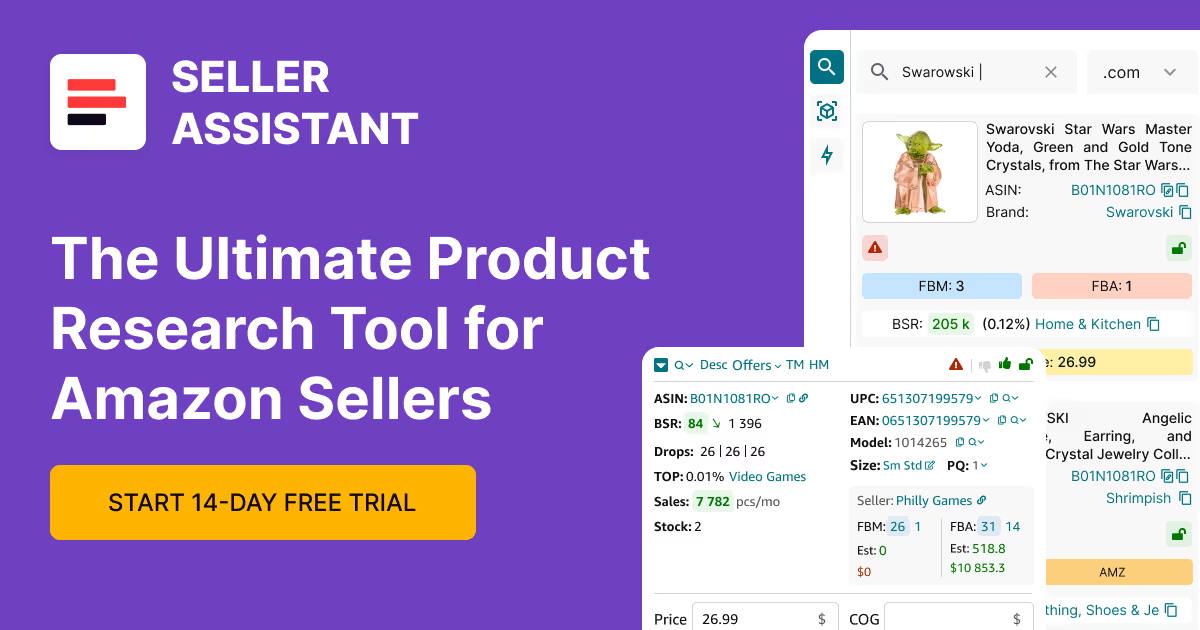
.svg)
Amazon Product Hunting Tips in 2025
Download Amazon Seller Guide
This guide will help you get started, understand the basics of Amazon selling, and explain in simple words how it all works.

Product hunting is the foundation of every successful Amazon FBA business – but in 2025, it's not just about finding profitable products. It's about doing it faster, safer, and smarter than your competitors. With more restrictions, IP risks, and shrinking margins, manual research won’t cut it anymore.
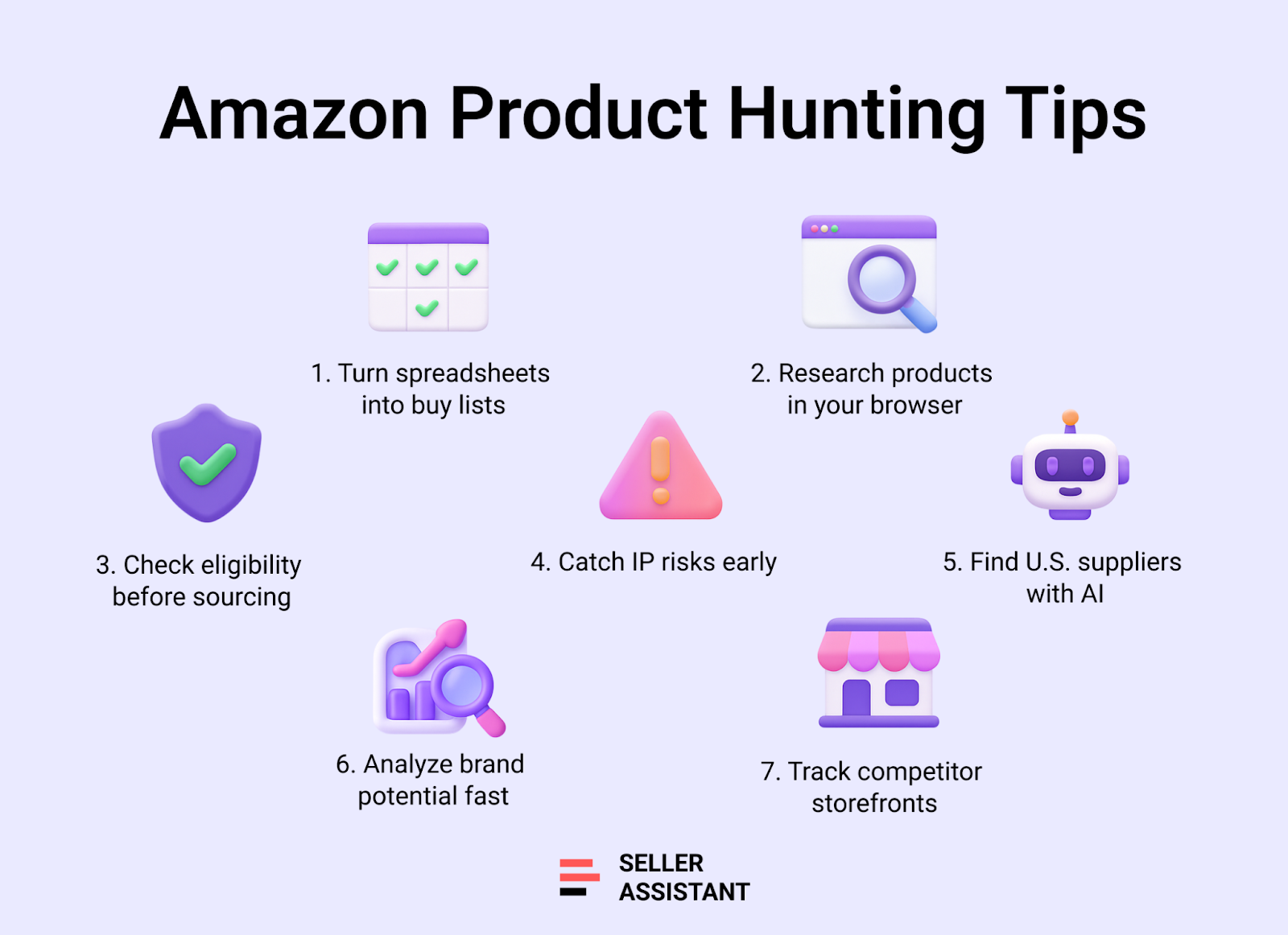
In this post, we’ll cover 7 powerful Amazon product hunting tips designed specifically for wholesale, online arbitrage, and dropshipping sellers. Each tip solves a real sourcing challenge using a specific tool from Seller Assistant – an all-in-one platform that streamlines your entire product hunting workflow.
Let’s get into the strategies that actually work.
What is Amazon Product Hunting?
Amazon product hunting is the process of finding products to resell on Amazon that meet specific profitability, demand, and risk criteria. For FBA sellers, that means sourcing items with strong sales velocity, healthy ROI, manageable competition, and low risk of restrictions or policy violations.
For wholesale, online arbitrage, and dropshipping sellers, product hunting is the first and most critical step in their sourcing workflow. It’s how you build a winning catalog – in bulk or one ASIN at a time.
But in 2025, successful product hunting requires more than spreadsheets and gut instinct. It demands fast data, smart filters, and automated insights – the kind that come from purpose-built tools like Seller Assistant.
Note. Seller Assistant is an end-to-end Amazon workflow management platform that integrates 10+ wholesale-focused solutions into one connected system. It combines sourcing workflow automation, bulk research and intelligence tools, and integrated Chrome extensions – giving you everything you need to streamline finding deals, managing suppliers, and creating purchase orders.

The platform aggregates: workflow management tools – Purchase Orders Module, Suppliers Database, Warehouses Database to organize, automate, and scale every step of your wholesale and arbitrage operations; bulk research & sourcing tools – Price List Analyzer, Bulk Restriction Checker, Sourcing AI, Brand Analyzer, Seller Spy to evaluate supplier price lists, verify selling eligibility and restrictions, open new brands, and discover winning product ideas from competitors to expand your product catalog; Chrome extensions – Seller Assistant Browser Extension, IP-Alert Extension, and built-in VPN by Seller Assistant to deep-research products, check IP claims and compliance, and access geoblocked supplier sites directly within your browser; and integrations & team access features – seamless API connectivity and integrations with Zapier, Airtable, and Make, plus Virtual Assistant Accounts for secure, scalable team collaboration.
With Seller Assistant, every step of your Amazon wholesale and arbitrage workflow is automated and connected.
Tip 1. Stop Guessing with Supplier Spreadsheets
The challenge
Every wholesale seller knows the drill – you get a massive supplier price list with thousands of SKUs and zero clarity on what’s actually worth buying. Manually checking profitability, eligibility, and risk for each product isn’t just time-consuming – it’s dangerous.
One missed hazmat item, IP complaint, or restricted ASIN, and your profits or account health could take a hit. And the longer it takes to sort the list, the more good deals you’re missing.
The smart move
Forget manual scanning. You need an automated analyzer that matches SKUs to ASINs, checks restrictions, and shows profit potential in bulk – all with built-in safety filters. That’s exactly what Price List Analyzer delivers.
This Software Makes Amazon FBA Wholesale Selling 10x Easier
What Price List Analyzer gives you
Price List Analyzer transforms your raw supplier file into a pre-qualified buy list. It runs deep analysis on every product and enriches it with 70+ data points – helping you filter, shortlist, and export only the best deals.
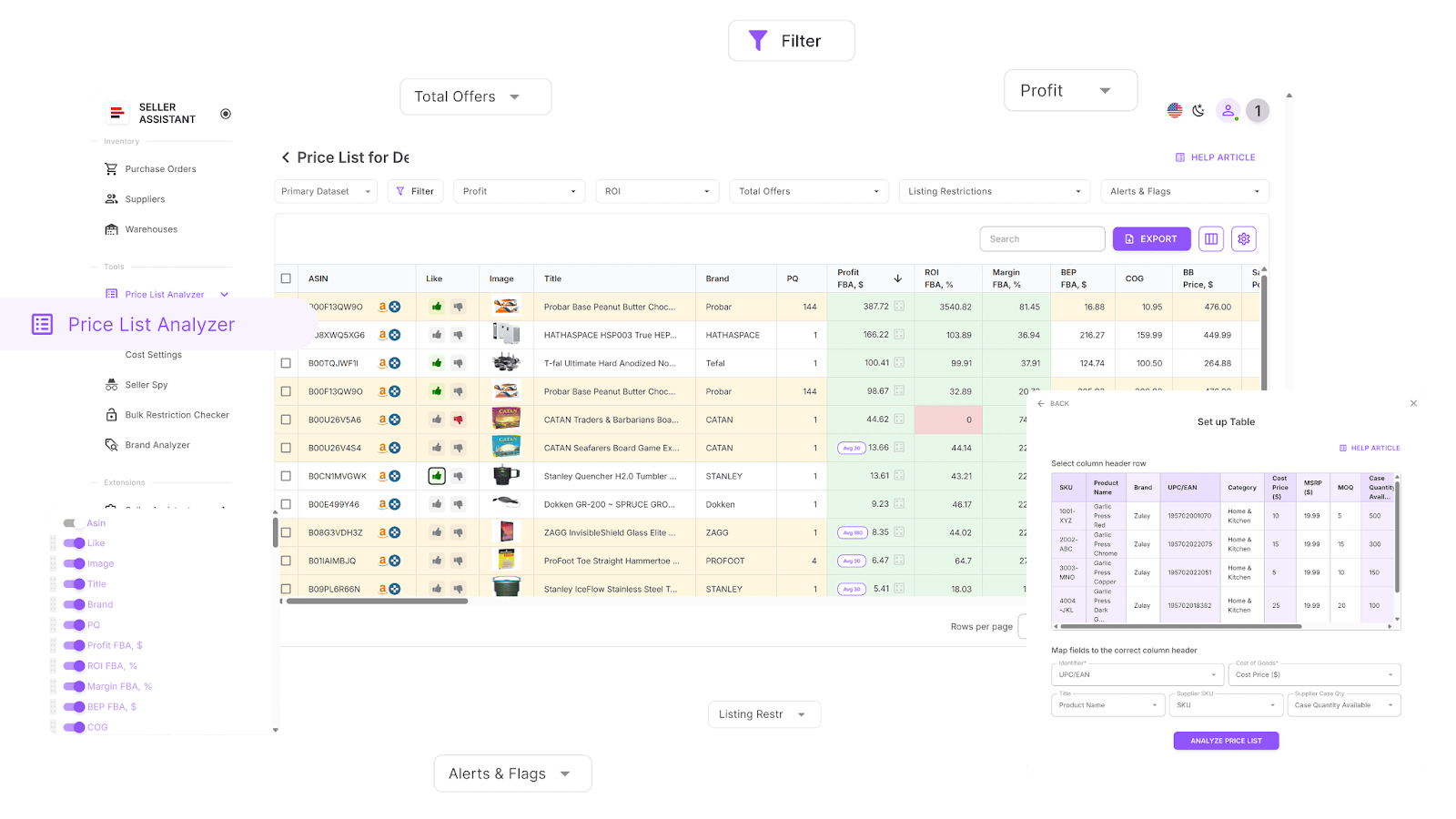
You can
- Scan large supplier lists and surface only the best product leads
- Auto-match supplier SKUs to Amazon ASINs with no manual lookup
- Instantly flag ineligible or gated products that can’t be sold or need approval
- Enrich every row with over 70 product metrics, including:
- Sales potential: BSR, sales rank trends, monthly sales velocity
- Profitability: ROI, margins, breakeven points, net profit
- Price history: average Buy Box pricing over 30/90/180 days
- Fees: referral, FBA/FBM fees, shipping, storage, hazmat, prep
- Competition: Buy Box rotation, seller count, Amazon in-stock rate
- Automatically detect risky ASINs: meltable, hazmat, fragile, oversized, or bundled
- Get instant alerts like:
- “No FBA fees”
- “No Buy Box price”
- “ASIN not found”
- “Set or Bundle”
- “Too low FBA ROI”
- “Approval required”
- Filter by profit, ROI, velocity, competition, or risk flags – whatever fits your criteria
- Save table layouts and filters to reuse across supplier lists
- Like or dislike products, then filter to shortlist for purchasing
- Export clean buy lists ready to send to your team, or supplier
- Edit COG, pack quantity, shipping, or prep cost – and see profit update instantly
- Add shared team notes that stick to the product across all future uploads
How to use it
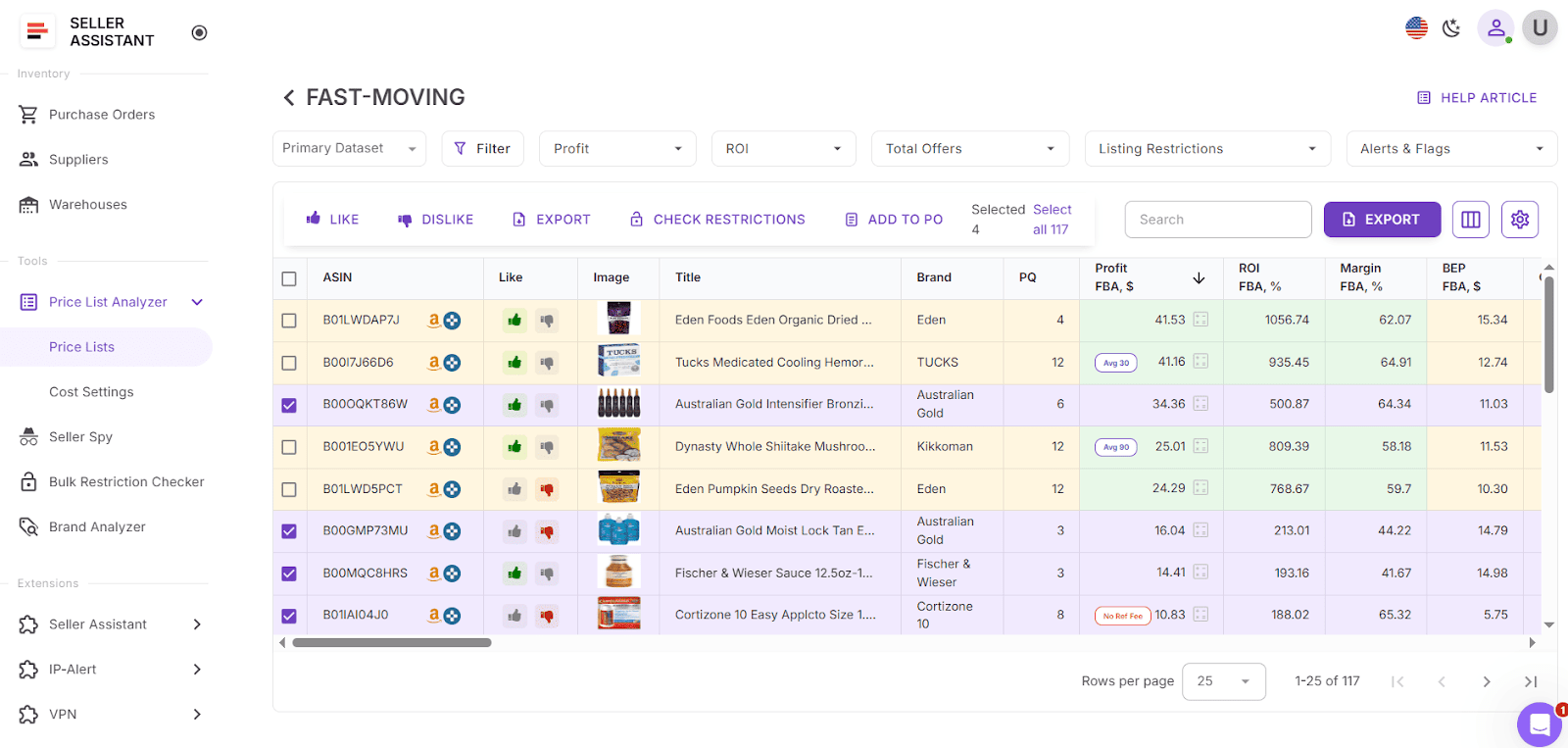
Log in to your Seller Assistant account and open Price List Analyzer. Upload a supplier file – the tool will instantly match SKUs to ASINs and fill in all metrics. Apply filters to exclude low-ROI or restricted products. Edit numbers in real time to simulate your actual cost and profit. Then export a fully-validated shortlist, ready to buy – with team notes synced automatically next time that ASIN appears.
Tip 2. Research Deals without Switching Tabs
The challenge
Once you’ve filtered down a supplier list, you still have to validate each potential product – and that’s where the bottleneck begins. Jumping between Amazon, supplier sites, spreadsheets, and third-party tools makes the process slow and chaotic. Important red flags slip through: IP complaints, hidden FBA fees, restricted listings, or Amazon dominating the Buy Box. Verifying ASINs one by one across tabs wastes time and invites mistakes.
The smart move
Bring your product research into the same space where you’re already working. Seller Assistant Extension turns your browser into a sourcing command center – giving you real-time insights on profitability, risk, and demand directly on Amazon, supplier sites, or competitor storefronts. No more copy-pasting ASINs or losing track of tabs.
What Seller Assistant Extension gives you
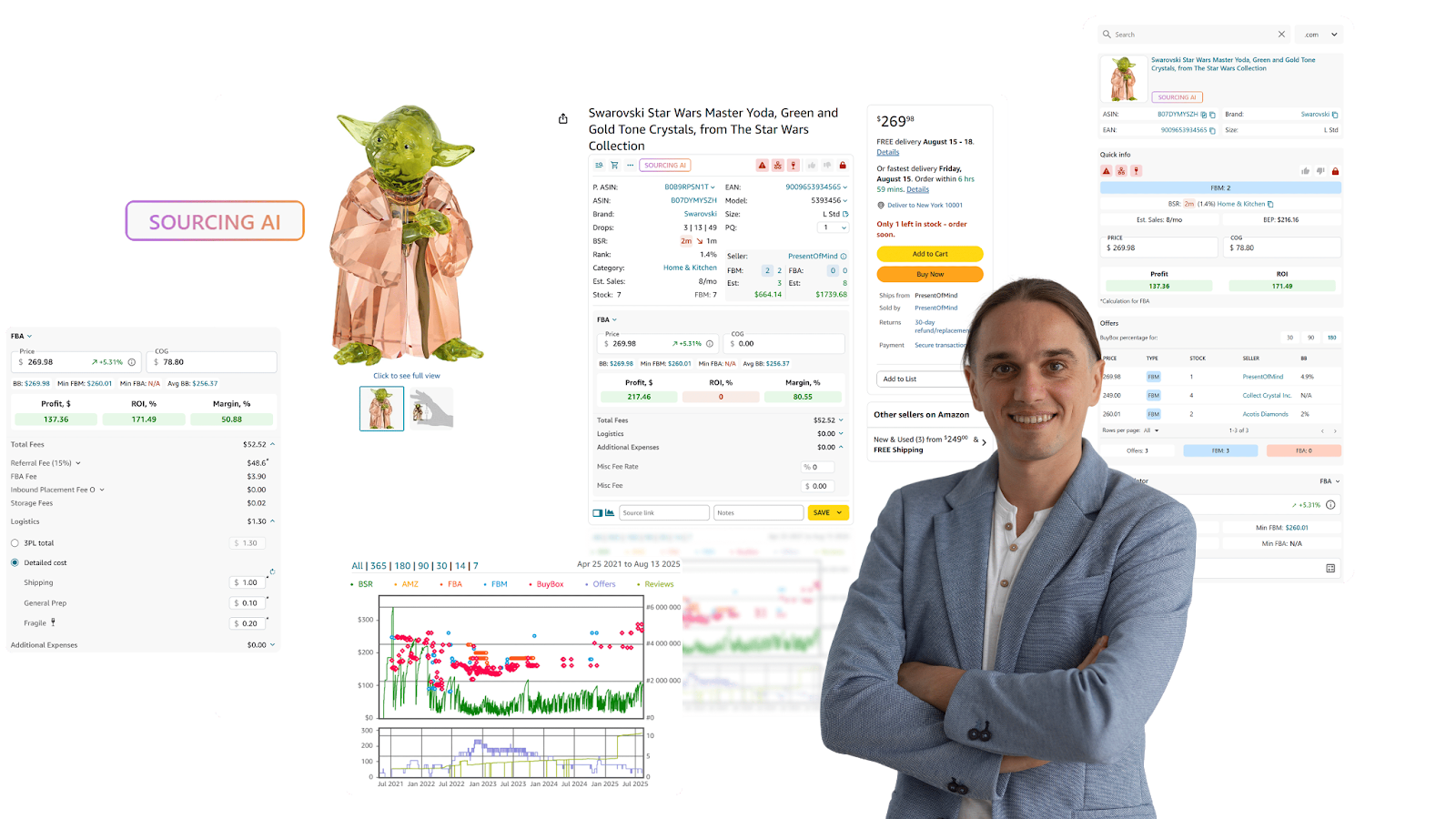
Seller Assistant Extension overlays rich, instant data across every Amazon or supplier page you visit – turning product pages, search results, and storefronts into fully-researched dashboards.
You can
- See full product intelligence right on Amazon product pages, including:
- Sales velocity
- Competition and Buy Box rotation
- Restriction and IP complaint flags
- Profitability and fees
- Variations, history, and best-sellers
- Research products side-by-side on supplier websites using Side Panel View.
- Use Quick View on Amazon search pages to scan potential winners instantly
- Explore competitor storefronts with Storefront Widget to:
- Identify best-selling categories
- Spot profitable brands
- Reverse-engineer products to resell
- Detect policy risks with IP Alert – see violation type and complaint date on listings
- Calculate profit, ROI, and margin with the customizable FBM&FBA Profit Calculator
- Handle global tax calculations with the built-in VAT Calculator (US, EU, Canada)
- Check your ability to sell any product with Restriction Checker
- Automatically receive Alerts and Flags for:
- Hazmat
- Generic brands
- Heavy or bulky items
- Meltable, fragile, adult content
- Amazon as a Buy Box seller
- Forecast sales volume and revenue with Sales Estimator
- Instantly view competitor inventory stock with Stock Checker
- Analyze variations with Variation Viewer, including ratings and sales share
- Dive into seller offers using Offers – see prices, stock, and Buy Box share
- Push research into Google Sheets in one click with Google Sheets Export
- Find up to 10 verified U.S. suppliers for any ASIN using Sourcing AI
- Use Lookup Links to quickly search eBay, Walmart, Target, Google for product sources
- Save Notes, Likes/Dislikes, and source links across all product pages and sites
- Analyze price and sales trends using Keepa-powered Charts Panel.
How to use it

Once installed, Seller Assistant Extension works automatically as you browse. On any Amazon product or search page, supplier website, or Amazon competitor storefront, a built-in data panel reveals everything you need to decide: is the product profitable, restricted, or risky? No more flipping between tools or tabs – just instant, reliable answers directly in your workflow.
Tip 3. Confirm Eligibility Before Wasting Time
The challenge
There’s nothing worse than building a purchase order, calculating margins, and lining up suppliers – only to discover that you can’t even list the product. Many ASINs are brand-gated, category-restricted, or outright blocked on your account. Without checking eligibility upfront, you risk hours of wasted work and potential capital losses.
The smart move
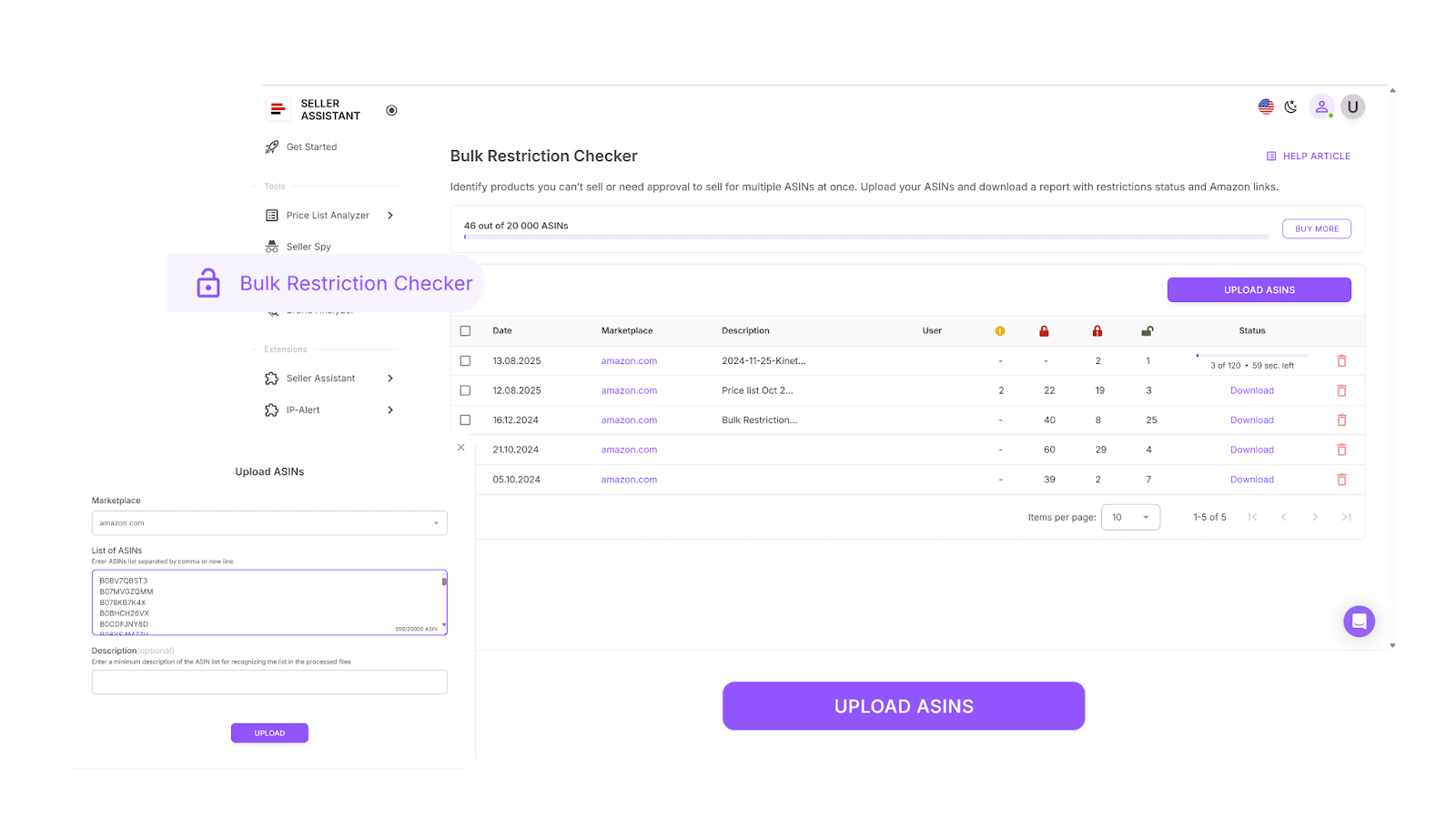
Cut out dead ends early. With Bulk Restriction Checker, you can scan thousands of ASINs at once and see which products you’re allowed to sell, which need ungating, and which are completely off-limits. That way, you only invest time in deals that are actually viable.
What Bulk Restriction Checker gives you
Bulk Restriction Checker ensures your sourcing list is clean from the start. In just seconds, you get a clear status report for every ASIN you’re considering.
You can
- Scan up to 20,000 ASINs at once for eligibility checks
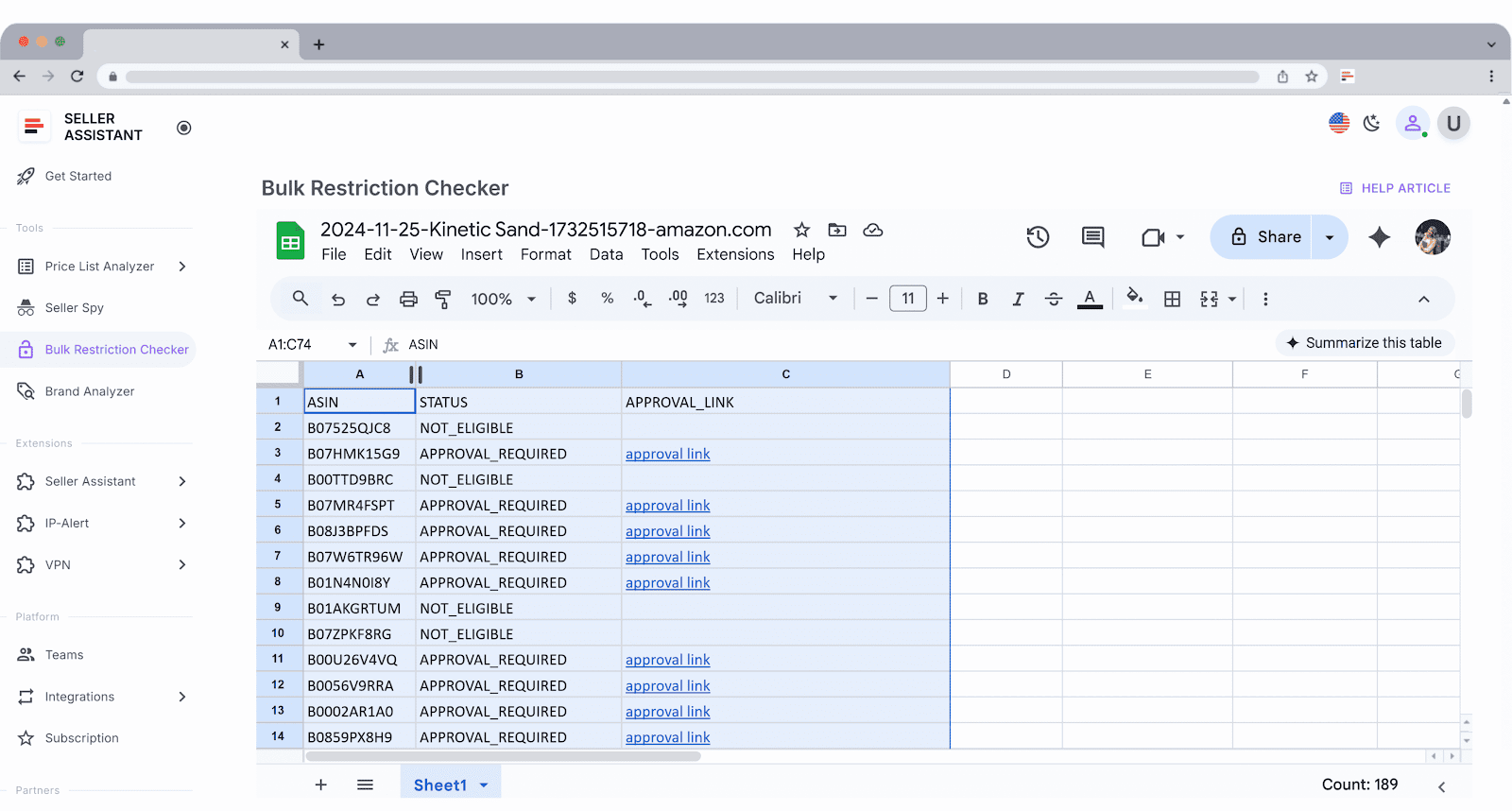
- Instantly see one of three statuses:
- Eligible – you can sell it without restriction
- Approval required – gated ASINs needing ungating
- Not eligible – blocked items you can’t list
- Export a downloadable report to filter, sort, and share with your team
- Prioritize sourcing only from products that are profitable and listable
How to use it
Log in to your Seller Assistant account, select your Amazon marketplace, and upload your ASIN list. In seconds, you’ll get a complete eligibility report that flags each product’s status. Use this to clean up supplier spreadsheets, skip the ungating hassle, and stay laser-focused on products you can actually sell.
Tip 4. Catch Hidden IP Risks Before You Order
The challenge
You’ve found a profitable ASIN, confirmed eligibility, and prepared to order – but there’s a trap waiting. If the listing has a history of IP complaints or Amazon policy violations, you could face warnings, returns, or even suspensions before making a single sale. Too many sellers only learn this after sinking money into inventory they can’t safely sell.
The smart move
Protect your account by spotting risks before they become expensive mistakes. IP Alert® Extension gives you instant visibility into ASINs with past policy issues, so you know upfront whether a product is safe to source.
What IP Alert® Extension gives you
IP Alert® Extension acts as your real-time early warning system for policy violations and ASIN-level risk. It flags dangerous listings across every step of your research workflow.

You can
- Spot risk icons everywhere: red triangle markers appear on product pages, search results, storefronts, and supplier sites
- Hover for full details: see the violation type and the report date instantly
- Cover every major risk area, including:
- Intellectual property complaints (suspected or confirmed)
- Authenticity and condition issues
- Food, safety, and compliance violations
- Restricted product or listing rule breaches
- Customer review policy violations
- Regulatory alerts
- Use it seamlessly with Seller Assistant’s Quick View, Side Panel View, and Storefront Widget
- Combine with Alerts & Flags and Restriction Checker for an all-in-one sourcing safety net
How to use it
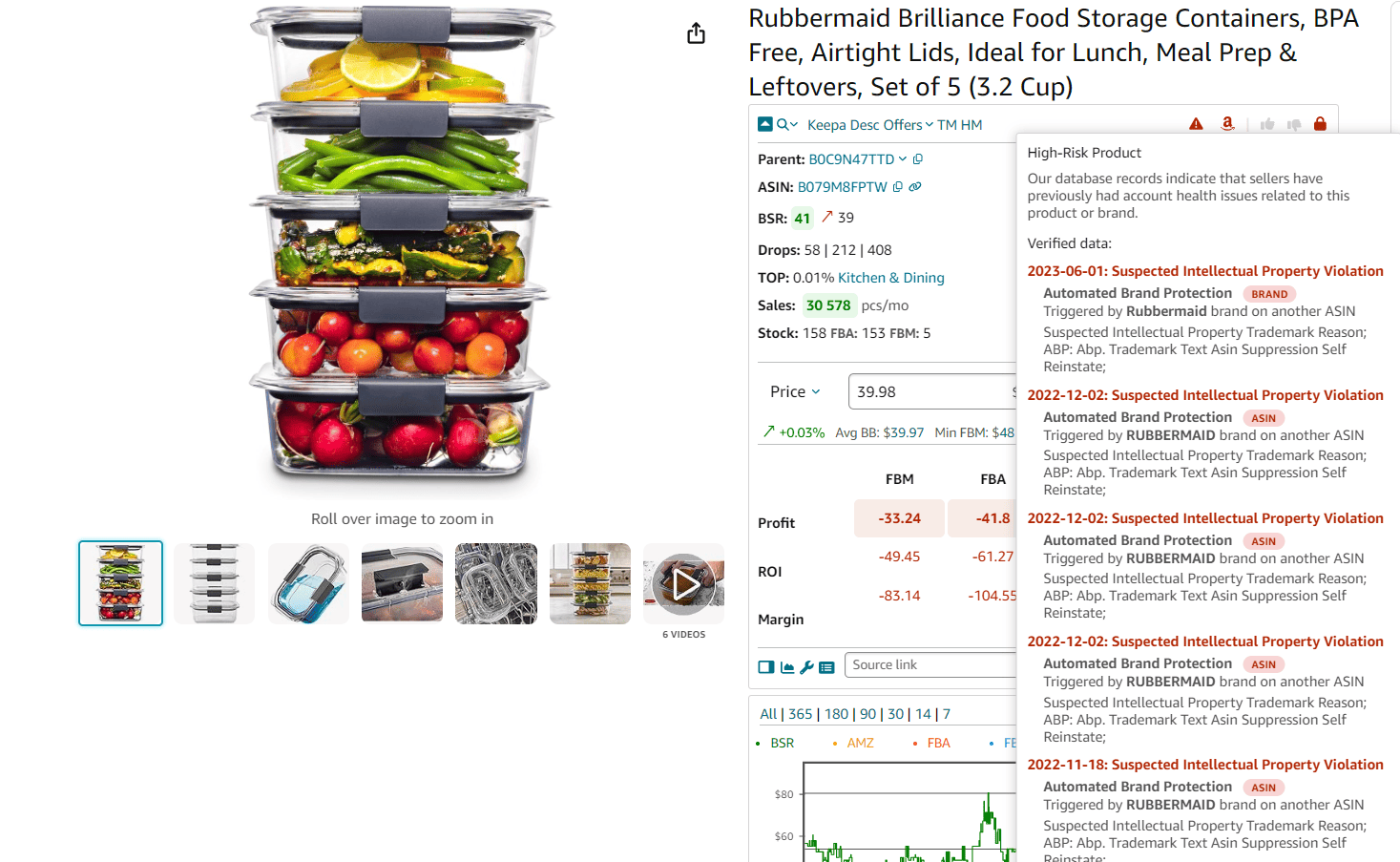
Install IP Alert® Extension and log in to your Seller Assistant account. As you browse Amazon listings, search results, supplier pages, or competitor storefronts, red triangle icons appear automatically on flagged products. Hover to see exactly what the issue is, when it was reported, and why. With this, you can skip problem ASINs before they drain your profits or damage your account health.
Tip 5. Find U.S. Suppliers with AI in One Click
The challenge
Even after finding a profitable, eligible, and safe product, the hardest part is locating a reliable U.S.-based supplier that actually stocks it. Manual searches through outdated directories or random Google results waste hours and often lead nowhere. Worse, mismatched SKUs, missing pack sizes, or inflated costs can destroy a deal before it starts.
The smart move
Automate supplier discovery right where you source. Sourcing AI, built into Seller Assistant, uses real product data to instantly find verified U.S. suppliers – so you get accurate offers without spreadsheets or endless searches.
What Sourcing AI does for you
Sourcing AI acts as a sourcing scout inside your workflow, returning clean, verified supplier options with full details and confidence scores.
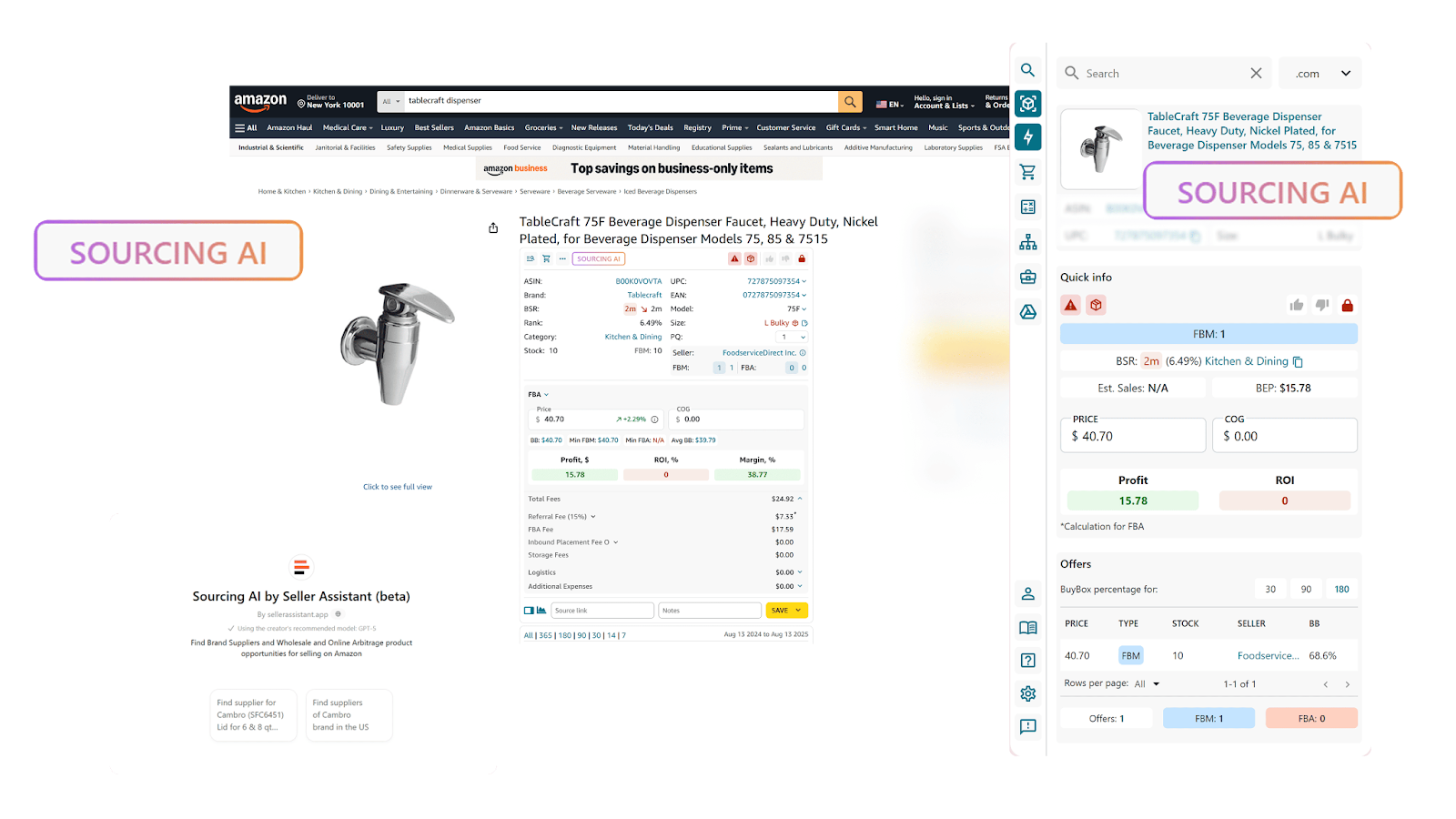
You can
- Identify suppliers and distributors of specific brands you want to resell
- Find suppliers to your products with AI-powered search
- Match products by identifiers: ASIN, UPC, EAN, model number, brand, or part number
- Get results only from verified U.S. suppliers (excludes Alibaba, Temu, eBay)
- Apply Max COG filtering to skip suppliers that don’t meet your profitability threshold
- Receive up to 10 supplier offers per product, with:
- Supplier name and link
- SKU and price
- MOQ (minimum order quantity)
- Confidence level (Exact Match or Likely Match)
- Compare supplier vs. Amazon pricing side by side for quick profitability checks
- Get alerts for multipacks or bundles that may not align with your Amazon listing
- See in-chat warnings when data is missing or costs exceed your Max COG
How to use it
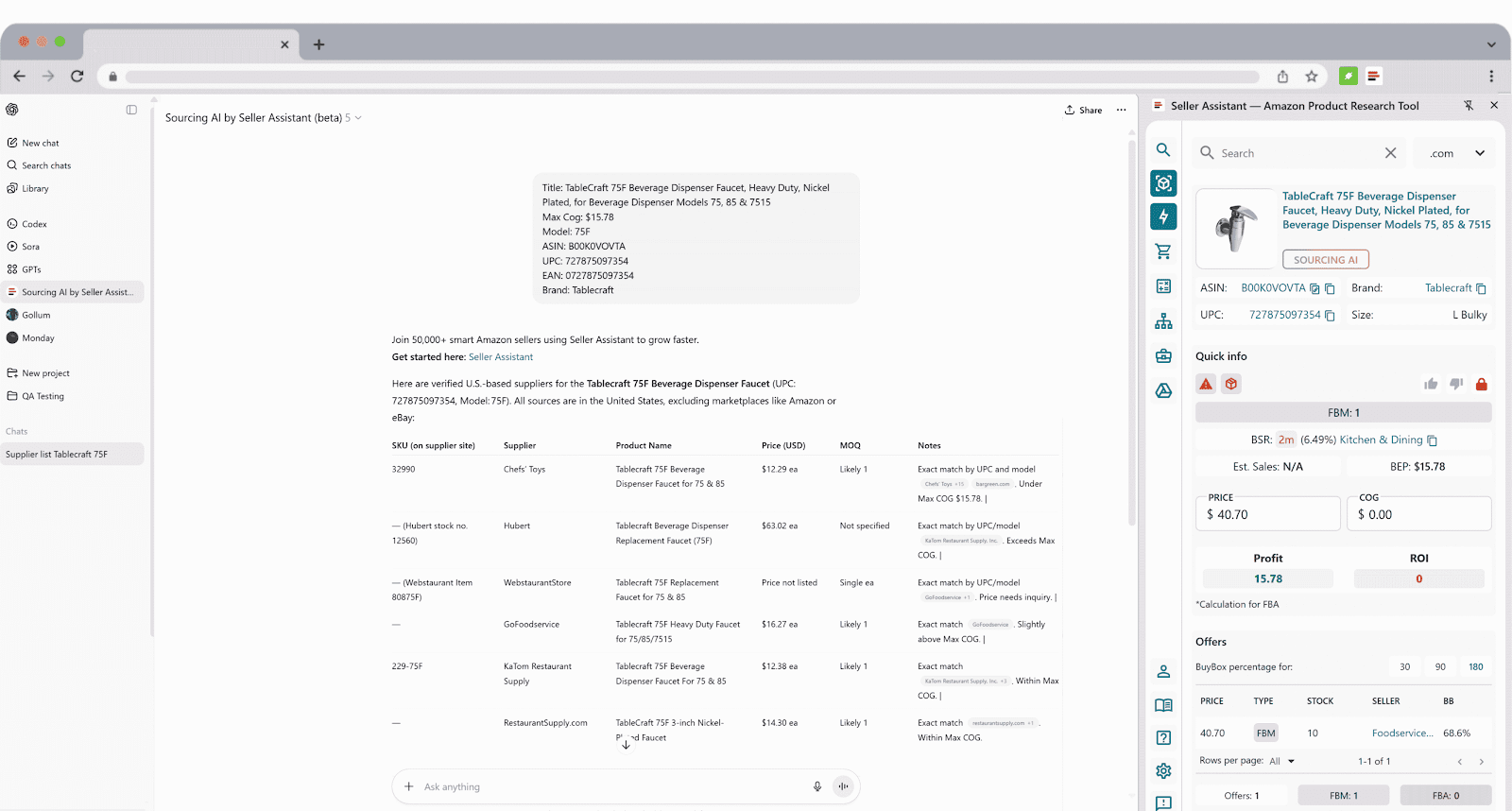
While browsing any Amazon product page, click the Sourcing AI button in your Seller Assistant Extension. It automatically sends a pre-filled prompt with ASIN, brand, UPC, and your Max COG to ChatGPT. Within seconds, you’ll see a clean, structured table of up to 10 verified U.S. supplier offers – complete with links, prices, and match confidence. It’s fast, precise, and eliminates hours of manual supplier hunting.
Tip 6. Check Brand Potential Before Outreach
The challenge
When starting your sourcing process, one of the first questions is: which brands are worth pursuing? Picking the wrong ones wastes time on outreach and can leave you with dead stock. Some brands are reseller-friendly, others are crowded with competition, and some don’t work with resellers at all. Manually researching brand catalogs and market presence is slow, unreliable, and makes it hard to separate strong opportunities from weak ones.
The smart move
Don’t guess – measure. Brand Analyzer in Seller Assistant shows you instantly whether a brand has real resale potential by breaking down its catalog performance, competition, and customer reputation. With this data, you know in seconds if outreach is worth the effort.
What Brand Analyzer does for you
Brand Analyzer gives you a clear, data-backed snapshot of any brand’s position on Amazon so you can target only the right opportunities.
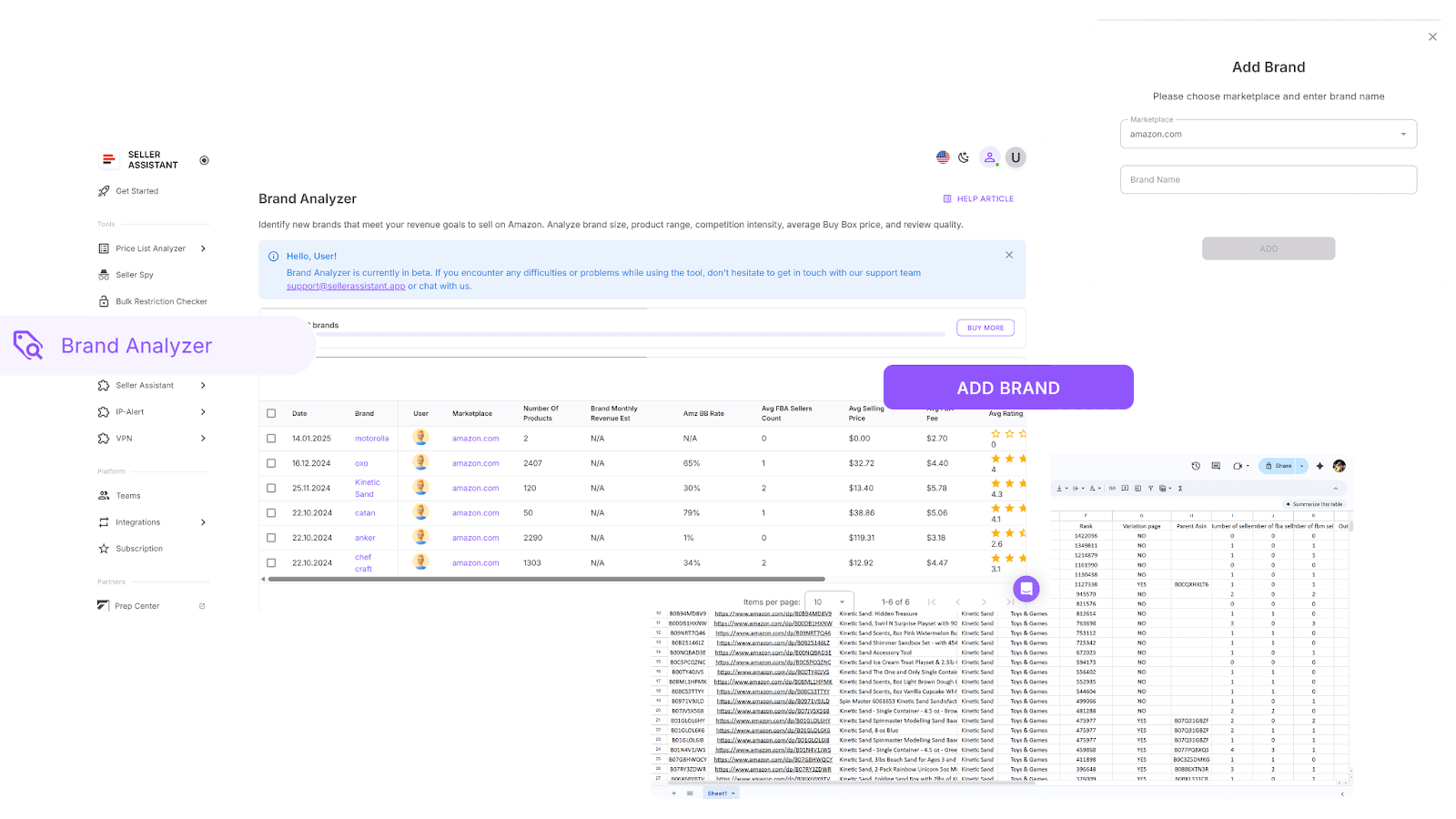
You can
- See if a brand is resale-friendly before outreach
- Automate brand research instead of manually scanning catalogs
- Estimate monthly revenue across the entire brand catalog
- View Amazon’s Buy Box share to assess competition intensity
- Check the average number of FBA sellers per listing to gauge competitiveness
- Measure brand presence by the total number of active ASINs
- Assess customer trust with total reviews and average ratings
- Get the average Buy Box price to guide your pricing strategy
- Review average FBA fees to calculate costs and profit margins
- See a consolidated view of key brand metrics: revenue, pricing, competition, in-stock rate, and reputation
- Quickly spot brands with strong profit potential and skip those that aren’t worth your time
How it works
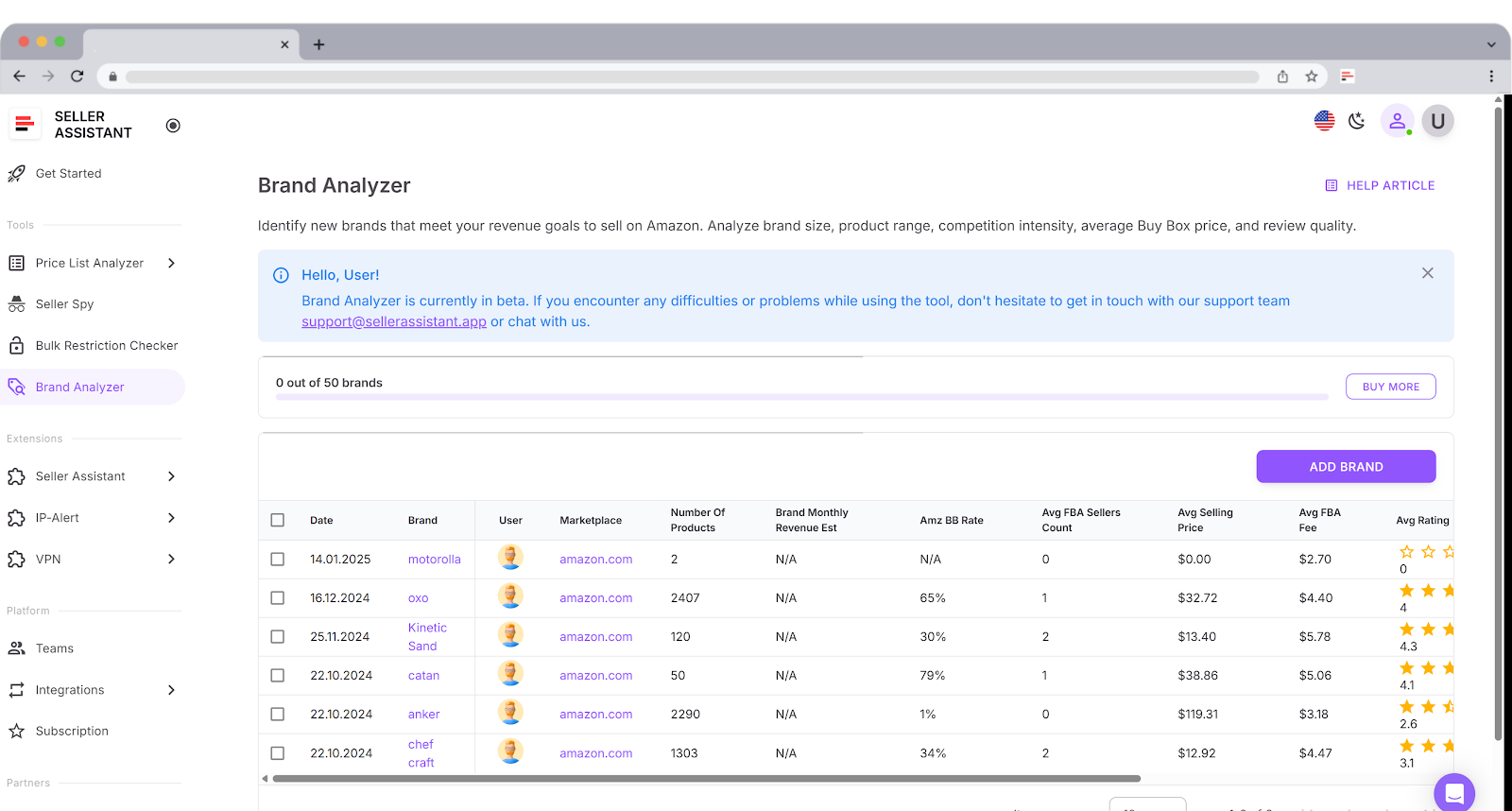
Log in to your Seller Assistant account, open Brand Analyzer, and type in the brand name. You’ll instantly get a full brand-level report plus a breakdown of every ASIN in its catalog. From there, filter by revenue, ROI, Buy Box share, or FBA fees to identify brands that fit your business model – while avoiding those that don’t.
Tip 7. Automatically track what your competitors sell
The challenge
Staying ahead in Amazon wholesale or arbitrage means knowing what your competitors are doing. If you can see which ASINs they’re testing, adding, or dropping, you can expand your catalog with proven winners and avoid unprofitable products. The problem is, manually checking competitor storefronts is slow and unreliable – by the time you notice changes, rivals already have the advantage. Without real-time tracking, you’re always reacting instead of proactively shaping your sourcing and pricing strategy.
The smart move
Automate competitor monitoring with Seller Spy. This tool keeps watch on selected storefronts and alerts you to catalog changes – so you know exactly what products or brands competitors are adding, dropping, or repricing, before it’s too late.
What Seller Spy does for you
Seller Spy delivers competitor insights on autopilot, helping you spot catalog shifts, sourcing leads, and pricing moves without manual effort.

You can
- Track up to 3 competitor storefronts automatically
- Detect catalog shifts – new ASINs added or old ones removed
- Uncover sourcing leads from profitable brands/products competitors carry that you don’t
- Monitor pricing changes to adjust your offers competitively
- Export all findings into Excel reports for clear, filterable tracking
How it works
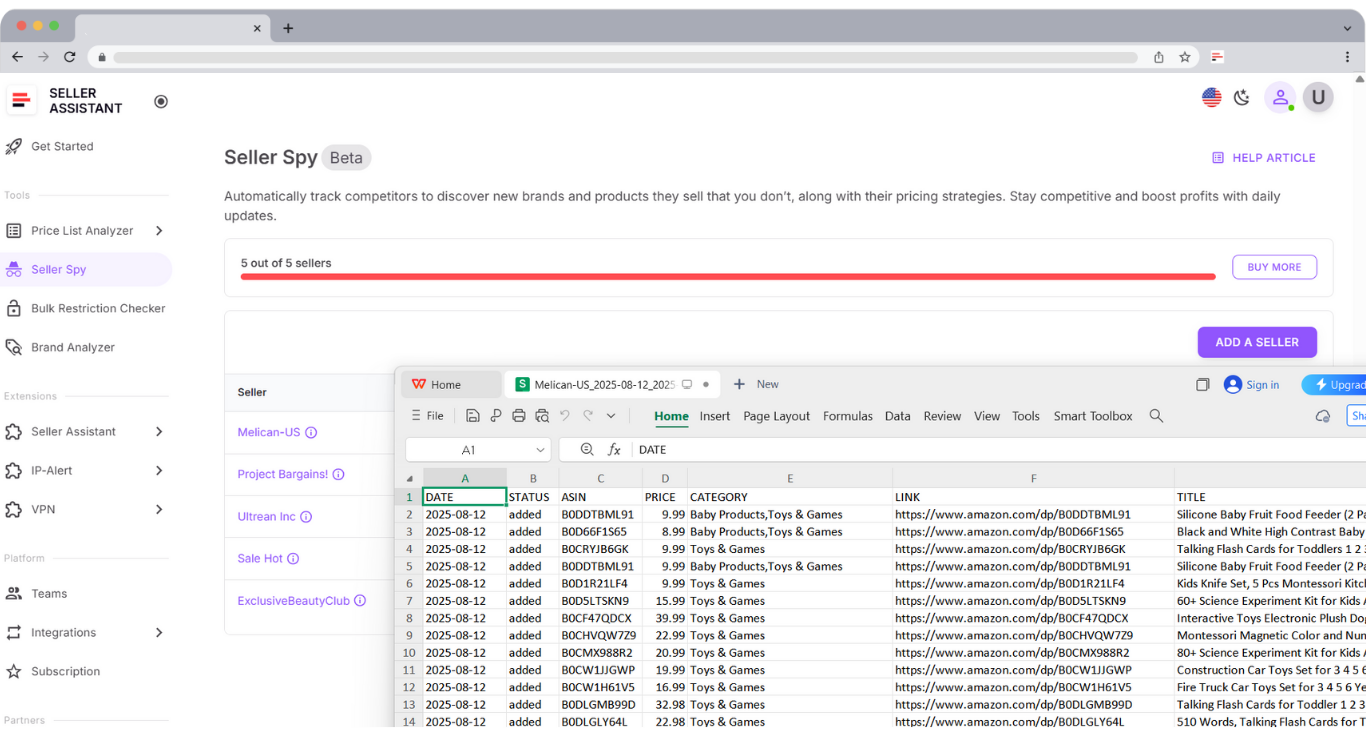
Log in to your Seller Assistant account and open Seller Spy. Enter up to three competitor storefront URLs, and the tool will automatically track their activity. It records catalog moves like added or dropped ASINs and price changes. Export the .xls report anytime to review updates and adjust your own sourcing or pricing strategy with confidence.
FAQ
How much does Amazon take from a $100 sale?
On average, Amazon deducts around 15% referral fee plus FBA or FBM fulfillment costs, which can total $30–$40 depending on the product category and size. Tools like Seller Assistant automatically calculate all fees (referral, FBA, storage, shipping) so you know your real profit before buying.
What sells quickly on Amazon?
High-demand items such as household essentials, electronics accessories, toys, and seasonal products tend to sell fastest. With Seller Assistant’s Price List Analyzer, you can spot products with strong BSR and sales velocity to identify fast movers in bulk.
How to see what items sell the most on Amazon?
Amazon’s Best Sellers page shows trending products, but for sourcing decisions you need deeper insights. Seller Assistant Extension reveal sales rank history, demand, and revenue estimates across brands and ASINs.
How to make money on Amazon?
You make money by sourcing products with high demand, low competition, and profitable margins, then reselling them through FBA or FBM. Seller Assistant helps automate sourcing, eligibility checks, and competitor tracking so you can scale profitably.
What is the most bought item?
While best-sellers change daily, consistently high-volume categories include books, electronics accessories, personal care, and kitchen items. Tools like Seller Assistant let you track which products are actually selling the most.
Final Thoughts
Mastering product research is the foundation of every profitable Amazon business, and in 2025 the sellers who win are those who work smarter, not harder. These Amazon product hunting tips show how to avoid wasted time, cut risks, and uncover high-margin products by relying on automation and connected workflows.
With Seller Assistant's suite of tools you can turn product hunting into a streamlined, data-driven process. Apply these strategies, and you’ll be ready to scale your catalog with confidence while staying ahead of the competition.
Seller Assistant automates and connects every stage of your Amazon wholesale and arbitrage workflow. It brings together in one platform: workflow management tools – Purchase Orders Module, Supplier Database, Warehouse Database, bulk research & sourcing tools – Price List Analyzer, Bulk Restriction Checker, Sourcing AI, Brand Analyzer, Seller Spy, Chrome extensions – Seller Assistant Browser Extension, IP-Alert Extension, and built-in VPN by Seller Assistant, and integrations & team access features – seamless API connectivity, integrations with Zapier, Airtable, and Make, and Virtual Assistant Accounts.