
Wondering how to increase sales on Amazon? It’s not just about listing more products or running ads – it’s about working smarter. If your sales have hit a plateau or you’re just starting out, here’s the truth every top seller knows: success depends on selling the right products.
Why? Because the right products meet demand, outshine the competition, and drive consistent profits – while the wrong ones waste your time and money.
So, how do you find winning products in such a crowded marketplace? That’s exactly what this post will show you. We’ll reveal five powerful strategies you can use right now to source the right products for your Amazon store and turn your sales potential into reality.
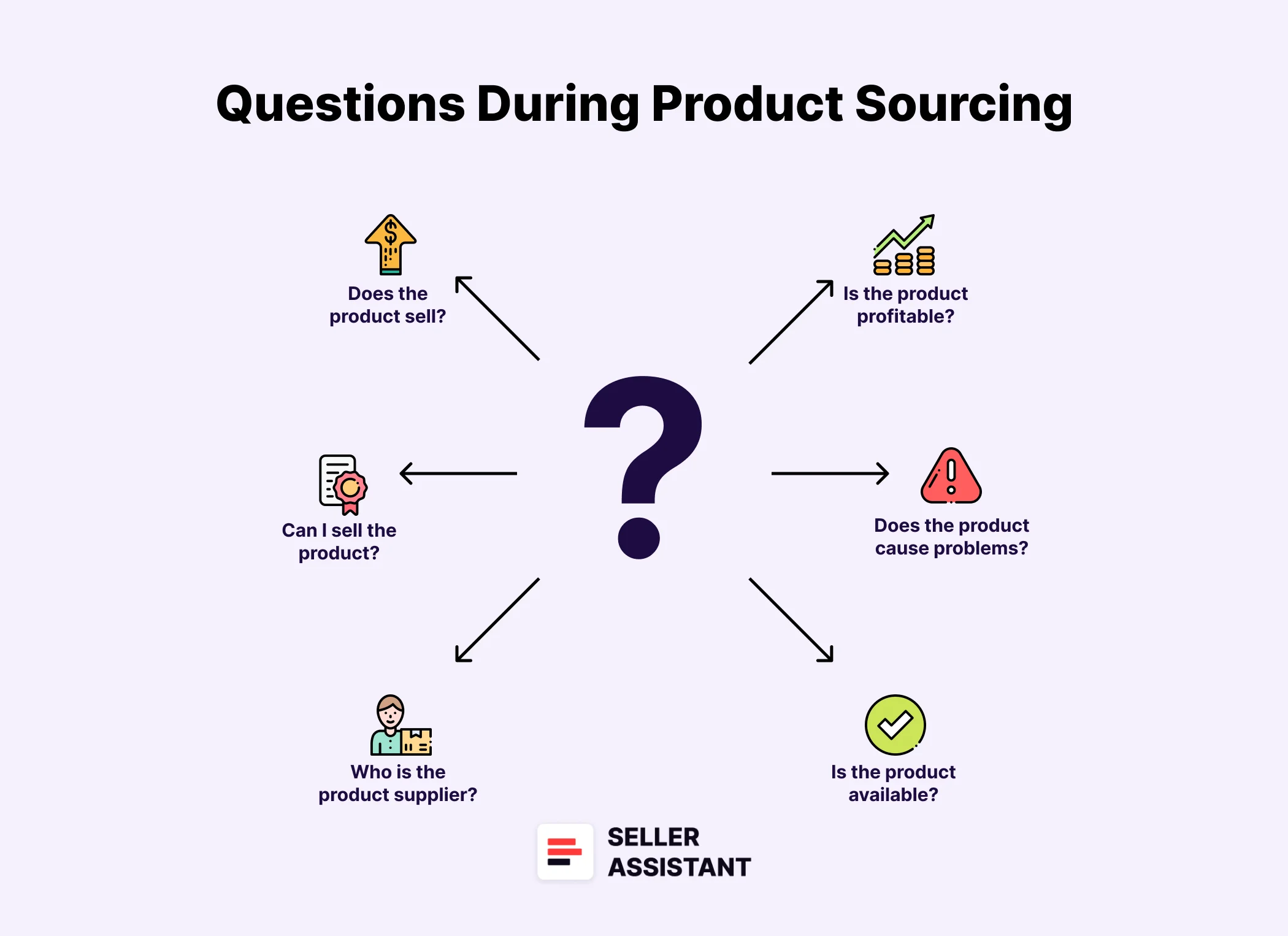
Choose the Right Strategy to Boost Your Amazon Sales
Choose the Right Strategy to Boost Your Amazon Sales
When it comes to how to increase sales on Amazon, there’s no one-size-fits-all answer. Your business model, goals, and budget all play a role in determining the best approach. Whether you’re a new seller or scaling an existing store, the key is to choose strategies that align with your current capabilities – and where you want to go.
No matter which path you take, one thing is certain: using the right tools is essential. Smart sellers rely on product sourcing software and other tools to streamline product research, uncover opportunities, and stay ahead of competitors. These solutions don’t just save time – they drive results.
Increasing sales is all about combining smart strategies, powerful tools, and steady effort. Up next, we’ll cover five proven strategies that work exceptionally well for wholesale, online arbitrage, and dropshipping sellers alike.
Strategy 1. Grow with Smart Brand Partnerships
Expanding your supplier network is one of the most effective ways to boost your Amazon sales. Partnering with new brands and distributors opens the door to more product opportunities – but it’s essential to ensure these brands are resale-friendly and align with Amazon’s requirements.
Seller Assistant’s Brand Analyzer makes this process easy by offering deep insights into brand suitability and product performance.
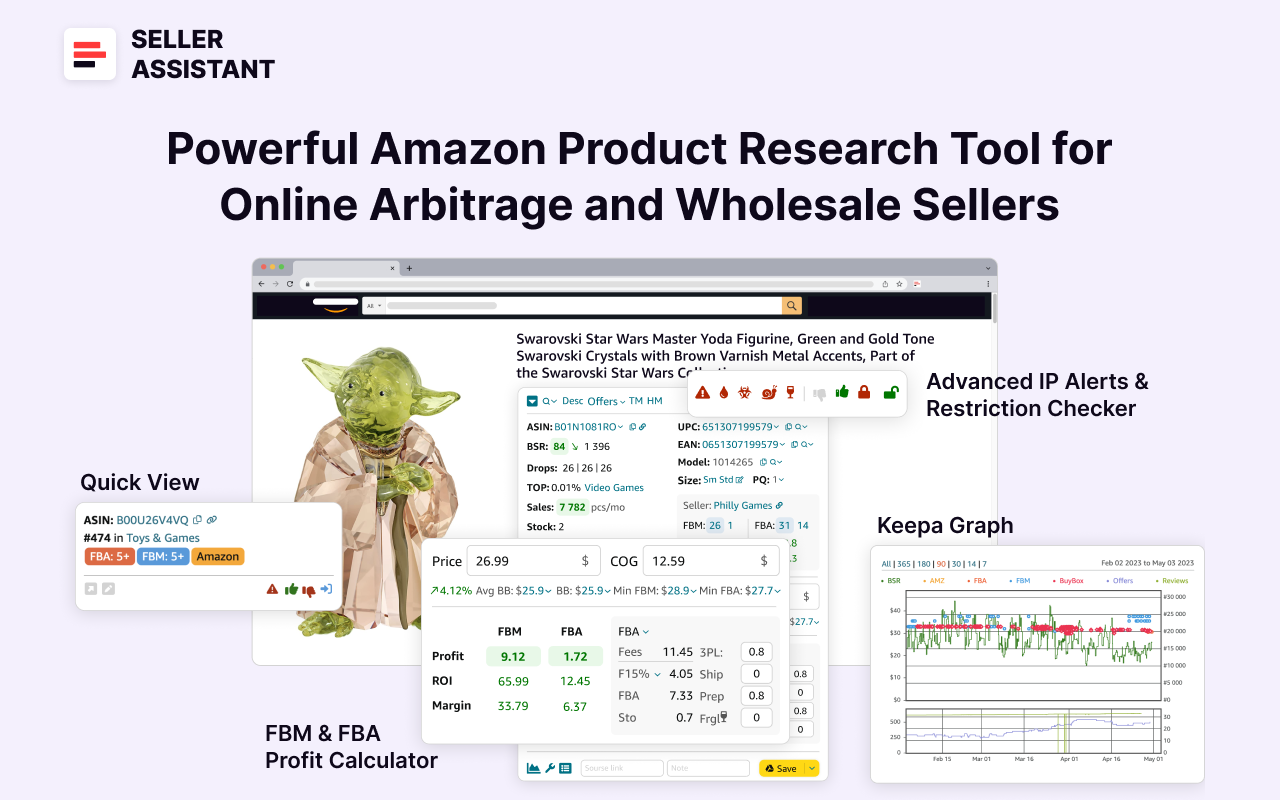
Note. Seller Assistant is a comprehensive product-sourcing software that helps Amazon sellers quickly find high-profit deals. It combines three extensions: Seller Assistant Browser Extension, and IP-Alert Chrome Extension by Seller Assistant, and VPN by Seller Assistant, Amazon seller tools: Price List Analyzer, Brand Analyzer, Seller Spy, Bulk Restrictions Checker, and API integrations, and features: Storefront Widget, Side Panel View, FBM&FBA Profit Calculator, Quick View, ASIN Grabber, UPC/EAN to ASIN converter, Stock Checker, IP Alert, and Restrictions Checker.
Seller Assistant
It offers a robust toolkit of over 20 features built to streamline every part of the sourcing process – from bulk scanning wholesale supplier sheets for high-margin leads to deep product research and advanced brand and competitor analysis. By using this FBA and FBM product sourcing software, you can easily identify products that have the potential to be sold well on Amazon.
How to choose a new supplier
Bringing on a new brand isn’t just about adding variety. You need to make sure the brand is a good fit for your business and complies with Amazon’s policies. Here’s what to check.
Key factors to evaluate brands
- Selling eligibility and restrictions
Ensure you can sell a brand on your Amazon seller account. Check if brand’s products are not restricted and if yes, make sure you can get approval to sell on Amazon. This avoids compliance issues and potential losses.
- Product range
Aim for brands with at least 500 products to maximize your chances of finding profitable listings.
- Revenue opportunities
Assess the brand’s average sales volume and pricing to ensure it aligns with your profit targets.
- Avoid competing with Amazon and brand itself
Stay away from brands where Amazon sells more than 30% of products and brands that sell directly on Amazon or work through exclusive distributors. This either means too high competition or reluctance to cooperate.
- Strong customer approval
Select brands with a solid reputation – look for average ratings above 4 stars and plenty of positive feedback.
- Seller competition
Too many sellers can cause price wars. Brands with more than 15 sellers on average per listing can be overly saturated.
- Compliance history
Brands that often file IP complaints or have Amazon policy violations should be avoided.
How to automate brand research with Brand Analyzer
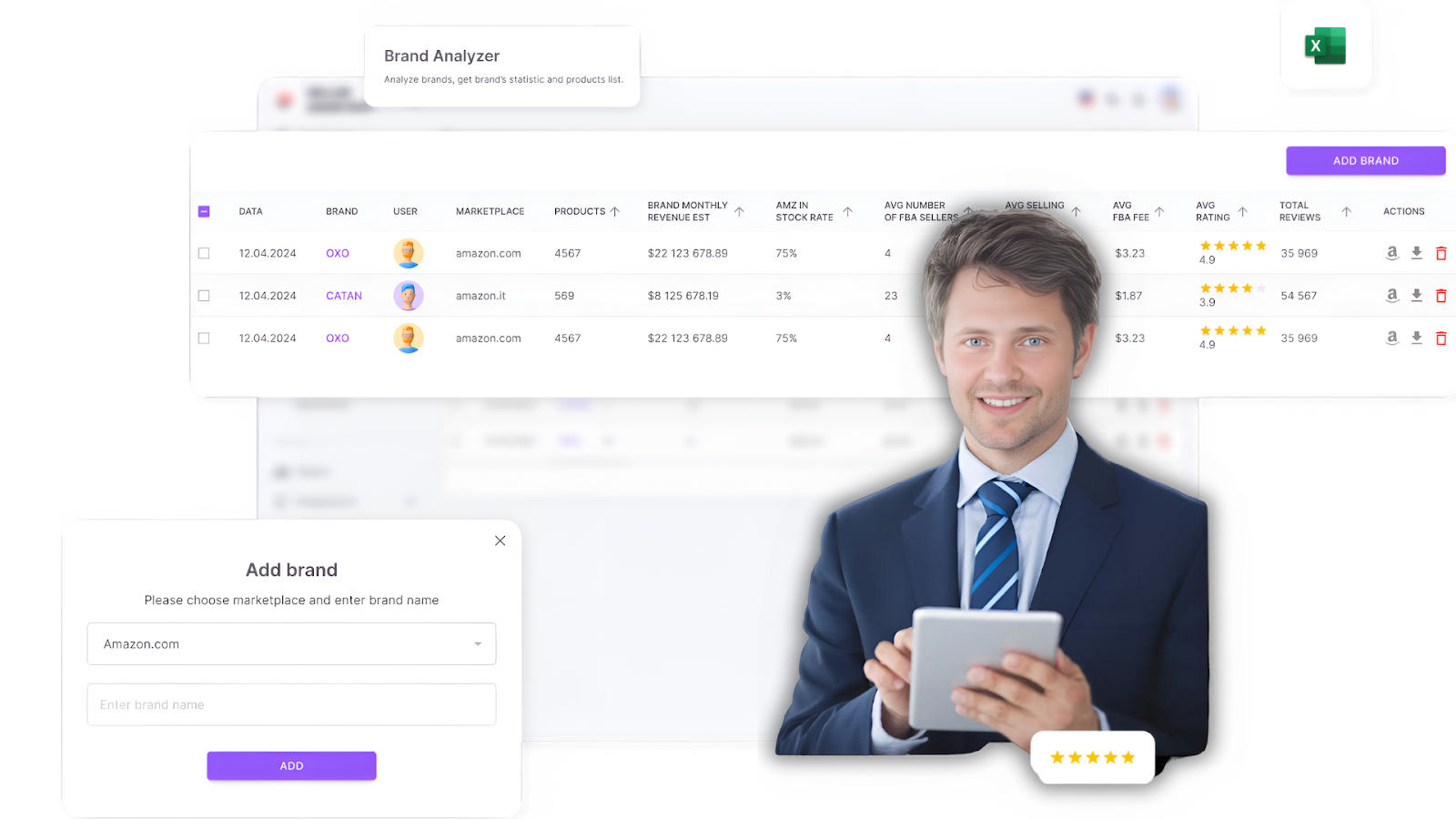
Manually reviewing all of this can be exhausting. That’s where Seller Assistant’s Brand Analyzer comes in. This powerful tool streamlines brand research, offering instant access to essential metrics that help sellers make smart decisions quickly.
Seller Assistant’s Brand Analyzer
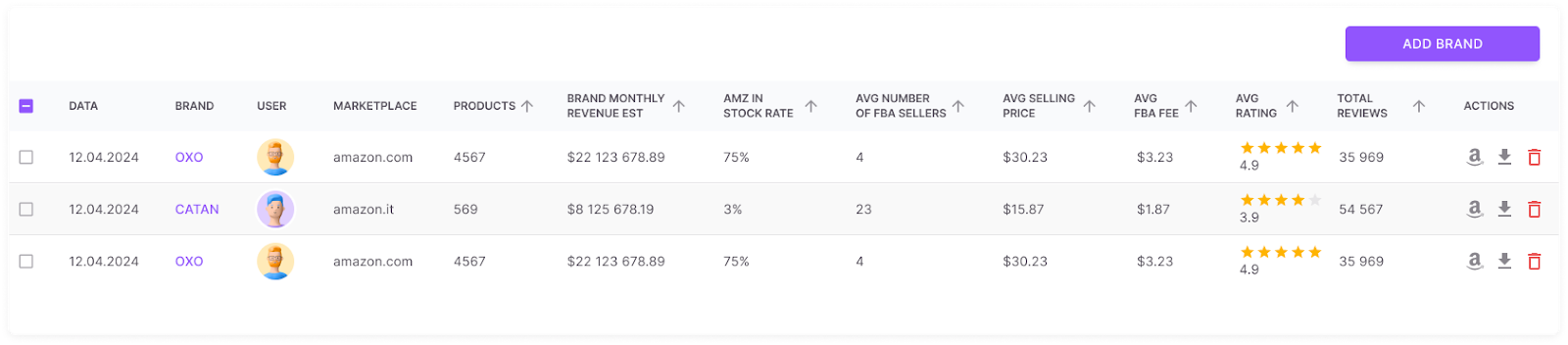
Built for wholesale, online arbitrage, and dropshipping sellers, Brand Analyzer makes evaluating resale potential simple. Just enter a brand name to get a comprehensive overview, including product count, sales and revenue potential, competitive landscape, Buy Box prices, review scores and ratings.
Plus, you can export a detailed report with every product’s key metrics for deeper analysis.
What Brand Analyzer offers
Brand Analyzer
- Resale-friendly check
Quickly assess if a brand is suitable for resale and worth approaching as a supplier.
- Automated brand research
Eliminate manual research – find profitable brands faster and with less effort.
- Revenue estimator
Calculate potential monthly earnings by analyzing total product revenue.
- Amazon in-stock rate insights
Understand Amazon’s in-stock rate for the brand’s products, helping you assess competition level from Amazon and avoid brands where Amazon controls a large share of sales.
- Seller competition overview
See the average number of FBA sellers to gauge market saturation and profit potential.
- Product portfolio size
Review how many products the brand offers to measure its overall market presence.
- Customer satisfaction metrics
Evaluate brand reputation through total reviews and average star ratings.
- Pricing intelligence
Access average Buy Box prices to estimate brand’s price levels.
- FBA fee insights
Get average FBA fee data to calculate costs and margins more accurately.
- All-in-one metrics dashboard
View all key data – from revenue to competition and customer feedback – in one clear overview.
- Profitability finder
Easily identify brands that are resale-friendly and positioned to deliver strong profit margins.
- Detailed product list
Get all brand’s products spreadsheet with detailed metrics for each product.
Strategy 2. Find Winning Deals with Supplier Price List Scanning
Adding new products to your Amazon store is essential for boosting sales – but only if those products are in demand, profitable, and free from hidden risks. Unfortunately, sourcing at scale (especially from wholesale price lists or supplier databases) is often complicated and time-consuming.
That’s why smart sellers turn to Seller Assistant’s Price List Analyzer. This powerful tool helps you quickly spot profitable deals and avoid problematic products with minimal effort.
How to choose the right leads from supplier price lists
Expanding your product catalog helps capture more customers, generate new revenue streams, and minimize risks tied to limited inventory. But picking the right products requires careful analysis to avoid dead stock and poor-performing items.
Key factors to evaluate products
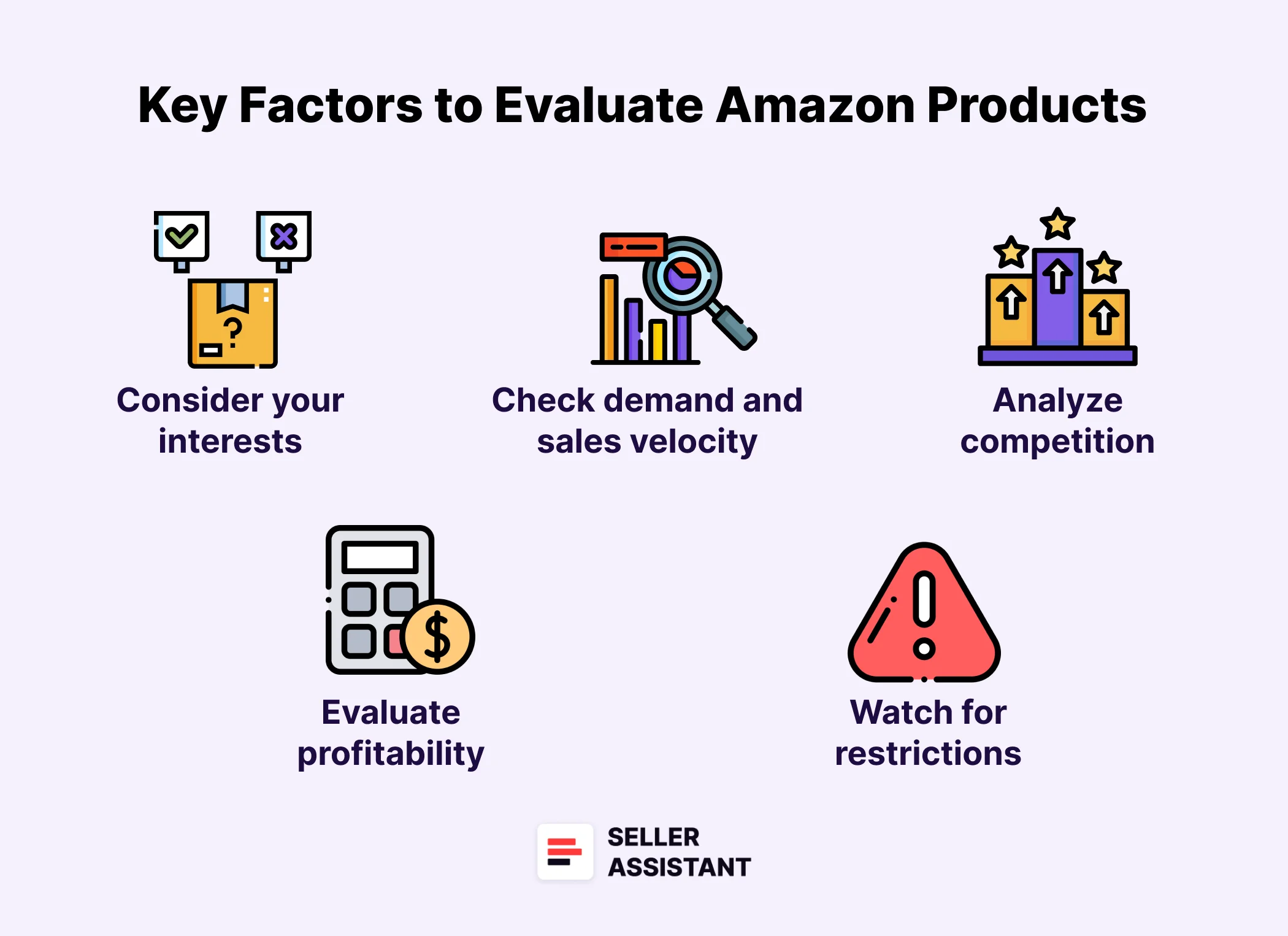
Key factors to evaluate products
- Sales performance
Check the Best Sellers Rank (BSR), sales velocity, and actual product sales to confirm product demand and sales speed.
- Competition level
Avoid highly saturated listings. Target products with 2–15 competing sellers and stay away from those sold directly by Amazon.
- Your chances to win the Buy Box
Assess how dominant current Buy Box holders are. Long-term control by a single seller makes competition tough.
- Pricing and profitability
Calculate full costs, including COGS, FBA fees, and logistics, to verify profit potential and healthy ROI.
- Selling eligibility and restrictions
Ensure you are eligible to sell products on your account, can ungate them if they are restricted, and have no history of IP complaints or Amazon policy violations.
- Customer feedback
Focus on products with strong ratings (4–5 stars) and minimal negative reviews to maintain customer trust.
- Alerts and hidden risks
Look for hidden risks like fragile items, heavy or bulky products, HazMat, meltable, are sets or bundles, that could affect profitability, and check for best-selling variations.
How to automate product sourcing with Price List Analyzer
Manually reviewing each product takes time – but Seller Assistant’s Price List Analyzer transforms the process.
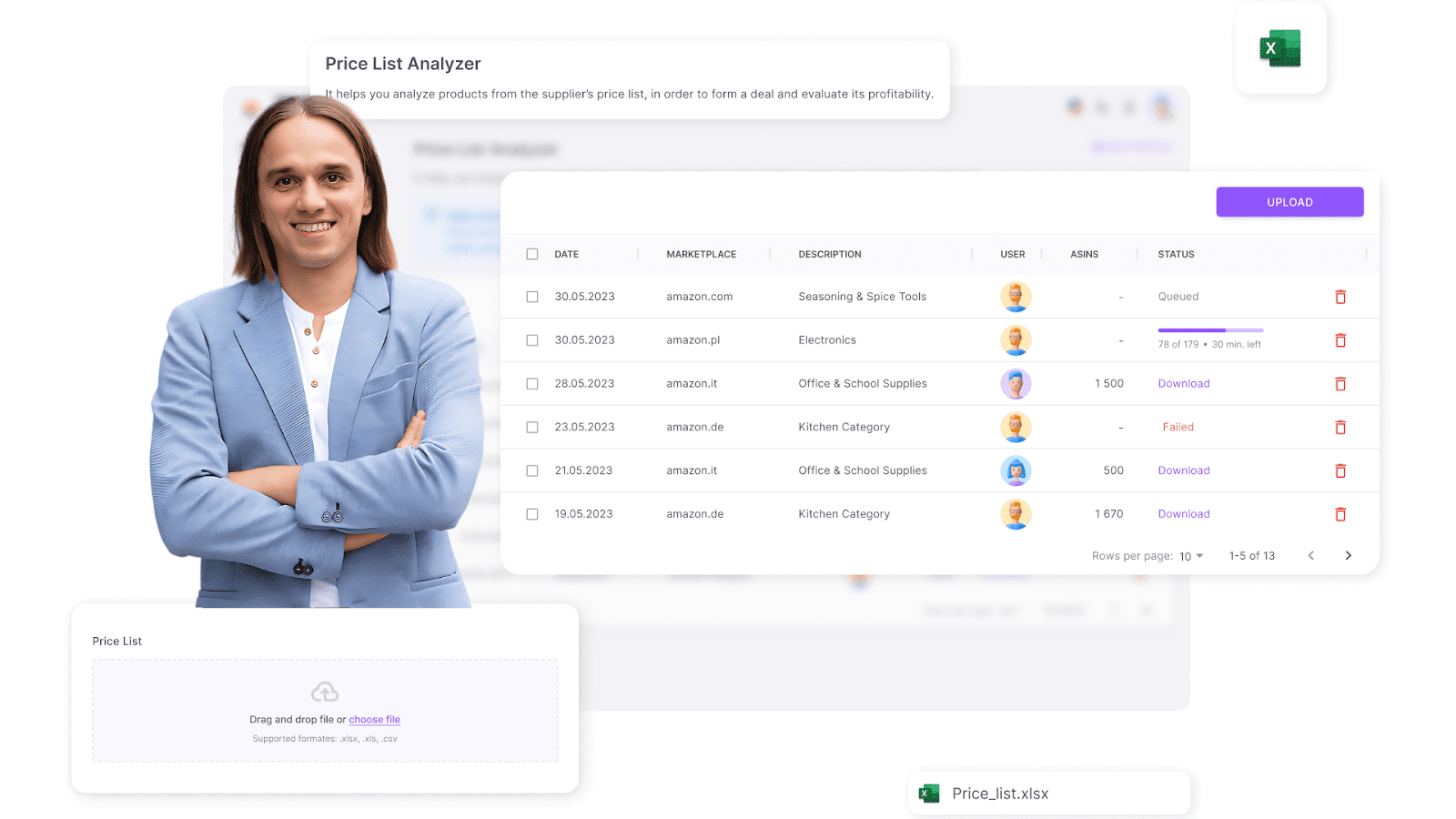
Seller Assistant’s Price List Analyzer
It automatically matches supplier data with Amazon listings, calculates profitability, and delivers the essential insights sellers need to make smart decisions. This tool is a game-changer for wholesale, online arbitrage, and dropshipping sellers.
By simply uploading a price list, you can generate a detailed UI table with all essential product parameters and filter results to identify the top leads and get rid of risky or unprofitable deals. You can also download the .xls report.
What Price List Analyzer offers
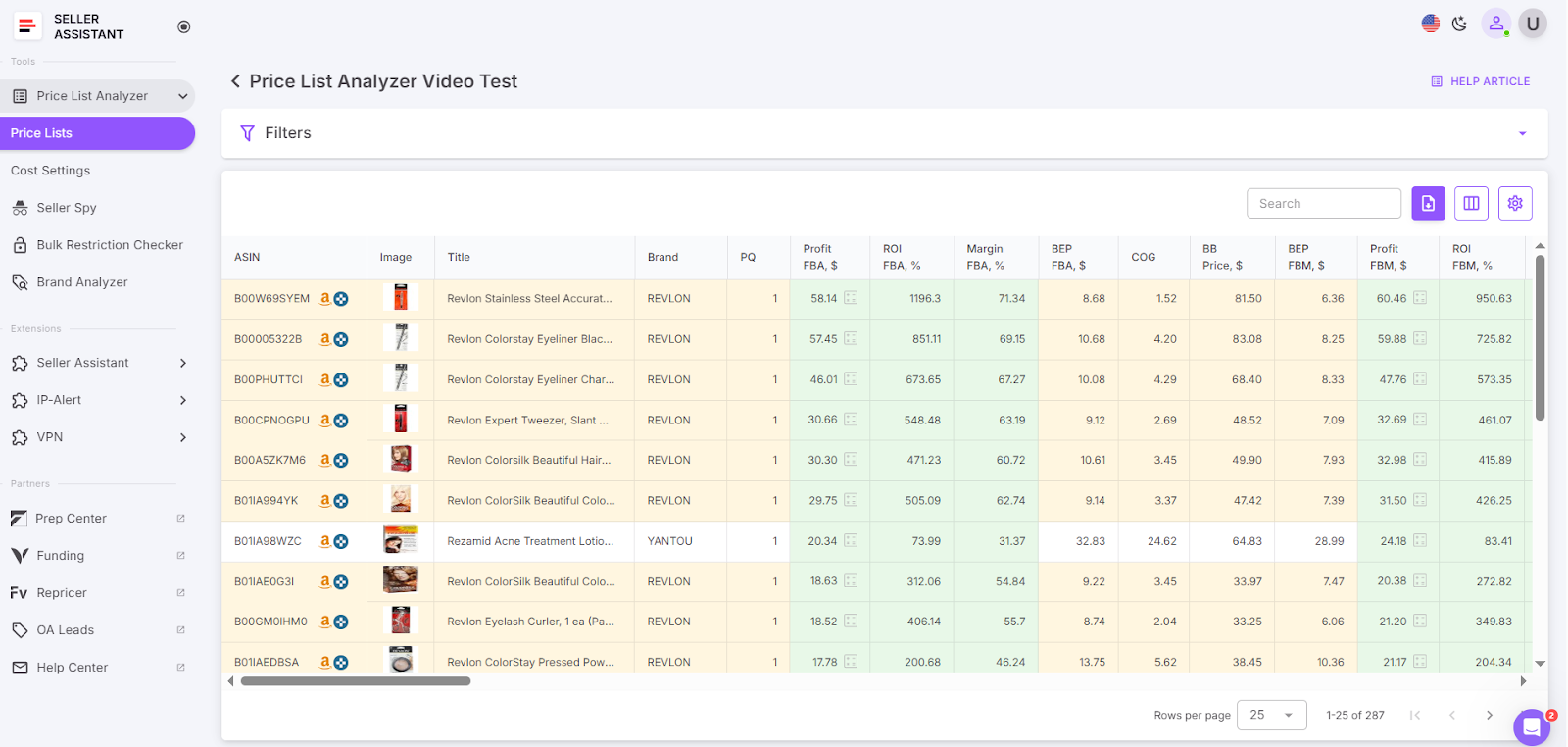
Get the UI table with key product metrics
- Detect high-margin leads
Automatically calculates profit, ROI, margin,Amazon fees, and other costs, to highlight the best deals.
- Data enrichment
Adds critical Amazon metrics to supplier spreadsheets to improve decision-making and help select potential leads.
- Wholesale list scanning
Processes bulk wholesale price lists instantly, calculates essential product data and highlights deal risks and warnings
- Advanced filtering
Allows users to filter results by selling eligibility, alerts and risks, sales potential, profitability parameters, and other criteria to assist with efficient deal finding.
- Comprehensive profitability insights
Provides detailed data on margins, ROI, demand, and sales velocity.
- Automated risk detection
Flags potential product risks and alerts for issues like oversized items, HazMat, bundles, variations, missing costs, no Buy Box price, or approval requirements.
Strategy 3. Focus On Best-Selling Deals with In-Depth Research
When thinking about how to increase sales on Amazon, advanced product research is one of the most effective strategies. It ensures that you only invest in deals that are in high demand, profitable, and carry minimal risk. By targeting the right products, sellers can maximize their return on investment and build a more predictable and profitable business.
While scanning wholesale lists with Seller Assistant’s Price List Analyzer, some leads may raise flags – for example, missing Buy Box prices, bundled listings, or ROI values that are too high or too low. These cases require deeper research to assess their viability. Additionally, many online arbitrage sellers using manual research can save time and improve accuracy by leveraging Seller Assistant Extension.
Why focusing on best-selling deals grows sales
Targeted product research allows sellers to invest resources only in deals with strong sales potential. This increases the likelihood that each item in your inventory will contribute to your profits. By understanding product demand, competition, and profitability before buying, you reduce risks and make smarter investments. Focusing on the best-selling deals ultimately creates a reliable and scalable sales model.
Key criteria for in-depth product research
- Sales performance
Monitor Best Sellers Rank (BSR) trends, sales velocity, and actual sales over 30/90/180 days to confirm product demand.
- Competition analysis
Evaluate how many sellers (FBA/FBM ) are on the listing and review their pricing strategies. Make sure Amazon doesn’t dominate the Buy Box.
- Profitability metrics
Analyze ROI, profit margins, and breakeven points to identify deals that meet your financial goals.
- Risk flags
Identify potential IP issues, resale restrictions, and other risks like fragile, meltable, hazmat, heavy and bulky, etc. to avoid problematic products.
- Historical data
Review long-term price and sales trends to make decisions based on a stable product. Make sure a product has a sales history of at least 6 months.
How to analyze deals with Seller Assistant Extension
Seller Assistant Extension streamlines advanced product research by delivering critical data right on Amazon product pages, search results, and supplier sites side-by-side, and competitor storefronts. With instant access to product metrics and supplier links, deciding which products to sell becomes much easier and faster.
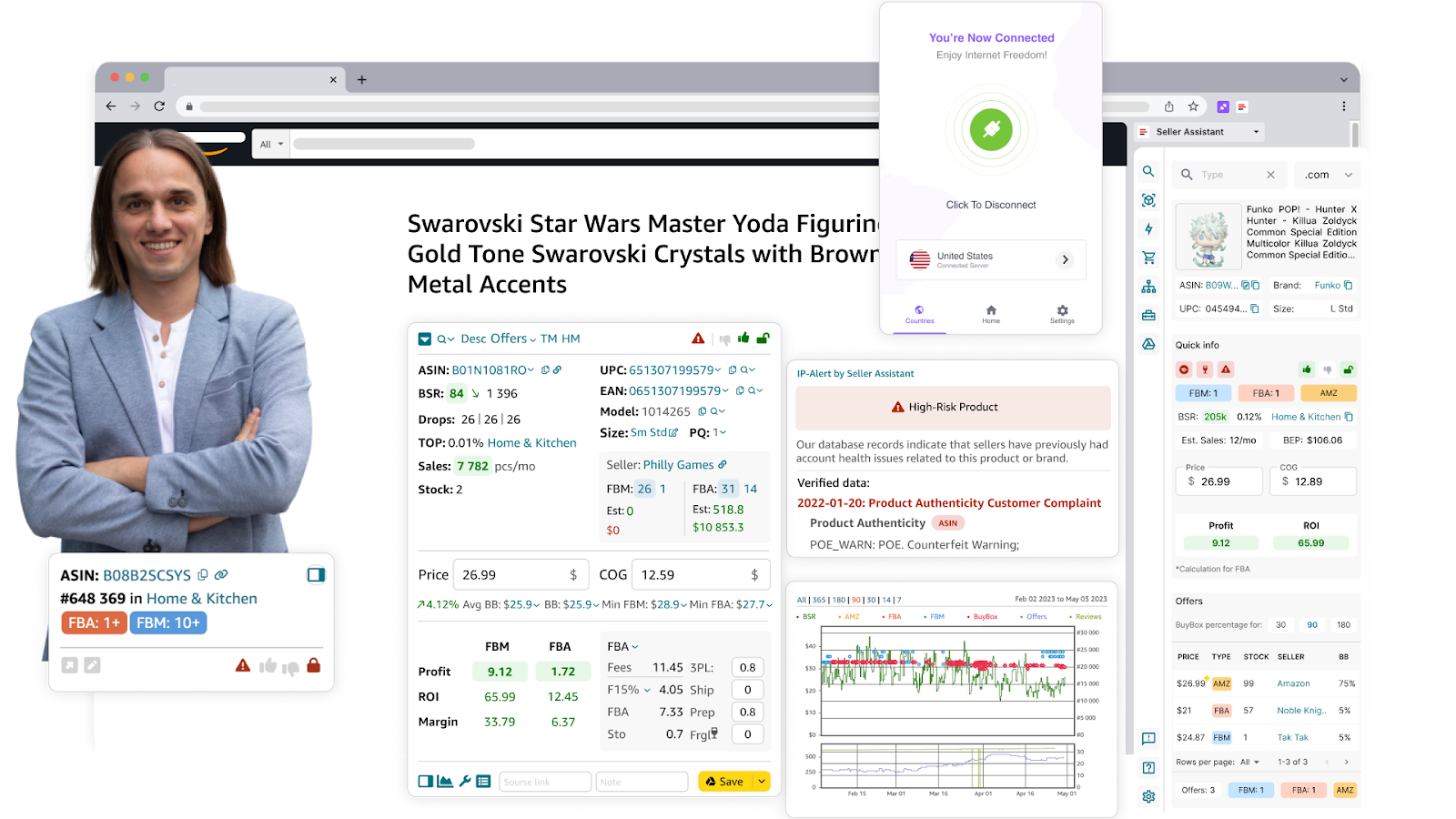
Seller Assistant Extension
What Seller Assistant Extension offers
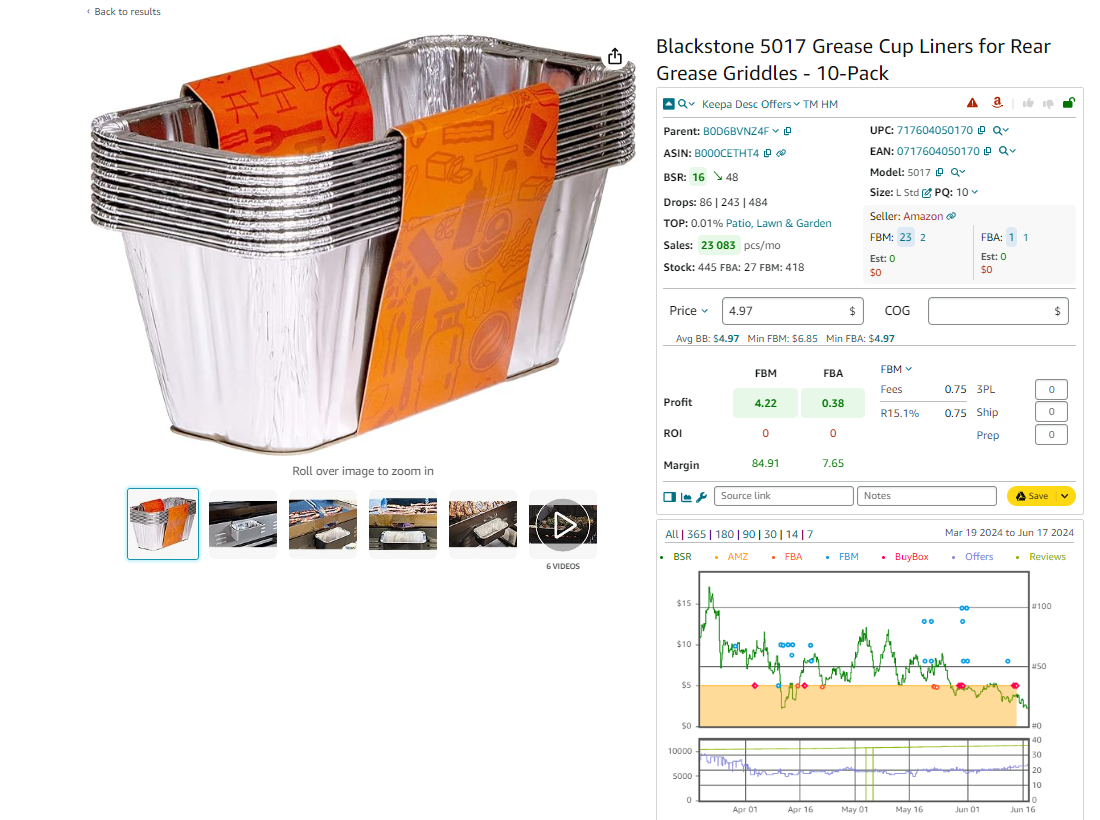
Start your product research
Evaluate sales potential
- Check BSR and trends
Products ranked between 1 and 200,000 usually sell well.
- Review the Top %
A figure below 0.5% signals high sales velocity.
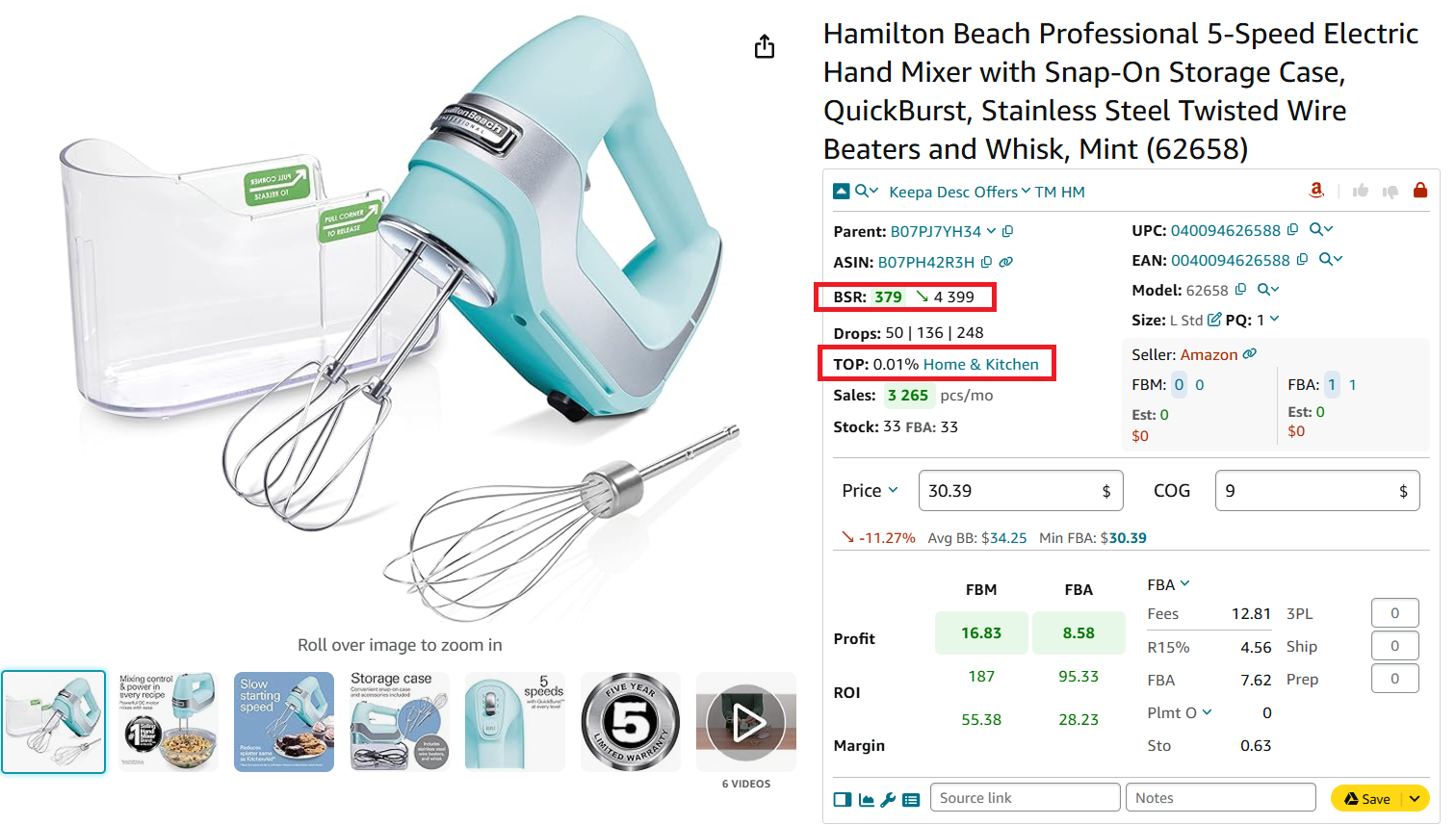
Check how well the product sells
- Estimate sales potential
- Review BSR drops
- These show how many units sold in the last 30, 90, and 180 days and help
- Check estimated sales
See how many units can be potentially sold per month based on BSR.
- Estimate the number units to sell
View the Est number to see how many units you might sell as a new seller on the listing.
- Research competitor stock
Check FBA and FBM stock levels to understand how much inventory other sellers hold.
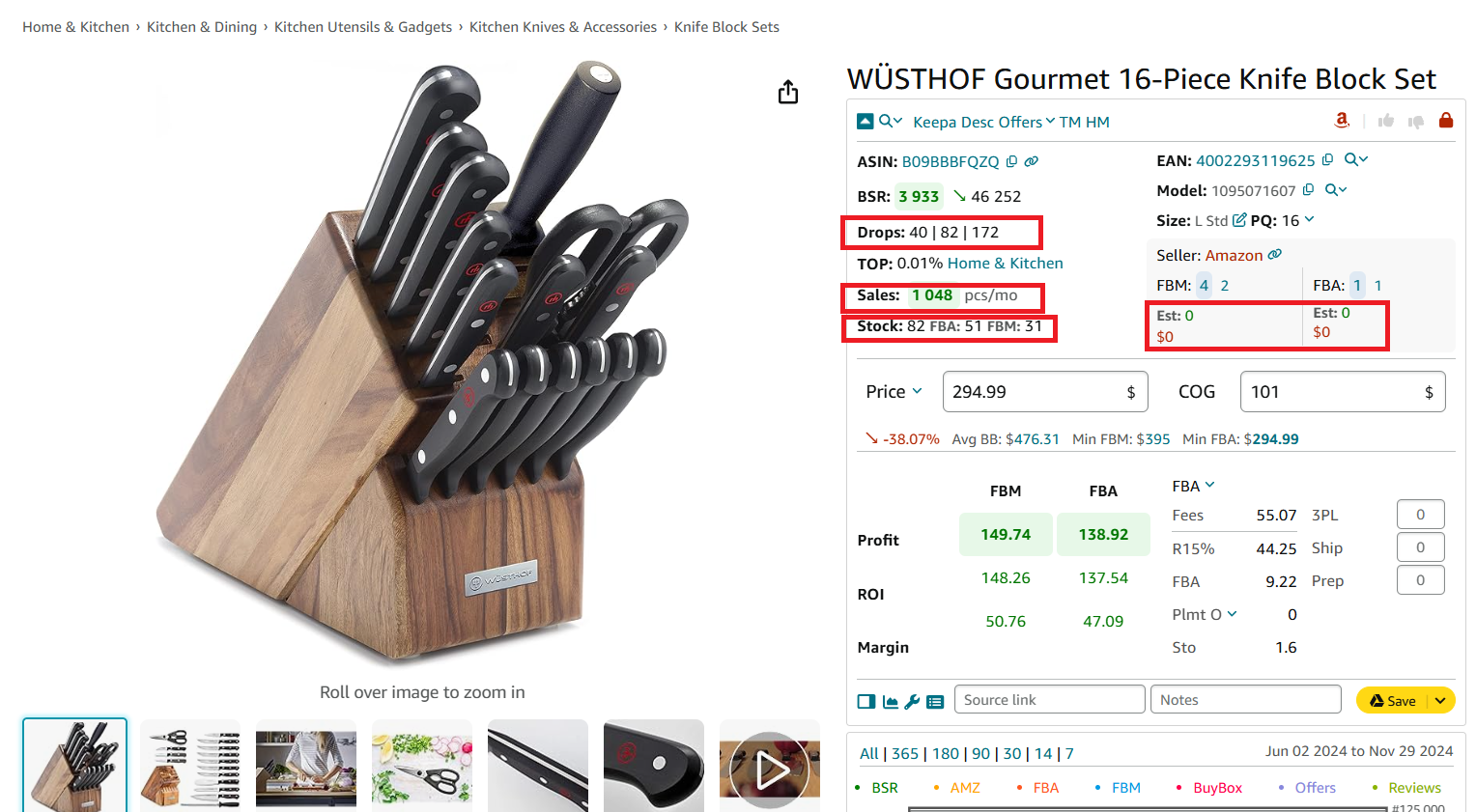
Identify how many units you can sell
- Analyze competition
- Seller count
Listings with 2–15 competitors offer the best balance of demand and opportunity.
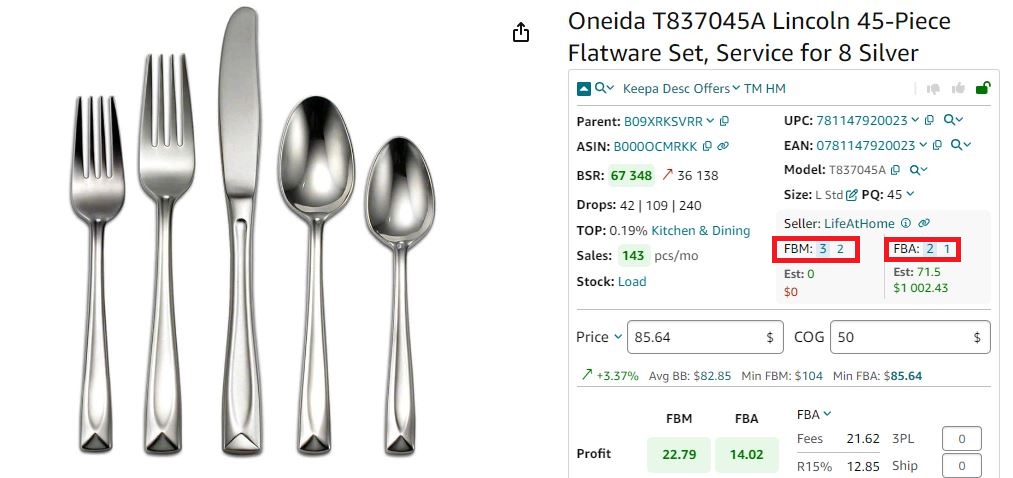
Seller Assistant shows the number of FBA and FBM offers
- Review seller offers and Buy Box chances
Use Offers to check seller details, stock, and Buy Box share.
- Check seller type
Avoid competing against Amazon directly when possible.
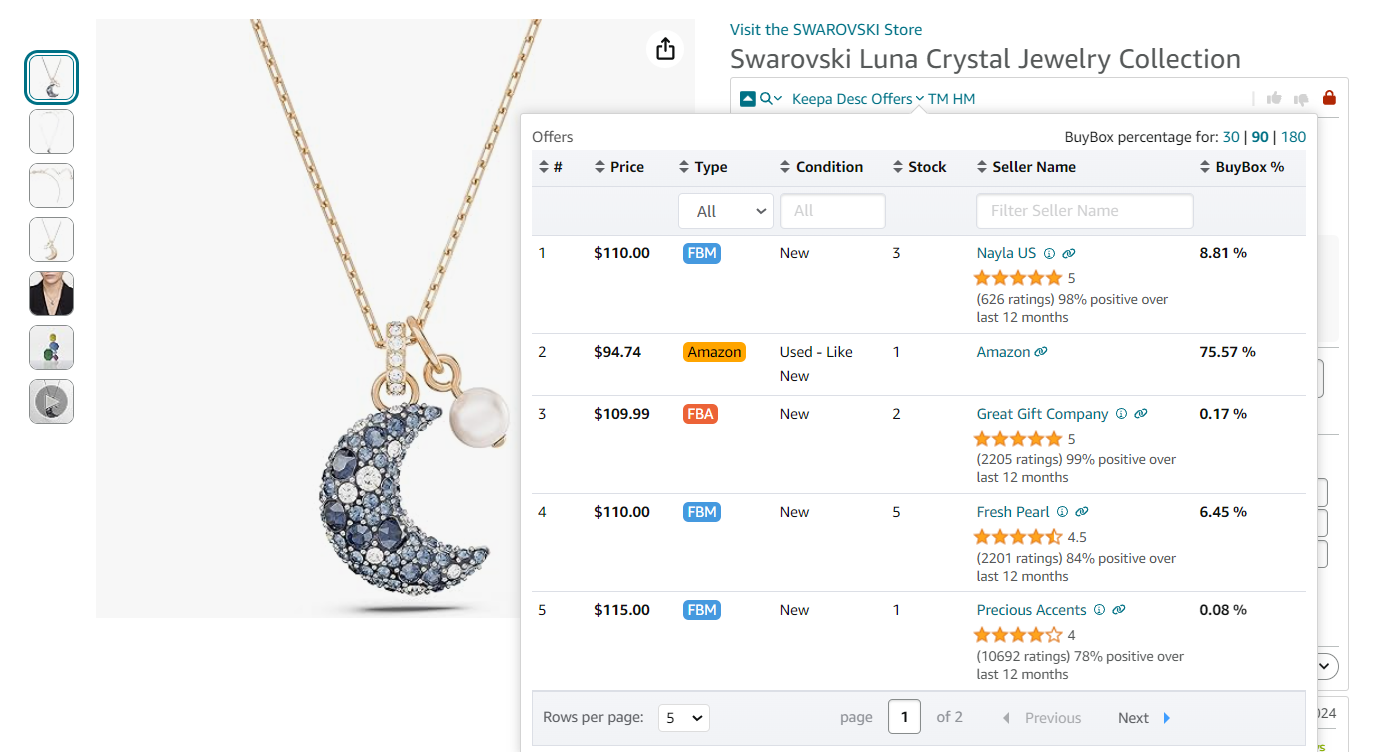
Offers is the extension’s feature that allows to research all seller offers of a product
- Examine historical data
Check that a product has at least 6 months of price and study sales history using integrated Keepa charts.
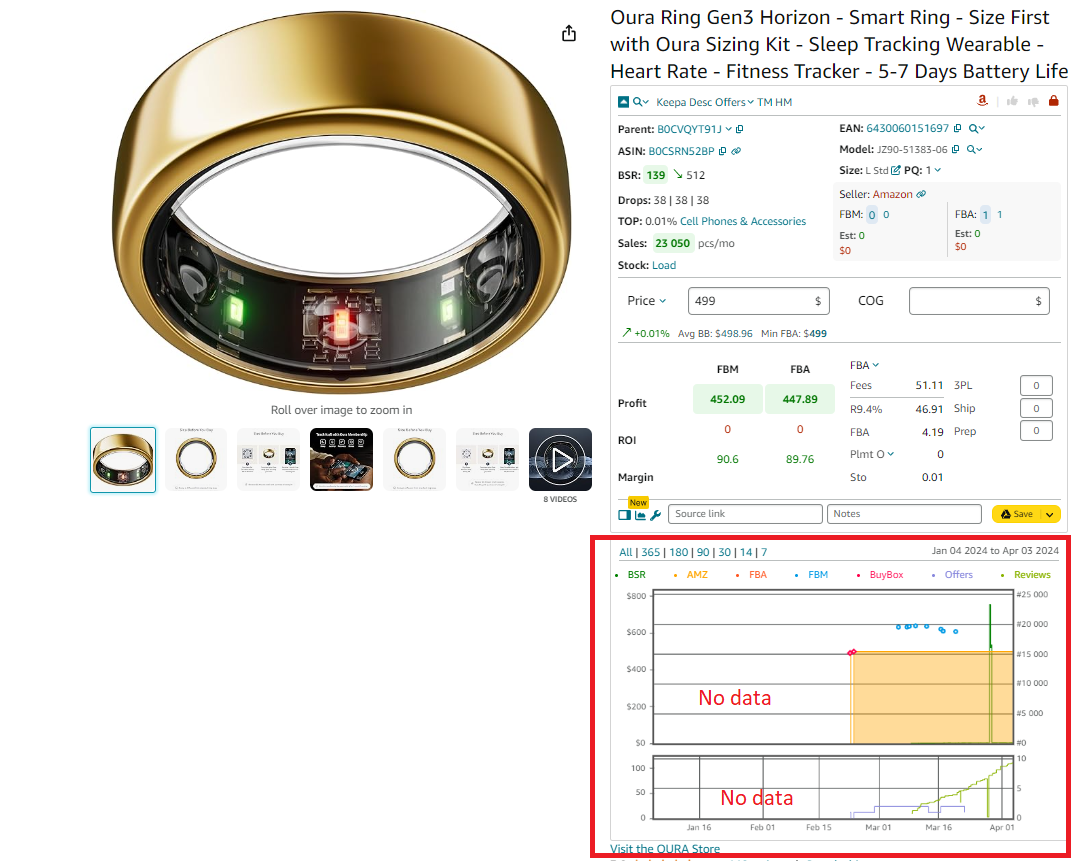
Keepa charts
- Evaluate pricing
- Check average Buy Box price (Avg BB) and compare to 90-day trends.
- Review Min FBA and Min FBM offers to plan your pricing strategy.
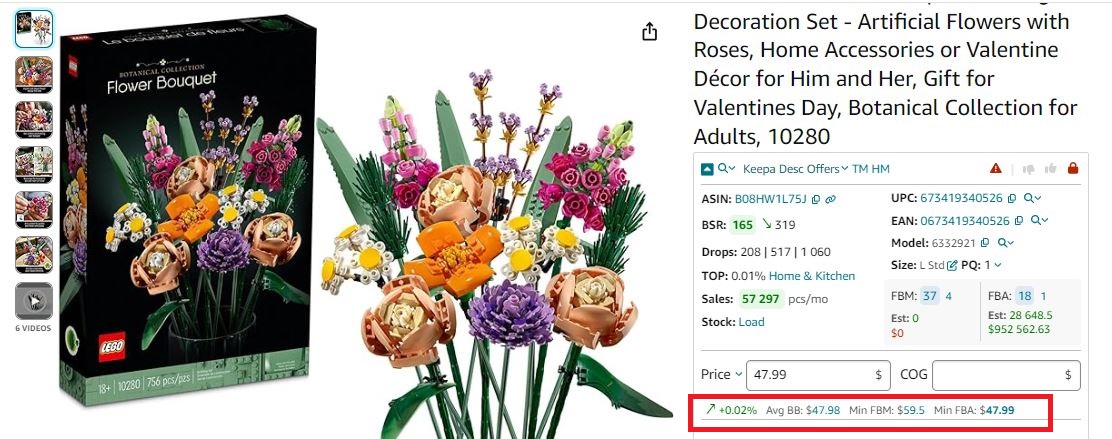
Buy Box price
- Focus on best-selling variations
Use Variation Viewer to find top-selling variations by share and ratings.
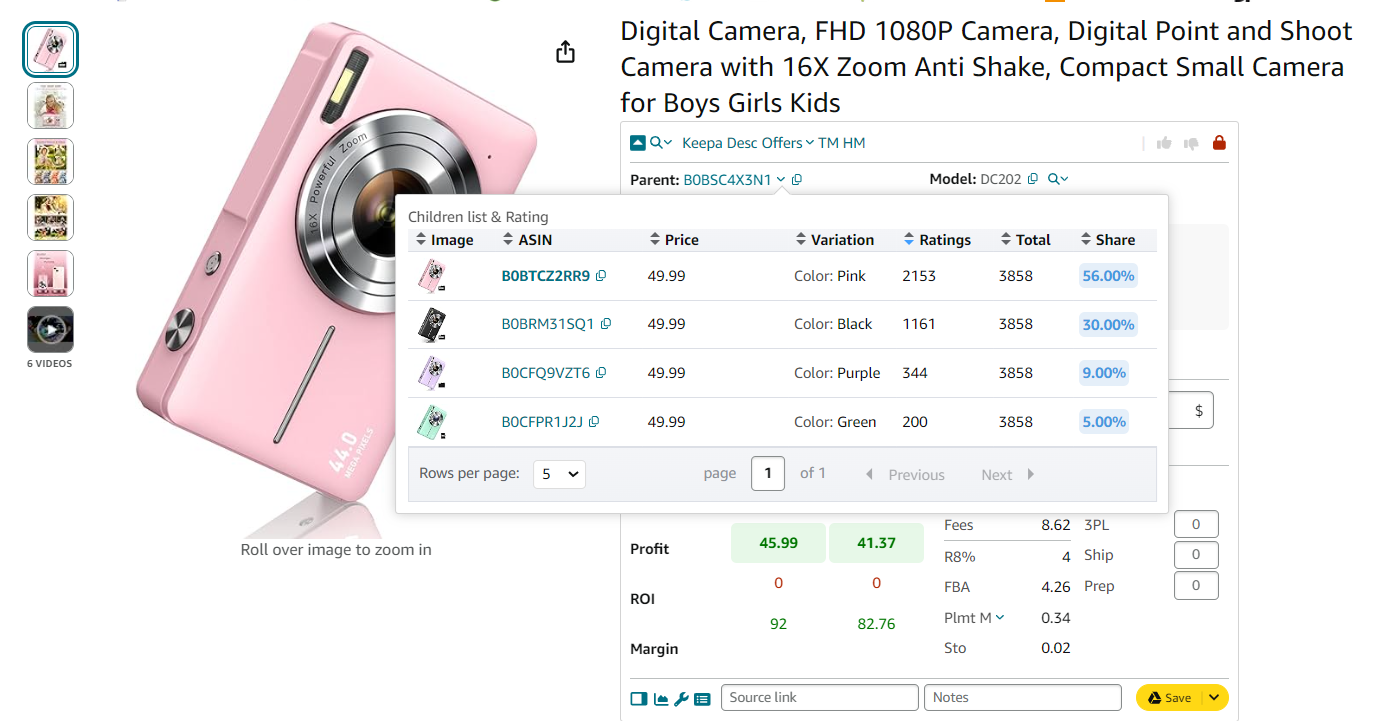
Variation Viewer
- Review restrictions and alerts
- Check product restrictions
Look for green lock (ungated) and red lock (restricted) icons.
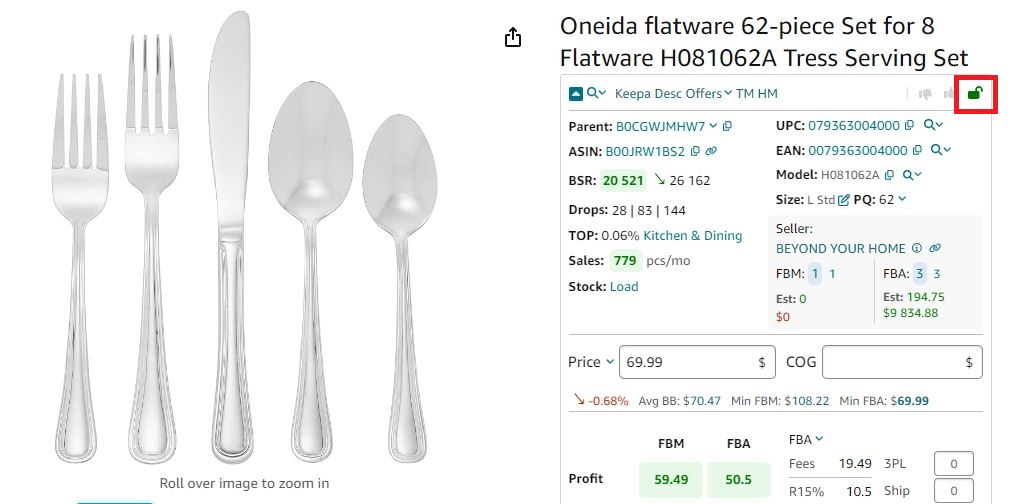
If you see a green open lock icon in Seller Assistant, you can sell a product
- Identify IP complaints
Look for Warning icons to detect IP risks and Amazon policy violations.
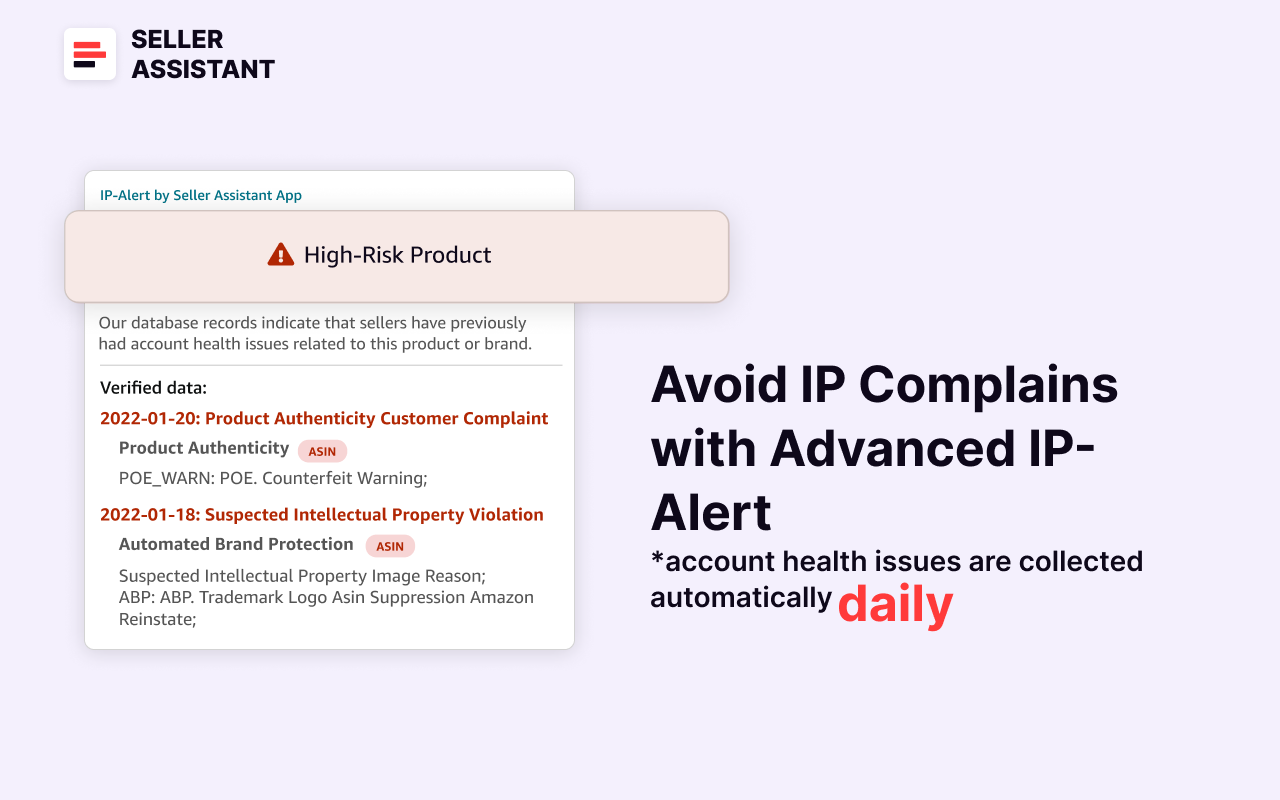
Seller Assistant’s IP Alert extension
- Review product flags
Identify issues like fragility, HazMat status, and more.
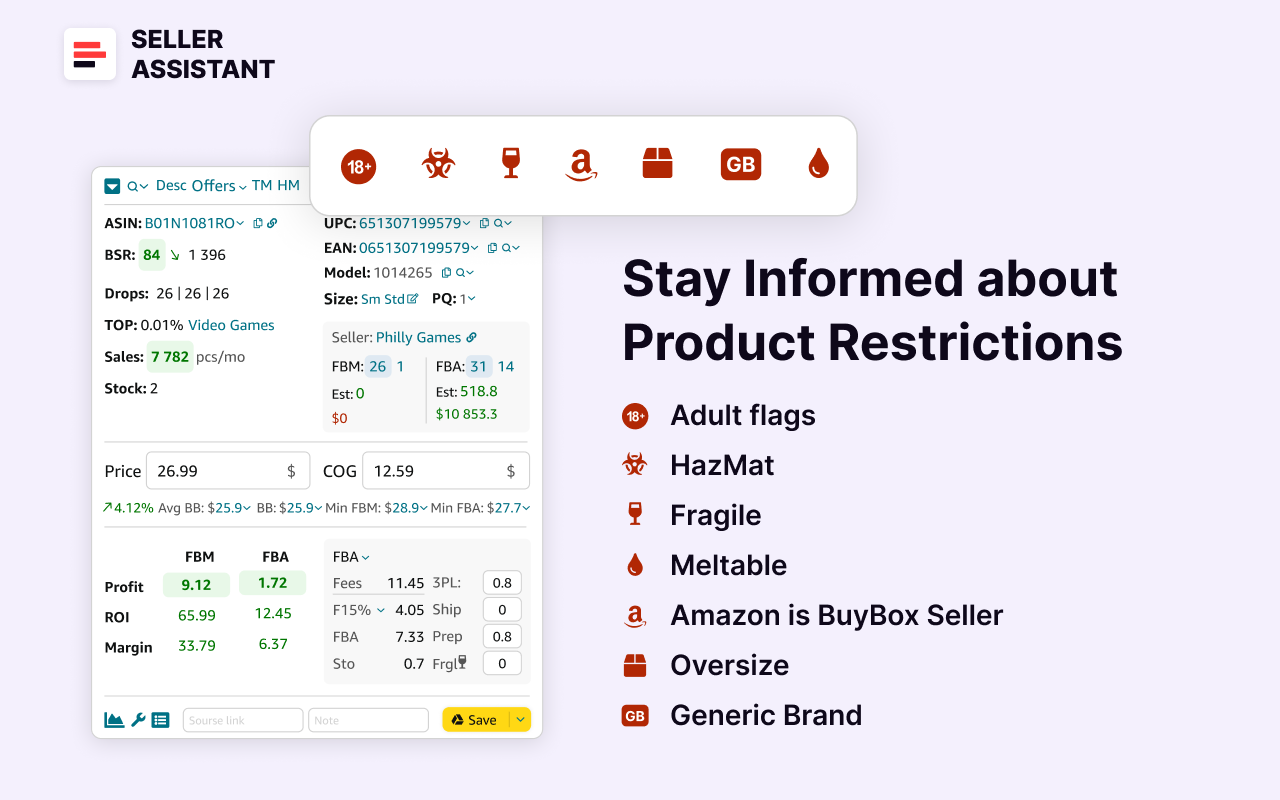
Seller Assistant’s product flags
- Analyze reviews
Focus on products with 4–5 star ratings and minimal negative feedback.
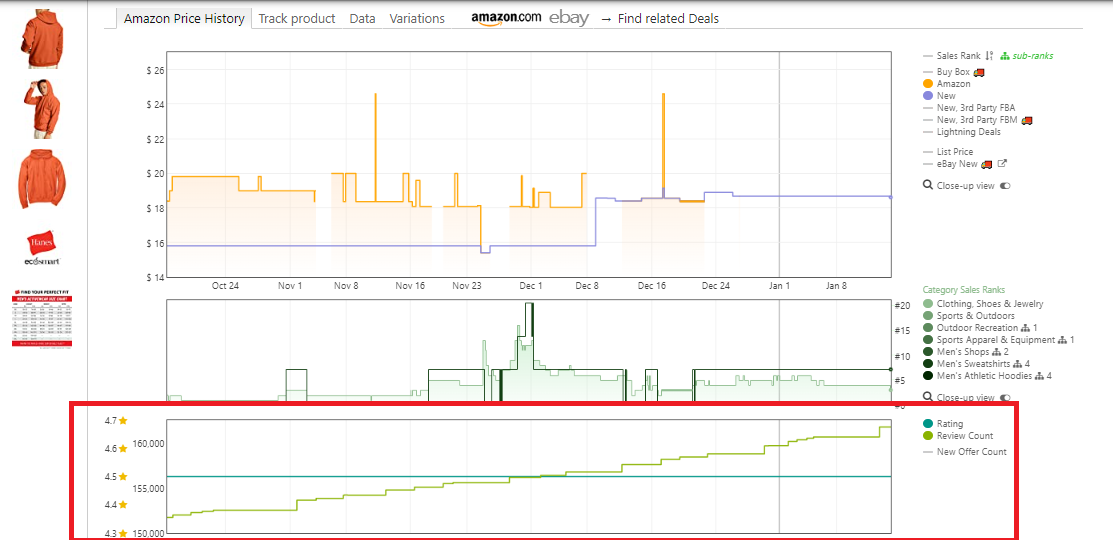
Reviews are available on the separate Keepa chart built into Seller Assistant
- Finalize profit calculation
- Use the FBA&FBM profit calculator
Enter COG and logistics costs to calculate FBA/FBM fees, profit, ROI, and margin.
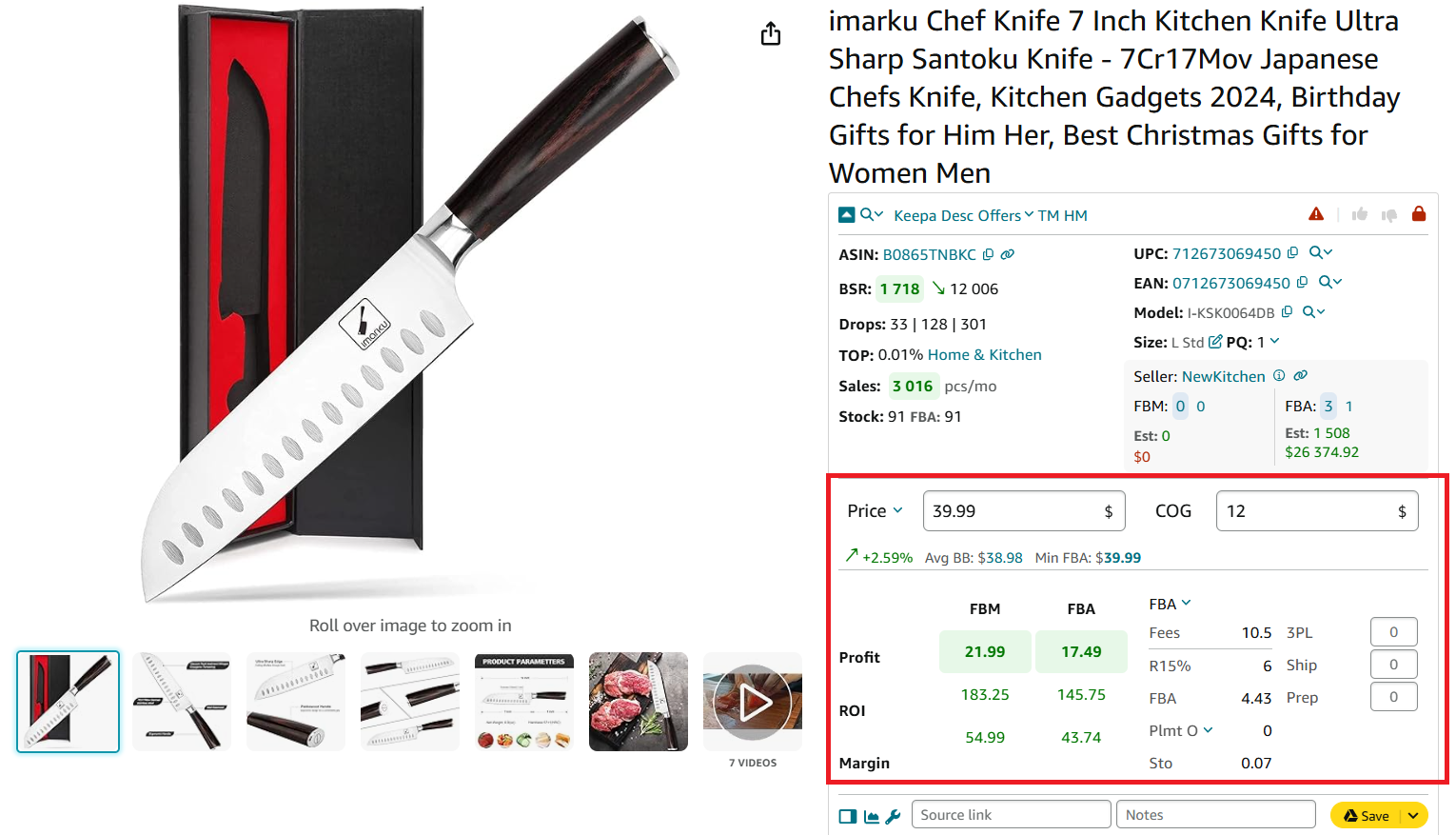
FBA&FBM profit calculator
Strategy 4. Spy on Competition to Sell What They Sell
When considering how to increase sales on Amazon, one of the smartest shortcuts is to leverage what already works. Competitors often offer best-sellers that you might not have in your catalog yet. By identifying and adding these proven products to your own inventory, you can tap into existing market demand and drive sales with less guesswork.
However, manually tracking competitor listings and strategies can be time-consuming. This is where automation comes in. Seller Assistant’s Seller Spy makes competitor analysis easy by revealing valuable insights into what your rivals are selling and how they price their products.
Why competitor tracking increases sales
By monitoring your competitors, you gain direct access to products that are already performing well. Adding these high-demand products to your inventory lets you ride the wave of market trends without trial and error.
In addition, tracking competitor pricing and reviews helps you stay competitive – which improves your chances of winning the Buy Box and capturing more sales.
Effective competitor analysis involves closely observing which products your competitors start or stop selling. These shifts reveal valuable insights about product trends, profitability, and customer preferences.
Key factors in competitor tracking
- New product monitoring
Keep track of new products your competitors list to spot emerging trends and expand your product offerings.
- Product removals
Identify which products competitors stop selling, which can signal declining demand or low profitability.
- Seller feedback
Review competitors’ ratings, total reviews, and positive feedback to assess product reliability and popularity.
- Pricing
Analyze competitor pricing strategies to ensure your prices remain competitive without eroding your profit margins.
How to automate competitor tracking with Seller Spy
Manual tracking can drain your time – but Seller Assistant’s Seller Spy automates the process and keeps you informed effortlessly.

Seller Spy
This powerful tool helps you monitor your competitors, track their product changes, and gain insights into their pricing strategies. Simply enter a competitor’s Amazon storefront link to access a competitor summary or download a detailed file with product tracking data.
Seller Spy highlights new brands and products your competitors add, as well as items they remove. With this data, you can expand your inventory and adjust prices accordingly to stay competitive and win more sales.
What Seller Spy offers
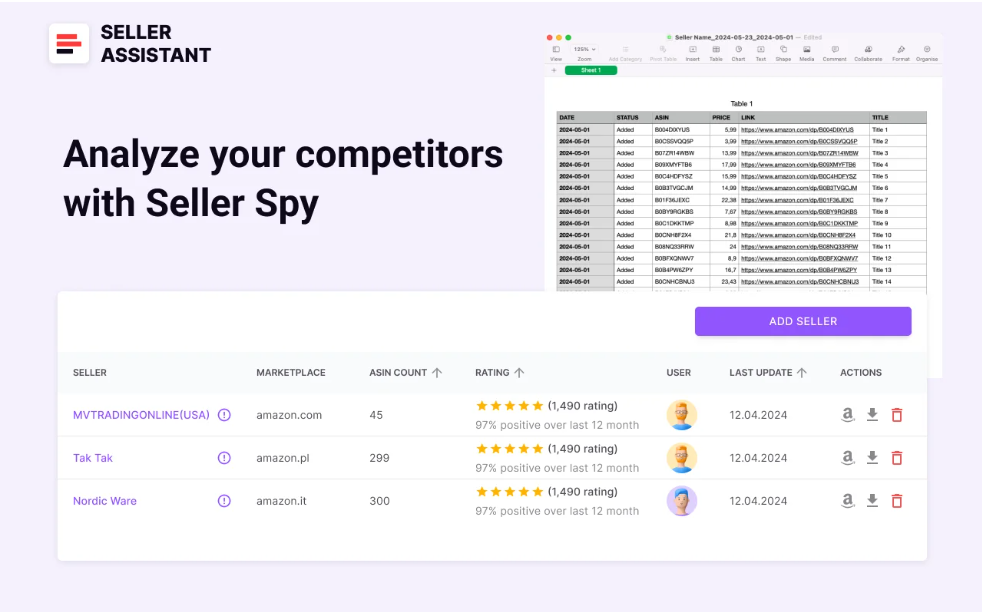
Seller Spy data
- Opportunity discovery
Track what best-sellers your competitors add. Identify products your competitors are selling that you aren’t, helping you expand your catalog.
- Automated competitor tracking
Save time with automatic monitoring of competitor activity.
- Product updates
Instantly see which products your competitors are adding or removing.
- Pricing insights
Track competitor pricing so you can fine-tune your prices and maintain healthy profit margins.
Strategy 5. Unlock Sales with Competitor-Driven Sourcing
If you’re wondering how to increase sales on Amazon, one of the smartest moves is to tap into your competitors’ success. Competitors are already selling profitable, in-demand brands – and analyzing their storefronts can help you spot valuable opportunities to expand your own product catalog.
By reviewing storefront summaries, you can pinpoint popular categories, high-performing brands, and top products that are already validated by the market. Tools like Seller Assistant’s Storefront Widget make this process fast and easy, turning competitor research into actionable insights.
Why analyzing competitor storefronts grows sales
Gaining visibility into your competitors’ brand strategies helps you identify what sells best. By focusing on top-performing brands and categories, you can avoid guesswork and directly target products with proven demand. This strategy lets you expand your inventory with confidence, while also spotting under-served niches with lower competition.
Key benefits of storefront analysis
- Competitor summary overview
Instantly access competitor store summaries, including product counts, brands, categories, ratings, and reviews.
- High-demand product discovery
Identify low-competition, high-demand products based on your competitors’ success.
- Brand performance insights
Review pricing data, brand popularity, and potential deal risks to make informed sourcing decisions.
- Portfolio expansion opportunities
Find top-performing brands that your competitors are selling and add them to your own Amazon store.
How to leverage storefront analysis with Storefront Widget
Seller Assistant’s Storefront Widget simplifies the process of competitor research by automatically extracting storefront data as soon as you visit a competitor’s Amazon store. Instead of manual tracking, you get instant access to key metrics that help you decide which brands and products are worth adding to your own catalog.
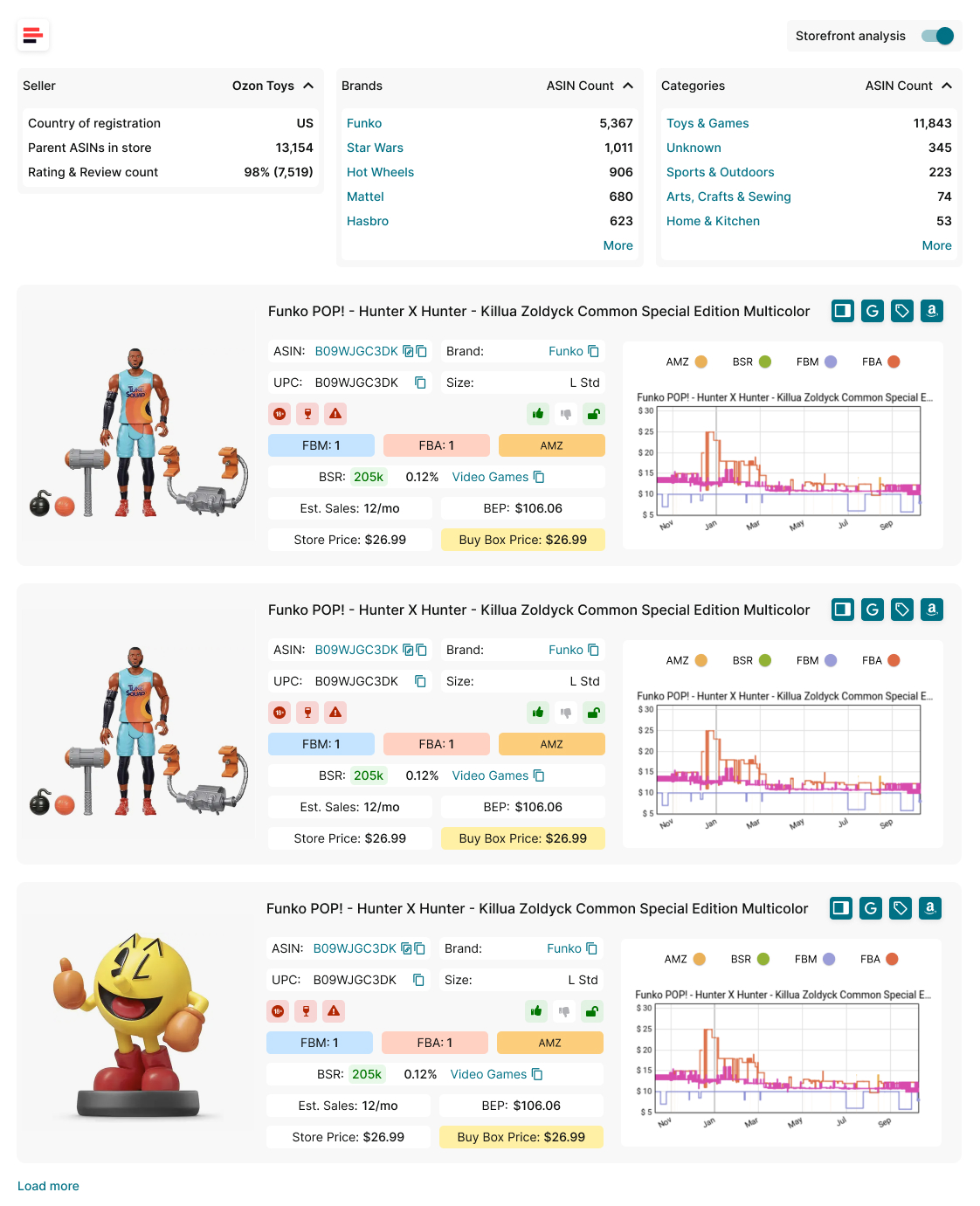
Storefront View
What Storefront Widget offers
- Comprehensive competitor’s storefront research
Storefront Widget automatically activates and displays valuable storefront data. This allows you to analyze competitor storefront stats and single products to search for potential deals.
- View store summary statistics
Instantly see total product count, best-selling brands, category breakdown, and customer ratings and reviews.
- Analyze individual product performance
Assess key metrics such as Best Sellers Rank (BSR), price history, estimated sales, and competition levels.
- Sort and filter results
Quickly identify the most profitable brands and categories to focus on by applying filters and sorting tools.
FAQ
How much can you earn selling on Amazon?
Earnings vary widely depending on your product selection, pricing strategy, and competition. Some sellers make a few hundred dollars per month, while others scale to six or seven figures annually.
Can I sell my Amazon seller account?
Selling your Amazon seller account is against Amazon’s policies. Instead, you can sell your business, but the account transfer must be approved by Amazon.
How do I attract buyers on Amazon?
Attract buyers by selling in-demand products, competitive pricing, and proposing discounts. Providing great customer service and fast shipping also boosts visibility and trust.
How to get more orders in Amazon?
Increase orders by offering competitive pricing, running promotions, optimizing listings for SEO, and winning the Buy Box. Leveraging product research tools to stock high-demand products also plays a key role.
Is it realistic to make money on Amazon?
Yes, many sellers generate solid profits, but success requires effort, smart product choices, and continuous optimization. Selling on Amazon is highly competitive, so ongoing learning and adaptation are essential.
How to increase organic ranking on Amazon?
Boost organic ranking by optimizing your listings with relevant keywords, earning positive reviews, and driving consistent sales. Maintaining competitive prices and strong seller metrics also influence ranking.
How to sell on Amazon organically?
Selling organically means relying on SEO, reviews, and sales performance rather than paid ads. Focus on optimizing listings, offering great products, and encouraging customer reviews to improve organic visibility.
Final Thoughts
Learning how to increase sales on Amazon starts with one critical principle: sell the right products. Whether you’re adding new brands, sourcing smarter from wholesale lists, focusing on proven best-sellers, analyzing competitor inventories, or tracking top brands through storefronts – each strategy helps you make informed, profit-driven decisions.
Using Seller Assistant’s tools like Price List Analyzer, Seller Assistant Extension, Brand Analyzer, Seller Spy, and Storefront Widget takes the guesswork out of product research and competitor analysis, making it easier than ever to find winning products and scale your business.
Seller Assistant is an all-in-one product sourcing software offering all the features vital for product sourcing. It combines three extensions: Seller Assistant Extension, IP Alert, and VPN by Seller Assistant, tools: Price List Analyzer, Brand Analyzer, Seller Spy, Bulk Restrictions Checker, and API integrations, and features: Storefront Widget, Side Panel View, FBM&FBA Profit Calculator, Quick View, ASIN Grabber, UPC/EAN to ASIN converter, Stock Checker, and other features that help quickly find high-profit deals. Seller Assistant also offers integration with Zapier allowing to create custom product sourcing workflows.

