.svg)
How to Wholesale on Amazon
Download Amazon Seller Guide
This guide will help you get started, understand the basics of Amazon selling, and explain in simple words how it all works.

Wondering how to wholesale on Amazon? Start with the basics: you buy branded products in bulk from brands or authorized distributors and resell under existing ASINs – no new listings, just smart product selection, eligibility checks, and profitability calculation.
Success is process-driven: get your permits, target resale-friendly brands, verify gating, analyze price lists, negotiate pricing, place clean POs, and route inventory to FBA or your 3PL.
In this post, we’ll recap what to remember about wholesale, walk the model step-by-step, then show how Seller Assistant's connected workflow automates the busywork – from brand research and restriction checks to price-list analysis and purchase orders.
Note. Seller Assistant is an end-to-end Amazon workflow management platform that integrates 10+ wholesale-focused solutions into one connected system. It combines sourcing workflow automation, bulk research and intelligence tools, and integrated Chrome extensions – giving you everything you need to streamline finding deals, managing suppliers, and creating purchase orders.

The platform aggregates: workflow management tools – Purchase Orders Module, Suppliers Database, Warehouses Database to organize, automate, and scale every step of your wholesale and arbitrage operations; bulk research & sourcing tools – Price List Analyzer, Bulk Restriction Checker, Sourcing AI, Brand Analyzer, Seller Spy to evaluate supplier price lists, verify selling eligibility and restrictions, open new brands, and discover winning product ideas from competitors to expand your product catalog; Chrome extensions – Seller Assistant Browser Extension, IP-Alert Extension, and built-in VPN by Seller Assistant to deep-research products, check IP claims and compliance, and access geoblocked supplier sites directly within your browser; and integrations & team access features – seamless API connectivity and integrations with Zapier, Airtable, and Make, plus Virtual Assistant Accounts for secure, scalable team collaboration.
With Seller Assistant, every step of your Amazon wholesale and arbitrage workflow is automated and connected.
What to Know About Wholesale Before You Start
Amazon wholesale is a data-driven reselling model where you buy branded products directly from brands or authorized distributors at wholesale prices, then resell them on Amazon under existing listings. You’re not creating a new brand – you’re leveraging products that already have proven demand and consistent sales history.
The money in wholesale comes from the margin between your buy cost and the retail price after Amazon fees. For example, you might purchase a product for $18 and sell it for $39; after Amazon’s referral and fulfillment fees, your net profit could be around $8–$10 per unit. It’s a stable, scalable model, but one that rewards process, relationships, and precision over guesswork.
Buy from the right source
Only buy from brands or authorized distributors that allow resellers. This ensures compliance, reduces IP complaints, and keeps your account safe.
Check brand and category restrictions
Before contacting suppliers, confirm you’re eligible to sell their products. Avoid gated or restricted brands that require approval to prevent wasted time.
Understand your costs
Calculate every fee – COGS, Amazon referral fees, FBA storage, prep, shipping, and taxes – to determine true profitability before ordering.
Prepare your business documents
You’ll need a reseller permit, EIN, and possibly a sales tax permit to buy inventory tax-free and open wholesale accounts.
Build supplier relationships
Supplier access is everything. Be professional, persistent, and organized – most approvals come after consistent follow-up and clean communication.
Expect upfront investment
Most suppliers have minimum order quantities (MOQs), usually $1,000–$2,000+, so you’ll need working capital to start.
Focus on data, not hunches
Use sales rank (BSR), price history, and competition data to identify products with stable demand and margins – not just what “looks good.”
Plan for logistics
Decide early between FBA (Amazon fulfillment) or FBM (your own or a prep center). Set up warehouses, prep rules, and routing before your first order.
Automate from day one
Manual sourcing doesn’t scale. Workflow tools like Seller Assistant automate price-list analysis, restriction checks, and PO creation, helping you grow faster with fewer errors.
How the Amazon Wholesale Process Actually Works
Amazon wholesale is built on a repeatable, structured workflow: you find profitable products, buy them directly from approved suppliers, and resell them under existing listings. There’s no branding or marketing involved – the focus is on research, compliance, supplier access, and margin control. Below is a simplified, step-by-step view of how to launch and operate your Amazon wholesale business efficiently.
Step 1. Secure your reseller license
Your first move is to get a reseller or sales tax permit in your state. This allows you to purchase inventory tax-free from distributors and charge sales tax correctly to customers.
Step 2. Choose your niche and target brands
Pick a category that fits both your interest and profit goals. Then, research brands already performing well on Amazon and identify which ones have strong demand, steady pricing, and room for additional sellers.
Step 3. Check your approval status
Before contacting anyone, verify if your target category or brand is ungated and sellable on your account. Avoid spending time on restricted brands that require approval or aren’t open to resellers.
Step 4. Locate verified suppliers
Look for official U.S.-based distributors or authorized brand partners that work with Amazon resellers. Focus on suppliers who offer quality, competitive pricing, and transparent business credentials.
Step 5. Verify supplier legitimacy
Protect your business from scams. Review the supplier’s website, verify their business registration, read online reviews, and check company details via Linkedin and tools like Whois or ScamAdviser.
Step 6. Contact suppliers professionally
Reach out through email, phone, or their contact form. Introduce your business, explain your selling model, and express interest in opening a wholesale account. Keep your communication short, clear, and professional.
Step 7. Track your outreach
You’ll contact many suppliers before getting approvals. Maintain a spreadsheet or use a supplier management tool to log contact dates, responses, pricing details, and account statuses. This organization is key to scaling efficiently.
Step 8. Complete the supplier application
Once a supplier shows interest, they’ll request your business credentials – such as your EIN, reseller permit, and company contact details. Fill out all fields accurately to speed up approval.
Step 9. Open your wholesale account
After approval, you’ll gain access to wholesale pricing and catalogs. This unlocks the product data and pricing lists you’ll use for analysis and deal selection.
Step 10. Request supplier catalogs
Ask your supplier for their current wholesale price list in Excel or CSV format. It includes SKUs, descriptions, and pricing tiers – your foundation for identifying potential products to resell.
Step 11. Evaluate products for profit and risks
Analyze each SKU for sales velocity, competition, and margin potential. Use tools like Seller Assistant's Price List Analyzer to automate matching products to ASINs and calculating ROI, but always double-check manually for accuracy.
Step 12. Negotiate for better deals
Once you’ve shortlisted viable products, negotiate for bulk discounts, better payment terms, or free shipping. Strong communication and consistent ordering history often unlock better pricing over time.
Step 13. Set up your shipping workflow
Create clear routing rules for every supplier. Decide whether inventory will go directly to Amazon FBA or to your own warehouse/prep center. Define prep costs, labeling, and lead times.
Step 14. Place your first purchase orders
Use structured purchase orders (POs) to confirm what you’re buying, how much, and at what price. Pay via credit card, ACH, or wire transfer. Confirm delivery details and expected shipping dates.
Step 15. Send inventory and start selling
Choose your fulfillment method:
- FBA – Amazon stores, ships, and handles customer service for you (used by most wholesale sellers).
- FBM – You or your 3PL handle shipping directly, offering more control but more logistics work.
Once products are live, track your pricing, stock, and profitability continuously – then repeat the process with more suppliers and better deals.
Mastering your Amazon Wholesale Workflow with Seller Assistant
A wholesale workflow is the complete system that keeps your Amazon business running smoothly – from researching brands and verifying eligibility to analyzing price lists, creating purchase orders, and routing inventory. For wholesale sellers, every stage is connected: a single missed restriction, incorrect ASIN match, or misplaced order can cost hundreds in lost profit. That’s why successful sellers rely on workflow automation tools instead of spreadsheets and manual copy-pasting – to save time, reduce human error, and scale operations with confidence.
Seller Assistant is the all-in-one platform built specifically for wholesale and arbitrage sellers who want speed, precision, and structure. It connects every moving part of your Amazon workflow into one automated system – supplier management, product research, price list analysis, and purchase order creation – all fully integrated and accessible in one dashboard. With Seller Assistant, you can process thousands of SKUs in minutes, track every supplier and warehouse, and turn data chaos into a streamlined, profit-driven operation.
Step 1. Find data-backed brands to resell
Before jumping into supplier sourcing, your first move is to decide which brands and products to focus on – based on data, not intuition. Unlike private label sellers, wholesale and online arbitrage sellers work with existing Amazon listings, so success comes from understanding what already sells well, how big a brand’s catalog is, and what level of competition exists. The goal is to reverse-engineer what the best sellers are already doing – analyze their storefronts, uncover their best-performing brands, and identify profitable gaps backed by actual sales data.
Look for brands with large product portfolios (ideally 500+ ASINs), steady monthly demand, and balanced competition levels. Using concrete insights helps you target proven, high-performance products with healthy margins – long before you start contacting suppliers or investing in inventory.
Tools that power this stage
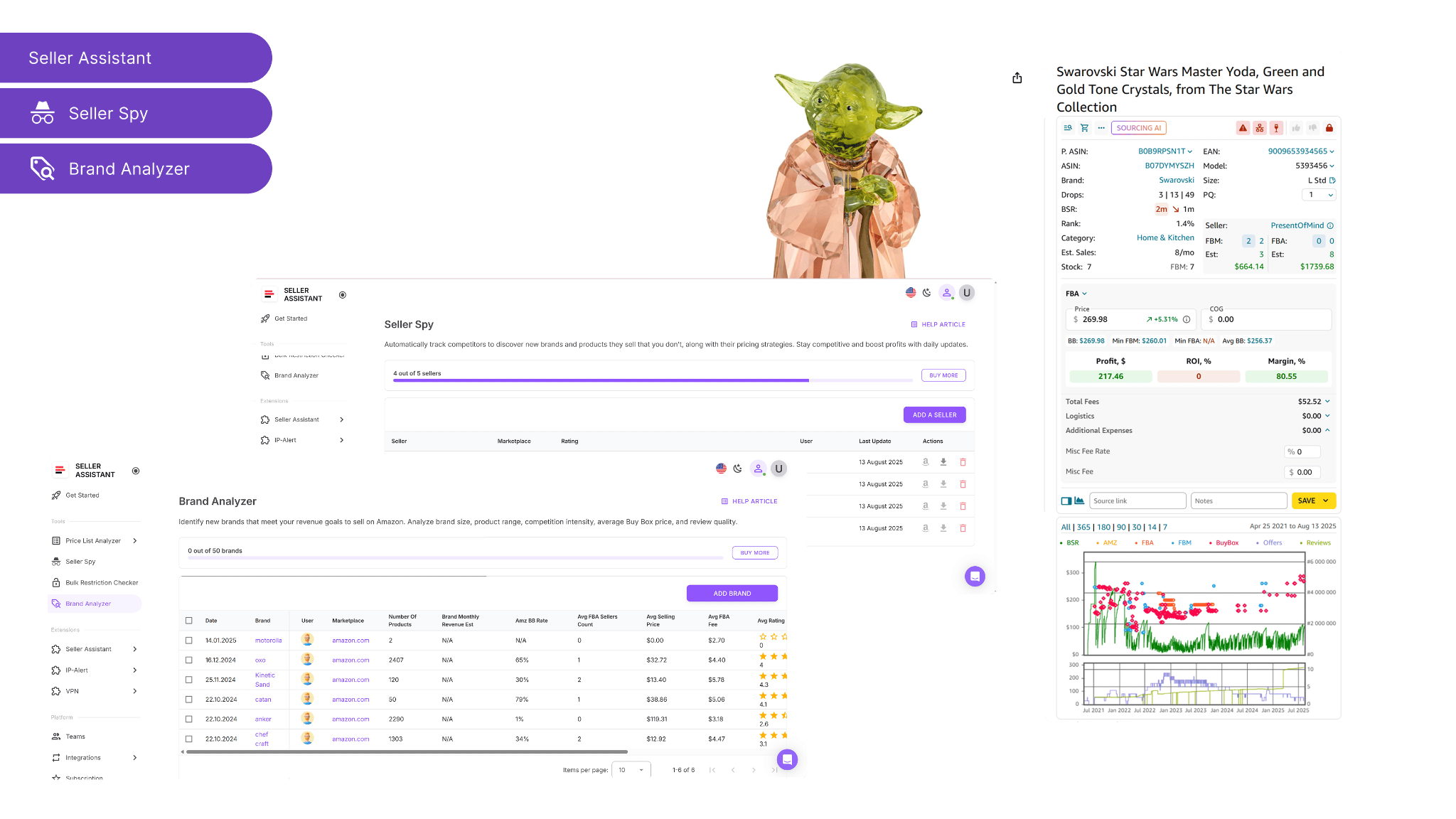
How the tools work in Seller Assistant
Storefront Widget
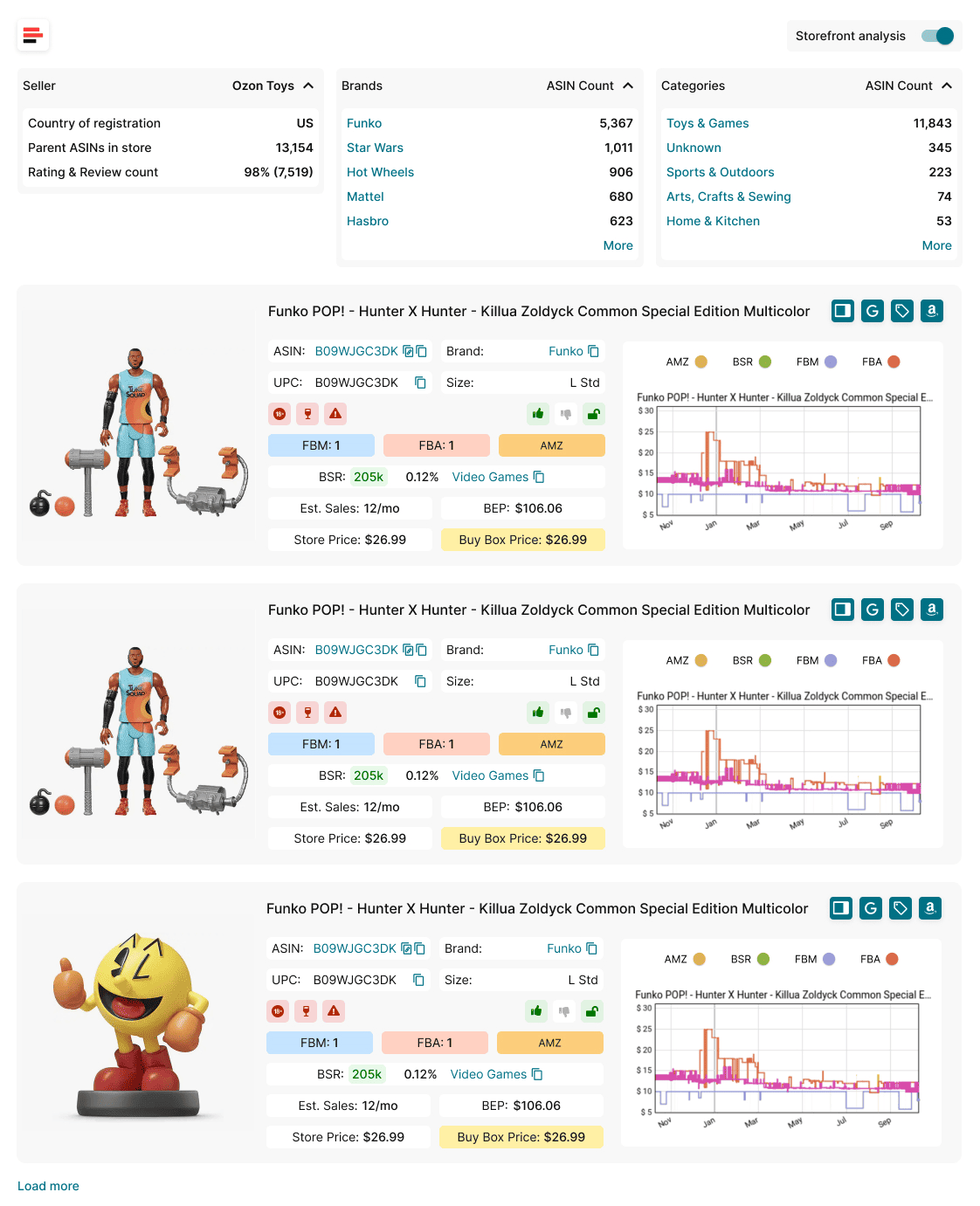
- Integrates seamlessly into Amazon storefronts to reveal seller insights instantly – showing country of registration, number of ASINs, top-performing brands and categories, overall ratings, and review data.
- Displays detailed product cards packed with live performance metrics such as estimated sales, BSR, pricing comparisons, FBA/FBM competition levels, and alerts for IP risks or selling restrictions.
- Allows you to filter and explore competitor listings by specific brands or categories, enabling precise and time-efficient product discovery.
Seller Spy
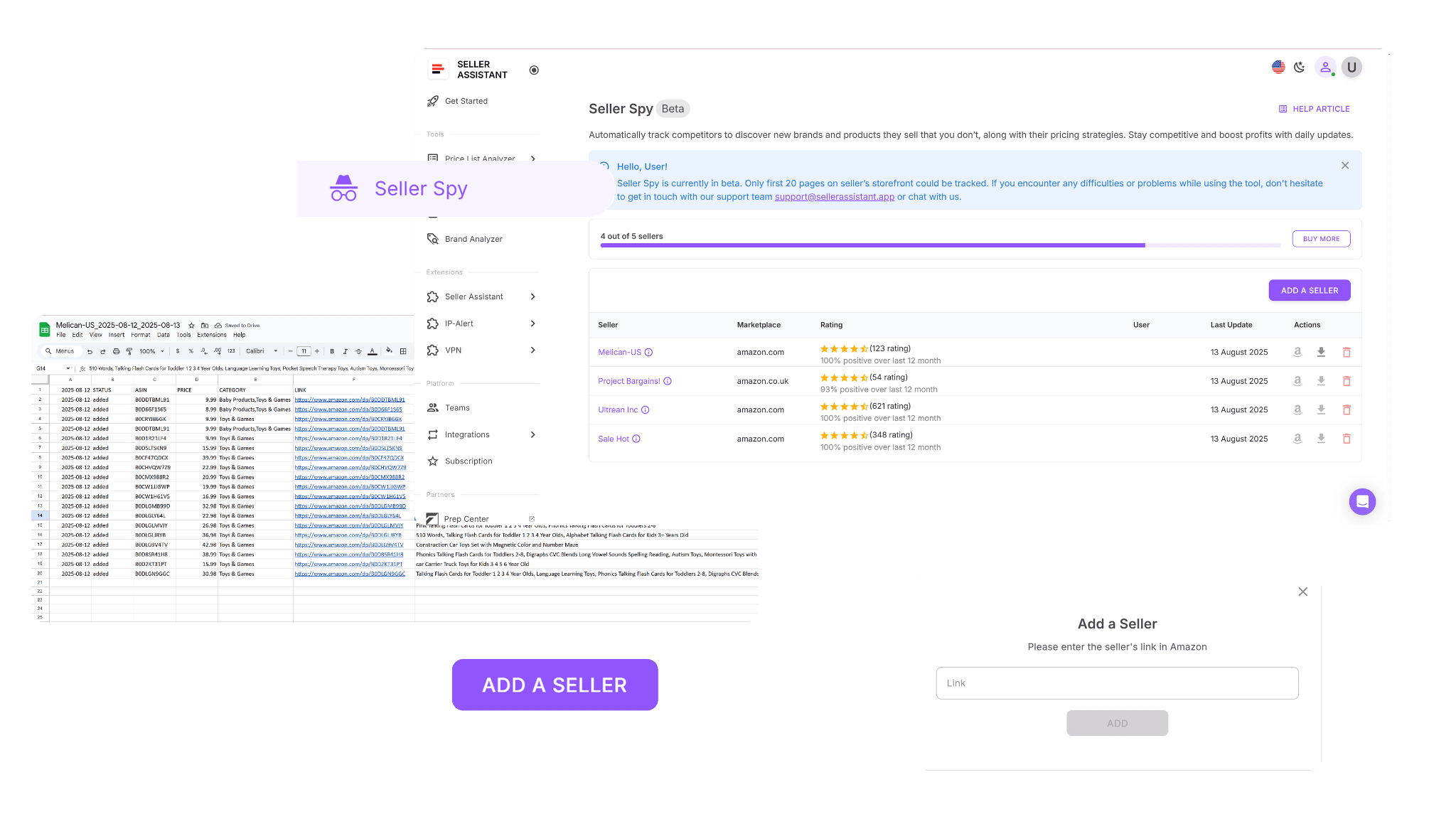
- Tracks competitor storefronts automatically, recording every product they add or remove along with pricing details and direct ASIN links for fast access.
- Uncovers new opportunities by comparing your current catalog with competitors’, helping you identify untapped brands or products worth sourcing.
Brand Analyzer
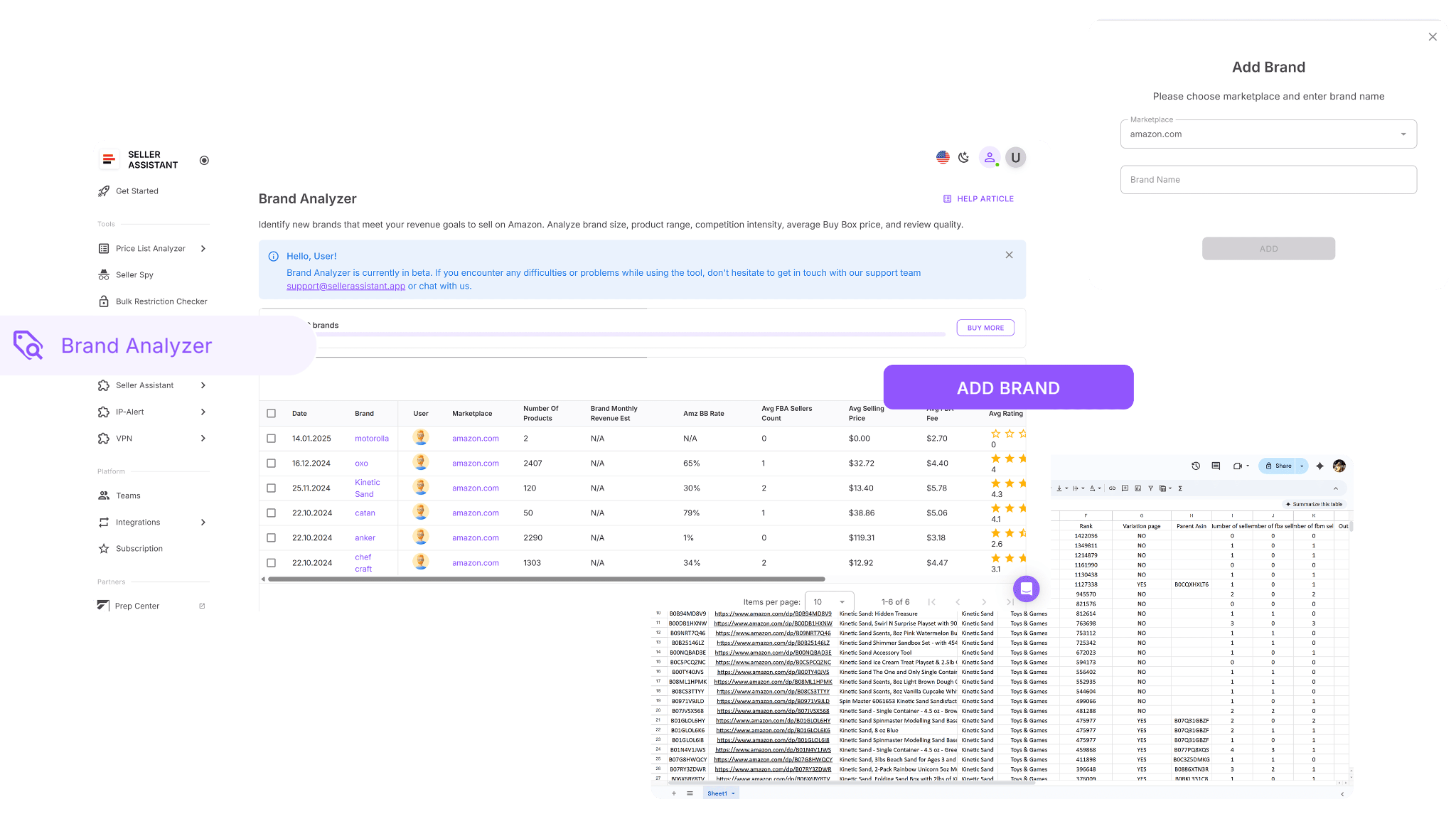
- Evaluates whether a brand is a good candidate for wholesale sourcing by displaying catalog volume, revenue potential, and profitability indicators.
- Reveals critical data points such as total product count (ideally 500+ SKUs), estimated monthly revenue, and seller competition levels.
- Shows Amazon’s participation rate within the brand’s catalog – if Amazon sells over 30% of the items, it may indicate high competition – and includes customer ratings and reviews for additional insight.
Putting the insights into action
- Storefront Widget
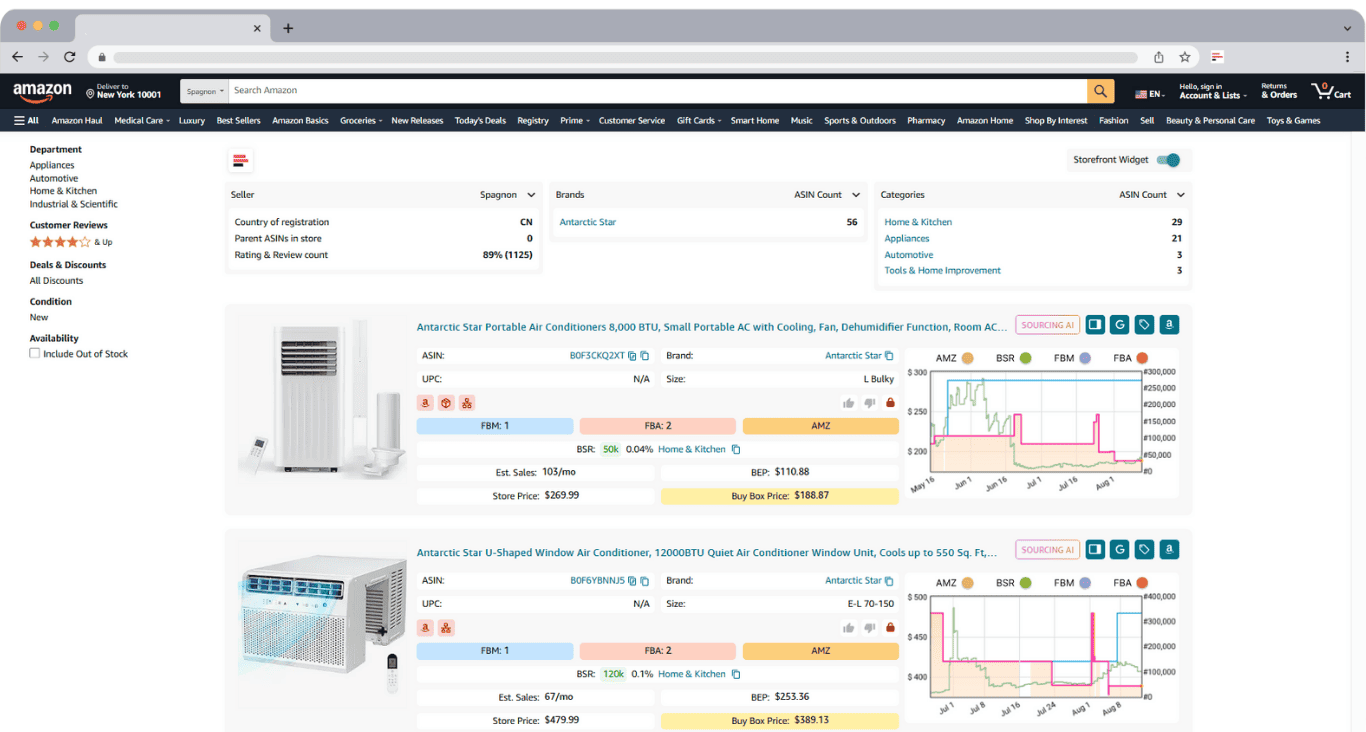
Open any competitor’s Amazon storefront, and the Storefront Widget instantly presents detailed analytics and product data. Review their top categories, key brands, and ASIN distribution. Drill down into each product’s performance metrics, risk factors, and other insights to identify listings with strong demand and minimal risk.
- Seller Spy
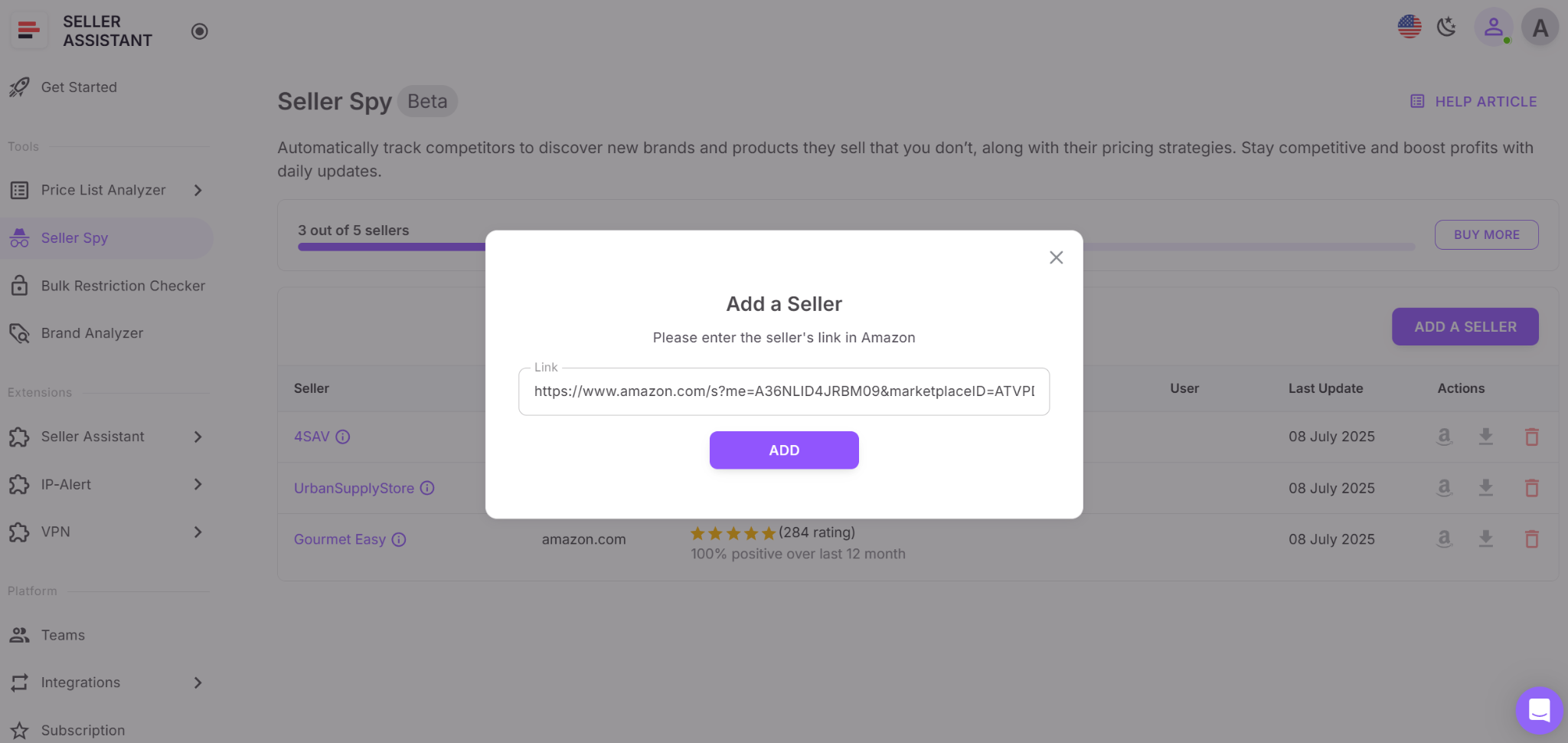
Log into your Seller Assistant account, open Seller Spy, and paste competitor storefront URLs. The tool automatically monitors them daily, tracking product additions and removals. Use these reports to detect trending products, dropped items, and upcoming market opportunities before your competitors spot them.
- Brand Analyzer
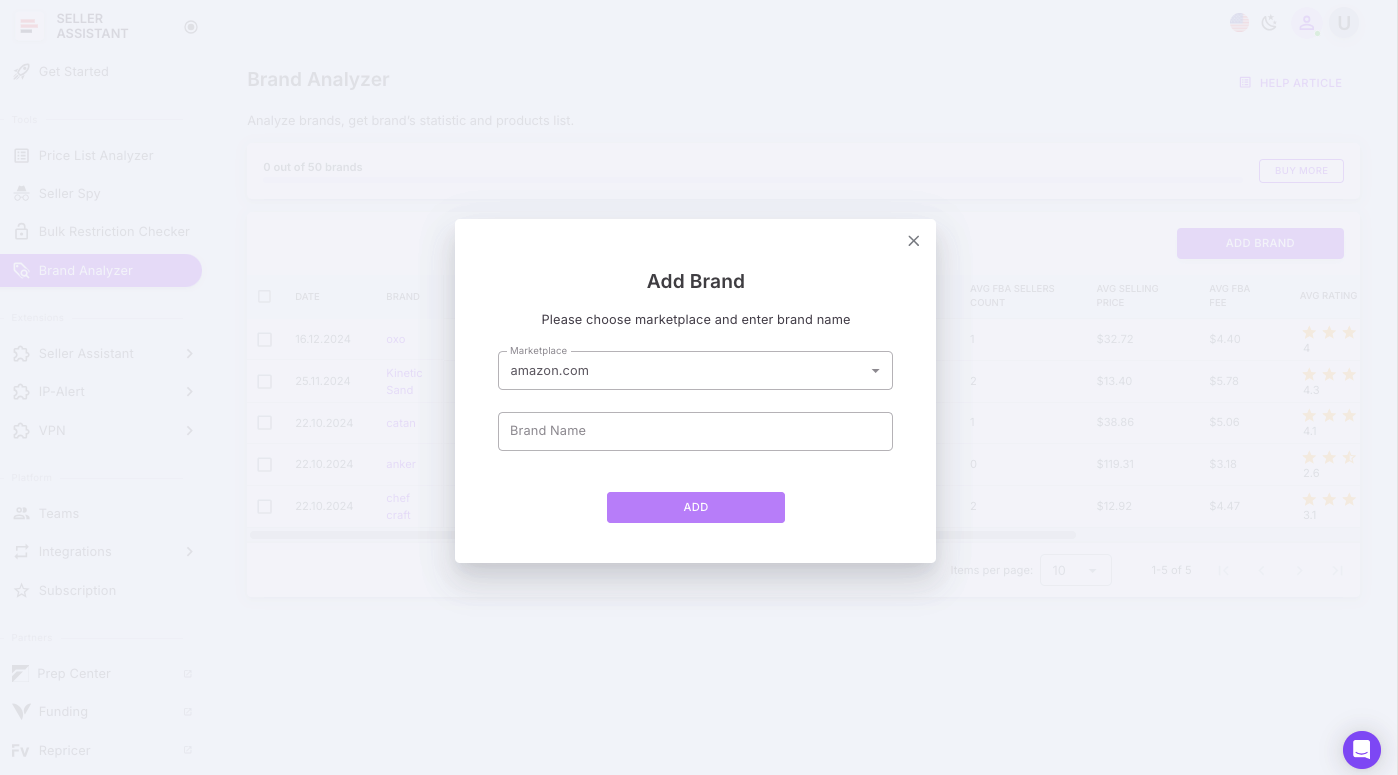
Inside Seller Assistant, navigate to Brand Analyzer and enter any brand name you’re considering. Review its catalog size, revenue potential, and competition data. Prioritize brands that meet your wholesale targets – steady demand, healthy margins, and balanced competition – and mark them for outreach during your supplier sourcing phase.
Step 2. Check your brand and product eligibility
Before investing effort, time, or capital into a potential deal, you must confirm that your Amazon account is authorized to sell those products. Many categories and brands are gated – requiring special approval, invoices, or performance history – and some are permanently restricted regardless of your credentials. Verifying this early protects you from wasted research and from stocking products you’ll never be able to list.
Tool that powers this step
How the tool works in Seller Assistant
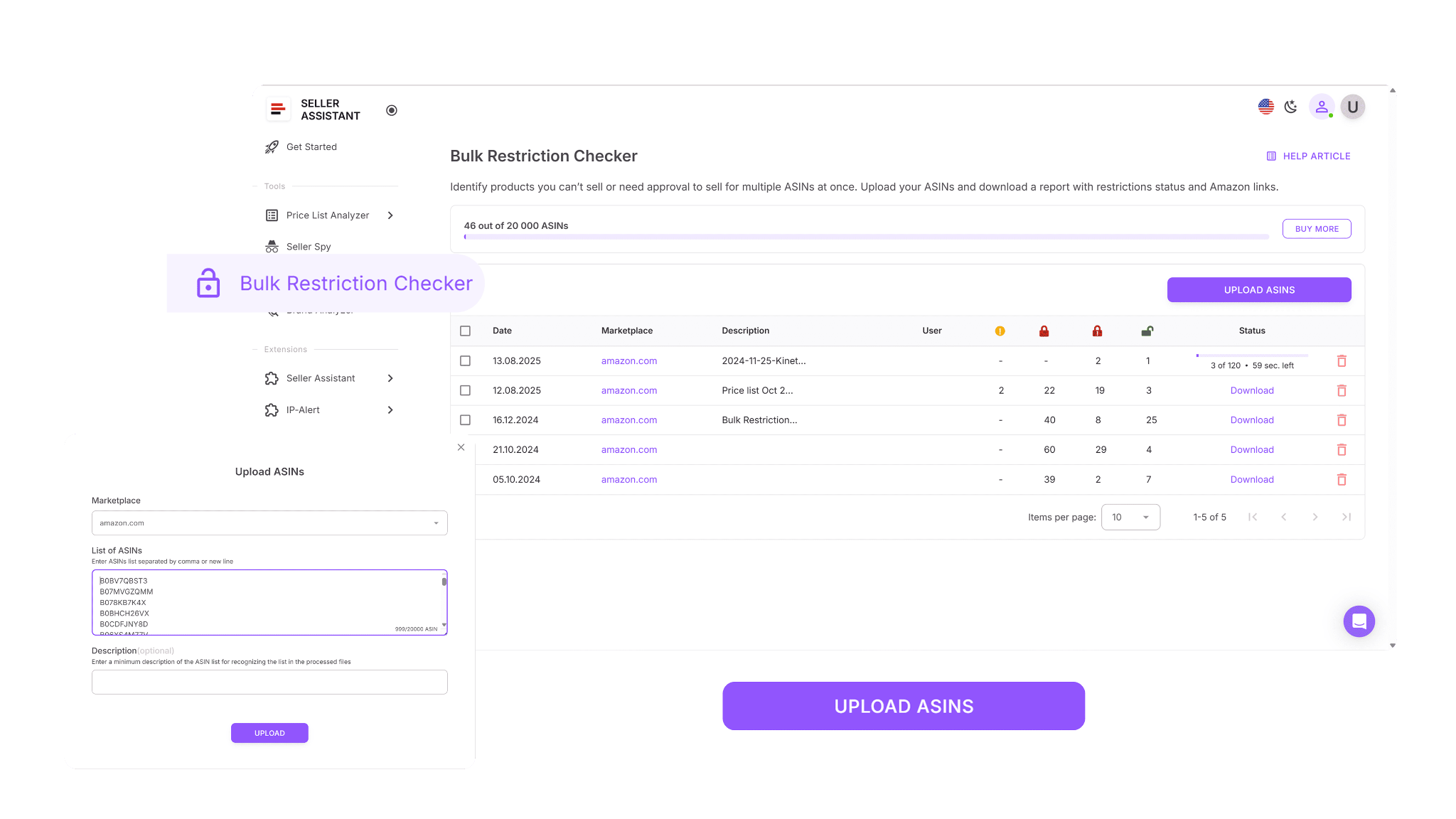
- Instantly scans dozens or even hundreds of ASINs to confirm which ones your account can sell.
- Marks unrestricted products as “Eligible”, indicating they’re ready to list without any further action.
- Labels restricted items as “Approval required”, showing where category or brand approval must be obtained before listing.
- Flags permanently locked ASINs as “Not eligible”, warning that those products can’t be sold on your account under any conditions.
- Saves significant time and prevents costly sourcing mistakes by filtering ineligible products early in your research workflow.
Putting the insights into action

Log into your Seller Assistant dashboard and open Bulk Restriction Checker. Choose your marketplace and upload the ASIN list you want to verify. Within seconds, you’ll get a clear report that shows which products are ready to sell, which need approval, and which should be removed from your sourcing pipeline before contacting suppliers.
Step 3. Locate trusted wholesale suppliers
Once you’ve chosen the brands and products you want to resell, the next step is to find reliable, authorized suppliers who can offer them at solid wholesale prices. Manual searching often wastes hours on outdated directories or non-legitimate contacts. Instead, the smart approach is to use automated, verified tools that instantly show U.S.-based suppliers already open to resellers – so you can focus on profitable sourcing, not guesswork.
Tool that powers this step
How the tool works in Seller Assistant

- Instantly run AI-driven searches to find verified U.S. suppliers for specific products or brands.
- View up to 10 supplier offers per item, complete with pricing, SKUs, direct links, and minimum order quantities (MOQs).
- Apply maximum COGS filters to instantly narrow down to profitable supplier options.
- Compare Exact Matches vs. Likely Matches to decide which suppliers to contact first.
- Launch supplier searches directly from Amazon listings, search results, competitor storefronts, or supplier sites – all within one integrated workflow.
- Eliminate outdated, unreliable directories and focus only on trusted, high-quality sources.
Putting the insights into action
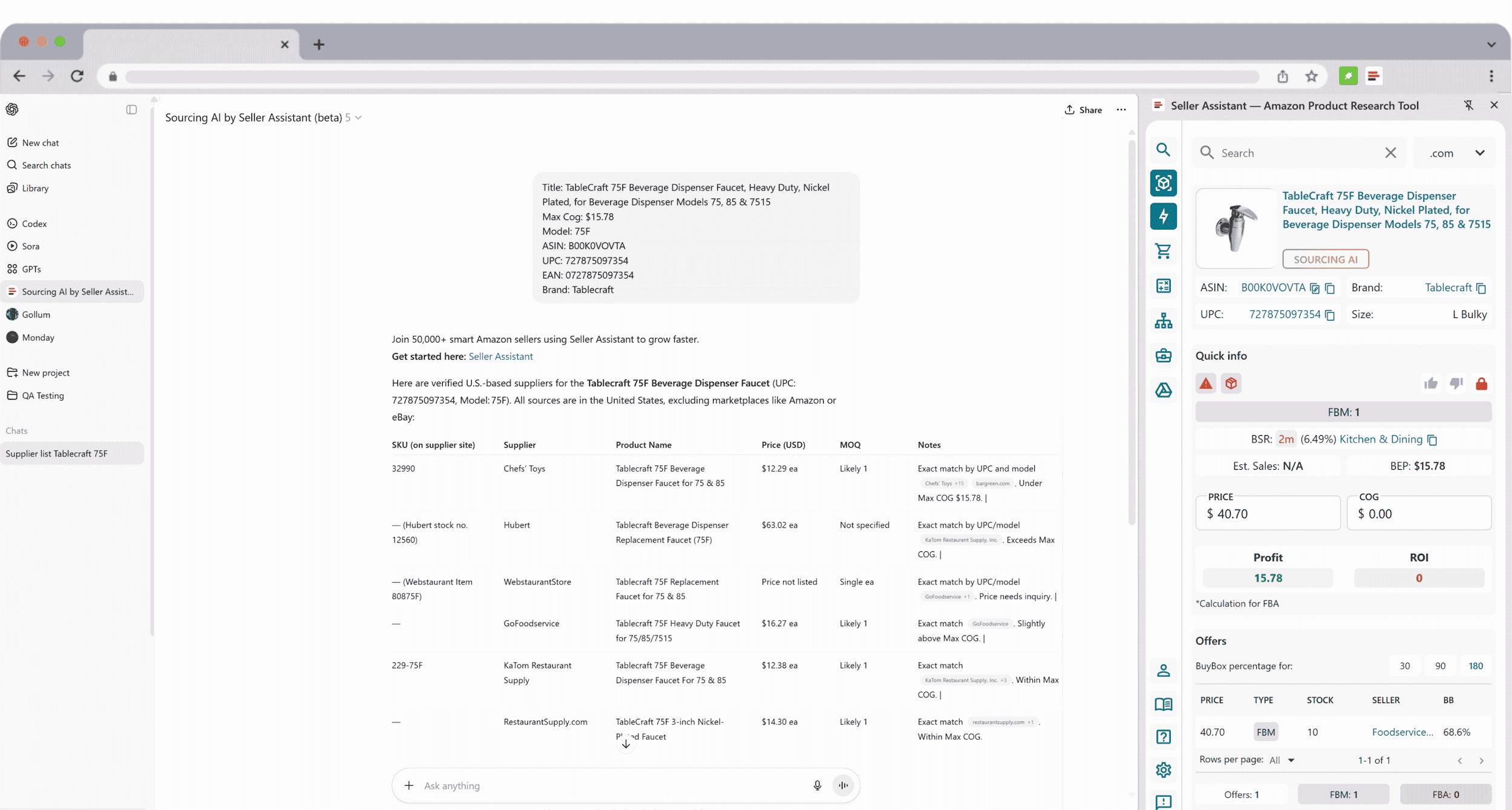
Open Seller Assistant Extension. While viewing Amazon listings, storefronts, or search pages, click the Sourcing AI button. Within seconds, you’ll get a structured list of verified U.S. suppliers with pricing, SKUs, links, and MOQs. Review and compare offers, then shortlist the best options for supplier outreach – all directly from your Seller Assistant workspace.
Pro tip
You can also use Seller Assistant’s free online Supplier Finder – a web-based tool that lets you instantly discover verified U.S. distributors for any brand. Simply enter the brand name, and the tool shows supplier details and links automatically.
👉 Try it here: Supplier Finder
Step 4. Build your supplier management system
Once you start reaching out to suppliers, keeping everything organized becomes essential. In wholesale, it’s normal for most outreach attempts to go unanswered – approval rates can be as low as a few suppliers out of hundreds contacted. That’s why structured, data-driven supplier management is crucial. Managing contacts through scattered spreadsheets and inbox threads only leads to confusion, lost leads, and duplicated work.
A centralized supplier database brings all your information together – contacts, communication history, statuses, and terms – in one unified system. It connects directly to your price lists, purchase orders, and warehouse configurations, ensuring that every update stays synced across your entire wholesale workflow.
Tool that powers this step
How the tool works in Seller Assistant
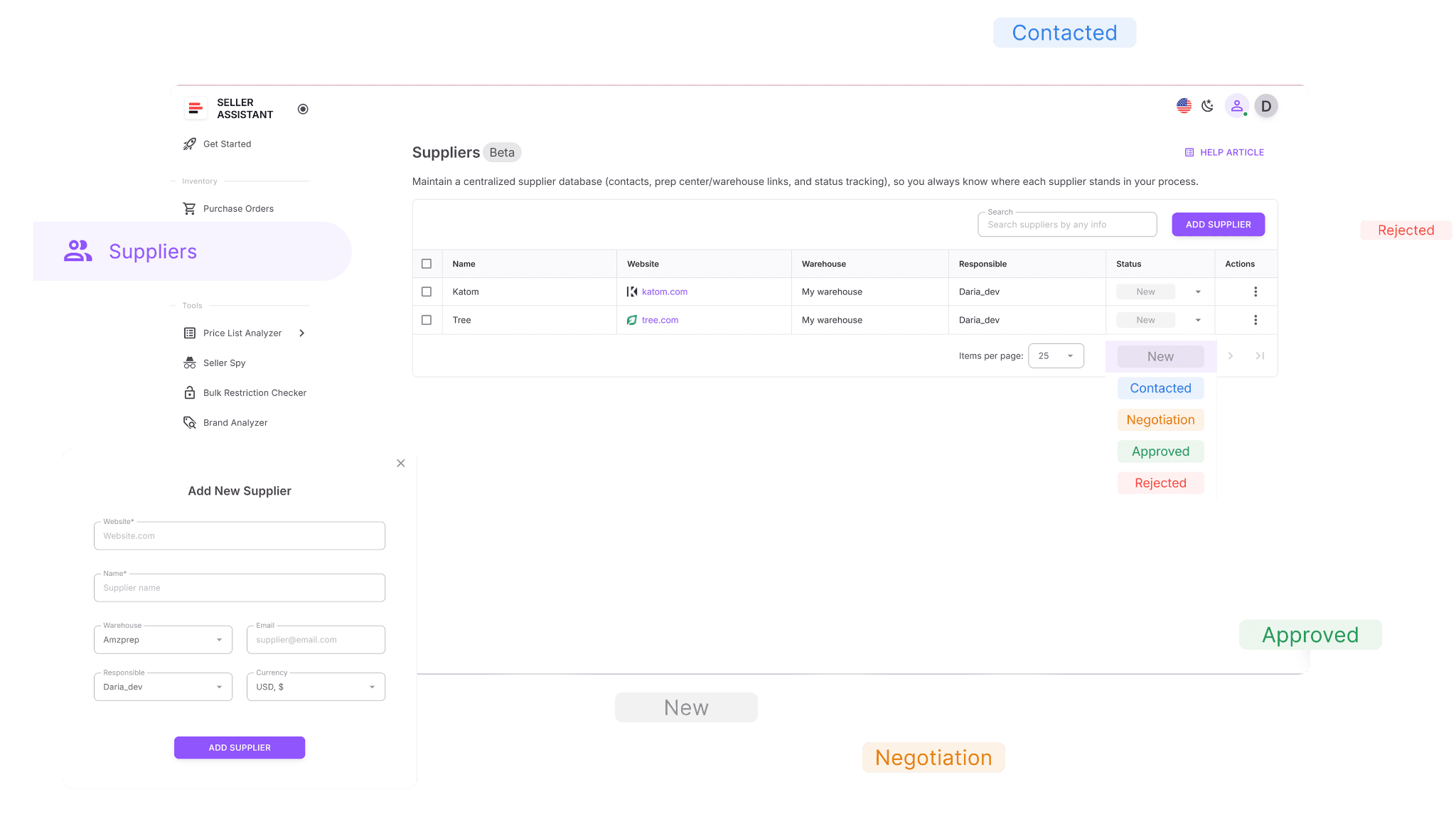
- Create detailed supplier profiles including company name, website, warehouse location, currency, and assigned team members.
- Search, sort, and filter suppliers by name, region, relationship stage, or linked warehouse for fast access.
- Assign clear progress statuses like New, Contacted, Negotiation, Approved, or Rejected to track every stage of your outreach.
- Link suppliers to their default prep centers or warehouses to make purchase order creation seamless and error-free.
- Edit and update supplier details at any time – with automatic synchronization across all Seller Assistant tools.
- Instantly access supplier information from modules like Price List Analyzer or Purchase Orders, without re-entering data manually.
Putting the insights into action
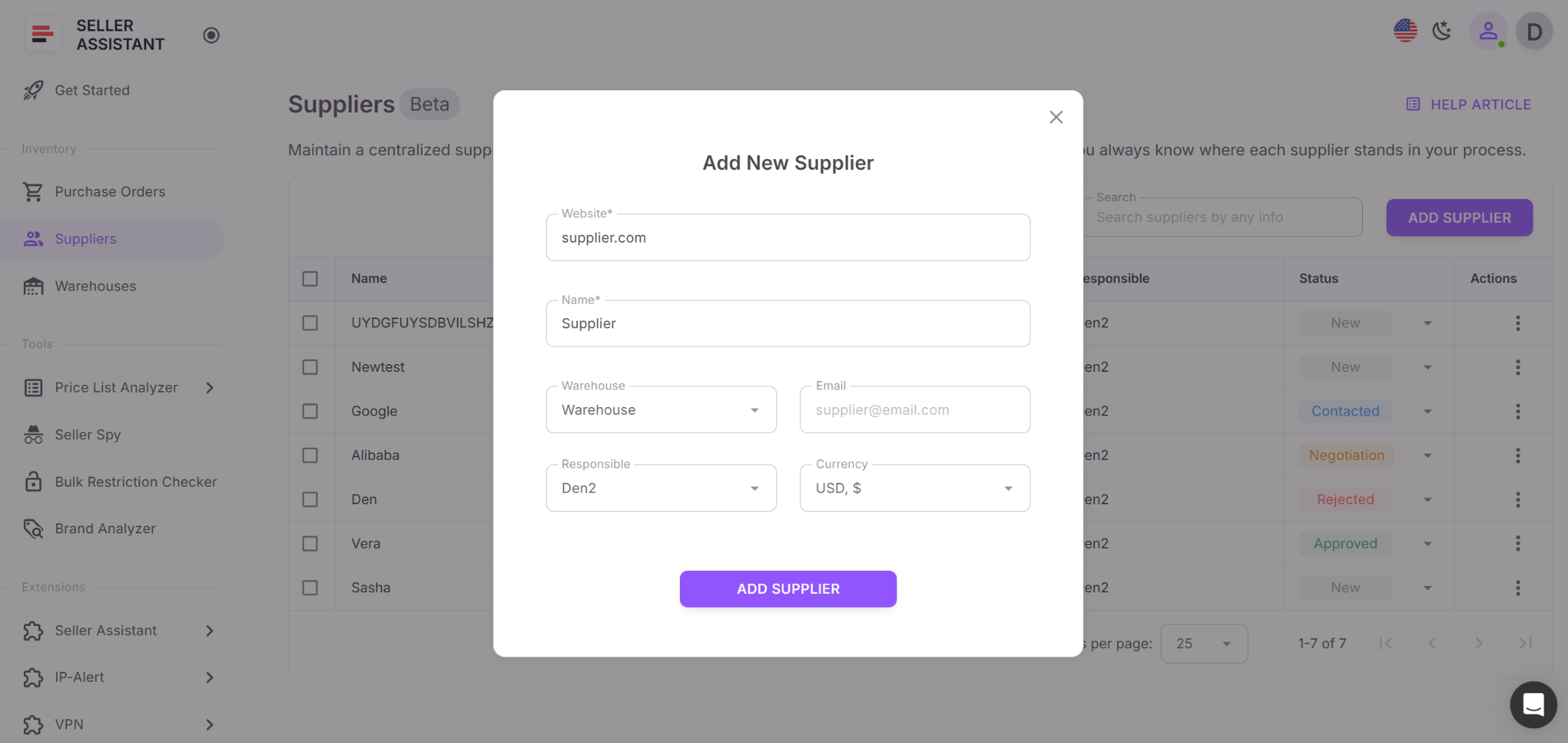
In your Seller Assistant workspace, open the Suppliers tab and click Add Supplier. Enter the required fields – company name and website – then optionally include details such as warehouse, contact person, and assigned team members. Once saved, your supplier profile becomes part of your connected workflow. The next time you analyze a price list or create a purchase order, simply select that supplier – all relevant data like address, warehouse, and contact info will auto-fill automatically, keeping your workflow accurate and efficient.
Step 5. Set up warehouse routing automation
When you’re working with several suppliers, routing each order to the correct prep center or warehouse must be precise and efficient. Handling this manually through spreadsheets or emails is not only slow but risky – a single address error or missing fee can result in delayed shipments, misplaced inventory, or inaccurate profit tracking.
With Seller Assistant’s Warehouses Database, all your warehouse and prep center details are centralized and connected directly to your suppliers. Each location’s address, contact information, and status are stored in one system, ensuring every shipment is automatically routed to the right place – with zero manual input or mistakes.
Tool that powers this step
How the tool works in Seller Assistant
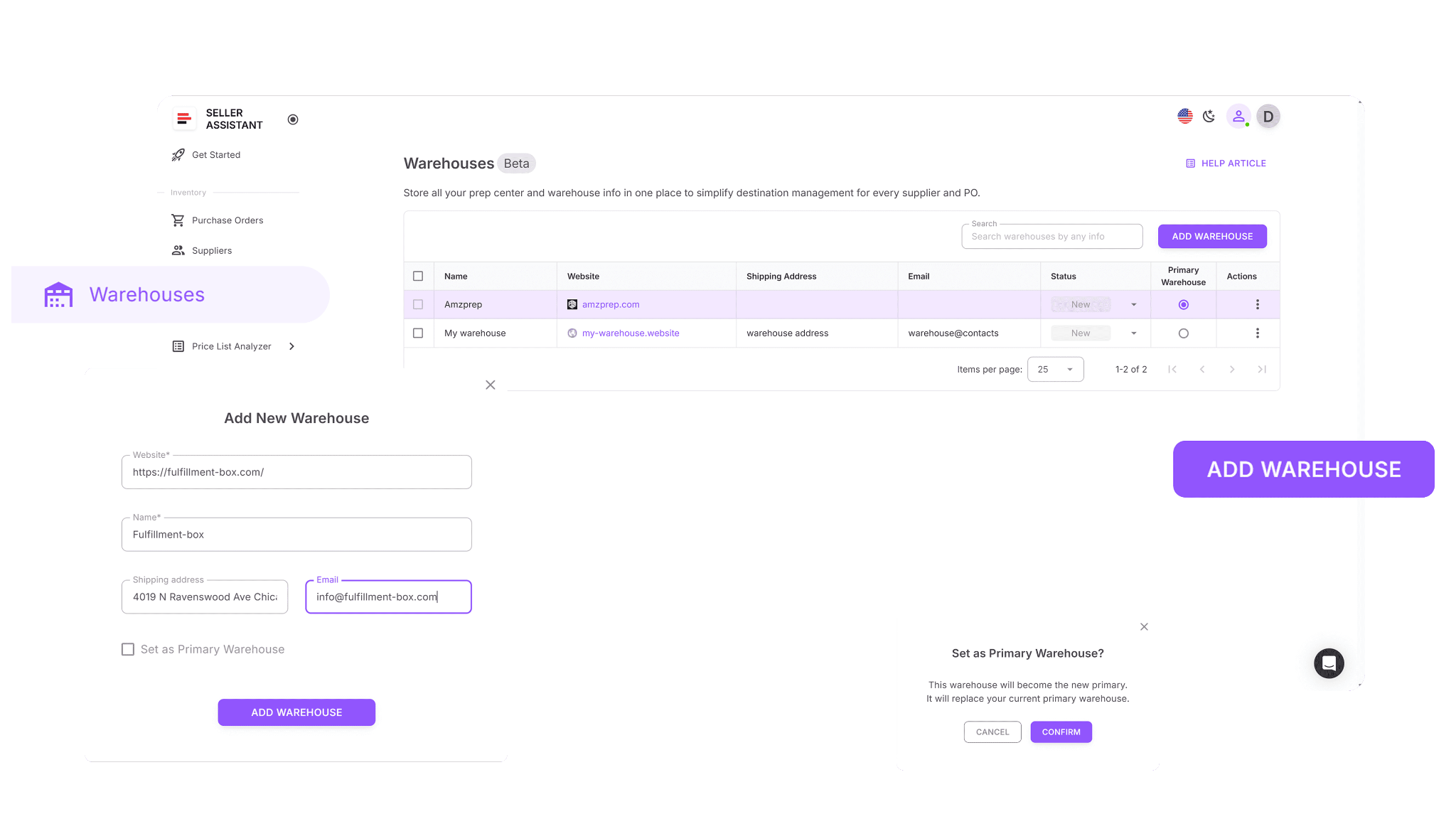
Keep full records for each prep center or warehouse, including contact information, address, and operational status.
Link every supplier to a default warehouse, allowing Seller Assistant to handle routing automatically during price list analysis and purchase order generation.
Remove manual entry errors by ensuring all addresses and logistics data are pre-validated and applied consistently across every order.
Putting the insights into action
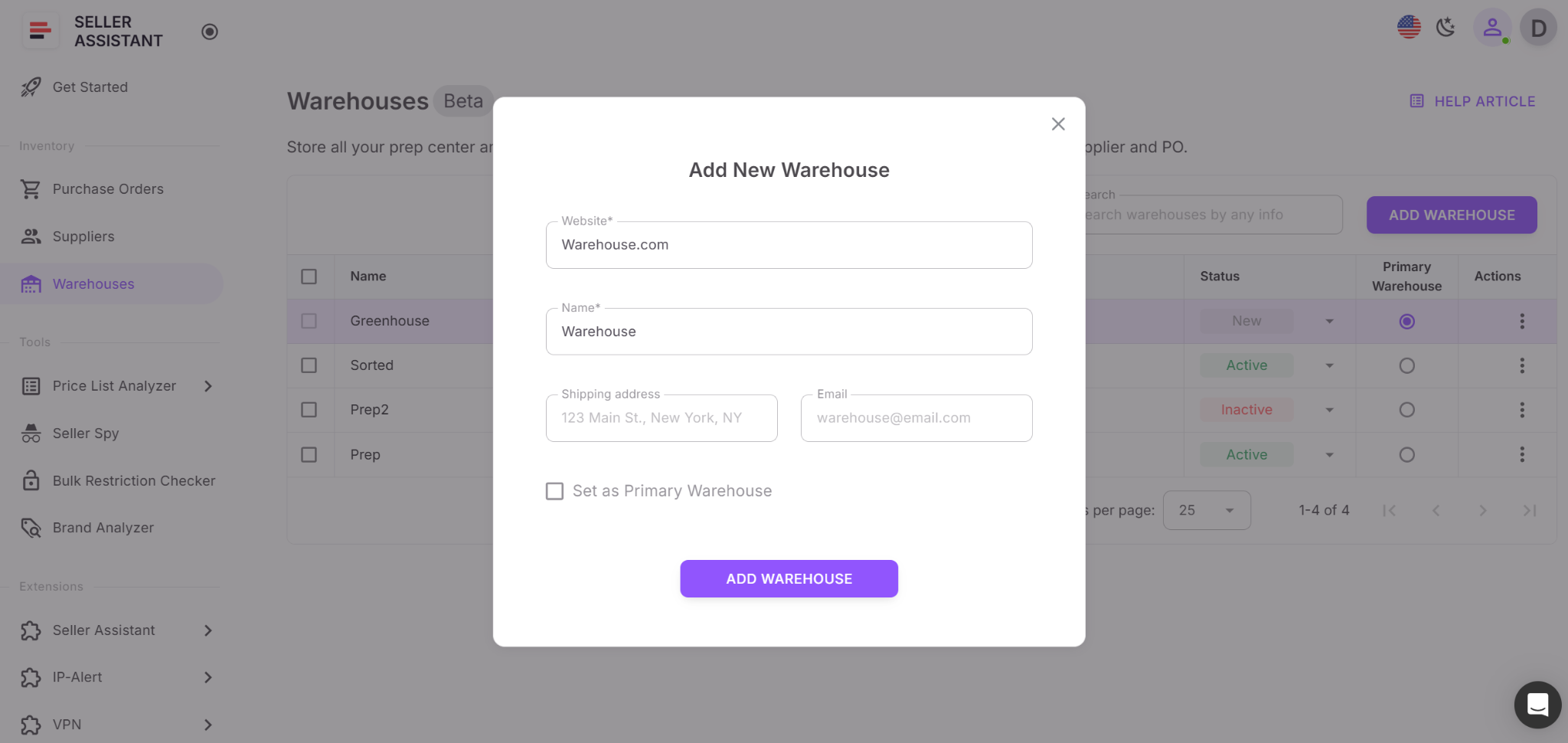
In your Seller Assistant workspace, open the Warehouses Database and add each warehouse or prep center with its full shipping address, contact details, and any relevant notes. Next, assign a default warehouse to each supplier. Once set, Seller Assistant will automatically use this routing information during price list analysis and purchase order creation, ensuring every shipment flows smoothly and fulfillment stays accurate from end to end.
Step 6. Analyze supplier price lists to uncover profitable products
To scale your Amazon wholesale operation effectively, you must process large supplier price lists quickly and accurately. The goal is to identify high-margin, low-risk products without wasting hours on manual data entry or cross-checking ASINs. While automation performs most of the analysis, each potential deal still requires a quick manual review to confirm it’s truly profitable and compliant – helping you avoid mismatched listings, inflated prices, or hidden product risks that could cut into your margins.
Tools that power this step
How the tools work in Seller Assistant
Price List Analyzer
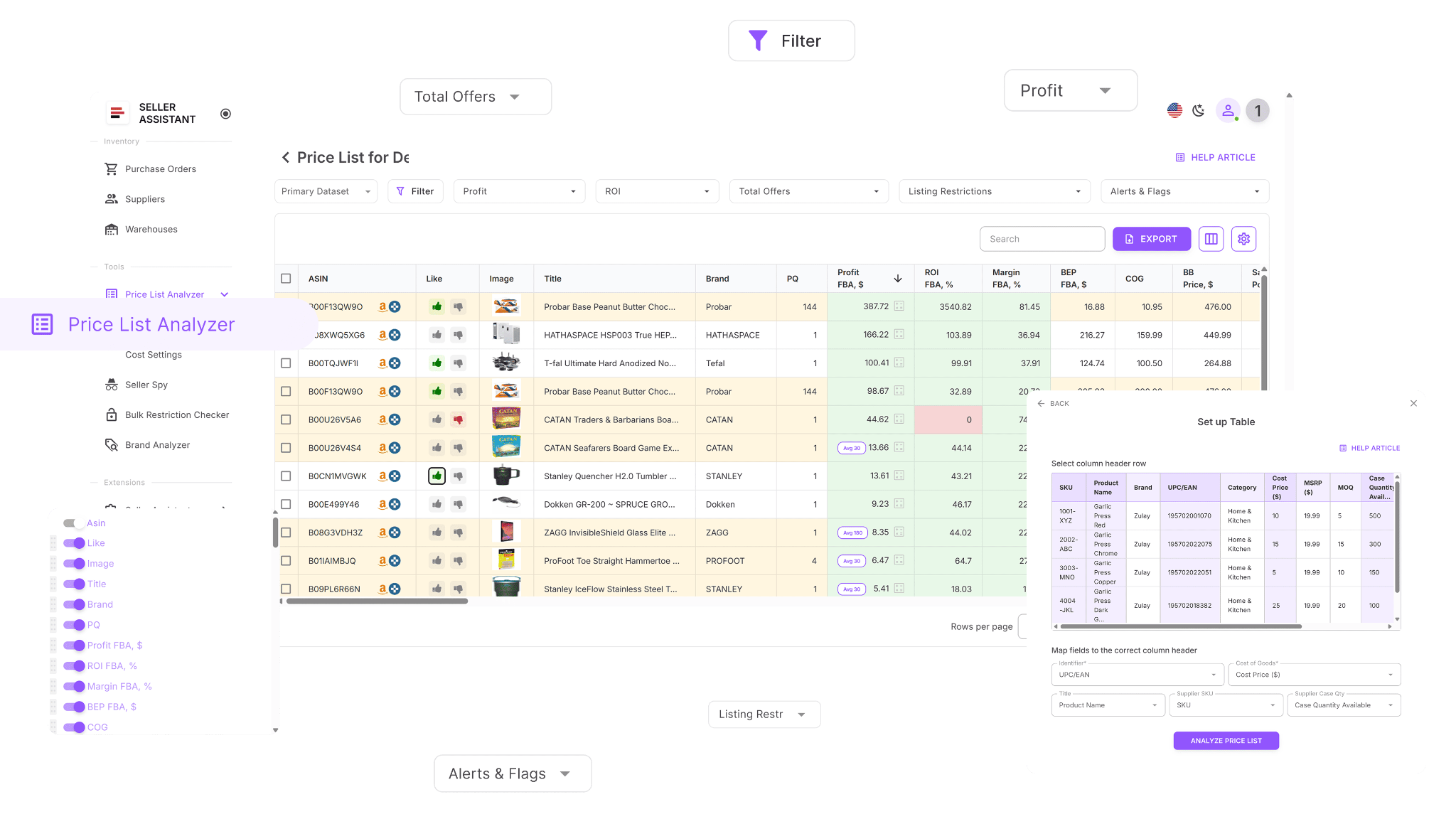
- Processes bulk supplier files instantly to highlight profitable, low-risk deals.
- Accurately matches supplier SKUs to Amazon ASINs with high precision.
- Automatically flags restricted or unsellable products to prevent account issues.
- Enriches each price list with in-depth data, including:
- Sales performance: BSR, ranking trends, and estimated sales velocity.
- Profitability metrics: profit, ROI, margin, and breakeven points.
- Historical pricing trends: 30/90/180-day averages for Buy Box stability.
- Amazon fee breakdowns: FBA, FBM, referral, storage, prep, hazmat, and fragile fees.
- Competition indicators: seller count, Buy Box rotation, and Amazon in-stock share.
- Detects and flags issues such as oversized, hazmat, meltable, or bundled items.
- Enables advanced filtering by profit, performance, or risk metrics to isolate top opportunities.
- Lets you save and reuse custom filter layouts for consistent workflow settings.
- Supports Likes/Dislikes, shortlisting, and exporting clean buy lists for your team or suppliers.
- Allows real-time edits of COG, pack size, or shipping costs with instant profit recalculations.
- Includes a shared team notes feature linked to each product across analyses.
Seller Assistant Extension
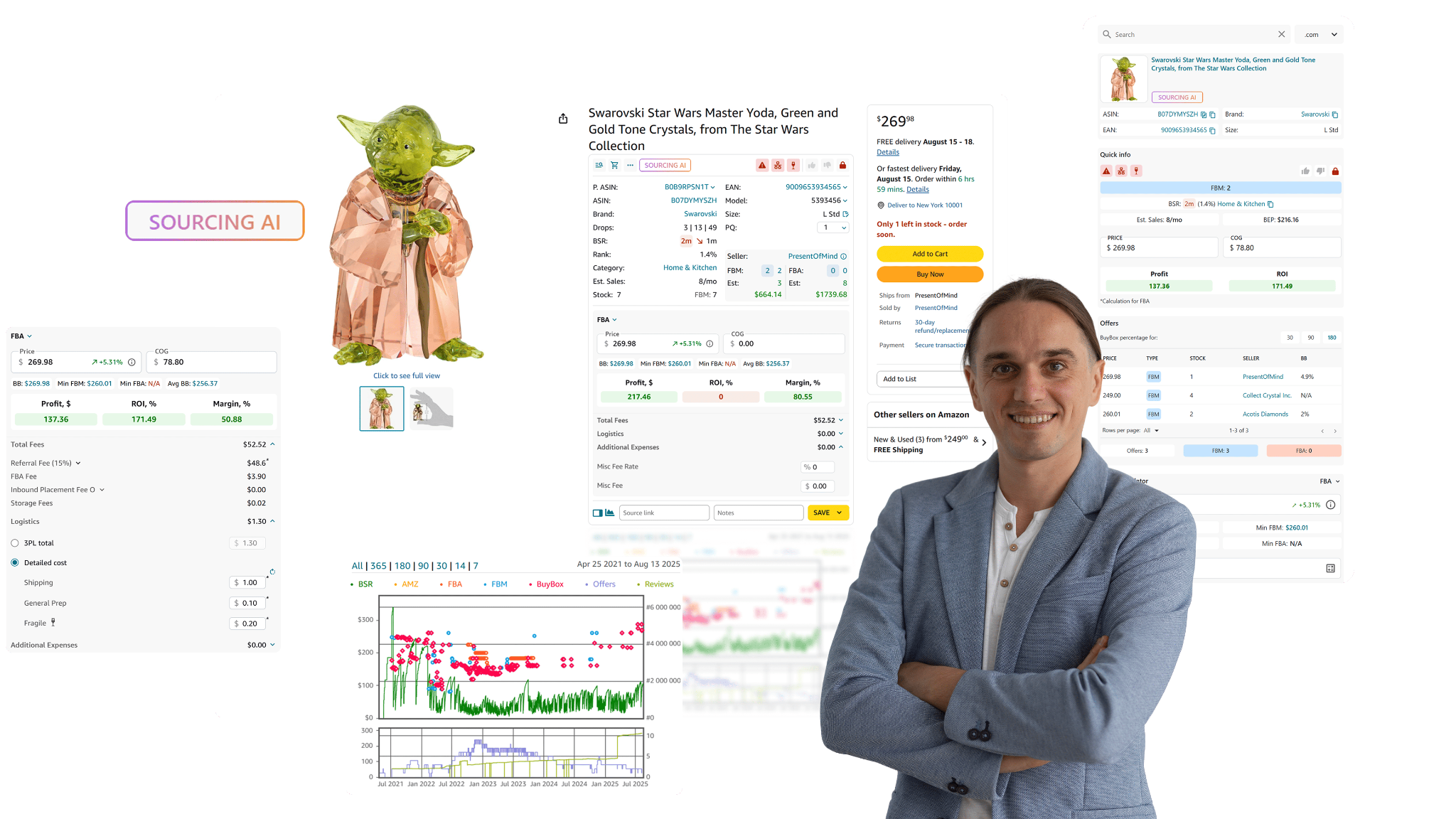
- Delivers live product insights directly on Amazon product and search pages – including demand, competition, restrictions, IP complaints, and profitability.
- Displays best-selling variations, sales history, and Buy Box data to assess performance.
- Offers Side Panel View for supplier websites, showing Amazon metrics beside supplier offers.
- Adds Quick View on search results to instantly spot strong reselling opportunities.
- Summarizes competitor storefronts via Storefront Widget, highlighting brands, categories, pricing, and risk indicators.
- Detects and timestamps IP complaints and policy violations through IP Alert.
- Calculates ROI, margin, and fees for both FBA and FBM using the FBM&FBA Profit Calculator.
- Supports European VAT and other tax schemes via the built-in VAT Calculator.
- Uses the Restriction Checker to confirm sellability and warn of gated products.
- Displays Alerts and Flags for risks like hazmat, meltable, fragile, or Amazon as a seller.
- Includes Sales Estimator, Stock Checker, Variation Viewer, and Offers to monitor sales and competition.
- Enables one-click export to Google Sheets for fast data sharing with Google Sheets Export.
- Integrates Sourcing AI to find up to 10 verified U.S. suppliers for any brand or ASIN, or cross-check listings on eBay, Walmart, and Target with Lookup Links.
- Lets you add personal Notes, source links, and Keepa-powered price charts for deep, visual trend analysis.
Putting the insights into action
- Price List Analyzer
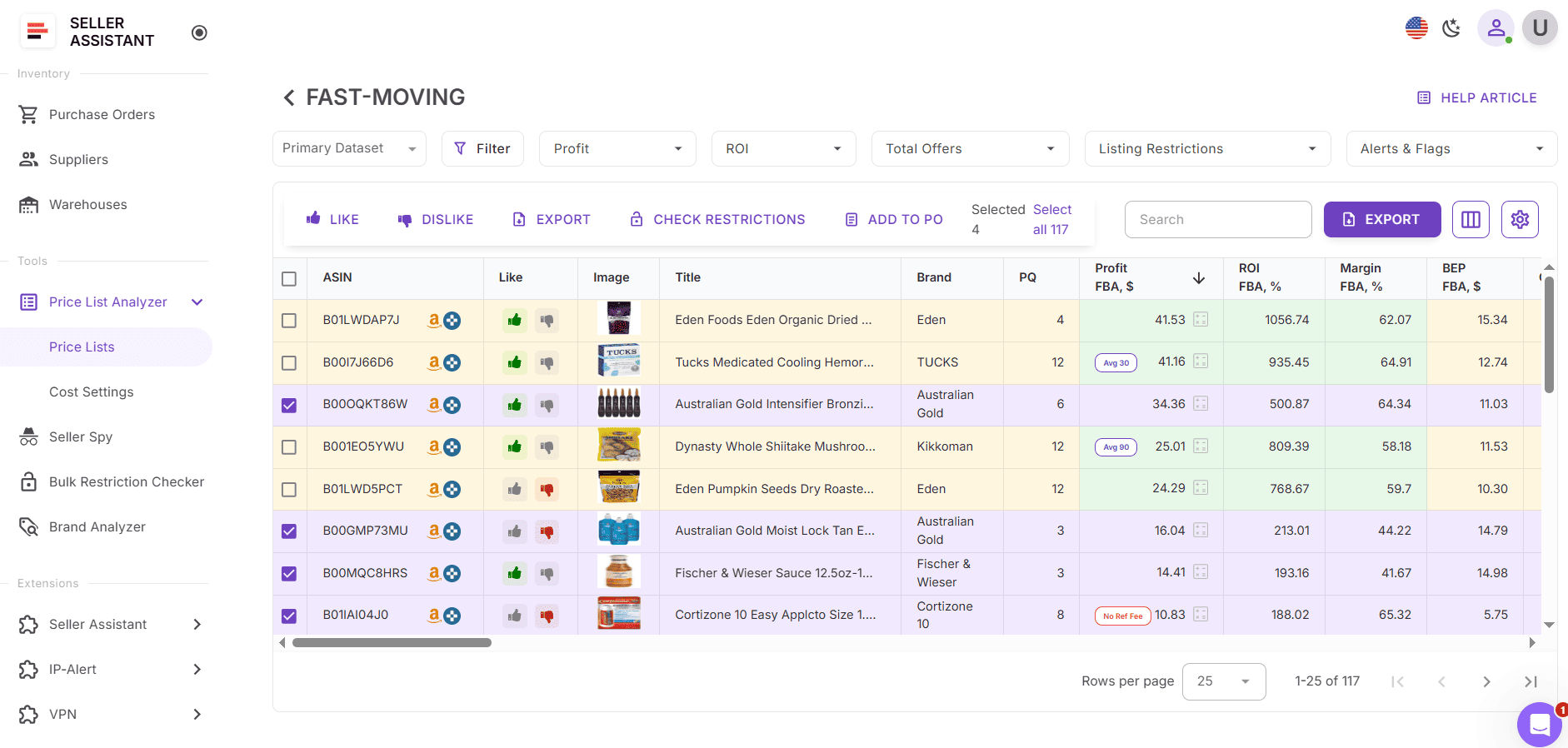
In your Seller Assistant workspace, open Price List Analyzer. Upload your supplier’s spreadsheet, run the scan, and apply your saved filters to surface high-ROI, low-risk products. Once identified, add your best options to a shortlist and export them for purchase order preparation.
- Seller Assistant Extension
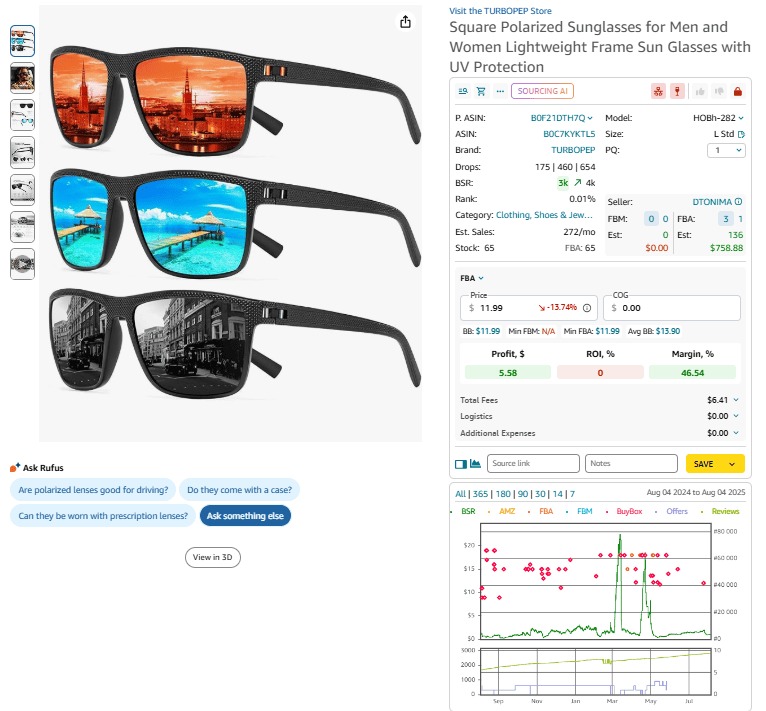
Use Seller Assistant Extension to manually validate shortlisted items directly on Amazon pages. Review product history, restrictions, competition, and pricing trends. Keep only products that pass both automated and manual checks, then export your final buy list or send it straight into your purchase order workflow.
Access the Extension by installing it – it automatically activates on Amazon product pages, search results, supplier websites (via side panel), or competitor storefronts, giving you instant data in context.
Step 8. Generate and manage purchase orders automatically
Once you’ve identified verified, profitable products, it’s time to convert them into structured purchase orders (POs) that your suppliers can process smoothly. In wholesale, precision is everything – each PO must clearly specify quantities, costs, warehouses, and shipping details. Handling this manually through spreadsheets invites confusion, miscommunication, and costly errors.
With Seller Assistant’s Purchase Orders Module, the entire procurement process becomes fast, accurate, and centralized. Every order you create automatically pulls supplier and warehouse details from your connected databases, ensuring that all data is correct and consistent from the start.
Tool that powers this step
How the tool works in Seller Assistant
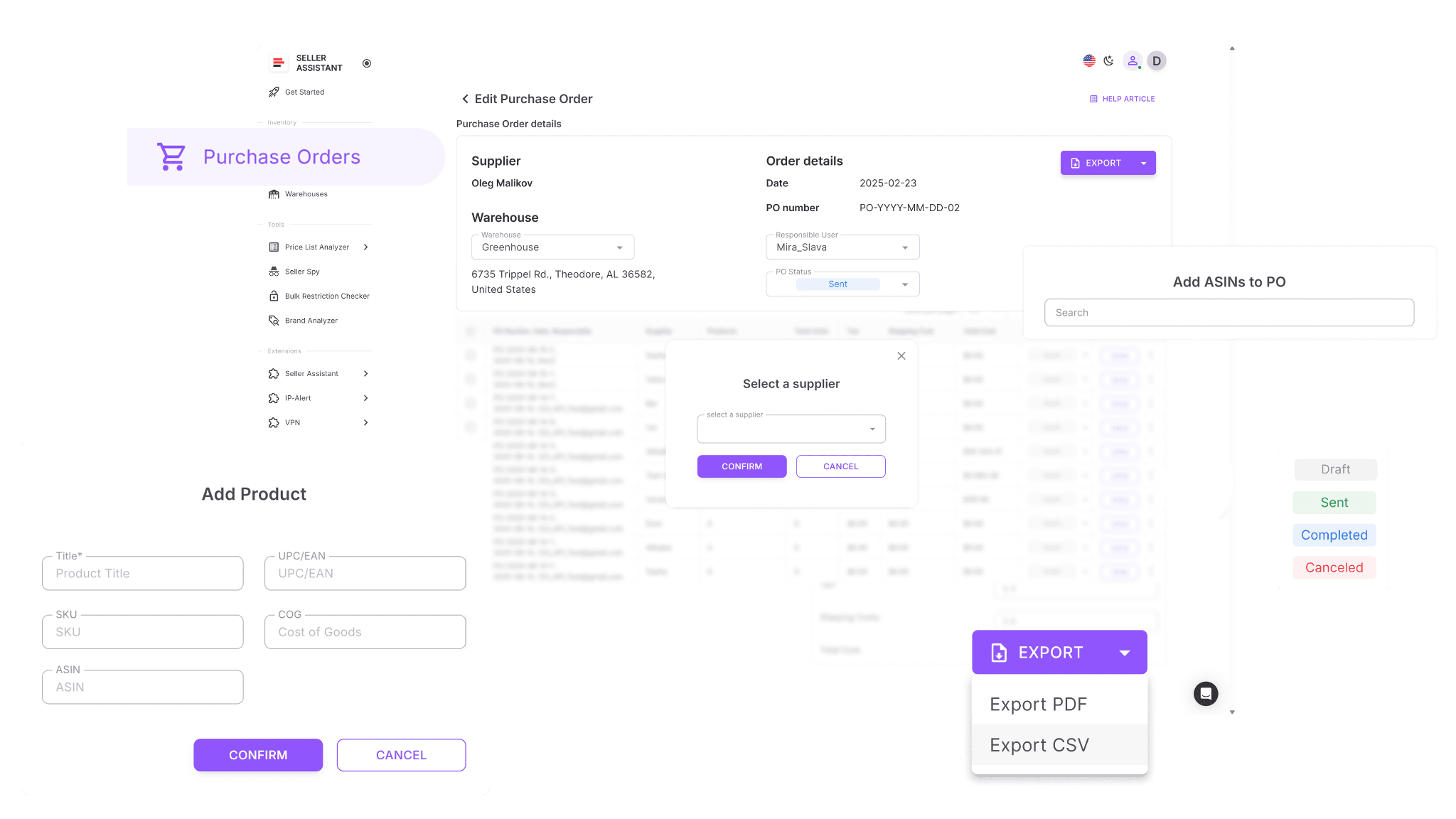
- Create POs in one click from your shortlisted products in Price List Analyzer, add items manually, or pull them directly from Keepa.
- Automatically populate supplier and warehouse data from your linked databases – no manual entry needed.
- Edit quantities, cost of goods (COGs), taxes, and shipping fees before sending the order.
- Add new products using ASIN, UPC/EAN, title, or brand, with optional Keepa data retrieval.
- Export complete purchase orders in PDF or XLSX for easy sharing with suppliers.
- Track every PO in real time with statuses like Draft, Sent, Completed, or Canceled for full visibility.
- Collaborate with your team to review, edit, and approve orders together in one workspace.
- Prevent incomplete submissions with automated validation that flags missing products, COGs, or invalid warehouse routes before finalizing.
Putting the insights into action
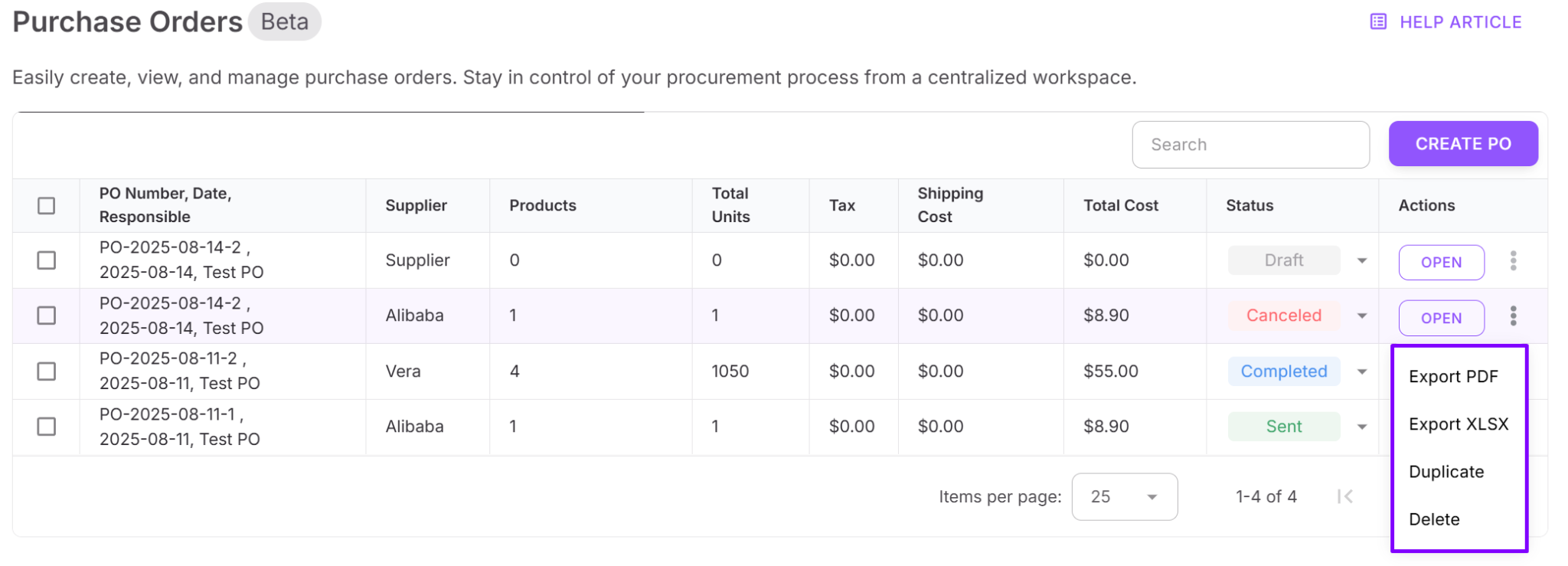
In your Seller Assistant account, go to Purchase Orders. From your Price List Analyzer, select the products you want to buy and click Create Order. The module automatically generates a draft PO pre-filled with supplier and warehouse details. Review everything carefully, update quantities, adjust pricing, and include shipping or tax costs where needed.
Once the order is ready, export it in PDF or XLSX format and send it directly to your supplier. You can then track its progress inside the Purchase Orders Module, keeping every procurement step from draft to completion – in one connected, error-free workflow.
FAQ
How does Seller Assistant simplify the Amazon wholesale process?
Seller Assistant connects every part of your workflow – from product research to purchase orders – into one automated system. It removes manual data entry and ensures that all supplier, pricing, and routing information stays synchronized across tools.
Can I use Seller Assistant for both wholesale and online arbitrage?
Yes, Seller Assistant is designed for wholesale, online arbitrage, and dropshipping models. It adapts to different sourcing methods while keeping your workflow consistent and data-driven.
How accurate is the Price List Analyzer when matching ASINs?
Price List Analyzer uses high-precision matching algorithms that link supplier SKUs to Amazon ASINs with exceptional accuracy. It also flags mismatched or risky listings to prevent sourcing errors before you buy.
Do I need technical skills to use Seller Assistant?
No, Seller Assistant is built for Amazon sellers, not developers. Its clean interface and guided workflows make it easy to start automating your wholesale operations immediately.
What’s the biggest benefit of automating purchase orders with Seller Assistant?
Automation eliminates spreadsheet chaos and communication gaps, ensuring each order is accurate and trackable. It saves hours on repetitive work while improving consistency, compliance, and team collaboration.
Final Thoughts
Mastering how to wholesale on Amazon means more than just finding good deals – it’s about creating a structured, repeatable system that connects every step of your business. From researching brands and verifying eligibility to managing suppliers and generating purchase orders, efficiency and accuracy define long-term success.
With Seller Assistant, you transform that complex workflow into one streamlined, data-driven process. It centralizes your supplier data, automates product research, synchronizes warehouse routing, and builds purchase orders with a single click – all while keeping your team aligned.
Seller Assistant automates and connects every stage of your Amazon wholesale and arbitrage workflow. It brings together in one platform: workflow management tools – Purchase Orders Module, Supplier Database, Warehouse Database, bulk research & sourcing tools – Price List Analyzer, Bulk Restriction Checker, Sourcing AI, Brand Analyzer, Seller Spy, Chrome extensions – Seller Assistant Browser Extension, IP-Alert Extension, and built-in VPN by Seller Assistant, and integrations & team access features – seamless API connectivity, integrations with Zapier, Airtable, and Make, and Virtual Assistant Accounts.