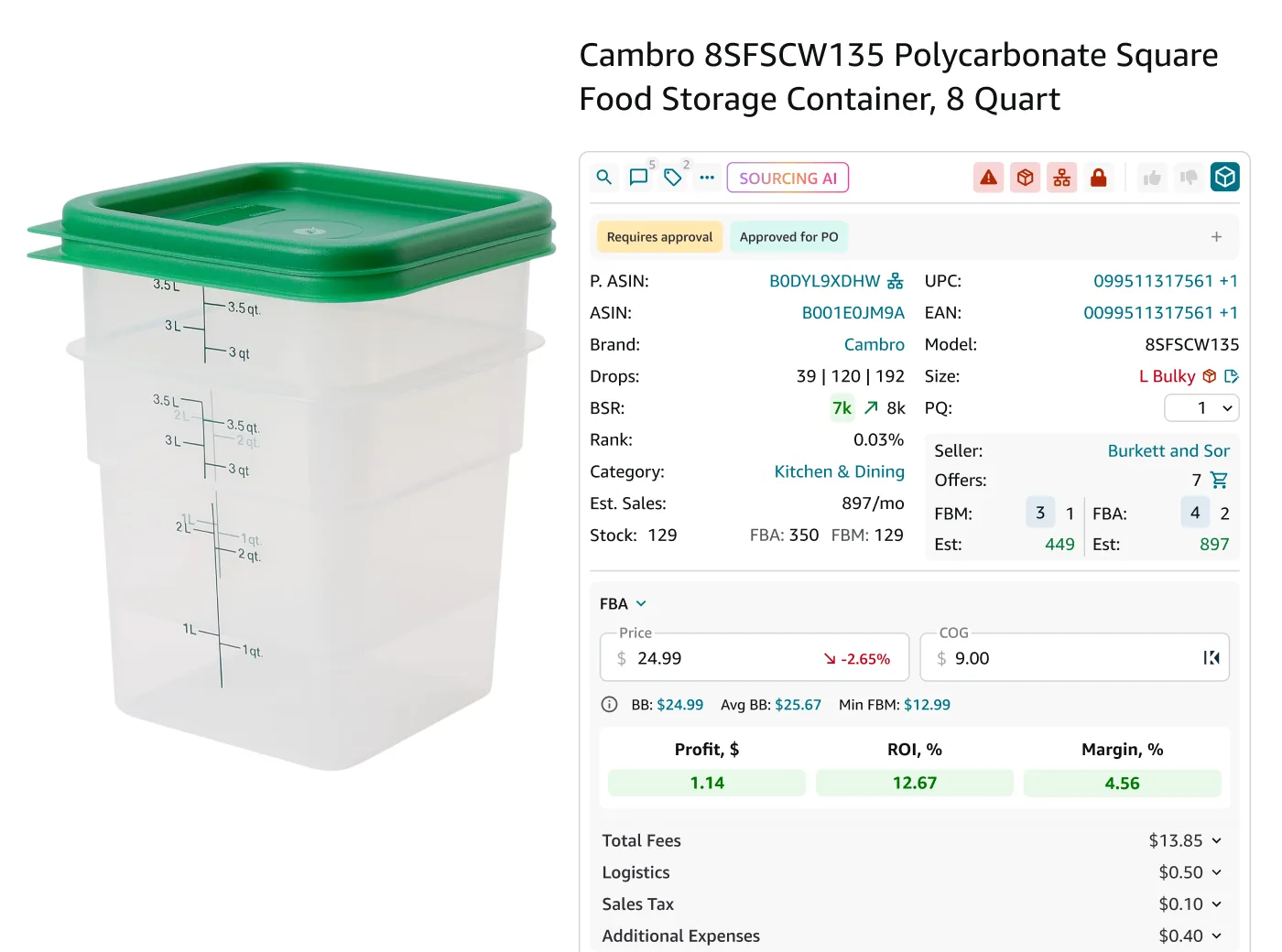
Sourcing products is the cornerstone of successful Amazon selling. Whether you’re just starting out or looking to expand your Amazon store, finding the right products can make or break your business.
It’s not just about picking items; it’s about in-depth product research, profitability analysis, and understanding supplier relationships.
In this post, we’ll dive into the best practices for sourcing products tailored specifically for wholesale and online arbitrage sellers, and dropshippers. If you aim to maximize your margins, this guide will give you actionable insights on how to grow and streamline your sales on Amazon.
What Is Amazon Product Sourcing?
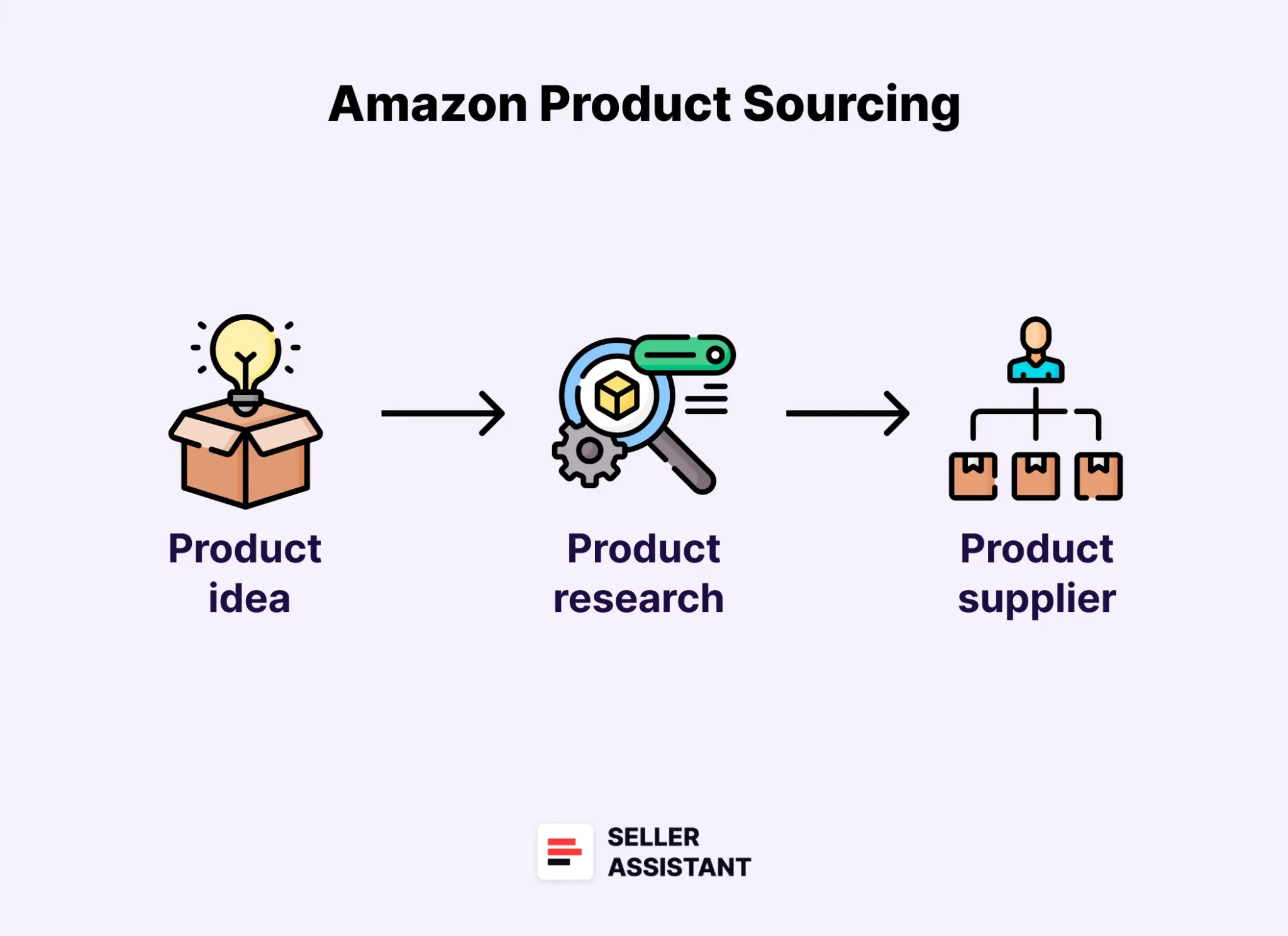
Amazon product sourcing
Amazon product sourcing is the process of finding and acquiring products to sell on Amazon’s marketplace. With Amazon sourcing, sellers research and select items that can be purchased at a low cost and resold at a higher price for a profit.
Product sourcing involves two major parts: finding a product on Amazon that sells well and has no risks (intellectual property complaints, Amazon policy violations, etc.) and its supplier (typically off-Amazon) that offers the same product for a much lower price. When you find such a deal, you can list it on Amazon and make a profit once it’s sold.
Successful sourcing ensures the products align with market demand, comply with Amazon’s rules, and generate sustainable revenue.
Related: Seller Assistant Extension Review
The Best Amazon Online Arbitrage Tool — Seller Assistant
How to Dropship on Amazon with Seller Assistant
Amazon Wholesale: How to Sell Wholesale on Amazon
Why is product sourcing important?
Product sourcing is the foundation of a profitable Amazon business. It involves identifying, evaluating, and obtaining products to resell. Without effective product sourcing, you risk choosing items that aren’t profitable, face high competition, or violate Amazon’s policies.
Correct product sourcing helps avoid common pitfalls. For instance, some products may infringe on intellectual property rights, have negative reviews that deter buyers, or you may not be eligible to sell on your Amazon account. Failing to identify these risks before purchasing inventory can result in money losses. By sourcing effectively, you maximize profit potential and minimize risks.
Key questions to answer during product sourcing
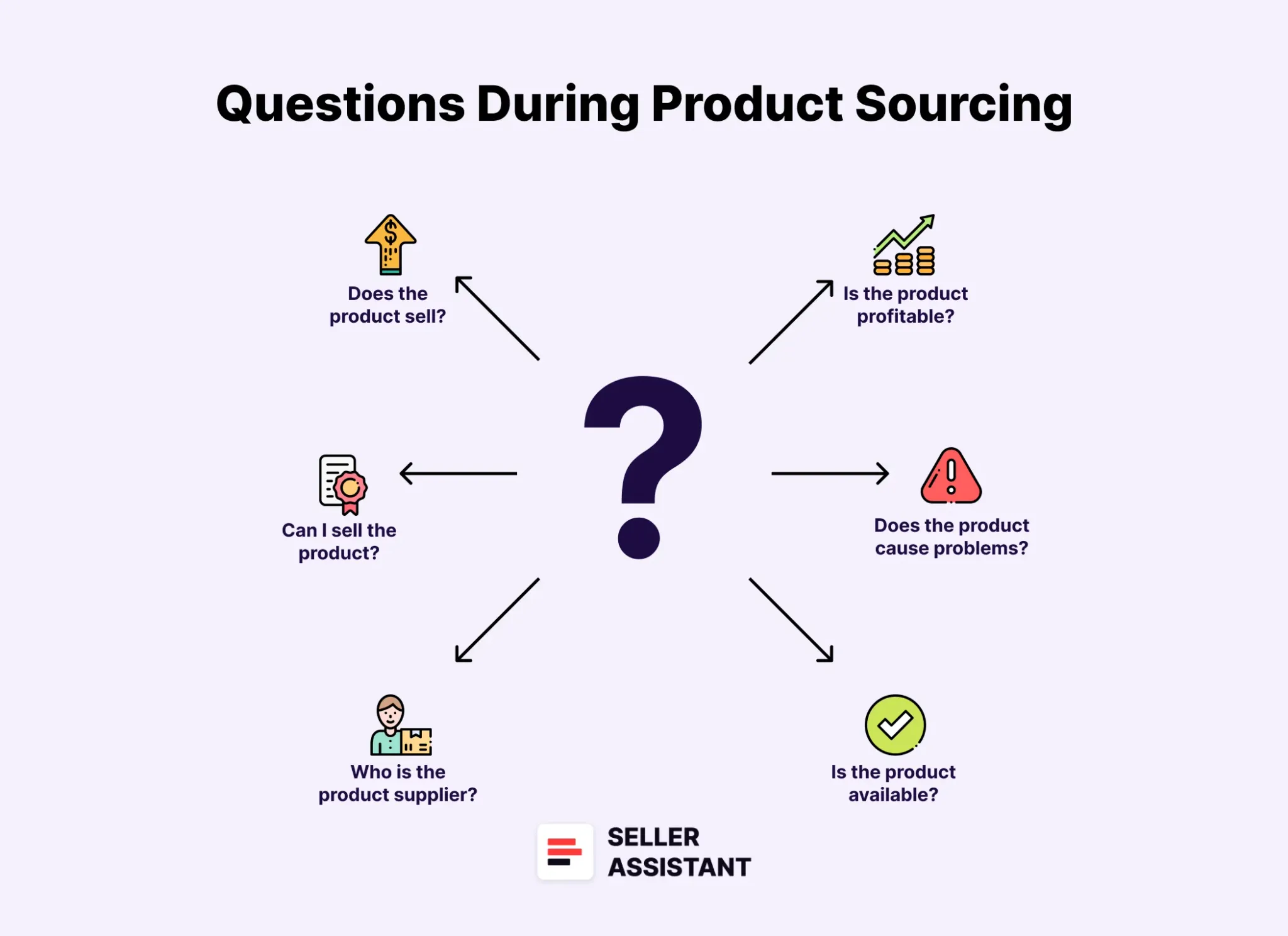
Key questions to answer during product sourcing
When you do product sourcing, you must make sure it’s the right choice to avoid financial losses. With successful sourcing, you need to answer five critical questions described below.
- Does the product sell?
Evaluate the product’s popularity on Amazon. Look for high demand and consistent sales history using tools like sales rank or competitor analysis.
- Can I sell the product?
Verify that you’re eligible to sell the product under your Amazon account. Certain products may require approval or be restricted.
- Who is the product supplier?
Identify reliable and legitimate suppliers who offer competitive prices. Ensure they can provide quality products and consistent stock.
- Is the product profitable?
Calculate potential profit margins. Factor in costs like purchasing, shipping, Amazon fees, and storage to ensure profitability.
- Does the product cause problems?
Research potential issues, such as intellectual property claims, bad reviews, or low ratings, which could impact your ability to sell the product effectively.
What is the process of product sourcing?
The product sourcing process varies depending on the business model you follow. Here’s how it works for the two main types of sourcing.
Wholesale sourcing (bulk sourcing)
Wholesale sourcing involves purchasing products in large quantities from a supplier, often at discounted prices, and reselling them for a profit. The key steps include finding a wholesale supplier, analyzing the supplier’s wholesale price list to identify profitable products, and purchasing inventory in bulk to resell on Amazon.
This method is ideal for sellers looking for scalability, but it requires upfront investment and bulk inventory management.
Online arbitrage and dropshipping sourcing (single product sourcing)
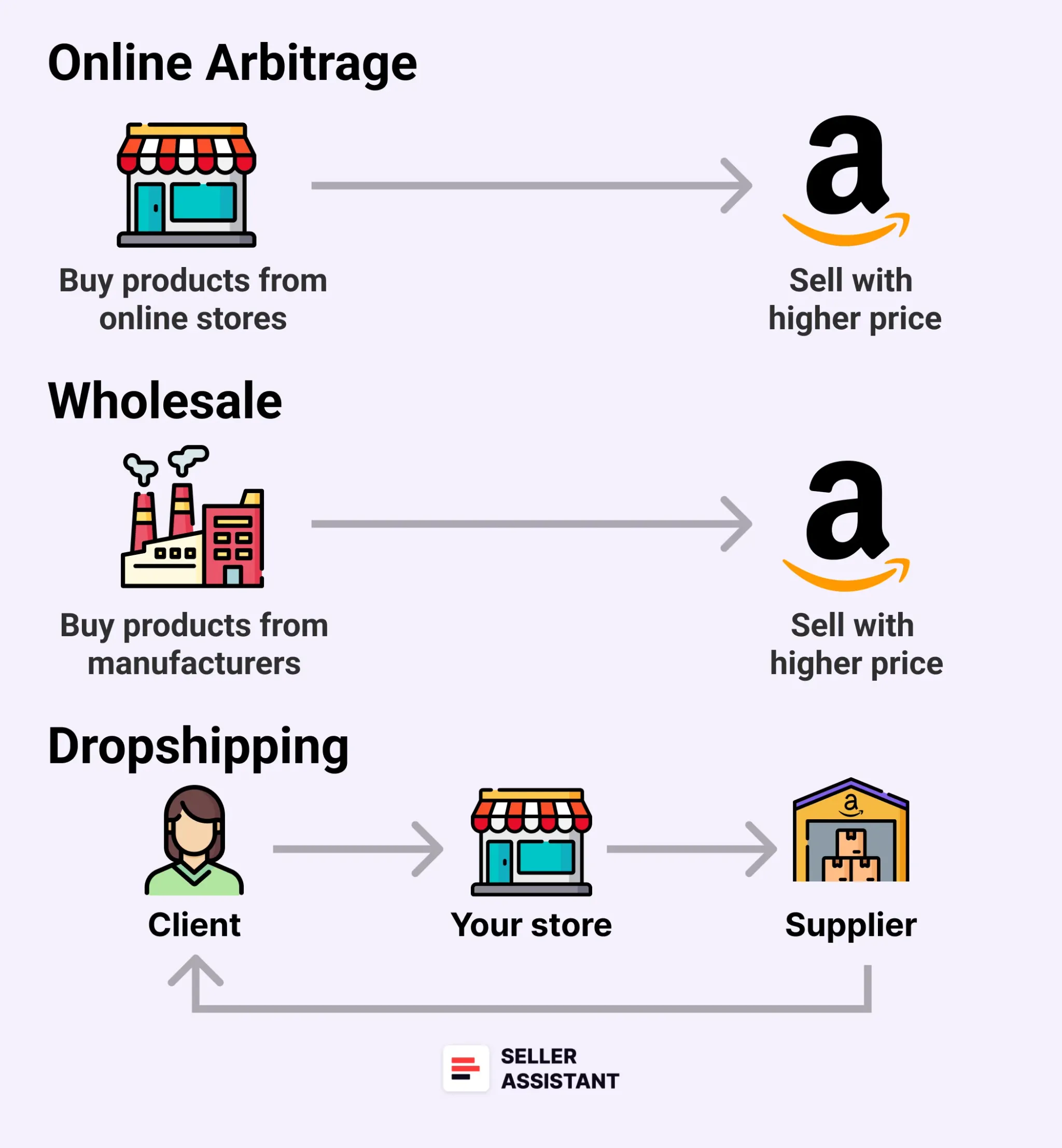
Online Arbitrage vs. Wholesale
Online arbitrage and dropshipping sourcing focuses on acquiring products individually rather than in bulk.
- Online arbitrage
With online arbitrage, sellers buy discounted products from retail or online stores and resell them on Amazon. The key is to sell inventory quickly to avoid storage fees. This model works best with thorough research to find fast-moving, low-risk items.
- Dropshipping
Instead of holding inventory, sellers work with suppliers who ship products directly to customers after a purchase. Dropshipping minimizes upfront costs and eliminates storage needs, but profit margins may be lower, and quality control depends on the supplier.
Key differences between wholesale and online arbitrage/dropshipping sourcing
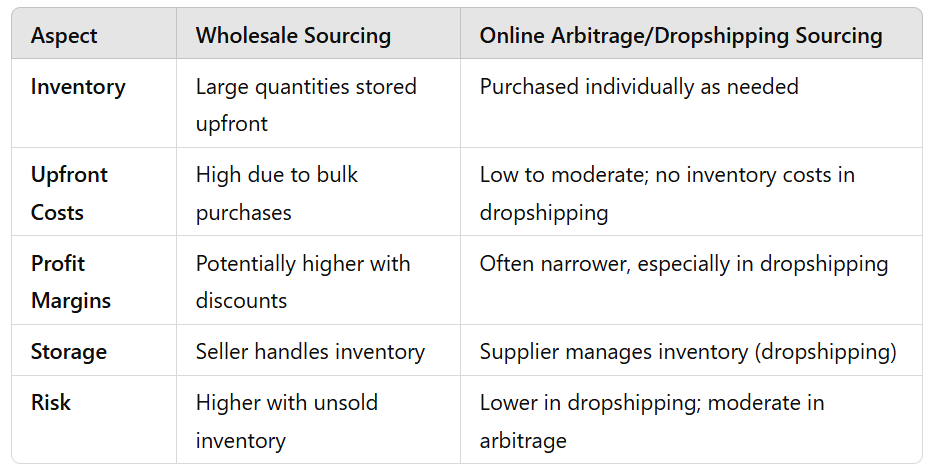
Key differences between wholesale and online arbitrage/dropshipping sourcing
If you sell wholesale, you have to find a supplier, get his price list, choose profitable products from that list, and sell them on Amazon.
If you sell with online arbitrage or dropshipping, you need to find popular Amazon products that have minimum selling risks, and then look for a supplier of the same product who sells it for a much lower price. When a product sells, you pocket the difference between the sale price on Amazon and supplier price.
The key difference between online arbitrage and dropshipping products is that online arbitrage inventory must sell as fast as possible because you buy products first to resell them, and you pay fees for its storage.
With dropshipping, the supplier stores products until they are purchased, and then sends them to the dropshipper’s customer, so dropshipper can add a slightly higher profit margin and wait until the product sells.
Related: How to Find Amazon FBA Wholesale Suppliers
Online Arbitrage vs Dropshipping: Which Business Model Is Best For You?
How Does Wholesale Sourcing Work?
The Amazon wholesale sourcing involves purchasing products in bulk directly from brands or distributors at discounted wholesale rates. Sellers then resell these items on Amazon at higher prices, earning a profit from the price difference.
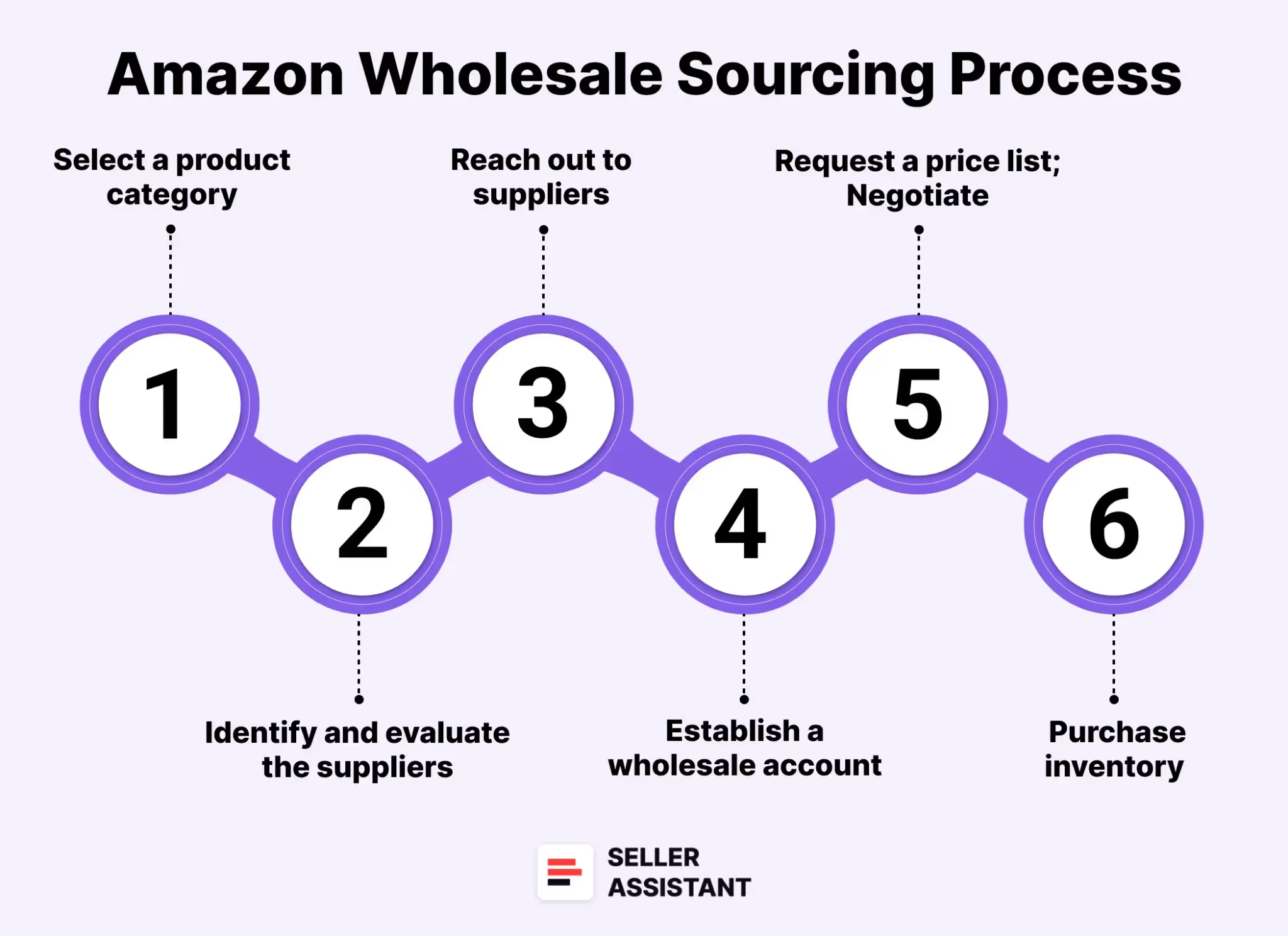
Here’s a step-by-step guide to understanding how Amazon wholesale sourcing operates.
Steps to Amazon wholesale sourcing
.webp)
Steps to Amazon wholesale sourcing
Step 1. Select a product category
Choose a category or niche that aligns with your interests and research findings. Focus on areas with strong demand, manageable competition, and healthy profit margins.
Step 2. Identify potential suppliers
Research and identify reputable brands or distributors in your chosen category. Look for suppliers offering a variety of products that fit your business strategy.
Step 3. Evaluate the suppliers
Ensure the suppliers you’re considering are reliable. Check their reviews, request references, and verify their credentials using tools like LinkedIn, Whois, or ScamAdviser. This step helps you avoid scams and establish trustworthiness.
Step 4. Reach out to suppliers
Contact the suppliers via email, phone, or their websites. Introduce your business, explain your goals, and express your interest in creating a wholesale account with them.
Step 5. Complete an application
Fill out the supplier’s application form, which typically requires details like your reseller’s permit, business license, and contact information. Clearly state your business intentions and needs.
Step 6. Establish a wholesale account
Once your application is approved, open a wholesale account with the supplier. This will grant you access to their inventory at wholesale pricing.
Step 7. Request a wholesale price list
Ask for a detailed wholesale price list. This document will outline product offerings, prices, and stock availability, which are essential for planning your purchases.
Step 8. Analyze the price list
Review the price list carefully to identify items with high demand, proven sales performance, and strong profit potential on Amazon. Prioritize profitable and fast-selling products.
Step 9. Negotiate terms
Discuss pricing and terms with your supplier. Larger orders or consistent purchasing may lead to better discounts. Building a strong relationship with your supplier can also result in long-term benefits.
Step 10. Purchase your inventory
Once you’ve finalized the terms, place your order and pay using accepted payment methods, such as credit cards or wire transfers.
How to select a wholesale supplier for Amazon?
A crucial step in wholesale sourcing is finding a reliable brand or supplier. This requires evaluating whether the brand is reseller-friendly and aligns with your business objectives.
Analyzing a supplier involves checking if they meet specific criteria, such as brand size, product range, revenue potential, competition levels, average Buy Box prices, and product reviews. These factors help you understand the brand’s potential profitability and compatibility with your goals.
Manually conducting such an analysis can be time-consuming and complex. Tools like Seller Assistant’s Brand Analyzer can significantly simplify this process by offering a detailed, data-driven approach to identifying profitable and reseller-friendly brands.
Seller Assistant’s Brand Analyzer is a powerful tool designed to automate and streamline the process of evaluating wholesale suppliers. It provides comprehensive insights into a brand’s potential, allowing you to focus on suppliers that offer profitable opportunities.
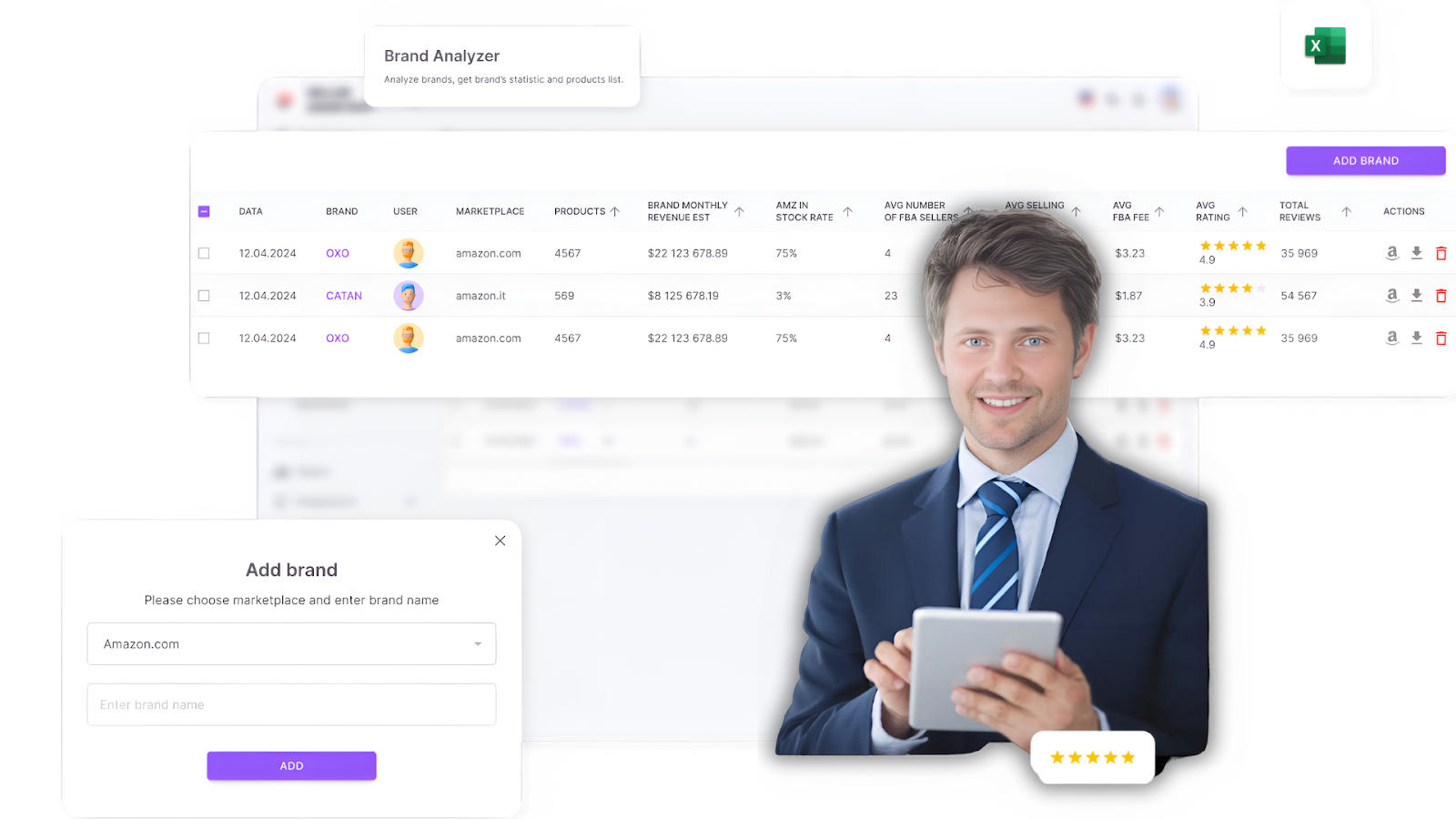
Seller Assistant’s Brand Analyzer
By simply entering a brand’s name, the tool provides detailed metrics that help determine whether the brand is suitable for reselling. This ensures you prioritize suppliers capable of supporting your revenue goals.
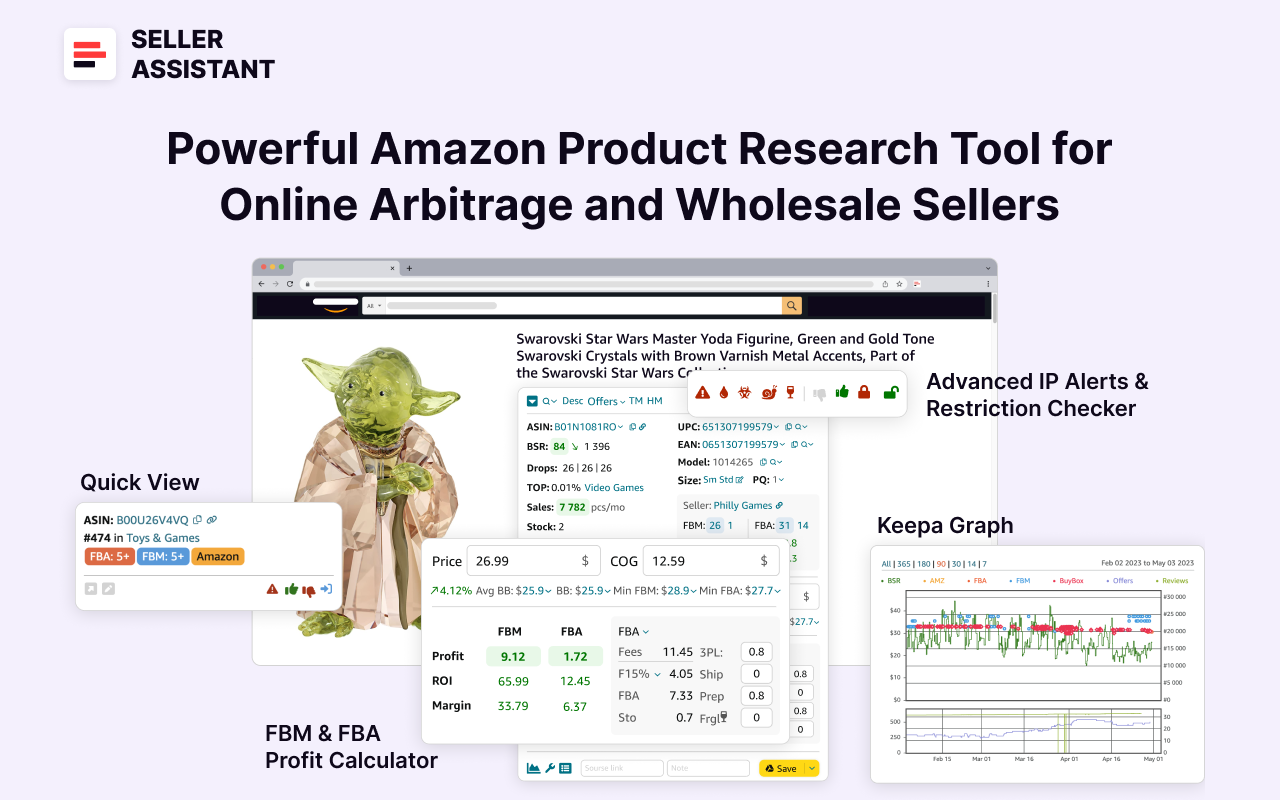
Seller Assistant
Seller Assistant shows all essential product data on Amazon search, product, and inventory pages, and on any website to help you find high-margin deals. By using this FBA and FBM product sourcing software, you can easily identify products that have the potential to be sold well on Amazon.
Automated supplier research with Brand Analyzer
When determining if a brand is resale-friendly, consider the following key factors provided by Brand Analyzer’s dashboard. This tool consolidates essential metrics like revenue, competition, stock levels, pricing, and customer feedback, making it easier to make informed decisions quickly.
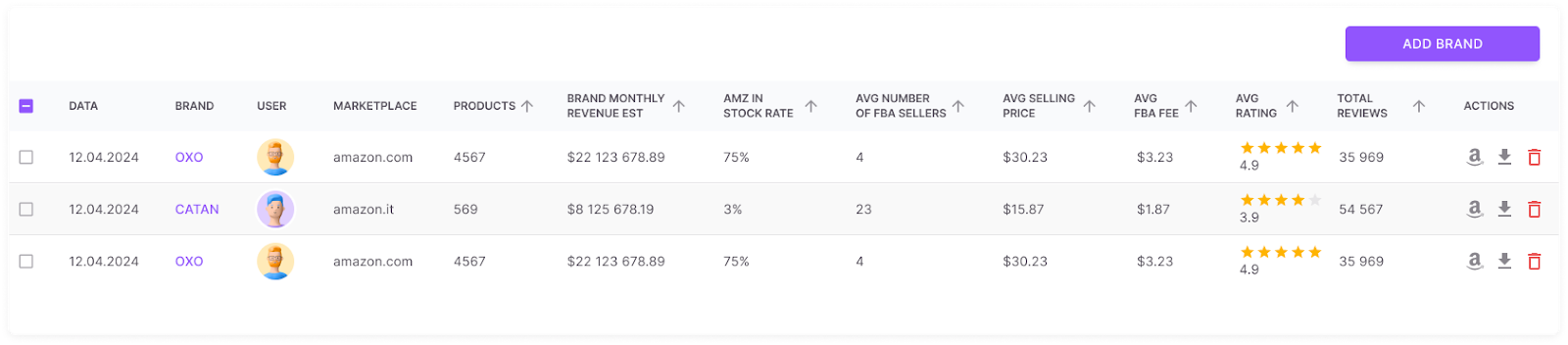
Brand Analyzer
Product range
Choose brands that offer a broad range of products, ideally more than 500, as this increases your chances of identifying profitable items. Brand Analyzer provides a clear view of the total number of products a brand offers and even allows you to download detailed product information for further analysis.
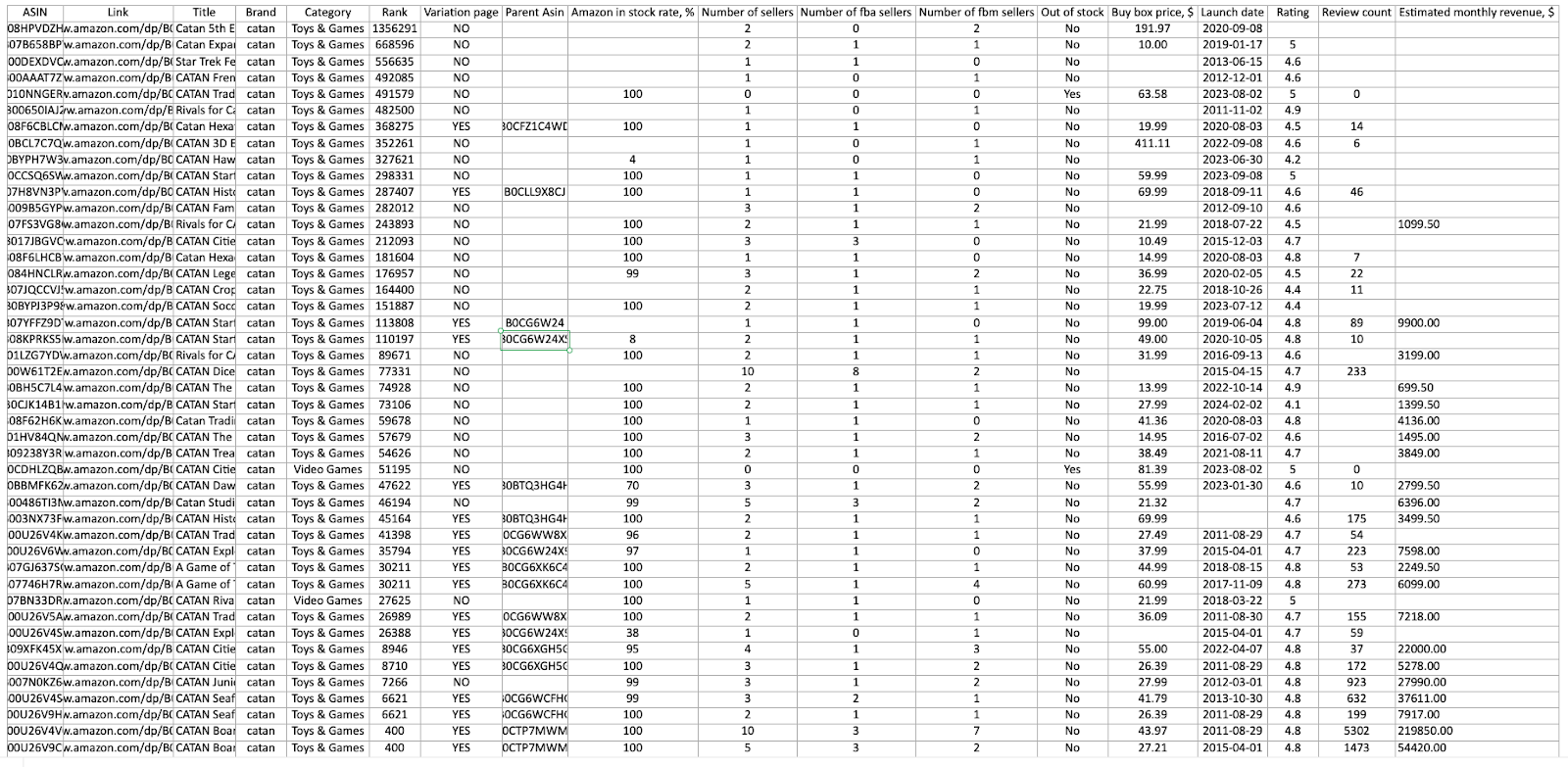
Brand Analyzer detailed report
Revenue potential
Evaluate the brand’s average sales and pricing to confirm it meets your revenue targets. Brand Analyzer calculates the estimated monthly revenue of the brand’s product portfolio, providing clarity on profitability potential.
Competition with Amazon
Avoid brands that sell their products directly on Amazon or restrict access to a limited number of distributors. If Amazon sells more than 30% of the brand’s products, it may be too competitive for resellers. Brand Analyzer highlights Amazon’s stock presence for each brand under the “Amz in-stock rate” metric.
Competition among sellers
Brands with too many sellers (e.g., more than 15 sellers per product) often lead to price wars and reduced profit margins. Brand Analyzer displays the average number of sellers per product and the total product count, helping you evaluate competition and minimize risks.
Brand reputation
Focus on brands with strong customer ratings (4 stars or higher) and positive reviews, as these indicate credibility and demand. Brand Analyzer provides data on average product ratings, total reviews, and Buy Box prices, allowing you to gauge the brand’s market reputation and optimize your pricing strategy.
Resale eligibility and restrictions
Ensure the brand’s products are approved for resale on Amazon and free from compliance issues. Restricted products can lead to complications, so it’s essential to verify their eligibility for your Amazon account.
Use Seller Assistant’s Bulk Restriction Checker to review multiple products simultaneously. Upload the product list from Brand Analyzer into the Bulk Restrictions Checker. The tool uses a color-coded system: a green open lock means the product is eligible for resale, a red closed lock indicates restrictions, and a red lock with an exclamation mark means the product cannot be sold on your account.
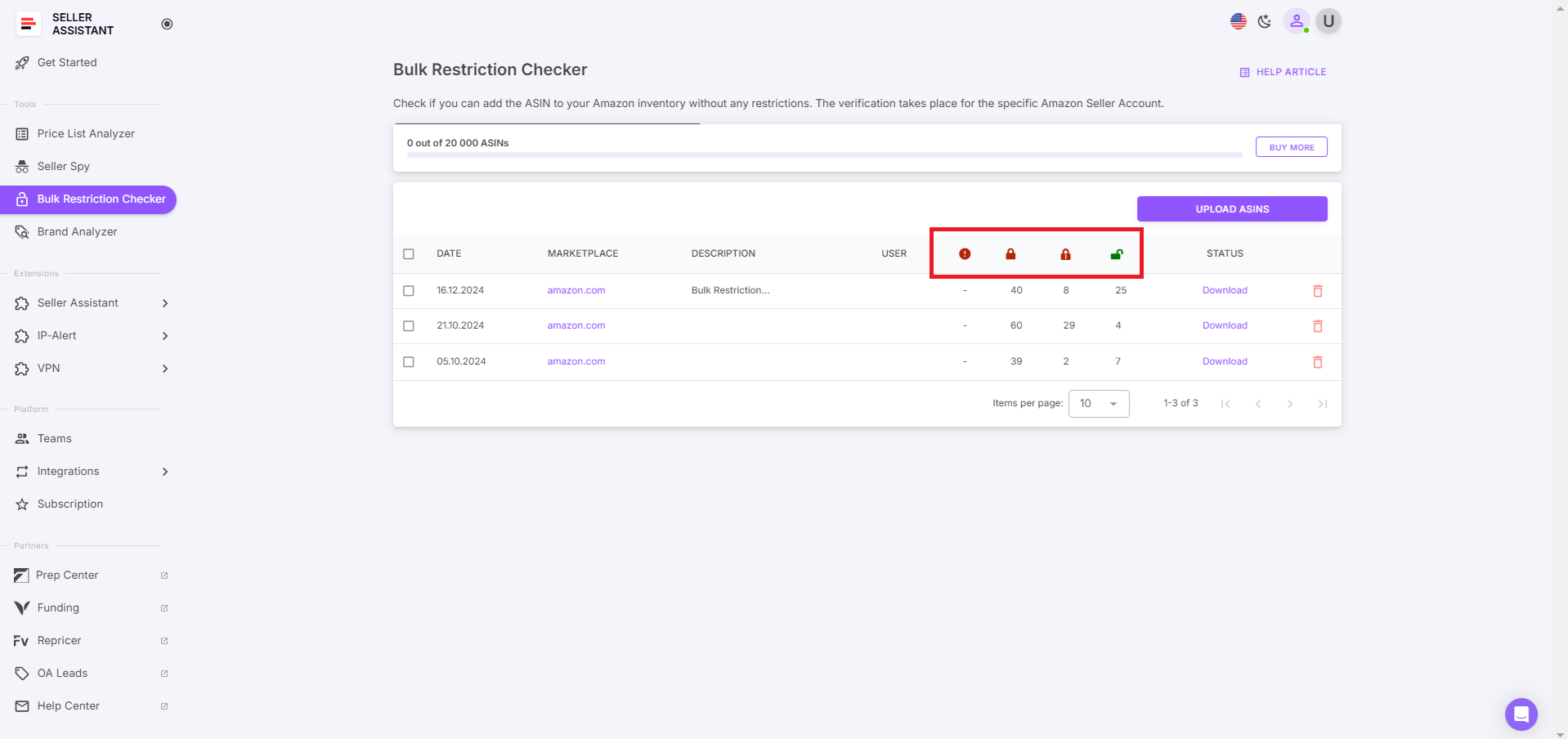
Seller Assistant’s Bulk Restriction Checker
How to find Amazon wholesale deals?
One of the most critical steps in wholesale sourcing is analyzing the wholesale price list provided by your supplier. This process involves scanning through extensive lists containing hundreds of items to identify the best-selling and most profitable deals while minimizing potential risks. The goal is to pinpoint products that will sell quickly, generate strong profit margins, and meet your specific criteria.
Conducting this analysis manually can be both time-intensive and overwhelming. To streamline the process, you need to efficiently spot high-margin opportunities, evaluate key product metrics, assess profitability, identify risks, and filter out the best options.
Tools like Seller Assistant’s Price List Analyzer simplify this process, providing automated analysis and actionable insights.
Seller Assistant’s Price List Analyzer is a specialized tool designed to help Amazon sellers automate the bulk evaluation of wholesale price lists. Ideal for wholesale, online arbitrage, and dropshipping businesses, this tool enhances your price list with detailed data, enabling you to make informed decisions and research profitable opportunities.
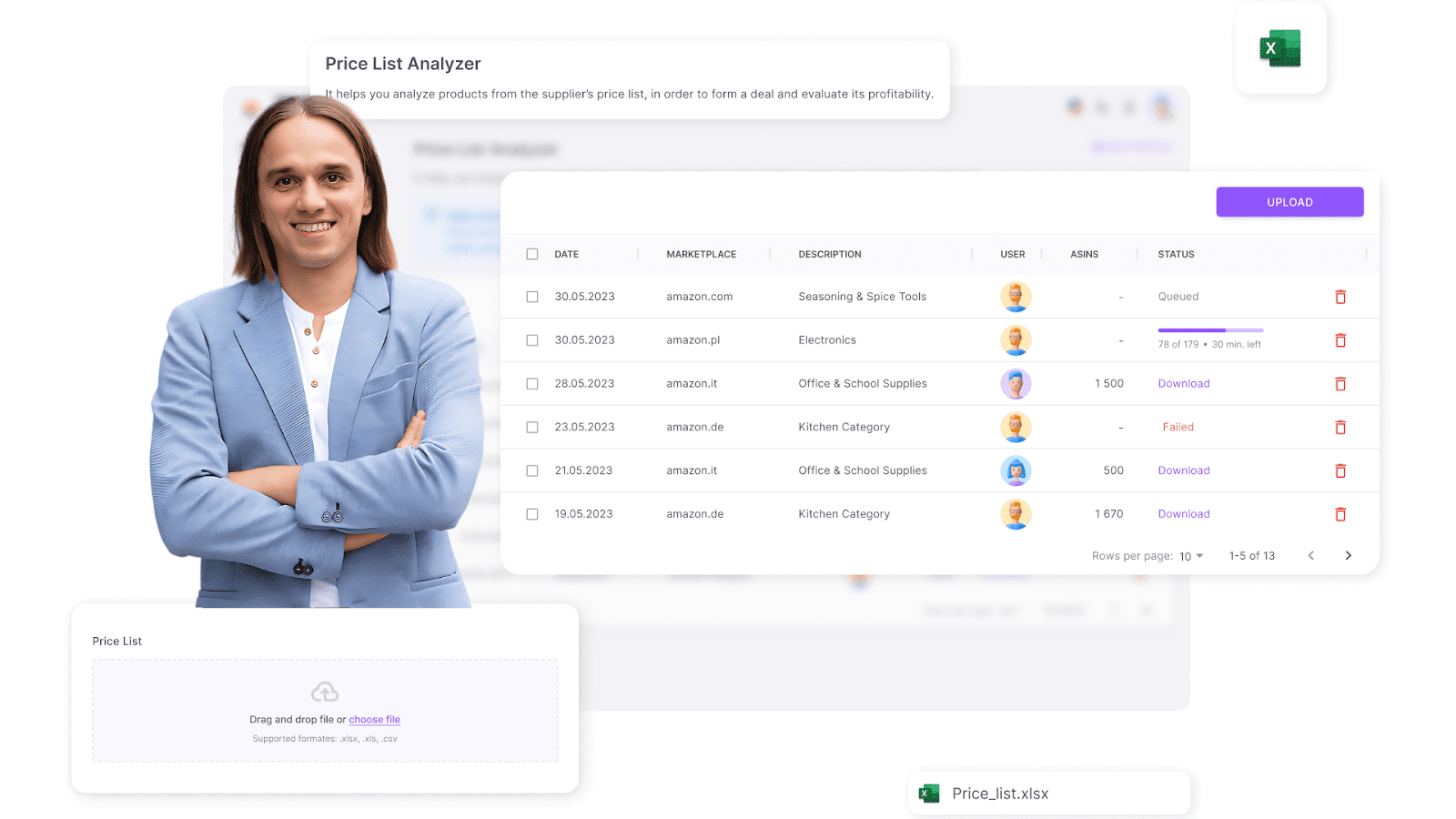
Seller Assistant’s Price List Analyzer
By uploading a supplier’s price list, the tool matches items to their corresponding Amazon listings, calculates profitability, and highlights potential risks.
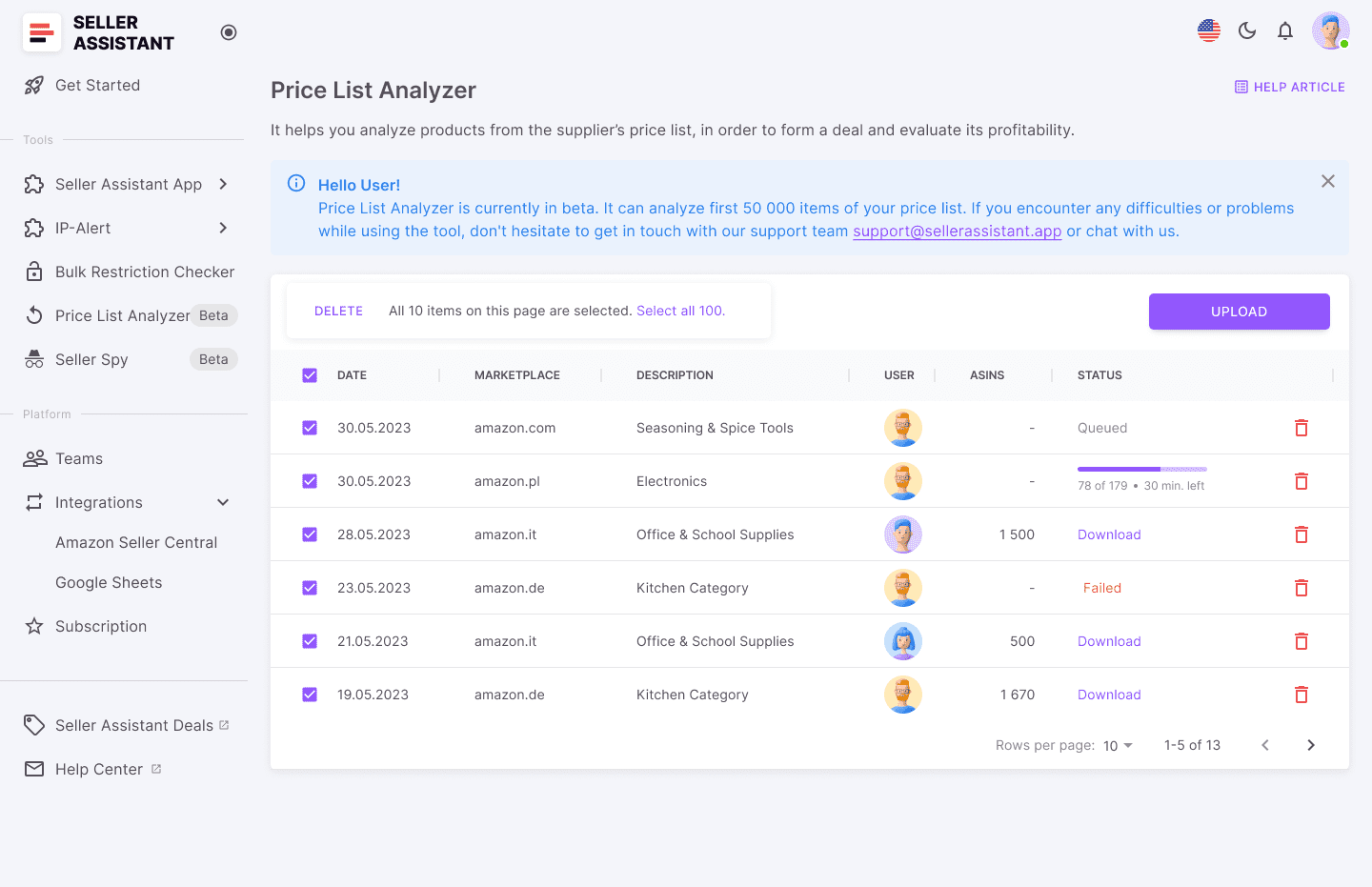
Seller Assistant’s Price List Analyzer
Sellers can then download the Excel file, sort and filter the results using metrics like ROI, profit, sales rank, and Buy Box likelihood to focus on the most promising deals.
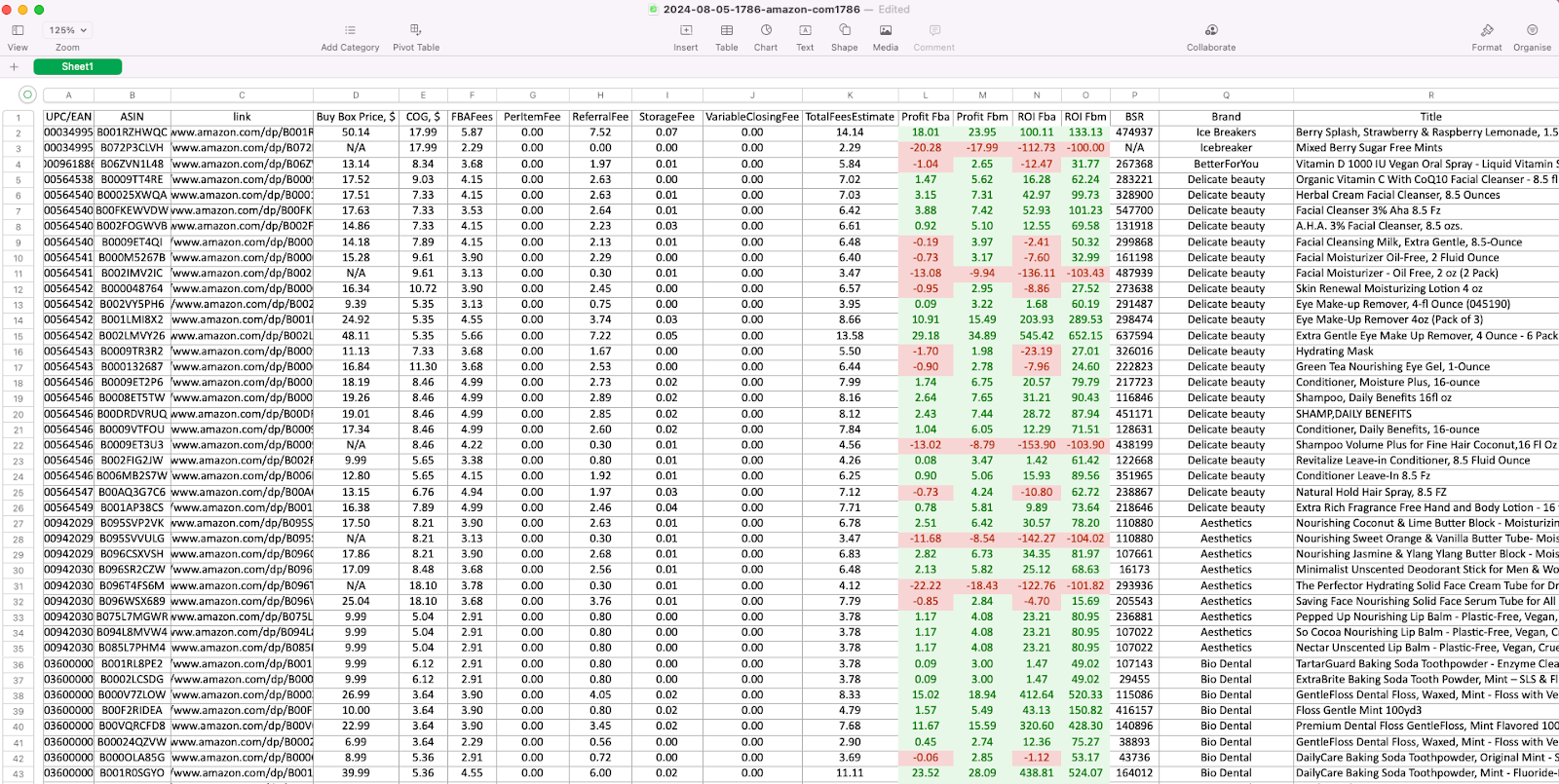
Price List Analyzer results table
Automated wholesale deal analysis with Price List Analyzer
To source the best deals on your wholesale list, analyze and filter products based on the following checklist.
Sales performance
- What to check
Examine the product’s Best Sellers Rank (BSR) to determine its popularity and ensure it sells quickly within its category.
- How it helps
The Price List Analyzer automatically provides BSR for each item, saving you time and ensuring precise data.
Competition level
- What to check
Avoid products with excessive competition (more than 15 sellers) or those sold directly by Amazon, as these factors can lead to reduced profit margins.
- How it helps
The tool identifies the number of sellers on each listing and flags items sold by Amazon, making it easy to avoid overly competitive products.
Chances to win the Buy Box
- What to check
Assess who currently dominates the Buy Box and evaluate your chances of competing successfully.
- How it helps
The Price List Analyzer highlights dominant Buy Box sellers, helping you focus on products where you can effectively compete.
Pricing and profitability
- What to check
Evaluate Cost of Goods Sold (COGS), FBA fees, and logistics costs to ensure the product meets your ROI and profit margin goals.
- How it helps
The tool calculates net profit, ROI, and other profitability metrics for each product, allowing for precise financial analysis.
Product restrictions
- What to check
Ensure the product is unrestricted, free from intellectual property complaints, and complies with Amazon’s selling policies.
- How it helps
Integrate the Price List Analyzer with Seller Assistant’s Bulk Restriction Checker to evaluate multiple products at once. Products with a green open lock icon are sellable, while a red closed lock indicates restrictions. A red lock with an exclamation mark signals the product is not eligible for sale on your account.
Customer feedback
- What to check
Focus on products with high customer ratings (4–5 stars) and minimal negative feedback, as these indicate strong demand and satisfaction.
- How it helps
The tool displays average ratings and total review counts for each item, simplifying the evaluation of customer feedback.
Alerts and hidden risks
- What to check
Look for potential red flags, such as oversized items, HazMat classification, seasonal demand fluctuations, or bundled products, which could affect profitability or logistics.
- How it helps
The tool provides alerts for risks like “No FBA Fees,” “ASIN Not Found,” or “Approval Required,” helping you avoid costly mistakes.
How Does Online Arbitrage/Dropshipping Sourcing Work?
Online arbitrage and dropshipping are effective sourcing models for Amazon sellers who aim to avoid large inventory investments and instead focus on finding and selling individual products.
Both methods revolve around identifying popular and profitable products, researching their viability, and securing suppliers who offer them at competitive prices.
For online arbitrage, sellers purchase products at low prices from retail or online stores, then resell them on Amazon for a profit. In dropshipping, sellers list products on Amazon without holding inventory – the supplier ships the product after the sale to prep centers that repackage products in your name and ship orders to customers . While similar, these approaches have distinct workflows, but both require systematic product sourcing.
Steps for online arbitrage/dropshipping sourcing
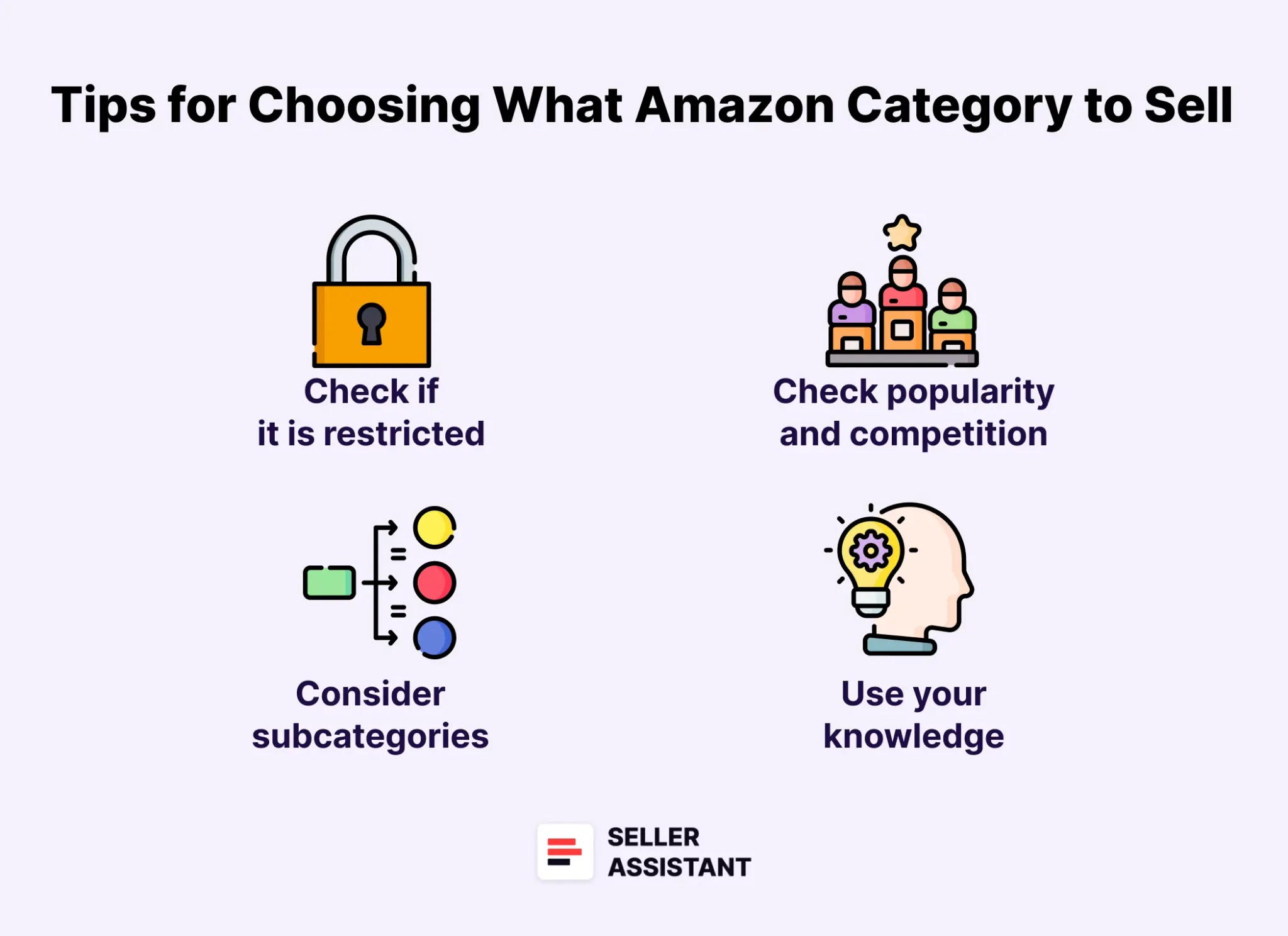
What Amazon Category to Sell
Step 1. Choose a product category and identify potential products
- What to do
Select an Amazon product category that interests you or has strong market demand. Look for products with high customer interest (good sales rank) and low competition, ensuring potential profitability.
- Why it matters
Choosing a product category narrows your focus and helps you identify items that sell well while offering room for your business to compete.
Step 2. Do product research
- What to do
Assess the product’s sales potential, eligibility for resale, and profitability. Check if the product is restricted, subject to intellectual property claims, or has an excessive number of negative reviews. Use a product research checklist to ensure it meets all criteria, such as demand, sales rank, and risk levels.
- Why it matters
Thorough research ensures the product aligns with your goals and avoids costly mistakes, such as selling restricted or low-quality items.
Step 3. Find a supplier offering competitive pricing
- What to do
Locate a supplier who provides the product at a price that allows you to cover costs (buying price, Amazon fees, logistics) and maintain a healthy profit margin. For online arbitrage, search for deals on retail platforms. For dropshipping, identify a reliable supplier who can ship products directly to prep centers that repackage products in your name and ship orders to customers.
- Why it matters
Competitive pricing maximizes your profitability and ensures the product remains attractive to customers compared to competitors.
Step 4. Validate the supplier’s reliability
- What to do
Verify that the supplier can consistently deliver quality products and maintain adequate stock. For dropshipping, confirm their shipping speed, handling times, and customer service standards.
- Why it matters
A reliable supplier minimizes the risk of negative customer feedback due to delays or defective products, which can harm your Amazon account’s performance.
How to source online arbitrage/dropshipping suppliers for Amazon?
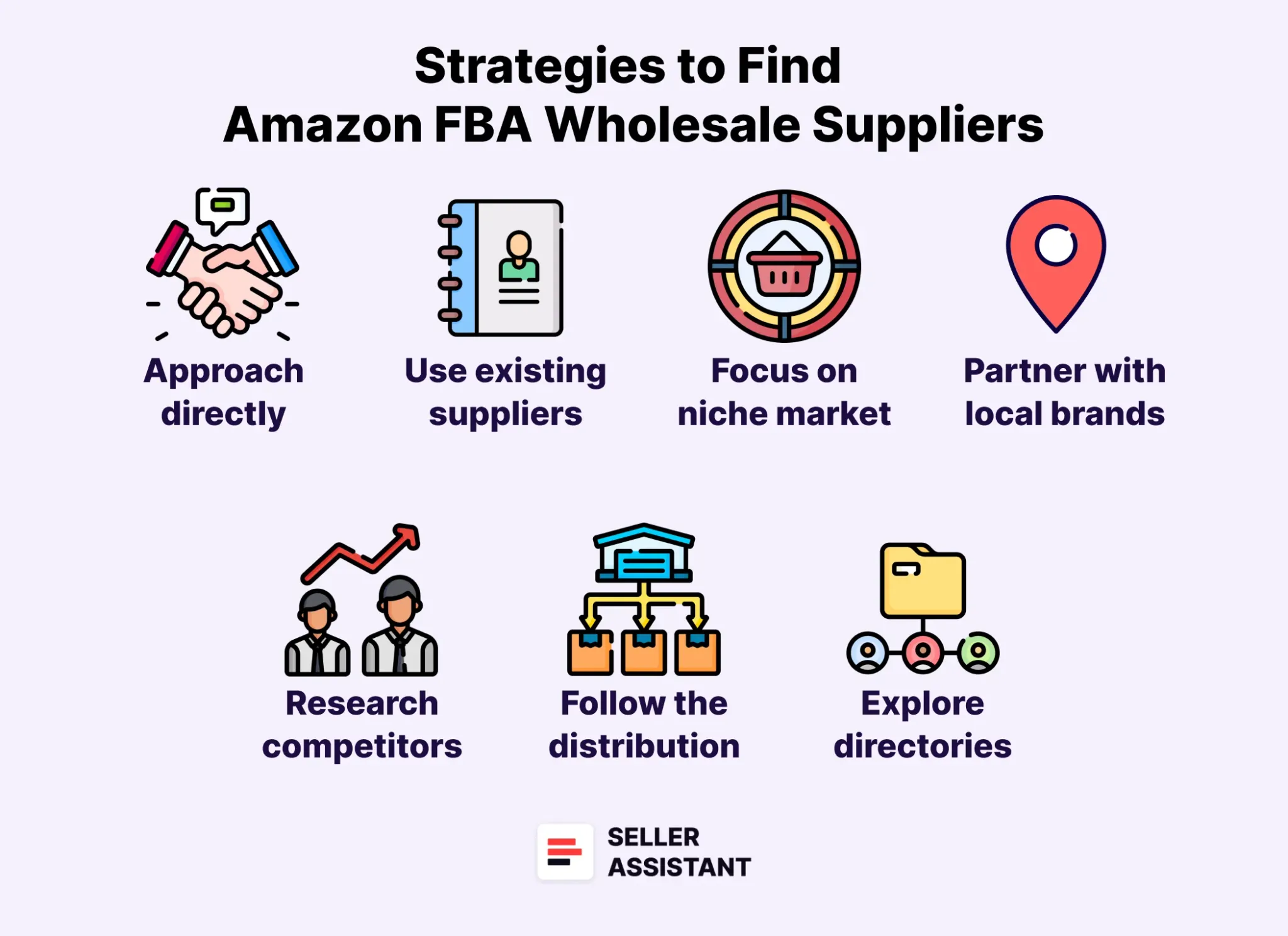
Strategies to find Amazon FBA Wholesale Suppliers
Finding the right suppliers is crucial for successful Amazon product sourcing. There are various strategies to discover reliable and profitable suppliers. Each strategy offers unique benefits and works best depending on your business model and goals.
Below, we explore five proven strategies to help you find suppliers effectively.
Strategy 1. Automated sourcing
Automated sourcing, also known as supplier-to-Amazon sourcing, is ideal for sellers who don’t have supplier ideas and are willing to analyze large product portfolios. This strategy uses technology to scrape product data from supplier websites and match it with Amazon listings.
- How it works
By scraping supplier or e-commerce websites for product data, you obtain a file with hundreds or thousands of items. These items are analyzed to determine their profitability, popularity, and compliance with your selling criteria. Automating this process saves time and effort, enabling sellers to filter profitable leads quickly.
- Tools to use
Seller Assistant’s Price List Analyzer automates product matching and calculates key metrics like ROI, BSR, Buy Box price, fees and other essential deal parameters. This data-driven approach ensures you focus on profitable suppliers and deals with minimal risks.
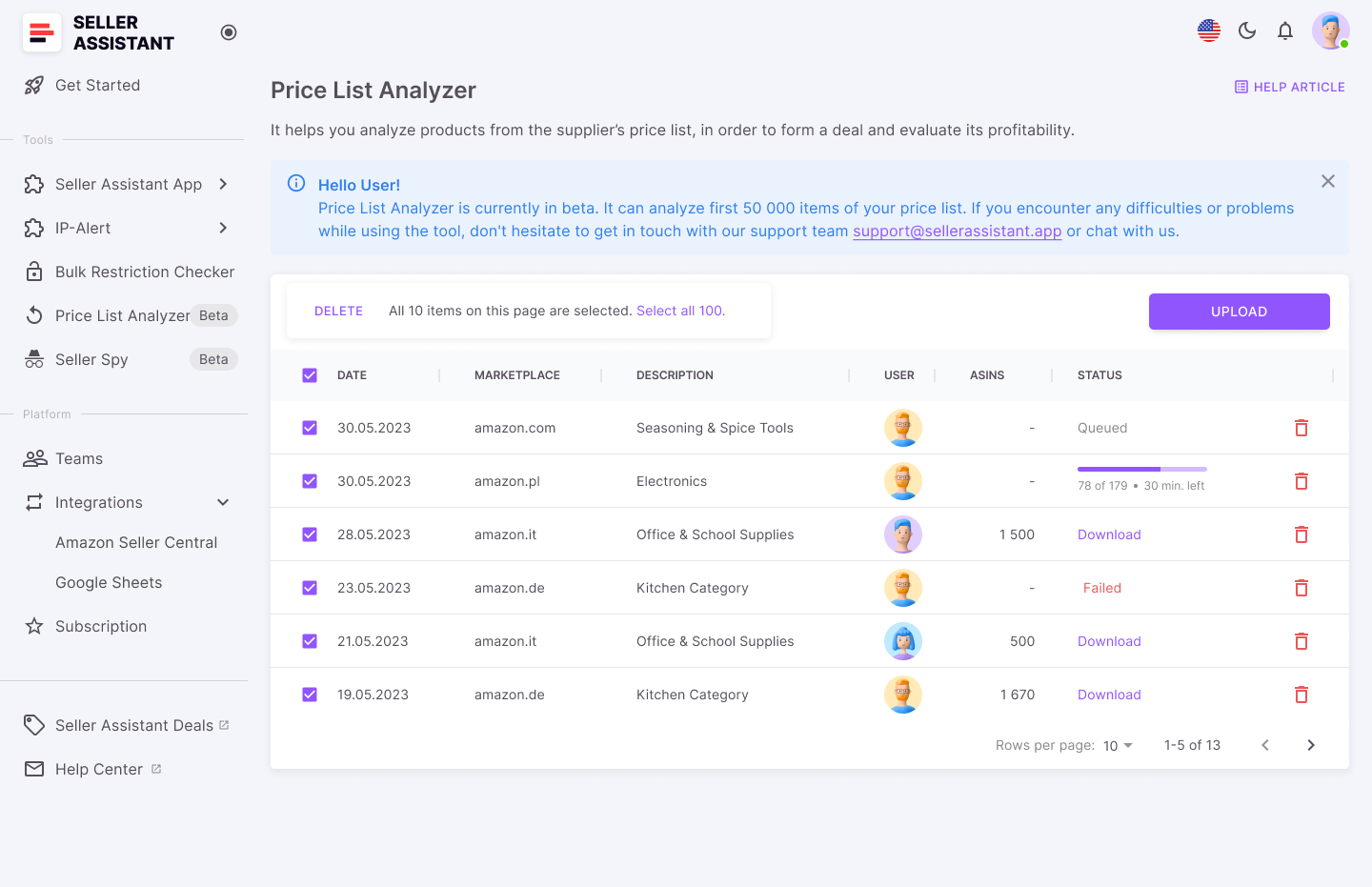
Ptice List Analyzer
Strategy 2. Buying Deals from a Deals Marketplace
This strategy involves purchasing pre-vetted deals from a dedicated marketplace. It’s particularly beneficial for new sellers or those looking to scale their online arbitrage business without extensive research.
- How it works
Deals are listed on marketplaces like Seller Assistant Deals. Sellers register, review the available deals, and purchase those that meet their criteria. Deals are pre-verified and limited to a few buyers to maintain exclusivity and profitability.
- Tools to use
This strategy involves using Seller Assistant Deals Marketplace. This platform offers a wide range of verified and exclusive deals tailored to your Amazon Seller Account. Metrics like ROI, profit, BSR, and Buy Box price are displayed for every deal. Refund guarantees are provided for unavailable or misrepresented products.
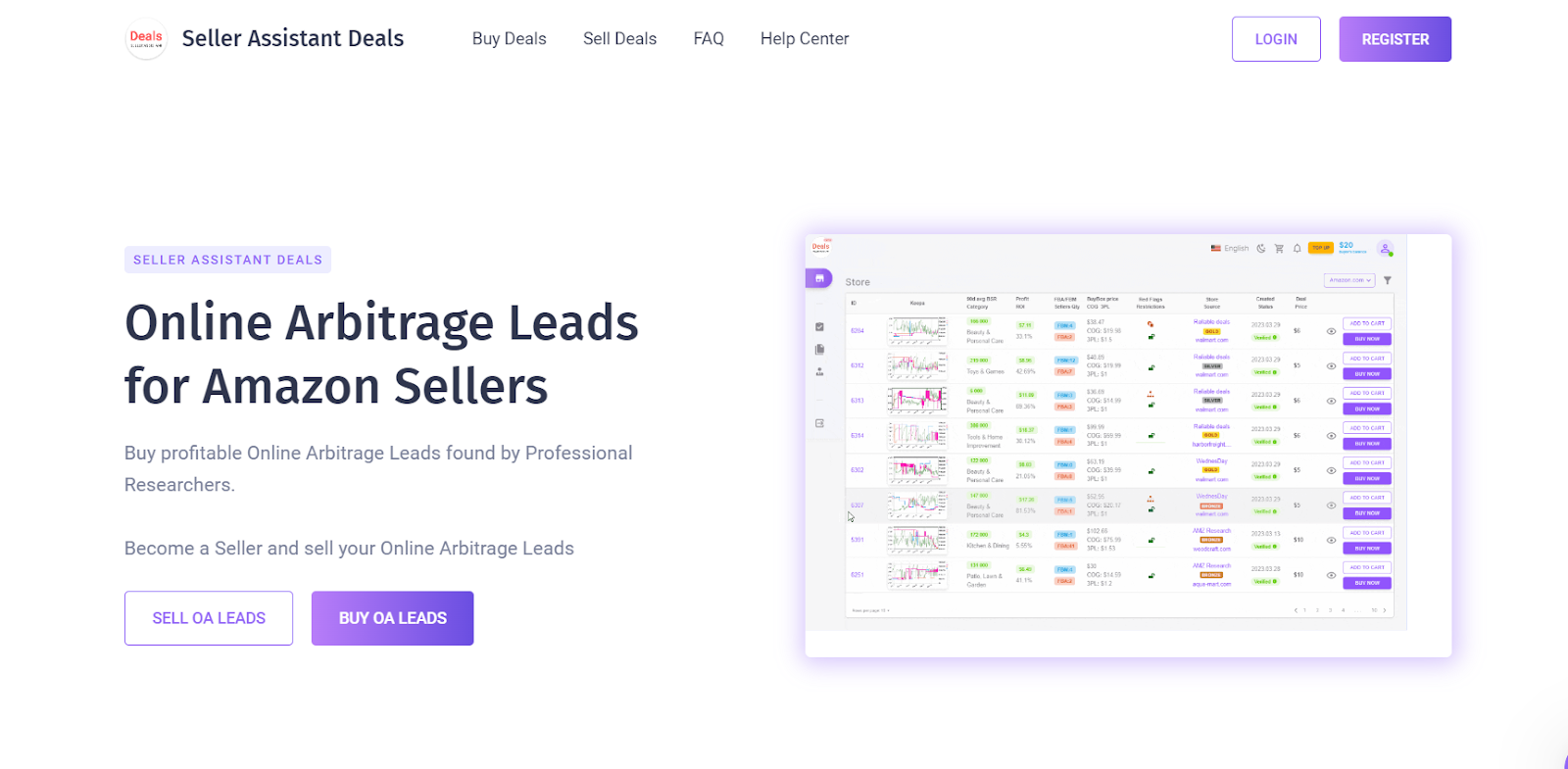
Seller Assistant Deals
Strategy 3. Self-sourcing
Self-sourcing is a hands-on approach where sellers independently identify popular products on Amazon and locate suppliers offering those items at competitive prices. It’s ideal for experienced sellers who prefer full control over the sourcing process.
- How it works
Start by exploring Amazon Best Sellers, Amazon Movers & Shakers, Amazon’s Hot New Releases, or Amazon “Most Wished For” to find in-demand products. Then, use tools like Seller Assistant’s Side Panel View to locate suppliers and evaluate product profitability by comparing supplier offers with Amazon listings.
- Tools to use
Seller Assistant’s Side Panel View simplifies supplier research by providing essential data like BSR, profit, ROI, and product restrictions directly on the supplier’s website. This tool ensures efficient side-by-side comparisons.
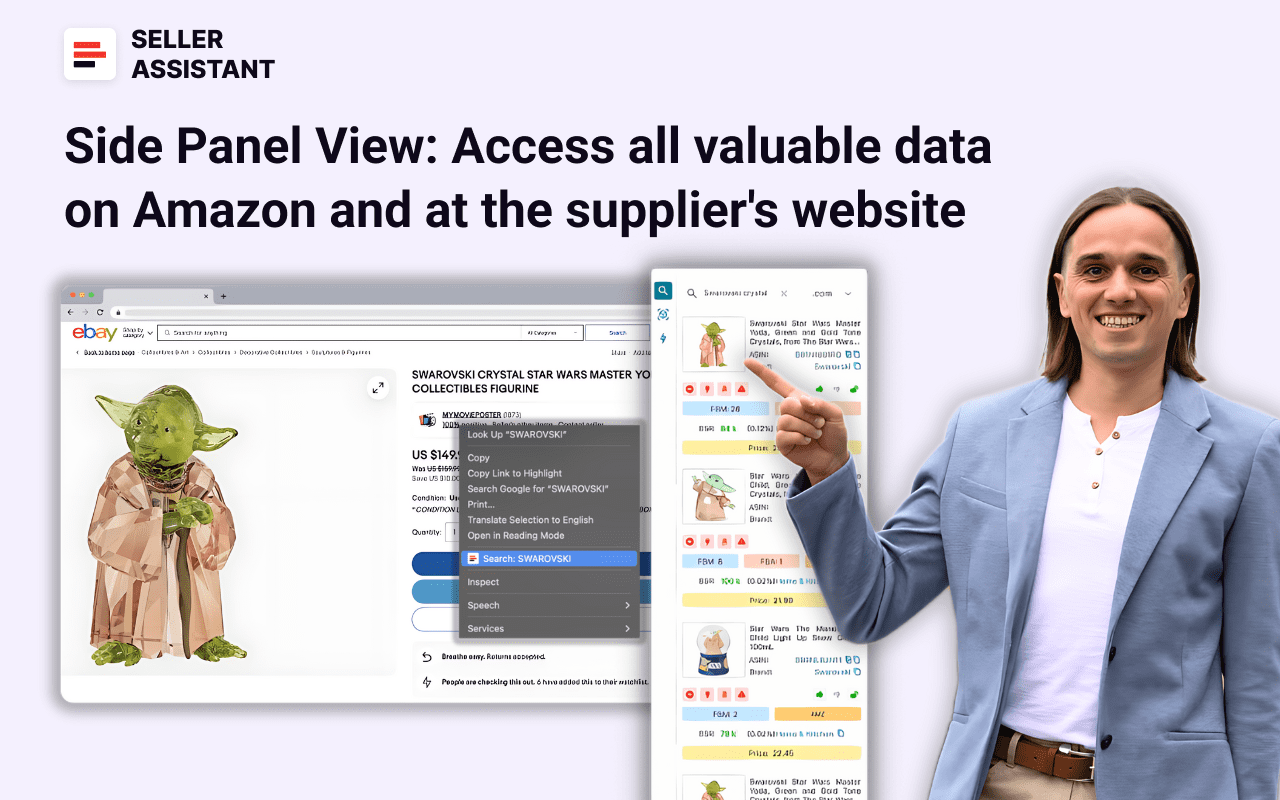
Side Panel View
Strategy 4. Competitor research
Competitor research involves analyzing your competitor’ inventory to identify new product opportunities and market gaps. This strategy is excellent for expanding your inventory and staying competitive.
- How it works
Track competitors’ product offerings to discover brands or products they sell that you don’t. Identify high-demand, low-competition items to add to your store. This approach also helps optimize pricing strategies by observing competitors’ practices.
- Tools to use
Seller Assistant’s Seller Spy tracks competitors’ product additions and removals, providing valuable insights into new opportunities and pricing strategies. Download detailed reports to streamline decision-making.
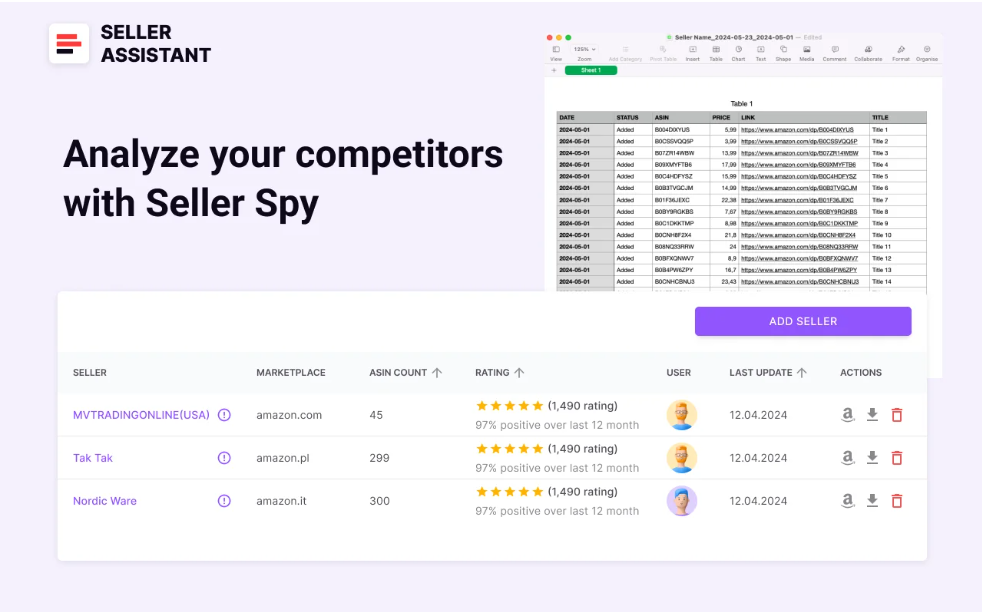
Seller Spy
Strategy 5. Choose from a list of 500+ suppliers
For sellers seeking to expand their supplier base, using a curated list of proven suppliers is a straightforward way to find reliable partners.
- How it works
Select suppliers from the list and contact them to request their price lists. Once received, upload the price lists to tools like Seller Assistant’s Price List Analyzer to automatically identify profitable deals. Filter the results by desired profit and ROI levels to find the best opportunities.
- Tools to use
- Seller Assistant’s List of 500+ US suppliers provides a comprehensive directory of trustworthy suppliers.
- Price List Analyzer simplifies bulk price list analysis to uncover profitable deals.
How to select online arbitrage/dropshipping deals?
Selecting the right deals is critical to succeeding in online arbitrage or dropshipping. Once you’ve chosen a product idea, it’s essential to thoroughly research the product to ensure it will sell profitably and meet your expectations. To simplify the process, many sellers use a structured product research checklist to ensure every key factor is considered.
Using tools like the Seller Assistant Extension streamlines this process, providing detailed insights and metrics directly on Amazon product and search pages, as well as supplier websites. Below is a step-by-step guide to help you research and select the best online arbitrage and dropshipping deals.
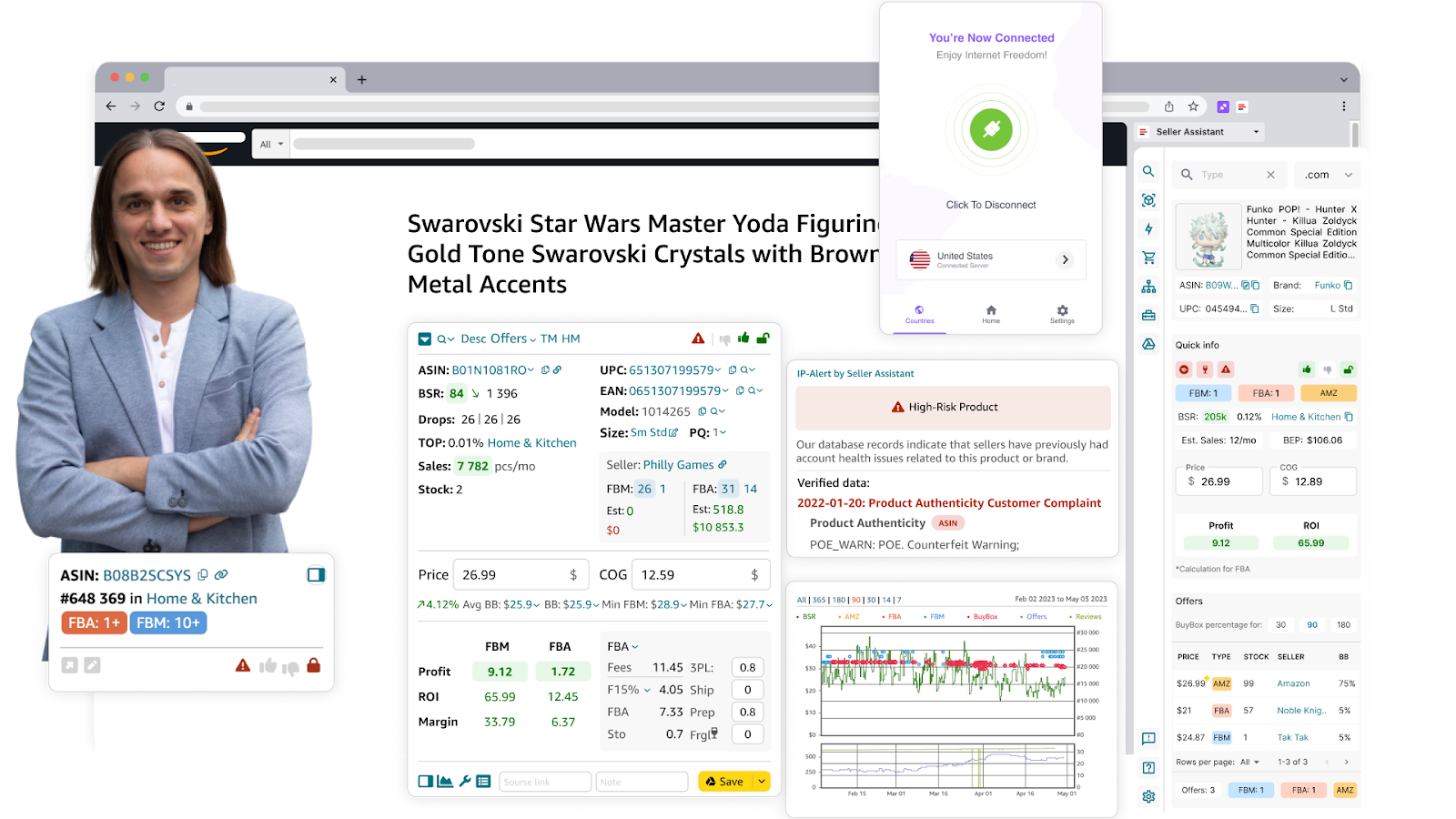
Seller Assistant Extension
Step-by-step product research with Seller Assistant Extension
Step 1. Clean the product link
- What to do
Remove referral tags from the product link by clicking the ASIN and deleting any text starting with “ref=”. Referral tags can sometimes display incorrect or skewed information.
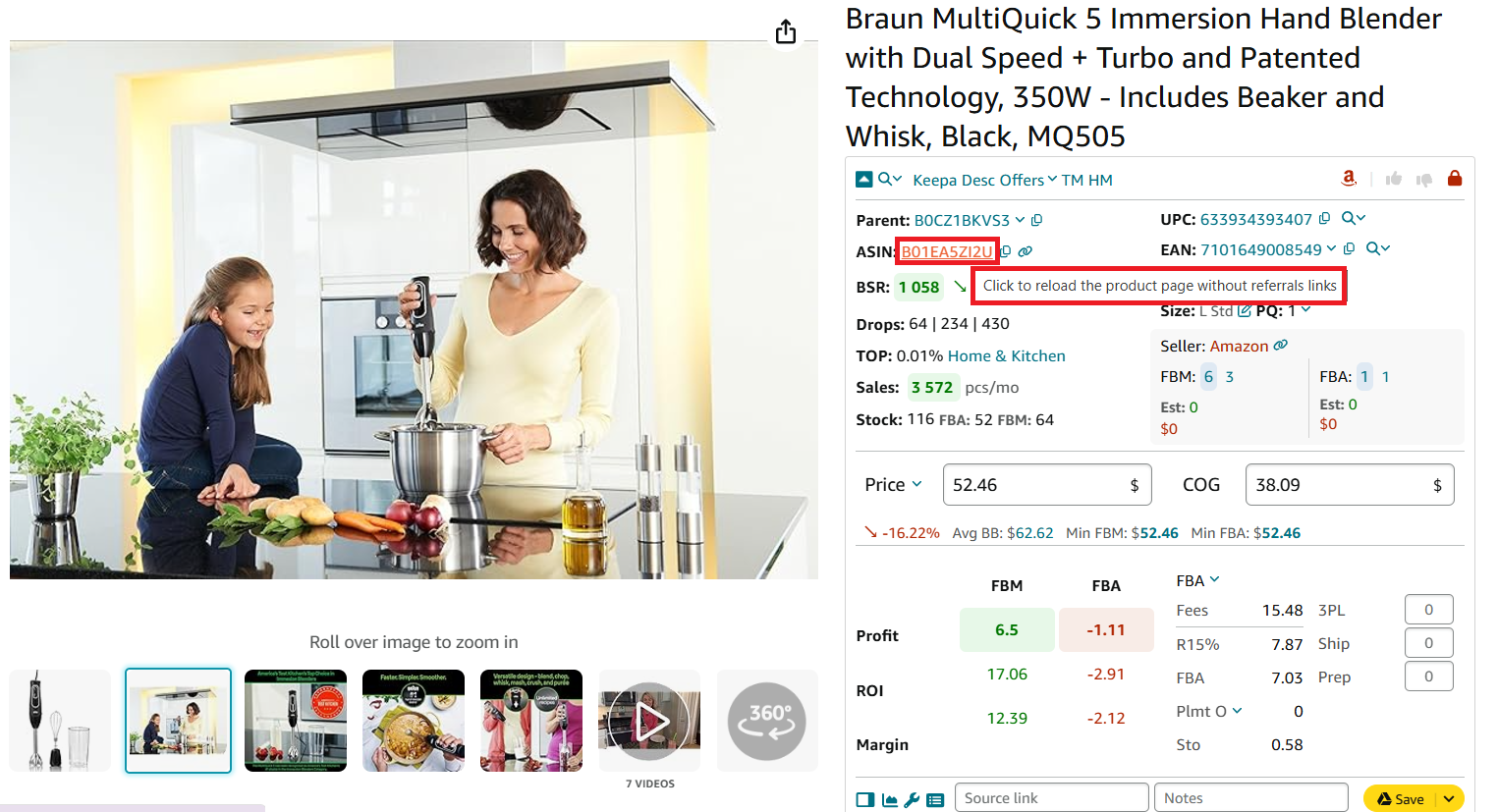
Click the product ASIN to remove the referral
- Why it’s important
Ensures you get accurate product data for analysis.
Step 2. Evaluate sales performance
- What to do
Check the product’s Best Sellers Rank (BSR) and its trend. A BSR between 1 and 100,000 generally indicates good sales performance. Also, compare the current BSR to the average BSR over 30, 90, or 180 days to spot trends. Green arrow down means sales are increasing, while red arrow up means sales are declining. Look for products with a Top percentage below 0.5% for high sales velocity.
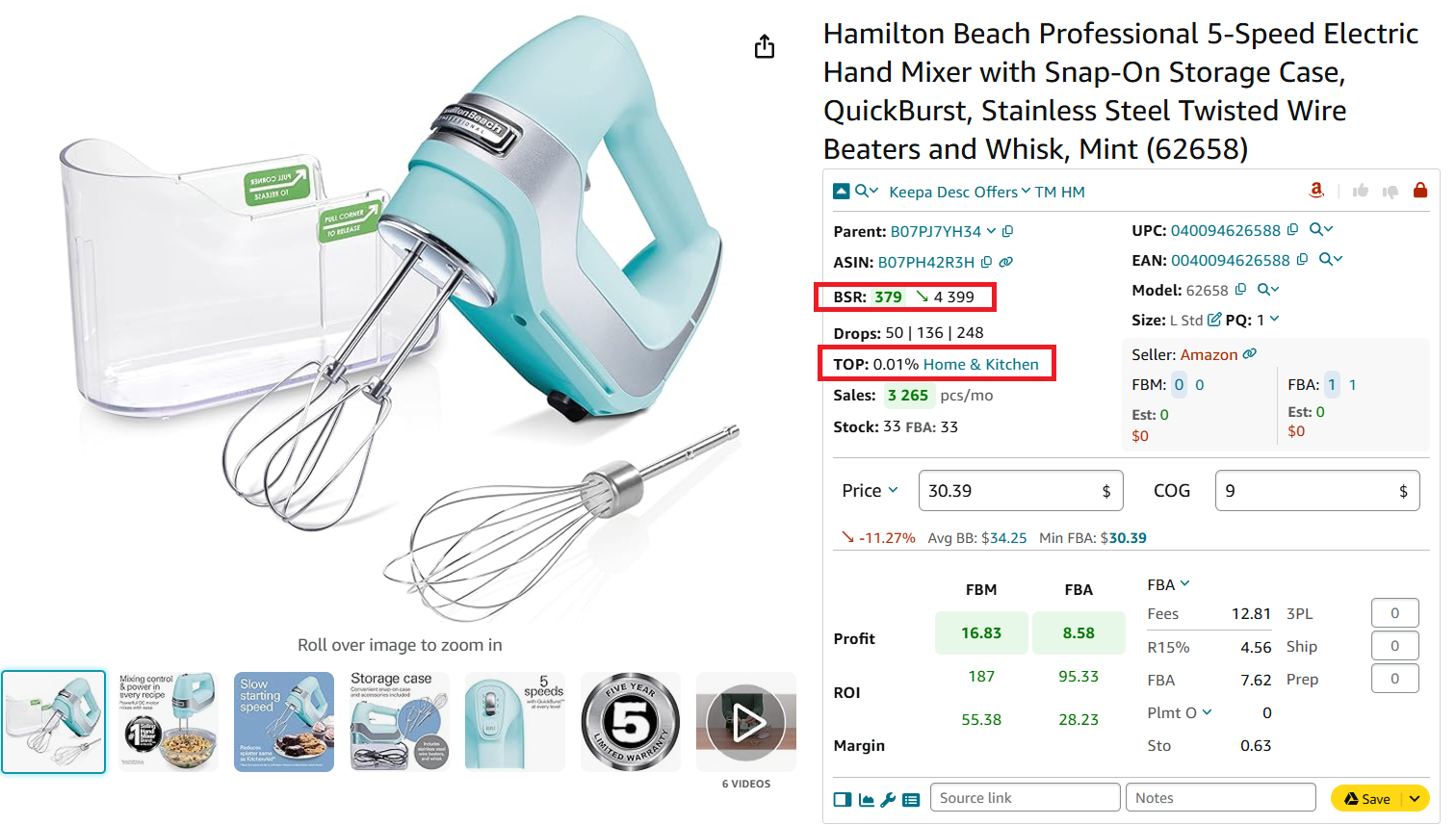
Check how well the product sells
- Why it’s important
Identifies fast-moving products with consistent demand.
Step 3. Assess potential sales volume
- What to do
Use metrics like BSR Drops to see how often a product sells and Sales Estimate (Est) to predict monthly unit sales. Check competitor stock levels (FBA and FBM) to understand current market inventory.
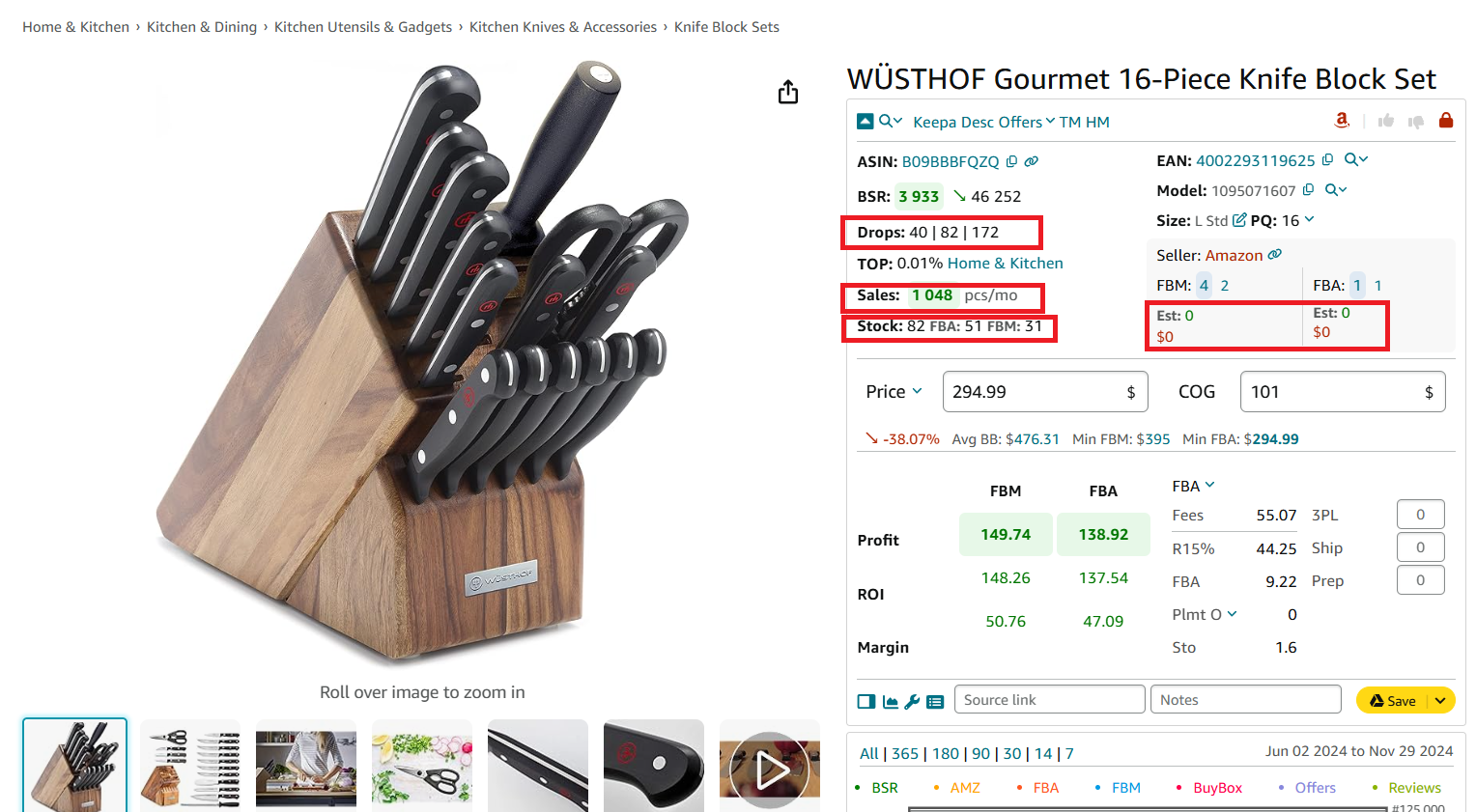
Identify how many units you can sell
- Why it’s important
Helps you predict how many units you can realistically sell based on current market conditions.
Step 4. Analyze competition
- What to do
Examine the number of FBA and FBM sellers offering the product. Ideally, this number should range between 2 and 15. Use the Offers feature in Seller Assistant to see detailed competitor data like stock levels and pricing.
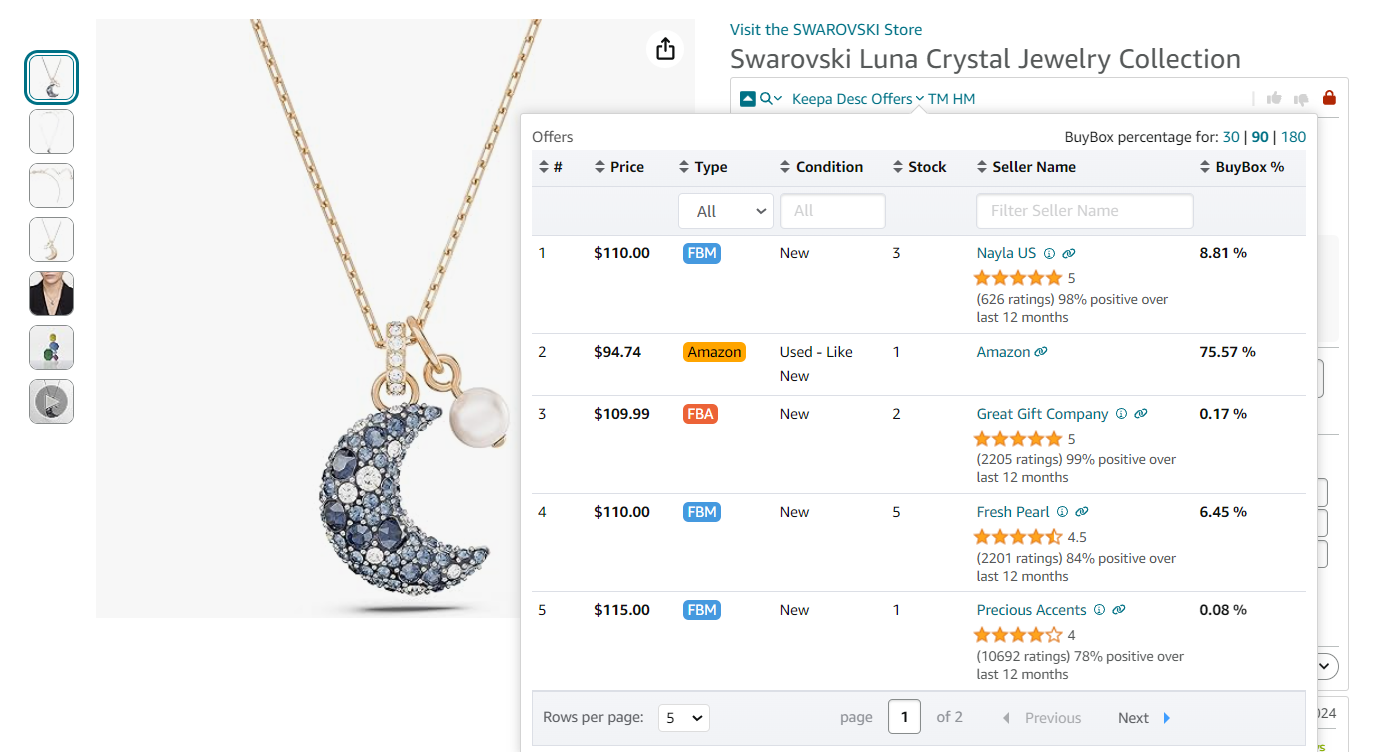
Offers is the extension’s feature that allows to research all seller offers of a product
- Why it’s important
Helps avoid oversaturated listings and identifies your chances of winning the Buy Box.
Step 5. Verify Amazon’s presence
- What to do
Look for the Red Amazon icon in Seller Assistant, which flags listings where Amazon is a competitor.
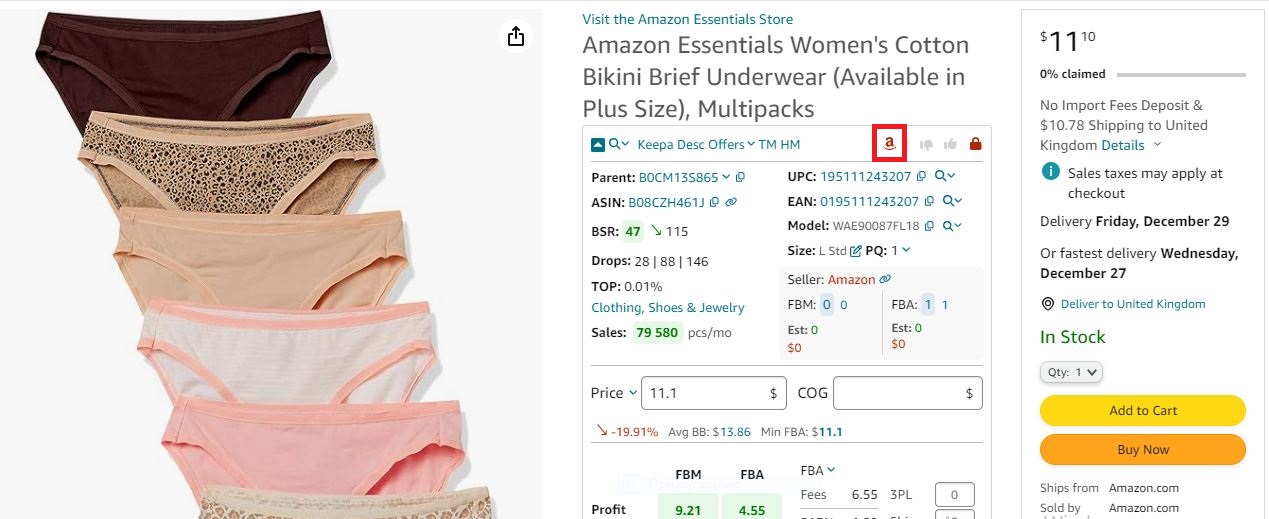
If Amazon is a seller, Seller Assistant shows the red Amazon icon on the product pages
- Why it’s important
Competing with Amazon for the Buy Box is challenging and often unprofitable.
Step 6. Review listing history
- What to do
Use integrated Keepa charts to check how long the product has been listed and its sales history. Avoid new products without sufficient data to analyze their long-term performance.
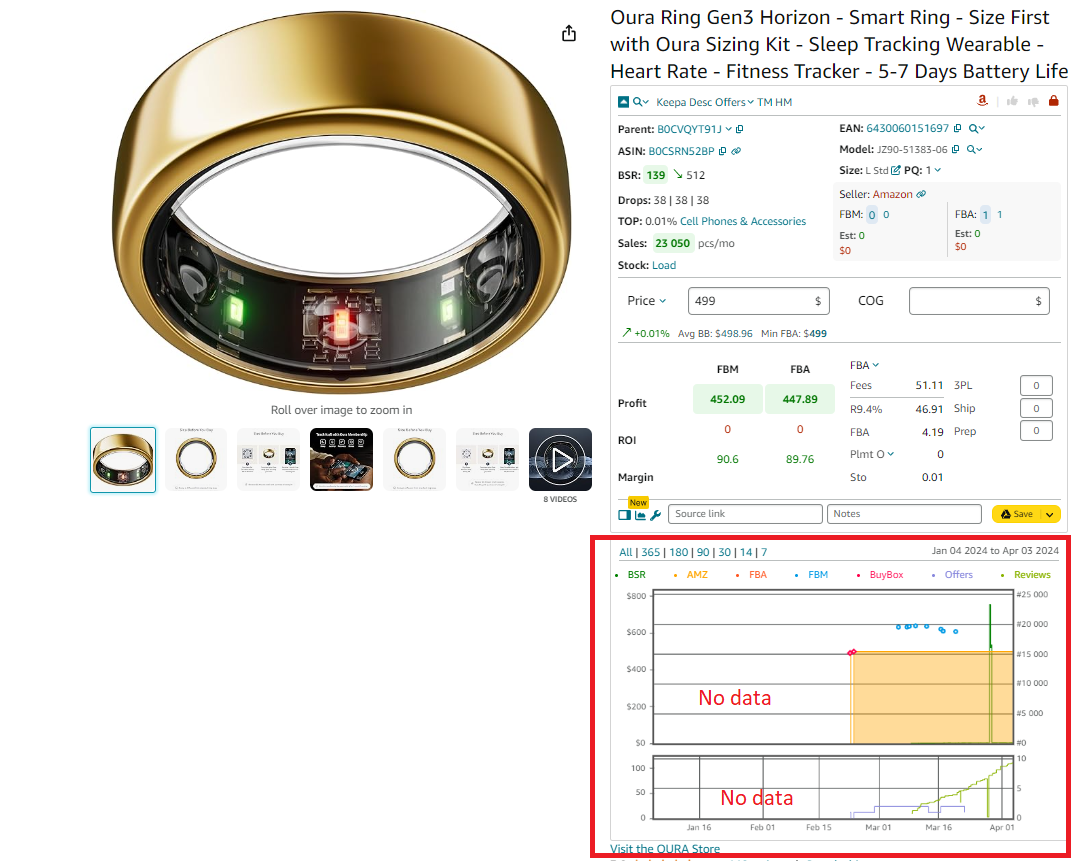
Keepa charts
- Why it’s important
Reduces risks associated with untested or unstable products.
Step 7. Analyze pricing trends
- What to do
Review the Average Buy Box Price (Avg BB) and compare it to the 90-day price trend. Look at the Min FBA and Min FBM prices to assess profitability.
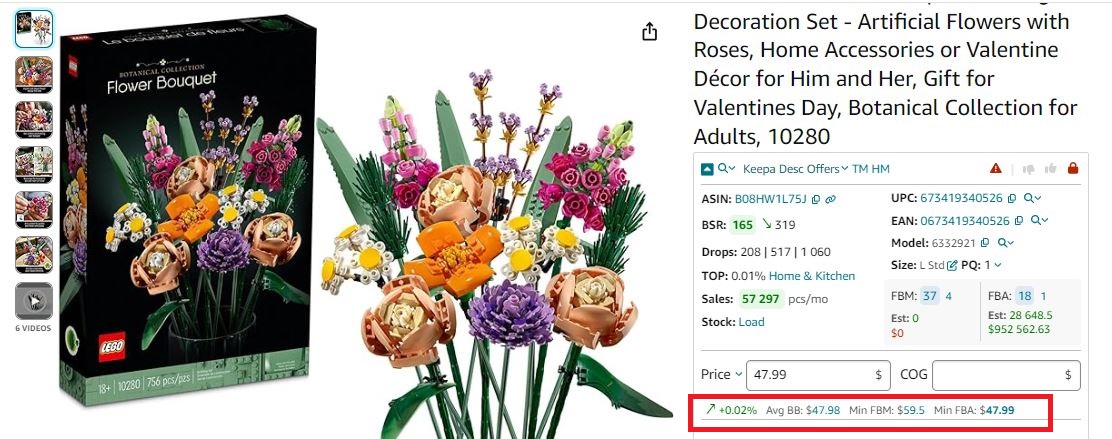
Buy Box
- Why it’s important
Helps you determine if the product can meet your profit expectations and ensures competitive pricing.
Step 8. Select the best-selling variations
- What to do
Use the Variation Viewer to identify the most popular product variations, such as size or color. Look for variations with the highest rating percentages.
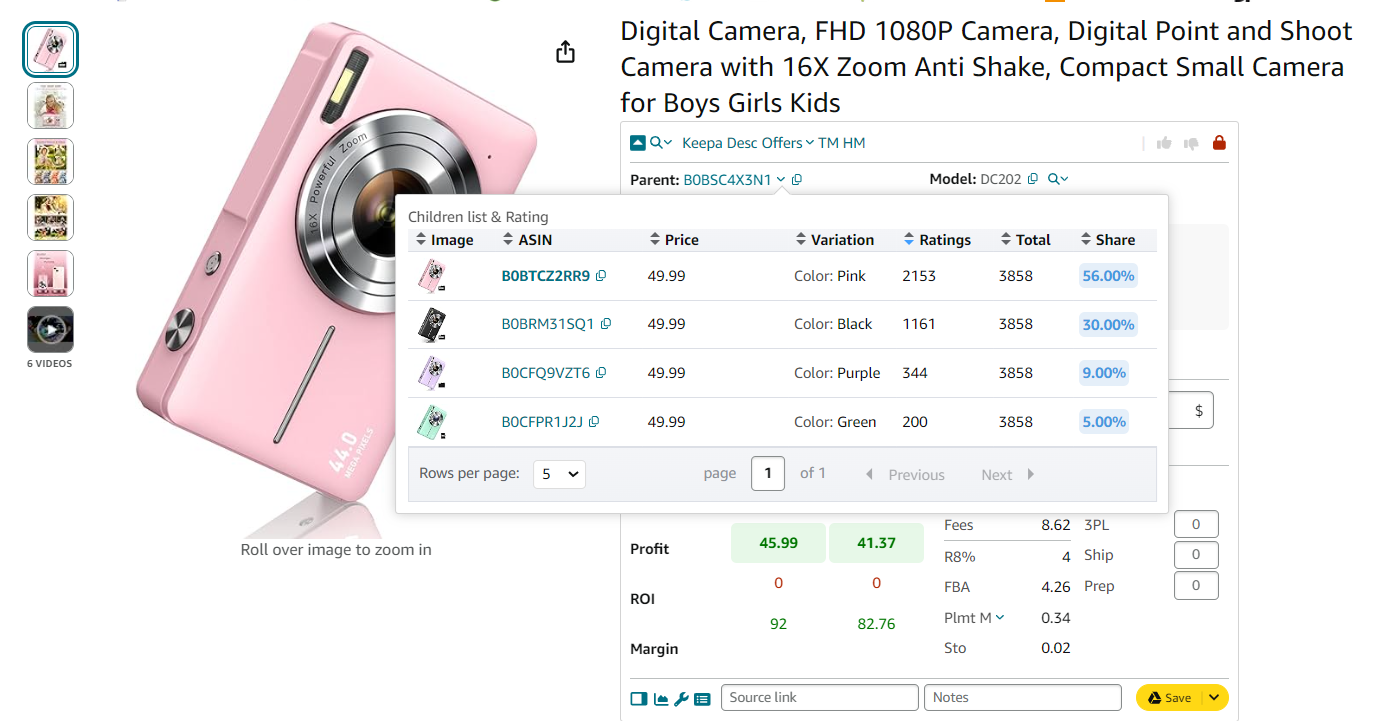
Variation Viewer
- Why it’s important
Ensures you focus on the most in-demand options, maximizing sales potential.
Step 9. Check customer reviews
- What to do
Look for products with an average rating of 4-5 stars and minimal negative feedback. Use Keepa’s review charts to gauge customer satisfaction.
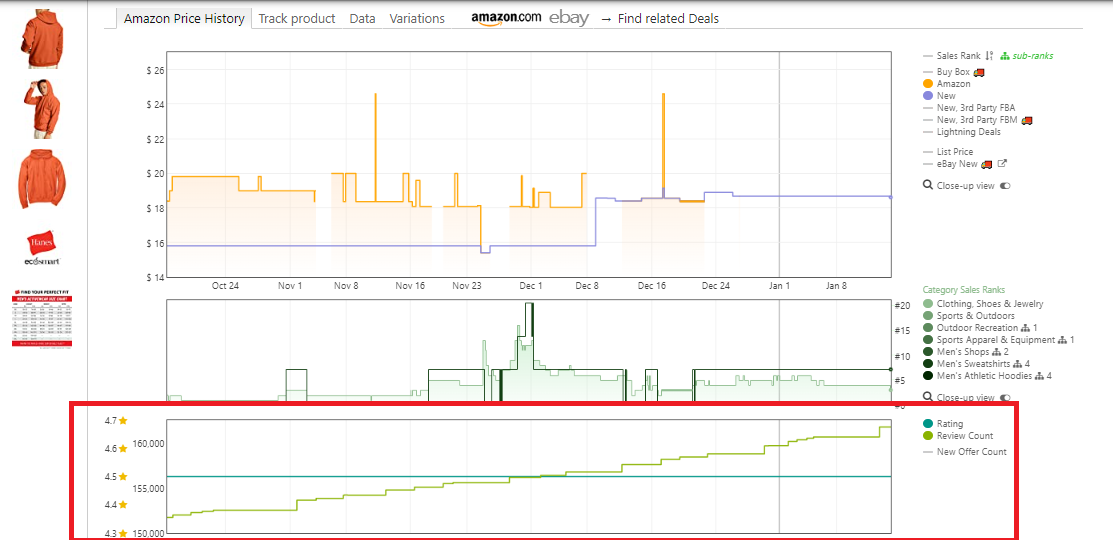
Reviews are available on the separate Keepa chart built into Seller Assistant
- Why it’s important
High ratings indicate strong customer demand and lower risk of returns or complaints.
Step 10. Confirm product eligibility
- What to do
Check for restrictions using Seller Assistant. Green open locks indicate sellable products, while red closed locks signal restrictions.
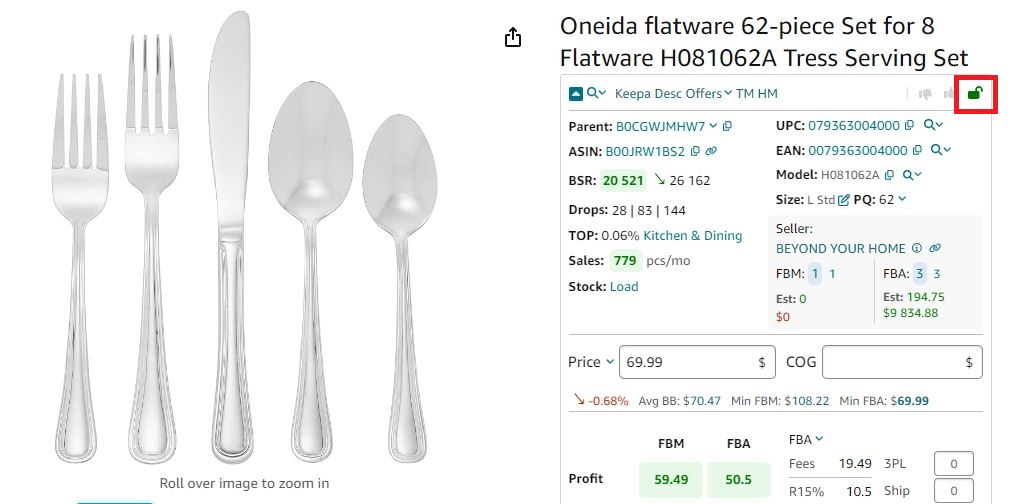
If you see a green open lock icon in Seller Assistant, you can sell a product
- Why it’s important
Prevents you from investing in products you cannot legally sell on your Amazon account.
Step 11. Check for alerts and risks
- What to do
Look for product warnings flagged by Seller Assistant, such as IP complaints, fragile, heavy and bulky items, hazardous materials, and other risks.
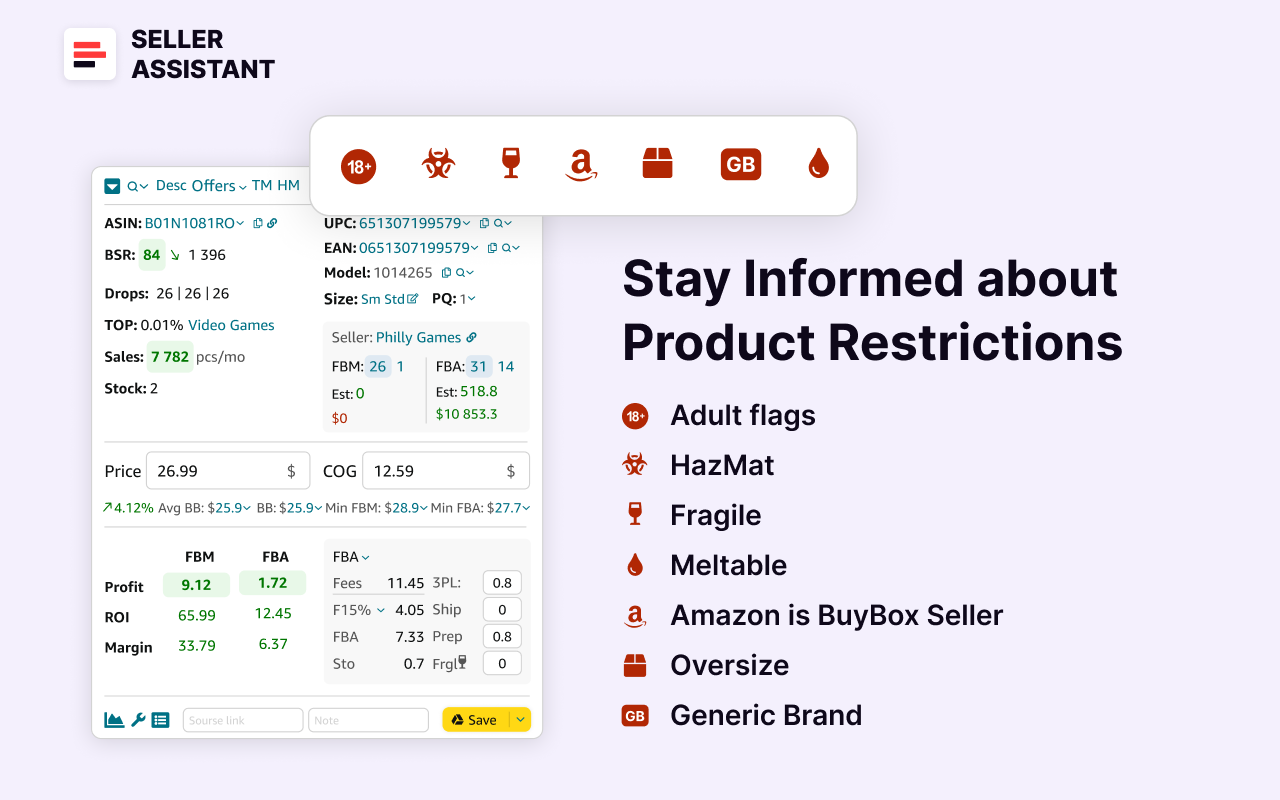
Seller Assistant’s product flags
- Why it’s important
Helps avoid costly mistakes related to logistics, packaging, or legal issues.
Step 12. Calculate profitability
- What to do
Use the integrated FBA&FBM profit calculator to evaluate profitability. Enter the Cost of Goods (COG) and logistics costs, and it will factor in Amazon fees, and calculate your profit, margin, and ROI.
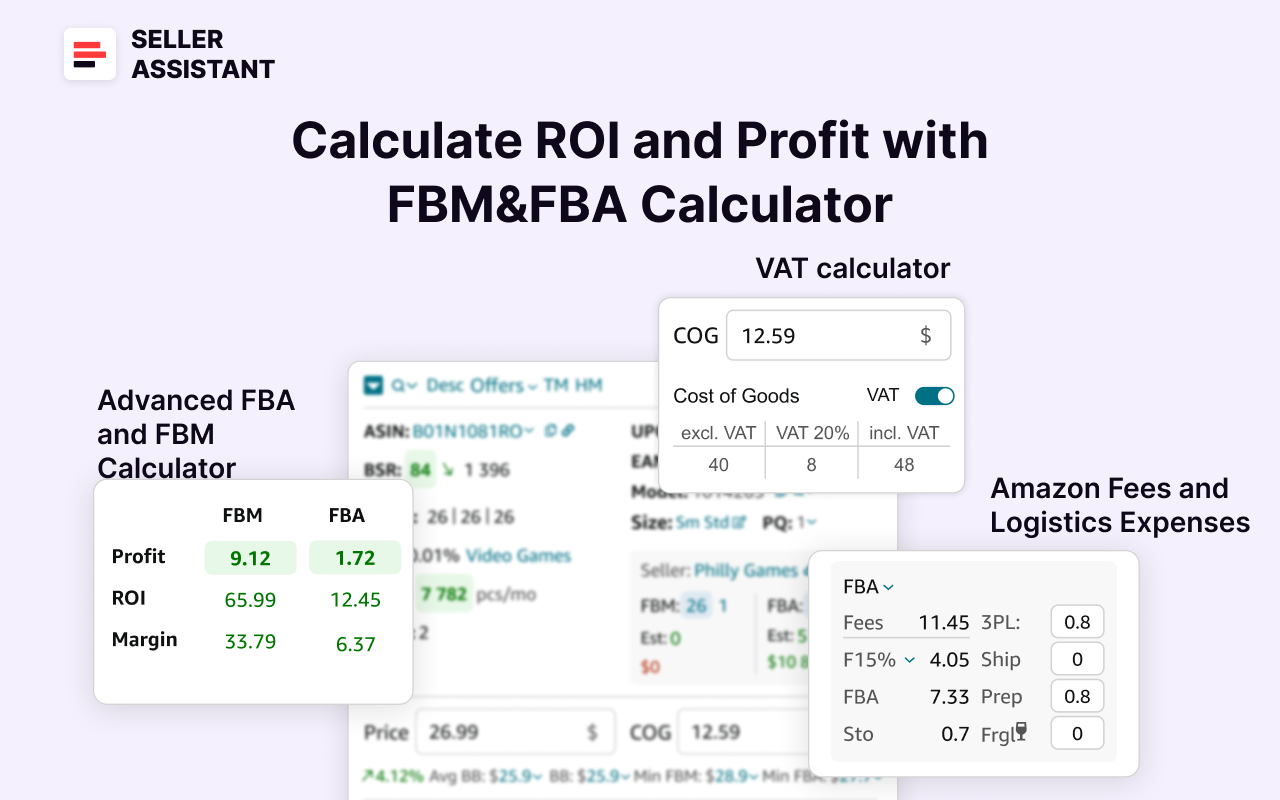
Seller Assistant’s FBA&FBM profit calculator
- Why it’s important
Ensures the product meets your profit margin goals and minimizes financial risks.
FAQ
Where do Amazon sellers get their products?
Amazon sellers source their products from various channels, including wholesale suppliers, distributors, online and retail arbitrage, or dropshipping partners. Some sellers also create their own private label products or purchase inventory from liquidation and closeout sales.
Can I make $1000 a month on Amazon?
Yes, making $1000 a month on Amazon is achievable with proper product research, sourcing, and pricing strategies. Success depends on factors like choosing profitable products, managing costs, and optimizing your listings.
What is the most profitable product to sell on Amazon?
The most profitable products are those with high demand, low competition, and healthy profit margins. Categories like electronics, health and beauty, and home goods often yield strong returns when researched thoroughly.
How to find an item to sell on Amazon?
To find an item to sell, research high-demand, low-competition products using tools like Seller Assistant or Keepa. Explore sources like Amazon Best Sellers, trending niches, or your wholesale supplier price lists price lists for profitable opportunities.
Can you buy stuff from Amazon and sell it?
Yes, you can buy products from Amazon and resell them, but this strategy requires careful consideration of fees and pricing to ensure profitability. It’s more commonly done with discounted or clearance items.
How to find a wholesaler?
You can find wholesalers by searching online directories, attending trade shows, or contacting manufacturers directly. Tools like Seller Assistant’s list of suppliers also simplify the process of locating reliable partners.
Final Thoughts
Sourcing the right products is the foundation of a successful Amazon business. Whether you’re exploring wholesale, online arbitrage, or dropshipping, the key is thorough research, careful supplier selection, and a clear understanding of your profit margins.
By leveraging tools like Seller Assistant and following proven strategies, you can streamline your sourcing process, reduce risks, and focus on scaling your business.