.svg)
How to Use Seller Assistant’s Warehouses Database
Download Amazon Seller Guide
This guide will help you get started, understand the basics of Amazon selling, and explain in simple words how it all works.

Amazon sellers often work with multiple suppliers, prep centers, and purchase orders at the same time. When ship-to addresses and routing rules live in spreadsheets or email threads, mistakes happen – orders get sent to the wrong location, suppliers need clarification, and operations slow down.
Seller Assistant's Warehouses Database solves this by centralizing all prep center and warehouse information in one place. Instead of retyping addresses or double-checking routing for every order, you store warehouse details once and reuse them across your workflow.
In this post, you’ll learn how the Warehouses Database works and how Amazon sellers use it to keep supplier shipments organized and purchase orders accurate.
Note. Seller Assistant is an end-to-end Amazon workflow management platform that integrates 10+ wholesale-focused solutions into one connected system. It combines sourcing workflow automation, bulk research and intelligence tools, and integrated Chrome extensions – giving you everything you need to streamline finding deals, managing suppliers, and creating purchase orders.

The platform aggregates: workflow management tools – Purchase Orders Module, Suppliers Database, Warehouses Database to organize, automate, and scale every step of your wholesale and arbitrage operations; bulk research & sourcing tools – Price List Analyzer, Bulk Restriction Checker, AI Supplier Finder, Brand Analyzer, Seller Spy to evaluate supplier price lists, verify selling eligibility and restrictions, open new brands, and discover winning product ideas from competitors to expand your product catalog; Chrome extensions – Seller Assistant Browser Extension, IP-Alert Extension, and built-in VPN by Seller Assistant to deep-research products, check IP claims and compliance, and access geoblocked supplier sites directly within your browser; and integrations & team access features – seamless API connectivity and integrations with Zapier, Airtable, and Make, plus Virtual Assistant Accounts for secure, scalable team collaboration.
With Seller Assistant, every step of your Amazon wholesale and arbitrage workflow is automated and connected.
Why Sellers Need Structured Warehouse Management
Running an Amazon wholesale operation usually means working with multiple suppliers, prep centers, and Amazon FBA destinations. As the number of purchase orders grows, keeping track of where each shipment should go becomes harder. When warehouse addresses and routing rules are stored in spreadsheets or scattered notes, sellers risk sending inventory to the wrong location, which can delay fulfillment and create confusion with suppliers.
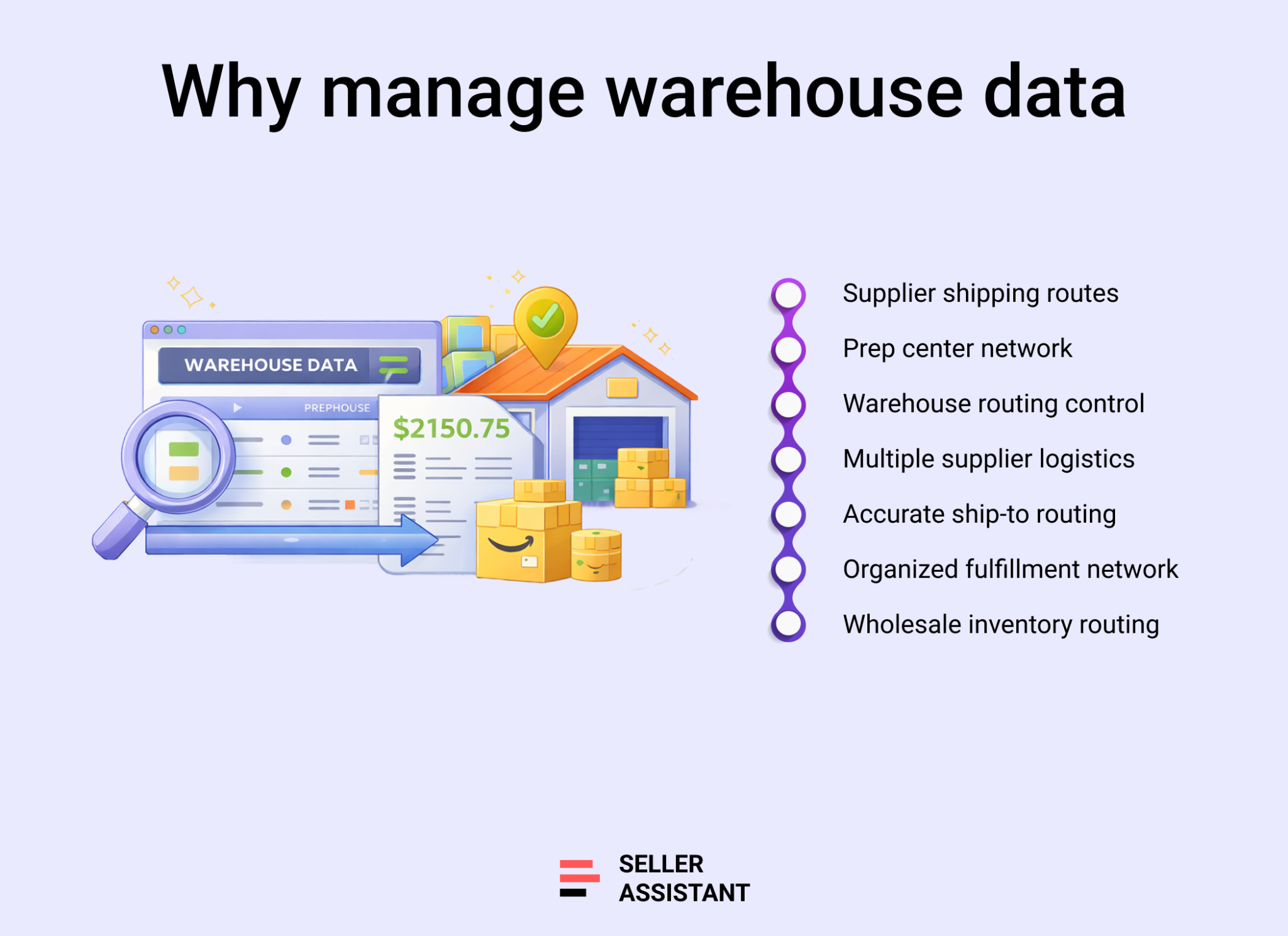
Multiple suppliers require clear routing
Wholesale sellers often purchase products from several distributors or brand owners at the same time. Each supplier may ship inventory to a different prep center or directly to Amazon FBA. Without a structured system, sellers must manually check and enter ship-to addresses for every purchase order, which increases the chance of mistakes.
Prep centers and warehouses must stay organized
Many Amazon sellers use prep centers to label, bundle, or inspect products before sending them to Amazon. Managing several prep centers means keeping track of their addresses, contacts, and operational status. A centralized warehouse record makes it easier to maintain accurate information and reuse it across orders.
Accurate shipping destinations prevent costly errors
Sending a purchase order with the wrong ship-to address can delay inventory processing and create additional logistics costs. Organized warehouse management ensures that suppliers always receive the correct destination details, keeping fulfillment smooth and predictable.
Scalable operations need consistent logistics data
As a wholesale business grows, the number of suppliers, products, and purchase orders increases quickly. Centralizing warehouse information allows sellers to reuse routing data across their workflow, reduce manual entry, and keep operations organized as they scale.
What Is Seller Assistant's Warehouses Database?
Seller Assistant's Warehouses Database is a centralized warehouse and prep center management tool built for Amazon wholesale sellers, online arbitrage sellers, and dropshippers who need to control where supplier shipments are delivered. Instead of manually tracking ship-to addresses in spreadsheets or email threads, you store warehouse and prep center information once and reuse it across your sourcing and purchasing workflow.
Warehouse-level logistics overview
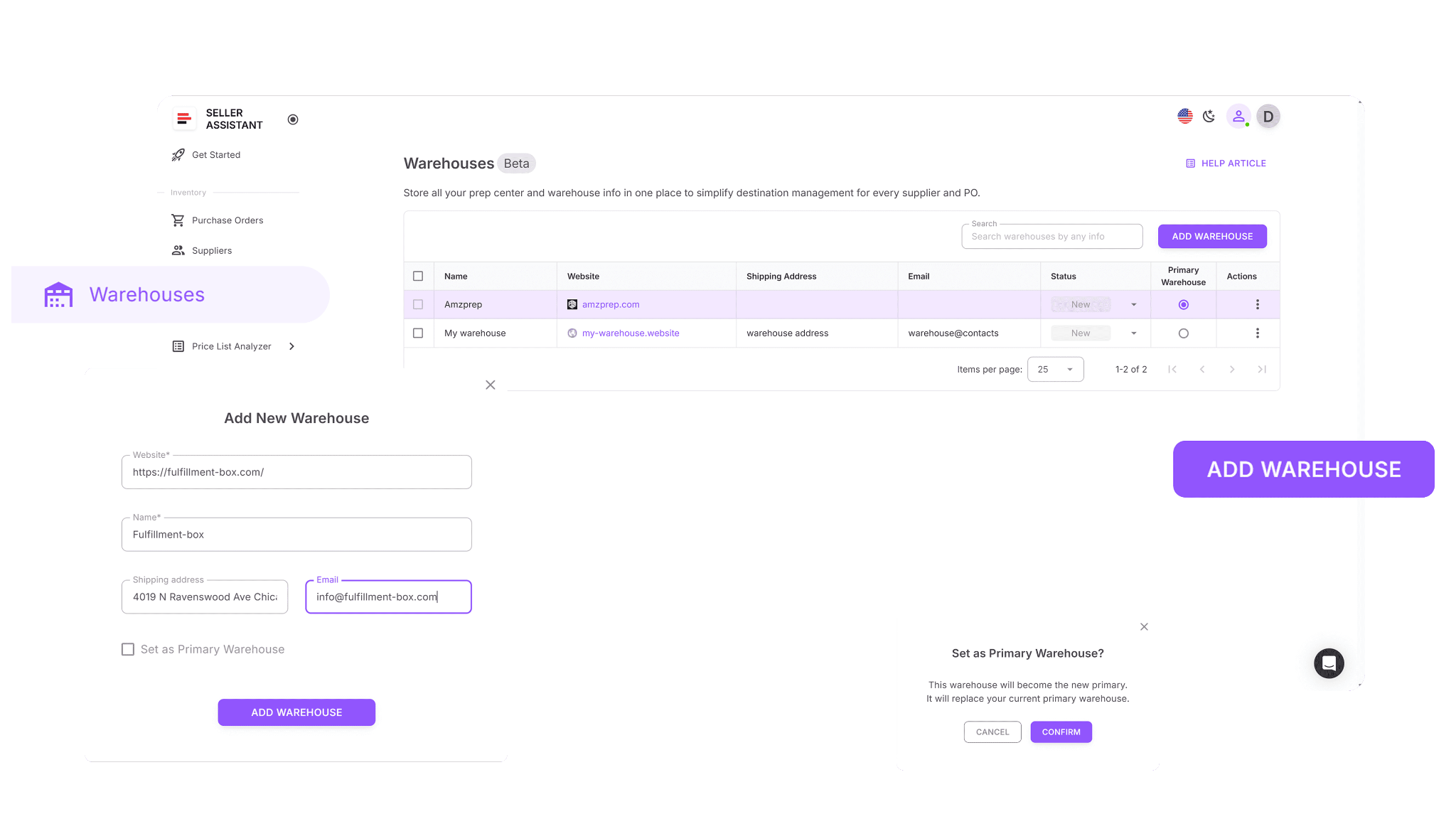
Warehouses Database stores structured profiles for every prep center or warehouse used in your operations. Each record includes the warehouse name, website, shipping address, contact details, and operational status. The system also allows you to assign one primary warehouse, which automatically fills the default ship-to address when creating supplier records or purchase orders.
These records act as the logistics layer of your workflow. By maintaining accurate warehouse profiles, sellers can ensure suppliers always receive the correct shipping destination and that purchase orders contain consistent routing information.
Why centralized warehouse data matters
As wholesale operations grow, sellers often work with multiple suppliers and multiple fulfillment destinations. Some orders may go to prep centers for labeling and inspection, while others may ship directly to Amazon FBA. When this routing logic is handled manually, the risk of mis-shipments increases.
Warehouses Database removes that risk by keeping all shipping destinations organized in one place. Once a warehouse is saved, it can be reused across supplier profiles and purchase orders without re-entering the address.
Part of a connected wholesale workflow
Warehouses Database works alongside other wholesale workflow tools in Seller Assistant. Warehouse records link directly to Suppliers Database and Purchase Orders Module, ensuring that supplier data, shipping destinations, and product orders stay synchronized across tools. Warehouse records can be selected when creating supplier profiles and are automatically used when generating purchase orders. This keeps ship-to information consistent across different parts of the workflow and reduces the need to re-enter logistics details.
Within Seller Assistant’s wholesale environment – which includes supplier management, bulk sourcing tools, and purchasing features – the Warehouses Database handles fulfillment routing. It ensures that every order has a clearly defined destination, helping sellers coordinate suppliers, prep centers, and inventory flow without relying on spreadsheets or manual address tracking.
What Can You Do with Warehouses Database?
Warehouses Database helps Amazon sellers manage prep centers and warehouse locations in a structured system. Instead of tracking ship-to addresses in spreadsheets or emails, sellers store each fulfillment location in one centralized database. Warehouse data can then be reused automatically when assigning suppliers or creating purchase orders, keeping fulfillment routing consistent and reducing manual entry as operations scale.
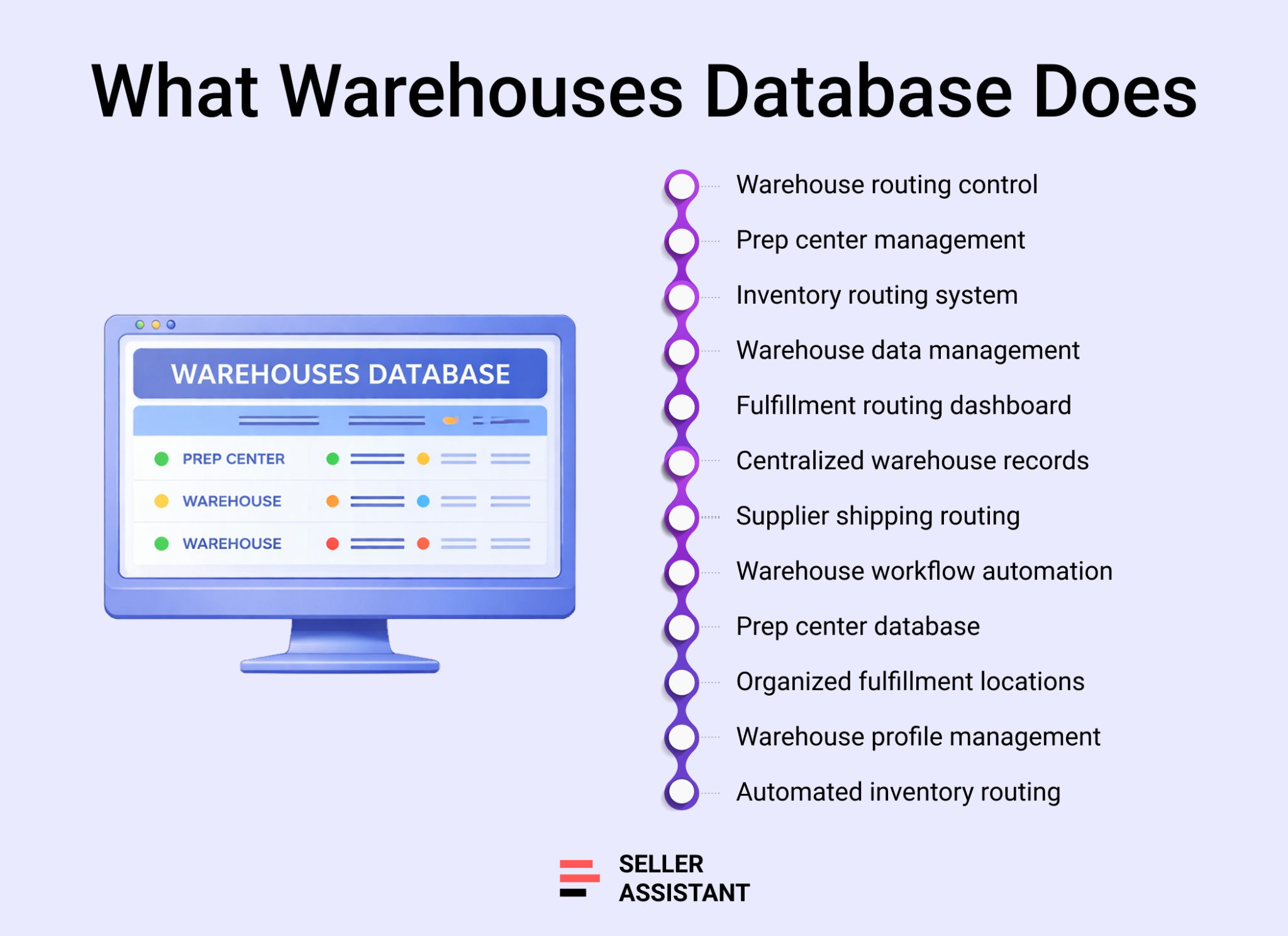
Create warehouse and prep center profiles
Warehouses Database allows you to create detailed profiles for each warehouse or prep center you work with. Profiles store important location data such as the warehouse name, website, ship-to address, phone number, and email so routing information is always available when creating orders.
Manage warehouse operational status
Each warehouse can be assigned an operational status such as New, Active, or Inactive. This helps sellers track which fulfillment locations are currently used and prevents routing inventory to outdated or inactive facilities.
Link suppliers to fulfillment locations
Sellers can connect warehouses to supplier profiles to automate routing decisions. When a supplier is linked to a default warehouse or prep center, the correct ship-to location is applied automatically during purchase order creation.
Automatically apply ship-to details in purchase orders
When creating purchase orders, the system pulls warehouse data directly from the database. Ship-to addresses and routing details are filled automatically, which reduces manual entry and prevents mistakes during order creation.
Reuse warehouse data across sourcing workflows
Warehouse profiles are shared across Suppliers Database and the Purchase Orders Module, allowing routing information to flow across the entire sourcing and purchasing workflow without being re-entered.
Set a primary warehouse
Sellers can assign one warehouse as the primary ship-to location. This default destination is automatically used when routing information is not specified, helping maintain consistent fulfillment logic.
Search and organize warehouse records
The warehouse list supports searching and sorting by name, website, or address. This makes it easier to locate fulfillment locations quickly, especially when managing multiple warehouses or prep centers.
Update warehouse details without breaking connections
Warehouse information can be edited at any time. Updates automatically apply across supplier profiles and purchase orders while keeping all existing workflow connections intact.
How Warehouses Database Works
Warehouses Database is located in the Inventory section of your Seller Assistant account and acts as the central hub for managing all prep centers and warehouse destinations used in your sourcing and purchasing workflow. Sellers create warehouse profiles once, store routing details, and reuse that information when assigning suppliers or generating purchase orders. This prevents repeated data entry and ensures suppliers always ship inventory to the correct location.
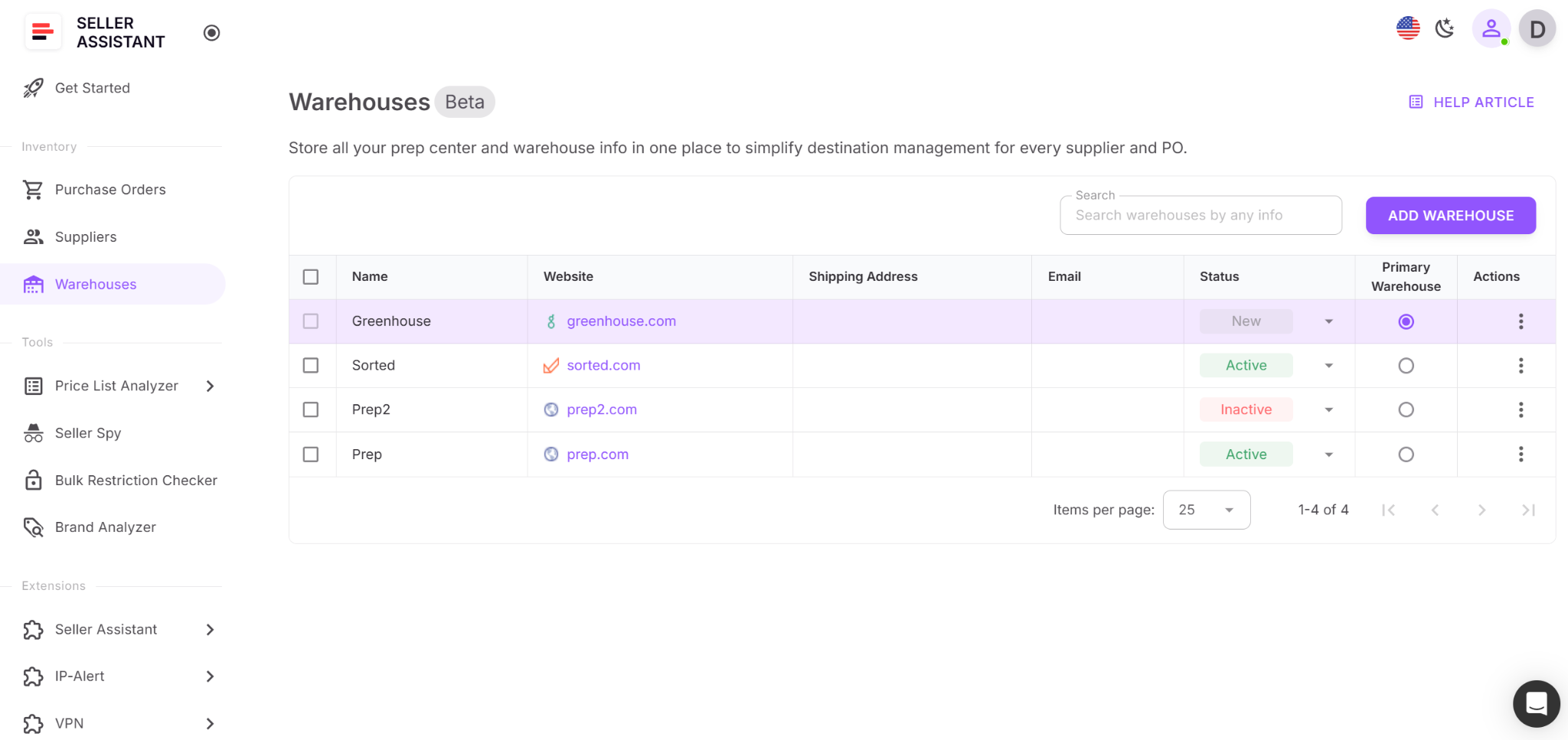
To start using the database, you simply add a new warehouse record by entering the website and name. The system automatically fills the warehouse name from the website, and you can add optional details such as the shipping address, email, phone number, or notes. Once saved, the warehouse becomes available across other Seller Assistant tools.
Primary warehouse logic
One warehouse can be set as the primary warehouse, which acts as the default shipping destination. When a supplier or purchase order is created, this primary warehouse automatically fills the ship-to address unless another location is selected.
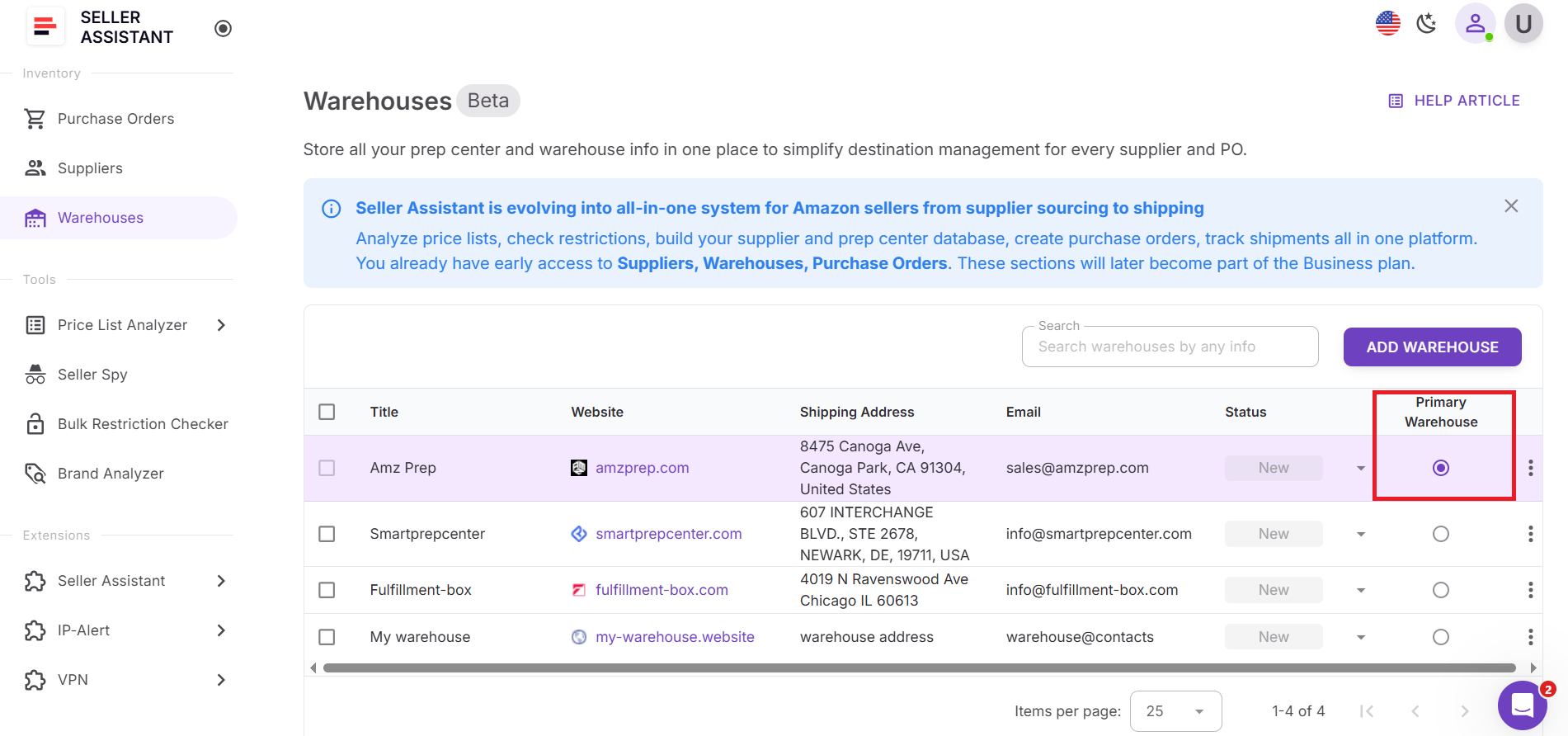
Each account starts with a default warehouse called “My Warehouse.” Only one primary warehouse can exist at a time, and it cannot be deleted until another warehouse is assigned as the primary location. This rule ensures that a default routing destination always exists.
How warehouses connect with other Seller Assistant tools
Warehouses Database is integrated with other operational tools inside Seller Assistant.
Suppliers Database
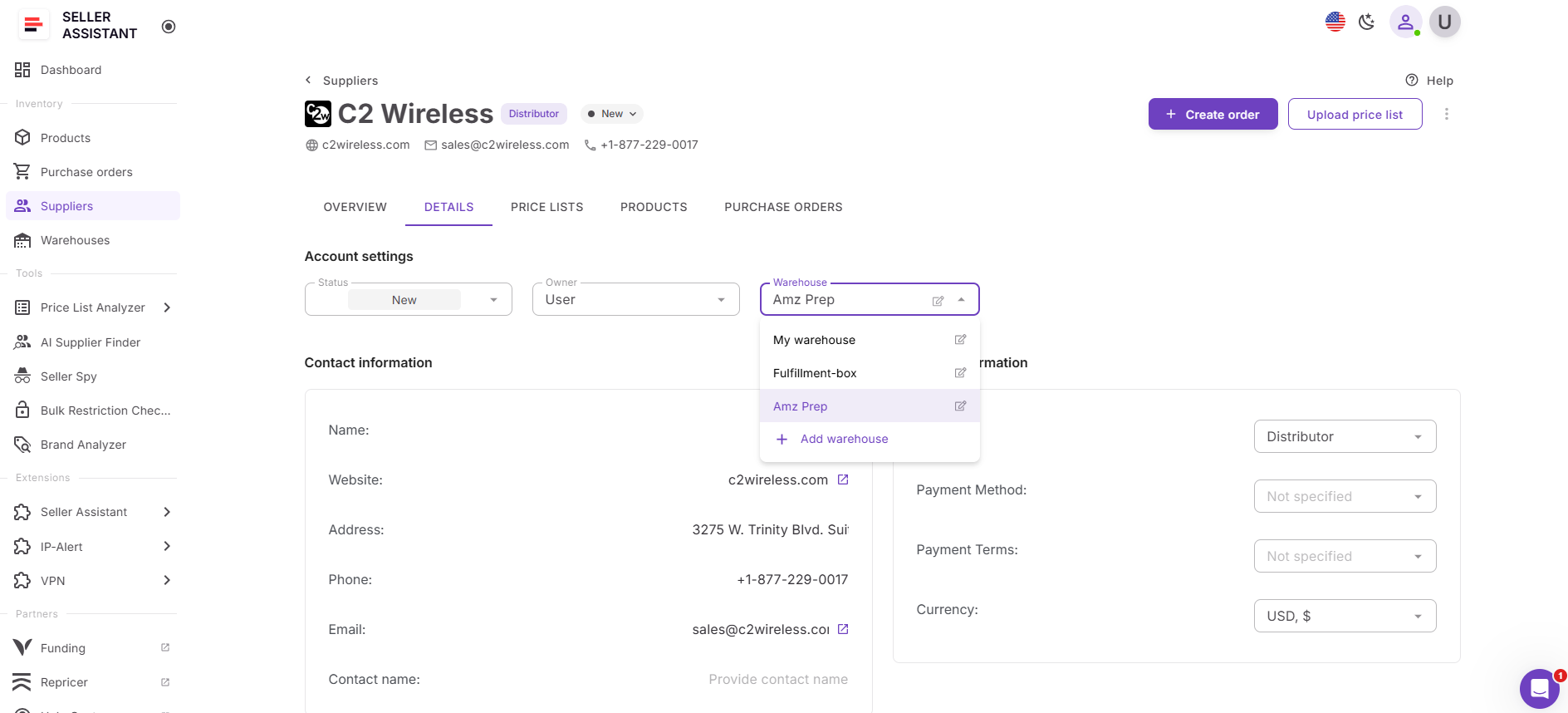
When creating or editing a supplier profile, you can assign a warehouse or prep center as the supplier’s default shipping destination. This ensures that the correct ship-to address is automatically applied whenever you create purchase orders for that supplier.
Purchase Orders Module
When generating a purchase order, the system automatically fills the ship-to address using the selected warehouse record. This reduces manual entry and helps prevent routing errors when sending orders to suppliers.
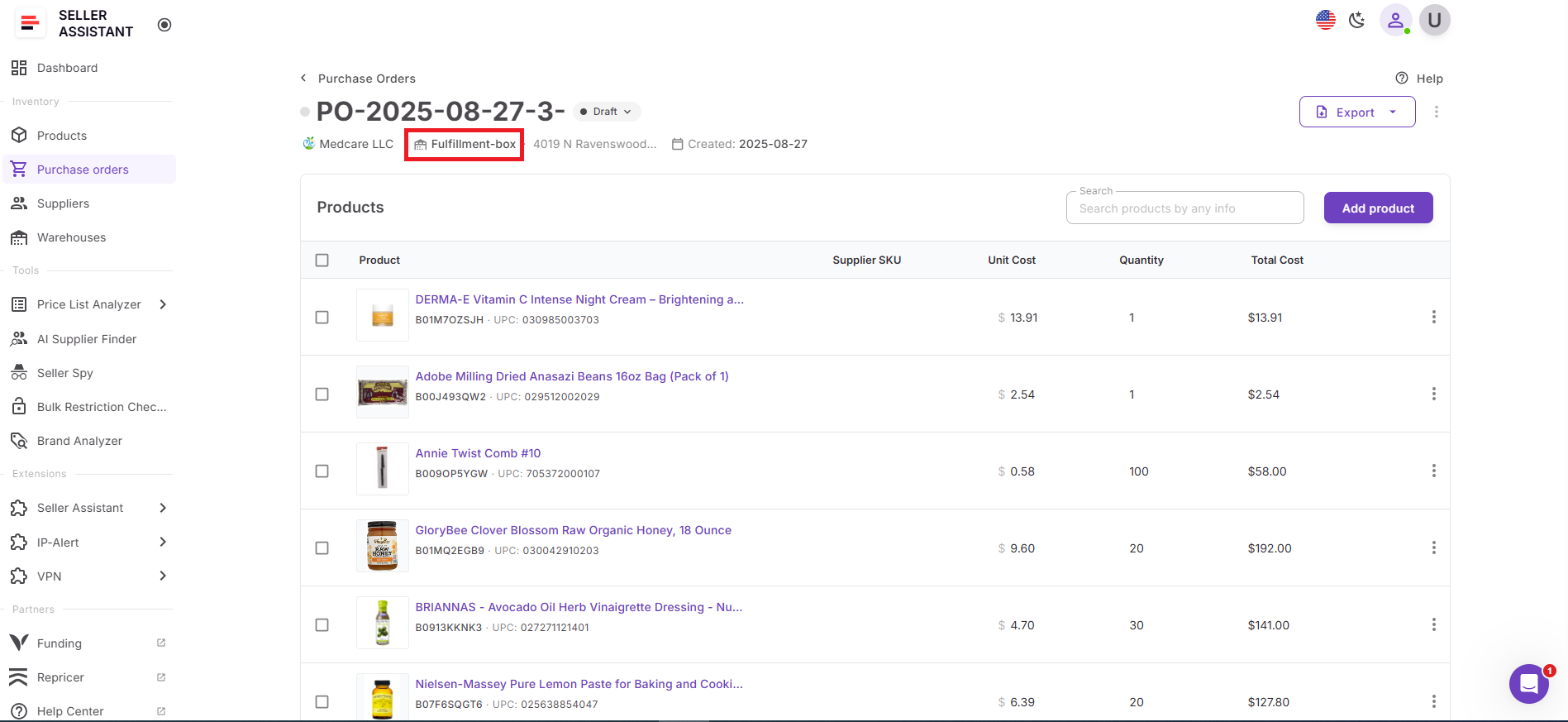
Because warehouse profiles are shared across tools, updates to warehouse details automatically apply wherever the warehouse is used.
What data warehouses database stores
Each warehouse record contains the core information needed to route inventory and manage fulfillment locations. The database stores the following data fields:
- Name – warehouse or prep center name
- Website – business website associated with the location
- Shipping address – full destination address used for supplier shipments
- Contacts – email, phone number, or additional contact details
- Status – operational state of the warehouse: New, Active, or Inactive.
The warehouse list can be searched and sorted by name, website, address, or contact details, making it easier to manage multiple prep centers or fulfillment locations inside one organized system.
How to Use Warehouses Database Step by Step
Warehouses Database is designed to make fulfillment routing easy to manage. You add each prep center or warehouse once, keep its details updated, and then reuse that information across suppliers and purchase orders. This gives you one place to control ship-to destinations and helps prevent routing mistakes as your Amazon wholesale or online arbitrage operation grows.
Step 1. Open warehouses database
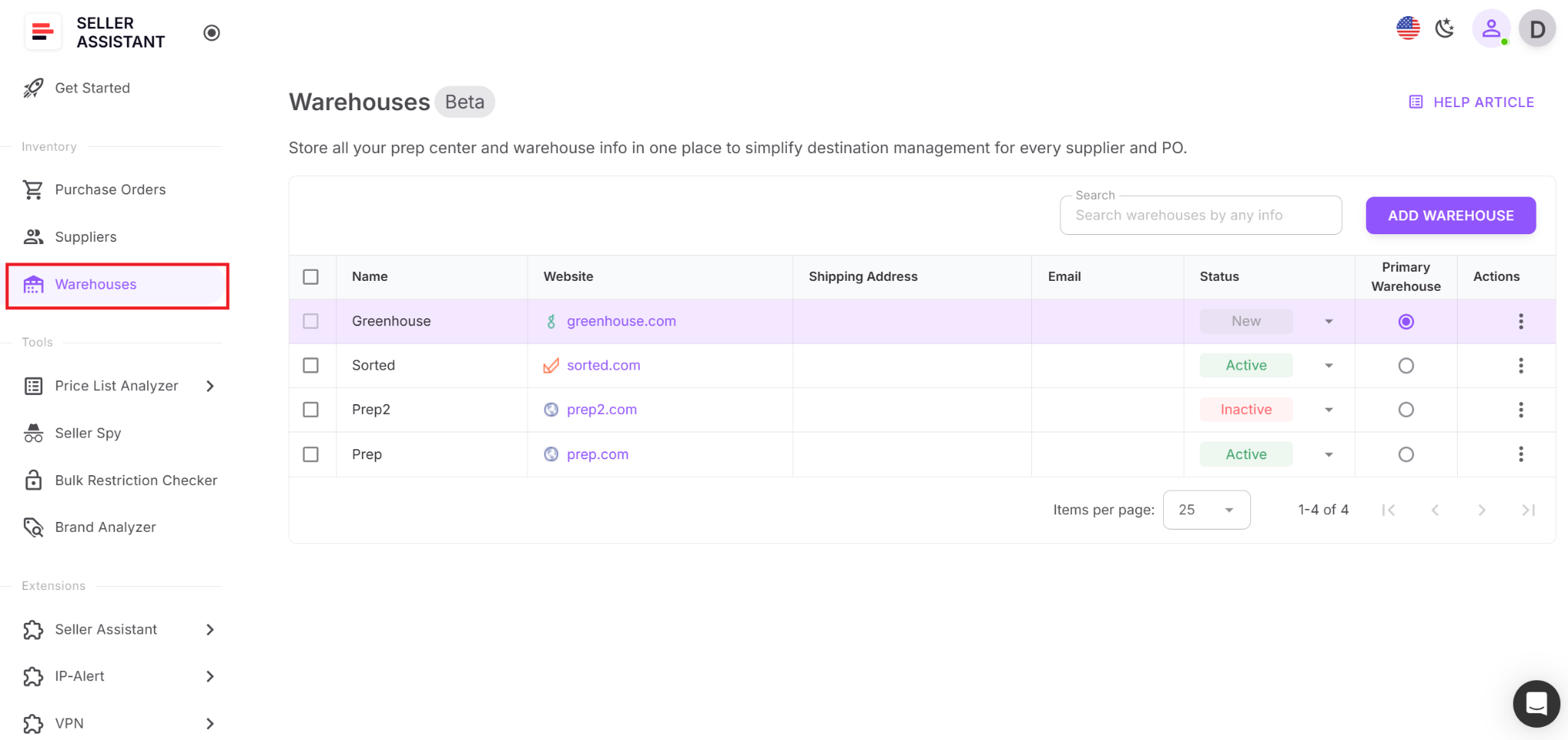
Log in to your Seller Assistant account and go to Inventory → Warehouses. This is the main workspace where you can view, search, sort, add, and manage all warehouse and prep center records.
Step 2. Add a new warehouse
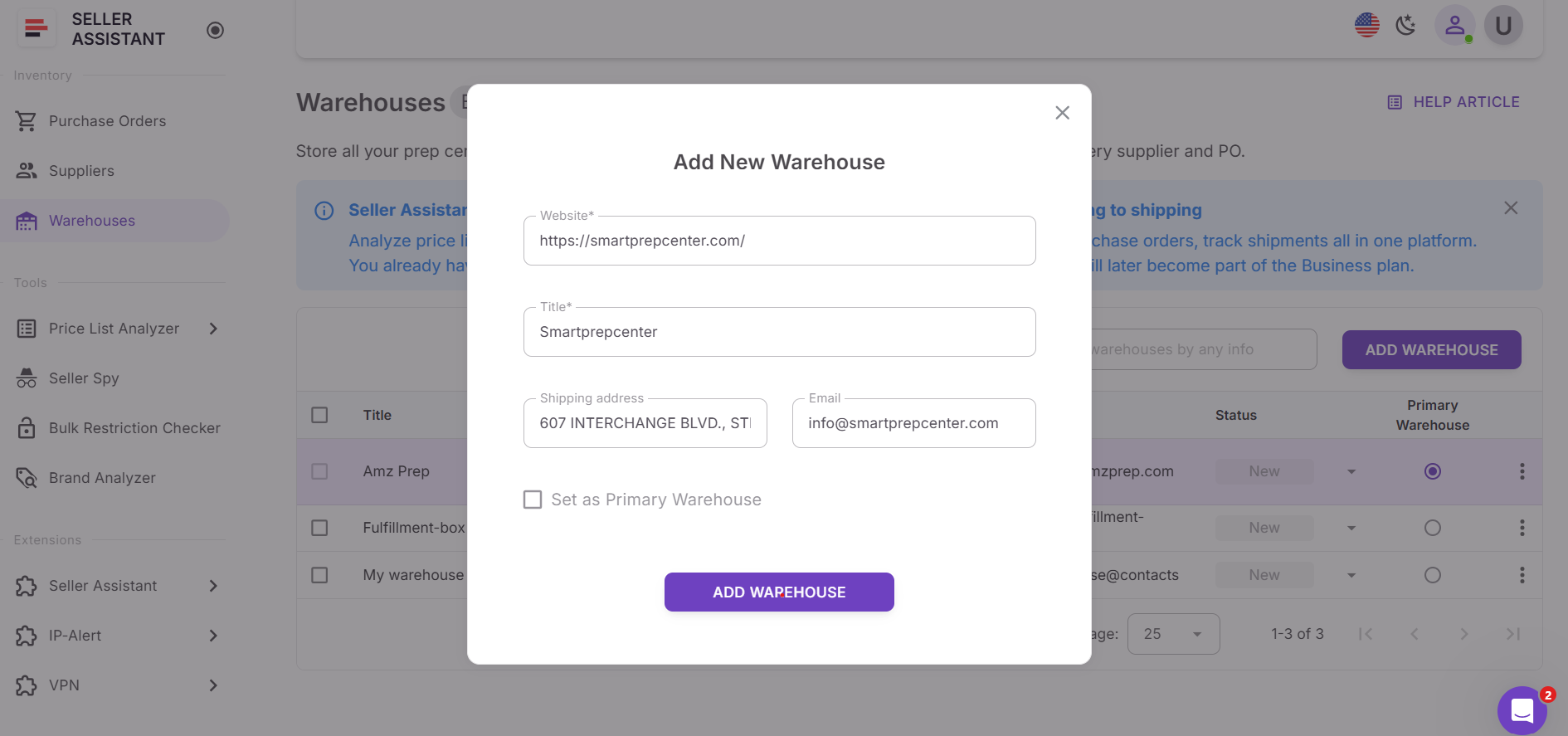
Click Add Warehouse to create a new record. Enter the required fields:
- WebsiteName – auto-filled from the website, but editable
- You can also add optional details such as the full shipping address, email, phone number, and other contact information.
Step 3. Review and save warehouse details
Check that the warehouse name, website, and shipping details are correct before saving. This matters because the same record may later be reused in supplier profiles and purchase orders.
Step 4. Set warehouse status
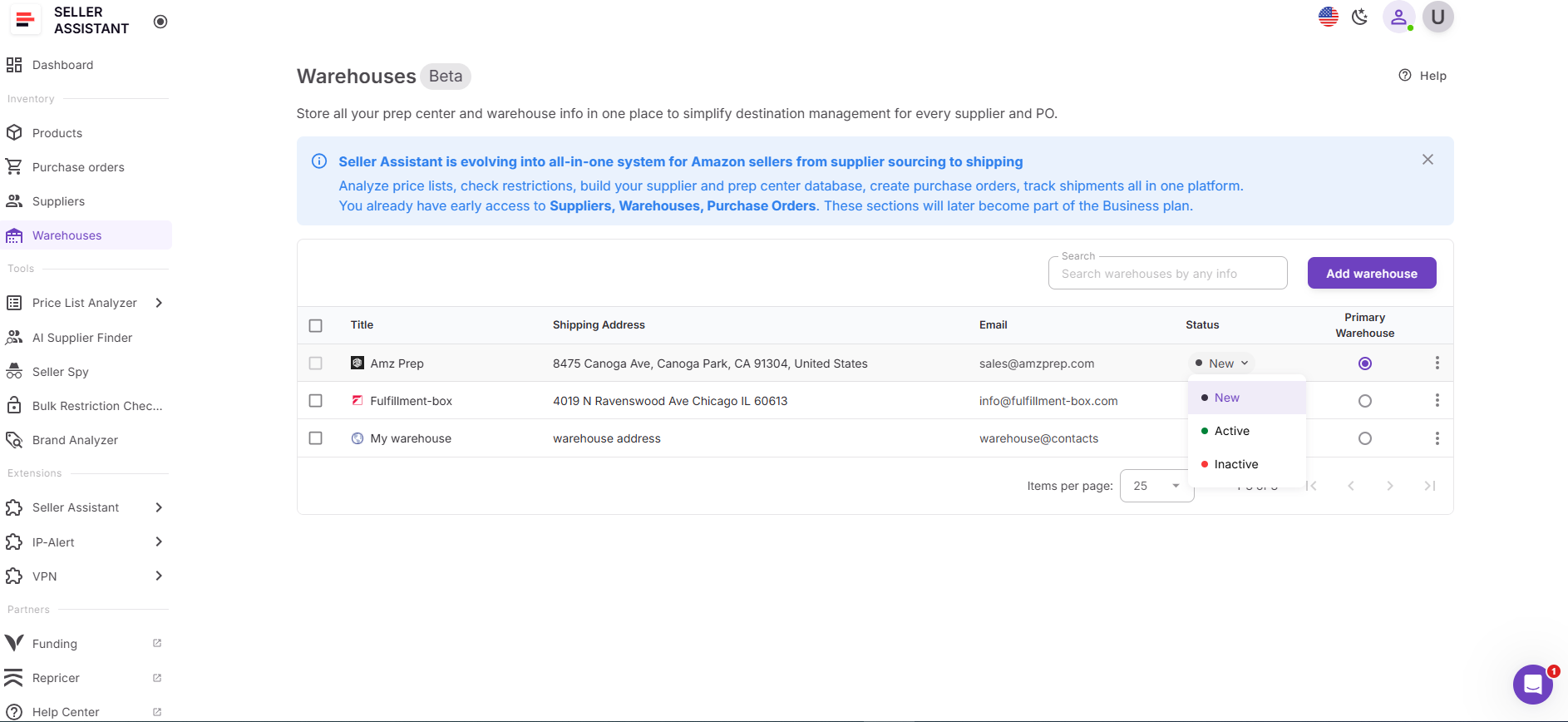
Assign the warehouse a status that reflects how you use it in your workflow:
- New
- Active
- Inactive
This helps you keep current fulfillment locations separate from locations you no longer use.
Step 5. Assign a primary warehouse
Choose one warehouse as your primary warehouse. This location becomes the default ship-to address in supplier records and purchase orders.
A default primary warehouse called My Warehouse is created for every account. Only one primary warehouse can exist at a time. If you want to delete the current primary warehouse, you must first assign another one as primary.
Step 6. Use warehouses with suppliers
When creating or editing a supplier in Suppliers Database, assign the correct warehouse or prep center to that supplier. This keeps routing consistent and makes sure supplier orders are directed to the right destination.
Step 7. Use warehouses in purchase orders
When creating a purchase order, Seller Assistant automatically fills the ship-to address using the assigned warehouse. This reduces manual entry, speeds up order creation, and lowers the risk of sending inventory to the wrong place.
Step 8. Search, sort, and update records
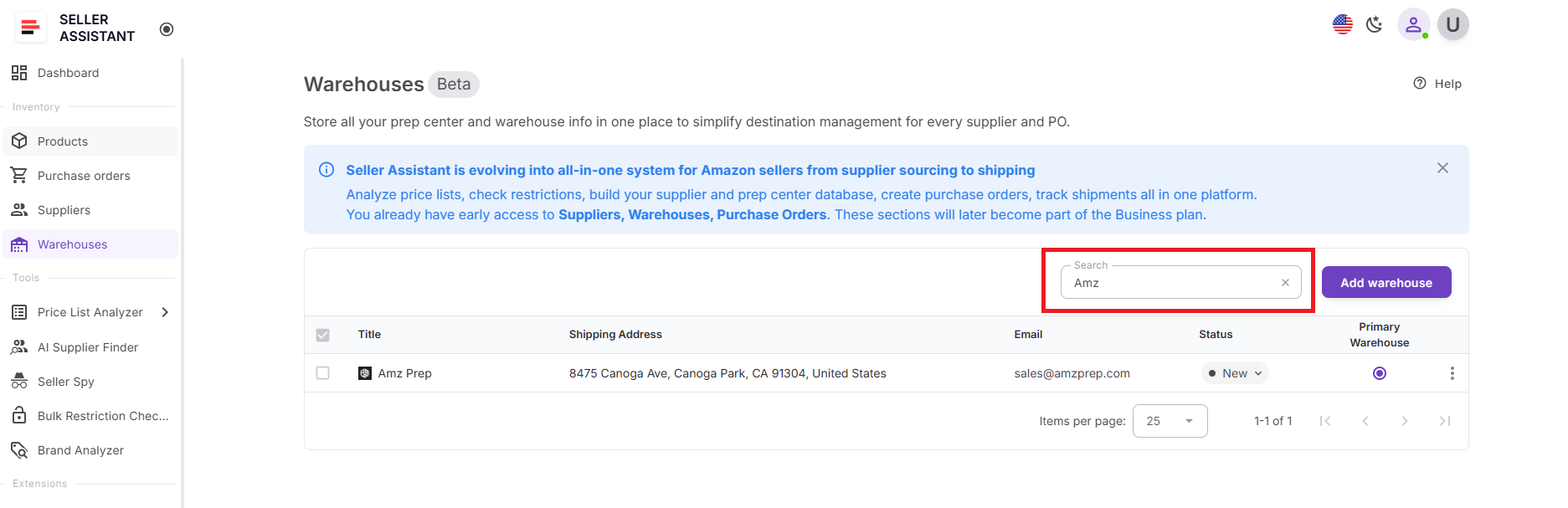
As your operation grows, you can search warehouses by name, website, address, or contacts and sort the list by column. You can also edit warehouse details at any time to keep routing data accurate across your workflow.
FAQ
What is the purpose of Warehouses Database in Seller Assistant?
Warehouses Database stores all prep center and warehouse locations used in your Amazon operations in one centralized system. It ensures that supplier shipments and purchase orders always use the correct ship-to destination.
Can I use Warehouses Database without connecting my Amazon account?
Yes, the tool works independently from your Amazon account connection. It functions as an internal logistics management system for routing supplier shipments and organizing fulfillment locations.
How does the primary warehouse work?
You can assign one warehouse as the primary location, which becomes the default ship-to address in supplier records and purchase orders. This helps automate routing decisions and prevents mistakes when creating new orders.
Can I link warehouses to suppliers?
Yes, warehouses can be connected to supplier profiles inside the Suppliers Database. When a supplier is linked to a warehouse, that destination is automatically used during purchase order creation.
What happens if I update warehouse information?
You can edit warehouse details at any time, including addresses or contact information. Updates apply across connected supplier profiles and purchase orders without breaking existing workflow links.
Final Thoughts
Managing prep centers and warehouse destinations becomes more complex as your Amazon wholesale or online arbitrage business grows. When routing information lives in spreadsheets or scattered notes, small mistakes can cause shipping delays, supplier confusion, and unnecessary operational friction.
Seller Assistant's Warehouses Database solves this by keeping all fulfillment locations organized in one centralized system. By storing warehouse data once and connecting it with Suppliers Database and Purchase Orders Module sellers can automate ship-to routing, reduce manual entry, and maintain consistent logistics across their workflow.
Seller Assistant automates and connects every stage of your Amazon wholesale and arbitrage workflow. It brings together in one platform: workflow management tools – Purchase Orders Module, Supplier Database, Warehouse Database, bulk research & sourcing tools – Price List Analyzer, Bulk Restriction Checker, AI Supplier Finder, Brand Analyzer, Seller Spy, Chrome extensions – Seller Assistant Browser Extension, IP-Alert Extension, and built-in VPN by Seller Assistant, and integrations & team access features – seamless API connectivity, integrations with Zapier, Airtable, and Make, and Virtual Assistant Accounts.