


Every seller wants one thing: to be an Amazon top-rated seller. But learning how to become an Amazon top-rated seller isn’t just about fulfilling orders – it starts long before a sale is made.
Amazon tracks everything from the products you list to how you handle messages, claims, and returns. One misstep can trigger account health issues or even account suspension. That’s why becoming and staying top-rated requires more than luck – it demands data, strategy, and daily discipline.
In this post, we’ll break down exactly how to protect your rating, what metrics matter most, and how Seller Assistant helps sellers like you stay in Amazon’s good graces.
What Is the Amazon Seller Rating, Really?
Your Amazon seller rating is Amazon’s way of measuring how well you’re doing as a seller. It reflects your performance, reliability, and how closely you follow Amazon’s rules. A strong seller rating is the foundation of long-term success – it increases your chances to win the Buy Box, improves visibility, and lowers the risk of account suspension.
Your performance rating is shown inside Seller Central → Performance → Account Health. There, you’ll find your Account Health Rating (AHR), which is Amazon’s traffic light system:
- Green: Healthy (you’re doing fine)
- Yellow: At risk (you need to fix something now)
- Red: Unhealthy (you’re close to suspension or already under restriction)
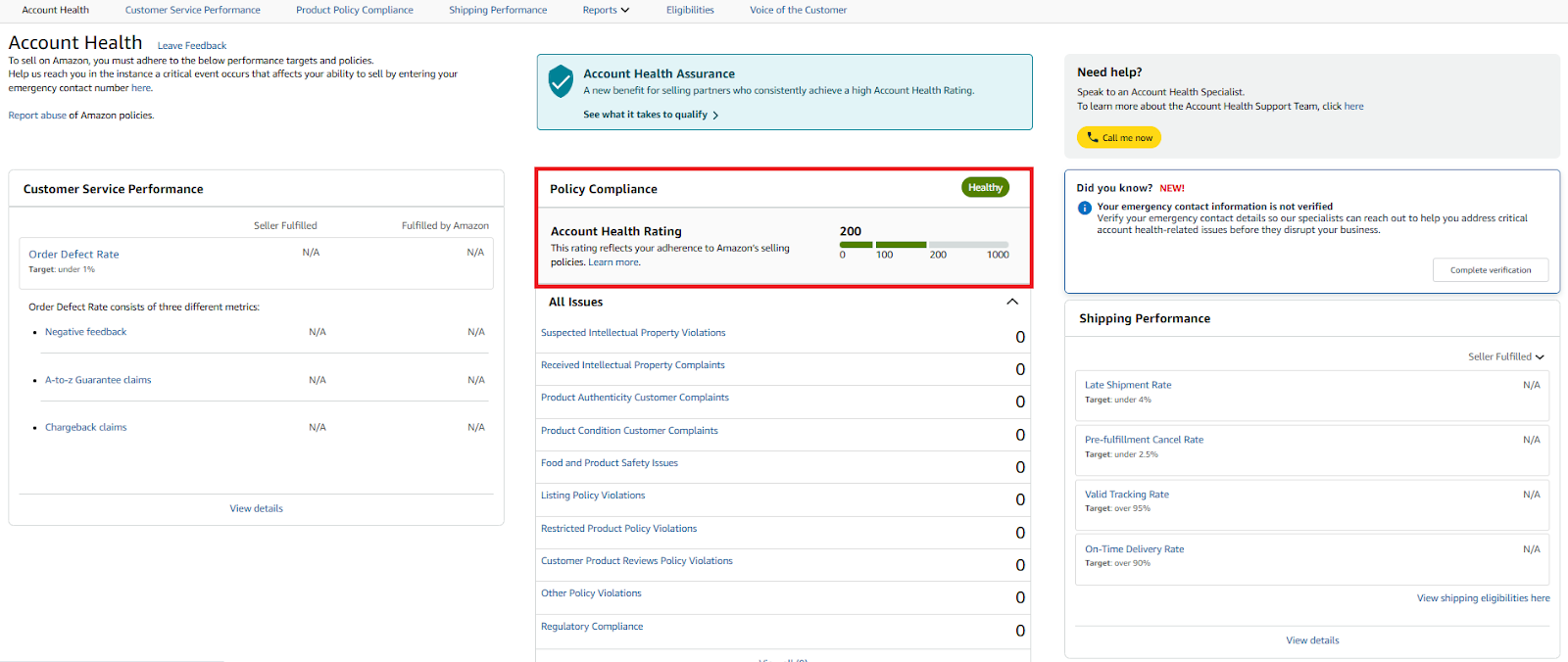
Account Health Rating
In the Account Health Dashboard, you’ll find detailed metrics that directly influence your account’s health.
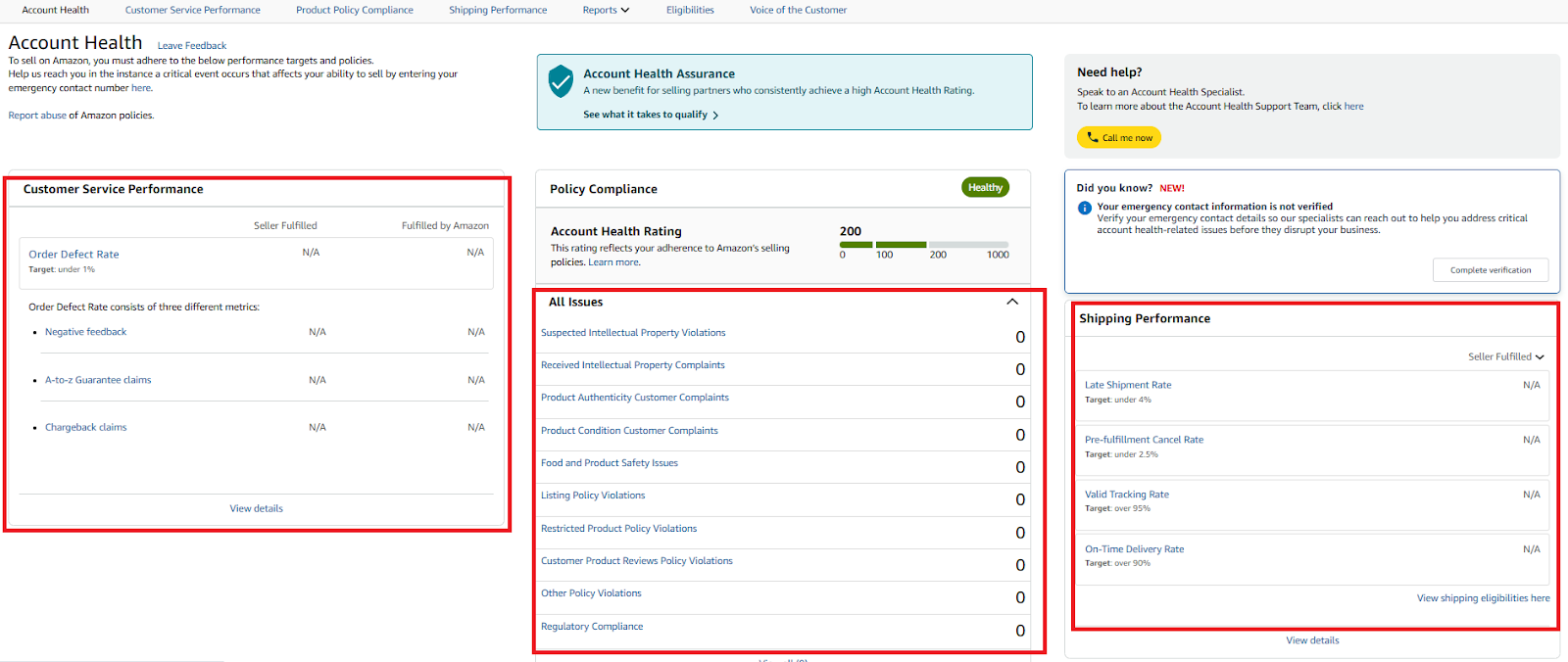
In the Account Health Dashboard, you’ll find detailed metrics that directly influence your account’s health.
Order defect rate (ODR)
This combines negative feedback, A-to-Z Guarantee claims, and chargebacks. ODR is one of the most critical indicators. Keep it below 1% to stay compliant.
Late shipment rate
Measures how often you ship orders after your handling time. A late shipment rate above 4% signals unreliability and hurts your ability to win the Buy Box.
Cancellation rate
If you cancel too many orders (especially due to being out of stock), Amazon sees it as poor inventory management. Stay under 2.5% to avoid performance alerts.
Valid tracking rate (VTR)
Amazon requires valid tracking IDs for at least 95% of your shipments. Failing to meet this threshold shows you’re not providing a reliable customer experience.
Customer feedback
Buyers can leave 1- to 5-star ratings, which appear on your storefront.
- 5–4 stars = positive
- 3 stars = neutral
- 2–1 stars = negative
Amazon calculates your feedback score based on the percentage of positive feedback in 30, 90, and 365-day windows. This affects how trustworthy you appear to buyers. You can check and manage this under Performance → Feedback Manager.
A-to-Z claims and chargebacks
If customers feel their issues aren’t resolved, they may file a claim or chargeback. These are red flags and damage your metrics fast – even if you’re not at fault.
Policy violations and IP complaints
Listings that break Amazon’s rules or infringe on intellectual property will result in strikes on your account. These are tracked under Policy Compliance in the Account Health dashboard.
Your product choice matters – more than you think
Many sellers overlook this: your product sourcing decisions directly impact your rating. Selling a risky product – one that gets returned often, attracts negative reviews, or triggers IP complaints – can destroy your metrics even if you fulfill every order perfectly.
To protect your rating
- Avoid gated or brand-restricted products unless approved
- Check ASINs for IP history and previous suspensions
- Steer clear of items with quality, sizing, or compliance complaints
- Use tools like Seller Assistant to vet every product before you buy
Where to track all your metrics
The tools below give you real-time visibility into your standing – and early warnings if something’s going wrong.
To monitor your full performance picture:
- Seller Central → Performance → Account Health Dashboard (AHR, policy, metrics)
- Feedback Manager (buyer feedback and percentages)
- Performance Notifications (warnings, alerts)
- Voice of the Customer (product-level issues, return reasons).
Best practices to retain the seller rating
| Problem | Possible Causes | Solutions |
|---|---|---|
| Stock-out | Inventory is not available |
- Do not list backordered items.
- Maintain a minimum threshold of inventory.
- Remove offerings that are consistently out-of-stock.
| | Inventory quantity is not accurate |
- Send inventory update feeds up to every 15 minutes.
- Process Amazon orders quickly.
- Set aside dedicated inventory for Amazon orders.
- Use partial update in text files with only SKU and quantity data.
- Add multiple listings using inventory files.
| | Drop-shipper inventory isn’t up to date |
- Monitor availability and ship times closely.
- Synchronize back-end systems.
| | Late shipment | Product takes longer to ship than promised |
- Set accurate lead-time-to-ship for each SKU.
- Use the Add a Product feature or XML latency element.
- Notify buyers of delays, upgrade shipping if needed.
- Remove consistently late offerings.
| | Buyer missed shipment notification |
- Send tracking info with your fulfillment feed.
| | Product not as described | Product image does not accurately depict its features |
- Use clear, maximum-size images with multiple views.
- Ensure images meet Amazon requirements.
| | The size or material is different than expected |
- Use custom sizing charts and fill out dimensions.
| | Wrong size or wrong product | Incorrect product shipped |
- Check packing, picking, and shipping accuracy.
- Ensure SKU matches correct Amazon listing.
| | Product quality | Buyer not satisfied with product quality |
- Accurately describe the product, avoid misleading terms.
- Remove products with consistent negative feedback.
- Include usage instructions on page and shipment.
| | Customer service issue | Buyers cannot reach your customer service department |
- Ensure correct phone/email on Amazon Help pages.
- Use short, clear email addresses.
- Adjust spam filter settings.
| | Buyers are not getting timely responses |
- Acknowledge all inquiries within 24 hours.
| | Removal of feedback | Incorrect feedback |
- Use Feedback Manager to request removal.
- Reply publicly to resolve issues and build trust. See Can Amazon remove feedback.
|
The Most Overlooked Factor: the Products You Choose
Many sellers focus on fulfillment and shipping speed – but overlook the biggest driver of seller rating: the product itself. Your product choices directly impact how your account performs.
Why? Because products with frequent complaints, defects, or listing changes often lead to returns, negative reviews, and policy violations – all of which damage your Account Health.
Worse, selling flagged or infringing products can trigger immediate IP complaints, result in listing removal, or even account suspension.
To avoid these risks and protect your seller rating, only source products that meet three essential conditions:
- Steady demand
- Strong profit margins
- Low risk of policy issues
Use tools like Seller Assistant to instantly check all product metrics in bulk with price list scanning or single products with in-depth research.
Seller Assistant is an end-to-end Amazon workflow management platform that integrates 10+ wholesale-focused solutions into one connected system. It combines workflow automation, bulk research, sourcing intelligence tools, and integrated Chrome extensions – giving you everything you need to streamline product sourcing, supplier management, and purchase order creation.

Seller Assistant is an end-to-end Amazon workflow management platform
The platform aggregates: workflow management tools – Purchase Orders Module, Supplier Database, Warehouse Database to organize, automate, and scale every step of your wholesale and arbitrage operations; bulk research & sourcing tools – Price List Analyzer, Bulk Restriction Checker, Sourcing AI, Brand Analyzer, Seller Spy to evaluate supplier price lists, verify selling eligibility and restrictions, open new brands, and discover winning product ideas from competitors to expand your product catalog; Chrome extensions – Seller Assistant Browser Extension and IP-Alert Extension to deep-research products, check IP claims and compliance; and integrations & team access features – seamless API connectivity and integrations with Zapier, Airtable, and Make, plus Virtual Assistant Accounts for secure, scalable team collaboration.
With Seller Assistant, every step of your Amazon wholesale and arbitrage workflow is automated and connected.
How to evaluate the product before sourcing
Eligibility and restrictions
- Before checking profitability, make sure you’re actually allowed to sell the product.
- Avoid gated categories and restricted brands unless your account is approved
- Check if you can sell a product on your Amazon account. Don’t list until you confirm eligibility – guessing leads to performance strikes
Profitability metrics
A product might sell fast – but does it profitably? Calculate using Amazon’s fee structure:
- Profit = Selling price – COGS – Amazon fees – logistics – tax
- ROI target = 15–30%+
- Margin target = 15%+
- Compare FBA vs. FBM options. One often outperforms the other, depending on weight, size, and storage.
Demand indicators
You want products that sell consistently, not one-hit wonders. Look for:
- BSR (Best Sellers Rank): Aim for products ranked between 1–200,000
- BSR trend: Steady = strong. Spikes = seasonal or unstable
- BSR drops: The more drops, the higher the sales volume
- Sales velocity: Avoid listings with <1% velocity – they’ll just eat storage fees
Competition levels
- More sellers = tighter margins. But too few sellers can be a red flag.
- FBA seller count: 3–15 is manageable
- Avoid reselling private label listings: One-seller listings are usually locked down
- Buy Box share: If it’s dominated by one seller (or Amazon), skip it
Price history behavior
- Use tools like Keepa to spot price stability.
- Average Buy Box price sets expectations
- Price trend: Frequent drops = race to the bottom
- Avoid listings with volatile prices unless you plan to undercut aggressively (not ideal for rating protection).
Product risks to avoid
Some products look profitable on paper but come with hidden risks. Red flags include:
- Amazon dominating the Buy Box
- Fragile, meltable, or hazmat items
- Adult category (restricted ads, packaging limits)
- Generic or unbranded listings (you can’t add an offer)
- High return or defect rate products
- Any ASIN with previous IP complaints or policy strikes
Sales volume and unit planning
- Always estimate realistic monthly sales – especially for multipacks or variations.
- Don’t assume all variation colors/sizes sell equally
- Make sure you’re sourcing the correct configuration
- Buying too much of the wrong variation = dead stock + losses
By choosing products carefully, you prevent most of the problems that lower your seller rating. Smart sourcing is the first – and best – line of defense.
Seller Assistant Helps You Pick Products That Boost Rating
To protect your seller rating and scale profitably, you need a reliable way to find products that sell well, earn strong margins, and carry minimal risk. Seller Assistant supports product research in two powerful ways:
Bulk scanning of supplier lists for scalable product discovery
Deep research of single products for high-confidence sourcing decisions
Both strategies help resellers quickly identify profitable, low-risk products – while filtering out items that could lead to IP complaints, policy violations, or poor performance.
Strategy 1. Supplier price list scanning for scalable product discovery
Supplier price list scanning is the go-to method for sellers who work with large catalogs or spreadsheets of SKUs. It’s designed to quickly sift through hundreds or thousands of items and surface the most profitable opportunities.
How this strategy works
- Get a supplier file (wholesale), or scrape/export data from supplier websites (OA or dropshipping ).
- Feed the list into Seller Assistant’s Price List Analyzer.
- The tool automatically matches each product with Amazon listings, enriches the data with sales, profitability, and risk insights, and flags potential issues.
- Manual scanning takes hours and risks missed opportunities. Automation makes the process fast, accurate, and scalable.
Tools you’ll need
Seller Assistant’s Price List Analyzer is built for bulk scanning. It transforms a plain spreadsheet into a decision-ready sourcing file.
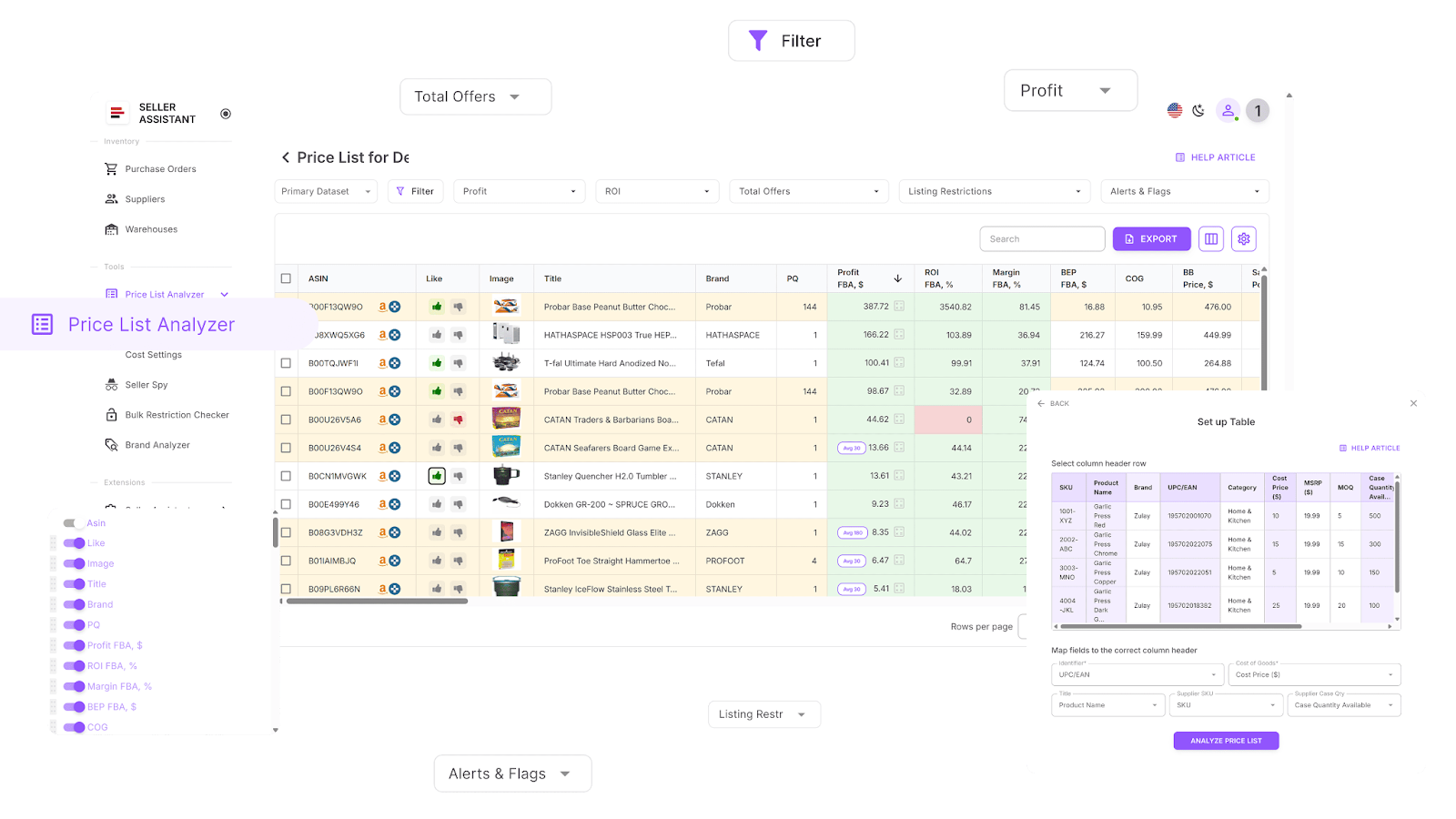
Price List Analyzer
With it, you can
- Instantly match supplier items to Amazon ASINs
- Auto-populate with sales insights (BSR, velocity, trend history)
- See profitability metrics (ROI, margins, break-even, net profit)
- Track Buy Box behavior and price history over 30/90/180 days
- Review fees (Amazon referral, FBA/FBM, storage, prep, hazmat)
- Check seller competition, Buy Box rotation, Amazon in-stock rate
- Flag restricted ASINs, hazmat, meltables, or IP risk products
- Like/Dislike items and build sourcing shortlists
- Export filtered lists directly into purchase orders
Who this strategy is best for
- Wholesale sellers with big supplier catalogs
- OA and dropshippers scanning scraped product data at scale
Strategy 2. Deep research of individual products
If bulk scanning helps you scale, deep product research helps you control quality and minimize risk. This strategy is ideal for sellers who want precision over volume. With it, you hand-pick products one by one where the supplier cost is significantly lower than the Amazon selling price.
Though slower than bulk sourcing, deep research builds sourcing intuition, gives product-level insights, and ensures that every item you add to your inventory is profitable, compliant, and low-risk. Wholesale sellers often use this strategy to vet deals auto-selected with bulk research.
How this strategy works
You start by browsing Amazon or supplier sites for promising products. With the Seller Assistant Extension, all the key data you need – profitability, sales demand, competition, restrictions, and hidden risks – appears directly on the Amazon product and search pages, supplier websites, and Amazon competitor storefronts. This means you can make confident sourcing decisions in real time without switching between spreadsheets and tools.
Tools you’ll need
Seller Assistant Extension turns your browser into a complete sourcing dashboard. It overlays insights directly on Amazon product pages, search results, supplier catalogs, and even competitor storefronts.
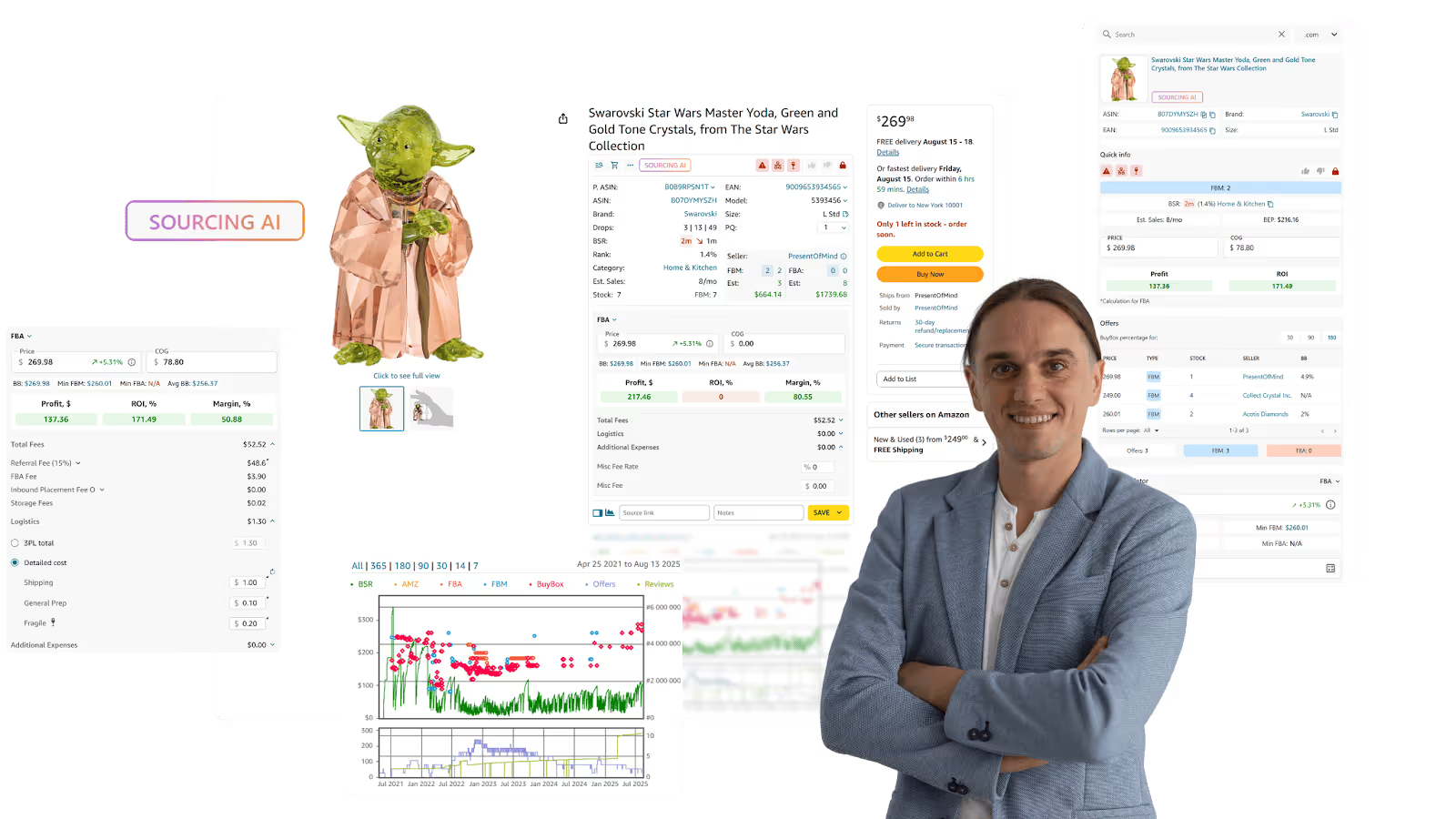.png)
Seller Assistant Extension
Key features of Seller Assistant Extension
- Product Page View: Shows ASIN, UPC/EAN, BSR, dimensions, monthly sales, seller count, and other essential product metrics
- Quick View: Displays restrictions, IP alerts, sales velocity, and seller data on search results
- Side Panel View: Matches products directly on supplier sites with Amazon listings
- Storefront Widget: Reveals competitor’s brands, categories, reviews, and top-performing items
- Sourcing AI: Discovers up to 10 U.S. suppliers per product with
- Sales Estimator & Stock Checker: Projects monthly sales and checks seller stock levels
- FBM&FBA Profit Calculator: Calculates ROI, profit, margins, fees, VAT, and logistics
- Restriction Checker: Instantly check selling eligibility and restrictions
- IP Alert: Spots IP complaints and Amazon policy violations
- Alerts and Flags: Flags risks like hazmat, adult, meltable, fragile, generic brands, or Amazon as a competitor
- Offers: Analyze all competitor offers on a listing – prices, stock, and Buy Box share
- Variation Viewer: Identifies best-selling variations by review share
- Keepa Integration: Provides long-term sales and pricing trends
- Google Sheets Export & Notes: Send data to Sheets, save supplier links, and add team comments
Who this strategy is best for
- Online arbitrage sellers who need detailed validation before buying
- Dropshippers checking risk factors before listing
- Wholesale sellers verifying individual deals that automation might miss
Core Performance Metrics Every Top-Rated Seller Must Control

Core Performance Metrics Every Top-Rated Seller Must Control
Smart product selection sets the stage for success – but once the right items are in your catalog, you need to keep your performance metrics within Amazon’s thresholds. These numbers are non-negotiable: fall below the standards, and your seller rating – and even your entire account – can be at risk.
Amazon measures success with metrics. Staying within limits isn’t just about avoiding penalties – it’s what keeps you visible, competitive, and trusted as a seller.
Order defect rate (ODR)
Keep this under 1%. ODR includes negative feedback, A-to-Z Guarantee claims, and chargebacks. Even a small spike signals poor buyer experience.
Late shipment rate
Must stay below 4%. Late shipments reduce trust and trigger poor feedback. Accurate handling times and reliable carriers are essential.
Cancellation rate
Stay under 2.5%. High cancellations usually mean poor stock control or unreliable suppliers. Both frustrate customers and harm your rating.
Valid tracking rate (VTR)
Keep above 95%. Without tracking, customers can’t follow orders, leading to disputes and lower satisfaction scores.
Customer feedback rating
Aim for at least 95% positive over 12 months. Monitor Feedback Manager, respond to issues quickly, and request removal of unfair reviews when eligible.
A-to-Z claims and chargebacks
Every claim is a red flag. Resolve customer issues proactively before they escalate to this stage. Zero is the goal.
Policy compliance
Avoid IP complaints, restricted product violations, and other policy breaches. These are recorded in your Account Health dashboard and can instantly shift your rating from healthy to at risk.
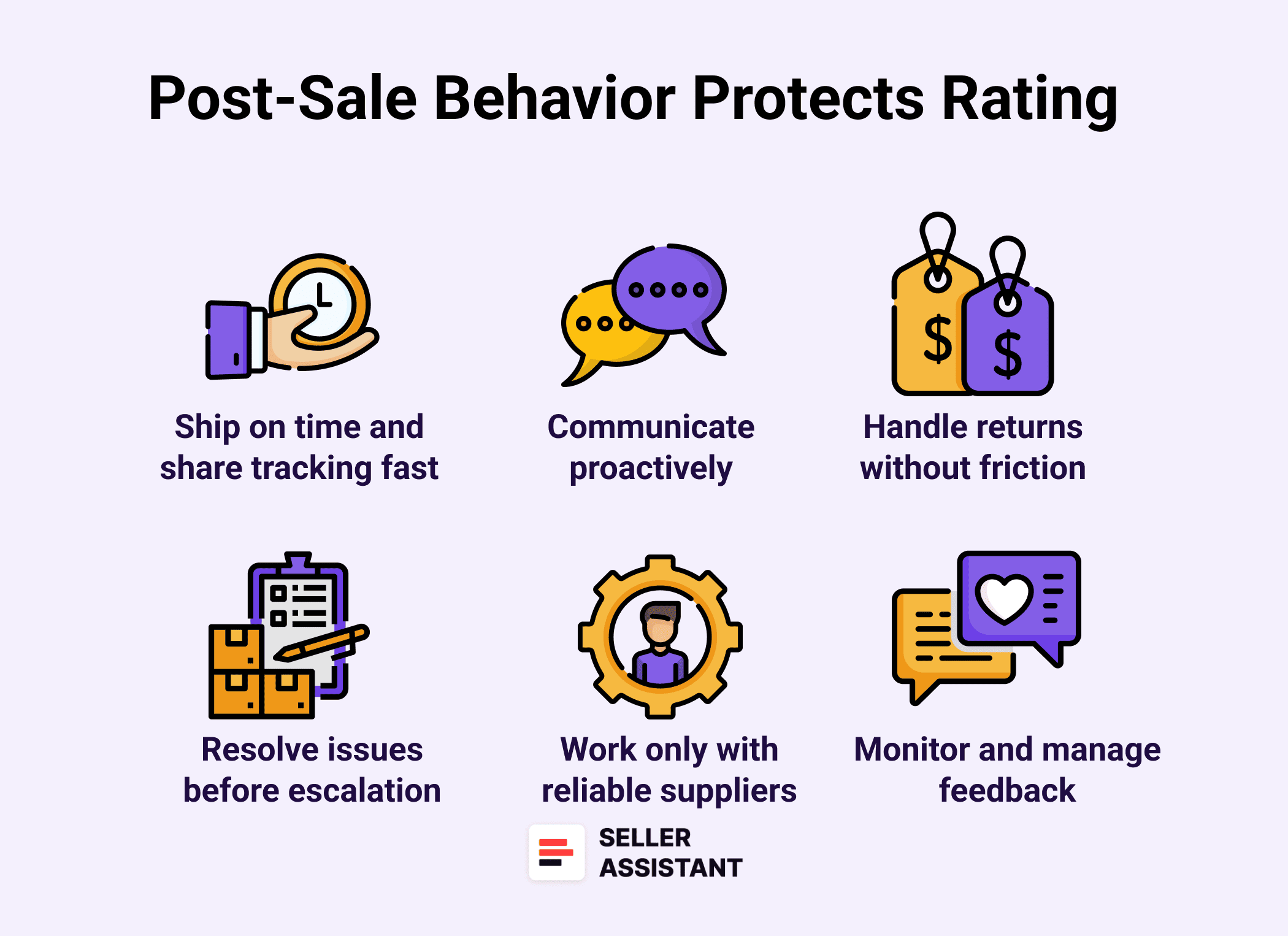
Post-Sale Behavior That Protects Your Rating
Finding the right products and keeping your metrics in check is only half the job. What happens after the sale is just as important. Buyers leave feedback based on their overall experience – from tracking updates to returns. Smooth post-sale operations protect your Amazon seller rating and build long-term trust.
Here are the essentials to focus on.
Post-Sale Behavior That Protects Your Rating
Ship on time and share tracking fast
Upload tracking information as soon as the package is handed to the carrier. Late uploads make buyers nervous and increase the chance of negative feedback.
Communicate proactively
If there’s a delay or issue, let the buyer know early. Silence leads to frustration – and poor ratings. Answer every message within 24 hours, including weekends.
Handle returns without friction
Buyers expect easy, no-questions-asked returns within Amazon’s 30-day window. Complicated return policies almost guarantee negative ratings.
Resolve issues before they escalate
Offer refunds, replacements, or solutions quickly. Fast problem-solving often prevents A-to-Z claims and chargebacks.
Monitor and manage feedback
Check Feedback Manager regularly. If a buyer leaves unfair or irrelevant feedback (for example, complaining about shipping delays caused by Amazon), request its removal.
Work only with reliable suppliers
Dropshippers and wholesalers depend on supplier accuracy. Vet suppliers carefully to avoid late shipments, stockouts, and item-not-as-described complaints that hurt your rating.
Daily Habits of Top-Rated Amazon Sellers
Maintaining a healthy Amazon account isn’t about one-off fixes – it’s about consistent daily routines. Top-rated sellers succeed because they build habits that prevent problems before they start. Use this checklist to stay on track.
✔️Check your Account Health Dashboard every day for warnings, policy violations, or risk alerts
✔️Run new products through Seller Assistant to flag restrictions, IP risks, or poor sales metrics before sourcing
✔️Review order defect rate, cancellation rate, and shipment metrics to ensure they’re within Amazon’s thresholds
✔️Upload tracking numbers immediately after dispatch
✔️Respond to all buyer messages within 24 hours (including weekends and holidays)
✔️Monitor Feedback Manager and request removal of unfair or Amazon-responsibility feedback
✔️Track returns and refunds – act fast to resolve issues and minimize negative feedback✔️Check supplier reliability if dropshipping or doing OA – confirm stock levels and shipping timelines regularly
✔️Keep an eye on Voice of the Customer to identify early signs of product complaints or quality issues
✔️Log performance notifications – address any alerts before they affect your Account Health Rating
Staying top-rated isn’t luck – it’s the result of repeatable, disciplined habits. Make this checklist part of your daily routine, and you’ll not only protect your seller rating but also build long-term trust with Amazon and your buyers.
FAQ
How to become an Amazon top seller?
You need to consistently keep your Account Health Rating in the green by controlling performance metrics, sourcing profitable low-risk products, and providing excellent customer service. Using tools like Seller Assistant helps avoid policy violations and find products that support long-term account growth.
What qualifies as a bestseller on Amazon?
A product qualifies as a bestseller if it ranks among the top-selling items in its category based on Amazon’s Best Sellers Rank (BSR). A lower BSR number means higher recent sales velocity.
How much does Amazon take from a $100 sale?
Amazon deducts a referral fee (typically 8–15%), plus applicable FBA or FBM fees for storage, shipping, and handling. On average, expect Amazon to keep $15–$20 from a $100 sale, though exact amounts depend on category and fulfillment method.
How to get an A+ listing on Amazon?
A+ Content (Enhanced Brand Content) is only available to brand-registered sellers. Once enrolled, you can design A+ pages through Seller Central → Advertising → A+ Content Manager.
Final Thoughts
At the end of the day, learning how to become an Amazon Top Rated Seller comes down to three things: choosing the right products, keeping your performance metrics in the green, and delivering a flawless customer experience. Sellers who cut corners with risky products or unreliable fulfillment quickly see their ratings – and accounts – collapse.
With Seller Assistant, you can take the guesswork out of sourcing by instantly spotting profitable, low-risk products while avoiding IP complaints and policy violations. Combine that with disciplined daily habits and proactive account management, and you’ll not only protect your rating but also build a resilient, long-term Amazon business.
Seller Assistant automates and connects every stage of your Amazon wholesale and arbitrage workflow. It brings together in one platform: workflow management tools – Purchase Orders Module, Supplier Database, Warehouse Database, bulk research & sourcing tools – Price List Analyzer, Bulk Restriction Checker, Sourcing AI, Brand Analyzer, Seller Spy, Chrome extensions – Seller Assistant Browser Extension, IP-Alert Extension, and integrations & team access features – seamless API connectivity, integrations with Zapier, Airtable, and Make, and Virtual Assistant Accounts.

