.svg)
How to Research Seasonal Products on Amazon
Download Amazon Seller Guide
This guide will help you get started, understand the basics of Amazon selling, and explain in simple words how it all works.

If you’ve ever stocked a trending product too late – or got stuck with dead Q4 inventory – you already know the importance of timing. Spotting an Amazon seasonal product before demand spikes can mean the difference between a fast flip and a profit flop.
This post is built for resellers – whether you do wholesale, online arbitrage, or dropshipping. We’ll walk you through identifying, validating, and profiting from seasonal ASINs.
Learn how to analyze seasonality, source smarter, and accurately calculate your profits for seasonal items. Let’s break down exactly how to prepare for the next seasonal wave – before it hits.
What Is a Seasonal Product?
A seasonal product on Amazon is an item that sees sharp increases in demand during specific times of the year. Think Halloween costumes in October, Valentine’s Day gifts in February, or pool toys in spring and summer. These products may sell slowly or not at all outside their peak season – but can explode in sales during their demand window.
For Amazon sellers, seasonal products represent opportunity spikes – if you catch them early. The key is sourcing and listing before competitors flood the ASIN. Timing is everything. Seasonality isn’t just about holidays – school supplies, allergy meds, and even windshield scrapers follow seasonal demand curves.
Amazon seasonal product examples
- Portable heaters
- Season: Fall & Winter
- Why: As temperatures drop, shoppers rush to buy space heaters for homes, offices, and garages. Sales peak from October to January, especially in colder regions.
- Halloween costumes
- Season: September–October
- Why: Halloween drives massive seasonal spending. Most sales happen within a 30-day window, then fall to near zero in November.
- Inflatable pool floats
- Season: Late Spring–Summer
- Why: Demand rises as the weather warms. These are popular for vacations, pool parties, and beach trips. Sales cool off fast after August.
- Back-to-school supplies
- Season: July–September
- Why: Parents shop for backpacks, lunchboxes, and stationery during the school prep period. Sellers often see bulk purchases in late summer.
- Advent calendars
- Season: October–December
- Why: These are hot Q4 gift items with limited shelf life. Most customers want them before December 1st, making timing crucial for sourcing and selling.
Types of Amazon Seasonal Products
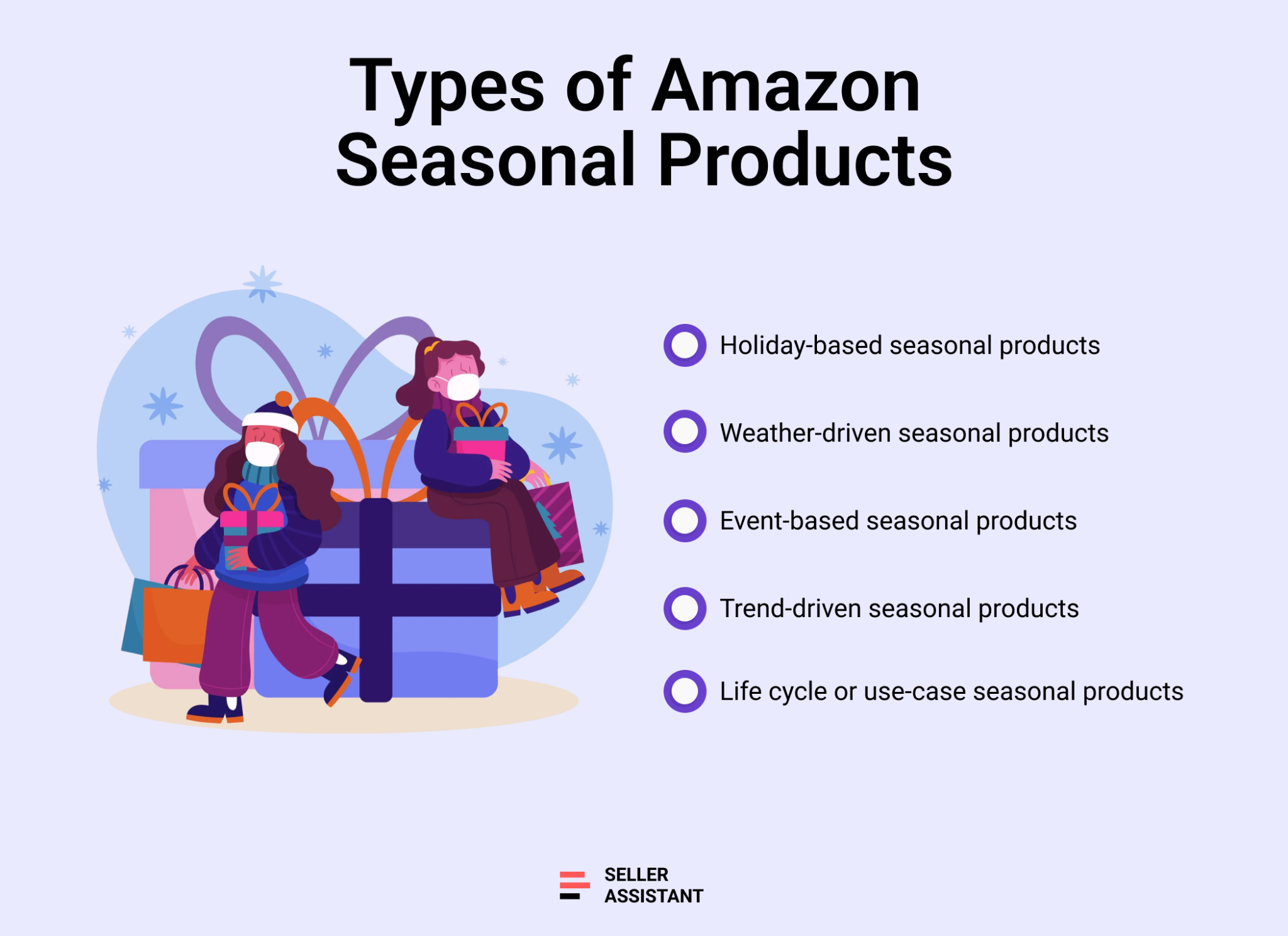
Holiday-based seasonal products
Items that spike around major holidays.
- Examples
Christmas lights, Halloween costumes, Easter baskets, Valentine’s gifts
- Why they matter
Demand is predictable but highly compressed; sell-through must happen before the event.
Weather-driven seasonal products
Products linked to temperature, climate, or daylight changes.
- Examples
Portable heaters (winter), sunscreen (summer), snow shovels, dehumidifiers
- Why they matter
Driven by geography – regional demand can vary even within the same season.
Event-based seasonal products
Items tied to recurring social or cultural events.
- Examples
Graduation gifts, back-to-school supplies, prom accessories, Fourth of July flags
- Why they matter
Short-lived spikes that offer resellers fast flips if timed right.
Trend-driven seasonal products
Items that trend for a short time during a season, often based on pop culture or viral products.
- Examples
Branded toys from a summer movie, trending Halloween masks, viral TikTok gift ideas
- Why they matter
High risk, high reward – get in early and exit fast.
Life cycle or use-case seasonal products
Products that people only buy or use during certain times of year due to routine or behavior.
- Examples
Planners/calendars (December–January), allergy meds (spring), garden tools (March–June)
- Why they matter
Less obvious, but often profitable with less competition.
Why Seasonal Product Checks Matter
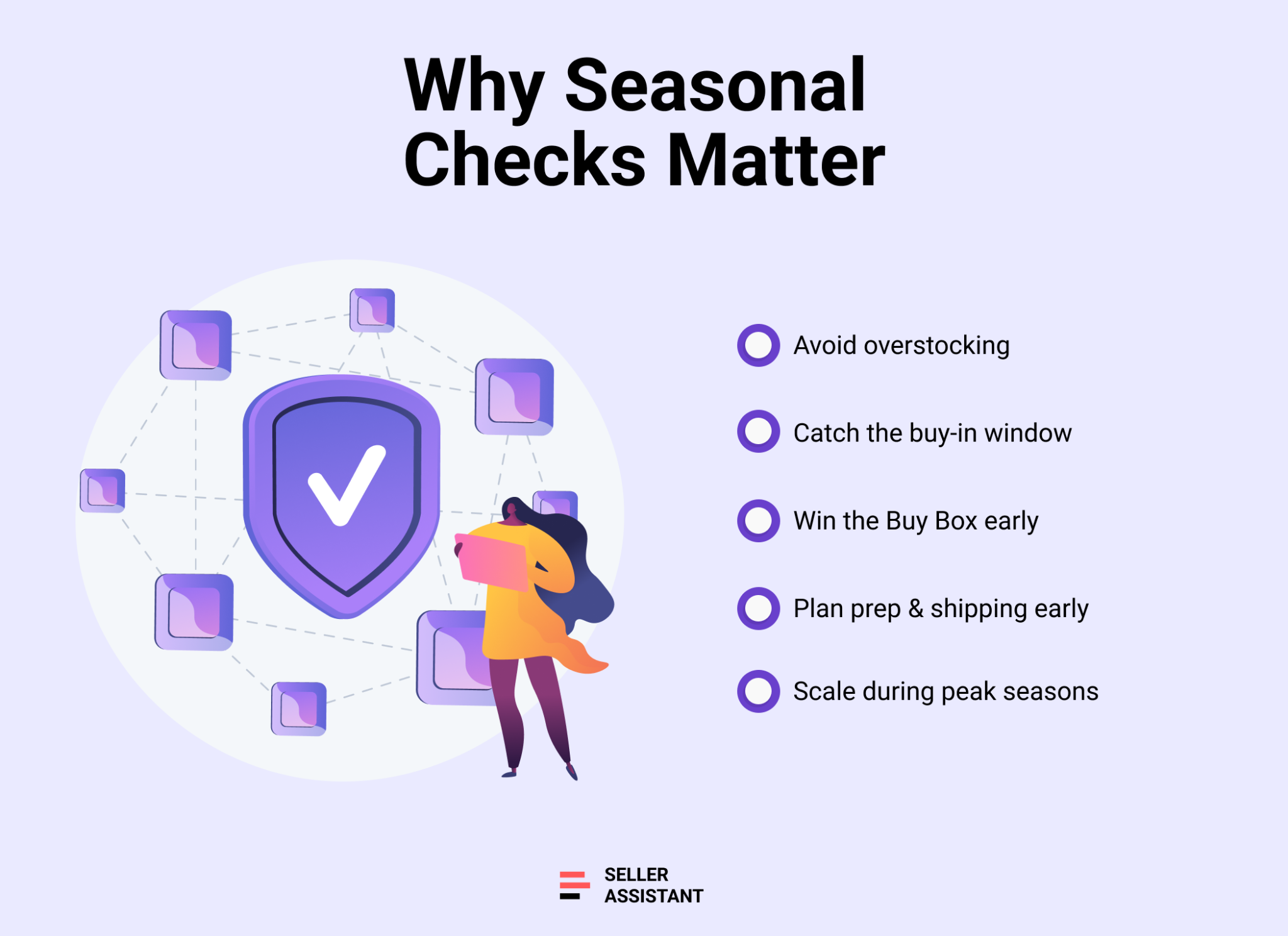
Timing is everything when it comes to selling seasonal products on Amazon. A product with massive potential can become dead inventory overnight if you miss its demand window. That's why running seasonal product checks is non-negotiable for wholesale, OA, and dropshipping businesses. It’s not just about what to sell – it’s about when to sell it.
Below are key reasons why staying ahead of seasonality gives you a competitive edge.
Avoid overstocking
Buying too late or too much can leave you stuck with seasonal products no one wants after the event. You may end up liquidating below cost or paying long-term storage fees.
Catch the buy-in window before suppliers run dry
Most seasonal inventory – especially holiday-related – has a short sourcing window. Missing it means watching competitors sell out while you're still waiting for restock.
Get the Buy Box when competition is low
Early movers often face less competition and better pricing. By the time most sellers jump in, the race to the bottom has already begun.
Align your sourcing and prep schedule
If you don't plan ahead, you risk FBA delays or missed shipping deadlines,after peak demand has passed.
Scale profitably during peak seasons
The best resellers don’t just "ride Q4" – they map out seasonality all year long. With smart checks in place, you can plan inventory flow, boost turnover, and compound profits across multiple seasonal cycles.
How to Identify Seasonal Products
Understanding seasonality can make or break your success as an Amazon reseller. Knowing when a product sells – not just if it sells – is the difference between quick flips and unsellable inventory. For wholesale, online arbitrage, and dropshipping models, identifying a seasonal product early allows you to buy in before the spike and exit before the competition piles in.
There are two highly effective methods resellers can use to identify seasonal patterns in existing ASINs:
- Using Seller Assistant's built-in Keepa charts
- Using Google Trends for broader demand signals
Let’s break them down.
Note. Seller Assistant is an end-to-end Amazon workflow management platform that integrates 10+ wholesale-focused solutions into one connected system. It combines sourcing workflow automation, bulk research and intelligence tools, and integrated Chrome extensions – giving you everything you need to streamline finding deals, managing suppliers, and creating purchase orders.

The platform aggregates: workflow management tools – Purchase Orders Module, Suppliers Database, Warehouses Database to organize, automate, and scale every step of your Amazon wholesale and arbitrage operations; bulk research & sourcing tools – Price List Analyzer, Bulk Restriction Checker, Sourcing AI, Brand Analyzer, Seller Spy to evaluate supplier price lists, verify selling eligibility and restrictions, open new brands, and discover winning product ideas from competitors to expand your product catalog; Chrome extensions – Seller Assistant Browser Extension, IP-Alert Extension, and built-in VPN by Seller Assistant to deep-research products, check IP claims and compliance, and access geoblocked supplier sites directly within your browser; and integrations & team access features – seamless API connectivity and integrations with Zapier, Airtable, and Make, plus Virtual Assistant Accounts for secure, scalable team collaboration.
With Seller Assistant, every step of your Amazon wholesale and arbitrage workflow is automated and connected.
Method 1. Seller Assistant: Built-in Keepa charts on product and storefront pages
Seller Assistant Extension is a powerful product sourcing tool built specifically for Amazon sellers. It integrates directly into your browser, overlaying essential product data on Amazon product pages, search pages, supplier websites, and even competitor storefronts.
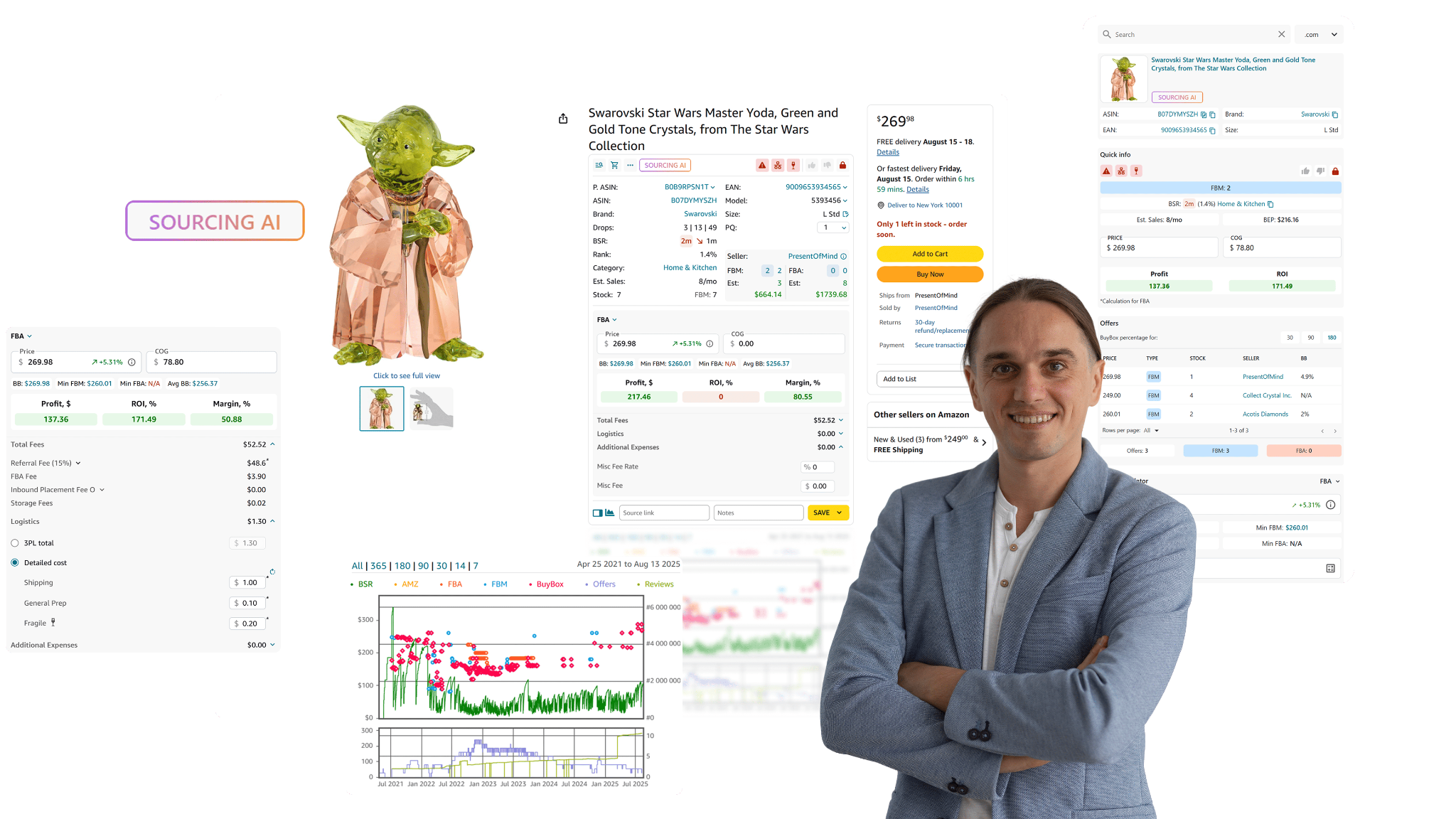
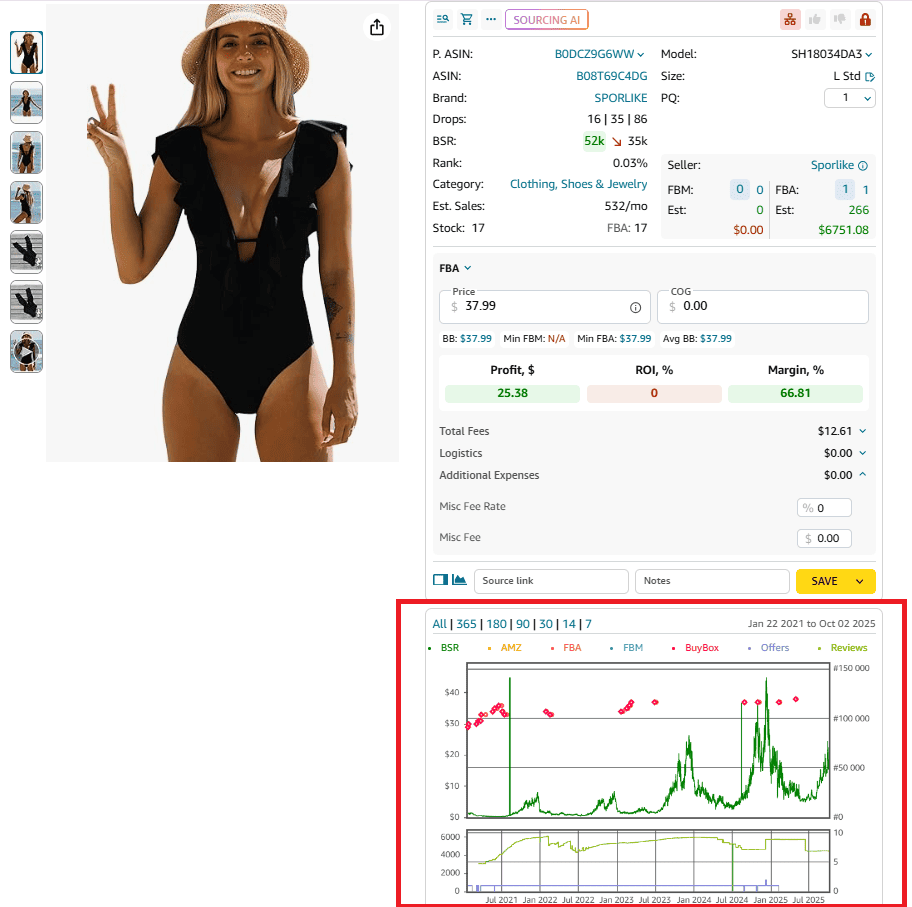
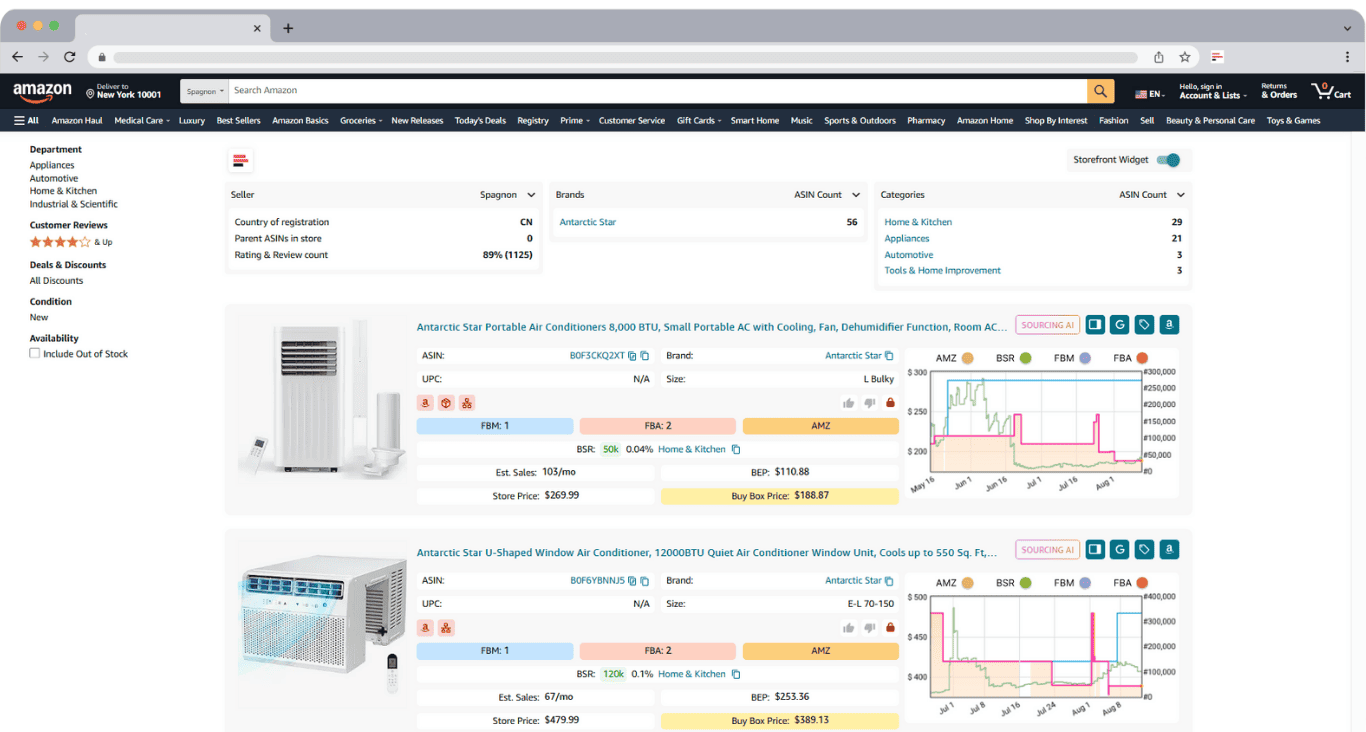
One of its features is the interactive Keepa-driven sales history chart, displayed as a Charts Panel within Seller Assistant interface.
These charts overlay in 2 places on Amazon allowing you to see sales trends without ever leaving the page:
- right inside Amazon product listings as product page view
- In your Amazon competitor storefronts inside Storefront Widget product cards
Why it’s crucial for seasonal product research
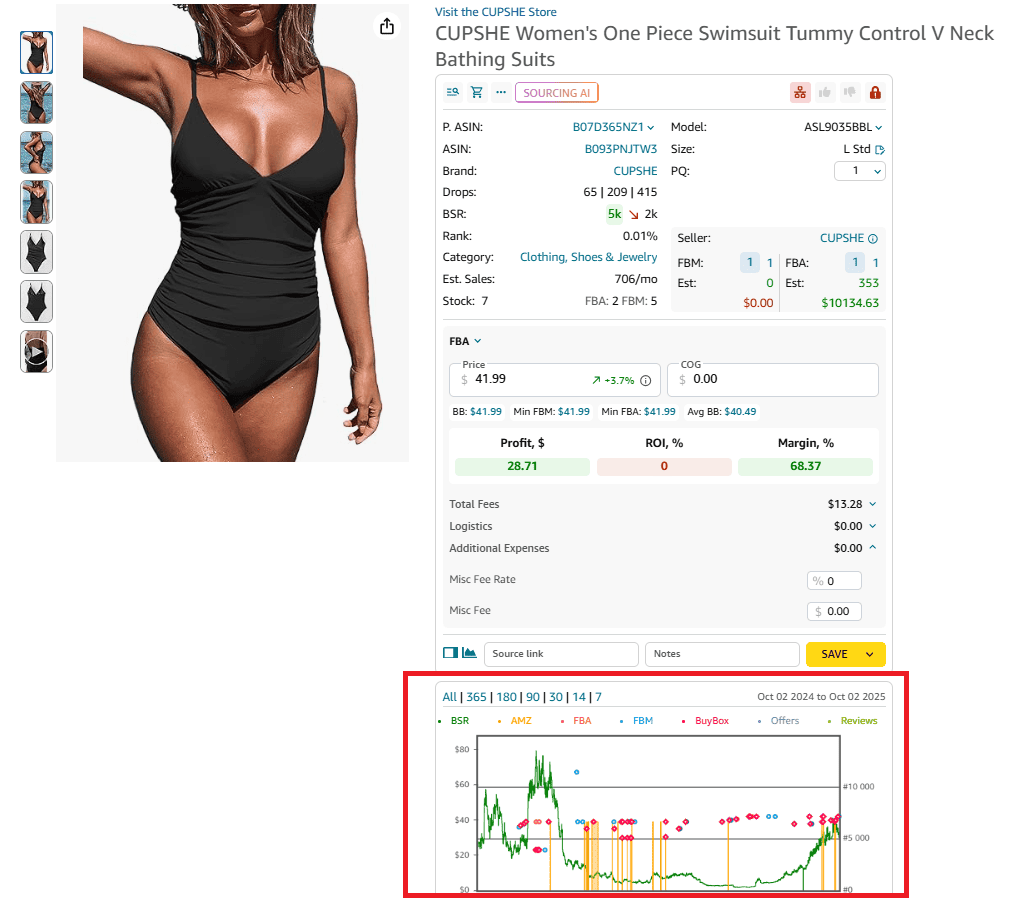
Because spotting demand spikes over time – especially sudden rank drops – is how you identify seasonality. When using Seller Assistant, switch the Keepa chart to 365 days view or the lifetime sales period. This reveals the product’s behavior.
How to analyze seasonality using Seller Assistant’s Keepa charts
- Step 1. Open an Amazon product page or storefront using the Seller Assistant Extension
- Step 2. Scroll to the Charts Panel to view the integrated Keepa sales history
- Step 3. Set the chart to 365 days for a year-long view/the lifetime sales period
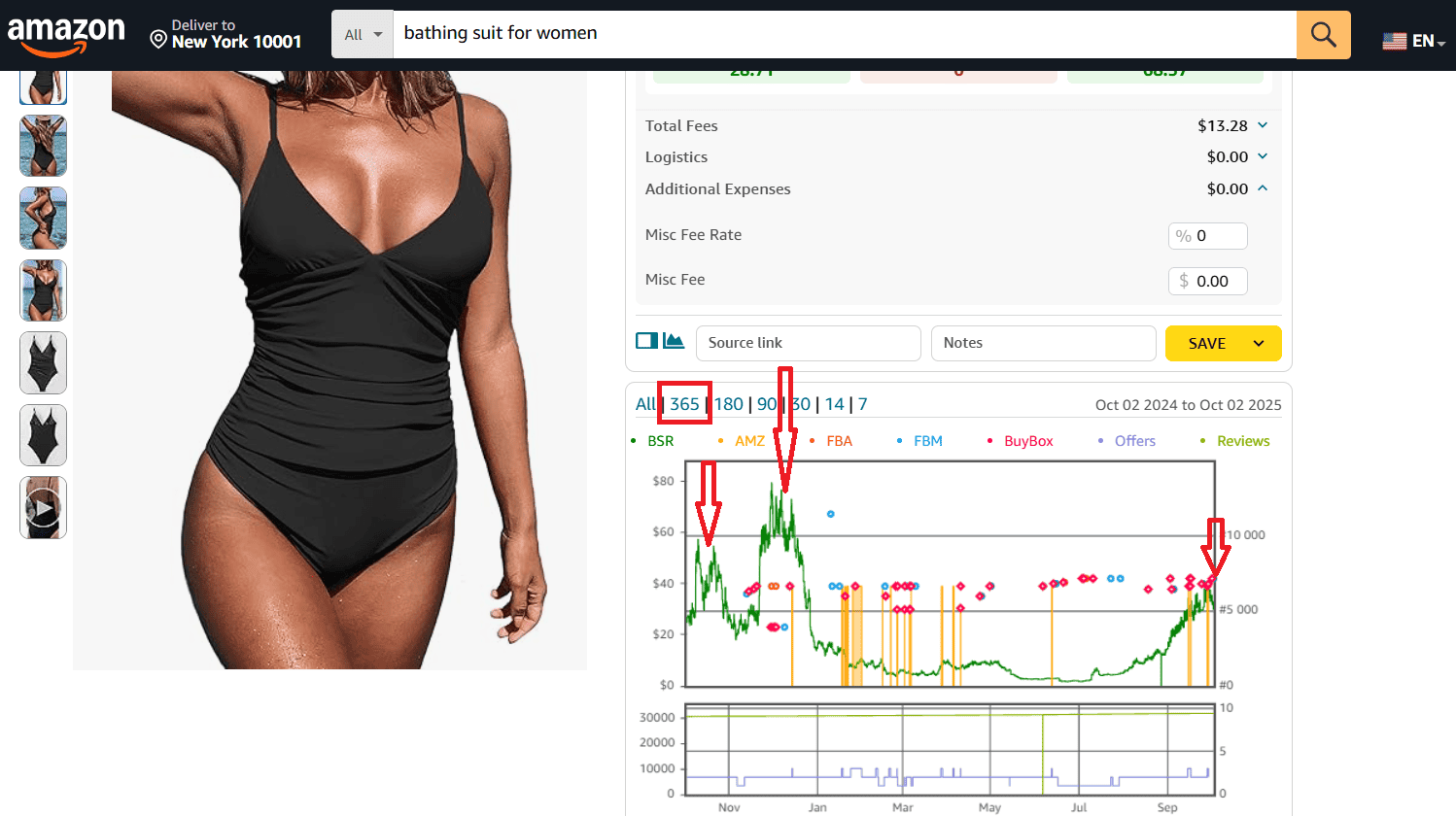
Look for patterns like:
- BSR drops to zero during specific months
- Sharp sales spikes followed by flat or low movement
- Price fluctuations tied to certain periods
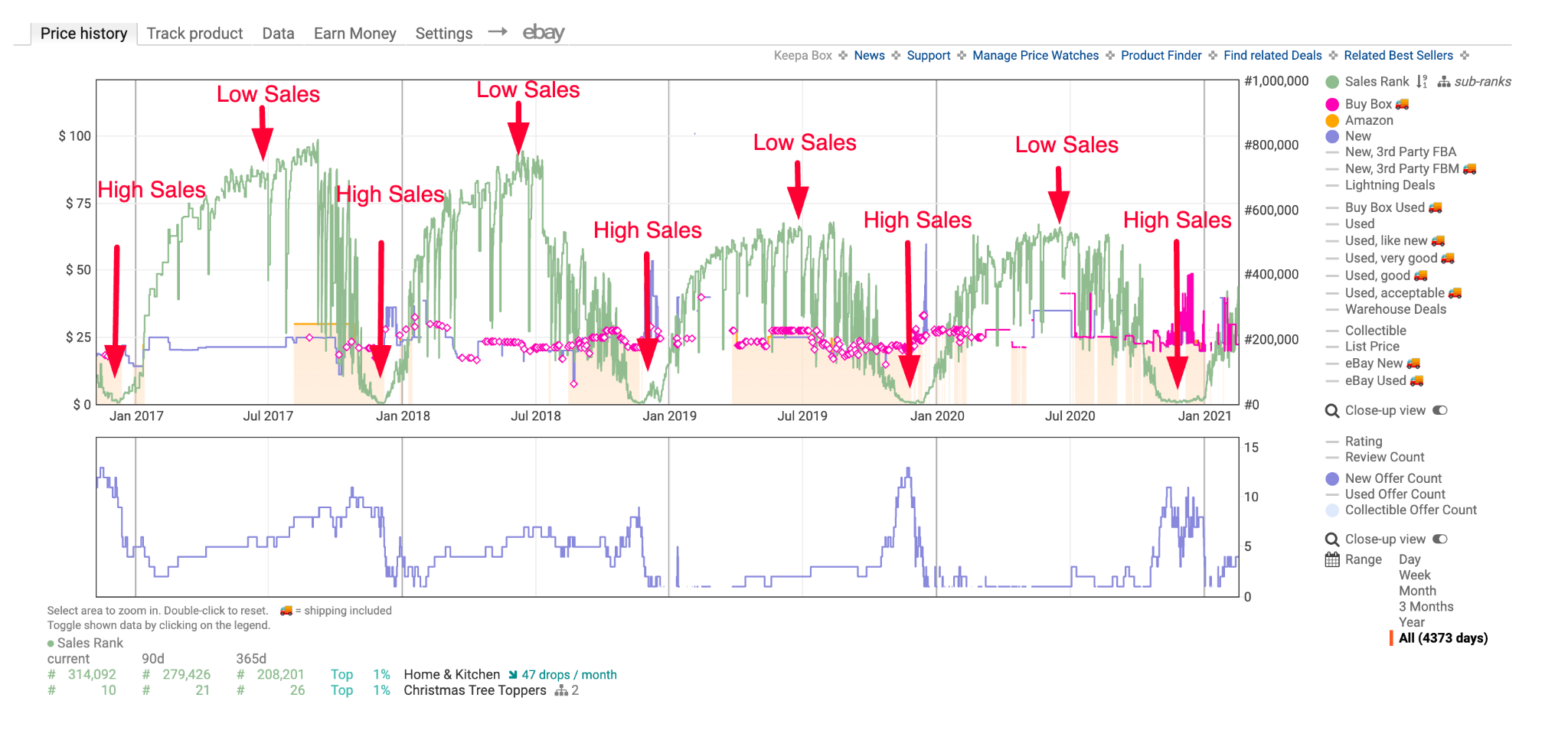
These signals often indicate a seasonal product. For example, if the product’s BSR dips steeply every December and stays flat the rest of the year, it’s likely tied to holiday demand. Think Christmas pajamas or advent calendars.
Method 2. Google Trends: a general view of demand seasonality
Unlike the detailed, product-specific insights you get from Seller Assistant’s Keepa charts, Google Trends offers a broader, more general look at shopper interest. It shows how often people search for a keyword over time, across the entire internet – not just on Amazon. This makes it useful for spotting overall demand cycles, but it doesn’t provide the in-depth ASIN-level data resellers need for precise sourcing decisions.
How to use Google Trends
- Step 1. Go to Google Trends
- Step 2. Enter a product keyword (e.g., “pool float” or “Christmas pajamas”)
- Step 3. Set timeframe to 12 months or 5 years to see recurring spikes
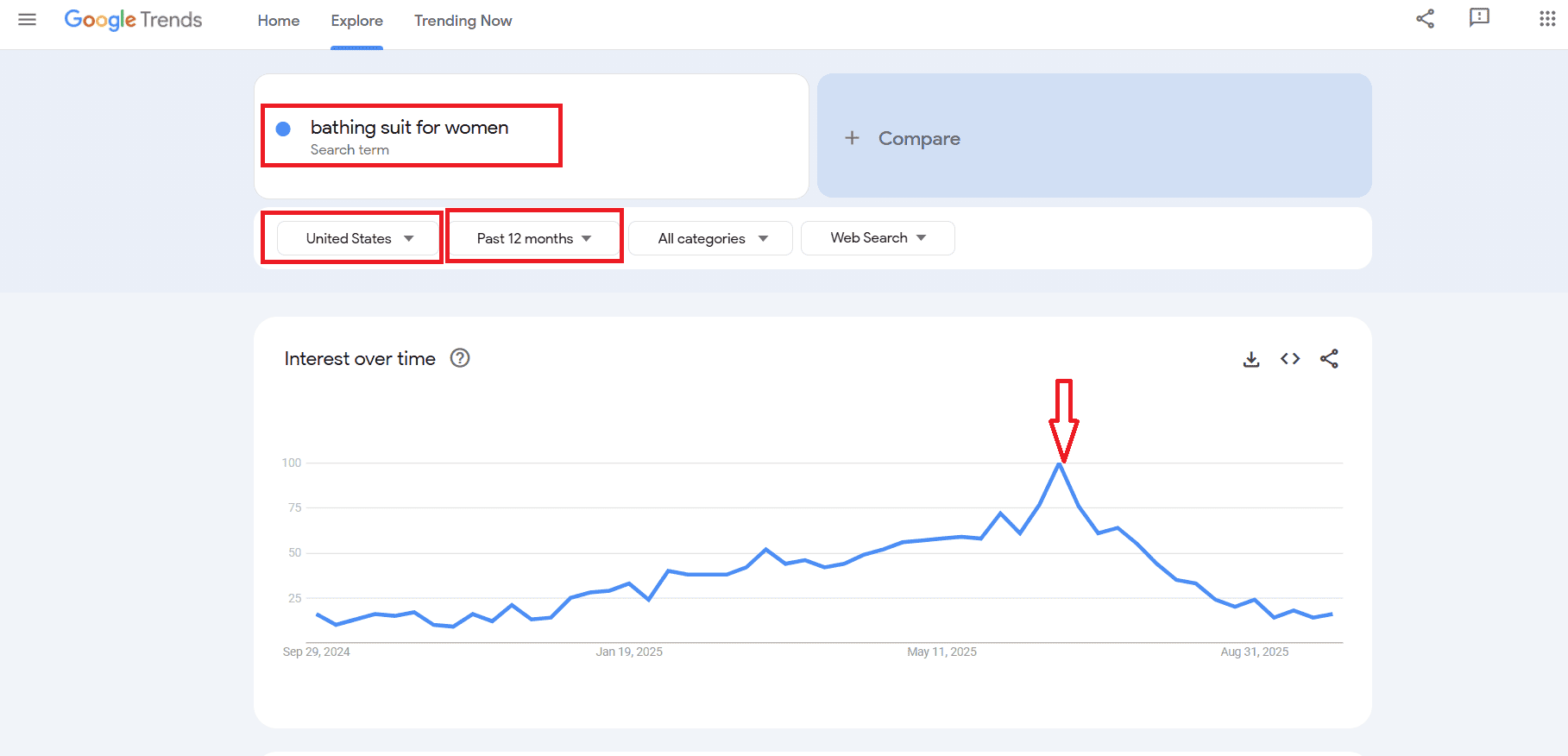
Review the chart:
- Repeating peaks every year = strong seasonal demand
- Flat lines with a single spike = short-lived trend
- Steady searches = evergreen demand
Why it’s helpful but limited
Good for spotting big-picture trends: Shows when interest in a product category usually rises.
- Useful for early awareness: Confirms if a product idea is tied to specific seasons.
- Not detailed enough for sourcing: Google Trends won’t show ASIN sales rank, Buy Box behavior, or profitability.
- Must be cross-checked with Amazon data: To avoid mistakes, always validate Google Trends results with Seller Assistant’s Keepa charts.
How to Correctly Calculate Profit for Seasonal Items
The problem with seasonal profit calculation
One of the biggest mistakes Amazon sellers make is calculating profit based only on the current Buy Box price. Seasonal items often have temporary price spikes that don’t reflect the product’s true profitability.
- Example
A seller reviews a seasonal grocery item like hot chocolate mix. The current Buy Box shows $24.99, inflated by short-term demand. At that price, the system shows a $5 profit – it looks like a winner. But if you check the average Buy Box over time, the real selling price is closer to $17.99. Recalculating with the historical average shows just $0.30 profit. Instead of tying up cash in a deal that looks great during a spike, the seller avoids a money trap.
This is where Seller Assistant’s Price List Analyzer comes in.
Using Price List Analyzer to calculate profit by average Buy Box
Price List Analyzer is Seller Assistant’s bulk research tool that processes supplier price lists and enriches them with 70+ data points per product, including profitability, sales signals, competition stats, and risks. For seasonal items, its profit simulation feature is critical – it lets you calculate profit using the average Buy Box price over the last 30, 90, or 180 days, instead of just today’s price.
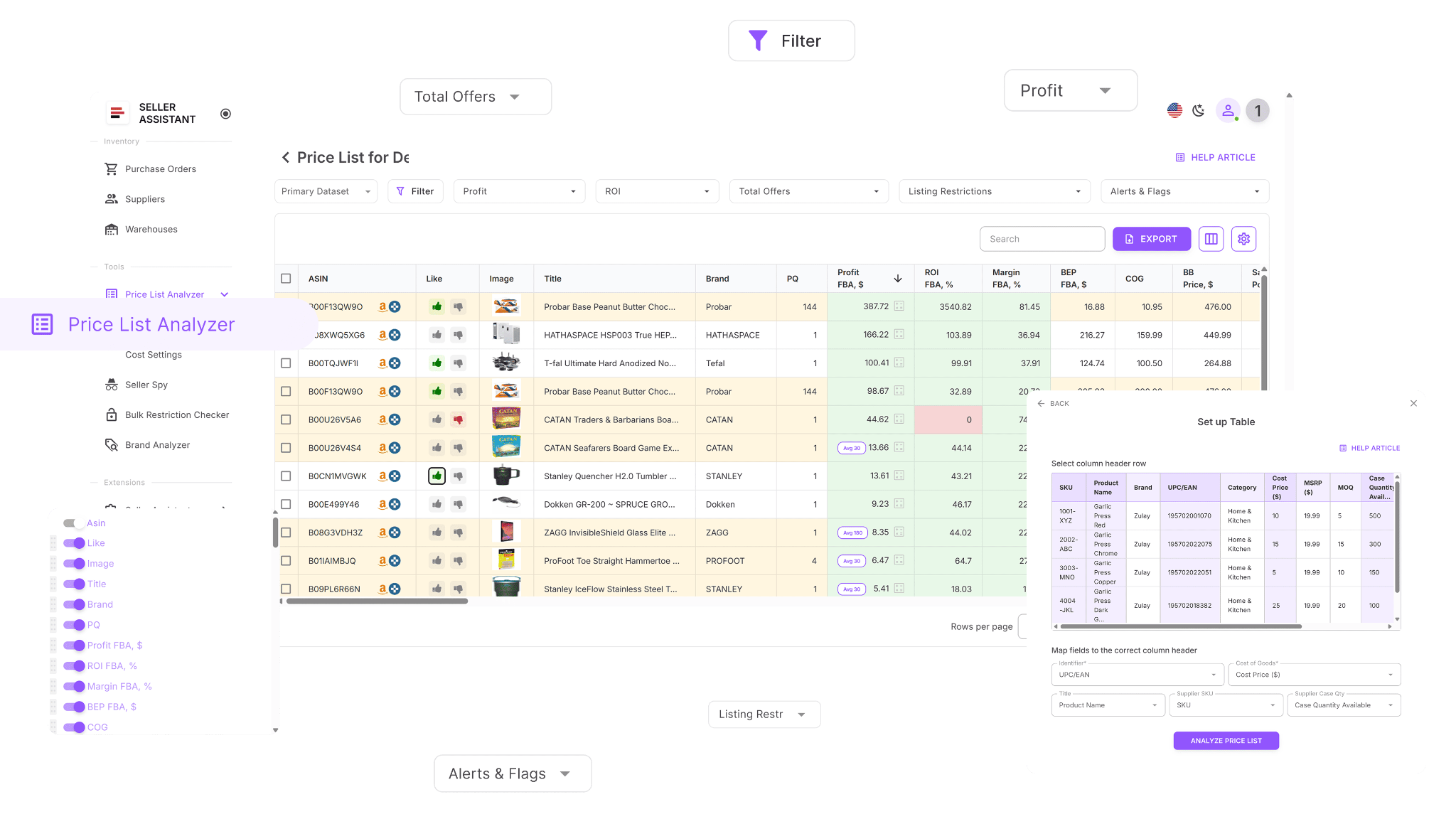
How it works
- Step 1. Upload your supplier’s price list into the Price List Analyzer.
The tool automatically matches each SKU to Amazon ASINs and overlays key data.
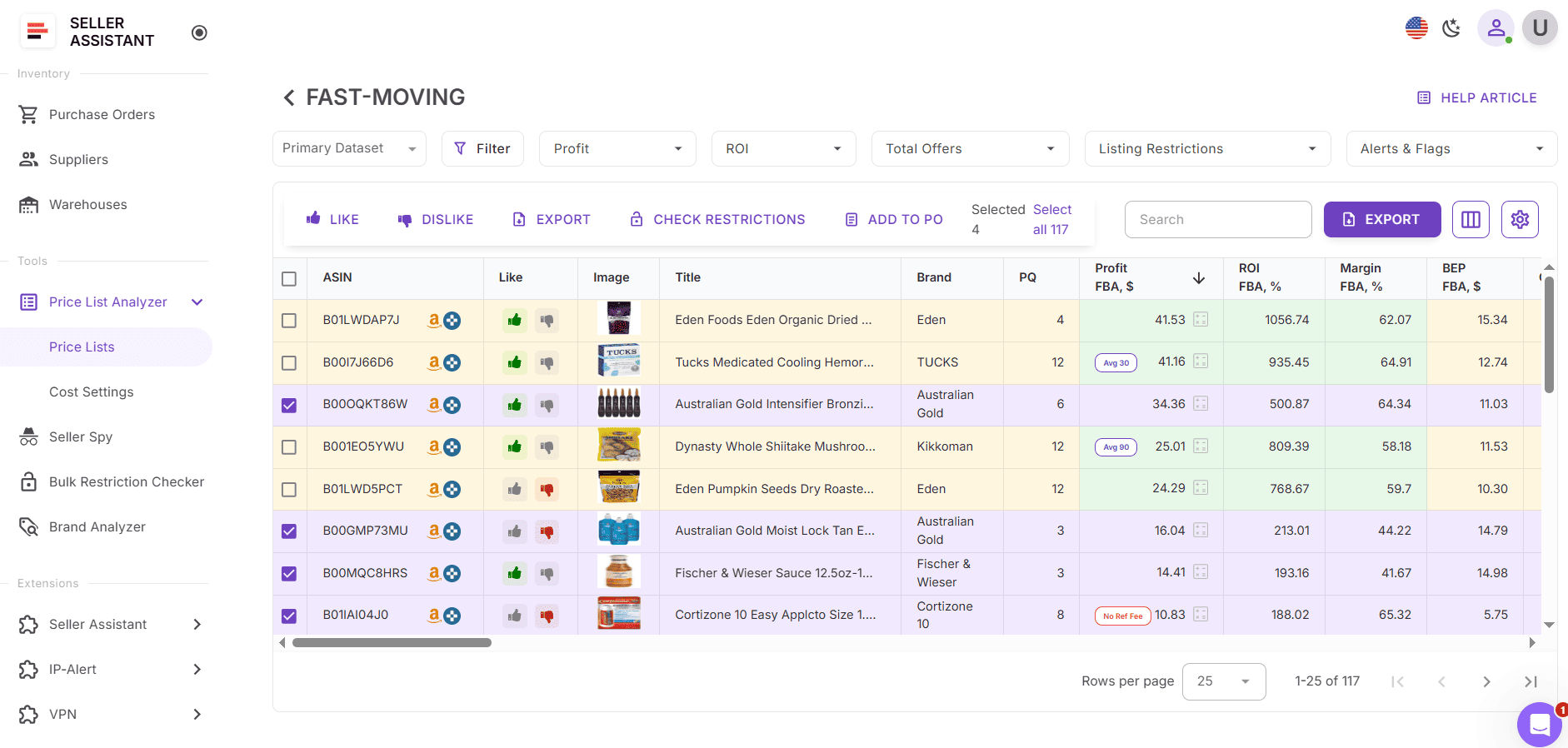
- Step 2. Select average Buy Box (30/90/180 days) as your calculation metho
- When uploading a price list, you can:
- Click the settings button (on upload or mapping screens)
- Override the default settings for that specific file
- Choose:
- Profit calculation method (BB price type)
- Shipping costs, taxes, DSF, additional fees
- After processing:
- If average Buy Box was used, a tag will show up in the Profit, Selling Price, and Estimates columns.
- No tag = current Buy Box was used.
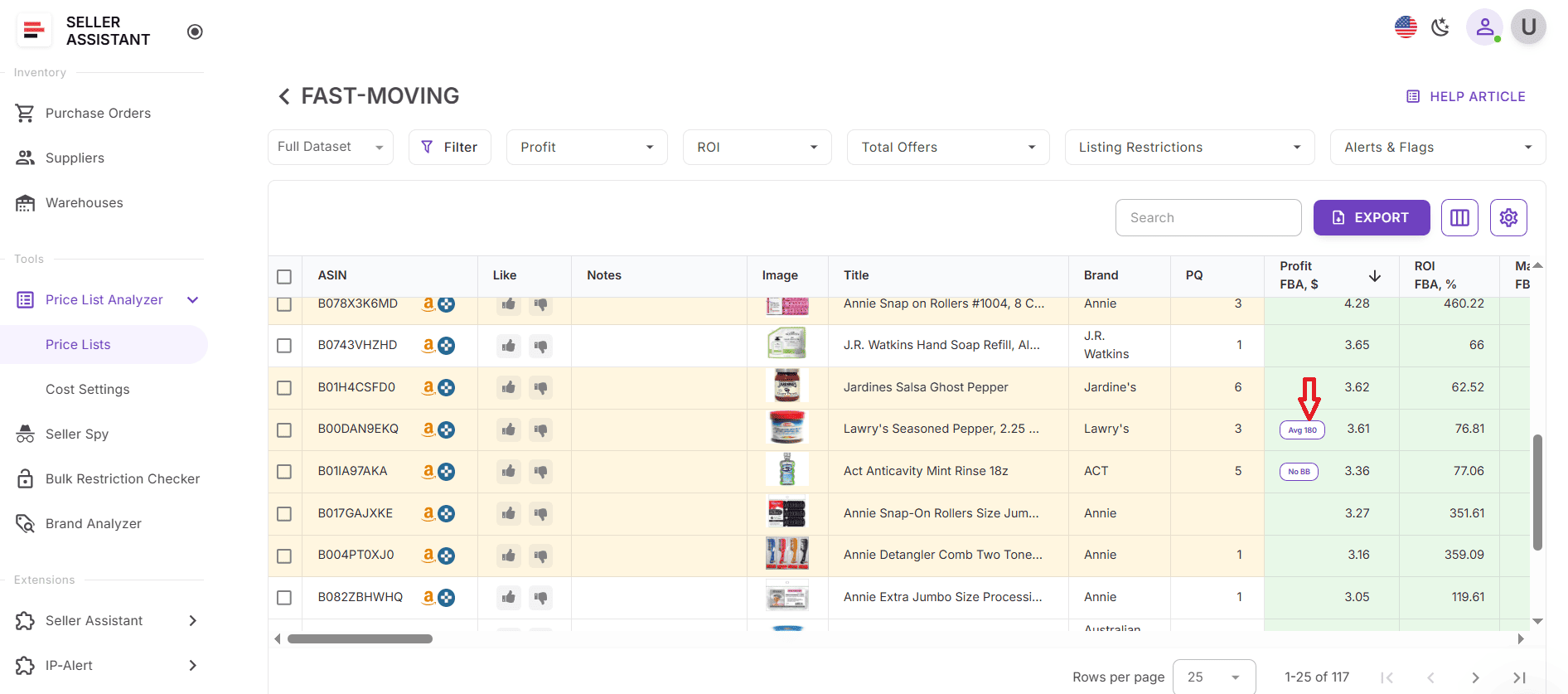
With this setup, you’re evaluating true profitability, not chasing temporary spikes. Seasonal ASINs often swing wildly during peak months, and without this adjustment, sellers risk overestimating ROI.
Seasonal Inventory Management Tips for Amazon Sellers
Managing seasonal inventory on Amazon is tricky – too much stock, and you’re stuck with unsellable items; too little, and you miss out on profit. Smart planning ensures your cash flow stays healthy while you maximize sales during demand peaks. Here are proven seasonal inventory tips for wholesale, OA, and dropshipping sellers:
Plan ahead of the season
Use tools like Seller Assistant to spot seasonal ASINs months before demand spikes. Source early – suppliers often sell out as the season approaches.
Calculate profit with average Buy Box prices
Don’t rely on inflated current prices. Seasonal items may look profitable short term but average out much lower. Always check profit at 30/90/180-day averages.
Start lean, scale with velocity
Test small quantities first. If sales velocity is strong, reorder quickly. This reduces the risk of excess inventory after the season ends.
Set a sell-out deadline
Work backward from the event date (e.g., December 24th for Christmas items). If products haven’t sold by your cutoff, adjust pricing or switch to FBM to liquidate.
Have a liquidation plan
If you miss peak season, be ready: bundle leftovers, run clearance pricing, or remove stock before long-term storage fees kick in.
FAQ
How to identify seasonal items?
Seasonal items show recurring sales spikes during specific times of the year, like Christmas lights in December or pool floats in summer. You can confirm seasonality by analyzing sales history with tools such as Seller Assistant's built-in Keepa charts or Google Trends.
How to check product details on Amazon?
Install a product research tool like Seller Assistant Browser Extension, which overlays data directly on Amazon product and search pages. It shows essential details such as profitability, sales rank, restrictions, and competition in one view.
How can you tell if a product is seasonal using the Keepa's product graph?
Switch the Keepa chart to a 365-day view to see the full year’s sales history. If the Best Sellers Rank drops sharply only during certain months and stays flat otherwise, the product is seasonal.
How to check Amazon trending products?
Browse Amazon’s Best Sellers, Movers & Shakers, and Most Wished For lists to see what’s currently gaining popularity. Tools like Google Trends or Seller Assistant can also help verify if a trend has consistent demand or is a short-lived spike.
How to check monthly sales of a product on Amazon?
Use a product sourcing tool like Seller Assistant Extension, which includes a sales estimator showing approximate monthly sales volume. This helps you forecast demand and decide if an ASIN is worth sourcing.
Final Thoughts
Seasonal products can be some of the most profitable opportunities on Amazon – if you know how to research, time, and manage them correctly. The key is identifying seasonality early with tools like Seller Assistant's built-in Keepa charts and confirming big-picture demand with Google Trends. Always calculate profit based on average Buy Box prices, not temporary spikes, and plan your inventory with clear sell-out deadlines to avoid getting stuck with unsellable stock.
Seller Assistant automates and connects every stage of your Amazon wholesale and arbitrage workflow. It brings together in one platform: workflow management tools – Purchase Orders Module, Supplier Database, Warehouse Database, bulk research & sourcing tools – Price List Analyzer, Bulk Restriction Checker, Sourcing AI, Brand Analyzer, Seller Spy, Chrome extensions – Seller Assistant Browser Extension, IP-Alert Extension, and built-in VPN by Seller Assistant, and integrations & team access features – seamless API connectivity, integrations with Zapier, Airtable, and Make, and Virtual Assistant Accounts.