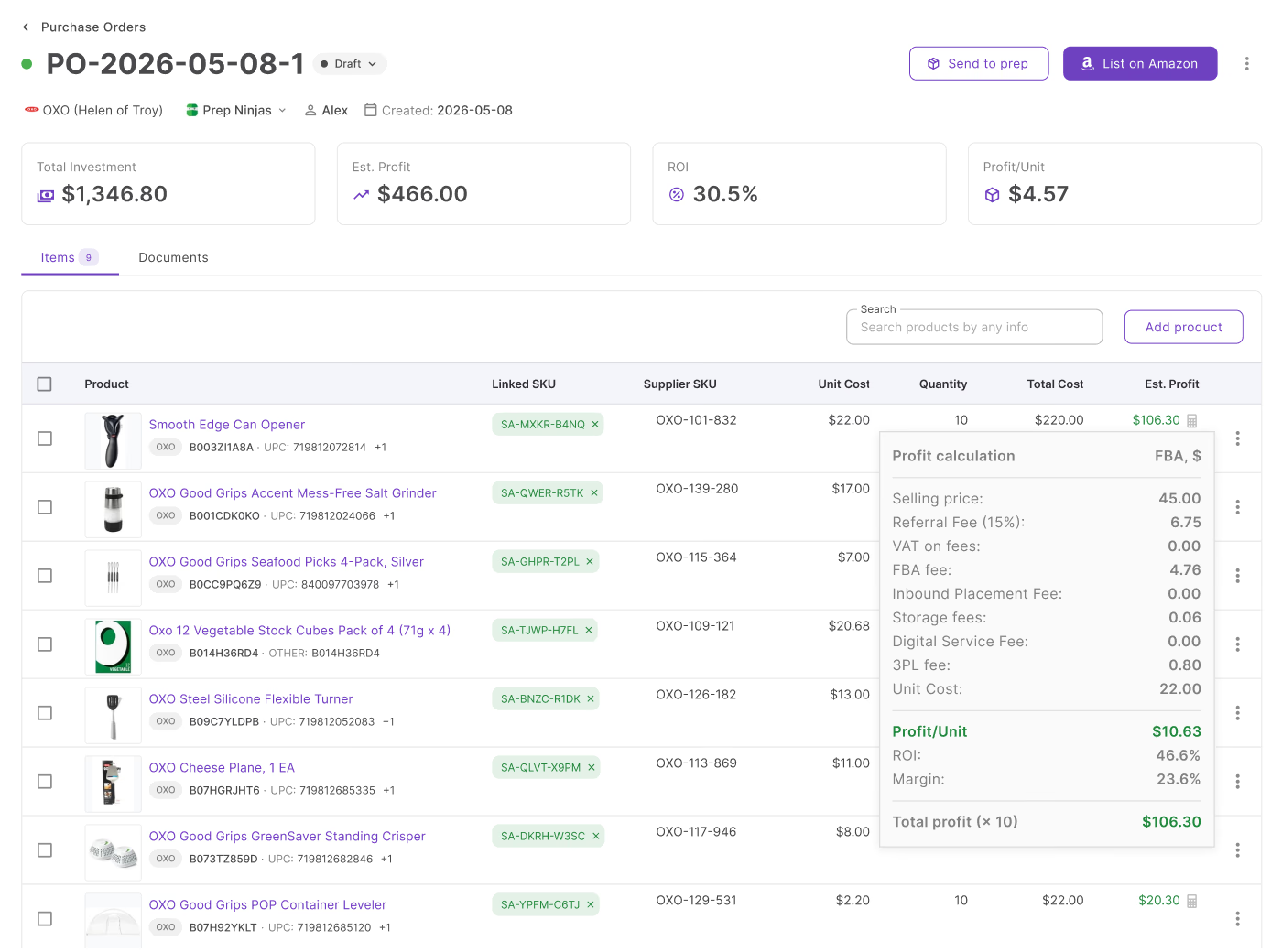
Supplier price lists are where most Amazon wholesale deals begin – but turning those spreadsheets into accurate purchase orders is usually slow and messy. Sellers often analyze products in one tool, track profitable ASINs in another spreadsheet, and manually rebuild orders before sending them to suppliers.
As supplier catalogs and SKU counts grow, that process creates delays, duplicate work, and costly ordering mistakes.
Seller Assistant simplifies the entire workflow. With Price List Analyzer and Purchase Orders Module working together, Amazon resellers can analyze supplier lists, shortlist profitable low-risk products, and convert them directly into ready-to-send purchase orders without manual data entry or disconnected spreadsheets.
Why Create Purchase Orders from Supplier Price Lists?
Supplier price lists are the starting point of most Amazon wholesale and online arbitrage sourcing workflows. After analyzing a catalog and identifying profitable products, sellers need a fast way to turn those opportunities into structured purchase orders. Without a connected process, products, pricing, quantities, and supplier details often end up scattered across spreadsheets, emails, and notes.
Creating purchase orders directly from supplier price lists helps sellers organize purchasing, reduce manual work, and move from product research to ordering much faster.
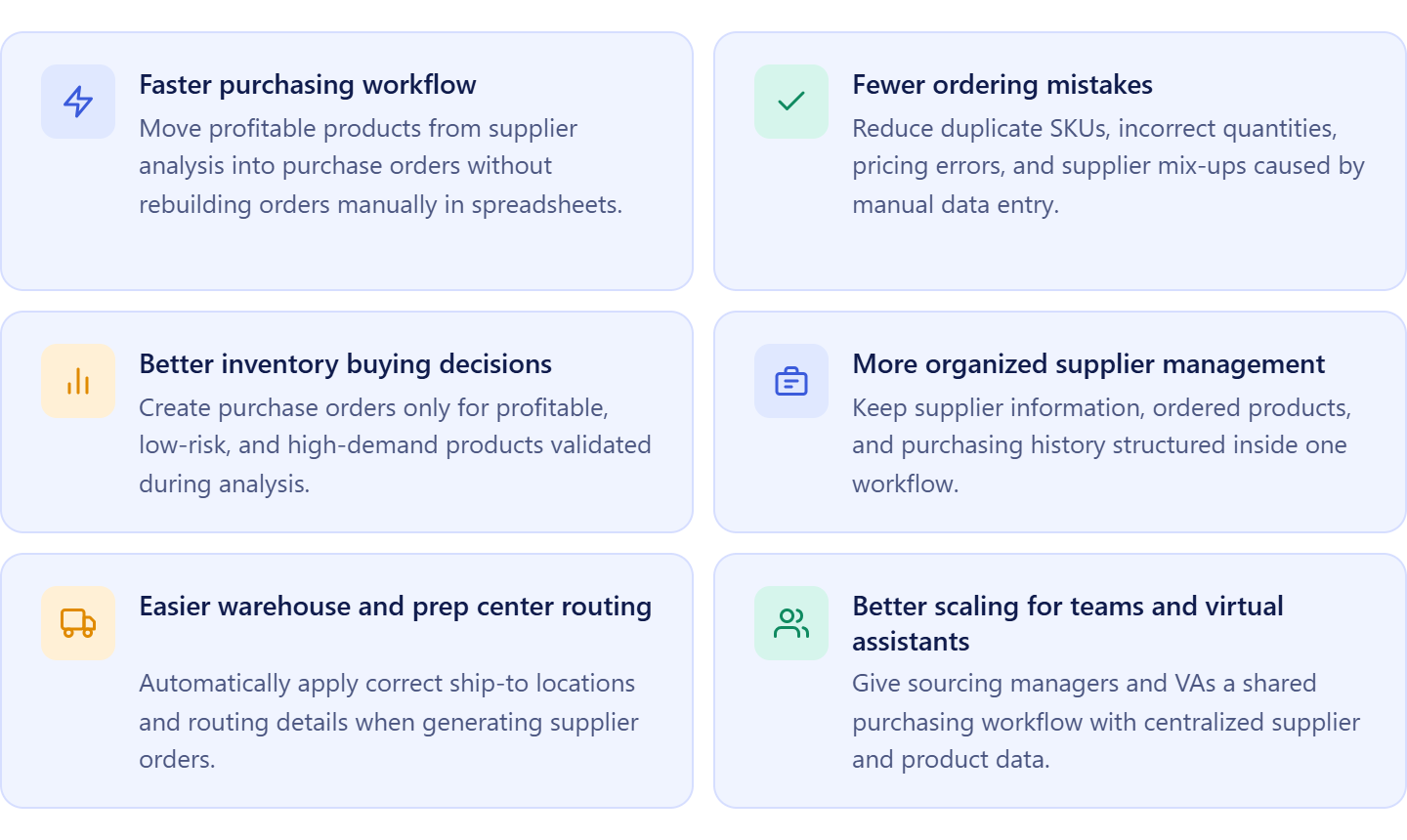
Faster purchasing workflow
Manually copying profitable ASINs from analyzed supplier spreadsheets into separate purchase order templates takes time and slows down sourcing operations. Creating POs directly from supplier price lists removes repetitive data entry and speeds up the transition from product analysis to purchasing.
Fewer ordering mistakes
When sellers rebuild orders manually, it becomes easy to enter incorrect quantities, duplicate SKUs, wrong costs, or incorrect supplier information. Structured purchase orders created from analyzed supplier data reduce the risk of costly procurement errors.
Better inventory buying decisions
Creating purchase orders after analyzing supplier catalogs helps sellers focus only on profitable, low-risk, and high-demand products. This prevents buying inventory with weak margins, high competition, restrictions, or unstable Buy Box history.
More organized supplier management
Purchase orders created from supplier price lists keep supplier data, pricing, and ordered products centralized in one workflow. Sellers can track what was ordered, compare previous purchases, and maintain a cleaner procurement history as supplier networks grow.
Easier warehouse and prep center routing
Amazon sellers often ship inventory to multiple prep centers or warehouses. Creating purchase orders inside a connected workflow helps automatically apply correct ship-to locations and routing details, reducing fulfillment confusion and shipping mistakes.
Better scaling for teams and virtual assistants
As sourcing volume increases, manual spreadsheets become difficult to manage across teams. Structured purchase order workflows make it easier for sourcing managers, buyers, and virtual assistants to collaborate using the same supplier, product, and purchasing data.
What Seller Assistant tools create purchase orders from supplier sheets
Creating purchase orders from supplier price lists requires more than simply selecting profitable products. Amazon sellers also need accurate product analysis, supplier data, warehouse routing, and structured purchasing workflows connected in one system. Seller Assistant simplifies this process by linking bulk supplier catalog analysis with centralized purchase order management inside a connected wholesale workflow.
Instead of manually copying shortlisted ASINs into spreadsheets or rebuilding supplier orders from scratch, sellers can analyze supplier catalogs in bulk, select profitable low-risk products, and convert them directly into structured purchase orders in just a few clicks.
This workflow is powered by two core tools: Seller Assistant’s Price List Analyzer and Seller Assistant’s Purchase Orders Module.
Price List Analyzer
Price List Analyzer is where supplier catalogs are analyzed at scale. The tool automatically matches supplier products to Amazon ASINs, calculates profitability, estimates demand, evaluates competition, and flags risks such as restrictions, Amazon presence, suppressed Buy Box, or unstable pricing. Sellers can quickly filter supplier lists and identify profitable, low-risk products across thousands of SKUs without checking products manually one by one.
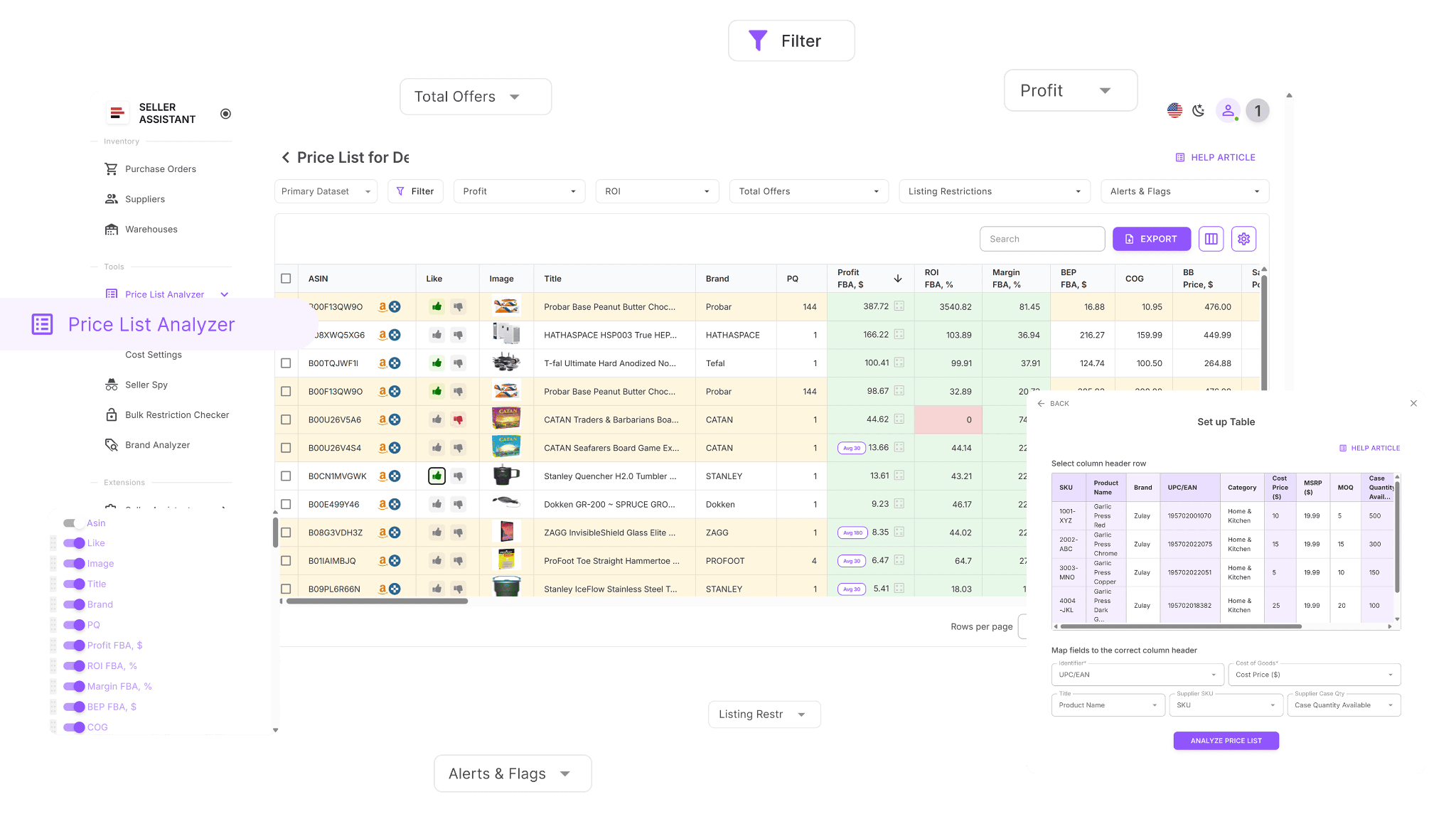
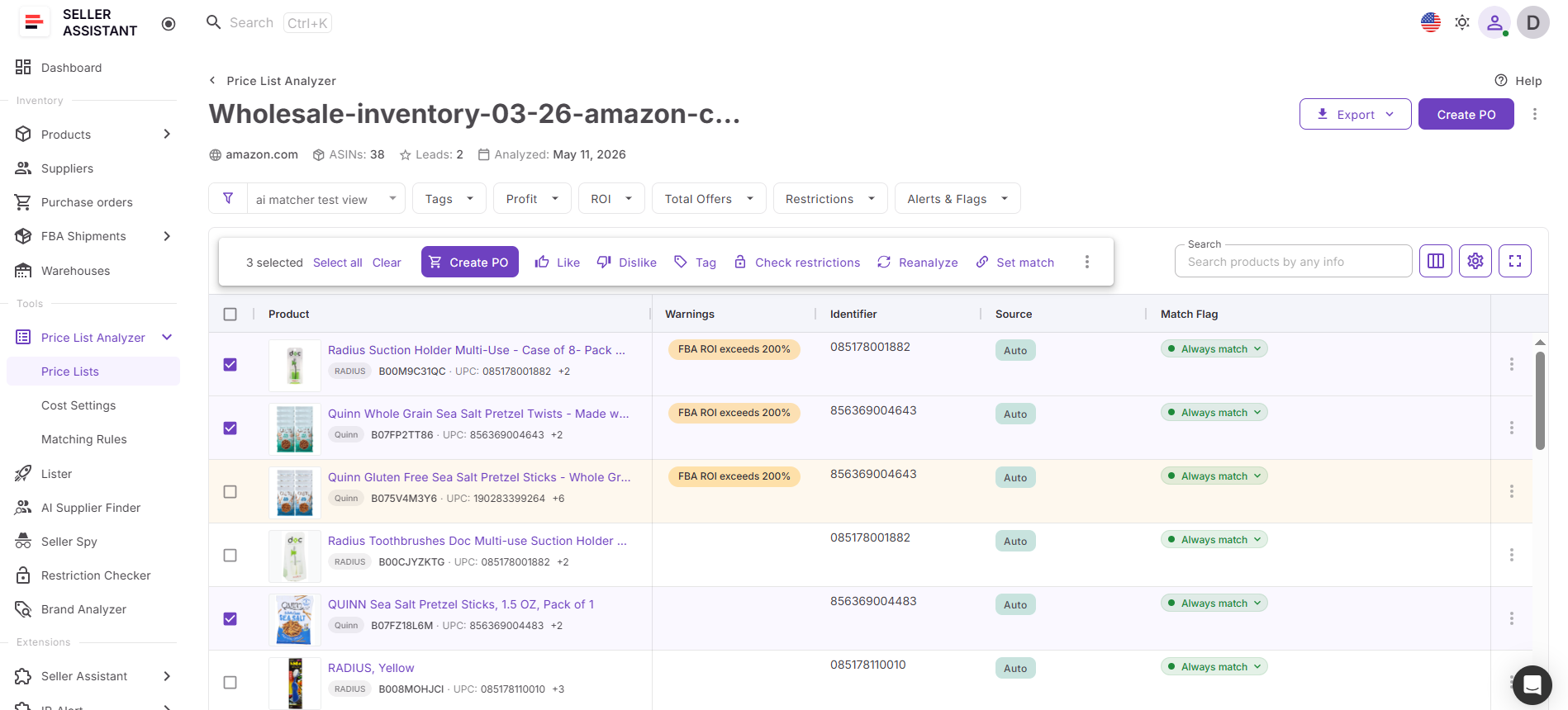
After analysis is complete, sellers can select products directly inside the analyzed supplier list and move them into a purchase order using the Add to PO workflow.
Purchase Orders Module
Purchase Orders Module is a centralized workspace for creating, managing, and tracking supplier orders. Products selected in Price List Analyzer can be transferred directly into a purchase order together with supplier and pricing data, eliminating repetitive manual entry.
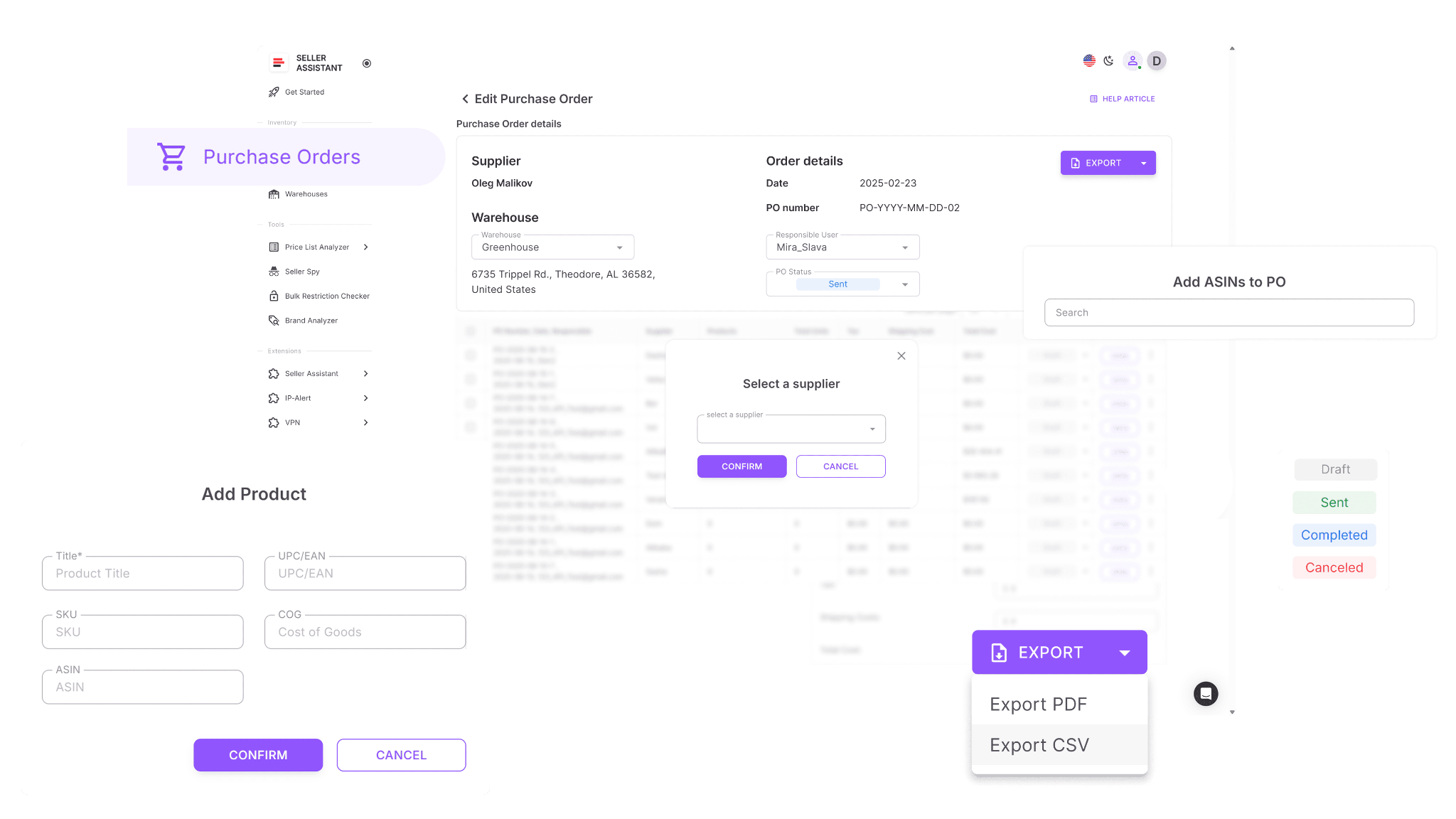
Inside the module, sellers can manage quantities, costs, shipping, taxes, warehouse routing, order statuses, and supplier-ready exports in one structured workflow. This helps keep procurement organized as supplier count and order volume grow.
How the tools work together
Price List Analyzer acts as the sourcing and decision engine, while Purchase Orders Module handles purchasing execution. Sellers first analyze supplier catalogs to identify profitable and low-risk inventory. After selecting products inside the analyzed price list, they can click Add to PO, review selected items, and automatically create a structured purchase order populated with supplier product data.
This creates a connected workflow where sourcing decisions move directly into purchasing without rebuilding orders manually.
How purchase order creation fits into your sourcing workflow
Creating purchase orders from analyzed supplier catalogs is part of Seller Assistant’s connected wholesale workflow. Supplier data, product analysis, warehouse routing, and purchasing stay linked across the system, allowing sellers to move from supplier research to procurement much faster.
Instead of juggling spreadsheets, disconnected templates, and manual data entry, Amazon resellers can manage sourcing and purchasing inside one structured workflow designed specifically for wholesale, online arbitrage, and dropshipping operations.
Note. Seller Assistant is an end-to-end Amazon workflow management platform that integrates 15+ wholesale-focused solutions into one connected system. It combines sourcing workflow automation, bulk research and intelligence tools, and integrated Chrome extensions – giving you everything you need to streamline finding deals, managing suppliers, and creating purchase orders.

With Seller Assistant, every step of your Amazon wholesale and arbitrage workflow is automated and connected.
What Is Price List Analyzer?
Price List Analyzer is Seller Assistant’s bulk sourcing and product evaluation tool built for Amazon wholesale sellers, online arbitrage sellers, and dropshippers who work with large supplier catalogs. It transforms raw supplier price lists into structured Amazon product data, allowing sellers to evaluate profitability, competition, demand, and sourcing risks across hundreds or thousands of SKUs at once.
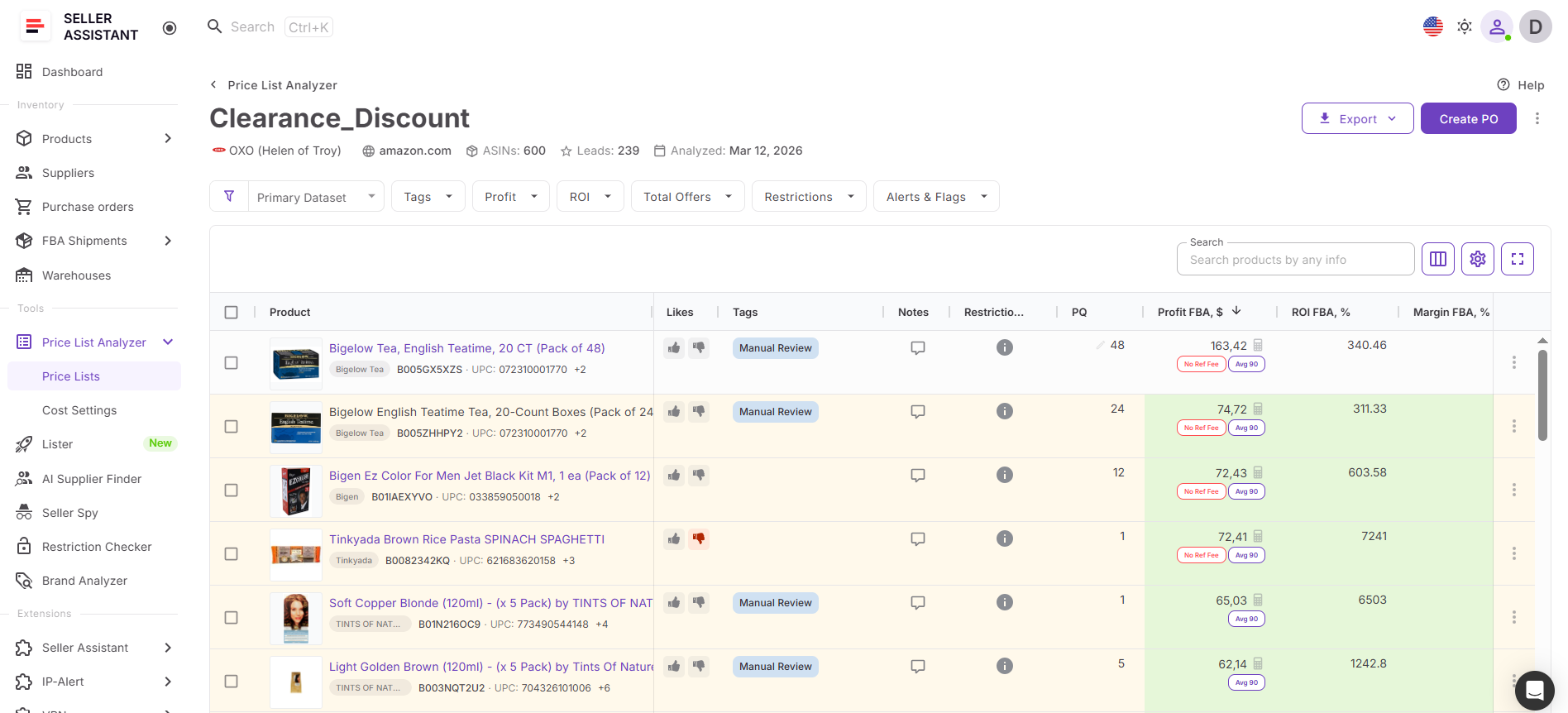
Instead of manually checking products one by one and rebuilding purchase orders separately, sellers can analyze supplier catalogs, identify profitable low-risk products, and move selected items directly into Purchase Orders Module inside one connected workflow.
What you can do with Price List Analyzer
Price List Analyzer helps Amazon resellers turn supplier spreadsheets into structured purchasing decisions while keeping sourcing and procurement connected throughout the workflow.
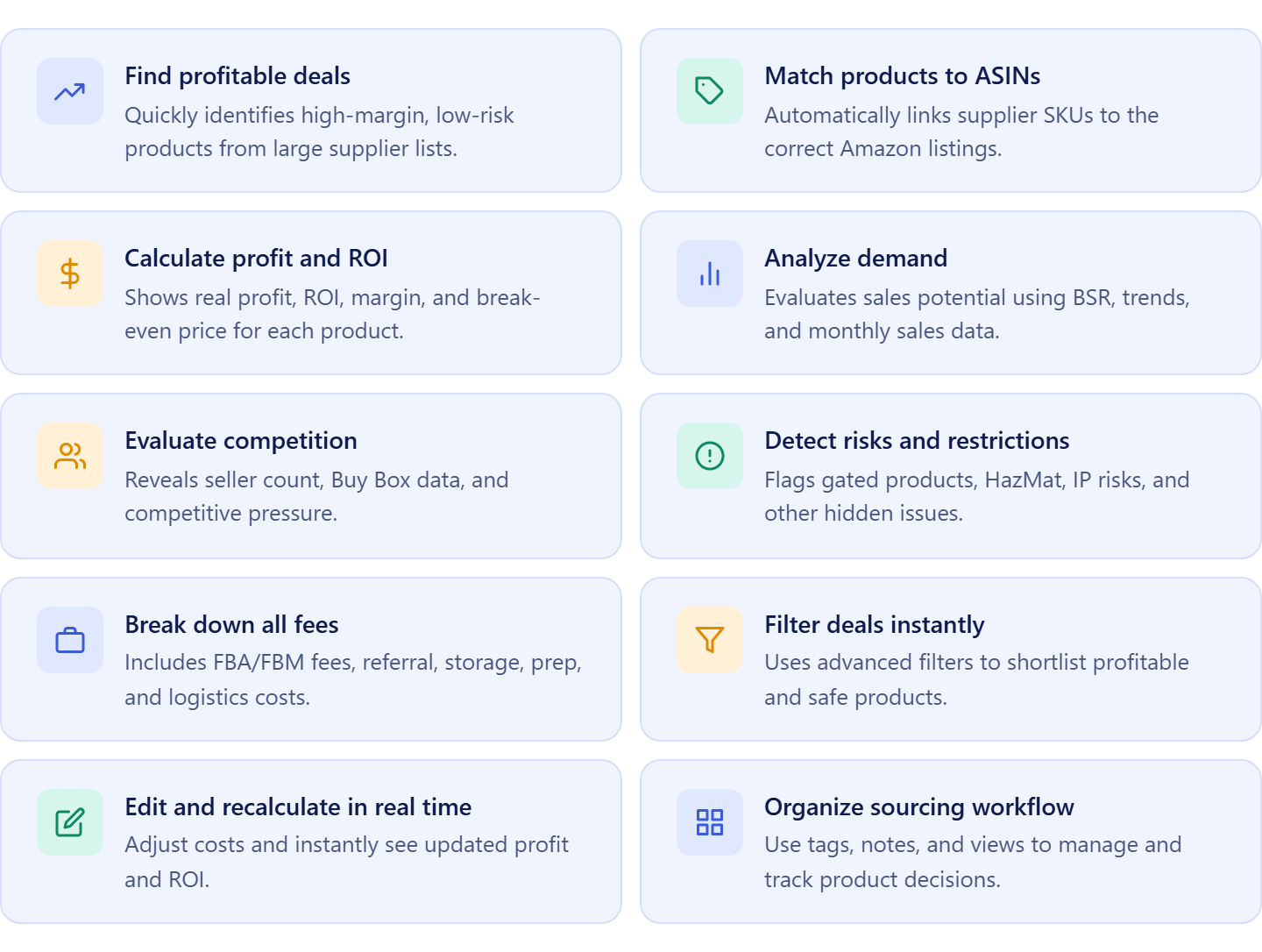
- Analyze supplier catalogs at scale
Upload large supplier price lists and evaluate hundreds or thousands of products in minutes instead of manually researching ASINs one by one.
- Match supplier products to Amazon listings automatically
Automatically connect supplier SKUs, UPCs, and EANs to the correct Amazon ASINs without manual product matching.
- Calculate profitability using Amazon fees
View ROI, margin, net profit, break-even price, and maximum COG using built-in FBA and FBM fee calculations.
- Evaluate demand and sales consistency
Use BSR history, sales estimates, and historical trends to identify products with stable demand and reliable sales velocity.
- Review competition and Buy Box conditions
Analyze seller count, Amazon presence, Buy Box pricing, and competitive pressure before purchasing inventory.
- Detect restrictions and sourcing risks early
Identify restricted products, HazMat items, meltable products, IP risks, suppressed Buy Box conditions, and other sourcing risks before creating purchase orders.
- Filter the best purchasing opportunities
Apply filters for ROI, profit, competition, restrictions, demand, and risk to quickly shortlist the strongest supplier products.
- Adjust costs dynamically
Edit COG, shipping, prep fees, taxes, and package quantities with instant recalculation of profitability metrics.
- Organize sourcing decisions
Use likes, tags, notes, and saved views to structure sourcing decisions and collaborate with sourcing teams or virtual assistants more efficiently.
- Create purchase orders directly from analyzed products
Select profitable products inside the analyzed supplier price list, click Add to PO, review selected items, and move them directly into Purchase Orders Module without copying data manually.
How Price List Analyzer connects with purchase order creation
Price List Analyzer works as the sourcing and product evaluation layer inside Seller Assistant’s purchasing workflow.
Sellers begin by uploading and analyzing a supplier price list to identify profitable, low-risk, and high-demand products. After filtering and reviewing shortlisted products, they can select items directly inside the analyzed supplier list and create a purchase order using the built-in Add to PO workflow.
The system transfers selected products into Purchase Orders Module automatically, keeping supplier product data, pricing, and sourcing information connected during purchasing.
Because Price List Analyzer connects directly with Purchase Orders Module, Suppliers Database, Warehouses Database, Product Database, Bulk Restriction Checker, and other Seller Assistant workflow tools, sourcing and purchasing data moves through the workflow without repeated manual entry.
This allows Amazon sellers to move from supplier catalog analysis to supplier-ready purchase orders much faster while keeping sourcing, purchasing, and inventory workflows organized inside one structured system.
What Is Purchase Orders Module?
Purchase Orders Module is Seller Assistant’s centralized purchasing workspace designed to help Amazon wholesale sellers, online arbitrage sellers, and dropshippers create, manage, and track supplier orders inside one structured workflow. Instead of manually rebuilding purchase orders from analyzed supplier spreadsheets, sellers can generate organized supplier-ready POs directly from Price List Analyzer using connected product, supplier, and warehouse data.
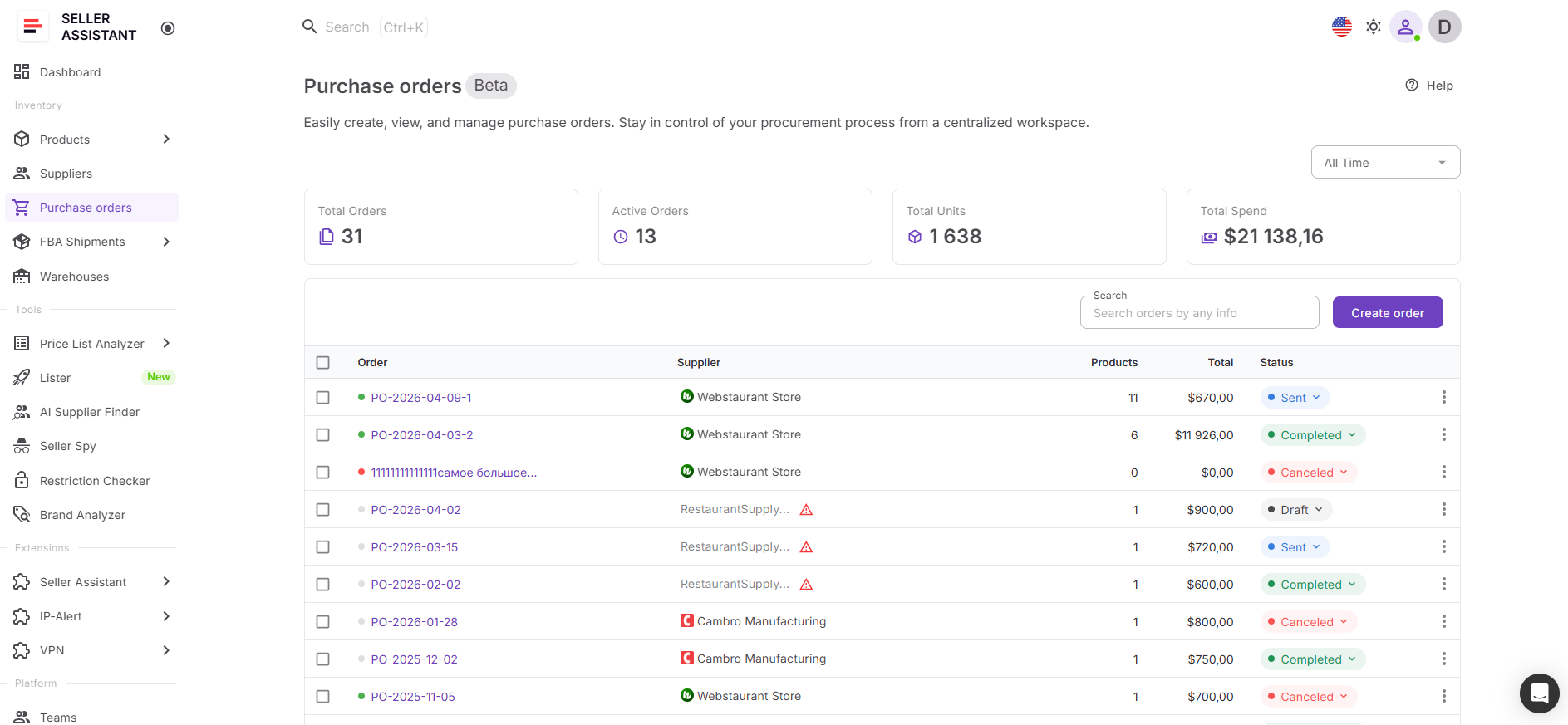
The module keeps procurement organized, reduces repetitive manual work, and helps ensure supplier orders remain accurate and consistent as sourcing operations grow.
What you can do with Purchase Orders Module
Purchase Orders Module helps sellers turn analyzed supplier products into structured purchase orders while keeping purchasing workflows centralized and easy to manage.
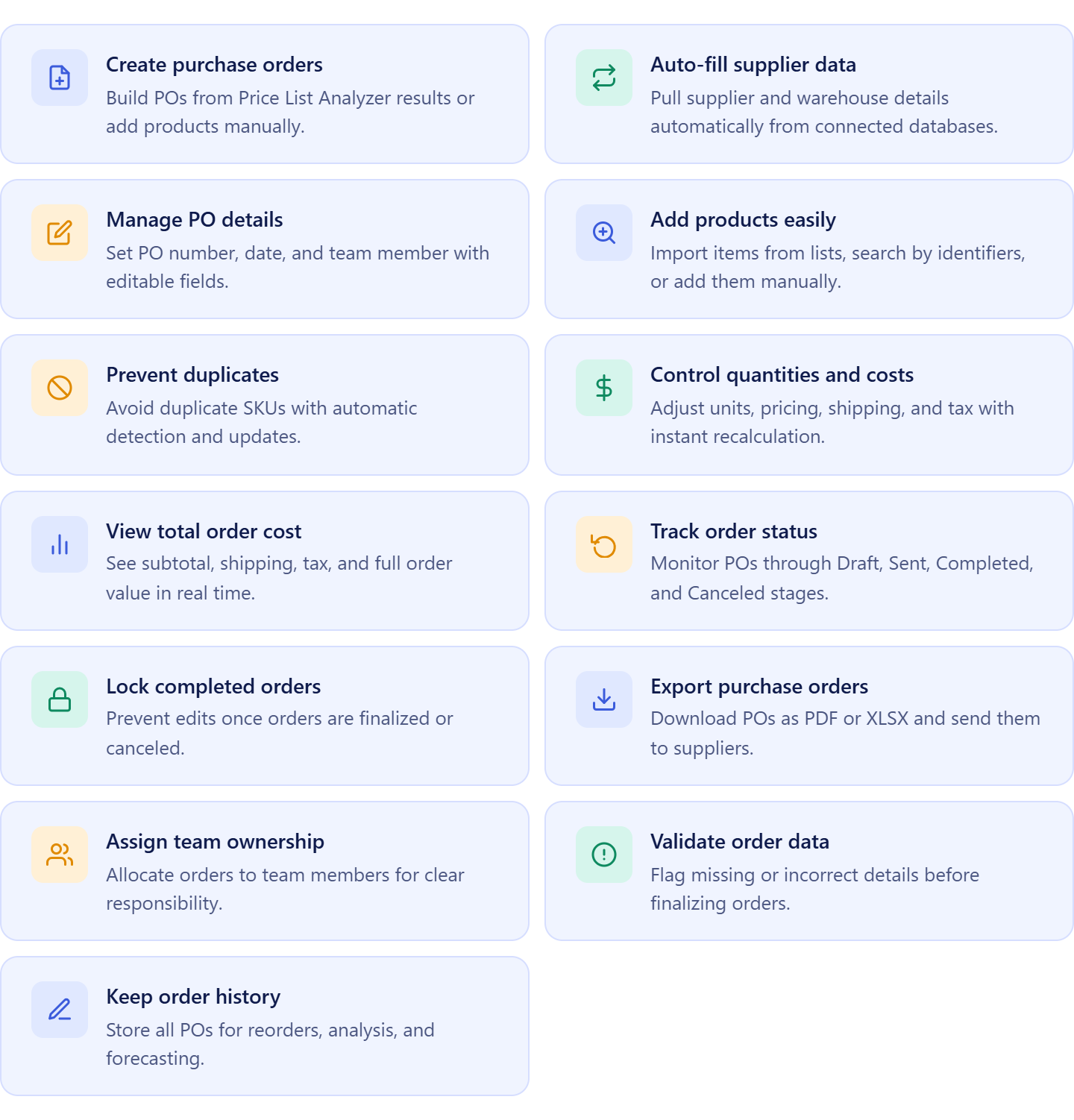
- Create purchase orders from analyzed supplier price lists
Move profitable products directly from Price List Analyzer into a purchase order without manually copying ASINs, pricing, or quantities into separate templates.
- Auto-fill supplier and warehouse information
Use connected supplier profiles and warehouse routing data to automatically populate purchasing and shipping details.
- Manage purchase order details in one place
Control PO numbers, creation dates, assigned team members, and order ownership from a centralized purchasing workspace.
- Add products from multiple sourcing workflows
Import products from Price List Analyzer, uploaded supplier price lists, product search, team data, or manual entry when needed.
- Prevent duplicate SKU entries
Automatically detect duplicate products inside the same purchase order and update the existing line instead of creating duplicate entries.
- Adjust quantities and purchasing costs
Update quantities, unit costs, shipping, taxes, and additional expenses with automatic recalculation of totals.
- Review total purchasing cost instantly
See subtotal, shipping costs, taxes, and total order value in real time before finalizing supplier orders.
- Track purchase order progress
Manage procurement using clear order statuses including Draft, Sent, Completed, and Canceled.
- Lock finalized purchase orders
Prevent accidental edits after supplier orders are completed or canceled.
- Export supplier-ready purchase orders
Download purchase orders as PDF or XLSX files for supplier communication and purchasing documentation.
- Organize purchasing across teams
Assign purchase orders to sourcing managers, buyers, or virtual assistants to keep procurement workflows structured.
- Detect missing or incorrect purchasing data
Receive warnings about incomplete routing details, missing supplier information, or incorrect order settings before finalizing a PO.
- Keep searchable purchasing history
Store all supplier purchase orders inside one system for reorders, spending analysis, forecasting, and procurement tracking.
How Purchase Orders Module connects supplier price lists with purchasing
Purchase Orders Module works as the purchasing execution layer inside Seller Assistant’s sourcing workflow.
Sellers first analyze supplier catalogs in Price List Analyzer to identify profitable, low-risk, and high-demand products. After selecting products inside the analyzed supplier price list, they can click Add to PO, review selected items, and automatically create a purchase order populated with supplier product data.
Once the order opens inside Purchase Orders Module, sellers can adjust quantities, assign warehouses or prep centers, manage shipping and taxes, and export supplier-ready purchase orders without rebuilding orders manually.
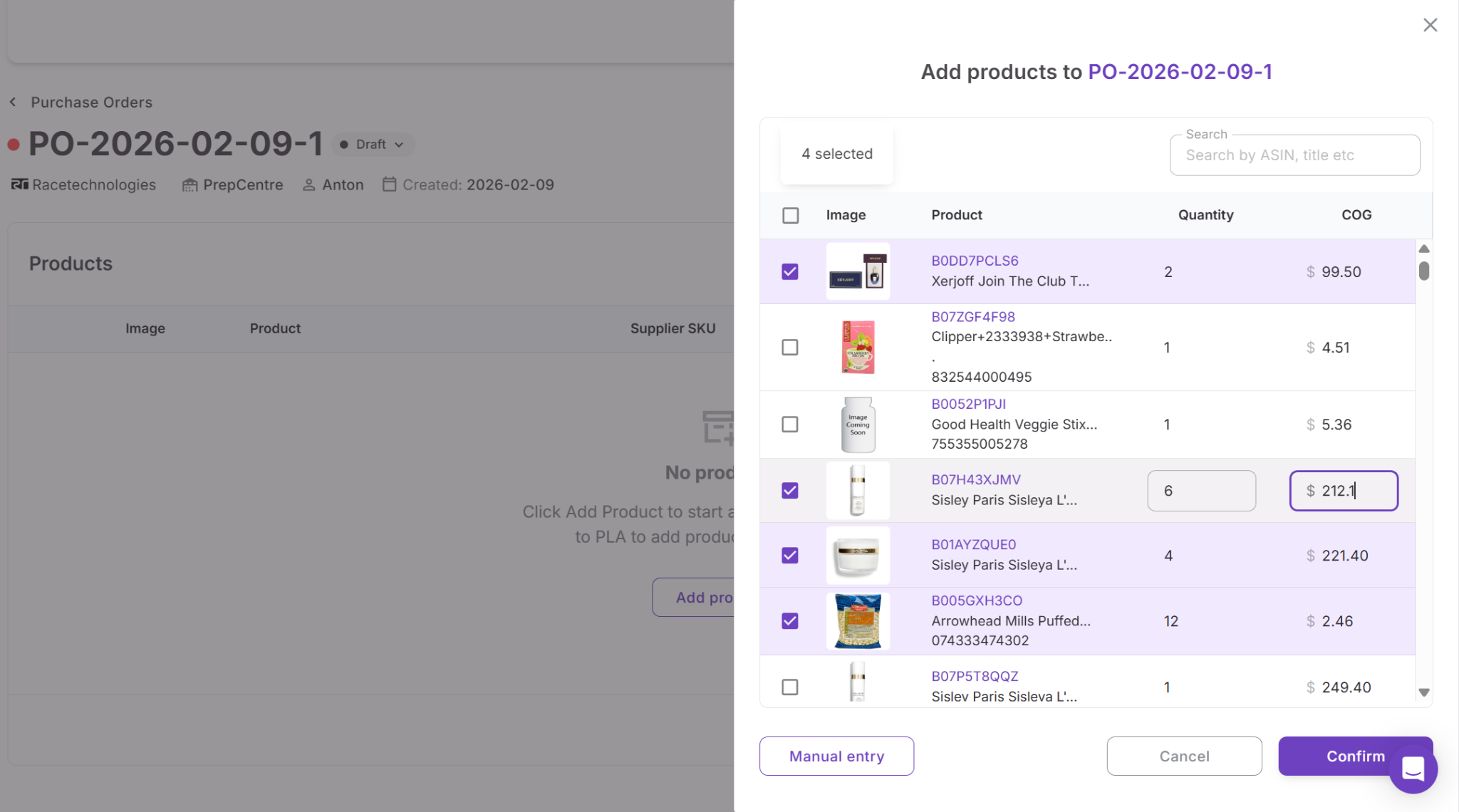
Because Purchase Orders Module connects directly with Price List Analyzer, Suppliers Database, Warehouses Database, Product Database, and other Seller Assistant workflow tools, supplier data, purchasing information, and routing details flow automatically across the workflow.
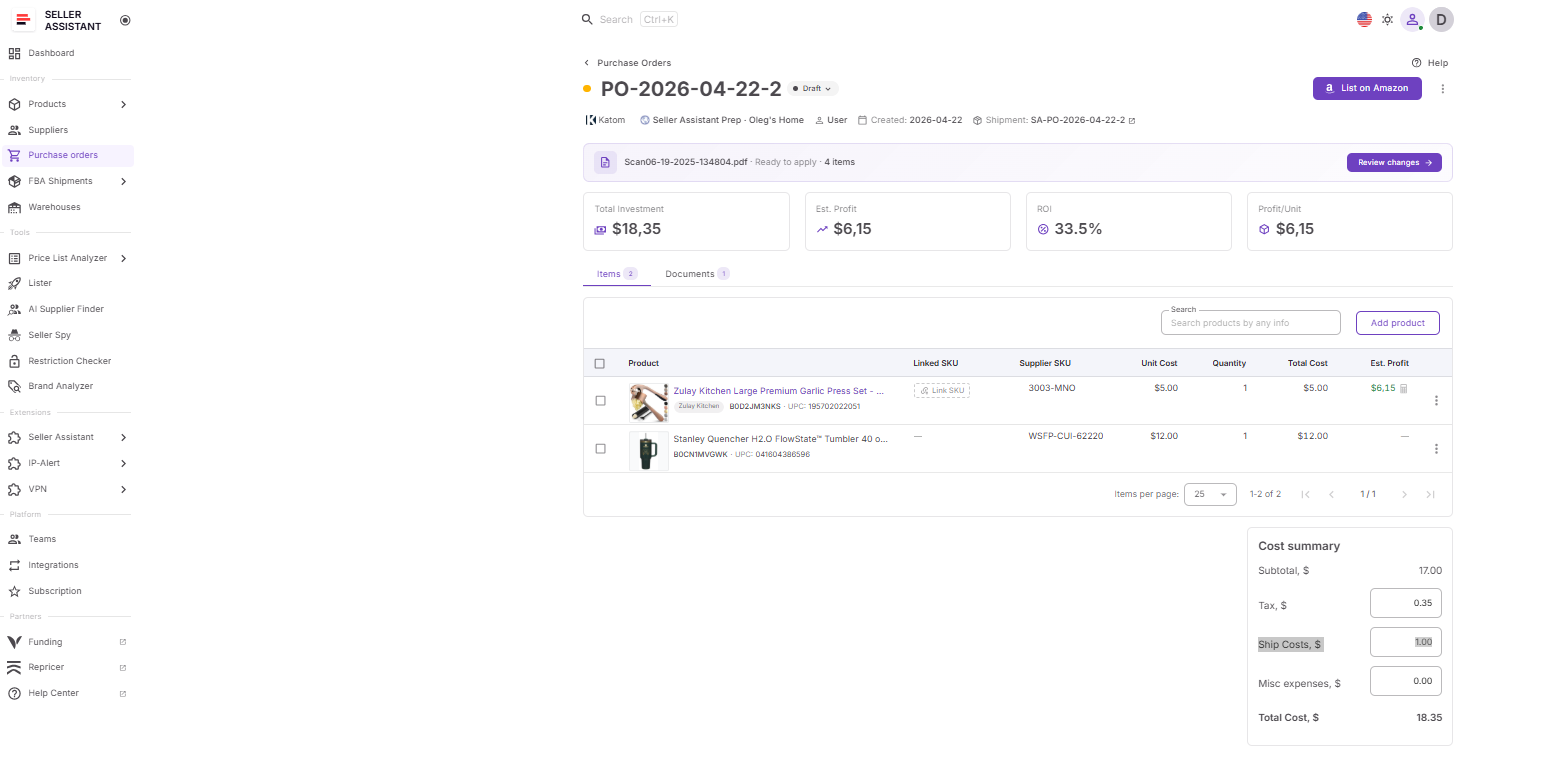
This creates a connected purchasing system where Amazon sellers can move from supplier catalog analysis to supplier-ready purchase orders much faster while keeping procurement organized and scalable.
How to Create Purchase Orders From Supplier Price Lists
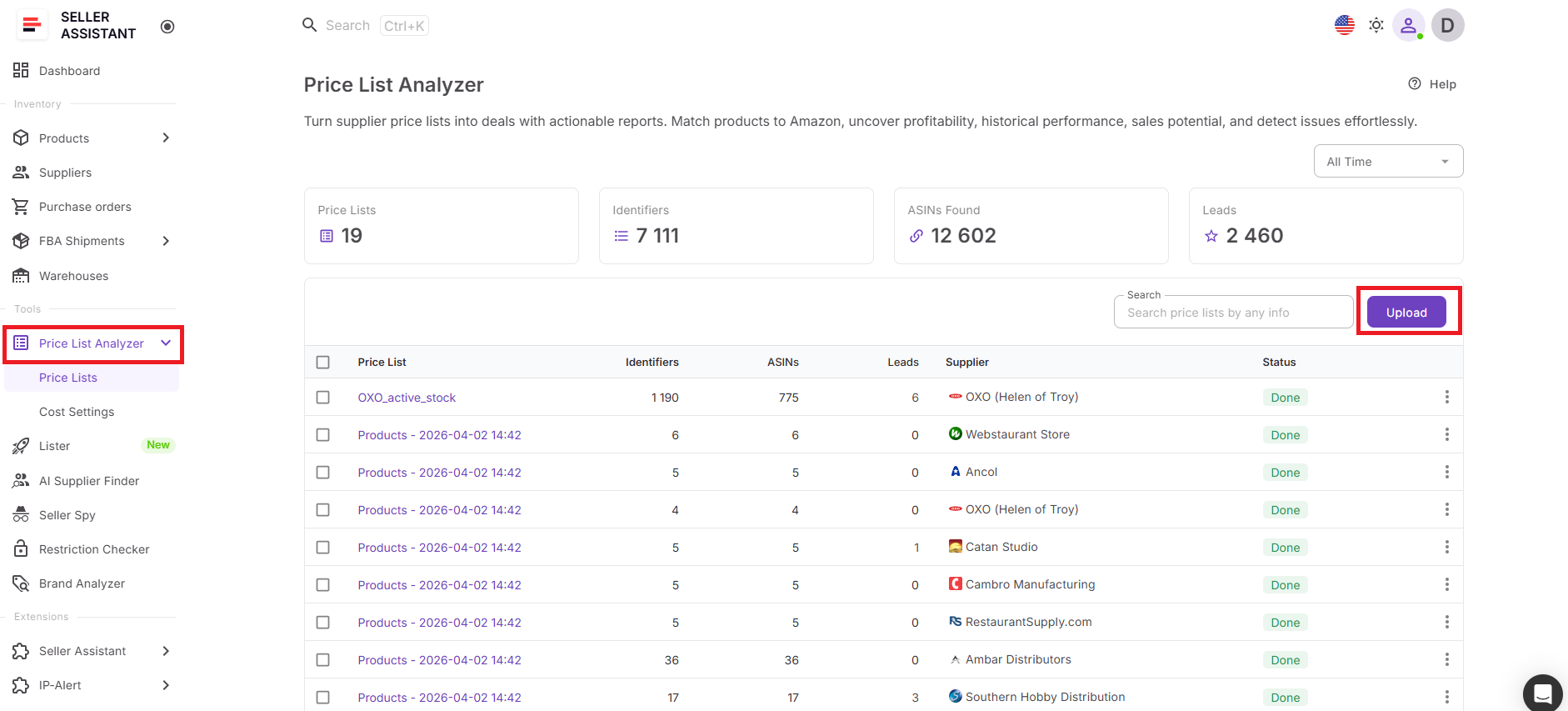
The workflow starts inside Price List Analyzer, where sellers upload and analyze supplier price lists to identify profitable, low-risk, and high-demand products. Instead of manually reviewing ASINs one by one and rebuilding supplier orders in spreadsheets, sellers can evaluate the entire supplier catalog inside one structured sourcing workspace.
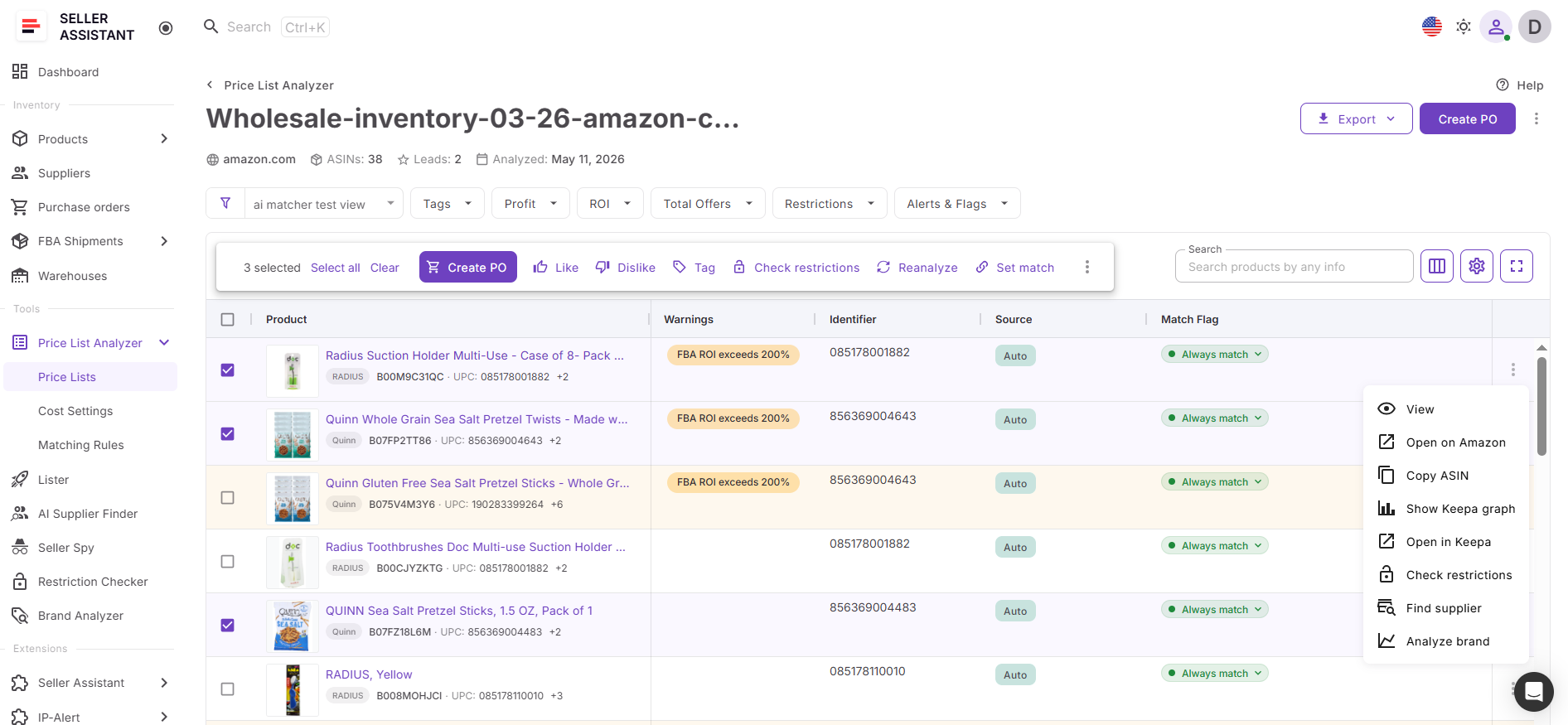
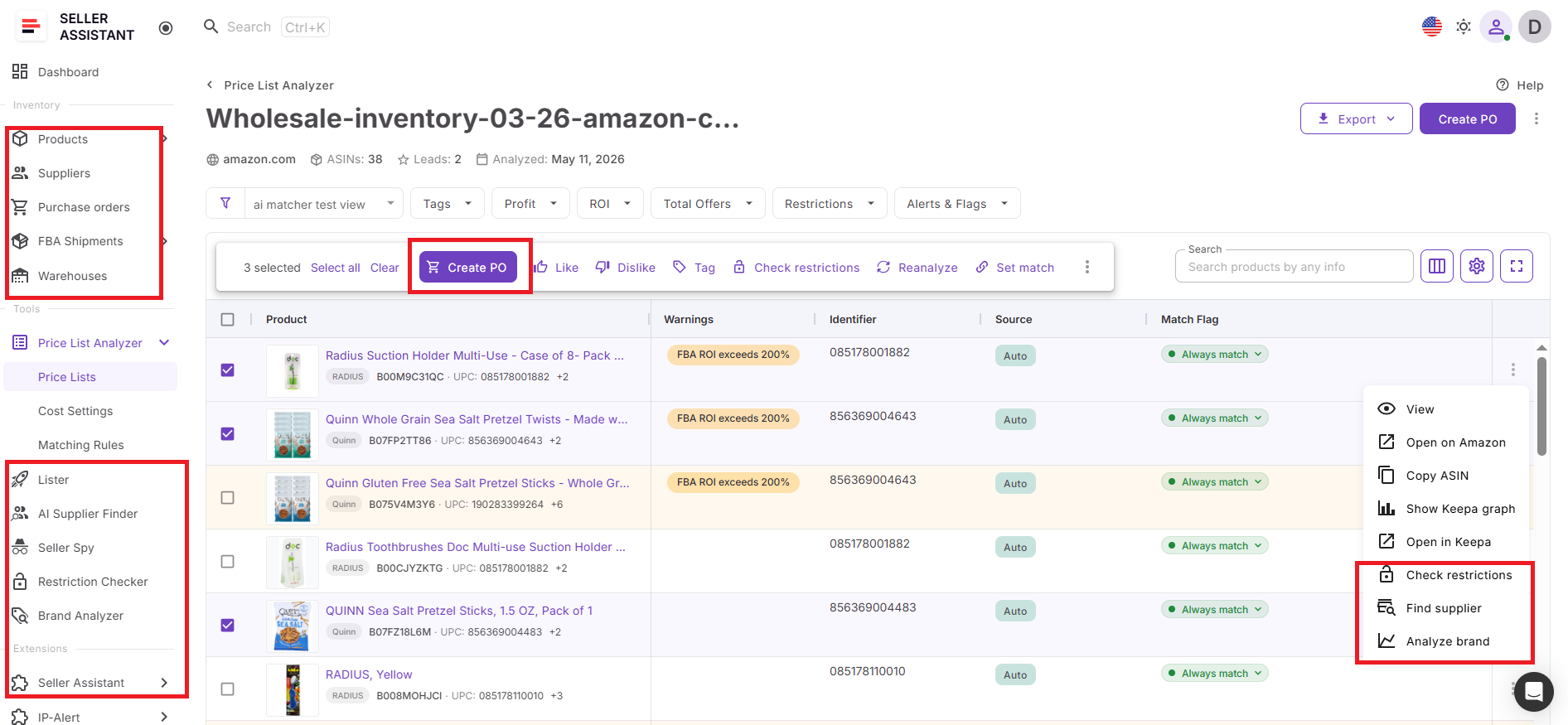
Once the analysis is complete, sellers open the analyzed supplier list, review profitability, competition, demand, restrictions, and Buy Box conditions, and select the products they want to purchase. After ticking the selected products, an action menu appears at the top of the table, allowing sellers to click Add to PO and move shortlisted products directly into Purchase Orders Module.
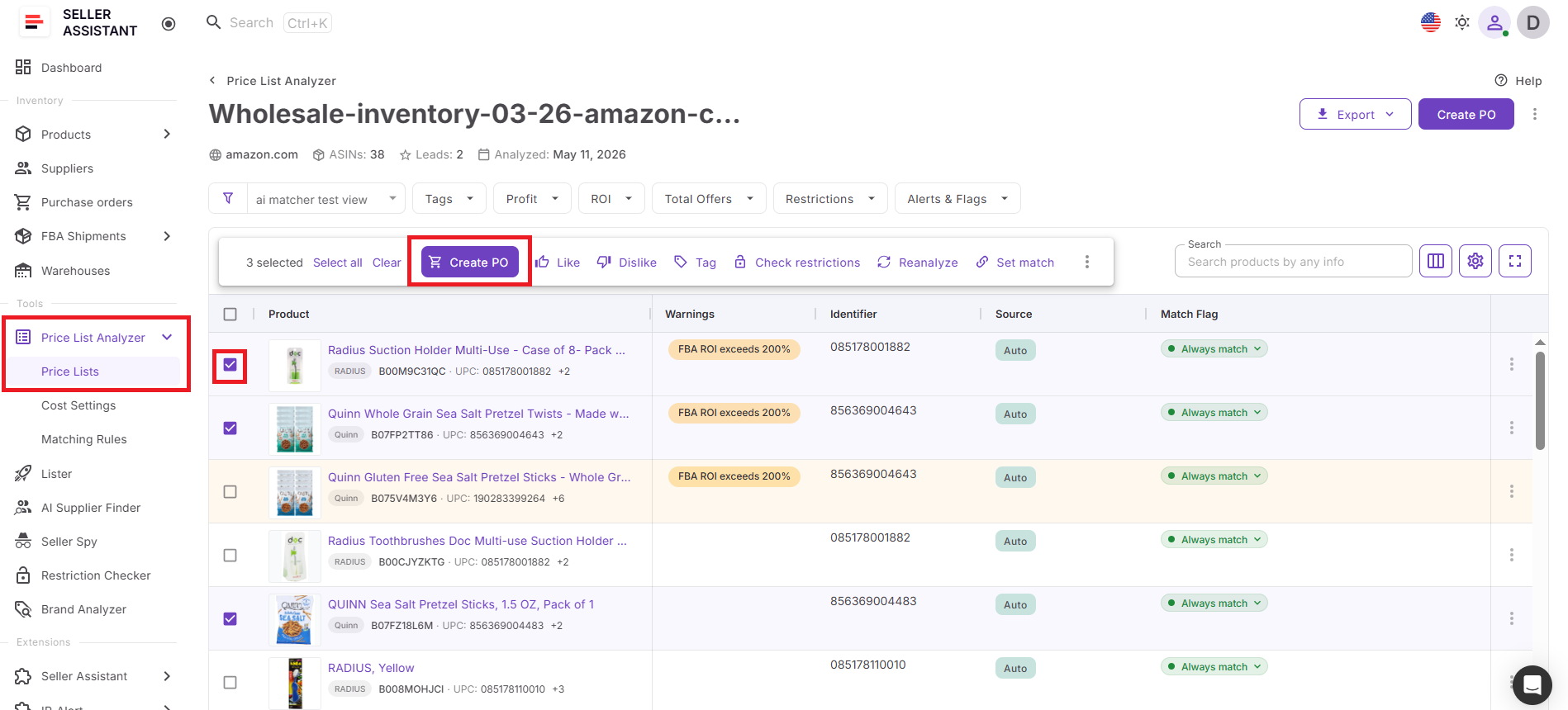
The system automatically transfers selected products into a structured purchase order together with connected supplier and product data. Sellers can then review the order, adjust quantities and costs, assign warehouses or prep centers, and export a supplier-ready purchase order without manually copying ASINs, pricing, or supplier information between spreadsheets and templates.
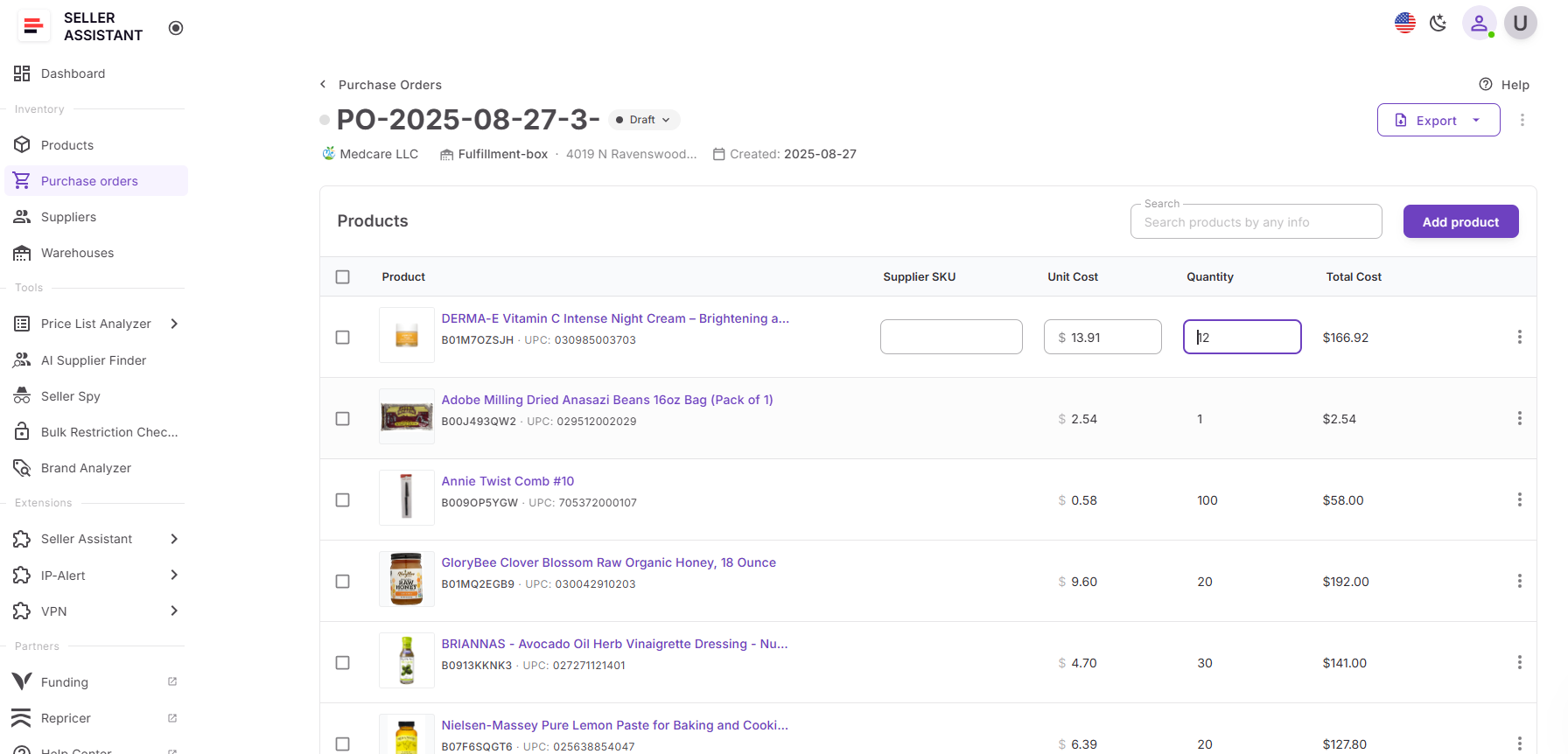
This connected workflow reduces manual work, minimizes purchasing mistakes, and allows Amazon resellers to move from supplier catalog analysis to supplier-ready purchase orders much faster.
How to Create Purchase Orders from Supplier Price Lists Step-by-Step
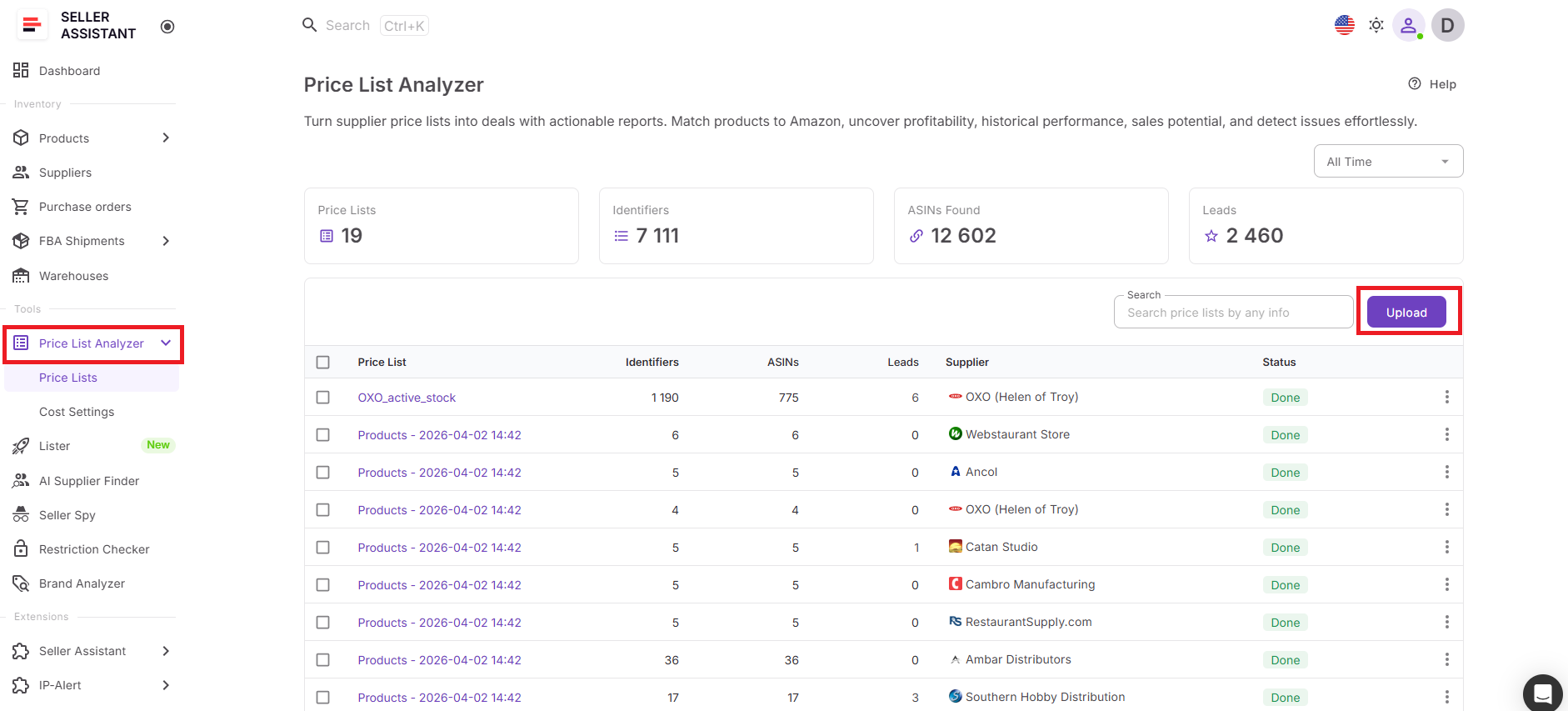
Step 1. Analyze your supplier price list
Upload the supplier catalog to Price List Analyzer and run bulk analysis. Seller Assistant matches products to Amazon ASINs, calculates ROI and profit, checks demand, evaluates competition, and flags restrictions or product risks.
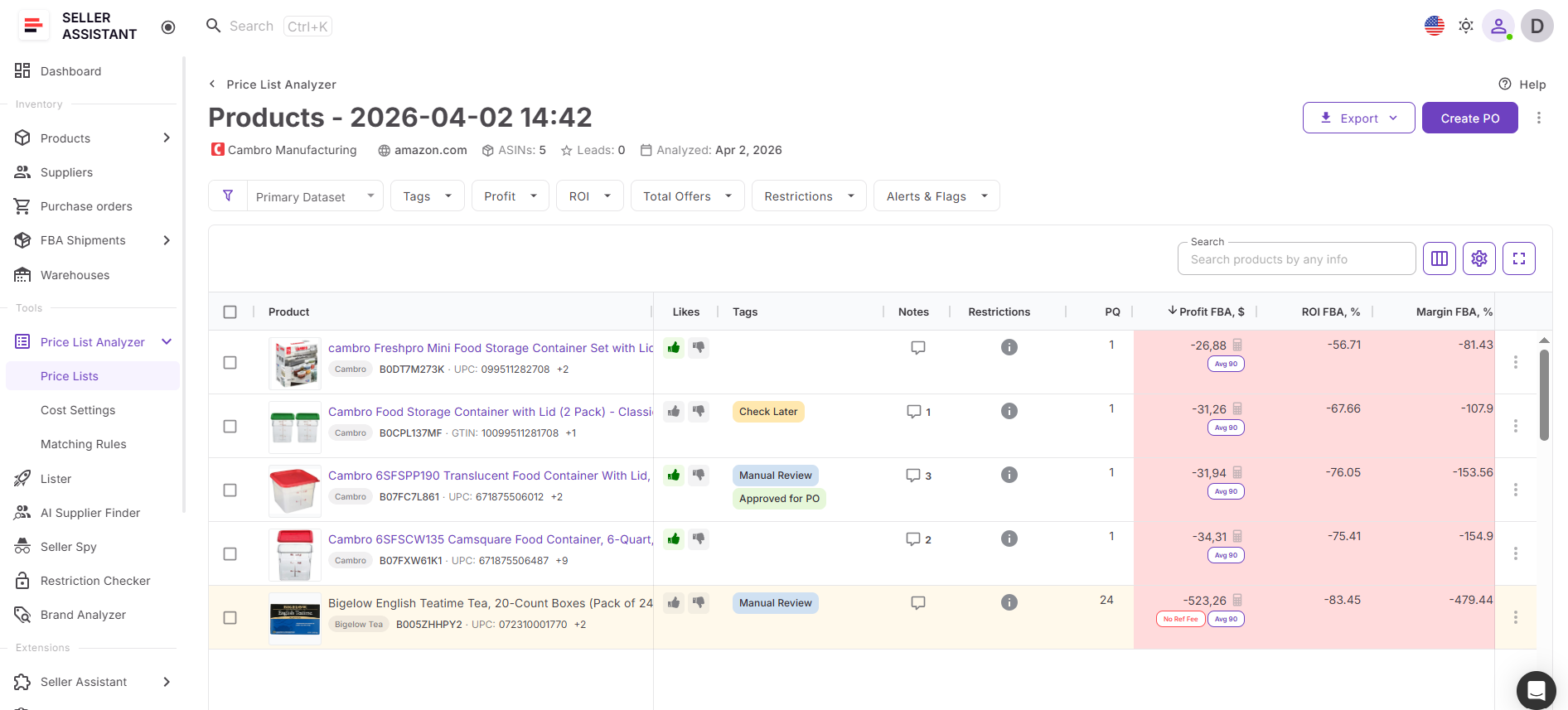
Step 2. Open the analyzed price list
After the analysis is complete, open the processed supplier list. Review the results in the table and use filters to narrow the catalog to products that match your buying criteria.
Step 3. Select products for the purchase order
Tick the checkbox next to each product you want to include in the PO. Focus on products with strong profit, healthy ROI, stable demand, acceptable competition, and no critical risk alerts.
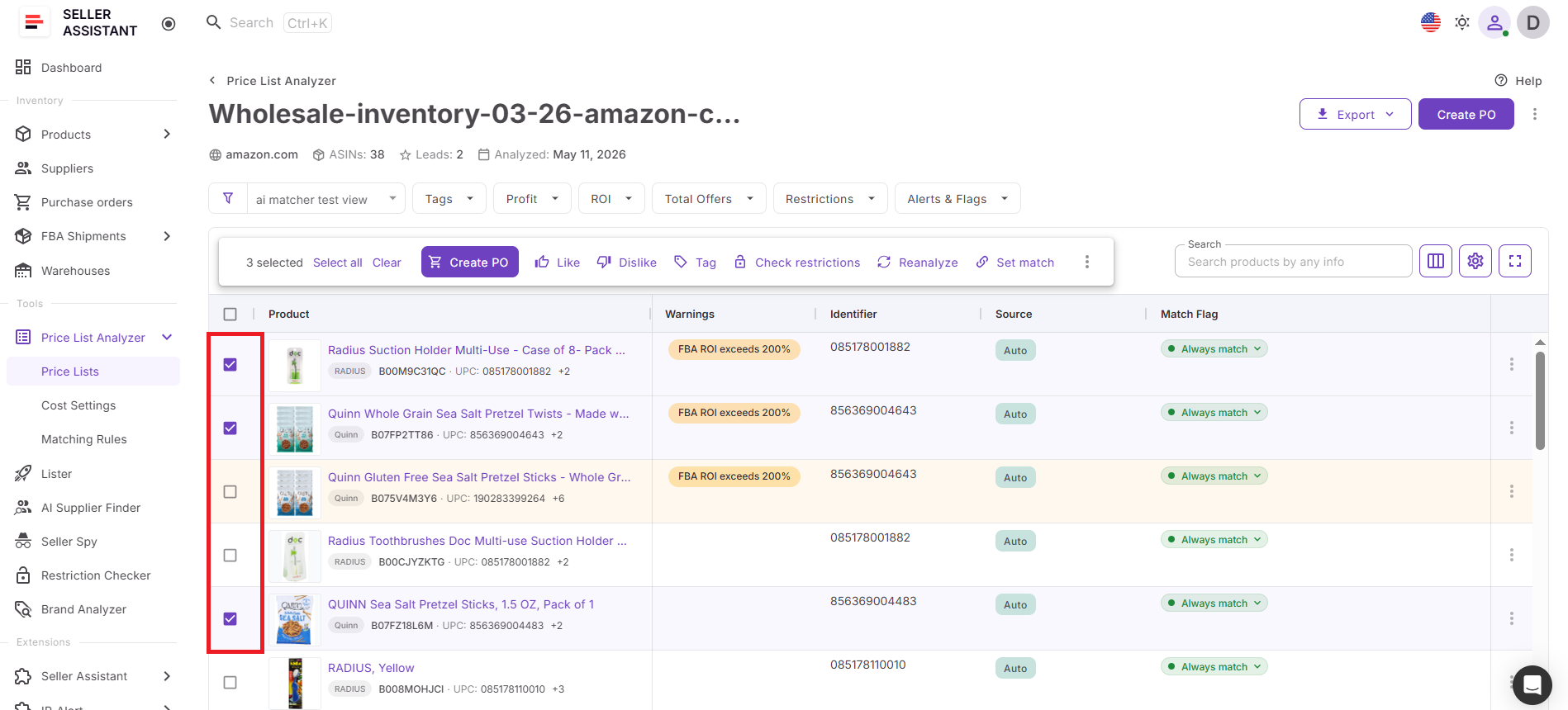
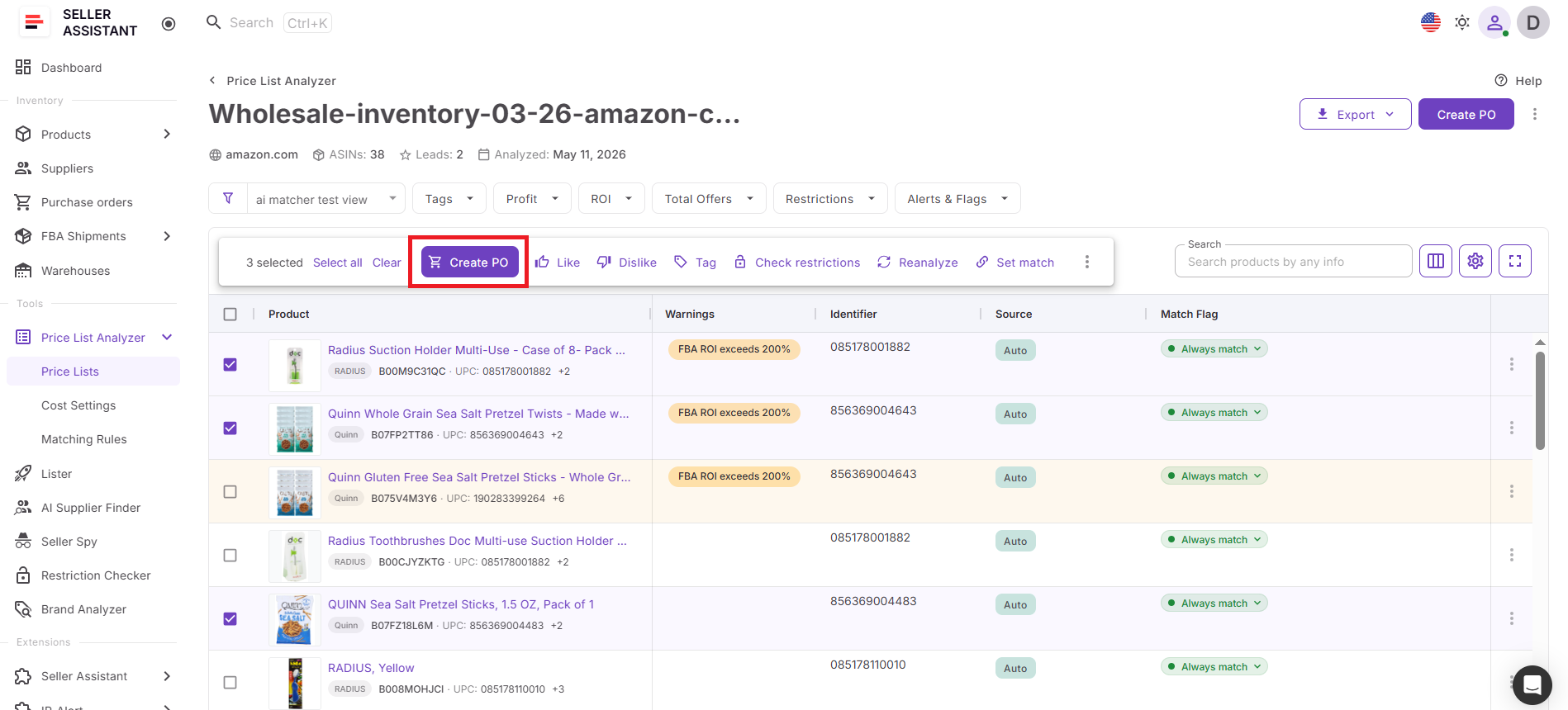
Step 4. Click Create PO
Once you select products, an upper menu appears in the table. Click Create PO to start creating a purchase order from the selected products.
Step 5. Review the selected products
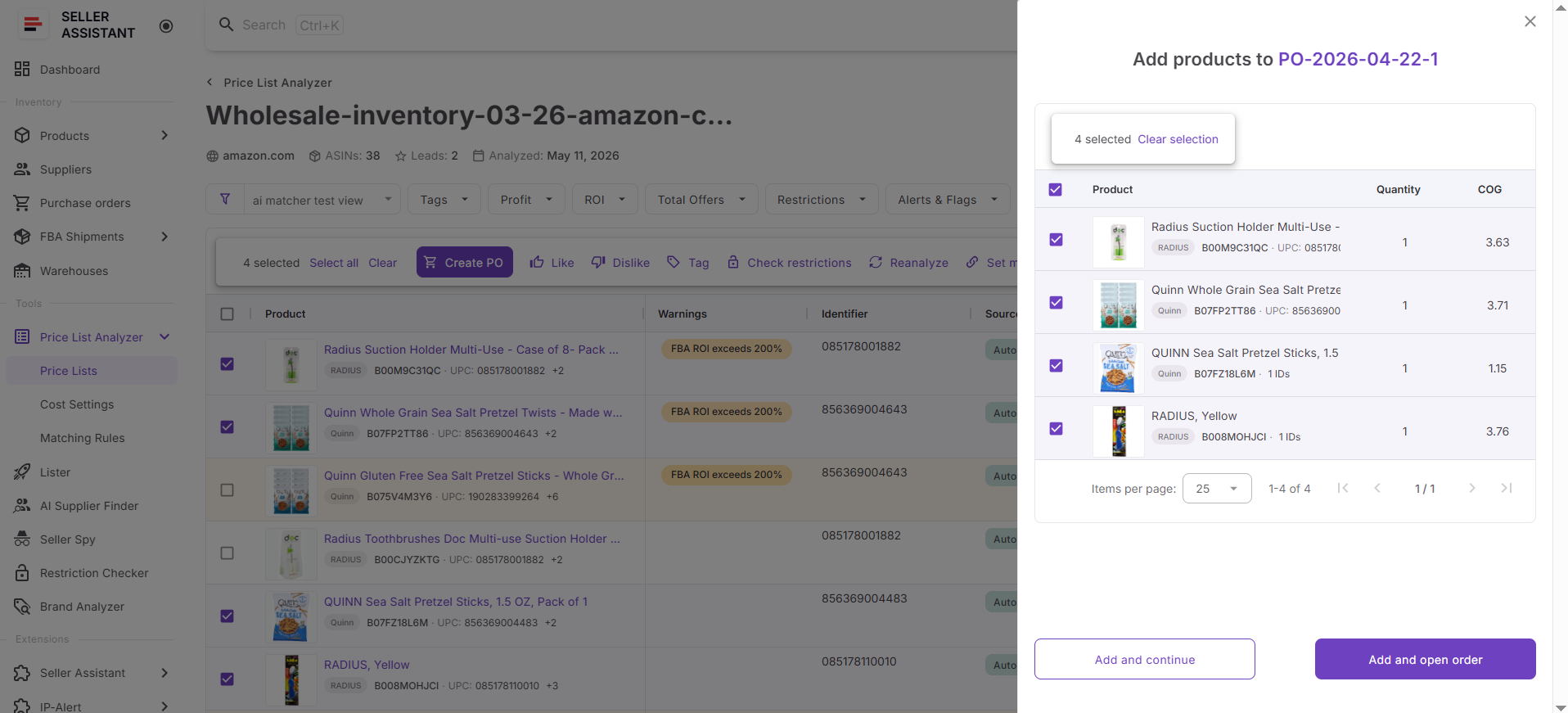
A window opens where you can check the products before adding them to the order. Remove any products you don’t want to include and confirm that the final list is correct.
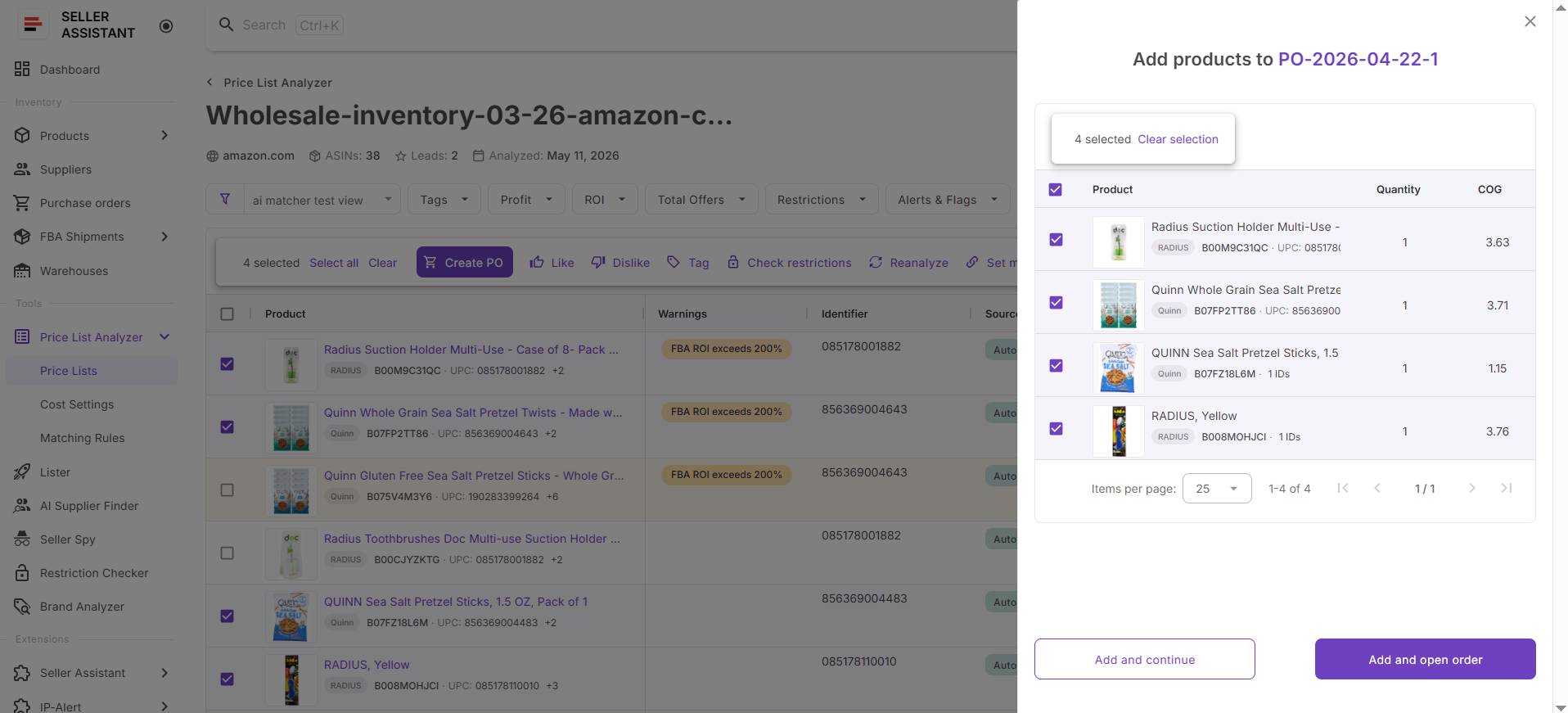
Step 6. Click Add and open order
Click Add and open order at the bottom of the window. Seller Assistant creates a purchase order and opens it in Purchase Orders Module
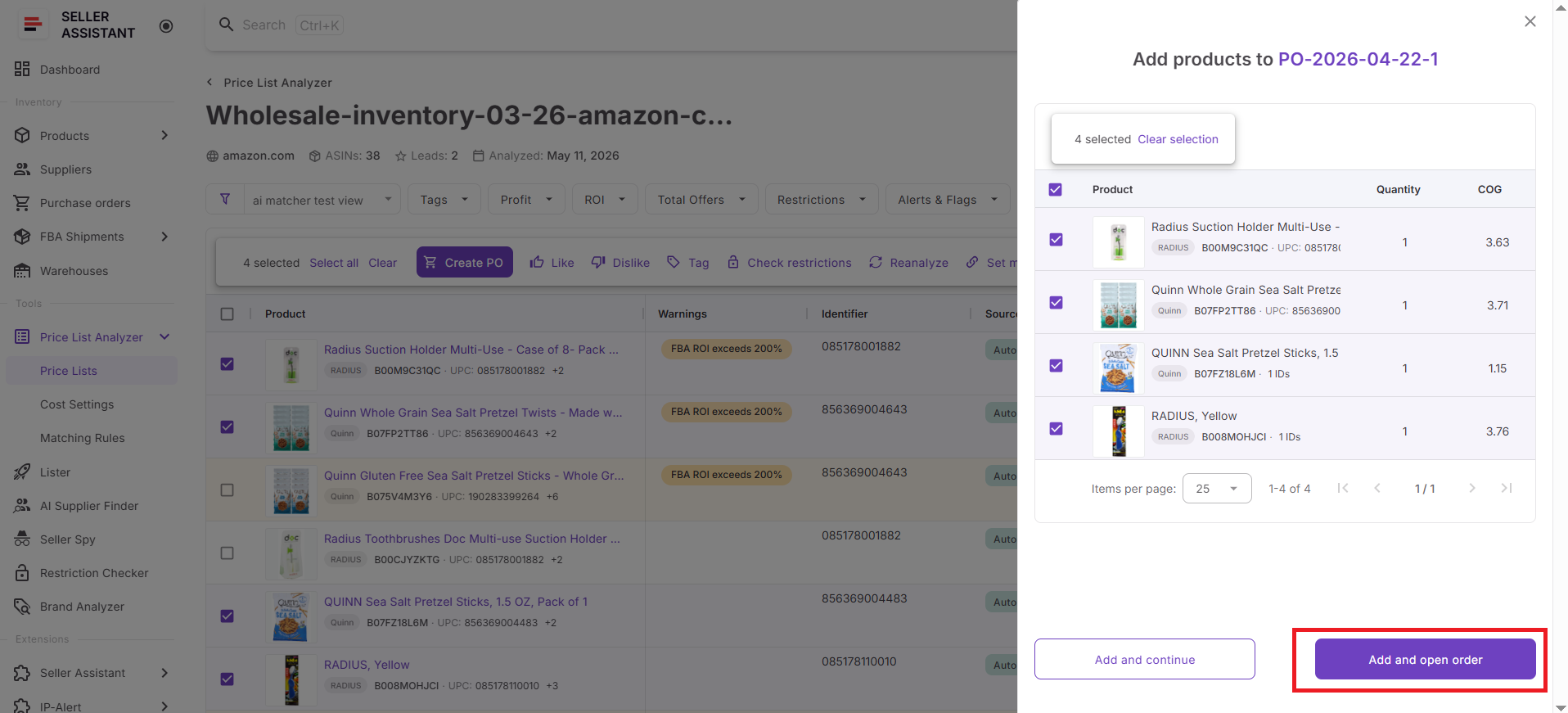
Step 7. Complete the purchase order
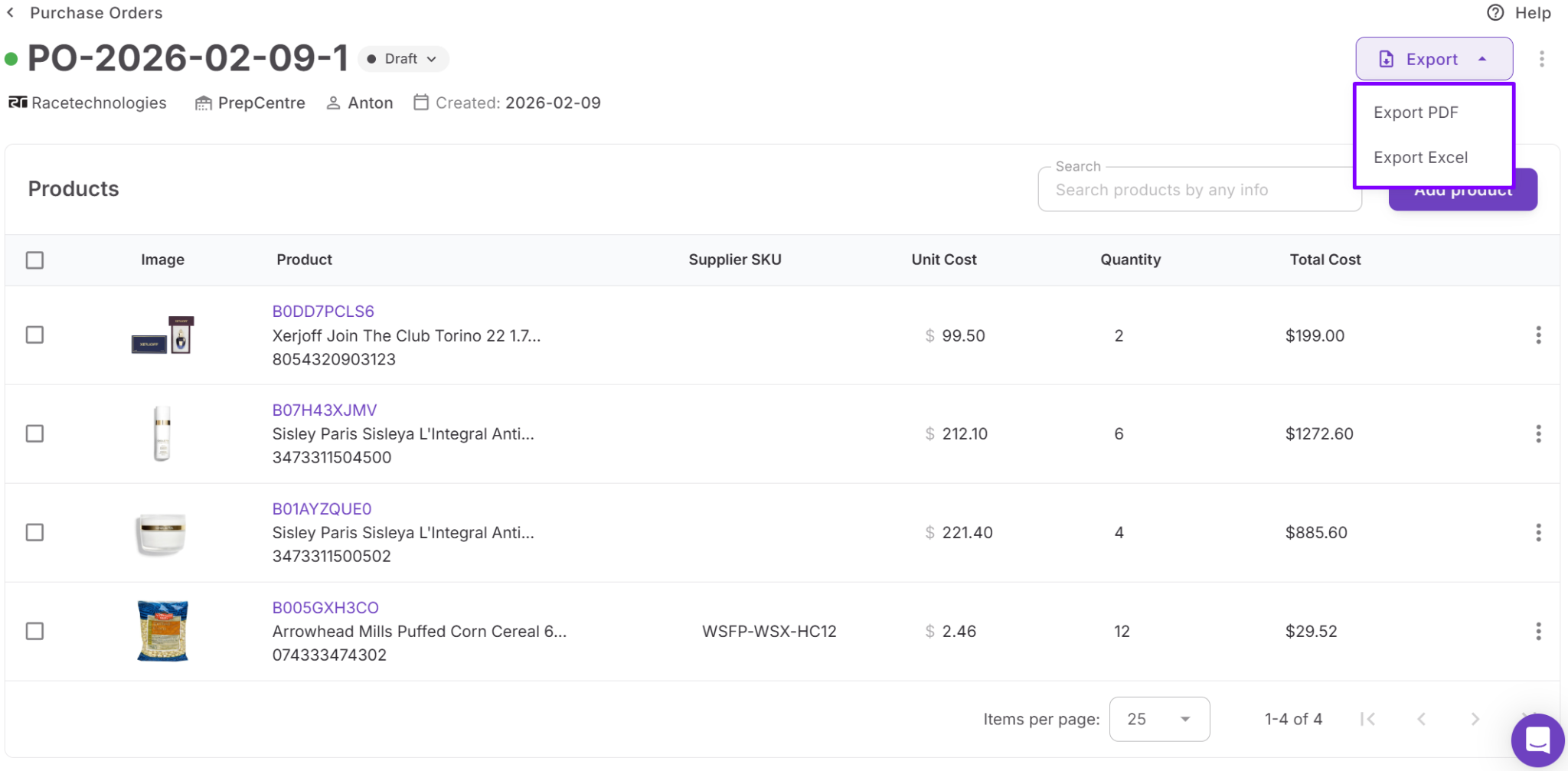
Review supplier details, assign a warehouse or prep center, adjust quantities and costs, and check the order total. When the PO is ready, export it as PDF or XLSX and send it to your supplier.
FAQ
Can you create purchase orders directly from a supplier price list?
Yes, Seller Assistant allows sellers to create purchase orders directly from analyzed supplier price lists inside Price List Analyzer. Selected products can be moved into Purchase Orders Module without manually copying ASINs, costs, or supplier data.
Why should Amazon sellers analyze supplier price lists before creating purchase orders?
Analyzing supplier catalogs helps sellers identify profitable, low-risk, and high-demand products before purchasing inventory. This reduces the risk of buying restricted, low-margin, or highly competitive products that are difficult to sell profitably.
What products can be added to a purchase order from Price List Analyzer?
Sellers can select any analyzed products from the supplier price list and add them directly to a purchase order. The workflow supports profitable ASINs filtered by ROI, demand, competition, restrictions, and other sourcing criteria.
Can teams and virtual assistants manage purchase orders together?
Yes, Purchase Orders Module supports team workflows with shared purchasing data and assigned responsibilities. This helps sourcing managers, buyers, and virtual assistants collaborate without using disconnected spreadsheets or templates.
What file formats can be used for supplier price lists?
Price List Analyzer supports supplier catalogs in XLSX and XLS formats. Sellers can upload large supplier files and analyze hundreds or thousands of products in bulk instead of researching products manually.
Final Thoughts
Creating purchase orders manually from supplier spreadsheets slows down sourcing and increases the risk of costly mistakes as your Amazon business grows. Rebuilding orders in separate templates, copying ASINs manually, and managing supplier data across disconnected files makes purchasing harder to scale and organize.
Seller Assistant simplifies this workflow by connecting Price List Analyzer and Purchase Orders Module inside one system. Sellers can analyze supplier catalogs, identify profitable low-risk products, select products directly from analyzed price lists, and generate supplier-ready purchase orders in just a few clicks. This allows Amazon wholesale sellers, online arbitrage sellers, and dropshippers to move from product research to purchasing faster while keeping sourcing, suppliers, and procurement workflows organized.