



Amazon brand research is not a one-time task. Competition, demand, pricing, and Amazon’s presence can change quickly, turning a previously attractive sourcing opportunity into a less profitable one.
That’s why successful wholesale sellers, online arbitrage sellers, and dropshippers regularly revisit the brands they source. Keeping brand research up to date helps sellers make decisions based on current marketplace conditions rather than outdated data.
In this post, we’ll show how to refresh brand research with Seller Assistant’s Brand Analyzer, why regular reanalysis matters, and how updated brand insights can help you identify opportunities and avoid sourcing mistakes.
Note. Seller Assistant is an end-to-end Amazon workflow management platform that integrates 15+ wholesale-focused solutions into one connected system. It combines sourcing workflow automation, bulk research and intelligence tools, and integrated Chrome extensions – giving you everything you need to streamline finding deals, managing suppliers, and creating purchase orders.

The platform aggregates: workflow management tools – Purchase Orders Module, Suppliers Database, Product Database, Warehouses Database, FBA Shipments to organize, automate, and scale every step of your wholesale and arbitrage operations; bulk research & sourcing tools – Price List Analyzer, Bulk Restriction Checker, AI Supplier Finder, Brand Analyzer, Seller Spy to evaluate supplier price lists, verify selling eligibility and restrictions, open new brands, and discover winning product ideas from competitors to expand your product catalog; Chrome extensions – Seller Assistant Browser Extension, IP-Alert Extension, and built-in VPN by Seller Assistant to deep-research products, check IP claims and compliance, and access geoblocked supplier sites directly within your browser; and integrations & team access features – seamless API connectivity and integrations with Zapier, Airtable, and Make, plus Virtual Assistant Accounts for secure, scalable team collaboration.
With Seller Assistant, every step of your Amazon wholesale and arbitrage workflow is automated and connected.
What Is Brand Reanalysis Feature in Seller Assistant?
Brand Reanalysis is a feature in Seller Assistant’s Brand Analyzer that allows sellers to refresh an existing brand analysis using the latest marketplace data. Instead of creating a new analysis from scratch, you can update a previously analyzed brand with a single click and get the most current information about demand, competition, pricing, Amazon presence, and overall sourcing potential.
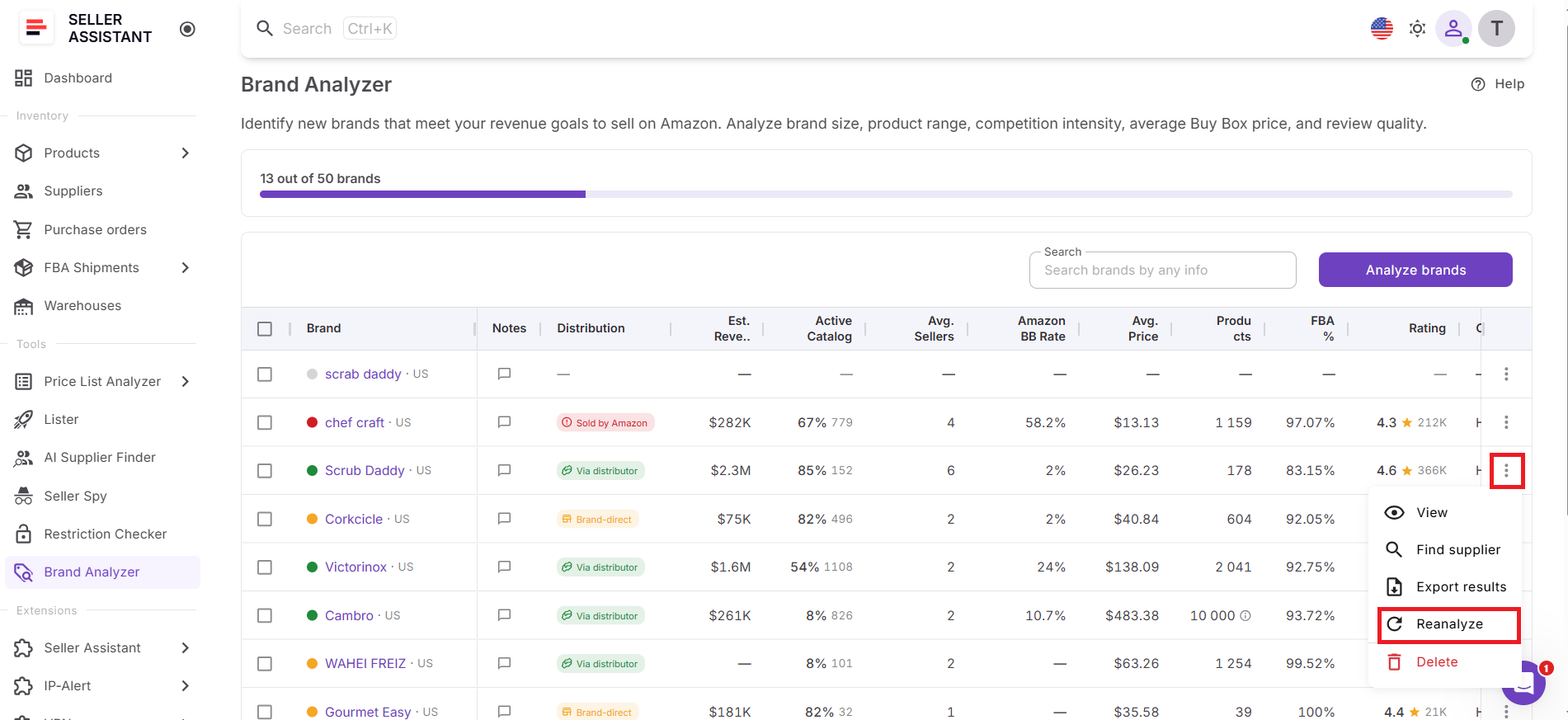
This feature is important because Amazon marketplaces change constantly. Seller counts increase or decrease, Amazon may start or stop competing on listings, product catalogs evolve, and sales performance can shift over time. Decisions based on outdated brand research can lead to missed opportunities or sourcing mistakes.
Example
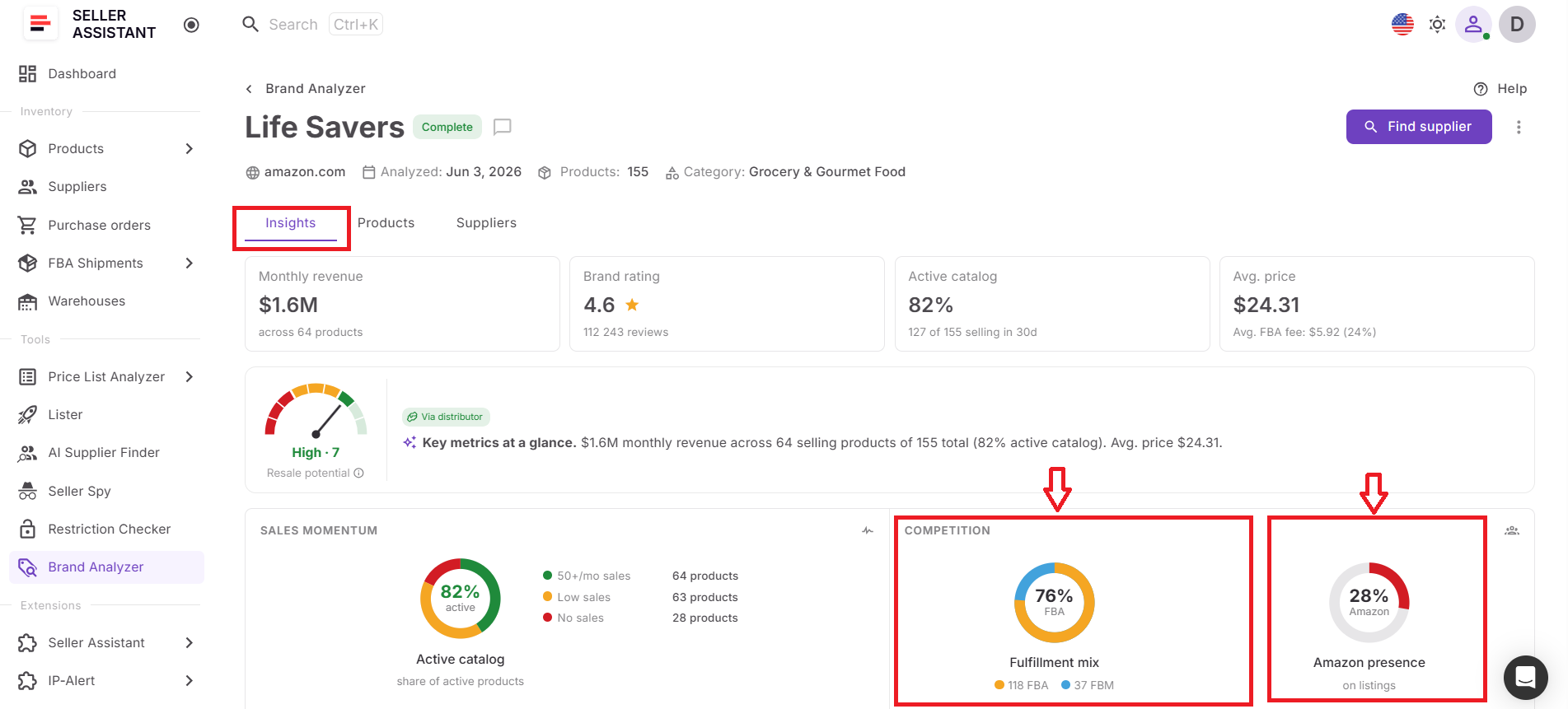
For example, imagine you analyzed a brand two months ago and found that Amazon rarely held the Buy Box and competition was relatively low. Before opening a wholesale account or placing a purchase order, you can reanalyze the brand to check whether those conditions still exist. If Amazon’s Buy Box share has increased significantly or seller competition has intensified, you can adjust your sourcing strategy before committing inventory.
Why Successful Sellers Regularly Refresh Brand Research
Brand research is only valuable when it’s current. Amazon marketplaces change constantly, and factors such as competition, demand, pricing, catalog activity, and Amazon’s presence can look very different from what they were weeks or months ago. By regularly refreshing brand research, wholesale sellers, online arbitrage sellers, and dropshippers can identify changing opportunities, avoid relying on outdated information, and make sourcing decisions based on the latest marketplace data.
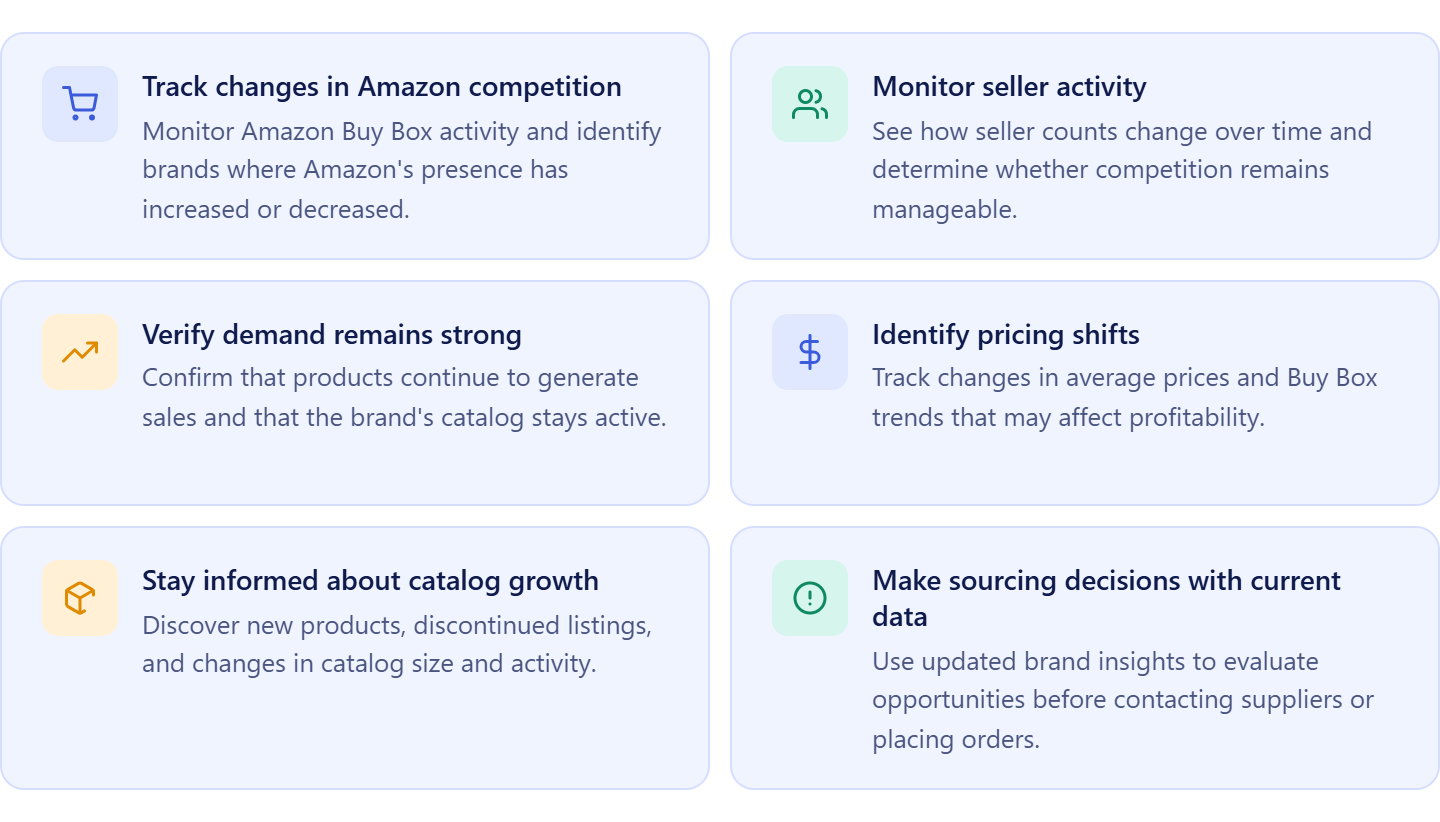
Track changes in Amazon competition
Amazon’s presence within a brand can change over time. Refreshing brand research helps sellers monitor Amazon Buy Box activity and identify brands where competition from Amazon has increased or decreased.
Monitor seller activity
The number of sellers competing on a brand’s products can change significantly. Updated research helps determine whether competition remains manageable or has become too crowded.
Verify demand remains strong
Sales performance is not static. Reanalyzing brands helps sellers confirm that products continue to generate demand and that the catalog remains active.
Identify pricing shifts
Average selling prices and Buy Box prices can change due to competition, seasonality, or market conditions. Updated pricing data helps sellers evaluate whether a brand still supports their profitability targets.
Stay informed about catalog growth
Brands regularly launch new products and discontinue older ones. Keeping research current helps sellers identify new opportunities and understand how the brand’s catalog is evolving.
Make sourcing decisions with current data
Whether you’re preparing to contact a supplier, open a wholesale account, or place an order, updated brand research provides greater confidence that your decisions are based on the latest marketplace conditions rather than outdated information.
How Brand Reanalysis Works in Seller Assistant
Brand research is most valuable when it’s based on current marketplace conditions. However, competition, demand, pricing, and Amazon’s presence can change over time, making previously analyzed data less reliable for sourcing decisions. That’s why Seller Assistant introduced Brand Reanalysis – a feature that allows sellers to instantly refresh existing brand research without starting the analysis from scratch.
Whether you’re revisiting a brand before contacting suppliers, evaluating new opportunities, or preparing to place an order, Brand Reanalysis helps ensure you’re working with the latest available data.
Automatically refresh brand intelligence
When a brand is reanalyzed, Brand Analyzer updates its insights using current marketplace data. This includes key brand metrics such as estimated revenue, active catalog percentage, seller count, Amazon Buy Box rate, average price, FBA share, ratings, distribution type, and other indicators used to evaluate wholesale opportunities.
The tool also recalculates the brand’s Resale Potential Score and generates an updated AI summary, helping sellers quickly understand whether the opportunity has improved, declined, or remained stable.
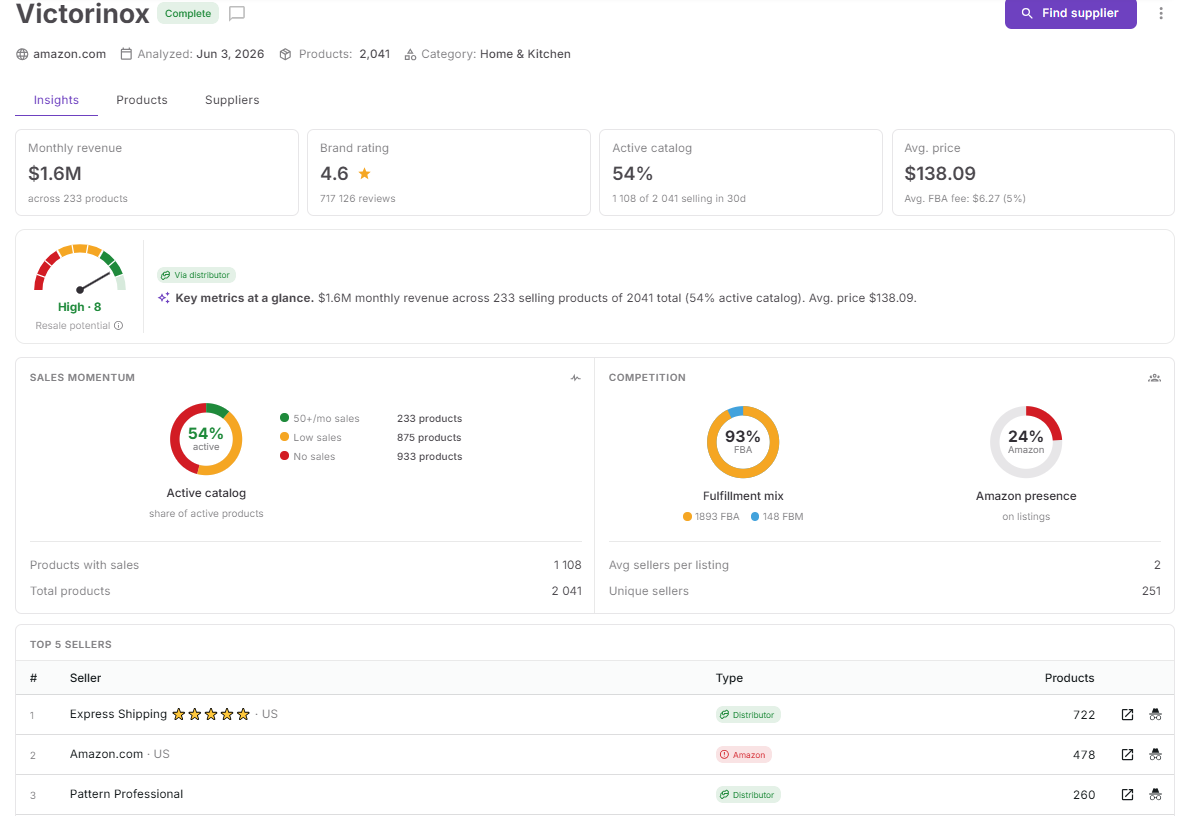
What happens during brand reanalysis
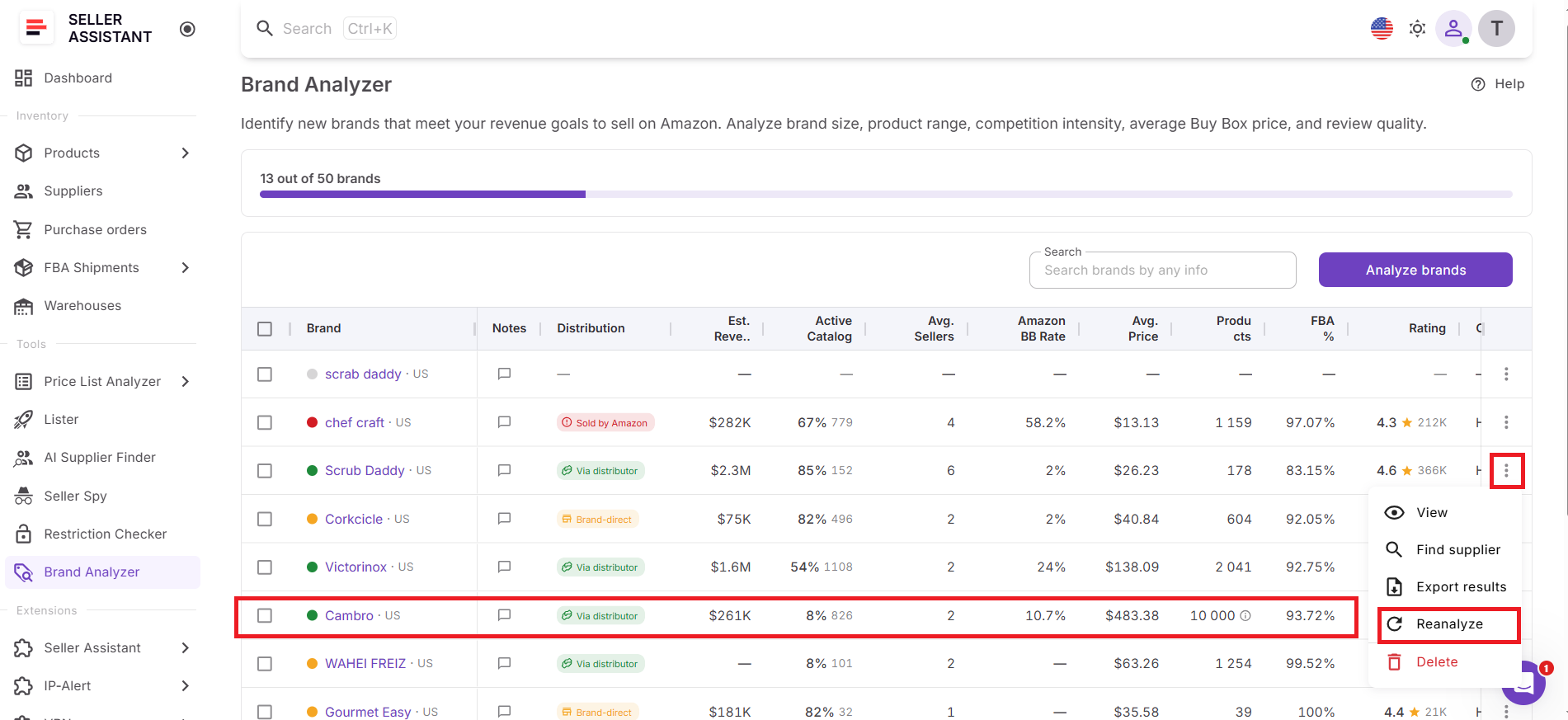
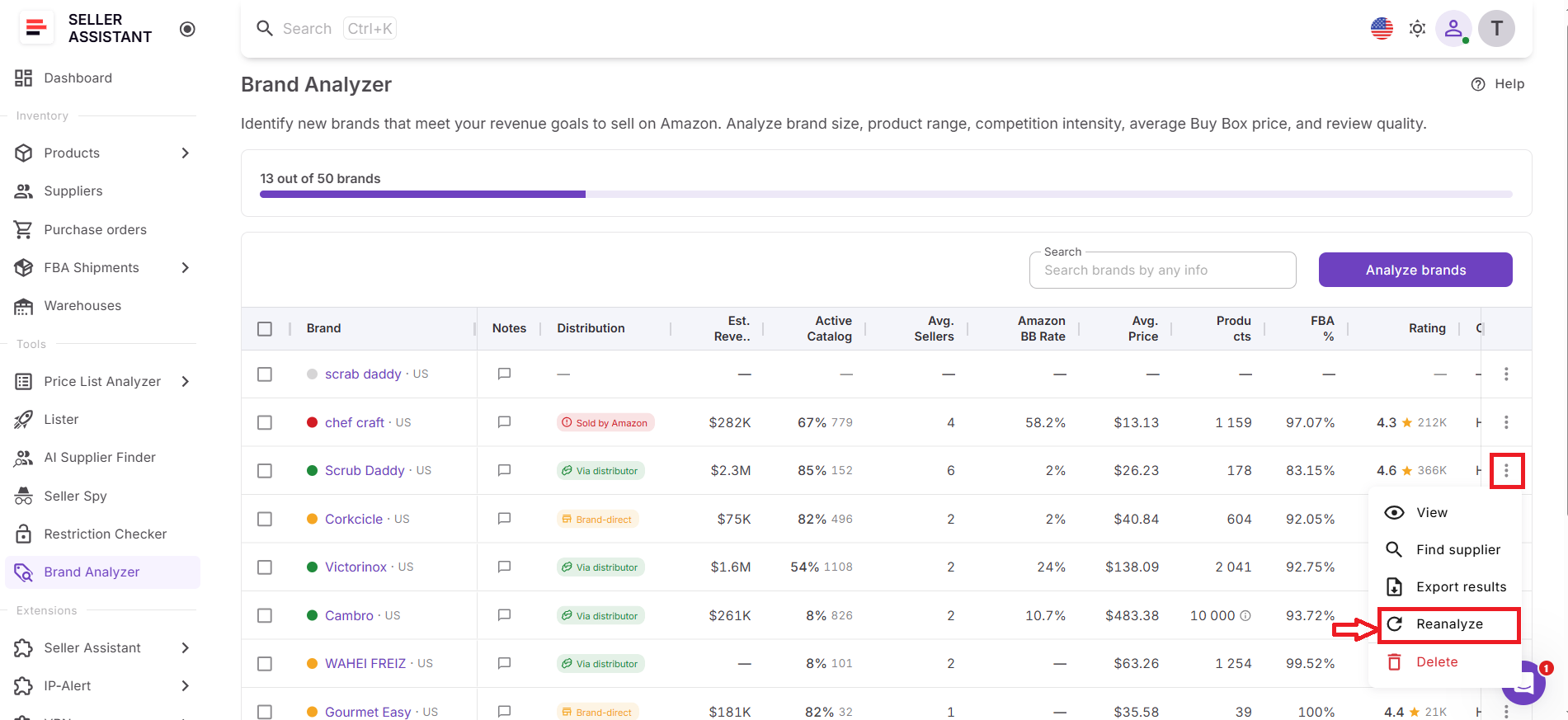
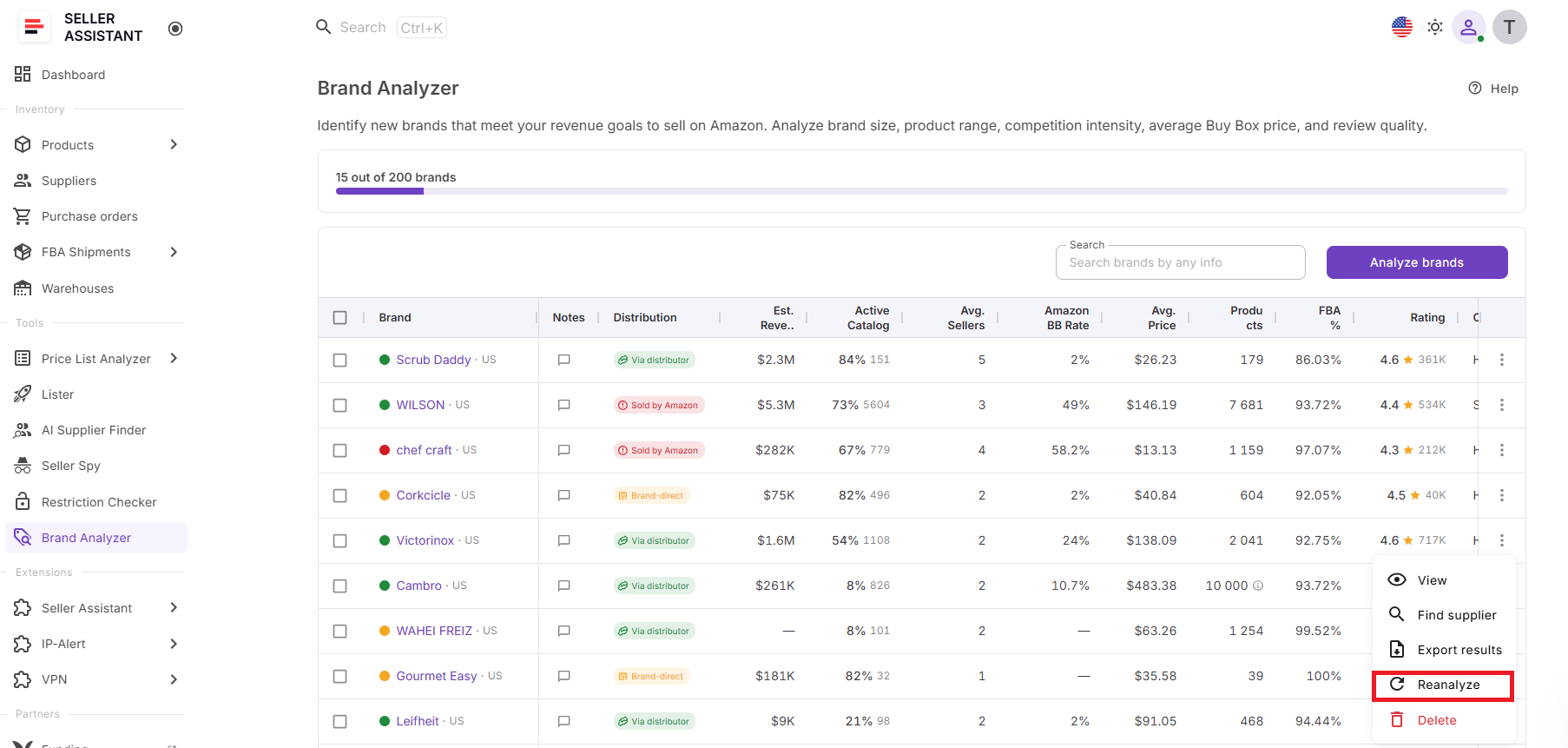
To update a brand, sellers simply open the three-dot menu next to the brand and click Reanalyze. Brand Analyzer then refreshes the analysis using the latest marketplace information and updates all available dashboards.
Once the process is complete, sellers can review updated data in the Insights, Products, and Suppliers dashboards, giving them a current view of the brand’s performance, products, and sourcing opportunities.
Why brand reanalysis matters
A brand that looked attractive several weeks or months ago may no longer meet your sourcing criteria today. Brand Reanalysis helps sellers verify current demand, monitor changes in competition, track Amazon’s presence, and reassess opportunities before making important sourcing decisions.
By keeping brand research up to date, sellers can reduce risk, avoid outdated assumptions, and make more confident wholesale sourcing decisions.
Brand Analyzer: a Smarter Way to Manage and Update Brand Research
Keeping brand research up to date is only possible if you have a reliable way to analyze, monitor, and refresh brand data over time. That’s where Seller Assistant’s Brand Analyzer comes in. Built specifically for wholesale sellers, online arbitrage sellers, and dropshippers, Brand Analyzer helps sellers research brands, evaluate sourcing opportunities, and use Brand Reanalysis to keep that research current as marketplace conditions change.
Instead of repeatedly researching brands from scratch, sellers can maintain an up-to-date view of demand, competition, pricing, supplier accessibility, and overall resale potential. Combined with Brand Reanalysis, Brand Analyzer becomes an ongoing brand intelligence tool that supports sourcing decisions throughout the entire buying cycle.
Brand Analyzer overview
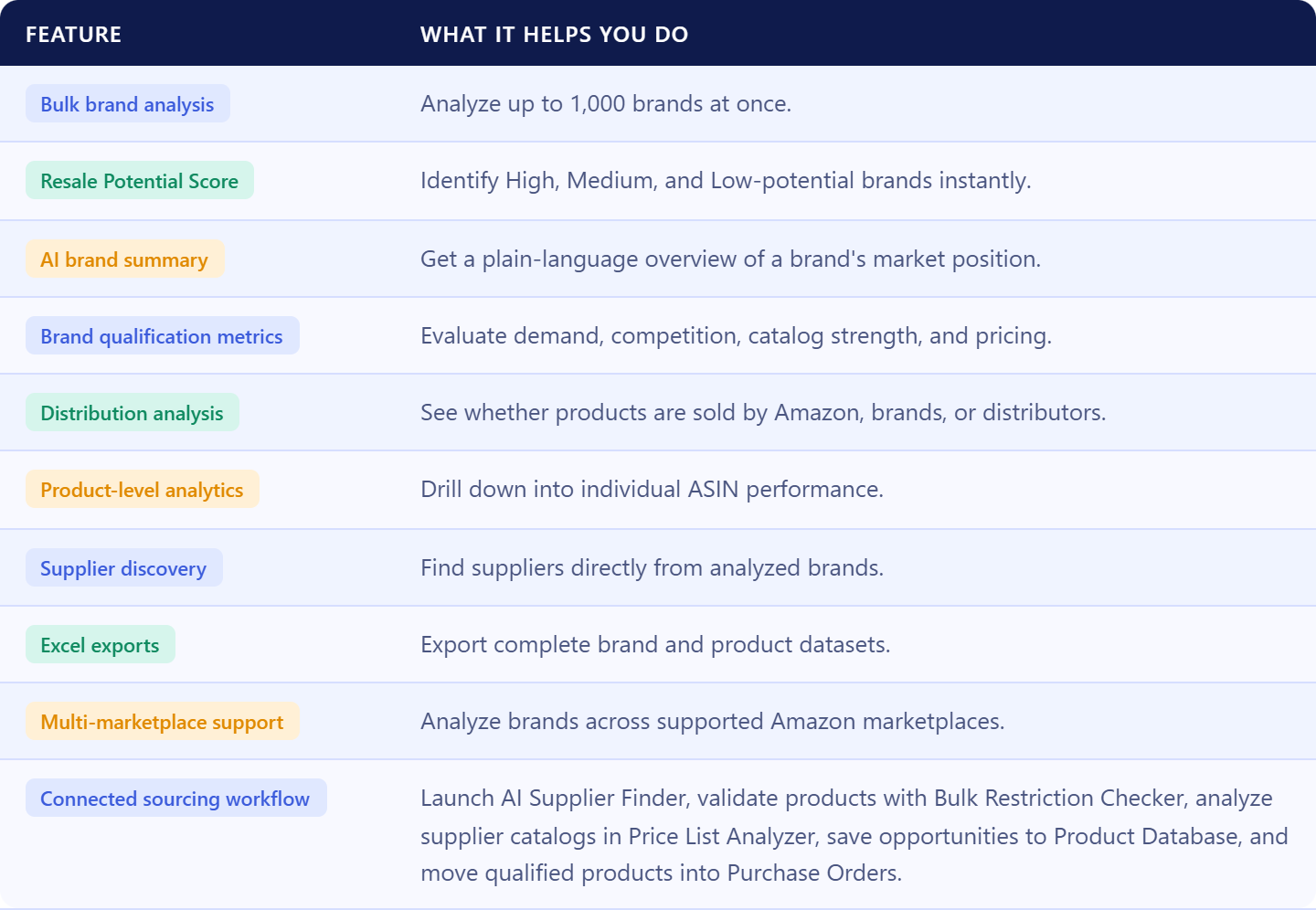
What is Brand Analyzer?
Brand Analyzer is Seller Assistant’s wholesale brand research and monitoring tool that helps Amazon resellers evaluate brands and keep their research updated over time. It combines brand-level analytics, AI-powered insights, product data, supplier information, and Brand Reanalysis capabilities in a single workspace.
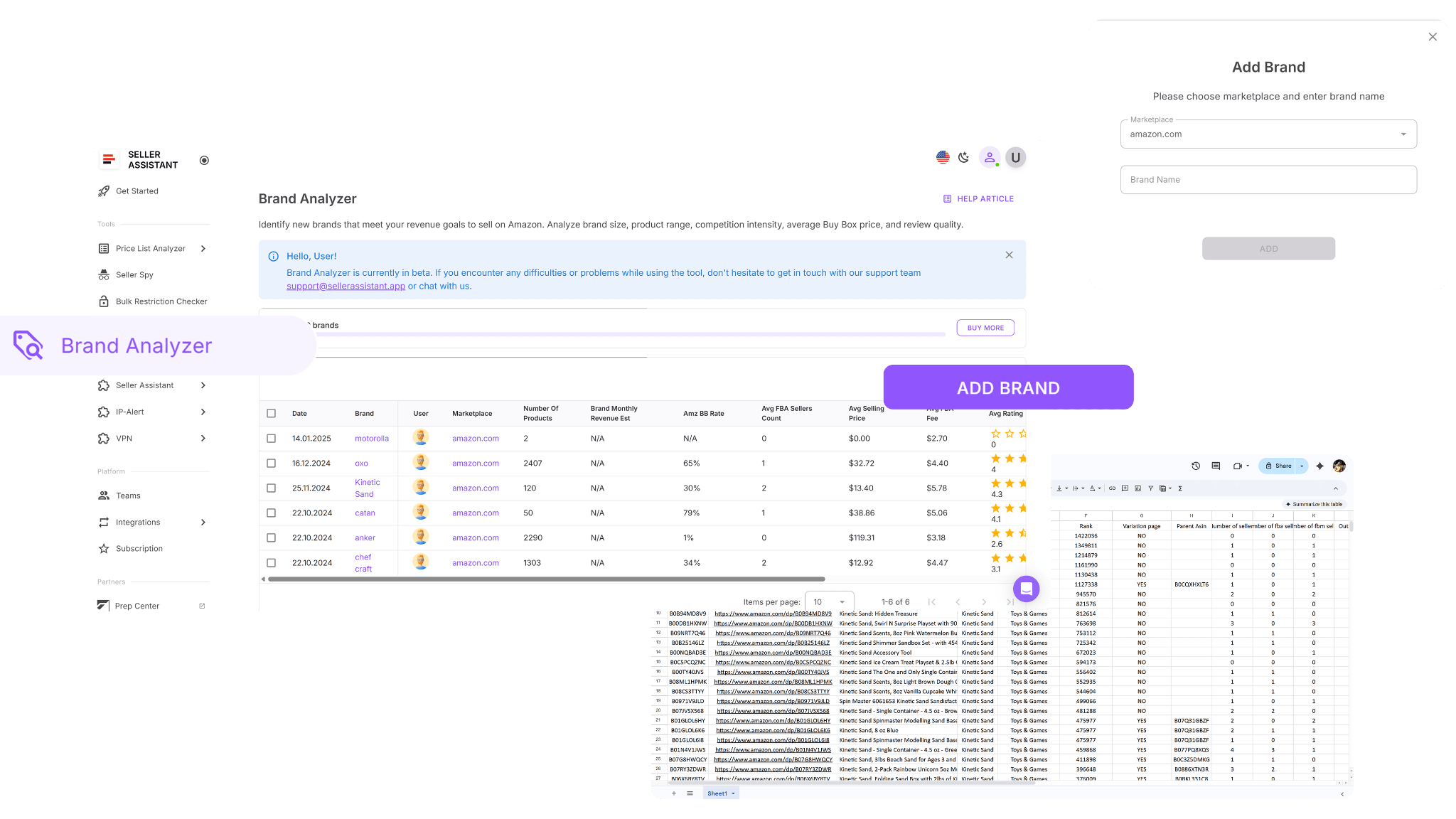
Rather than relying on old reports or manually checking dozens of listings, sellers can analyze brands, monitor changes, and refresh existing analyses whenever they need updated information. This helps ensure sourcing decisions are based on current marketplace conditions instead of outdated data.
What Brand Analyzer helps sellers do
Brand Analyzer helps sellers move beyond one-time brand research. It allows them to discover new opportunities, monitor existing brands, compare sourcing options, track marketplace changes, and refresh analyses whenever conditions evolve.
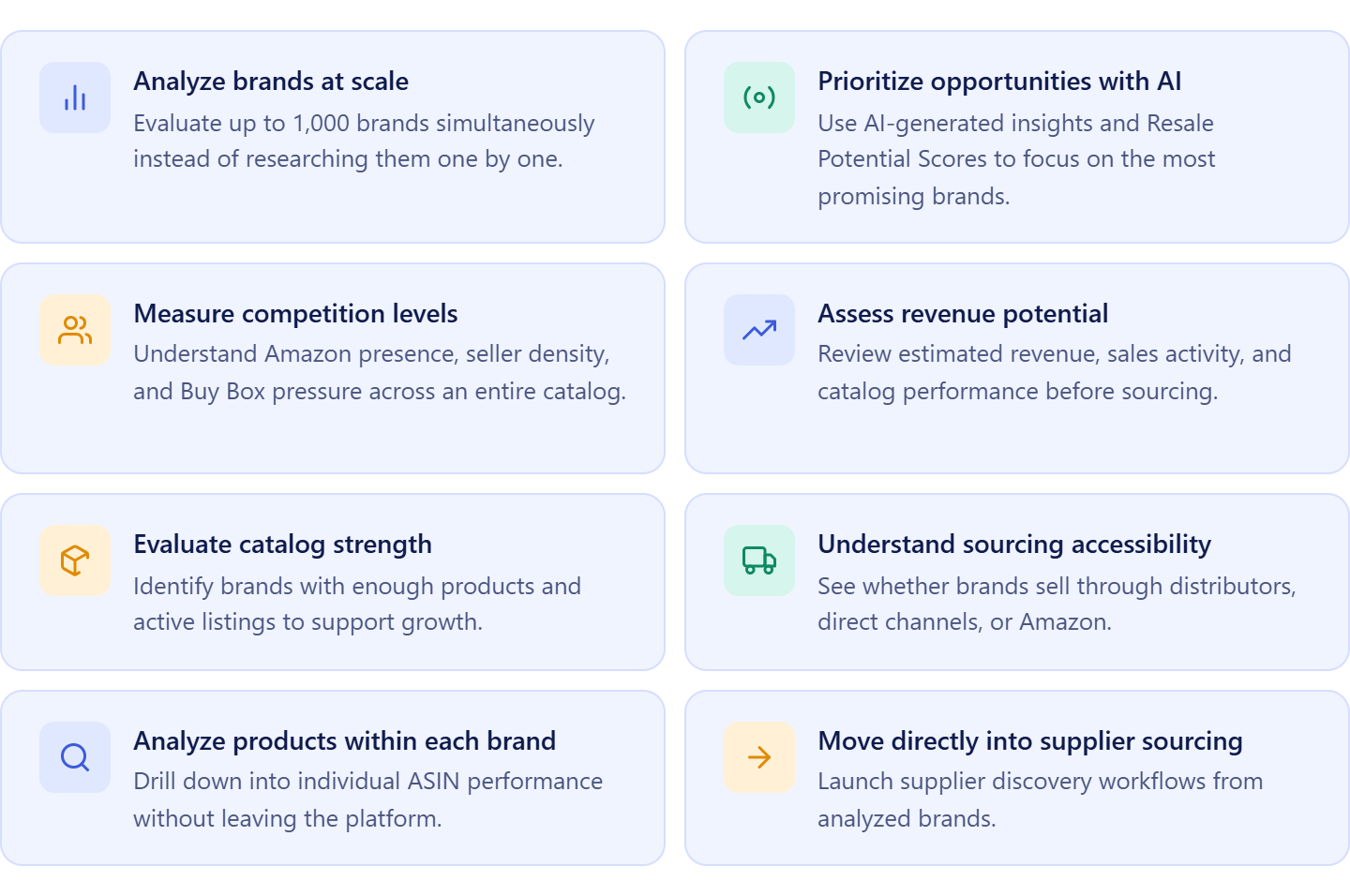
How Brand Analyzer helps keep brand research current
Brand Analyzer supports every stage of the brand research process, from initial discovery to ongoing monitoring and reanalysis.
Analyze brands at scale
Sellers can research individual brands or submit up to 200 brands at once. This makes it easy to evaluate supplier catalogs, distributor lists, competitor storefronts, and other large sources of potential opportunities.
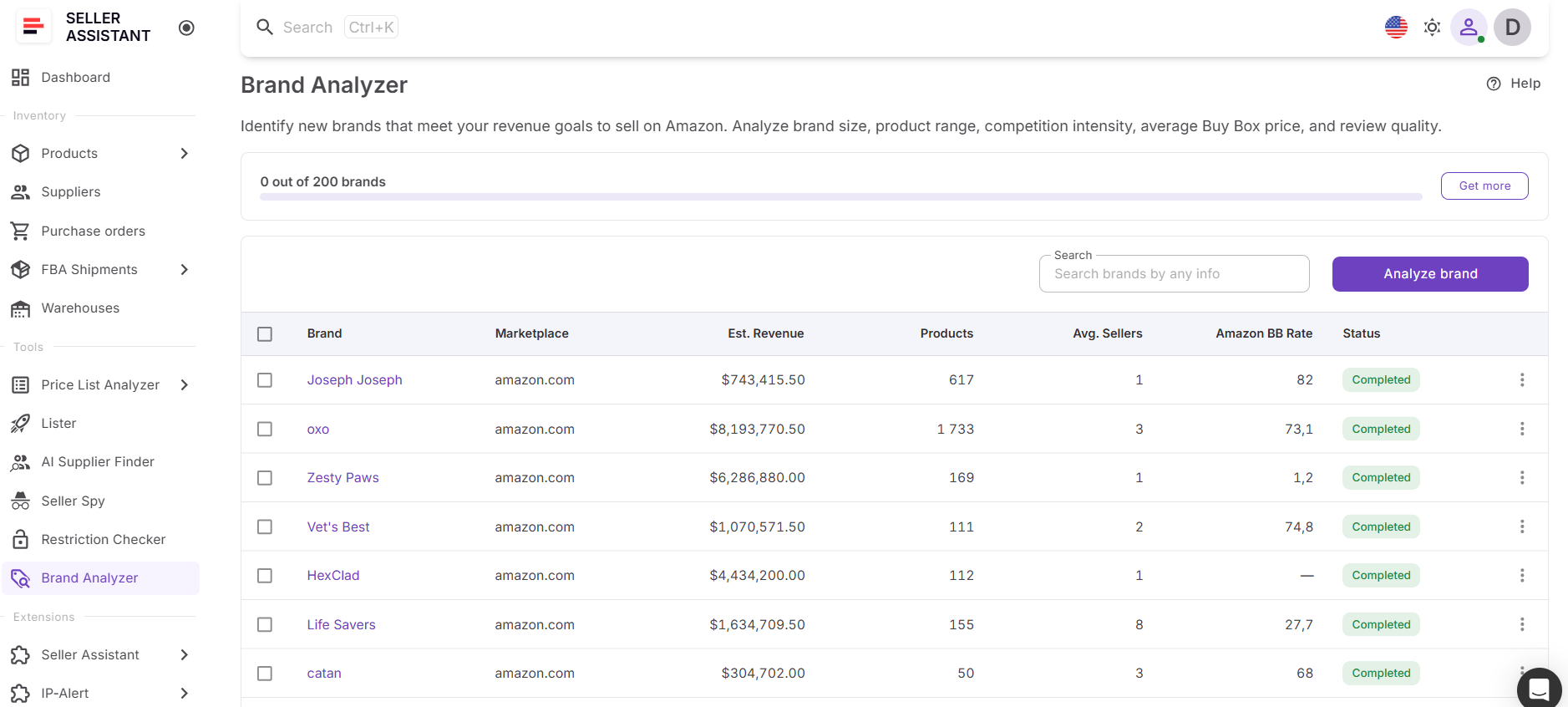
Because brands are processed simultaneously, sellers can build and maintain a broad pipeline of sourcing opportunities without spending hours on manual research.
Monitor key brand metrics
Brand Analyzer provides a complete set of metrics that help sellers evaluate whether a brand remains attractive over time.
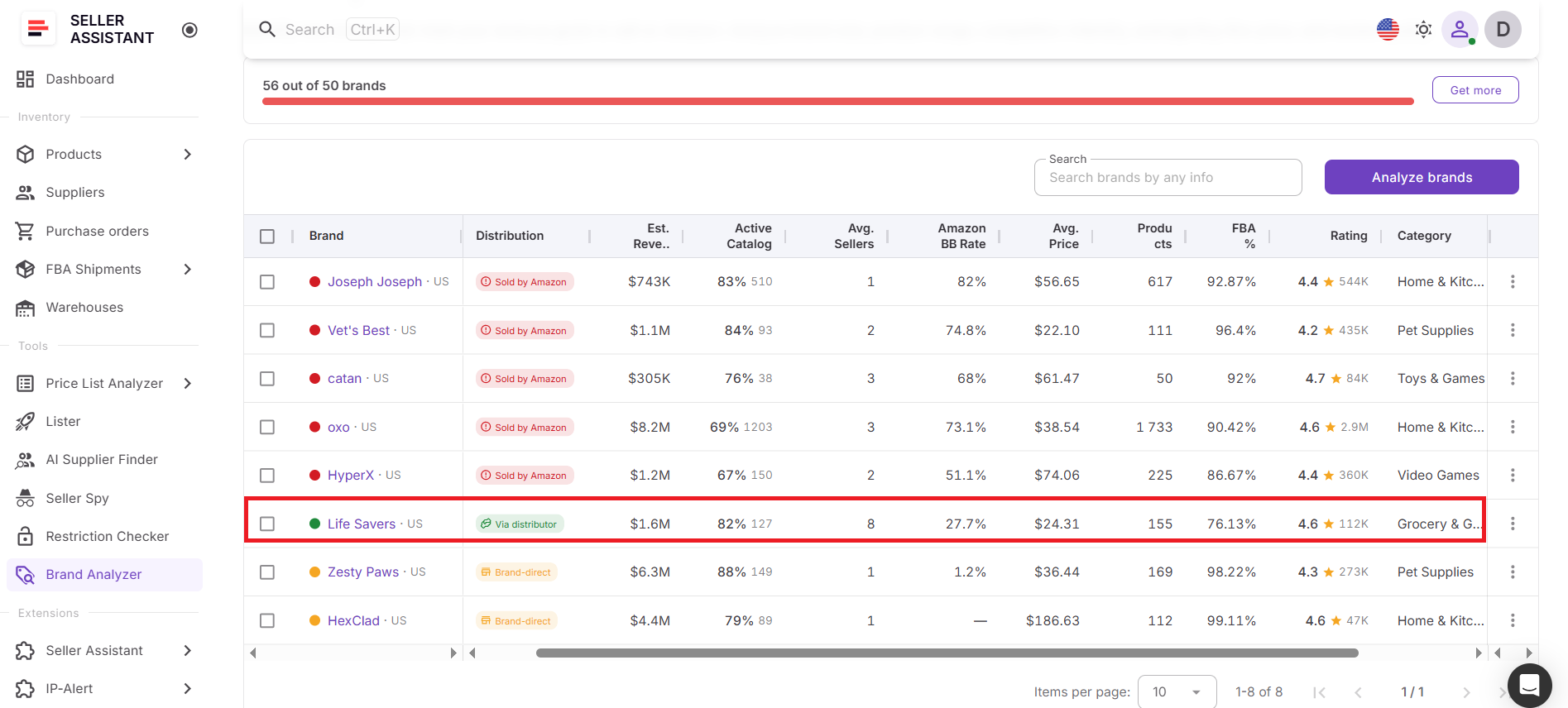
These insights include:
- Estimated monthly revenue
- Active catalog percentage
- Number of products
- Average seller count
- Amazon Buy Box rate
- Average selling price
- FBA percentage
- Average rating
- Category
- Distribution type
By monitoring these metrics, sellers can identify meaningful changes in competition, demand, pricing, and reseller accessibility.
Use AI-powered insights to track opportunity changes
Brand Analyzer uses AI to help sellers quickly understand how a brand is performing.
The tool generates a Resale Potential Score based on competition levels, seller counts, pricing, sales velocity, market size, FBA share, and other marketplace signals. Brands are categorized as High, Medium, or Low potential, making it easy to spot changes in opportunity level after a reanalysis.
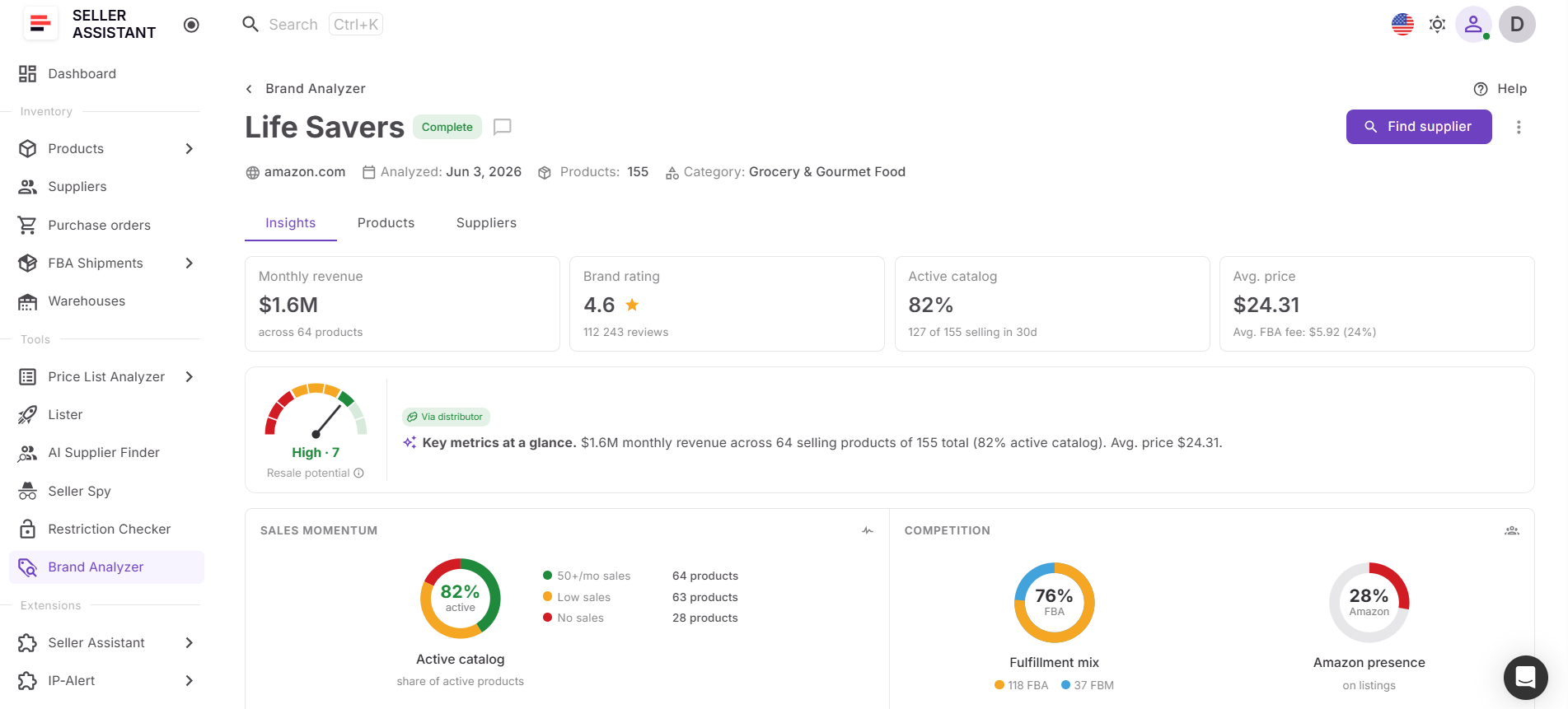
Each analysis also includes an AI-generated summary that explains the brand’s current market position and sourcing potential in plain language.
Review product-level performance
Marketplace changes often begin at the product level. Brand Analyzer’s Products dashboard allows sellers to review ASIN performance, revenue estimates, seller counts, Buy Box data, BSR trends, ratings, reviews, and other product-specific metrics.
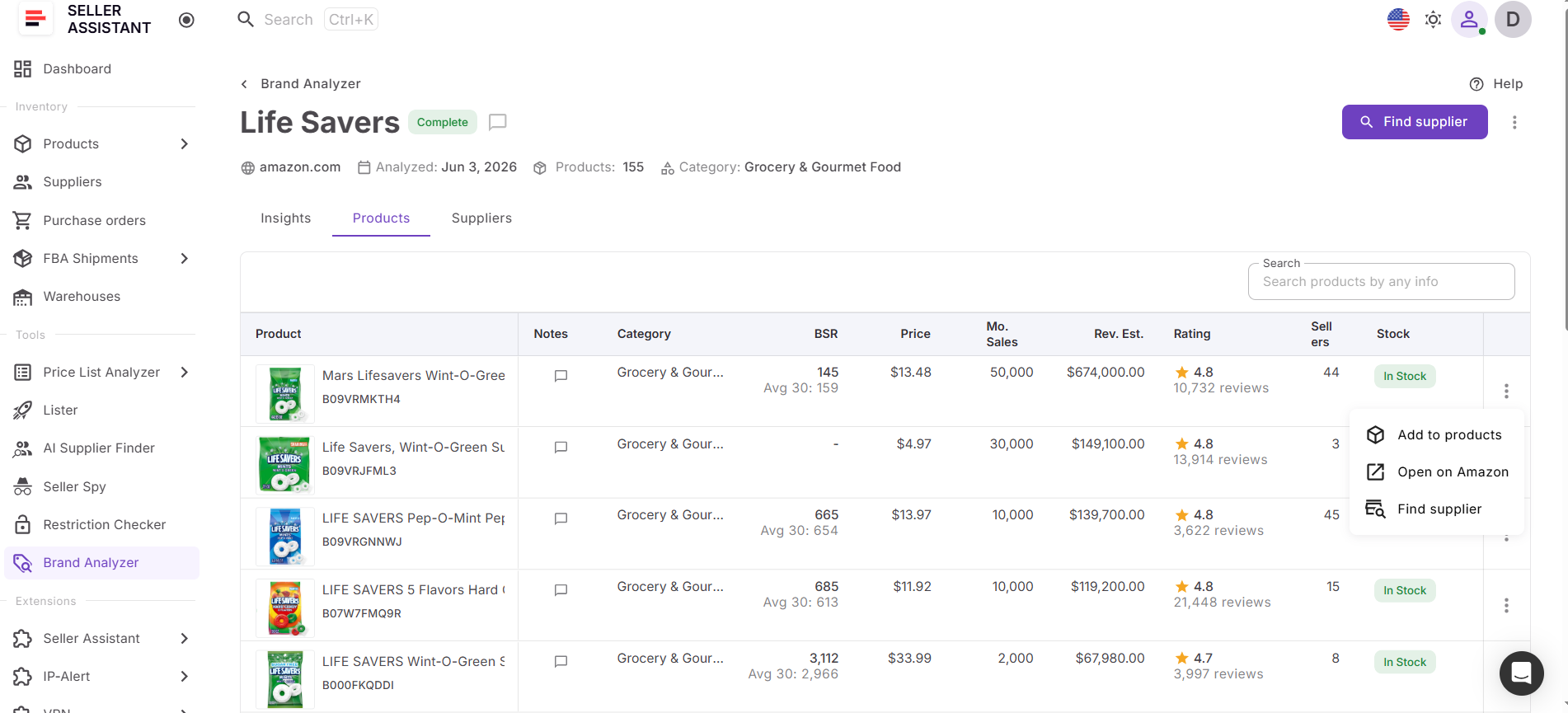
This helps sellers understand which products continue to drive demand and whether new opportunities have emerged within the brand’s catalog.
How to Reanalyze Brands Step By Step
Step 1. Open Brand Analyzer
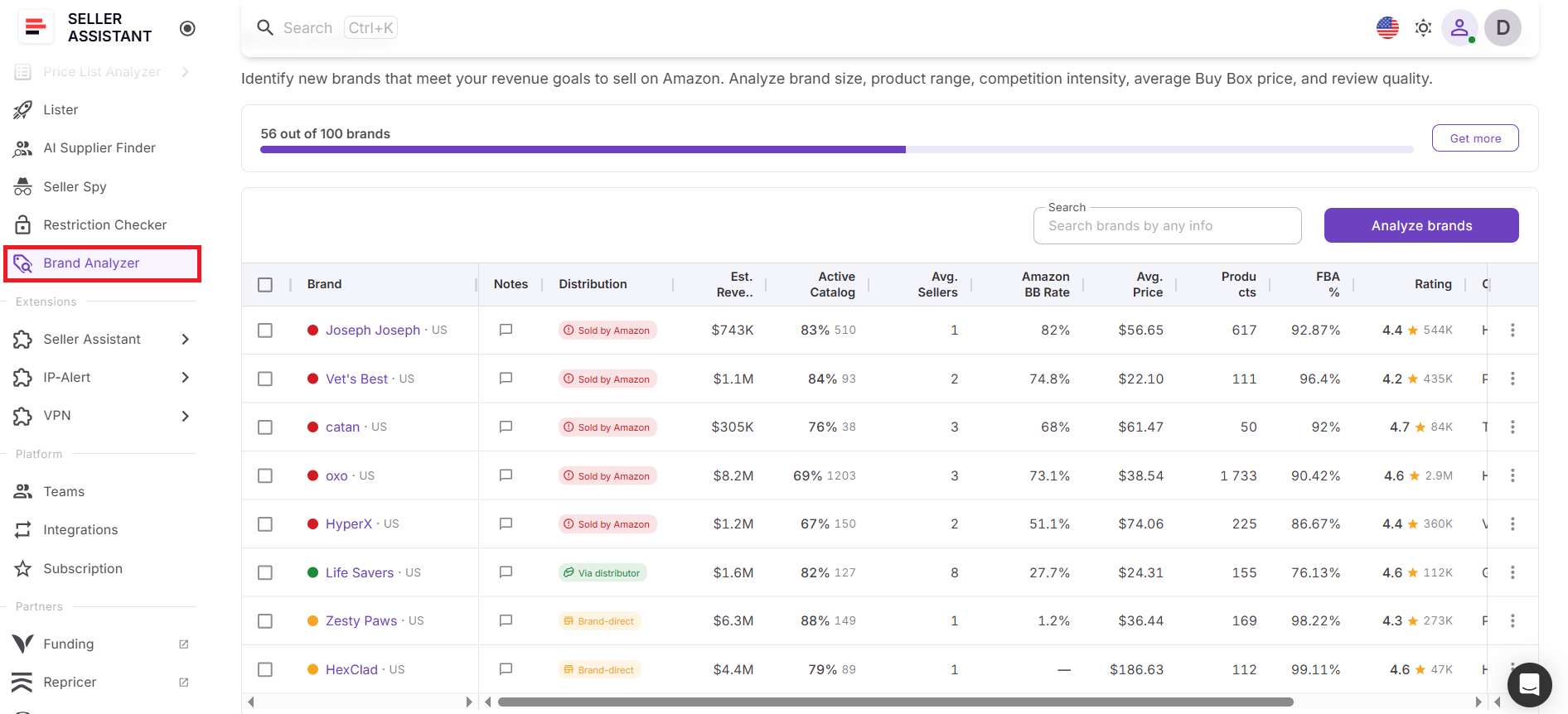
Log in to your Seller Assistant account and open Brand Analyzer from the Tools section.
Step 2. Find the brand
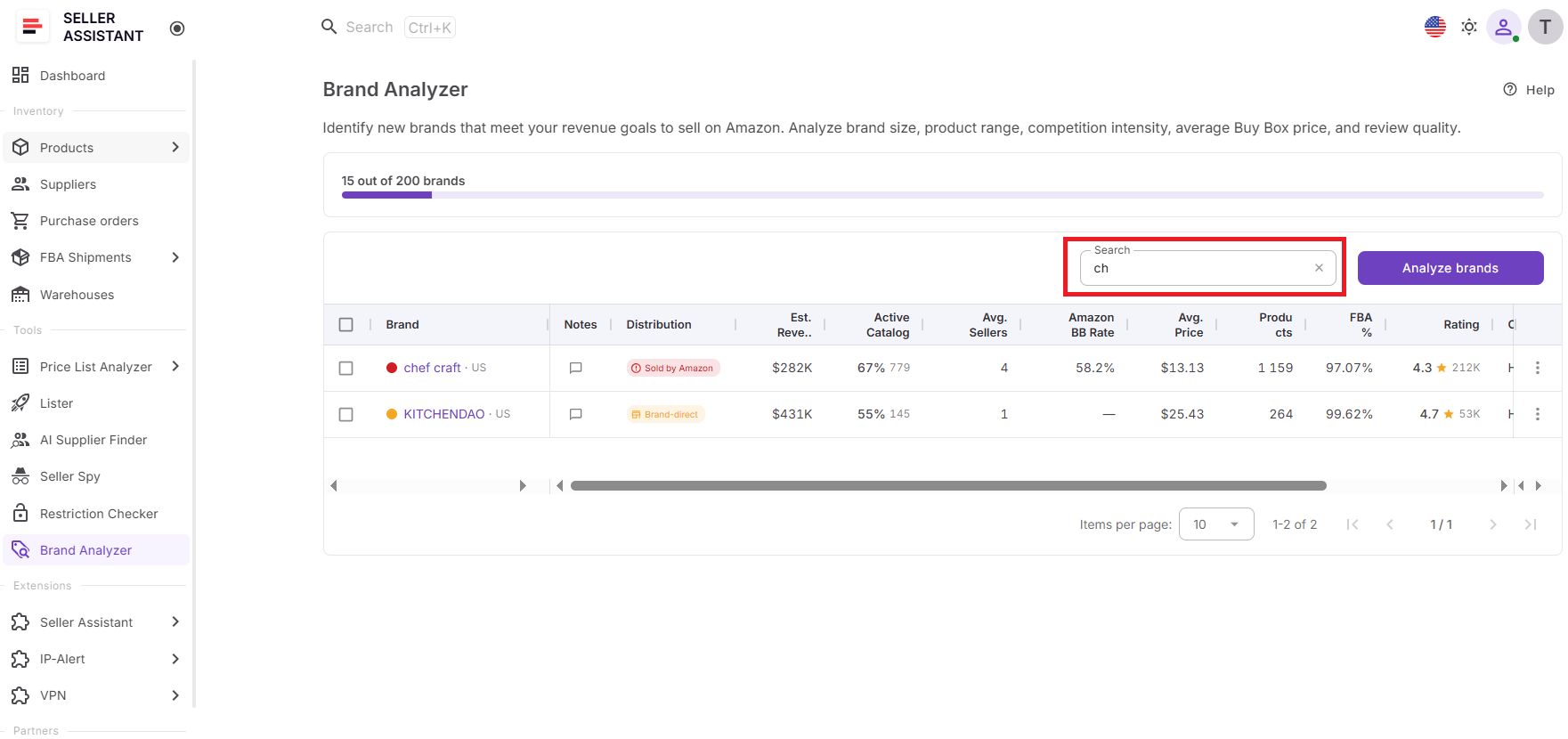
Locate the brand you want to update in your Brand Analyzer dashboard. You can use search or browse your analyzed brand list.
Step 3. Open the brand menu
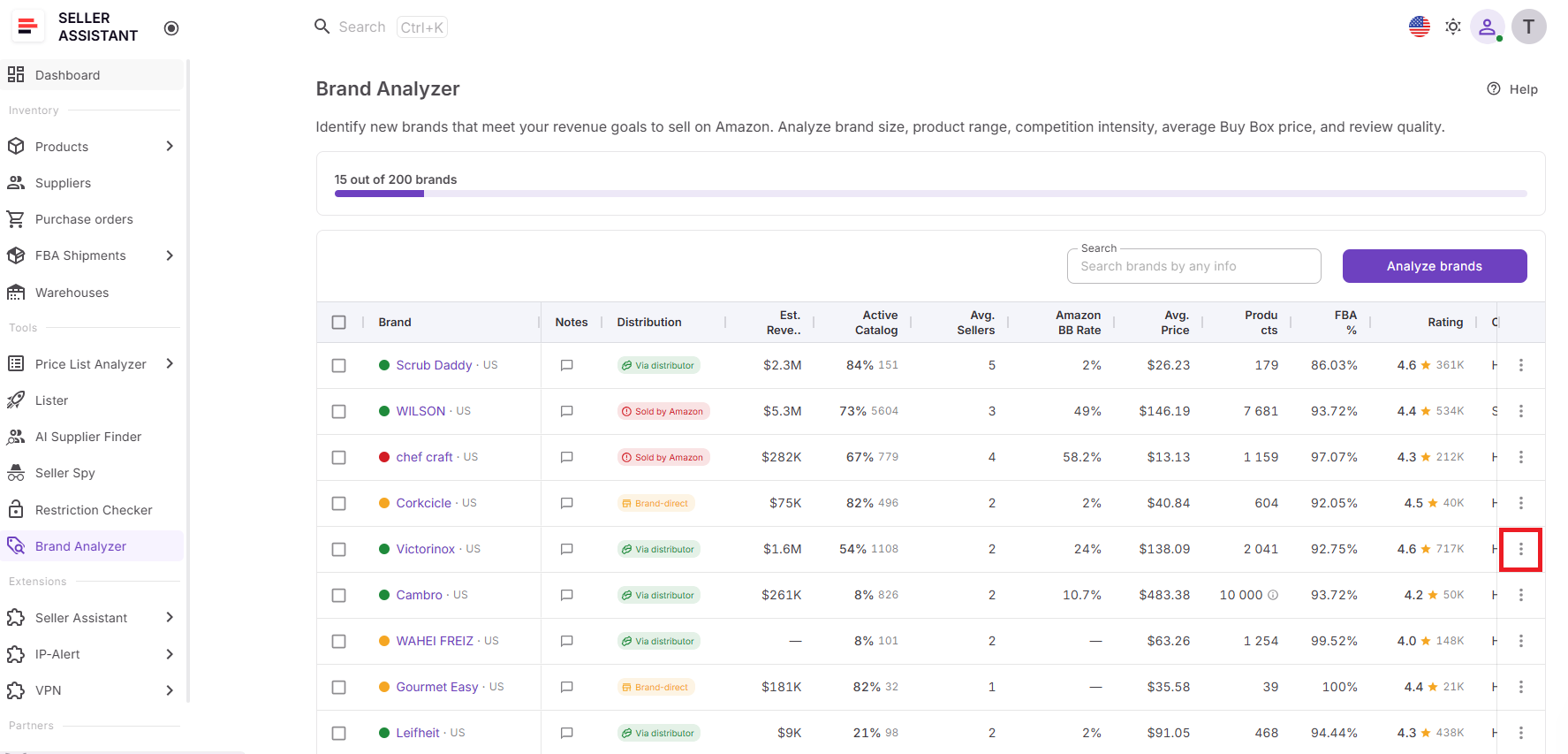
Click the three-dot menu next to the brand name to open available actions.
Step 4. Click Reanalyze
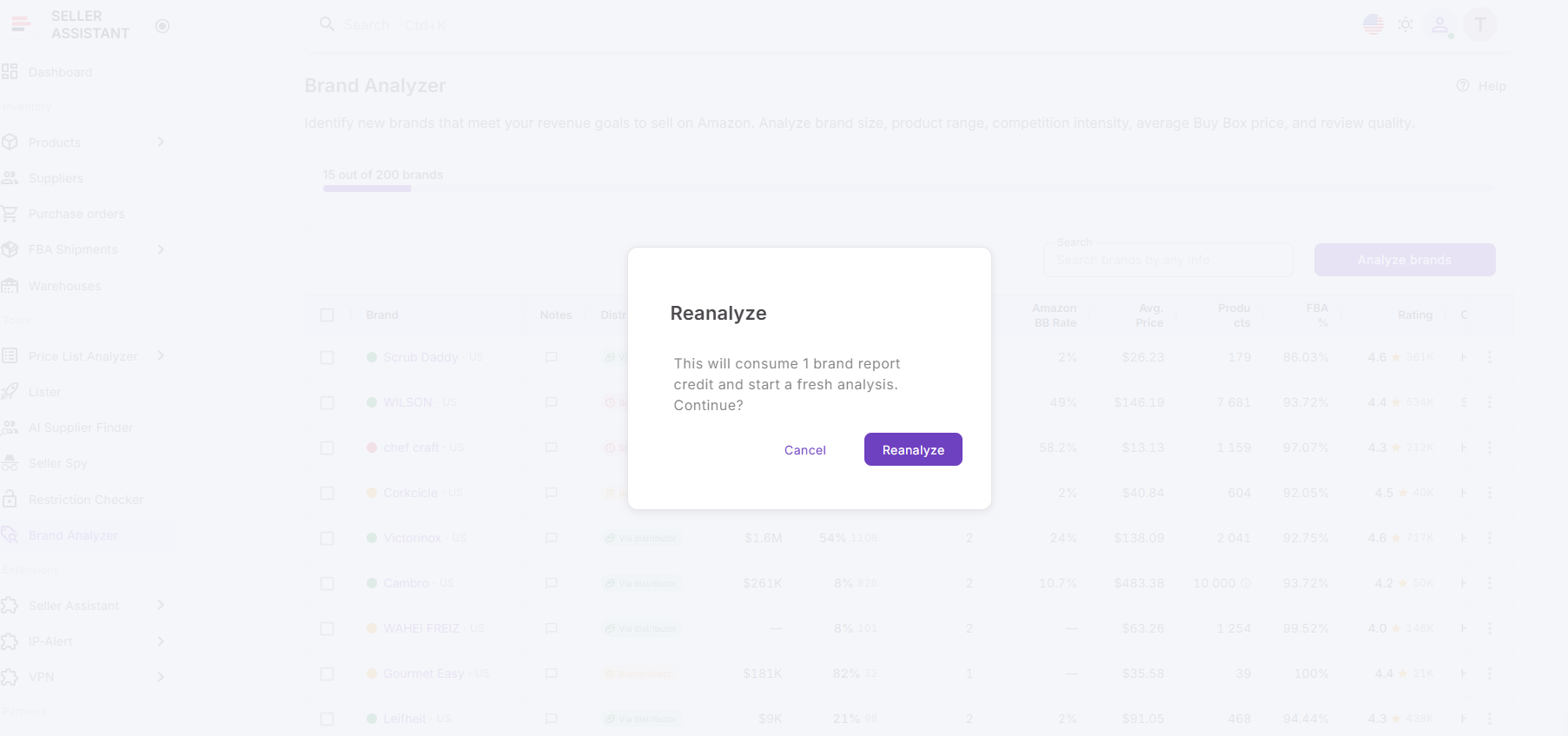
Select Reanalyze from the menu. Brand Analyzer will start refreshing the brand using the latest available Amazon marketplace data.
Step 5. Wait for the update to finish
The brand status will show that analysis is in progress. Once completed, the updated results will appear in your dashboard.
Step 6. Review refreshed insights
Check the updated Resale Potential Score, AI brand summary, estimated revenue, active catalog, seller count, Amazon Buy Box rate, pricing, FBA %, rating, distribution type, and product-level data.
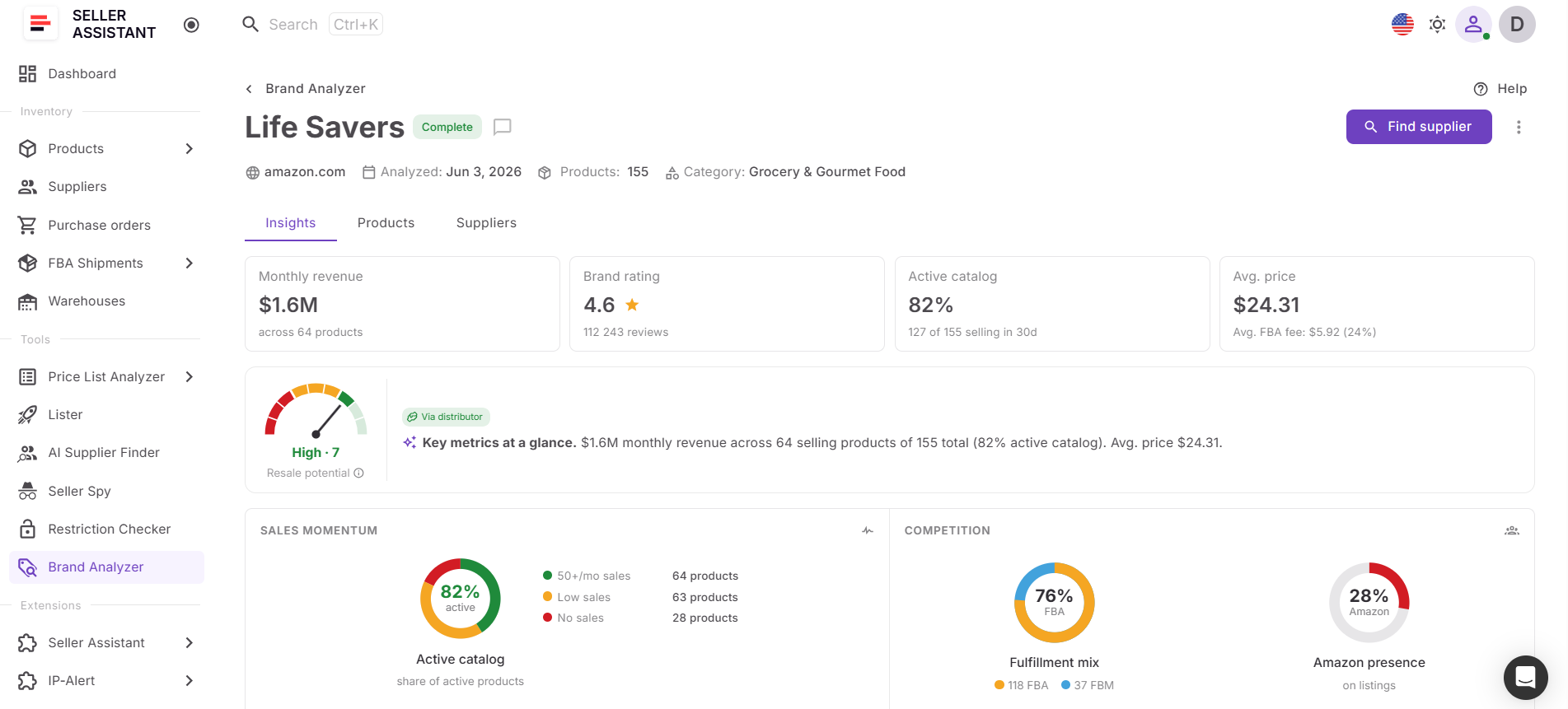
Step 7. Use updated data for sourcing decisions
Use the refreshed analysis to decide whether to contact suppliers, continue product research, update your sourcing pipeline, or remove the brand from consideration.
FAQ
What is Brand Reanalysis in Seller Assistant?
Brand Reanalysis is a feature in Brand Analyzer that refreshes an existing brand analysis using the latest Amazon marketplace data. It helps sellers keep their brand research current without creating a new analysis from scratch.
When should I reanalyze a brand?
It’s a good idea to reanalyze a brand before contacting suppliers, opening a wholesale account, or placing an inventory order. You should also refresh analyses periodically to monitor changes in competition, demand, pricing, and Amazon’s presence.
What data is updated during Brand Reanalysis?
Brand Reanalysis refreshes key brand metrics such as estimated revenue, active catalog percentage, seller count, Amazon Buy Box rate, average price, FBA share, ratings, and distribution type. It also updates product-level insights, recalculates the Resale Potential Score, and generates a new AI brand summary.
How do I reanalyze a brand in Brand Analyzer?
Find the brand in Brand Analyzer, open the three-dot menu next to it, and click Reanalyze. The tool will process the brand again and update the analysis with current marketplace information.
Why is it important to keep brand research up to date?
Amazon marketplaces change constantly, and a brand’s demand, competition, pricing, and sourcing potential can shift over time. Keeping brand research current helps sellers make sourcing decisions based on accurate data rather than outdated assumptions.
Final Thoughts
Brand research is not something you do once and forget. As competition, demand, pricing, and Amazon’s presence change, even the most promising brands can look very different over time. Keeping brand research current helps sellers make better sourcing decisions, reduce risk, and avoid relying on outdated marketplace data.
Seller Assistant’s Brand Analyzer makes ongoing brand research simple with Brand Reanalysis. Instead of starting from scratch, sellers can refresh existing analyses in one click, update key brand and product metrics, review new AI insights, and reassess sourcing opportunities using the latest information available. Whether you’re evaluating new brands or monitoring existing opportunities, Brand Analyzer helps ensure your sourcing strategy is always based on current marketplace conditions.
Seller Assistant automates and connects every stage of your Amazon wholesale and arbitrage workflow. It brings together in one platform: workflow management tools – Purchase Orders Module, Suppliers Database, Warehouses Database, FBA Shipments, bulk research & sourcing tools – Price List Analyzer, Bulk Restriction Checker, Sourcing AI, Brand Analyzer, Seller Spy, Chrome extensions – Seller Assistant Browser Extension, IP-Alert Extension, and built-in VPN by Seller Assistant, and integrations & team access features – seamless API connectivity, integrations with Zapier, Airtable, and Make, and Virtual Assistant Accounts.


