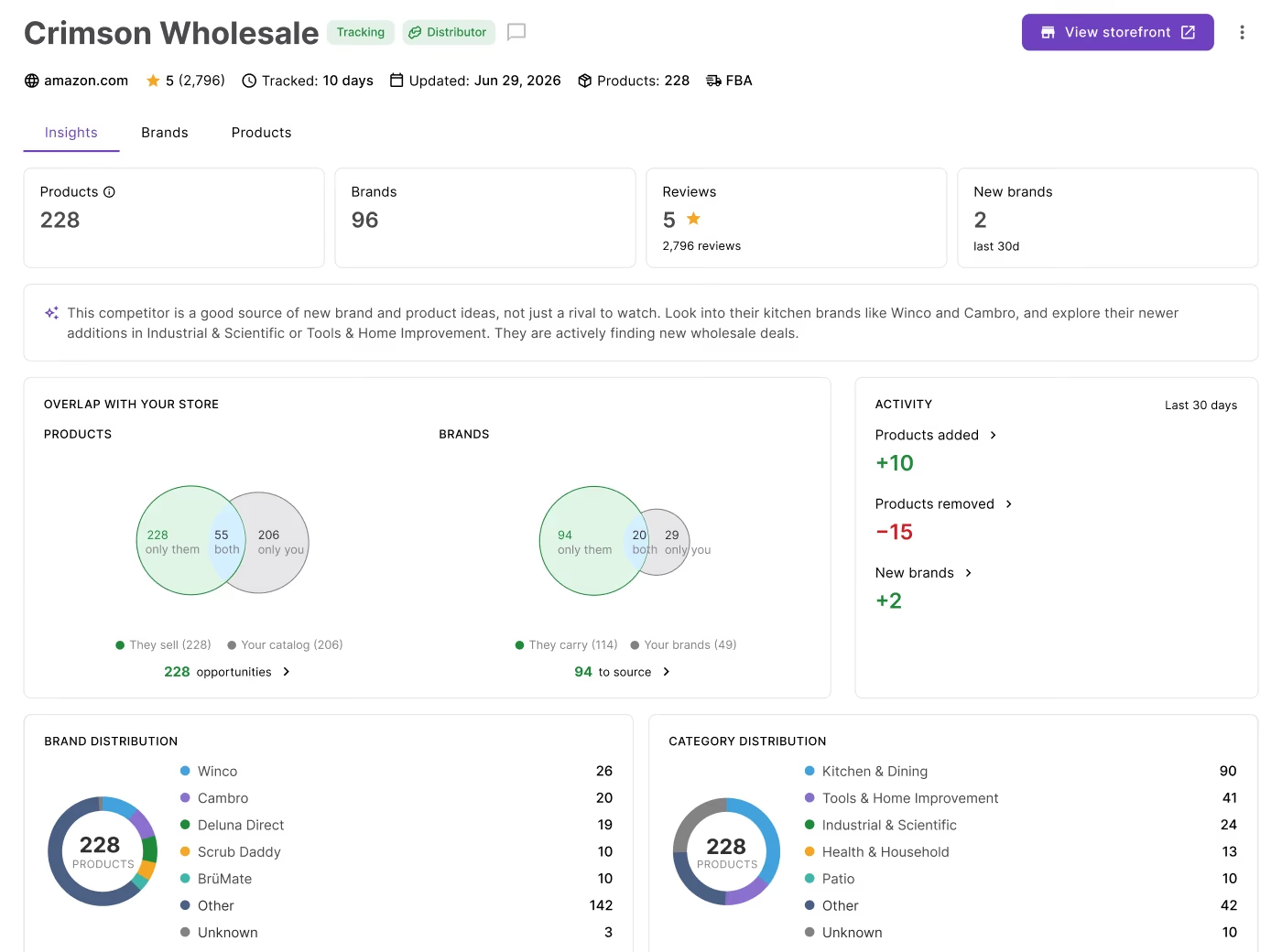
Seller Assistant’s Seller Spy is an Amazon competitor tracking tool that monitors sellers’ catalogs, brands, and product changes to help you discover new sourcing opportunities.
Successful Amazon resellers don’t just source products – they monitor their competitors to uncover new opportunities. When another seller adds profitable brands, expands into new categories, or changes their catalog, that information can point you toward your next winning deal.
Seller Spy automates competitor monitoring by tracking those changes and bringing them together in one place. You can discover brands and products you don’t yet carry, compare competitor catalogs with your own, analyze opportunities, and continue your research with Brand Analyzer and AI Supplier Finder.
This post explains how to use Seller Spy to find sourcing opportunities faster and make more informed inventory decisions.
Why Amazon Sellers Should Monitor Competitors
Many Amazon sellers focus on researching products one at a time. While that can uncover profitable deals, it doesn’t reveal broader sourcing trends or show how successful competitors build and grow their catalogs. Monitoring competitors gives you a wider view of the market. You can see which brands they start selling, what products they add or remove, how their pricing changes, and where they’re expanding.
These insights help you spot sourcing opportunities earlier, identify gaps in your own catalog, and make decisions based on real market activity rather than trial and error.
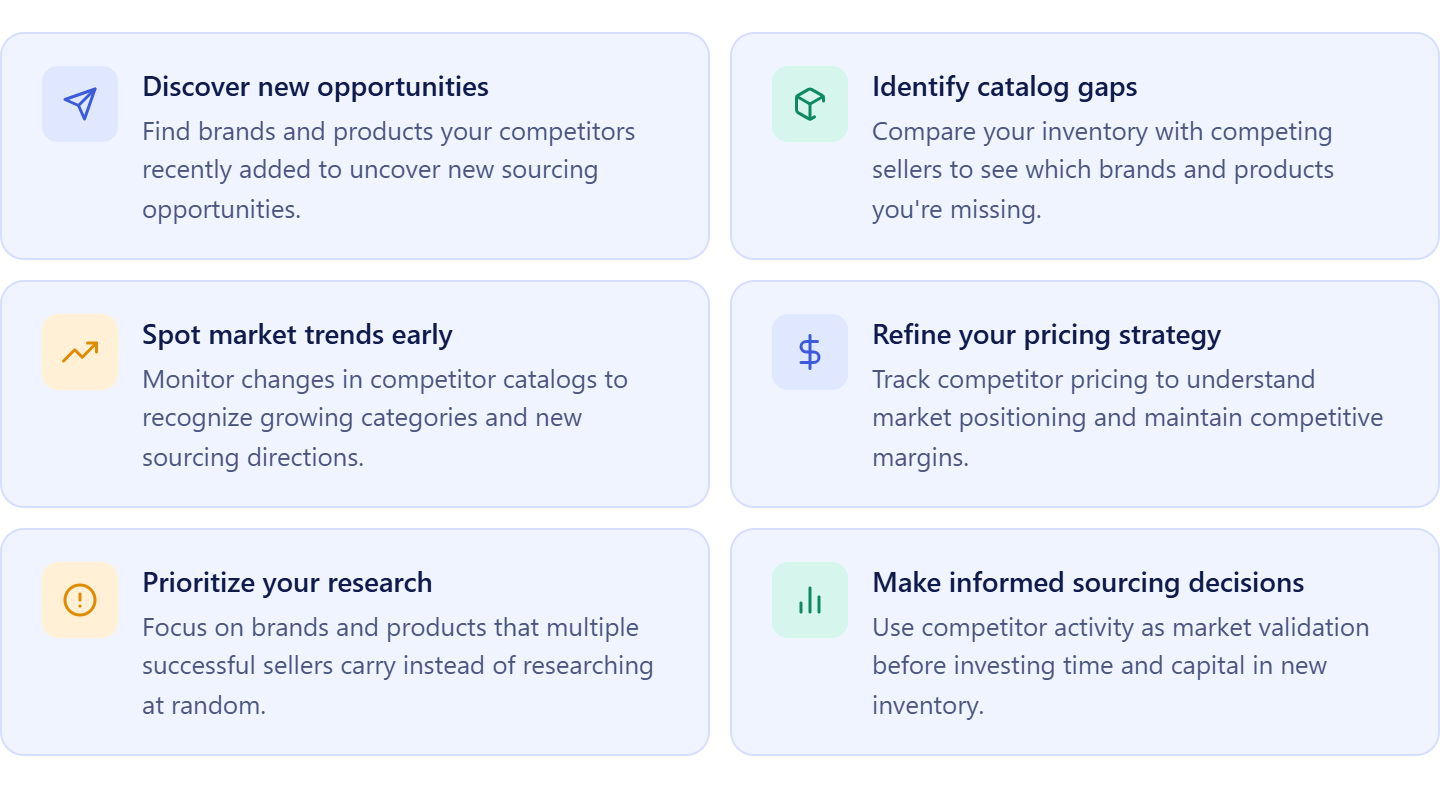
Discover new sourcing opportunities
Competitors often add profitable products and brands before they become widely known. Tracking those changes helps you uncover new opportunities and expand your catalog with products that already have proven demand.
Identify catalog gaps
Comparing your inventory with competitor catalogs shows which brands and products you’re missing. That makes it easier to prioritize sourcing efforts and build a more competitive product selection.
Spot market trends early
Changes in competitor catalogs often signal new sourcing opportunities, growing categories, or shifts in customer demand. Recognizing these trends early gives you more time to evaluate and act on them.
Benchmark your pricing
Monitoring competitor prices helps you understand market positioning and identify products where your pricing may be too high or too low. That insight supports more competitive pricing and healthier margins.
Prioritize your sourcing efforts
Instead of researching products at random, you can focus on brands and categories that multiple successful sellers already carry. This approach helps you spend time on opportunities with stronger market validation.
Make more informed sourcing decisions
Competitor activity adds valuable context to product research. Looking at how other sellers build their catalogs helps you evaluate opportunities with greater confidence and reduce the risk of investing in weak or oversaturated products.
What is Seller Assistant’s Seller Spy?
Seller Assistant’s Seller Spy is an Amazon competitor monitoring tool designed for wholesale sellers, online arbitrage sellers, and dropshippers. It helps sellers understand how competitors build and grow their catalogs by tracking changes in products, brands, and pricing. Instead of manually checking Amazon storefronts, sellers can monitor competitor activity in one place, uncover sourcing opportunities earlier, and make inventory decisions based on real market data.
Seller Spy at a glance
| Area | Description |
|---|---|
| Multi-level competitor monitoring | Seller Spy monitors competitors at multiple levels, helping sellers move from a market-wide overview to detailed seller, brand, and product analysis. |
| Market-level insights | The Overview dashboard summarizes competitor activity across all tracked sellers, highlighting sourcing opportunities, newly discovered brands, recent product additions, the most active competitors, and trending brands. |
| Seller-level insights | The Sellers dashboard organizes tracked competitors and displays key information such as catalog size, newly added products and brands, marketplace, rating, notes, tracking history, and last update. |
| Brand- and product-level insights | The Seller Details page lets sellers analyze competitor catalogs in depth with Insights, Brands, and Products tabs, making it easy to review catalog overlap, recent activity, brand portfolios, product changes, and filter results for deeper research. |
| Connected sourcing workflow | Seller Spy integrates with Brand Analyzer and AI Supplier Finder, allowing sellers to evaluate promising brands and find suppliers without leaving their sourcing workflow. |
What Can You Do with Seller Spy?
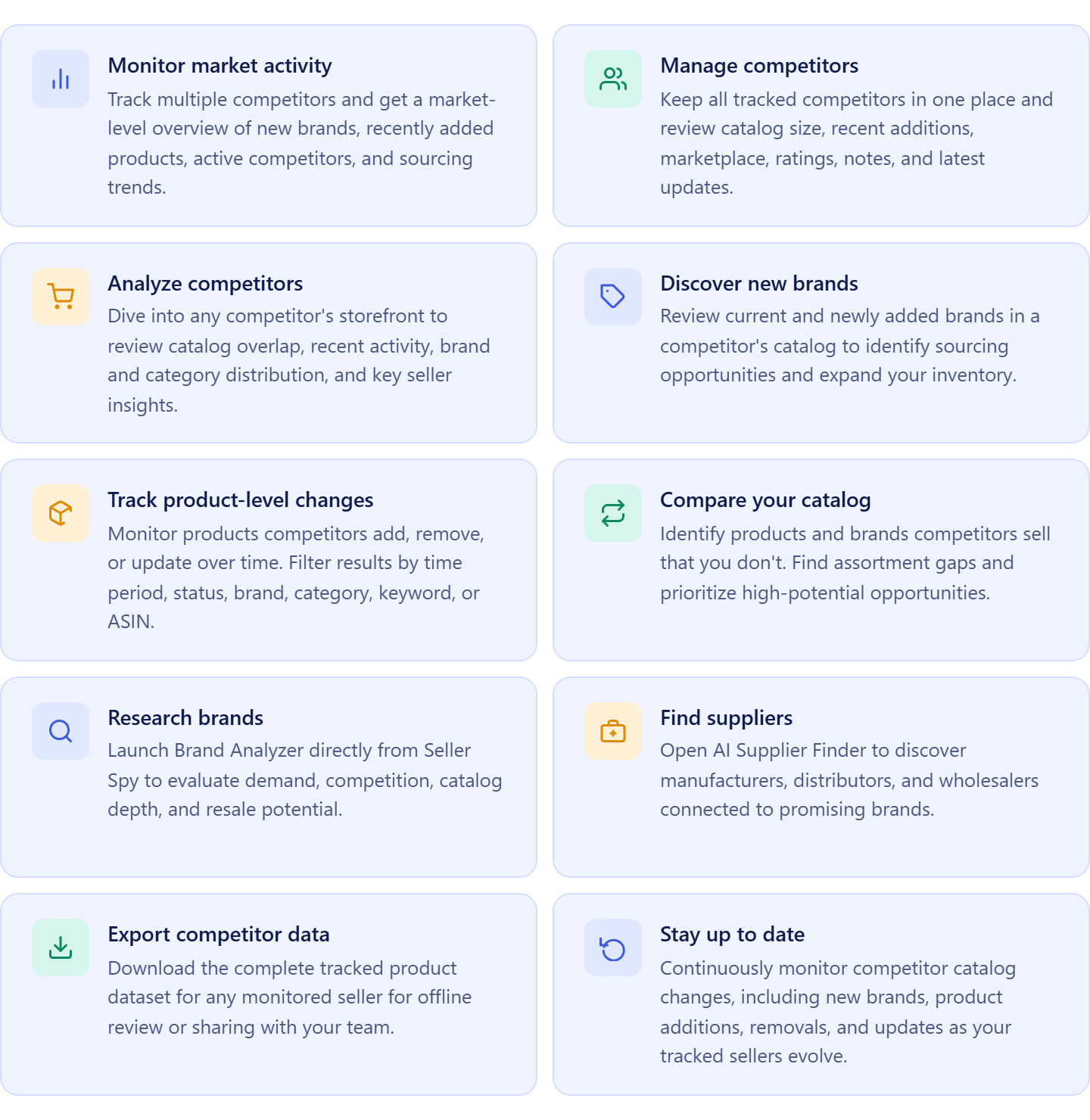
Seller Spy helps Amazon wholesale sellers, online arbitrage sellers, and dropshippers monitor competitors, discover sourcing opportunities, and track market changes from a single workspace. Instead of manually checking Amazon storefronts, sellers can see how competitor catalogs evolve over time, identify new brands and products, compare competitor inventories with their own, and continue their research with Brand Analyzer and AI Supplier Finder.
The tool combines market-level insights, competitor monitoring, product tracking, brand analysis, and supplier discovery to help sellers make faster and more informed sourcing decisions.
Monitor competitor activity across your market
Track multiple Amazon competitors simultaneously and view market-wide activity from the Overview dashboard. Monitor newly discovered brands, recently added products, active competitors, and trending brands to identify sourcing opportunities as they emerge.
Manage competitors in one workspace
The Sellers dashboard keeps all tracked competitors in one place. Review catalog size, recently added products and brands, marketplace, ratings, notes, tracking history, and the latest updates to identify which competitors deserve closer attention.
Analyze competitors at the seller level
Open the Seller page to investigate a competitor in depth. Review catalog overlap with your own business, recent activity, seller information, and brand and category distribution before exploring individual products.
Discover new brands to source
Review the competitor’s current and newly added brands to identify opportunities for expanding your catalog. Compare those brands with your own inventory to quickly see which opportunities you’re missing.
Track product-level catalog changes
Monitor products competitors add, remove, or update over time. Filter results by time period, status, brand, category, keyword, or ASIN to focus on the changes that matter most to your sourcing strategy.
Compare your catalog with competitors
Identify products and brands your competitors sell that you don’t. Catalog comparison helps reveal assortment gaps and prioritize products with proven market demand.
Research brands without leaving Seller Spy
Launch Brand Analyzer directly from Seller Spy to evaluate a brand’s demand, competition, catalog depth, and resale potential before investing time in supplier outreach or product research.
Find suppliers for promising brands
When you discover a sourcing opportunity, open AI Supplier Finder to search for manufacturers, distributors, and wholesalers connected to the brand, helping you move from competitor research to supplier discovery faster.
Export competitor data for deeper analysis
Download the complete product tracking dataset for any monitored seller whenever you need to perform additional analysis, build reports, or share findings with your sourcing team.
Keep competitor intelligence up to date
Seller Spy continuously tracks changes in competitor catalogs, allowing you to monitor new products, brands, and pricing over time. This helps you base sourcing decisions on current market activity instead of outdated storefront snapshots.
How Seller Spy Works
Seller Spy monitors competitors at multiple levels, helping sellers move from broad market monitoring to detailed brand, product, and supplier research. Instead of manually checking Amazon storefronts, the tool combines market insights, competitor tracking, catalog analysis, brand discovery, and supplier research in one connected workflow.
Market-level monitoring
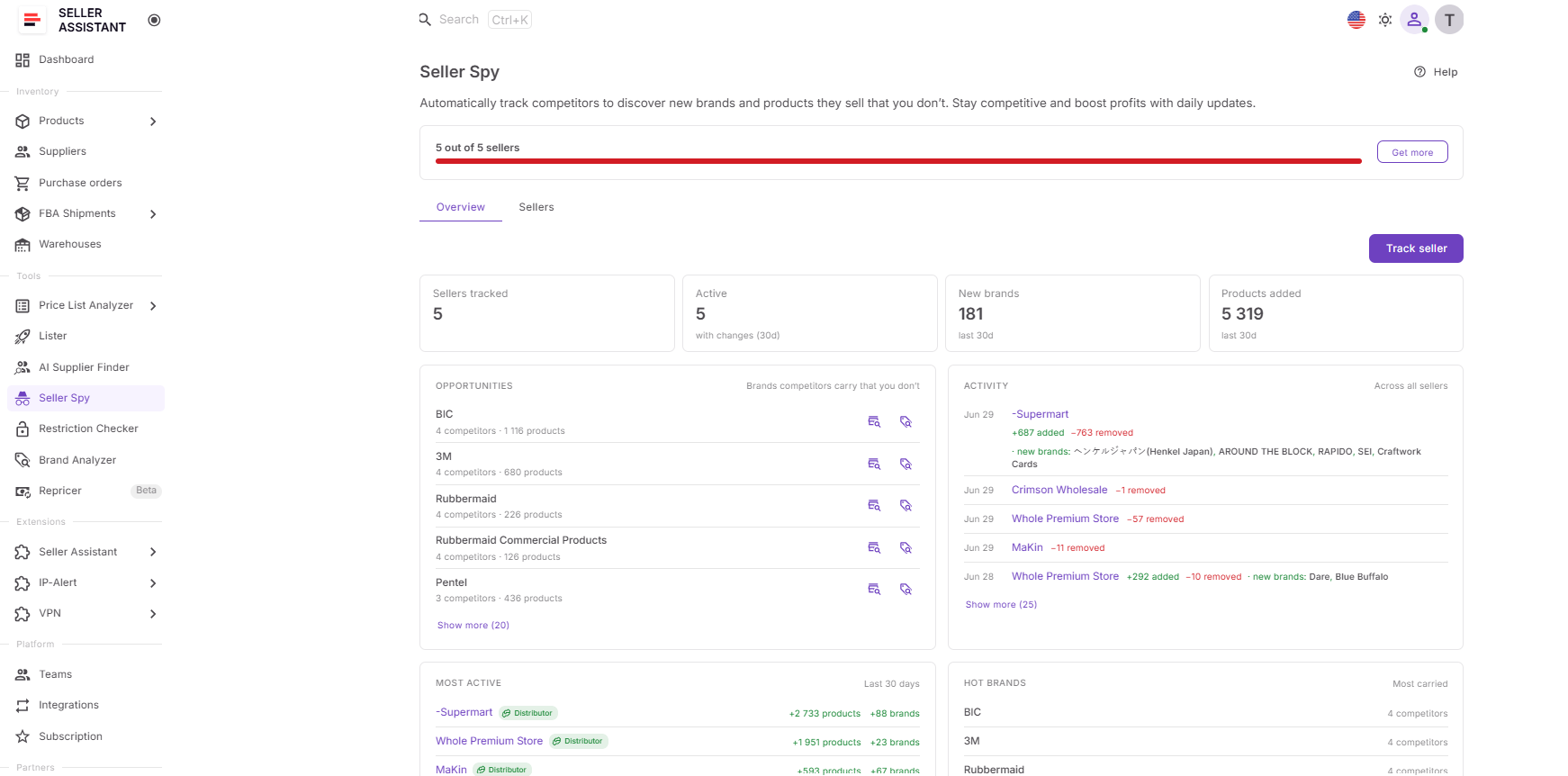
Seller Spy starts with the Overview dashboard, where sellers can monitor activity across all tracked competitors. The dashboard summarizes key marketplace metrics, including the number of tracked sellers, active competitors, new brands discovered, and products added over the last 30 days.
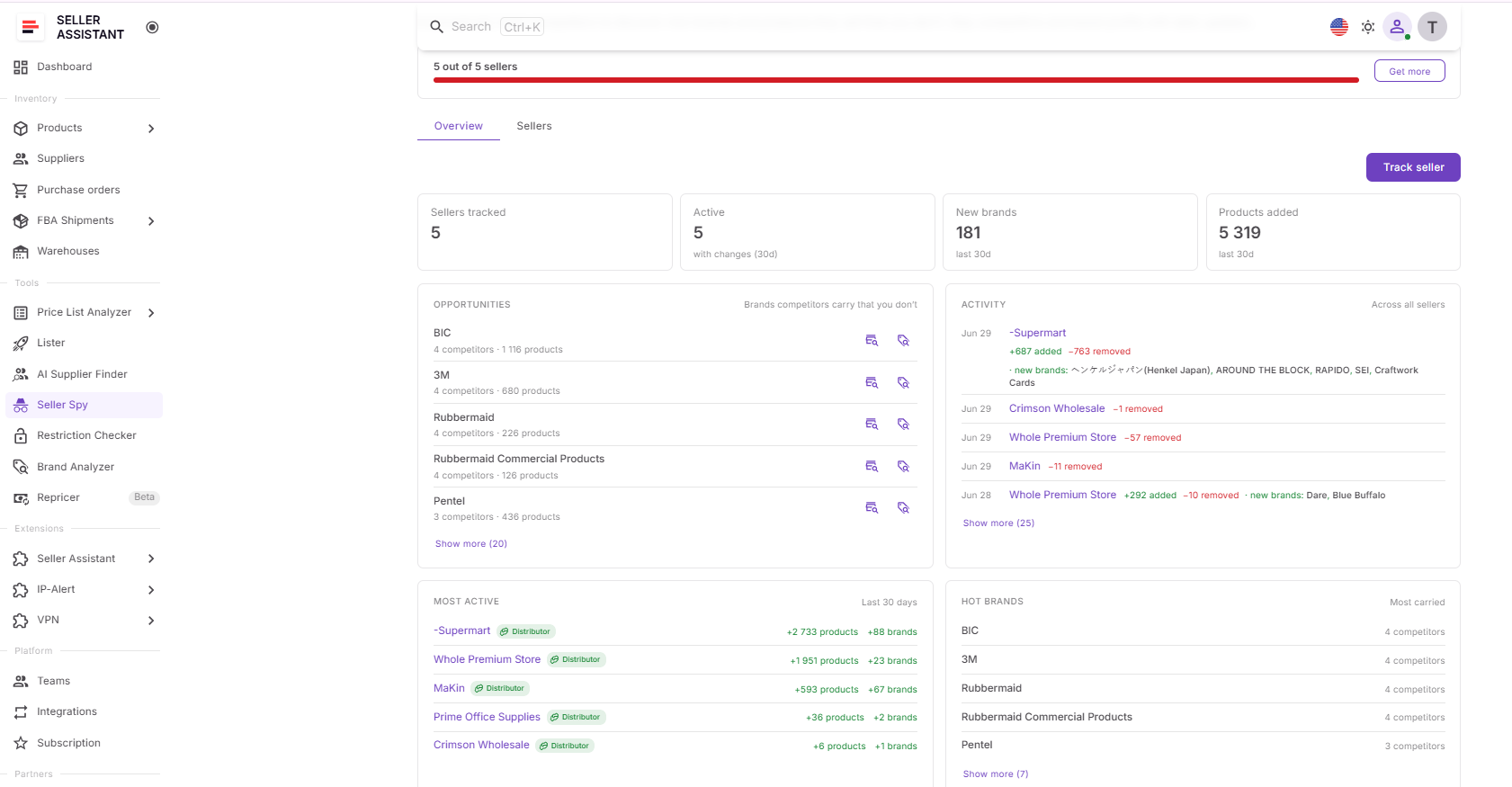
It also highlights sourcing opportunities with widgets showing brands competitors carry that you don’t, recent competitor activity (products added, removed, and new brands), the most active competitors, and the most widely sold brands across tracked sellers. These insights help sellers identify emerging sourcing opportunities without reviewing individual storefronts.
Competitor management
The Sellers Dashboard serves as the central workspace for managing tracked competitors. Each tracked seller includes key information such as:
- Seller name and marketplace
- Seller type
- Total products
- Products and brands added during the last 30 days
- Seller rating and review count
- Tracking start date
- Last update
- Notes
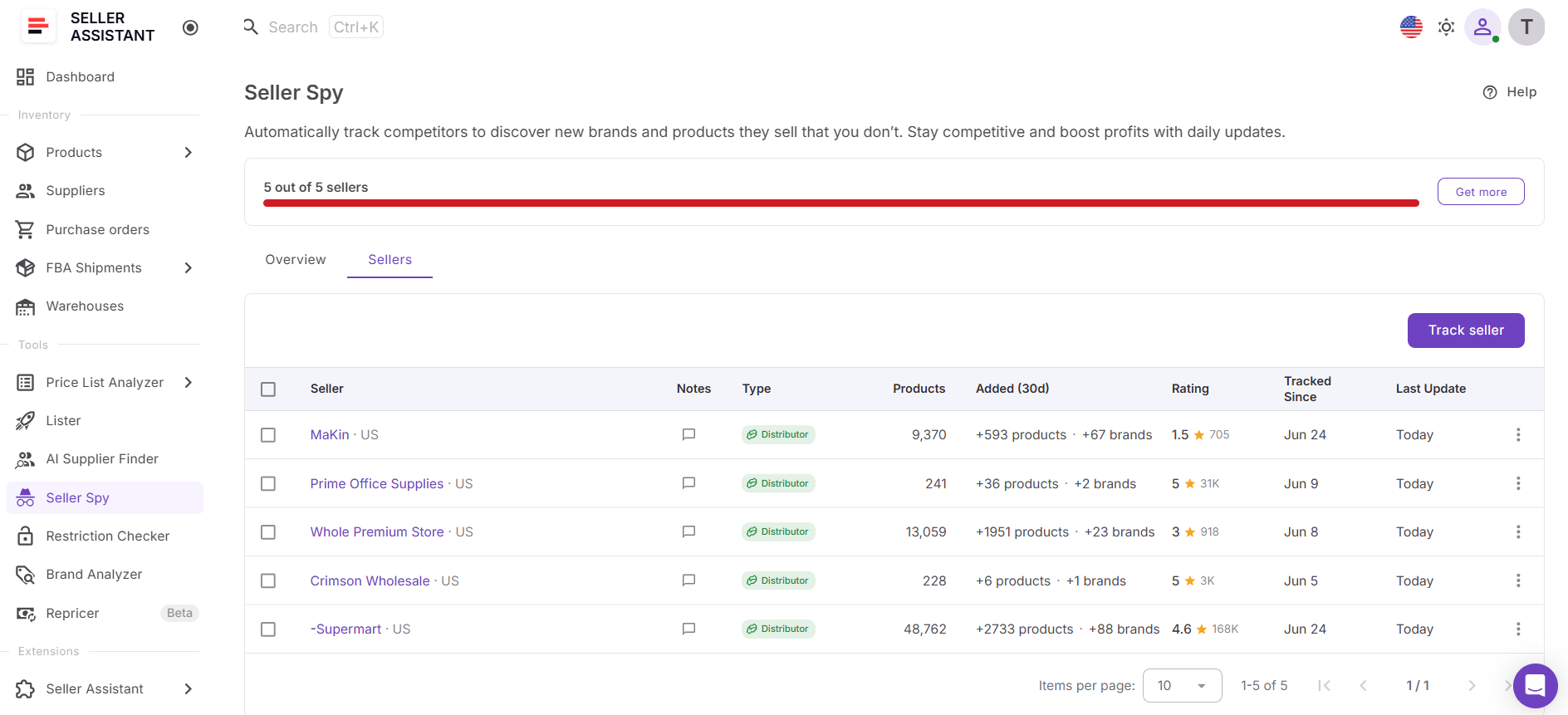
This allows sellers to quickly compare competitors, identify the fastest-growing storefronts, and prioritize which sellers to investigate further.
Seller-level analysis
Clicking a tracked competitor opens the Seller Details page, where sellers can analyze a competitor from multiple perspectives.
The Insights tab provides an executive summary of the competitor’s business, including:
- Products in the catalog
- Number of brands
- Seller rating and review count
- New brands discovered during the last 30 days
- Catalog overlap between the competitor and your own store (products and brands)
- Products added and removed during the last 30 days
- Brand distribution
- Category distribution
- Seller details, including business name, fulfillment method, country, shipping origin, and business address (when available)
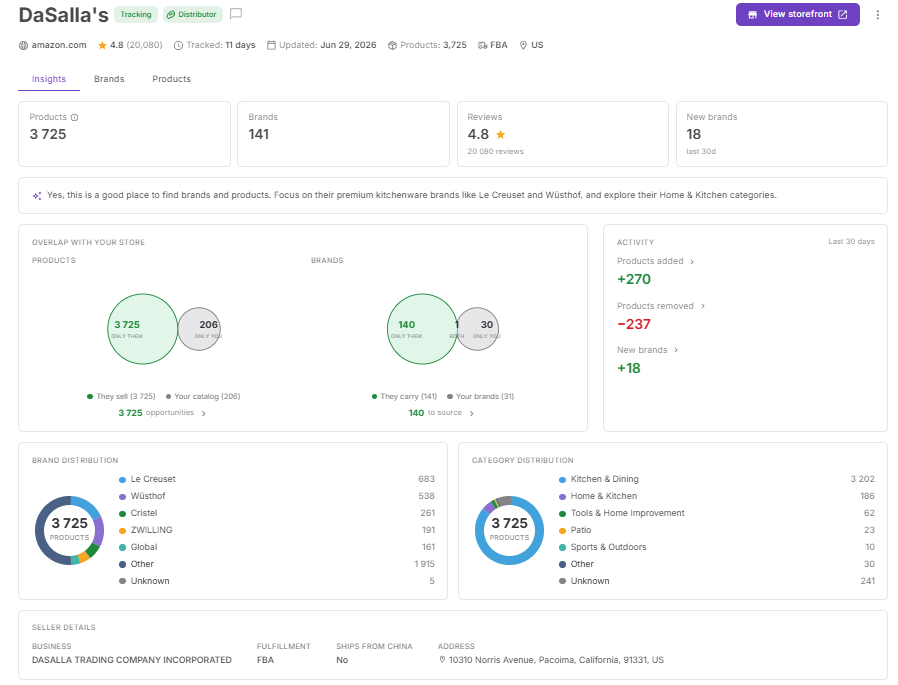
These metrics help sellers quickly understand the competitor’s scale, sourcing focus, and growth activity.
Brand-level analysis
The Brands tab organizes brands into Current and New views, allowing sellers to distinguish established brands from recently added sourcing opportunities.
Brands can also be filtered by:
- All brands
- Brands already in your catalog
- Opportunity brands not yet in your catalog
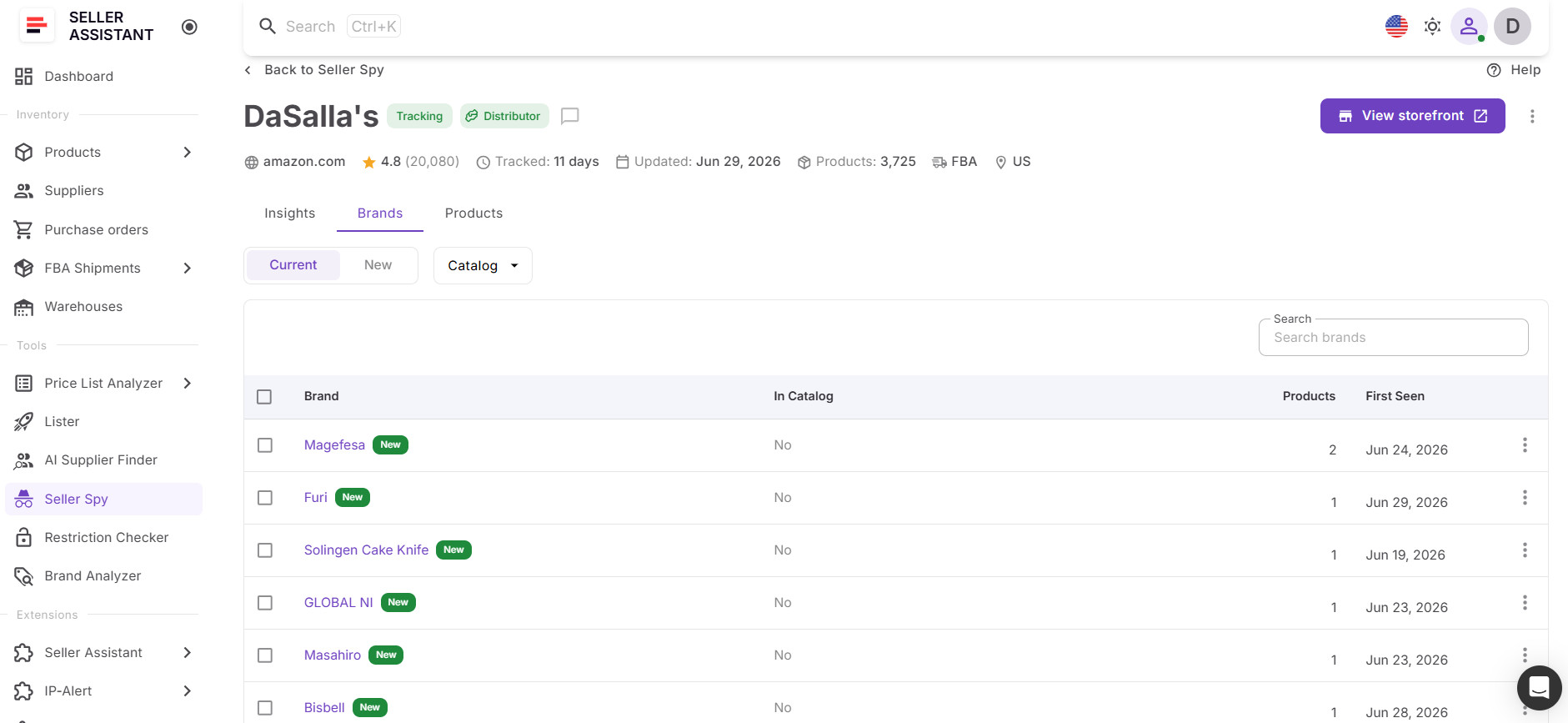
For each brand, Seller Spy displays information such as:
- Brand name
- Whether it’s already in your catalog
- Number of products
- Date first detected
This helps sellers identify new brands competitors have started carrying and prioritize them for further research.
Product-level analysis
The Products tab lets sellers monitor both current inventory and catalog changes over time.
Products can be filtered by:
- Current products or Changes
- Brand
- Category
- Catalog status
- Keyword
- ASIN
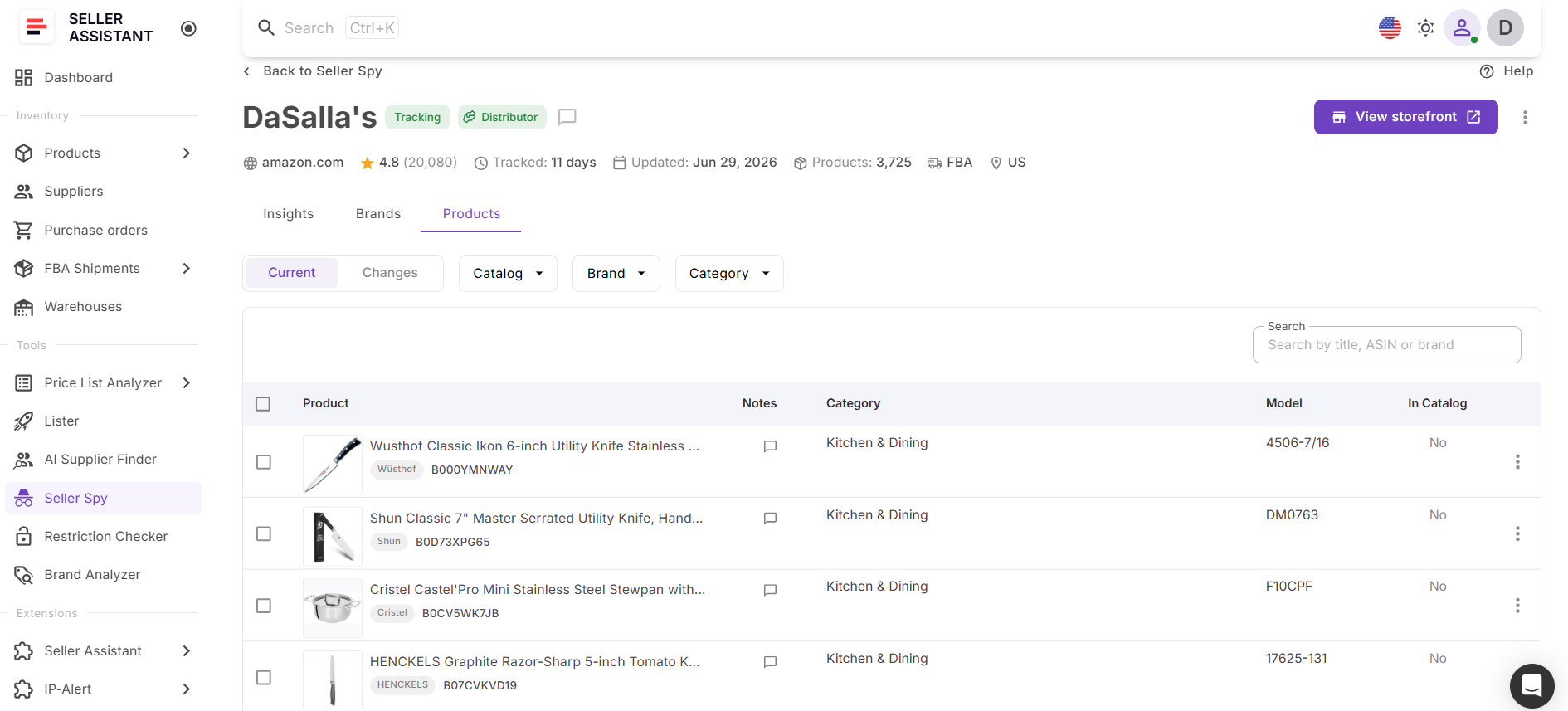
For each product, Seller Spy displays key information including:
- Product image and title
- Brand
- ASIN
- Category
- Model number
- Catalog status
- Notes
These filters make it easy to investigate new product additions, monitor inventory changes, or focus on specific brands and categories.
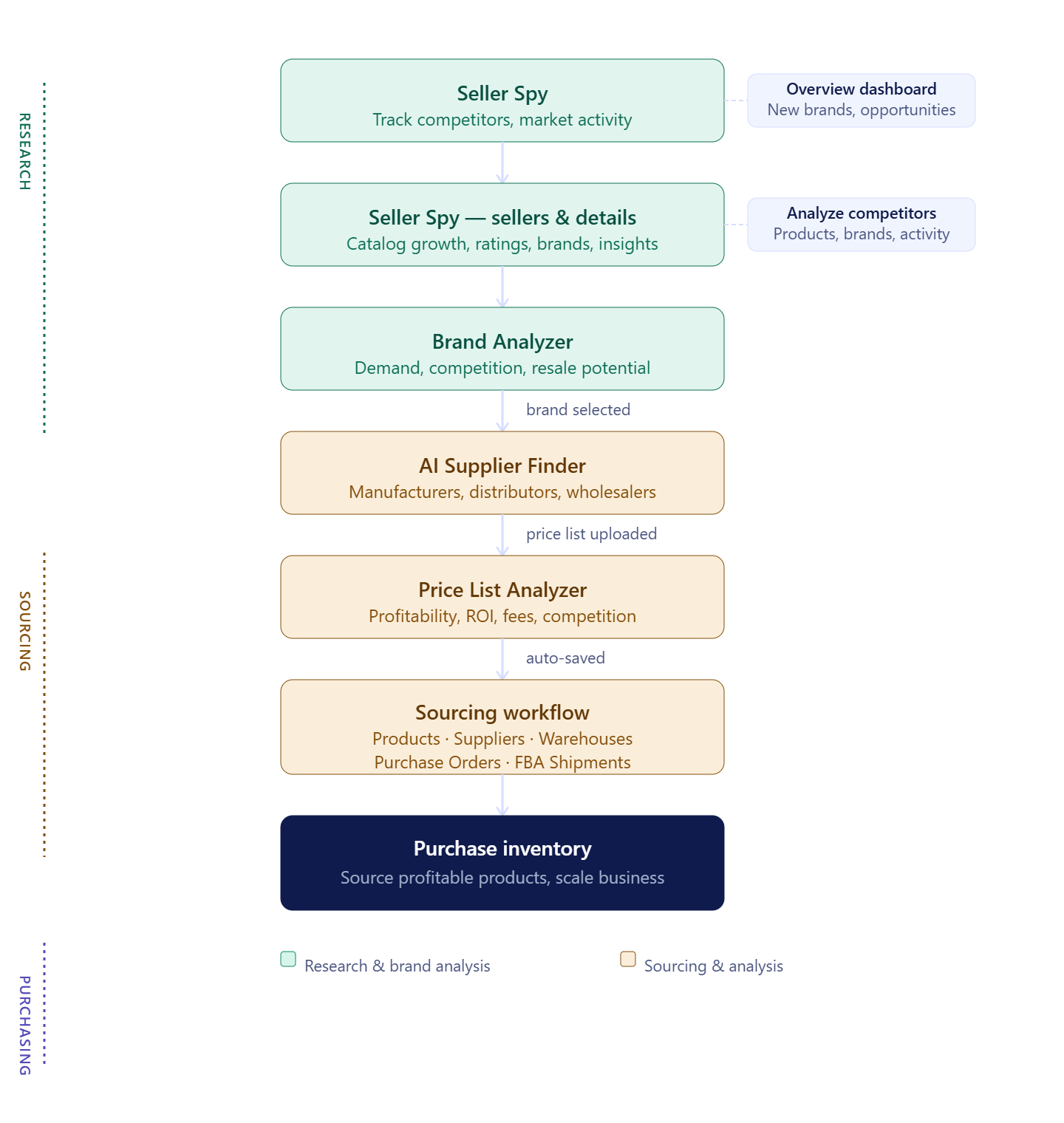
Connected sourcing workflow
Seller Spy is designed to work seamlessly with other Seller Assistant tools, creating a connected sourcing workflow.
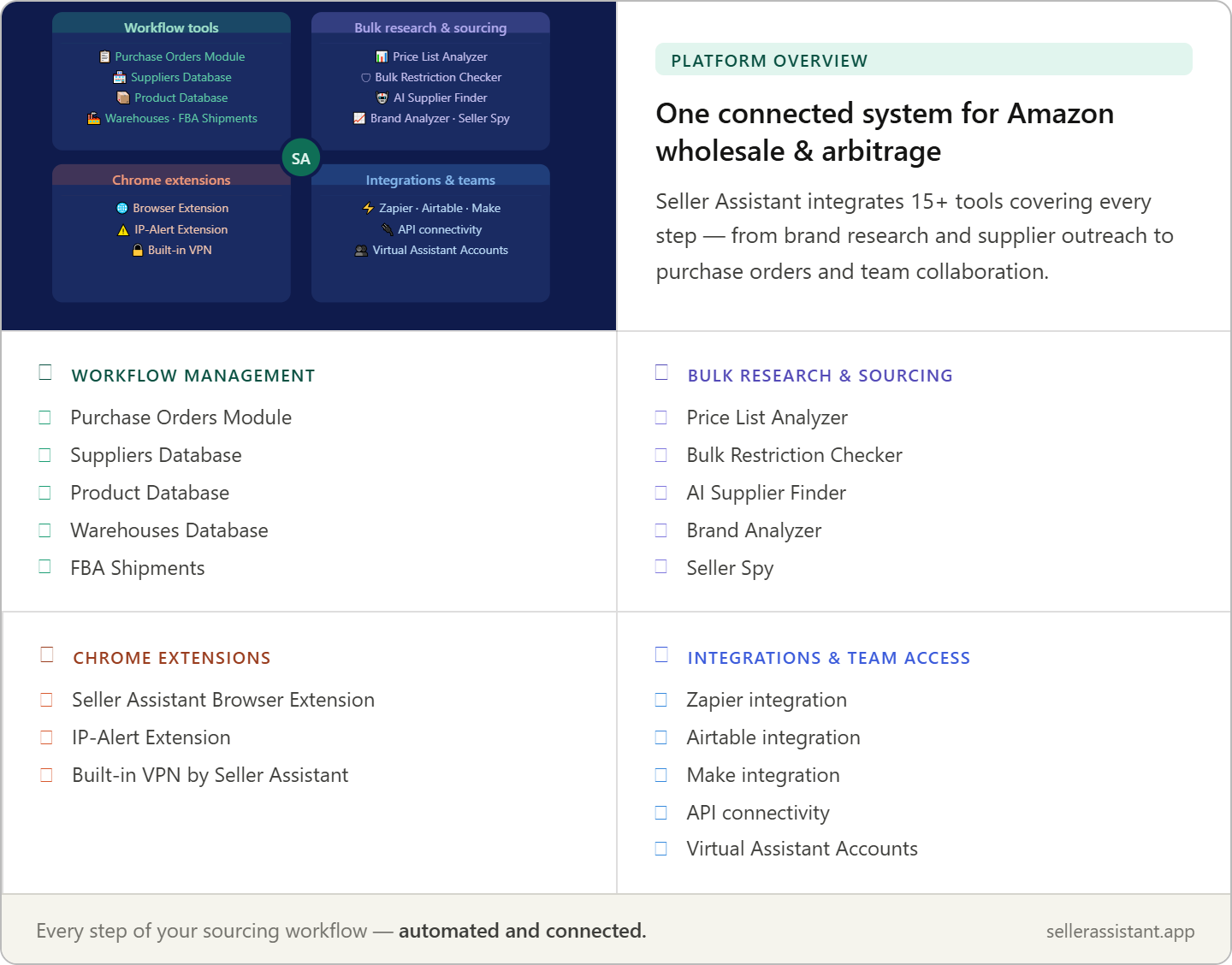
When you discover a promising brand, you can launch Brand Analyzer directly from Seller Spy to evaluate its demand, competition, catalog depth, Amazon presence, and resale potential before contacting suppliers.
Once you’ve qualified the brand, you can open AI Supplier Finder to locate manufacturers, authorized distributors, wholesalers, and other B2B suppliers associated with that brand.
If you identify products worth sourcing, you can continue your workflow in Price List Analyzer to evaluate profitability, competition, ROI, fees, and other product metrics before making purchasing decisions. Together, these tools connect competitor monitoring with brand qualification, supplier discovery, bulk product analysis, and purchasing in a single wholesale workflow.
Continuous competitor tracking
Unlike a one-time storefront review, Seller Spy continuously monitors tracked competitors. As sellers add or remove products, introduce new brands, or update their catalogs, the platform records those changes over time. Sellers can review activity directly inside Seller Spy or export the complete tracked seller dataset whenever they need an offline copy.
How to Use Seller Spy Step by Step
Step 1. Open Seller Spy
Log in to Seller Assistant and open Seller Spy from the Tools section.
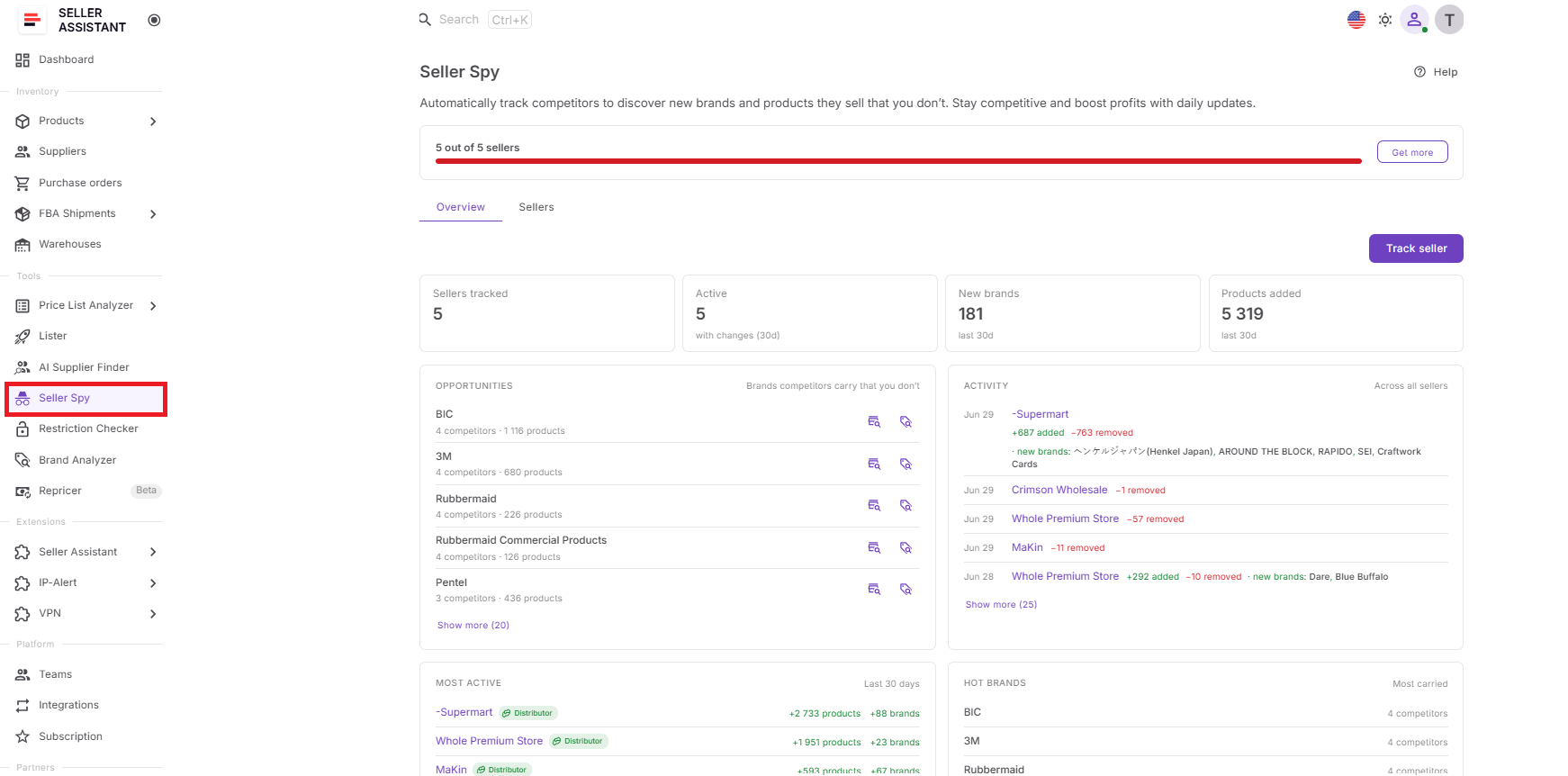
This is where you add competitors, monitor activity, and access the Overview, Sellers, and Seller Details dashboards.
Step 2. Add competitors to track
Click Track seller and add the Amazon seller storefront or seller information page.
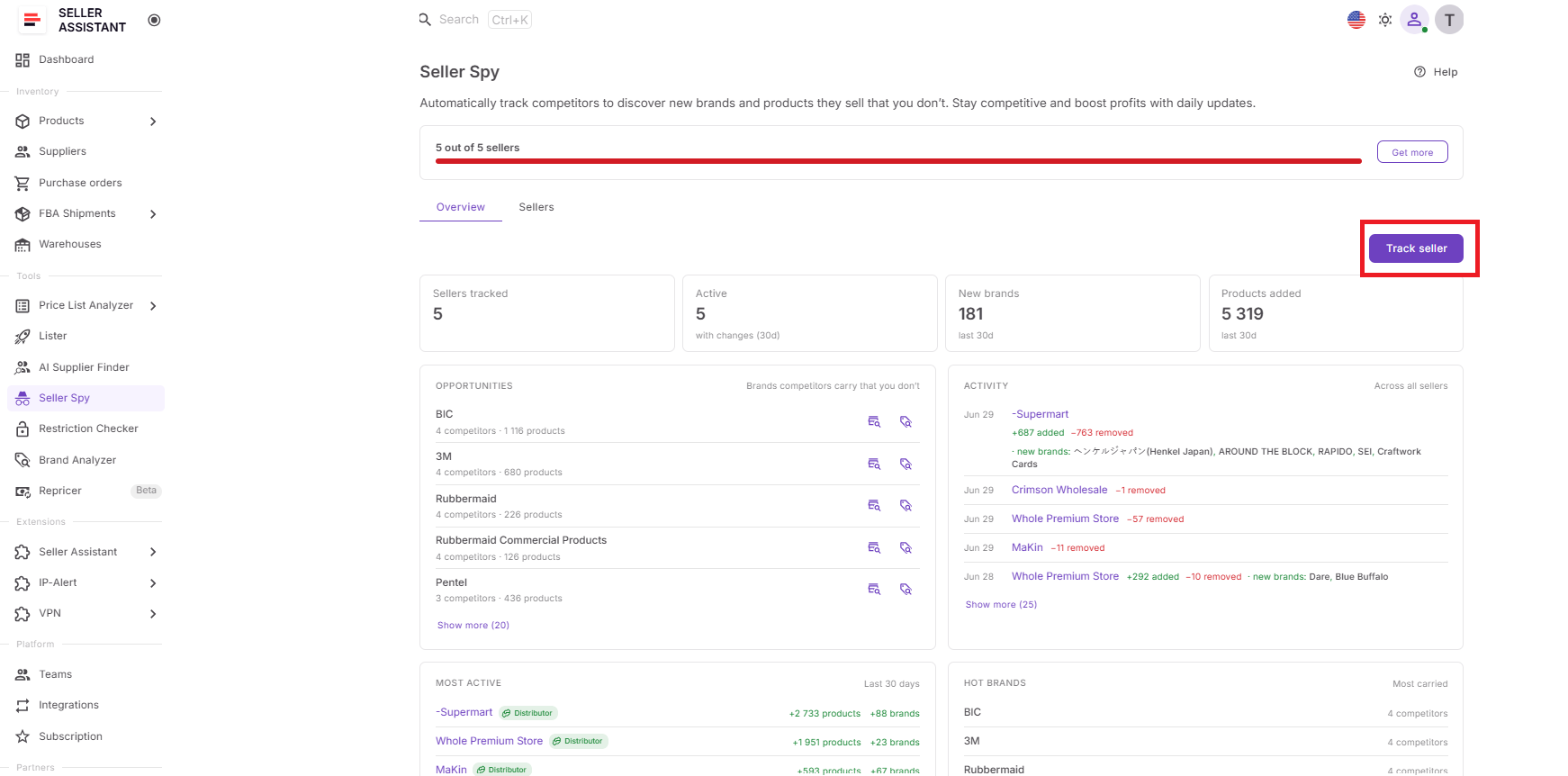
Seller Spy needs tracked competitors to start collecting catalog, brand, product, and pricing changes.
Step 3. Review the Overview dashboard
Check tracked sellers, active sellers, new brands, products added, Opportunities, Activity, Most Active, and Hot Brands.
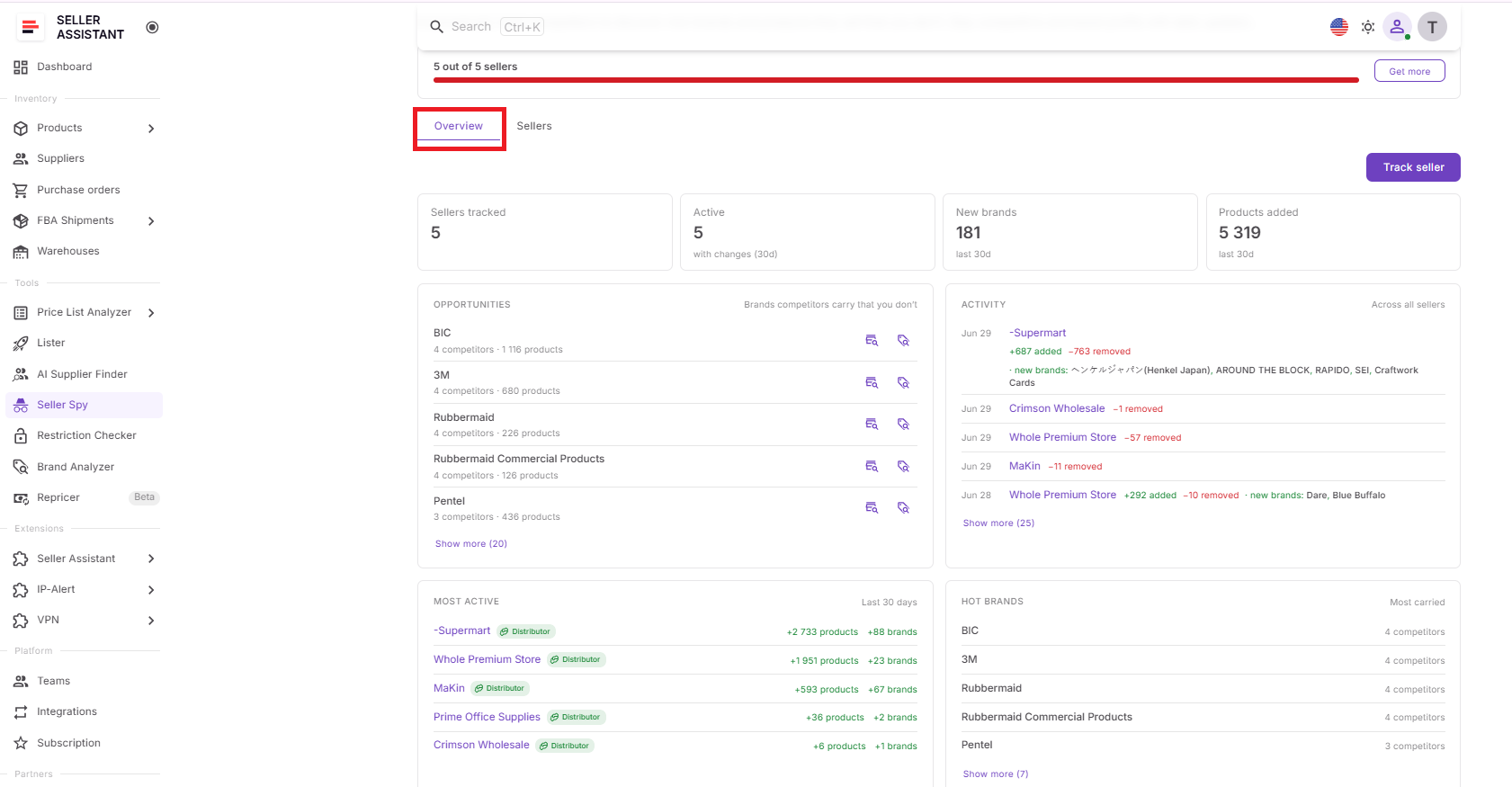
This gives you a market-level view of competitor movement and helps you spot sourcing opportunities quickly.
Step 4. Open the Sellers dashboard
Review each seller’s marketplace, type, product count, added products and brands, rating, tracking date, notes, and last update.
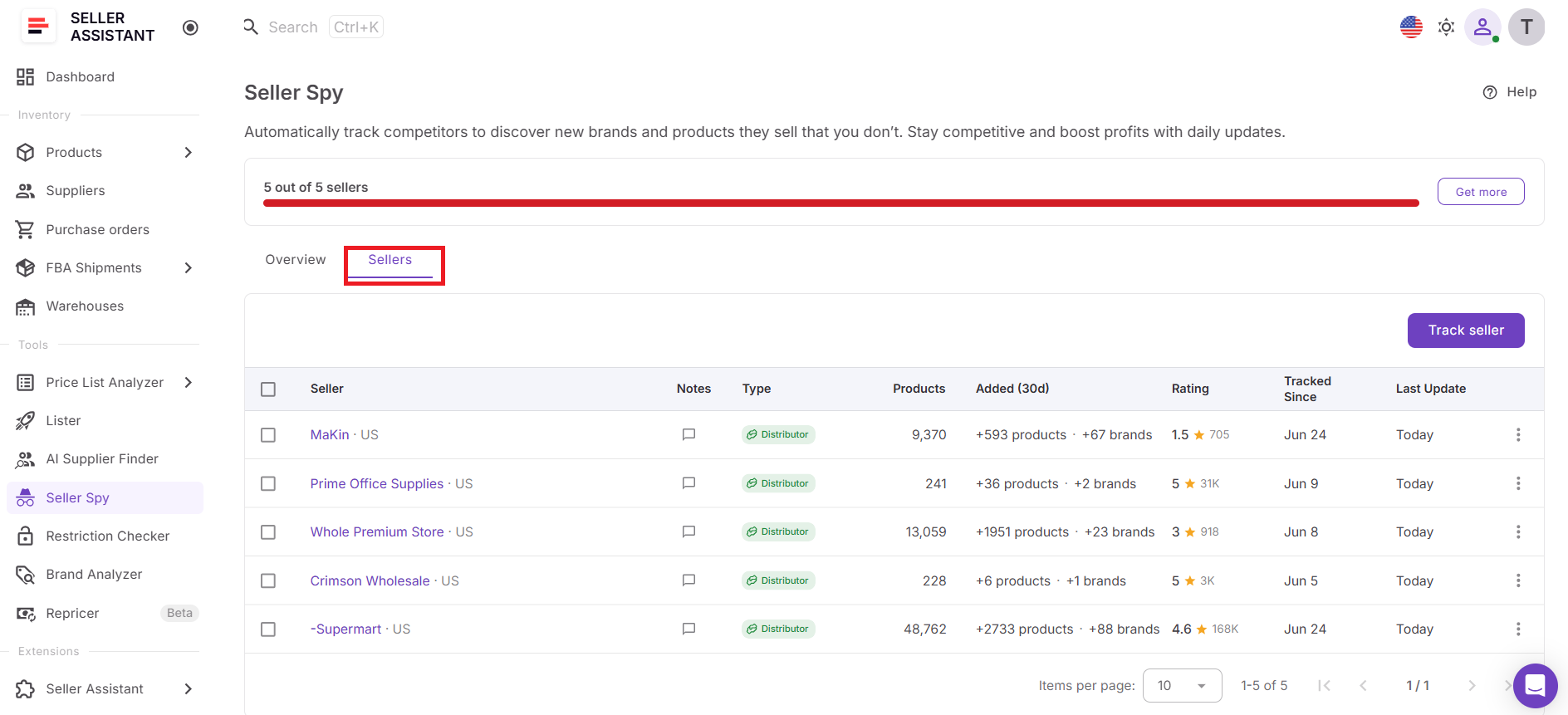
This helps you decide which competitors are worth deeper research.
Step 5. Analyze Seller Details
Click a seller’s name and review Insights, Brands, and Products.
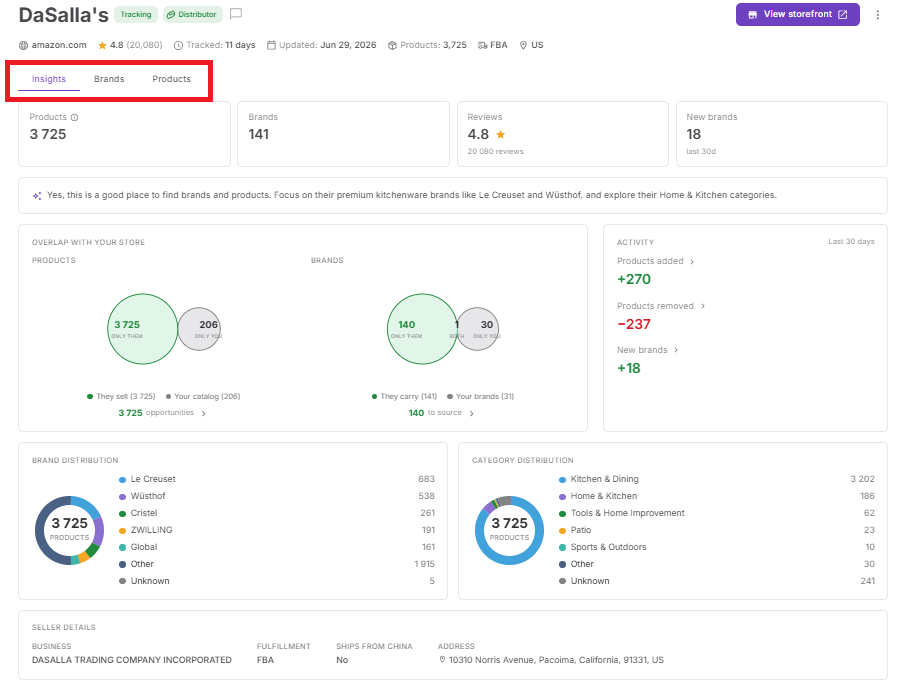
This shows catalog overlap, new brands, product changes, category distribution, and seller-level opportunities.
Step 6. Research promising brands
Open Brand Analyzer from Seller Spy for brands that look promising.
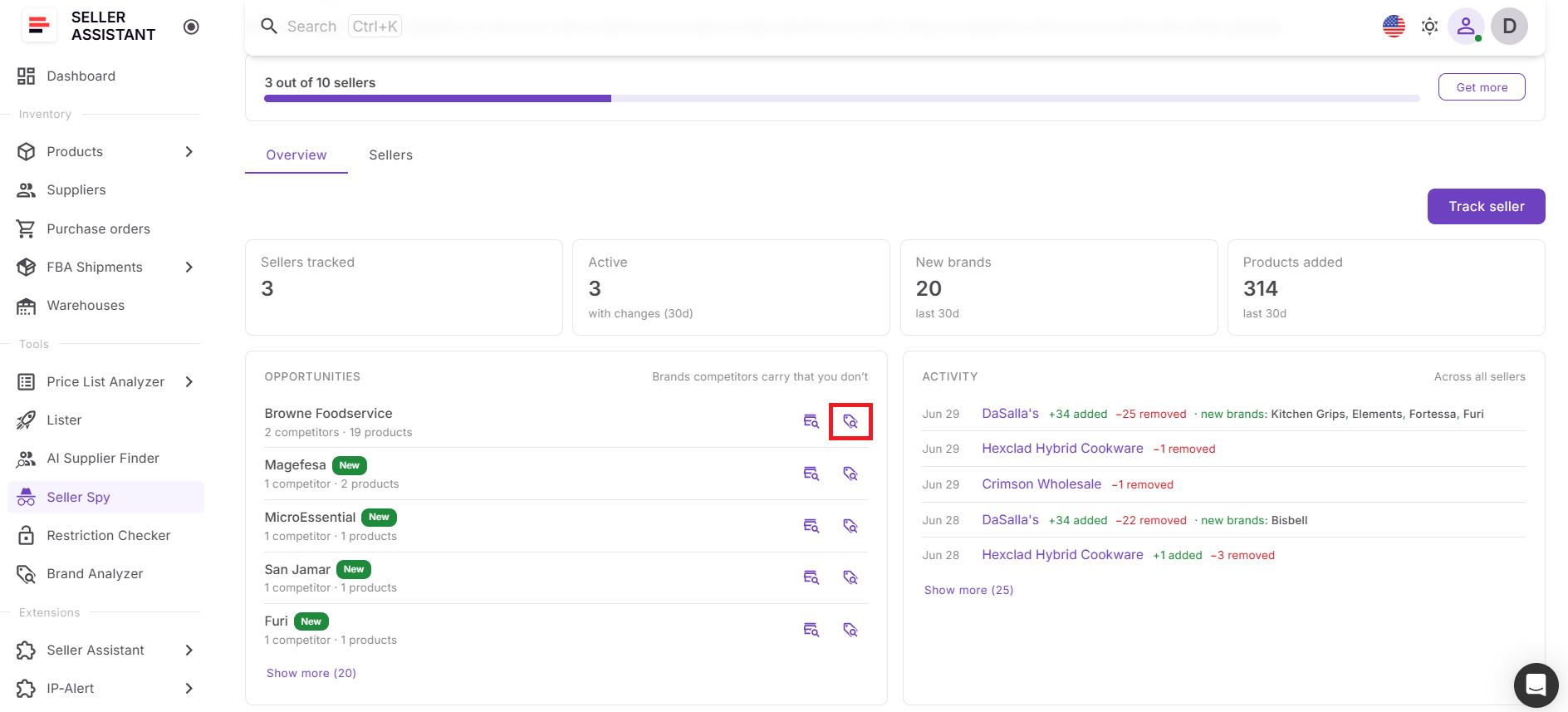
Brand Analyzer helps validate demand, competition, catalog depth, Amazon presence, and resale potential before outreach.
Step 7. Find suppliers
Launch AI Supplier Finder for brands you want to source.
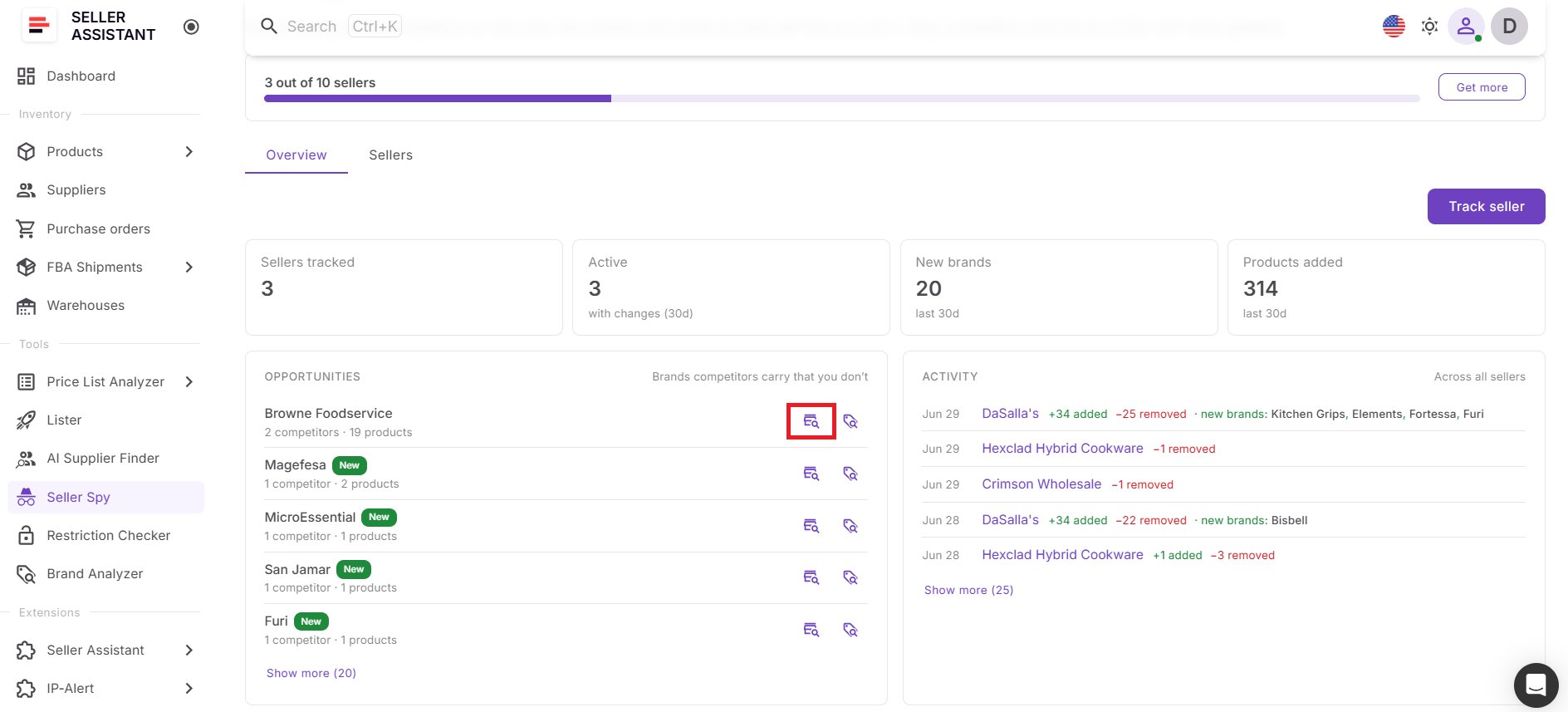
This helps you find manufacturers, distributors, and wholesalers connected to the brand.
Step 8. Continue product analysis
Move promising products into product research using Price List Analyzer or other Seller Assistant workflow tools.
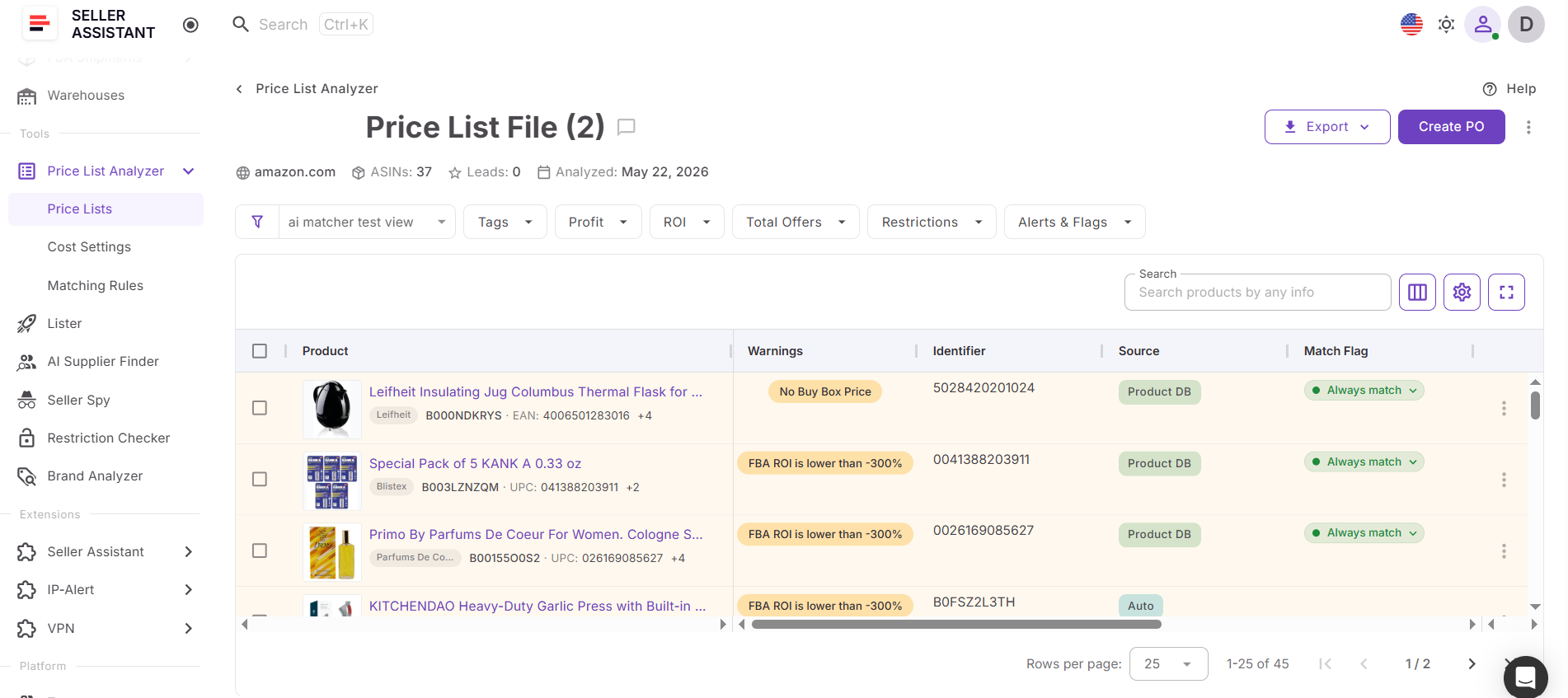
Competitor discovery is only the first step – you still need to confirm ROI, fees, demand, competition, and restrictions before buying.
FAQ
How many competitors should I track at the same time?
Focus on a small group of competitors whose sourcing strategies closely match your business rather than tracking dozens of unrelated sellers. A mix of direct competitors, large distributors, and niche specialists usually provides the most actionable insights.
How often does Seller Spy update competitor data?
Seller Spy automatically tracks changes on an ongoing basis and updates tracked seller activity as new data becomes available. Checking the tool regularly helps you spot new brands and products soon after they appear in a competitor’s catalog.
Can I use Seller Spy for online arbitrage and dropshipping?
Yes. Although wholesale sellers often use it to discover brands and suppliers, online arbitrage sellers and dropshippers can also monitor competitors to find profitable products, identify trending brands, and expand their sourcing opportunities.
What should I do after finding a promising brand?
Use Seller Assistant’s Brand Analyzer to evaluate the brand’s demand, competition, Amazon presence, and resale potential before investing time in supplier outreach. If the brand meets your criteria, continue with AI Supplier Finder to identify manufacturers, distributors, and wholesalers that carry it.
Can I stop tracking a seller and add them again later?
Yes. You can remove a seller from Seller Spy at any time if you no longer want to monitor them. If you decide to track that seller again later, simply add them back and Seller Spy will begin monitoring their activity again.
Final Thoughts
Monitoring competitors is one of the fastest ways to discover new sourcing opportunities, but manually checking Amazon storefronts is time-consuming and difficult to scale. Seller Assistant’s Seller Spy automates competitor monitoring, giving you a clear view of market activity, catalog changes, new brands, and product trends from a single workspace.
Combined with Brand Analyzer, AI Supplier Finder, and the rest of the Seller Assistant workflow, Seller Spy helps you move seamlessly from competitor research to brand validation, supplier discovery, product analysis, and purchasing. Whether you’re an Amazon wholesale seller, online arbitrage seller, or dropshipper, it provides the insights you need to make smarter sourcing decisions, uncover profitable opportunities earlier, and stay ahead of the competition.