



Most Amazon sellers think they know their profit – but they’re working with incomplete numbers. Looking at supplier cost or even estimated margins from sourcing tools doesn’t reflect what you actually spend to get a product ready for sale.
Prep fees, inbound shipping, and other hidden costs quietly eat into your ROI and can turn a “winning” deal into a loss. The difference comes down to how you calculate your costs.
In this post, we’ll break down estimated cost vs landed cost, show why the gap matters, and explain how to calculate your true per-unit profit with Seller Assistant.
What Are Estimated and Landed Costs on Amazon?
Many Amazon sellers rely on quick cost estimates during sourcing – but those numbers don’t always reflect what they’ll actually pay. The gap between estimated cost and landed cost is where profit is often lost. Understanding how each works is key to making accurate buying decisions.
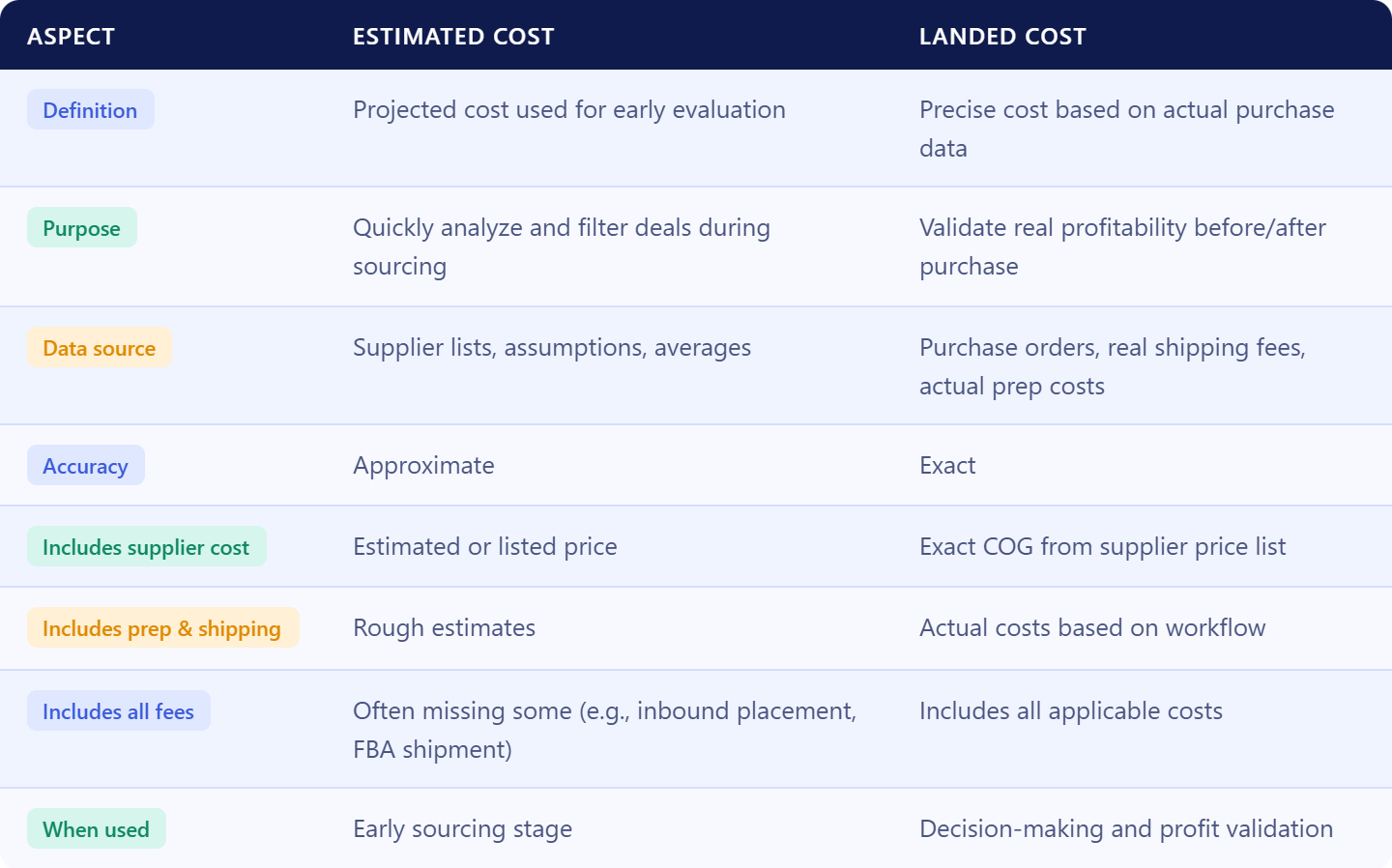
What is the estimated cost?
Estimated cost is an anticipated or projected expense for acquiring inventory, used during early product evaluation.
It typically includes:
- Supplier price (often from a price list)
- Estimated Amazon fees
- Rough assumptions for prep and shipping
Estimated cost is used to quickly analyze deals at scale. It helps sellers filter large supplier lists and identify products that look profitable before placing an order.
However, it often does not include all real costs, such as:
- Inbound placement service fees (if applicable)
- Actual inbound shipping to Amazon
- Exact prep costs based on your warehouse or prep center
Because of this, estimated cost provides direction – but not full accuracy.
What is the landed cost?
Landed cost is the precise per-unit cost based on actual purchasing data, reflecting what you truly pay to get inventory ready for sale.
It includes:
- Exact supplier COG from the actual purchase order and price list
- More accurate shipping costs
- Real prep costs based on your workflow
- All applicable fees tied to getting inventory into Amazon
Landed cost is used to validate and confirm profitability with accurate inputs. It reflects real numbers rather than assumptions, giving you a reliable foundation for pricing and margin calculations.
Unlike estimated cost, landed cost captures the full financial picture, including costs that are often missed or simplified during early sourcing.
Where Estimated Cost Breaks and Landed Cost Wins
Estimated cost and landed cost are not competing metrics – they serve different purposes. The problem is that many sellers treat them as interchangeable. That’s where mistakes happen. The real difference comes down to how complete the data is and how reliable your profit calculation becomes.
Level of accuracy
Estimated cost gives you a directional view based on assumptions. Landed cost reflects exact numbers pulled from real operations. One helps you screen deals, the other confirms if they actually work.
Cost coverage
Estimated cost often skips or simplifies parts of the equation. It may not include inbound placement fees, exact shipping rates, or real prep costs. Landed cost includes every expense required to get inventory ready for sale, so nothing is hidden.
Data source
Estimated cost relies on preliminary COG data and average inputs. Landed cost is built on the updated supplier price list COGs, shipment data, and actual warehouse costs. The difference is assumptions vs recorded transactions.
Impact on profit
Estimated cost can overstate margins, especially when fees are underestimated. Landed cost shows your real margin per unit. This directly affects pricing, ROI, and whether a deal is worth scaling.
Role in decision making
Estimated cost is used to move fast during sourcing. Landed cost is used to make confident decisions. Sellers who rely only on estimates take risks. Sellers who validate with landed cost control their profitability.
How Seller Assistant Calculates Your True Cost per SKU
In Seller Assistant, landed cost represents the full per-unit cost required to prepare a product for sale on Amazon. It brings together supplier pricing, order-related expenses, prep, and inbound costs into one automatically calculated value for each SKU.
What goes into landed cost
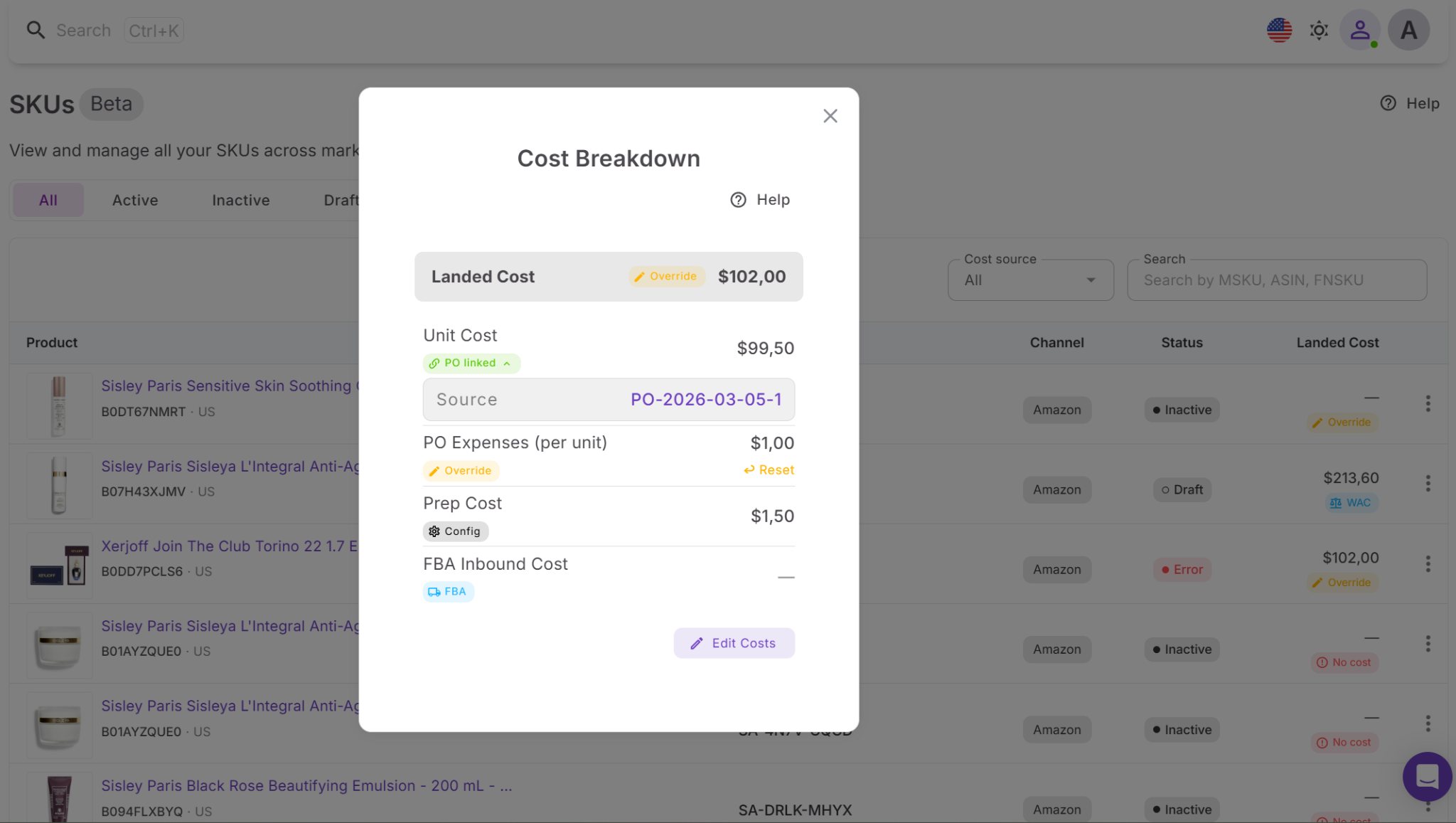
This metric combines all essential cost elements:
- Supplier cost based on actual purchase orders
- Prep expenses tied to your warehouse or prep center
- Shipping and logistics costs
- FBA inbound charges
Instead of estimating these separately, Seller Assistant consolidates them into a single, reliable number.
What insights you get
Landed cost breaks down every expense behind your per-item costs. You can view each component – product cost, shipping, prep, and inbound – along with where the data comes from, such as purchase orders, shipment records, or predefined settings.
This makes it easier to see how your total cost is formed and identify where adjustments may improve margins.
Where to access and control it
You’ll find landed cost in the SKUs Tool within the Product Database. Each SKU includes a landed cost field that opens a detailed cost view when clicked.
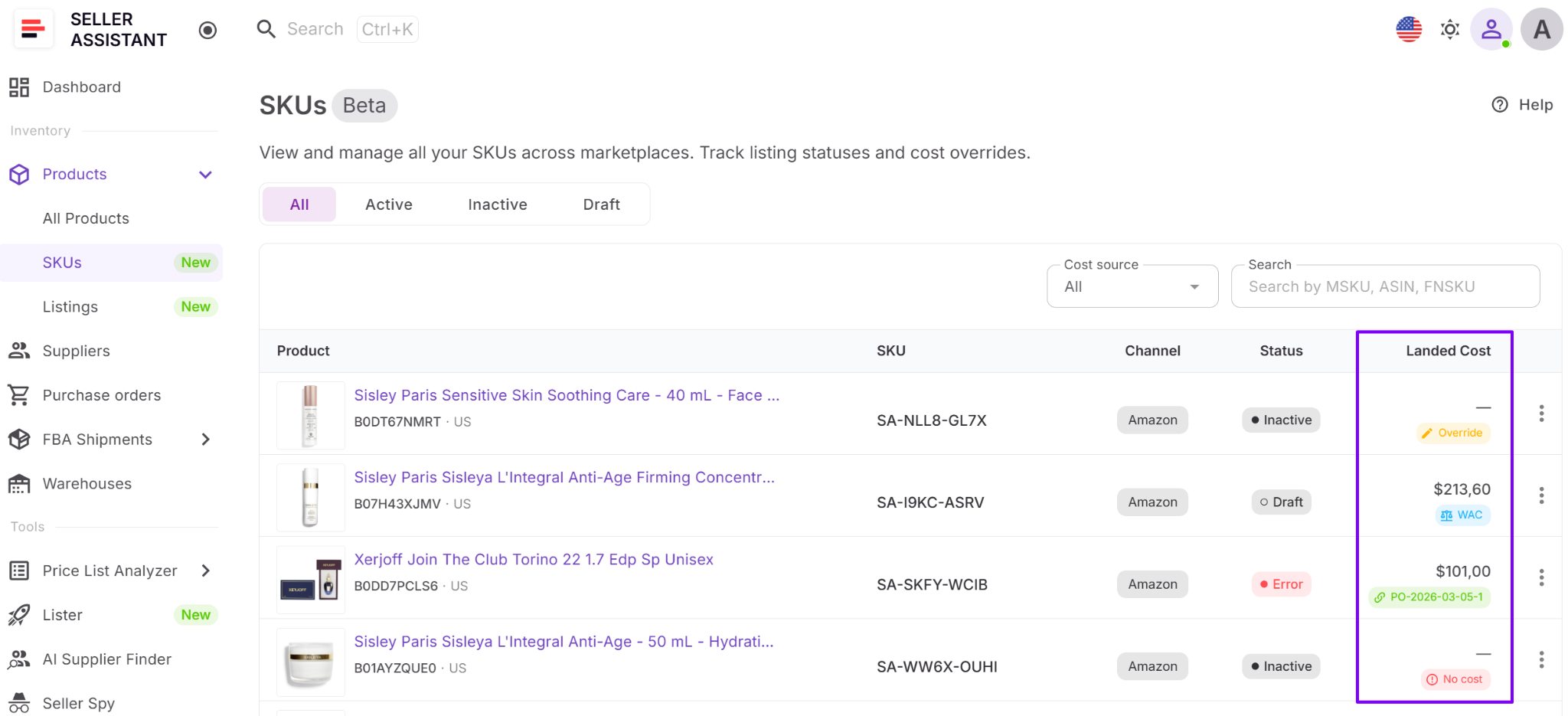
Inside, you can:
- Examine each cost component
- Modify values when needed
- Revert changes back to system-calculated data
Why it directly impacts profit
Landed cost gives you a complete and accurate cost per unit, not just a supplier price. This allows you to calculate margins correctly, avoid pricing errors, and eliminate deals that only appear profitable at first glance.
Note. Seller Assistant is an end-to-end Amazon workflow management platform that integrates 15+ wholesale-focused solutions into one connected system. It combines sourcing workflow automation, bulk research and intelligence tools, and integrated Chrome extensions – giving you everything you need to streamline finding deals, managing suppliers, and creating purchase orders.

The platform aggregates: workflow management tools – Purchase Orders Module, Suppliers Database, Product DB, Warehouses Database, FBA Shipments to organize, automate, and scale every step of your wholesale and arbitrage operations; bulk research & sourcing tools – Price List Analyzer, Bulk Restriction Checker, AI Supplier Finder, Brand Analyzer, Seller Spy to evaluate supplier price lists, verify selling eligibility and restrictions, open new brands, and discover winning product ideas from competitors to expand your product catalog; Chrome extensions – Seller Assistant Browser Extension, IP-Alert Extension, and built-in VPN by Seller Assistant to deep-research products, check IP claims and compliance, and access geoblocked supplier sites directly within your browser; and integrations & team access features – seamless API connectivity and integrations with Zapier, Airtable, and Make, plus Virtual Assistant Accounts for secure, scalable team collaboration.
With Seller Assistant, every step of your Amazon wholesale and arbitrage workflow is automated and connected.
How Landed Cost Updates and Tracks Your Costs
Landed cost is calculated at the SKU level and updates automatically as your operations progress. When you open a SKU, you can see the full per-unit cost breakdown. As you create purchase orders, receive shipments, or adjust expenses, the system recalculates everything in real time, keeping your profitability data accurate without manual work.
Where to access landed cost
You can view landed cost in the SKUs Tool within the Product Database. Each SKU includes a landed cost field in the table – click it to open a detailed breakdown and manage individual cost components.
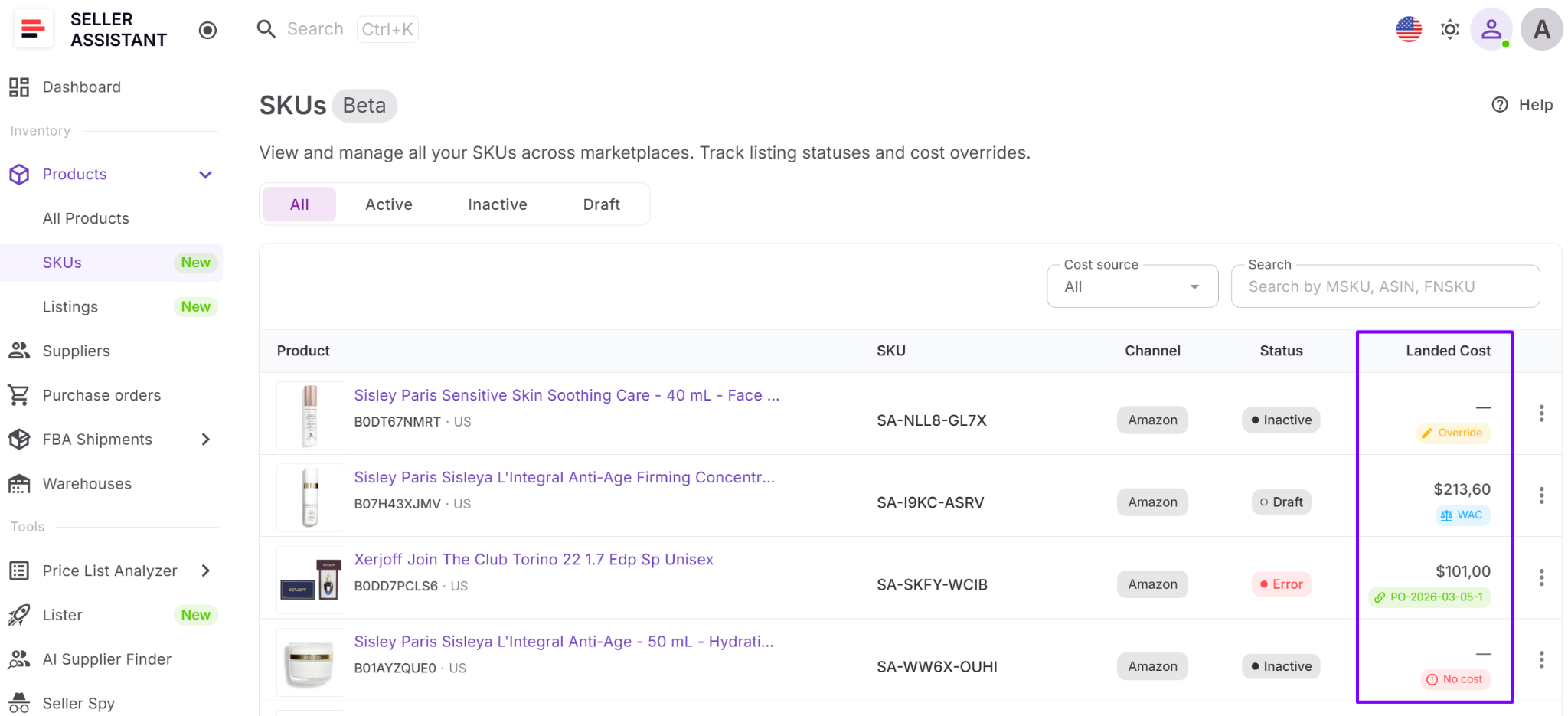
What costs are included
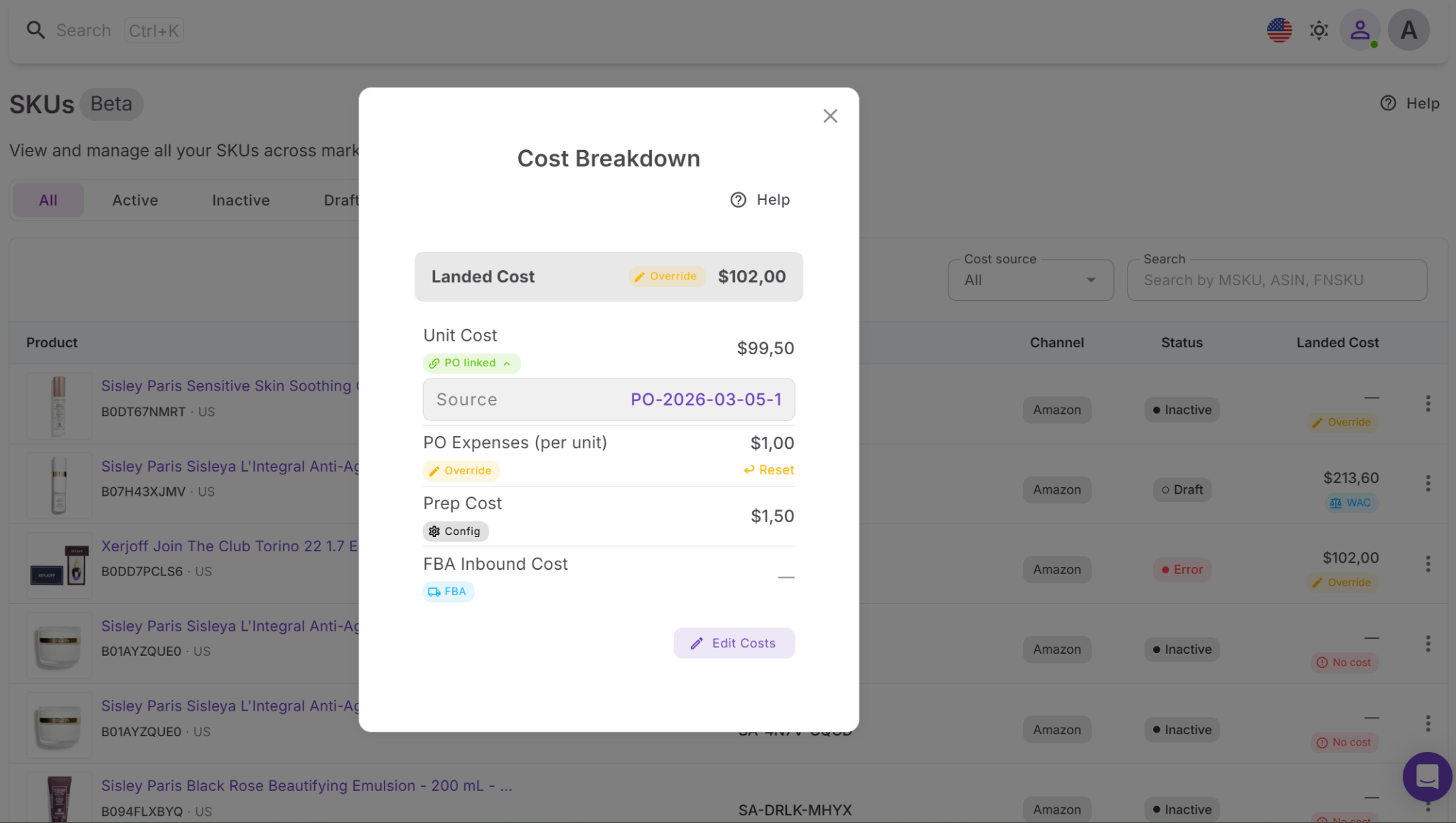
Landed cost covers all key per-unit expenses:
- Unit cost (COG)
- Purchase Order expenses allocated per unit
- Prep costs
- FBA inbound costs
Each component can be edited or overridden if needed. You can also reset values back to the system-calculated version at any time.
How to review cost details
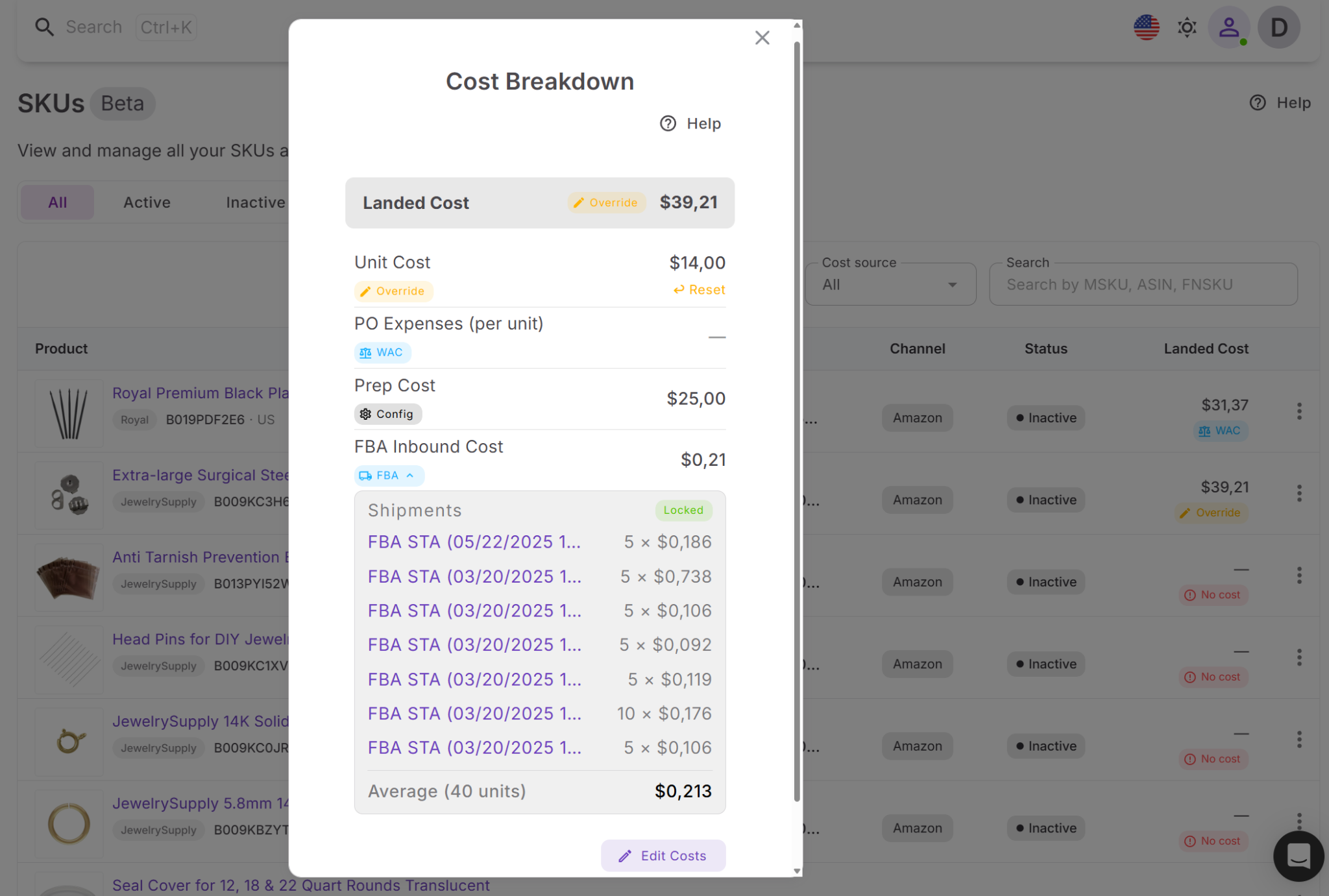
Each cost element can be expanded to show deeper data, including:
- Linked Purchase Orders
- Shipment details
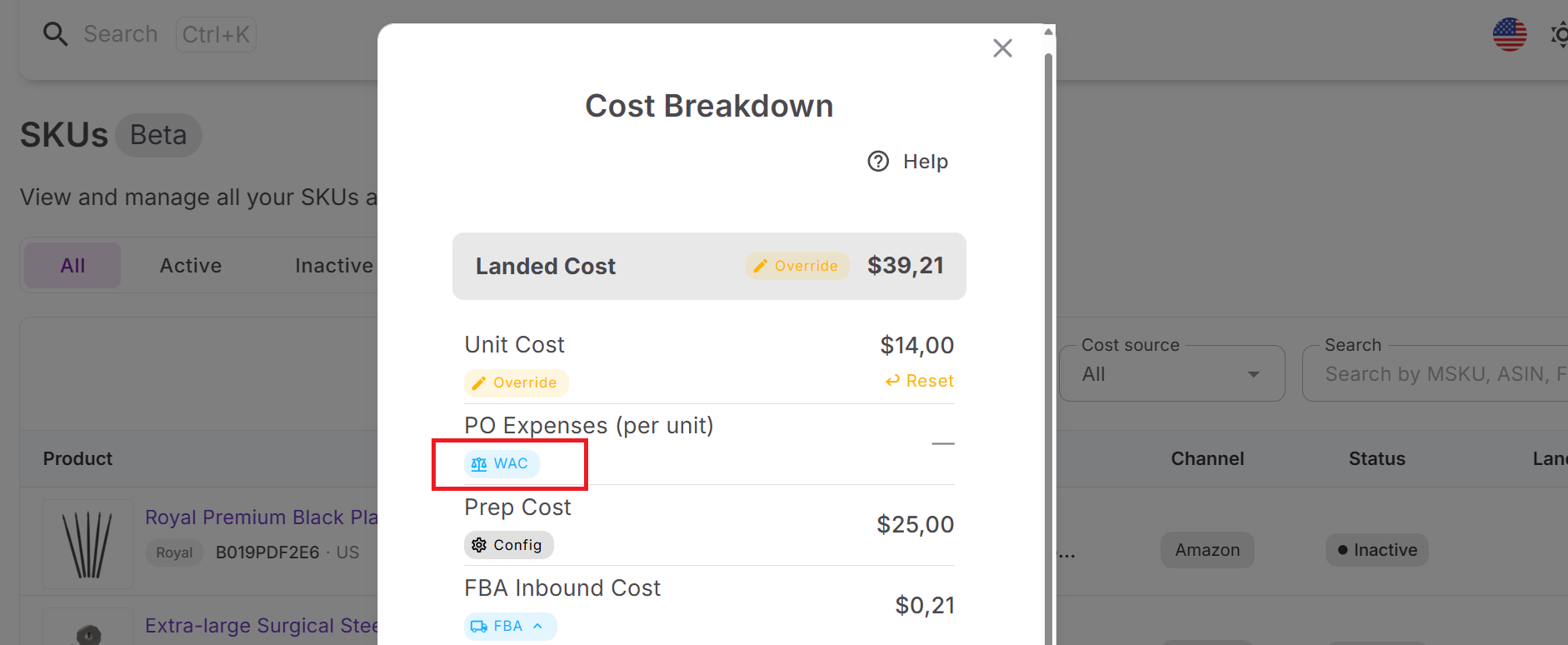
- Weighted average cost (WAC) calculations
This gives you full transparency into how every number is formed and allows you to verify your costs.
Where the data comes from
Each part of landed cost is pulled from a specific source:
- Unit cost – from the latest Purchase Order or calculated as weighted average cost
- Purchase Order expenses – distributed from shipping and additional order costs
- Prep cost – based on your cost settings
- FBA inbound cost – taken from shipment data
Weighted average cost is especially useful when you purchase the same SKU at different prices over time, helping you maintain a realistic baseline cost.
How it connects across your workflow
Landed cost is used across different Seller Assistant’s tools and ties together different parts of your connected wholesale operation:
Product Database consolidates all product data at the unit level
Price List Analyzer calculates 100+ deal metrics, risks, profitability,and provides initial cost estimates
Purchase Orders Module captures actual buying data and generates supplier POs
FBA Shipments adds real inbound costs and helps create shipments to Amazon.
This ensures a consistent flow of cost data from sourcing to fulfillment, so your profitability always reflects real numbers.
How to Work with Landed Cost Step by Step
Landed cost lets you see the actual per-unit cost of your inventory. Here’s how to review and manage it inside Seller Assistant.
Step 1. Open the SKUs Tool
Navigate to Inventory → Products → SKUs, locate the SKU you want, and click the landed cost field to open the detailed breakdown.
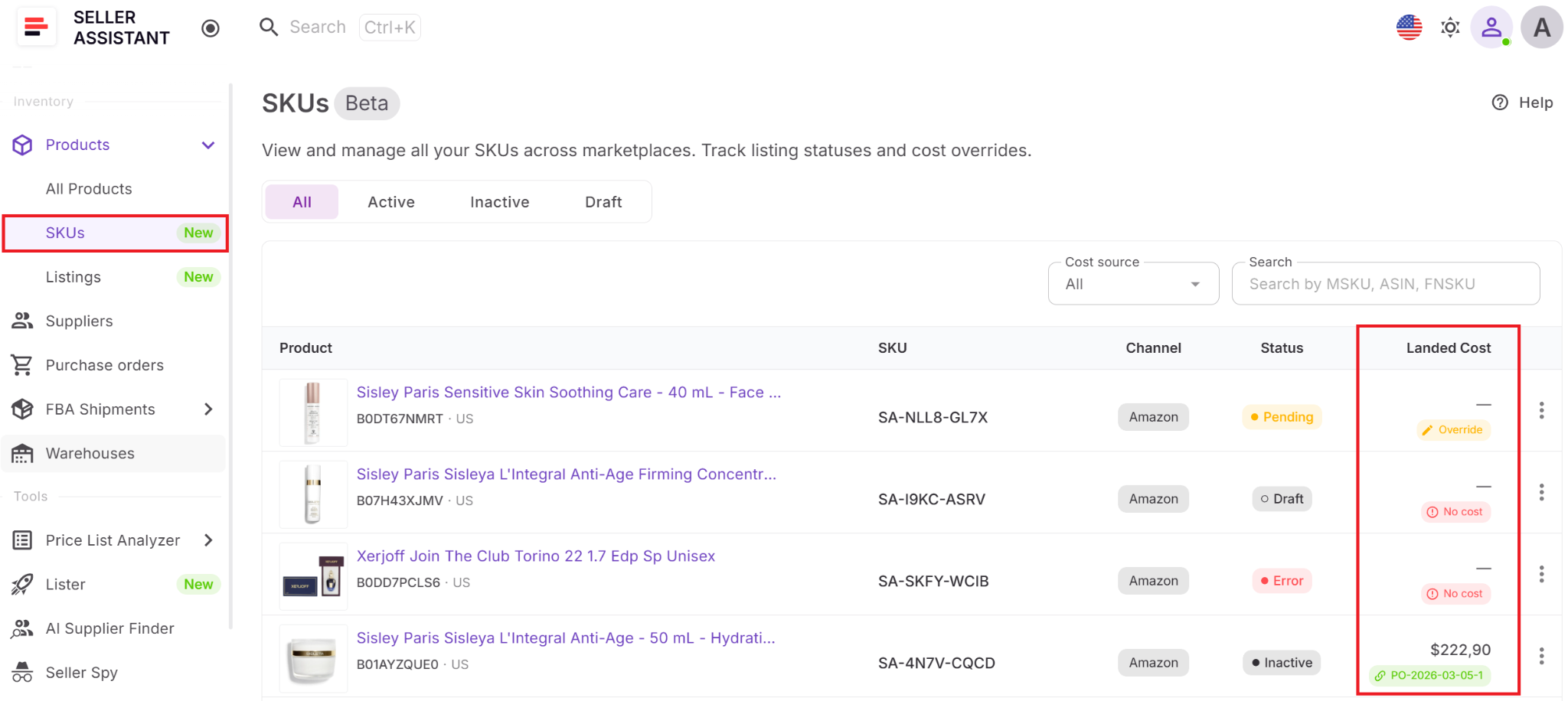
Step 2. Analyze the cost structure
Review the main components – unit cost, Purchase Order expenses, prep cost, and FBA inbound cost. This shows the real cost behind each unit.
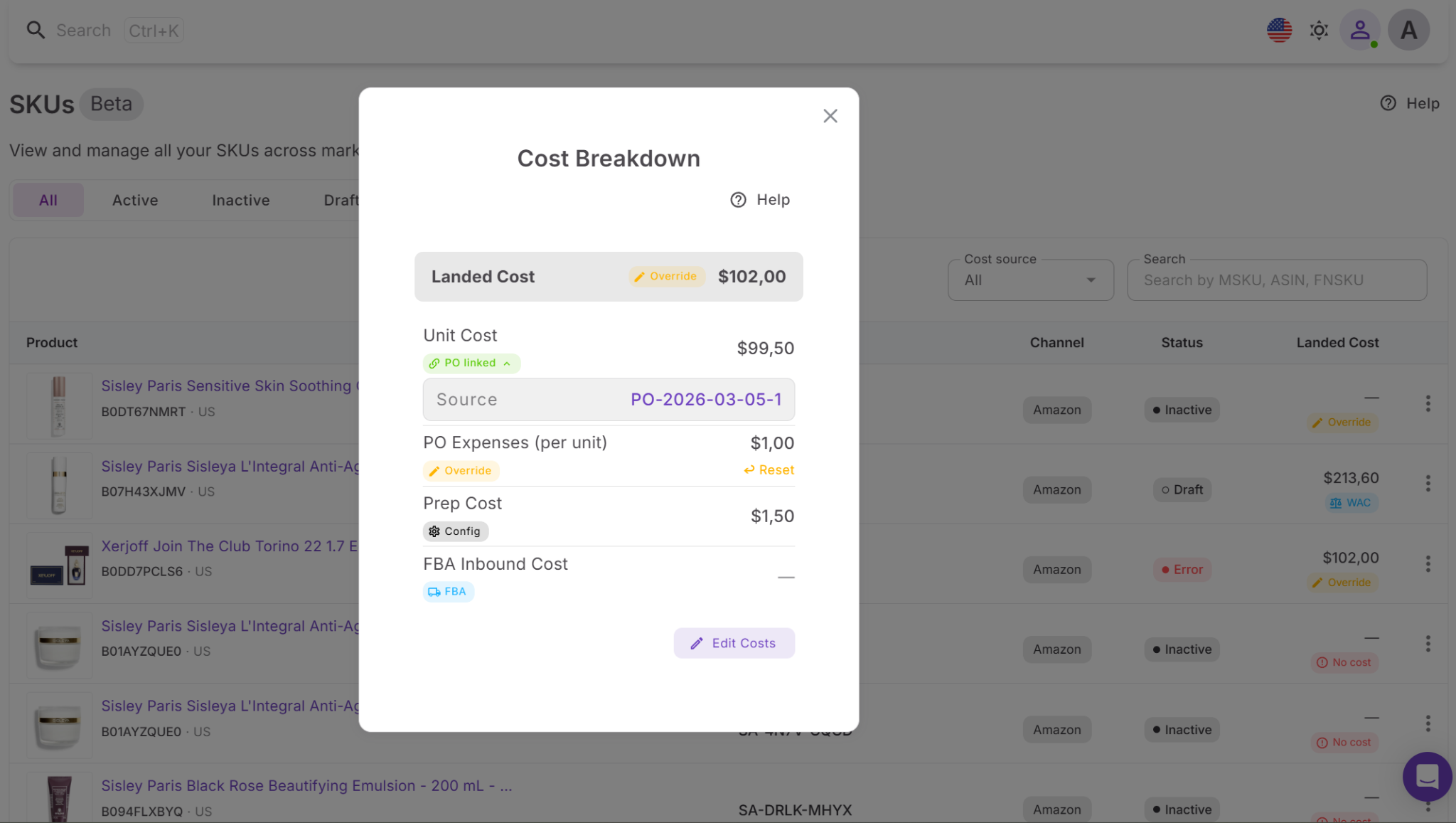
Step 3. Verify cost sources
Check the source tags for each value, such as PO, WAC, Shipment, Config, or Override. This tells you where each number comes from and how it was calculated.
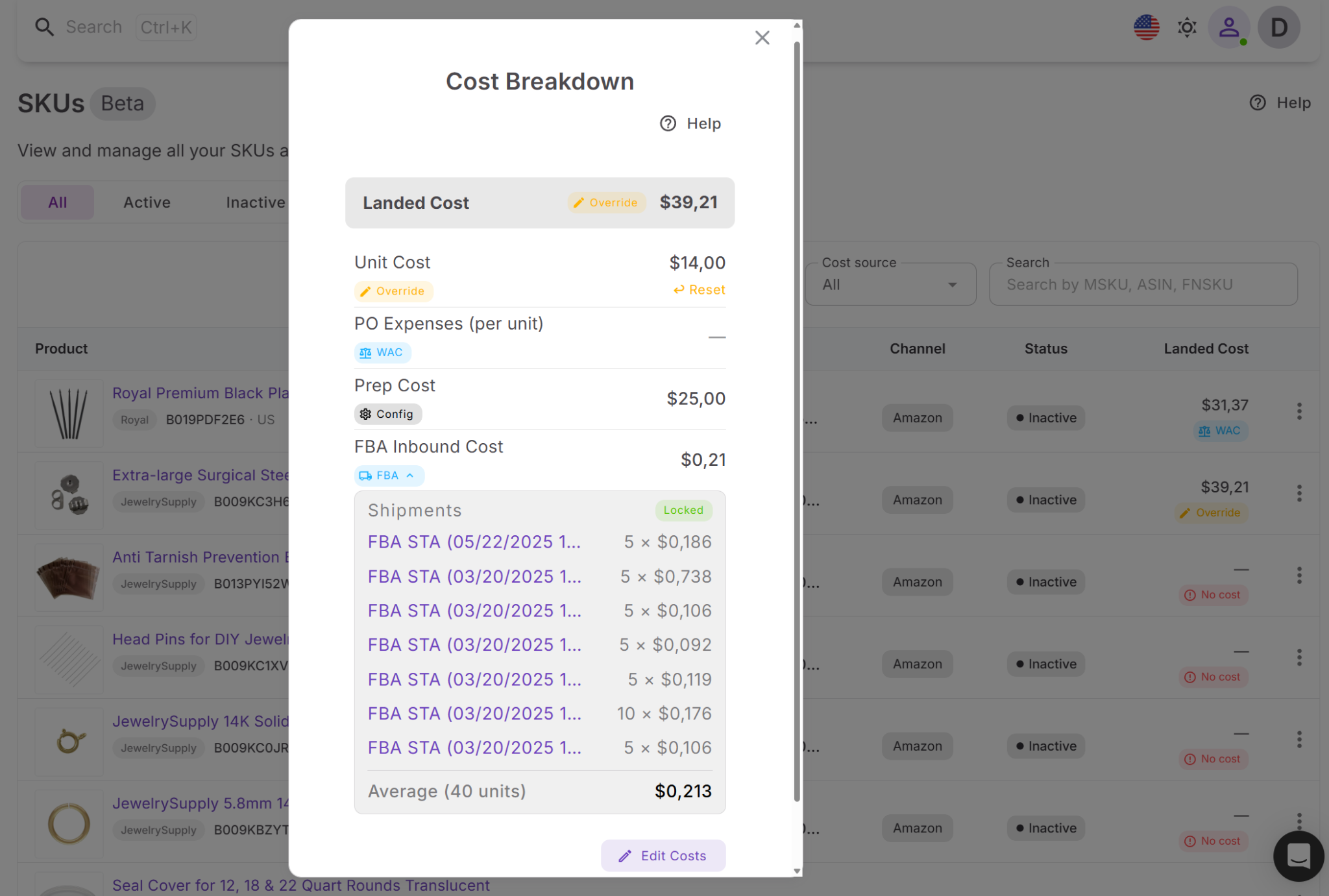
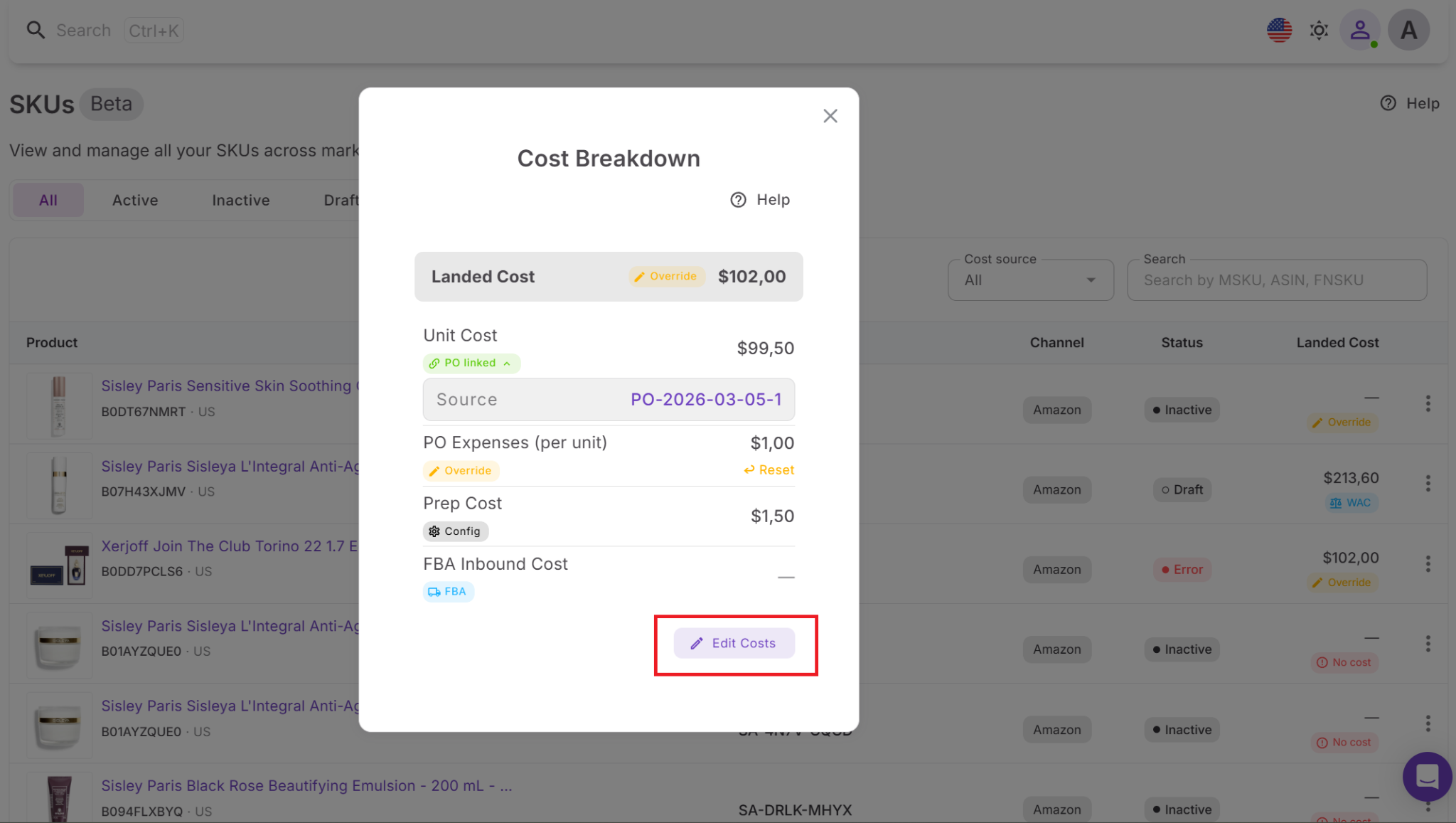
Step 4. Update values when needed
If any cost needs correction, edit the component and save it. You can always remove changes and return to the automatically calculated value.
FAQ
What is the difference between estimated cost and landed cost on Amazon?
Estimated cost is a projected value used during early sourcing based on assumptions. Landed cost is the actual per-unit cost calculated from real purchase, prep, and shipping data.
Why is estimated cost often inaccurate?
Estimated cost may exclude fees like inbound placement, exact shipping, or real prep costs. These missing or simplified inputs can make a deal look more profitable than it actually is.
What costs are included in the landed cost?
Landed cost includes supplier cost, prep expenses, shipping, and FBA inbound fees. It reflects everything required to get a product ready for sale on Amazon.
Can small cost differences really affect profitability?
Yes, even small costs per unit can significantly reduce ROI, especially at scale. A difference of $0.50–$1 per unit can turn a profitable product into a losing one.
When should I rely on landed cost instead of estimated cost?
Use estimated cost to quickly evaluate deals during sourcing. Use landed cost to validate profitability before scaling or making pricing decisions.
Final Thoughts
Estimated cost helps you move fast, but it doesn’t show the full picture. Landed cost closes that gap by reflecting what you actually pay per unit once all expenses are included. The difference between the two is where most profit miscalculations happen.
Sellers who rely only on estimates risk overvaluing deals and setting the wrong prices. Those who use landed cost work with complete, accurate data at every stage. With Seller Assistant, this process becomes automatic – your real landed costs reflect across purchase orders, prep, and shipments, giving you reliable margins you can act on.
Seller Assistant automates and connects every stage of your Amazon wholesale and arbitrage workflow. It brings together in one platform: workflow management tools – Purchase Orders Module, Suppliers Database, Warehouses Database, FBA Shipments, bulk research & sourcing tools – Price List Analyzer, Bulk Restriction Checker, Sourcing AI, Brand Analyzer, Seller Spy, Chrome extensions – Seller Assistant Browser Extension, IP-Alert Extension, and built-in VPN by Seller Assistant, and integrations & team access features – seamless API connectivity, integrations with Zapier, Airtable, and Make, and Virtual Assistant Accounts.


