



Analyzing supplier price lists manually is one of the biggest bottlenecks for Amazon resellers. Checking ASINs one by one, calculating fees, and validating demand slows down sourcing and limits how many deals you can find.
Seller Assistant’s Price List Analyzer solves this by turning bulk supplier data into clear, actionable insights. In minutes, you can identify profitable, low-risk products instead of sorting through thousands of SKUs manually.
In this post, you’ll learn how to use Price List Analyzer step by step – and how it fits into a larger workflow that helps you scale sourcing with speed and accuracy.
Why Supplier Catalog Analysis Must Be Fast, Accurate, and Scalable
Wholesale sourcing is a volume game. Supplier catalogs often contain hundreds or thousands of products, but only a small fraction meet the criteria for profitable resale on Amazon. Your ability to quickly find those products determines how efficiently you can grow.
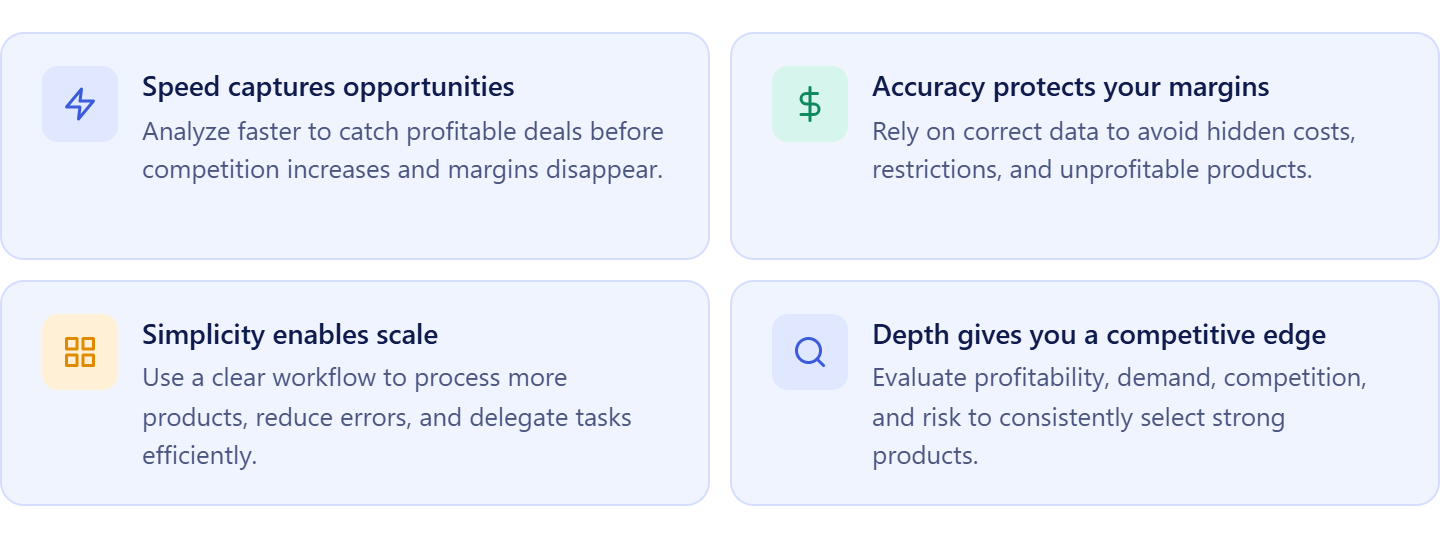
Why speed defines your opportunity
Amazon markets move fast. Prices fluctuate, Buy Box ownership changes, and new sellers enter listings daily. If your analysis takes too long, profitable products are gone before you act.
Working faster allows you to:
- Evaluate more supplier catalogs
- Catch deals before competition increases
- Act while margins still exist
Speed directly impacts how many viable opportunities you can capture.
Why accuracy protects your margins
Fast decisions only matter if they’re correct. Miscalculating fees, ignoring restrictions, or overlooking hidden costs can turn a seemingly profitable product into a loss.
Accurate analysis helps you:
- Understand true profit after all expenses
- Avoid restricted or high-risk products
- Select items with real, consistent demand
Without accuracy, scaling sourcing only scales mistakes.
Why simplicity enables scale
As your business grows, complexity becomes a bottleneck. Manual checks, scattered tools, and inconsistent processes slow down decision-making and increase errors.
A simple, repeatable workflow allows you to:
- Process large catalogs without friction
- Maintain consistent evaluation criteria
- Delegate work to team members effectively
Simplicity is what turns sourcing into a system instead of a task.
Why depth of analysis gives you an edge
Superficial checks aren’t enough in competitive categories. To make confident buying decisions, you need to evaluate products from multiple angles – profitability, demand, competition, pricing stability, and risk.
Extensive analysis helps you:
- Filter out weak or misleading opportunities
- Validate products before committing capital
- Build a pipeline of reliable, repeatable deals
The sellers who win are not the ones who scan the most products – but the ones who identify the right ones, consistently.
What is Seller Assistant’s Price List Analyzer?
Seller Assistant’s Price List Analyzer is a bulk product research tool designed for Amazon wholesale, online arbitrage, and dropshipping sellers who work with large supplier catalogs. It converts raw supplier price lists into a structured, Amazon-ready dataset, allowing you to evaluate thousands of products in minutes instead of analyzing them one by one.
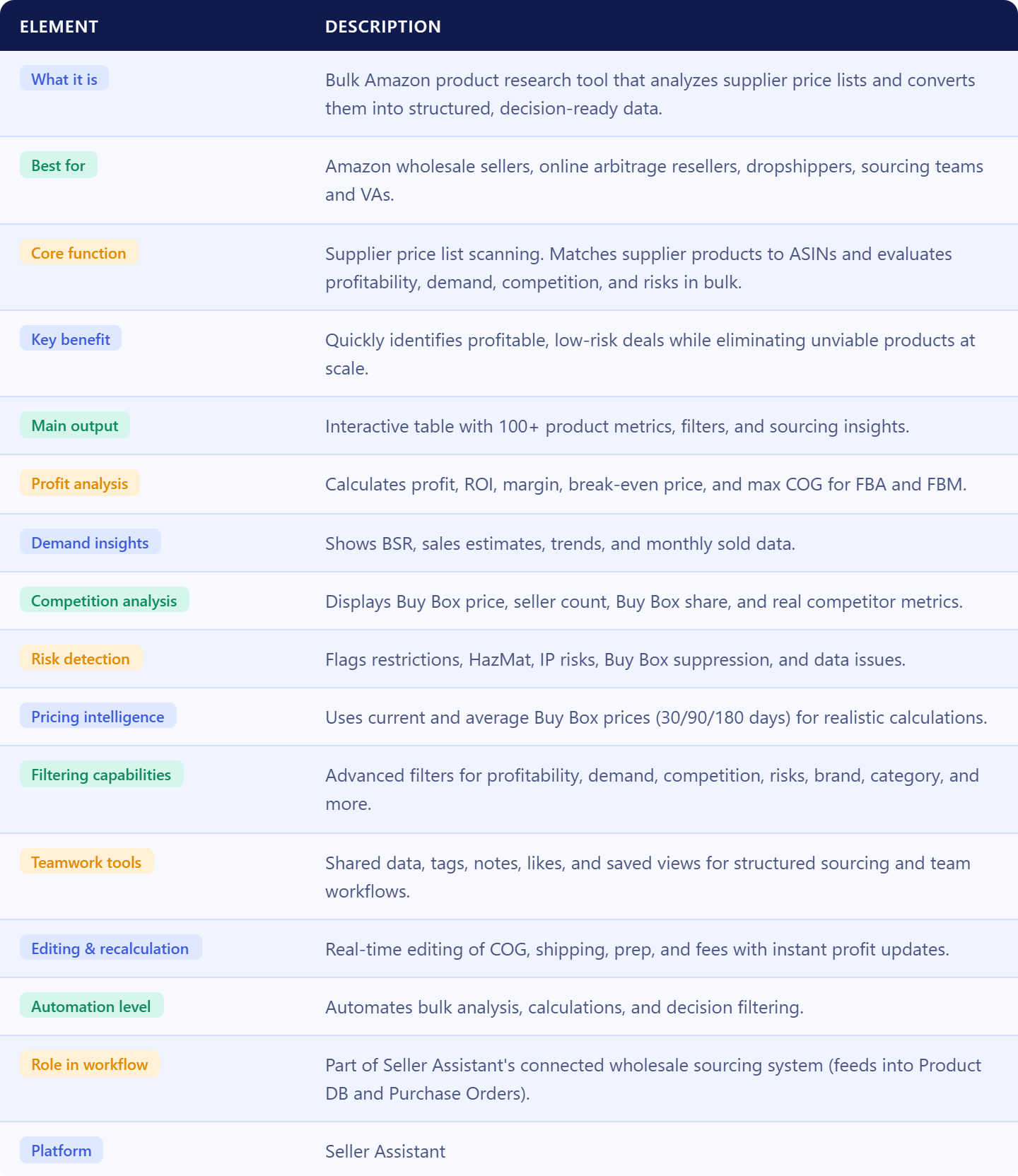
The tool helps you quickly identify profitable, low-risk deals by combining automated ASIN matching, detailed profitability calculations, built-in warnings, and advanced filtering. Instead of manually checking each product, you can instantly surface the items that meet your criteria and eliminate those with hidden risks.
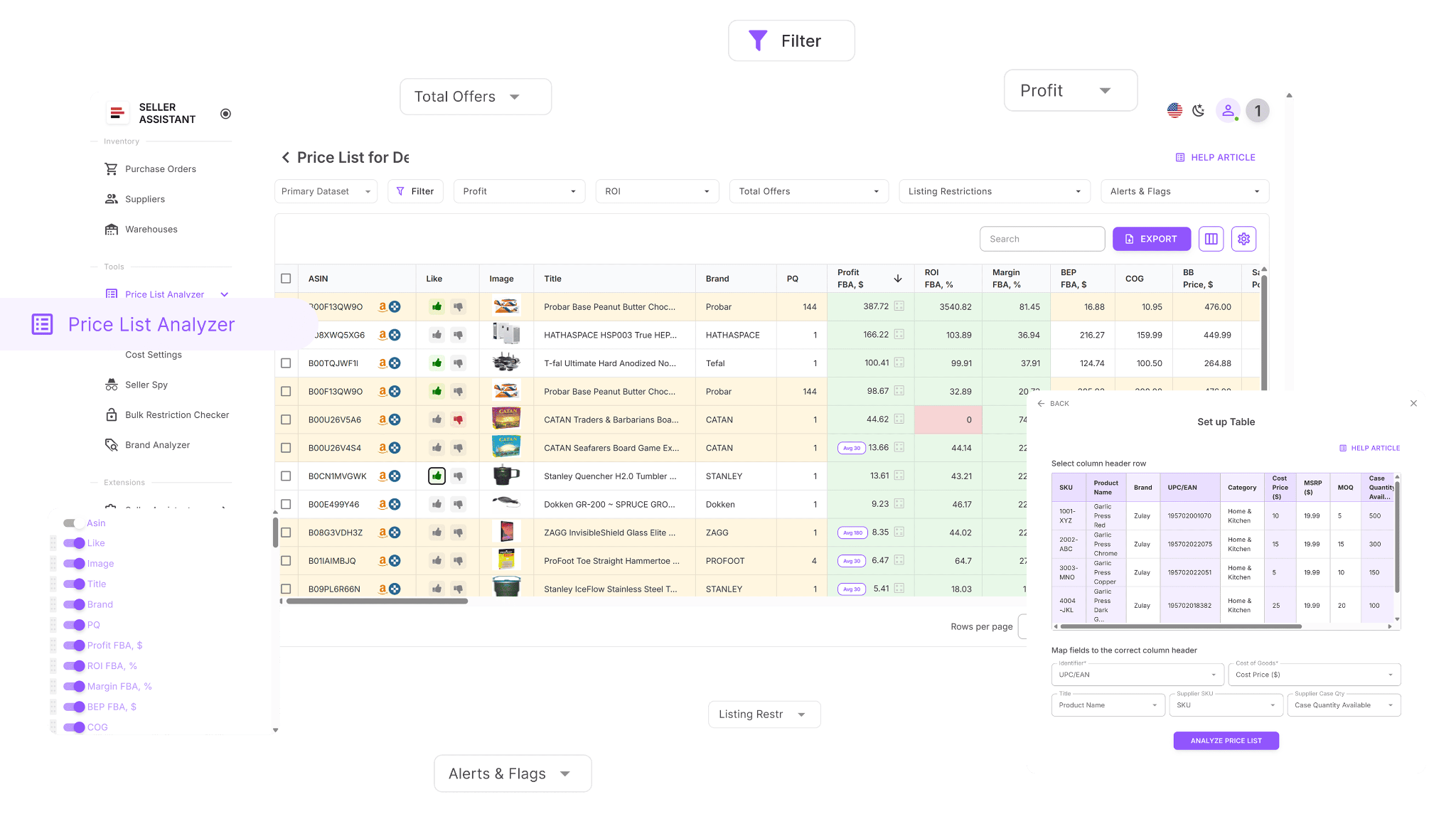
Price List Analyzer also supports team-based workflows by enabling shared views, notes, and tags, so sourcing decisions, insights, and product evaluations can be easily tracked and reused across your team.
By turning unstructured supplier data into clear, actionable insights, it allows you to move from manual research to fast, consistent, and scalable sourcing decisions.
What data Price List Analyzer shows
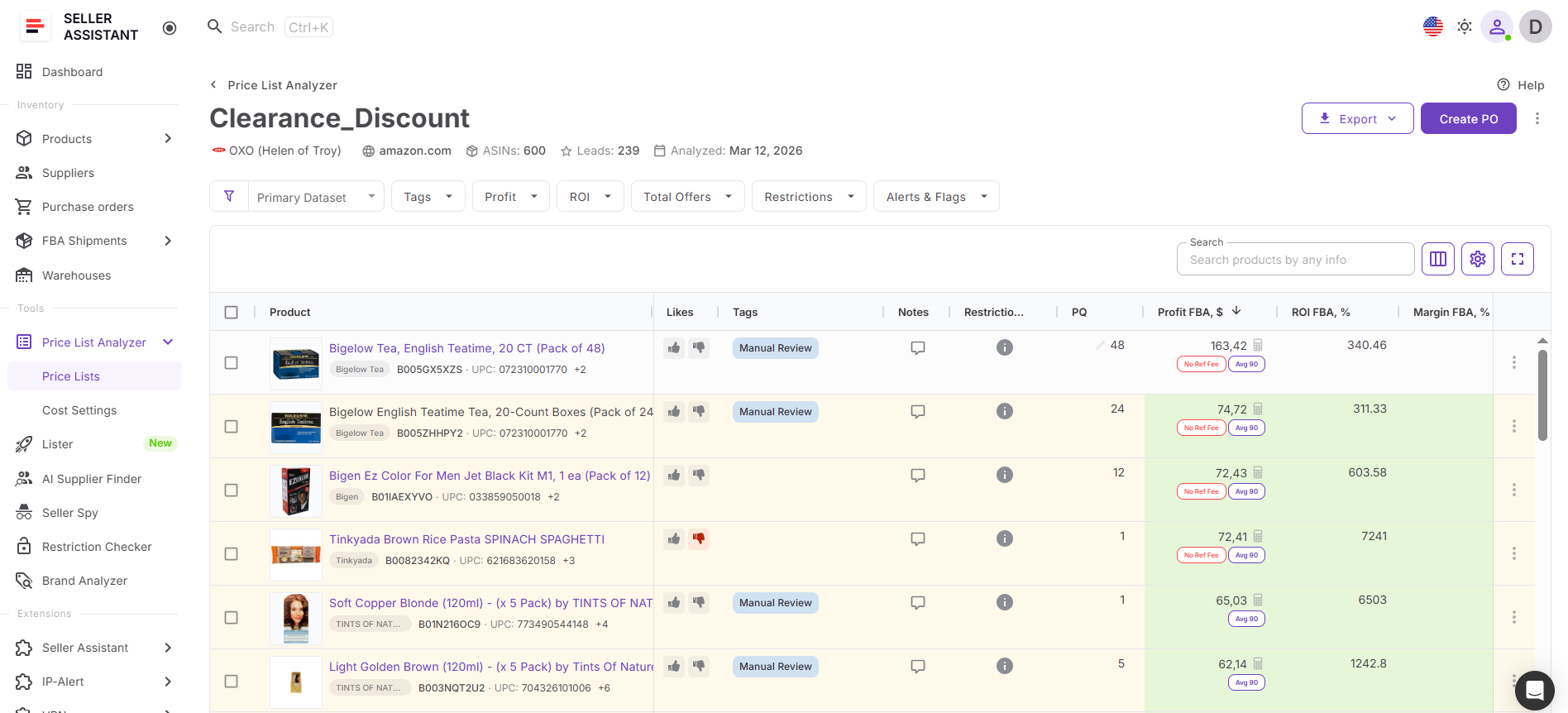
Price List Analyzer provides 100+ key product metrics that help you evaluate each product from every angle – profitability, demand, competition, pricing, and risk. Instead of switching between tools, all critical data is available in one structured table for fast decision-making.
Profitability and cost metrics
These metrics determine whether a product is actually worth selling.
Profit (FBA and FBM)
- ROI and margin
- Break-even price (FBA and FBM)
- Max COG (maximum cost to stay profitable)
- Seller proceeds (before COG and logistics)
Cost structure includes:
- Cost of goods (COG)
- Referral fees
- FBA and FBM fees
- Storage and inbound placement fees
- Prep, shipping, and 3PL logistics costs
- Taxes, VAT, and digital service fees
These metrics ensure you calculate real profit, not estimated profit.
Demand and sales performance metrics
These show whether a product actually sells.
- BSR (current rank)
- Average BSR (30, 90, 180 days)
- Sales estimate (units and revenue)
- Sales rank drops (30, 90, 180 days)
- Monthly sold (Amazon data where available)
You can validate:
- Sales consistency
- Demand stability over time
- Real sales velocity
Pricing and Buy Box metrics
These help you understand price stability and realistic selling prices.
- Buy Box price
- Average Buy Box (30, 90, 180 days)
- Price dynamics (%)
- Competitive price threshold
- Selling price used in calculations
The system also adjusts pricing logic automatically when Buy Box data is missing .
Competition metrics
These show how difficult it is to compete on a listing.
- Total offers (number of sellers)
- Buy Box eligible offers (real competitors)
- Amazon in Buy Box
- Top seller and Buy Box share (%)
- Average Amazon Buy Box share (30, 90, 180 days)
This helps you avoid:
- Listings dominated by Amazon
- Oversaturated products
- Price wars
Risk, restrictions, and warnings
These highlight problems before you invest.
- Listing eligibility
- Restricted products
- No Buy Box / suppressed Buy Box
- No FBA fees (missing data)
- ASIN not found or invalid
- Set or bundle flags
Risk flags include:
- HazMat
- Meltable
- Fragile
- Oversize
- IP complaints risk
- Variation and bundle risks
Warnings are highlighted to prevent costly mistakes and surface hidden issues instantly .
Product and listing data
These help identify and validate products.
- ASIN, UPC, EAN, GTIN
- Product title and image
- Brand and category
- Variations and parent ASIN
- Product dimensions, weight, and attributes
- Description and features
This ensures accurate matching and product verification.
Engagement and workflow data
These support decision-making and team collaboration.
- Likes and dislikes
- Tags
- Notes (shared across team)
- Supplier SKU and case quantity
These features allow you to:
- Track decisions
- Organize sourcing stages
- Share insights across your team
- Alerts, flags, and product condition
These help evaluate product viability beyond raw numbers.
Why Price List Analyzer is important for Amazon sellers
Bulk sourcing without structured analysis leads to missed opportunities and costly mistakes. Price List Analyzer solves this by combining speed, accuracy, and depth in one workflow.
It allows you to:
- Process thousands of products in minutes instead of hours
- Identify profitable deals before competitors
- Avoid restricted or high-risk products early
- Make consistent, data-driven sourcing decisions
- Scale product research without increasing manual workload
Instead of reacting to individual deals, you build a repeatable system for finding them.
How it fits into Seller Assistant workflow
Price List Analyzer is not a standalone tool – it’s part of a connected wholesale workflow inside Seller Assistant.
It integrates with other tools to create a complete sourcing system:
- Brand Analyzer → helps evaluate brand potential before sourcing
- AI Supplier Finder → connects analyzed products to real wholesale suppliers
- Suppliers Database → stores supplier data used during sourcing and purchasing
- Bulk Restriction Checker → validates selling eligibility before or after analysis
- Price List Analyzer → analyzes supplier catalogs and identifies profitable deals
- Product Database → saves analyzed products, tracks offers, and compares suppliers
- SKUs → manages seller SKUs, statuses, and landed costs
- Listings → tracks and manages Amazon listings across marketplaces
- Lister → creates listings directly from product data without switching to Seller Central
- Warehouses Database → manages prep centers and default shipping destinations for orders
- Purchase Orders Module → converts profitable products into ready-to-send purchase orders
- FBA Shipments → tracks inbound shipments and delivery status.
Data flows between these tools automatically, so you don’t need to re-enter information or switch between systems. This turns bulk analysis into a complete sourcing workflow – from product discovery to purchasing.
Note. Seller Assistant is an end-to-end Amazon workflow management platform that integrates 15+ wholesale-focused solutions into one connected system. It combines sourcing workflow automation, bulk research and intelligence tools, and integrated Chrome extensions – giving you everything you need to streamline finding deals, managing suppliers, and creating purchase orders.

The platform aggregates: workflow management tools – Purchase Orders Module, Suppliers Database, Product DB, Warehouses Database, FBA Shipments to organize, automate, and scale every step of your wholesale and arbitrage operations; bulk research & sourcing tools – Price List Analyzer, Bulk Restriction Checker, AI Supplier Finder, Brand Analyzer, Seller Spy to evaluate supplier price lists, verify selling eligibility and restrictions, open new brands, and discover winning product ideas from competitors to expand your product catalog; Chrome extensions – Seller Assistant Browser Extension, IP-Alert Extension, and built-in VPN by Seller Assistant to deep-research products, check IP claims and compliance, and access geoblocked supplier sites directly within your browser; and integrations & team access features – seamless API connectivity and integrations with Zapier, Airtable, and Make, plus Virtual Assistant Accounts for secure, scalable team collaboration.
With Seller Assistant, every step of your Amazon wholesale and arbitrage workflow is automated and connected.
What Price List Analyzer Does
Price List Analyzer turns raw supplier catalogs into structured, decision-ready data, helping you quickly identify which products are worth buying and which to skip.
Helps you find profitable deals faster
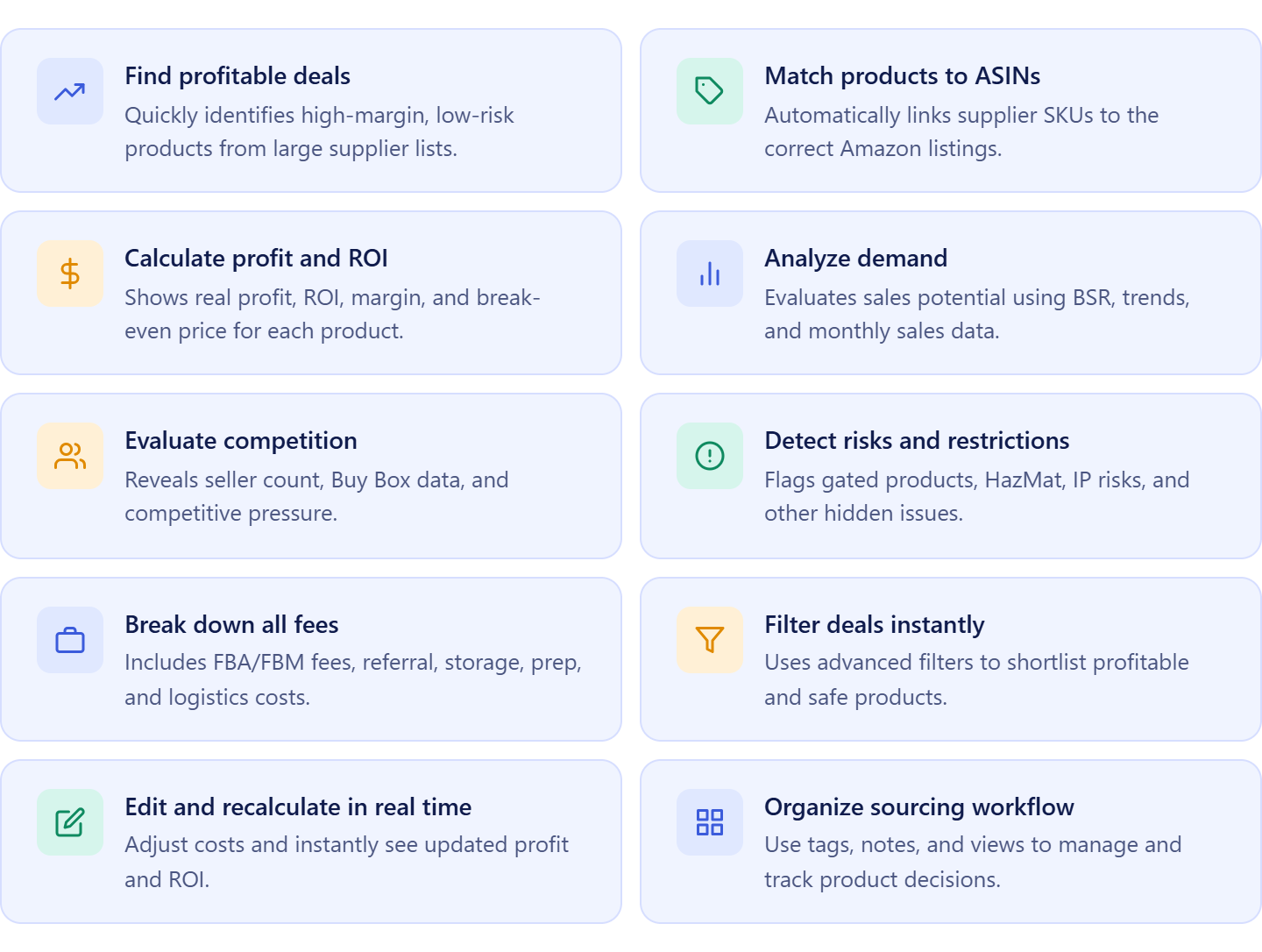
Instead of manually checking products one by one, Price List Analyzer scans entire supplier lists and highlights items that meet your profitability criteria. With built-in calculations, filtering, and warnings, you can instantly focus on high-margin, low-risk opportunities and ignore unprofitable products.
Automates product matching and data enrichment
- Matches supplier SKUs to the correct Amazon ASINs automatically
- Enriches each product with 100+ Amazon and Keepa data
Calculates profitability and costs
- Calculates profit, ROI, margin, and break-even price
- Breaks down all Amazon fees, including FBA/FBM, referral, storage, and prep
Analyzes demand and sales performance
- Estimates demand using BSR, sales trends, and monthly sales data
- Helps identify products with stable and consistent sales
Evaluates competition and pricing
- Analyzes Buy Box price and historical averages
- Shows number of sellers and competitive pressure
Detects restrictions and risks
- Identifies ineligible or approval-required products
- Flags risks such as hazmat, meltable, oversized, fragile, or IP-related issues
Enables fast filtering and bulk decision-making
- Allows bulk filtering by profitability, demand, competition, and risk
- Helps you quickly shortlist viable products from large catalogs
Supports real-time adjustments and recalculation
- Enables in-table editing of costs and parameters
- Instantly recalculates all data including profit and ROI based on changes
Organizes sourcing workflow and team collaboration
- Supports tags, notes, and saved views
- Helps structure sourcing decisions and share insights across your team
How Price List Analyzer Works
Price List Analyzer follows a simple workflow: you upload a supplier price list, and the system automatically matches products to Amazon ASINs, calculates profitability, and enriches each item with demand, competition, pricing, and risk data. Within minutes, you get a structured table where every product is ready for evaluation and filtering.
From upload to analyzed results
The process is straightforward:
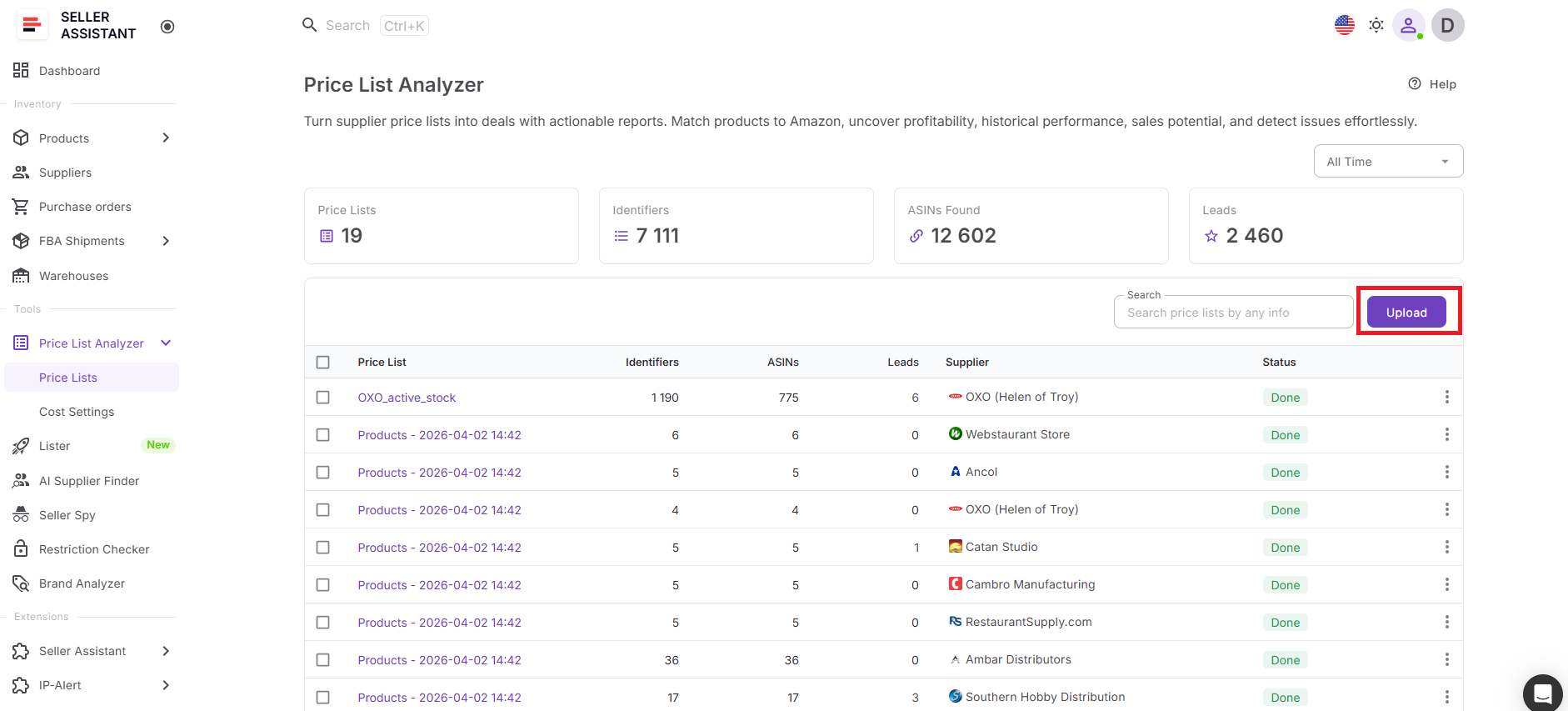
- Upload your supplier file (.xlsx or .xls)
- Map key fields like UPC/EAN/ASIN and cost of goods with built-in AI
- Start analysis
The system then:
- Matches products to Amazon listings
- Calculates profit, ROI, and fees
- Adds demand, pricing, and competition data
- Flags risks, restrictions, and warnings
You can start reviewing results even before the full analysis is complete.
Filter and identify the best deals
Once your data is ready, you can quickly narrow down your list:
- Apply filters for ROI, profit, demand, and competition
- Exclude restricted or high-risk products
- Use list-based filters (brand, category, size tier, tags)
- Apply quick filters for faster decision-making
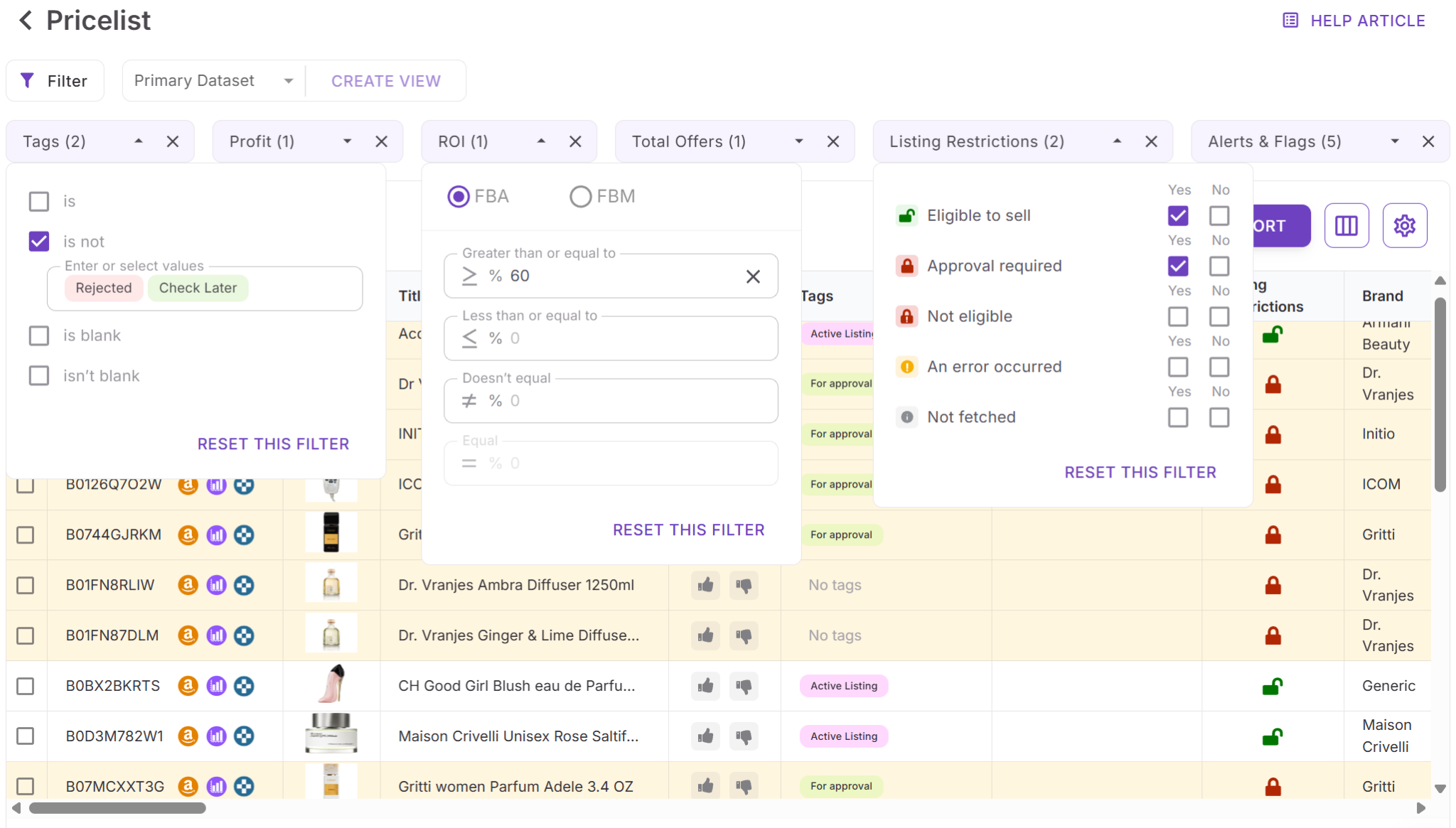
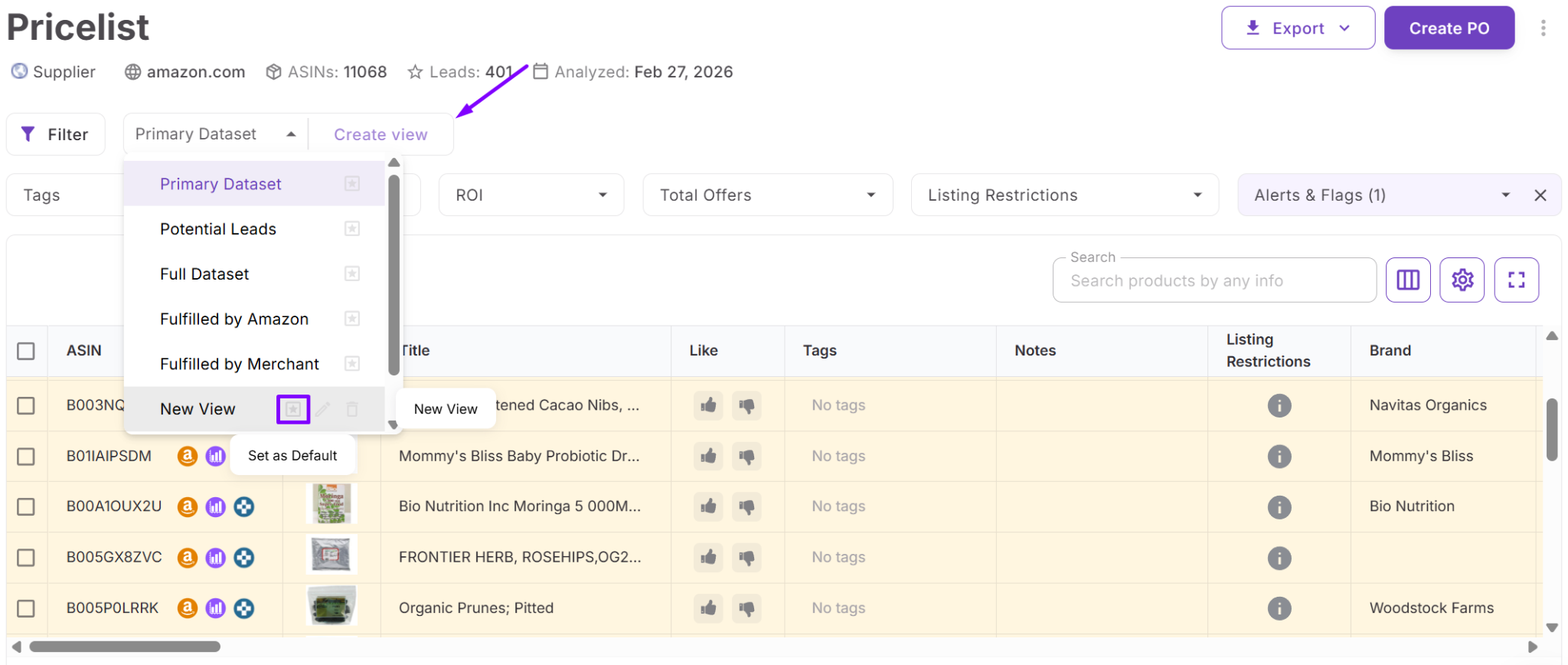
Saved views allow you to reuse your criteria across different price lists, making your sourcing process consistent and scalable.
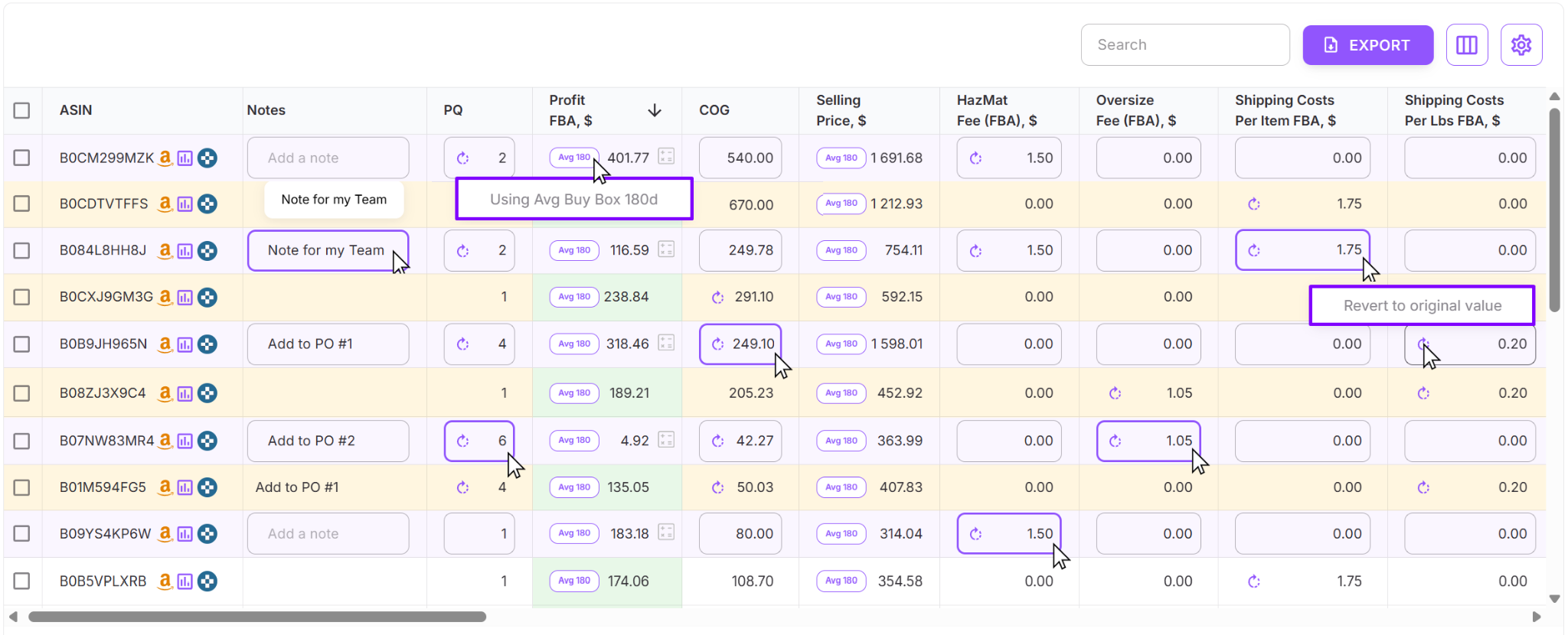
Adjust data and recalculate instantly
Price List Analyzer is interactive – you can refine your assumptions without re-uploading files:
- Edit cost of goods, shipping, prep, and fees
- Adjust package quantity (PQ)
- Update logistics or tax settings
All changes trigger instant recalculation of profit and ROI, helping you validate deals under real conditions.
Use advanced data for deeper analysis
With extended metrics and recent updates, you can:
- Analyze Buy Box averages instead of temporary price spikes
- Validate demand using historical data (30/90/180 days)
- Evaluate real competition using Buy Box–eligible sellers
- Detect risks like suppressed Buy Box or high return rates
This helps you avoid false positives and focus on stable, reliable products.
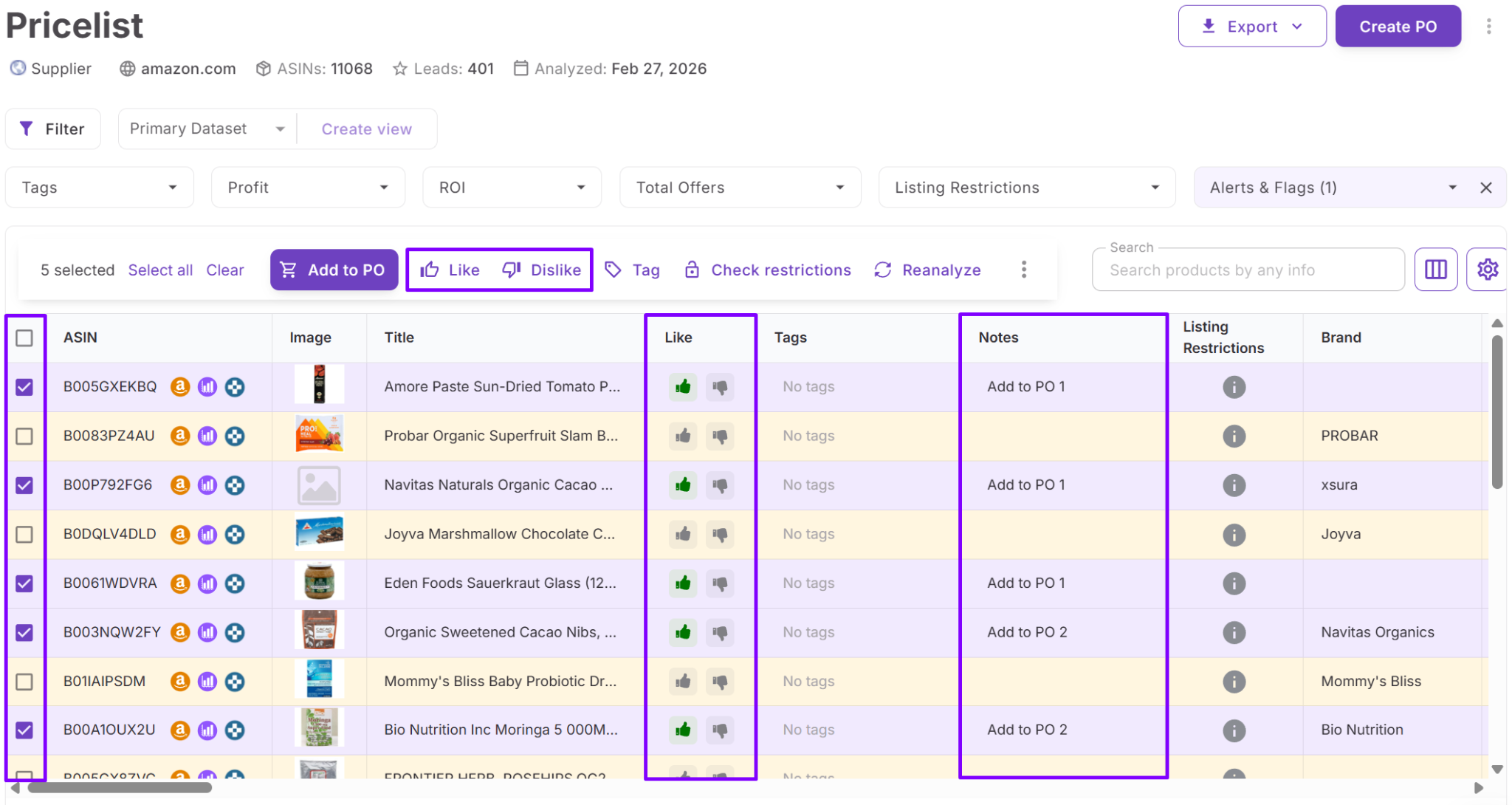
Organize and scale your sourcing workflow
Beyond analysis, you can:
- Tag and annotate products
- Use likes/dislikes to build shortlists
- Add notes that stay linked to products across uploads
- Collaborate with team members using shared views and data
Why this workflow matters
Instead of manually reviewing products, you move to a system where:
- Deals are filtered automatically
- Calculations are consistent
- Decisions are faster and more accurate
This makes it easy to scan large supplier catalogs, eliminate weak products, and focus only on the best opportunities.
How to Use Price List Analyzer Step by Step
Using Price List Analyzer is simple: upload your supplier file, map the key fields, run the analysis, and review the results in an interactive table. From there, you can filter products, adjust costs, save views, and export shortlisted deals.
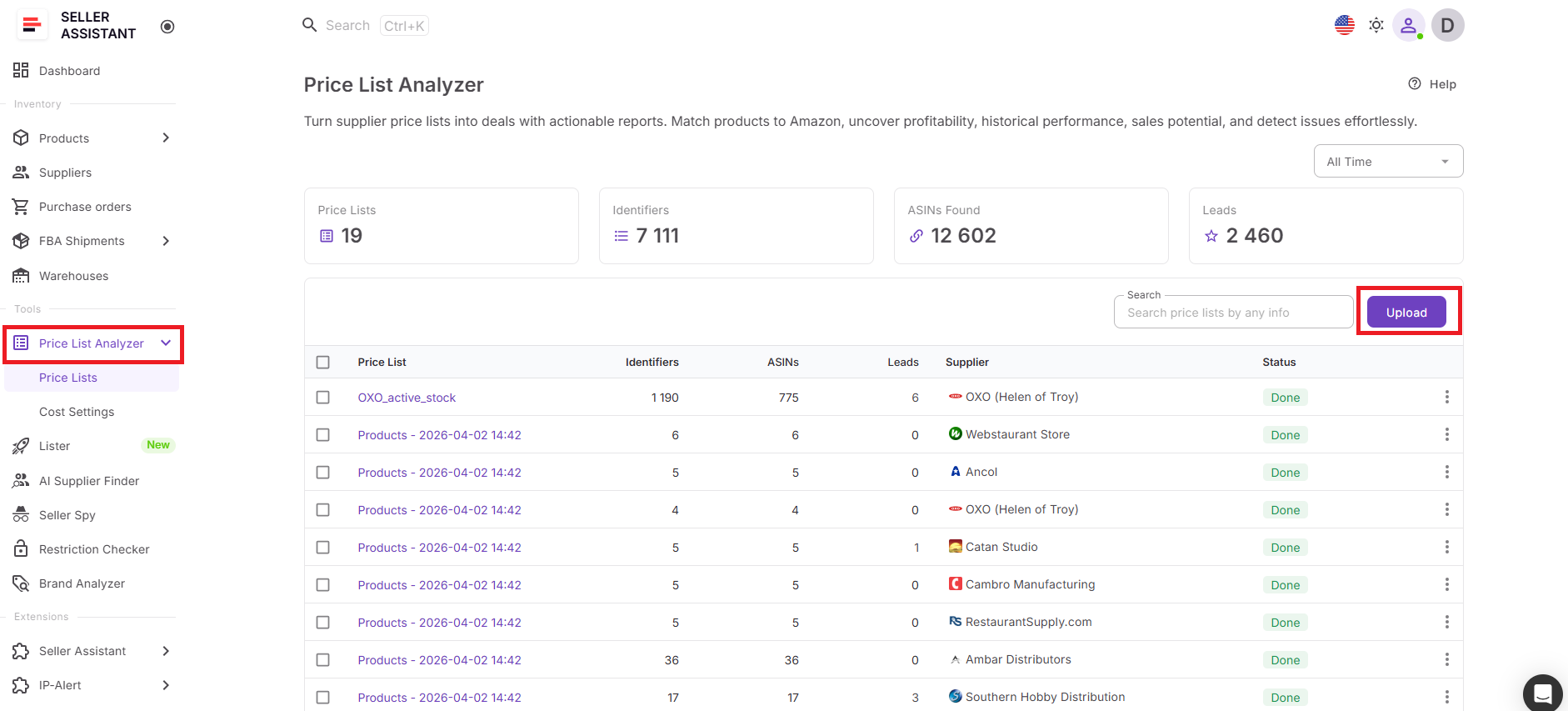
Step 1. Upload your price list
Open Price List Analyzer in your Seller Assistant account, click Upload, choose your marketplace, and select your supplier file in .xlsx or .xls format.
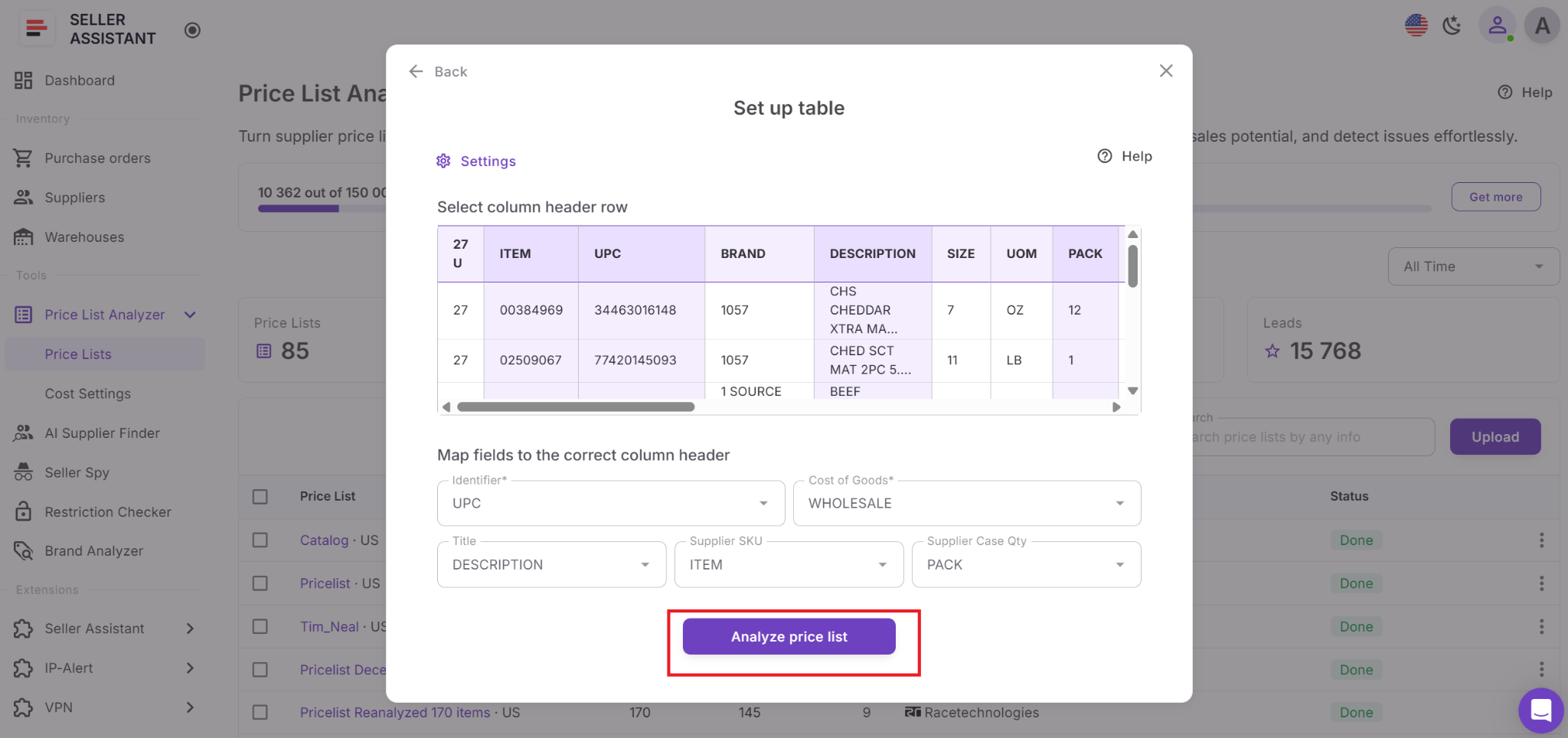
Step 2. Map the required fields
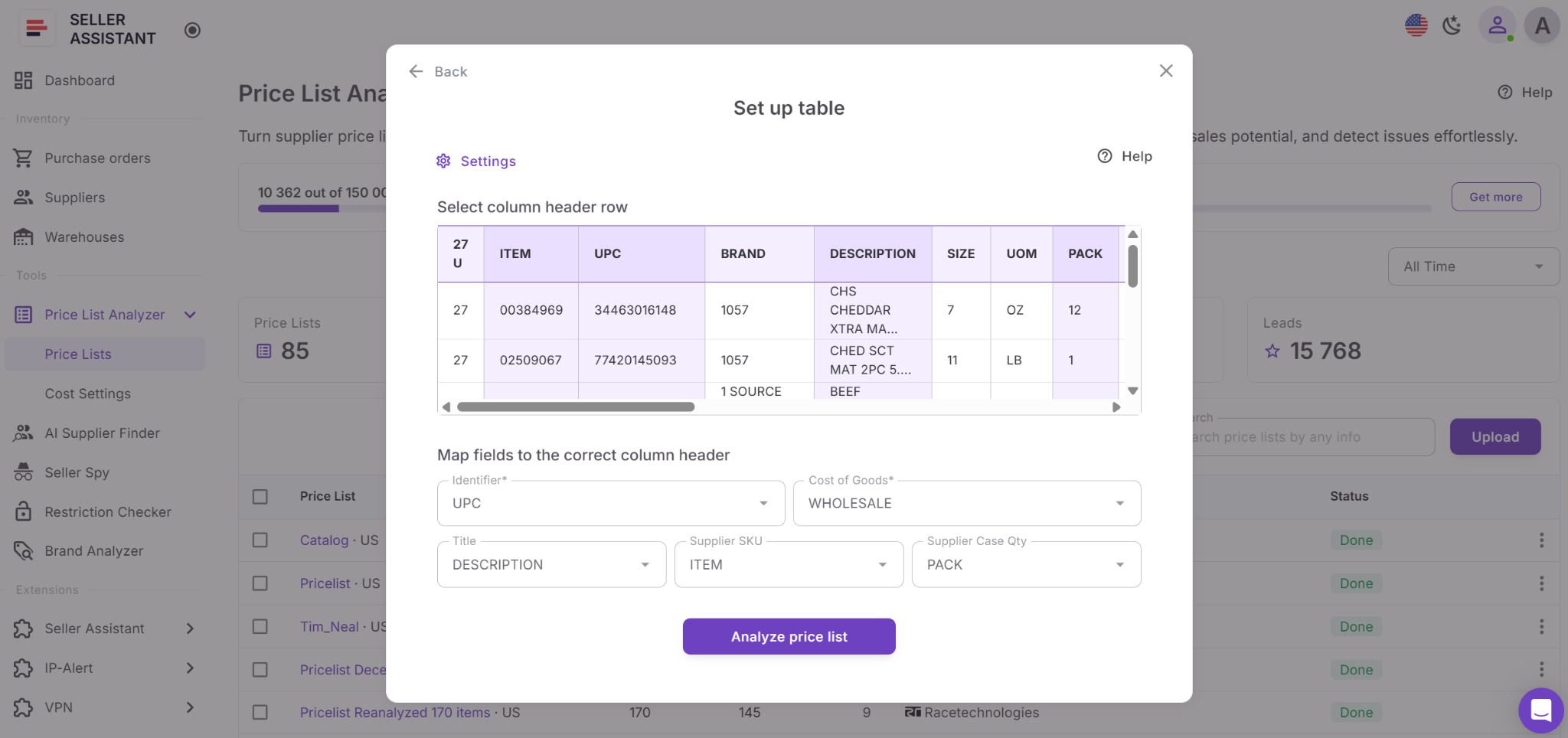
Map the key columns in your file so the system can process it correctly using built-in AI. At minimum, your file must include:
- UPC, EAN, or ASIN
- Cost of goods
If needed, you can also map other fields such as product title. AI-assisted mapping can help select the right sheet, header row, and matching columns.
Step 3. Start the analysis
Click Analyze Price List. Price List Analyzer will automatically:
- Match supplier products to Amazon ASINs
- Calculate profit, ROI, margin, and break-even price
- Add demand, competition, pricing, and risk data
- Flag restrictions and warnings
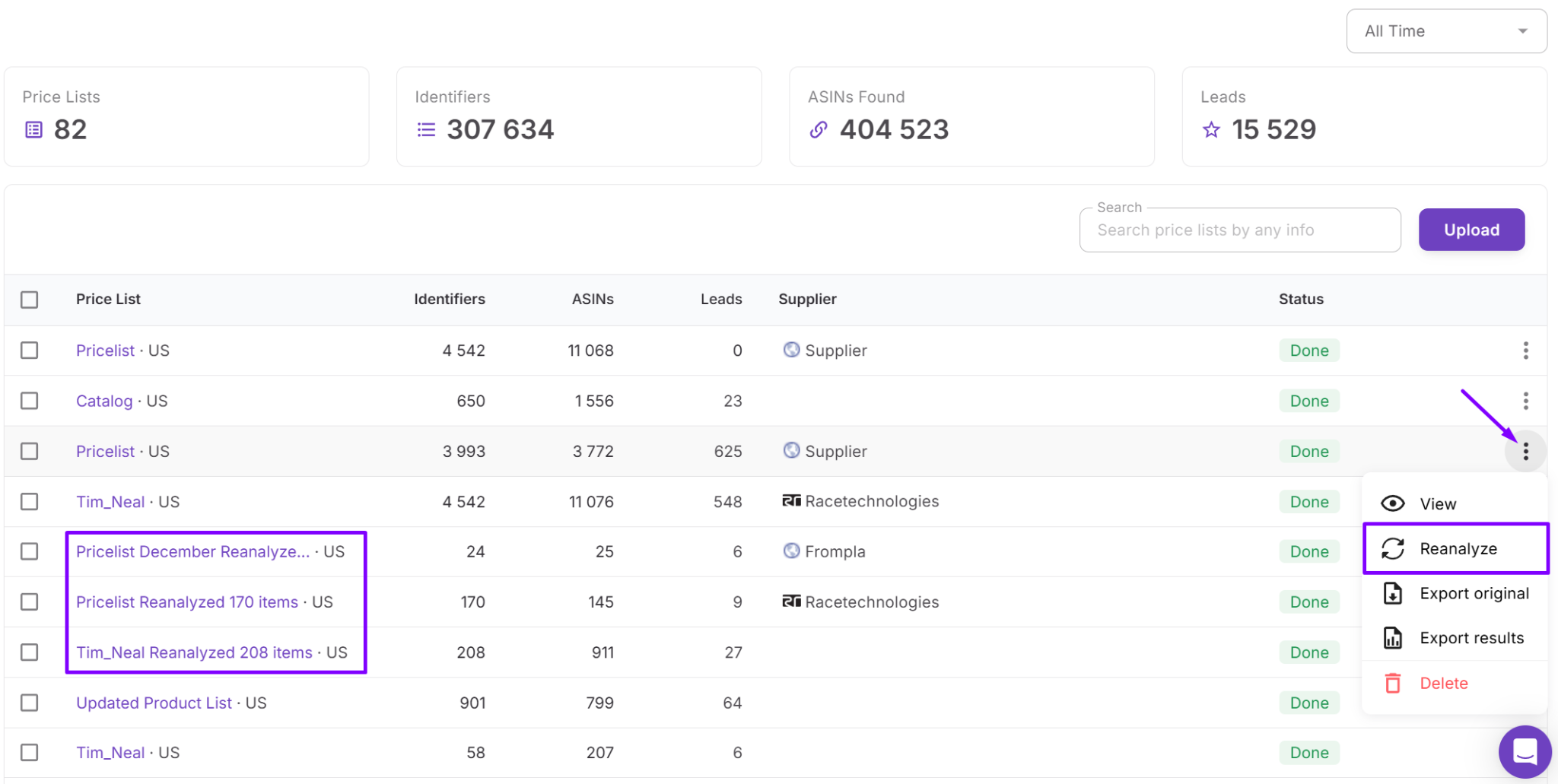
If you upload multiple files, they are processed in a queue.
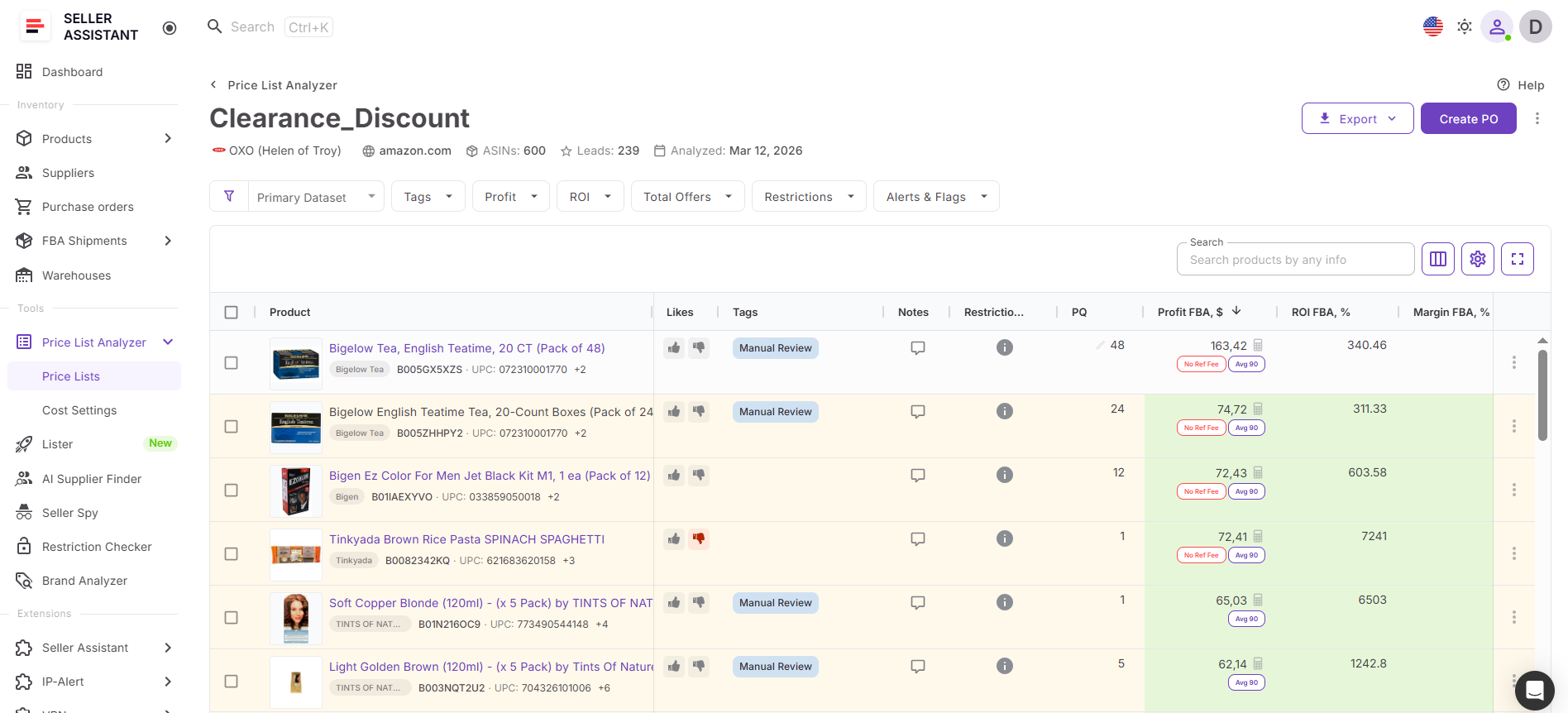
Step 4. Review results in the table
You can open the analyzed file right away, even while processing is still running. The table updates as products are processed, so you can start reviewing leads before the entire file is complete.
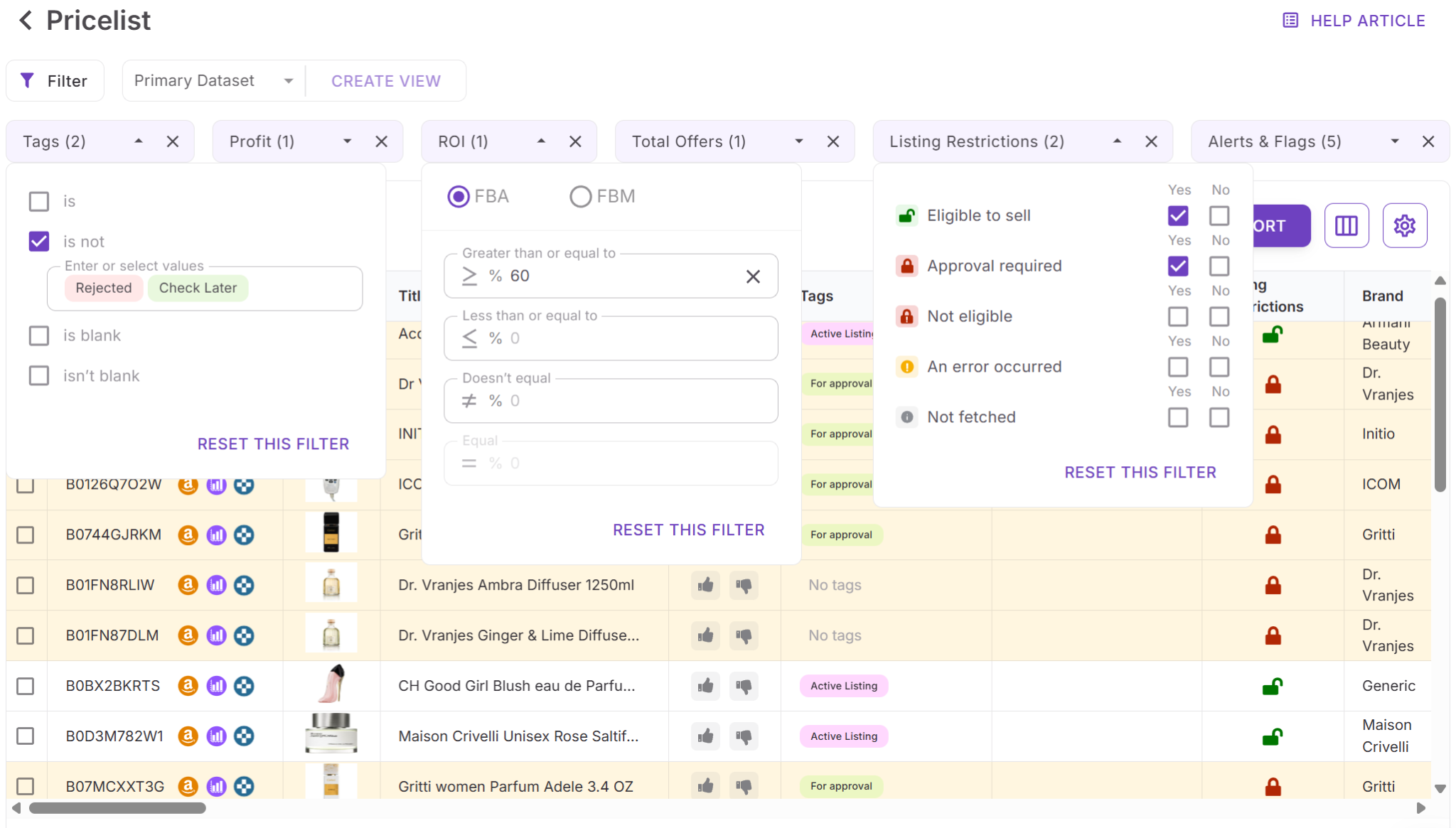
Step 5. Filter the products
Use filters to narrow your list and surface the best opportunities. You can filter by:
- Profit and ROI
- Demand and sales estimates
- Competition and Buy Box data
- Restrictions, warnings, and risk flags
- Brand, category, size tier, and tags
- Any other metric of your choice
Quick filters make this faster, and saved views let you reuse your preferred setup across future lists.
Step 6. Adjust costs and recalculate
If your assumptions change, you can edit values directly in the table:
- Cost of goods
- Shipping and prep costs
- Package quantity
- Fees and taxes
Profit, ROI, and other data recalculate instantly, so you can validate products without re-uploading the file.
Step 7. Organize your shortlist
As you review products, you can:
- Add likes or dislikes and leave notes
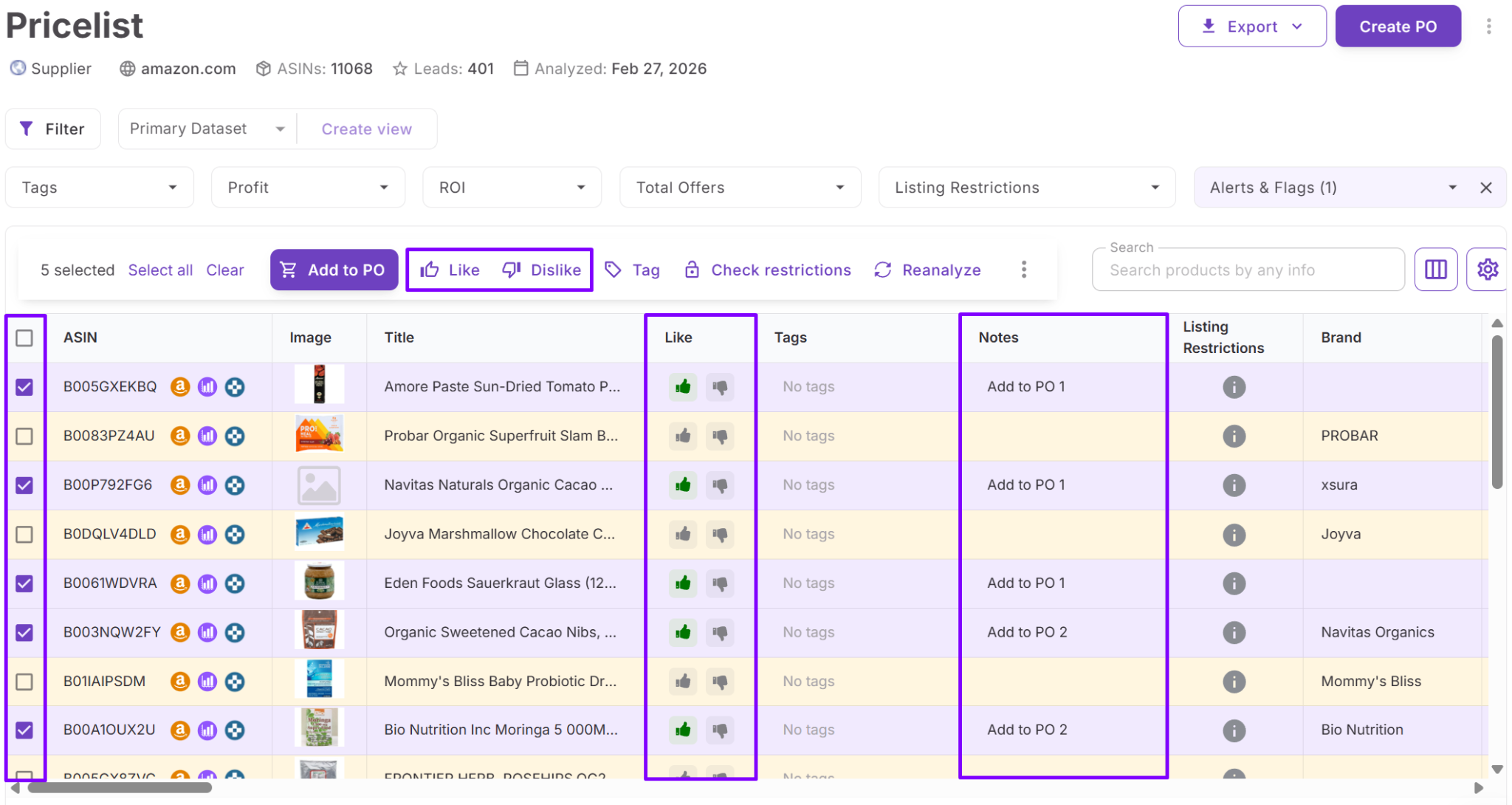
- Apply tags
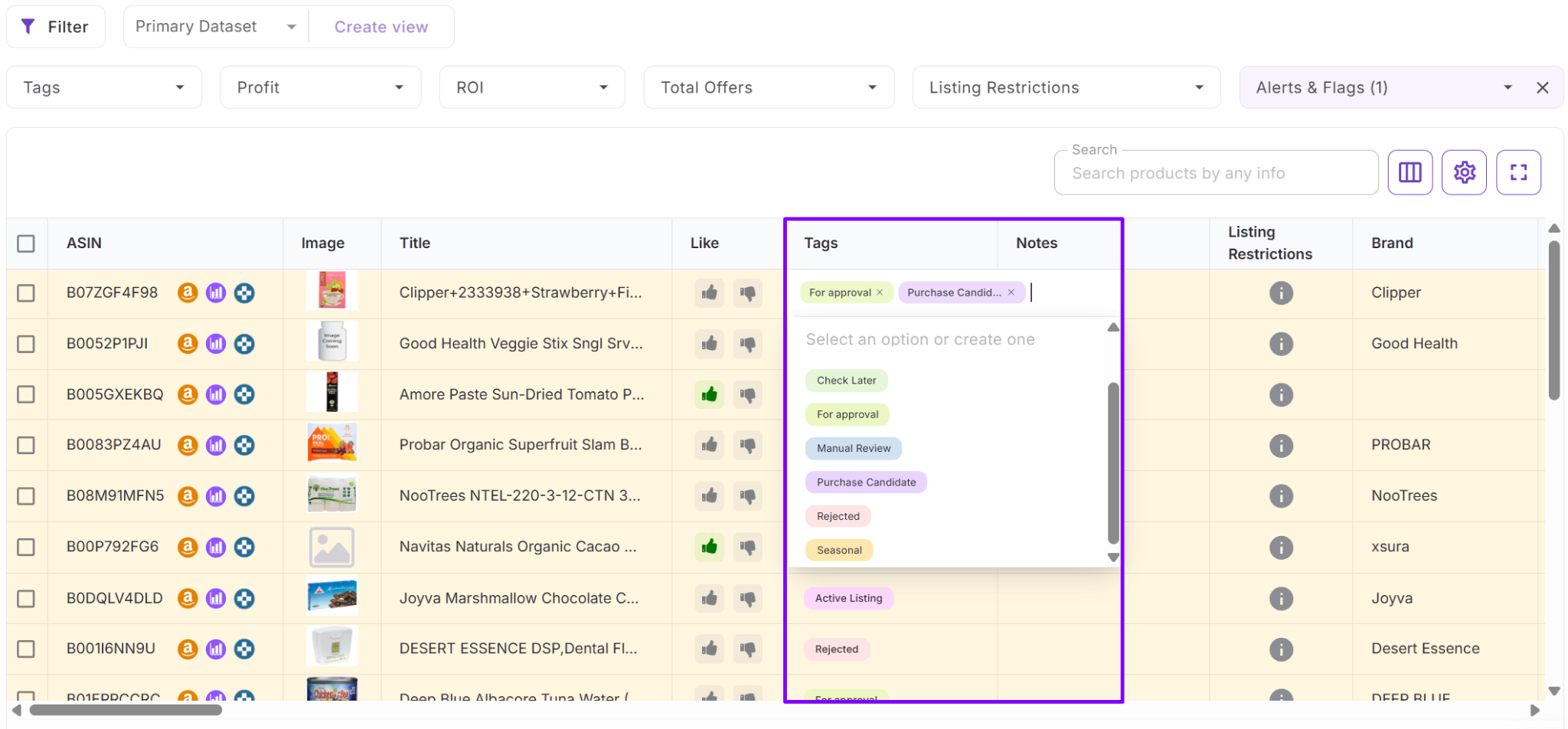
- Save filtered views
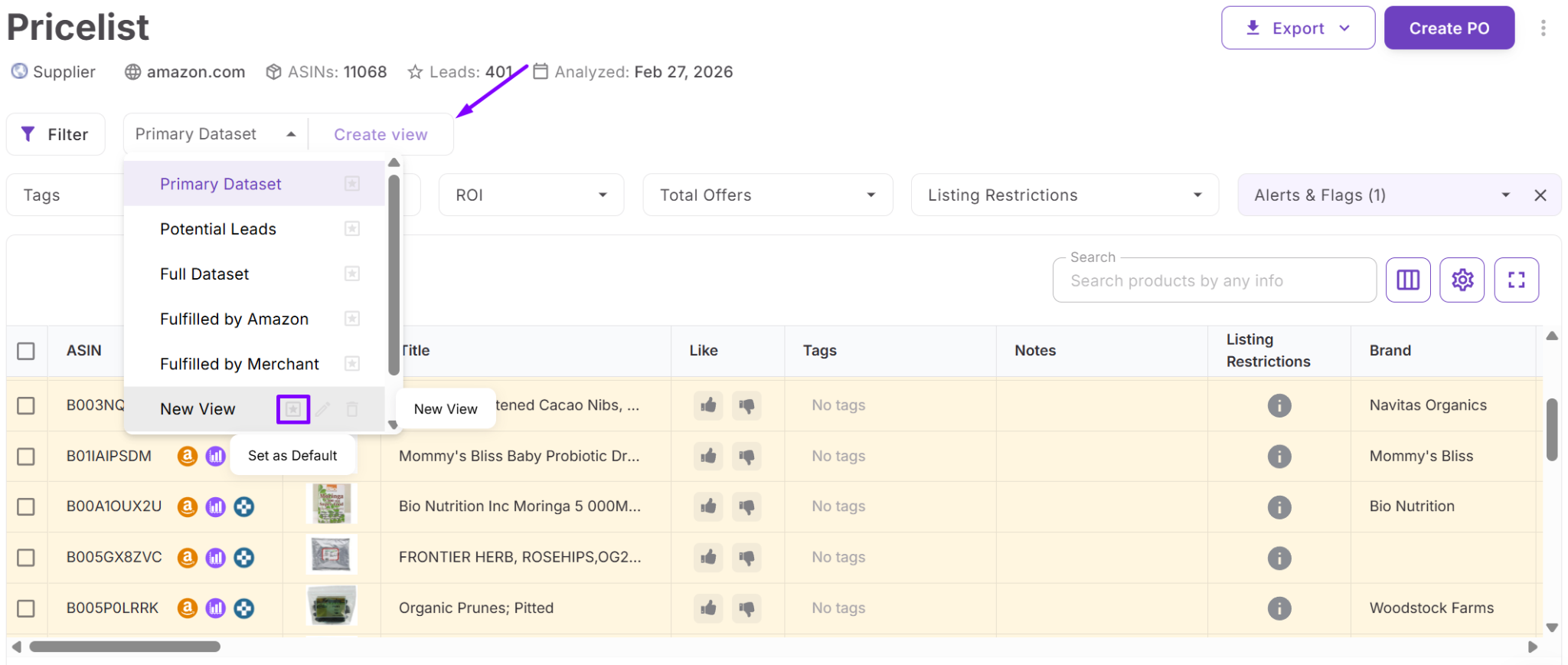
These tools help you build a shortlist, track decisions, and collaborate with your team.
Step 8. Export or continue the workflow
Once you’ve identified strong deals, you can export:
- The full list
- A filtered list
- Only selected products
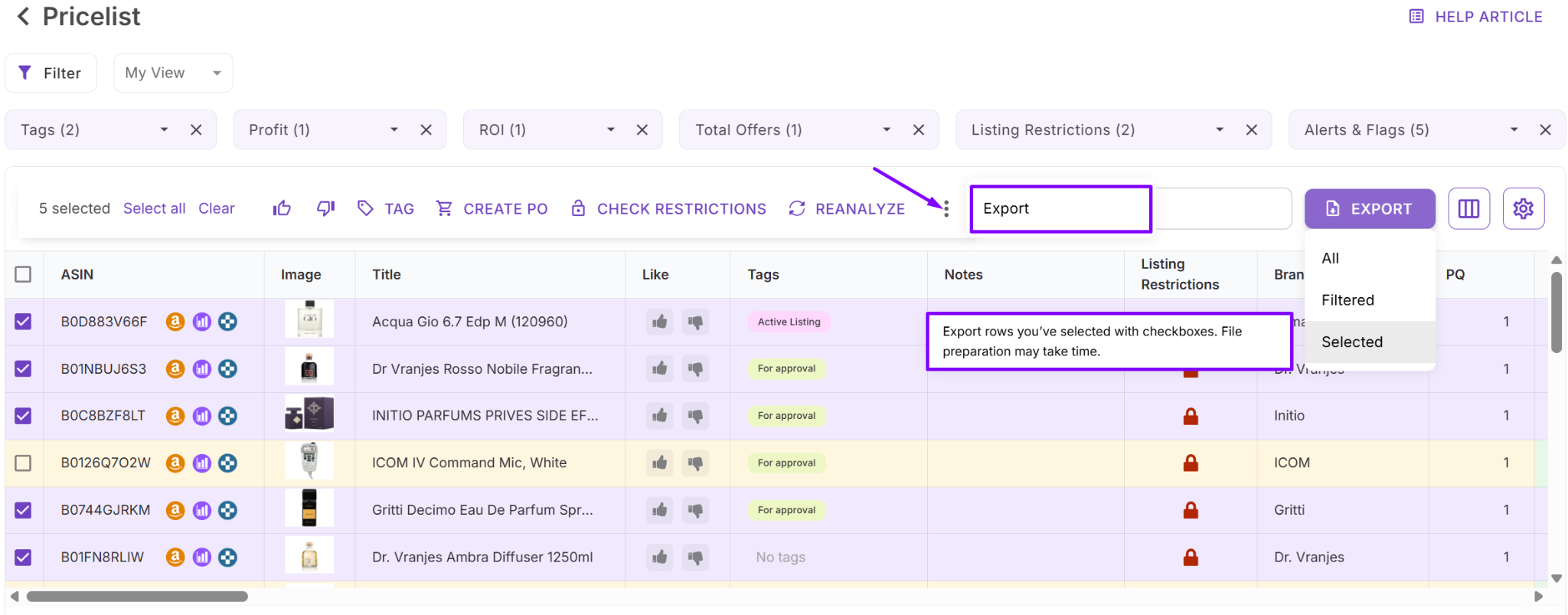
You can also move products into the rest of your Seller Assistant workflow for product tracking, purchase orders, and further sourcing actions.
FAQ
What kind of supplier files can I use in Price List Analyzer?
You can upload supplier price lists in .xlsx or .xls format with UPC, EAN, or ASIN and cost of goods. The tool supports large catalogs, allowing you to analyze hundreds or thousands of products at once.
How accurate are the profit and ROI calculations?
Calculations are based on real Amazon fees, your cost settings, and selected Buy Box pricing logic. Accuracy depends on correct inputs like COG, shipping, and prep costs, so it’s important to configure them properly.
Can I use Price List Analyzer for online arbitrage or only wholesale?
Price List Analyzer works for wholesale, online arbitrage, and dropshipping as long as you have product data in bulk format. Any list of products with identifiers and costs can be analyzed.
What is a good ROI or profit threshold to filter products?
Most Amazon sellers look for at least 20–30% ROI and $2–$5 profit per unit, depending on their business model. However, ideal thresholds vary based on volume, risk tolerance, and operational costs.
Do I need other Seller Assistant tools to use Price List Analyzer effectively?
You can use Price List Analyzer on its own, but it becomes more powerful when combined with other tools in the workflow. Integrations with product tracking, supplier management, and purchase orders help turn analysis into real sourcing decisions.
Final Thoughts
Price List Analyzer changes how Amazon sellers approach product sourcing. Instead of manually checking products one by one, you can analyze entire supplier catalogs, validate profitability, and identify risks in a single workflow.
The real advantage is not just speed – it’s consistency and decision quality. With structured data, built-in calculations, and advanced filtering, you can eliminate weak products early and focus only on deals that meet your criteria.
As your business grows, this becomes essential. Price List Analyzer helps you scale sourcing, reduce errors, and turn bulk data into clear, confident buying decisions.
Seller Assistant automates and connects every stage of your Amazon wholesale and arbitrage workflow. It brings together in one platform: workflow management tools – Purchase Orders Module, Suppliers Database, Warehouses Database, FBA Shipments, bulk research & sourcing tools – Price List Analyzer, Bulk Restriction Checker, Sourcing AI, Brand Analyzer, Seller Spy, Chrome extensions – Seller Assistant Browser Extension, IP-Alert Extension, and built-in VPN by Seller Assistant, and integrations & team access features – seamless API connectivity, integrations with Zapier, Airtable, and Make, and Virtual Assistant Accounts.


