



Most Amazon sellers think they know their profit – but they’re often calculating it wrong. Product cost alone doesn’t reflect what it actually takes to get inventory ready for sale.
Prep, shipping, and inbound fees can quietly eat into margins and turn a profitable deal into a loss.
Landed cost solves this by showing the true per-unit cost of getting a product to Amazon, and Seller Assistant makes it easy to calculate and track it automatically. When you calculate it correctly, you stop guessing your margins and start making decisions based on real profitability across your sourcing, purchasing, and fulfillment workflow.
Why Landed Cost Is Where Real Profit Is Decided
Looking at product cost alone doesn’t tell you if a deal is profitable. Landed cost brings together every expense tied to getting a product to Amazon, giving you a clear, accurate view of your margins. Without it, you’re making decisions on incomplete data and risking losses that only show up after the product is already in FBA.
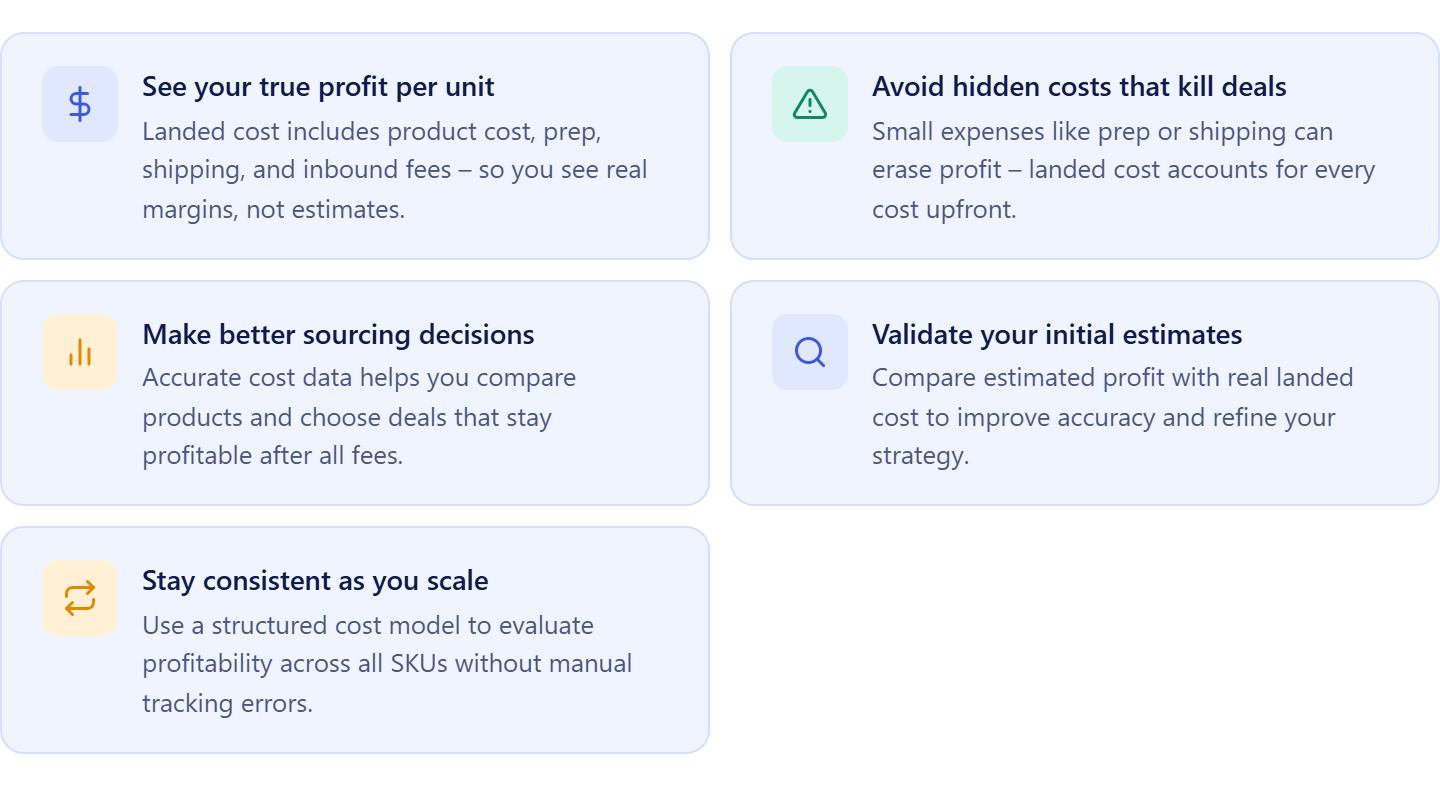
See your true profit per unit
Landed cost includes all expenses – product cost, prep, shipping, and inbound fees. This gives you a real margin instead of an estimate based only on supplier price.
Avoid hidden costs that kill deals
Small costs like prep or inbound shipping can turn a good deal into a bad one. Landed cost helps you account for every expense before and after purchase.
Make better sourcing decisions
When you know your real cost, you can compare products more accurately. This helps you choose deals that remain profitable after all fees are included.
Validate your initial estimates
What looks profitable in sourcing tools doesn’t always match reality. Comparing estimated profit with actual landed cost helps you refine your buying strategy.
Stay consistent as you scale
As your catalog grows, manual cost tracking becomes unreliable. Landed cost gives you a consistent way to evaluate profitability across all SKUs and orders.
What Is Landed Cost in Seller Assistant
| Landed cost summary | Description |
|---|---|
| What it is | Per-unit cost calculation for Amazon sellers – combines all expenses required to get a product ready for sale (COG, prep, shipping, inbound fees) |
| Best for | Amazon wholesale sellers, online arbitrage resellers, dropshippers |
| Core function | Aggregates and tracks all cost components at the SKU level with automatic updates from Purchase Orders, shipments, and cost settings |
| Key benefit | Shows true profitability per unit, prevents underestimating costs, and enables accurate pricing and sourcing decisions |
| Where to find it | Inside SKUs Tool in Product Database – available in the landed cost field in each SKU |
| Platform | Seller Assistant |
In Seller Assistant, landed cost is the total per-unit cost of getting a product ready for sale on Amazon. It combines unit cost, purchase order expenses, prep costs, and FBA inbound fees into a single number, calculated automatically for each SKU.
What landed cost shows you
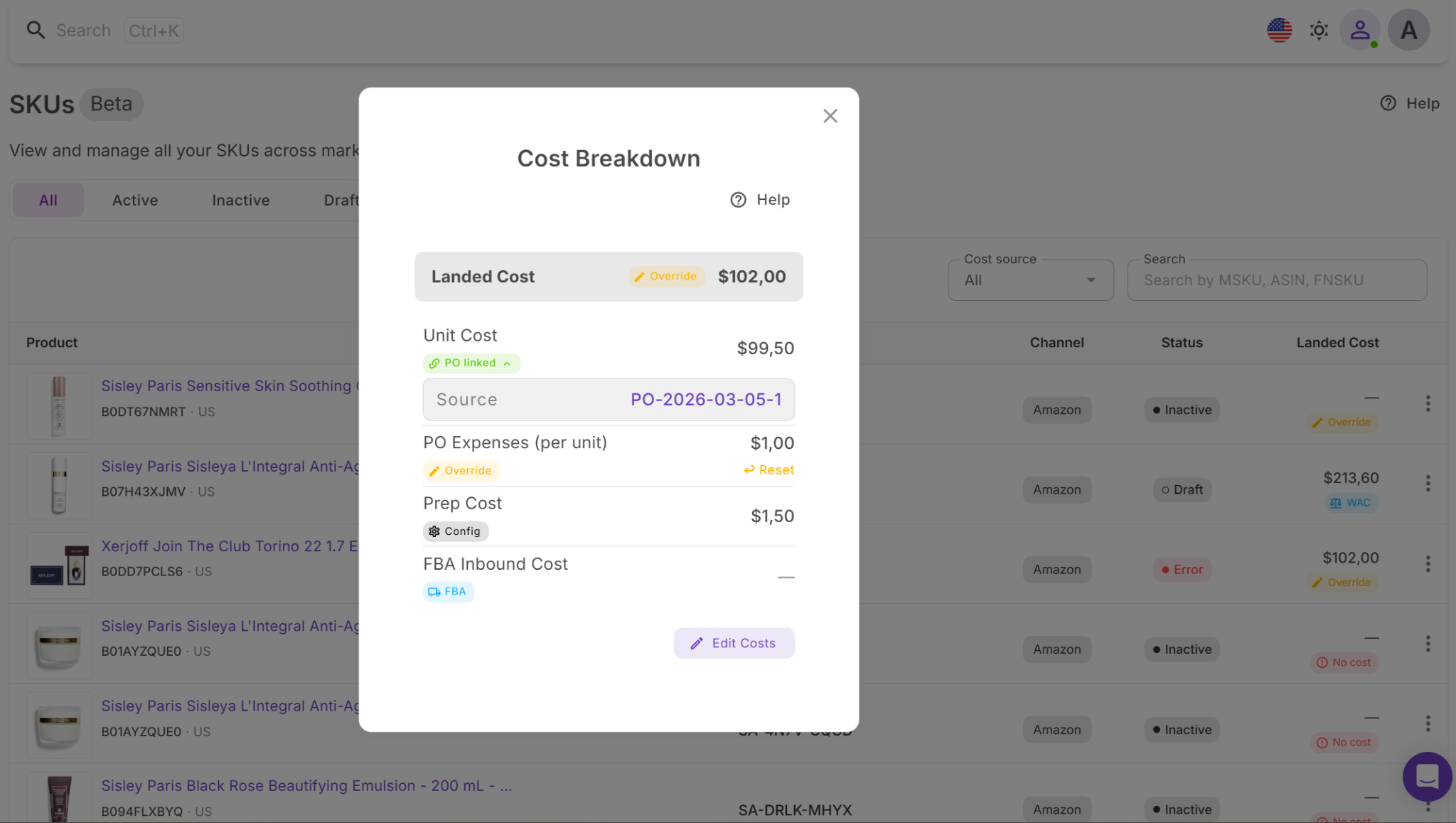
Landed cost gives you a complete breakdown of where your money goes. You can see each cost component – product cost, shipping, prep, and inbound payments – along with its source, such as purchase orders, shipments, or cost settings. This makes it easy to understand how your final cost is formed and where adjustments may be needed.
Where to find and how to manage it
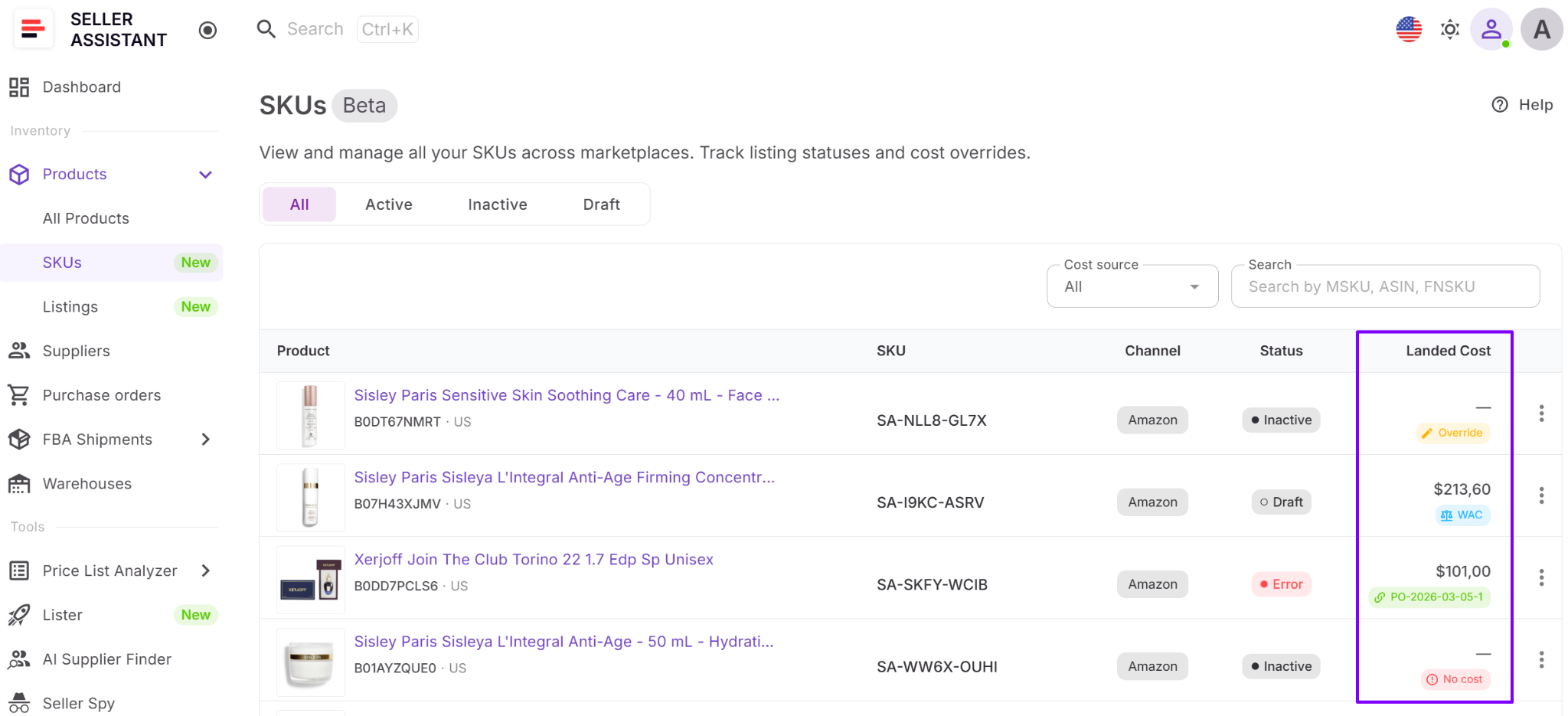
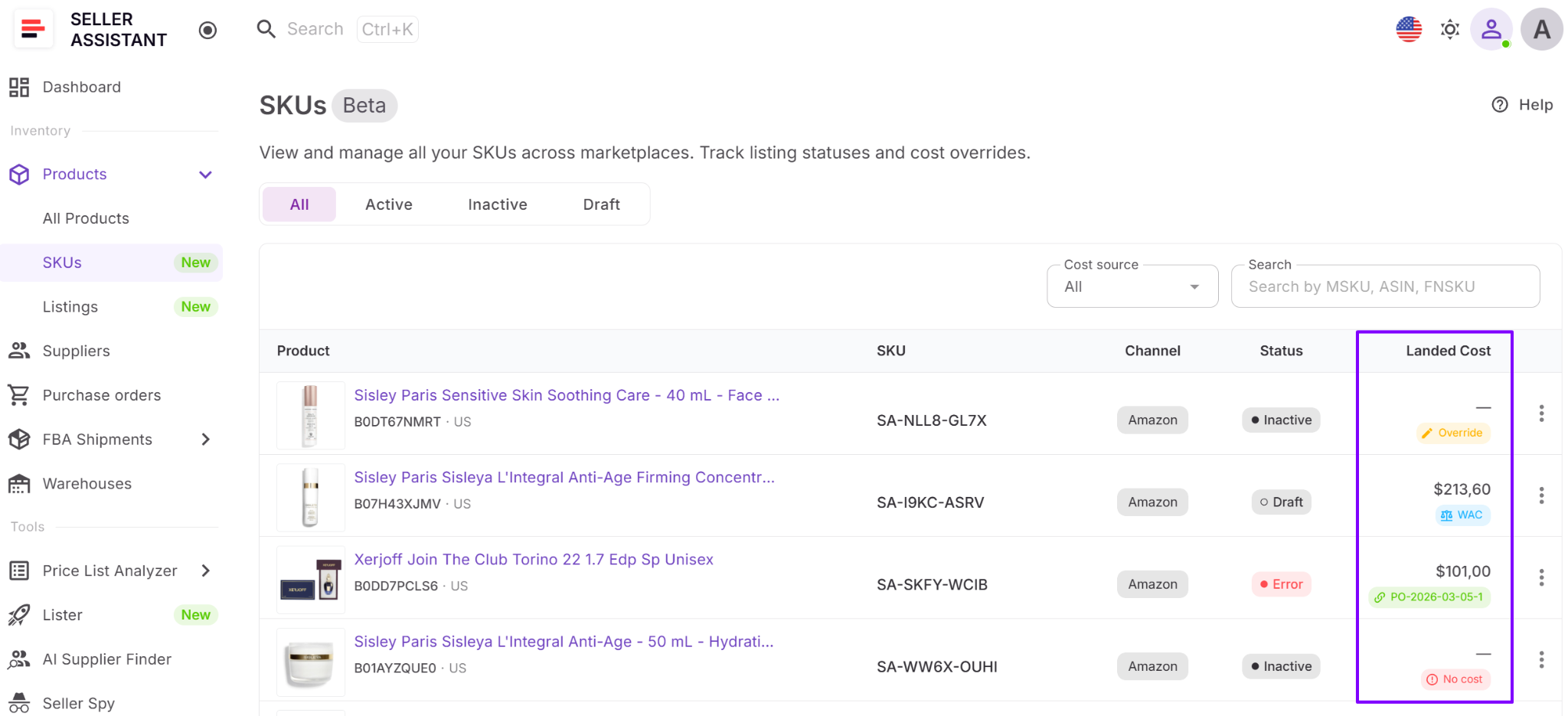
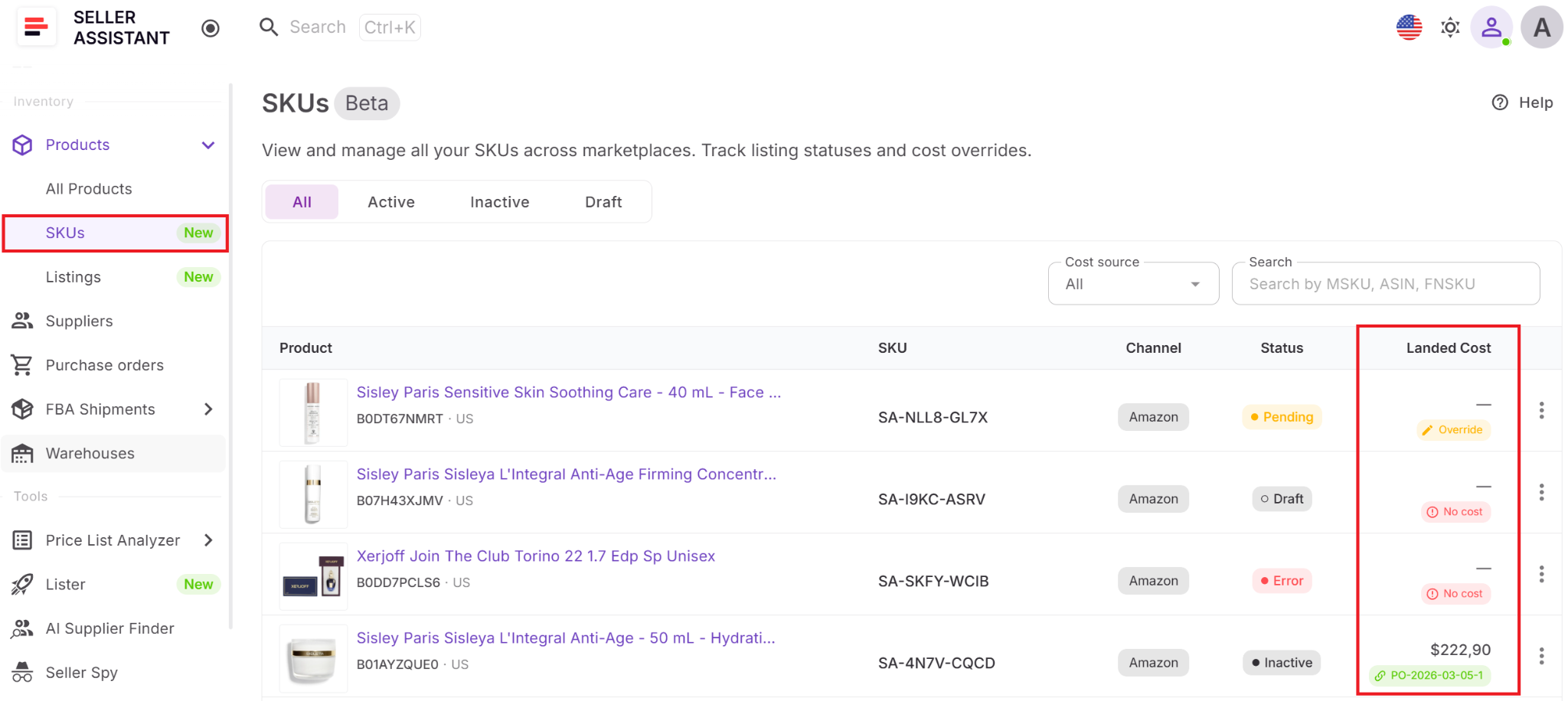
You can access landed cost in the SKUs Tool by clicking on the landed cost field in the SKU table. This opens a detailed cost breakdown where you can review, edit, or override specific components. While most values are calculated automatically, you can adjust them when needed and reset to system-calculated values at any time.
Why it matters for your profitability
Landed cost shows your true cost per unit, not just your supplier price. This helps you calculate real margins, avoid underpricing, and identify deals that are not actually profitable after all expenses are included.
How landed cost fits your workflow
Landed cost is built into Seller Assistant’s connected wholesale workflow and is calculated at the SKU level inside the SKUs Tool in Product Database. Estimated costs come from Price List Analyzer, actual costs are updated through Purchase Orders Module and FBA Shipments, and the final per-unit cost is tracked per SKU. This keeps your profitability data accurate and connected across sourcing, purchasing, listing, and fulfillment.
Note. Seller Assistant is an end-to-end Amazon workflow management platform that integrates 15+ wholesale-focused solutions into one connected system. It combines sourcing workflow automation, bulk research and intelligence tools, and integrated Chrome extensions – giving you everything you need to streamline finding deals, managing suppliers, and creating purchase orders.

The platform aggregates: workflow management tools – Purchase Orders Module, Suppliers Database, Product DB, Warehouses Database, FBA Shipments to organize, automate, and scale every step of your wholesale and arbitrage operations; bulk research & sourcing tools – Price List Analyzer, Bulk Restriction Checker, AI Supplier Finder, Brand Analyzer, Seller Spy to evaluate supplier price lists, verify selling eligibility and restrictions, open new brands, and discover winning product ideas from competitors to expand your product catalog; Chrome extensions – Seller Assistant Browser Extension, IP-Alert Extension, and built-in VPN by Seller Assistant to deep-research products, check IP claims and compliance, and access geoblocked supplier sites directly within your browser; and integrations & team access features – seamless API connectivity and integrations with Zapier, Airtable, and Make, plus Virtual Assistant Accounts for secure, scalable team collaboration.
With Seller Assistant, every step of your Amazon wholesale and arbitrage workflow is automated and connected.
How Landed Cost Helps You Control Profit
The landed cost is not just a calculation – it’s a decision-making tool. It helps you understand your real margins, adjust costs, and connect your sourcing assumptions with actual results. Instead of relying on estimates, you use landed cost to manage profitability at the SKU level.
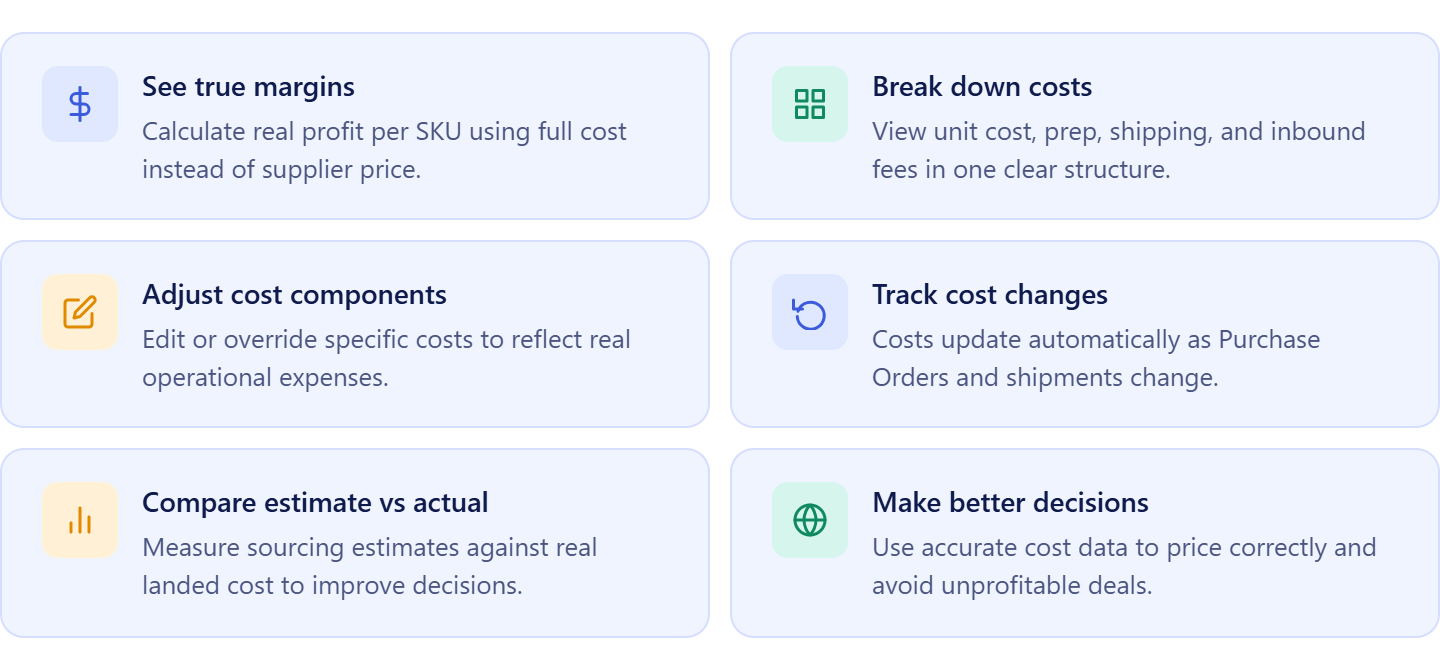
See your true margin per SKU
Landed cost shows the full per-unit cost, including all expenses. This lets you calculate accurate profit and avoid relying on incomplete numbers.
Break down every cost component
You can see exactly how your total cost is built – unit cost, prep, shipping, and inbound fees. This helps you identify which parts of your operation impact margins the most.
Adjust and control cost data
You can edit or override specific cost components when needed. This gives you flexibility to reflect real-world situations like unexpected expenses or special prep.
Track how costs change over time
Landed cost updates automatically when Purchase Orders or shipments change. This keeps your profitability data current without manual recalculation.
Compare estimated vs actual profit
You can compare sourcing estimates from Price List Analyzer with actual landed cost. This helps you refine your buying decisions and improve deal selection over time.
Make better pricing and sourcing decisions
With accurate cost data, you can price products confidently and avoid deals that only look profitable on the surface.
How Landed Cost Works
Landed cost works at the SKU level and updates automatically as your operations move forward. You open a SKU, review its landed cost, and see the full per-unit breakdown. As you create Purchase Orders, receive shipments, or adjust costs, the system recalculates values, so your profitability stays current without manual updates.
Where to find landed cost
You can find landed cost in the SKUs Tool inside the Product Database. Each SKU has a landed cost field in the table – click it to open the detailed cost breakdown and manage each component.
What cost components you see and can change
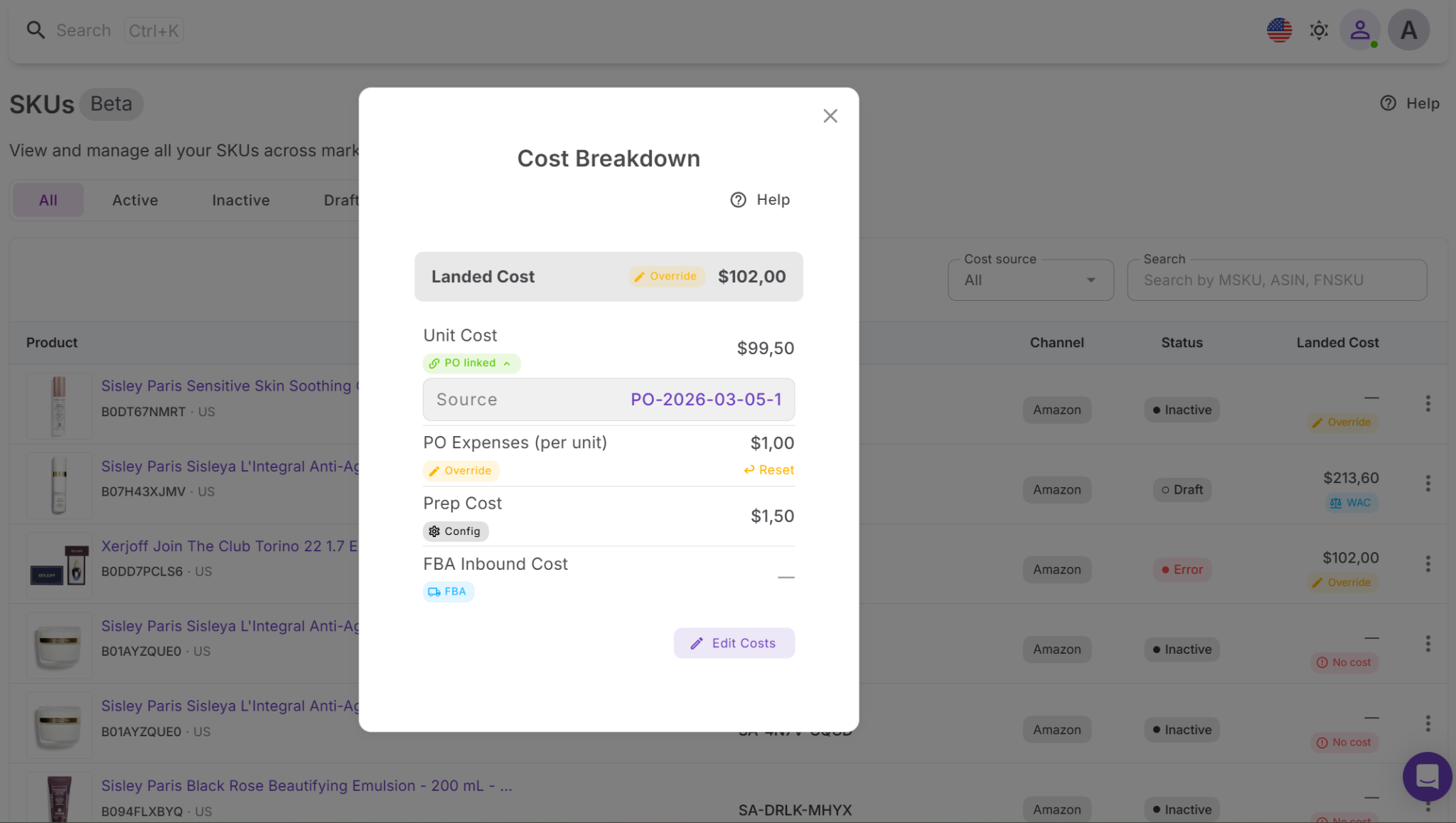
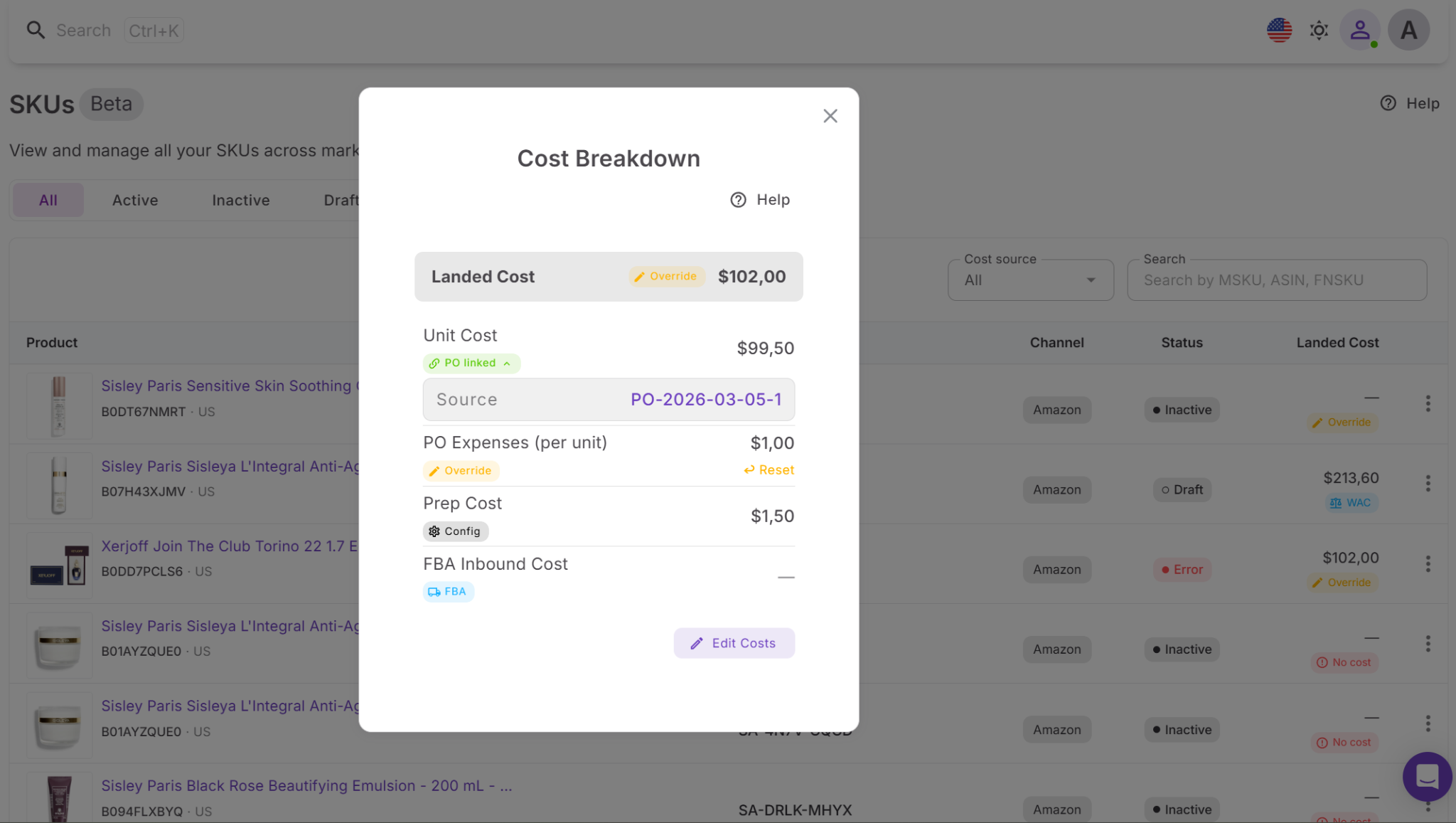
Landed cost includes all major per-unit expenses:
- Unit cost (COG)
- Purchase Order expenses (allocated per unit)
- Prep cost
- FBA inbound cost
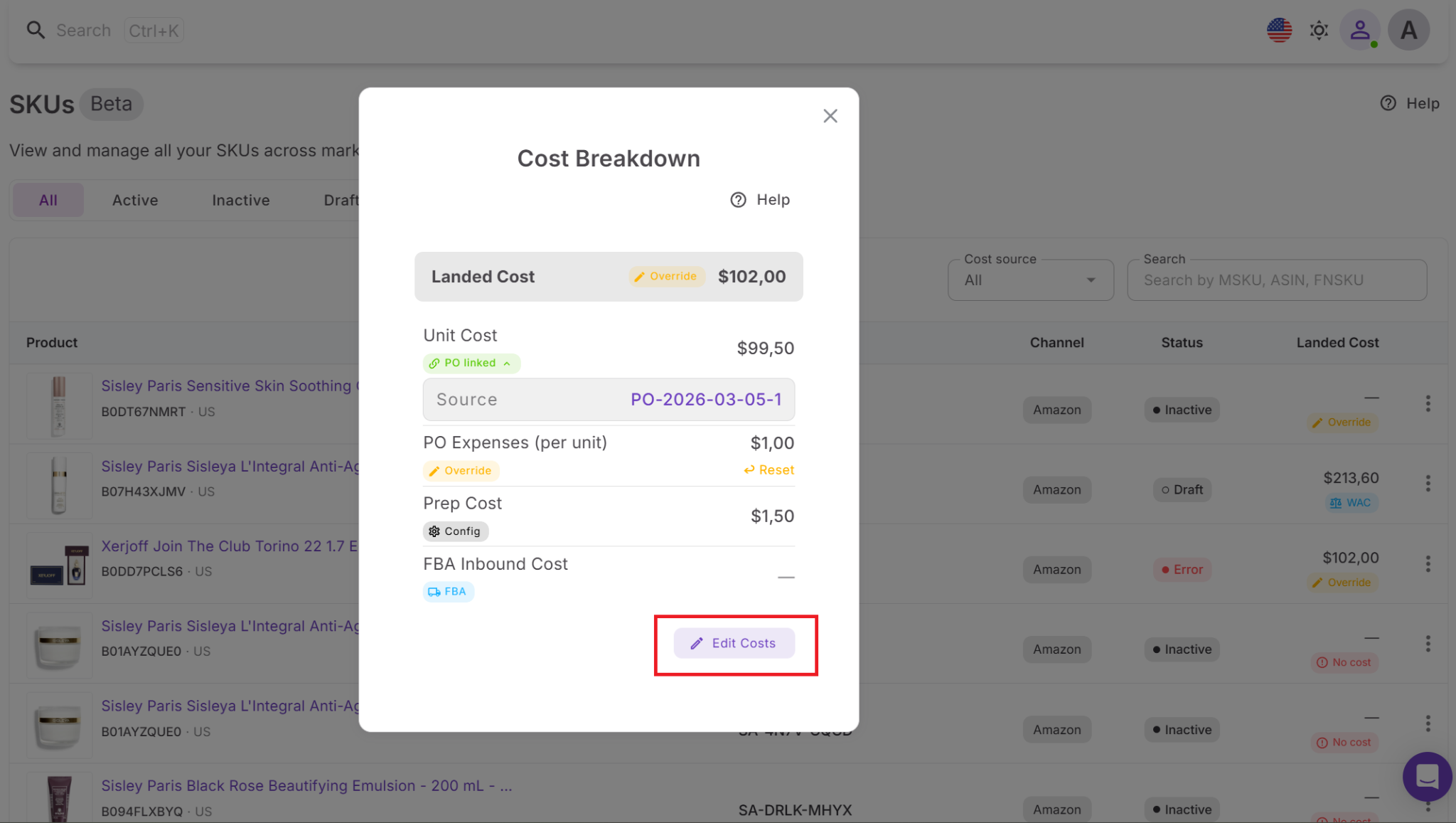
You can edit or override any component manually. If needed, you can reset it back to the automatically calculated value.
Drill down into every cost component
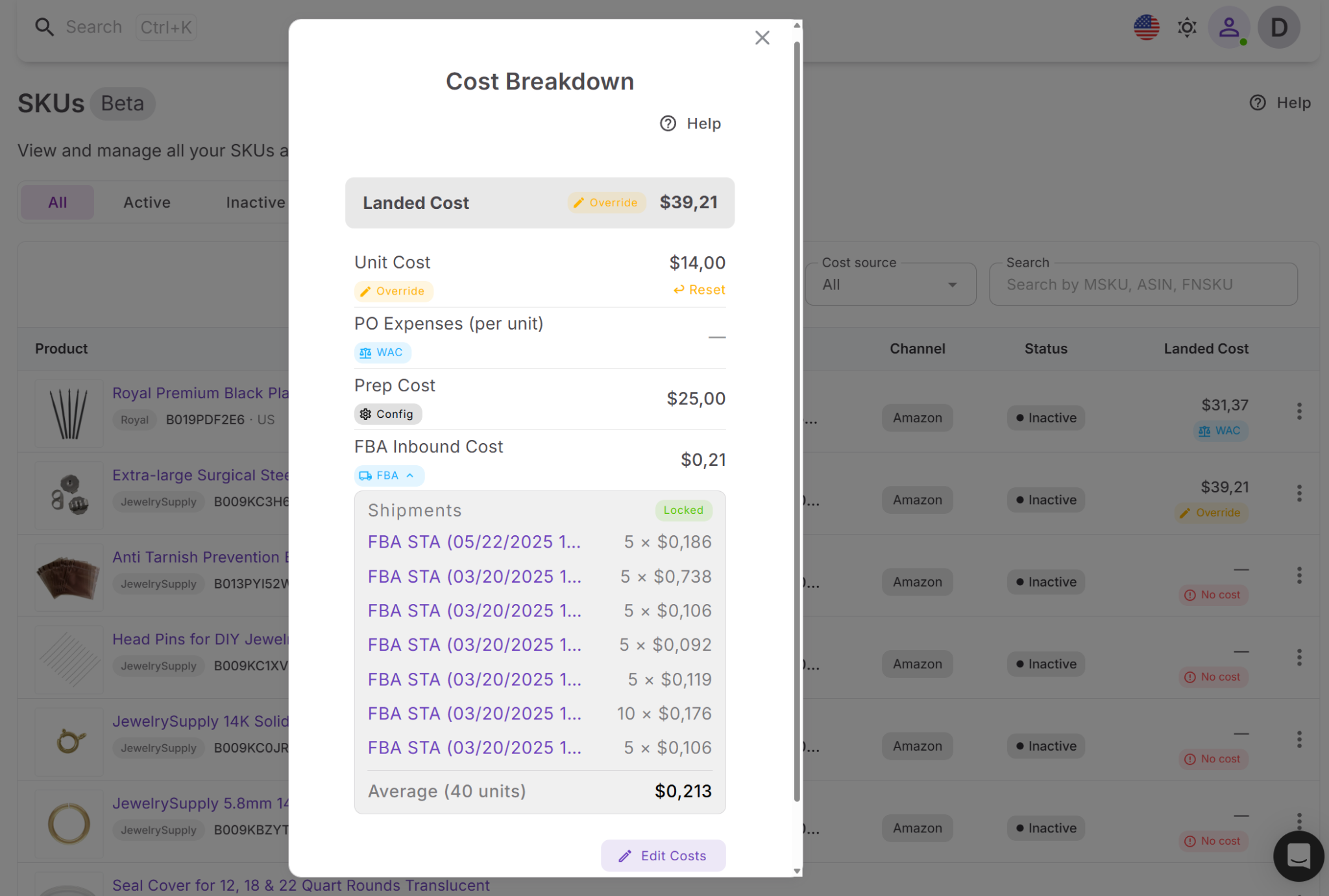
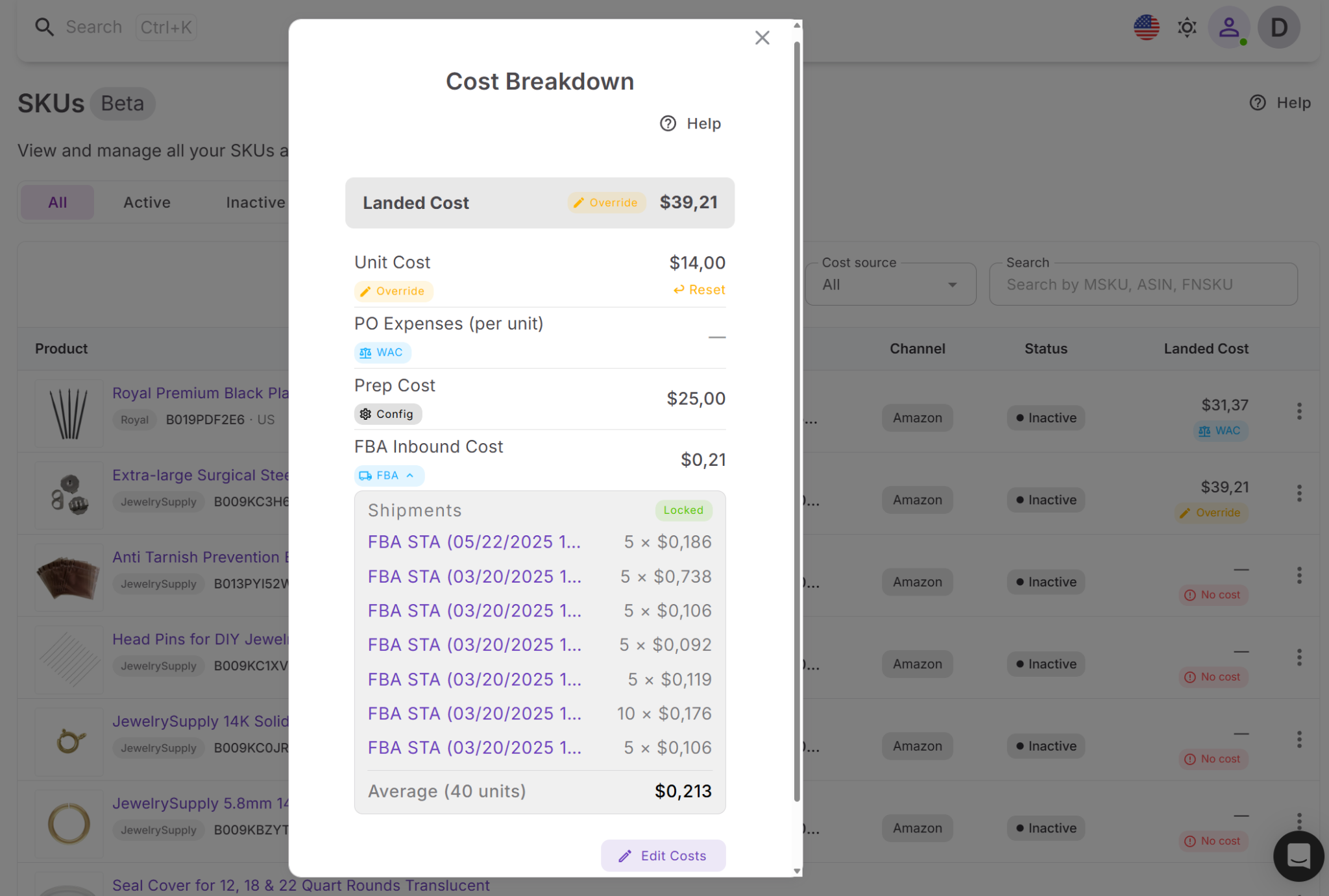
You can click any cost component to expand it and see detailed data, including:
- Linked Purchase Orders
- Shipment data
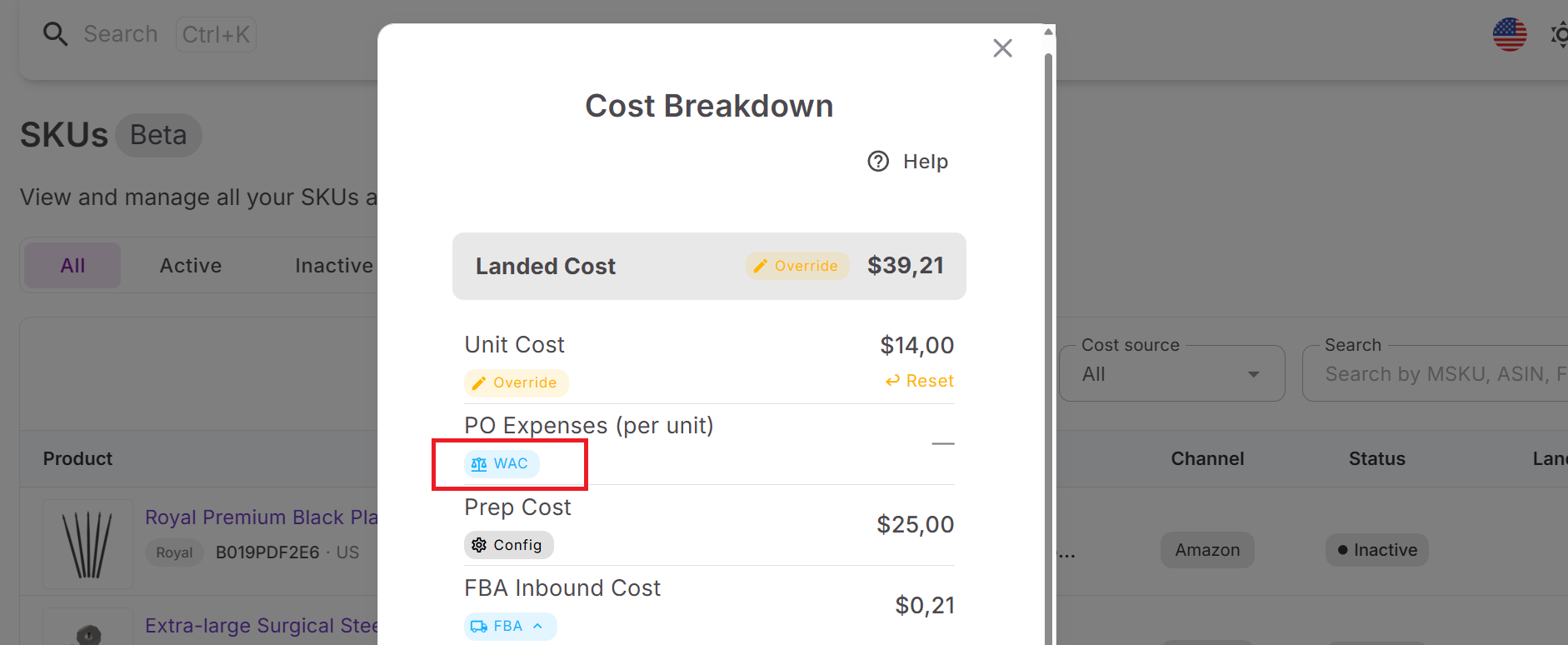
- Weighted average cost (WAC) calculations
This allows you to fully understand how each number is calculated and verify your costs.
Where the data comes from and why WAC matters
Each cost component is pulled from a specific source:
- Unit cost – from the latest Purchase Order or calculated as weighted average cost
- PO expenses – allocated from shipping and additional PO costs
- Prep cost – from cost settings (Price List Analyzer)
- FBA inbound cost – from shipment data
Weighted average cost is important when you buy the same SKU at different prices over time. It gives you a more accurate baseline cost instead of relying on a single purchase price.
How landed cost connects with Seller Assistant tools
Landed cost is calculated and stored at the SKU level inside the Product Database. Each SKU represents a specific way a product is sold, and landed cost defines its true per-unit profitability. This ensures every listing is backed by accurate cost data.
Landed cost is part of a connected system. Price List Analyzer provides estimated costs before buying, Purchase Orders Module defines actual product and expense data, and FBA Shipments adds inbound costs. SKUs Tool brings all this data together, so landed cost reflects the full lifecycle of a product – from sourcing to fulfillment.
Why this matters in real operations
Landed cost is not static – it evolves as your business moves. This means your profit calculations improve over time, helping you make better pricing, sourcing, and restocking decisions based on real data instead of assumptions.
How to Use Landed Cost Step by Step
Landed cost helps you track the real per-unit cost of your Amazon inventory. Here’s a simple way to use it inside Seller Assistant.
Step 1. Open the SKUs Tool
Go to Inventory → Products → SKUs and find the SKU you want to review. Click the landed cost field in that row to open the cost breakdown.
Step 2. Review the full cost breakdown
Check the main components that make up landed cost – unit cost, Purchase Order expenses, prep cost, and FBA inbound cost. This shows what the product actually costs you per unit.
Step 3. Check where each cost comes from
Look at the source labels for each component, such as PO, WAC, Shipment, Config, or Override. This helps you understand whether the value comes from a Purchase Order, weighted average cost, shipment data, settings, or a manual edit.
Step 4. Adjust costs if needed
Edit any cost component to reflect real expenses, then save the change. If you want to return to the system value, reset the field to remove the override.
FAQ
What is included in the landed cost on Amazon?
Landed cost includes all expenses required to get a product ready for sale, not just the purchase price. This typically covers unit cost, prep, shipping, and FBA inbound fees.
Why is the landed cost more accurate than the product cost?
Product cost only shows what you paid the supplier, while landed cost includes all additional expenses. This gives you a true per-unit cost and a realistic view of your profit.
How does Weighted Average Cost work in landed cost?
Weighted Average Cost calculates an average unit cost across multiple Purchase Orders. This helps you maintain accurate cost data when you buy the same product at different prices.
Can I change landed cost values manually?
Yes, you can override any cost component directly in the cost breakdown. You can also reset it to return to the automatically calculated value.
How is landed cost different from estimated profit in Price List Analyzer?
Price List Analyzer shows estimated profitability before you buy a product. Landed cost reflects the actual cost after sourcing, prep, and shipping, giving you real profit data.
Final Thoughts
Landed cost is what turns your Amazon business from guesswork into controlled profitability. When you account for every expense – product cost, prep, shipping, and inbound fees – you see the real margin behind each SKU and avoid decisions based on incomplete data.
Seller Assistant makes this process automatic and connected. By linking Price List Analyzer, Purchase Orders Module, SKUs, and FBA Shipments, it ensures your costs stay accurate as your operations evolve. Instead of relying on estimates, you work with real numbers – and that’s what allows you to price smarter, source better deals, and scale profitably.
Seller Assistant automates and connects every stage of your Amazon wholesale and arbitrage workflow. It brings together in one platform: workflow management tools – Purchase Orders Module, Suppliers Database, Warehouses Database, FBA Shipments, bulk research & sourcing tools – Price List Analyzer, Bulk Restriction Checker, Sourcing AI, Brand Analyzer, Seller Spy, Chrome extensions – Seller Assistant Browser Extension, IP-Alert Extension, and built-in VPN by Seller Assistant, and integrations & team access features – seamless API connectivity, integrations with Zapier, Airtable, and Make, and Virtual Assistant Accounts.


