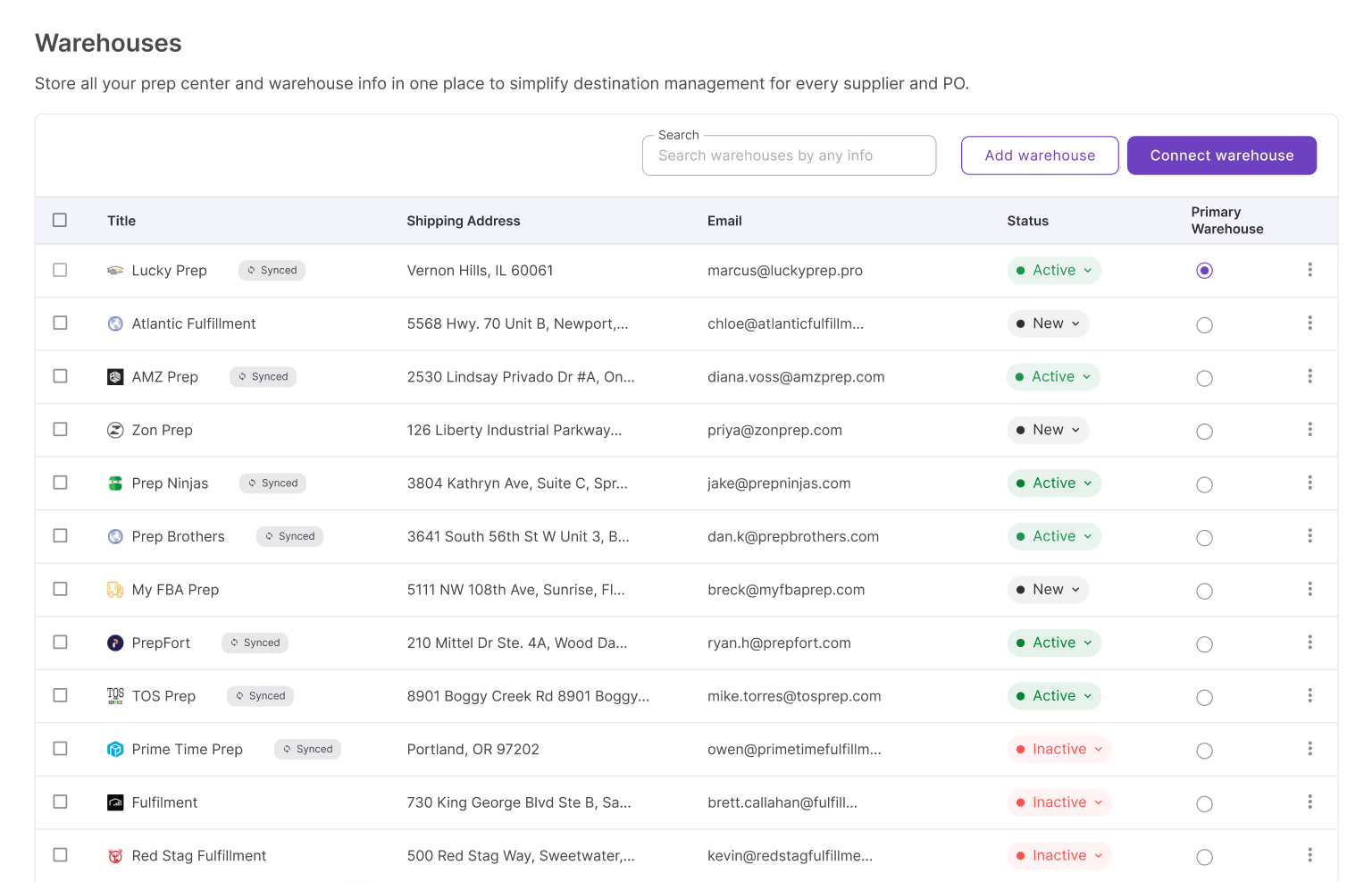
Finding profitable products is only half the job – once inventory starts moving from suppliers to warehouses and prep centers, keeping fulfillment organized matters just as much. Add a few suppliers, a couple of prep centers, and a growing list of purchase orders, and tracking accurate shipping information by hand quickly turns into a bottleneck.
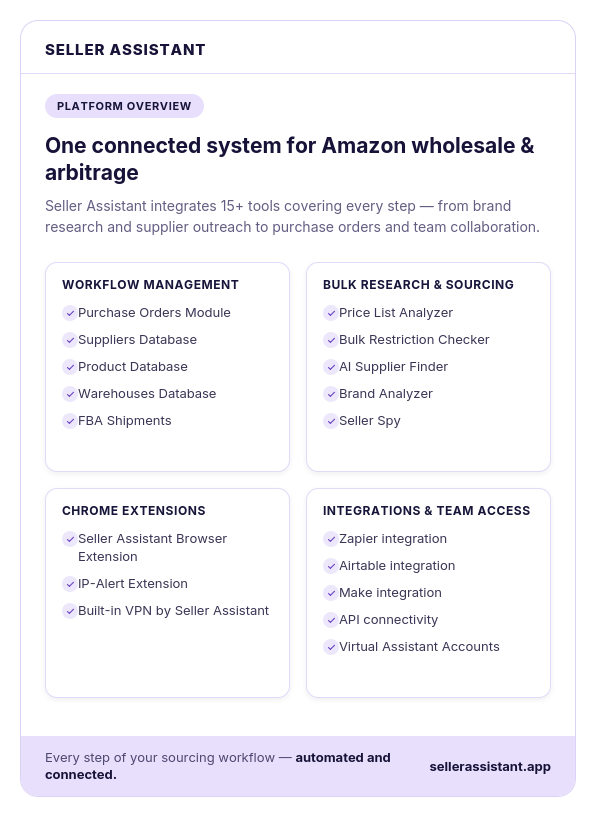
Seller Assistant addresses this with two connected tools: Warehouses Database, which centralizes all your fulfillment locations, and Prep Center Integration, which syncs supported prep centers directly with the platform. Together, they keep warehouse data accurate, organized, and easy to manage as operations scale.
Why Warehouse and Prep Center Management Gets Complicated
Managing one warehouse or prep center is straightforward. Managing several fulfillment locations while working with multiple suppliers is much more challenging. As your Amazon business grows, so does the amount of warehouse information you need to maintain.
Keeping addresses, contacts, and fulfillment locations accurate across different systems can quickly become difficult, especially if you’re relying on spreadsheets or scattered notes.
A centralized warehouse management system helps organize this information, reduce manual work, and keep your operations running smoothly.
Managing multiple fulfillment locations
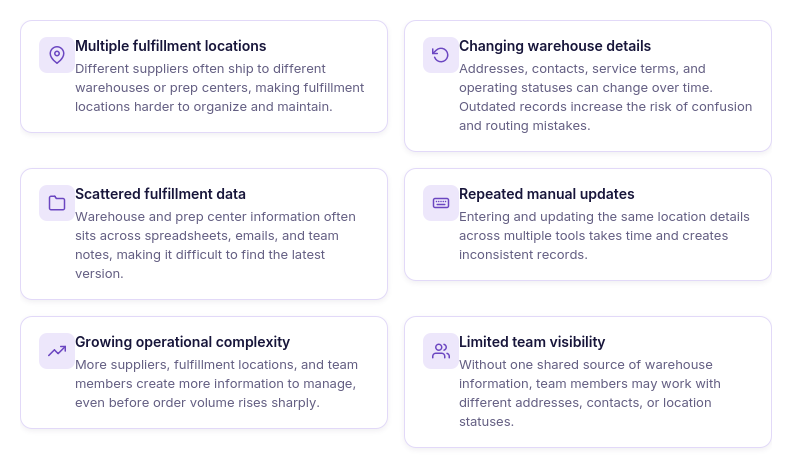
As your supplier network grows, so does the number of warehouses and prep centers you work with. Different suppliers may ship to different fulfillment locations based on logistics, shipping costs, geographic proximity, or prep requirements. Managing all those locations manually quickly becomes difficult, increasing the risk of using outdated or incorrect warehouse information.
Keeping warehouse information up to date
Warehouse addresses, contact details, and operational status change over time. Prep centers may relocate, update contact information, or stop accepting shipments. Maintaining accurate records across multiple documents and tools requires constant effort and increases the risk of mistakes.
Organizing fulfillment data across your business
Warehouse information is used throughout your operations. Suppliers, prep centers, inventory records, and purchasing workflows all depend on accurate fulfillment data. Storing this information in different places makes it harder to keep everyone working with the same records.
Reducing manual data management
Many sellers begin by tracking warehouse information in spreadsheets or documents. While that works for a small operation, it quickly becomes difficult to manage as the business grows. Updating records manually, searching for the latest information, and sharing changes with team members takes valuable time.
Scaling operations without adding complexity
Growth often means adding more suppliers, warehouses, prep centers, and team members. Without a structured way to manage fulfillment locations, complexity increases alongside your business. A centralized warehouse management system provides a scalable way to organize warehouse information and support expanding operations.
Improving visibility across fulfillment locations
Having all warehouse and prep center information in one place makes it easier to see which locations are active, find the details you need, and keep fulfillment records organized. Better visibility helps teams work more efficiently and reduces confusion as daily operations become more complex.
How Seller Assistant Keeps Fulfillment Organized
Managing warehouses and prep centers is only one part of running an Amazon business. Before inventory reaches a warehouse, sellers need to find profitable products, source them from reliable suppliers, and organize purchasing.
After inventory is received, it must be prepared for Amazon and tracked through the rest of the fulfillment process. When each stage relies on a different tool, warehouse information is often duplicated, updated manually, or stored in multiple places.
One platform for your operational workflow
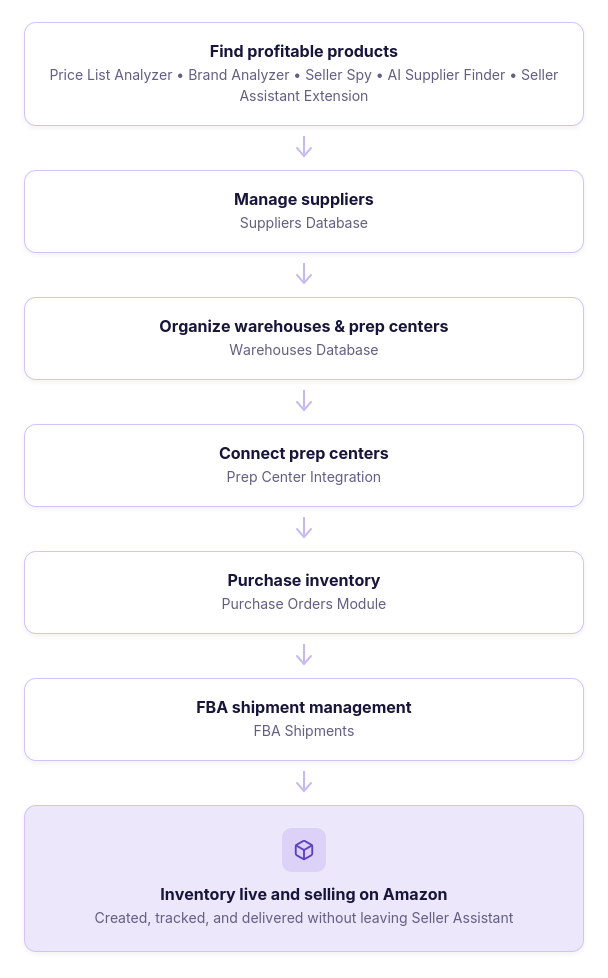
Seller Assistant connects the key stages of wholesale and online arbitrage operations in one platform. Sellers can research products with sourcing tools like Price List Analyzer, Brand Analyzer, Seller Spy, and AI Supplier Finder, then organize products and supplier relationships in Product Database and Suppliers Database. From there, inventory moves into purchasing, warehouse management, prep, and eventually Amazon fulfillment – all within the same connected workflow.
Centralized warehouse and prep center management
Warehouses Database serves as the central hub for managing fulfillment locations. Instead of maintaining warehouse addresses, prep center contacts, and routing information across spreadsheets or separate systems, sellers store everything in one place and reuse it throughout Seller Assistant. When working with supported fulfillment partners, Prep Center Integration automatically synchronizes warehouse locations, helping keep records accurate and eliminating duplicate data entry.
Connected tools that work together
Because Seller Assistant’s modules share information, warehouse data doesn’t exist in isolation. Fulfillment locations can be linked to suppliers, reused when creating purchase orders, synchronized with connected prep centers, and carried through the inventory workflow until products are ready for shipment to Amazon FBA. Rather than copying the same information between different applications, sellers manage it once and use it across the platform.
Built to scale with your business
As your business grows, so do the number of suppliers, warehouses, prep centers, and inventory shipments you manage. Seller Assistant keeps these operations connected by combining sourcing, supplier management, warehouse management, purchasing, prep center integration, and fulfillment into a single workflow. This reduces manual work, improves data consistency, and gives sellers a centralized system for managing inventory from sourcing to Amazon FBA.
Warehouses Database: Your Central Hub for Fulfillment Locations
As your Amazon business grows, keeping track of warehouses and prep centers becomes more challenging. Managing fulfillment locations across spreadsheets, emails, or separate documents makes it harder to keep shipping information accurate and consistent. Seller Assistant’s Warehouses Database solves this by providing one centralized place to manage all your warehouses, prep centers, and shipping destinations.
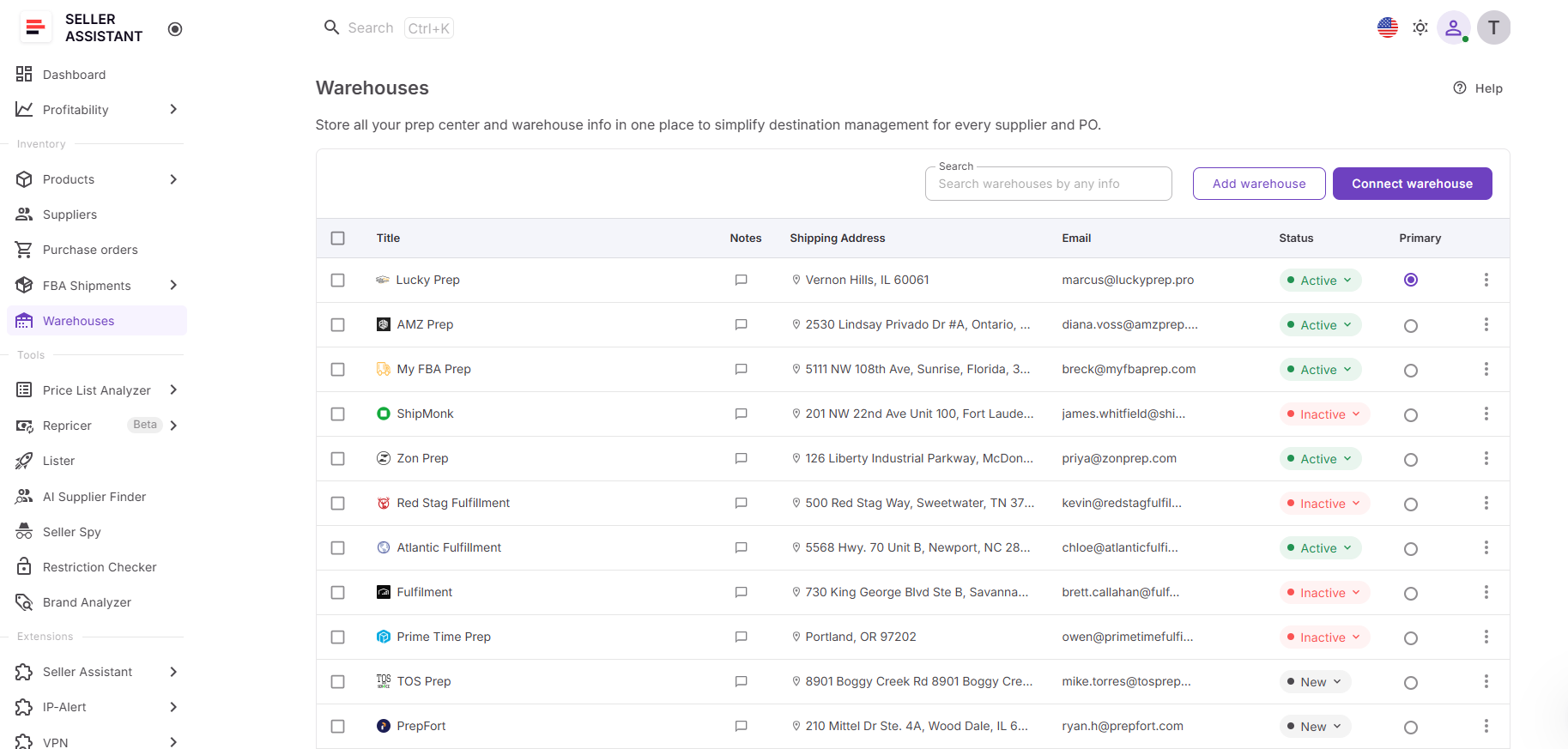
Designed for Amazon wholesale sellers, online arbitrage sellers, and dropshippers, the Warehouses Database stores all fulfillment information in one system and makes it available throughout your Seller Assistant workflow. Instead of maintaining separate records for each supplier or order, you create a warehouse profile once and reuse it whenever needed.
What you can do with Warehouses Database
Warehouses Database helps you organize and maintain your fulfillment network as your business expands.
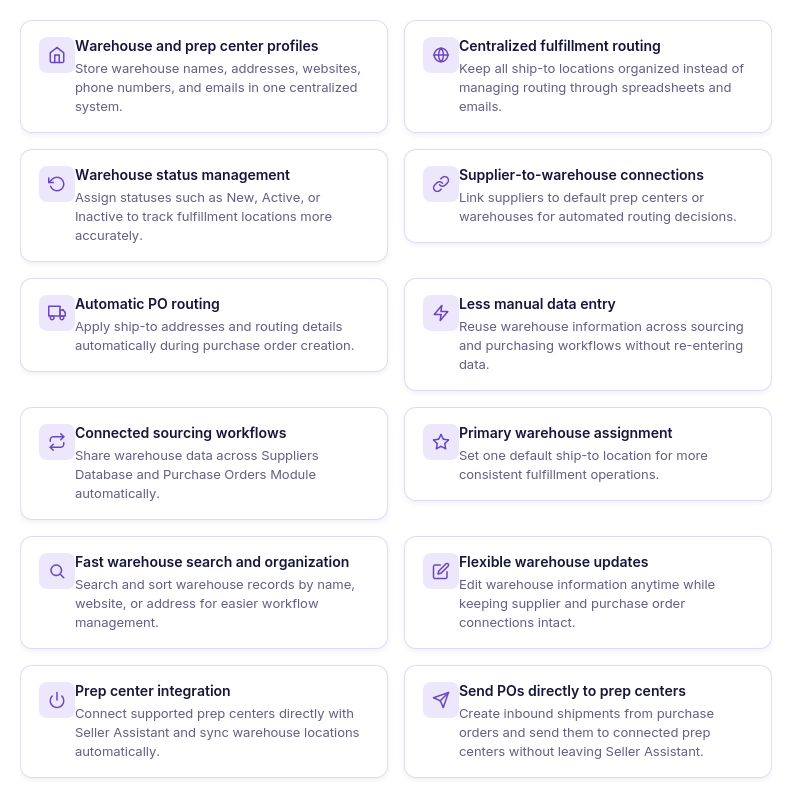
With the tool, you can:
- Create warehouse and prep center profiles
Store all your fulfillment locations in one centralized database instead of managing them across spreadsheets or separate documents.
- Keep fulfillment details organized
Save shipping addresses, contact information, notes, and other key details for every warehouse and prep center in one place.
- Track warehouse status
Mark fulfillment locations as New, Active, or Inactive to keep your warehouse network organized and up to date.
- Set a primary warehouse
Choose a default fulfillment location that Seller Assistant automatically uses throughout your workflow.
- Find warehouse records quickly
Search and sort warehouses by title, website, address, or contact information to locate the right fulfillment location in seconds.
- Update warehouse information anytime
Edit addresses, contacts, and other warehouse details whenever they change to keep your records accurate.
- Sync supported prep centers
Connect compatible prep centers to automatically import and synchronize warehouse locations with Seller Assistant.
- Reuse warehouse information across Seller Assistant
Use the same warehouse records throughout the platform without re-entering fulfillment information for different workflows.
How Warehouses Database works
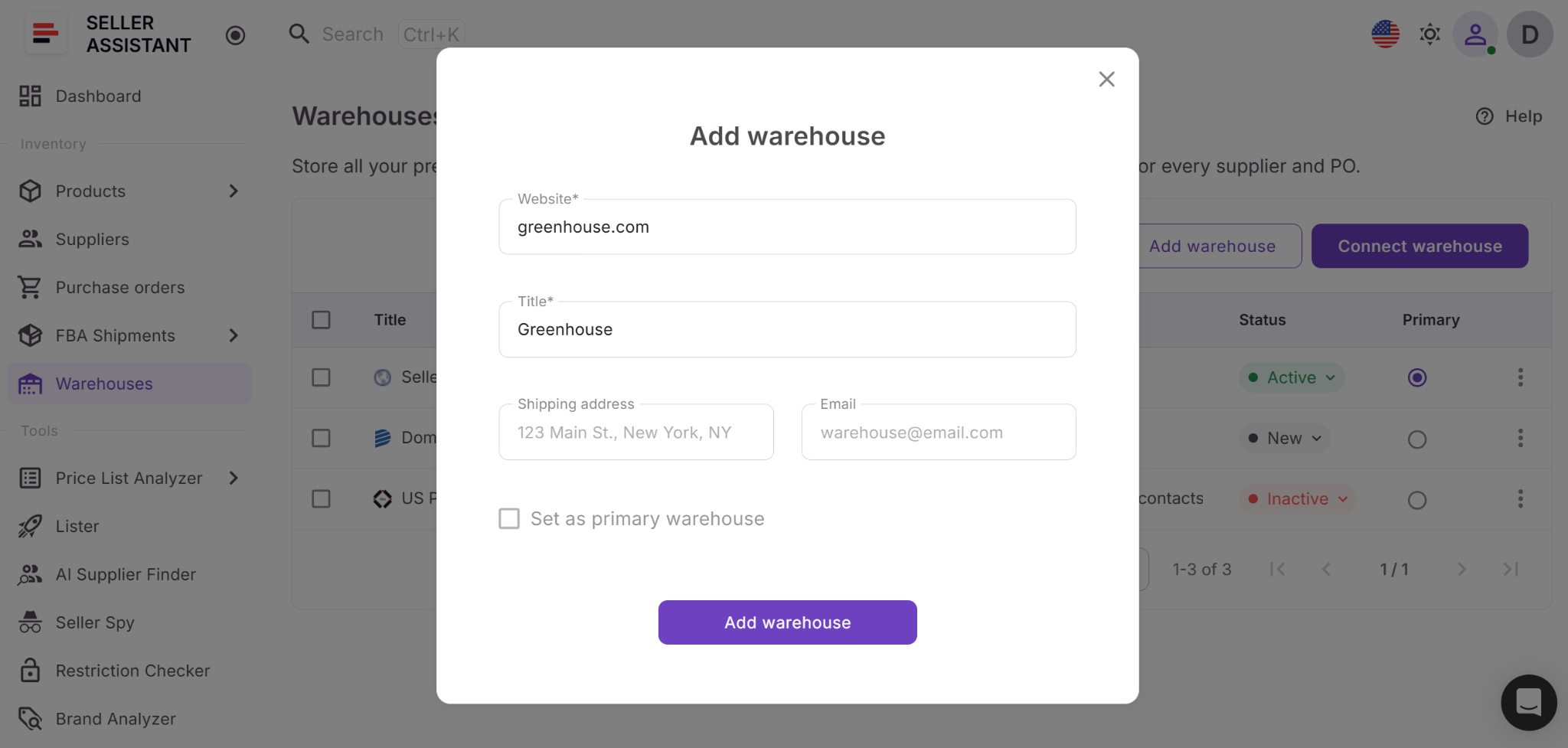
Every warehouse or prep center is stored as an individual profile in the Inventory section of Seller Assistant. To create a new record, you simply add the warehouse website and title, then complete optional details such as the shipping address, email, phone number, contacts, and notes.
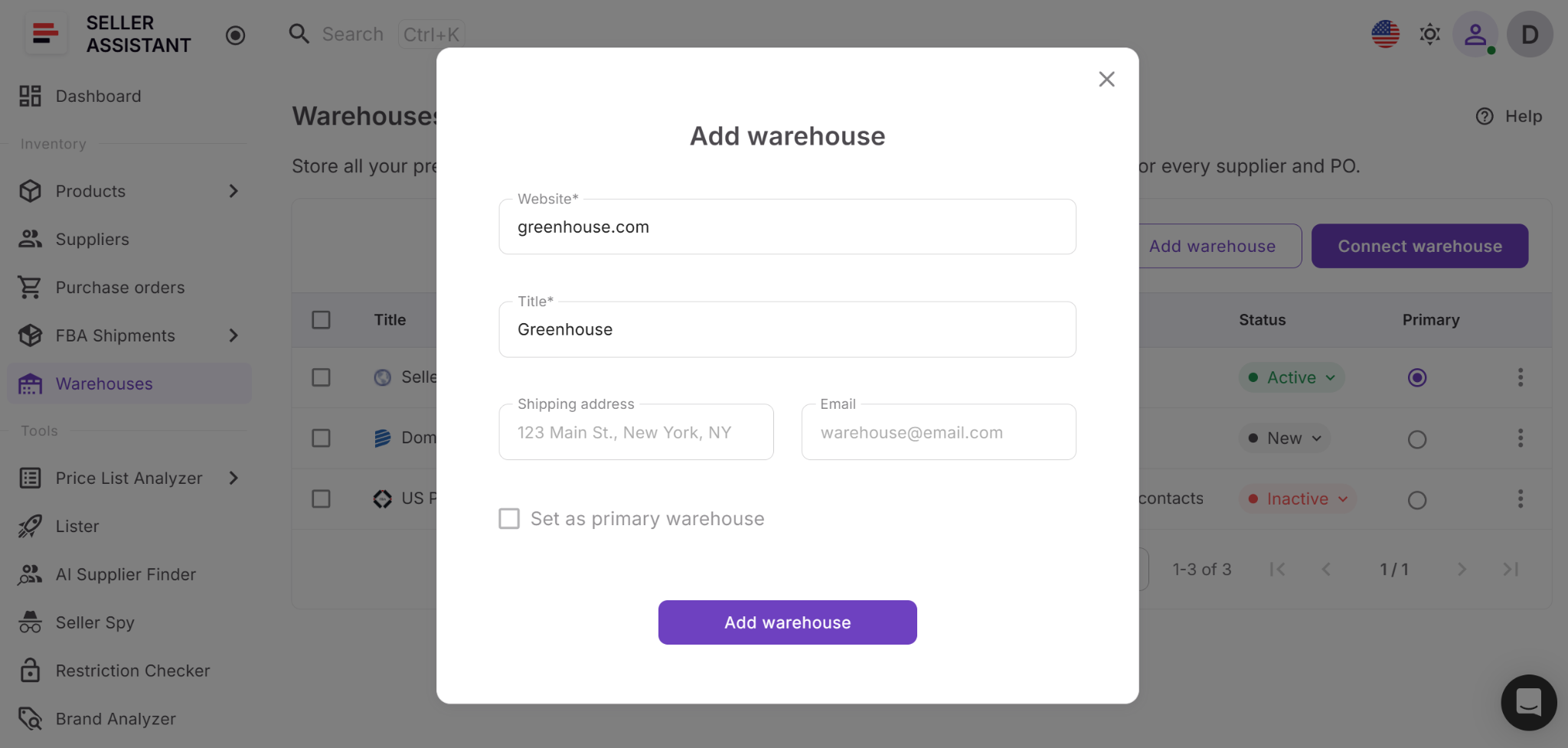
Each warehouse profile includes:
- Title – warehouse or prep center name;
- Website – business website;
- Shipping address – destination for supplier shipments;
- Contacts – email, phone number, and other contact details;
- Notes – additional information with note history for team collaboration;
- Status – New, Active, or Inactive.
As your list of fulfillment locations grows, you can quickly search, sort, and update warehouse records to keep your information accurate and organized.
Set a primary warehouse
Warehouses Database lets you assign one primary warehouse that acts as your default fulfillment location. Once selected, this warehouse is automatically used wherever a default ship-to destination is needed, helping maintain consistency across your workflow.
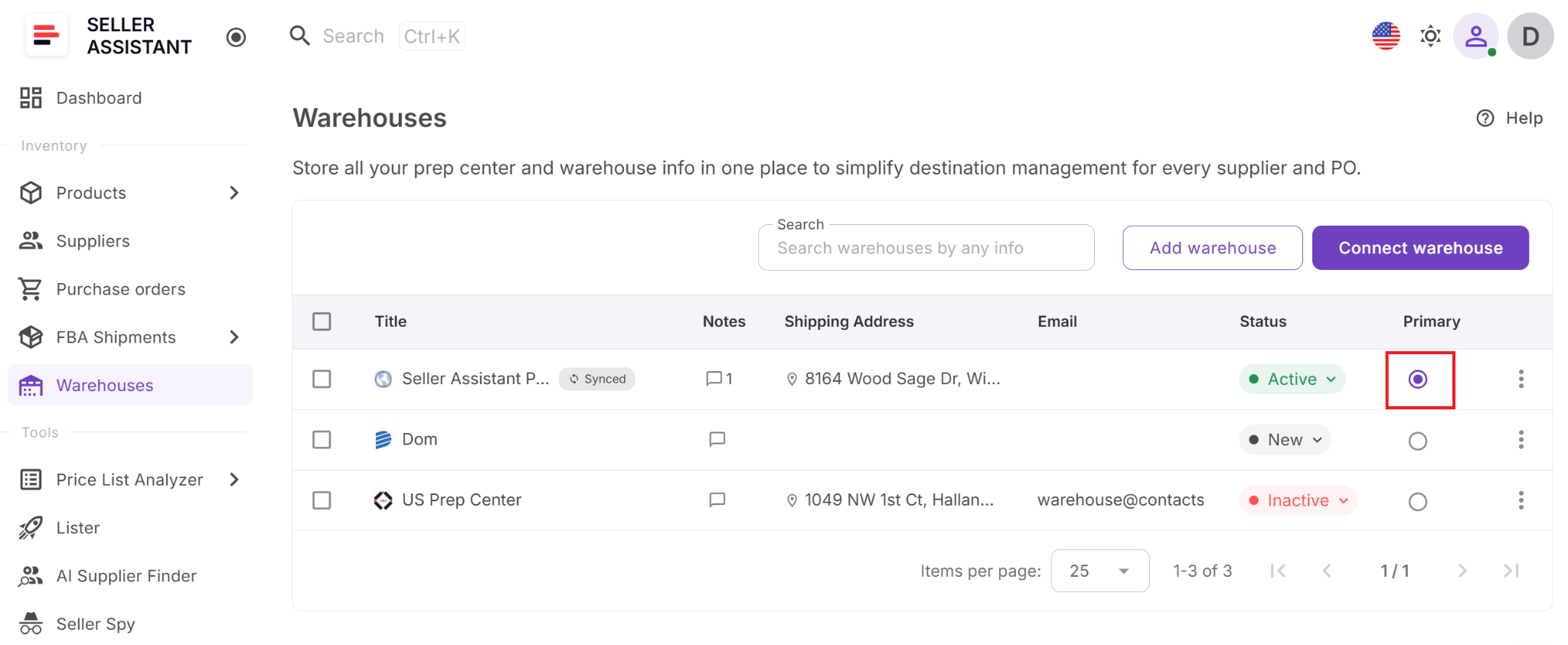
Every Seller Assistant account includes a default primary warehouse called My Warehouse. If you want to remove it, simply assign another warehouse as the primary location first.
Connected with your Seller Assistant workflow
Warehouses Database isn’t just a standalone directory of warehouse locations. It integrates with other Seller Assistant tools to keep fulfillment information connected across your operations.
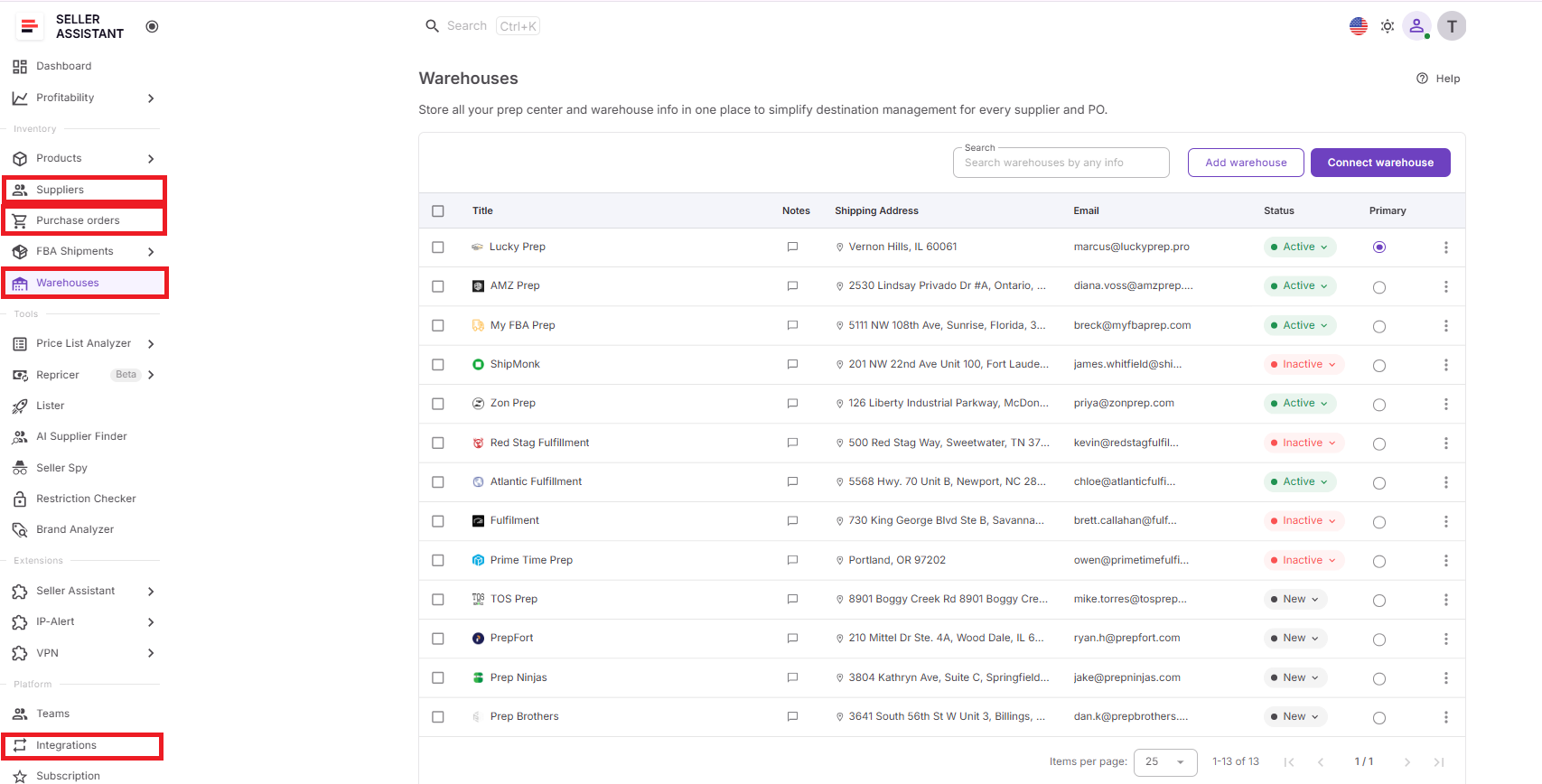
Warehouse records can be linked to supplier profiles in the Suppliers Database, making it easy to assign default fulfillment locations for each supplier. The same warehouse information is available when creating purchase orders in Purchase Orders Module, eliminating repeated data entry and helping maintain consistent shipping destinations. If you use a supported prep center, Prep Center Integration automatically synchronizes warehouse locations, making them immediately available throughout Seller Assistant.
By serving as the central source of fulfillment information, Warehouses Database helps connect sourcing, supplier management, purchasing, warehouse management, and prep operations into one organized workflow, reducing manual work and making it easier to scale your Amazon business.
Prep Center Integration: Connect Your Prep Center to Seller Assistant
Managing prep center operations often means switching between multiple platforms to create shipments, track inventory, and keep warehouse information up to date. Prep Center Integration eliminates much of that manual work by connecting supported prep centers directly to Seller Assistant.
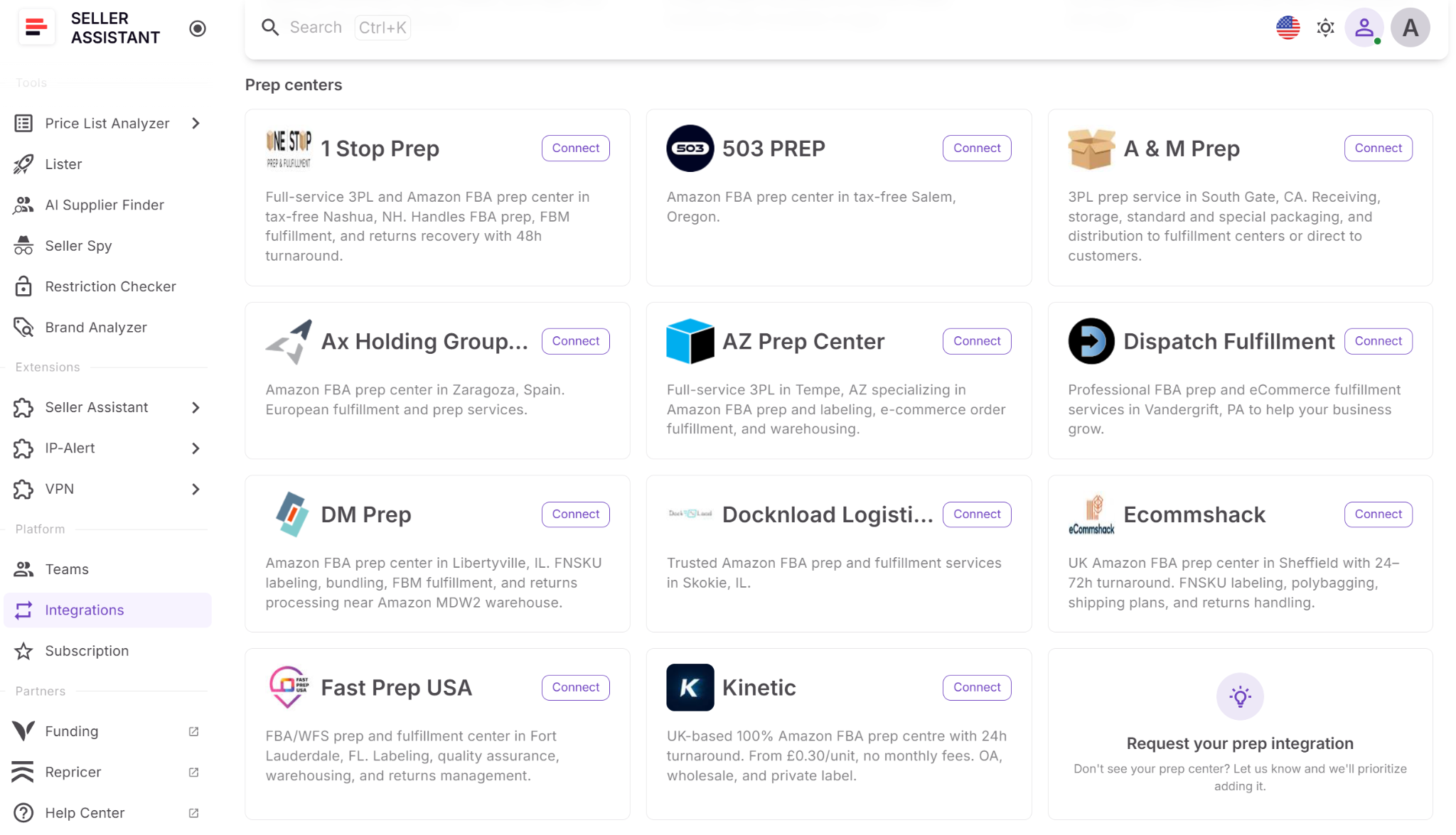
Instead of maintaining warehouse records in separate systems or manually transferring fulfillment information, you can connect your prep center once and manage synchronized warehouse data from within Seller Assistant. This creates a more connected workflow and helps keep fulfillment information consistent as your business grows.
What you can do with Prep Center Integration
Prep Center Integration extends Warehouses Database by connecting it directly to supported prep centers.
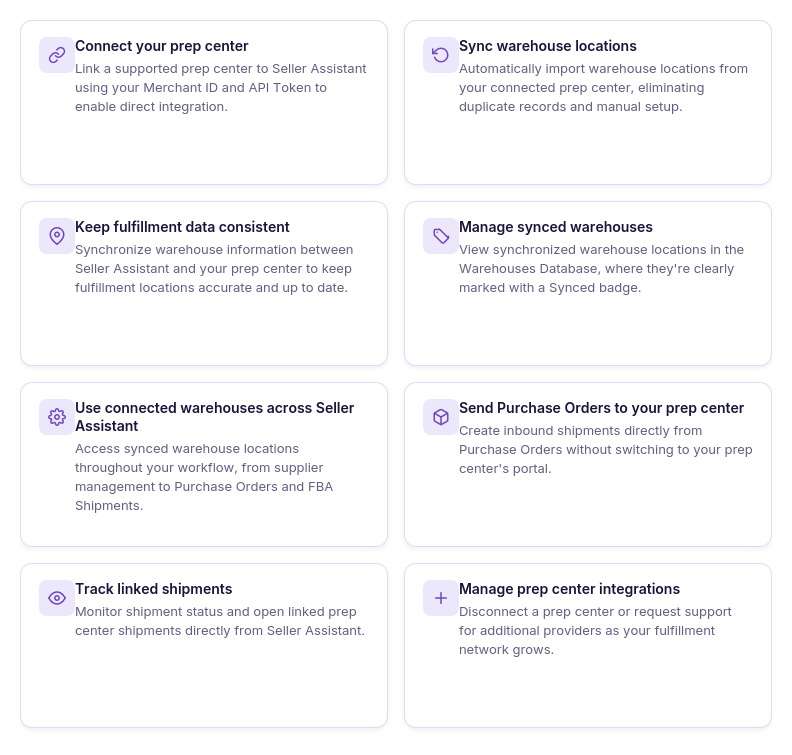
With the integration, you can:
- Connect your prep center
Link a supported prep center to Seller Assistant with the API token. Seller Assistant reads the merchant account from the token, and you pick one if the token has several merchant accounts.
- Sync warehouse locations automatically
Import warehouses from your connected prep center, eliminating the need to create and maintain duplicate location records.
- Keep fulfillment data consistent
Automatically synchronize warehouse information between Seller Assistant and your prep center to reduce manual updates and outdated records.
- Manage synced warehouses
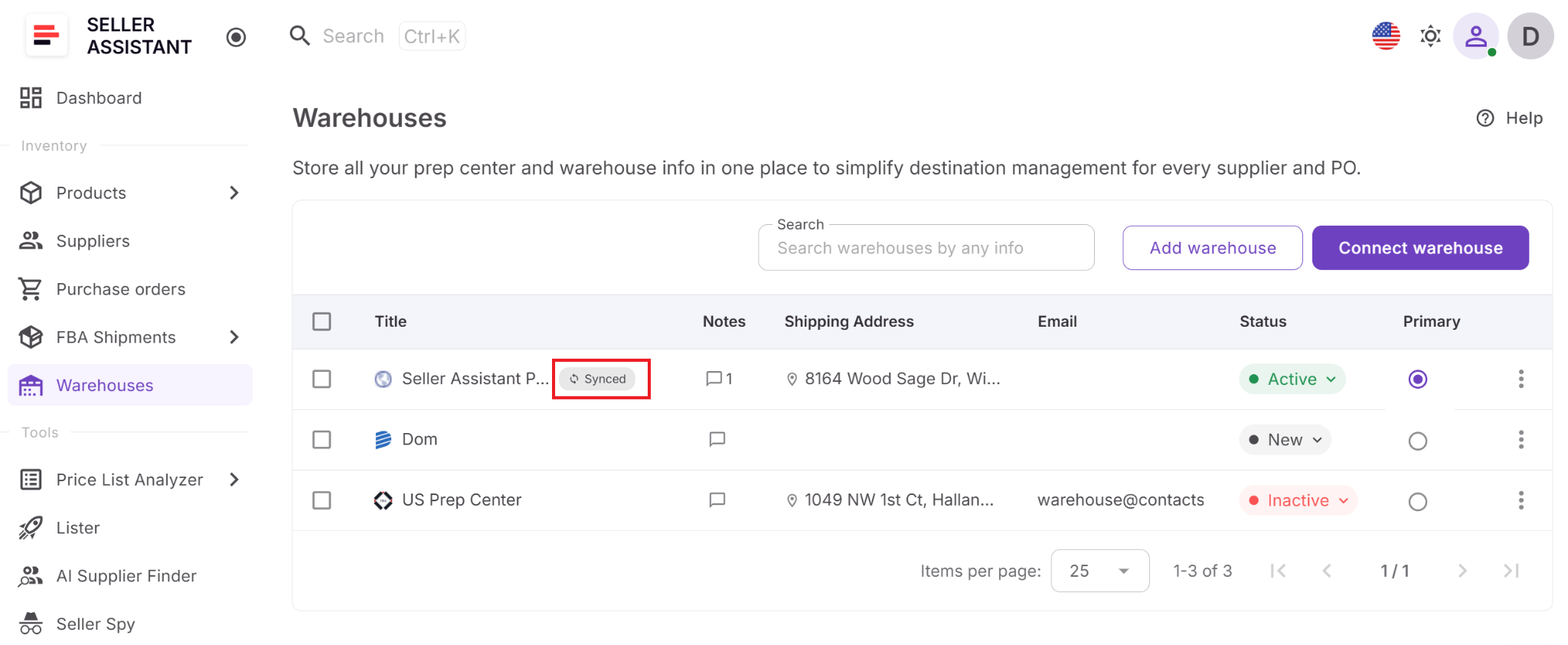
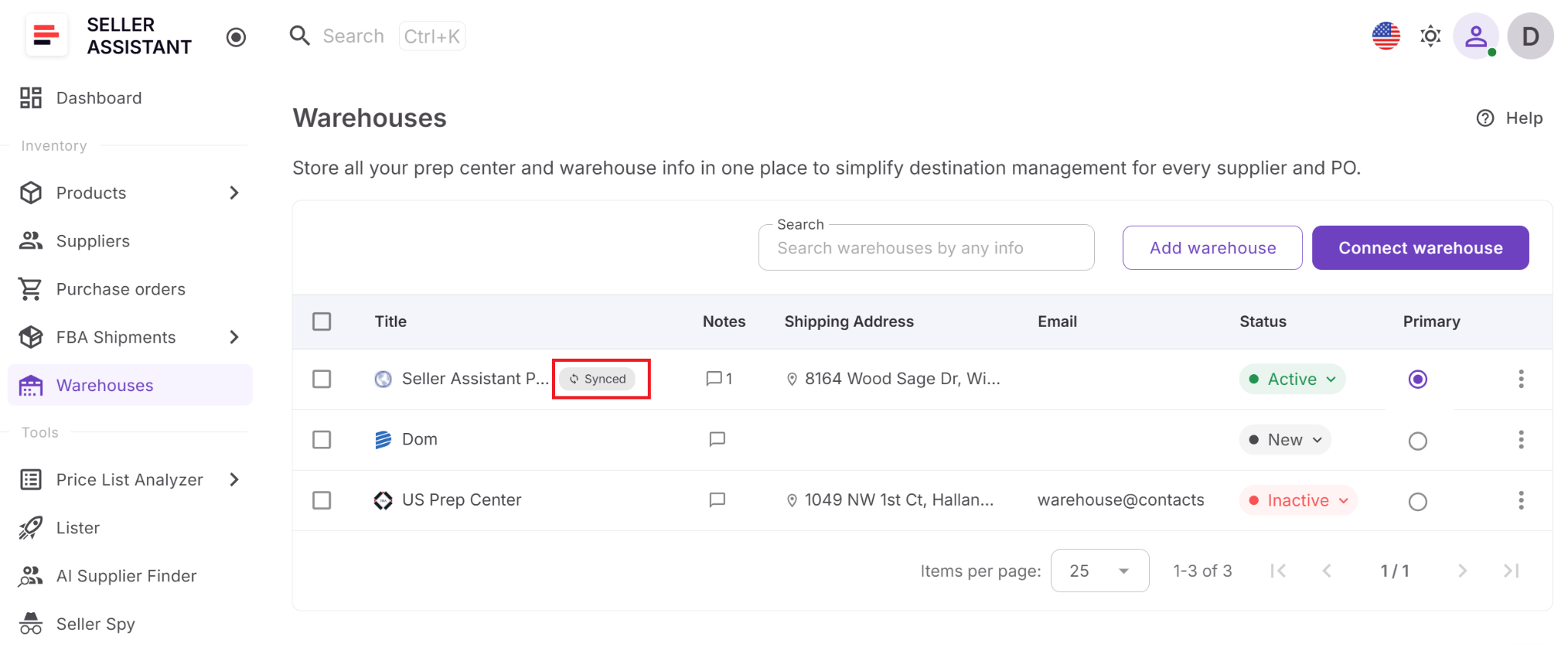
View synced warehouse locations directly in Warehouses Database, where they’re clearly marked with a Synced badge.
- Use connected warehouses throughout your workflow
Select synced warehouses across Seller Assistant, making fulfillment locations available wherever they’re needed.
- Send purchase orders to your prep center
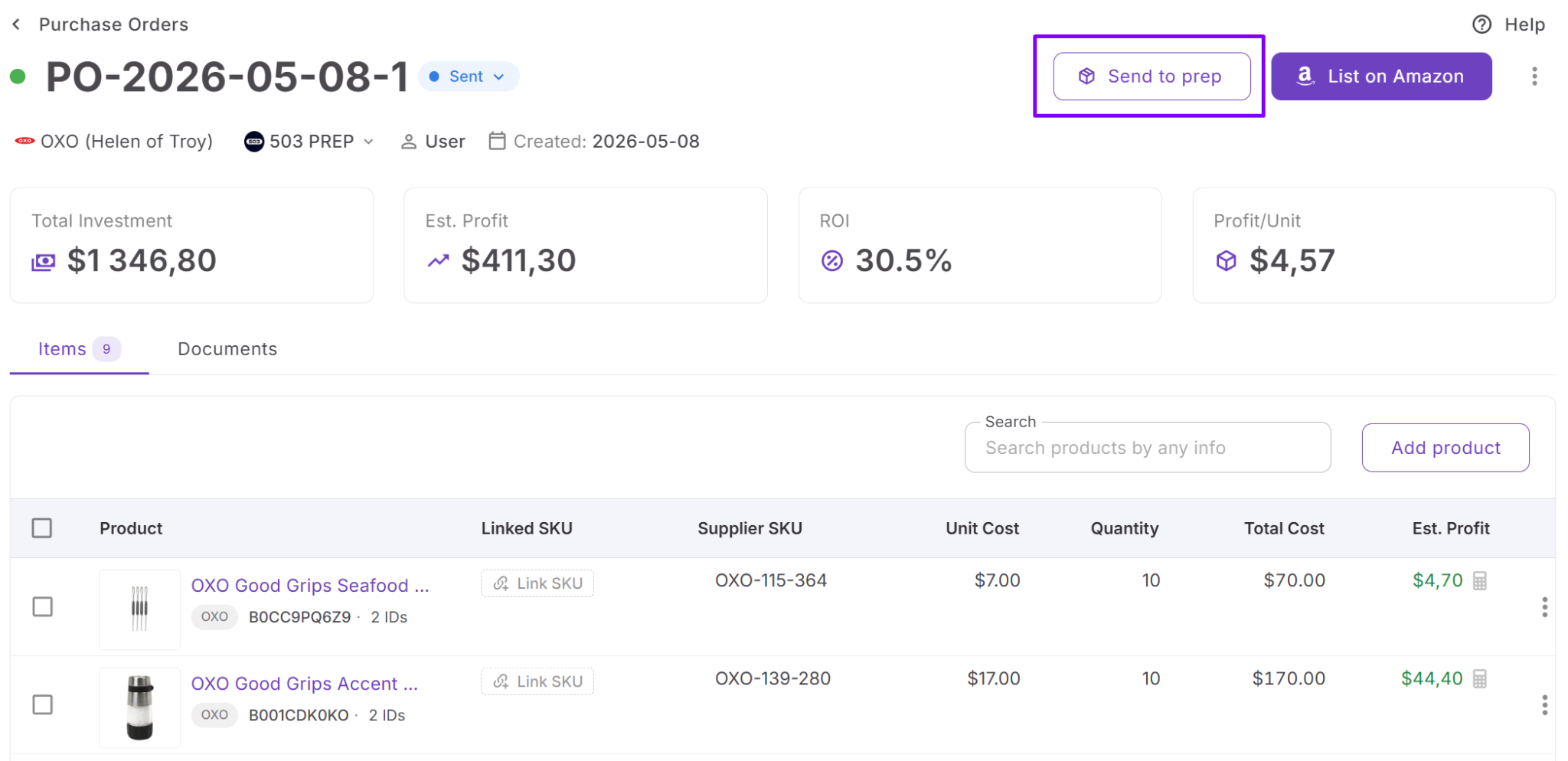
Create inbound shipments directly from Purchase Orders Module without switching to your prep center’s portal.
- Track linked shipments
Access shipment status and open the linked shipment in your prep center directly from Seller Assistant.
- Manage prep center connections
Disconnect a prep center or request support for additional providers as your fulfillment network evolves.
How Prep Center Integration works
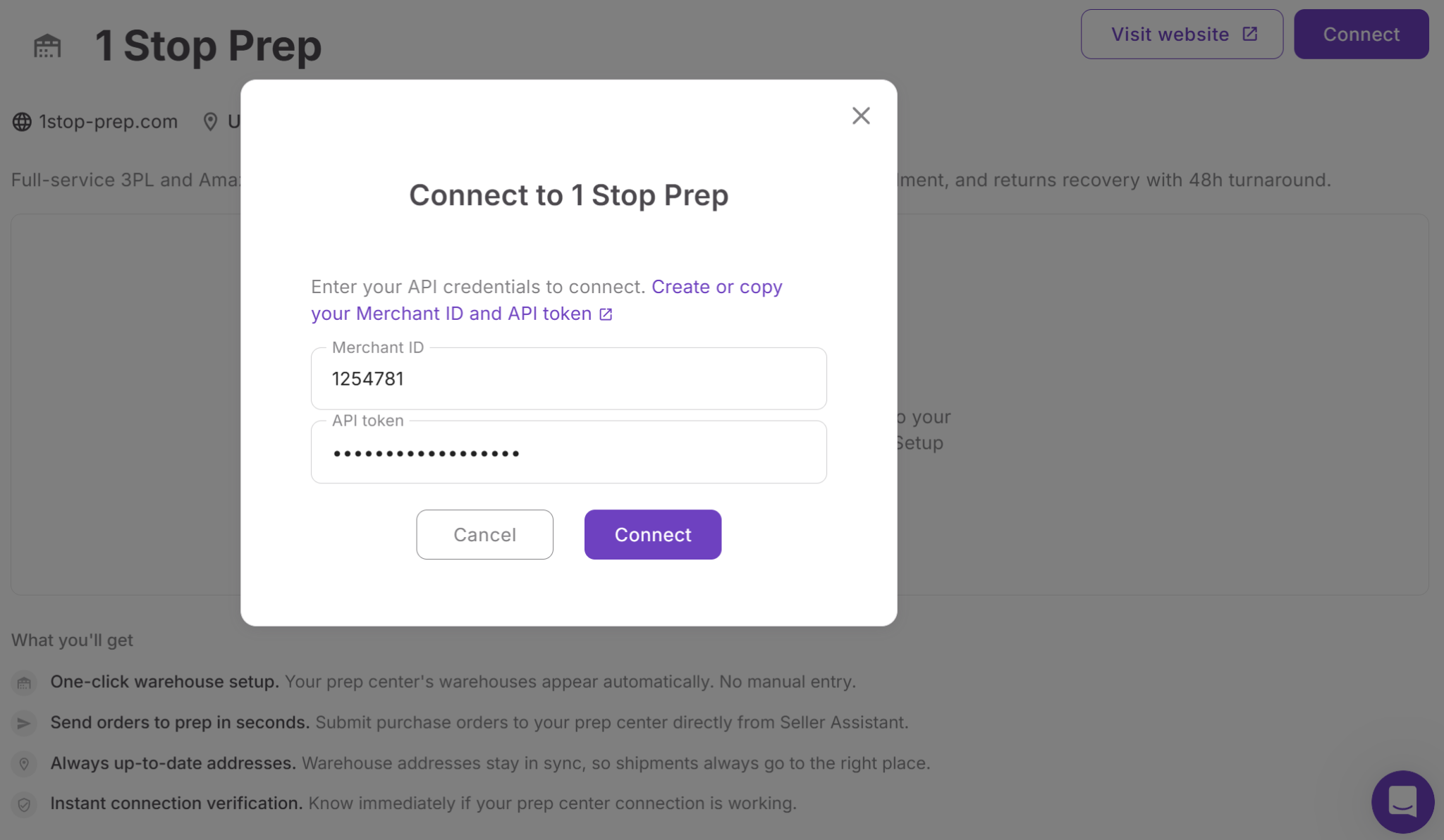
Connecting a prep center takes only a few steps. From the Integrations page, select a supported provider and connect with the API token. Seller Assistant reads the merchant account from the token, and you pick one if the token has several merchant accounts. After the connection is verified, Seller Assistant automatically imports your prep center’s warehouse locations.
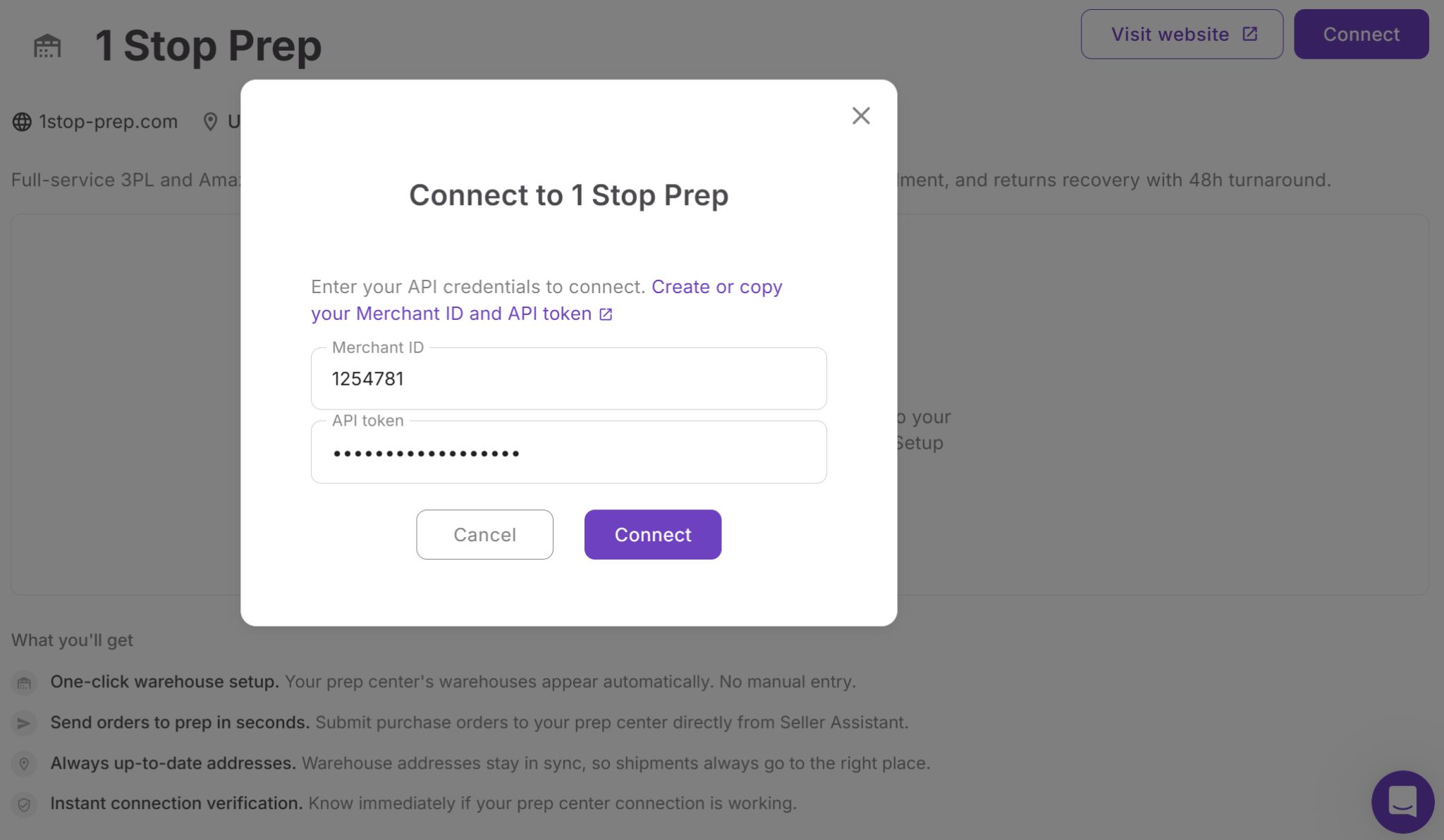
Synced warehouses appear in Warehouses Database with a Synced badge, making it easy to distinguish them from manually created warehouse records. These synchronized locations can then be selected throughout Seller Assistant, helping ensure your fulfillment information stays accurate across connected workflows.
Built on Warehouses Database
Prep Center Integration works together with Warehouses Database, rather than replacing it. Warehouses Database remains the central location for managing all fulfillment destinations, while the integration automatically adds and maintains warehouse records from connected prep centers.
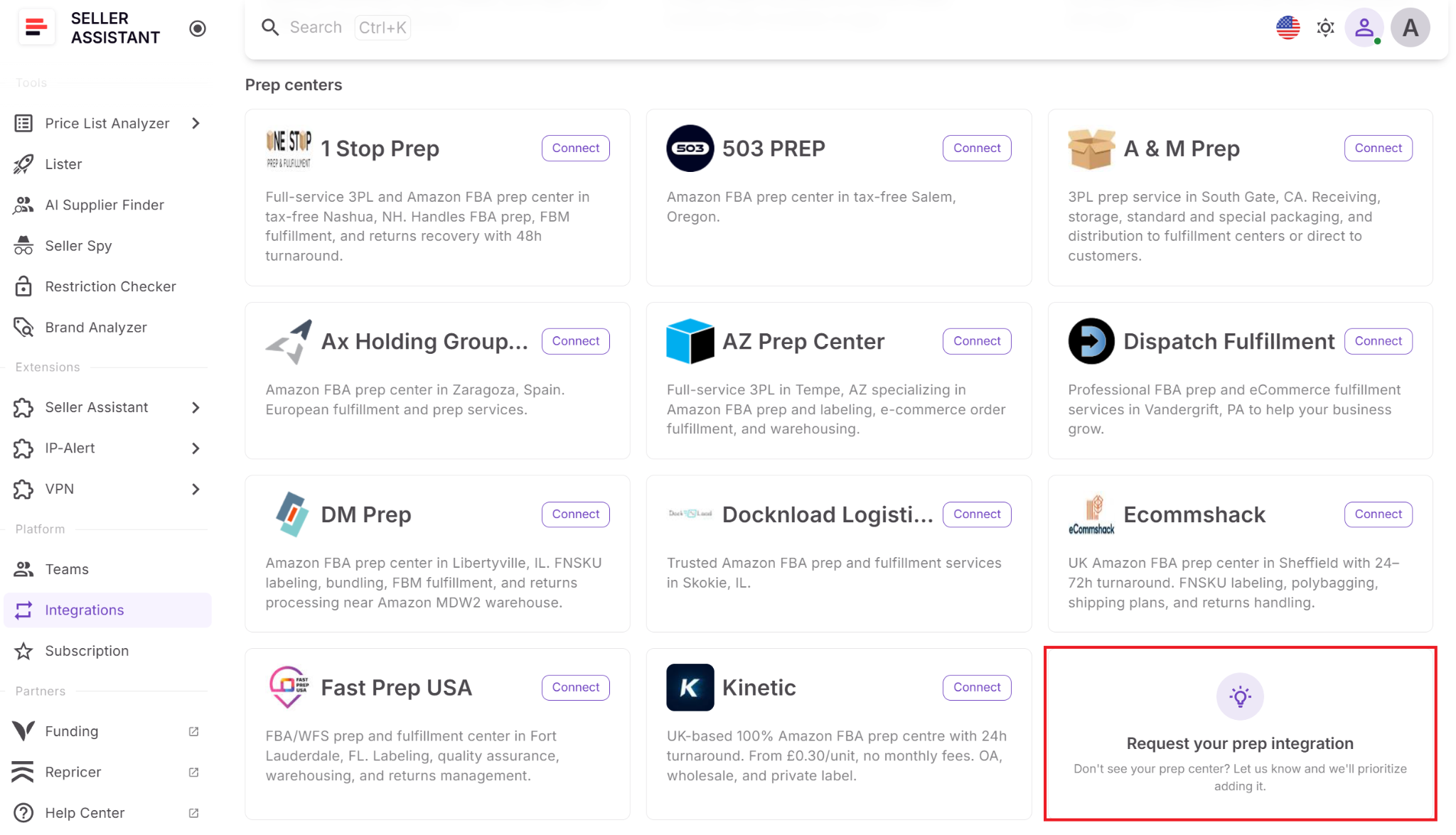
This approach gives sellers one centralized warehouse database while reducing duplicate records and manual maintenance. Instead of updating warehouse information in multiple systems, synchronized locations stay connected to the prep center and are available wherever they’re needed in Seller Assistant.
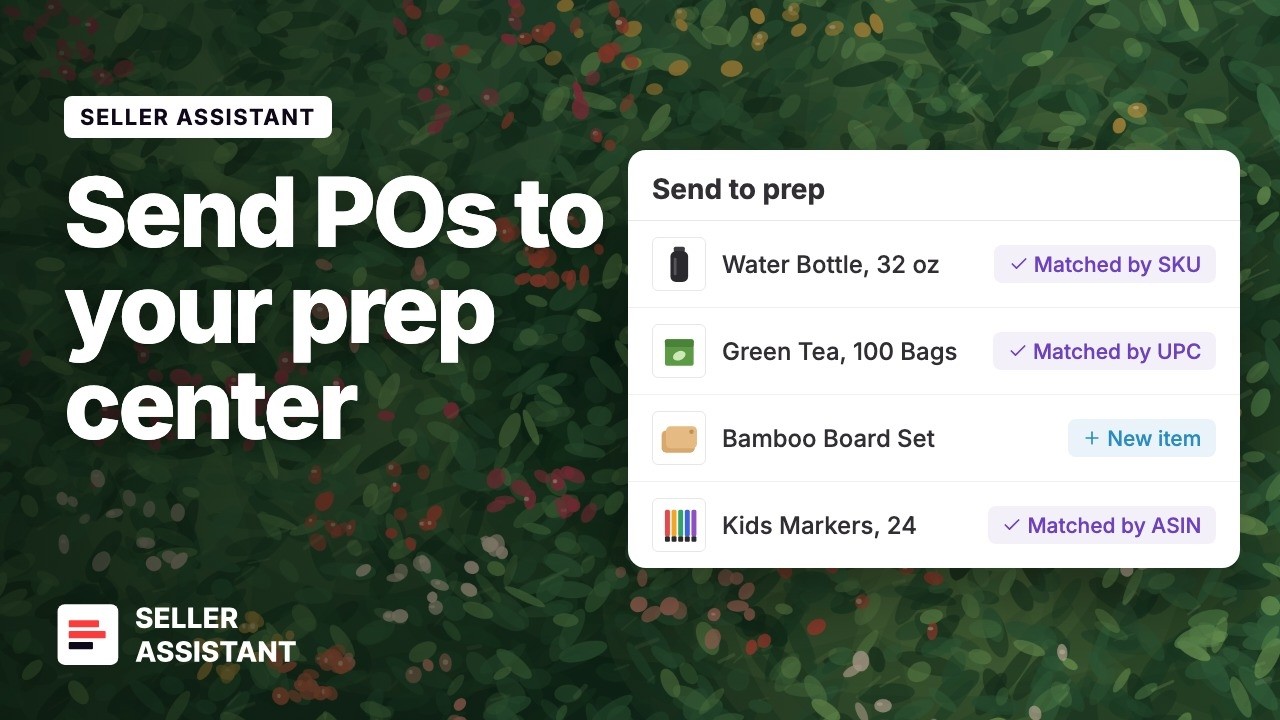
Connect your prep center and send your next PO in one click.
Part of a connected fulfillment workflow
Prep Center Integration fits naturally into Seller Assistant’s end-to-end workflow. Once connected, synchronized warehouse locations become available alongside Suppliers Database, Purchase Orders Module, and FBA Shipments, allowing fulfillment information to flow across the platform instead of being recreated in separate systems. This reduces manual work, improves data consistency, and helps Amazon sellers manage prep operations more efficiently.
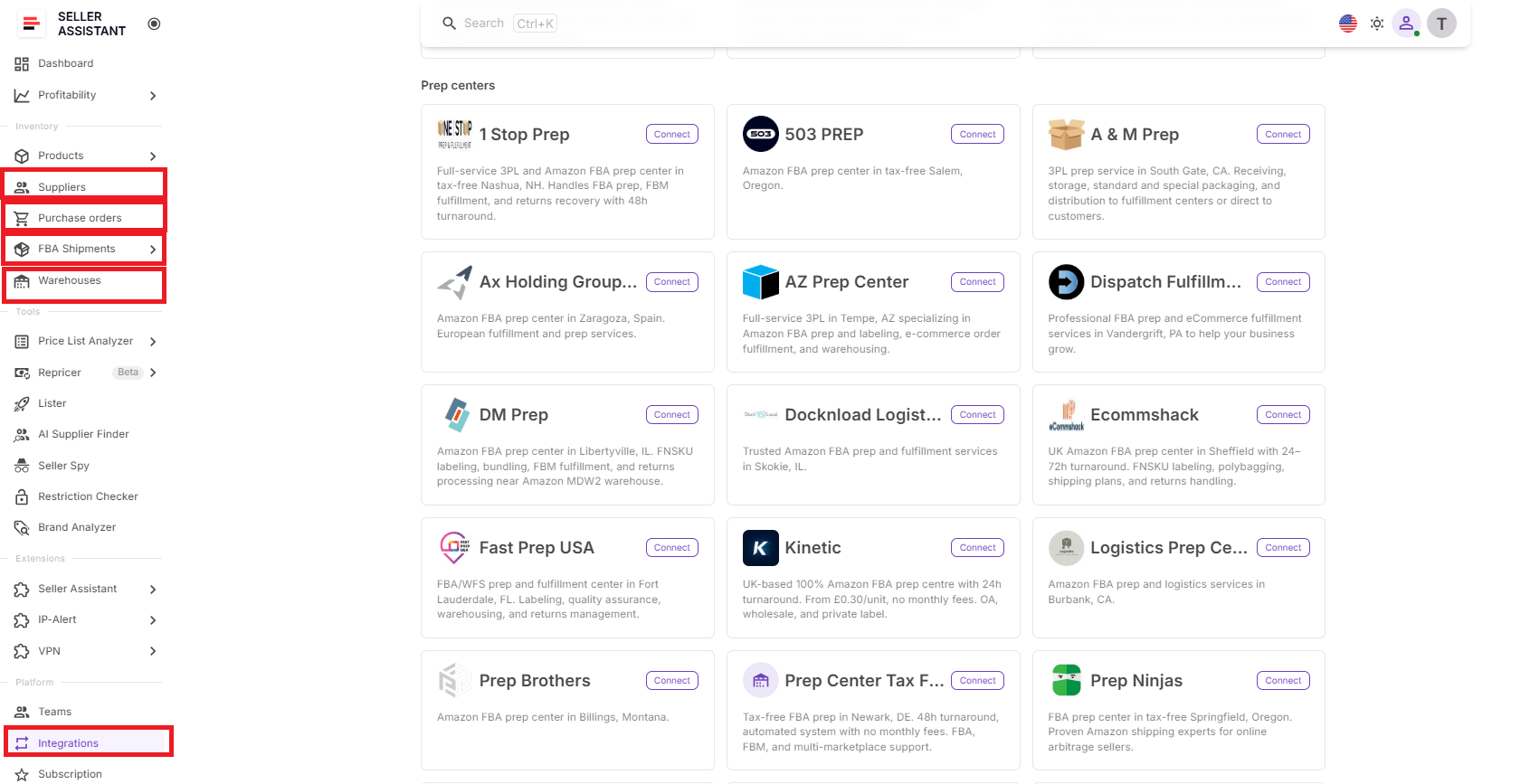
How Warehouses Database and Prep Center Integration Work Together
Warehouses Database and Prep Center Integration are designed to complement each other. The Warehouses Database serves as the central hub for managing all your fulfillment locations, while Prep Center Integration connects supported prep centers and automatically synchronizes their warehouse data. Together, they eliminate duplicate records, reduce manual updates, and keep warehouse information consistent across your operations.
Step 1. Organize your fulfillment locations
Start by creating warehouse and prep center profiles in Warehouses Database. You can store shipping addresses, contact information, notes, and operational statuses, making the database your single source of truth for fulfillment locations.
Step 2. Connect your prep center
If you work with a supported prep center, connect it to Seller Assistant with the API token. Seller Assistant reads the merchant account from the token, and you pick one if the token has several merchant accounts. Once the connection is verified, Seller Assistant automatically imports the prep center’s warehouse locations.
Step 3. Keep warehouse information synchronized
Imported warehouse locations appear in Warehouses Database with a Synced badge alongside your manually created records. This means you can manage all fulfillment locations from one place while keeping connected prep center data up to date automatically.
Step 4. Use warehouse data across Seller Assistant
Because Warehouses Database is integrated with other Seller Assistant tools, the same warehouse information is available throughout your workflow. Warehouse records can be linked to suppliers, selected when creating Purchase Orders, and used with FBA Shipments, so you don’t have to maintain the same fulfillment data in multiple places.
One connected fulfillment workflow
Instead of treating warehouse management, prep centers, purchasing, and fulfillment as separate processes, Seller Assistant connects them into one workflow. You organize fulfillment locations once in Warehouses Database, extend them with Prep Center Integration, and reuse the same warehouse information throughout the platform. This reduces manual work, improves data consistency, and makes it easier to manage a growing Amazon business.
Warehouses Database and Prep Center Integration at a Glance
Warehouses Database and Prep Center Integration are built to work together as part of the same fulfillment workflow. Warehouses Database serves as the foundation by centralizing all your warehouse and prep center information, while Prep Center Integration expands those capabilities by connecting supported prep centers and synchronizing their warehouse data automatically. Together, they create a single source of truth for your fulfillment locations, reducing manual work and keeping warehouse information consistent across Seller Assistant.
| Warehouses Database helps you… | Prep Center Integration extends this by… |
|---|---|
| Create warehouse and prep center profiles | Connecting supported prep centers directly to Seller Assistant |
| Store shipping addresses, contacts, notes, and statuses | Syncing warehouse locations automatically |
| Organize and manage fulfillment locations | Keeping synchronized warehouse information up to date |
| Set a primary warehouse for your operations | Making connected prep center locations available throughout Seller Assistant |
| Search, edit, and maintain warehouse records | Eliminating duplicate warehouse records and manual updates |
| Reuse warehouse information across Seller Assistant | Extending warehouse data to connected prep center workflows |
FAQ
Can I manage both my own warehouse and third-party prep centers in Seller Assistant?
Yes. The Warehouses Database lets you store and manage any fulfillment location, whether it’s your own warehouse, a third-party prep center, or a combination of both. This gives you one centralized place to organize all the locations your suppliers ship to.
What happens if I stop working with a warehouse or prep center?
You don’t have to delete it. You can mark the location as Inactive to keep its details for historical reference while preventing it from being used as an active fulfillment destination.
Can my team access the same warehouse information?
Yes. Warehouse records are shared across your Seller Assistant workspace, so team members work with the same addresses, contacts, and fulfillment locations. This helps maintain consistent data and reduces the risk of using outdated information.
Do I have to connect a prep center to use the Warehouses Database?
No. The Warehouses Database works independently, so you can manually create and manage warehouse and prep center records even if you don’t use a supported integration. You can always connect a prep center later as your workflow evolves.
What if my prep center isn’t supported yet?
You can still manage that prep center by creating it manually in the Warehouses Database. If you’d like a direct connection, you can submit a request for a new integration from Seller Assistant’s Integrations Hub, helping prioritize future provider support.
Final Thoughts
As your Amazon business grows, managing warehouses and prep centers becomes just as important as finding profitable products. Keeping fulfillment locations organized, maintaining accurate warehouse information, and reducing manual updates helps prevent operational mistakes and creates a more efficient workflow. A centralized warehouse management system gives you better visibility into your fulfillment network and makes it easier to scale your business without adding unnecessary complexity.
Seller Assistant brings warehouse and prep center management together in one connected platform. With Warehouses Database, you can organize and maintain all your fulfillment locations in one place, while Prep Center Integration synchronizes supported prep centers and keeps warehouse information up to date. Together with Seller Assistant sourcing, supplier management, Purchase Orders Module, and FBA Shipments tools, they help create a streamlined workflow that saves time, improves data consistency, and supports the growth of your Amazon business.