To monitor Amazon competitors effectively, you need more than an occasional look at a rival’s storefront. Competitor monitoring is an ongoing practice – tracking catalog changes, new brands, pricing shifts, and market patterns consistently enough to turn that intelligence into sourcing decisions.
Most sellers check competitors manually when they remember to, which means they miss the signals that matter most: a brand quietly added by three sellers at once, a catalog expanding rapidly into a new category, a product that’s been selling steadily for months.
This post covers what to monitor, how often, and how Seller Assistant’s Seller Spy makes the entire process automatic.
What Competitor Monitoring Means on Amazon
Competitor monitoring is the process of systematically tracking the brands, products, and catalog activity of other Amazon sellers to identify sourcing opportunities and market trends. Rather than checking competitor storefronts occasionally, sellers monitor changes over time to understand how successful businesses expand their catalogs, which brands they continue to sell, and where new opportunities emerge.
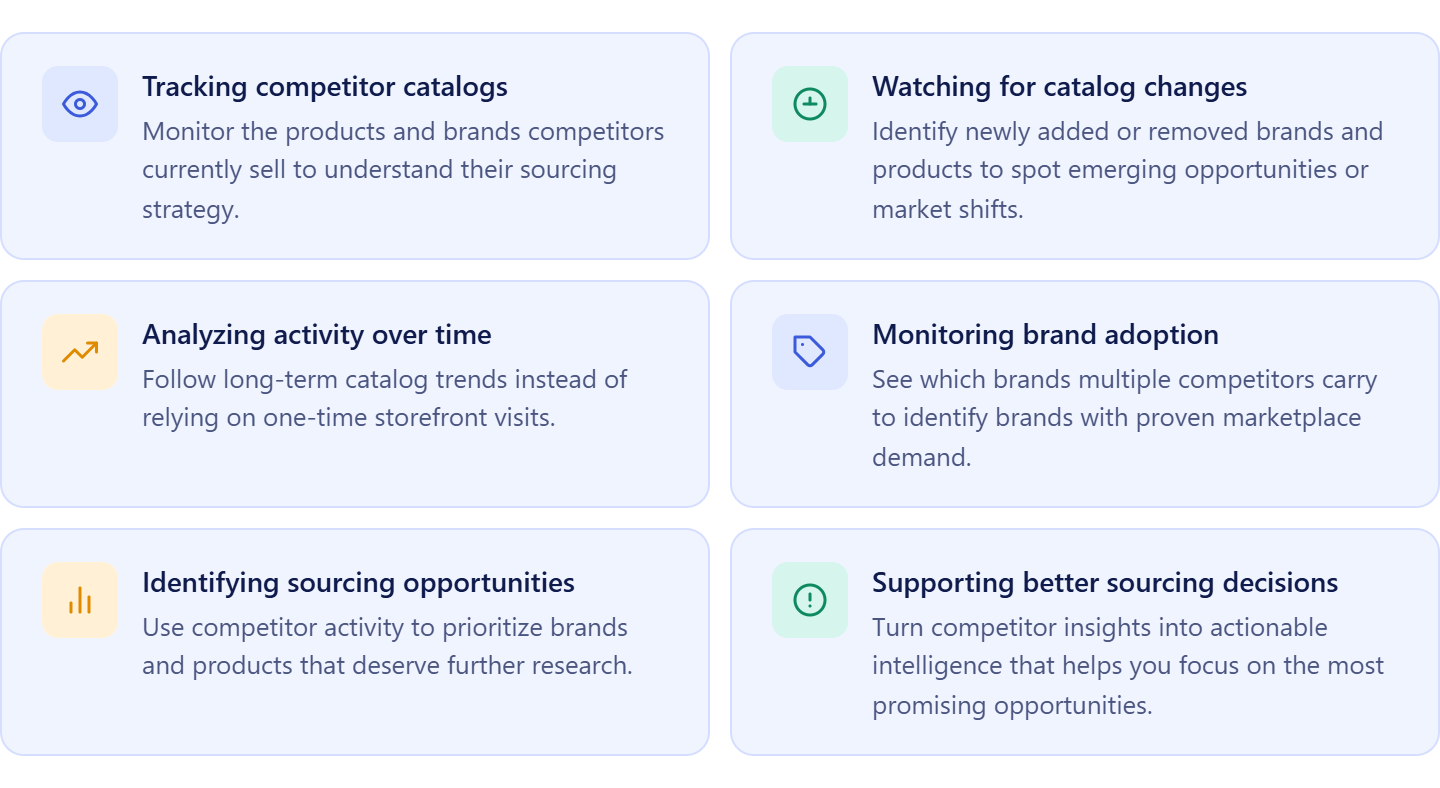
For Amazon wholesale sellers, online arbitrage sellers, and dropshippers, competitor monitoring provides real marketplace intelligence that supports better sourcing decisions. Instead of relying on assumptions or random research, sellers can base their strategy on brands and products that are already performing in the marketplace.
Passive observation vs. active monitoring
Many sellers practice passive observation by visiting competitor storefronts from time to time and manually browsing their listings. While this can provide a snapshot of a competitor’s inventory, it doesn’t reveal how that inventory changes over time or what those changes mean.
Active competitor monitoring is a continuous process. It tracks additions and removals of brands and products, changes in catalog size, marketplace activity, and long-term selling patterns. Monitoring these trends helps sellers recognize new sourcing opportunities, identify successful brand strategies, and react more quickly to changes in the market.
Competitor monitoring is about trends, not snapshots
A single storefront visit shows what a competitor sells today. Continuous monitoring shows how their business evolves over weeks and months. Seeing brands repeatedly added, products consistently stocked, or catalogs steadily expanding provides far more valuable insights than isolated observations.
The goal isn’t to copy competitors – it’s to understand their sourcing patterns, identify brands worth researching, and make more informed decisions about where to focus your own sourcing efforts.
What to Monitor – and Why Each Signal Matters
Not every change in a competitor’s catalog is worth acting on. The key is to focus on signals that reveal sourcing opportunities, shifts in strategy, or changes in market conditions. By monitoring these patterns over time, you can decide which brands deserve further research and which trends may affect your own sourcing strategy.
| Competitor Signal | What It May Indicate | Why You Should Monitor It |
|---|---|---|
| New brands added | A competitor has established a new supplier relationship or identified a promising sourcing opportunity. | Discover brands that may be worth researching before they become widely adopted by other sellers. |
| Brands removed | A brand may no longer be profitable, available from suppliers, or aligned with the seller’s sourcing strategy. | Understand changes in the market and avoid basing sourcing decisions on outdated competitor catalogs. |
| Catalog size changes | A competitor is expanding into new categories, adding suppliers, or reducing inventory. | Identify shifts in sourcing strategy and monitor how competitors are growing or refining their businesses. |
| Brand overlap across competitors | Multiple successful sellers carry the same brand. | Use this as marketplace validation and prioritize brands with broader reseller interest for further analysis. |
| Long-term catalog presence | A brand has remained in a competitor’s catalog over an extended period. | Distinguish stable, consistently sourced brands from short-term or seasonal opportunities that may not support long-term growth. |
Signal 1. New brands added
When a competitor begins selling a new brand, it often indicates they’ve established a new supplier relationship or identified a promising sourcing opportunity. If several competitors add the same brand within a short period, it may be a strong candidate for further research.
Why it matters
New brands can help you discover sourcing opportunities before they become widely adopted.
Signal 2. Brands removed
Brands disappearing from a competitor’s catalog can reveal just as much as new additions. The seller may have lost access to a supplier, stopped carrying the brand due to low profitability, or shifted their sourcing strategy.
Why it matters
Monitoring removed brands helps you recognize changing market conditions and avoid making decisions based on outdated competitor data.
Signal 3. Catalog size changes
A competitor’s catalog may expand rapidly as they add new suppliers or contract as they discontinue products and brands. Tracking these changes over time helps you understand whether a seller is growing, refining their inventory, or changing business direction.
Why it matters
Catalog growth and contraction provide valuable context about competitor sourcing activity and market positioning.
Signal 4. Brand overlap across competitors
When the same brand appears in the catalogs of multiple successful Amazon sellers, it suggests consistent marketplace demand and broader reseller interest. This doesn’t automatically make the brand a good sourcing opportunity, but it does make it worth investigating further.
Why it matters
Brand overlap provides marketplace validation and helps you prioritize brands with stronger sourcing potential.
Signal 5. Long-term catalog presence
Some brands remain in competitor catalogs for months or even years, while others appear only briefly. Brands with consistent long-term presence often indicate stable supplier relationships and sustained demand rather than short-term opportunities.
Why it matters
Long-term catalog presence helps you distinguish brands that support ongoing wholesale sourcing from those driven by temporary market conditions.
How Seller Spy Automates Competitor Monitoring
Monitoring Amazon competitors manually quickly becomes difficult as your business grows. Visiting storefronts one by one, comparing catalogs, and trying to remember what changed from last week is time-consuming and often misses important trends.
Seller Assistant’s Seller Spy automates competitor monitoring by continuously tracking competitor catalogs, brands, products, and marketplace activity, giving sellers up-to-date insights from a single workspace.
Designed for Amazon wholesale sellers, online arbitrage sellers, and dropshippers, Seller Spy helps you move beyond occasional storefront checks and monitor competitors systematically. Instead of collecting isolated data points, you can see how competitor catalogs evolve over time, identify sourcing opportunities as they emerge, and use marketplace trends to guide your sourcing strategy.
How Seller Spy helps you monitor competition
Seller Spy tracks competitor activity at multiple levels, allowing you to analyze both the market as a whole and individual sellers in detail.
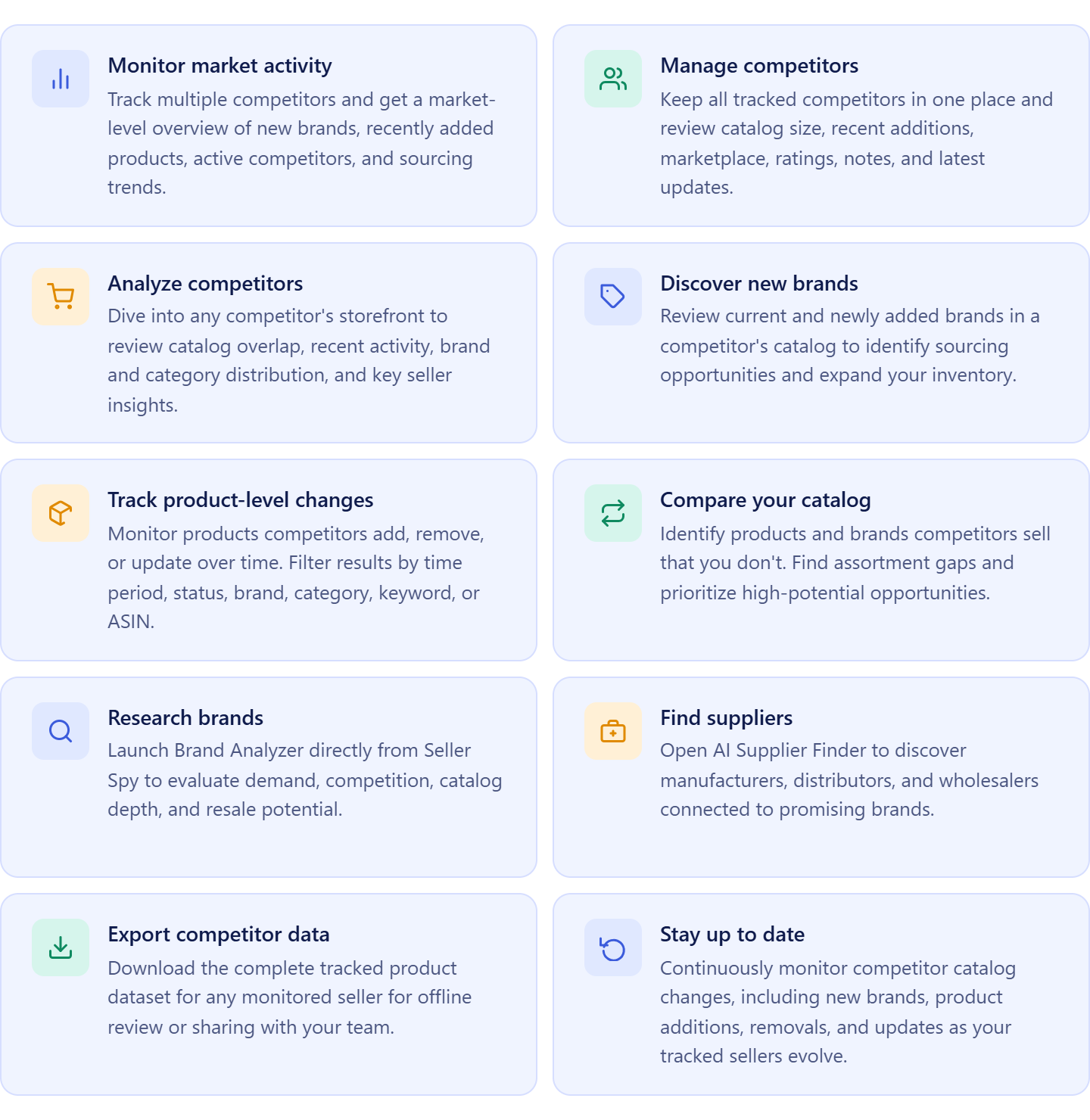
- Track competitor brands
See which brands competitors currently sell and identify new brands they’ve recently added. This helps you discover sourcing opportunities backed by real marketplace activity.
- Follow catalog changes
Monitor products added to or removed from competitor catalogs over time. Tracking these changes helps you recognize shifts in sourcing strategies and emerging market trends.
- Compare catalogs with your own
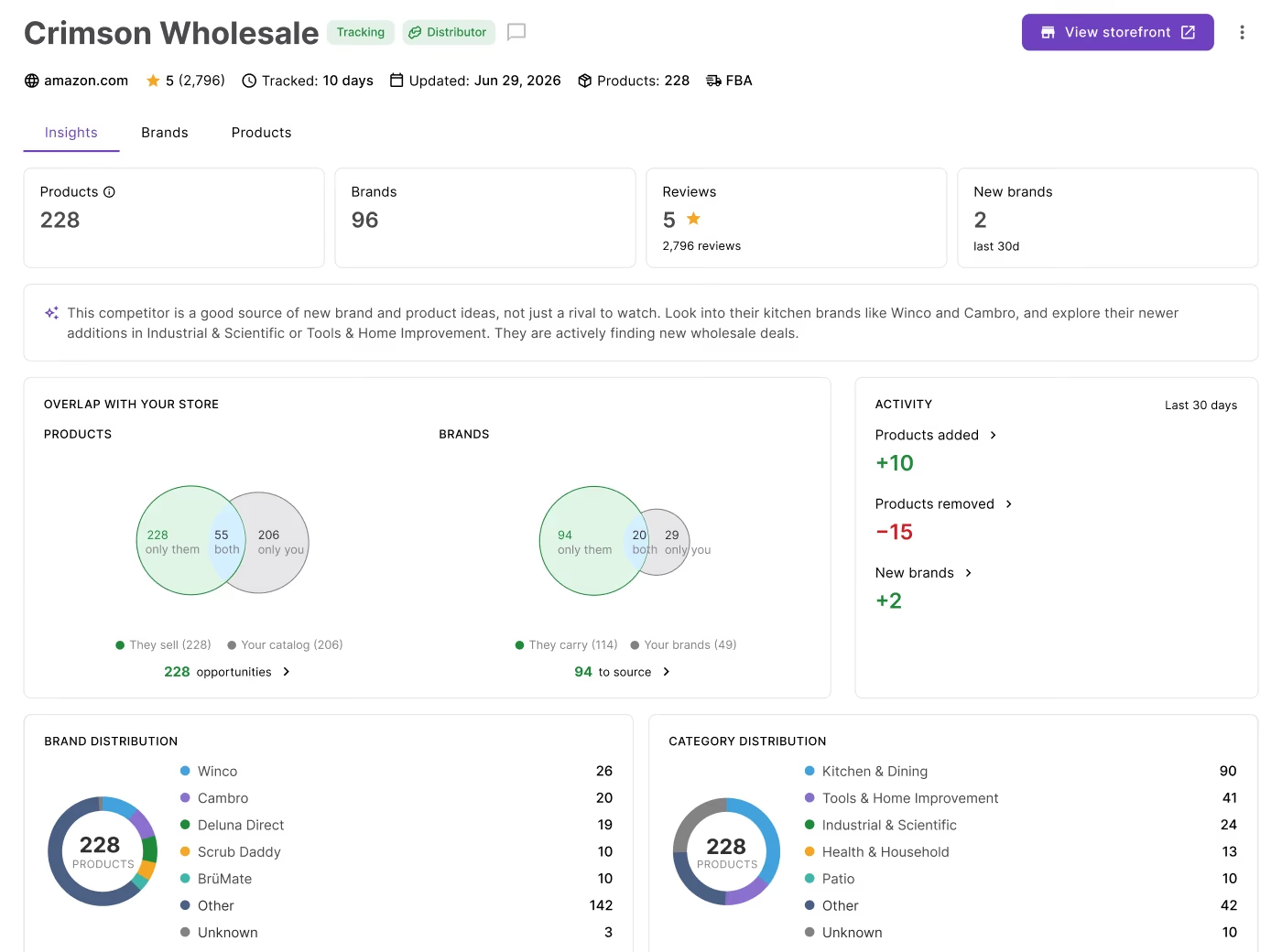
Identify brands and products you already sell alongside those missing from your inventory. This makes it easier to spot gaps and prioritize opportunities for catalog expansion.
- Analyze category distribution
Review how competitors allocate their inventory across Amazon categories. Understanding these patterns can reveal new niches, sourcing priorities, and areas of market growth.
- Review seller profiles
Access important seller information, including marketplace, fulfillment model, seller rating, review count, and tracking history. These insights help you better understand each competitor’s business and selling strategy.
- Identify active sellers and trending brands
Monitor the most active competitors, brands gaining traction, and recent marketplace activity across all tracked sellers. This provides an overview of where the market is moving and which opportunities deserve attention.
- Discover new sourcing opportunities
Use competitor intelligence to uncover brands and products with potential for your own catalog. Instead of relying on random research, you can prioritize opportunities supported by competitor data.
- Continue your sourcing workflow
Launch Brand Analyzer to validate promising brands or open AI Supplier Finder to locate manufacturers, distributors, and wholesalers. This allows you to move directly from competitor monitoring to the next stage of your sourcing process.
Three levels of competitor intelligence
Seller Spy organizes competitor monitoring into three connected dashboards that let you move from a broad market overview to detailed seller, brand, and product research. Each dashboard contains dedicated sections that help answer different sourcing questions, making it easy to investigate opportunities at the level of detail you need.
| Dashboard | Sections | What You’ll Find |
|---|---|---|
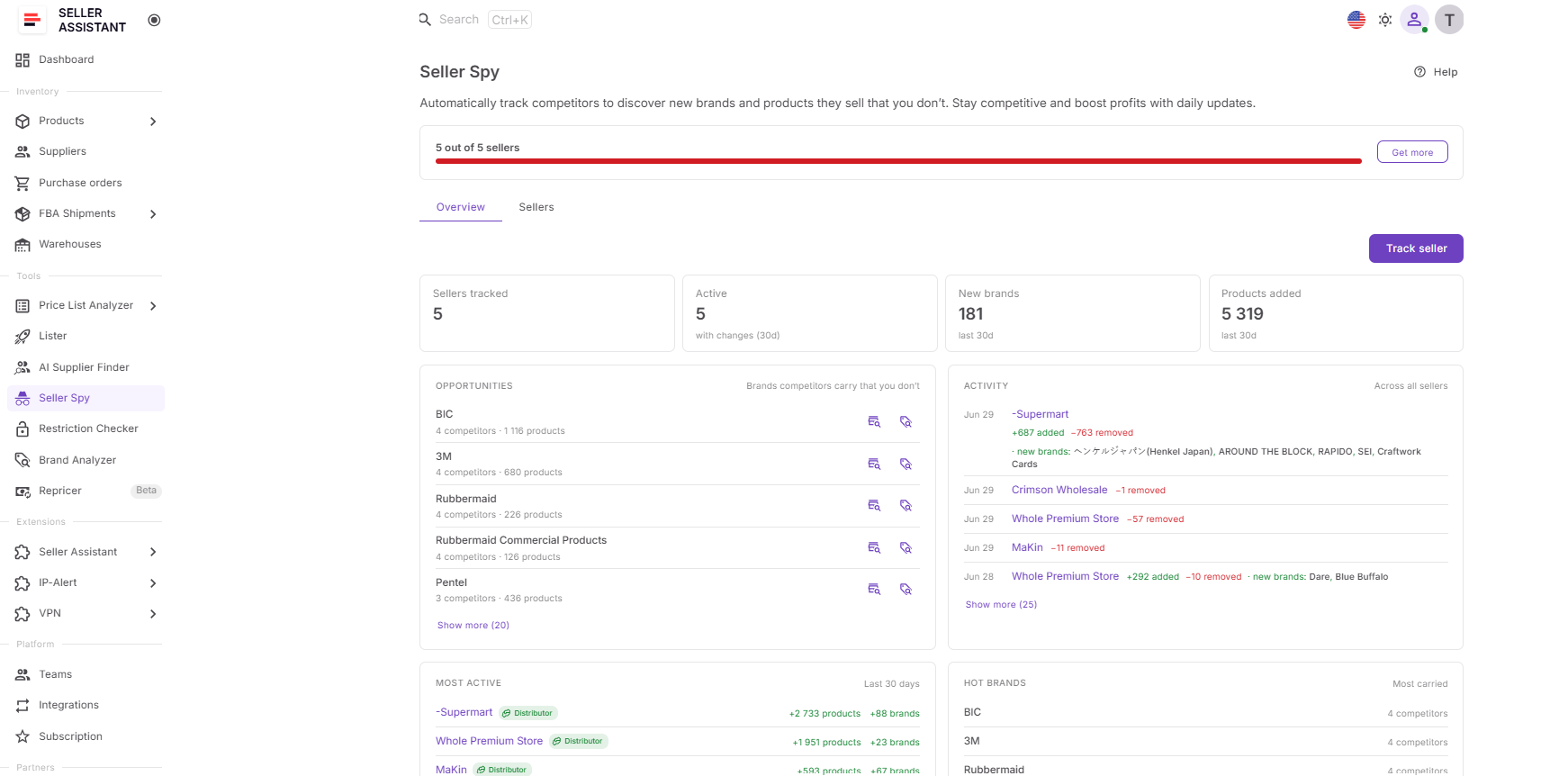
| Overview | Tracked Sellers Opportunities Activity Most Active Hot Brands | A high-level view of competitor activity across all tracked sellers, including sourcing opportunities, new brands, recent product additions, trending brands, and the most active competitors. |
| Sellers | Sellers list | A complete list of tracked competitors with key metrics such as marketplace, seller type, catalog size, added brands and products, rating, notes, tracking date, and last update. |
| Seller Details | Insights Brands Products | In-depth analysis of an individual competitor, including catalog overlap, category distribution, brand portfolio, newly added brands, product changes, and detailed product-level information. |
Overview dashboard
The Overview dashboard provides a market-wide summary of competitor activity across every tracked seller. Instead of reviewing competitors one by one, you can immediately see which sellers are most active, which brands are trending, where new sourcing opportunities are emerging, and how competitor catalogs are changing over time.
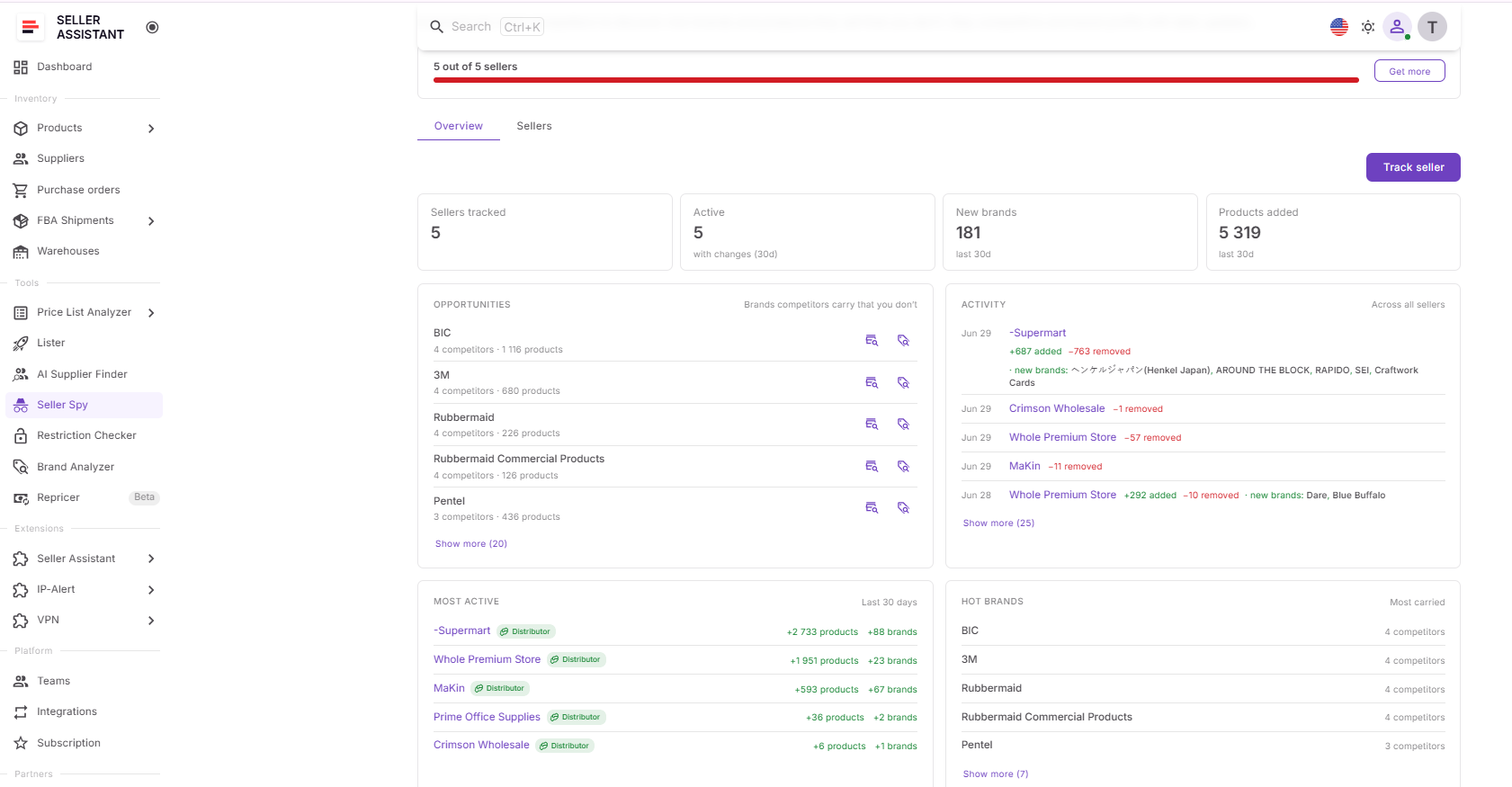
Its sections include:
- Tracked Sellers – shows the number of tracked and active competitors.
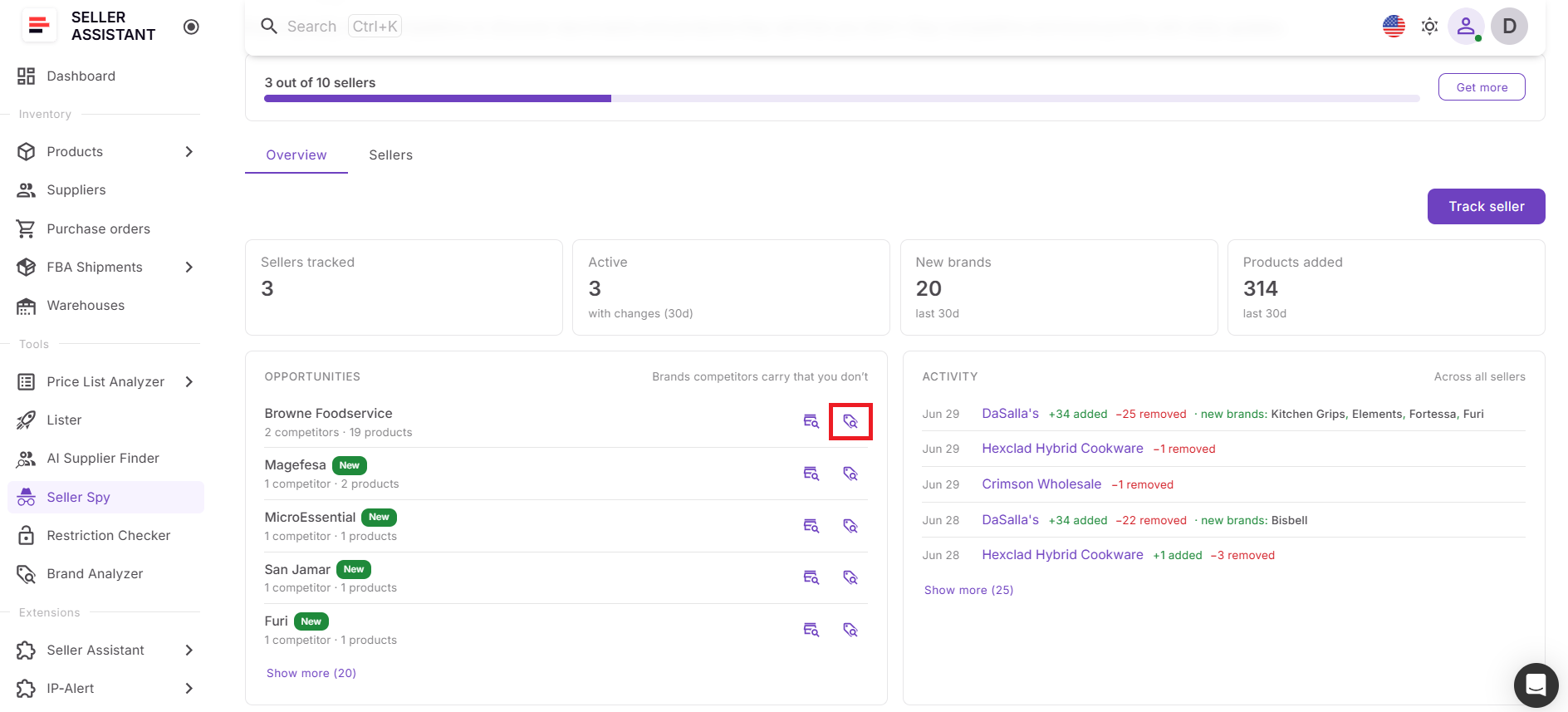
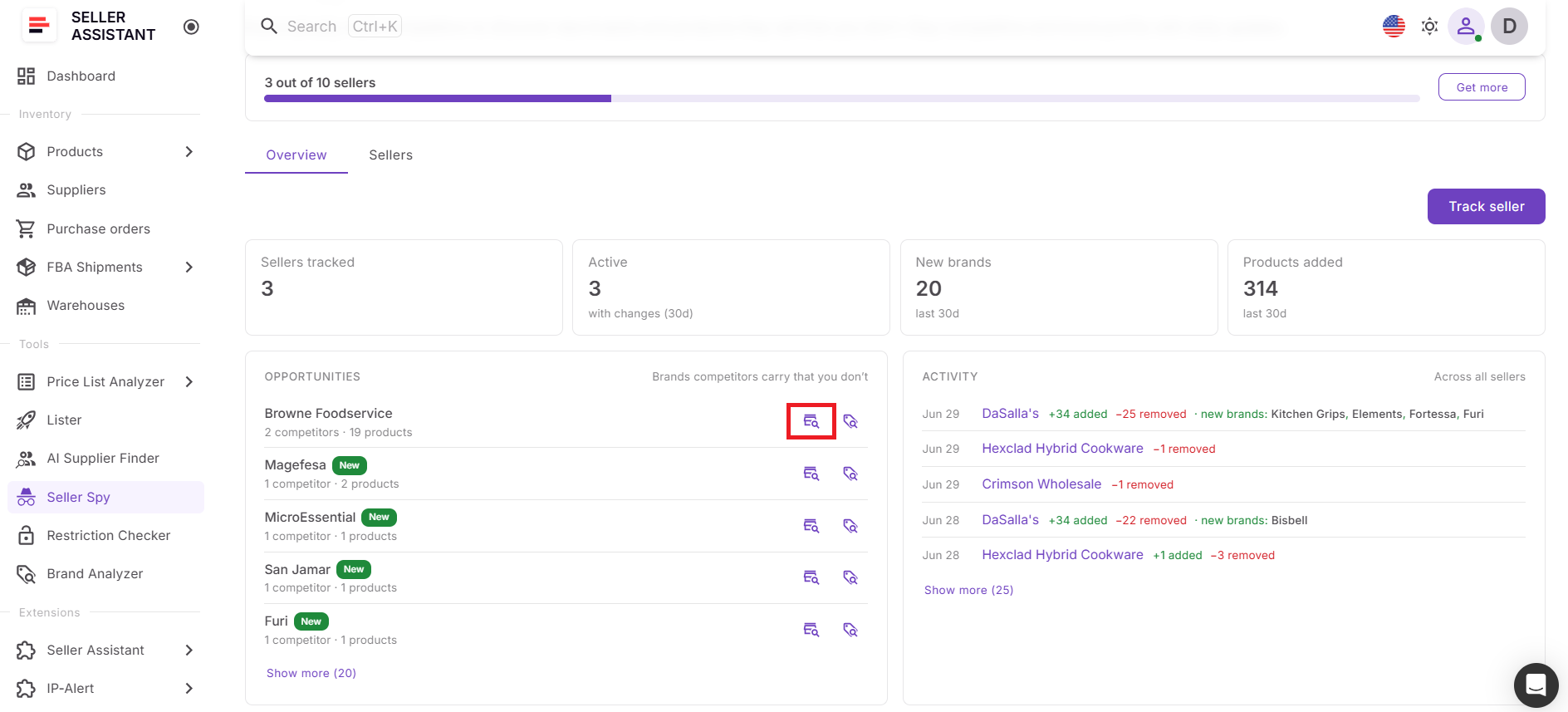
- Opportunities – highlights brands that represent potential sourcing opportunities and lets you launch Brand Analyzer or AI Supplier Finder directly from each brand.
- Activity – summarizes recent catalog changes across all monitored competitors.
- Most Active – identifies competitors making the largest catalog updates.
- Hot Brands – highlights brands appearing most frequently across tracked sellers.
Sellers dashboard
Sellers Dashboard is your competitor management workspace. It organizes every tracked seller in one place, making it easy to compare businesses, prioritize research, and decide which competitors deserve closer attention.
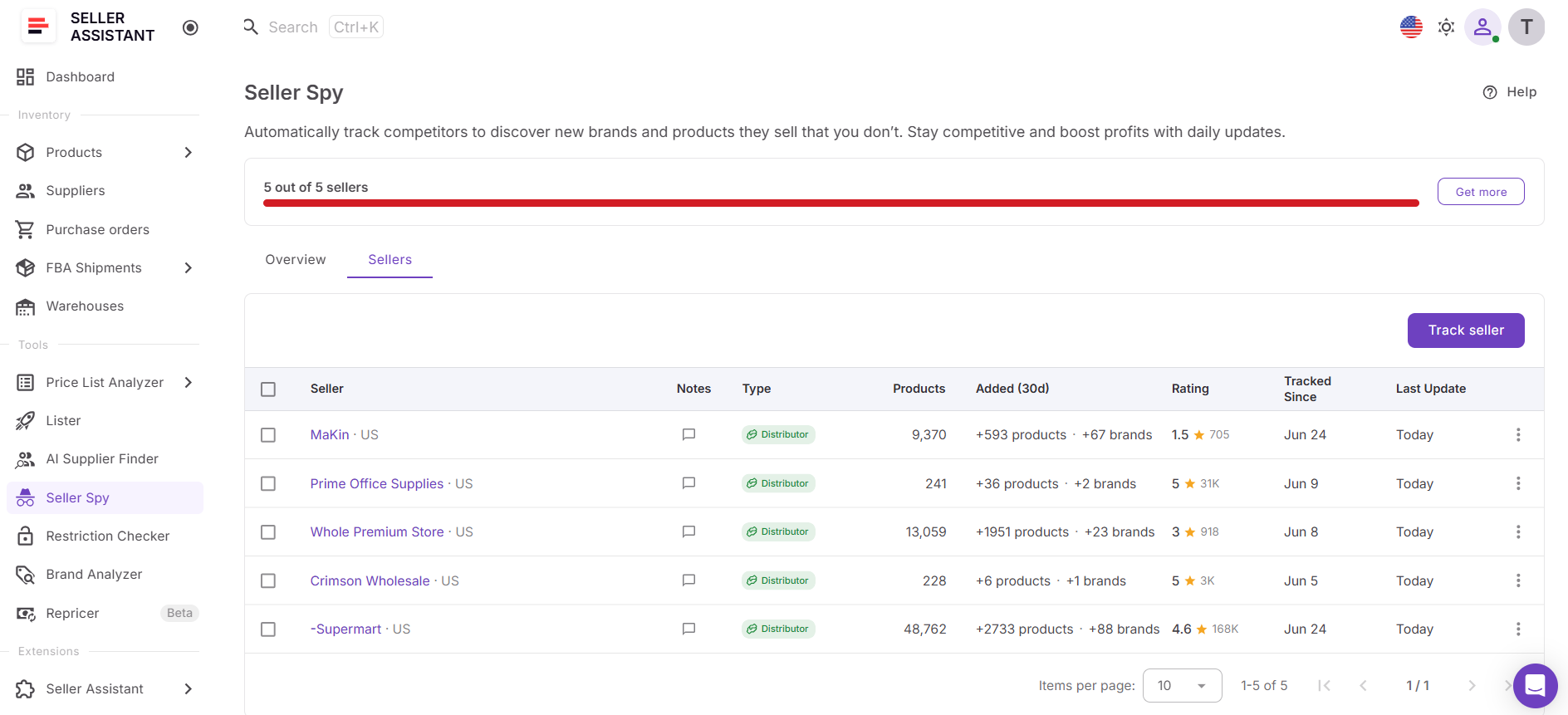
For each seller, you can review information such as:
- Marketplace;
- Seller type;
- Number of products;
- Newly added brands and products;
- Seller rating;
- Notes;
- Tracking date;
- Last update.
Seller Details dashboard
Selecting a competitor opens the Seller Details dashboard, where you can analyze that seller’s sourcing strategy in depth.
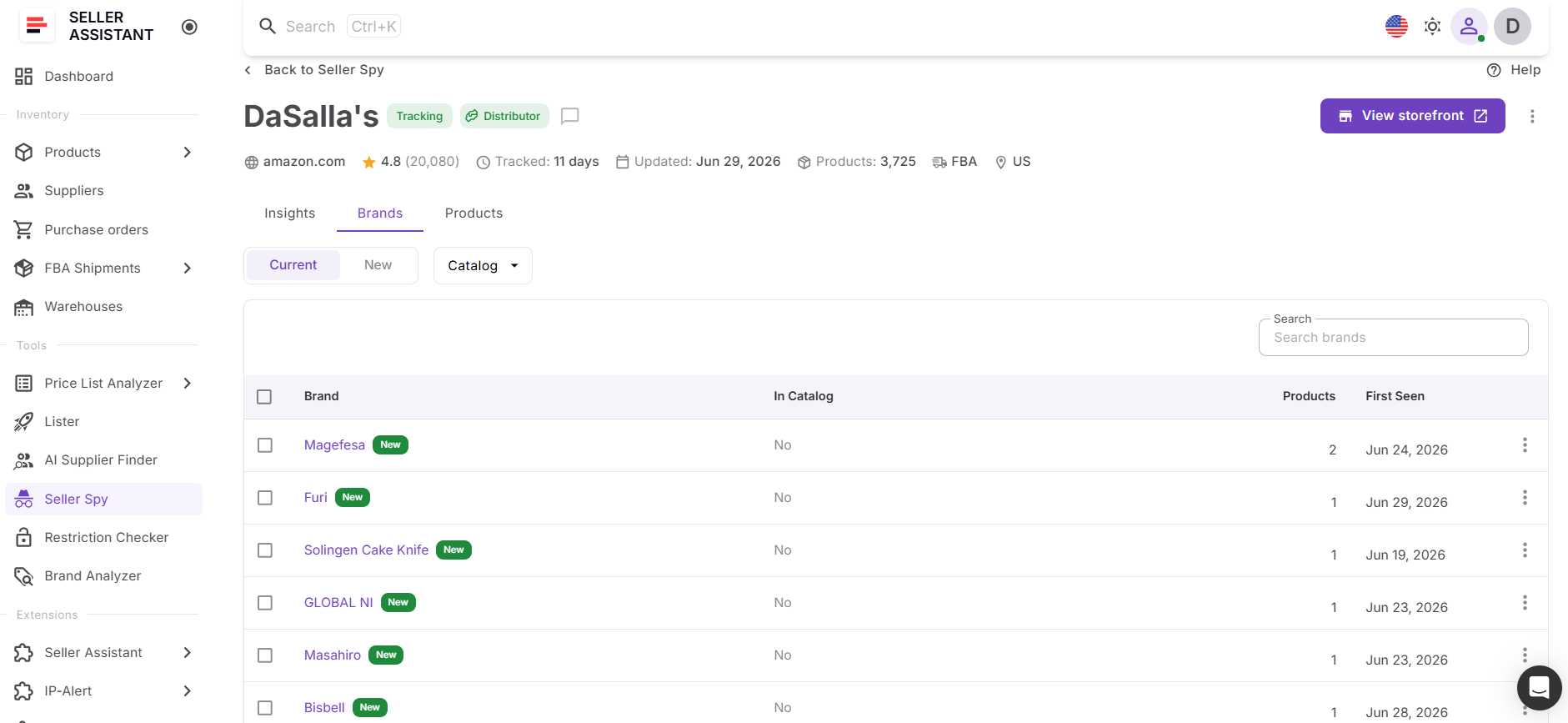
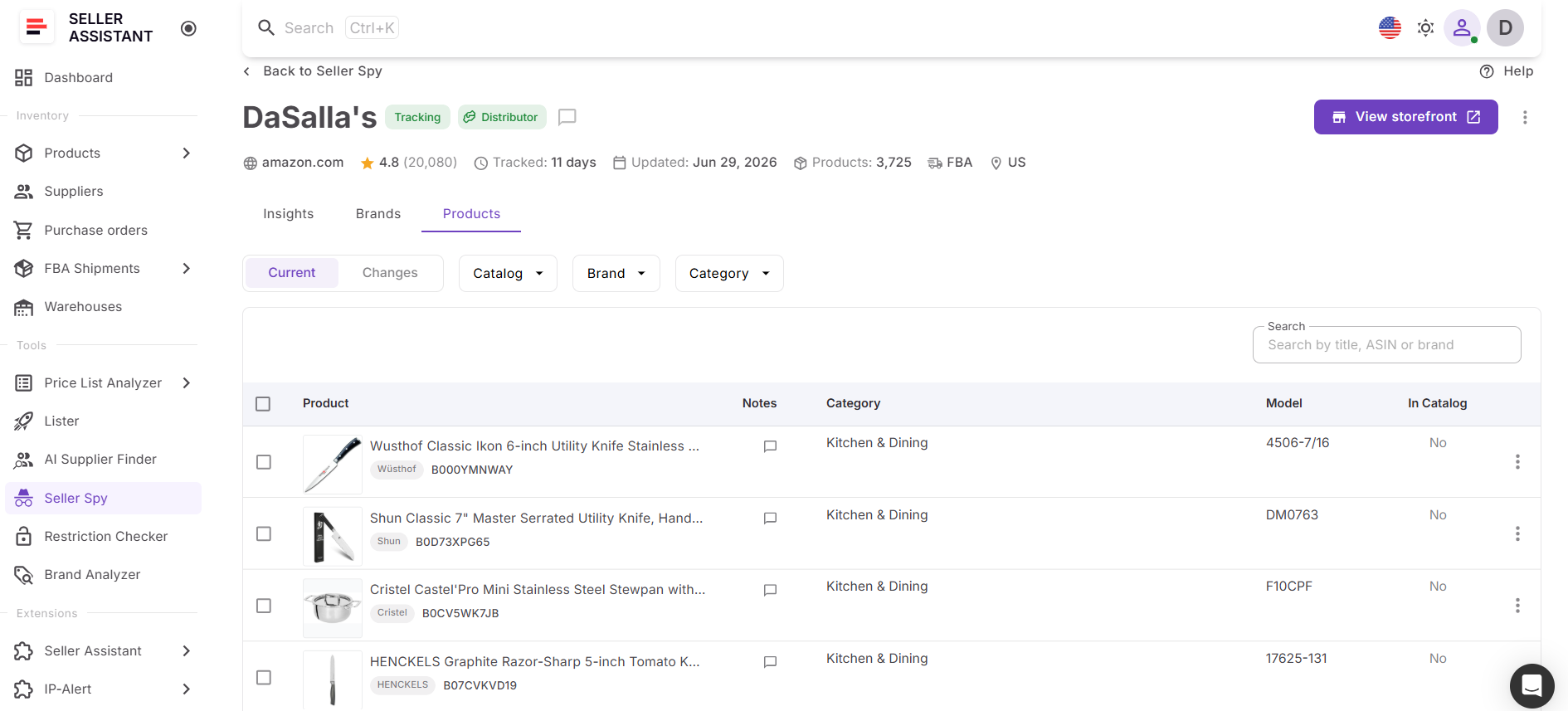
It includes three dedicated sections:
- Insights – provides an overview of catalog overlap, category distribution, marketplace activity, and sourcing trends.
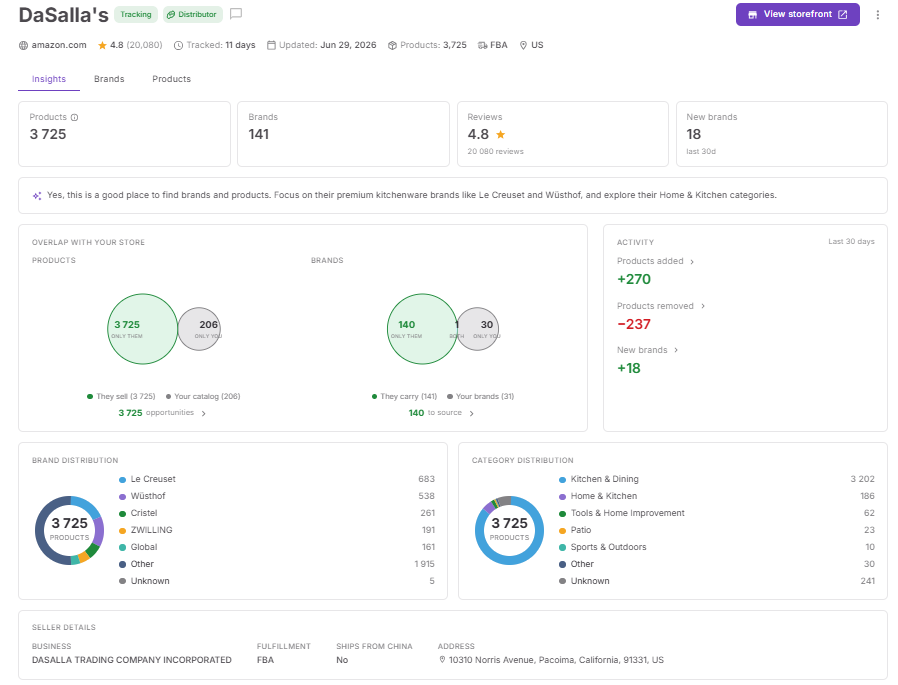
- Brands – displays the competitor’s brand portfolio, newly added brands, and brand-level changes over time.
- Products – lists the competitor’s products together with product-level changes, allowing you to investigate specific sourcing opportunities and catalog movements.
This progression – from Overview → Sellers → Seller Details – lets you start with market-wide trends, narrow your focus to specific competitors, and finally drill down into the brands and products driving their sourcing strategy.
Connected to the rest of your sourcing workflow
Competitor monitoring is only the first step in building a successful sourcing strategy. When Seller Spy identifies a promising brand, you can immediately continue your research without leaving the platform.
Launch Brand Analyzer to evaluate the brand’s demand, competition, Amazon presence, and resale potential.
Then use AI Supplier Finder to locate manufacturers, authorized distributors, and wholesalers connected to that brand.
After that, apply Price List Analyzer or other Seller Assistant workflow tools to select promising deals.
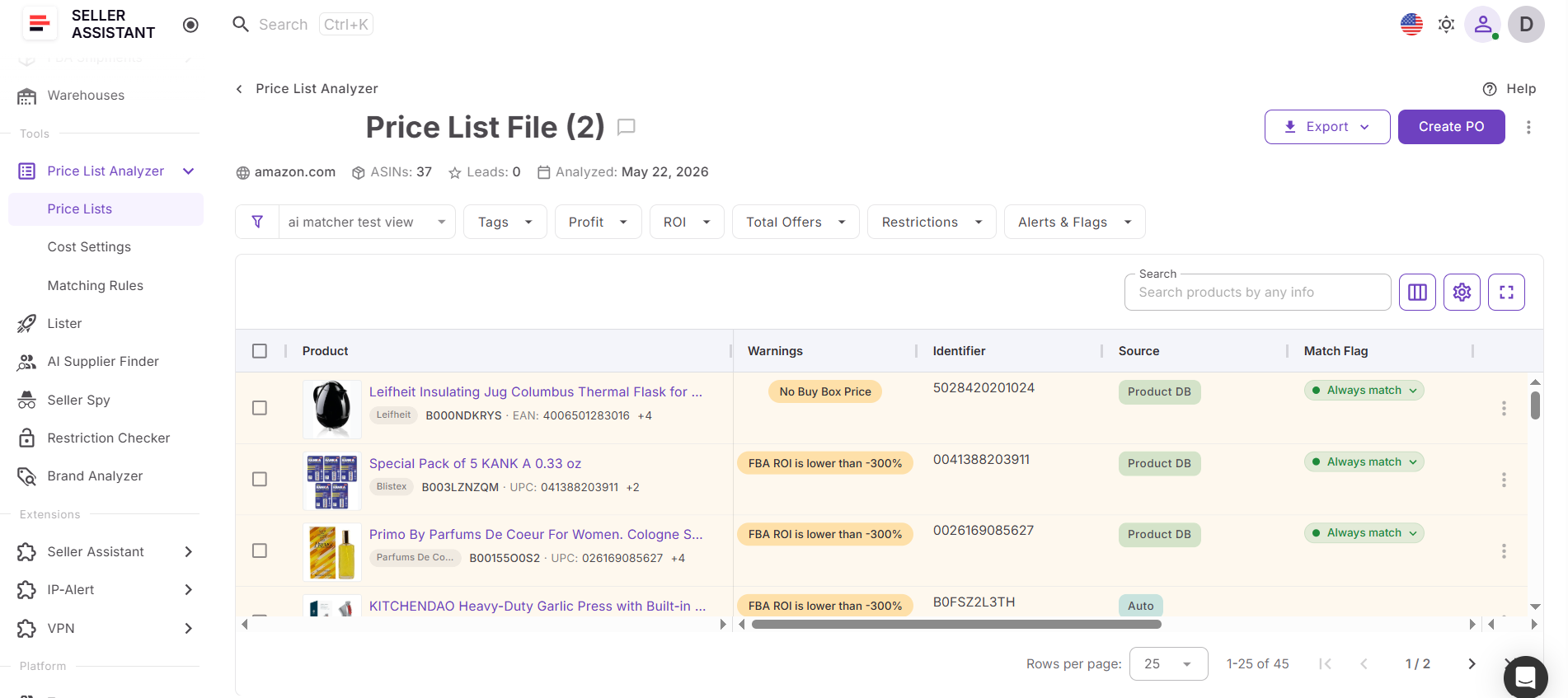
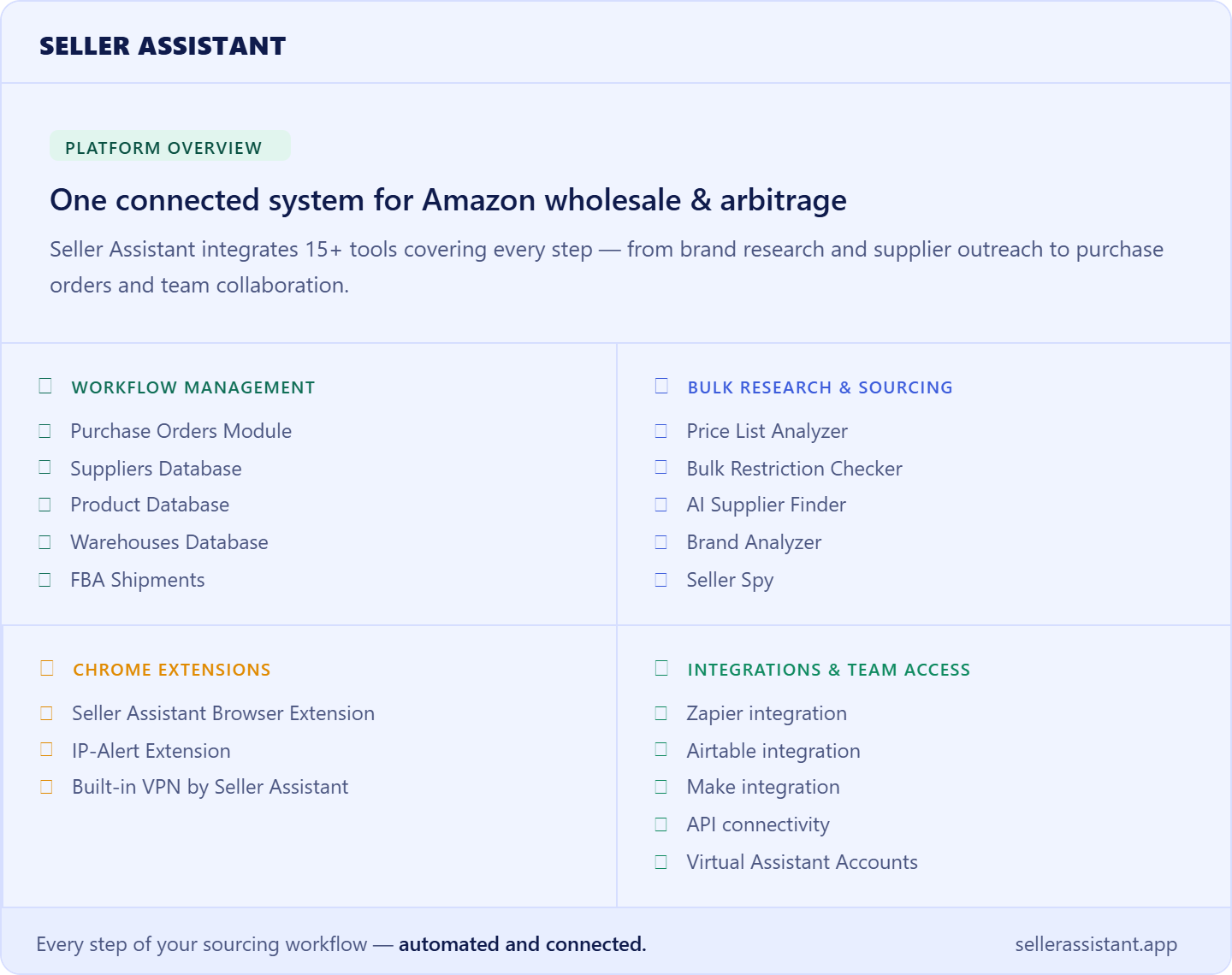
As part of Seller Assistant’s connected sourcing ecosystem, Seller Spy also integrates with other workflow tools, allowing you to move efficiently from competitor intelligence to supplier research, product analysis, purchasing, and inventory management.
How to Read Competitor Signals
Collecting competitor data is only useful if you know how to interpret it. A new brand, a shrinking catalog, or increased activity doesn’t automatically indicate a sourcing opportunity. The key is to understand what each signal may reveal about a competitor’s strategy and decide whether it’s worth investigating further. Looking at trends over time – rather than isolated changes – helps you make more informed sourcing decisions.
| Competitor Signal | What It May Mean | What to Do Next |
|---|---|---|
| A competitor adds a new brand | The seller may have opened a new supplier account or identified a promising sourcing opportunity. | Research the brand further to determine whether it has sufficient demand, manageable competition, and resale potential. |
| Several competitors add the same brand | The brand is attracting attention from multiple sellers, suggesting broader marketplace demand. | Prioritize the brand for deeper analysis before it becomes widely adopted. |
| A brand disappears from a competitor’s catalog | The seller may have changed suppliers, shifted strategy, or stopped selling the brand due to market conditions. | Investigate the brand before pursuing it and check whether demand, competition, or Amazon’s presence has changed. |
| A competitor’s catalog grows rapidly | The seller may be expanding into new categories, working with additional suppliers, or scaling their business. | Review the newly added brands and products to identify sourcing opportunities that fit your business model. |
| A competitor consistently sells the same brand over time | The brand may provide stable demand and support long-term supplier relationships. | Consider adding the brand to your research list as a potential long-term sourcing opportunity rather than a short-term trend. |
| A brand appears across multiple competitor catalogs | Multiple successful sellers have chosen to source the same brand, providing marketplace validation. | Analyze the brand to determine whether it fits your sourcing criteria and offers room to compete profitably. |
| One competitor becomes much more active than others | The seller may have expanded their supplier network or adjusted their sourcing strategy. | Monitor their recent additions closely to identify emerging brands and product categories before competitors do. |
| Most catalog changes occur within one category | The competitor may be focusing on a niche with growing demand or strengthening their position in a specific market segment. | Research the category to understand whether it aligns with your sourcing strategy and business goals. |
How to Set Up and Run Competitor Monitoring – Step by Step
Step 1. Build a focused competitor list
Start with sellers that appear on ASINs you already source or in categories you actively sell. Use Seller Assistant Extension to trace them. Add a mix of large resellers, niche specialists, and sellers whose catalog structure resembles your own business.
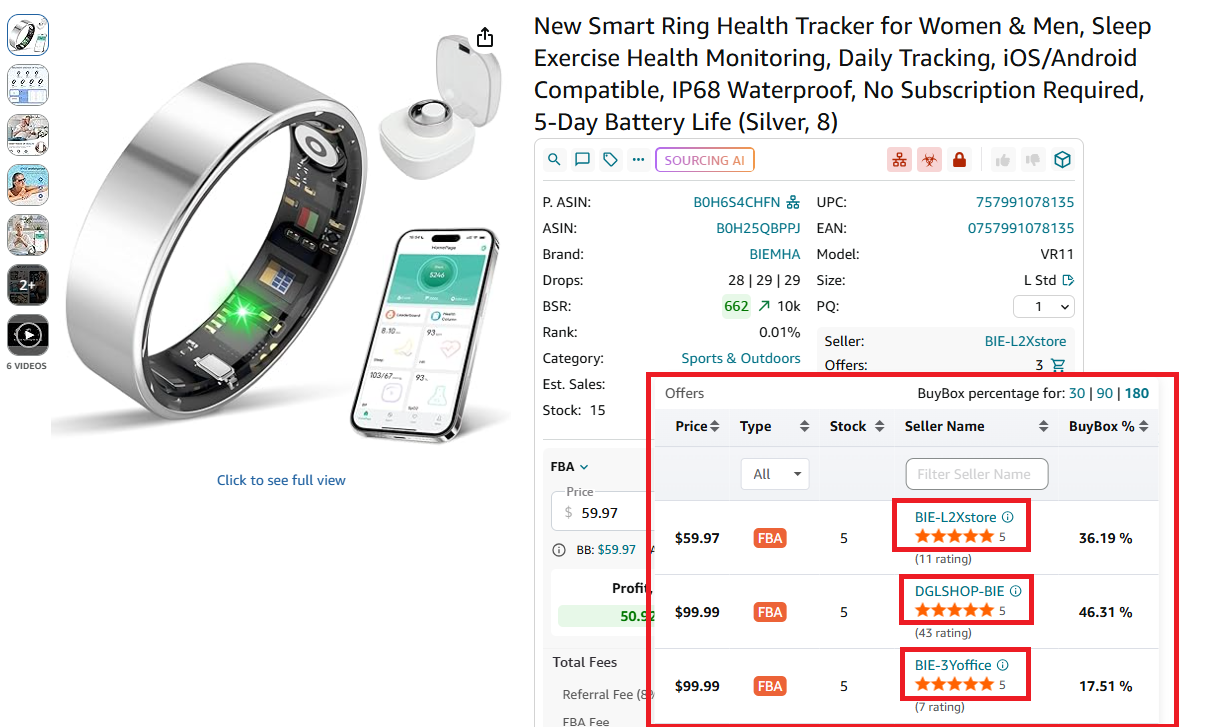
This gives you a relevant monitoring pool and prevents the dashboard from filling with sellers whose activity has little value for your sourcing strategy.
Step 2. Add sellers to Seller Spy
Open Seller Spy in Seller Assistant, click Track seller, and add the competitor using their Amazon storefront or seller information page.
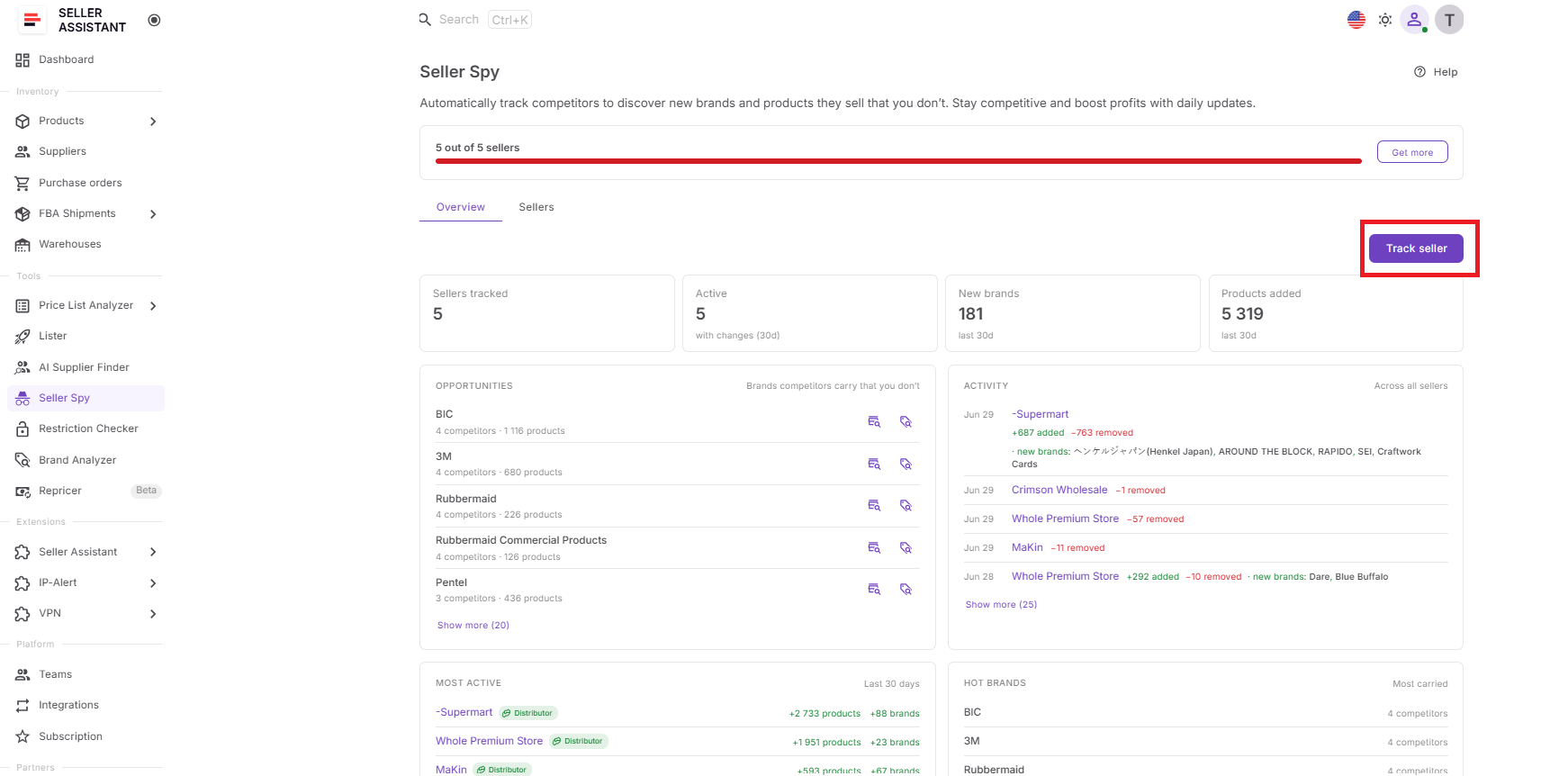
Once added, Seller Spy begins collecting catalog, brand, product, and activity data for that seller.
Step 3. Review the Overview dashboard
Use the Overview dashboard to check tracked sellers, active sellers, new brands, recently added products, Opportunities, Activity, Most Active, and Hot Brands.
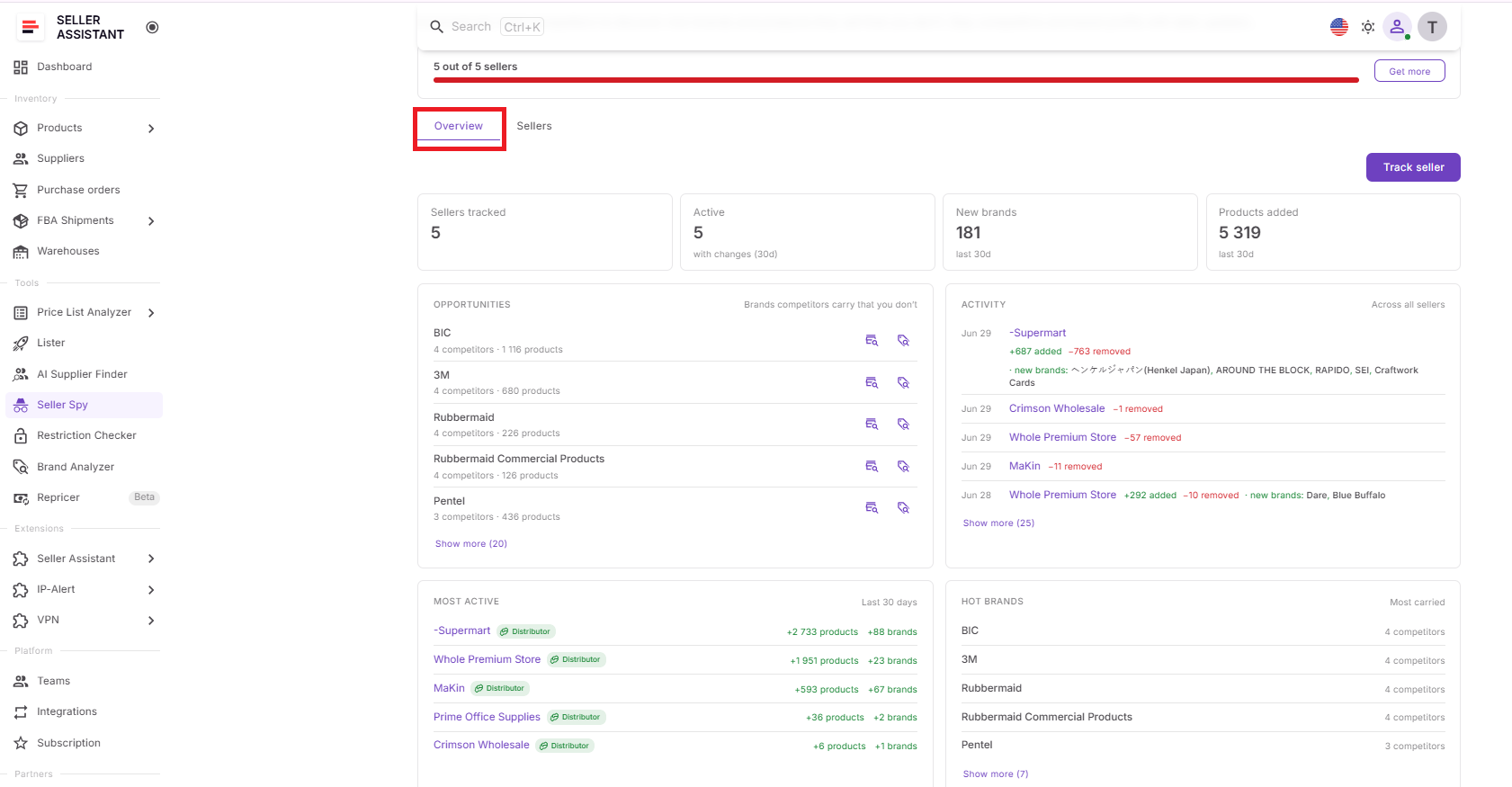
This helps you identify which changes deserve attention before you spend time opening individual seller profiles.
Step 4. Compare competitors in the Sellers dashboard
Open the Sellers dashboard and compare tracked sellers by marketplace, seller type, catalog size, recently added brands and products, rating, notes, tracking date, and last update.
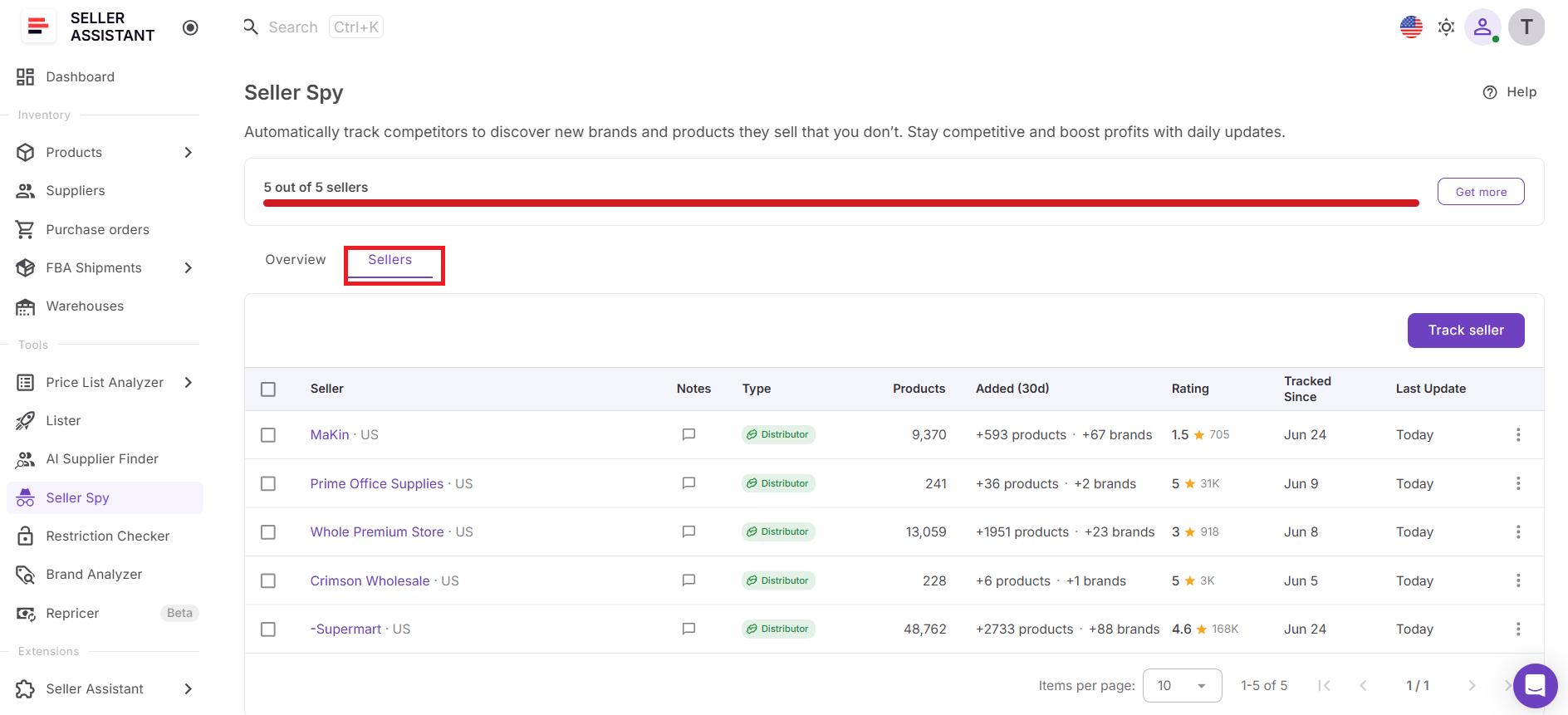
Use this view to decide which sellers are most relevant, active, or worth investigating in more detail.
Step 5. Investigate important changes in Seller Details
Click a seller’s name to open Seller Details, then review the Insights, Brands, and Products sections.
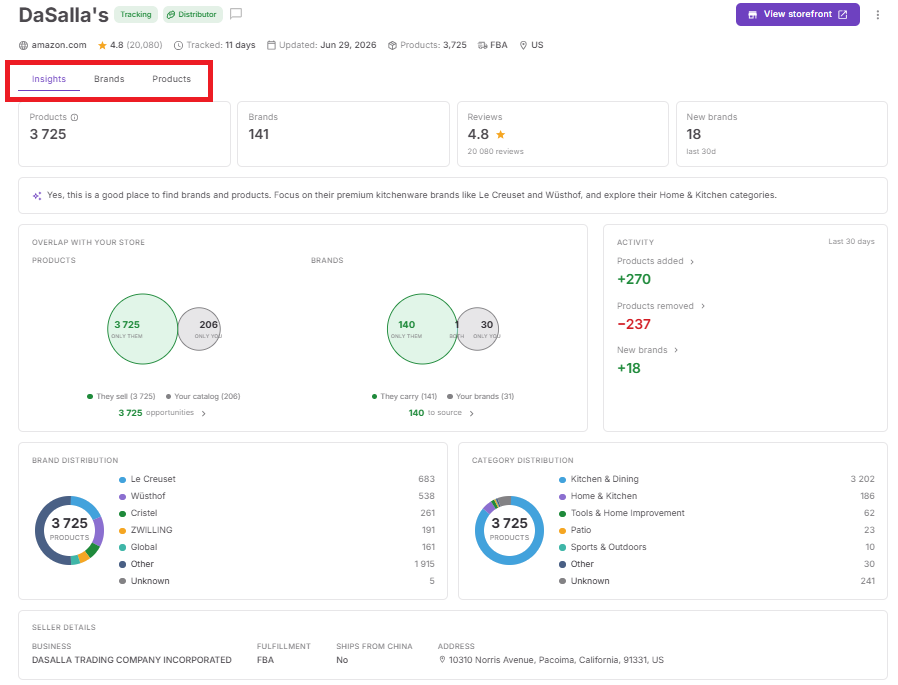
Use Insights for catalog overlap and activity patterns, Brands for current and newly added brands, and Products for current inventory and product-level changes.
Step 6. Create a review routine
Check high-priority changes daily, review active competitors weekly, and assess broader patterns monthly.
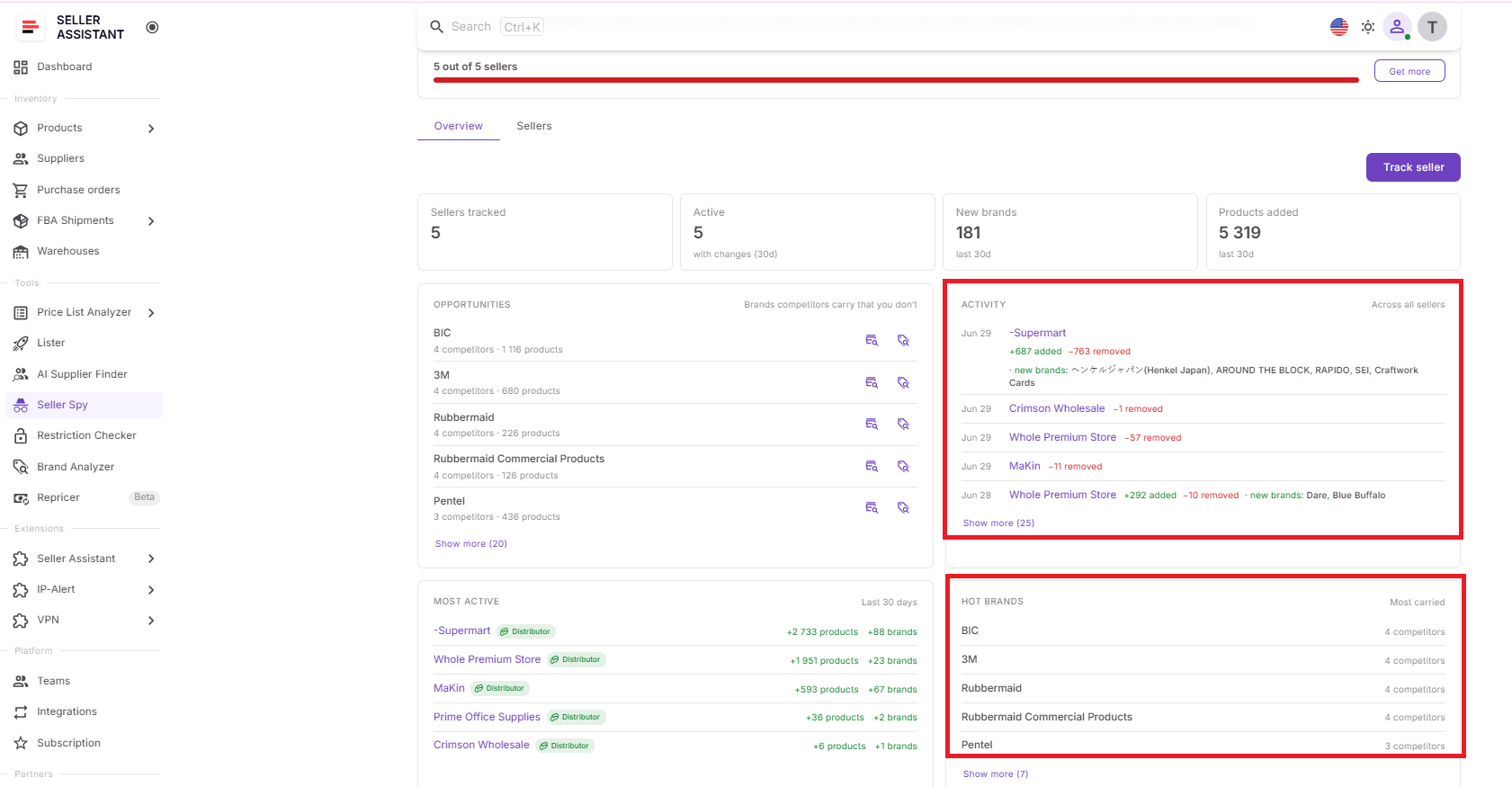
A regular schedule helps you distinguish one-off catalog changes from recurring sourcing behavior and long-term market trends.
Step 7. Refine your tracking list over time
Remove inactive or irrelevant sellers and add new competitors as you discover them on promising ASINs or in related categories.
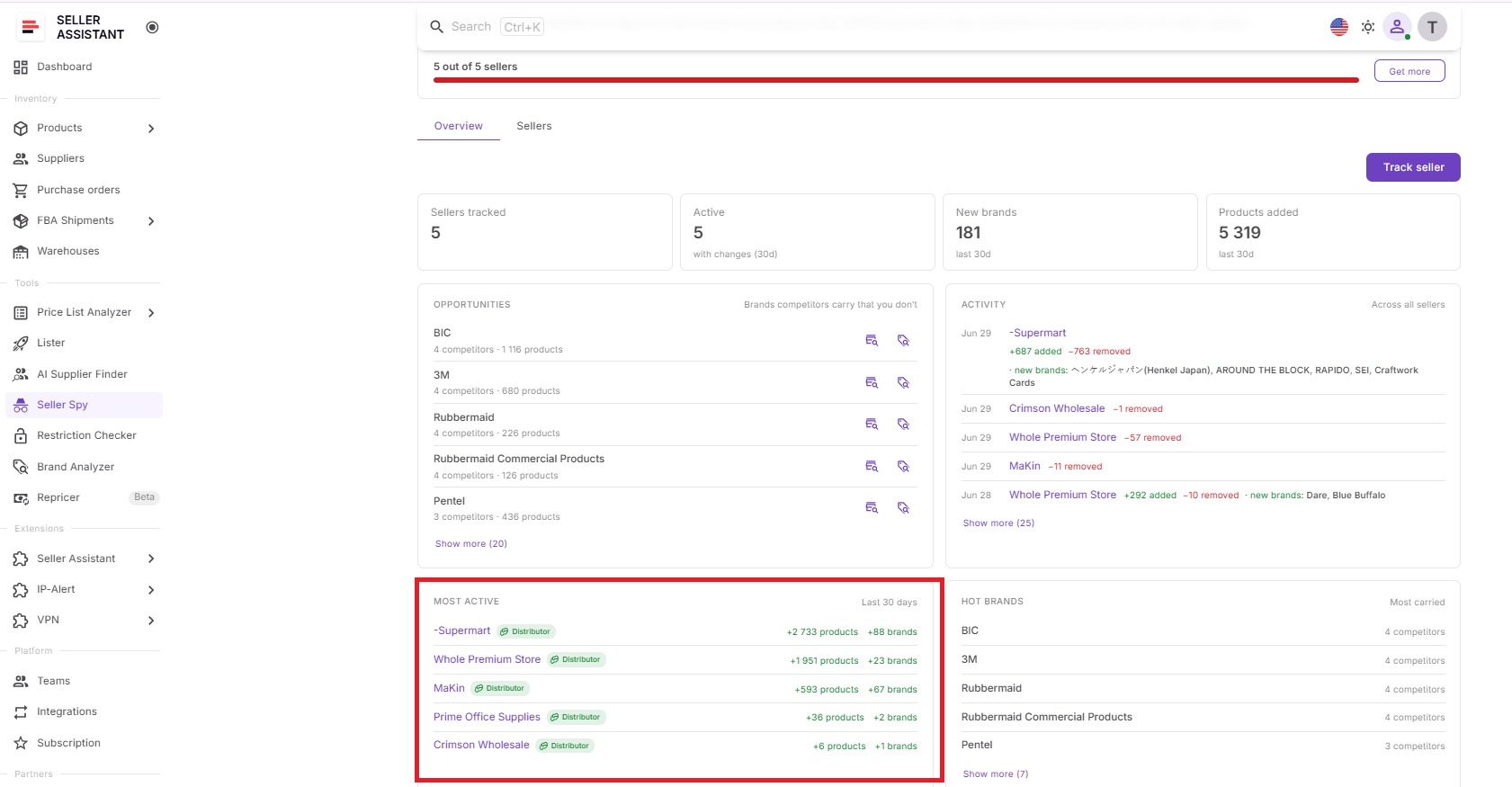
Keeping the list focused improves the quality of your insights and ensures Seller Spy continues to surface useful sourcing signals rather than noise.
How Often Should You Monitor Amazon Competitors?
Competitor monitoring isn’t a one-time task – it’s an ongoing process that helps you stay informed about changes in the marketplace. The right monitoring frequency depends on your sourcing model, the number of competitors you track, and how quickly your market changes. Reviewing competitor activity regularly allows you to identify new opportunities early while separating meaningful trends from short-term fluctuations.
Wholesale sellers – focus on long-term trends
Wholesale sourcing is built around supplier relationships and established brands, so daily catalog changes are usually less important than consistent patterns over time.
Recommended schedule
- Daily: Check newly added brands and major competitor activity.
- Weekly: Review catalog changes, brand additions, and sourcing opportunities.
- Monthly: Analyze long-term trends, competitor growth, and brands that continue to appear across multiple sellers.
Online arbitrage sellers – monitor more frequently
Online arbitrage opportunities can appear and disappear quickly. Frequent monitoring helps sellers discover new products and brands before competition increases.
Recommended schedule
- Daily: Review competitor activity, new products, and recently added brands.
- Weekly: Compare competitor catalogs and identify recurring sourcing opportunities.
- Monthly: Evaluate long-term trends to identify brands worth adding to your regular sourcing process.
Dropshippers – watch for catalog changes
Dropshippers benefit from monitoring competitors that frequently expand or adjust their catalogs. This helps identify new products to test and brands that continue to perform well.
Recommended schedule
- Daily: Monitor product additions and catalog updates.
- Weekly: Review new brands and competitor activity.
- Monthly: Assess broader sourcing trends and identify consistently successful brands.
Focus on consistency rather than constant checking
Checking competitor storefronts every few hours rarely provides additional value. A structured monitoring routine is more effective because it helps you identify meaningful changes instead of reacting to every catalog update. Over time, consistent monitoring builds a clearer picture of competitor sourcing strategies and reveals opportunities that occasional storefront visits often miss.
How Many Competitors Should You Monitor?
There isn’t a universal number of competitors every Amazon seller should track. Monitoring too few competitors limits your market visibility, while tracking too many can make it difficult to identify meaningful trends. The goal is to build a focused competitor list that provides relevant sourcing insights rather than collecting as many storefronts as possible.
Start with competitors in your niche
Begin by tracking sellers that offer products similar to yours or operate in the same categories. These competitors are more likely to reveal brands, suppliers, and sourcing strategies that are relevant to your business.
Monitor sellers on products you already source
One of the easiest ways to find competitors is by looking at the sellers on ASINs you already sell or plan to source. These businesses often target the same brands and customer segments, making their catalogs valuable for ongoing research.
Include both large and niche sellers
Large Amazon sellers can help you identify established brands and broader market trends, while smaller niche sellers often uncover specialized brands and sourcing opportunities before they become widely adopted. Monitoring both provides a more balanced view of the marketplace.
Prioritize quality over quantity
A carefully selected list of 20–50 relevant competitors often delivers more actionable insights than hundreds of unrelated sellers. Focus on businesses whose sourcing strategies align with your own rather than trying to monitor every competitor in your category.
Update your competitor list regularly
Competitor monitoring should evolve as your business grows. Remove sellers that no longer provide useful insights and add new competitors as you enter new categories, discover promising brands, or expand into additional marketplaces. Keeping your tracking list current ensures your competitor intelligence remains relevant and actionable.
FAQ
Can competitors see that I’m monitoring their Amazon storefront?
No. Amazon storefronts contain publicly available information, and competitor monitoring tools analyze that public data without notifying the seller. Your research remains private and doesn’t affect the competitor’s account or listings.
Should I stop monitoring a competitor if they rarely change their catalog?
Not necessarily. Competitors with stable catalogs can reveal long-term sourcing strategies and brands they consistently replenish. Monitoring these sellers helps you identify brands that may support sustainable wholesale opportunities rather than short-term trends.
How can I tell whether a competitor is worth tracking?
Look for sellers that consistently carry brands relevant to your business and actively update their catalogs. Competitors whose sourcing strategy aligns with your own are more likely to provide actionable insights than sellers operating in unrelated categories.
Can competitor monitoring help me discover new product categories?
Yes. As competitors expand into new categories or increase their activity in specific niches, you can identify markets that may be worth exploring. These trends can help you diversify your catalog while staying aligned with proven marketplace demand.
What’s the biggest mistake sellers make when monitoring competitors?
Many sellers collect competitor data but never act on it. The most effective approach is to review changes regularly, prioritize the strongest opportunities, and use competitor insights to guide the next stages of your sourcing strategy, such as brand research and supplier discovery.
Final Thoughts
Monitoring Amazon competitors is more than keeping an eye on other sellers – it’s a strategic way to discover sourcing opportunities, understand market trends, and make better business decisions. By tracking competitor catalogs, brand activity, and long-term sourcing patterns, you can identify opportunities earlier, prioritize your research, and build a more informed sourcing strategy.
Seller Assistant’s Seller Spy simplifies this process by automating competitor monitoring and organizing insights in one place. The tool helps you move beyond occasional storefront checks and turn competitor intelligence into actionable insights. Combined with the rest of the Seller Assistant ecosystem, it provides the foundation for a smarter, more efficient sourcing workflow that helps you grow your Amazon business with confidence.