



Running an Amazon wholesale business means managing endless supplier lists, spreadsheets, and purchase orders. Seller Assistant brings structure to that chaos with a connected wholesale workflow that automates every step – from price list analysis to PO creation.
Instead of juggling tabs or manually checking ASINs, you can source products, verify restrictions, and send Amazon purchase orders in minutes. Whether you’re doing wholesale, or scaling online arbitrage or dropshipping, Seller Assistant acts as your all-in-one supplier sourcing software, helping you scale operations faster and smarter while maintaining full visibility and control over your Amazon business.
From Price List to Purchase Order: Wholesale Workflow
An Amazon wholesale workflow is a structured process that connects every step of your wholesale business – from finding profitable brands and verifying ASIN eligibility to sourcing suppliers, analyzing price lists, and sending purchase orders.
Instead of manually tracking products and orders across spreadsheets, a connected wholesale workflow keeps all data centralized, consistent, and automated. It helps sellers scale faster, avoid costly mistakes, and make data-driven buying decisions. For wholesale, online arbitrage, and dropshipping models, this workflow transforms scattered operations into a repeatable, efficient system that keeps you in full control.
Wholesale workflow steps
Step 1. Choose what to sell
Start by identifying brands and categories with consistent demand and strong profit margins. Study what successful sellers already carry, then evaluate those brands for sales history, catalog size, and competition level. Focus on data-backed brand choices before you begin sourcing.
Step 2. Check if you can sell it
Confirm that your Amazon account is eligible to sell the products you plan to source. Many brands and categories are gated or restricted, and verifying eligibility early prevents wasted time and inventory risks.
Step 3. Find suppliers
Locate verified wholesale suppliers who can offer your chosen brands at competitive prices. Use modern supplier sourcing software to skip outdated listings and quickly access trusted, resale-friendly distributors.
Step 4. Build your supplier database
Keep all supplier data organized in one central system. Tracking contacts, statuses, and terms ensures you never lose valuable leads and eliminates errors from juggling multiple spreadsheets.
Step 5. Assign warehouse
Assign default prep centers or warehouses to each supplier to automate shipping and routing. Centralized warehouse data ensures accuracy in addresses, fees, and delivery schedules.
Step 6. Analyze supplier price lists
Upload and scan supplier spreadsheets using price list analysis Amazon tools to find profitable products. Automation flags top opportunities while you verify details like ROI, restrictions, and demand.
Step 7. Create purchase orders
Turn shortlisted products into structured Amazon purchase orders in minutes. Automated PO creation reduces manual errors and keeps every cost, quantity, and routing detail consistent.
Step 8. Scale and stay in control
As your operation grows, delegate repetitive tasks to virtual assistants and connect your systems via integrations. Automation keeps your data synchronized and your workflow efficient, letting you scale confidently without losing visibility.
Benefits of Integrated Wholesale Workflow with Seller Assistant
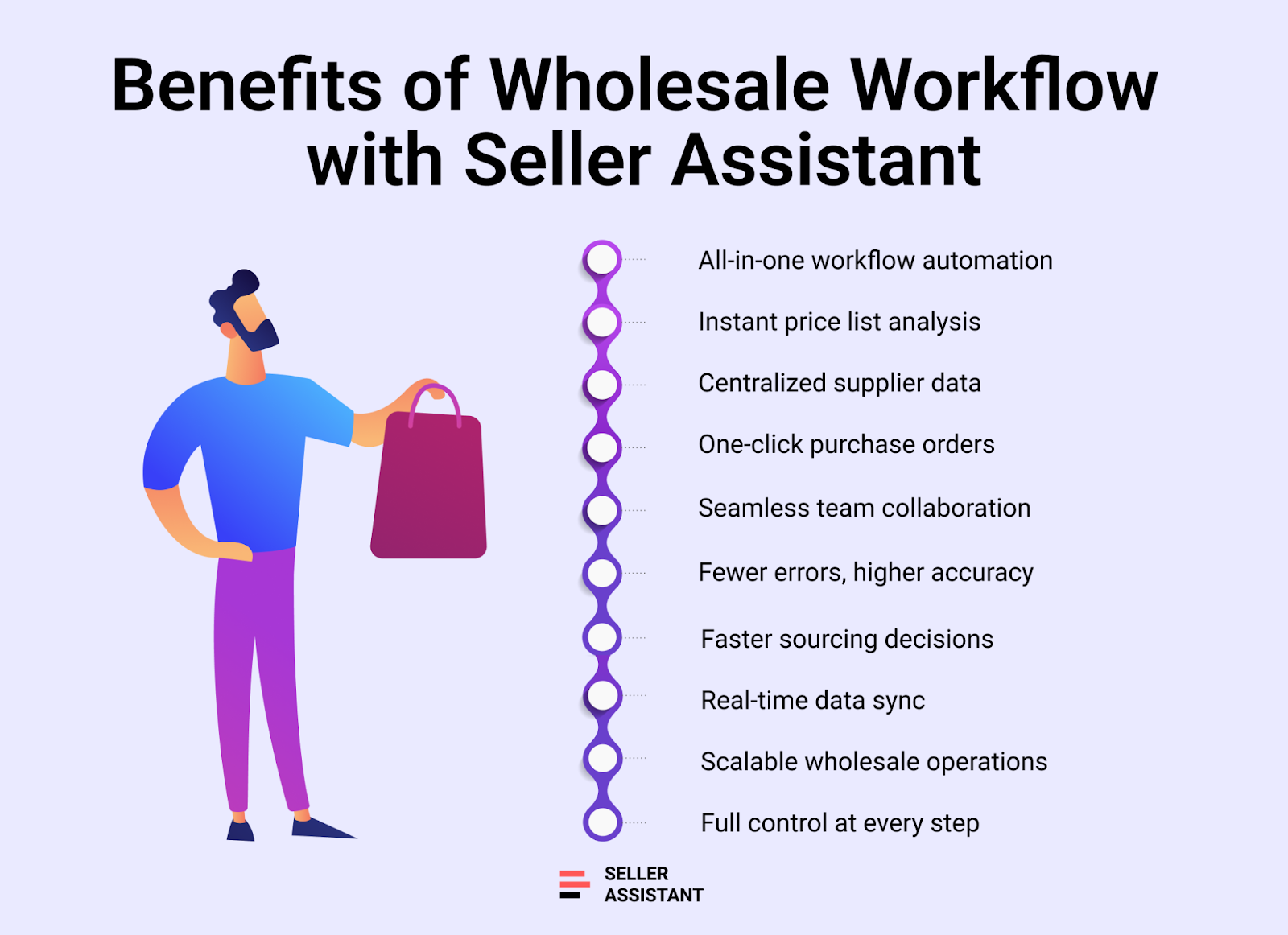
Seller Assistant automates and connects every stage of your Amazon wholesale workflow into one seamless system. Its integrated tools – from price list analyzers and supplier databases to purchase order and warehouse modules – eliminate manual work, reduce human error, and keep all data flowing smoothly between steps. Instead of switching between spreadsheets or browser tabs, you manage sourcing, analysis, and order creation in one connected workspace designed for speed, accuracy, and scalability.
Note. Seller Assistant is an end-to-end Amazon workflow management platform that integrates 10+ wholesale-focused solutions into one connected system. It combines sourcing workflow automation, bulk research and intelligence tools, and integrated Chrome extensions – giving you everything you need to streamline finding deals, managing suppliers, and creating purchase orders.

The platform aggregates: workflow management tools – Purchase Orders Module, Suppliers Database, Warehouses Database to organize, automate, and scale every step of your wholesale and arbitrage operations; bulk research & sourcing tools – Price List Analyzer, Bulk Restriction Checker, Sourcing AI, Brand Analyzer, Seller Spy to evaluate supplier price lists, verify selling eligibility and restrictions, open new brands, and discover winning product ideas from competitors to expand your product catalog; Chrome extensions – Seller Assistant Browser Extension, IP-Alert Extension, and built-in VPN by Seller Assistant to deep-research products, check IP claims and compliance, and access geoblocked supplier sites directly within your browser; and integrations & team access features – seamless API connectivity and integrations with Zapier, Airtable, and Make, plus Virtual Assistant Accounts for secure, scalable team collaboration.
With Seller Assistant, every step of your Amazon wholesale and arbitrage workflow is automated and connected.
Streamlined sourcing and research
Instantly move from identifying profitable brands to locating verified suppliers without leaving your workflow. Seller Assistant’s sourcing and price list analysis Amazon tools work together to help you evaluate thousands of SKUs in minutes.
Centralized supplier and warehouse data
No more scattered spreadsheets or lost contacts. The integrated Supplier and Warehouse Databases store every detail – from supplier status to routing info – ensuring consistency across sourcing, POs, and fulfillment.
Automated purchase order creation
Generate accurate Amazon purchase orders directly from analyzed lists. Supplier and warehouse details auto-populate, cutting manual entry time and eliminating costly mistakes.
Real-time accuracy and visibility
Every connected module updates instantly. When you edit a supplier or product detail, the change reflects everywhere – keeping your workflow synchronized and error-free.
Reduced errors and wasted time
Automation minimizes manual checks and repetitive data entry. By integrating sourcing, eligibility checks, and POs, Seller Assistant ensures every decision is backed by clean, consistent data.
Scalable, future-proof operations
As your product catalog and supplier network grow, Seller Assistant’s integrated wholesale workflow adapts. You can expand your team, add new markets, or connect more tools – without losing structure or control.
Inside the System: How Seller Assistant Automates Workflow
Every stage of your Amazon wholesale workflow – from product research to purchase order creation – is automated with Seller Assistant’s integrated tools. Each module connects seamlessly to the next, ensuring your data flows without friction.
You don’t need to switch between platforms, import files, or duplicate work. Below, we’ll walk through the entire flow tool by tool and show how each one powers a specific step of your wholesale process inside Seller Assistant.
Step 1. Choose profitable brands
Before launching into sourcing, the first step is deciding what to sell – and doing it with data, not guesswork. Unlike private label sellers, wholesale and online arbitrage sellers focus on existing Amazon listings, which means success depends on analyzing historical sales trends, brand size, and competition. The smartest approach is to look at what top-performing sellers already offer, study their brands, and identify opportunities based on numbers – not assumptions.
You want brands with a substantial product catalog (ideally 500+ ASINs), steady demand, and manageable competition. With the right insights, you can narrow your focus to products that have proven sales potential and sustainable profit margins long before you begin supplier outreach.
Tools that make it happen
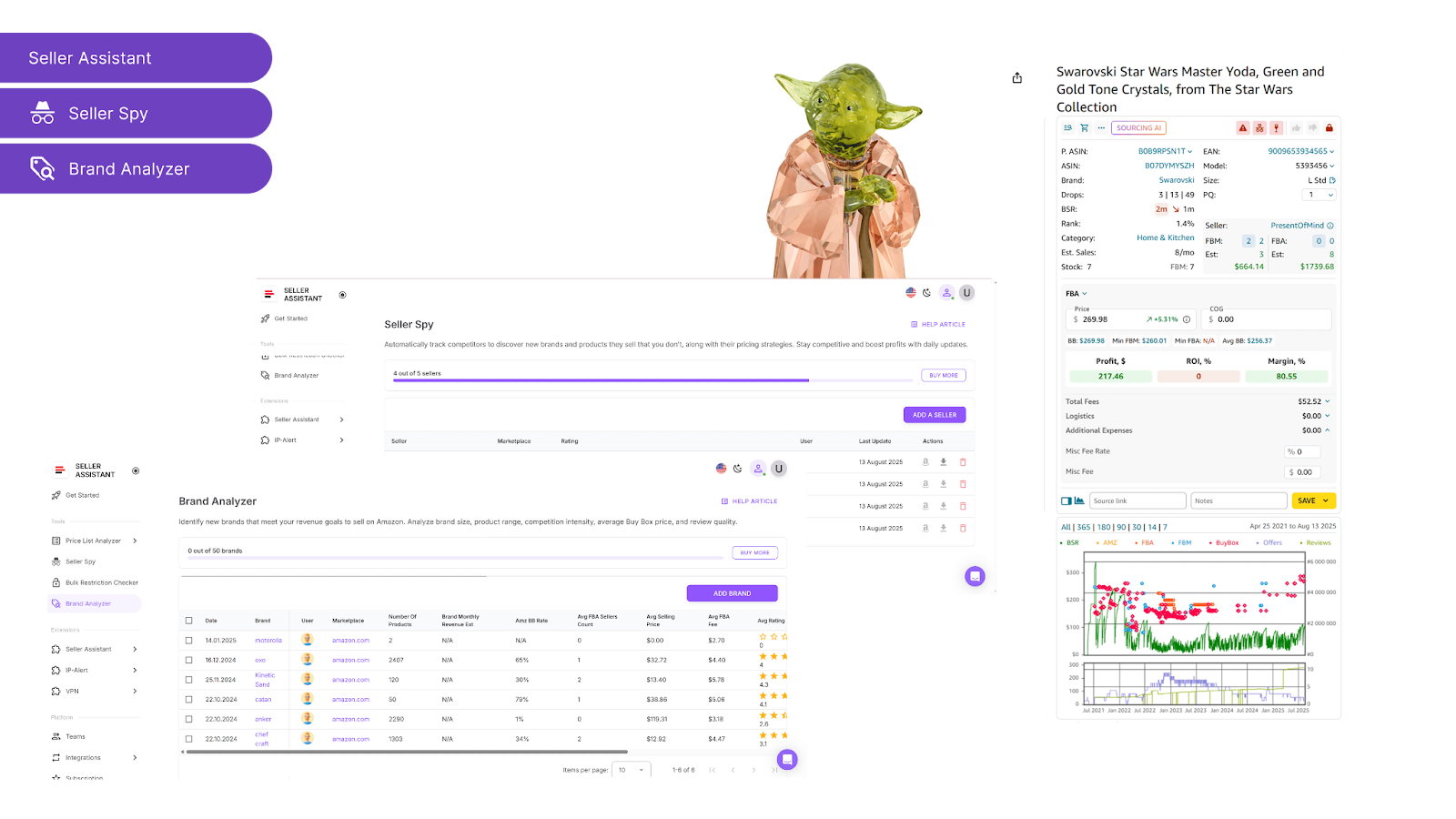
How Seller Assistant tools help you
Storefront Widget
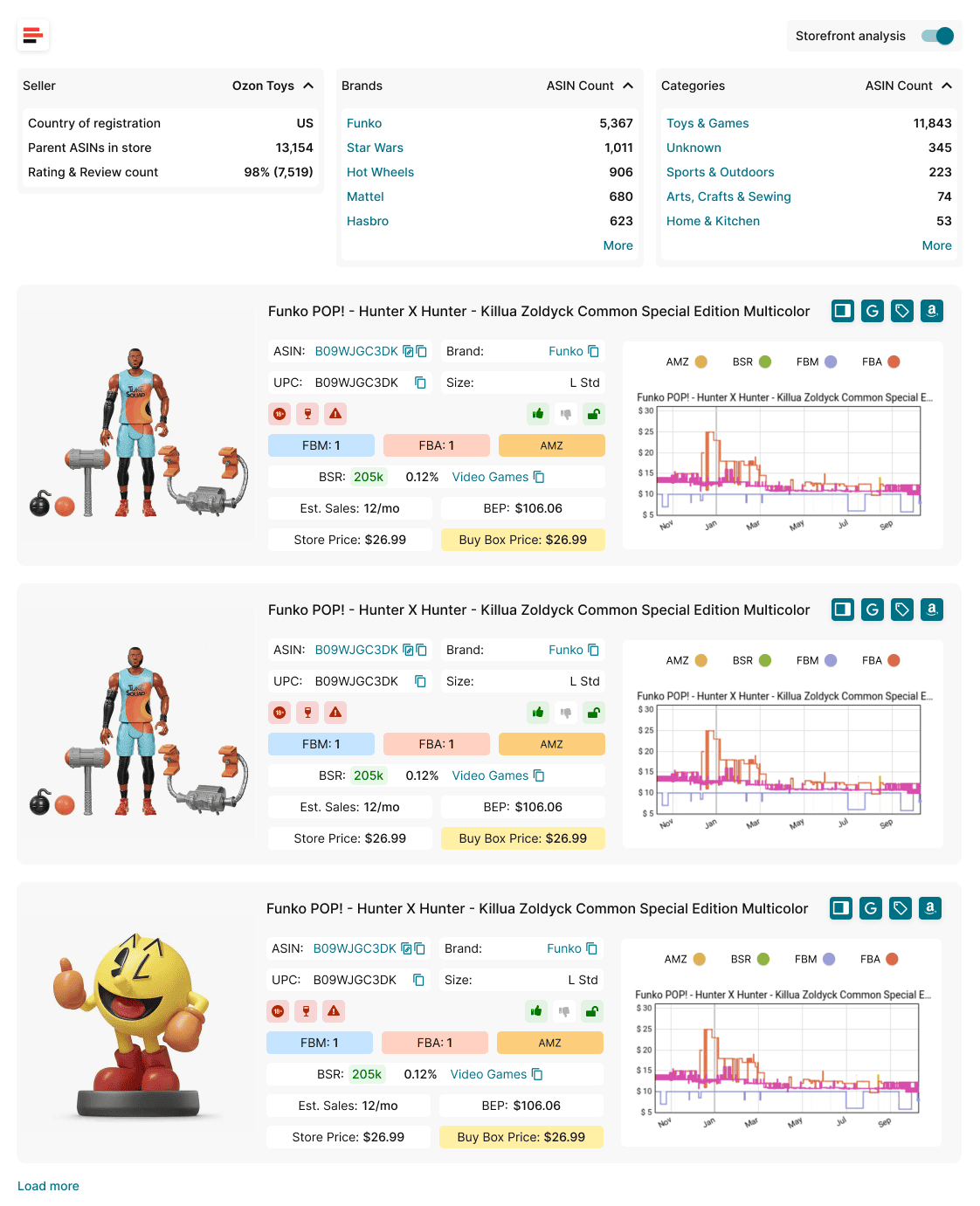
- Integrates directly into Amazon storefront pages, automatically showing a seller’s profile details – including country, total ASINs, main brands, top categories, ratings, and reviews.
- Displays product cards enriched with live metrics like estimated sales, BSR, price comparisons, FBA/FBM competition, and alerts for risks such as IP complaints or restrictions.
- Lets you filter competitor listings by brand or category for quick, focused product research.
Seller Spy
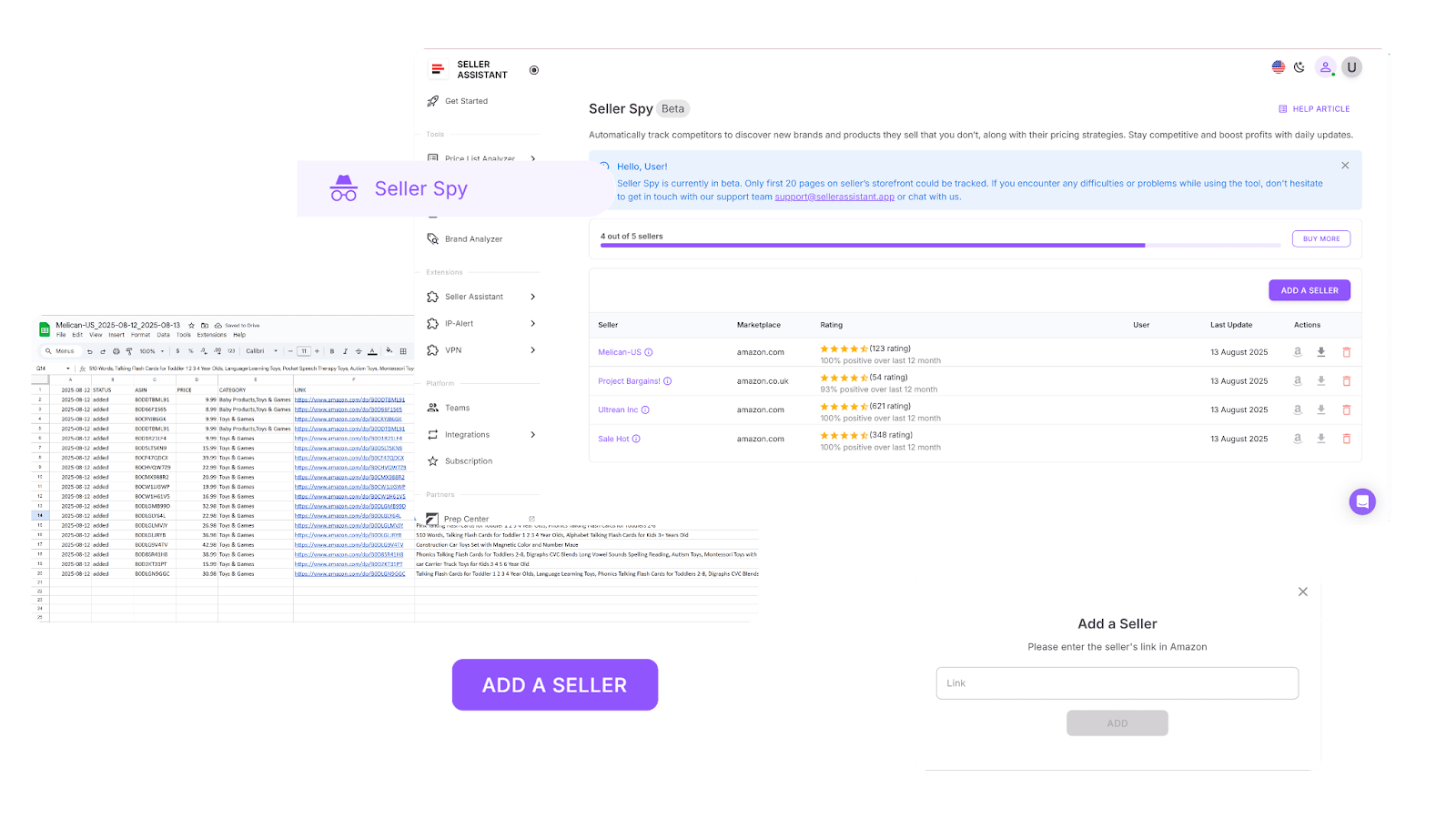
- Monitors competitor storefronts continuously, tracking what products they add or remove – with pricing details and direct ASIN links for easy access.
- Highlights gaps and opportunities by comparing a competitor’s catalog with your own, helping you find potential product or brand leads.
Brand Analyzer
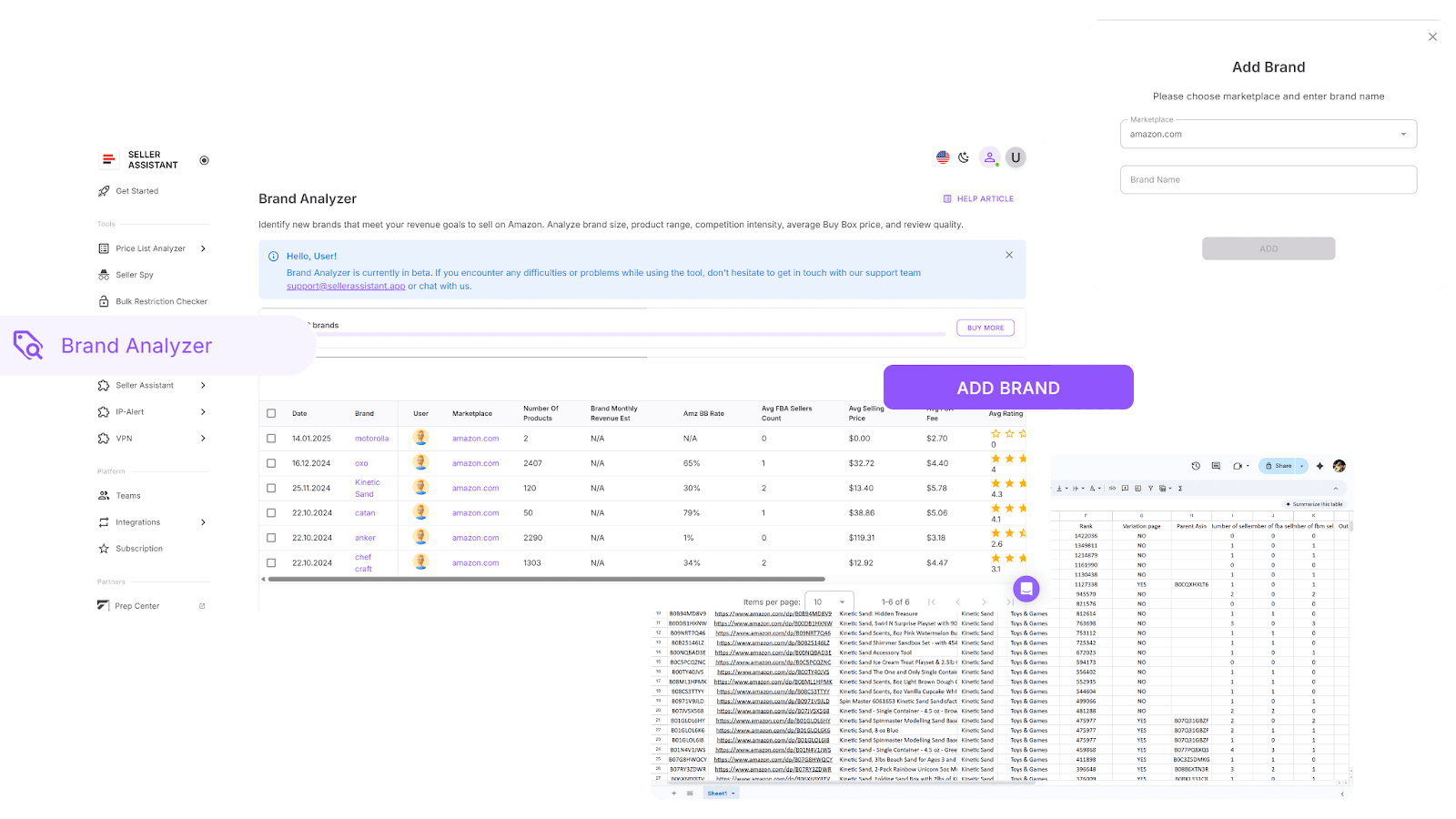
- Helps determine whether a brand is worth pursuing as a supplier by revealing catalog size, sales potential, and overall profitability.
- Shows key data like product count (preferably 500+ SKUs), estimated revenue, and competition levels.
- Indicates Amazon’s share in the brand’s catalog – if Amazon sells more than 30% of its products, competition may be too high – and displays customer ratings and feedback for additional context.
How to apply the tools
- Storefront Widget
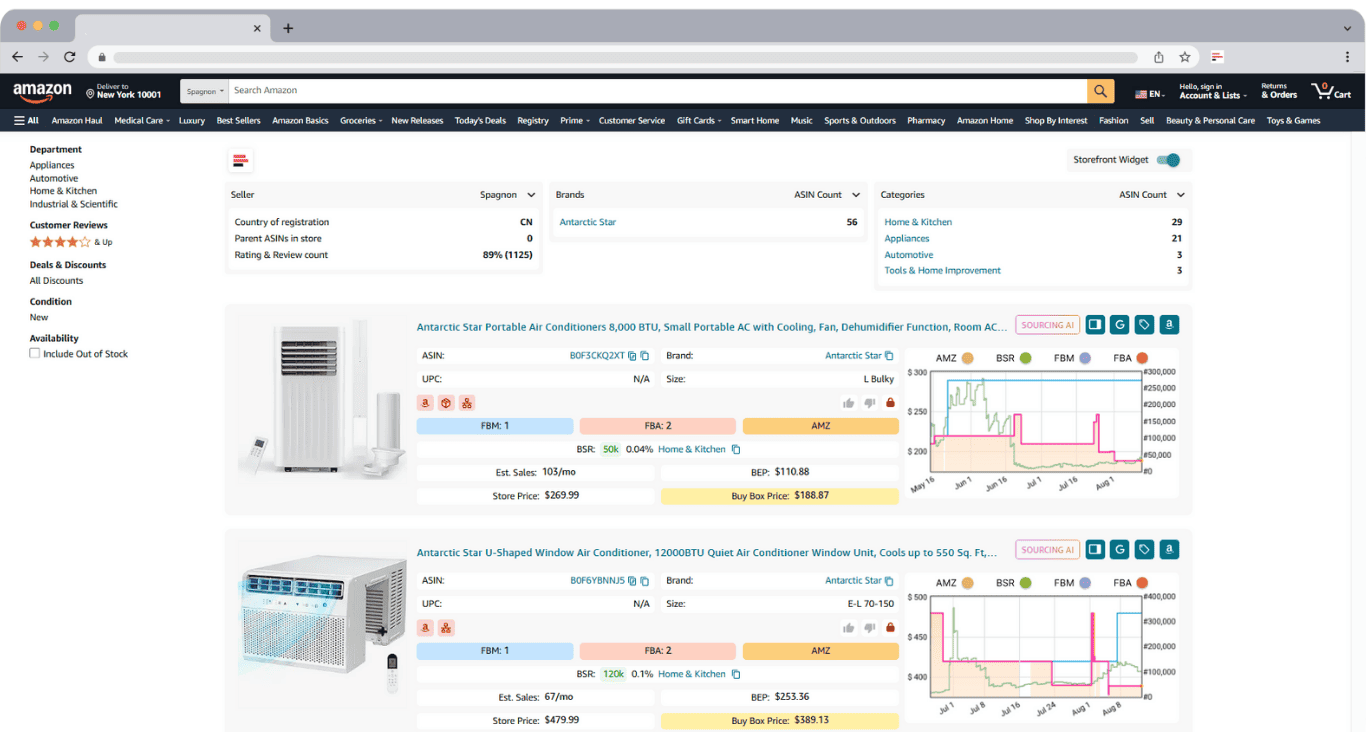
Visit any competitor’s Amazon storefront – Storefront Widget automatically loads detailed analytics and product cards. Explore the store summary: competitor’s top categories, top-selling brands, and ASIN breakdowns. Additionally, research product by product: performance, risk levels, and other metrics to find high-demand, low-risk listings to target.
- Seller Spy
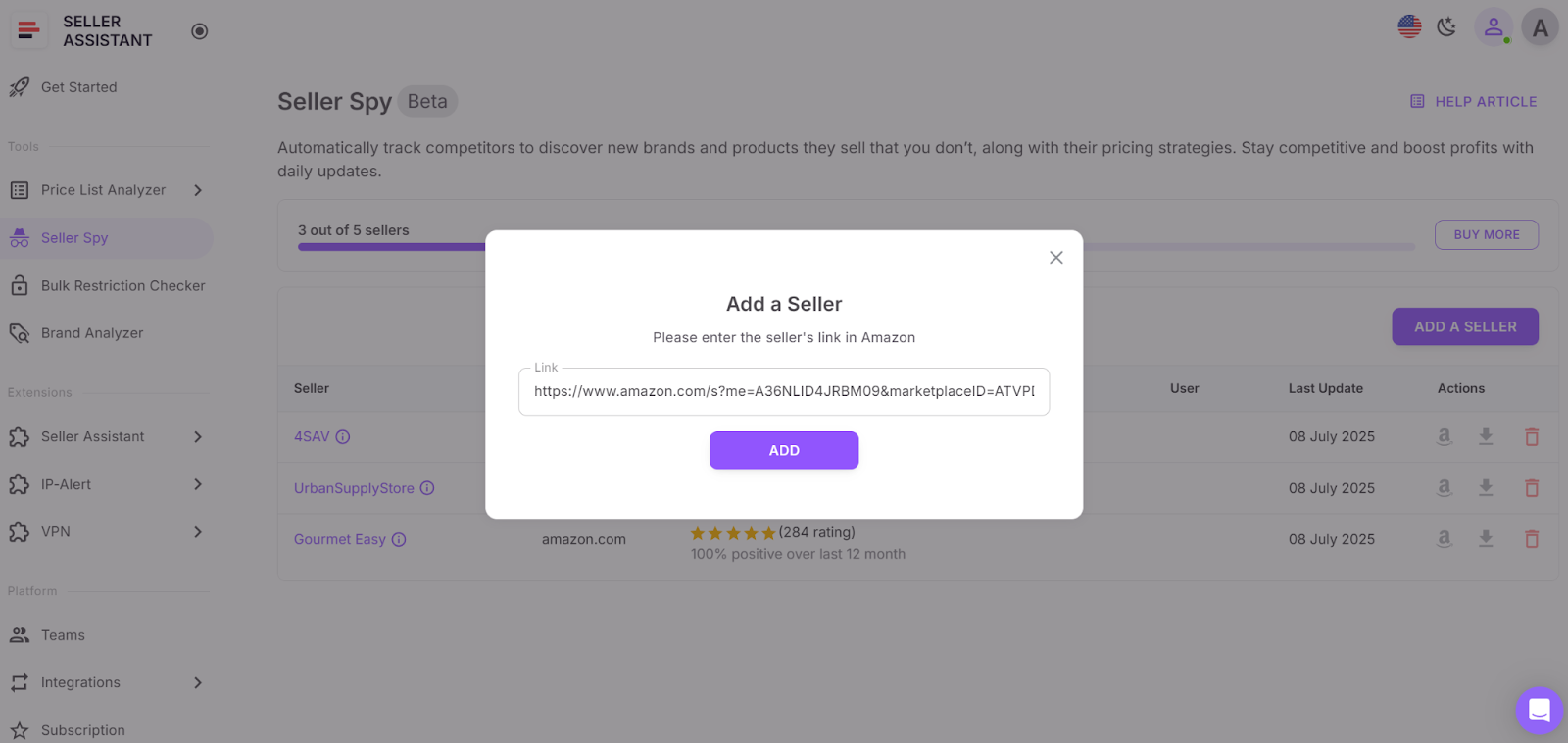
In your Seller Assistant personal account, go to Seller Spy. Paste competitor storefront links into Seller Spy and let it track them daily. The tool logs added and removed products, giving you a live snapshot of what’s trending or being phased out. Use this data to anticipate market shifts before others do.
- Brand Analyzer
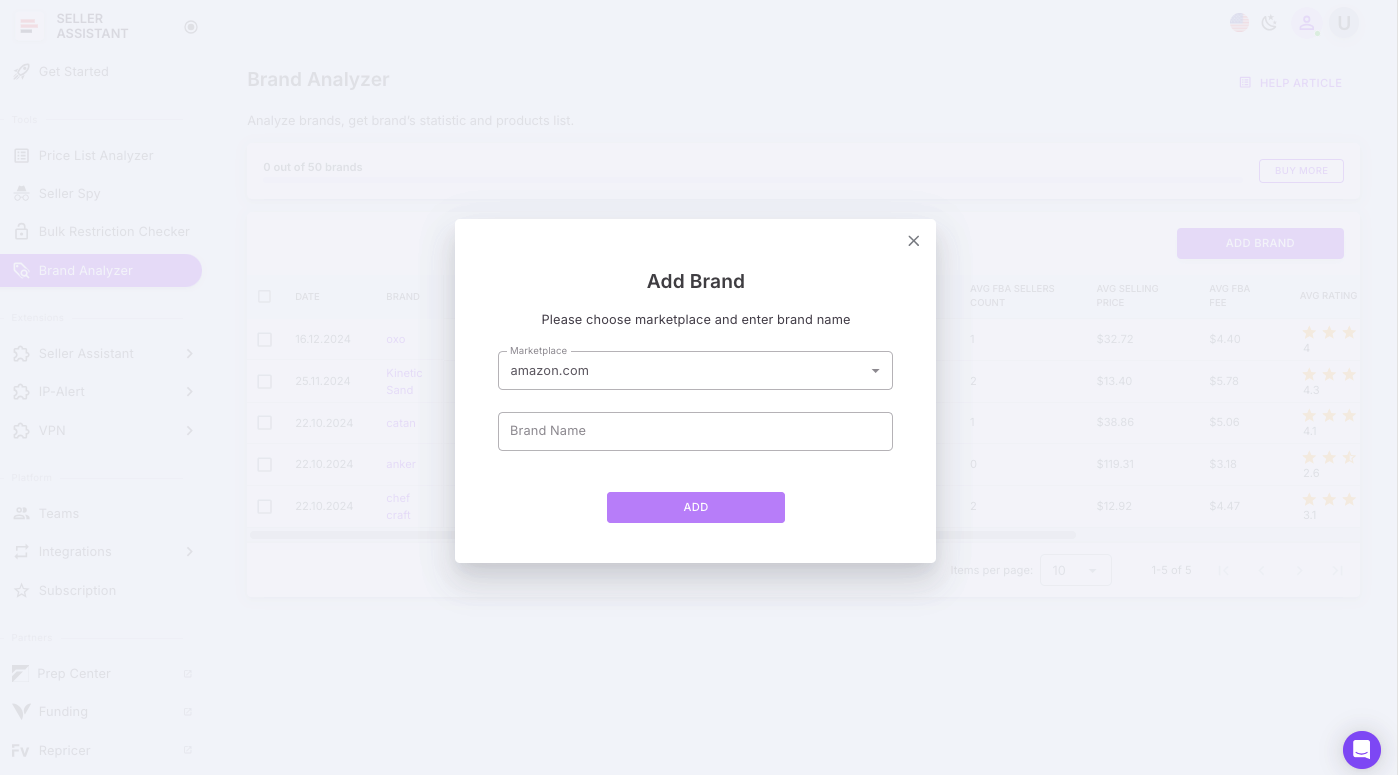
In your Seller Assistant personal account, go to Brand Analyzer. Add a brand name to Brand Analyzer to see if it fits your wholesale criteria. Review its catalog size, profitability, and competition levels. Focus on brands that show high revenue potential with moderate competition, and flag them for supplier sourcing in the next step of your workflow.
Step 2. Verify your selling eligibility
Before investing time or money in a product or brand, you need to confirm that you’re allowed to sell it on your Amazon account. Many brands and categories are gated, meaning they require specific approvals – and some can’t be ungated at all, regardless of your experience or documentation. By checking restrictions upfront, you prevent wasted effort on deals that will never make it to your inventory.
Tool that makes it happen
How Seller Assistant tool helps you
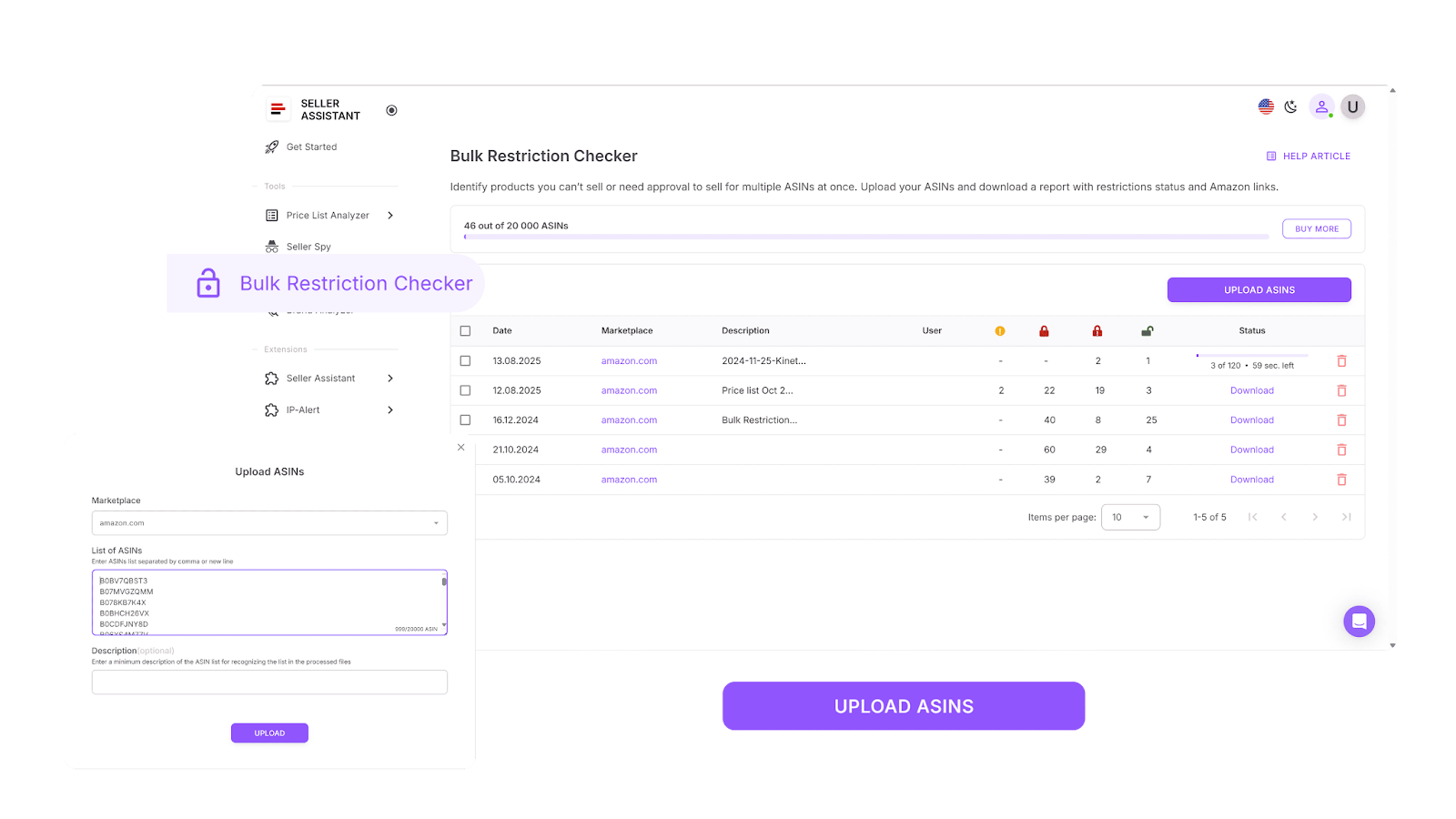
- Instantly checks selling eligibility for dozens – or even hundreds – of ASINs in one scan.
- Clearly identify open, ready-to-sell items labeled as “Eligible”, meaning no approval is needed.
- Flags products marked “Approval required”, showing where brand or category approval must be obtained.
- Highlights permanently restricted ASINs as “Not eligible”, signaling that your account cannot sell them under any conditions.
- Saves hours and avoids costly sourcing errors by verifying restrictions before moving forward with suppliers.
How to apply the tool
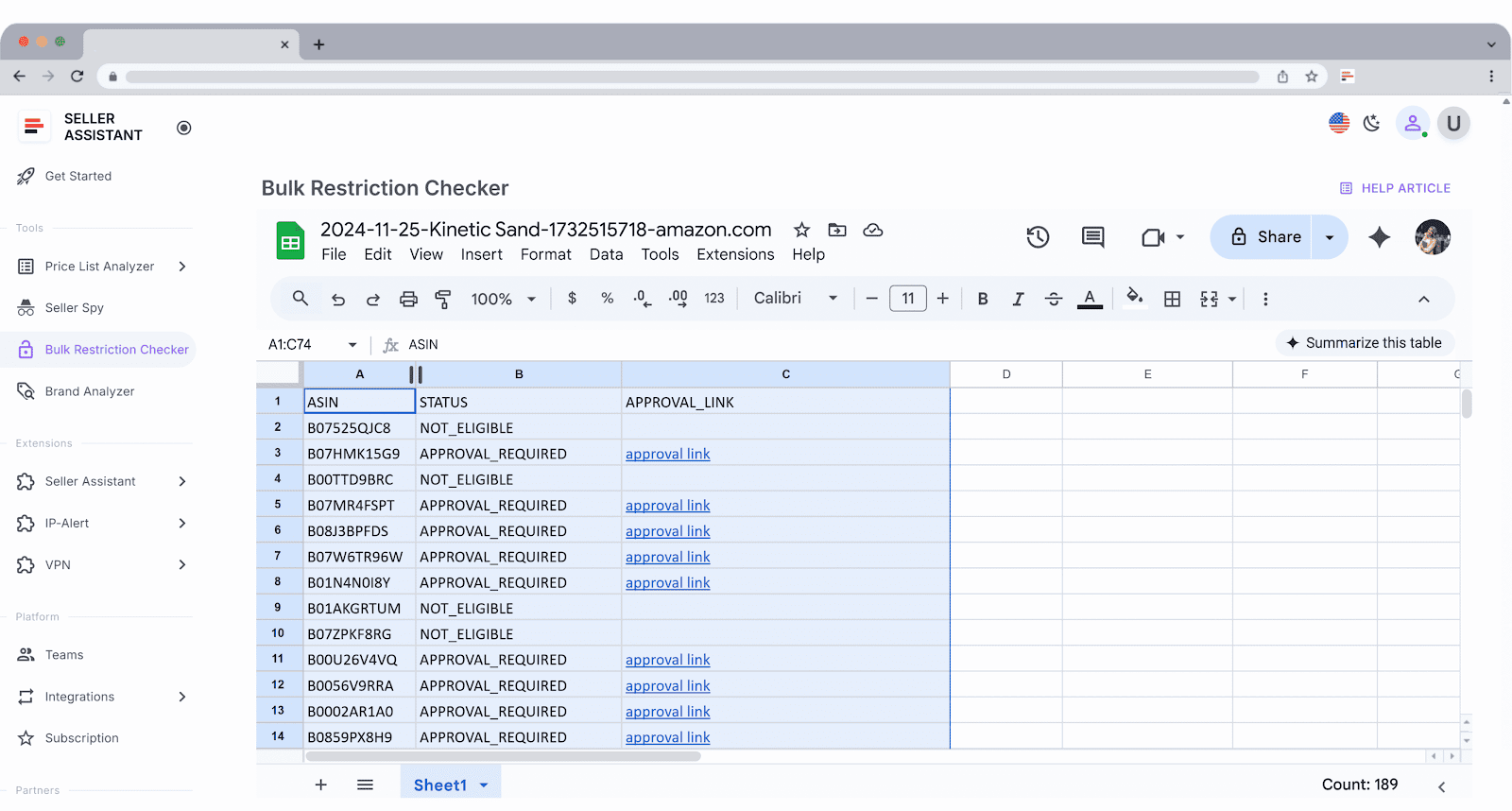
Log into your Seller Assistant workspace and open Bulk Restriction Checker. Select your target Amazon marketplace and upload your ASIN list. Within seconds, you’ll receive a detailed, color-coded report showing which items are eligible to sell, which need approval, and which should be excluded from your sourcing list altogether.
Step 3. Find wholesale suppliers
Once you’ve identified the right brands and products to sell, the next step is finding reliable suppliers who can offer them at profitable wholesale prices. Manual research is slow and often leads to outdated or low-quality sources. What you need is an automated, accurate, and verified way to discover U.S.-based wholesale suppliers that are open to resellers – without wasting hours scrolling through irrelevant directories or random websites.
Tool that makes it happen
How Seller Assistant tool helps you
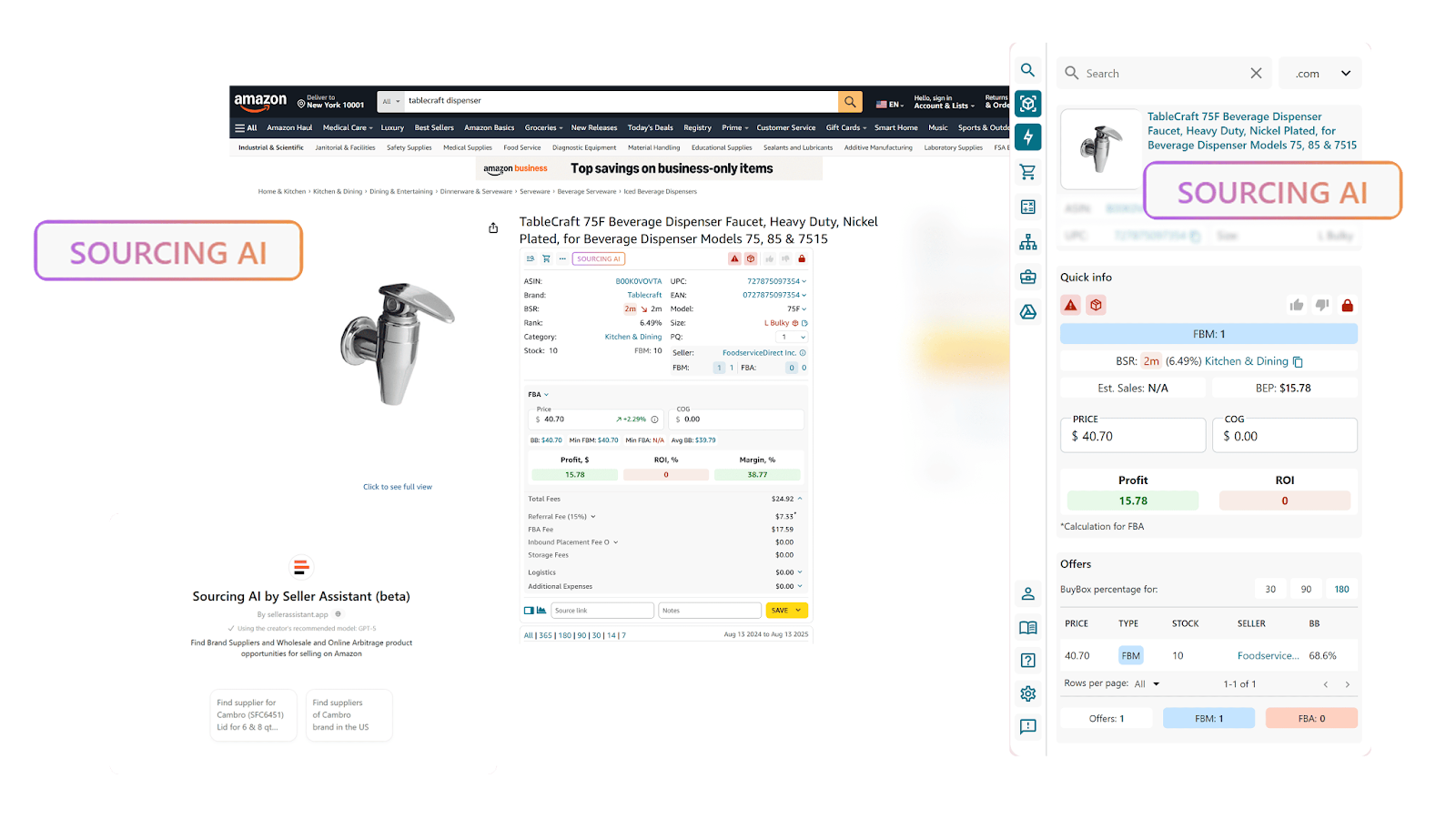
With Sourcing AI, you can:
- Run AI-powered searches to instantly find verified U.S. suppliers for specific products or brands.
- Get up to 10 supplier offers per item, including pricing, SKUs, direct links, and minimum order quantities (MOQs).
- Filter results by maximum cost of goods (COG) to instantly focus on profitable supplier options.
- Compare Exact vs. Likely Matches to prioritize which suppliers to contact first.
- Launch searches directly from Amazon product pages, search results, competitor storefronts, or supplier sites – all within one connected workflow.
- Eliminate unreliable or outdated supplier sources and focus only on trusted, high-quality listings.
How to apply the tool
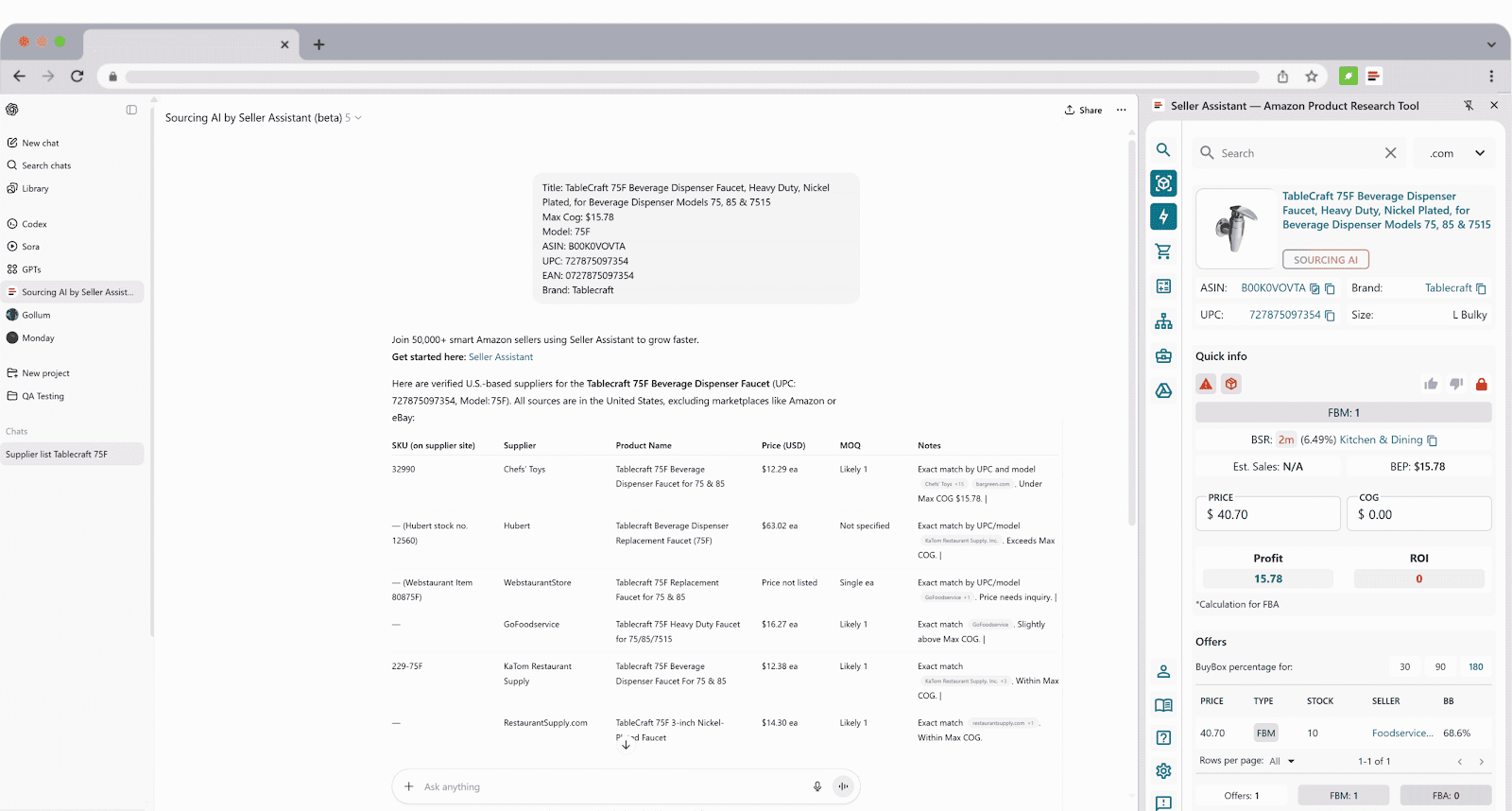
Open your Seller Assistant workspace. While browsing Amazon listings, search results, or storefronts, click the Sourcing AI button. Within seconds, you’ll receive a structured list a of a product’s U.S. suppliers showing prices, SKUs, links, and MOQs. Review, compare, and shortlist the most relevant offers – then proceed with supplier outreach directly from your workflow.
To look for brand suppliers, choose the request type: “Find Suppliers of XYZ brand in the US).”
Step 4. Create your supplier database
Once you begin contacting suppliers, organization becomes critical. In wholesale, most outreach attempts go unanswered – it’s common to get approved by only a few out of hundreds of prospects. That’s why supplier sourcing must be systematic and data-driven. Relying on scattered spreadsheets and email threads leads to confusion, lost opportunities, and duplicate work.
A centralized supplier database keeps every contact, status, and term in one place. It connects directly with your price lists, purchase orders, and warehouse settings, ensuring data stays synchronized and your workflow remains accurate and consistent at every step.
Tool that makes it happen
How Seller Assistant tool helps you
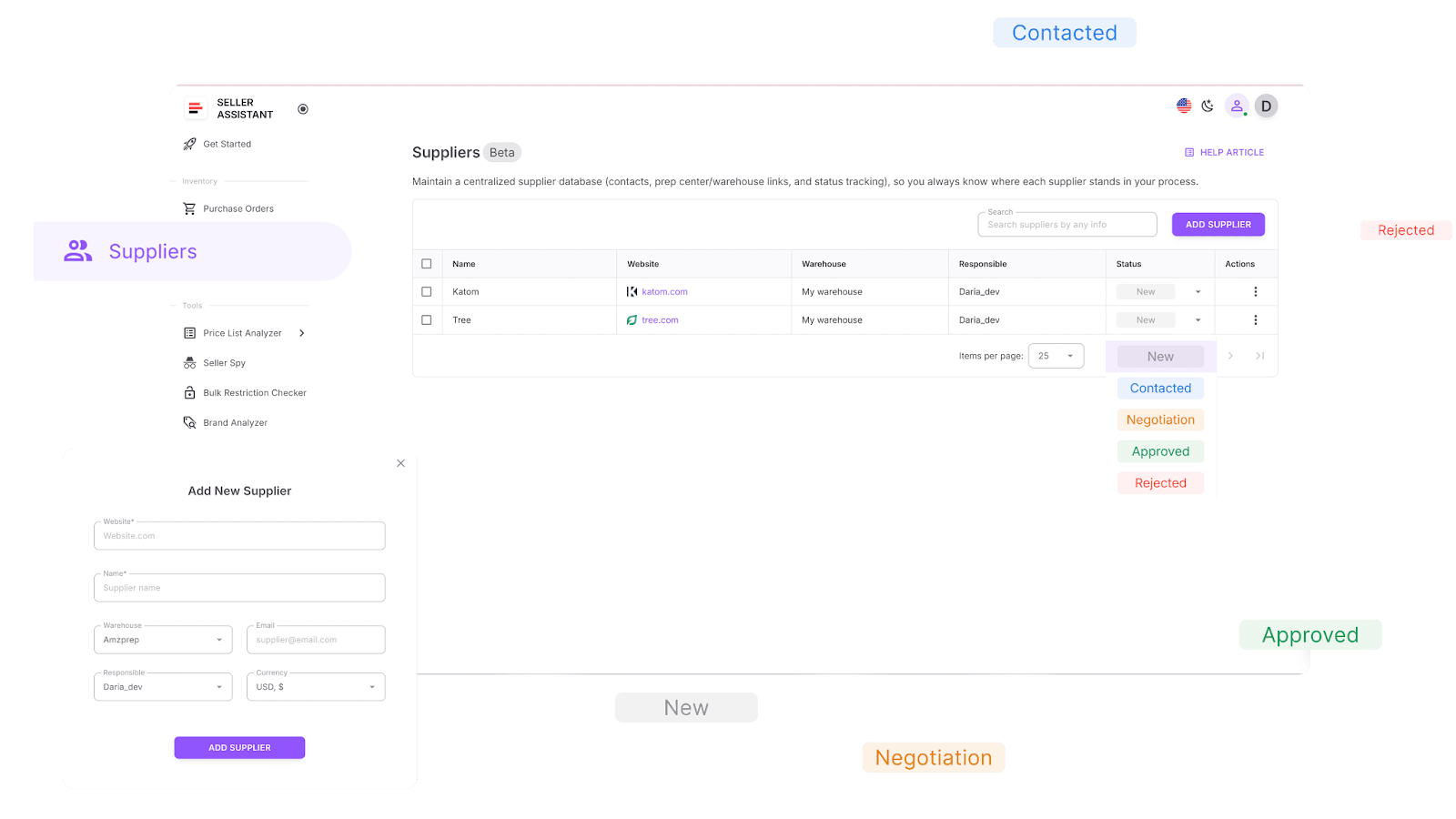
With Suppliers Database, you can:
- Create comprehensive supplier profiles with details like company name, website, warehouse address, currency, and assigned team members.
- Search, sort, and filter suppliers by name, location, status, or connected warehouse for quick navigation.
- Assign relationship statuses such as New, Contacted, Negotiation, Approved, or Rejected to track your outreach progress.
- Link suppliers to default warehouses or prep centers for faster, error-free purchase order creation.
- Edit or update supplier details at any time – all linked data automatically stays consistent across other tools.
- Access supplier information from modules like Price List Analyzer or Purchase Orders without re-entering it manually.
How to apply the tool
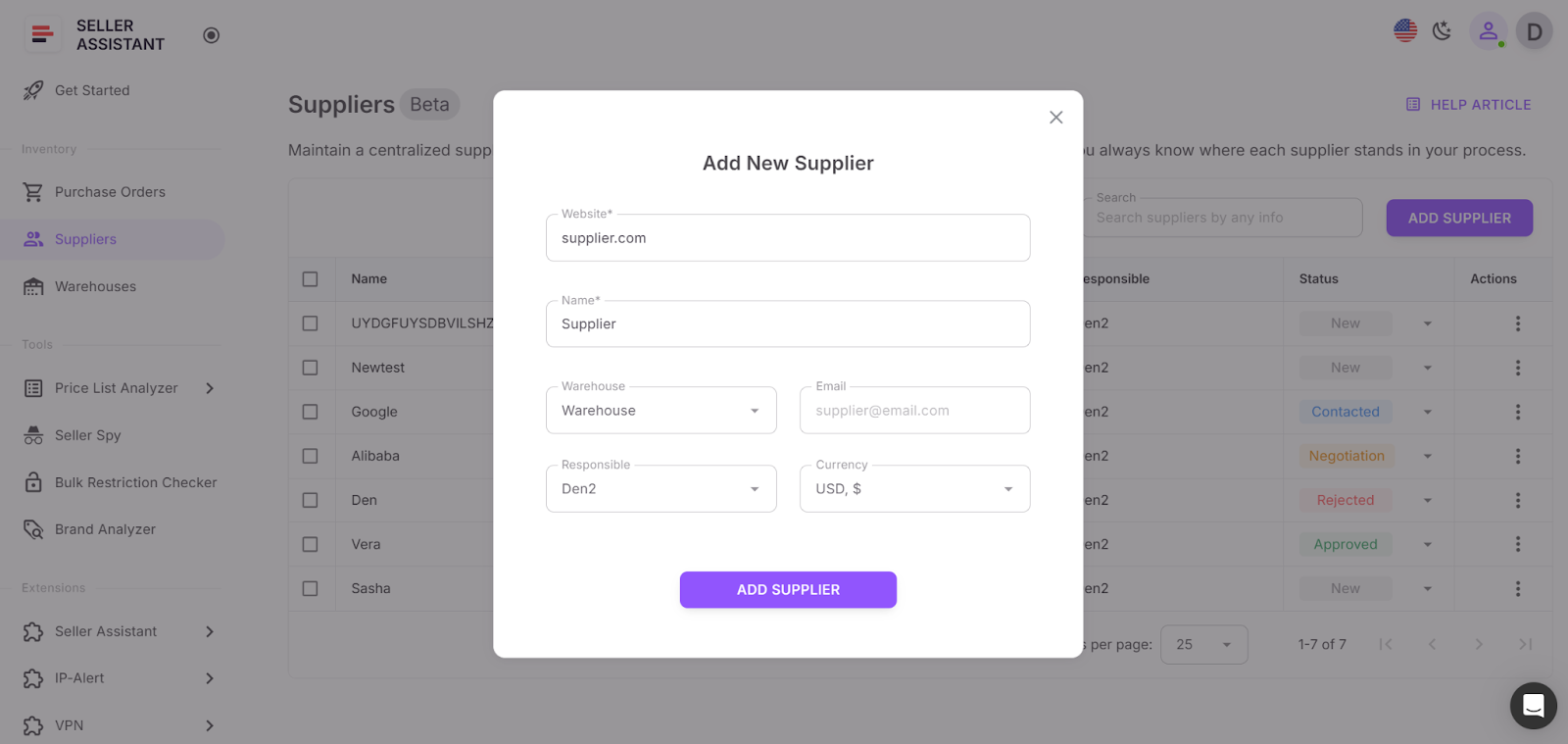
In your Seller Assistant workspace, open the Suppliers section and click Add Supplier. Fill in the required fields – name and website – then add optional details such as contacts, warehouses, and assigned team members. Once saved, the supplier profile instantly becomes accessible throughout your workflow. When you later upload a price list or generate a purchase order, simply select that supplier, and all connected data – address, warehouse, and contact details – will auto-fill automatically.
Step 5. Assign warehouse for automatic routing
When managing multiple suppliers, you need an accurate and fast way to route orders to the correct prep center or warehouse. Tracking this manually in spreadsheets is time-consuming and risky – one wrong address or missing fee can lead to fulfillment delays or incorrect profit calculations.
With Seller Assistant’s Warehouse Database, all your prep centers and warehouse details are centralized. Each location’s contact data, shipping address, and status are stored in one place and linked directly to suppliers, ensuring every order is routed automatically and without errors.
Tool that makes it happen
How Seller Assistant tool helps you
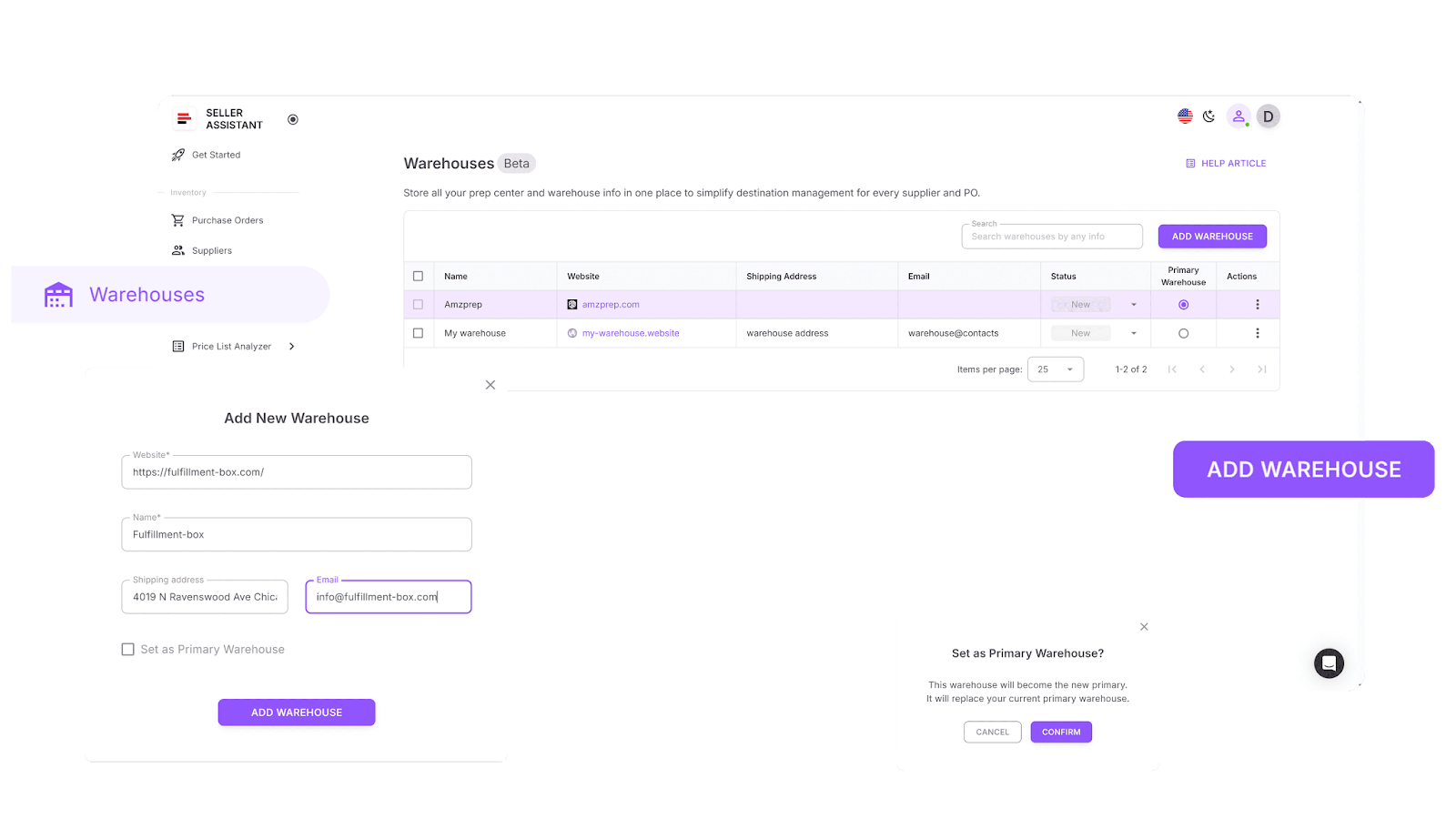
With Warehouse Database, you can:
- Store complete details for every prep center or warehouse – including addresses, contact info, and operational status – in one unified system.
- Link suppliers to their default warehouses so that routing is handled automatically during price list analysis or purchase order creation.
- Eliminate manual address entry, ensuring that every order goes to the correct location with consistent, validated data.
How to apply the tool
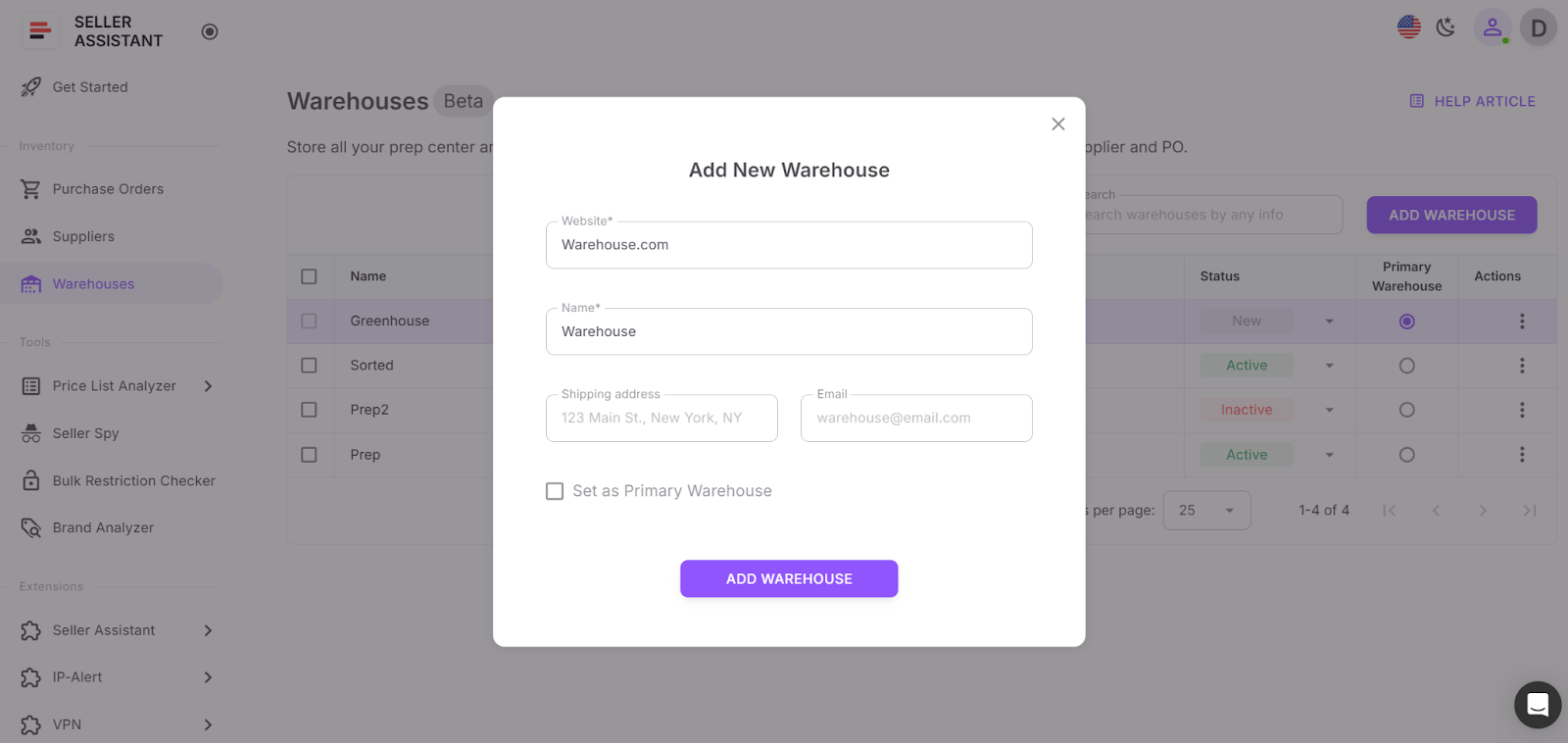
Open the Warehouses Database in your Seller Assistant workspace. Add each prep center or warehouse with its exact shipping address, contact person, and any relevant notes. Then assign a default warehouse to every supplier. Once set, Seller Assistant will automatically apply these routing details during price list analysis and PO creation, keeping fulfillment organized and error-free.
Step 6. Scan supplier price lists for the best deals
To scale your Amazon wholesale business efficiently, you need to process large supplier price lists fast – identifying profitable, low-risk products without drowning in manual checks. Automation handles the heavy lifting, but each deal still needs verification to confirm it’s truly worth sourcing. This step helps eliminate false ASIN matches, overpriced listings, and hidden risks that can impact your margins.
Tools that make it happen
How Seller Assistant tools help you
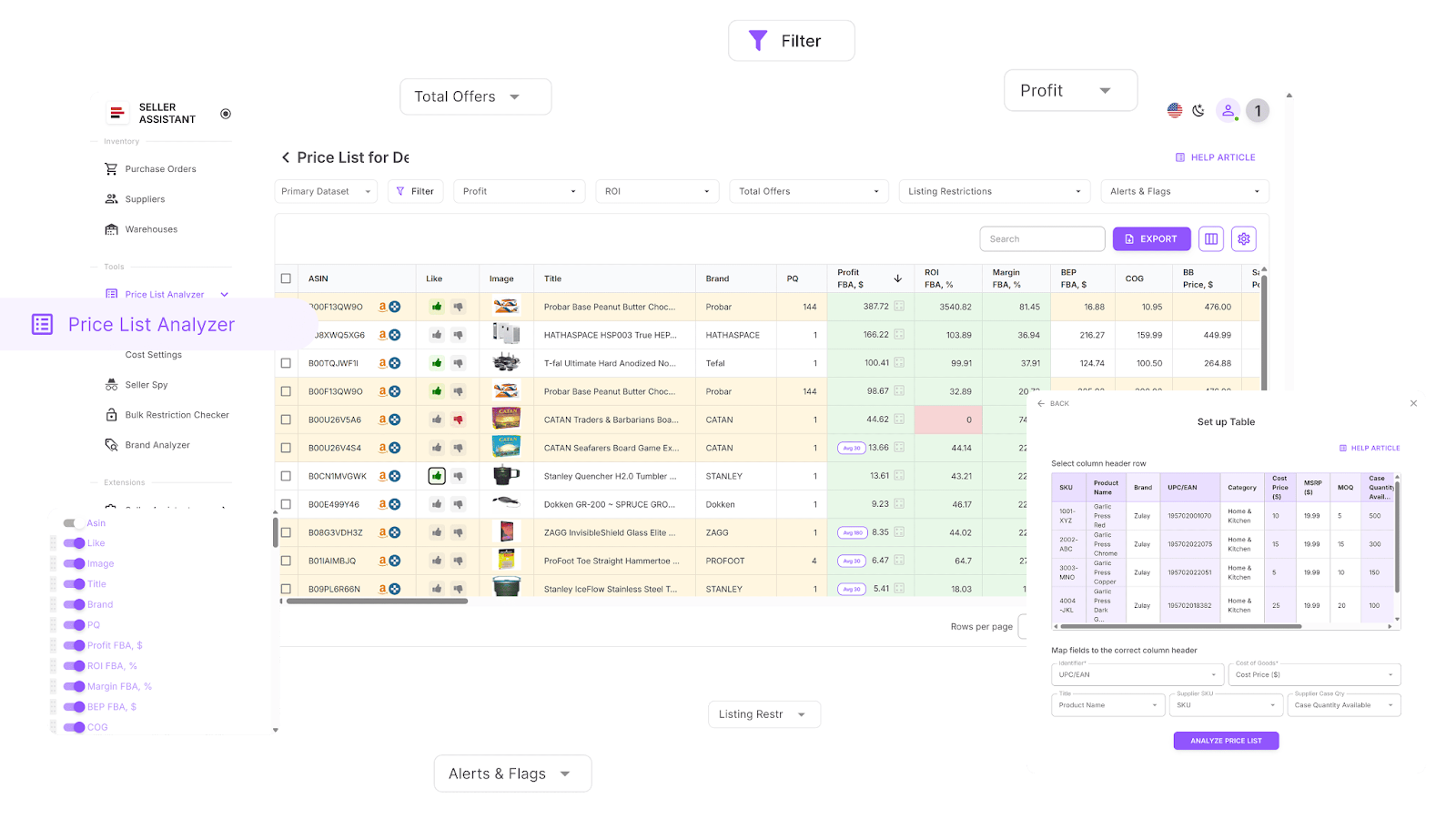
Price List Analyzer
-
Analyzes bulk files to instantly highlight high-profit, low-risk products.
-
Automatically matches supplier SKUs to Amazon ASINs with precise accuracy.
-
Detects restricted or unsellable products linked to your account, preventing compliance issues.
-
Enriches your price list with detailed data, including:
-
Sales performance metrics – BSR, rank trends, and estimated sales velocity.
-
Profitability calculations – profit, ROI, margin, and breakeven points.
-
Historical pricing insights – average Buy Box price and 30/90/180-day price trends for stability analysis.
-
Amazon fees breakdown – FBA, FBM, referral, storage, shipping, prep, hazmat, and fragile item costs.
-
Competition indicators – seller count, Buy Box rotation rate, and Amazon’s in-stock frequency.
-
Detects and flags potential risks like oversize, hazmat, meltable, or bundled listings, as well as ASIN mismatches and missing cost data.
-
Enables advanced filtering by any performance, profit, or risk metric to isolate top opportunities quickly.
-
Lets you save custom filter layouts for future analyses and maintain workflow consistency.
-
Allows adding Likes/Dislikes, creating shortlists, and exporting clean buy lists directly for team use or supplier submission.
-
Supports real-time edits of COG, pack size, or shipping costs with instant profit recalculations.
-
Includes a shared team notes feature that stays linked to each product across uploads.
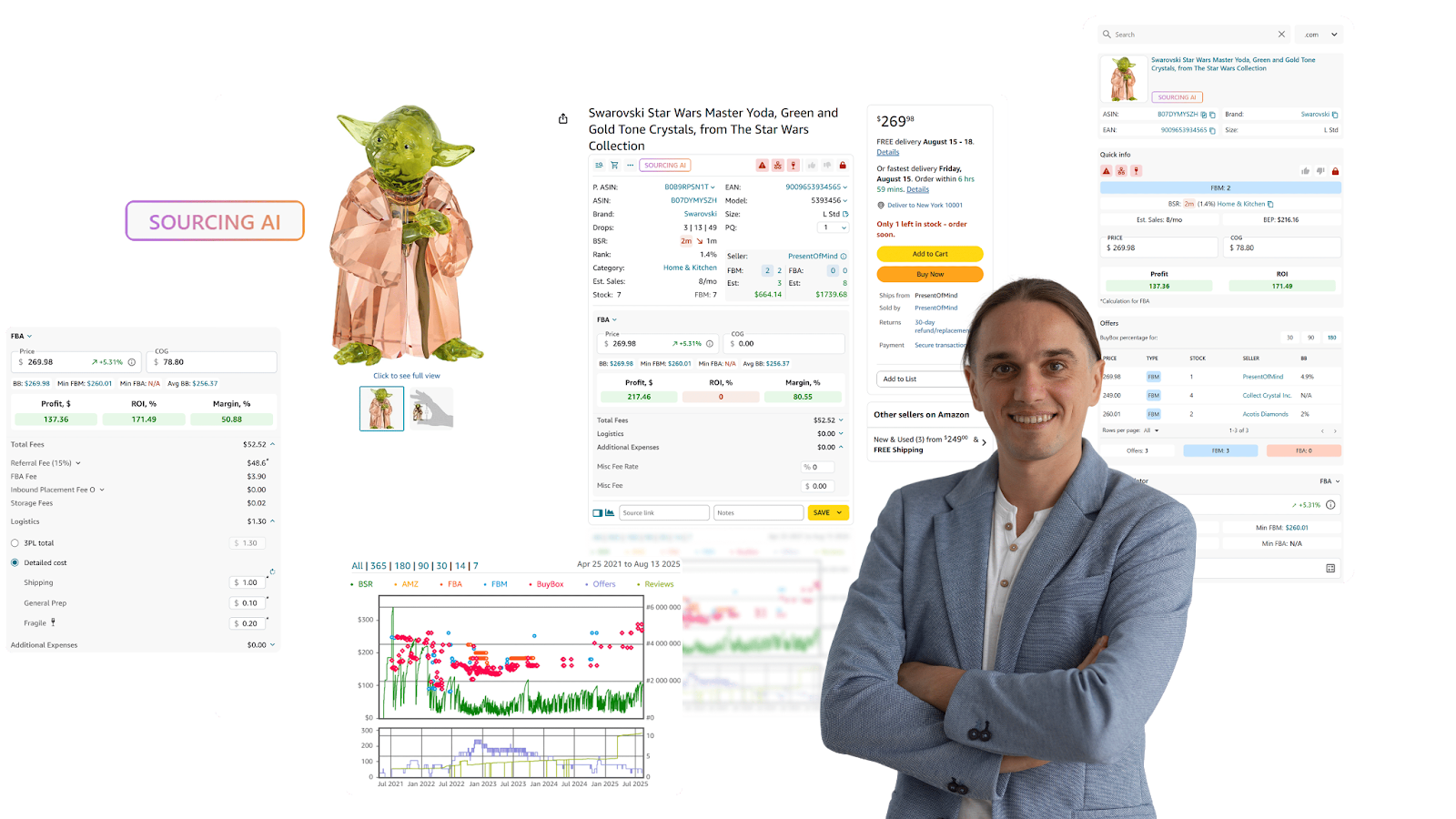
Seller Assistant Extension
-
Provides real-time product intelligence directly on Amazon product pages, including:
-
Sales velocity, demand potential, competition intensity, Buy Box probability, restrictions, IP complaints, and profitability.
-
Best-selling variations, performance history, and other critical sales data.
-
Enables side-by-side deal research on supplier websites with Side Panel View, showing Amazon metrics next to supplier offers.
-
Displays Quick View on Amazon search results to instantly spot promising resell products.
-
Summarizes competitor storefronts with Storefront Widget, including top categories, brands, pricing, and risk data.
-
Detects IP complaints and policy violations with IP Alert, including issue type and date.
-
Calculates ROI, profit, and margin with FBM&FBA Profit Calculator, fully customizable for different fees and logistics.
-
Computes European VAT and tax schemes with the built-in VAT Calculator.
-
Verifies eligibility to sell with Restriction Checker and alerts you to gated or restricted products.
-
Displays Alerts and Flags for risks such as hazmat, meltable, fragile, or Amazon as a competing seller.
-
Predicts sales potential with Sales Estimator and tracks stock levels via Stock Checker.
-
Evaluates product variations using Variation Viewer and monitors offer competition through Offers.
-
Exports research directly to Google Sheets with one-click Google Sheets Export.
-
Finds up to 10 verified U.S. suppliers for any product or brand via Sourcing AI, or quickly locate listings on other platforms (Google, eBay, Walmart, Target) using Lookup Links.
-
Adds personal notes, source links, and preferences with Notes, and analyzes long-term price trends using Keepa-powered Charts Panel.
How to apply the tools
- Price List Analyzer
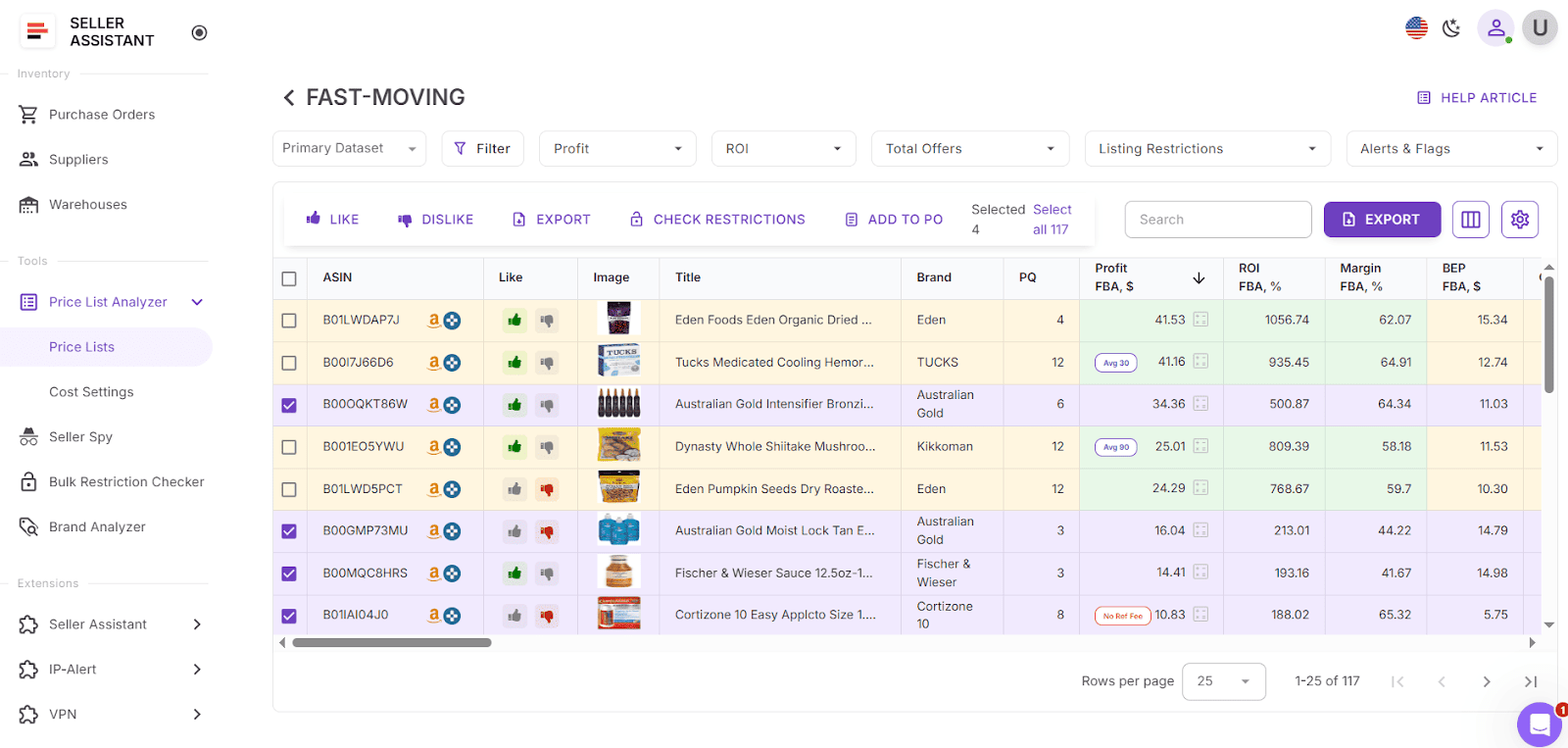
Open Price List Analyzer in your Seller Assistant account. Upload your supplier spreadsheet into Price List Analyzer, run the automated scan, and filter for high-profit, low-risk products, and shortlist to export to purchase order.
- Seller Assistant Extension
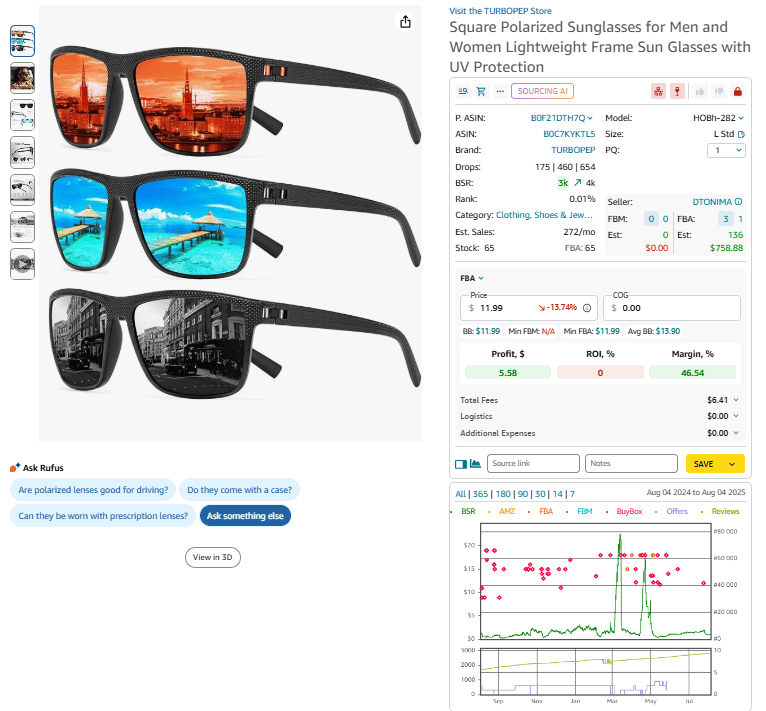
Review the shortlisted items using Seller Assistant Extension – check restrictions, competition, and sales history directly on Amazon pages. Only keep products that pass both automated and manual evaluations, then export your final buy list or send it straight into your purchase order workflow. To access the Extension, install it, and open products on Amazon product or search pages, on the supplier website as a side panel, or competitor storefront. The Extension will activate automatically.
Step 8. Create purchase orders
After identifying profitable and verified products, the next step is transforming them into structured purchase orders (POs) that suppliers can process without extra communication. In wholesale, clarity and precision are key – every order must include the correct quantities, costs, and destinations. An automated PO workflow eliminates spreadsheet chaos, minimizes human error, and ensures that all purchasing data stays organized in one place.
Tool that makes it happen
How Seller Assistant tool helps you
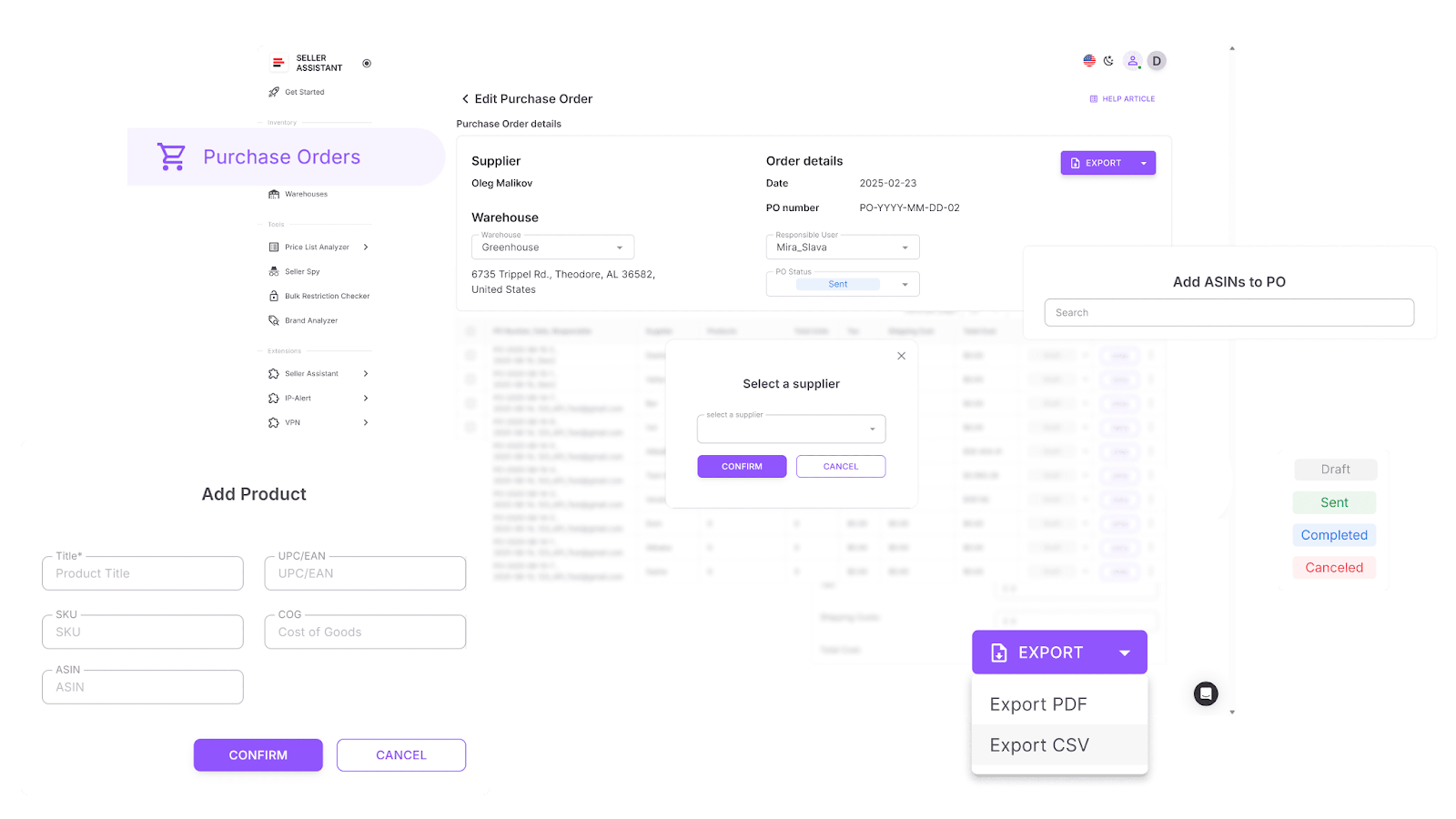
With Purchase Orders Module, you can:
- Generate POs in one click directly from your Price List Analyzer shortlist, by adding products manually from your supplier files, or from Keepa.
- Automatically pull supplier and warehouse details from your connected databases, saving time and preventing entry errors.
- Adjust quantities, COGs, shipping, and tax costs before sending the order.
- Search and add products using ASIN, UPC/EAN, title, or brand – and even retrieve data from Keepa when needed.
- Export finalized POs in PDF or XLSX format for seamless sharing with suppliers.
- Track every PO’s progress through clear statuses – Draft, Sent, Completed, or Canceled – for full transparency.
- Collaborate with your team in real time to review, edit, or approve orders.
- Prevent incomplete or incorrect POs using built-in validation that flags missing items, COGs, or invalid warehouse destinations.
How to apply the tool
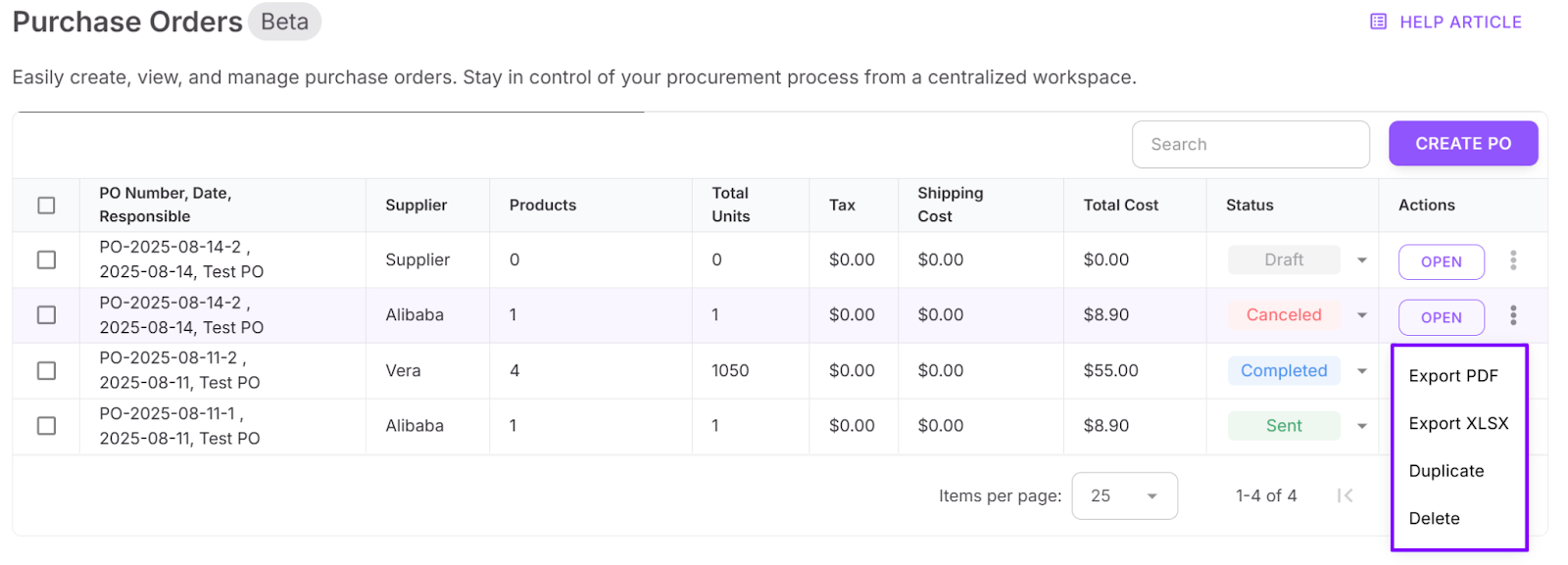
Open Purchase Orders in your Seller Assistant account. In your Price List Analyzer, select the products you’re ready to purchase and click “Create Order.” The module instantly generates a draft with all supplier and warehouse data pre-filled. Review the details, adjust quantities or costs if needed, and include shipping or tax estimates. Once the PO looks complete, export it in your preferred format and send it directly to your supplier. You can then monitor order status and progress in the Purchase Orders Module, keeping every procurement record in one central, connected workspace.
FAQ
What is an Amazon wholesale workflow?
An Amazon wholesale workflow is a structured system that connects every step of your business – from product sourcing to purchase orders – in one automated process. It helps sellers save time, reduce manual work, and scale operations efficiently.
How does Seller Assistant improve my wholesale workflow?
Seller Assistant automates and links all stages of your workflow, including supplier sourcing, price list analysis, and PO creation. This integration ensures your data stays consistent, cutting errors and repetitive manual tasks.
Can new Amazon sellers use Seller Assistant?
Yes, Seller Assistant is built for both beginners and advanced sellers. It offers step-by-step tools and automation features that simplify sourcing, eligibility checks, and order management.
Does Seller Assistant work for online arbitrage and dropshipping?
Absolutely – Seller Assistant supports wholesale, online arbitrage, and dropshipping models. Its sourcing and automation tools adapt to different workflows while maintaining the same connected system.
Why should I automate my wholesale operations?
Automation eliminates human error, saves hours of manual research, and gives you reliable data to make confident buying decisions. With Seller Assistant, your sourcing, analysis, and purchasing all flow seamlessly in one platform.
Final Thoughts
Building a scalable Amazon wholesale business isn’t about juggling spreadsheets or guessing which products will sell – it’s about structure, speed, and precision. Seller Assistant brings all of that together in one integrated workflow, connecting every step from product research to purchase orders. With its automation tools, you can source smarter, verify eligibility instantly, and create clean, ready-to-send POs in minutes.
Whether you run wholesale, online arbitrage, or dropshipping operations, Seller Assistant gives you a unified system that replaces manual work with accuracy and efficiency. It’s the complete solution for Amazon sellers who want to grow faster, stay organized, and maintain full control of their business.
Seller Assistant automates and connects every stage of your Amazon wholesale and arbitrage workflow. It brings together in one platform: workflow management tools – Purchase Orders Module, Supplier Database, Warehouse Database, bulk research & sourcing tools – Price List Analyzer, Bulk Restriction Checker, Sourcing AI, Brand Analyzer, Seller Spy, Chrome extensions – Seller Assistant Browser Extension, IP-Alert Extension, and built-in VPN by Seller Assistant, and integrations & team access features – seamless API connectivity, integrations with Zapier, Airtable, and Make, and Virtual Assistant Accounts.

