A supplier price list is where every wholesale purchase begins. But turning a catalog with hundreds or thousands of products into a profitable Amazon order requires more than simply selecting items and placing an order.
Sellers must identify the best opportunities, organize sourcing data, assign fulfillment destinations, and verify profitability before investing capital. When these tasks are handled manually, the process becomes slow and error-prone.
Seller Assistant streamlines the journey from wholesale list to purchase order by connecting product analysis, product management, warehouse routing, and purchasing into one workflow. In this guide, we’ll show how Amazon sellers can move from supplier catalogs to profitable purchase orders more efficiently.
Note. Seller Assistant is an end-to-end Amazon workflow management platform that integrates 15+ wholesale-focused solutions into one connected system. It combines sourcing workflow automation, bulk research and intelligence tools, and integrated Chrome extensions – giving you everything you need to streamline finding deals, managing suppliers, and creating purchase orders.

With Seller Assistant, every step of your Amazon wholesale and arbitrage workflow is automated and connected.
How Wholesale Lists Become Amazon Purchase Orders
Receiving a supplier price list is only the starting point of the wholesale sourcing process. Before placing an order, Amazon sellers must identify profitable products, eliminate risky opportunities, organize product data, assign inventory destinations, and calculate expected returns. The quality of these decisions directly impacts profitability and inventory performance.
The path from a wholesale list to a purchase order
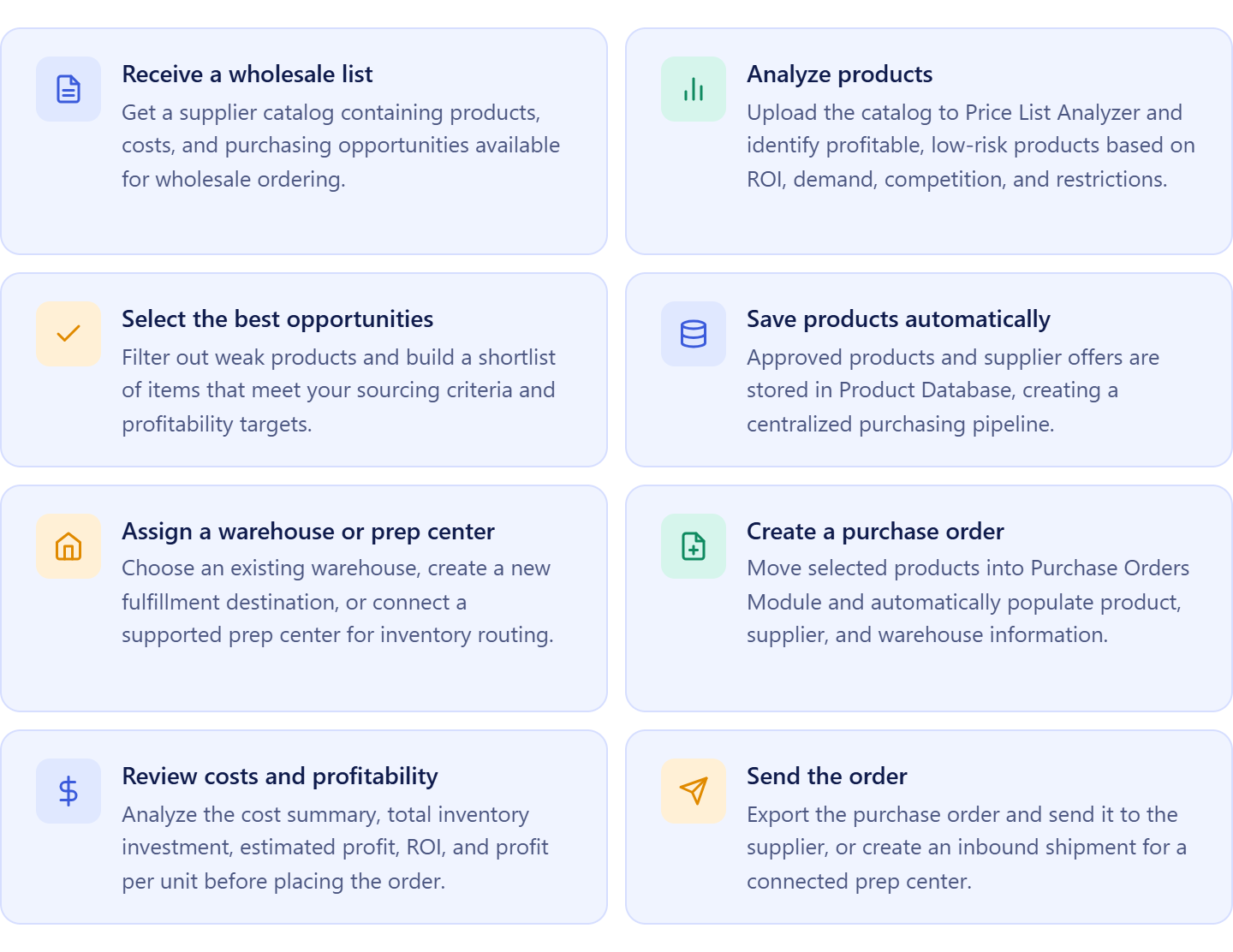
After receiving a supplier catalog, sellers review hundreds or even thousands of products to determine which ones are worth purchasing. This involves analyzing profitability, demand, competition, restrictions, and other factors that influence a product’s performance on Amazon.
Once the best opportunities are selected, product data, costs, and fulfillment destinations are organized before creating a purchase order. The order is then reviewed to confirm total investment and projected profitability before being sent to the supplier.
 Why product validation comes before purchasing
A supplier catalog may contain many products, but only a small percentage typically meet a seller’s sourcing criteria. Purchasing products without validating margins, demand, competition levels, or restrictions can tie up capital in inventory that performs poorly.
Evaluating products before ordering helps sellers focus their budget on opportunities that align with their business goals and risk tolerance.
Why catalog analysis and purchasing should be connected
As sourcing volume grows, sellers often work with larger catalogs, more products, and more frequent replenishment orders. Managing product analysis, inventory routing, and purchase orders separately creates extra work and increases the risk of errors.
A connected workflow keeps product evaluations, purchasing decisions, warehouse assignments, and order creation linked together. This makes it easier to move from wholesale list to purchase order while maintaining accuracy, visibility, and control over the entire purchasing process.
Why Amazon Sellers Connect Catalog Analysis And Purchasing
Turning a wholesale list into a purchase order involves several steps – product analysis, sourcing decisions, inventory routing, cost calculations, and order creation. When these activities are managed in separate spreadsheets and disconnected tools, sellers spend more time moving data than making purchasing decisions.
Seller Assistant connects catalog analysis, product management, warehouse routing, and purchase order creation into one workflow. This helps Amazon wholesale sellers, online arbitrage sellers, and dropshippers move from supplier catalogs to purchase-ready inventory faster and with fewer errors.
Faster catalog evaluation
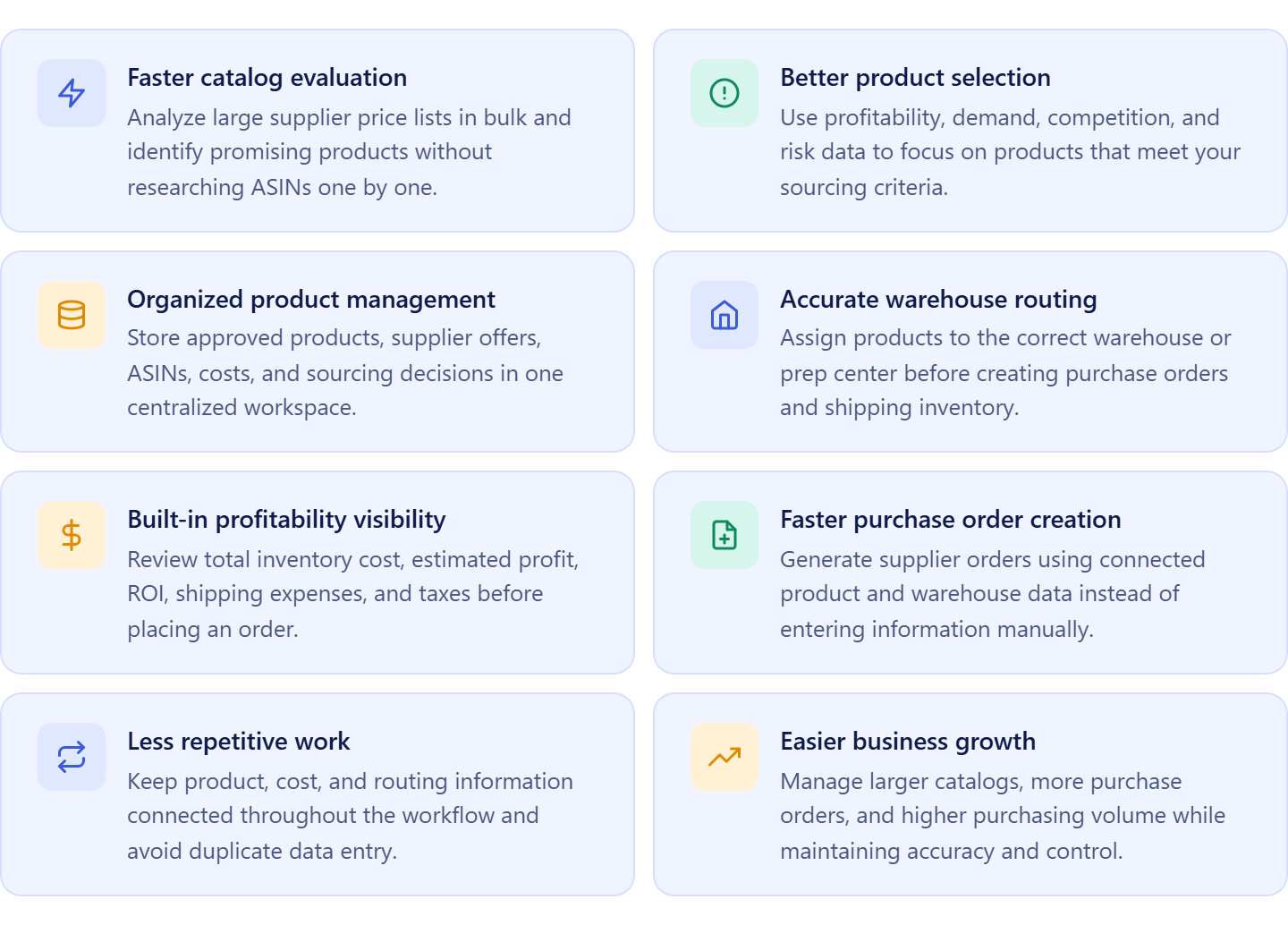
Analyzing supplier price lists in one system helps sellers quickly identify products that meet their profitability, demand, and competition requirements. This reduces the time spent researching products manually.
Better product selection
Access to profitability metrics, sales data, restrictions, and risk indicators helps sellers focus on products that are more likely to generate returns and avoid costly sourcing mistakes.
Organized product management
Keeping approved products, supplier offers, ASINs, and costs in one place creates a structured purchasing pipeline and eliminates the need to repeat sourcing work.
More accurate inventory routing
Connecting warehouses and prep centers to the purchasing process helps ensure inventory is assigned to the correct destination before orders are placed.
Clear visibility into order profitability
Reviewing total inventory cost, shipping expenses, taxes, estimated profit, and ROI before submitting an order helps sellers make more informed purchasing decisions and allocate capital more effectively.
Easier order creation and scaling
When product data, costs, and routing information remain connected, purchase orders can be generated with less manual work. As order volume grows, sellers can manage purchasing operations more efficiently while maintaining accuracy and control.
How Seller Assistant Turns Wholesale Lists into Purchase Orders
Working with wholesale supplier catalogs involves more than finding products to buy. Sellers must analyze large product lists, identify profitable opportunities, organize sourcing data, assign fulfillment destinations, calculate order costs, and create supplier orders. Managing these tasks across multiple spreadsheets and tools slows down the purchasing process and increases the risk of errors.
Seller Assistant connects every stage of the workflow, allowing sellers to move from a supplier price list to a completed purchase order without manually transferring data between systems. Product analysis, product management, warehouse routing, profitability calculations, and purchasing remain connected from start to finish.
How the workflow works
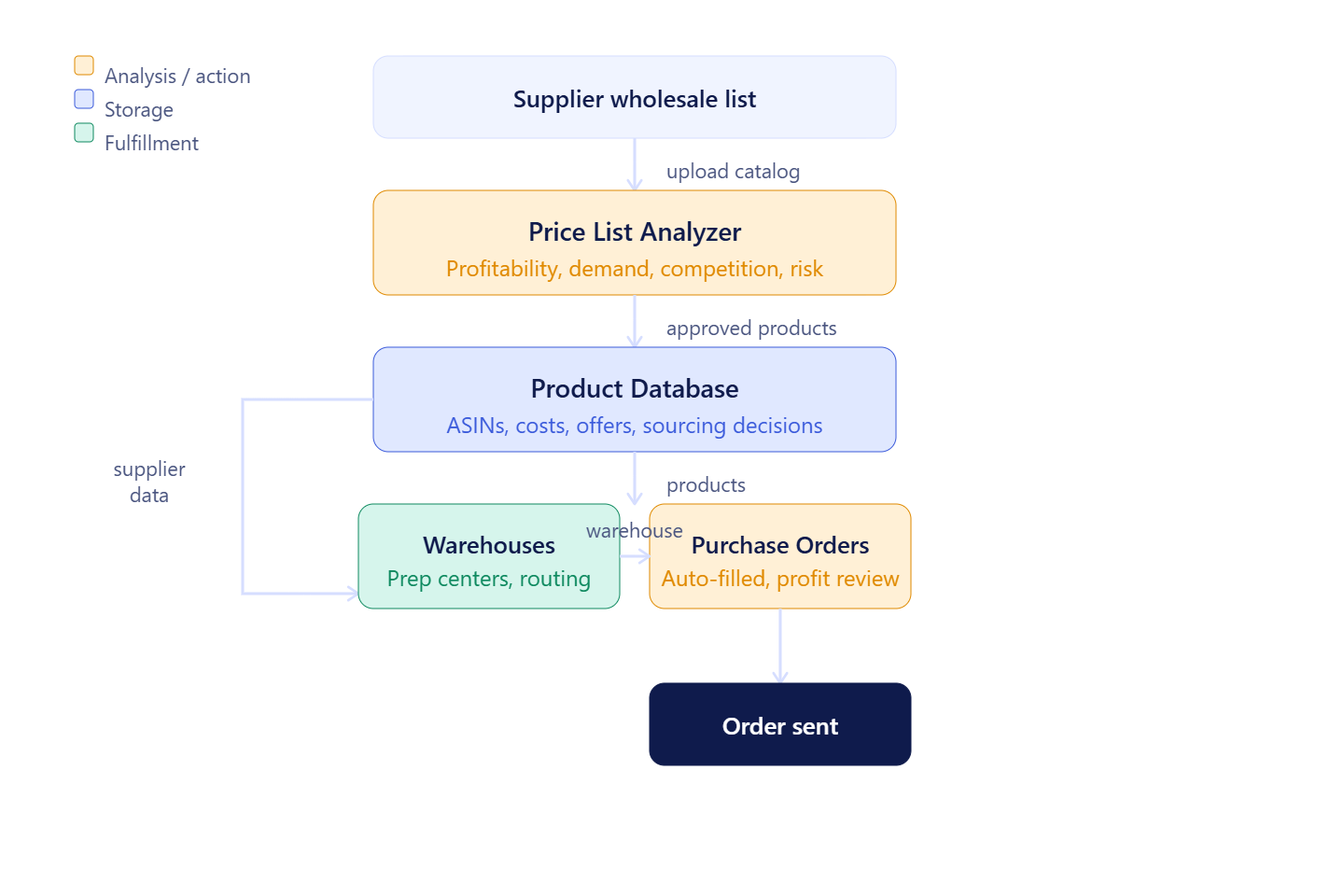
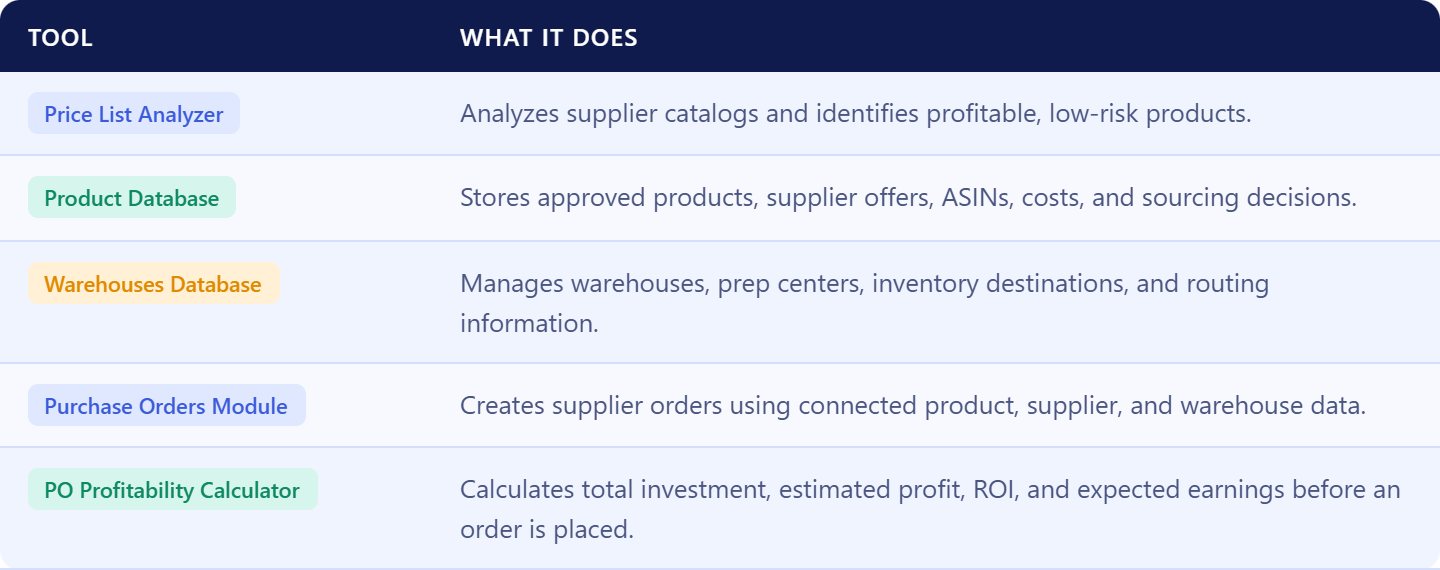
The process begins when a seller receives a wholesale list from a supplier and uploads it to Price List Analyzer. The catalog is analyzed to identify products that meet profitability, demand, competition, and risk requirements.
Products and supplier offers are then automatically stored in Product Database, where sourcing decisions, costs, ASINs, and product information remain organized and ready for purchasing.
Next, the seller selects a fulfillment destination using Warehouses Database. Existing warehouses can be reused, new locations can be added, and supported prep centers can be connected directly to Seller Assistant with Prep Center Intergration for streamlined inventory routing.
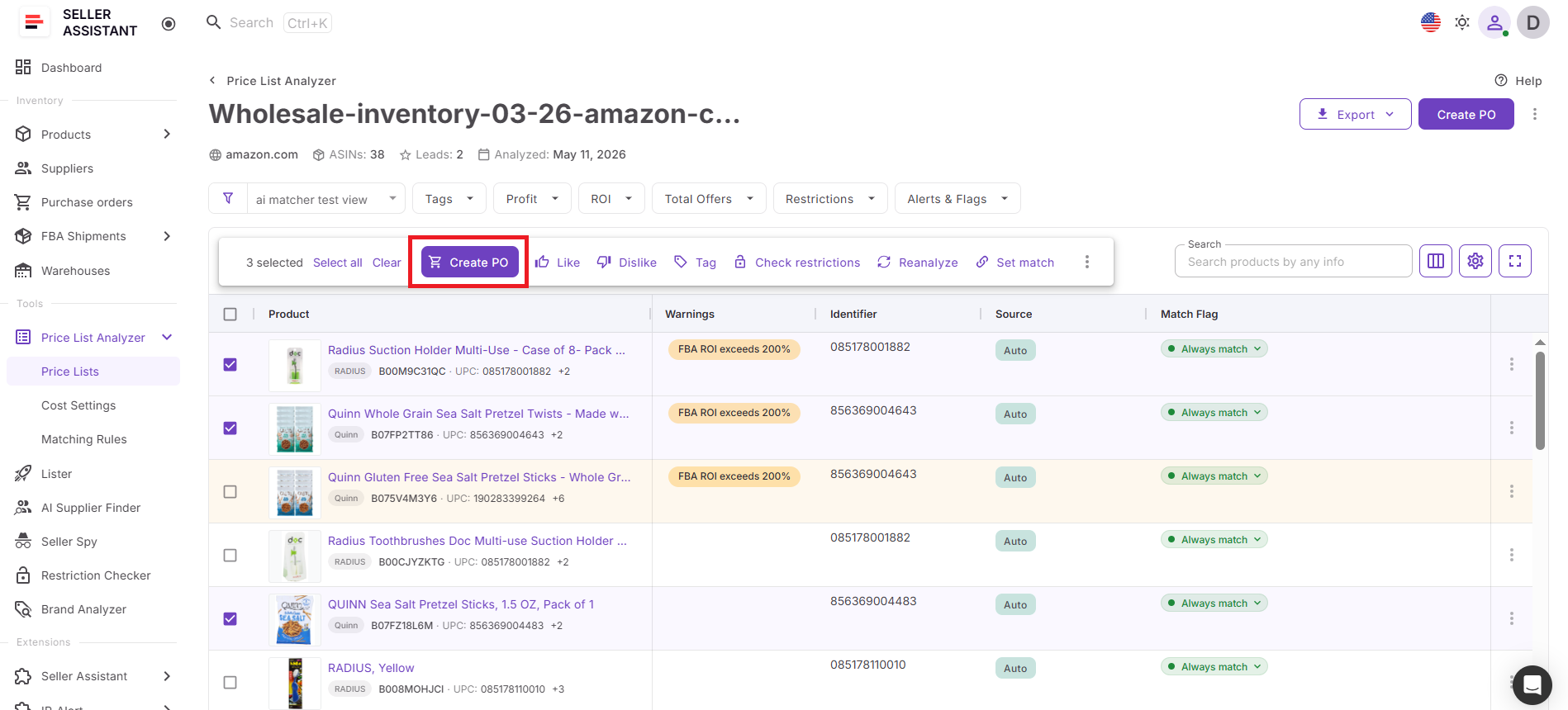
Once the best products are selected, they are moved into Purchase Orders Module. Product information, supplier data, and warehouse routing details are populated automatically, eliminating repetitive manual entry.
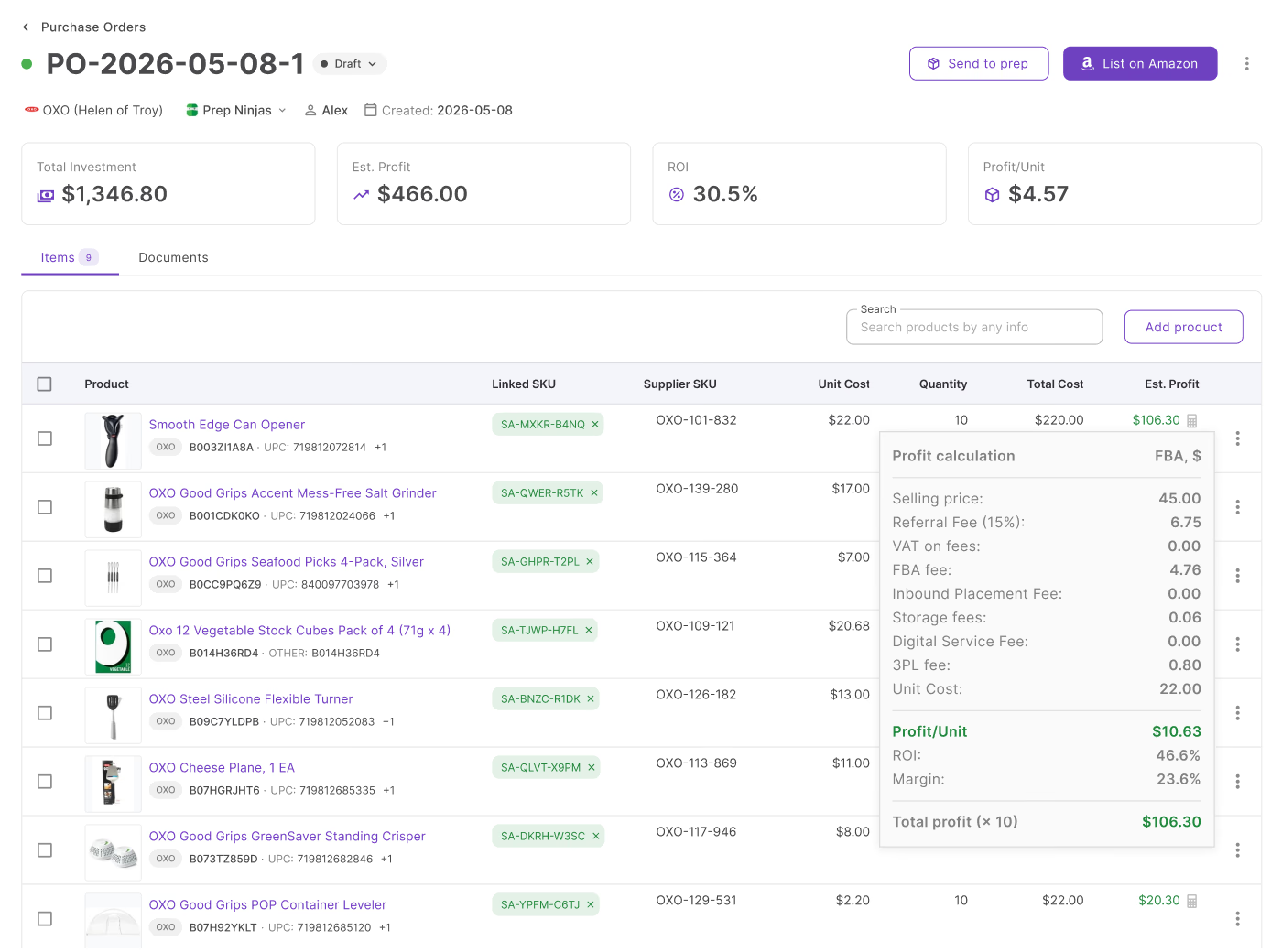
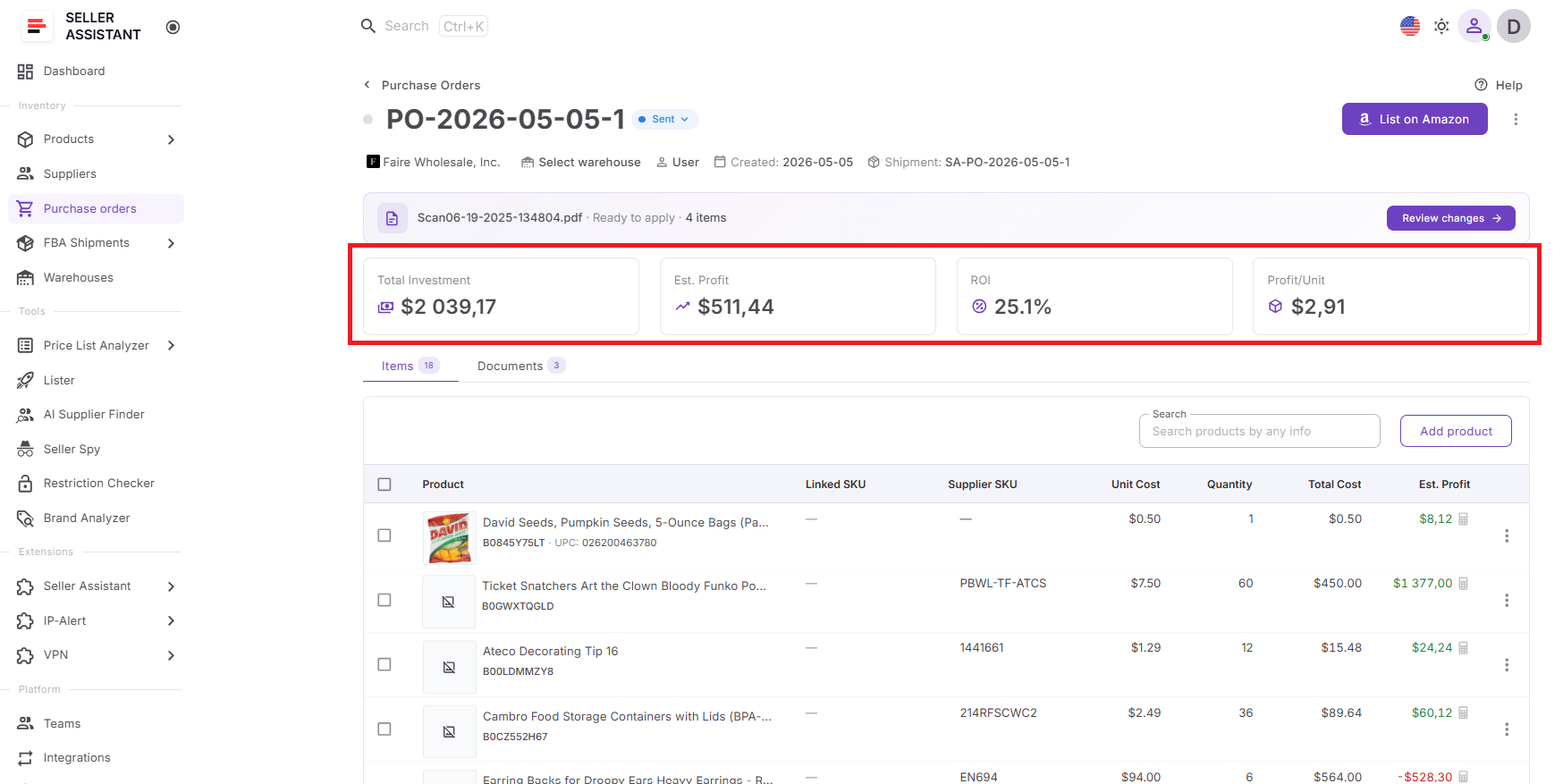
Before placing the order, sellers can review a complete cost summary and purchase order profitability, including inventory investment, shipping expenses, taxes, estimated profit, ROI, and expected earnings. After validation, the purchase order is ready to export and send to the supplier.
Seller Assistant tools used in the workflow
What Is Price List Analyzer?
Price List Analyzer is Seller Assistant’s bulk wholesale list analysis tool built for Amazon wholesale sellers, online arbitrage sellers, and dropshippers. It helps sellers transform supplier price lists into actionable purchasing opportunities by identifying products that meet their profitability, demand, competition, and risk requirements.
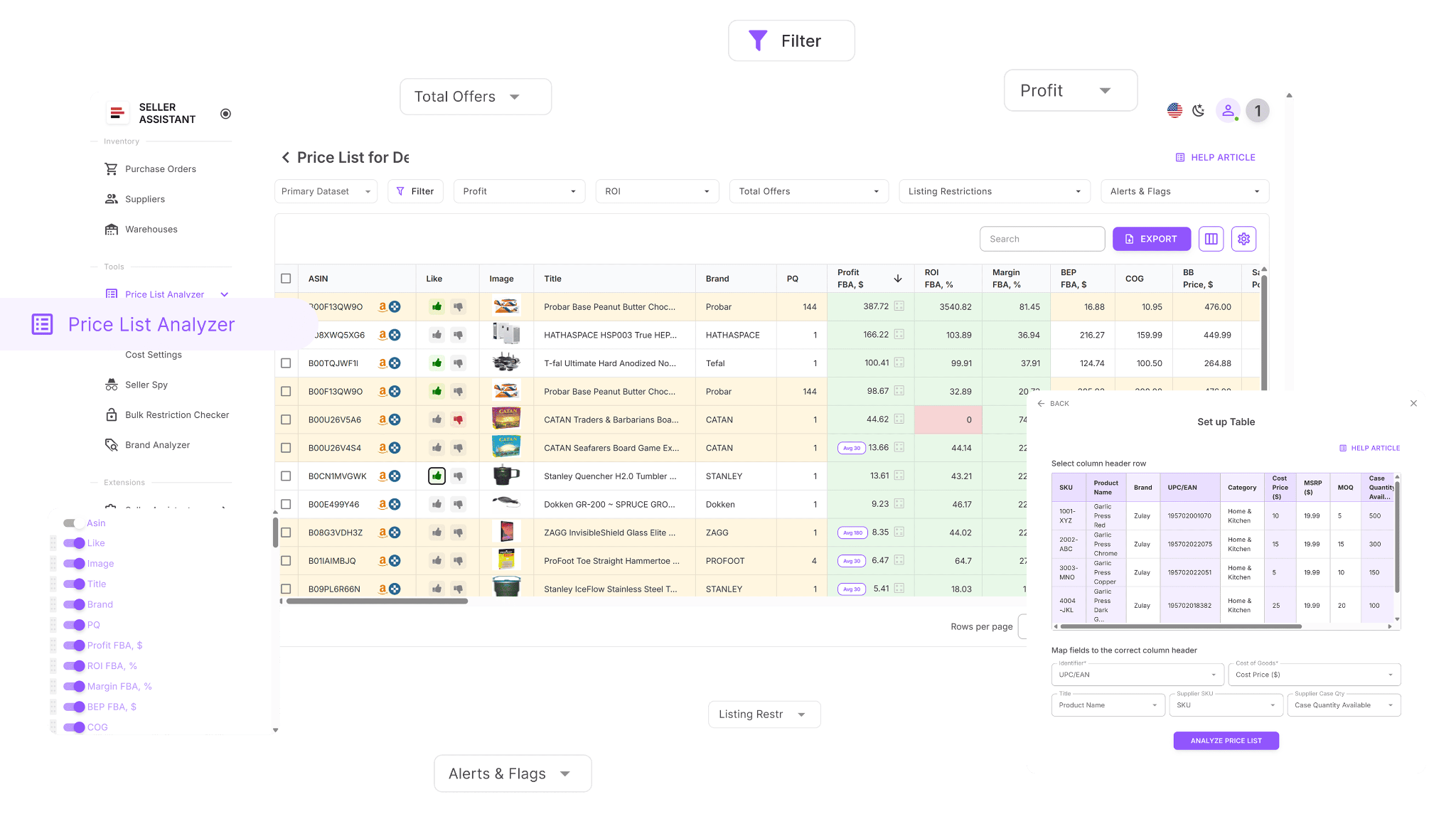
Instead of reviewing supplier catalogs product by product, sellers can evaluate hundreds or thousands of items at once and quickly identify which products are worth adding to a purchase order.
What Price List Analyzer does
Price List Analyzer helps sellers turn wholesale lists into purchase-ready product selections.
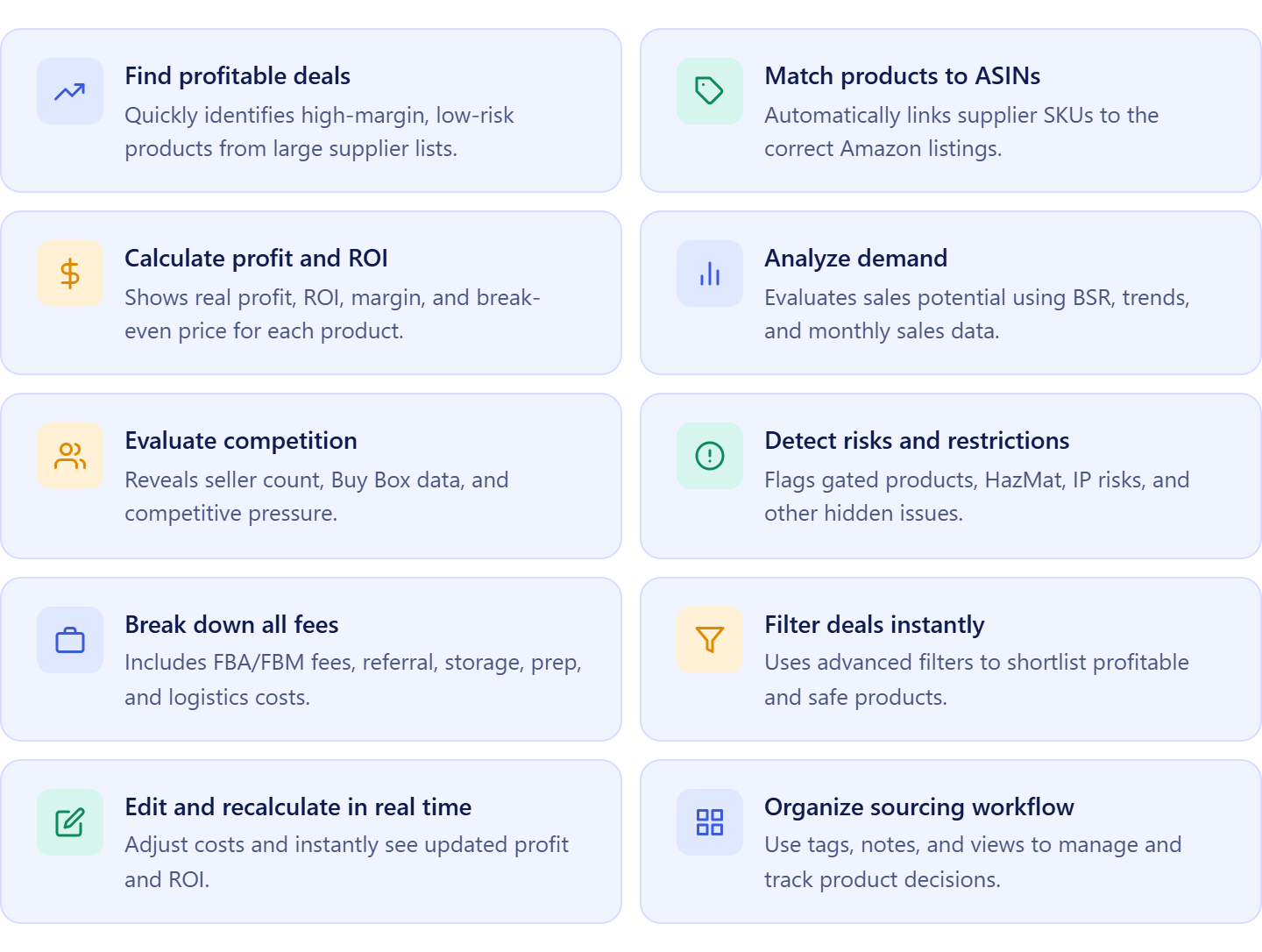
It allows sellers to:
- Upload and analyze wholesale supplier catalogs in bulk;
- Match supplier products to Amazon ASINs automatically;
- Calculate ROI, margin, profit, and break-even pricing;
- Evaluate sales potential using sales estimates and BSR trends;
- Analyze competition, Buy Box conditions, and Amazon presence;
- Identify restrictions, HazMat products, IP complaints, and other risks;
- Filter products by profitability, demand, competition, and risk;
- Adjust COG, shipping, prep, and logistics costs dynamically;
- Organize sourcing decisions with tags, notes, and saved views;
- Automatically move approved products into Product Database.
How Price List Analyzer helps turn wholesale lists into purchase orders
Price List Analyzer is the first step in the workflow that transforms a wholesale list into a purchase order. It helps sellers identify which products from a supplier catalog deserve investment before any purchasing decisions are made.
Once profitable and low-risk products are selected, product data, supplier offers, and sourcing costs remain connected throughout the workflow. Approved products automatically flow into Product Database and can later be added to purchase orders without repeating research or re-entering data. This helps sellers make better buying decisions, reduce sourcing risks, and build purchase orders using validated product information.
What Is Product Database?
Product Database is Seller Assistant’s centralized product organization tool built for Amazon wholesale sellers, online arbitrage sellers, and dropshippers. It serves as a structured repository for products identified during wholesale list analysis, keeping supplier offers, ASINs, costs, and purchasing data connected throughout the sourcing process.
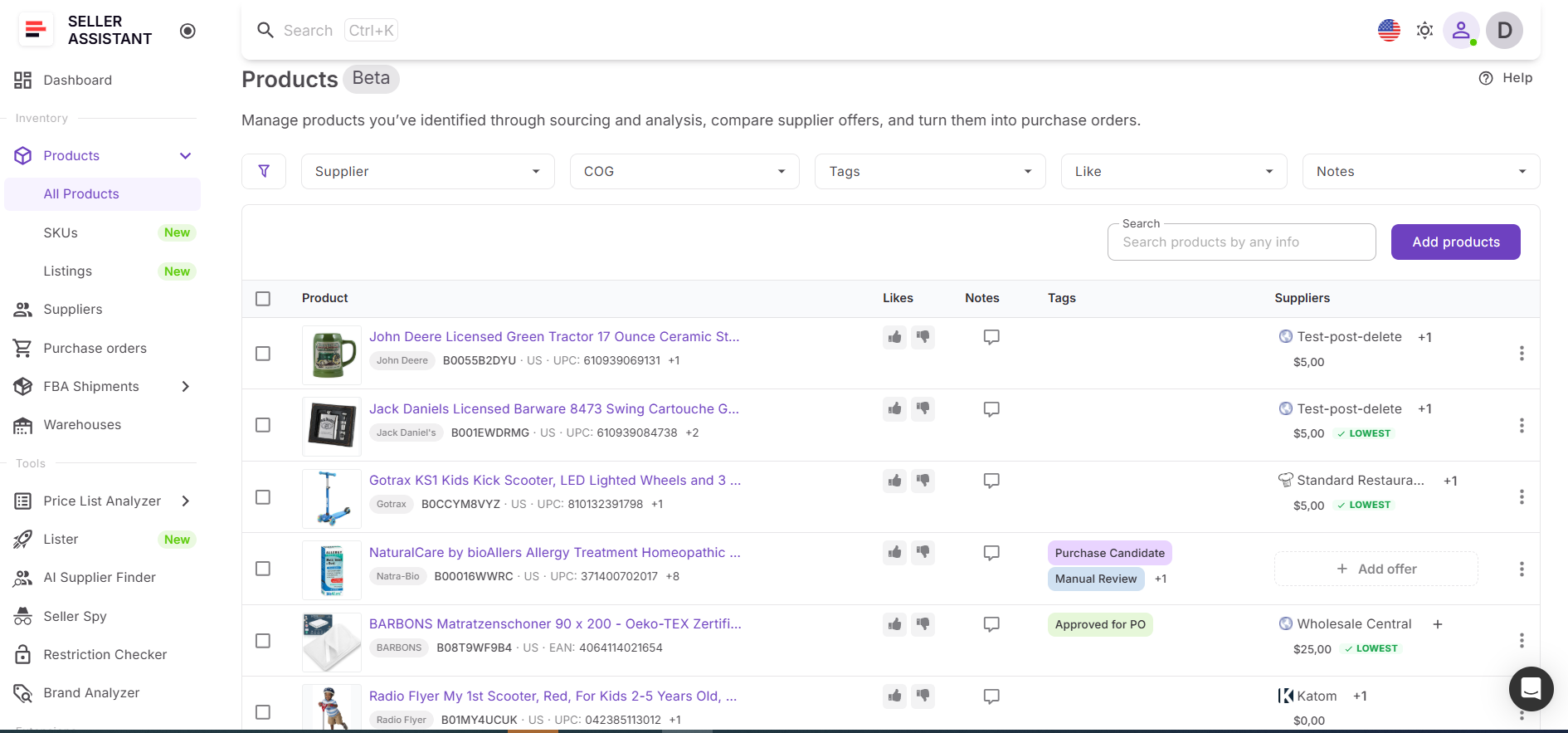
Instead of storing product information across multiple spreadsheets and supplier files, sellers can manage all approved products in one location and keep them ready for future purchasing decisions.
What Product Database does
Product Database helps sellers organize validated products and build a purchasing pipeline from wholesale lists.
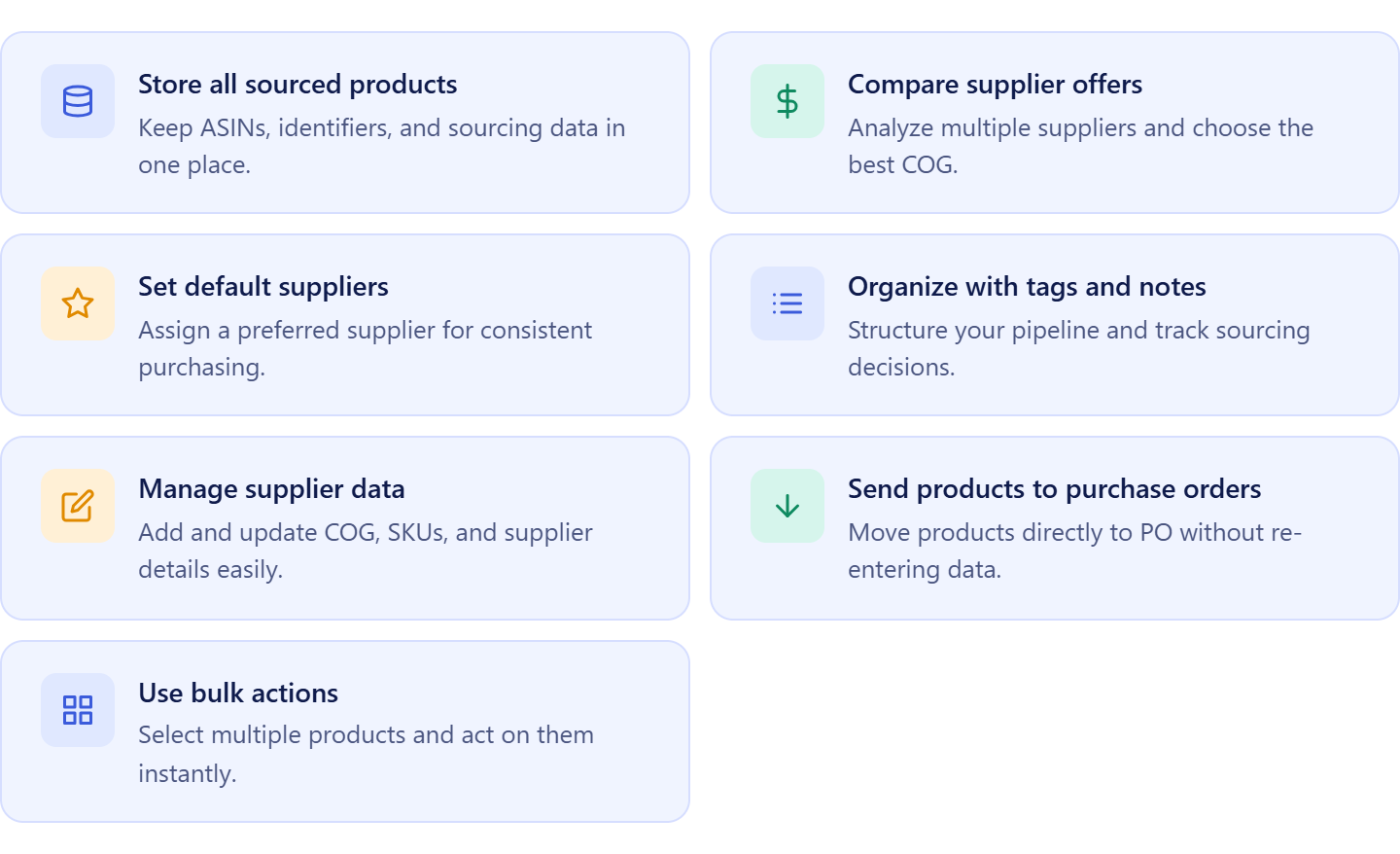
It allows sellers to:
- Store analyzed products and ASIN information in one place;
- Keep supplier offers connected to each product;
- Compare multiple supplier offers for the same ASIN;
- Assign preferred suppliers to purchasing opportunities;
- Organize sourcing decisions with tags, notes, and likes;
- Manage COG, supplier SKUs, and product identifiers;
- Move selected products directly into purchase orders;
- Apply bulk actions across multiple products.
How Product Database helps turn wholesale lists into purchase orders
Product Database acts as the bridge between catalog analysis and purchasing. Once products are approved in Price List Analyzer, they are automatically stored together with supplier offers, costs, and sourcing decisions, creating a centralized record of purchasing opportunities.
When sellers are ready to place an order, approved products can be moved directly into Purchase Orders Module without manually re-entering product details, supplier information, or costs. This keeps sourcing and purchasing connected, reduces repetitive work, improves order accuracy, and makes it easier to manage growing product catalogs as purchasing volume increases.
What Is Warehouses Database?
Warehouses Database is Seller Assistant’s warehouse and prep center management tool designed for Amazon wholesale sellers, online arbitrage sellers, and dropshippers. It provides a centralized place to manage warehouses, prep centers, shipping destinations, and inventory routing information used throughout the purchasing process.
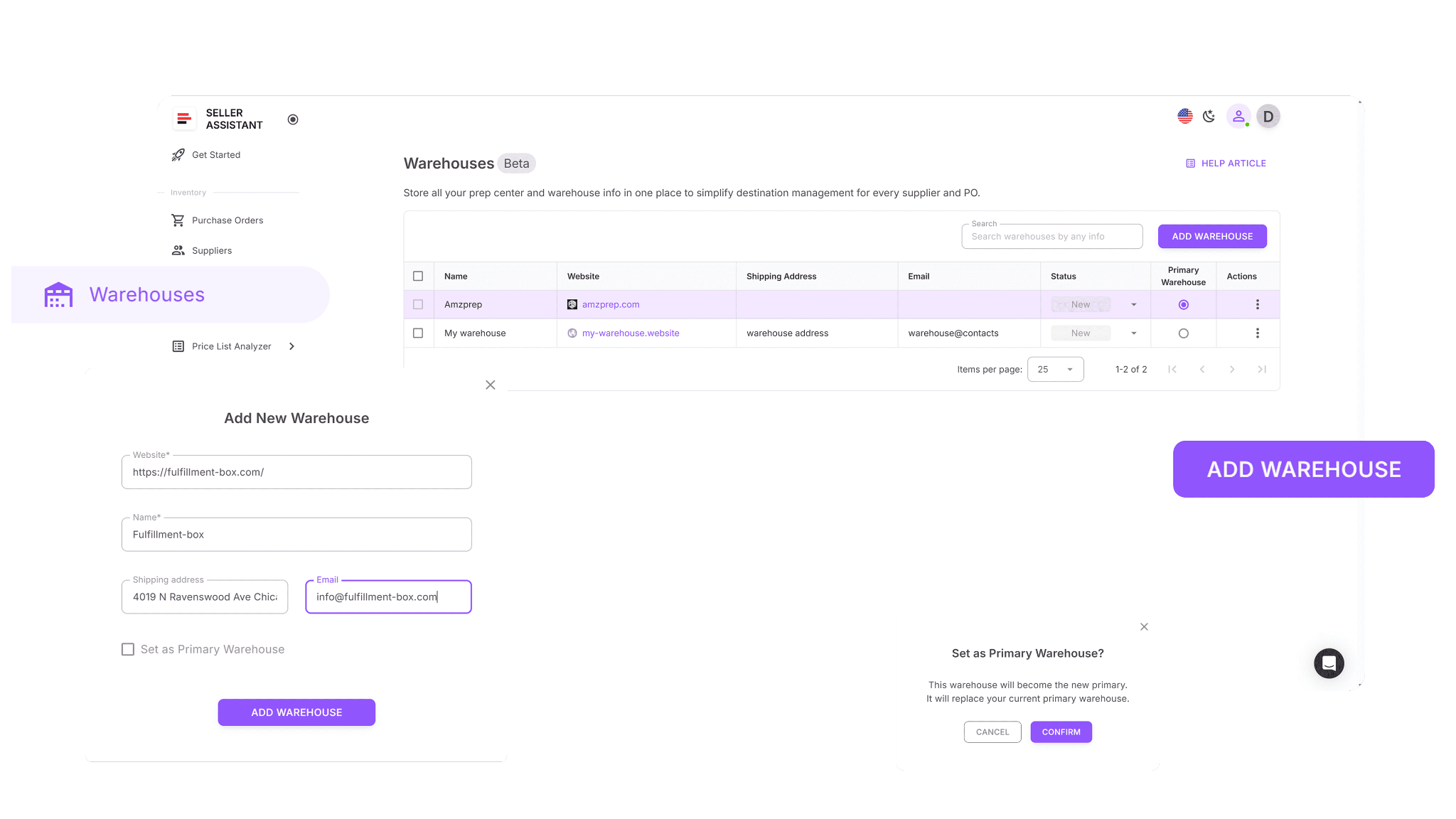
Instead of storing fulfillment details across spreadsheets, emails, and documents, sellers can keep all routing information organized in one system and reuse it across supplier orders and inventory shipments.
What Warehouses Database does
Warehouses Database helps sellers organize inventory routing and maintain accurate shipping destinations.
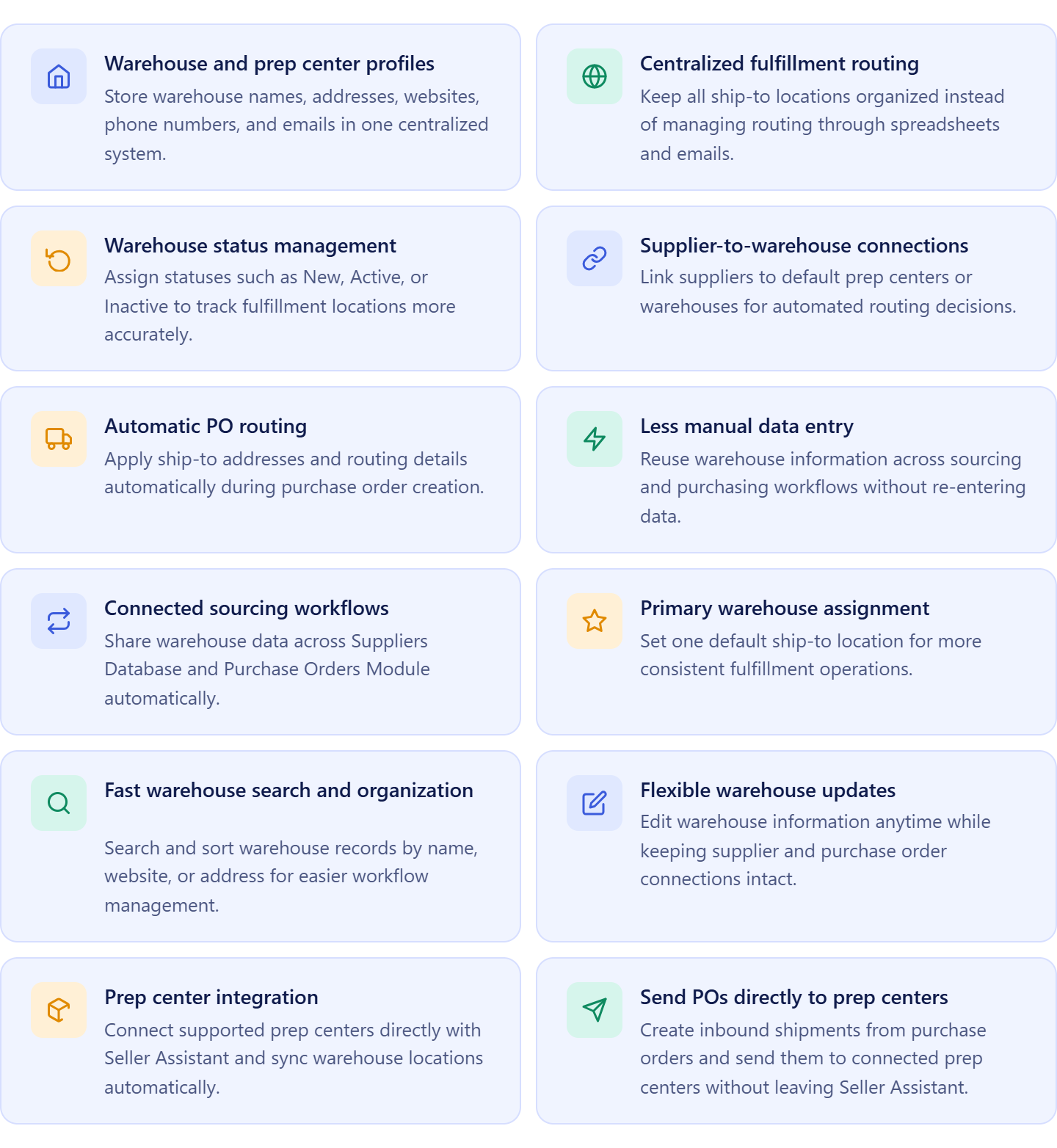
It allows sellers to:
- Create warehouse and prep center profiles;
- Store shipping addresses and contact information;
- Manage active fulfillment locations;
- Assign default warehouses to suppliers;
- Reuse ship-to destinations across supplier orders;
- Connect and sync supported prep centers directly with Seller Assistant;
- Search, organize, and update warehouse records easily;
- Keep routing information connected to suppliers and purchasing workflows.
How Warehouses Database supports supplier purchasing workflows
Warehouses Database supports supplier purchasing workflows by keeping fulfillment destinations connected to supplier and purchasing data. Instead of manually entering shipping addresses every time inventory is ordered, sellers can assign suppliers to specific warehouses or prep centers and automatically apply that routing information to future orders.
For sellers using integrated prep centers, synced warehouse locations become available directly in the workflow, and purchase orders can be sent to prep centers as inbound shipments without leaving Seller Assistant. This reduces routing errors, improves fulfillment accuracy, and makes inventory movement from supplier to prep center easier to manage as operations grow.
What Is Purchase Orders Module?
Purchase Orders Module is Seller Assistant’s purchase order creation and management tool built for Amazon wholesale sellers, online arbitrage sellers, and dropshippers. It helps sellers convert approved products from wholesale lists into structured supplier orders using connected product, supplier, and warehouse information.
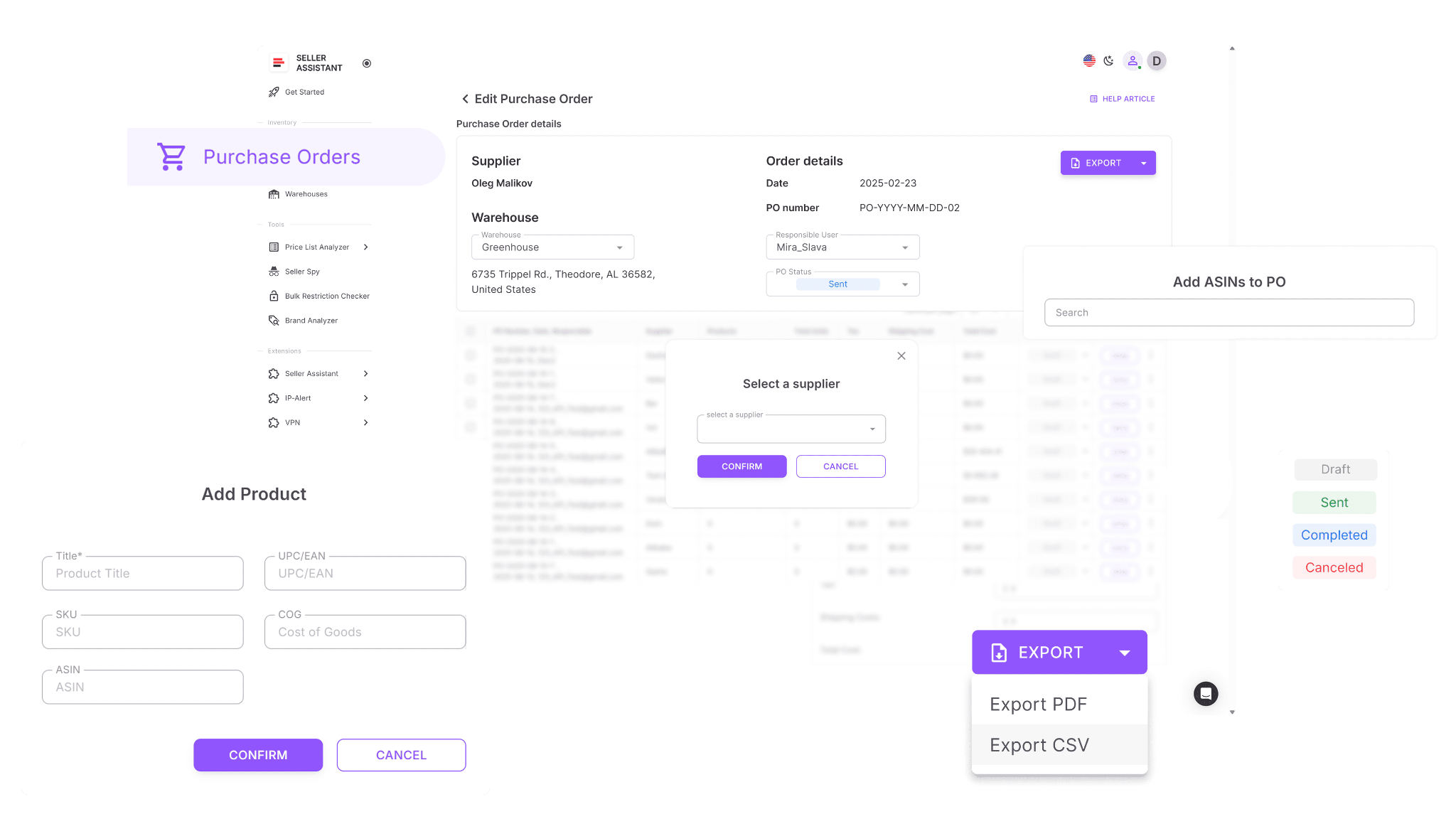
Instead of manually creating orders from spreadsheets and sourcing documents, sellers can generate purchase orders using data already collected during product analysis and purchasing preparation.
What Purchase Orders Module does
Purchase Orders Module helps sellers turn product selections into organized supplier orders.
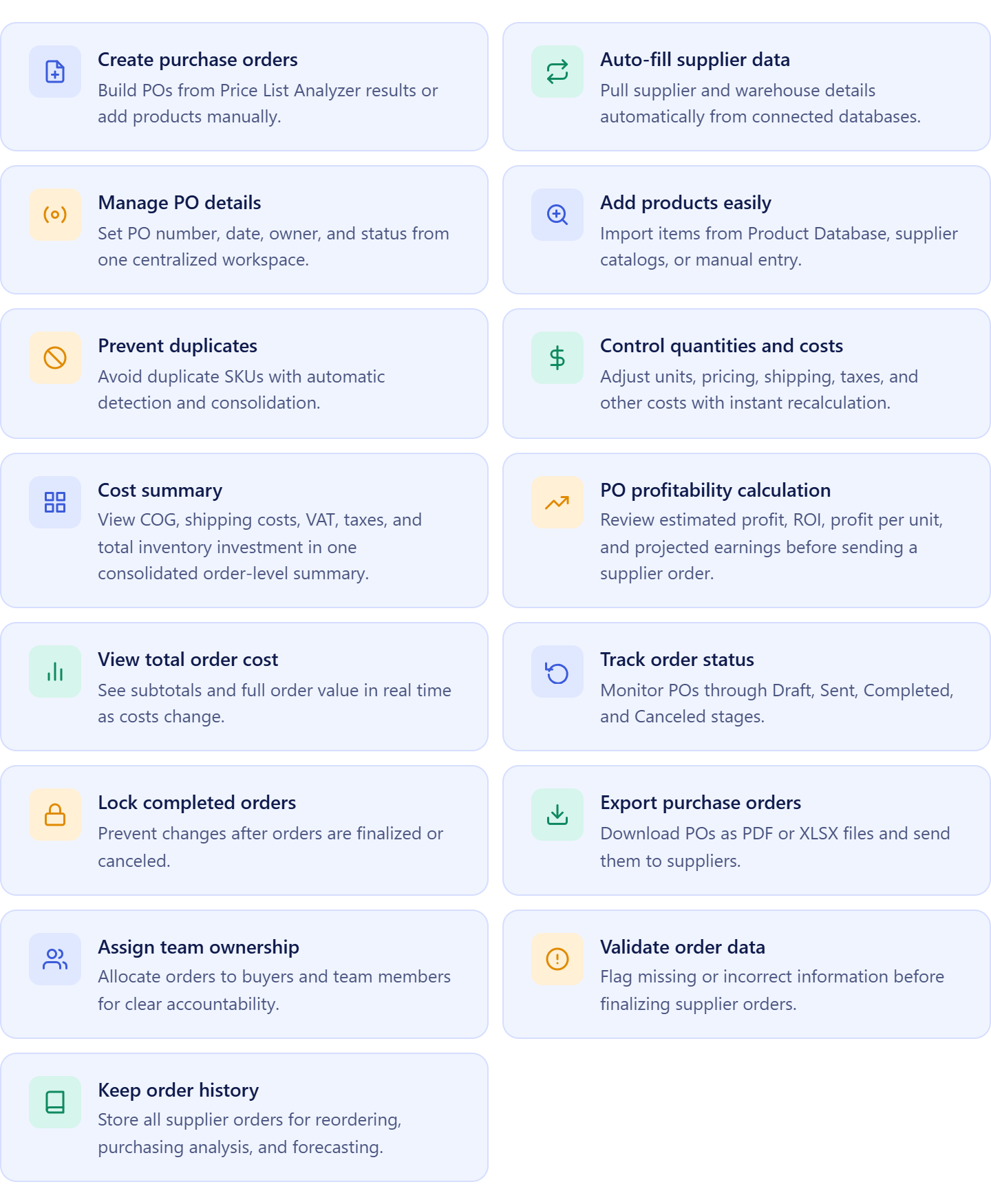
It allows sellers to:
- Create purchase orders from approved products;
- Automatically apply supplier and warehouse information stored in the workflow;
- Manage PO numbers, ownership, dates, and order statuses;
- Add products from Product Database, wholesale lists, or manual entry;
- Prevent duplicate products within the same order;
- Adjust quantities, pricing, shipping, taxes, and other purchasing costs;
- View a consolidated cost summary including COG, shipping, VAT, taxes, and total inventory investment;
- Calculate estimated profit, ROI, and expected earnings before placing an order;
- Track purchase orders through different order stages;
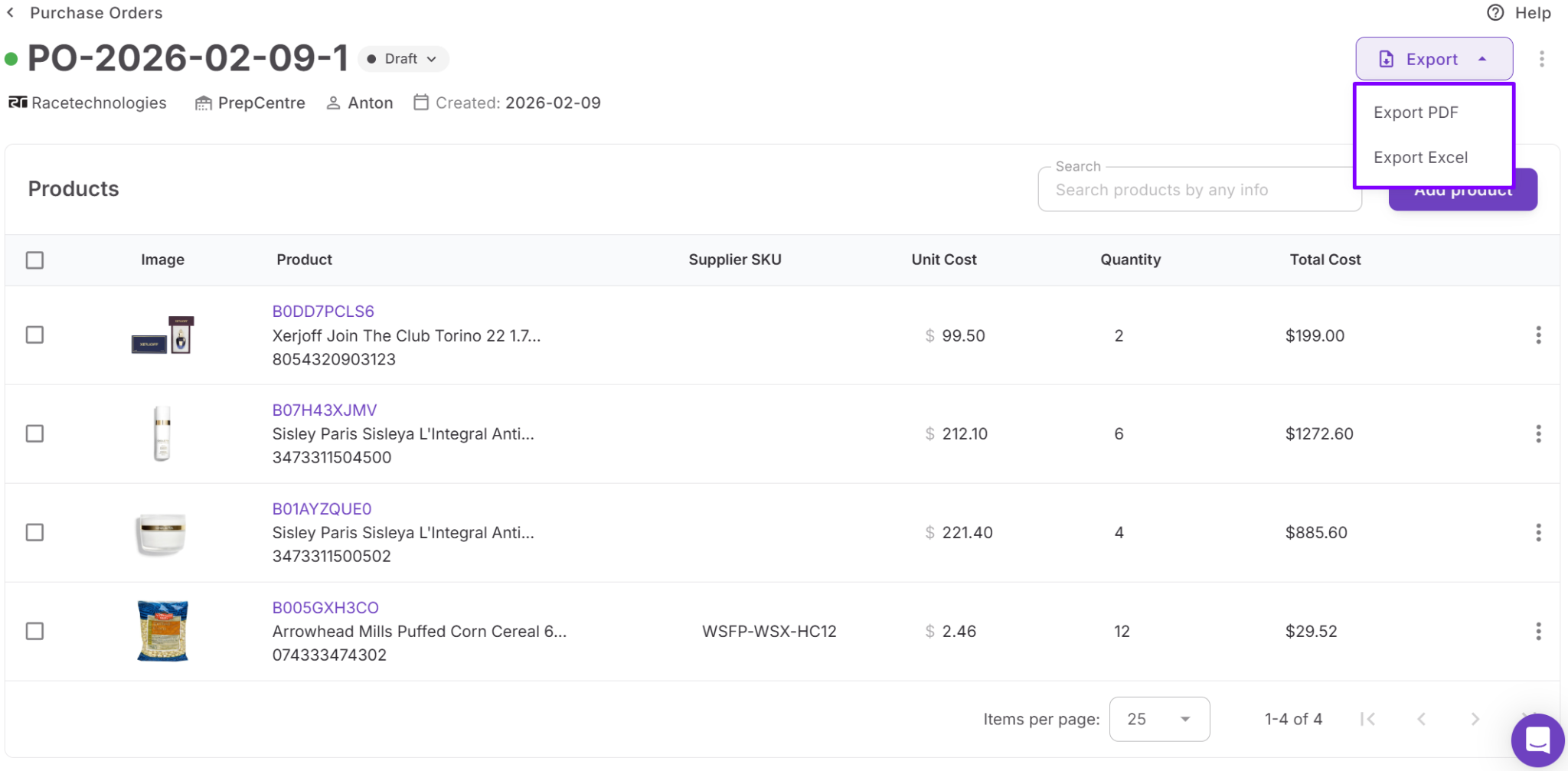
- Export purchase orders as PDF or XLSX files;
- Assign orders to team members;
- Identify missing information before sending orders;
- Maintain a complete history of purchases and reorders.
How Purchase Orders Module helps turn wholesale lists into purchase orders
Purchase Orders Module is the final stage of the workflow that transforms a wholesale list into a ready-to-send supplier order. Once products have been analyzed, approved, and assigned to a warehouse or prep center, they can be added directly to a purchase order with product, supplier, and routing information already attached.
The module also helps sellers validate purchasing decisions before committing capital. A built-in cost summary combines product costs, shipping expenses, taxes, and other order-level costs into one view, making it easy to see the total inventory investment. At the same time, profitability calculations show estimated profit, ROI, profit per unit, and projected earnings for the entire order.
This gives sellers a complete picture of expected financial performance before placing an order, helping them optimize quantities, remove weak products, and build purchase orders based on real profitability data rather than assumptions.
Steps to Turn a Wholesale List into a Purchase Order
A wholesale list contains the products you can buy, but it doesn’t tell you which products you should buy. Before placing an order, Amazon sellers must identify profitable opportunities, organize sourcing data, assign fulfillment destinations, and verify expected returns. A structured workflow helps transform supplier catalogs into purchase-ready inventory while reducing purchasing mistakes.
Step 1. Analyze the wholesale list
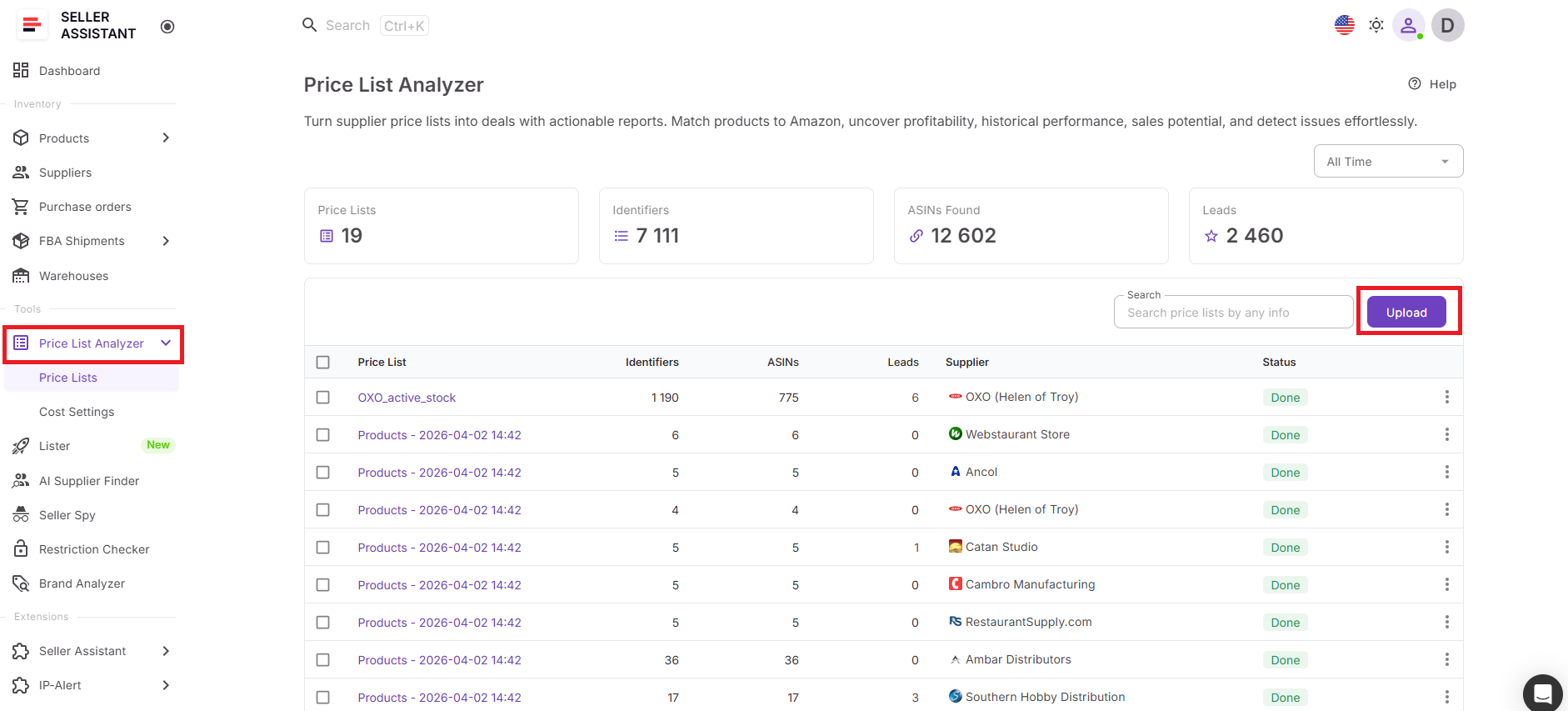
Upload the supplier catalog to Price List Analyzer and evaluate products using Amazon marketplace data. Review profitability, sales potential, competition, Buy Box conditions, restrictions, HazMat flags, IP complaints, and other risk indicators to identify products worth purchasing.
Step 2. Approve and organize products
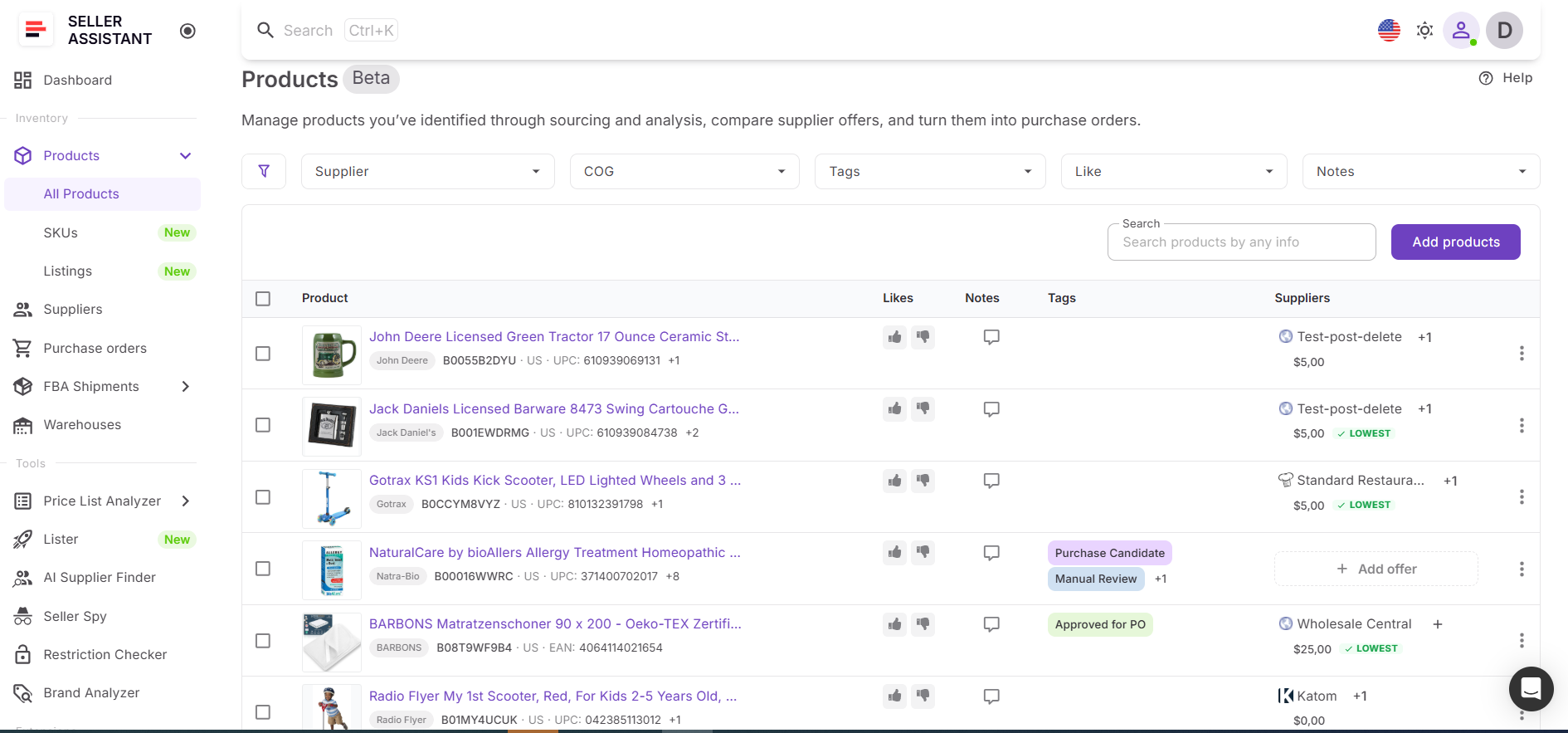
Once profitable products are identified, they are automatically stored in the Product Database together with supplier offers, ASINs, COG, and sourcing data. This creates a centralized product pipeline that keeps purchasing opportunities organized and ready for future orders.
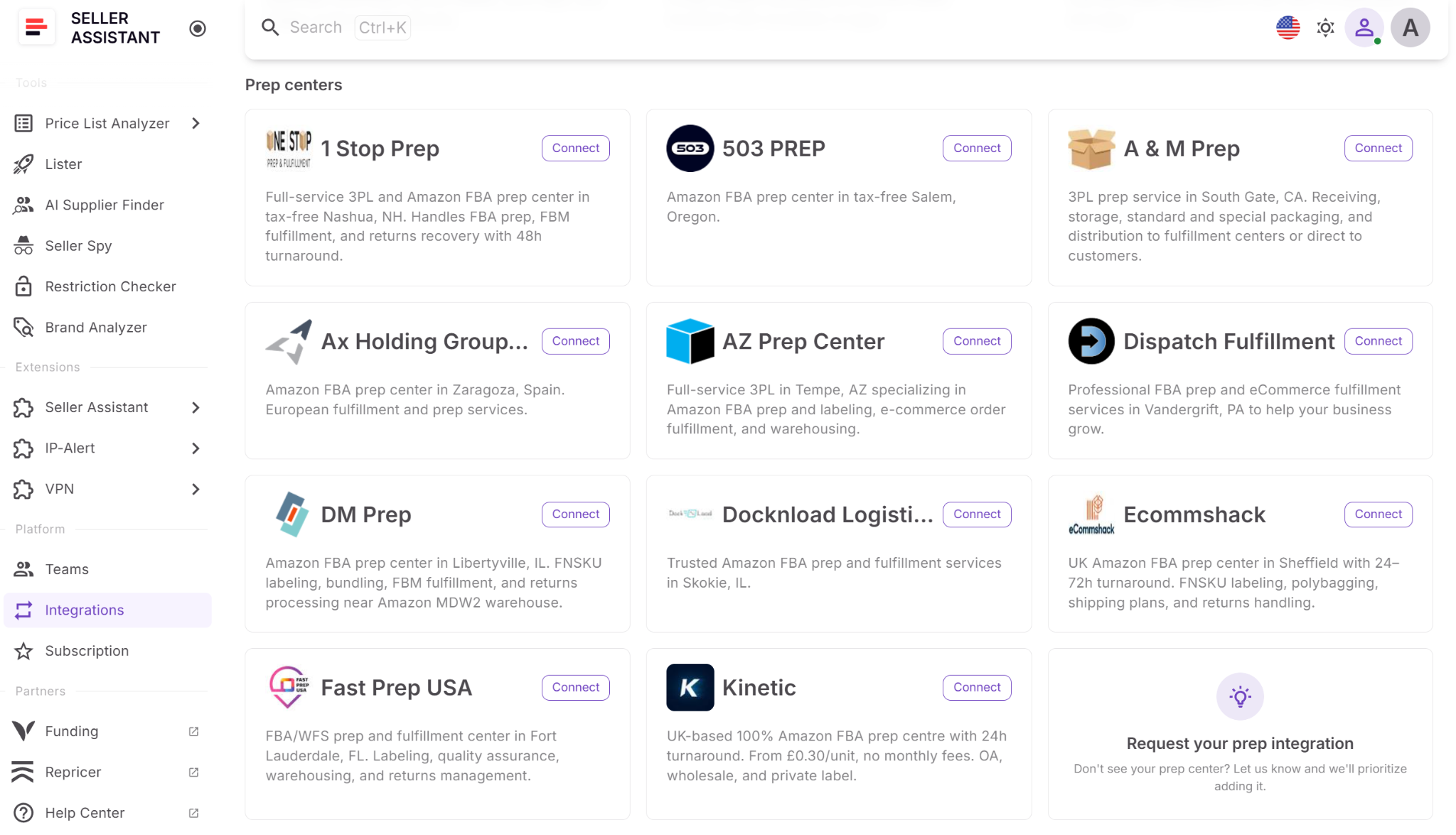
Step 3. Assign a warehouse or prep center
Choose where inventory should be shipped before creating the order.
- Sellers can assign existing warehouses with Warehouse Database.
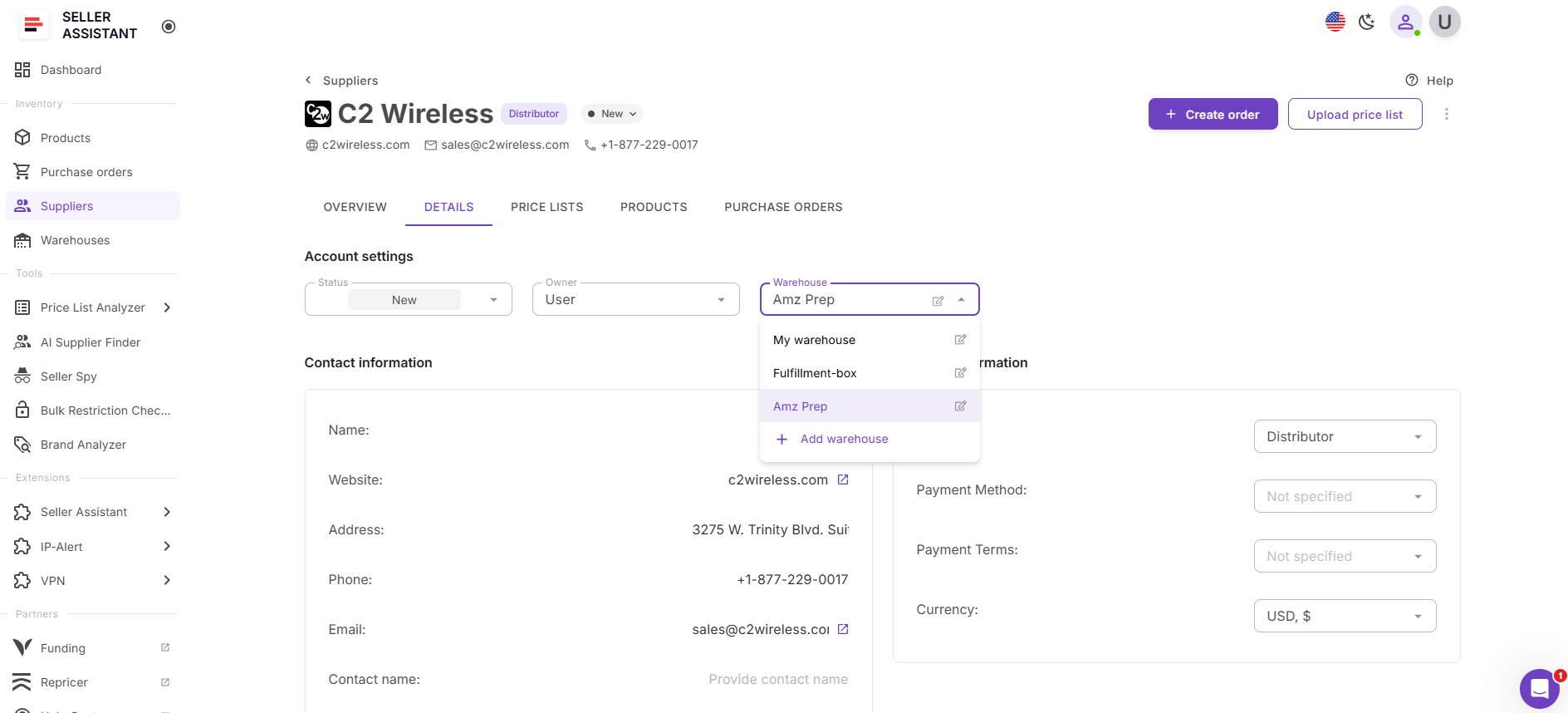
- They can also add new fulfillment destinations, or connect supported prep centers directly to Seller Assistant for more streamlined inventory routing.
Step 4. Create the purchase order
Move approved products into Purchase Orders Module to generate a supplier order. Product details, costs, and warehouse routing information are populated automatically from the workflow, reducing manual entry and helping maintain data accuracy.
Step 5. Review costs and expected profit
Before placing the order, review the complete cost summary and profitability calculations. Analyze inventory investment, shipping costs, taxes, estimated profit, ROI, and profit per unit to ensure the order meets your purchasing targets.
Step 6. Send the order and track purchasing activity
Export the purchase order and send it to the supplier. Order records remain available for replenishment planning, purchasing analysis, forecasting, future reorders, and inventory routing, making each new purchasing cycle easier to manage.
FAQ
What is a wholesale list?
A wholesale list is a supplier catalog that contains products available for purchase, along with pricing, product identifiers, and other sourcing information. Amazon sellers use wholesale lists to identify products that can be resold profitably on the marketplace.
Why should sellers analyze a wholesale list before placing an order?
Not every product in a supplier catalog is worth buying. Analyzing the list helps sellers identify products with strong margins, stable demand, manageable competition, and fewer sourcing risks before investing capital.
What information should be reviewed before creating a purchase order?
Sellers should review profitability, demand, competition, restrictions, shipping costs, taxes, and total inventory investment. This helps ensure the order aligns with purchasing goals and profit expectations.
Why is purchase order profitability important?
Purchase order profitability shows how much an order is expected to earn after accounting for product costs and other expenses. Reviewing ROI, profit per unit, and total projected profit helps sellers make more informed buying decisions.
Can purchase orders be connected to prep centers?
Yes. Seller Assistant supports direct integrations with supported prep centers, allowing sellers to sync warehouse locations and create inbound shipments from purchase orders. This simplifies inventory routing and helps move products from suppliers to prep centers more efficiently.
Final Thoughts
A wholesale list is more than a supplier catalog – it’s the starting point for every purchasing decision. To build profitable Amazon inventory, sellers must analyze products, organize sourcing data, assign fulfillment destinations, and validate order profitability before placing an order.
Seller Assistant connects these steps into one workflow. From catalog analysis with Price List Analyzer to product management, warehouse routing, purchase order creation, and profitability calculations, every stage remains connected and organized.