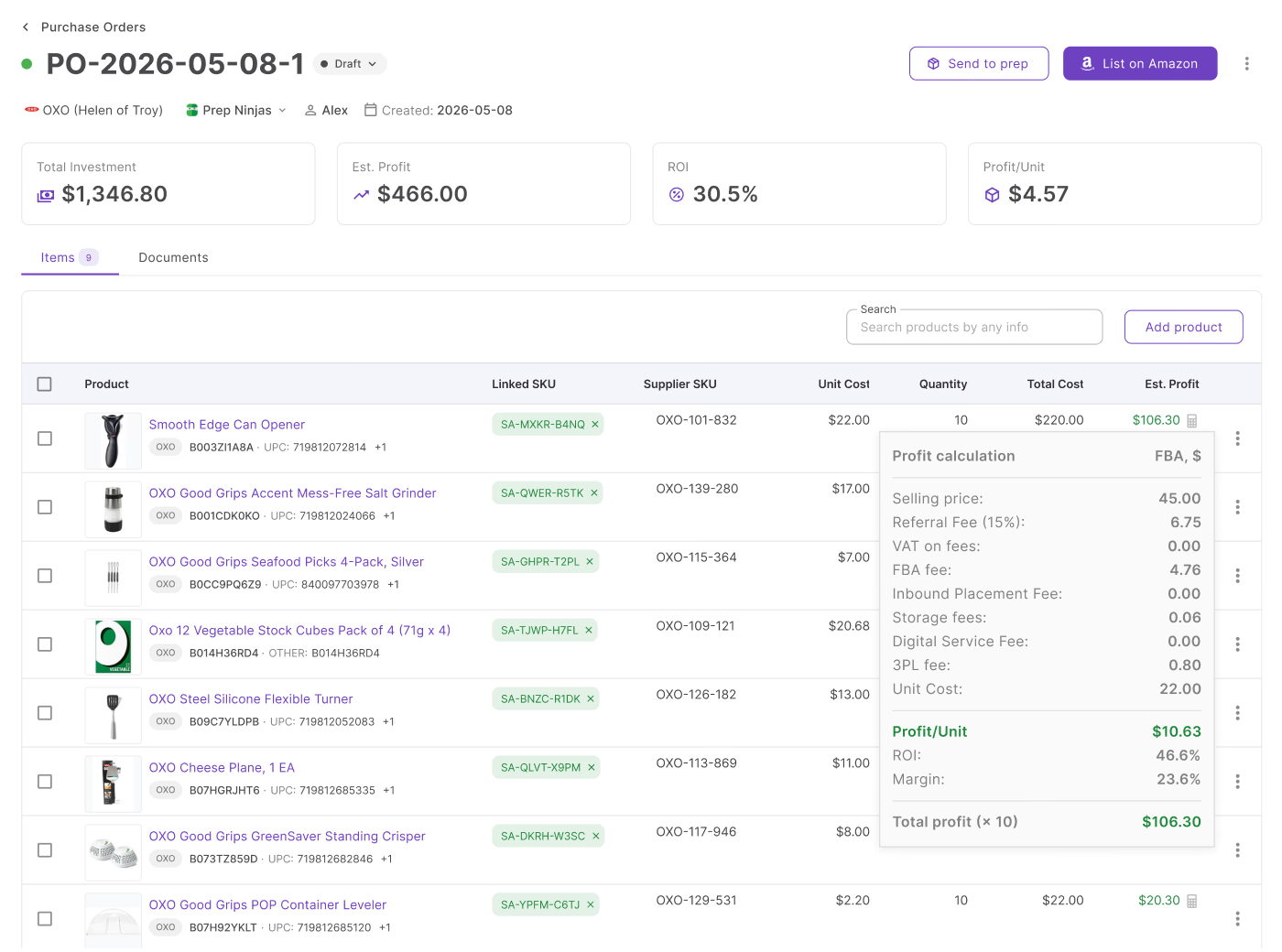
Every supplier invoice creates the same manual task – checking line items, unit costs, and shipping charges against what’s already in the purchase order.
For sellers processing dozens of POs a month, this cross-referencing eats time and still leaves room for a missed price change or a quantity that doesn’t quite match.
Seller Assistant’s Purchase Orders Module handles this automatically. Upload a supplier invoice to a PO, and AI parses the line items and costs, then shows a clear diff against your existing data. You review what changed, choose what to apply, and the PO updates instantly – no manual re-entry required.
Why Manual Invoice Updates Slow Down Purchasing
Receiving a supplier invoice should be the final step before confirming your purchase order – not the start of another round of manual data entry. Yet many Amazon wholesale sellers still spend valuable time comparing invoices with purchase orders, updating product quantities, correcting prices, entering shipping and tax costs, and recalculating order profitability by hand.
As order volume grows, these repetitive tasks become slower and more error-prone. A missed price change, incorrect quantity, or overlooked shipping charge can affect inventory costs, supplier payments, and expected profit. AI-powered invoice import eliminates much of this manual work by extracting invoice data automatically, comparing it with the existing purchase order, and letting sellers review every change before it’s applied.
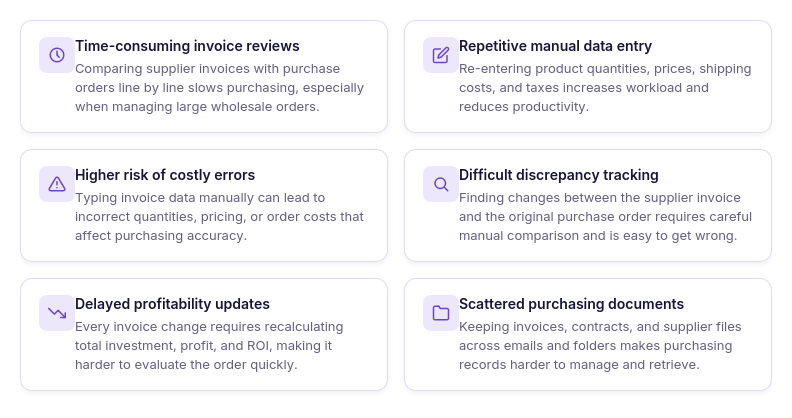 Comparing invoices line by line
Reviewing every product, quantity, and unit cost manually takes time, especially when supplier invoices contain dozens or hundreds of line items. It also increases the chance of overlooking pricing or quantity changes.
Re-entering products and order costs
Many sellers manually copy invoice information into purchase orders, including shipping charges, taxes, and miscellaneous expenses. This repetitive work slows purchasing and creates opportunities for data-entry mistakes.
Finding differences between the invoice and the purchase order
Suppliers may substitute products, adjust quantities, or update pricing before shipping an order. Identifying these changes manually requires comparing two documents side by side, making discrepancies easy to miss.
Recalculating profitability after every update
Even small invoice changes can affect the total inventory investment, estimated profit, and ROI of a purchase order. Calculating those figures manually every time costs change is both time-consuming and unreliable.
Managing supplier documents across multiple locations
Invoices, contracts, authorization letters, packing slips, and supplier correspondence are often stored in email folders or cloud drives separate from purchasing records. This makes documents harder to locate when reviewing orders, resolving supplier questions, or preparing future purchases.
What Is AI Invoice Import for Purchase Orders?
AI Invoice Import is a built-in feature of Seller Assistant’s Purchase Orders Module that automatically extracts data from supplier invoices and updates existing purchase orders. Instead of manually comparing invoices with purchase orders and re-entering product details, quantities, prices, shipping costs, and taxes, sellers can upload an invoice, review AI-detected changes, and import only the information they want to apply.
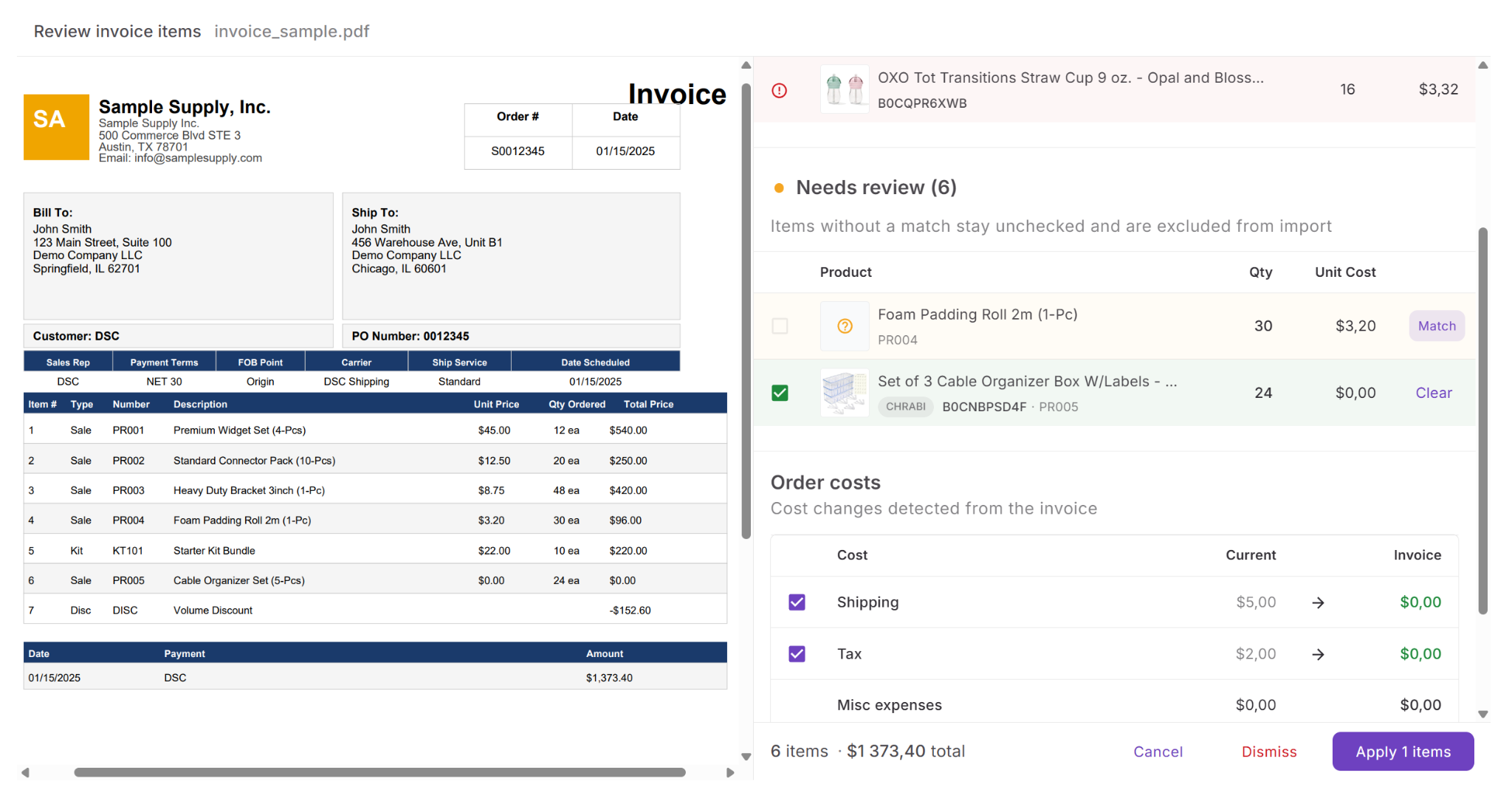
The feature is designed to help Amazon wholesale sellers, online arbitrage sellers, and dropshippers keep purchase orders accurate while reducing manual work. AI compares the uploaded invoice with the existing purchase order, highlights new and changed information, and lets sellers approve updates before they affect purchasing costs and profitability.
Beyond invoice automation, Purchase Orders Module also includes built-in document management. Sellers can attach invoices, packing slips, contracts, authorization letters, supplier correspondence, and other purchasing documents directly to purchase orders, keeping all order-related files organized in one place instead of across email inboxes, cloud storage, and local folders. While invoices trigger the AI import workflow, other document types are securely stored, categorized, and available for preview, download, or future reference whenever they’re needed.
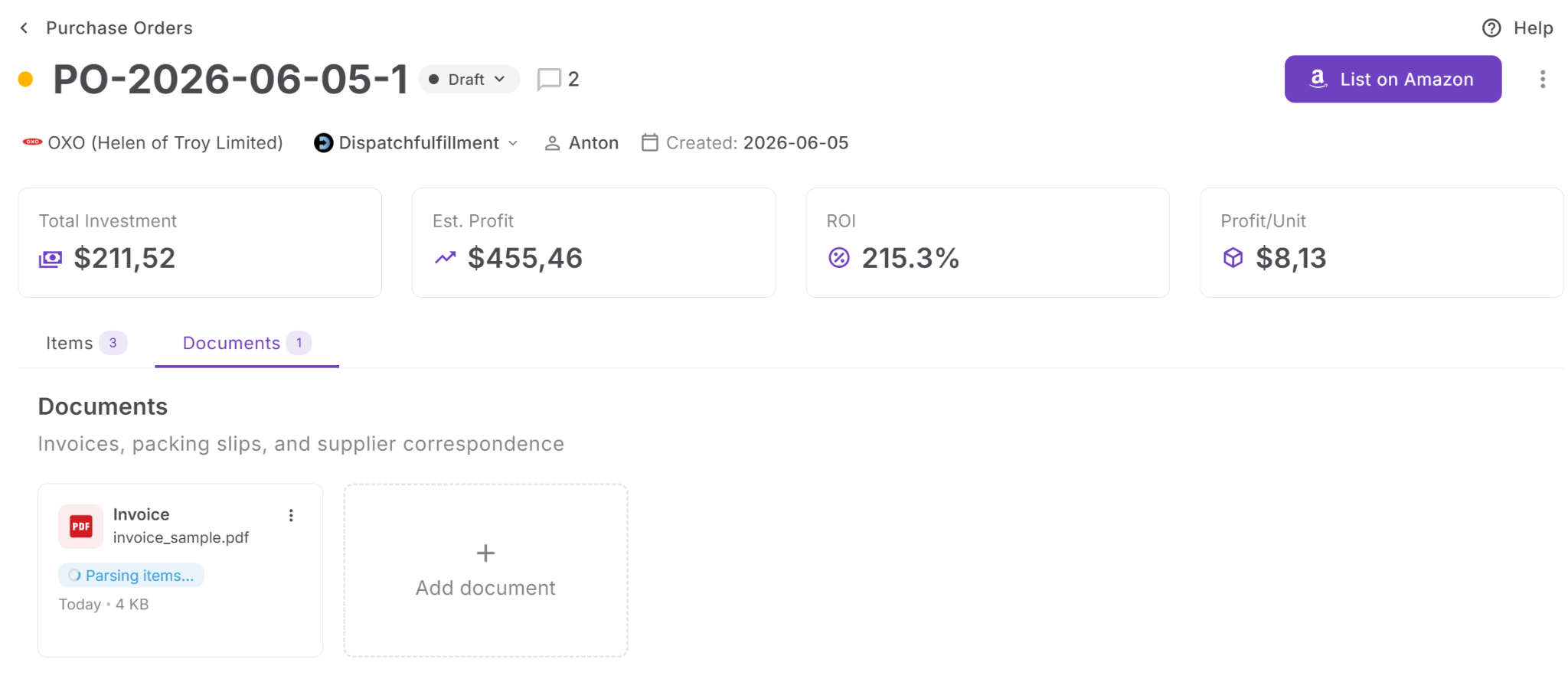
How Purchase Orders Module powers AI invoice automation
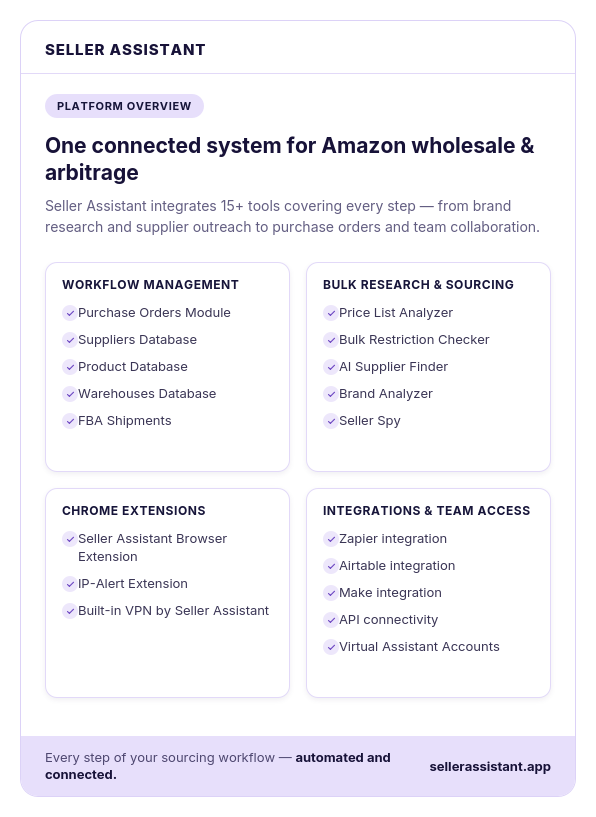
AI Invoice Import is built directly into Seller Assistant’s Purchase Orders Module, where sellers create, manage, and track supplier purchase orders from one centralized workspace. Instead of treating invoices as separate documents that require manual reconciliation, the module connects invoices to the corresponding purchase order, allowing AI to compare invoice data with existing order information and apply approved updates automatically.
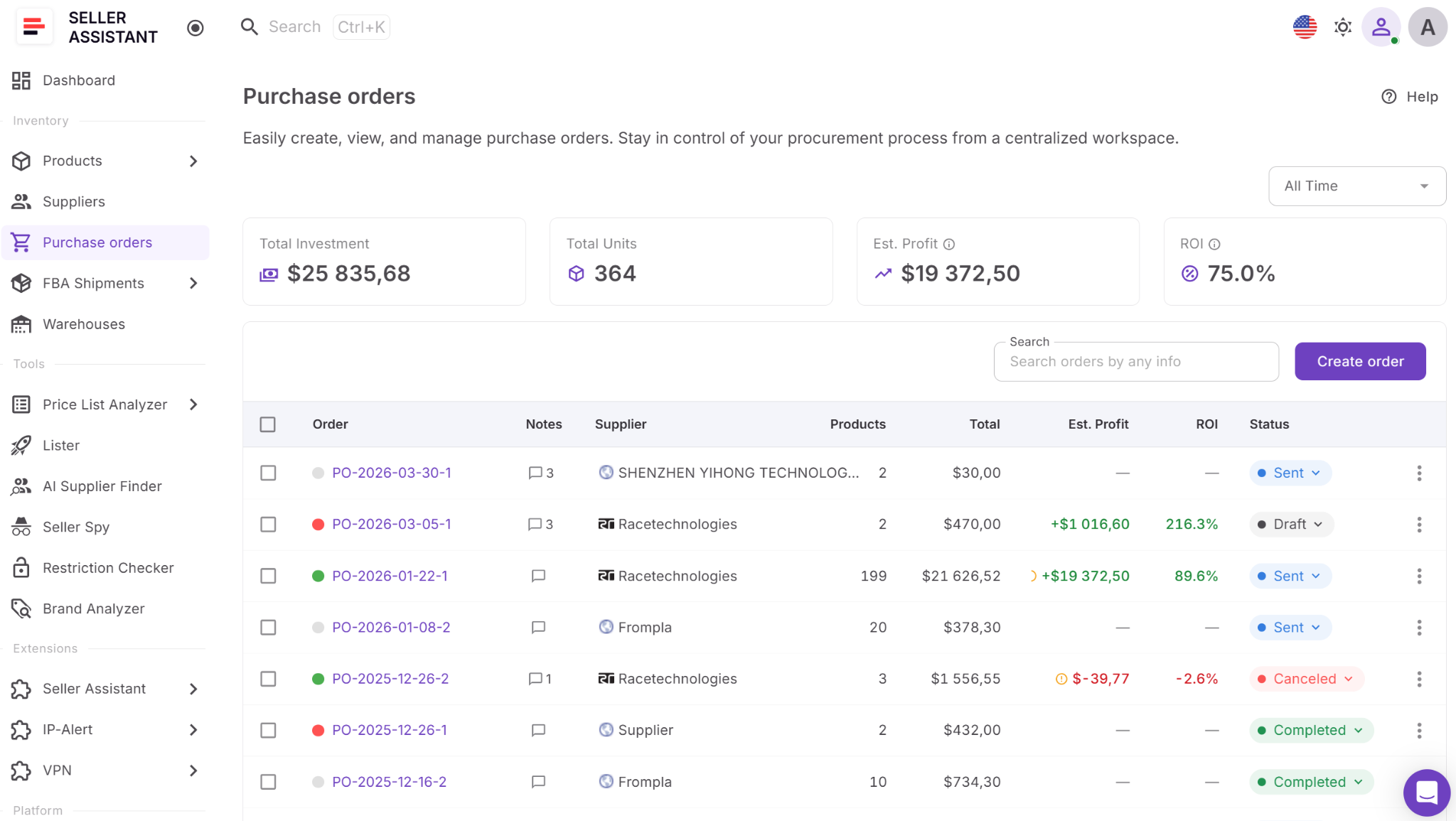
Purchase Orders Module is designed for Amazon wholesale sellers, online arbitrage sellers, and dropshippers who want to manage the entire purchasing process in one place. Purchase orders can be created from scratch or built directly from Price List Analyzer and Product Database, with supplier information, products, and costs flowing into the order automatically. Once a supplier invoice is received, it can be uploaded to the purchase order, reviewed, and used to update products, costs, and profitability without leaving the module.
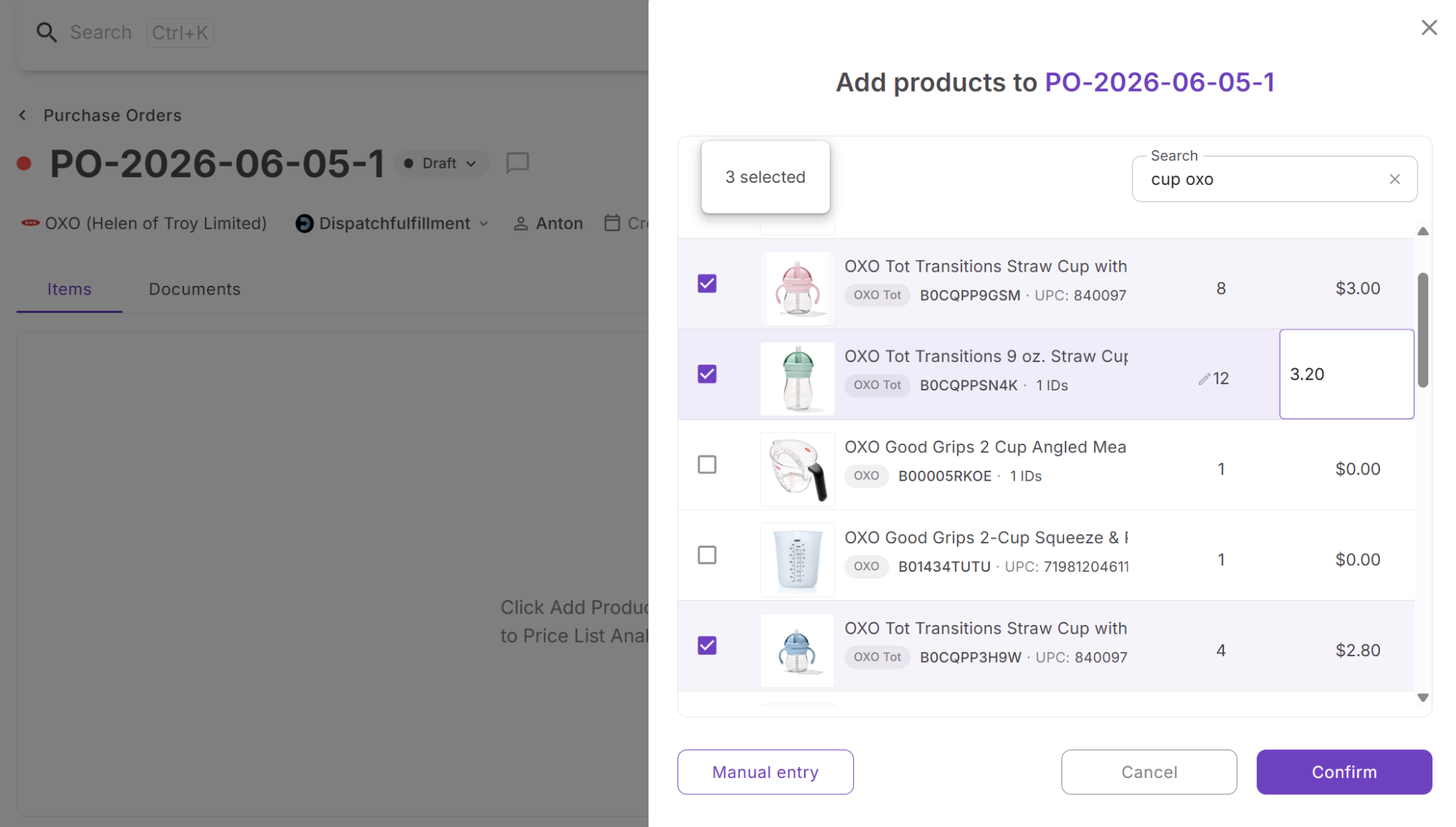
What you can do with Purchase Orders Module
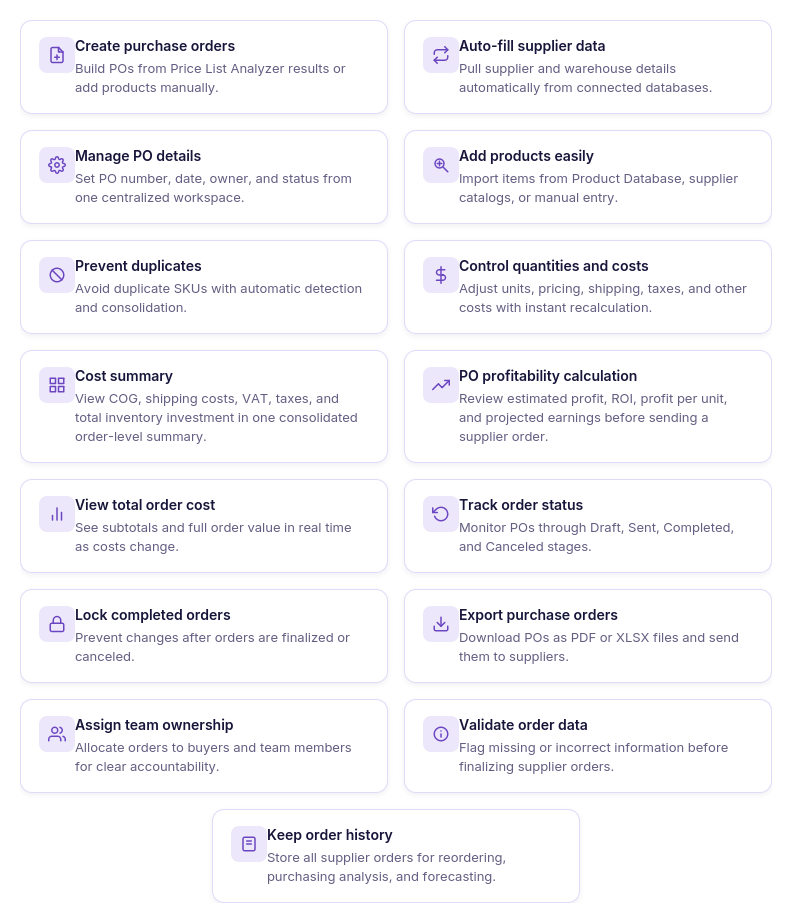
- Create purchase orders faster
Generate structured purchase orders manually or directly from analyzed products without rebuilding order information.
- Connect supplier and product data
Automatically populate purchase orders with supplier details and approved products from your sourcing workflow.
- Manage products in one workspace
- Add products from Product Database, supplier price lists, Keepa search, or manual entry while preventing duplicate items.
- Keep purchasing costs up to date
Adjust quantities, unit costs, shipping charges, taxes, and other expenses with automatic total recalculation.
- Review complete order costs
Monitor subtotal, shipping, taxes, miscellaneous expenses, and total inventory investment from one Cost Summary panel.
- Track purchase order profitability
See estimated profit, ROI, profit per unit, and projected earnings before and after invoice updates.
- Upload and manage purchasing documents
Attach invoices, packing slips, contracts, authorization letters, and supplier correspondence directly to each purchase order.
- Import supplier invoices with AI
Automatically extract invoice line items and order costs, compare them with the purchase order, and import only the changes you approve.
- Collaborate with your team
Assign purchase orders to team members, add notes, and keep everyone working from the same purchasing records.
- Monitor order progress
Track purchase orders through Draft, Sent, Completed, and Canceled statuses while maintaining a complete purchasing history.
- Export supplier orders
Download purchase orders as PDF or Excel files for sharing with suppliers or internal teams.
How Purchase Orders Module keeps purchasing organized
Purchase Orders Module is more than a purchase order builder – it’s the central hub for managing supplier purchasing from order creation through invoice reconciliation. By combining purchasing data, document management, AI-powered invoice import, cost tracking, and profitability analysis in one workflow, it eliminates repetitive manual work, improves purchasing accuracy, and gives sellers complete visibility into every supplier order from creation to completion.
What You Can Do with AI Invoice Import
AI Invoice Import streamlines one of the most time-consuming parts of supplier purchasing – updating purchase orders after receiving an invoice. Instead of manually comparing documents, re-entering product information, and recalculating costs, sellers can upload an invoice and let AI prepare the updates for review. Every change is presented before it’s applied, giving you full control over what becomes part of the purchase order.
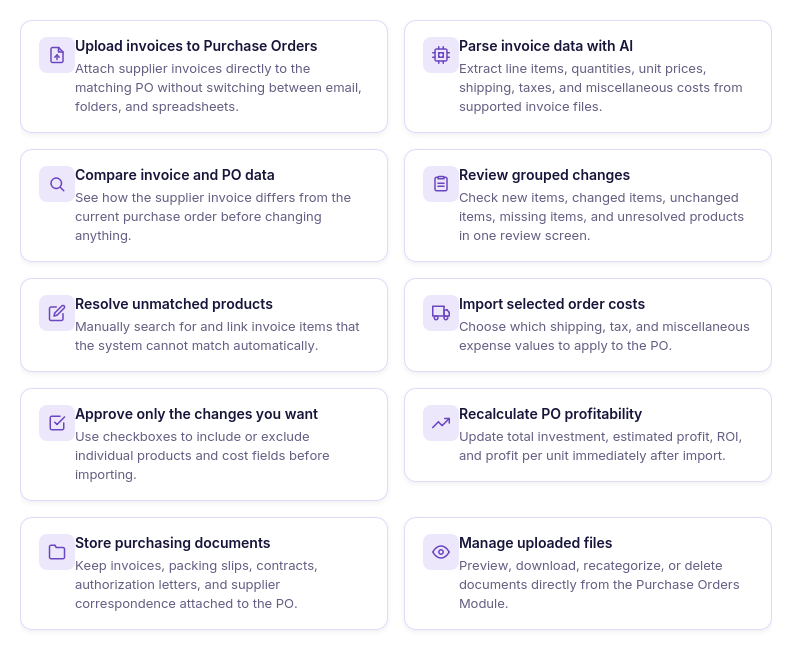
- Upload invoices directly to Purchase Orders
Attach supplier invoices to an existing purchase order without leaving the purchasing workflow.
- Extract invoice data automatically
AI identifies invoice line items, quantities, unit costs, shipping charges, taxes, and other order costs from supported documents.
- Compare invoices with existing purchase orders
Automatically detect differences between invoice data and the current purchase order instead of checking them manually.
- Review every proposed change
View new items, changed values, unchanged products, missing items, and unmatched products before importing anything.
- Match unresolved products manually
Search for and link products that AI couldn’t automatically match, ensuring accurate imports.
- Import order-level costs selectively
Choose whether to apply shipping, tax, and miscellaneous expenses individually before updating the purchase order.
- Update profitability automatically
Recalculate total investment, estimated profit, ROI, and other financial metrics immediately after importing invoice changes.
- Keep purchasing documents organized
Store invoices, packing slips, contracts, authorization letters, and supplier correspondence alongside each purchase order.
- Preview and manage documents
Preview, download, recategorize, or delete uploaded documents directly from the Purchase Orders Module.
How AI Invoice Import Works
AI Invoice Import is built directly into Purchase Orders Module, making invoice processing part of your normal purchasing workflow. Instead of using separate document storage or manually updating purchase orders after receiving an invoice, sellers manage everything from the Documents tab inside an existing purchase order.
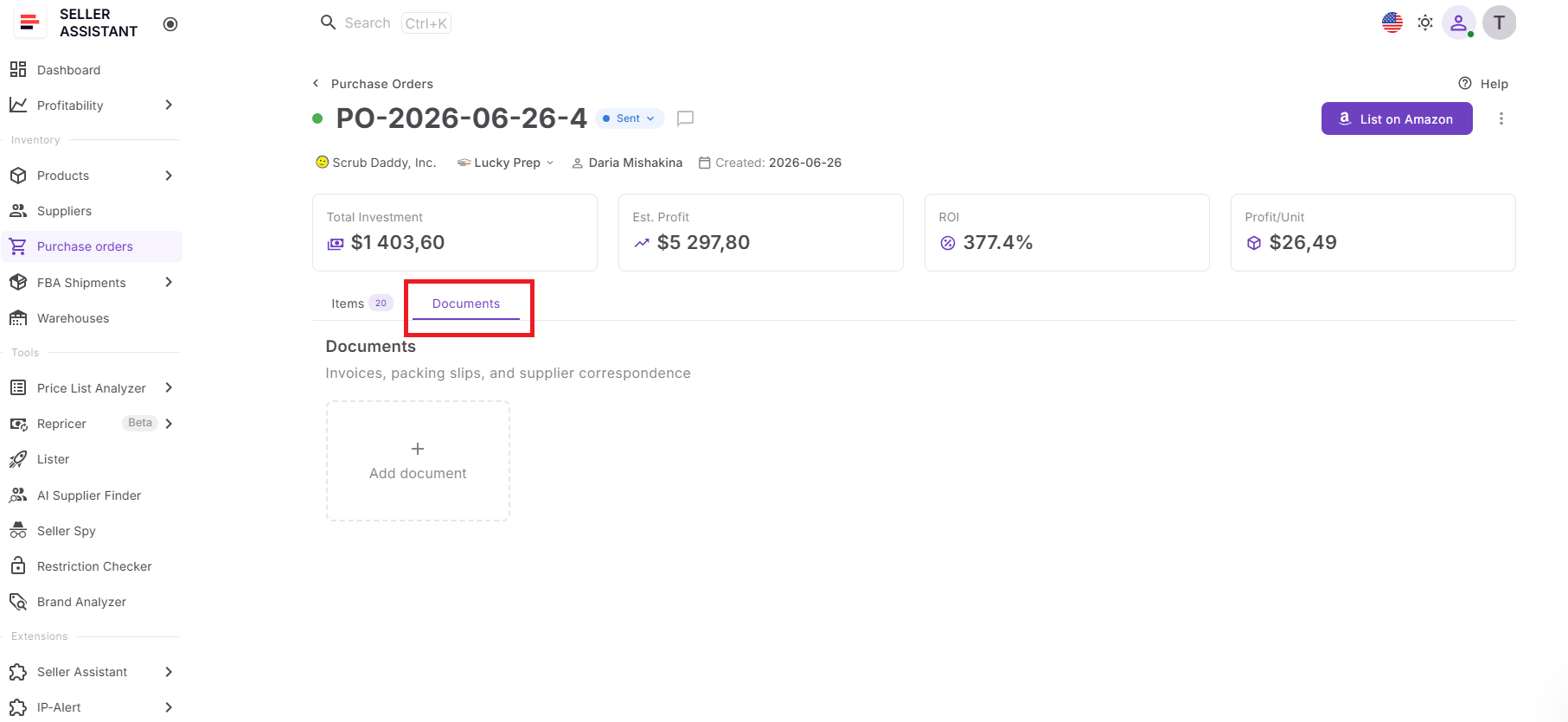
Upload invoices directly to your purchase order
Supplier invoices are uploaded from the Documents tab on the Purchase Order page. Once the file is added, Seller Assistant automatically begins processing it without requiring any manual setup or data entry.
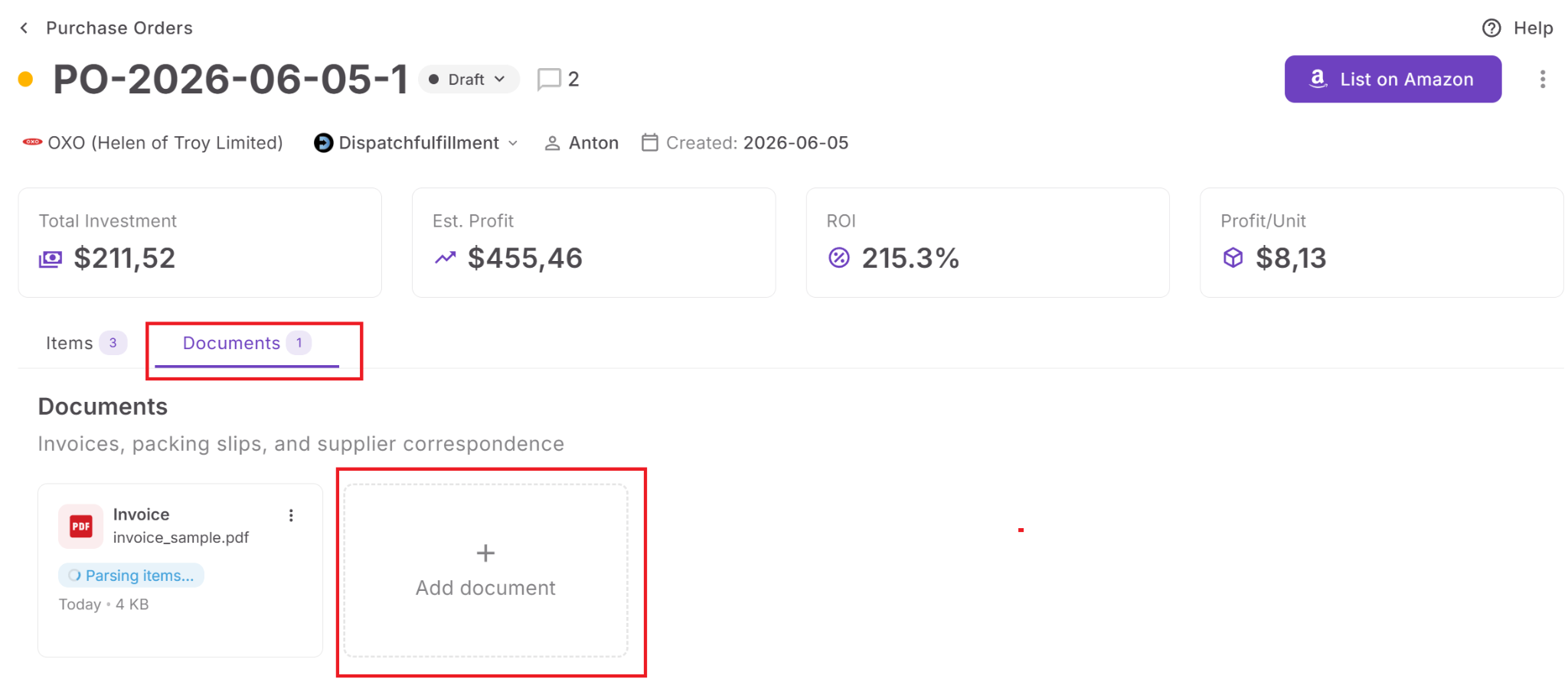
AI classifies and analyzes the document
After upload, Seller Assistant identifies the document type. Supported PDF and image invoices are processed by AI, which extracts product details, quantities, unit prices, shipping charges, taxes, and other purchasing costs.
Review changes before updating the purchase order
Rather than applying invoice data automatically, the system compares the extracted information with the existing purchase order and displays a review screen. Products are grouped into new items, changed items, unchanged items, items not found in the invoice, and unresolved items that require manual matching.
Choose exactly what to import
Sellers decide which products and order-level costs should update the purchase order. Shipping, tax, and miscellaneous expenses can be selected individually, giving full control over what information is imported.
Purchase order totals update automatically
After the selected changes are imported, Seller Assistant immediately updates product information, Cost Summary, total investment, estimated profit, ROI, and other purchase order metrics, ensuring financial data reflects the latest supplier invoice.
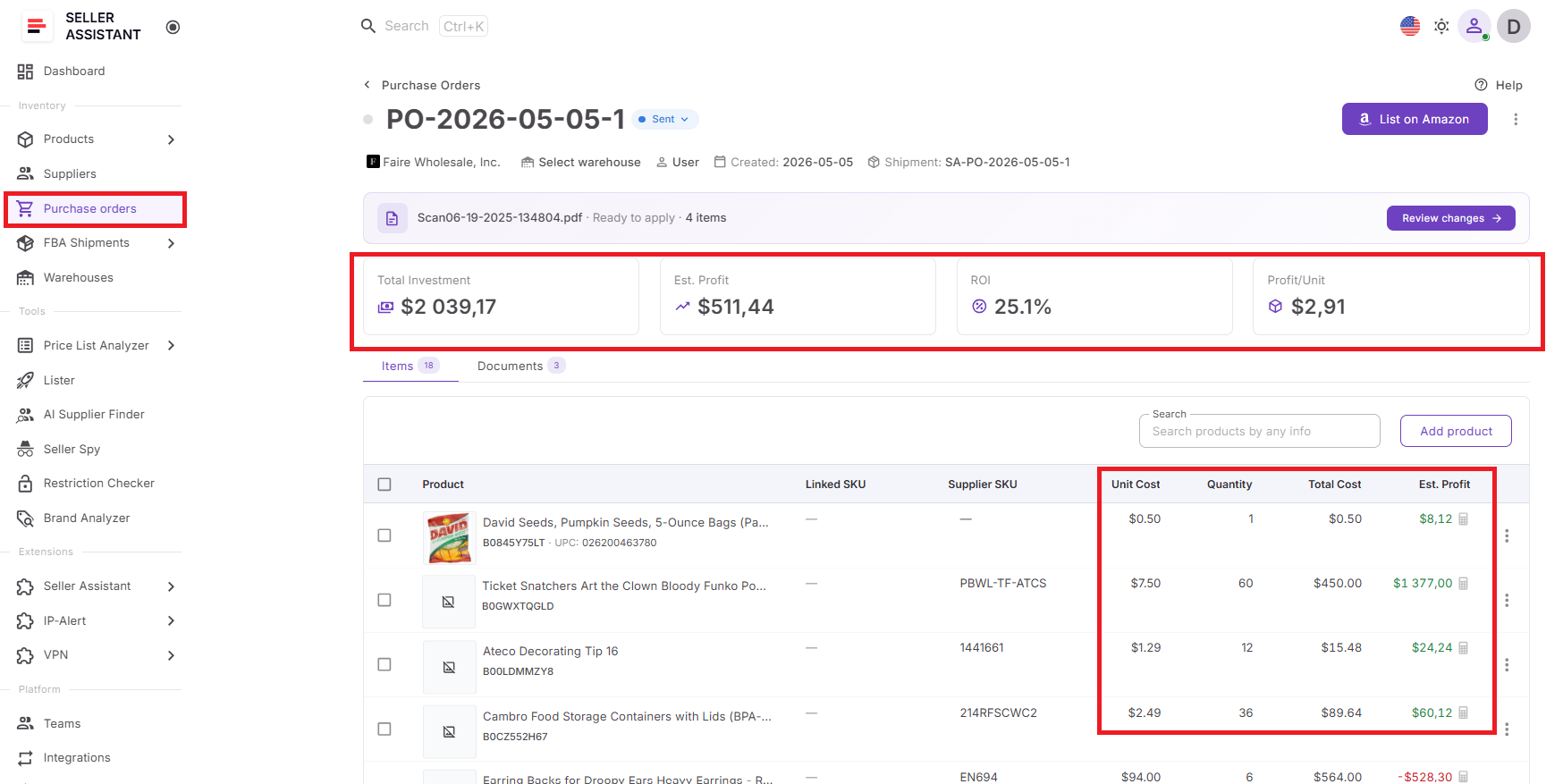
Store all purchasing documents in one place
The Documents tab also stores contracts, authorization letters, packing slips, supplier correspondence, and other purchasing documents. These files remain attached to the purchase order for easy preview, download, organization, and future reference, but they don’t trigger the AI invoice import workflow.
How to Auto-Import a Supplier Invoice into a Purchase Order
AI Invoice Import is designed to eliminate manual invoice reconciliation while keeping sellers in control of every update. Instead of automatically overwriting purchase order data, Seller Assistant lets you review and approve each change before it’s applied.
Step 1. Upload the supplier invoice
Open the Purchase Orders Module and go to the Documents tab. Upload the supplier invoice by clicking Add document or dragging the file into the upload area.
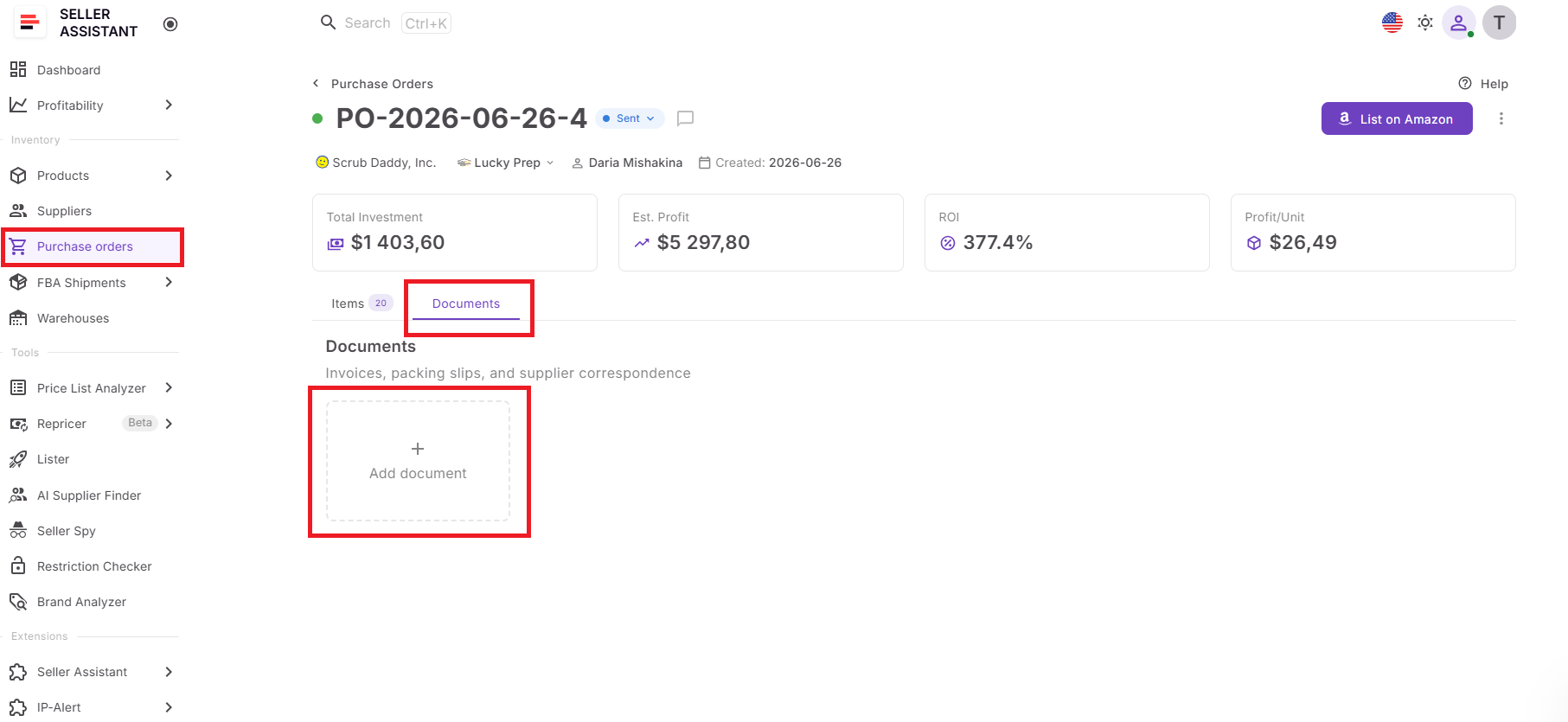
Uploading the invoice directly to the purchase order keeps all purchasing documents connected to the order and starts the AI processing automatically.
Step 2. Wait for AI to classify and parse the document
Seller Assistant first identifies the document type and then extracts products, quantities, prices, shipping charges, taxes, and other purchasing costs from supported invoice files.
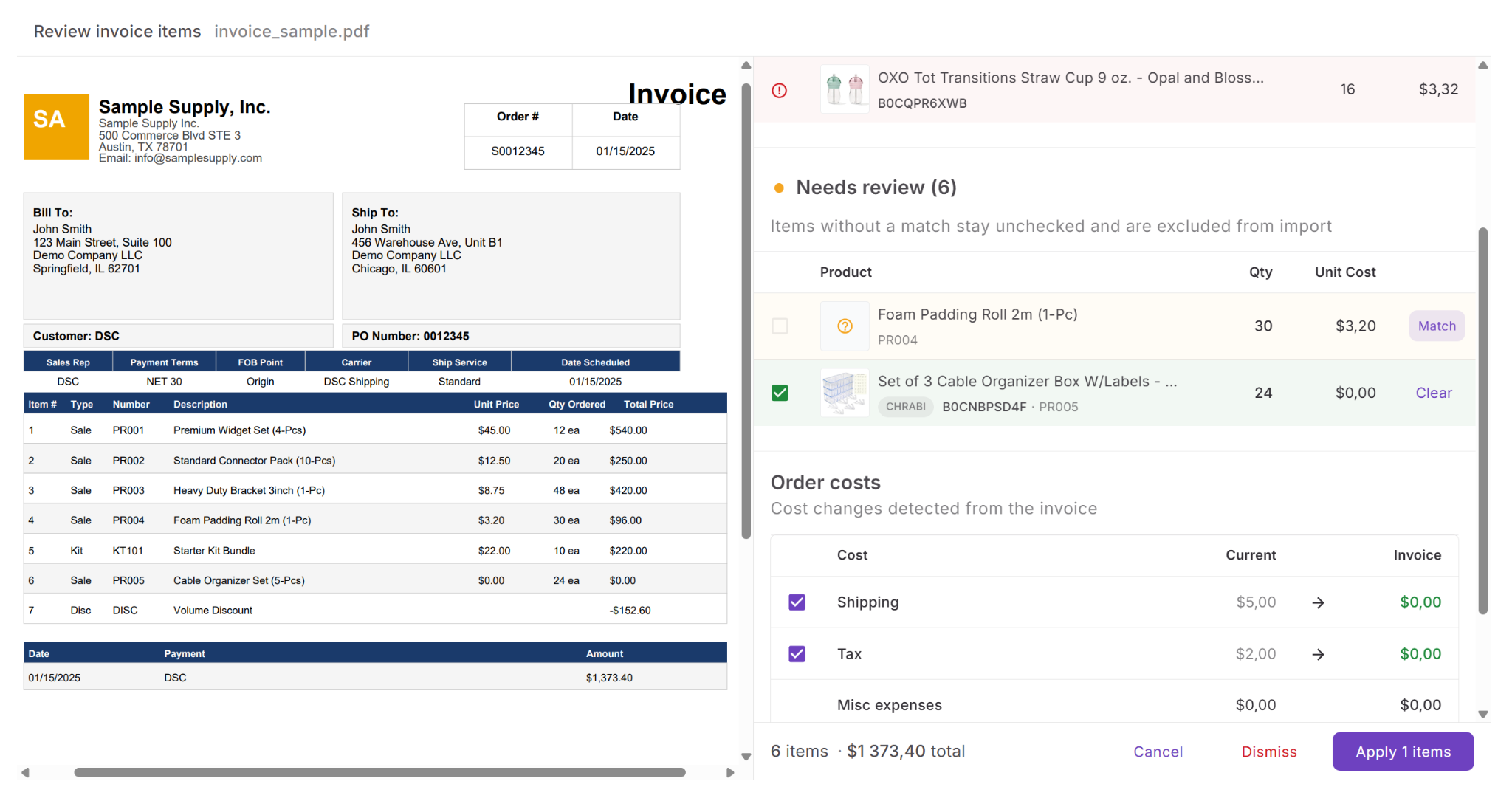
AI eliminates manual data entry and prepares structured invoice data that can be compared with your existing purchase order.
Step 3. Review the detected changes
When processing is complete, review changes. Compare invoice data with your purchase order, review new and changed products, identify items missing from the invoice, and resolve any unmatched products manually if necessary.
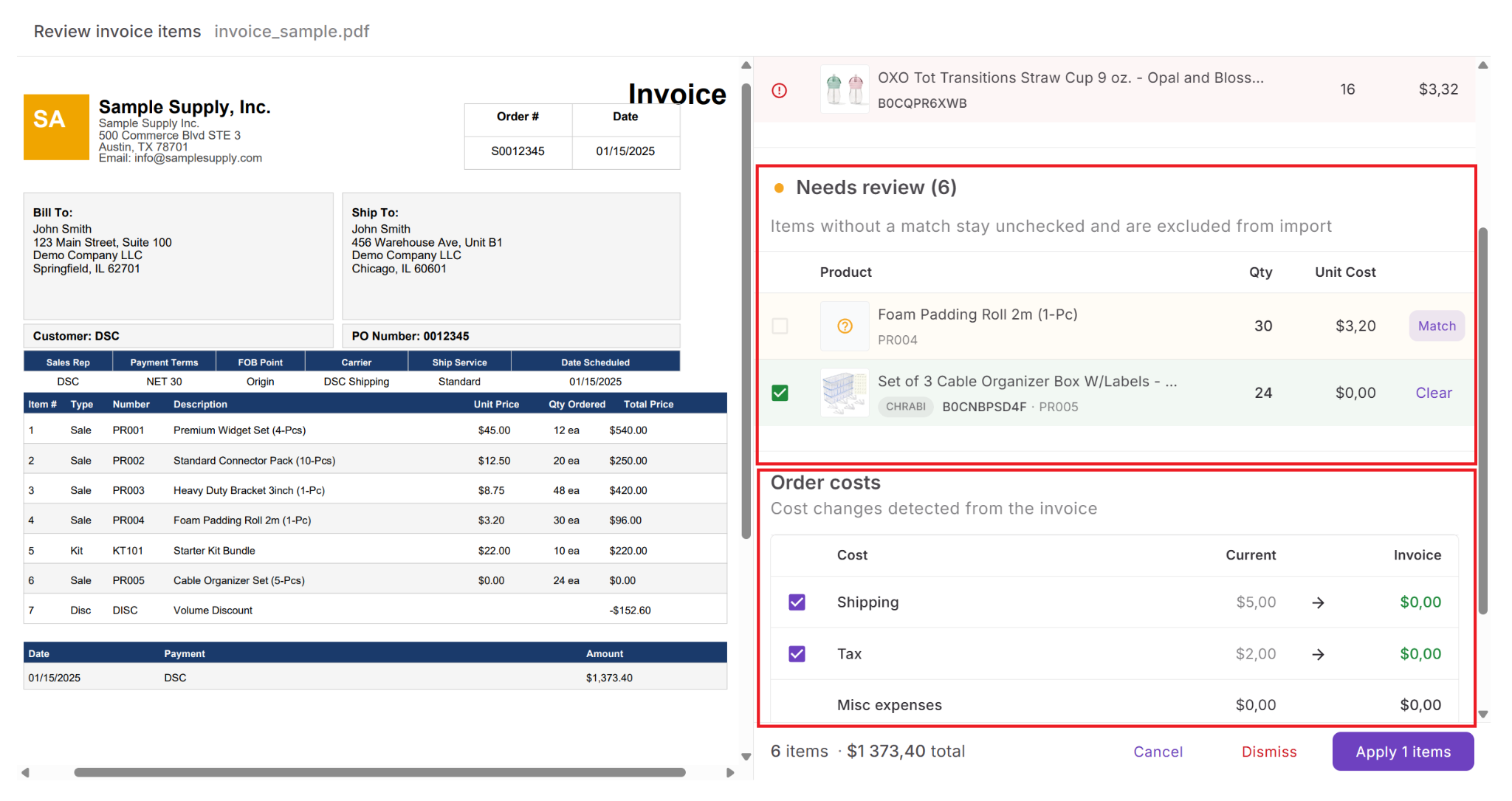
Reviewing differences before importing helps catch supplier changes, avoid incorrect updates, and maintain accurate purchasing records.
Step 4. Select what you want to import
Choose which products and order-level costs should update the purchase order. Shipping, tax, and miscellaneous expenses can each be accepted or skipped individually.
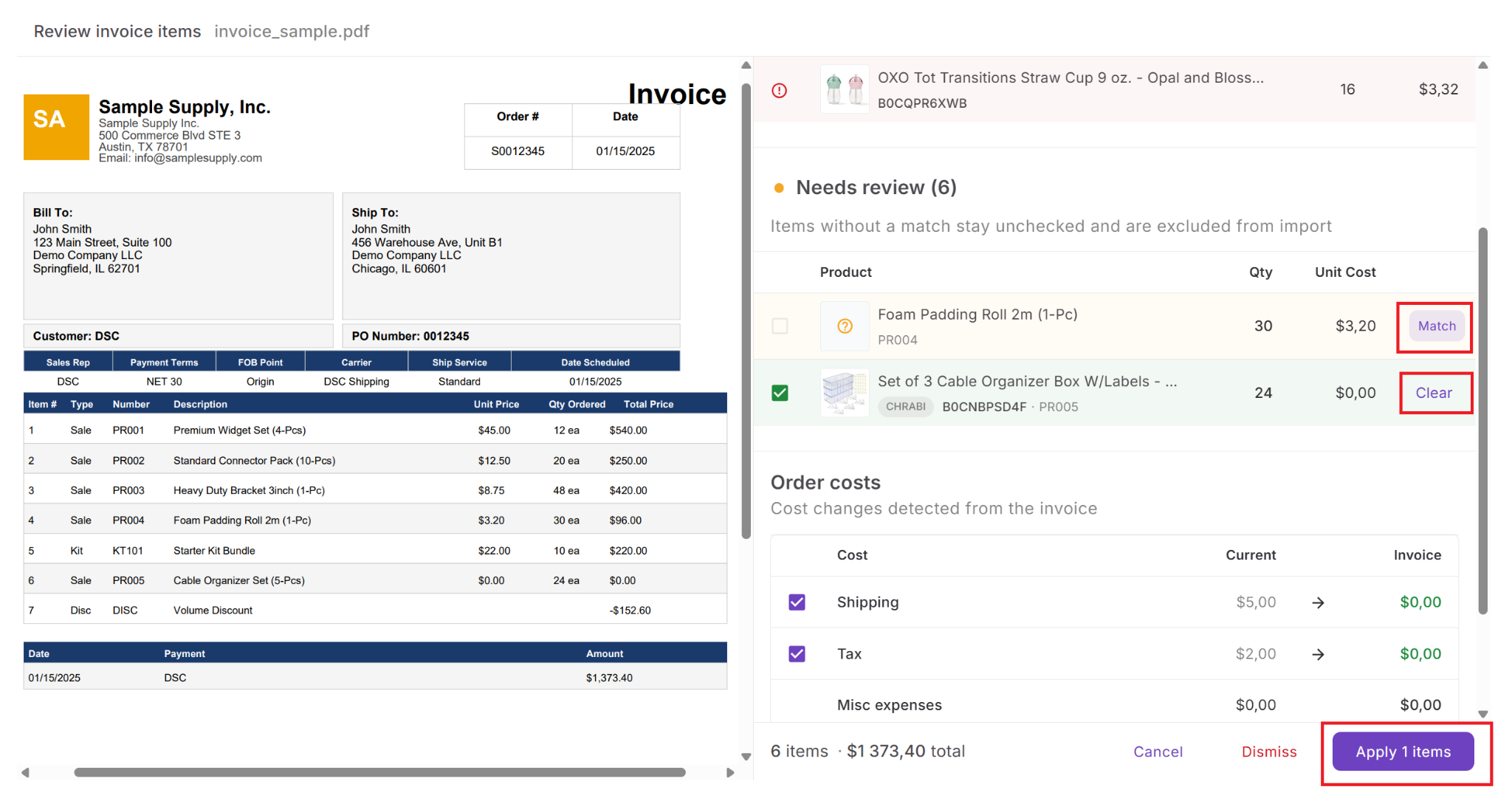
Not every invoice change should be applied automatically. Selective importing gives you complete control over product updates and purchasing costs.
Step 5. Import the approved changes
Click Import to update the purchase order. Seller Assistant immediately refreshes product information, Cost Summary, total investment, estimated profit, ROI, and other profitability metrics using the imported invoice data.
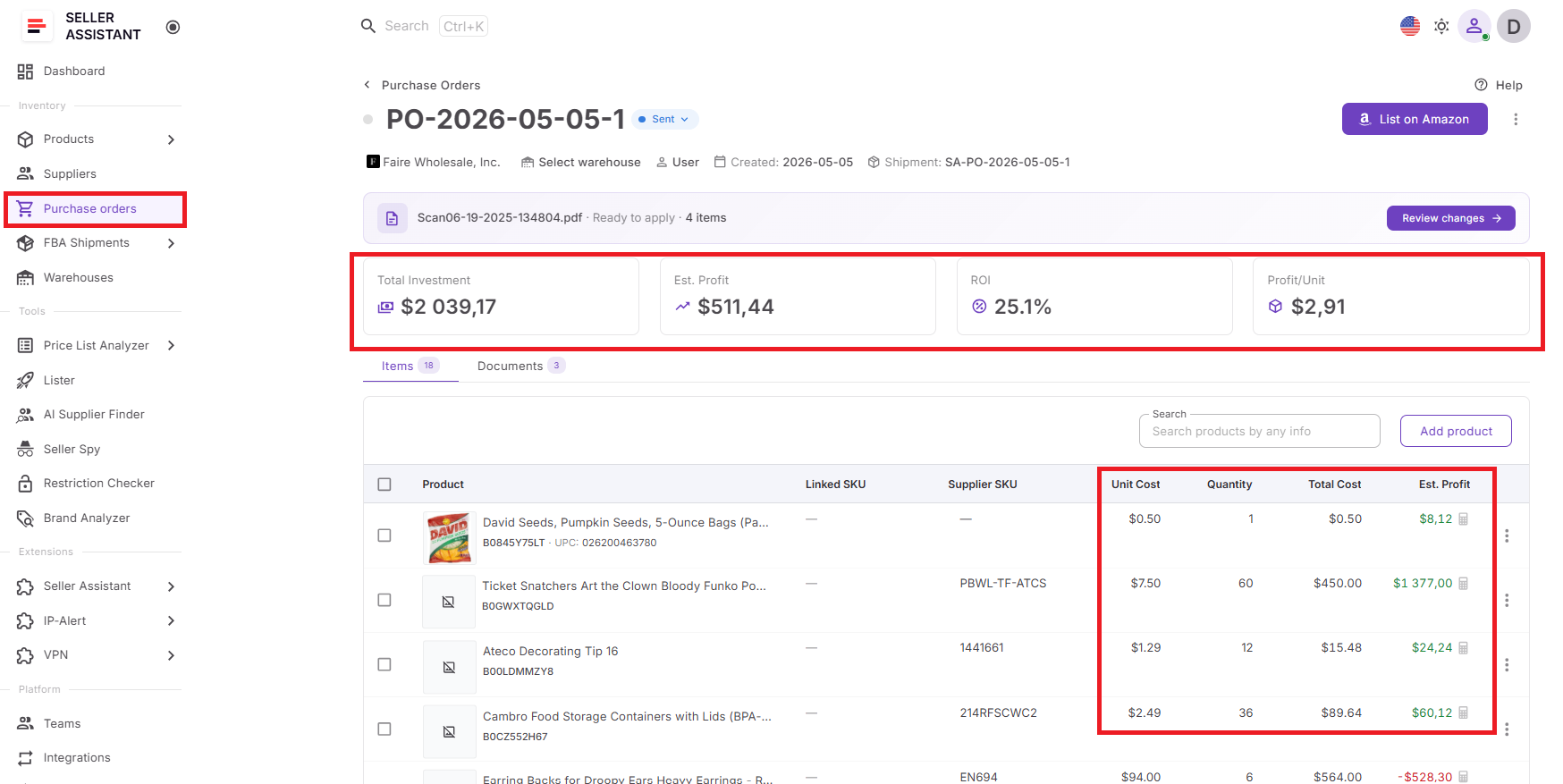
Your purchase order stays synchronized with the supplier’s invoice, giving you accurate purchasing records and up-to-date financial information without manual recalculations.
Managing Supplier Documents Beyond Invoices
Supplier invoices aren’t the only documents sellers need to keep organized. Contracts, authorization letters, packing slips, pricing agreements, and supplier correspondence are all part of managing wholesale relationships. Storing these files in email inboxes or separate cloud folders makes them harder to find when reviewing purchase orders, resolving supplier questions, or preparing future purchases.
Seller Assistant’s Purchase Orders Module and Suppliers Database include built-in document management, allowing sellers to keep purchasing documents connected to the suppliers and orders they belong to. While invoices can be parsed and imported into purchase orders, other document types are securely stored for quick access whenever they’re needed.
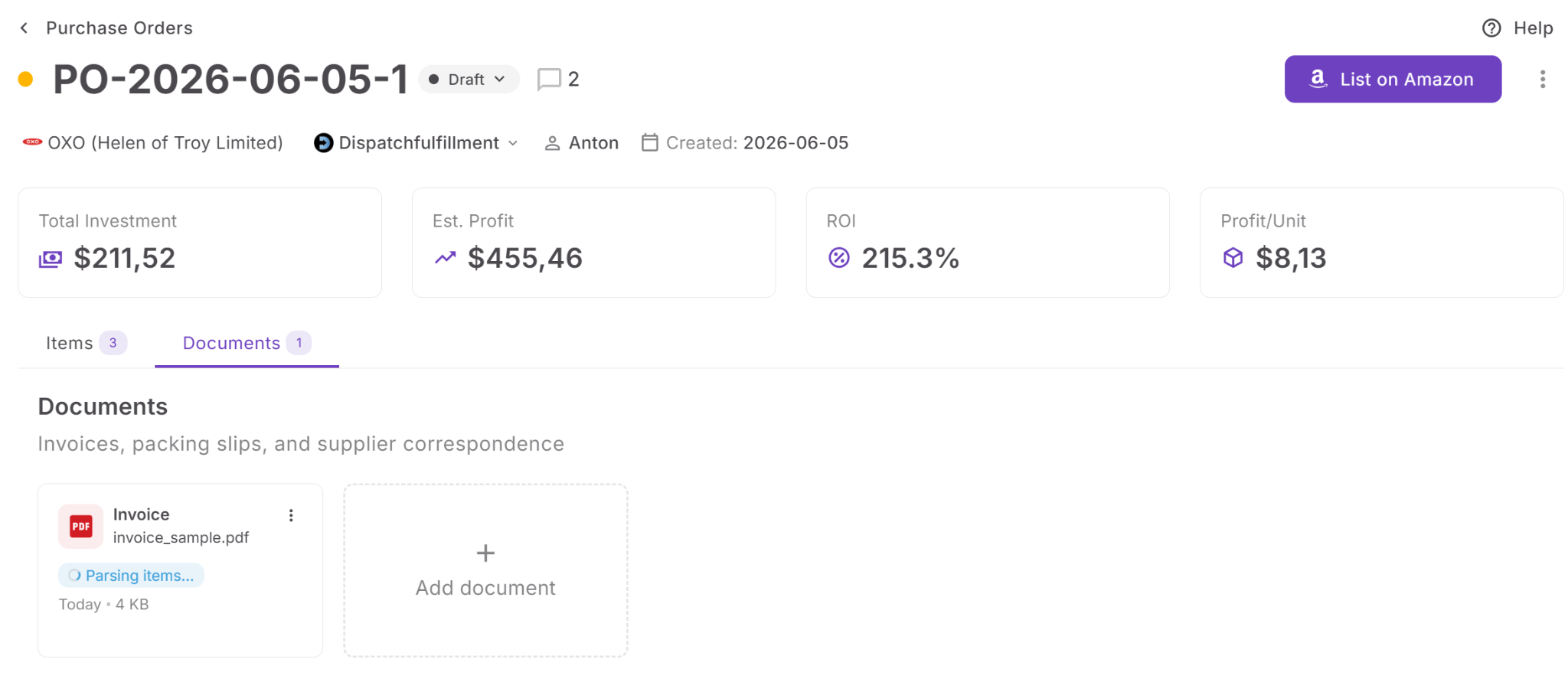
Store all supplier documents in one place
Upload contracts, authorization letters, packing slips, spreadsheets, supplier correspondence, and other purchasing documents directly to a Purchase Order or Supplier profile.
Keep documents linked to suppliers and purchase orders
Instead of searching through folders or email threads, access every document from the supplier or purchase order it belongs to.
Preview, download, and organize files
Open documents without leaving Seller Assistant, download them when needed, update their document type, or remove files that are no longer required.
Support multiple document formats
Store PDF, JPEG, PNG, WebP, Word, Excel, CSV, and TXT files in your purchasing workflow. AI parsing is available for supported PDF and image invoices, while all other files remain securely stored for future reference.
Build a complete purchasing record
By keeping invoices, contracts, authorization letters, and supporting documents together with supplier and purchase order data, Seller Assistant creates a centralized record of every purchasing transaction, making audits, supplier communication, and future reorders faster and more organized.
FAQ
Can I upload more than one invoice for the same purchase order?
Yes. You can attach multiple invoices to the same purchase order, although each invoice is reviewed and processed individually. If multiple invoices are pending, you’ll need to complete or dismiss the current review before moving to the next one.
What happens if the supplier changes prices after I create the purchase order?
The invoice review screen highlights any differences between the supplier invoice and your purchase order, making price changes easy to spot before they’re applied. This allows you to verify unexpected increases or decreases before updating your purchasing records.
Can I use AI Invoice Import if my supplier sends invoices in Excel?
Excel, CSV, Word, and TXT files can be uploaded and stored with your purchase order, but AI parsing is currently available only for PDF and image invoices. If your supplier sends Excel invoices, you can keep them attached to the PO for reference while using supported formats for automated data extraction.
Does importing an invoice replace my original purchase order?
No. Seller Assistant doesn’t overwrite your purchase order automatically. Every detected change is presented for review first, allowing you to choose which products and costs to import while leaving the rest of the order unchanged.
Can I use document management even if I don’t import invoices?
Yes. The Documents feature is useful even without AI invoice import because it creates a centralized repository for supplier-related files. Keeping contracts, authorization letters, packing slips, and correspondence attached to suppliers and purchase orders makes future audits, supplier communication, and reorders much easier.
Final Thoughts
Manually updating purchase orders from supplier invoices is time-consuming and increases the risk of pricing errors, incorrect costs, and outdated profitability calculations. By combining AI-powered invoice parsing, document management, and purchase order updates in one workflow, Seller Assistant helps Amazon wholesale sellers, online arbitrage sellers, and dropshippers process supplier invoices faster while maintaining complete control over every change.
With Purchase Orders Module, sellers can upload invoices, review AI-detected differences, selectively import products and order costs, automatically recalculate profitability, and keep all supplier documents organized alongside their purchase orders. The result is a more accurate purchasing process, less administrative work, and greater confidence that every purchase order reflects the latest supplier information before inventory is received.