


Finding reliable wholesale brands is one of the fastest ways to scale an Amazon resale business, but most sellers hit the same wall: where do you actually find brands that want Amazon sellers, and how do you know which ones are worth your time?
The good news is that wholesale brand sourcing becomes far easier when you know where to look – and when you can choose them with the right tools.
Seller Assistant helps you spot brands that meet your requirements and filter out risky brands before you reach out. Let’s break down how to do it efficiently.
Note. Seller Assistant is an end-to-end Amazon workflow management platform that integrates 10+ wholesale-focused solutions into one connected system. It combines sourcing workflow automation, bulk research and intelligence tools, and integrated Chrome extensions – giving you everything you need to streamline finding deals, managing suppliers, and creating purchase orders.

The platform aggregates: workflow management tools – Purchase Orders Module, Suppliers Database, Warehouses Database to organize, automate, and scale every step of your wholesale and arbitrage operations ; bulk research & sourcing tools – Price List Analyzer, Bulk Restriction Checker, Sourcing AI, Brand Analyzer, Seller Spy to evaluate supplier price lists, verify selling eligibility and restrictions, open new brands, and discover winning product ideas from competitors to expand your product catalog; Chrome extensions – Seller Assistant Browser Extension, IP-Alert Extension, and built-in VPN by Seller Assistant to deep-research products, check IP claims and compliance, and access geoblocked supplier sites directly within your browser; and integrations & team access features – seamless API connectivity and integrations with Zapier, Airtable, and Make, plus Virtual Assistant Accounts for secure, scalable team collaboration.
With Seller Assistant, every step of your Amazon wholesale and arbitrage workflow is automated and connected.
Where to Find Wholesale Brands
Amazon sellers use dozens of sourcing tactics to find wholesale brands – from attending trade shows to contacting random distributors to scanning brand catalogs. But the most reliable and scalable approach doesn’t start with suppliers at all. It starts with Amazon data. The easiest way to find wholesale brands that actually work is to pick a strong category, study the top sellers already dominating it, and look at which brands they consistently carry. These brands are already proven on Amazon, already generating revenue, and already friendly to resellers.
You can do this quickly with Seller Assistant’s Storefront widget, which lets you analyze any competitor’s store, extract all their brands, and instantly see which ones are worth pursuing.
Why this method works
You only choose brands with proven Amazon demand
You remove guesswork and rely on real marketplace data. If a brand performs well for established sellers, there’s a strong chance it can perform well for you too.
You avoid unfriendly or restrictive brands
By checking storefronts and ASIN competition patterns, you spot brands that block resellers, send IP complaints, or enforce strict catalog controls – before you waste time contacting them.
You minimize risk and maximize profitability
Every brand you consider has already demonstrated solid performance on Amazon. You only need to validate margins and demand, not gamble on untested suppliers.
You save weeks of manual sourcing effort
Instead of searching aimlessly for distributors or brands, you reverse-engineer what top sellers already know. Their inventory becomes your roadmap.
You build wholesale relationships that scale
Reseller-friendly brands often have wide product lines. Once you get approved, you can expand from a few SKUs into a full assortment, creating stable and long-term wholesale growth.
How to Uncover Profitable Wholesale Brands from Competitor Stores
Seller Assistant’s Storefront Widget helps you reveal the exact brands your competitors rely on – and instantly determine which of those brands could be profitable for your Amazon business.
Instead of scrolling through endless storefront pages and guessing which brands perform well, the tool provides a structured breakdown of all brands, categories, and products inside any seller’s store. You can immediately see which brands appear most often, which niches they dominate, and how their products perform on Amazon.
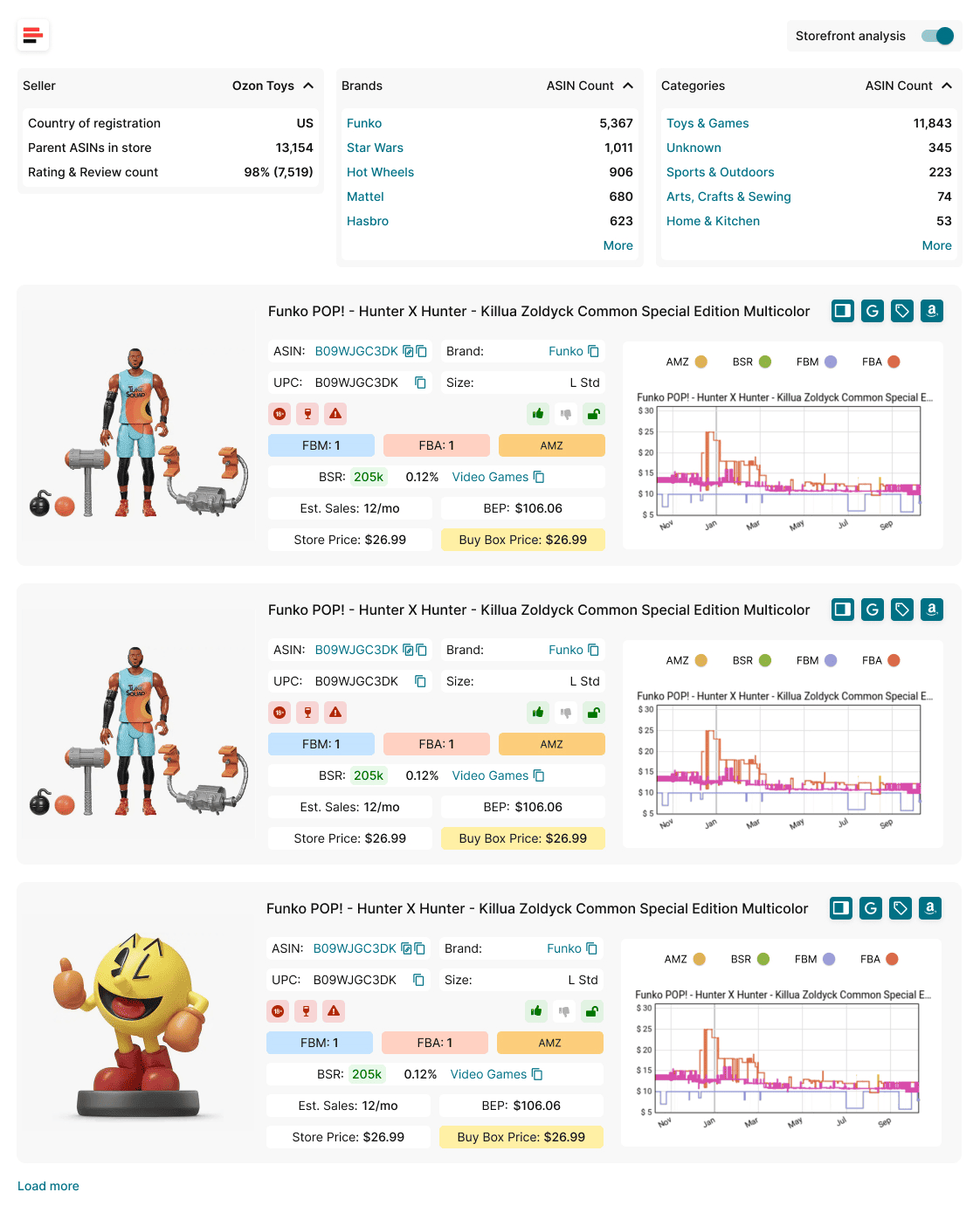
This allows you to filter out weak or risky brands and focus only on brands that already work for successful sellers.
The core of the tool is its Brand Summary, which highlights brand frequency, product counts, and performance indicators – making it ideal for identifying reseller-friendly wholesale brands.
For deeper validation, you can open any product through Product Cards to check its profitability, pricing trends, sales estimates, and competition levels.
What Storefront Widget does
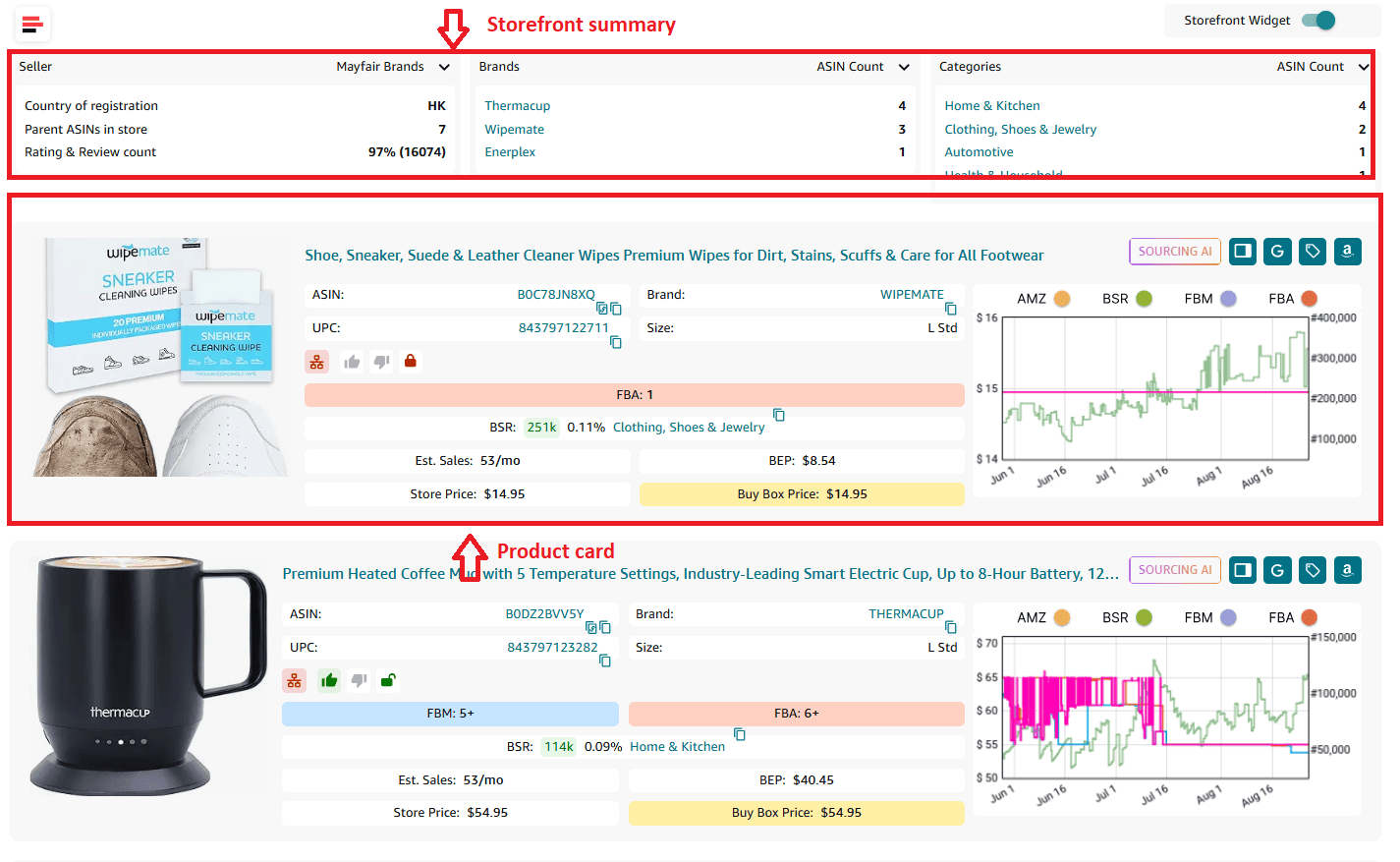
Storefront Widget is a brand discovery and competitor research tool built for Amazon wholesale sellers, online arbitrage sellers, and dropshippers.
It automatically scans any seller’s Amazon storefront and organizes their entire inventory into structured insights about:
- all brands they sell
- top categories they focus on
- ASIN counts, ratings, and reviews
- sales indicators and pricing patterns across products
The result is a snapshot of your competitor’s brand strategy – showing you which brands consistently appear in their store and which niches they dominate.
With Product Cards, you can instantly evaluate individual items for profitability, sales velocity, Buy Box conditions, risks, and restrictions, helping you judge whether a brand offers scalable potential.
How Storefront Widget supports brand sourcing
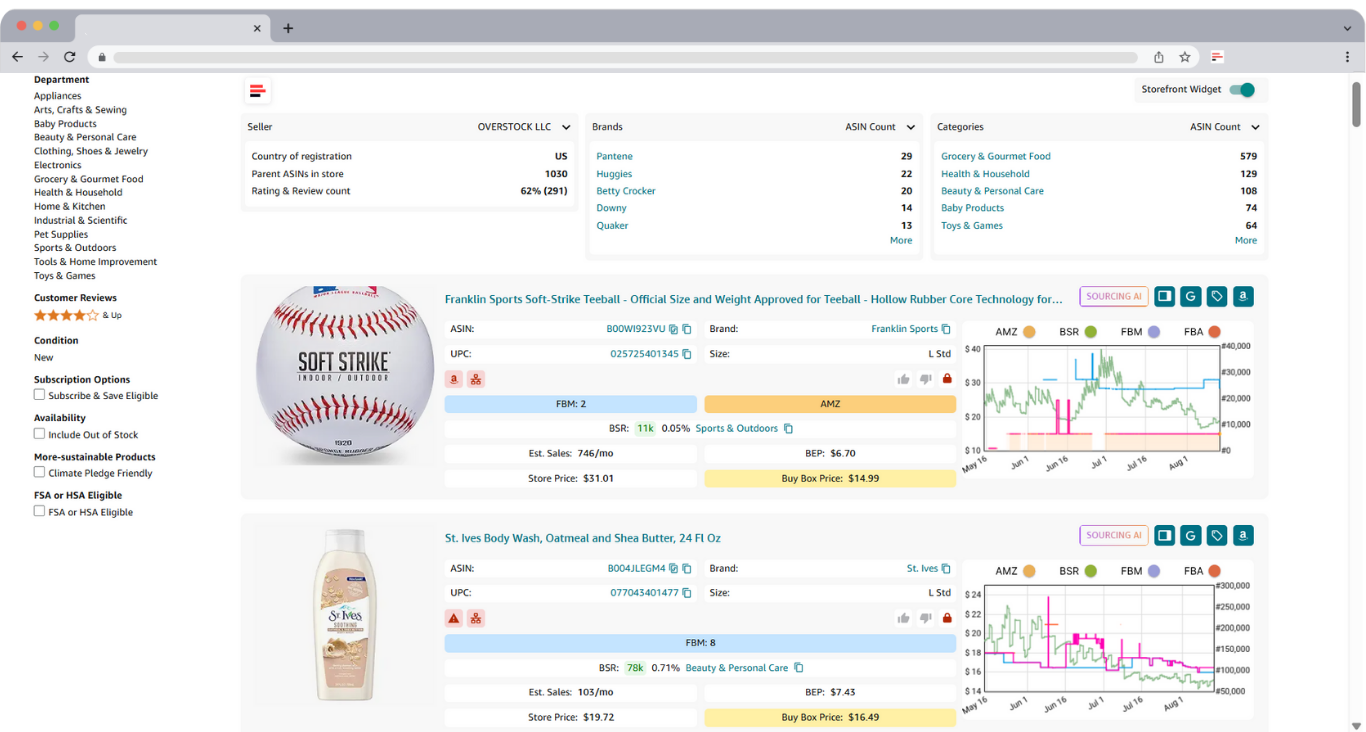
- Identify wholesale brands you can potentially sell on your competitor storefronts.
- Automate storefront research instead of manually scrolling pages.
- View detailed Brand Summary insights.
- Analyze competitor product portfolios at scale.
- Check product-level performance with Product Cards.
- Identify deal risks and protect account health.
- Evaluate competition levels.
- Spot profitable opportunities inside competitor inventories.
- Filter products by brand or category for targeted research.
- Access a consolidated dashboard of storefront statistics.
How to find wholesale brands using the Storefront Widget
Once you install Seller Assistant and open any seller’s Amazon storefront, Storefront Widget appears automatically at the top of the page. You can expand the Brand Summary, explore categories, filter by brand or category, and open Product Cards for individual product insights. The widget updates as you scroll or load more products, giving you a complete view of the seller’s entire brand portfolio in seconds.
Steps to use Storefront Widget
Step 1. Open the storefront of a US-based seller with a diverse brand portfolio
Choose a competitor who sells across multiple categories and carries many different brands. This ensures you get more opportunities and deeper insights into reseller-friendly brands.
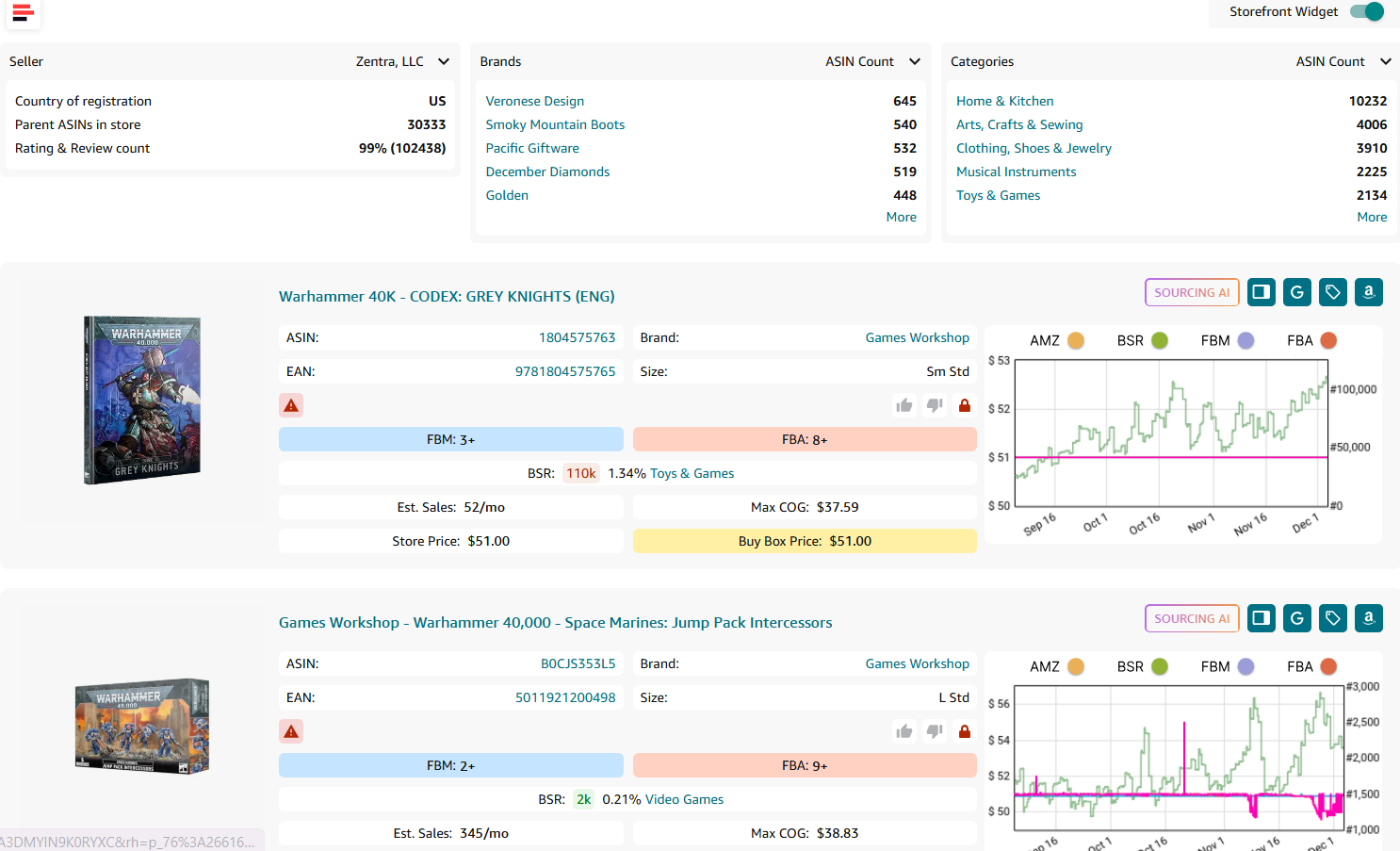
Step 2. Check the Brand Summary to see all brands the seller carries
Expand the brand list and review:
- How many ASINs each brand has
- Which brands appear most frequently
- Which brands dominate specific categories.
Step 3. Explore categories to spot brand patterns
Look at which brands the seller carries in the categories you are interested in.
If multiple strong brands appear within your niche, shortlist them as potential wholesale opportunities.
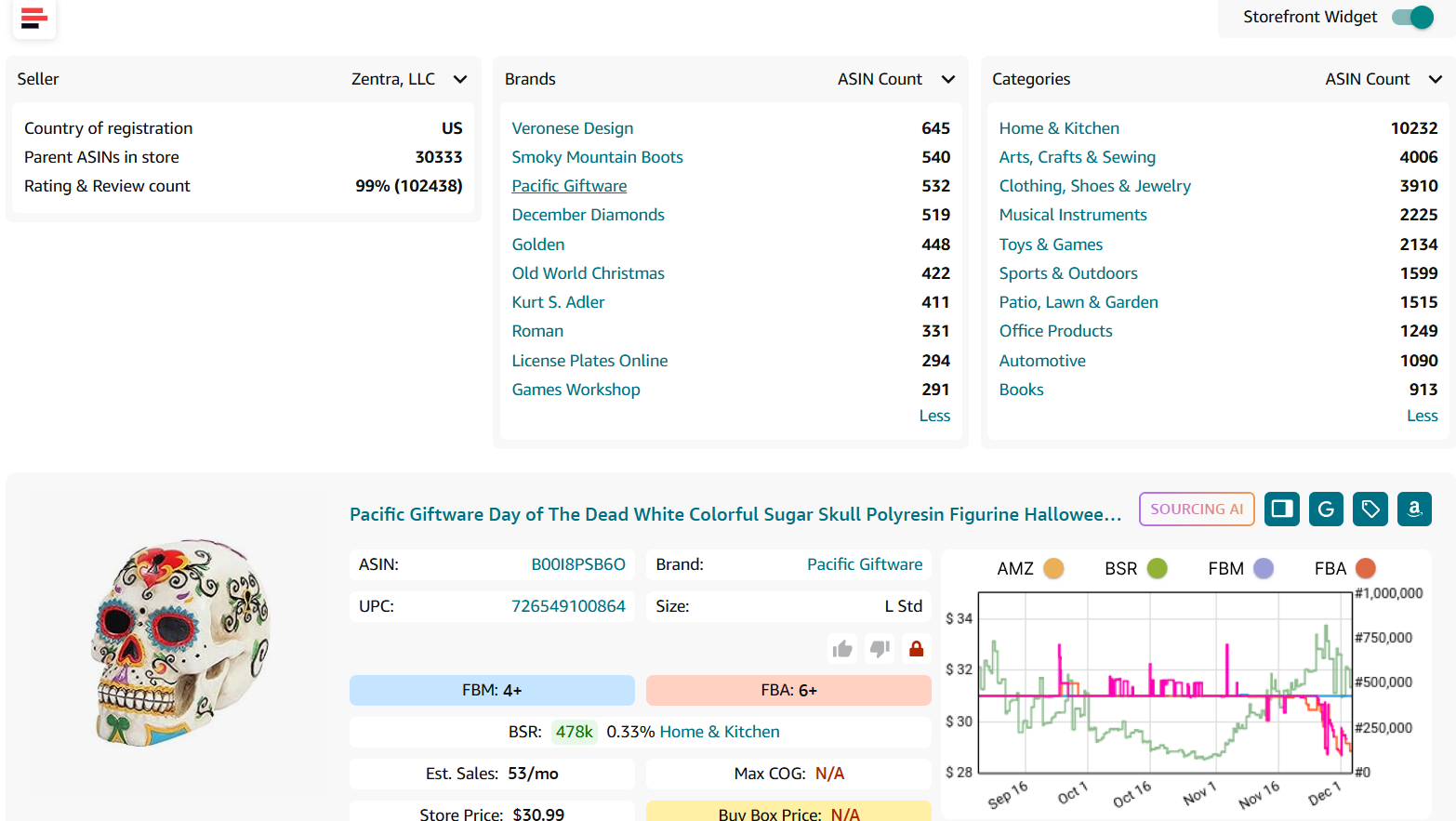
Step 4. Select the most promising brands and verify them with Brand Analyzer
After identifying brands from the storefront, open Seller Assistant’s Brand Analyzer to evaluate each brand in depth.
How to Evaluate Wholesale Brand Before Reselling It
Picking a brand for Amazon resale isn’t just about spotting items that sell well. A brand must also be safe to list, compliant with Amazon rules, profitable across multiple ASINs, and open to third-party sellers. Even if your supplier is legitimate, a brand itself may have resale restrictions, aggressive protection policies, or limited market potential. Evaluating a few key factors beforehand keeps your account protected and ensures the inventory you source can actually be sold.
Account approval and selling permissions
Before considering any brand, confirm whether your Amazon account is allowed to sell it. Some brands require gating approval, paperwork, or manufacturer authorization, and others are completely restricted. Checking this upfront prevents wasting sourcing budget on items you cannot list.
Preference for U.S.-based wholesale suppliers
Brands carried by U.S. suppliers are safer because they ship faster, provide proper documentation, and issue invoices that comply with Amazon’s verification standards. These invoices are crucial during authenticity checks or account health reviews, making U.S. suppliers the safest option for wholesale brand sourcing.
Brand catalog size and listing volume
Reseller-friendly brands usually have a sizeable presence on Amazon – ideally 500+ active listings. A large catalog gives you more opportunities to find profitable ASINs and reduces the risk that all products are monopolized by a single seller. The more listings a brand has, the easier it is to filter out unprofitable items.
Brand should avoid selling directly on Amazon
If the brand sells its own products on Amazon, competition becomes far more difficult. Brands that self-list tend to dominate their own Buy Box and enforce strict control over price and distribution. The same applies to brands with exclusive Amazon distributors – they rarely allow new third-party sellers. These brands are best avoided.
Avoid brands heavily sold by Amazon
When Amazon Retail sells a large portion of the brand’s catalog, winning the Buy Box becomes extremely difficult. If Amazon appears on more than 30% of the brand’s listings, the brand becomes a high-risk choice, as Amazon rarely yields the Buy Box share.
Sales volume and earning potential
A strong brand consistently generates healthy monthly sales across many ASINs. Assess whether the brand meets your minimum revenue standards and aligns with your target price points. Seller Assistant’s Brand Analyzer helps estimate average revenue and sales potential so you can quickly determine if the brand supports stable cash flow.
Seller competition levels
Listings with too many sellers often lead to price drops, unstable margins, and poor Buy Box rotation. Reviewing average FBA/FBM seller counts helps you gauge how competitive a brand truly is. Brands averaging 15+ sellers per listing often present higher risk and thinner profits.
Brand quality and customer trust
Reliable brands maintain high ratings and strong review volume. These indicators reveal product demand, customer satisfaction, and long-term performance trends. Brand Analyzer summarizes overall brand reputation so you can prioritize brands with proven quality and healthier Buy Box pricing behavior.
How to Select a Brand for Amazon
Seller Assistant’s Brand Analyzer helps you instantly understand whether a brand is worth reselling.
Instead of guessing brand quality or manually checking product pages, the tool gives you a complete, metric-based overview of any brand’s activity on Amazon. You can immediately see how big the brand is, how many products it offers, how competitive its listings are, what revenue potential it carries, and how strong its ratings and reviews are. These insights make it easy to rule out risky brands and focus only on the ones that match your profit and competition standards.
What Brand Analyzer is
Brand Analyzer is a specialized Amazon brand evaluation tool designed to identify profitable, reseller-friendly brands.
It automates the entire research process and shows whether a brand aligns with your earning goals, risk tolerance, and product selection criteria. This lets you determine upfront if a brand is a good fit for your store before you invest time contacting suppliers or scanning catalogs.
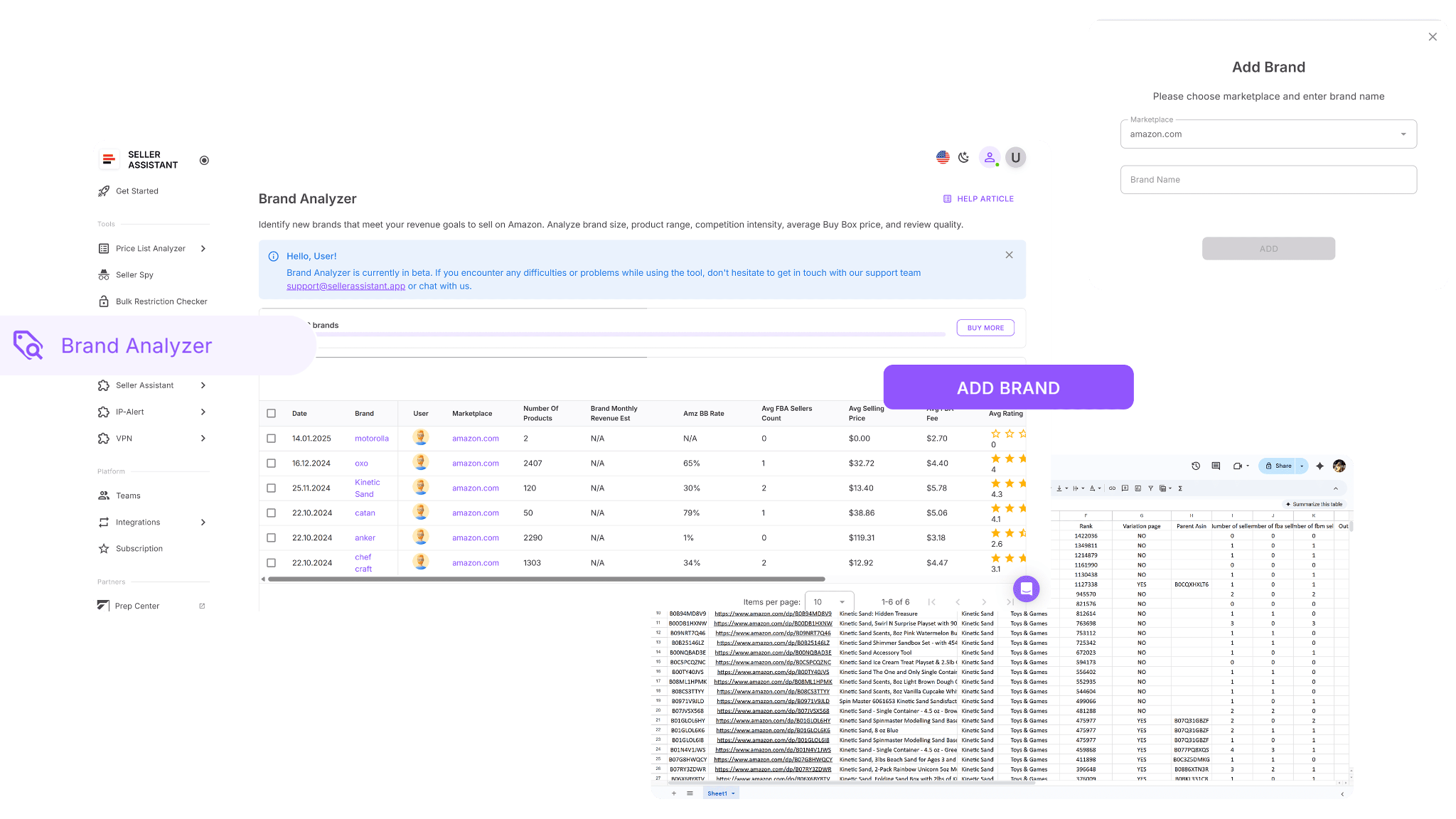
The tool is built for wholesale sellers, online arbitrage sellers, and dropshippers who need fast, accurate brand data. Enter any brand name, and Brand Analyzer provides a full performance breakdown. You can also download a complete report listing every ASIN from that brand with detailed metrics for deeper review.
What Brand Analyzer does
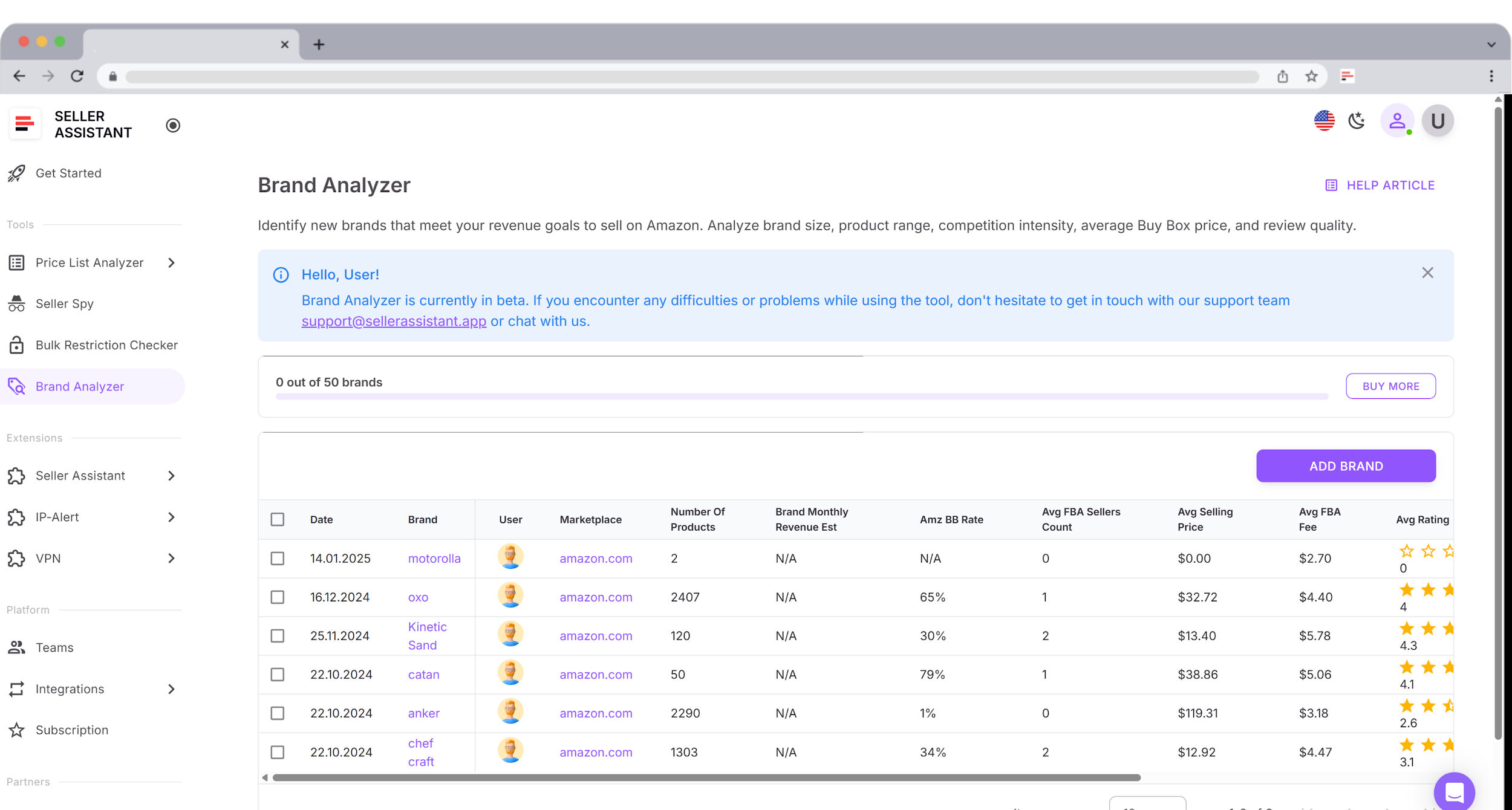
- Instant brand profile and reseller assessment: Quickly verify whether a brand allows third-party resellers and whether it’s safe to source from suppliers.
- Automated research instead of manual catalog checks: No need to browse hundreds of listings – Brand Analyzer does the entire evaluation automatically.
- Brand-wide revenue visibility: View monthly revenue estimates for the entire brand portfolio and judge earning potential at scale.
- Amazon competition overview: Check Amazon’s Buy Box share to see if Amazon sells the brand and how often it wins.
- Seller competition insights: Analyze average FBA seller counts to understand how competitive the brand’s listings are.
- Brand size and product availability: See how many ASINs the brand has and evaluate whether the catalog is large enough for profitable product discovery.
- Customer trust indicators: Review the brand’s average rating and total review count to assess product quality and demand.
- Pricing and margin clarity: Check average Buy Box prices and FBA fee levels to understand expected margins and cost structure.
- All metrics in one consolidated dashboard: Revenue, pricing, competition, in-stock rate, and brand ratings appear in a single interface for quick decision-making.
- Faster identification of profitable brands: Skip brands with poor metrics and focus your time only on high-potential opportunities.
How to choose a brand with Brand Analyzer
Brand Analyzer handles the full evaluation process for you. Enter the brand name, and the tool automatically analyzes its presence on Amazon – including revenue estimates, pricing behavior, competition levels, brand size, reviews, and overall performance.
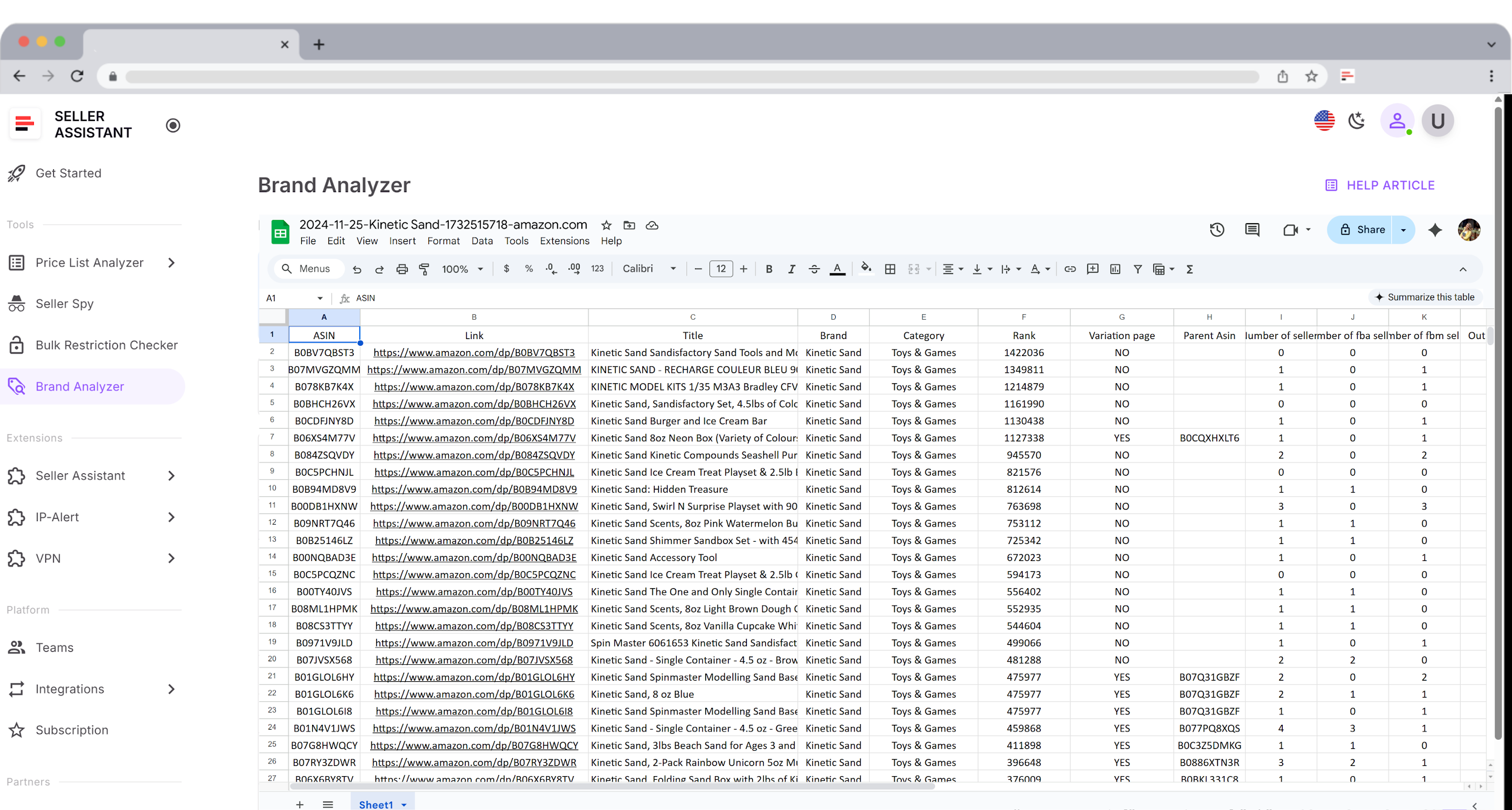
Once the analysis is finished, you can download a complete file containing all brand ASINs. This lets you sort, filter, and compare products to find the most profitable items. Brand Analyzer is available inside your Seller Assistant account, where you can add brands, run analyses, and export detailed Excel reports.
Steps to use Brand Analyzer
Step 1. Open Brand Analyzer in Seller Assistant
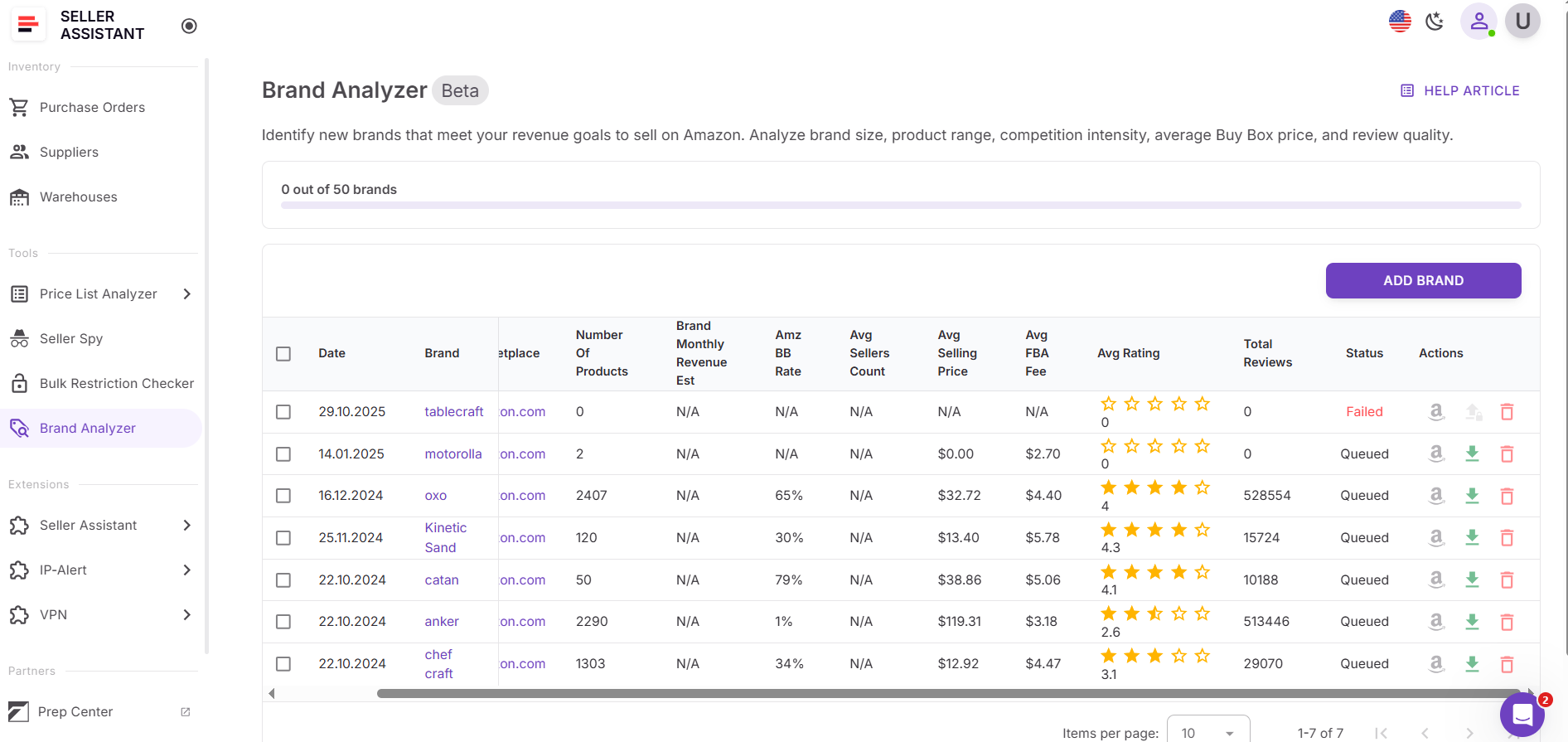
Go to your Seller Assistant dashboard, open the Tools section, and select Brand Analyzer. Click Add Brand.
Step 2. Enter the brand information
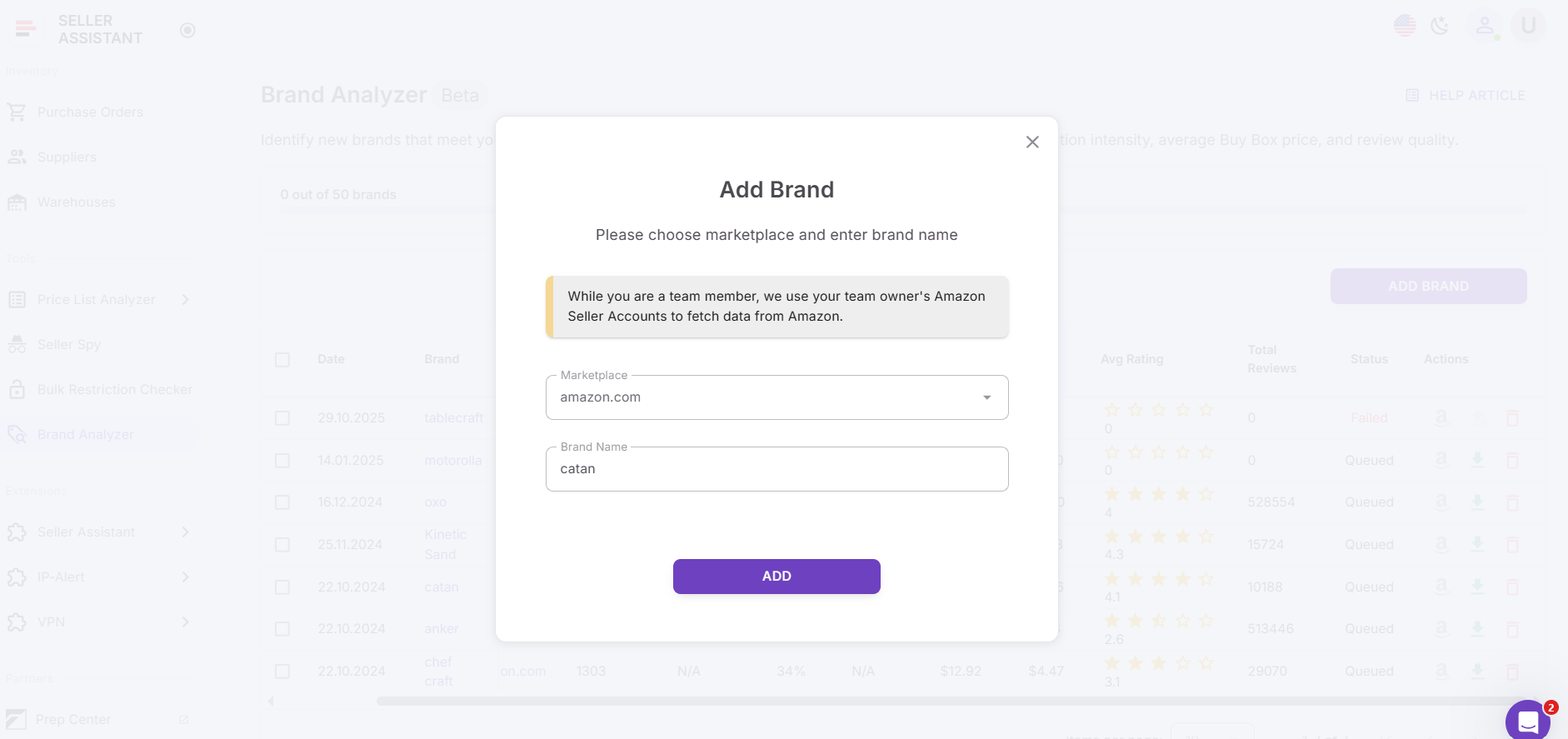
Choose your marketplace, type the brand name, and press Add to start the analysis.
Step 3. Wait for the system to process the brand
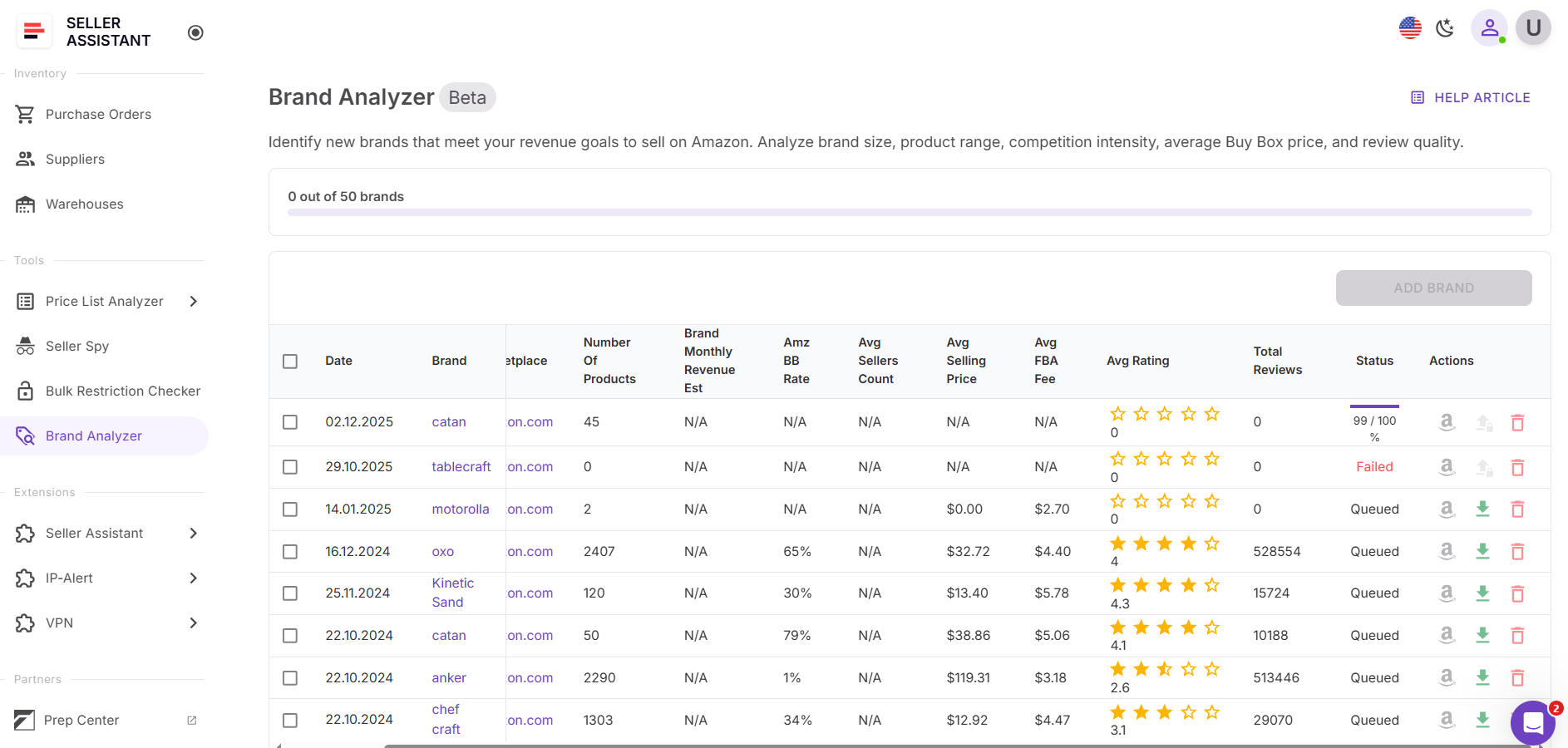
Brand Analyzer gathers all Amazon data and builds a complete performance dashboard. Review the results to determine whether the brand matches your expectations.
Step 4. Download the full brand report
Once the analysis finishes, export the .xls report. It contains every ASIN from the brand, along with all key performance metrics for deeper filtering and comparison.
FAQ
How do I know if a wholesale brand is safe to resell?
Check whether your Amazon account is approved to sell the brand and make sure it doesn’t frequently issue IP complaints. Tools like Seller Assistant’s Brand Analyzer and Restrictions Checker help you confirm safety before purchasing inventory.
Why should I analyze competitor storefronts when choosing brands?
Successful sellers already carry brands that work well on Amazon, so analyzing their storefronts reveals proven opportunities. The Storefront Widget helps you quickly identify which brands appear consistently and perform well.
Can I source a brand if Amazon sells the same products?
You can, but it’s rarely profitable because Amazon dominates the Buy Box and keeps prices stable at levels third-party sellers can’t match. If Amazon sells more than 30% of the brand’s catalog, it’s usually best to avoid it.
How does Brand Analyzer help me evaluate brand profitability?
It shows average revenue, Buy Box prices, competition levels, and customer ratings across the entire brand portfolio. This gives you a clear picture of whether the brand can support consistent sales and healthy margins.
What’s the most reliable way to find new wholesale brands?
Start by choosing a category, then analyze top competitor storefronts to see which brands they already sell successfully. After shortlisting promising brands, run them through Brand Analyzer to validate revenue potential, competition, and safety.
Final Thoughts
Finding the right wholesale brands doesn’t have to be a guessing game. By analyzing competitor storefronts, choosing brands proven to work in your category, and validating them with Brand Analyzer, you can build a product portfolio backed by real data – not assumptions. This process helps you avoid risky brands, focus on profitable ones, and scale your Amazon business with confidence.
With Seller Assistant’s Storefront Widget and Brand Analyzer working together, you get a complete, reliable system for sourcing brands that sell consistently, stay compliant, and support long-term growth.
Seller Assistant automates and connects every stage of your Amazon wholesale and arbitrage workflow. It brings together in one platform: workflow management tools – Purchase Orders Module, Supplier Database, Warehouse Database, bulk research & sourcing tools – Price List Analyzer, Bulk Restriction Checker, Sourcing AI, Brand Analyzer, Seller Spy, Chrome extensions – Seller Assistant Browser Extension, IP-Alert Extension, and built-in VPN by Seller Assistant, and integrations & team access features – seamless API connectivity, integrations with Zapier, Airtable, and Make, and Virtual Assistant Accounts.

