


Verifying wholesale suppliers is one of the most important steps in building a safe, profitable Amazon business. The wrong supplier can trigger inauthentic complaints, IP complaints, unsellable inventory, or wasted capital. The right one gives you reliable stock, predictable margins, and the ability to scale wholesale or bulk online arbitrage with confidence.
With counterfeit risks rising and supplier directories filled with middlemen, Amazon sellers need a clear, repeatable process to separate real brand-authorized distributors from questionable sources.
This post walks you through exactly how to validate any supplier, avoid red flags, and build a trustworthy network that protects your Amazon account.
What a Legit Amazon Wholesale Supplier Looks Like
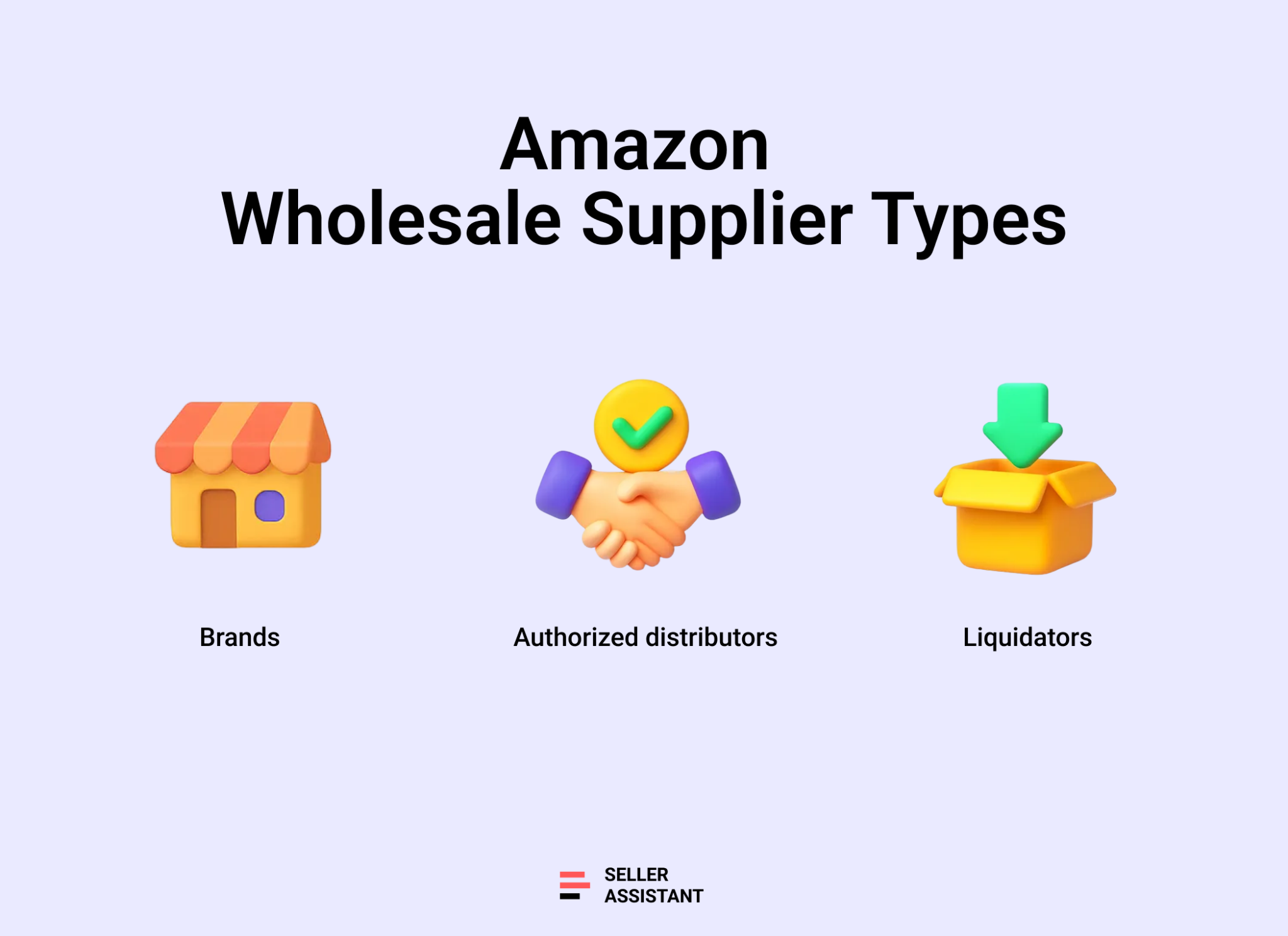
A real wholesale supplier fits clearly into the retail supply chain and can prove their relationship with the brands they sell. Below are the four main types you’ll encounter as an Amazon seller, how each works, their advantages and drawbacks, and which business models they’re best suited for.
Brand
What it is
A brand produces its own products and sells them directly to retailers or authorized distributors. Working with brands gives you the cleanest, most direct supply chain and the strongest documentation for Amazon compliance. Most major brands have structured reseller programs, strict MOQs, and well-defined account criteria.
Pros
Direct source of authenticity
Easiest way to prove product legitimacy and avoid inauthentic complaints.
Stable catalog and pricing
Brand-level pricing and consistent stock make long-term scaling simple.
Cons
High entry requirements
Many brands require strong order volume, detailed business info, or physical store presence.
Limited flexibility
Some brands restrict Amazon sellers or enforce tight MAP policies.
Best for
Established wholesale sellers with strong capital and a long-term strategy who want predictable supply, fewer competitors, and clean documentation for Amazon.
Authorized distributor
What it is
An authorized distributor buys from one or multiple brands and resells to approved retailers and Amazon sellers. Distributors often carry thousands of branded SKUs, offer tiered pricing based on volume, and provide clean invoices accepted by Amazon.
Pros
Access to multiple brands
Large catalogs let you test various niches without forming dozens of brand relationships.
Lower MOQs
Easier entry point compared to buying directly from manufacturers.
Cons
Distributor markup
Margins are slimmer than buying from brands directly.
Approval required
Many distributors screen Amazon sellers and decline accounts with low volume or limited track record.
Best for
Wholesale sellers building their first supplier network or scaling across multiple categories with manageable buying requirements.
Liquidator
What it is
A liquidator sells overstock, returns, shelf pulls, and closeout items from retailers and brands. Inventory is often sold by the case, pallet, or truckload. While deals can be profitable, item condition and authenticity vary, making this the riskiest option for Amazon FBA.
Pros
Deep discounts
High-margin opportunities if products are in good condition.
Low entry cost
No brand approval or high MOQs required.
Cons
Unpredictable condition
Mixed lots often include damaged, returned, or unsellable items.
Weak documentation
Invoices rarely satisfy Amazon’s requirements for authenticity or ungating.
Best for
Experienced sellers who resell through FBM, liquidation marketplaces, or multichannel platforms – not ideal for FBA unless the items are fully verified and individually inspected.
Step-by-Step Supplier Verification Checklist
A reliable wholesale supplier isn’t something you find by chance – it’s someone you verify through a structured, repeatable process. Each step below acts as a safeguard against counterfeit risk, poor documentation, or suppliers that can jeopardize your Amazon account. In the next sections, we’ll break down each step in detail so you know exactly how to perform it, what tools to use, and what red flags to watch for.
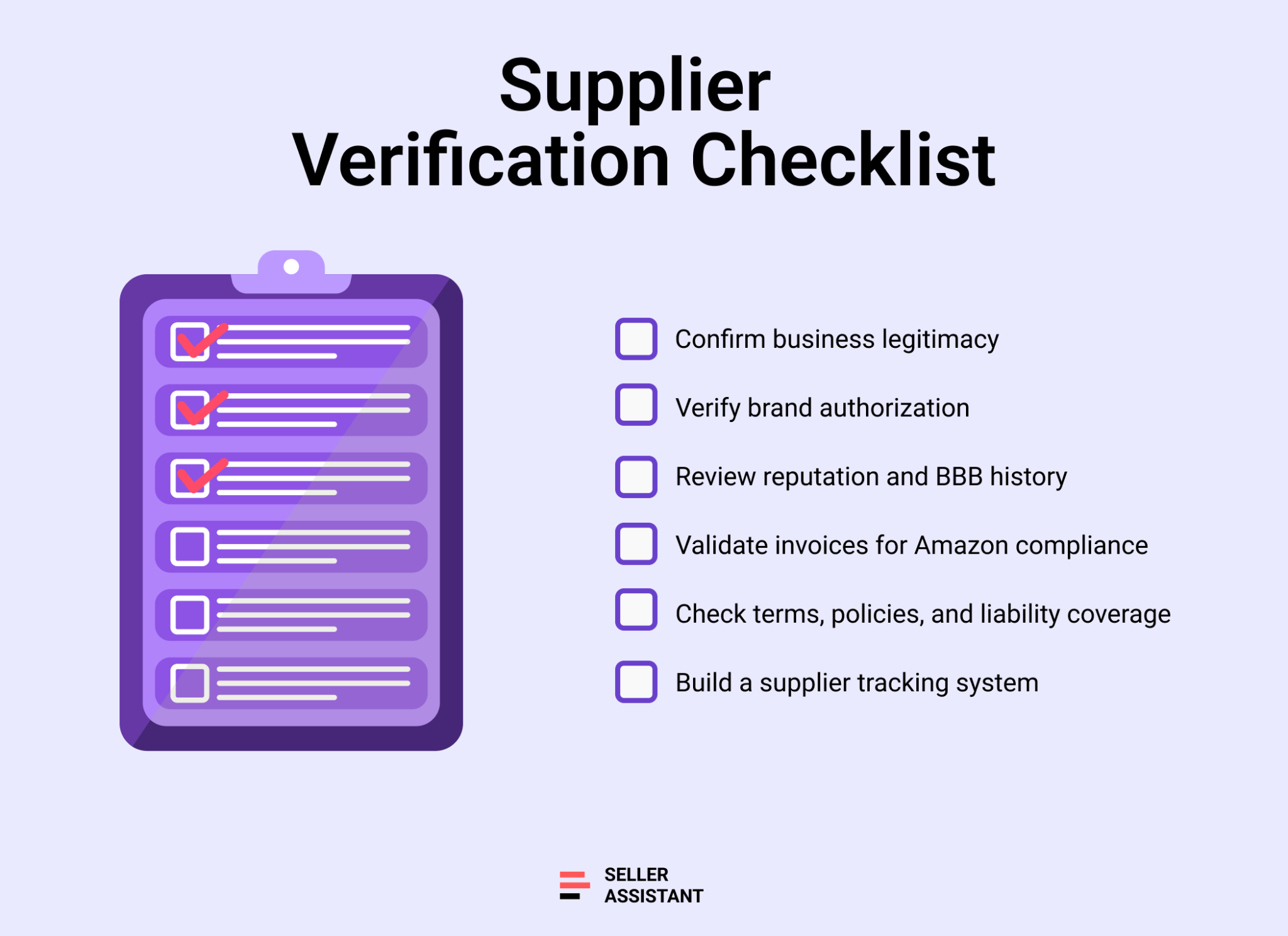
Step 1. Confirm business legitimacy
Check whether the supplier is a real, legally registered company with a physical presence. Validate their business registration, location, website, and online footprint before initiating any communication.
Step 2. Verify brand authorization
Ensure the supplier is officially allowed to sell the brands they offer. Confirm their authorization letters, ask the brand directly, and validate that the supplier is in the legitimate supply chain.
Step 3. Review reputation and BBB history
Look for consistent trust signals across BBB ratings, online reviews, and third-party platforms. You’ll use this to identify patterns of complaints, fraud concerns, or customer service issues.
Step 4. Validate invoices for Amazon compliance
Request a sample invoice and check if it contains the details Amazon requires. Proper invoices protect you against inauthentic complaints and help with category and brand approvals.
Step 5. Check terms, policies, and liability coverage
Review return policies, shipping terms, payment methods, liability insurance, and MAP rules. These policies determine whether the supplier is professional and safe to work with long term.
Step 6. Build a supplier tracking system
Create a structured way to track supplier details, status, and approvals. Supplier management is essential as you scale your operation.
How to Confirm Business Legitimacy
Before contacting a supplier, confirm that it is a real, legally established business. This step filters out 90% of risky or illegitimate suppliers immediately. A legitimate wholesale partner should have verifiable registration records, a physical presence, and a transparent online footprint. Below are the core checks you’ll perform before moving to deeper verification steps.
Business registration lookup
Real distributors are registered with their state or national business authority. Search their legal business name on the appropriate government database. Confirm the company status is active, the address matches what they share with you, and the business type aligns with wholesale activity.
Physical office and warehouse verification
Use Google Maps or similar tools to check the supplier’s listed business address. A credible supplier should have a warehouse, distribution center, or commercial office – not a UPS mailbox, residential home, or unverifiable location. Street-view images can help confirm the scale and legitimacy of their operations.
Website and domain credibility
A trustworthy supplier maintains a professional website with clear contact information, product categories, and company history. Check the domain age using tools like Whois; established suppliers typically have older, well-maintained domains rather than newly created sites with vague content.
Online footprint and social presence
Legitimate suppliers usually appear on LinkedIn company page, industry directories, or trade show exhibitor lists. Look for a LinkedIn company page with employee listings, real posts, or leadership profiles. A missing digital trace doesn’t always mean fraud, but strong presence increases trust and consistency across all verification checks.
How to Verify Brand Authorization
After confirming a supplier is a real business, the next step is validating whether they’re actually allowed to sell the brands they offer. This is one of the most important parts of the entire verification checklist. A supplier can look legitimate on paper, but if they aren’t authorized by the brand – or connected through an authorized distributor – you risk account suspensions, inauthentic complaints, and rejected invoices. Below are the core checks that confirm a clean supply chain.
Brand authorization confirmation
Start by asking the supplier directly whether they are an authorized distributor for the brands you plan to purchase. A reputable supplier will be transparent about their brand relationships and will clarify which brands they officially carry, which ones they source through distributors, and which ones they cannot provide brand-backed documentation for.
Request a brand authorization letter
Ask the supplier for an official authorization letter or certificate. This letter should come from the brand or the master distributor and must include the supplier’s legal business name, address, authorized product lines, and the issuing contact details. Valid authorization letters are typically recent, signed, and traceable to the brand.
Cross-check with the brand
To verify authenticity, review the brand’s website or contact the brand’s sales or distribution department and ask whether the supplier is part of their authorized reseller or distributor network. Brands often provide lists of approved distributors. This simple step eliminates any doubt about whether the supplier is legitimately connected to the brand.
How to Review Supplier Reputation
Once you confirm that a supplier is a legitimate business and has proper brand authorization, the next step is evaluating their reputation. Even authorized suppliers can have poor service, unreliable shipping, or repeated customer complaints. Checking a supplier’s track record helps you avoid costly issues like delayed shipments, damaged inventory, or long-term operational problems. This step gives you a broader view of how the supplier treats its customers and handles disputes.
BBB rating and complaint history
If the supplier operates in the U.S., look up their profile on the Better Business Bureau (BBB). Review their BBB rating (A+ to F), the number of resolved versus unresolved complaints, and the general tone of customer issues. A high rating with transparent complaint handling is a strong trust signal, while an “F” or patterns of unresolved problems indicate risk.
Third-party reviews and industry feedback
Search for the supplier on platforms like Google Reviews, Trustpilot, and industry forums. Look for recurring themes – slow delivery, poor packaging, incorrect items, or suspicious product quality. A few negative reviews are normal, but consistent patterns across multiple sources are red flags.
LinkedIn presence and business activity
Check the supplier’s LinkedIn company page to verify employee listings, company size, and activity. A supplier with a real team, regular posts, or industry connections is more dependable than one with no presence or vague employee profiles.
Check Terms, Policies, and Liability Coverage
After confirming that a supplier is legitimate, authorized, and reputable, the next step is reviewing their operational policies. These terms determine how the supplier handles returns, damages, payment processing, shipping, and liability – all of which impact your Amazon business. Strong policies show that the supplier is established, professional, and prepared to support you long term. Weak or vague terms often signal risk and unpredictability.
Return and replacement policy
Ask how the supplier handles damaged, defective, or incorrect items. A credible supplier will offer clear timelines, replacement procedures, and documentation requirements. If a supplier refuses returns entirely or provides unclear answers, reconsider the partnership – especially for FBA sellers who must meet Amazon’s quality standards.
Payment methods and billing terms
Review accepted payment methods such as credit card, ACH, or wire transfer. Reliable suppliers use traceable, secure methods. Avoid partners who insist on untraceable payments or unusual conditions. Also check whether they offer Net terms (Net 15, Net 30) for established buyers, which can improve cash flow as your business grows.
Liability and product insurance
Ask whether the supplier can provide product liability documentation or brand-backed insurance certificates. These are crucial in case of product defects, safety issues, or customer claims. Suppliers that cannot explain their coverage or refuse to share supporting documents may not be sourcing inventory from verified channels.
MAP and pricing policy clarity
Some brands enforce Minimum Advertised Pricing (MAP). If your supplier works with MAP-controlled brands, they should clearly explain the rules and provide documentation. Vague or inconsistent MAP communication may result in unexpected pricing conflicts or account issues.
How to Build Your Suppliers Database
Once you begin outreach, organization becomes just as important as verification. In wholesale, only a fraction of suppliers will respond, and even fewer will approve your account. Working with multiple suppliers often means juggling outdated spreadsheets, manually entering contact details, and digging through email threads leads to errors, slows down decision-making, and becomes unmanageable as your business grows.
A unified Seller Assistant’s Suppliers Database eliminates this chaos by storing all supplier information in one place and linking it to your price lists, purchase orders, warehouses, and prep settings. This ensures your entire workflow stays accurate, consistent, and scalable.
Note. Seller Assistant is an end-to-end Amazon workflow management platform that integrates 10+ wholesale-focused solutions into one connected system. It combines sourcing workflow automation, bulk research and intelligence tools, and integrated Chrome extensions – giving you everything you need to streamline finding deals, managing suppliers, and creating purchase orders.

The platform aggregates: workflow management tools – Purchase Orders Module, Suppliers Database, Warehouses Database to organize, automate, and scale every step of your wholesale and arbitrage operations ; bulk research & sourcing tools – Price List Analyzer, Bulk Restriction Checker, Sourcing AI, Brand Analyzer, Seller Spy to evaluate supplier price lists, verify selling eligibility and restrictions, open new brands, and discover winning product ideas from competitors to expand your product catalog; Chrome extensions – Seller Assistant Browser Extension, IP-Alert Extension, and built-in VPN by Seller Assistant to deep-research products, check IP claims and compliance, and access geoblocked supplier sites directly within your browser; and integrations & team access features – seamless API connectivity and integrations with Zapier, Airtable, and Make, plus Virtual Assistant Accounts for secure, scalable team collaboration.
With Seller Assistant, every step of your Amazon wholesale and arbitrage workflow is automated and connected.
How Suppliers Database helps you
Suppliers Database serves as the central hub for all supplier information across your wholesale operations.
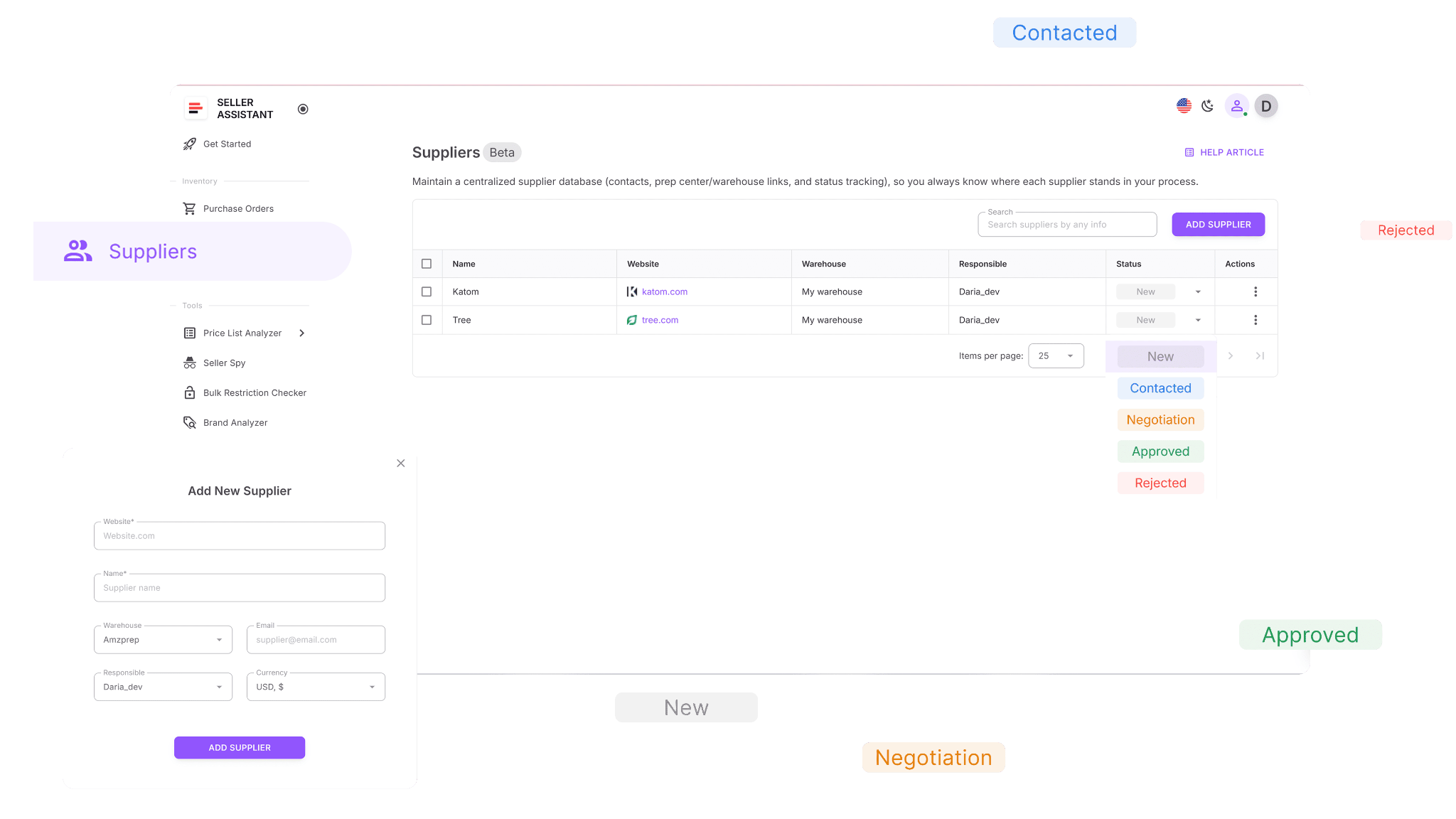
With Supplier Database, you can:
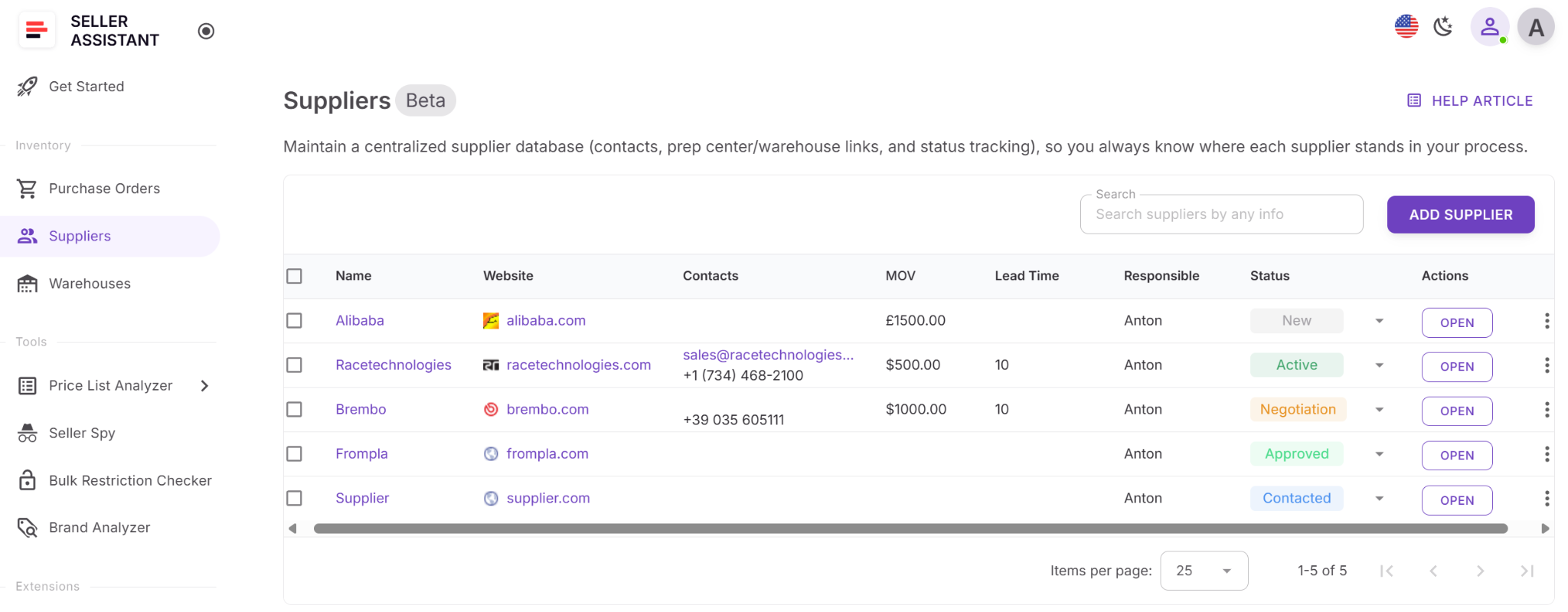
- Create complete supplier profiles including names, websites, contacts, warehouse addresses, currencies, MOV – Minimum Order Value, Lead Time – number of days to prepare and ship an order, and assigned team members.
- Search and filter suppliers by name, website, address, status, or associated warehouse.
- Assign relationship statuses like New, Contacted, No response, Negotiation, Approved, Active, On hold, Rejected to manage your outreach pipeline.
- Link suppliers to default warehouses or prep centers for automatic routing when creating purchase orders.
- Edit or update supplier details without breaking linked connections across other modules.
- Access supplier info directly in other tools like Price List Analyzer or Purchase Orders without copying anything manually.
Putting it into action
Step 1. Access Suppliers Database
Open Suppliers in your Seller Assistant account.
Step 2. Create new supplier’s profile
Click Add Supplier. Enter the supplier’s website, name, email, warehouse, responsible team member, and currency.
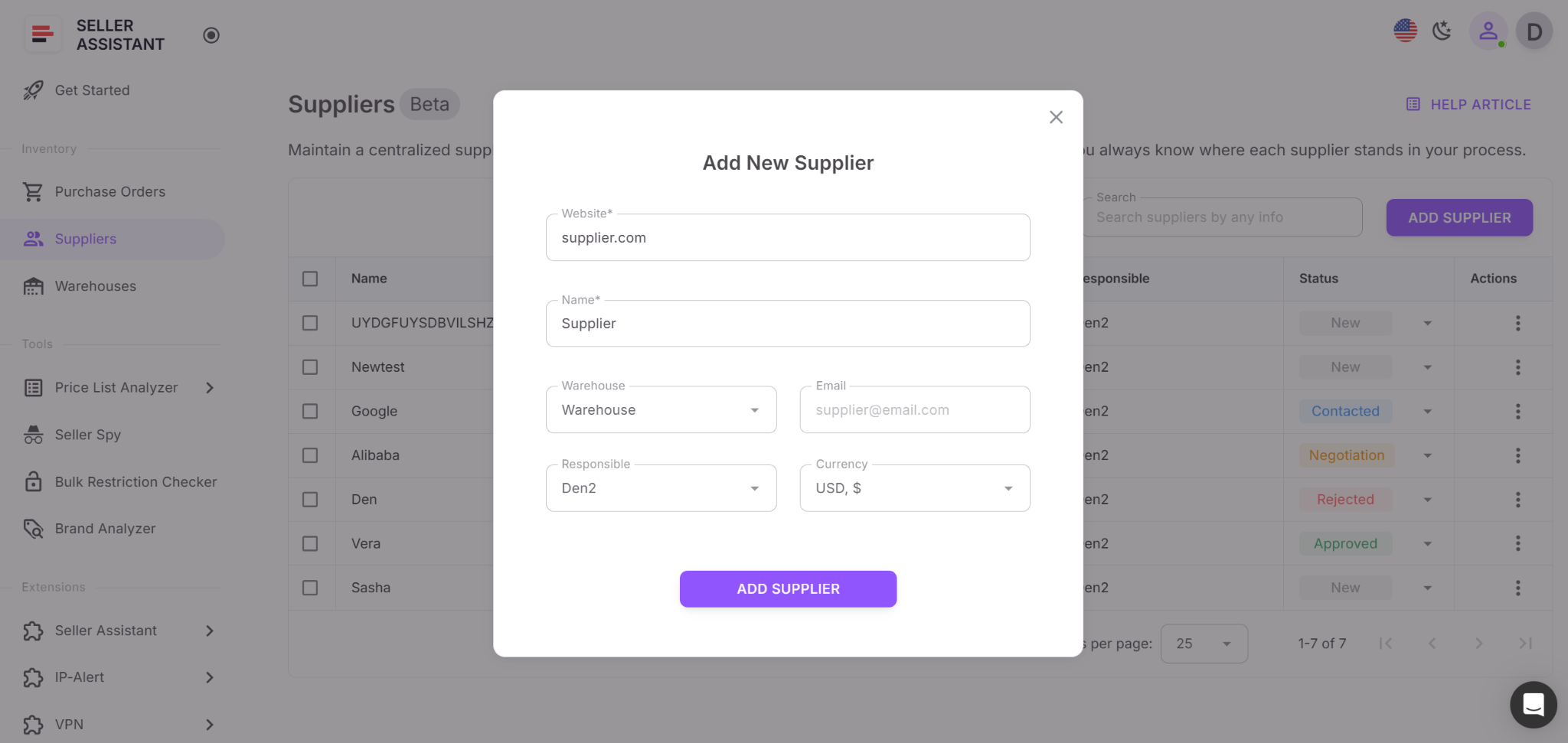
Step 3. Use the supplier across your workflow
Save the profile. Now you can use it across all your wholesale workflow in Seller Assistant.
Once saved:
- The supplier appears across your entire workflow.
- When you upload a price list or create a PO, you simply select the supplier.
- All linked data – address, default warehouse, contact info – fills in automatically.
FAQ
How many suppliers should I contact to get approved?
Most Amazon wholesale sellers get approved by only 1–2% of suppliers they contact. Expect to reach out to hundreds before securing a few solid relationships, which is normal for this business model.
Can I sell big brand products through wholesale?
Yes, but many major brands have strict reseller policies or only work with select distributors. New sellers often start with smaller brands before approaching top-tier manufacturers.
Do I need a business license or reseller permit to buy wholesale?
Yes, both documents are required by most legitimate suppliers to open an account. They also allow you to buy tax-free and provide proof of legitimacy when applying for approvals.
How do I know if a supplier is truly legitimate?
Check their business registration, authorization letters, BBB rating, online presence, and invoice formatting. Legit suppliers are transparent about their sourcing and can document their relationship with the brands they sell.
Is wholesale still profitable on Amazon in 2025?
Yes – wholesale remains profitable when paired with smart brand selection, solid supplier verification, and automation tools. Margins are tighter, but sellers using data-driven workflows consistently maintain strong ROI and scalable operations.
Final Thoughts
Verifying wholesale suppliers isn’t just a best practice — it’s a core part of protecting your Amazon business. A strong supplier network gives you authentic products, clean invoices, predictable margins, and the confidence to scale your catalog without fear of account issues.
By following a structured verification process and tracking every supplier relationship, you minimize risk, avoid unreliable sources, and focus your time on profitable, consistent inventory. With tools like Seller Assistant, you can automate the most time-consuming steps — from price list analysis to eligibility checks and supplier management — making your workflow faster, safer, and built for long-term growth.
Seller Assistant automates and connects every stage of your Amazon wholesale and arbitrage workflow. It brings together in one platform: workflow management tools – Purchase Orders Module, Supplier Database, Warehouse Database, bulk research & sourcing tools – Price List Analyzer, Bulk Restriction Checker, Sourcing AI, Brand Analyzer, Seller Spy, Chrome extensions – Seller Assistant Browser Extension, IP-Alert Extension, and built-in VPN by Seller Assistant, and integrations & team access features – seamless API connectivity, integrations with Zapier, Airtable, and Make, and Virtual Assistant Accounts.

