


Amazon’da satışları artırmak istemeyen satıcı var mı? Herkes yapar. Bununla birlikte, Amazon oldukça rekabetçi bir pazardır ve satıcılar rakipleri geride bırakmak için yaratıcı olmalıdır.
Rekabete rağmen, Amazon satışları artırmak için mükemmel fırsatlar sunuyor. Amazon’u ayda 2,5 milyar alıcı ziyaret ediyor işinizi büyütmek için büyük bir potansiyel sunar. Bu hedefe doğru strateji ile ulaşılabilir.
Bu gönderi, kendinizi büyütmek için 5 etkili stratejiyi açıklıyor Amazon tarafından yerine getirme (FBA) Satışlar ve Nasıl Çalışır
FBA Satışlarını Artırmak İçin 5 Strateji
FBA satışlarınızı büyütmek için doğru stratejileri seçmek, iş modelinizi ve yapmaya hazır olduğunuz yatırım seviyesini dikkatlice değerlendirmeyi gerektirir. Farklı yaklaşımlar farklı satıcı türleri için daha iyi çalışır. Anahtar, Amazon satıcı stratejinizi benzersiz hedeflerinizle, işletmenizin üstesinden gelebileceklerle ve bütçe kısıtlamalarınızla uyumlu hale getirmektir.
Hangi stratejiyi seçerseniz seçin, satış performansını optimize etmek için ilgili satıcı araçlarından yararlanmak pazarlık konusu değildir. Bu araçlar kolaylaştırmaya yardımcı olabilir ürün araştırması, rekabeti analiz etmek, ve genel verimliliği artırın. Ürün kaynak yazılımı gibi araçları etkili bir şekilde kullanan satıcılar genellikle önemli bir artış görüyor. Amazon satışları ve karları.
Amazon’da satışları artırmanın doğru stratejilerin, araçların ve tutarlı çabanın bir kombinasyonunu gerektirdiğini unutmayın. Aşağıda, özellikle etkili olan beş strateji bulunmaktadır. toptan, çevrimiçi arbitraj, ve dropshipping satıcıları.
Strateji 1. Cephaneliğinizi Genişletin
İster marka ister distribütör olsun, yeni tedarikçiler eklemek, Amazon satışlarınızı büyütmenin kanıtlanmış bir yoludur. Bununla birlikte, yeniden satış dostu olduklarından ve gerekli kriterleri karşıladıklarından emin olmak için potansiyel markaları kapsamlı bir şekilde araştırmak çok önemlidir. Amazon’da satış. Gibi araçlar Satıcı Asistanı Marka Analizörü Markalar ve ürünleri hakkında derinlemesine bilgiler sağlayarak bu süreci zahmetsiz hale getirin.
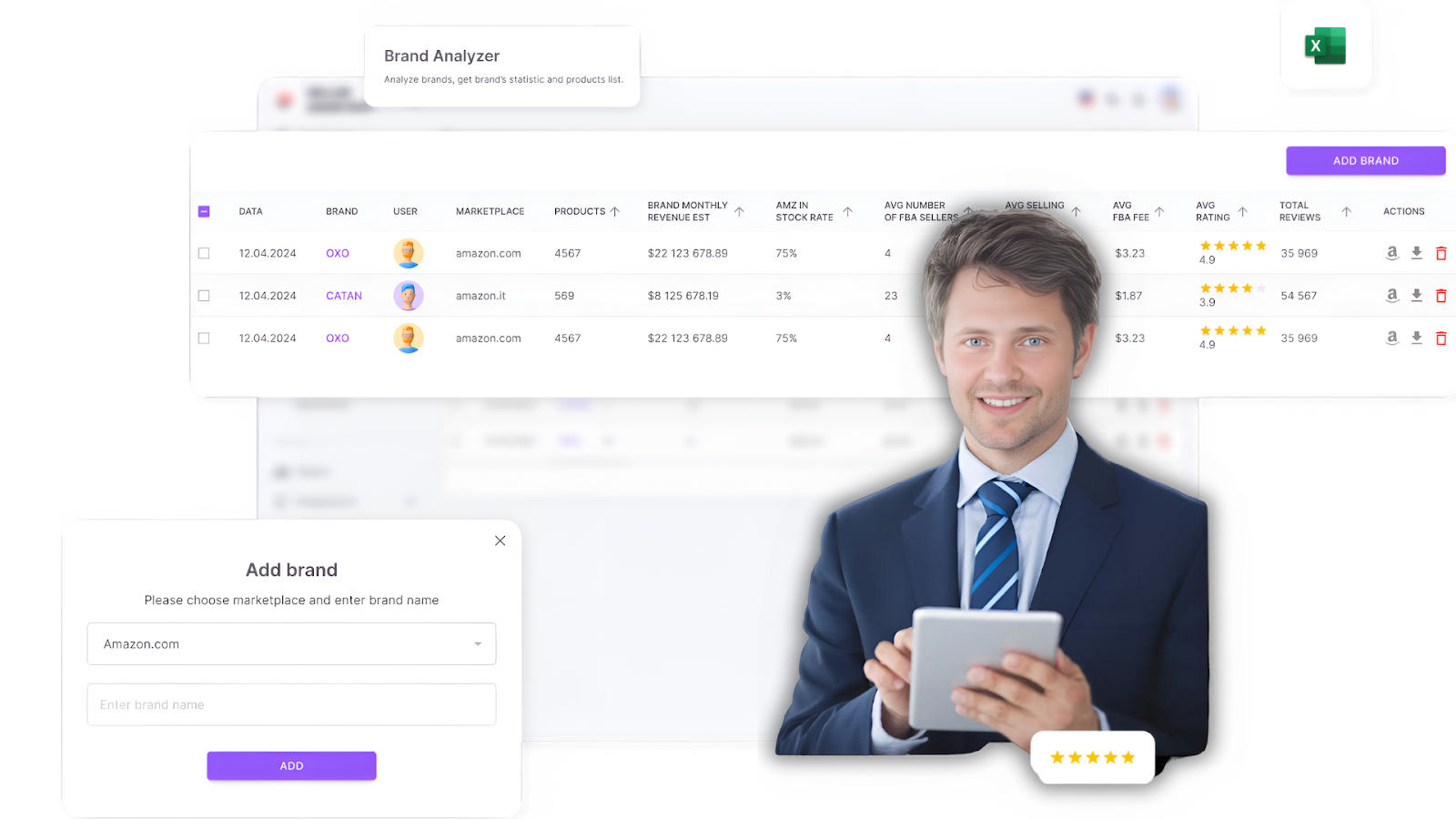
Satıcı Asistanının Marka Analizörü
Not. Satıcı Asistanı Amazon satıcılarının hızlı bir şekilde yüksek kârlı fırsatlar bulmasına yardımcı olan kapsamlı bir ürün tedarik yazılımıdır. Üç uzantıyı birleştirir: Satıcı Asistanı Tarayıcı Uzantısı, ve Satıcı Asistanından IP-Alert Chrome Uzantısı ve Satıcı Asistanından VPN, Amazon satıcı araçları: Fiyat Listesi Analizörü, Marka Analizörü, Satıcı Spy, Toplu Kısıtlama Denetleyicisi, ve API entegrasyonları, ve özellikleri: Yan Panel Görünümü, FBM&FBA Kar Hesaplayıcı, Hızlı Görünüm, ASIN Tutucu, UPC/EAN ‘den ASIN’e dönüştürücü, Stok Denetleyicisi, IP Uyarısı, ve Kısıtlamalar denetleyicisi.
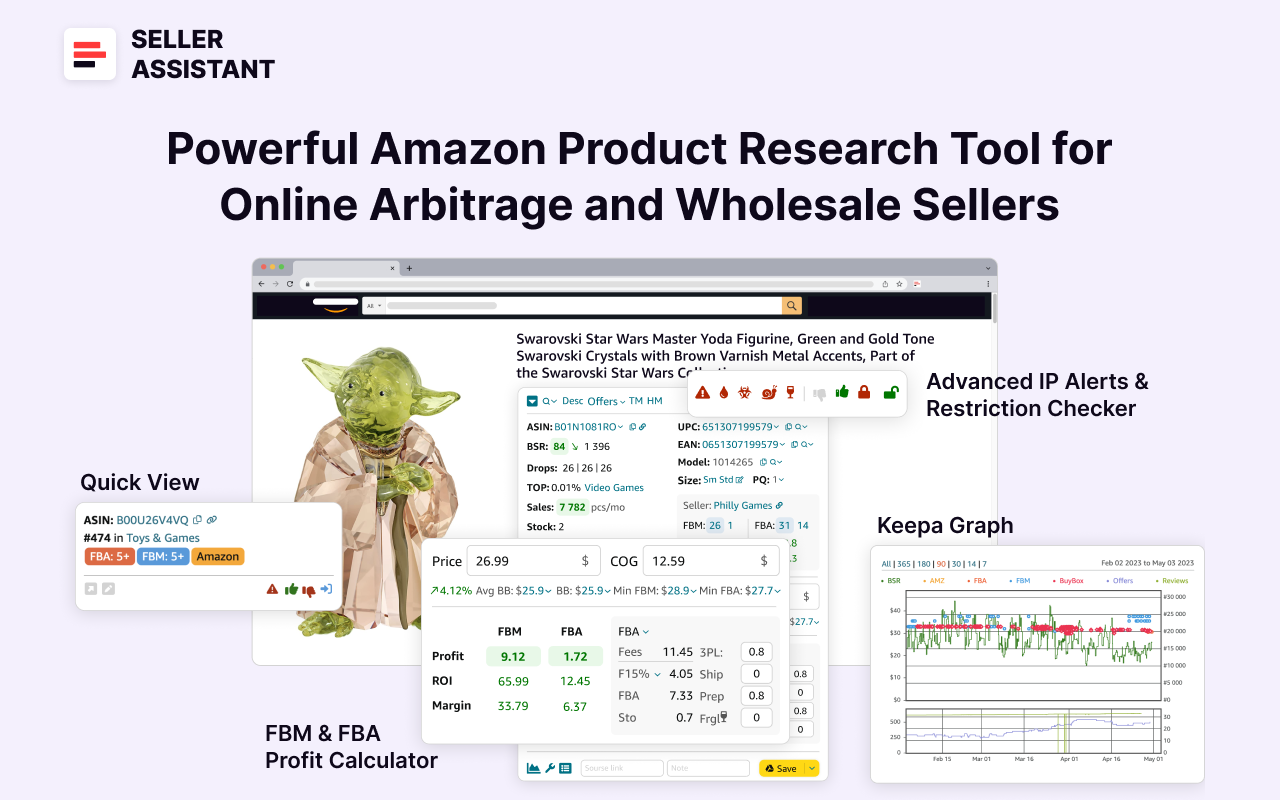
Satıcı Asistanı
Satıcı Asistanı, Amazon arama, ürün ve tüm temel ürün verilerini gösterir envanter sayfaları ve yüksek marjlı fırsatlar bulmanıza yardımcı olacak herhangi bir web sitesinde. Bu FBA ve FBM’yi kullanarak ürün tedariki yazılım, olma potansiyeline sahip ürünleri kolayca tanımlayabilirsiniz Amazon’da iyi satıldı.
İlişkili: Seller Assistant Extension İncelemesi
En İyi Amazon Çevrimiçi Arbitraj Aracı - Satıcı Asistanı
Satıcı Asistanı ile Amazon’da Dropship Nasıl Yapılır
Amazon Toptan Satış: Amazon’da Toptan Satış Nasıl Satılır
Satışları nasıl artırır
Tedarikçi ağınızı genişletmek, envanter çeşitliliğinizi ve satış potansiyelinizi artırarak daha geniş bir ürün yelpazesine erişmenizi sağlar. Portföyünüze daha fazla marka ekleyerek, yeni müşteri segmentlerine erişebilir ve değişen pazar taleplerini karşılayabilirsiniz. Ek olarak, birden fazla tedarikçiyle çalışmak, sabit bir envanter akışı ve tutarlı satışlar sağlayarak Amazon’daki satışları artırmanıza yardımcı olur.
Nasıl çalışır
Eklemek için yeni marka başarılı bir şekilde, aşağıdaki temel kriterlere göre yeniden satış uygunluğunu değerlendirmek çok önemlidir.
Yeniden satış dostu marka kriterleri
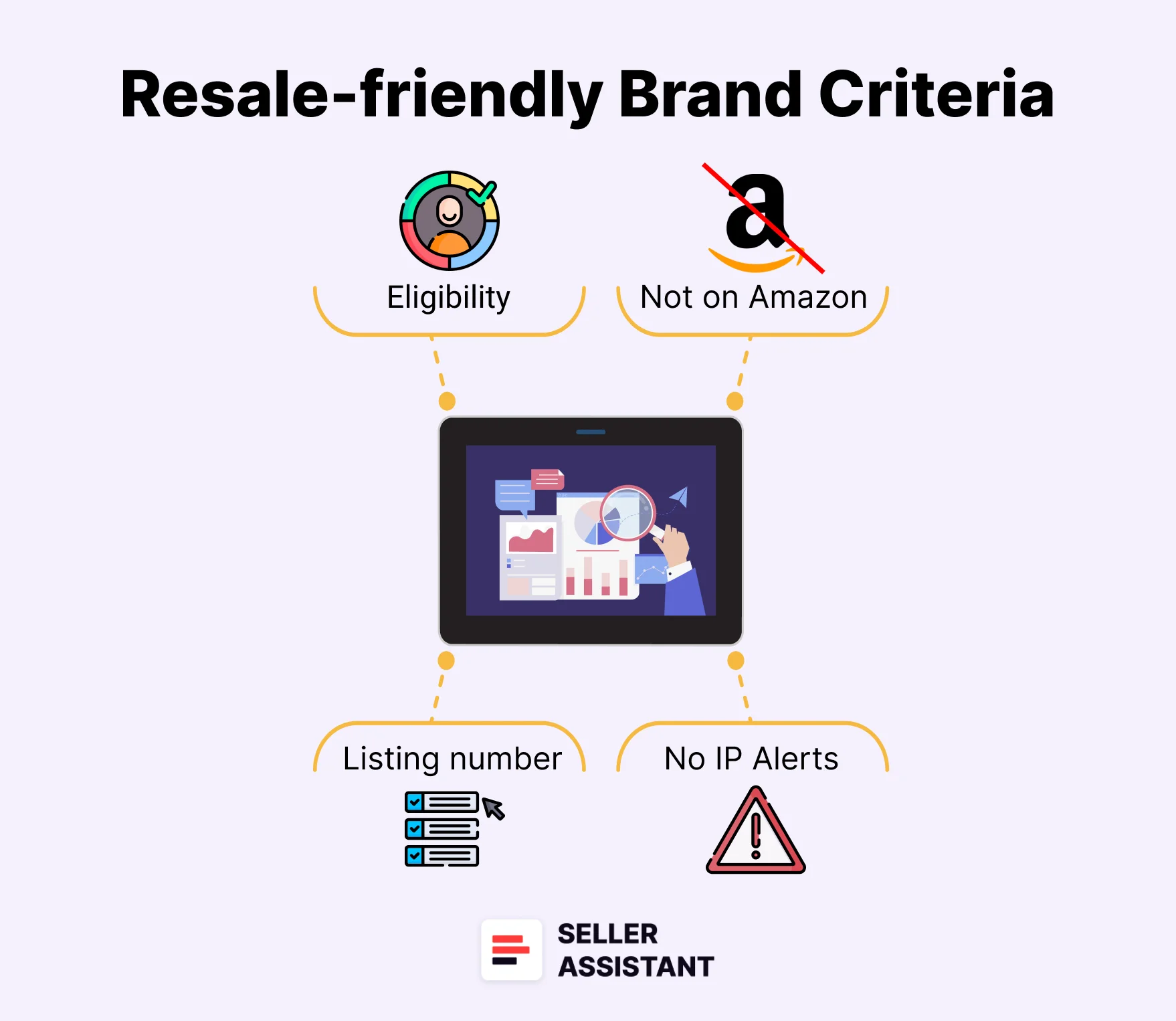
Yeniden satış dostu marka kriterleri
- Uygunluk ve kısıtlamalar
Markanın ürünlerinin kısıtlanmadığından veya Amazon’da satış yapmak için onay gerektirmediğinden emin olun. Bu, uyumluluk sorunlarını ve potansiyel kayıpları önler.
- Ürün hacmi
En az 500 ürün sunan markalara odaklanın, çünkü bu karlı seçenekler bulma şansını artırır.
- Gelir potansiyeli
Gelir hedeflerinize ulaştığından emin olmak için markanın aylık satışlarını ve ortalama ürün fiyatlarını analiz edin.
- Doğrudan rekabetten kaçının
Stay clear of brands that sell directly on Amazon or have exclusive distributors, as they often limit reseller opportunities.
- Customer approval
Choose brands with high ratings (above 4 stars) and strong customer feedback to ensure demand and credibility.
- Competition analysis
Avoid brands with overly high seller counts, which can lead to price wars and slim margins. Brands with more than 15 seller offers per listing are typically overly competitive.
- Compliance
Verify the brand doesn’t have a history of filing IP complaints and complies with Amazon’s policies (doesn’t have Amazon policy violations).
How to automate brand research with Brand Analyzer
Manual research can be time-consuming, but Seller Assistant’s Brand Analyzer simplifies the process by providing comprehensive brand data.
Seller Assistant’s Brand Analyzer is a powerful Amazon brand research tool designed to help sellers identify profitable brands. Its main purpose is to streamline brand research, making it easy to determine if a brand aligns with your revenue goals, meets essential selling criteria, and is a good fit for reselling on Amazon.
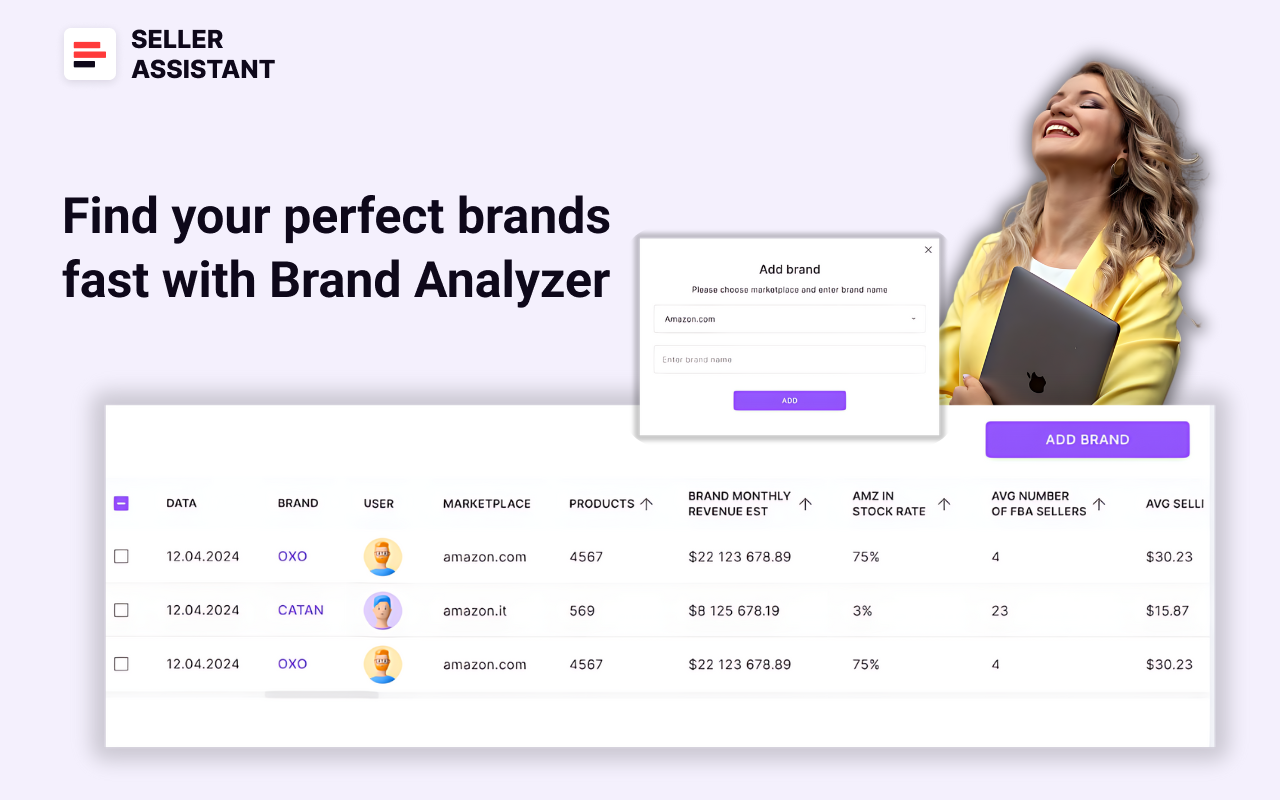
Brand Analyzer
Tailored for Amazon wholesale, online arbitrage sellers, and dropshippers, the tool simplifies the brand evaluation process. By simply entering a brand name, users can access all the necessary data to assess whether the brand is resale-friendly. Additionally, it provides the option to download a detailed report containing the brand’s products and their key metrics.
Brand Analyzer enables sellers to evaluate the brand’s size, the number of products it offers, potential revenue opportunities, competition levels (from Amazon and other sellers), average Buy Box prices, and the quality of reviews and ratings associated with its products.
To analyze a brand, add in the brand name to Brand Analyzer, and get brand summary details in your Seller Assistant personal account.
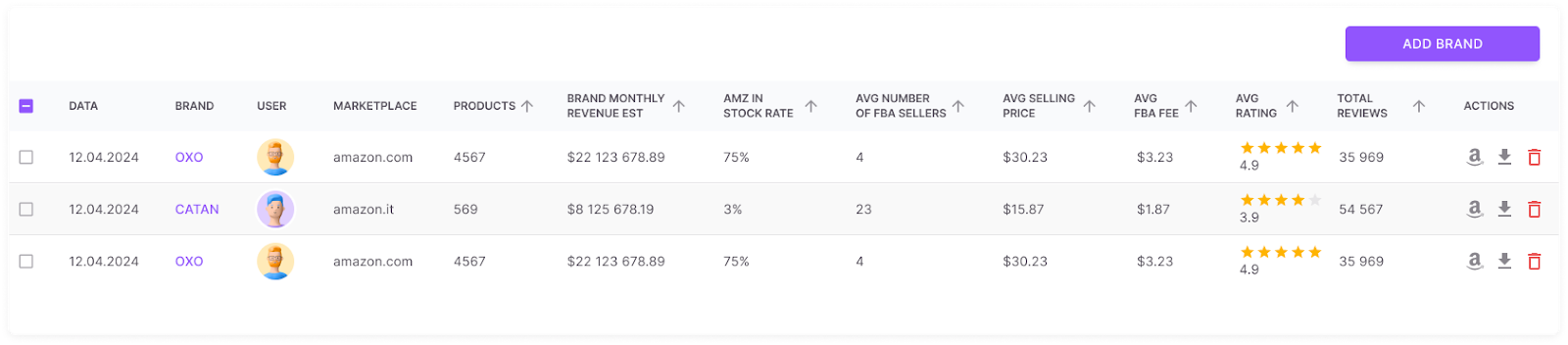
Brand Analyzer
You can also download a detailed report with all the metrics for each product.
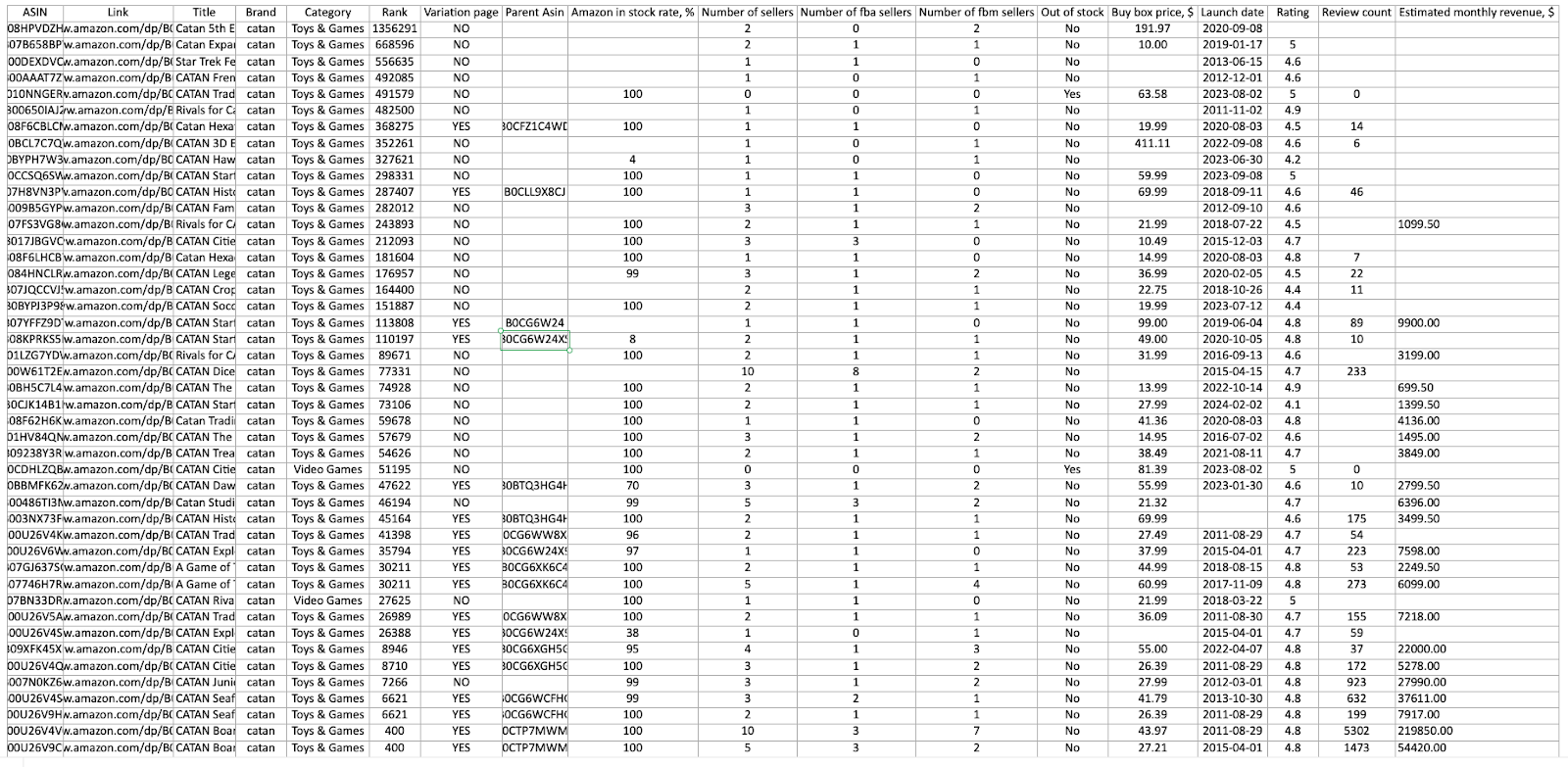
Brand Analyzer detailed report
Key features of Brand Analyzer
- Resale suitability check
Brand Analyzer evaluates whether a brand is suitable for resale and worth contacting as a supplier. It streamlines the brand research process, saving sellers time and effort in identifying profitable opportunities.
- Revenue estimator
The tool calculates potential monthly revenue by analyzing the total revenue generated by all the brand’s products. It provides detailed insights into Amazon’s Buy Box share for the brand, revealing competition levels and market dynamics.
- Competition analysis
Brand Analyzer also highlights the average FBA seller count per product, helping sellers gauge competition intensity and profit potential. It displays the total number of products offered by the brand, giving a clear picture of its market presence.
- Customer satisfaction metrics
By assessing customer satisfaction through total reviews and average ratings, the tool helps evaluate brand reputation. It also provides data on the average Buy Box price and FBA fees for the brand’s products, enabling sellers to refine pricing strategies and calculate costs accurately.
- Key metrics dashboard
With a comprehensive overview of metrics like revenue, competition, in-stock rates, pricing, and customer feedback, Brand Analyzer makes it easy to identify brands that are resale-friendly and capable of delivering strong profit margins.
Strategy 2. Source Smarter, Not Harder
Adding new products is a proven way to boost Amazon sales, provided they are in demand, profitable, and free from hidden risks. However, finding such products, especially in bulk wholesale price lists (for wholesale sellers ) or fetched supplier data (for online arbitrage and dropshippers ), can be extremely challenging and time-intensive.
Tools like Seller Assistant’s Price List Analyzer make this process seamless by identifying high-potential deals with minimal effort.
How it grows sales
Expanding your product range allows you to capture more of the market by meeting diverse customer needs. New high-profit products can generate additional revenue streams, enhance your competitive edge, and help you capitalize on trending items. By sourcing the right products, you also mitigate risks associated with over-reliance on a limited inventory, ensuring sustainable growth.
How it works
To select products that grow sales, it’s essential to evaluate them against key criteria below.
Key deal research criteria
- Sales performance
Check the product’s Best Sellers Rank (BSR) to gauge its popularity and ensure it moves quickly within its category.
- Competition level
Avoid listings with too many FBA/FBM sellers, as high competition often reduces profit margins. Ideally, look for products with 2–15 competitors. Additionally, avoid products sold by Amazon because it’s very difficult to compete for the Buy Box.
- Your chances to win the Buy Box
Look at other seller offers and estimate your chances of getting the Buy Box. If one seller dominates the Buy Box for a long time, it’s challenging to compete.
- Pricing and profitability
Calculate the product’s profitability by analyzing its Cost of Goods Sold (COG), FBA fees, and logistics costs. Ensure the ROI and margins meet your financial goals.
- Ürün kısıtlamaları
Ürünün Amazon satıcı hesabınız altında yeniden satışa uygun olduğunu ve kısıtlama içermediğini onaylayın,Fikri mülkiyet (fikri mülkiyet) şikayetleri, ve Amazon politika ihlalleri.
- Müşteri geri bildirimi
Güçlü incelemelere sahip (4-5 yıldız) ve minimum ürünleri seçin olumsuz geribildirim, müşteri memnuniyetini ve güvenilirliğini gösterir.
- Uyarılar ve gizli riskler
Bayraklar, varyasyonlar ve set/paket olup olmadığını kontrol edin. Bayraklar ekstra paketleme maliyetleri anlamına gelebilir (kırılgan, yetişkin ürünleri ), özel taşıma ve teslimat süreleri (ağır ve hacimli, Tehlikeli madde ) veya FBA ile mevsimsellik (eritilebilir ). Ürünlerin varyasyonları varsa, aynı BSR’ye sahip oldukları için nasıl sattıklarını kontrol etmelisiniz. Bir ürün bir set veya paket ise, yanlış hesaplamaları önlemek için karlılık rakamlarını kontrol etmelisiniz (pakette 1 veya 6 birim için bir fiyat geçerliyse bir fark vardır).
Fiyat Listesi Analizörü ile toptan satış listeleri nasıl taranır
Manuel ürün araştırması çok zor olabilir, ancak Satıcı Asistanı’nın Fiyat Listesi Analizörü süreci basitleştirir ve hızlandırır.
Fiyat Listesi Analizörü, toptan fiyat listelerinin analizini otomatikleştirmek ve satıcıların Amazon için en karlı fırsatları belirlemelerine yardımcı olmak için tasarlanmış gelişmiş bir Amazon ürün tedarik aracıdır. Için ideal toptan, online arbitraj satıcıları, ve stoksuz nakliyeciler, bu araç toplu ürün araştırmasını kolaylaştırır ve yüksek marjlı fırsatları seçmeyi zahmetsiz hale getirir.
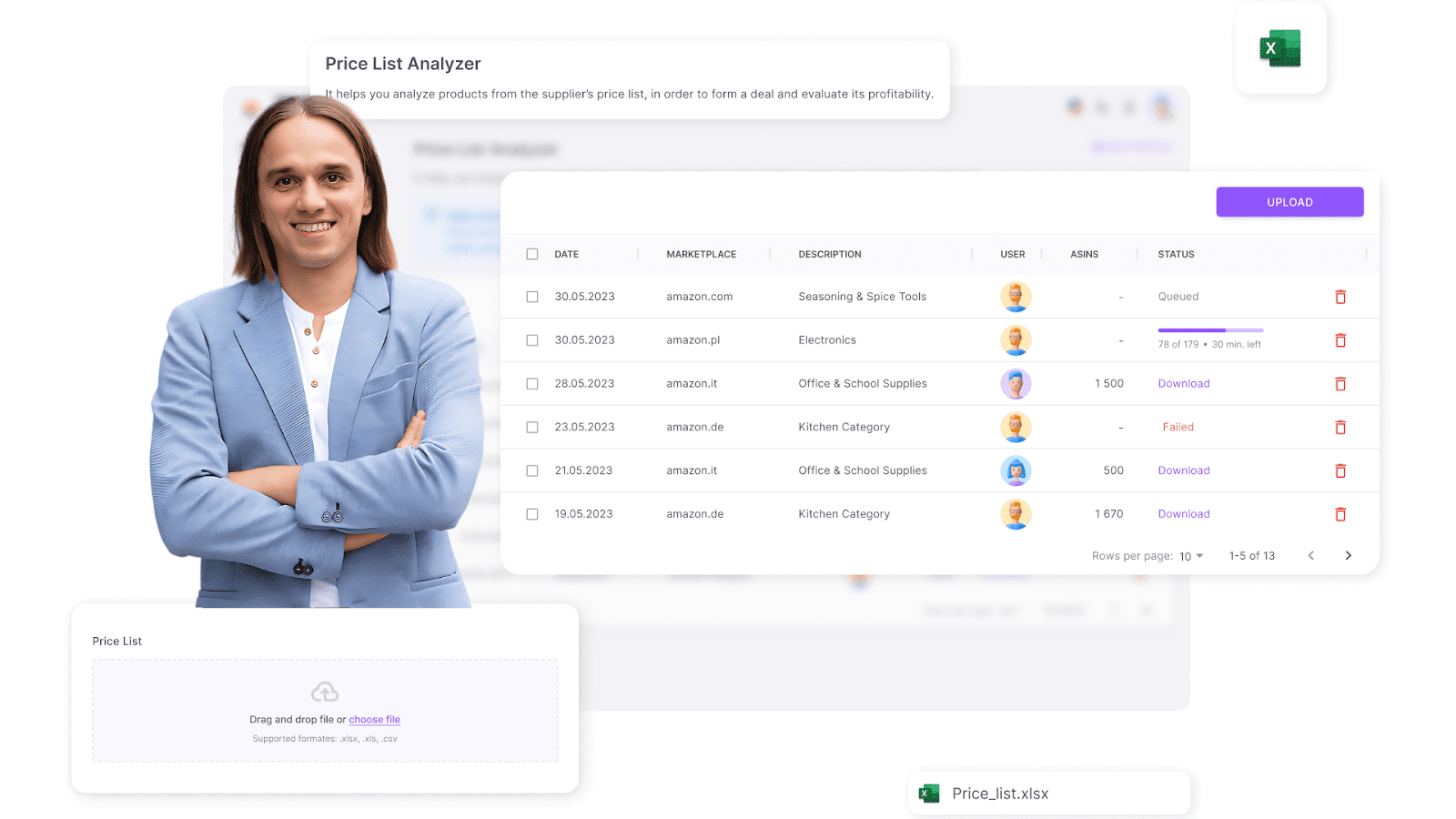
Fiyat Listesi Analizörü
Araç, tedarikçi ürünlerini kendileriyle otomatik olarak eşleştirir Amazon listeleri, her bir öğe için karlılığı hesaplar ve kritik performans ölçümleri sağlar. Kullanıcılar, karlı anlaşmalar ile gizli riskleri veya uyarıları olanları kolayca ayırt etmek için sonuçları herhangi bir metriğe göre filtreleyebilir.
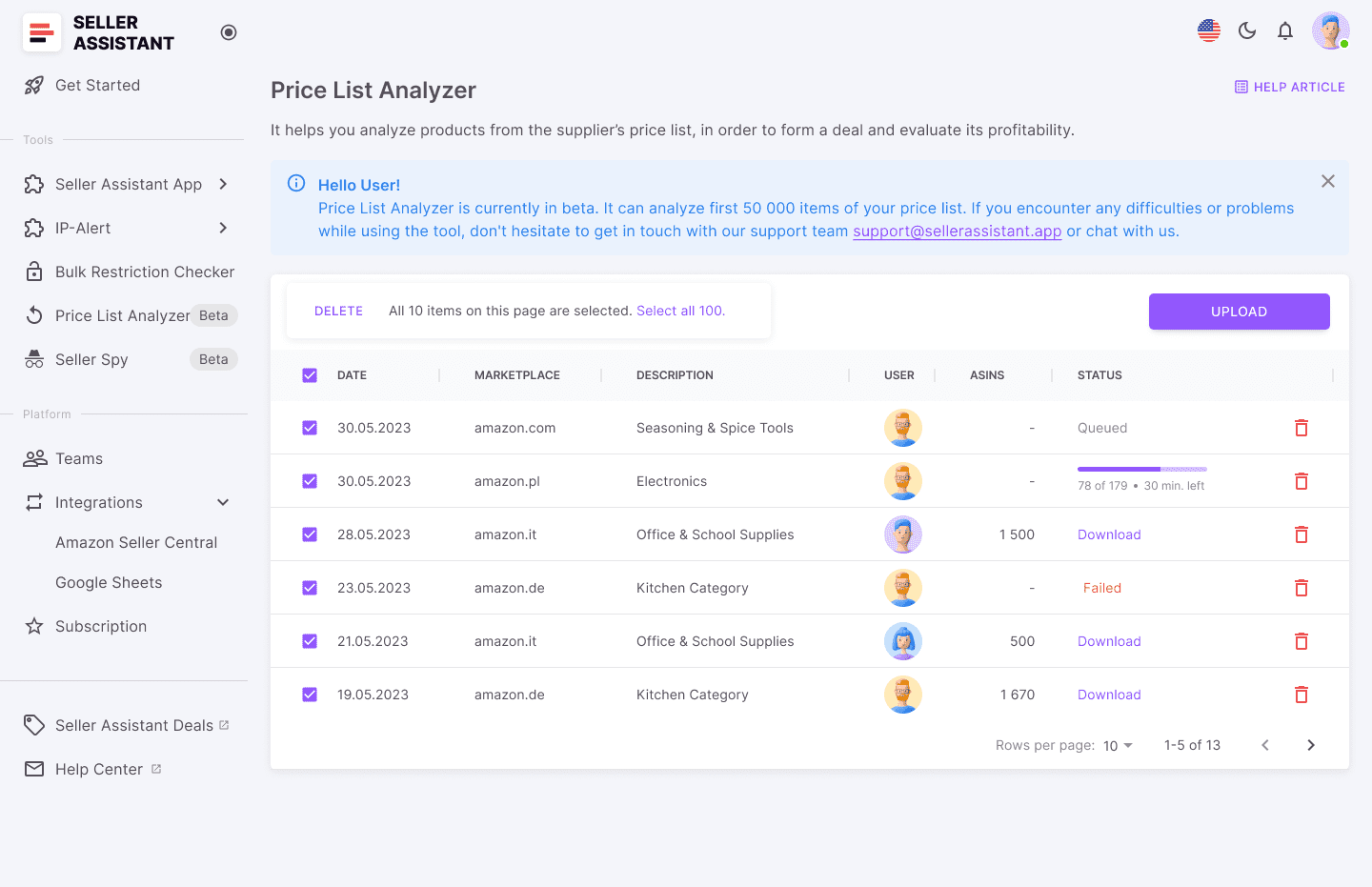
Satıcı Asistanının Fiyat Listesi Analizörü
Bir tedarikçi fiyat listesini analiz etmek için dosyayı Price List Analyzer’a yükleyin ve potansiyel olarak kârlı fırsatları içeren ayrıntılı bir .xls raporunu indirin.
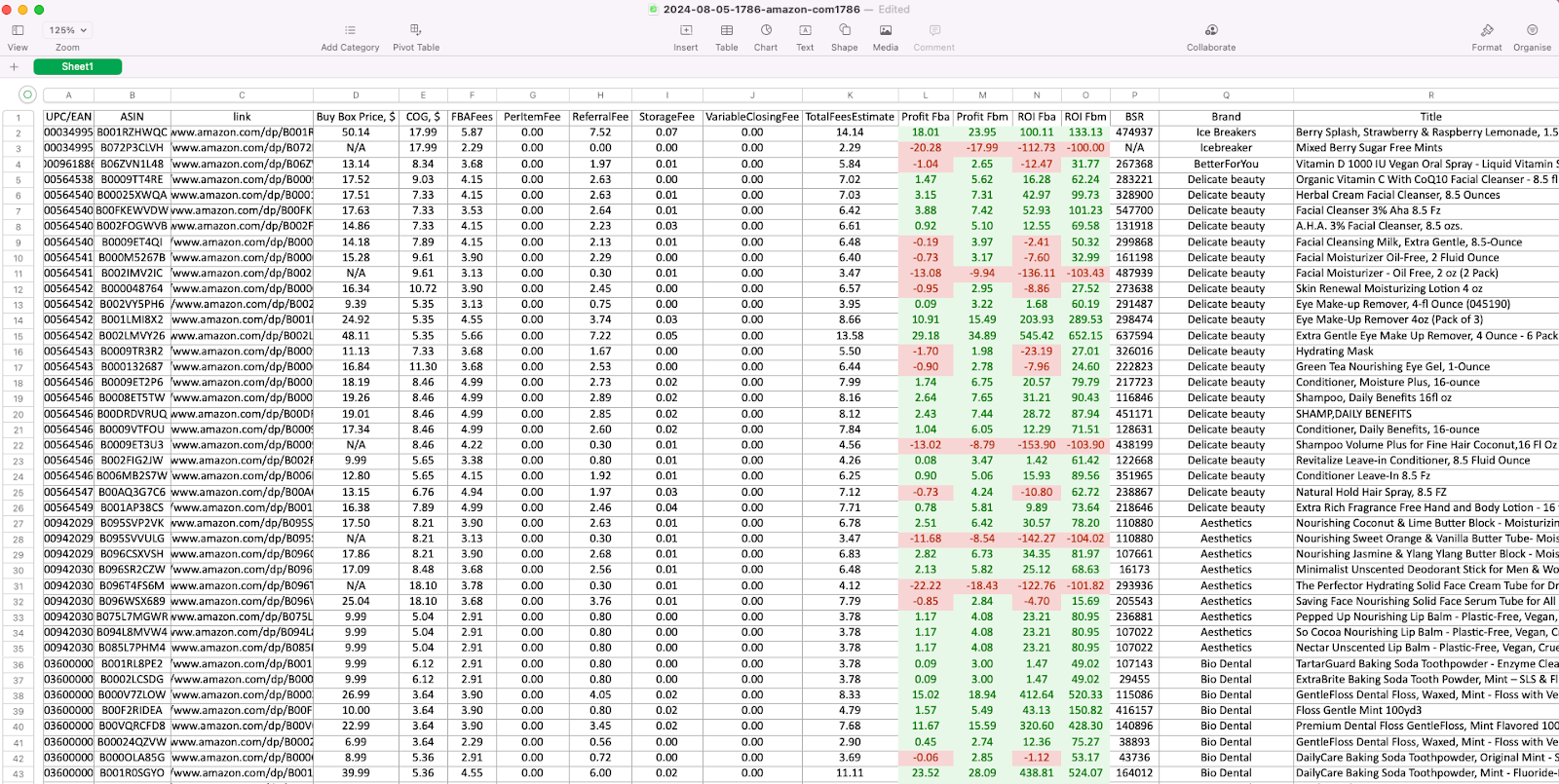
Fiyat Listesi Analizörü sonuç tablosu
Fiyat Listesi Analizörünün temel özellikleri
- Yüksek Marjlı Potansiyel Müşteri Tespiti
Aracı karlılığı hesaplar ve yatırım getirisi, kazançlı ürünleri vurgulayarak satıcılara saatlerce manuel araştırma tasarrufu sağlar.
- Veri zenginleştirme
Toptan fiyat listelerini temel metriklerle geliştirir ve satıcıların aşağıdakileri tanımlamasını sağlar. Amazon için en iyi fırsatlar.
- Toplu işleme ve gelişmiş filtreleme
Verimli kaynak bulma için gelişmiş veri filtrelerini kullanarak büyük fiyat listelerini hızla analiz edin ve aramaları hassaslaştırın.
- Kapsamlı karlılık bilgileri
Hakkında doğru bilgi edinin kar marjları, bilinçli kararlar vermek için yatırım getirisi, satış potansiyeli ve ürün hızı.
- Otomatik risk tespiti
Araç, aşağıdaki gibi olası sorunları işaretler büyük boy öğeler, tehlikeli maddeler (HazMat), eritilebilir veya kırılgan ürünler, fikri mülkiyet (IP) şikayetleri ve demetler veya varyasyonlar. Uyarılar arasında “FBA Ücreti Yok”, “Satın Alma Kutusu Fiyatı Yok”, “Mal Maliyeti Yok (COGs)”, “ASIN Bulunamadı”, “Onay Gerekli” ve Çok yüksek veya düşük ROI uyarıları yer alır.
Strateji 3. En Çok Satılan Fırsatlara Odaklanın
Ne sattığınız hakkında ileri düzeyde araştırma yapmak, ürününüzü büyütmenin son derece etkili bir yoludur. Amazon FBA satışları çünkü yalnızca yüksek talep gören, karlı ve düşük riskli anlaşmalara yatırım yapmanızı sağlar.
Satıcı Asistanı’nın gibi araçlarla otomatik toptan satış listesi taraması yaparken Fiyat Listesi Analizörü Bazı potansiyel müşteriler, Satın Alma Kutusu fiyatı, paketler veya setler olmaması veya çok düşük veya çok yüksek yatırım getirisi gibi uyarılara veya eksik verilere sahip olabilir. Bu anlaşmalar, uygulanabilirliklerini belirlemek için metrikleri tek tek analiz ederek ayrıntılı araştırma gerektirir. Ek olarak, bazı çevrimiçi arbitraj satıcıları, anlaşmaları bulmak için manuel araştırmalara güvenir ve bunlar aşağıdakilerle kolaylaştırılabilecek Satıcı Asistanı Uzantısı.
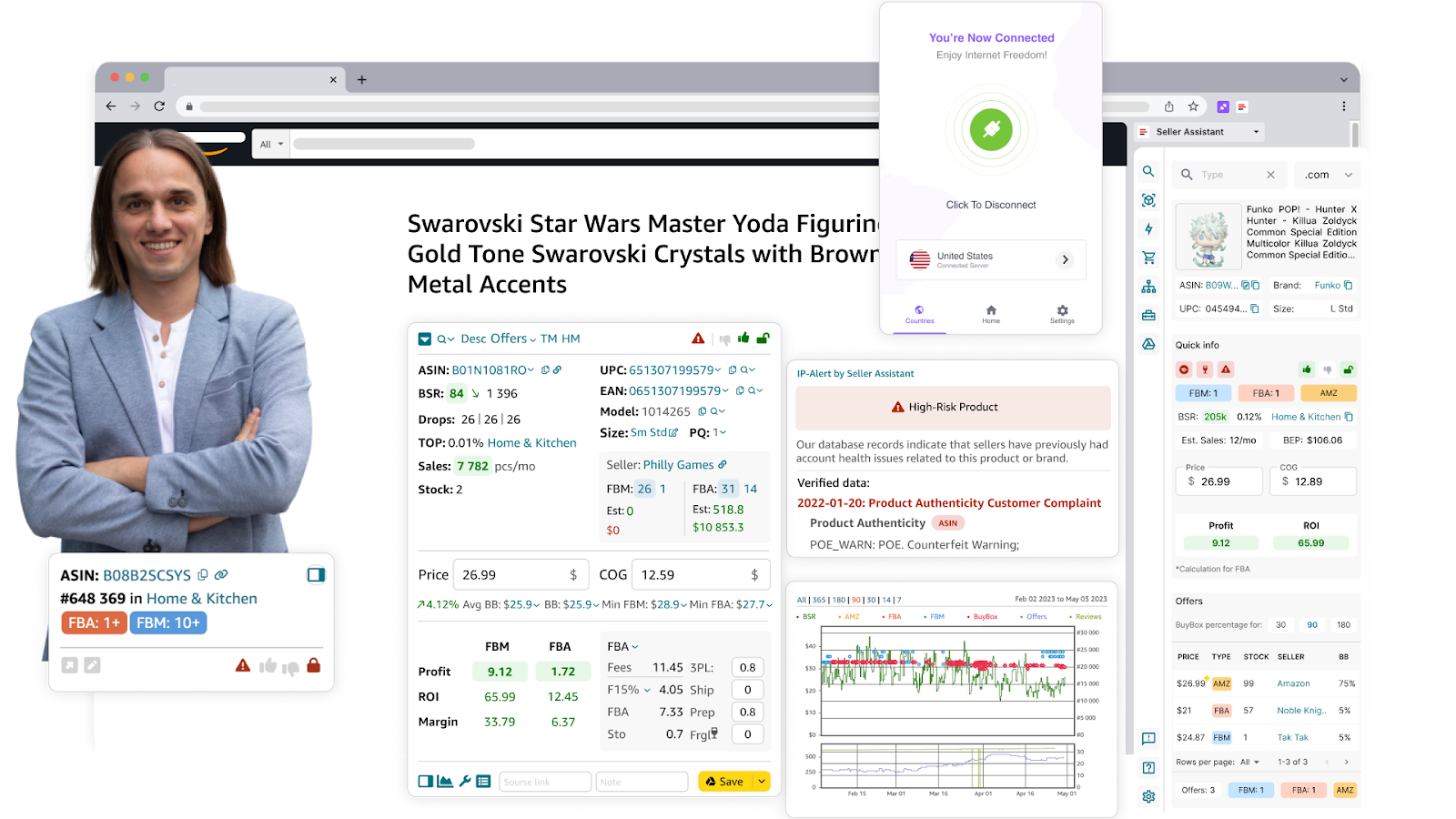
Satıcı Asistanı Uzantısı
Satışları nasıl artırır
Derinlemesine ürün araştırması, satıcıların kaynaklarını en umut verici potansiyel müşterilere odaklamasına olanak tanır ve envanterlerindeki her öğenin genel karlılıklarına olumlu katkıda bulunmasını sağlar. Bir ürünün satış performansını, rekabet düzeyini ve kar potansiyelini anlayarak bilinçli kararlar verebilir, riskli yatırımlardan kaçınabilir ve yatırım getirenizi en üst düzeye çıkarabilirsiniz. Bu yaklaşım, öngörülebilir başarı oranlarına sahip en çok satan anlaşmalara odaklanarak sürdürülebilir bir satış modeli oluşturmaya yardımcı olur.
Nasıl çalışır
Satıcı Asistanı Uzantısı Ayrıntılı verileri doğrudan Amazon ürün sayfalarında, arama sayfalarında sağlayarak ürün araştırmasını basitleştirir ve tedarikçi web siteleri. Satmaya değip değmeyeceğine karar vermek için size temel ürün verilerini rahatça gösterir. Ayrıca ürün tedarikçilerini bulmak için hızlı bağlantılar sağlar.
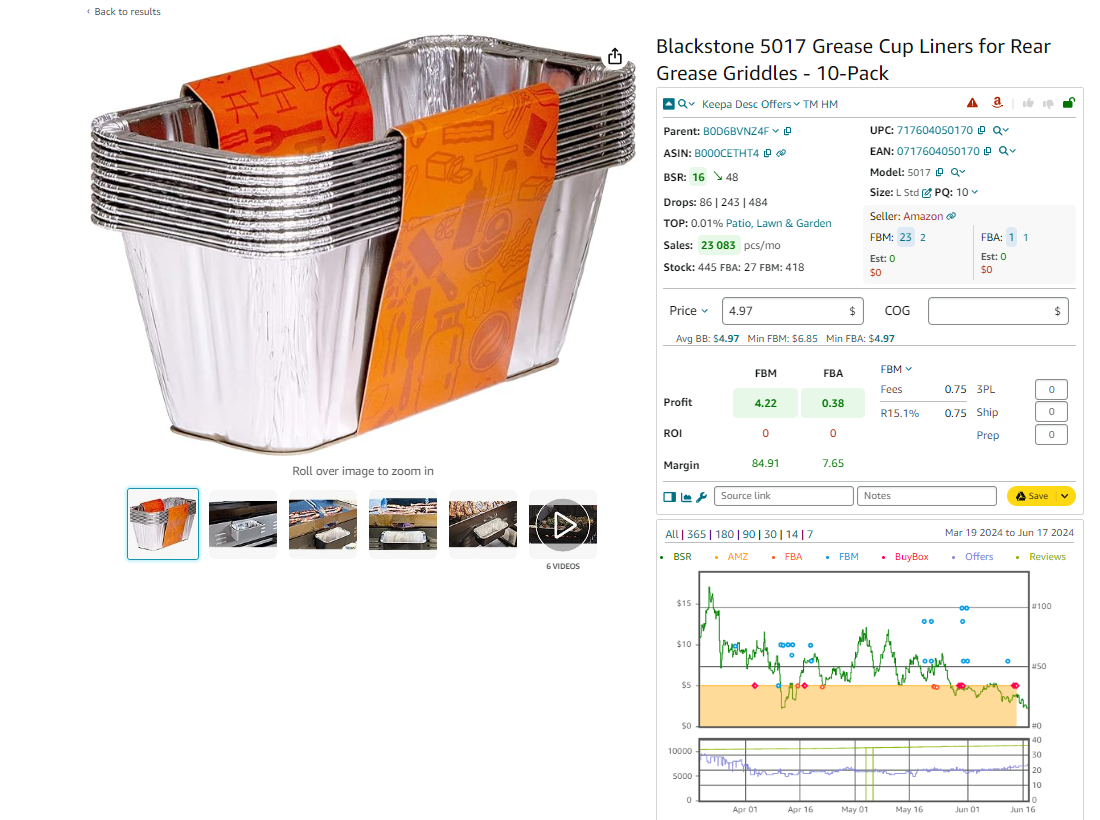
Ürün araştırmanızı başlatın
Gelişmiş anlaşma araştırma kriterleri
- Satış performansı
Görünüm En Çok Satanlar Sıralaması (BSR) ürün talebini değerlendirmek için eğilimler ve satış hızı.
- Rekabet analizi
Sayısını analiz edin FBA/FBM satıcılar ve rekabet yoğunluğunu değerlendirmek için fiyatlandırma stratejileri.
- Kârlılık ölçümleri
Uygulanabilir anlaşmaları belirlemek için beklenen yatırım getirisini, kar marjlarını ve bâr fiyatlarını hesaplayın.
- Risk bayrakları
Potansiyel IP şikayetlerini tespit etmek, ürün kısıtlamaları veya sorunlu maddelerden kaçınmak için diğer riskler.
- Geçmiş veriler
Zaman içindeki fiyat ve satış eğilimlerini analiz ederek güvenilir karar verme sağlayın.
İlişkili: Amazon İş Modelleri: Doğru Olanı Nasıl Seçilir?
Yeni Başlayanlar İçin Amazon’da Nasıl Satış Yapılır - Tam Kılavuz
Seller Assistant Extension ile adım adım gelişmiş ürün araştırması
Adım 1. Yönlendirmeleri kaldır
Yanıltıcı verileri önlemek için ürün bağlantılarından tavsiye etiketlerini silin.
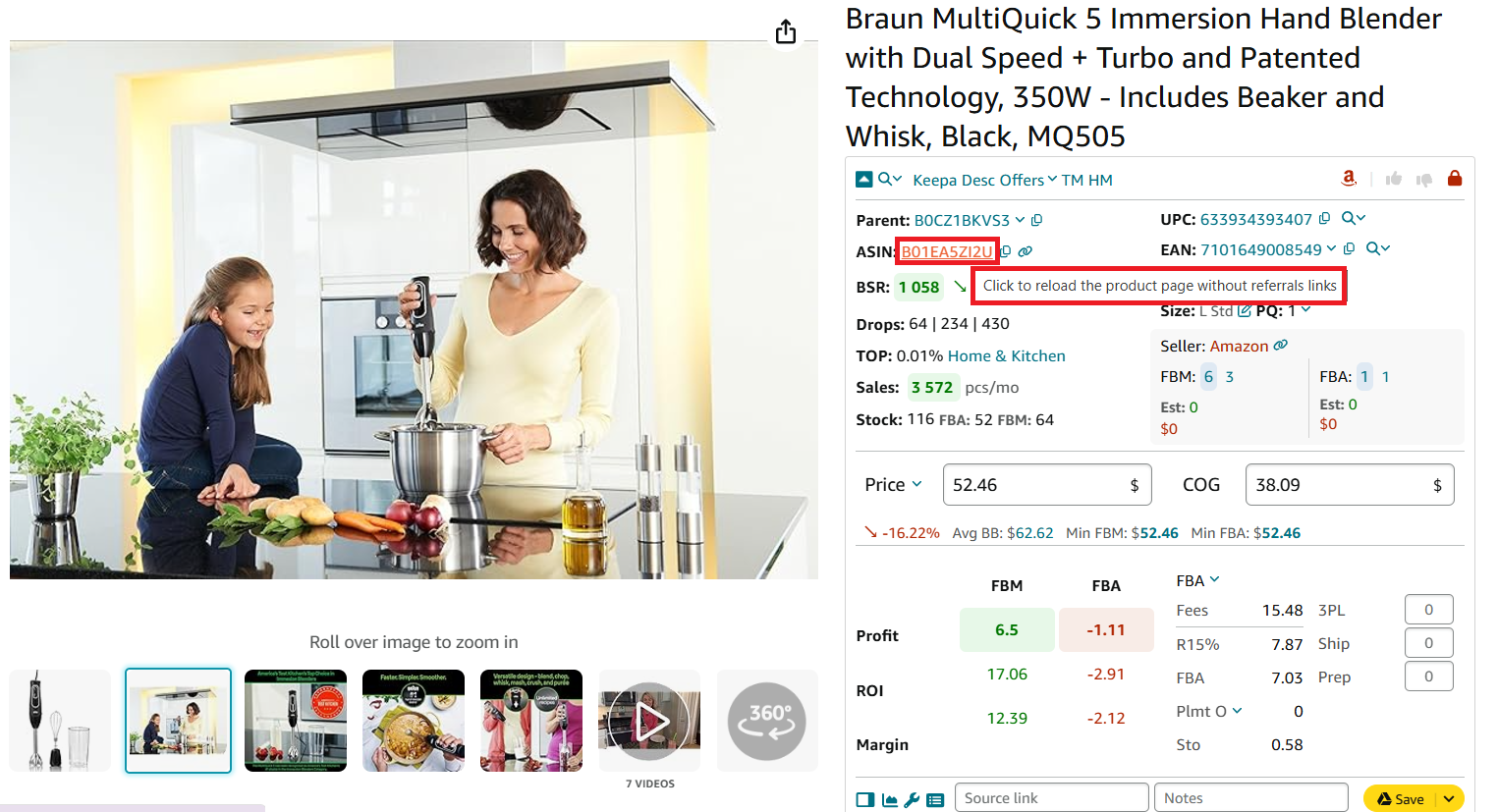
Click the product ASIN to remove the referral
Step 2. Evaluate sales potential
- Check BSR and trends
Products ranked between 1 and 100,000 typically sell well.
- Examine the “Top” percentage
A figure below 0.5% indicates high sales velocity.
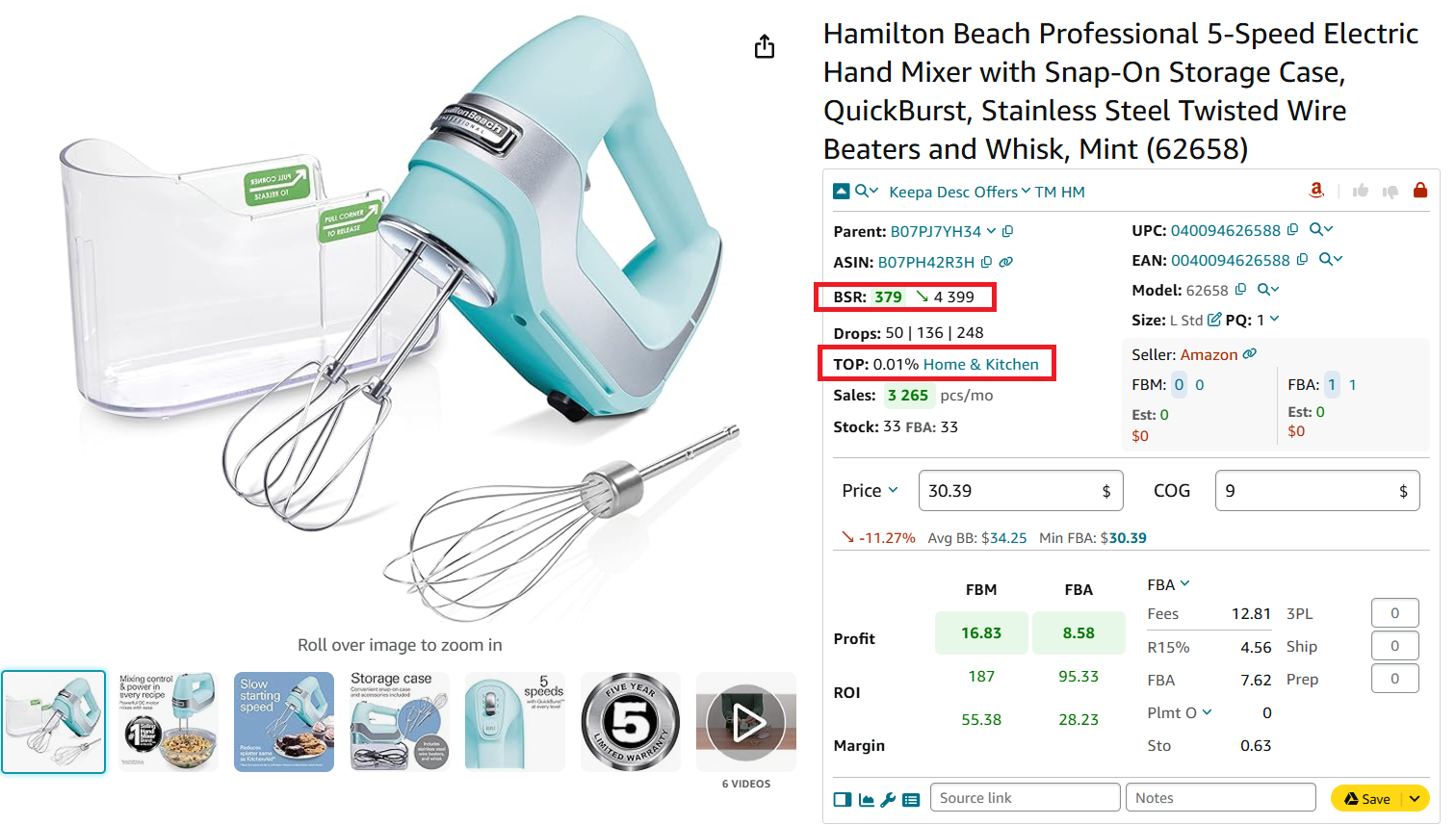
Check how well the product sells
Step 3. Find out how many units you can sell
- Look into Drops (BSR drops)
It indicates how many products were actually sold during 30, 90, and 180 days and helps estimate the number of products you can sell.
- Review Sales
It shows estimated product sales in pieces per month based on BSR. This helps estimate how many units you can potentially sell.
- View your potential sales
The Est figure indicates how many p=units you can potentially sell if you become one more seller on the listing.
- Research competitor stock
Stock is the quantity of products available for offer on Amazon by FBA and FBM sellers. The figures of products in stock are shown by FBA and FBM sellers separately.
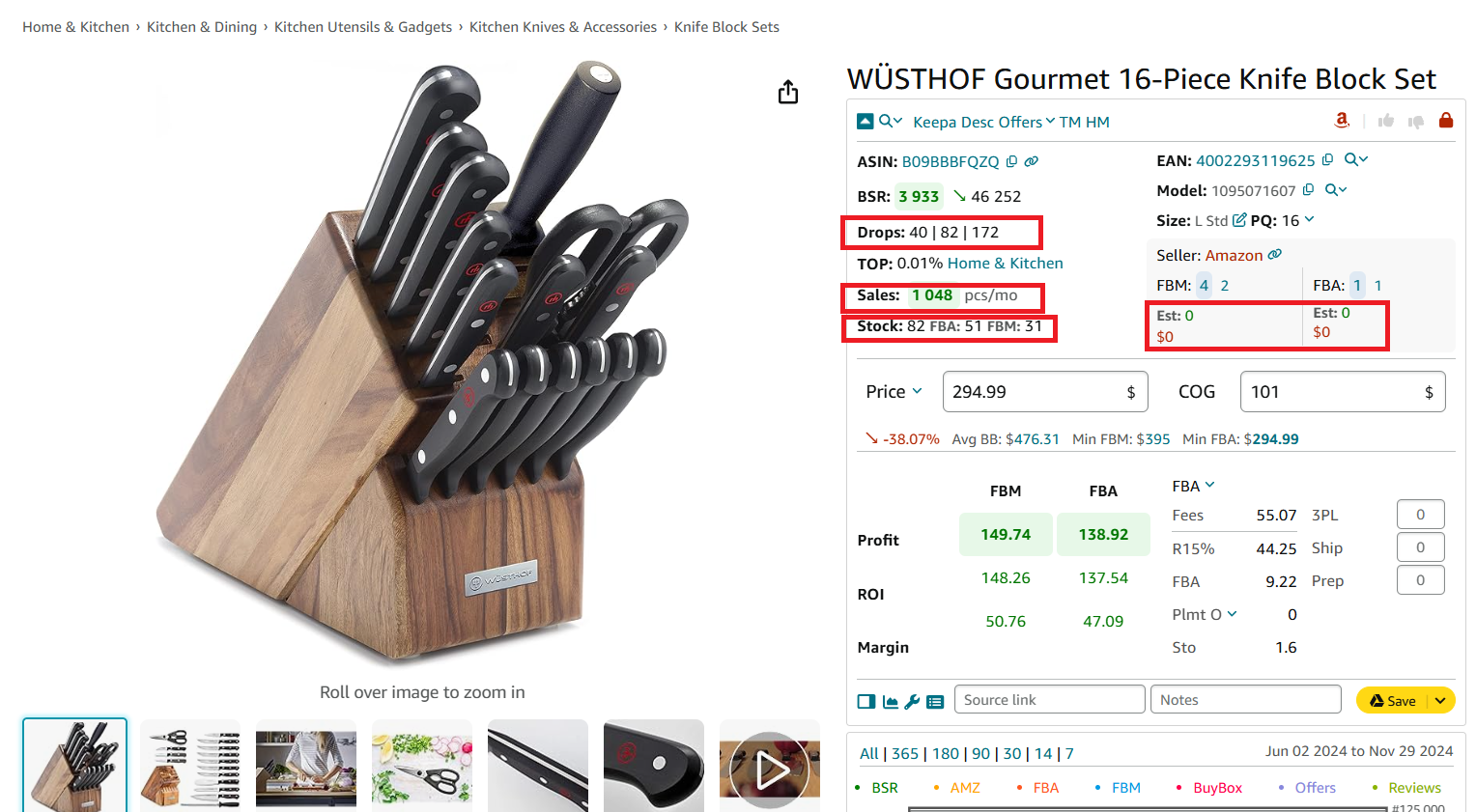
Identify how many units you can sell
Step 4. Analyze competition
- Look into seller count
Examine FBA/FBM seller offers and their pricing to gauge competition intensity. Ideal listings have 2–15 competitors.
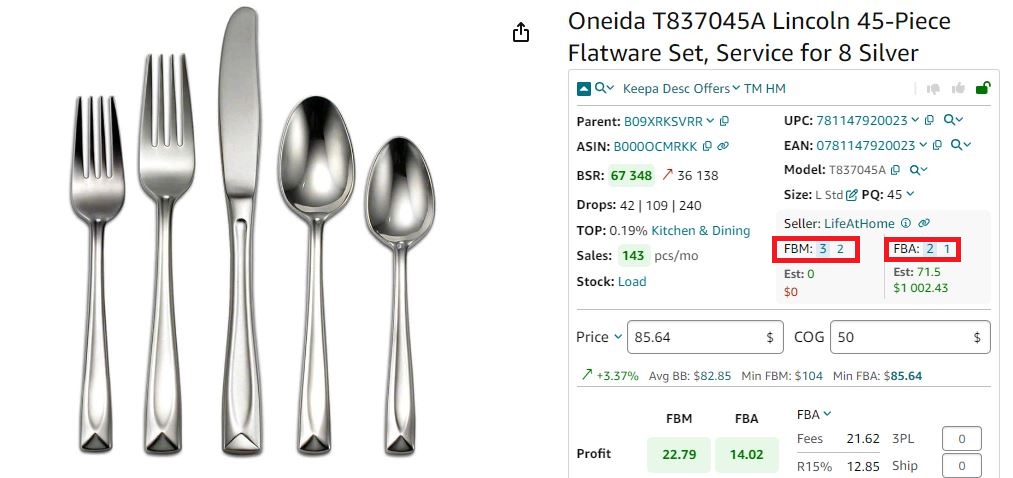
Seller Assistant shows the number of FBA and FBM offers
- Research competitor offers and your Buy Box chances
Use the Offers feature to view seller details, stock levels, and Buy Box share to understand whether there is a dominating seller in the Buy Box or you can overtake it.
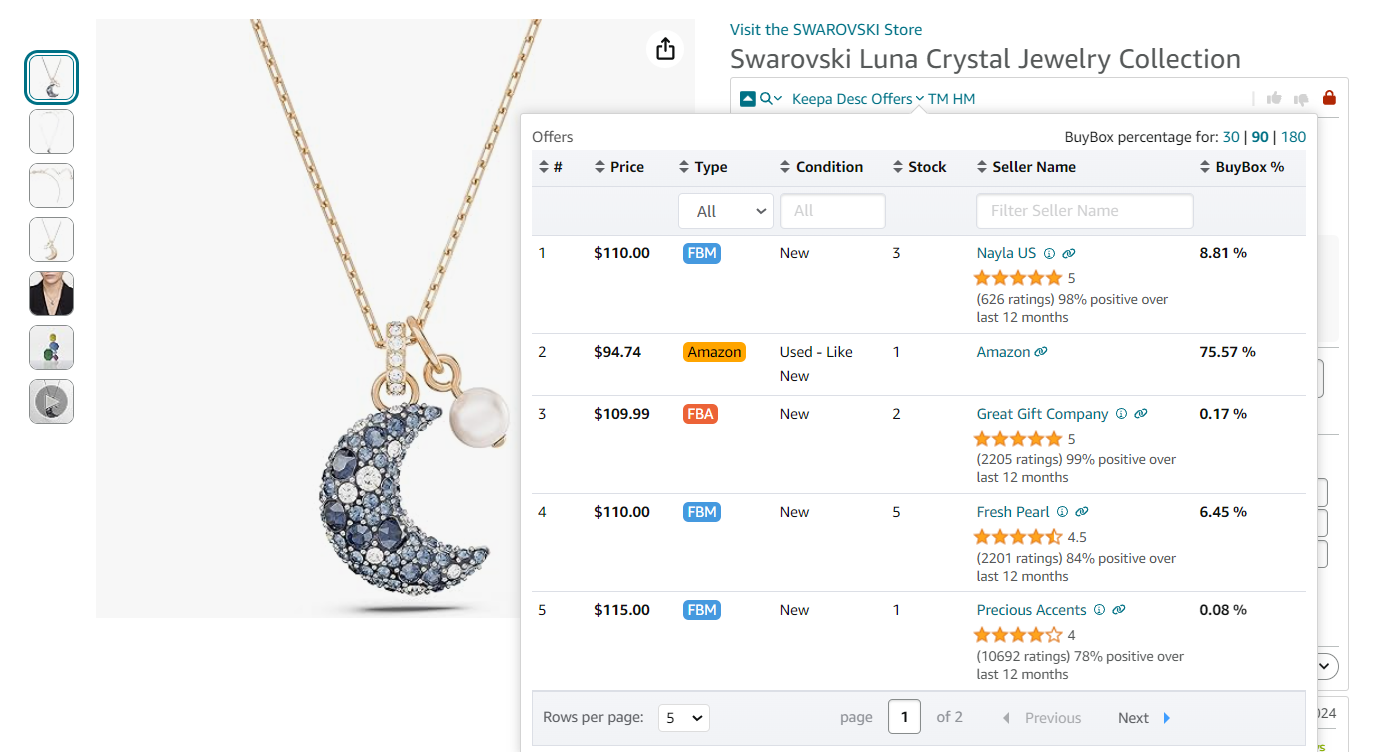
Offers is the extension’s feature that allows to research all seller offers of a product
- Check seller type
Verify whether Amazon is competing for the Buy Box, as this can make winning it difficult.
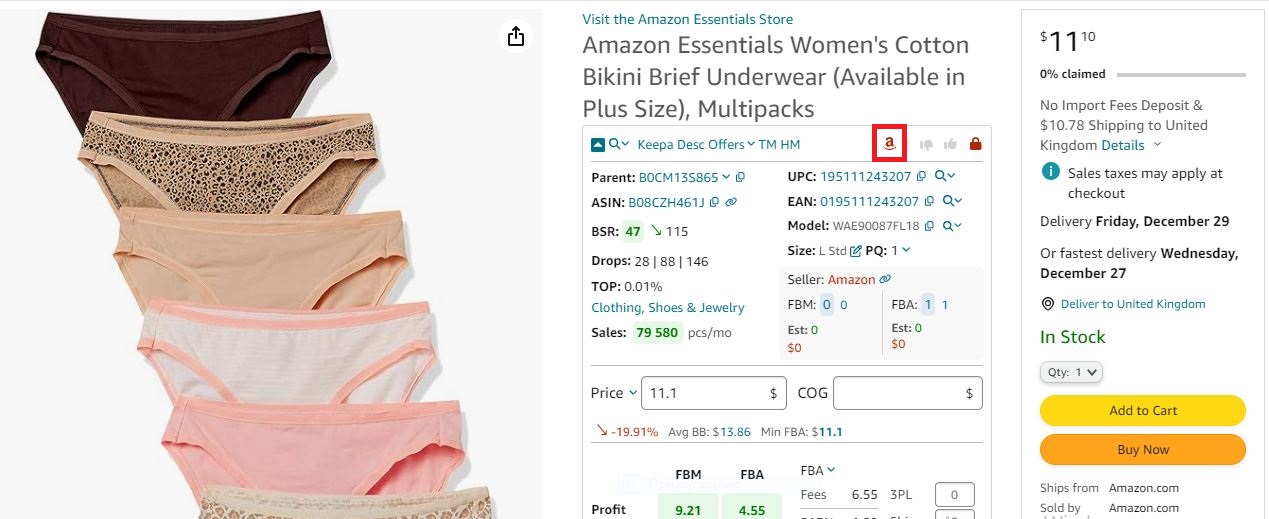
If Amazon is a seller, Seller Assistant shows the red Amazon icon on the product pages
Step 5. Examine historical data
Assess product listings at least six months old for stable sales history using integrated Keepa charts.
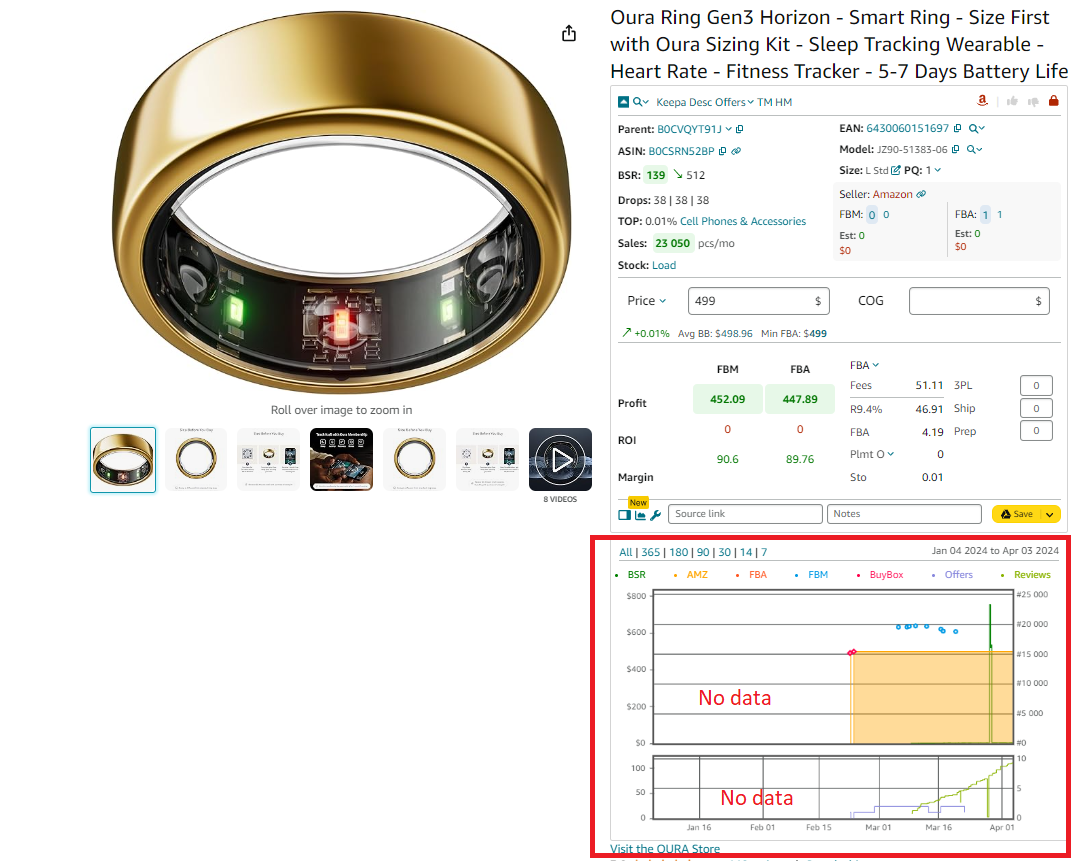
Examine historical data
Step 6. Evaluate pricing
Research the average Buy Box price (Avg BB), and if it goes up or down compared to a 90-day price (green arrow up or red arrow down). Study the lowest FBA (Min FBA) and lowest FBM (Min FBM) offers to understand the price level you can set.
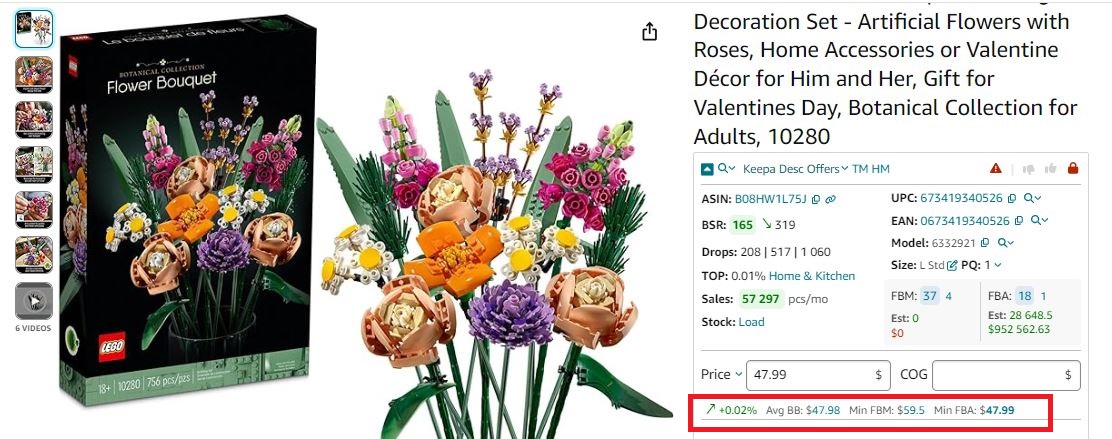
Buy Box
Step 7. Focus on variations
Use Seller Assistant’s Variation Viewer to identify top-selling product variations by ratings and share percentages.
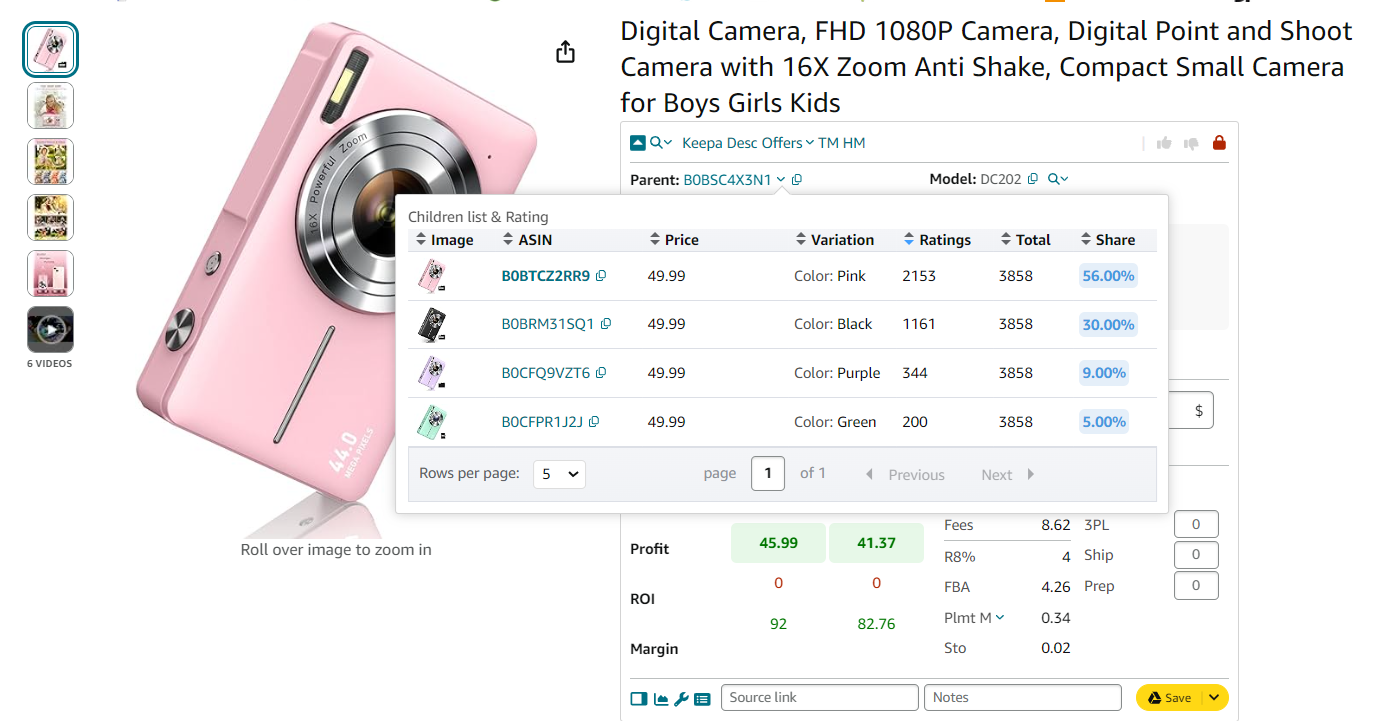
Variation Viewer
Step 8. Review restrictions and alerts
- Check product restrictions
Confirm that products are ungated or restricted using green (ungated) and red (restricted) icons.
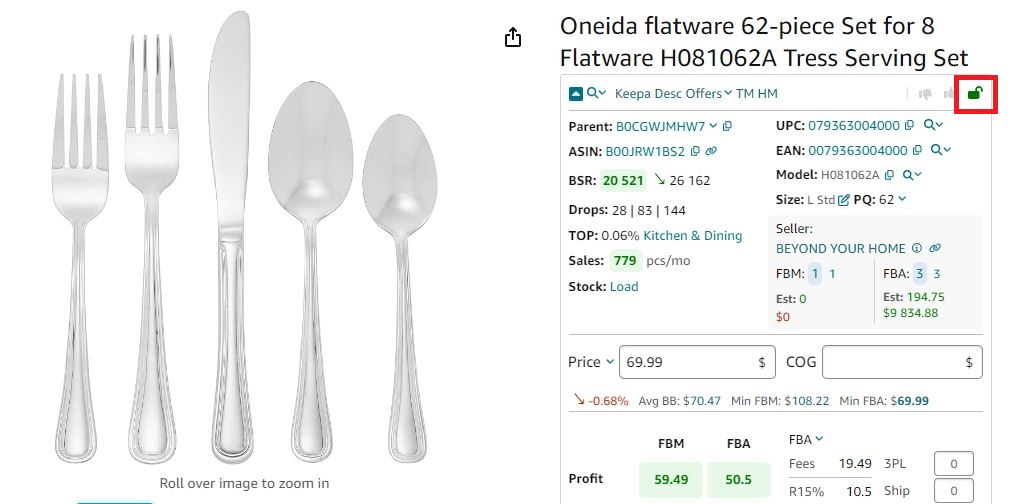
If you see a green open lock icon in Seller Assistant, you can sell a product
- Identify IP complaints
Identify risky products flagged for intellectual property complaints and Amazon policy violations by viewing the Warning icon. Hover a mouse over it to see the violation type.
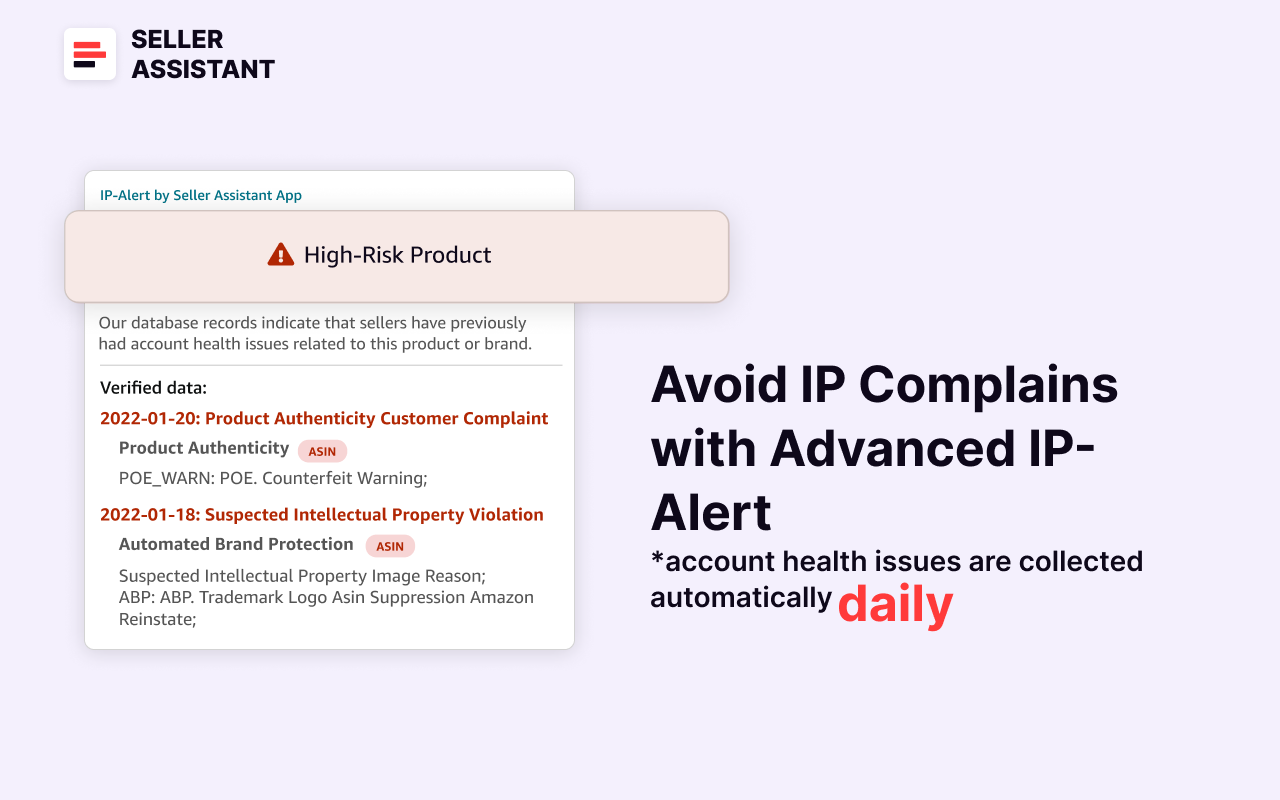
Seller Assistant’s IP Alert extension
- Research product flags
Review product warnings like fragility, hazardous materials, etc.
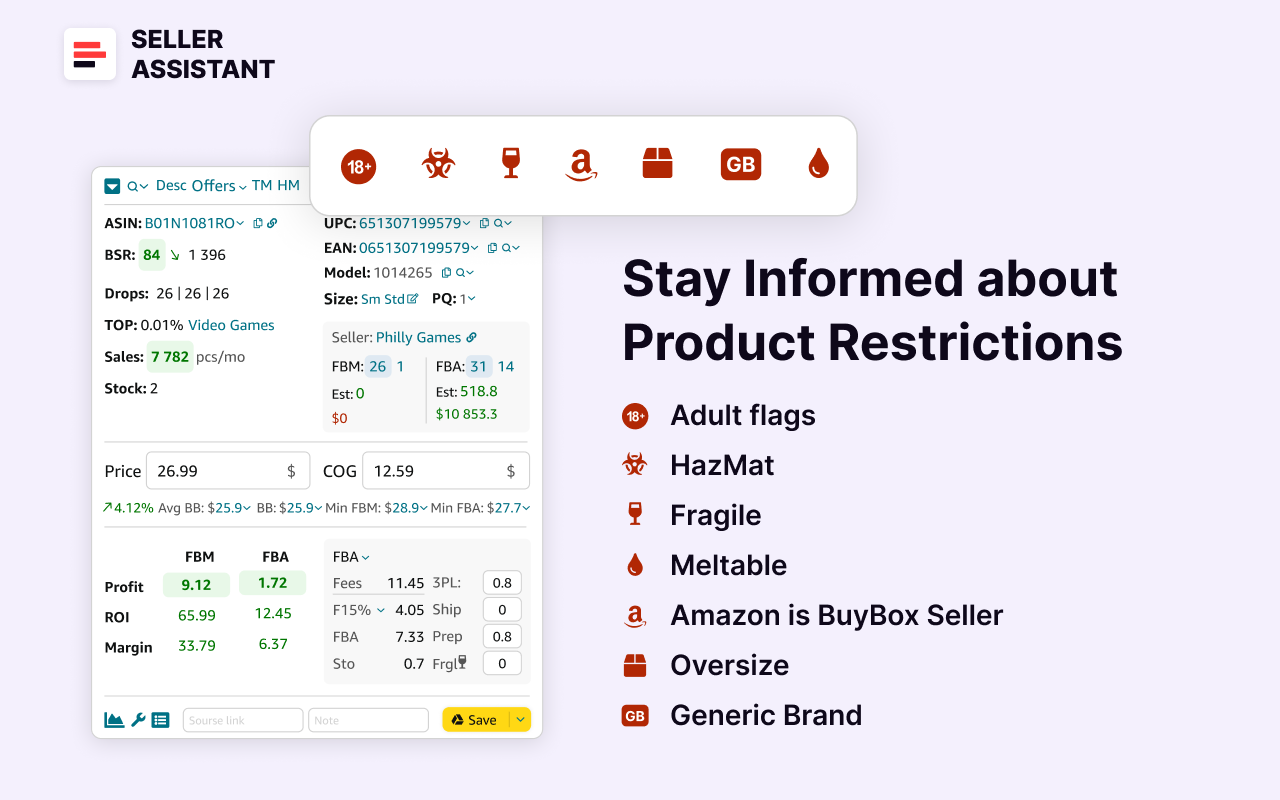
Seller Assistant’s product flags
Step 9. Analyze reviews
Prioritize products with 4–5 stars and low negative feedback. Look at the integrated Keeps chart.
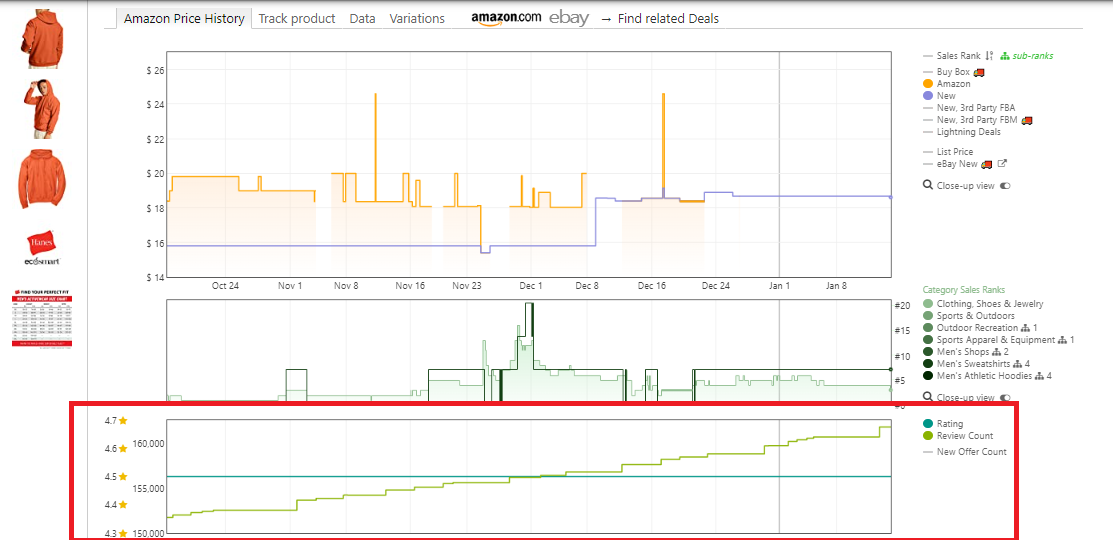
Reviews are available on the separate Keepa chart built into Seller Assistant
Step 10. Profit calculation
Use the FBA&FBM profit calculator to finalize profitability and ensure alignment with your financial goals. Determine ROI by entering the Cost of Goods Sold (COG, the purchase price from the supplier), and logistics costs/ The calculator will show all FBA or FBM fees, profit, ROI, and margin.
Seller Assistant’s product flags
Related: Best Product Ideas for Amazon FBA in 2024
Amazon FBA Selling Tips for 2024
Strategy 4. Sell What Your Competitors Sell
Your competitors may already be selling best-sellers that you aren’t aware of. Adding these products to your portfolio can be an effective way to increase your sales on Amazon and tap into proven market demand.
To identify such opportunities, competitor analysis and tracking are essential. While doing this manually is difficult and time-consuming, tools like Seller Assistant’s Seller Spy automates the process, providing valuable insights into your competitors’ product strategies.
.png)
Seller Spy by Seller Assistant
How it grows sales
By tracking competitors, you can discover their best-selling products and add similar or identical items to your inventory. This allows you to leverage their market insights, minimizing the guesswork in identifying in-demand products.
Additionally, monitoring competitor pricing and customer feedback ensures your products remain competitive, improving your chances of securing the Buy Box and driving more sales.
How it works
Competitor tracking involves identifying new products your competitors have introduced and those they’ve stopped selling. These changes reflect shifts in market demand, product profitability, or customer preferences.
Key aspects of competitor tracking
- New product monitoring
Stay informed about products competitors are adding to their stores, helping you spot trends and find opportunities to expand your portfolio.
- Product removals
Monitor products competitors stop selling, which may indicate declining demand or profitability, helping you avoid risky investments.
- Seller feedback
Track competitors’ star ratings, the total number of ratings, and positive reviews to gauge product popularity and reliability.
- Pricing
Analyze competitor pricing to ensure your products are competitively priced without sacrificing profit margins.
How to automate competitor tracking with Seller Assistant’s Seller Spy
Seller Spy, a tool from Seller Assistant, automates competitor analysis to help you stay ahead in the market. It tracks your competitors’ activities, providing insights into new brands and products they start or stop selling, as well as how they price their items.
To analyze your competitor, enter the link to the Amazon storefront of the seller you want to track and view the competitor summary or download a file with product tracking results.
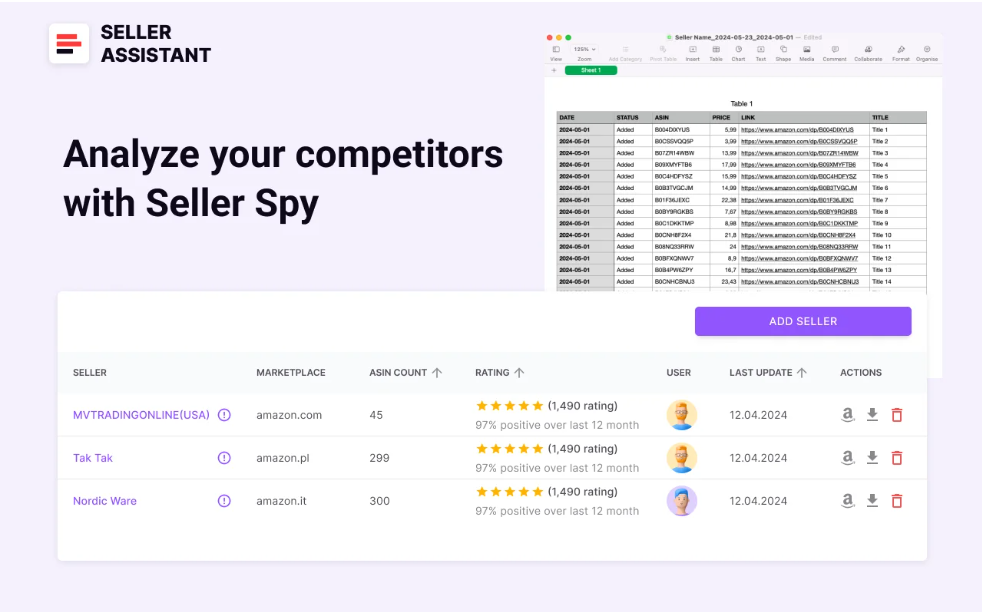
Seller Spy data
This data enables you to add similar or identical products to your Amazon store and make price adjustments to remain competitive when needed.
Seller Spy shows the competitor summary information and the breakdown of added or removed competitor’s products with detailed product information which (downloadable Excel file).
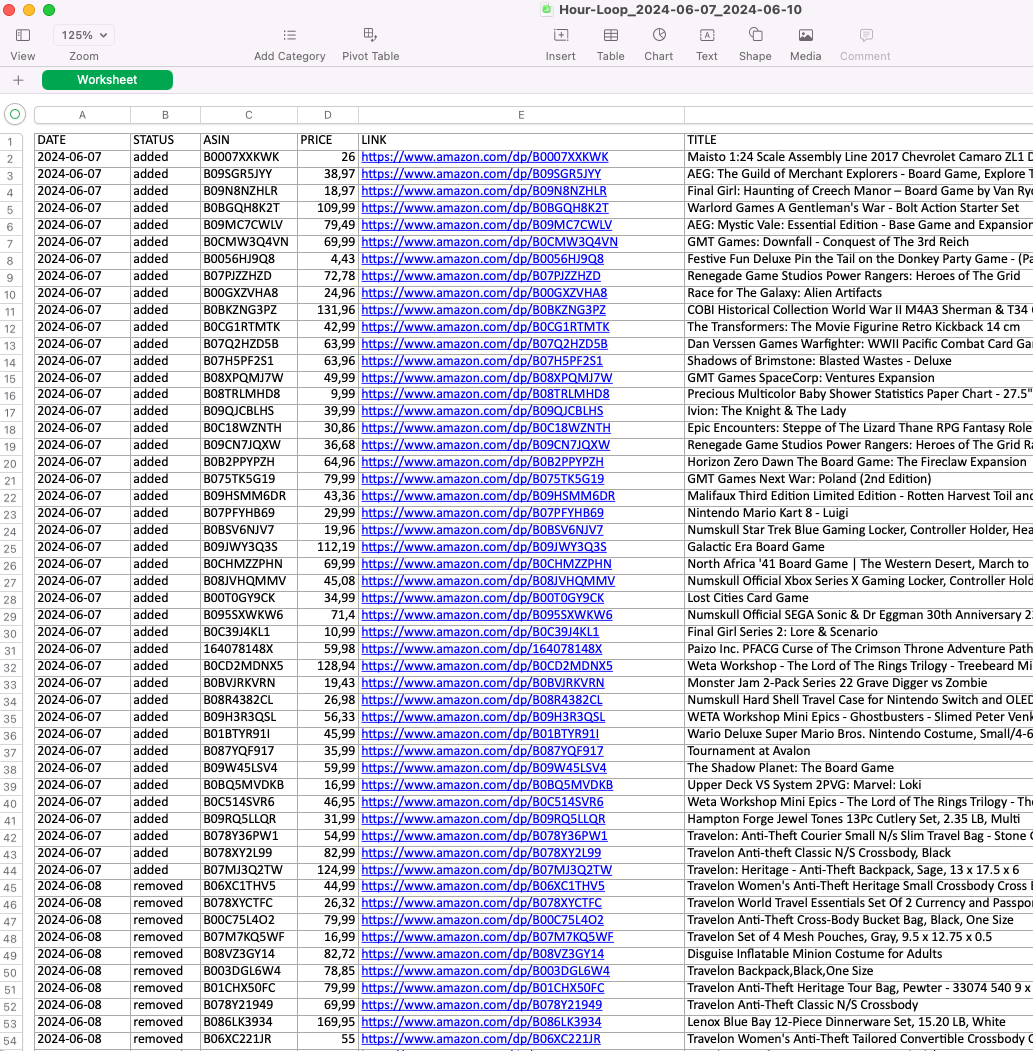
Seller Spy product tracking details
Key features of Seller Spy
- Automated competitor tracking
Effortlessly monitor competitor activity to save time and effort.
- Product updates
Identify which products competitors add or remove from their listings.
- Opportunity discovery
Uncover products your competitors are selling that you’re not, allowing you to expand your inventory.
- Pricing insights
Monitor competitor pricing to keep your products competitively priced and maximize profit margins.
.webp)
Seller Spy
Strategy 5. Propose Deals and Promotions
Promotions and deals tailored to specific events are a powerful marketing tool for how to increase Amazon sales. They attract new customers, boost visibility, and incentivize purchases by offering value through discounts or special offers.
With Amazon’s promotional tools, sellers can create compelling offers that drive sales while managing inventory effectively.
Related: Amazon FBA for Beginners
What to Sell on Amazon 2024
Selling on Amazon: How to Make Money?
How to Sell on Amazon for Beginners - Complete Guide
How it grows sales
Deals and promotions create urgency and attract price-sensitive buyers, making them effective in driving a surge in sales. By strategically offering discounts or promotions, you can get slow-moving inventory going, spotlight new products, or strengthen customer loyalty.
Promotions also improve your product’s visibility on Amazon, as they often appear in dedicated deal sections, increasing exposure and traffic to your offers.
Types of Amazon deals and promotions
Amazon offers four types of promotional tools: promotions, deals, coupons, and price discounts, described below.
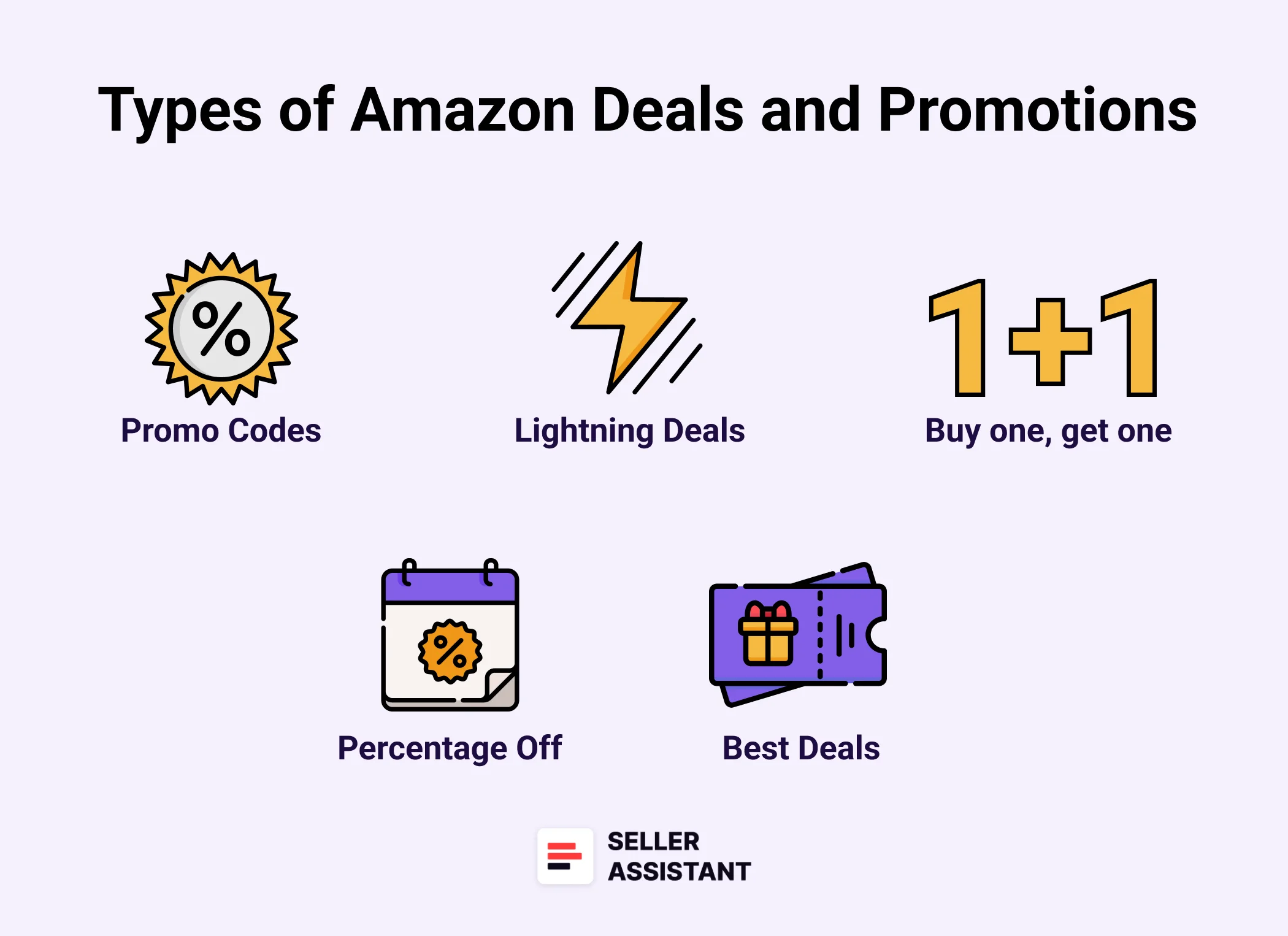
Types of Amazon deals and promotions
Promotions
- Social Media Promo Codes
Create custom promo codes to share on social media, email campaigns, or influencer partnerships. These codes can target specific customer groups and control redemptions to match your sales goals.
- Percentage Off
Offer discounts as a percentage of the product price to attract buyers. Use tiered discount structures to encourage larger purchases or apply a limited-time sale price to drive urgency.
- Buy One Get One
A classic promotion offering free or discounted items with a purchase. Perfect for spotlighting new products or moving excess inventory.
Deals
- Lightning Deals
These short-term promotions (usually 4–12 hours) provide steep discounts to create excitement and drive a sales spike. They appear prominently on Amazon’s Deals page.
- Best Deals
Time-bound offers lasting a few days, appearing on the Deals page, and boosting visibility for featured products.
Coupons
Digital discounts that can be redeemed directly by customers on the product page, search results, or their shopping cart. Coupons are easy to discover and automatically promoted on Amazon.
Price Discounts
Campaigns offering reduced prices for up to 30 days with a strike-through price displayed, enhancing product appeal and driving conversions.
How it works
Amazon provides intuitive dashboards for creating and managing promotions and deals. Here’s how to get started with each type.
Promotions
- Access the Promotions Dashboard in your Amazon Seller Central account.
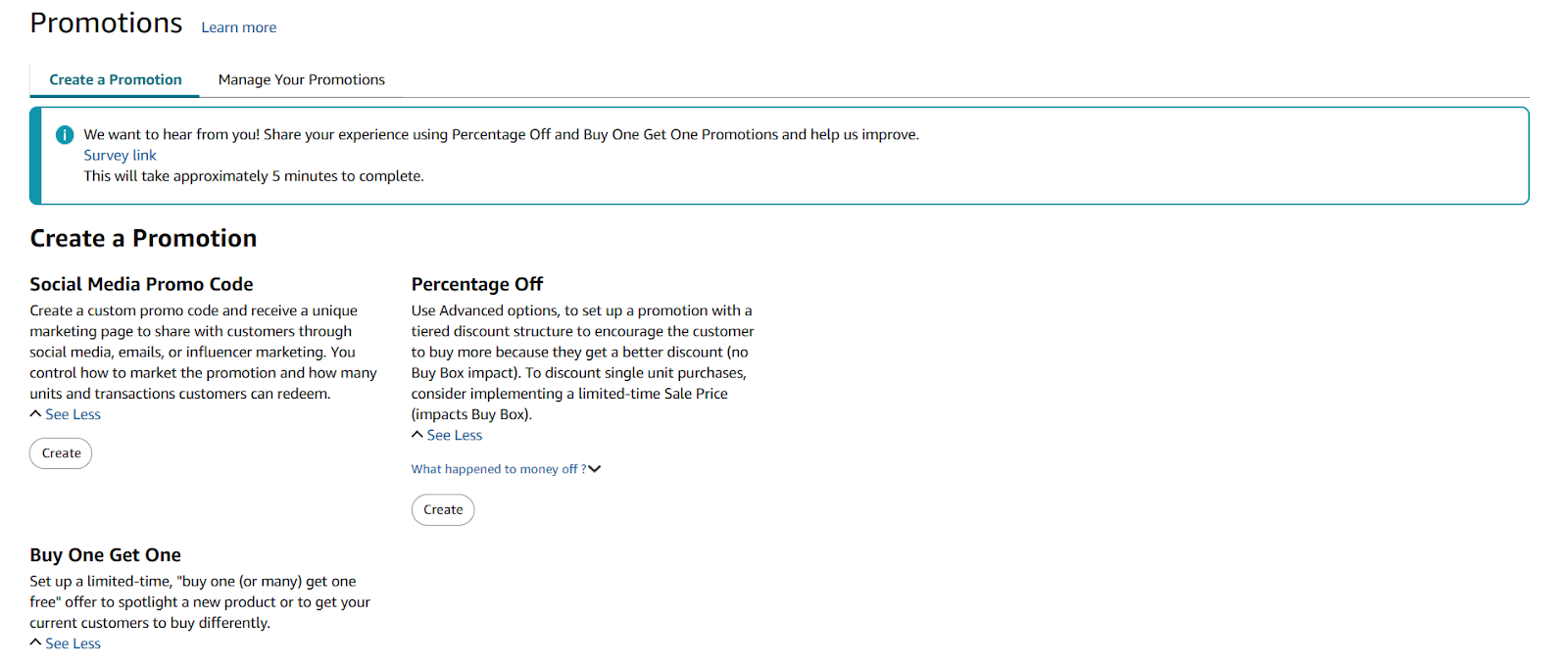
Promotions Dashboard
- Choose the promotion type (e.g., Social Media Promo Code, Percentage Off, or Buy One Get One).
- Customize the offer by setting discount levels, timeframes, and redemption limits to align with your goals.
Deals
- Use the Deals Dashboard to find eligible ASINs that can participate in the program.
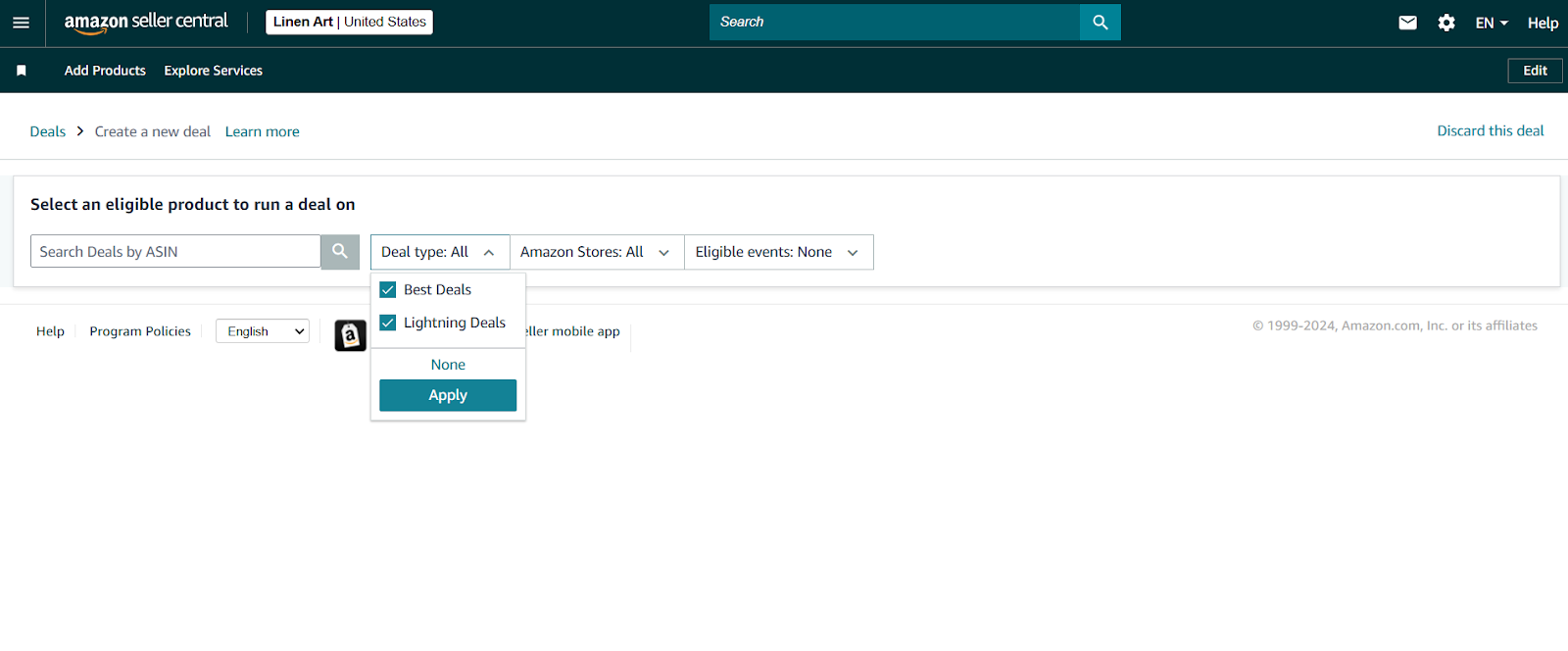
Deals Dashboard
- Customize your deal by selecting the timeframe, discounted price, and available units.
- Monitor deal performance and status to ensure optimal results.
Coupons
- Navigate to the Coupons Dashboard to create and manage digital discounts.
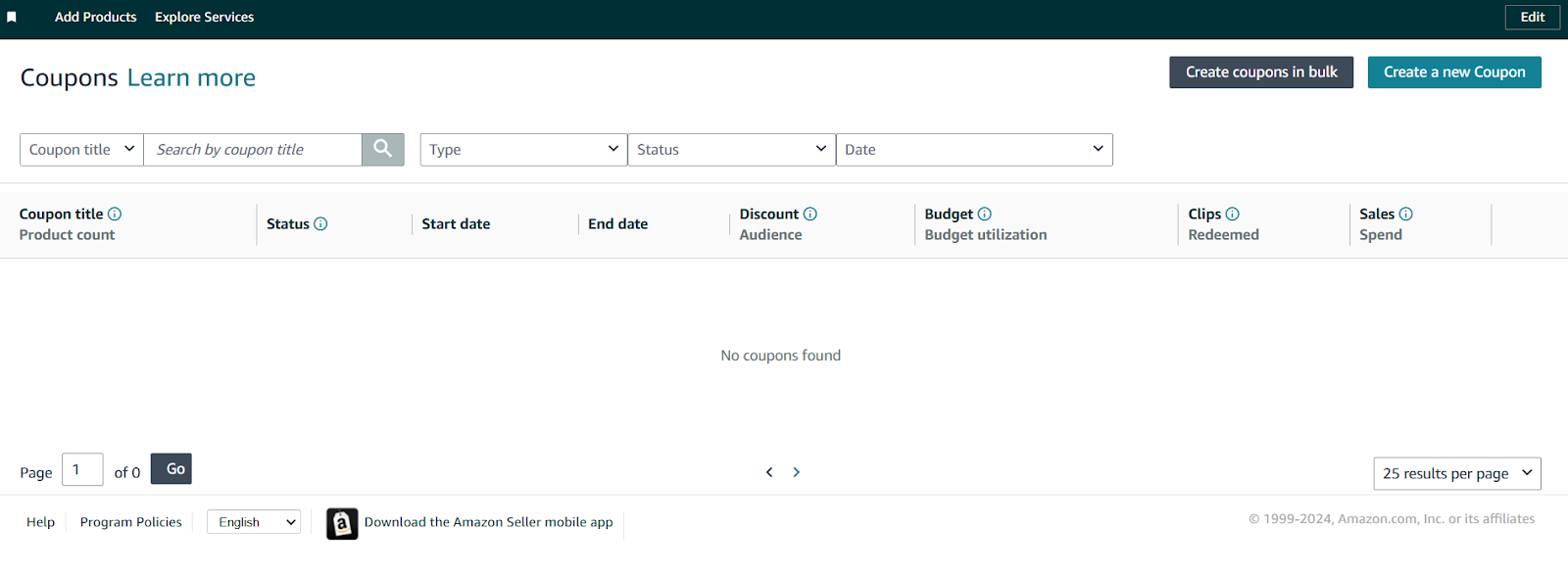
Coupons Dashboard
- Set the discount amount, targeted products, and expiration dates for the coupons.
- Ensure eligibility by maintaining a Professional Seller account with a minimum 3.5 feedback rating.
Price Discounts
- Access the Price Discounts Dashboard to set up time-bound campaigns.
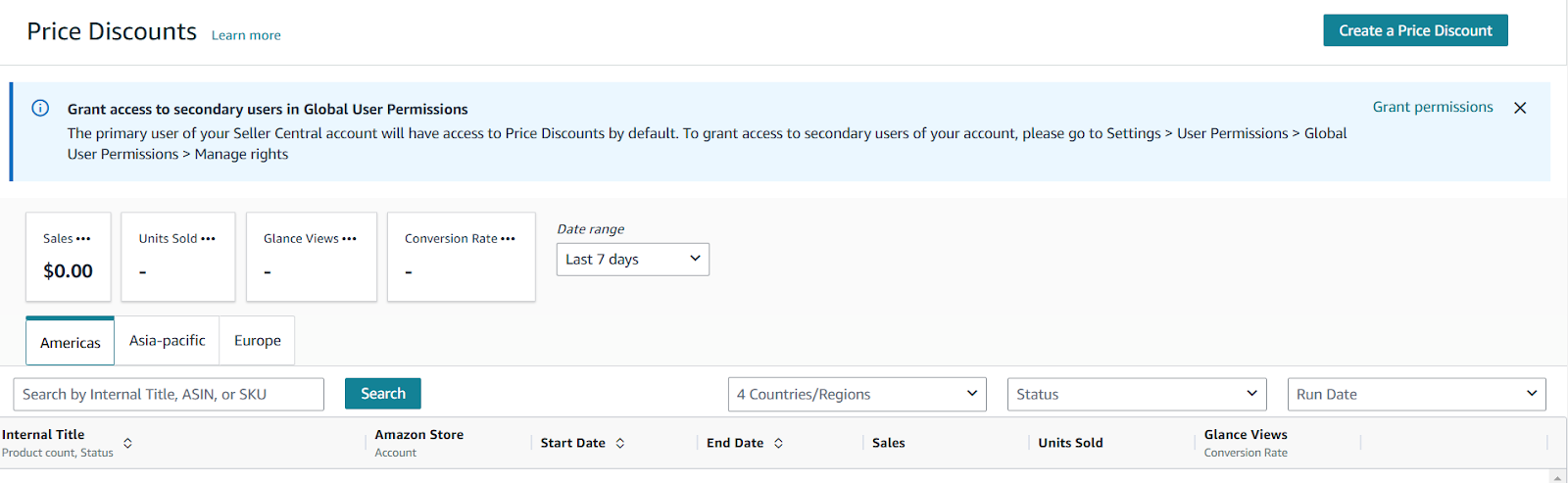
Price Discounts Dashboard
- Define the discount percentage and inventory limits for each product.
- Only Professional Sellers with a 3.5+ feedback rating are eligible for this feature.
Sıkça Sorulan Sorular
Amazon’da satışları nasıl artırabilirim?
Amazon’da satışları artırmak için yeni kârlı ürün tedarikçileri bulma, yüksek marjlı ürünler ekleme, rakipleri araştırarak kârlı ürünler belirleme ve promosyonlar sunma gibi stratejilere odaklanın. Ayrıca yüksek talep gören ürünleri belirlemek ve operasyonları kolaylaştırmak için araçlar kullanın.
Amazon’da satış sıralamam nasıl yükselir?
Amazon satış sıralamanızı iyileştirmek, rekabetçi fiyatlar sunarak, olumlu müşteri yorumları kazanarak ve kupon veya yıldırım fırsatları gibi promosyonlar düzenleyerek satış hızını artırmayı gerektirir. Ürün listenizin doğru açıklamalar ve anahtar kelimelerle optimize edilmesi de görünürlüğü ve dönüşümleri artırır.
Amazon’da kâr nasıl artırılır?
Kârı artırmak için yüksek marjlı ürünler tedarik etmeye, FBA ücretleri ve nakliye gibi maliyetleri azaltmaya ve fiyatlandırma eğilimlerini izlemek için araçlar kullanmaya odaklanın. Etkili fiyatlandırma stratejileri uygulayın ve yatırım getirisini en üst düzeye çıkarmak için reklam kampanyalarınızı optimize edin.
Amazon’da hızlı satış yapmaya nasıl başlanır?
Amazon’da hızlı satışa başlamak için orta düzeyde rekabet ve düşük riskli popüler, talep gören ürünleri seçin. Seller Assistant gibi uygun araçlarla ürün araştırmasını doğru yaptığınızdan emin olun. Kârlılık ve ücretleri iyice hesaplayın.
Amazon #1 en çok satan nedir?
Amazon #1 En Çok Satan, belirli bir dönemdeki satış hızına göre kendi kategorisinde en çok satanlar olarak sıralanan bir üründür. Bu ürünler popülerliklerini vurgulayan ve daha fazla görünürlük sağlayan bir ‘En Çok Satanlar’ rozeti ile işaretlenmiştir.
Son Düşünceler
Sonuç olarak, artan satışlar her Amazon satıcısının hedefidir. Bu hedefe doğru strateji ve araçlarla ulaşılabilir.
Böyle popüler araçlardan biri Satıcı Asistanı. Satıcı Asistanı ürün tedarik için hayati önem taşıyan tüm özellikleri sunan hepsi bir arada bir ürün tedarik yazılımıdır. Üç uzantıyı birleştirir: Satıcı Asistanı Uzantısı, IP Uyarısı, ve Satıcı Asistanından VPN, araçlar: Fiyat Listesi Analizörü, Marka Analizörü, Satıcı Spy, Toplu Kısıtlama Denetleyicisi, ve API entegrasyonları, ve özellikleri: Yan Panel Görünümü, FBM&FBA Kar Hesaplayıcı, Hızlı Görünüm, ASIN Tutucu, UPC/EAN ‘den ASIN’e dönüştürücü, Stok Denetleyicisi, ve hızlı bir şekilde yüksek kârlı fırsatları bulmanıza yardımcı olan diğer özellikler. Satıcı Asistanı ayrıca şunları sunar Zapier ile entegrasyon özel ürün tedarik iş akışları oluşturmaya izin verir.

