



Dropshipping on Amazon sounds easy – list a product, get an order, and let the supplier handle shipping. But in reality, Amazon’s strict rules make it much more challenging. Sellers must be the seller of record, and all invoices, packing slips, and packaging must display their name only, not the supplier’s. Breaking these rules can result in suspended accounts or removed listings.
Still, dropshipping can be both safe and profitable when done correctly. The key to success lies in learning how to dropship in Amazon while staying fully compliant and focusing on products that truly make sense to sell.
That’s exactly what we’ll show you in this post: how to quickly and effortlessly discover profitable, compliant dropshipping products using Seller Assistant – so you can concentrate on growing your business without worrying about account risks.
Understanding Amazon Dropshipping
-(1).webp)
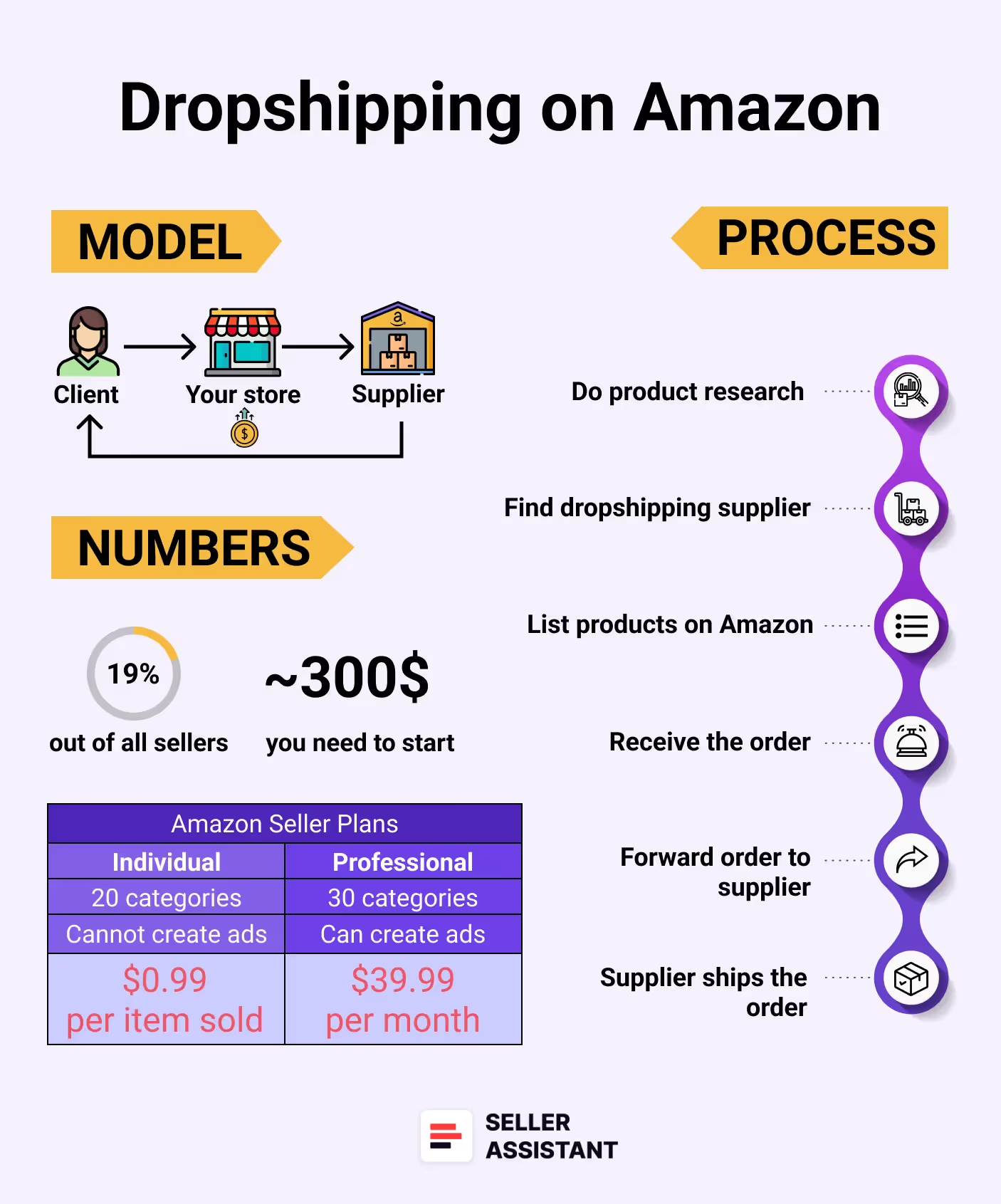
Amazon Dropshipping
Amazon dropshipping is a fulfillment method where you sell products on Amazon without keeping inventory or managing deliveries yourself. Instead, after a customer places an order, you purchase the product from a third-party supplier. The item is shipped to a prep center, which prepares and repackages it for final delivery to your customer.
This extra step through a prep center isn’t just a convenience – it’s critical for staying compliant. Amazon requires you to be identified as the “seller of record.” If packages arrive with supplier branding or invoices, you risk breaking Amazon’s policies. The prep center resolves this issue by ensuring every order is shipped under your name, protecting your account from penalties or suspension.
Learning how to dropship in Amazon the right way makes this business model both safe and profitable. Thanks to its low upfront costs, dropshipping is attractive to many sellers. You don’t need to invest heavily in stock or storage space. Instead, your profit comes from the price difference between what you pay the supplier and what buyers pay on Amazon – all while staying compliant.
The key players in Amazon dropshipping
Seller (You)
You run the storefront, list the products, provide customer support, and handle returns.
Supplier
A wholesaler or manufacturer who provides the products and ships them to your prep center.
Prep center
A third-party logistics partner that unboxes supplier shipments, removes external branding, repackages under your brand, and sends products to your customers.
Customer
The end buyer on Amazon. From their perspective, they are purchasing directly from you.
Amazon
The selling platform that connects you with customers and enforces strict compliance standards.
How Amazon Dropshipping Actually Works
In dropshipping, you serve as the connection point between buyers and suppliers. Your role is to discover in-demand, risk-free products that customers want on Amazon, and then partner with reliable suppliers who can provide and ship those items.
When someone places an order, you purchase the product from your chosen supplier. The supplier sends the product to a prep center, where all supplier-related branding is removed. From there, the order is repackaged and forwarded directly to the customer – allowing you to sell without ever storing inventory yourself.
Step-by-step: the Amazon dropshipping process
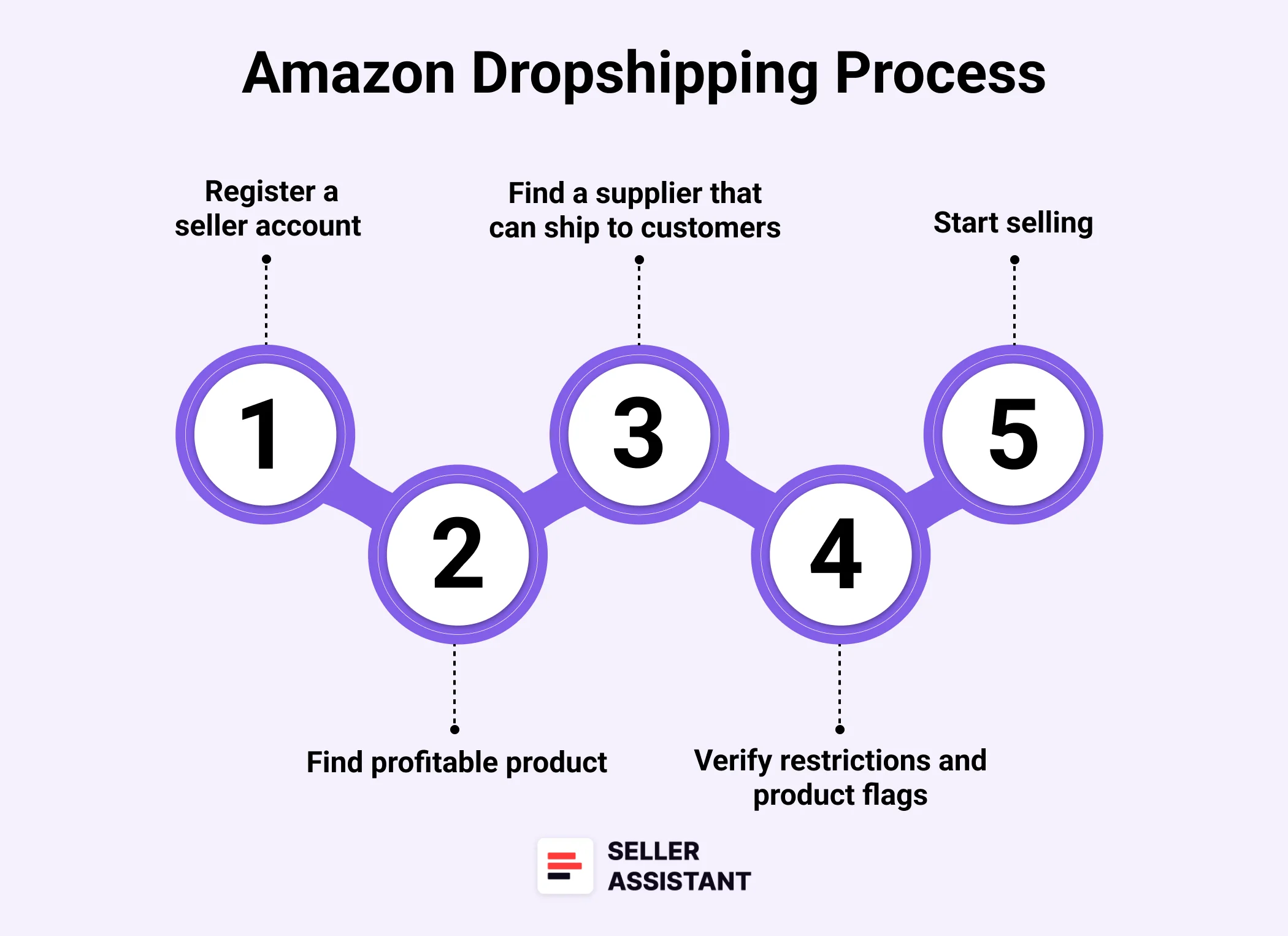
Amazon dropshipping process
Step 1. Create your Amazon seller account
First, register as a seller on Amazon. Select the Individual plan if you expect fewer than 40 sales per month, or opt for the Professional plan if you plan to sell in higher volumes.
Step 2. Choose a profitable product
Find products with high potential by analyzing demand, profit margins, and competition. Tools like Seller Assistant can help you avoid problematic items with IP issues, restrictions, or alerts.
Step 3. Partner with a trusted supplier
Pick a supplier that offers competitive pricing and understands Amazon’s packaging and shipping requirements. Make sure they are dependable and have strong support services.
Step 4. List the product on Amazon
Add your product to Amazon by using an existing listing that matches your item. Go to Inventory > Add Products in your Seller Central, enter the ASIN, select the condition, and publish your offer.
Step 5. Receive customer orders
Once a shopper makes a purchase, Amazon notifies you immediately.
Step 6. Order confirmation sent to the buyer
Amazon automatically confirms the order and shares details like the order number and estimated delivery timeframe with the customer.
Step 7. Forward order details to supplier
Share the order information – product details and customer address – with your supplier so they can prepare the shipment.
Step 8. Supplier ships to the prep center
Your supplier packages the product according to Amazon’s guidelines and sends it to the prep center for final processing.
Step 9. Prep center handles repackaging and delivery
The prep center receives the product, removes any supplier identifiers, applies your branding, and ships the final package to the customer.
.Step 10. Customer receives their order
The customer gets the product as if it came directly from your store, completing the transaction without ever knowing a supplier was involved.
How to Find Profitable Dropshipping Products for Amazon
Because dropshippers don’t pay for inventory upfront, they can list many products on Amazon without worrying about storage fees or product turnover. This model allows them to test multiple deals at once and focus only on what sells. The more items you list, the greater your potential profit.
However, manually researching and uploading products can be painfully slow and labor-intensive. That’s why smart dropshippers automate the entire process. With the right strategy and tools, you can quickly identify bulk deals, list them, and wait for the sales to roll in. Here’s how to do it efficiently and safely.
Smart sourcing: the automated strategy to scale and stay compliant
This method solves two of the biggest hurdles for Amazon dropshippers: finding winning products and staying aligned with Amazon’s strict dropshipping rules.
Instead of wasting hours chasing individual leads, this approach focuses on bulk sourcing. You scan supplier websites, automate product evaluations to uncover high-margin offers, set competitive prices to avoid price wars, and use prep centers to handle order fulfillment and compliance.
Tools to use
- Seller Assistant’s supplier directory
A comprehensive Seller Assistant’s List of 500+ US suppliers. These sources are verified for compliance, giving you confidence and efficiency when sourcing products.
- Seller Assistant’s Price List Analyzer
Seller Assistant’s Price List Analyzer is your central hub for bulk product analysis. It quickly transforms large supplier lists into actionable Amazon leads, highlighting profitable and policy-safe products.
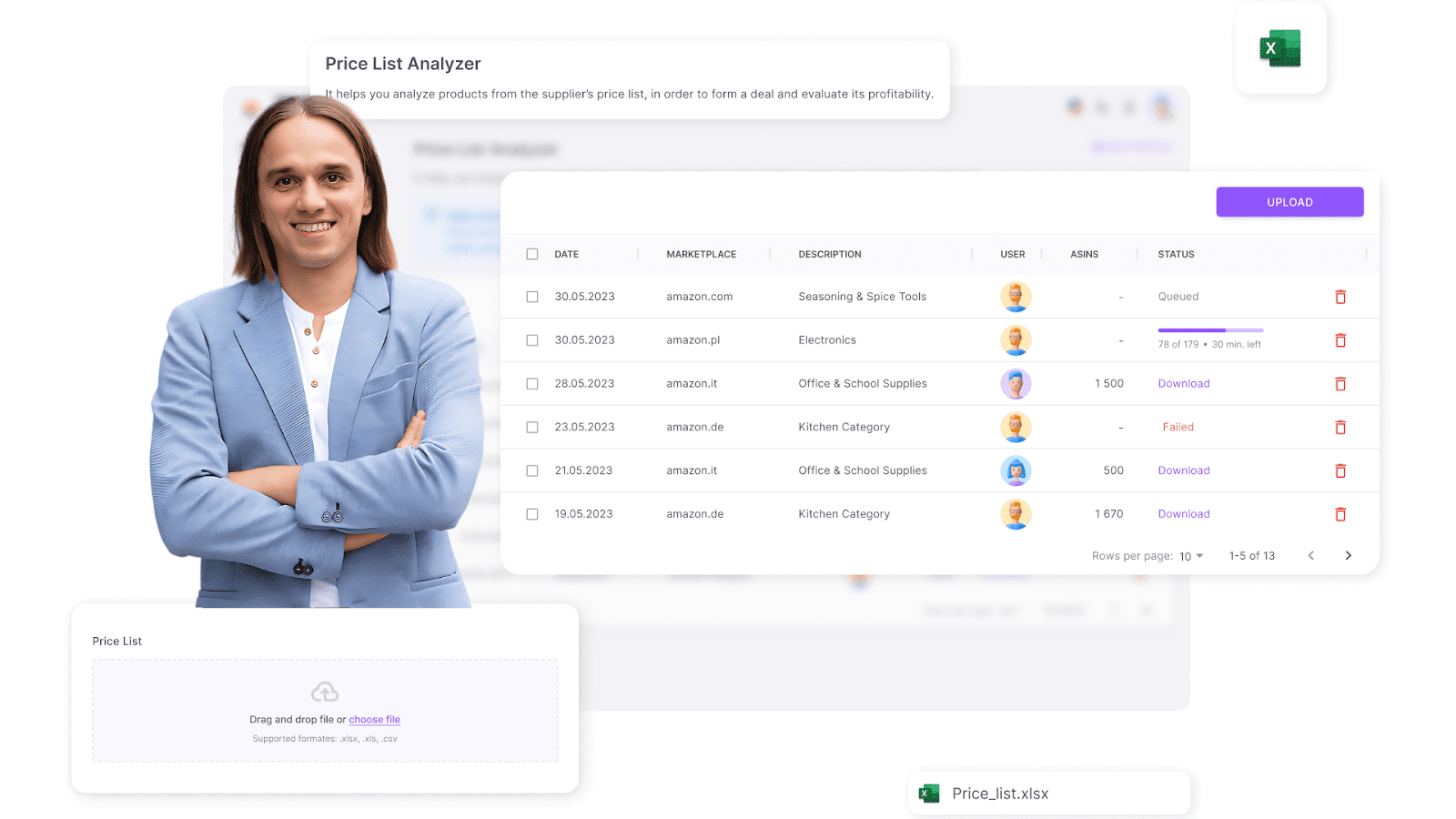
Seller Assistant’s Price List Analyzer
Note. Seller Assistant is a comprehensive product-sourcing software that helps Amazon sellers quickly find high-profit deals. It combines three extensions: Seller Assistant Browser Extension, and IP-Alert Chrome Extension by Seller Assistant, and VPN by Seller Assistant, Amazon seller tools: Price List Analyzer, Brand Analyzer, Seller Spy, Bulk Restrictions Checker, and API integrations, and features: Storefront Widget, Side Panel View, FBM&FBA Profit Calculator, Quick View, Stock Checker, IP Alert, Variation Viewer, Sales Estimator, Offers, and Restrictions Checker.
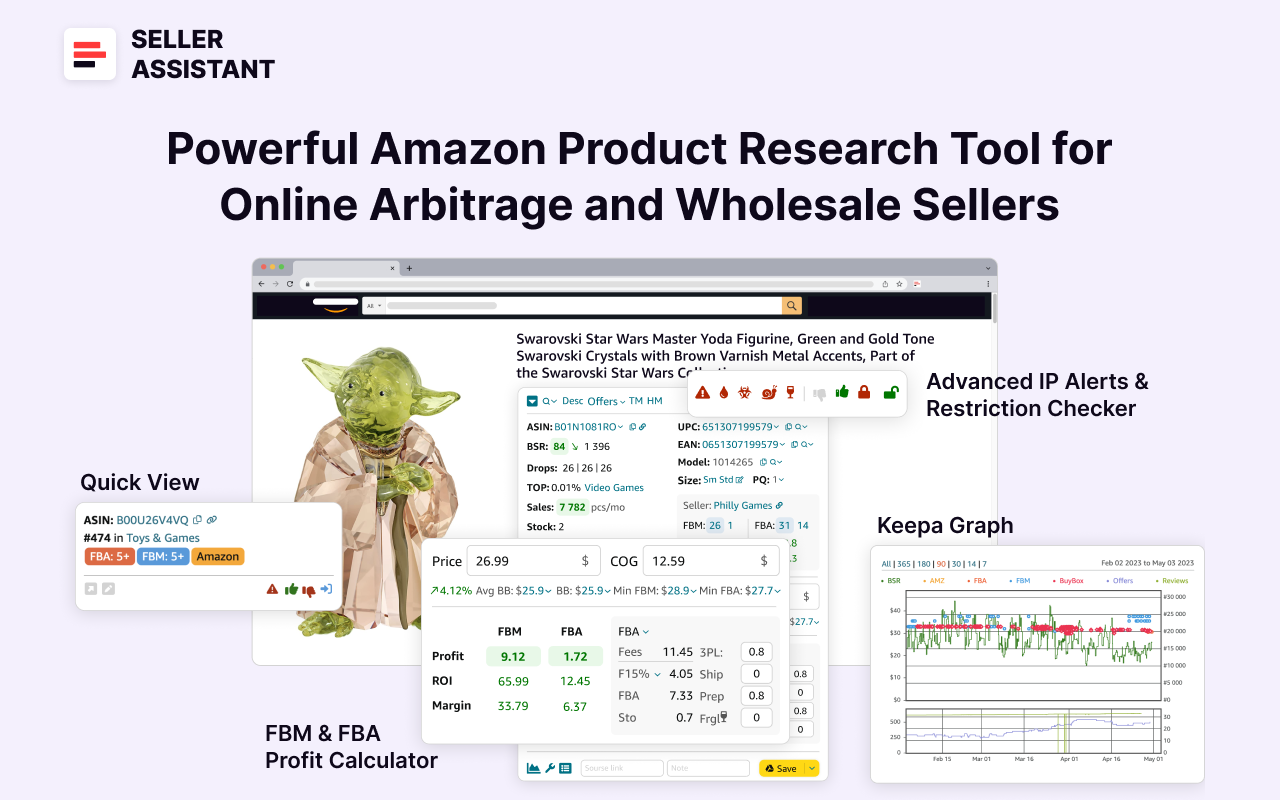
Seller Assistant
It offers a robust toolkit of over 20 features built to streamline every part of the sourcing process – from bulk scanning wholesale supplier sheets for high-margin leads to deep product research and advanced brand and competitor analysis. By using this FBA and FBM product sourcing software, you can easily identify products that have the potential to be sold well on Amazon.
The automated product sourcing process
Step 1. Pick a trusted supplier from Seller Assistant’s database
Begin with Seller Assistant’s List of 500+ US suppliers. These reliable partners provide consistent stock and understand Amazon’s standards, helping you avoid policy pitfalls from day one.
Step 2. Extract product data using a web scraper
Pull product details – prices, UPCs, titles, models – directly from your chosen supplier’s website. This gives you a large batch of potential products for evaluation.
Step 3. Analyze product lists with Price List Analyzer
Upload your scraped product list into Seller Assistant’s Price List Analyzer. This tool automatically pairs each product with its corresponding Amazon ASIN, checks for restrictions, assesses profitability, and filters out risky or low-performing items.
Step 4. Scale up by sourcing from multiple suppliers
Repeat this process across various suppliers. By doing so, you’ll quickly compile a pipeline of 50–100+ viable, high-margin, and compliant products ready to be listed.
Step 5. List products on Amazon with smart pricing
Join existing product listings on Amazon and price your offers about 1–1.5% above the average Buy Box price. This keeps you competitive while leaving room for profits. Since you’re not purchasing inventory upfront, you can continue adding more products as you go.
Step 6. Use a prep center for order fulfillment
When an order comes in, buy the product from your supplier and ship it to a prep center. There, the product is unbranded, repackaged, and sent to the customer with your name on the label. This process ensures compliance with Amazon’s dropshipping rules and keeps your account protected.
How to Choose a Dropshipping Supplier for Amazon
Selecting the right dropshipping supplier is crucial for success. Not all suppliers offer a wide range of popular products, and not every brand allows reselling. That’s why evaluating suppliers carefully is key. To do this effectively, consider important factors like the size of the supplier’s catalog, potential sales volume, competition (especially if Amazon sells the same products), average Buy Box prices, and customer ratings.
Trying to gather and assess all this information manually can be slow and overwhelming. This is where Seller Assistant’s Brand Analyzer becomes invaluable. It pulls together essential supplier data into a single, easy-to-read dashboard, helping you quickly spot the most promising brands and filter out the ones that don’t meet your standards.
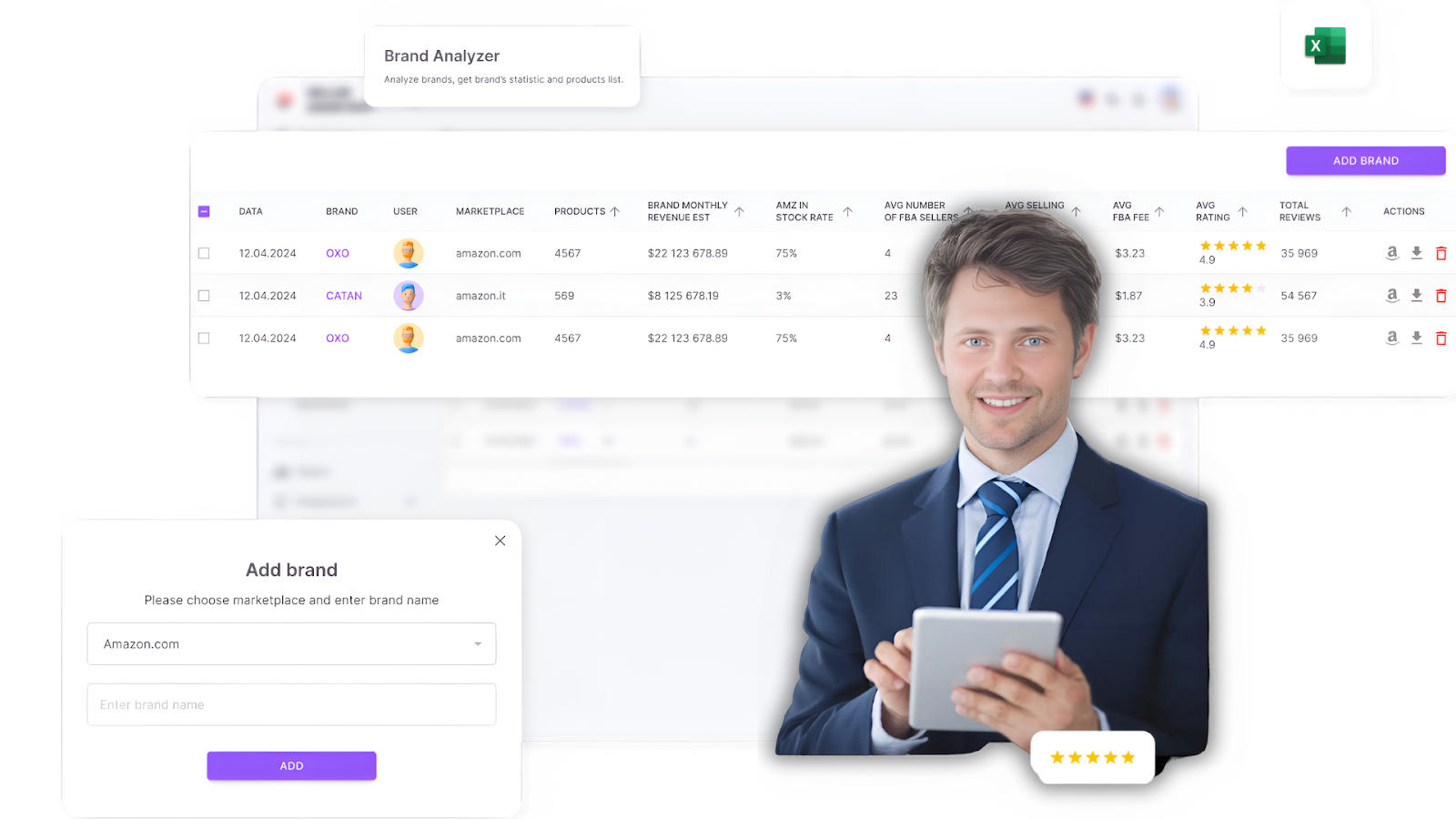
Seller Assistant’s Brand Analyzer
Speed up supplier selection with Brand Analyzer
Brand Analyzer simplifies and accelerates the process of finding the right suppliers. Just enter a brand name, and you’ll instantly get key metrics like product count, pricing trends, sales potential, and competitor presence. This overview makes it easy to make informed decisions without having to sort through mountains of data.
Key factors to consider when evaluating dropshipping suppliers
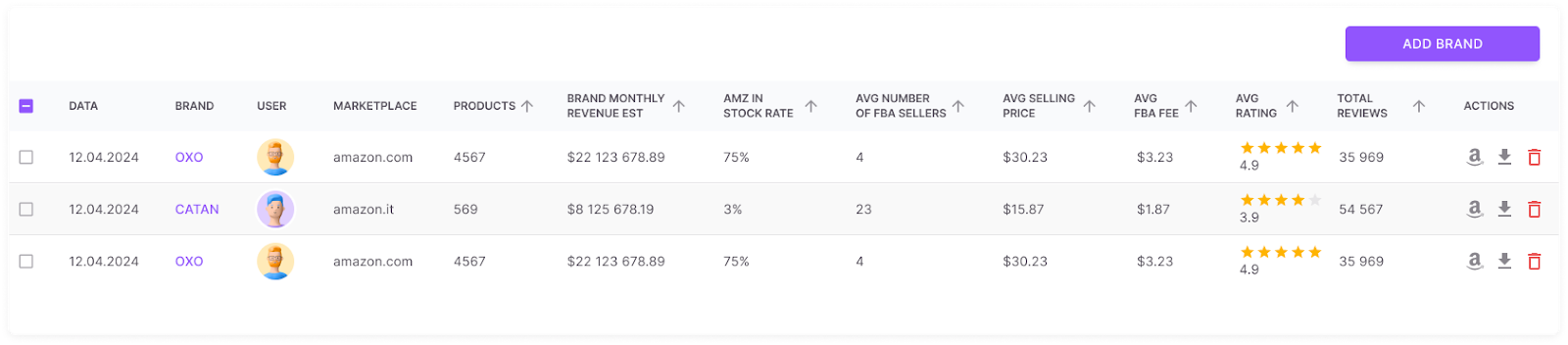
Brand Analyzer
Look for suppliers with large product catalogs
A supplier with a broad selection (ideally 500 products or more) increases your chances of discovering profitable ASINs. Brand Analyzer shows the total number of products and lets you export the full catalog for deeper review.
Check revenue potential upfront
It’s important to know if the supplier’s product range can meet your earning goals. Brand Analyzer calculates the total catalog revenue potential to help you focus on the most lucrative suppliers right from the start.
Avoid brands sold by Amazon
Selling the same products as Amazon can be risky – especially if Amazon holds more than 30% of the listings. Brand Analyzer highlights this with the “Amz in-stock rate” metric, helping you avoid brands heavily dominated by Amazon itself.
Evaluate seller competition and price stability
Too many sellers on a single listing (15 or more) often leads to price wars. Brand Analyzer shows you the average number of sellers per ASIN so you can avoid oversaturated markets.
Review product ratings and brand trustworthiness
Choose brands that are well-rated by buyers. Ideally, products should have at least a 4-star average with strong review counts. Brand Analyzer consolidates this data to help you easily assess a brand’s reputation and customer satisfaction levels.
Confirm brand eligibility for your account
Before you proceed, check that you’re actually allowed to sell the supplier’s products. Use Seller Assistant’s Bulk Restriction Checker for this. Upload the brand’s product list, and you’ll see their sellability status immediately:
- Green open lock: Product is approved and ready for sale.
- Red closed lock: Product is restricted and needs approval.
- Red lock with exclamation mark: Product cannot be sold by your account.
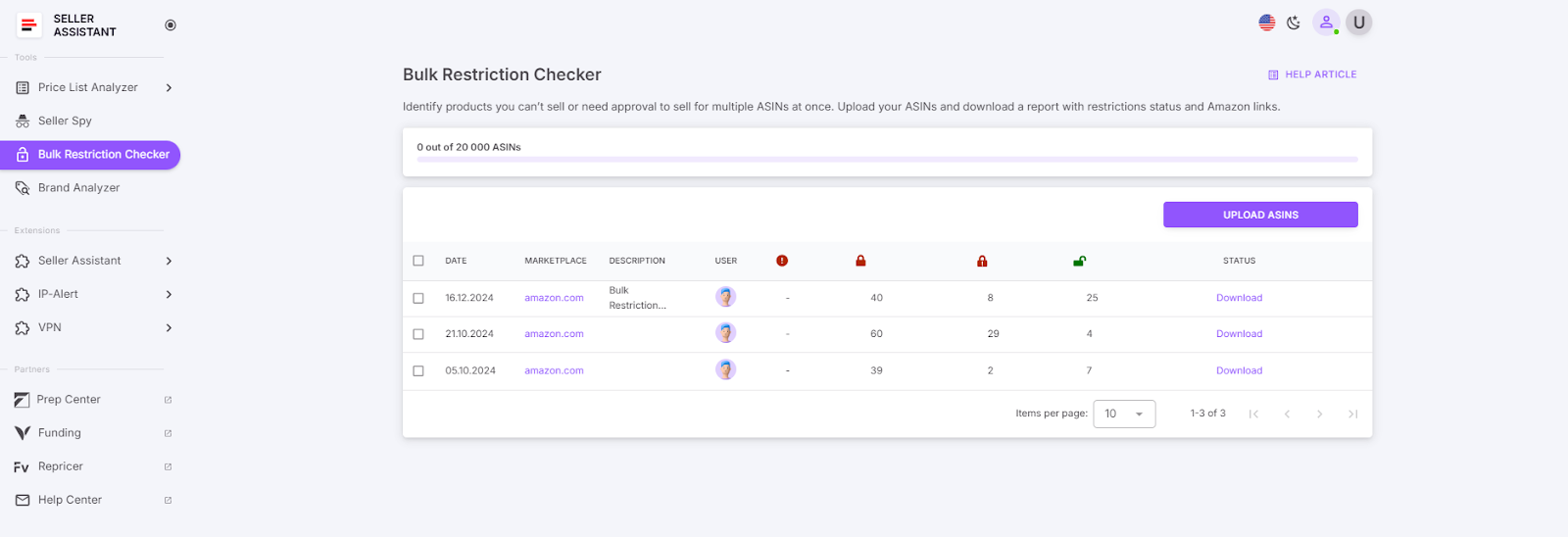
Bulk Restriction Checker
This step helps you avoid wasting time on products that you’re not authorized to list, ensuring you focus only on profitable and approved items.
How to Choose the Best Dropshipping Products
Once you’ve selected your supplier and extracted their product catalog, you’ll be left with a massive list of potential products. The next task is clear: pinpoint items that offer strong profit margins, steady demand, and minimal risk.
However, these lists often contain hundreds or even thousands of products, which makes manual analysis extremely slow and prone to errors.
That’s why automation is critical. Tools like Seller Assistant’s Price List Analyzer take the guesswork and tedious effort out of the equation. By processing large amounts of dropshipping data efficiently, they help you quickly spot the products with the best profit potential, moderate competition, and good Buy Box rotation opportunities – all without hours of manual review.
Automate product research with Price List Analyzer
Sorting through spreadsheets by hand is both time-consuming and error-prone. Seller Assistant’s Price List Analyzer streamlines this step, turning complex supplier lists into clear, actionable insights.
Seller Assistant’s Price List Analyzer
Once you upload your product file, the tool enriches each entry with detailed Amazon data. This gives you a clean, filtered view of the best opportunities.
It automatically connects products with their Amazon listings, calculates profitability, highlights competition levels, flags any restrictions, and allows you to apply filters to find the most attractive options quickly.
You can instantly sort by metrics such as ROI, profit per unit, Best Seller Rank (BSR), and seller count, allowing you to zero in on the highest-return, low-risk products immediately.
What to check when selecting dropshipping products
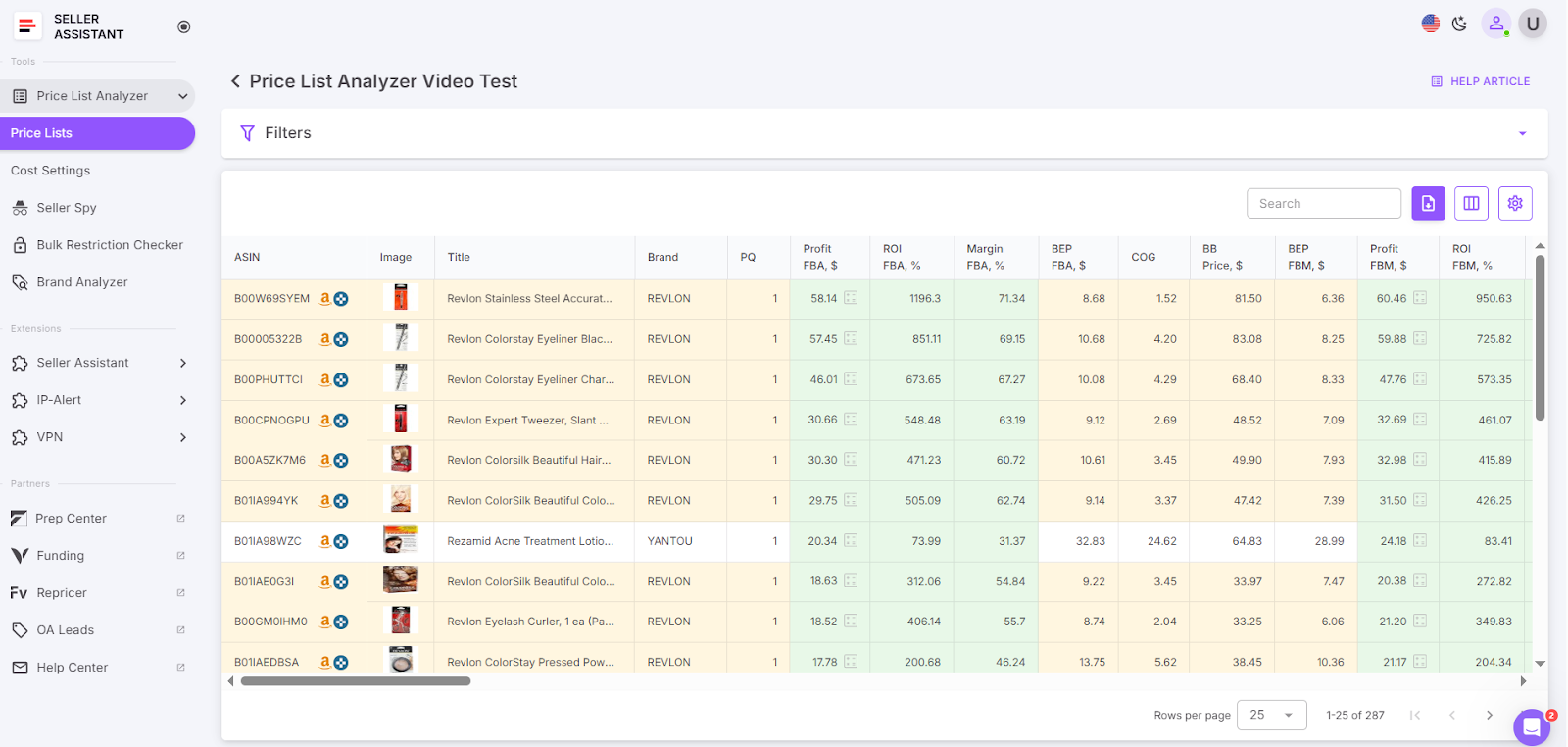
Get the UI table with key product metrics
Sales performance: Focus on high-demand items
- Understanding demand is essential. Look for products with a Best Sellers Rank (BSR) between 1 and 200,000 to ensure good sales potential. Ideally, target products with sales velocity under 0.5% – avoid slower movers with a velocity above 1%.
- Price List Analyzer displays BSR history over 30, 90, and 180 days, along with sales velocity indicators and BSR drops. These metrics provide clear visibility into how quickly products are selling.
Competition level: Steer clear of overcrowded listings
- Avoid listings dominated by too many sellers (15+) or those where Amazon itself controls most of the sales.
- The tool reveals seller counts and flags listings heavily influenced by Amazon, helping you sidestep highly competitive and low-margin products.
Buy Box distribution: Pick products with rotation opportunities
- If Amazon or dominant sellers hold the Buy Box for extended periods, it becomes much harder to make sales.
- Price List Analyzer tracks Buy Box ownership over time (30, 90, and 180 days), allowing you to target products with a better chance of winning the Buy Box.
Profitability: Validate your margins
- Profitability isn’t just about product cost. You also need to consider expenses like supplier pricing, FBA fees, shipping costs, and more.
- The tool automatically calculates vital figures – such as margins, ROI, breakeven prices, and total Amazon fees – so you always know your real profit potential.
Selling restrictions: Confirm product eligibility
- Before listing any product, verify that you are allowed to sell it.
- Price List Analyzer provides clear icons that indicate product status:
- Green open lock: Product is sellable
- Red closed lock: Product is restricted and needs approval
- Red lock with exclamation mark: Product is not eligible for your account
This helps you avoid wasting time on products that you can’t list.
Product reputation: Focus on trusted products
- Look for products with positive feedback – ideally, items rated 4 stars or higher and backed by plenty of reviews.
- The tool displays both star ratings and review counts so you can prioritize reliable products that are less likely to be returned.
Hidden risks and alerts: Stay away from problem products
- Some products come with hidden risks such as IP claims, HazMat classifications, or seasonal restrictions.
- Price List Analyzer automatically highlights potential issues, including:
- Intellectual property (IP) warnings
- HazMat, fragile, meltable, adult, or oversized product alerts
- Unusually high ROI (above 200%), which may signal listing errors
- Missing Buy Box prices or ASIN issues
- Selling restrictions or required approvals
By catching these red flags early, you can protect your dropshipping business from unnecessary risks.
FAQ
What are the benefits of using the Seller Assistant?
Seller Assistant is an all-in-one product sourcing solution designed to help Amazon sellers quickly uncover high-profit opportunities. It integrates multiple tools, including Seller Assistant Browser Extension, and IP-Alert Chrome Extension by Seller Assistant, and VPN by Seller Assistant, and essential Amazon seller tools: Price List Analyzer, Brand Analyzer, Seller Spy, Bulk Restrictions Checker, and API integrations.
Additionally, it offers powerful features such as Storefront Widget, Side Panel View, FBM&FBA Profit Calculator, Quick View, ASIN Grabber, UPC/EAN to ASIN converter, Stock Checker, IP Alert, and Restriction Checker.
With over 20 advanced features, Seller Assistant simplifies every step of the sourcing process – from bulk scanning dropshipping supplier lists for profitable deals to in-depth product research and brand or competitor analysis. This comprehensive tool makes it easy for FBA and FBM sellers to identify products with strong sales potential on Amazon.
How do I not fail dropshipping?
Dropshipping success requires thorough product research and ongoing effort to find profitable deals. Don’t expect quick riches, be patient, and adapt as you learn. Use the right product sourcing tools like Seller Assistant to minimize the risk of failure with your products.
Which is the best seller app?
Unfortunately, there’s no single “best” seller app as it depends on your specific needs and goals. If you are looking for the best tool to source dropshipping products, you can use Seller Assistant, a popular product sourcing tool.
How to dropship for beginners?
To start dropshipping on Amazon, research and source to find high-demand, low-competition products with reliable dropshippers who meet Amazon’s quality standards. Use the right product sourcing tools like Seller Assistant to do that. Ensure you comply with Amazon’s dropshipping policies (being the seller of record).
Is an Amazon FBA worth it?
Whether Amazon FBA is worth it depends on your goals and unit economics. It offers convenience and reach, as Amazon handles fulfillment and customer services. However, if you sell nonstandard products (bulky or heavy items), you may prefer to fulfill orders yourself or with a 3PL provider.
How much does it cost to start dropshipping on Amazon?
Starting dropshipping on Amazon requires minimal upfront investment. You’ll need to pay for a Seller account (Individual or Professional), product sourcing tools, and prep center services – but you don’t need to buy inventory upfront.
How to find products to dropship on Amazon?
You can find profitable dropshipping products by researching supplier catalogs and analyzing them with tools like Seller Assistant to check demand, competition, and restrictions. Automated analyzers make it easy to sort through thousands of items to find winning deals.
How to start dropshipping on Amazon for free?
While starting completely for free is unrealistic, you can minimize costs by choosing the Individual Seller plan and using free product research methods initially. However, to scale effectively and automate sourcing, investing in specialized tools and prep centers is necessary.
How to legally dropship on Amazon?
To dropship legally on Amazon, you must be the seller of record and ensure that all packaging, invoices, and shipments are in your name, not the supplier’s. Using a prep center helps meet these compliance requirements and keeps your account safe.
Final Thoughts
Learning how to dropship on Amazon the right way can unlock a powerful, low-risk business opportunity – but only if you stay compliant and work efficiently. With Amazon’s strict policies and the need to analyze thousands of products, doing everything manually is no longer practical.
That’s where Seller Assistant comes in. Its automated tools help you find profitable, compliant products quickly and scale your catalog without risking your account. By combining smart sourcing with automation and prep center fulfillment, you can simplify dropshipping and focus on growing your Amazon business with confidence.
Seller Assistant is an all-in-one product sourcing software offering all the features vital for product sourcing. It combines three extensions: Seller Assistant Extension, IP Alert, and VPN by Seller Assistant, tools: Price List Analyzer, Brand Analyzer, Seller Spy, Bulk Restrictions Checker, and API integrations, and features: Storefront Widget, Side Panel View, FBM&FBA Profit Calculator, Quick View, Stock Checker, IP Alert, Variation Viewer, Sales Estimator, Offers, Restrictions Checker, and other features that help quickly find high-profit deals. Seller Assistant also offers integration with Zapier allowing to create custom product sourcing workflows.


