


Makine Çevirisi Notu: Bu makale gezinme kolaylığı için geçici olarak çevrilmiştir.
Amazon’s FBA program takes the hassle out of shipping and fulfillment – but it also comes with a price tag. If you don’t know exactly how those fees are calculated, you could be losing profit without realizing it.
Depolama maliyetlerinden sipariş karşılama ve yönlendirme ücretlerine kadar her ücret, kârınızı etkiler.
This post will walk you through how FBA fees work, how to calculate them, and how to make smarter sourcing decisions as a result. Whether you’re just getting started or already selling at scale, understanding your FBA costs is non-negotiable.
What Are Amazon FBA Fees?
Amazon FBA fees are the costs sellers pay to use Amazon’s fulfillment network. These fees cover the platform’s services – from storing your products in Amazon’s warehouses to picking, packing, shipping orders, and handling customer service. While FBA helps automate logistics and scale your business, understanding the types of fees involved is critical to staying profitable.
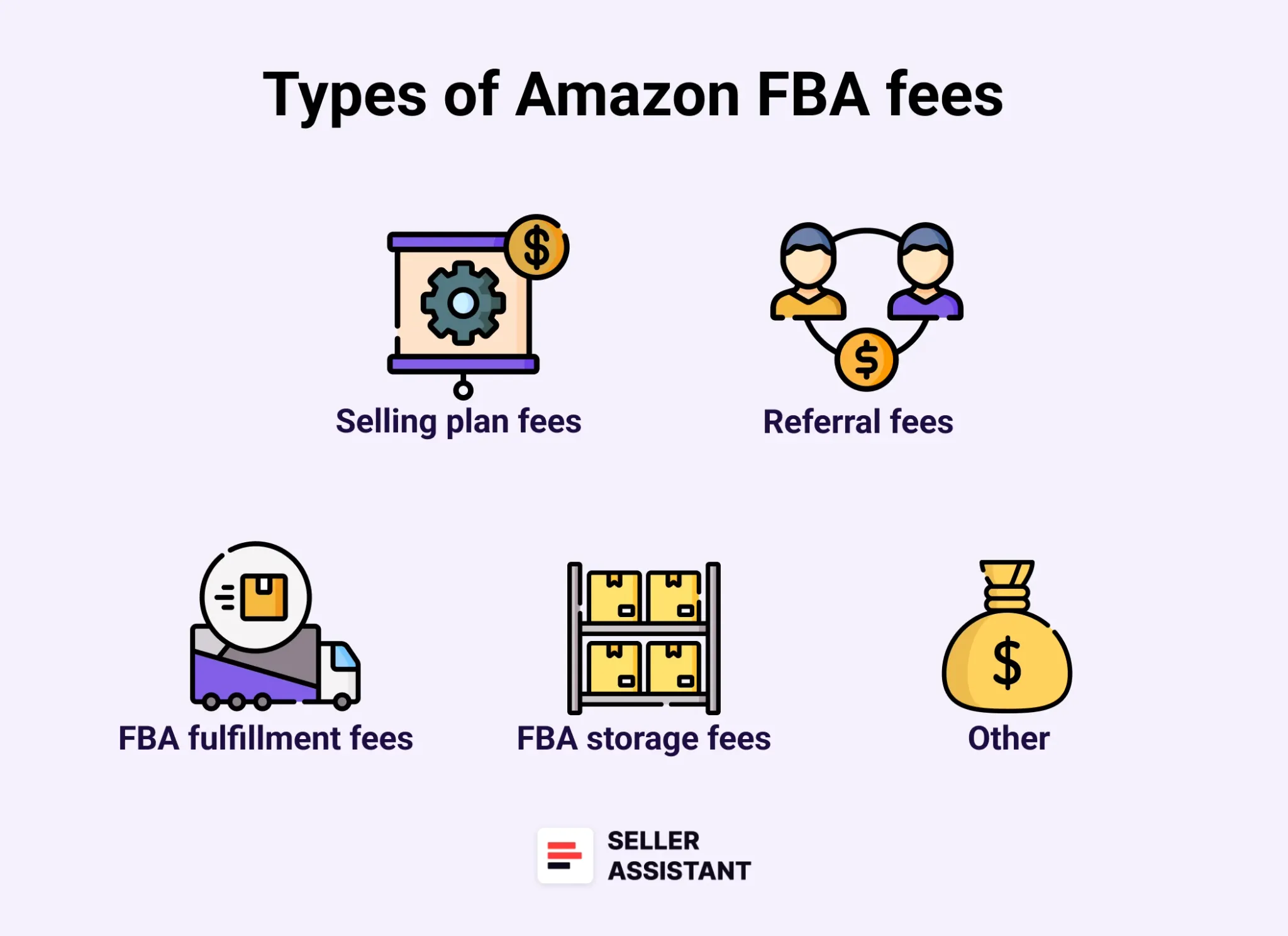
Amazon FBA ücretlerinin temel kategorileri
Core categories of Amazon FBA fees
- Selling plan fees
- Referral fees
- FBA Fulfillment fees
- Storage fees
- Prep and shipping costs.
In addition to these, several other specific fees can apply depending on your inventory size, product type, or business model. Here’s a detailed breakdown of each.
Selling plan fees
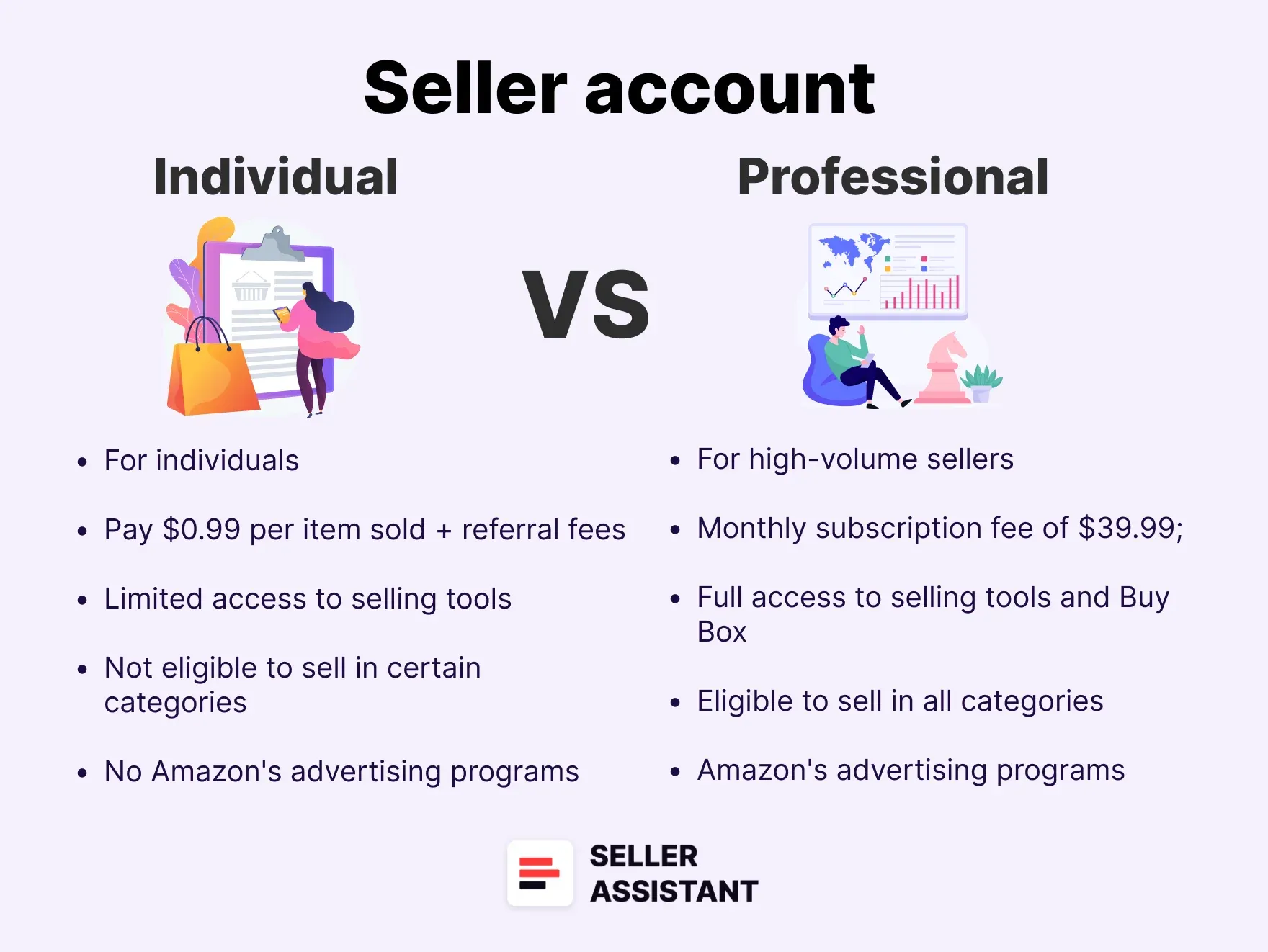
To sell on Amazon, you must choose a selling plan:
Satılan birim başına 0,99 ABD doları;Yeni başlayanlar veya ayda 40’tan az ürün satanlar için uygundur.
- Professional Plan
$39.99/month regardless of volume. Ideal for regular sellers – it includes access to tools, analytics, and Buy Box eligibility.
Referral fees
These are Amazon’s cut from each sale – a percentage of the total price (excluding tax but including shipping and gift wrap). Most categories fall between 8–15%, but some, like Amazon Device Accessories, can hit 45%.
Other selling fees
- Closing Fees
Medya kategorilerinde (Kitaplar, DVD’ler vb.) öğe başına 1,80 ABD doları
- High-Volume Listing Fee
1,5 milyondan fazla SKU için SKU başına aylık 0,001 ABD doları.
- Refund Administration Fee
Hangisi daha düşükse, yönlendirme ücretinin 5 ABD Doları veya %20’si.
- Digital Services Fee
Dijital hizmet vergisi olan ülkelerde (Birleşik Krallık, Fransa, İtalya, İspanya, Kanada vb.) %2–3 ek ücret.
Amazon FBA fulfillment fees
Bu ücretler, siparişlerin karşılanmasıyla ilgili lojistiği kapsar ve ürün boyutuna, ağırlığına, kategorisine ve türüne bağlıdır.
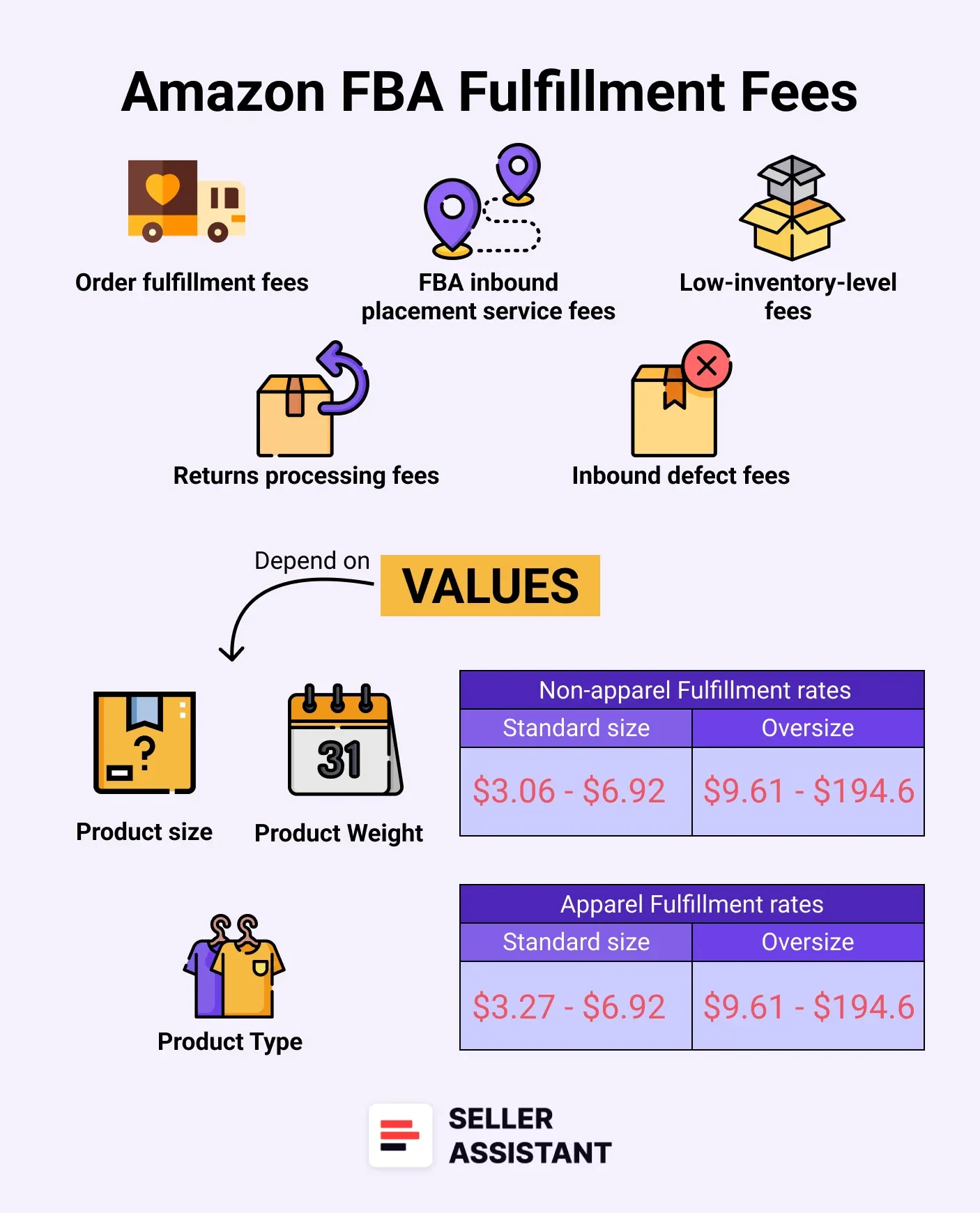
_ Amazon FBA sipariş karşılama ücretleri _
Main FBA fulfillment fees
- Order Fulfillment Fees
Toplama, paketleme, nakliye ve müşteri hizmetleri.Birim başına ücretlendirme, giyim/giyim dışı ürünlere göre değişir.
- Low-Price FBA
10 ABD dolarının altındaki ürünler için standart Amazon Lojistik’ten 0,77 ABD doları daha ucuzdur.
- Inbound Placement Service Fees
- Minimal Shipment Splits
Amazon ücret karşılığında tek merkezden yeniden dağıtım yapıyor.
- Partial Shipment Splits
Dağıtımı siz hallediyorsunuz, ücret yok.
- Returns Processing Fees
İade oranları eşikleri aştığında uygulanır (Kıyafet/Ayakkabının farklı kuralları vardır).
- Low-Inventory-Level Fees
Stok seviyesi 28 günlük arzın altına düşerse tetiklenir.
- Inbound Defect Fees
Uygun olmayan gönderiler için ücret alınır.
Amazon FBA storage fees
Storage fees are based on how much space your inventory takes up daily in fulfillment centers.
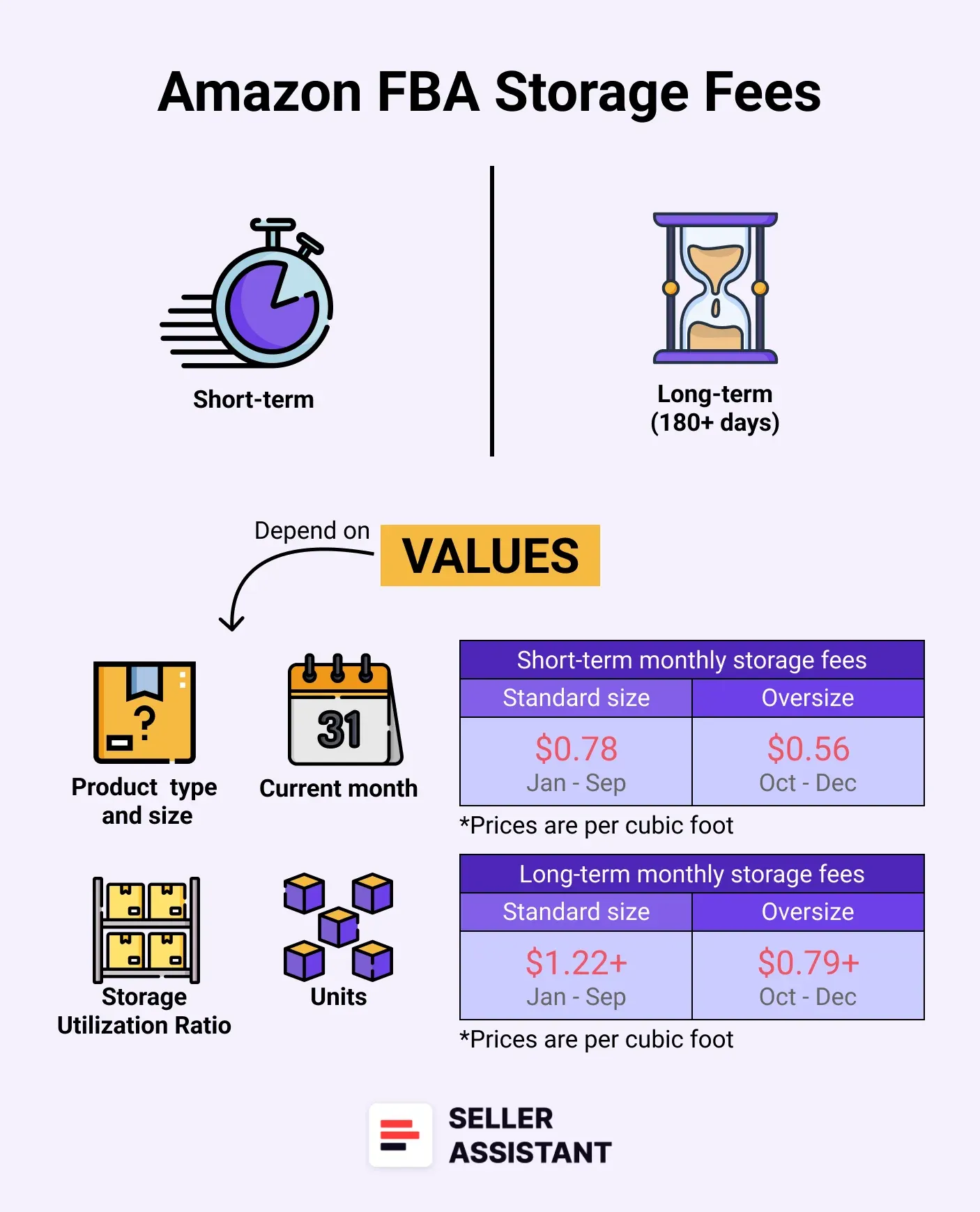
Amazon FBA depolama ücretleri
Types of storage fees
- Monthly Storage Fees
Fiyatlar boyuta, ürün türüne ve sezona (yoğun ve yoğun olmayan) göre değişiklik gösterir.Tehlikeli mallar daha yüksek ücretlere tabidir.
- Storage Utilization Surcharge
Yüksek depolama oranına sahip 25 fit küpten fazla alan kullanan satıcılar için geçerlidir.
- Aged Inventory Surcharge
180 günden fazla saklanan öğeler için.Normal depolama alanına aylık olarak eklenir.
- Overage Fee
Aylık depolama sınırlarını aştığınızda fit küp başına 10 ABD Doları tutarında ücret alınır.
- Removal and Disposal Fees
Eskimiş veya fazla envanterin iade edilmesi veya imha edilmesi maliyetleri.
Prep and shipping costs
These are fees for preparation of the order and shipping it to Amazon’s fulfillment centers. Typically, sellers use third-party prep centers to prepare orders and send them to Amazon.
Prep center fees
If you use a prep center, they charge for labeling, packaging, bubble-wrapping, and making your inventory FBA-compliant. Fees vary by provider and product type.
Shipping to Amazon fees
Gelen kargo olarak da bilinir; bu, mallarınızı tedarikçinizden veya hazırlık merkezinizden bir Amazon lojistik merkezine göndermenin birim başına maliyetidir.
How to Calculate Amazon FBA Fees
Calculating so many Amazon FBA fees can be challenging, but it’s important to have a good understanding of how much it will cost to sell your products through Amazon FBA and ensure you will get enough profit.
Amazon sellers typically use FBA fee calculators to estimate their costs. These tools break down how much you’ll pay for fulfillment, storage, referral fees, and more. By factoring in selling plan fees, referral fees, FBA fulfillment fees, and storage fees, you can set competitive prices while ensuring you make a profit.
Ancak FBA hesaplayıcıları farklıdır.Farklı amaçlar için kullanılırlar ve farklı düzeylerde ücret ayrıntıları sağlarlar.Ayrıca aynı derecede kullanışlı değiller.
Amazon Lojistik ücretlerinizi tahmin etmek veya öğrenmek için çeşitli seçenekleri kullanabilirsiniz.
You can apply advanced third-party FBA calculators like Seller Assistant’s FBM&FBA Profit Calculator showing all Amazon fees right on the Amazon search and product pages and in the Side View panel on your supplier websites. You can also get bulk Amazon fee and cost calculations for thousands products as once with Seller Assistant’s Price List Analyzer.
Another option is to use one of the two free Amazon fee tools: Inline revenue calculator in the Manage Inventory dashboard in your Seller Central, Amazon Revenue Calculator, and Amazon Fee Preview Report. However, some of these tools don’t factor in all FBA costs.
What Are Different Fee Calculators?
Daha önce de belirtildiği gibi, Amazon satıcılarının çoğunluğu FBA ücretlerini doğru bir şekilde hesaplamak için FBA hesaplayıcılarını kullanıyor.
Among them, Seller Assistant’s FBM&FBA Calculator stands out – it lets you calculate Amazon fees both in bulk (if you have a supplier list with thousands of UPCs) and for individual products directly on Amazon and supplier pages, side-by-side with real-time profitability estimates.
Note. Seller Assistant is a comprehensive product-sourcing software that helps Amazon sellers quickly find high-profit deals. It combines three extensions: Seller Assistant Browser Extension, and IP-Alert Chrome Extension by Seller Assistant, and VPN by Seller Assistant, Amazon seller tools: Price List Analyzer, Brand Analyzer, Seller Spy, Bulk Restrictions Checker, and API integrations, and features: Side Panel View, FBM&FBA Profit Calculator, Quick View, ASIN Grabber, UPC/EAN to ASIN converter, Stock Checker, IP Alert, and Restrictions Checker.
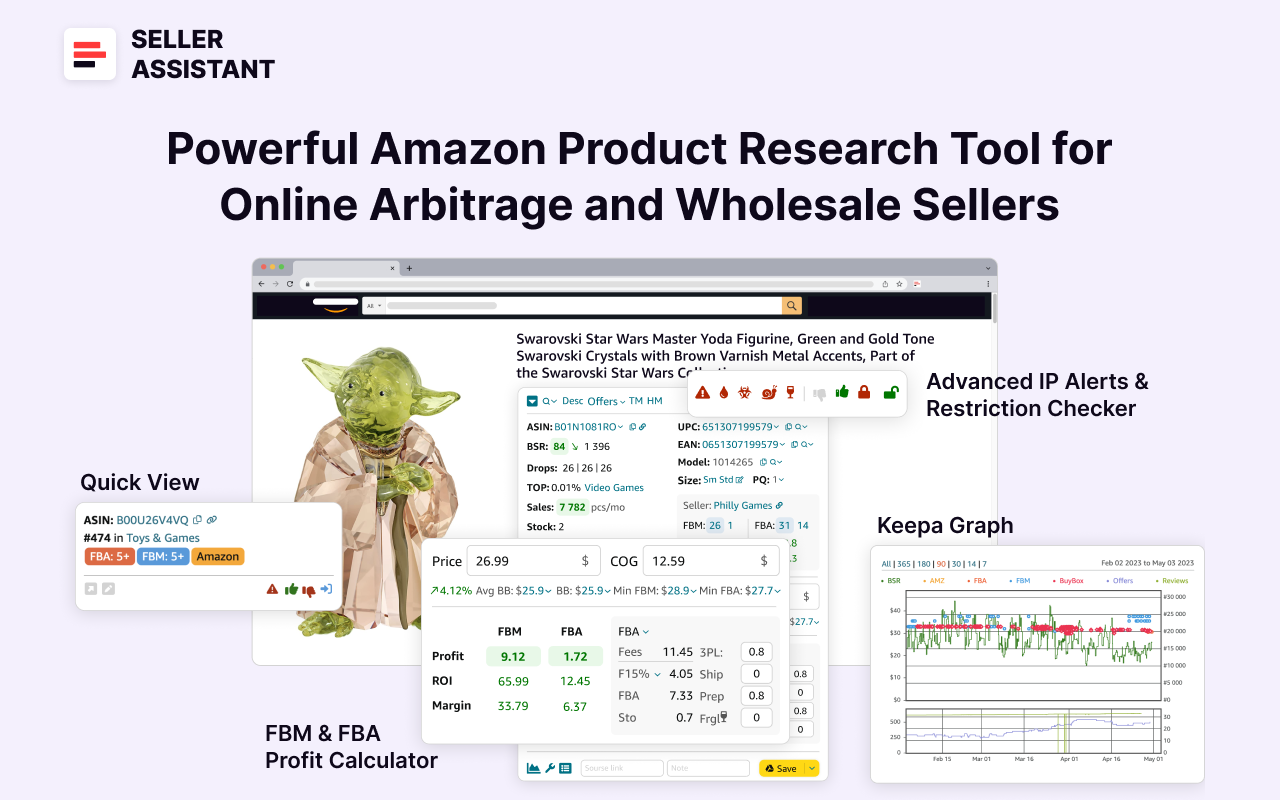
Satıcı Asistanı
Seller Assistant shows all essential product data on Amazon search, product, and inventory pages, and on any website to help you find high-margin deals. By using this FBA and FBM product sourcing software, you can easily identify products that have the potential to be sold well on Amazon.
Bulk FBA Fee calculations with Price List Analyzer
If you’re processing a wholesale sheet or supplier price list with hundreds of products, Seller Assistant’s Price List Analyzer is your go-to tool. It’s built specifically for wholesale, OA, and dropshipping sellers to quickly identify profitable deals and flag risky ones.
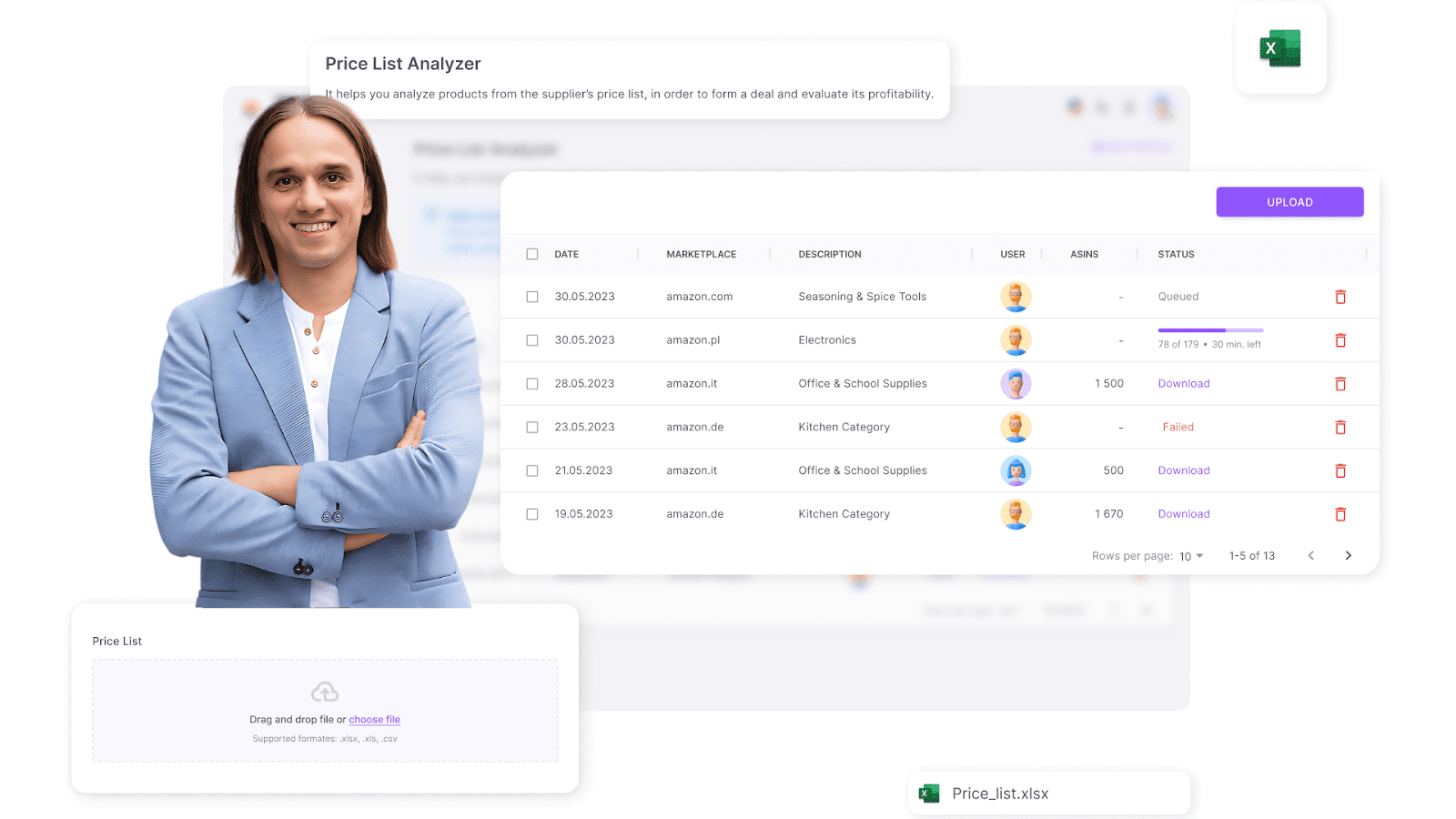
Satıcı Asistanı Fiyat Listesi Analizörü
It shows all essential product metrics, including product performance, profit, ROI, and margin, Amazon fees, product risks, competition levels, pricing trends, etc. You get all Amazon FBA fees automatically to estimate deal profitability and decide if they are worth sourcing.
What it does
- Automatically matches your supplier products to their Amazon listings
- Calculates FBA fees, profits, ROI, margin, and break-even prices
- Highlights product warnings and fulfillment risks
- Lets you filter and download clean Excel reports with all key metrics.
How to use it step-by-step
Step 1. Access Price List Analyzer
Satıcı Asistanında oturum açın ve Fiyat Listesi Analiz Aracına erişin.
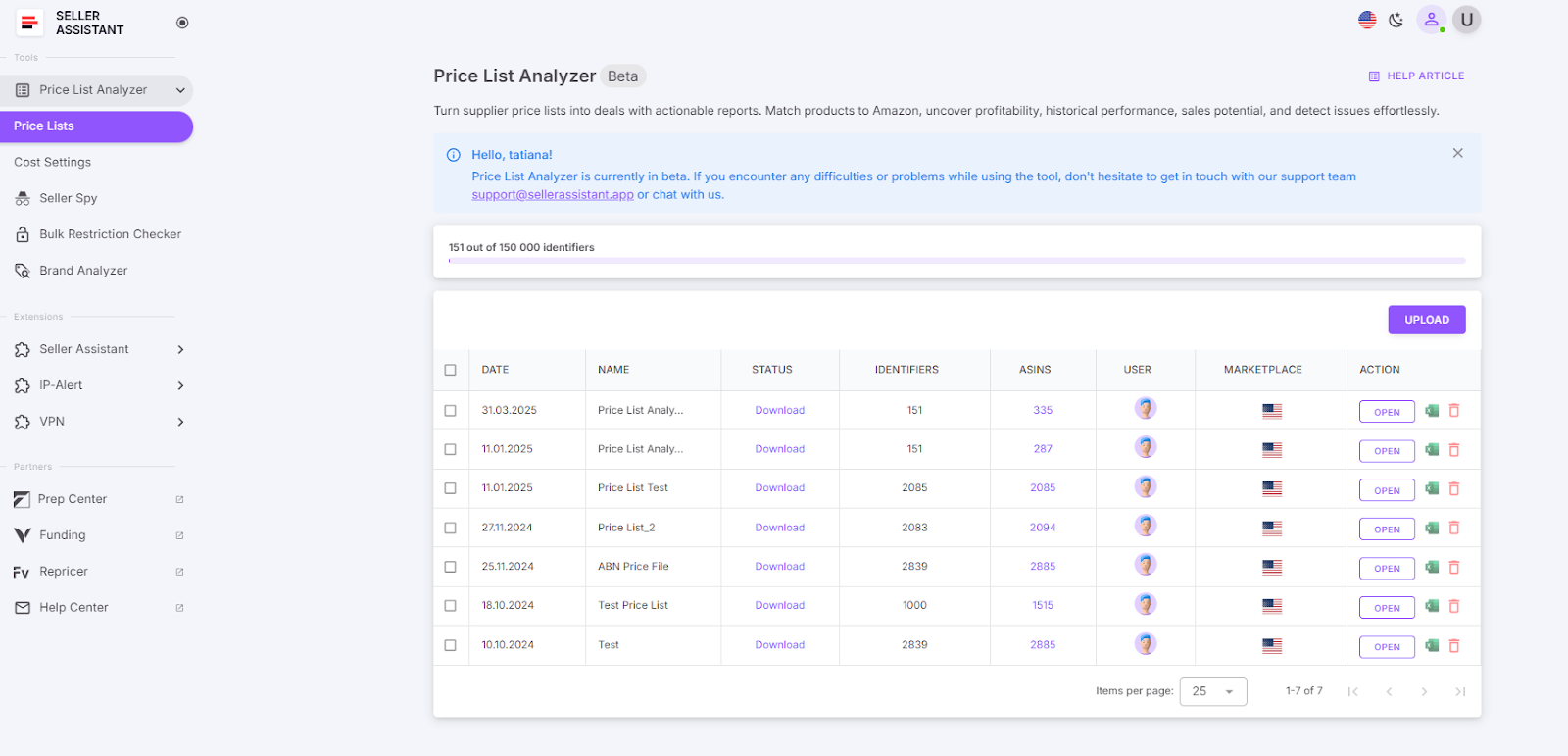
Fiyat Listesi Analiz Aracına Erişim
Step 2. Upload your wholesale price list
Upload your wholesale list in Excel format and select your marketplace.
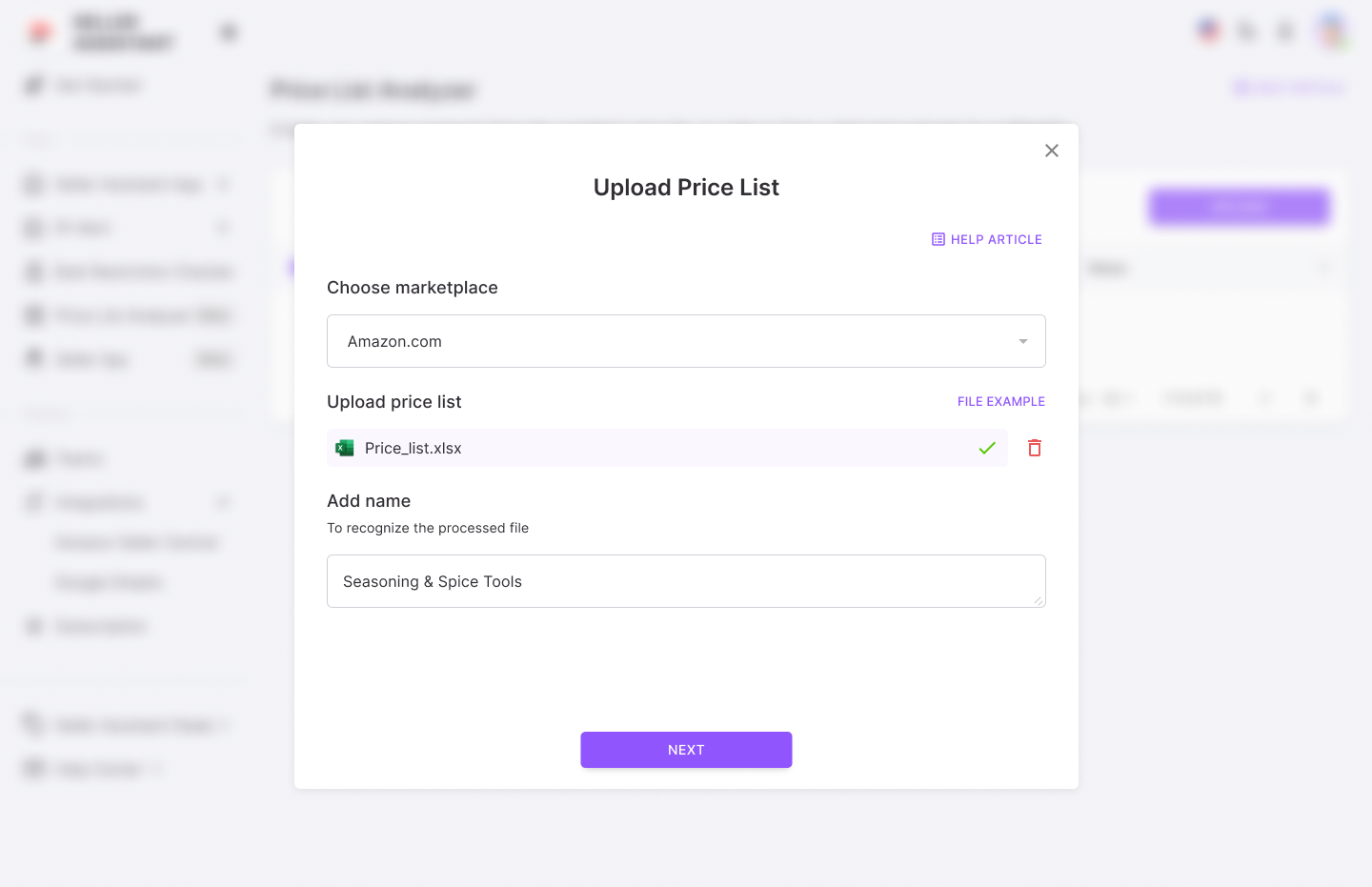
Toptan fiyat listenizi yükleyin
Step 3. Set up your wholesale list for processing
Temel veri sütunlarını (UPC/EAN kodları, maliyet ve ürün başlığı) eşleştirin.
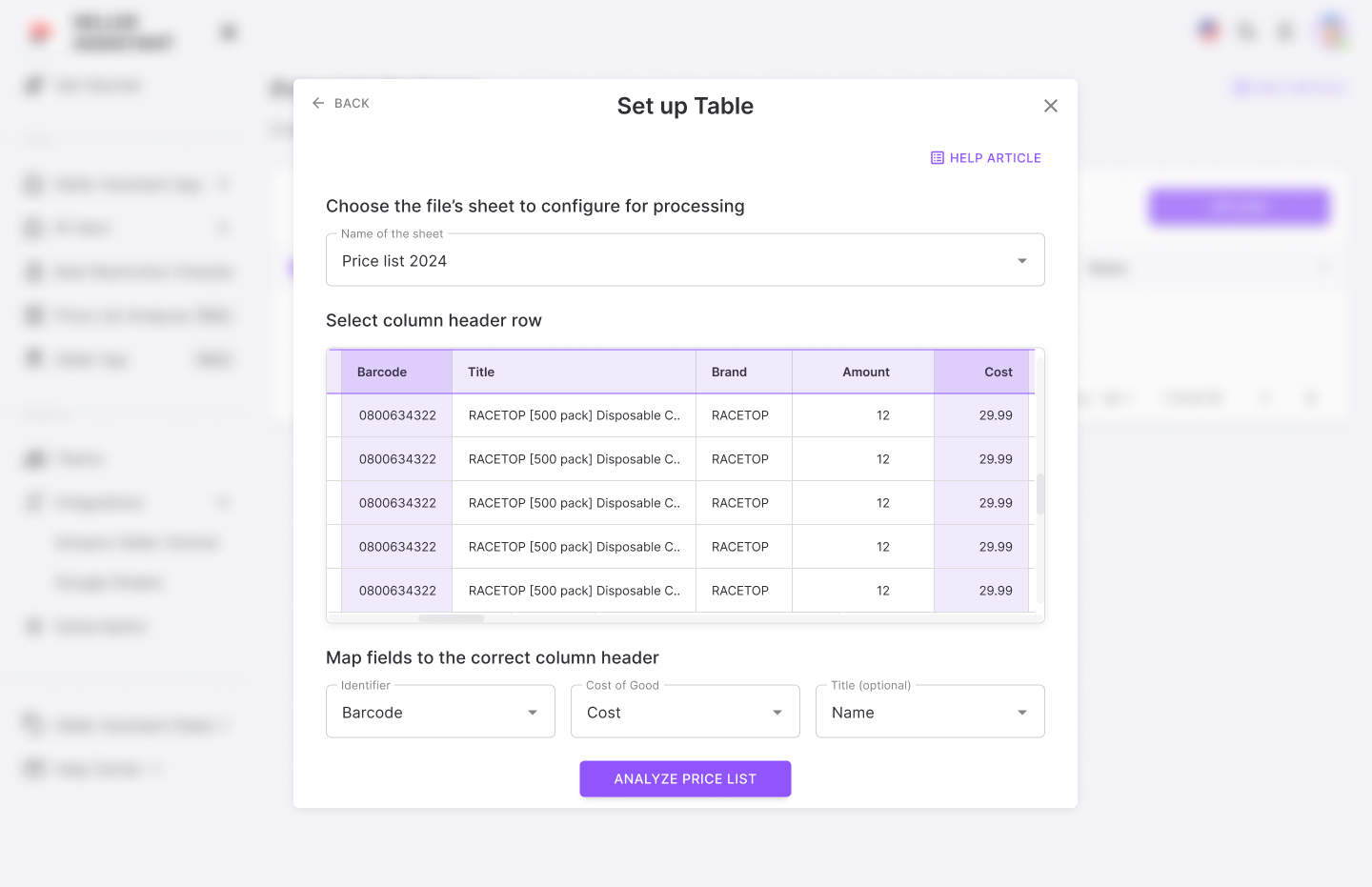
Toptan satış listenizi oluşturun
Step 4. Get the Price List Analyzer results
Analizi başlatın, temel ürün metriklerini içeren kullanıcı arayüzü tablosunu alın ve gerekirse ayrıntılı .xls raporunu indirin.
Fiyat Listesi Analiz Aracı karlılığı ve Amazon ücret verileri:
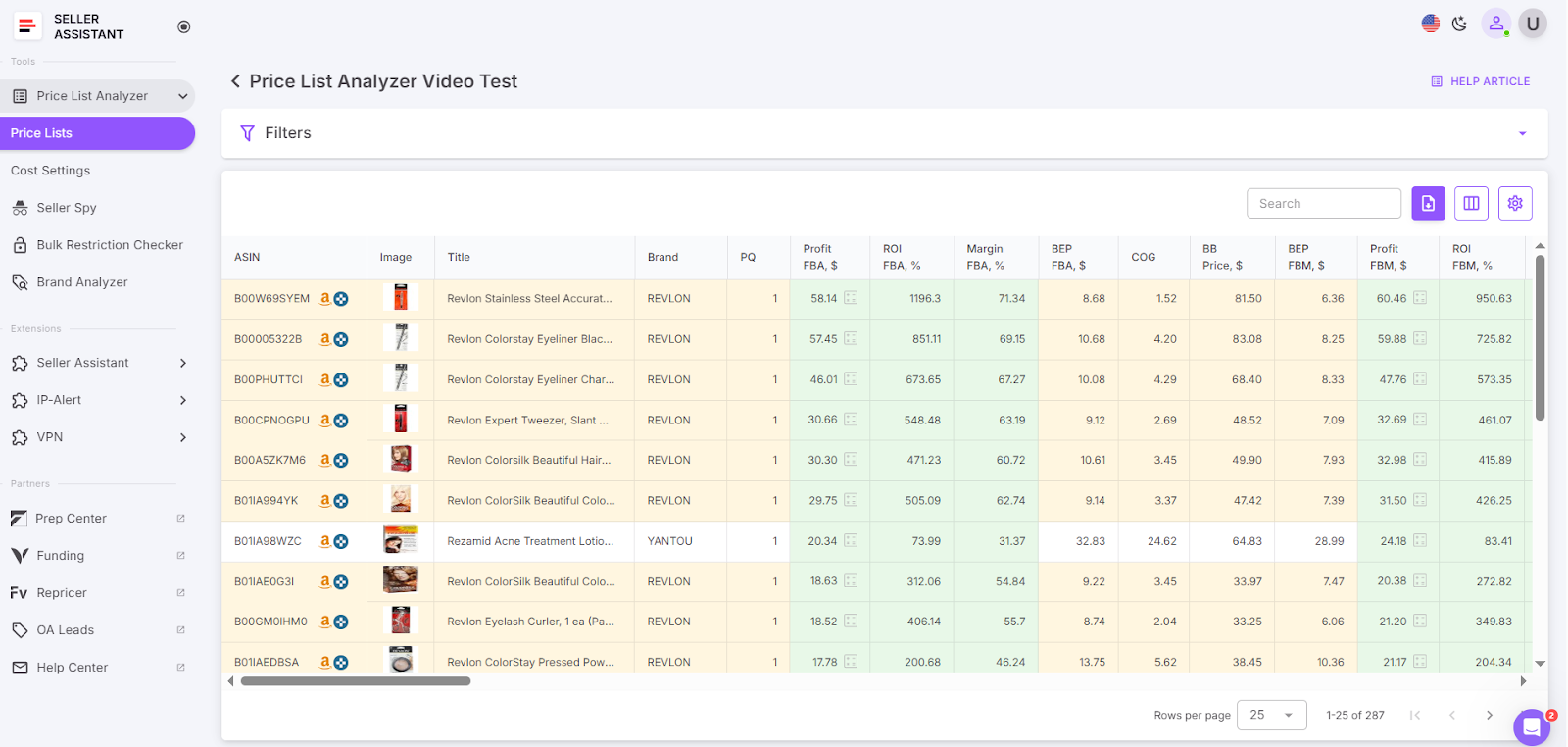
Temel ürün metriklerini içeren kullanıcı arayüzü tablosunu edinin
Pricing and profitability
- COG (Cost of Goods)
Malların vergi öncesi maliyeti.Tedarikçideki ürün fiyatı
- Cost of Goods incl. VAT
KDV dahil toplam maliyet
- Buy Box price
Amazon’da Buy Box kazanan ürünün güncel fiyatı
- Break-Even price (FBA/FBM)
The minimum product price with 0% profit for Fulfillment by Amazon (FBA) or Fulfillment by Merchant (FBM). If you go below break-even threshold, you lose money on the product
- Profit (FBA/FBM)
Estimated profit per unit using FBA or FBM fulfillment methods. Shows how much money you earn on the product
- ROI (FBA/FBM, %)
Yüzde olarak FBA veya FBM siparişleri için yatırım getirisi
- Margin (FBA/FBM, %)
Profit margin after costs, expressed as a percentage
Fulfillment costs
FBA veya FBM hizmetleriyle ilgili genel ücretler
- FBA fees
- Referral fee
Amazon’un satıştaki yüzdeye dayalı ücreti
Ürünü Amazon deposunda saklamanın maliyeti
- Variable Closing Fee
Kitaplar, müzik, video, blu-ray ve DVD’ler (BMVD) için diğer ücretlere ek olarak uygulanan bir ücret
- Digital Service Fee (DST)
DST applies to selling on Amazon fees (referral fee, fixed closing fee, variable closing fee, and get-paid-faster fee) if you sell in the countries where the fee is paid (e, g. Canada, France, Spain), and FBA fees (UK and France)
- Inbound shipping costs (FBA)
Ürünü Amazon deposuna gönderme maliyeti (FBA için)
- Prepare/labeling cost (FBA/FBM)
Ürünü sevkiyata hazırlama veya etiketleme maliyeti
- Fragile/bubble wrapping (FBA/FBM)
Ürünün kırılganlık nedeniyle özel ambalaj gerektirmesi durumunda ek maliyet
Step 5. Filter the results
Görüntülenen sonuçları iyileştirmek için filtreleri yapılandırın ve uygulayın.Filtrelenen listeyi indirmek için İndir düğmesine tıklayın ve güncellenen dosyayı kaydedin.
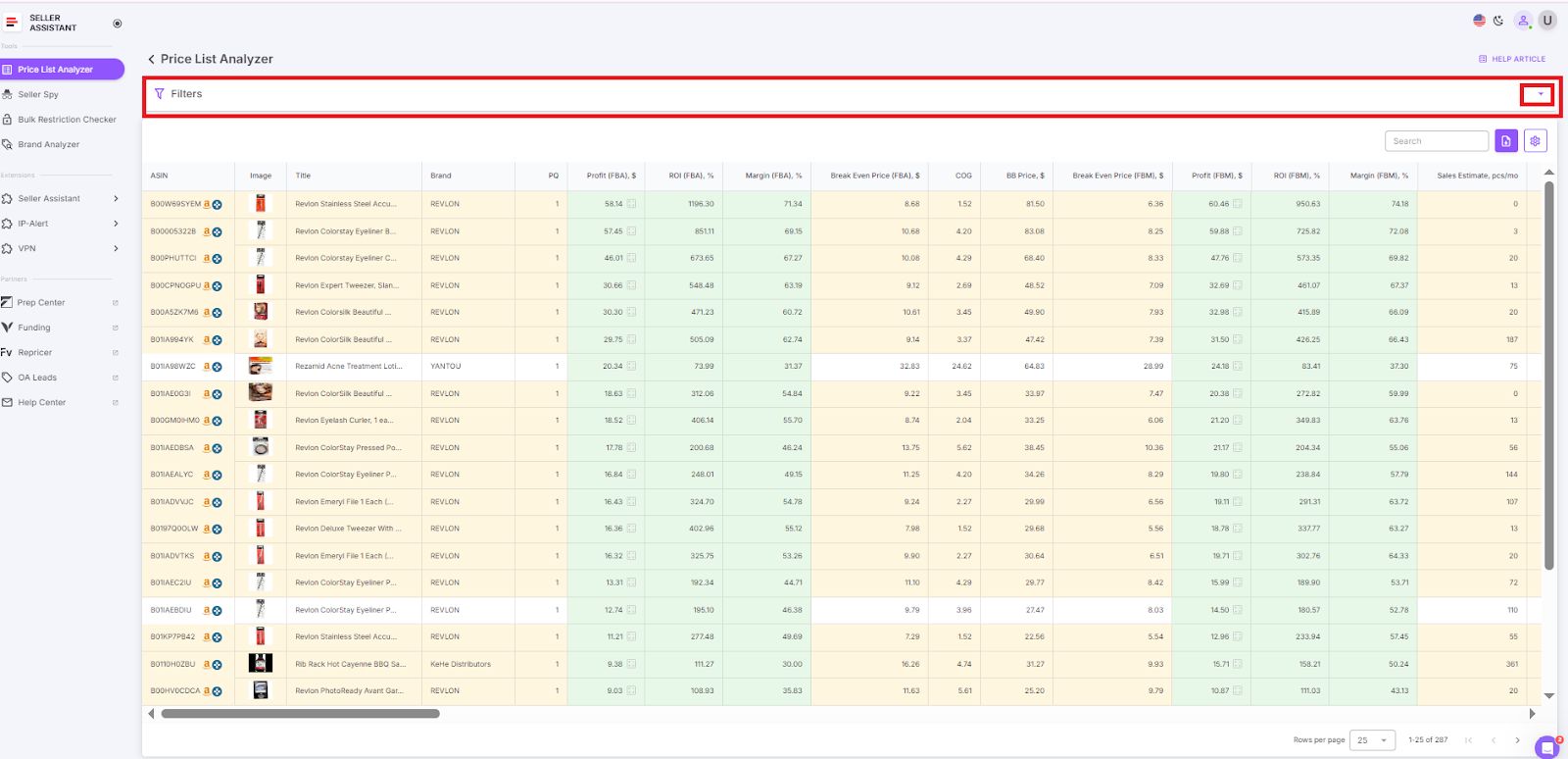
Sonuçları filtreleyin
FBA fees calculation for single products on Amazon
Hızlı ve doğru kârlılık kontrolleri için birçok Amazon satıcısı, Amazon ürün sayfalarında doğrudan Satıcı Asistanı Chrome Uzantısını kullanır.Bu araç, sekmeleri değiştirmeden veya verileri manuel olarak kopyalamadan, gezinirken tüm ücretleri ve kârları anında hesaplamanıza olanak tanır.
Seller Assistant Extension is a powerful product sourcing tool designed to help you find winning products to sell on Amazon. As a core part of the Seller Assistant software suite, it simplifies product research by showing key data right where you need it – on Amazon search and product pages, supplier websites, and even competitor storefronts.
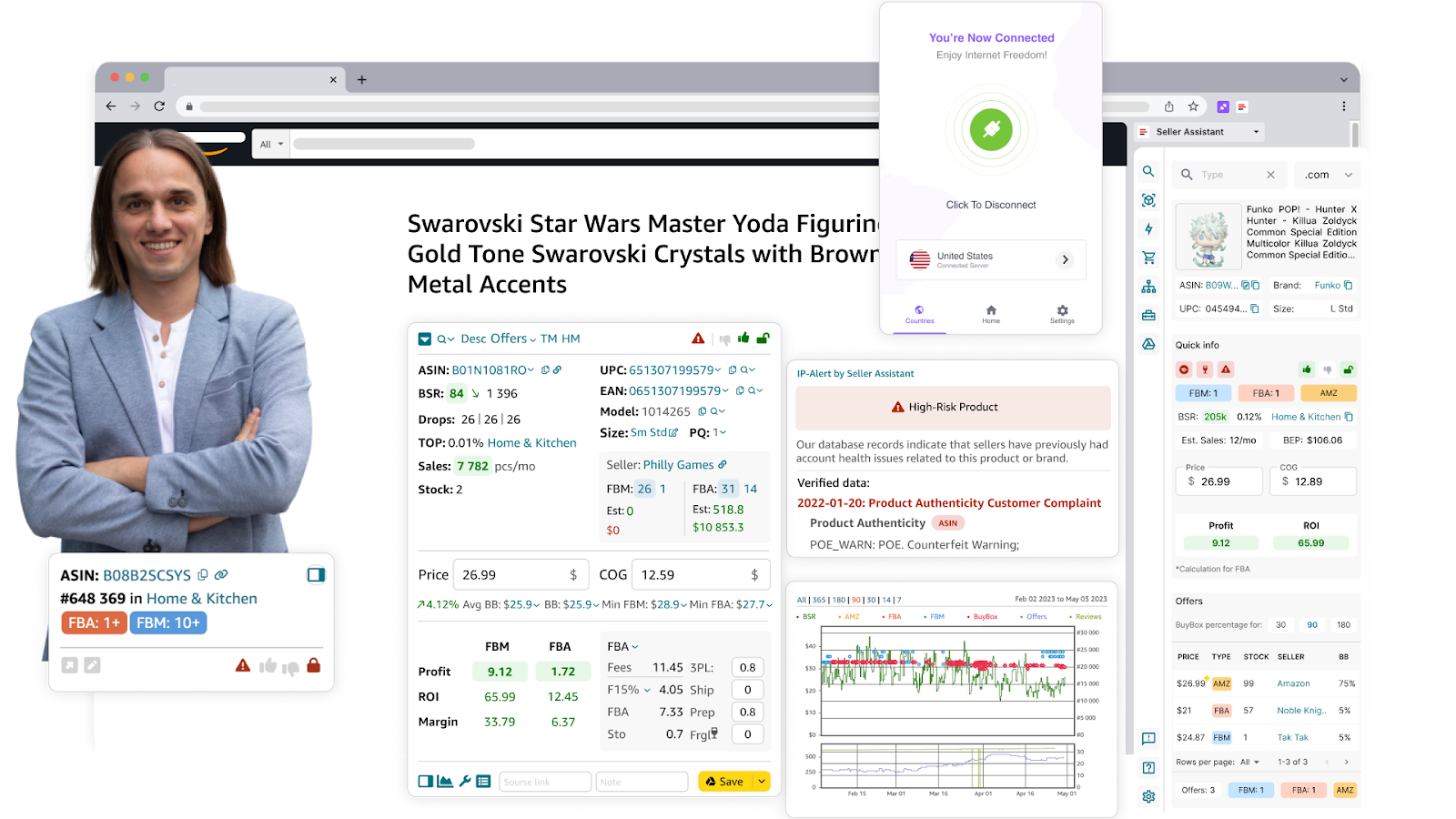
_ Satıcı Asistanı Uzantısı _
It gives you an instant read on profitability, competition, Buy Box potential, and sales viability. The extension also flags crucial risks like product restrictions or potential IP complaints. With built-in Keepa charts and FBM&FBA Profit Calculator, you can quickly decide whether a product is worth reselling – without ever leaving the page.
What it does
- Calculates FBA and FBM fees, including referral, fulfillment, and storage costs
- Estimates profit, ROI, and margin instantly
- Calculates break-even-point
- Customizes inputs like shipping, prep, and logistics costs
- Computes sales tax and VAT (if applicable).
How to use it step-by-step
Step 1. Open the Amazon product page
Navigate to the Amazon listing you’re interested in. Seller Assistant Extension will automatically activate and overlay its FBM&FBA Profit Calculator.
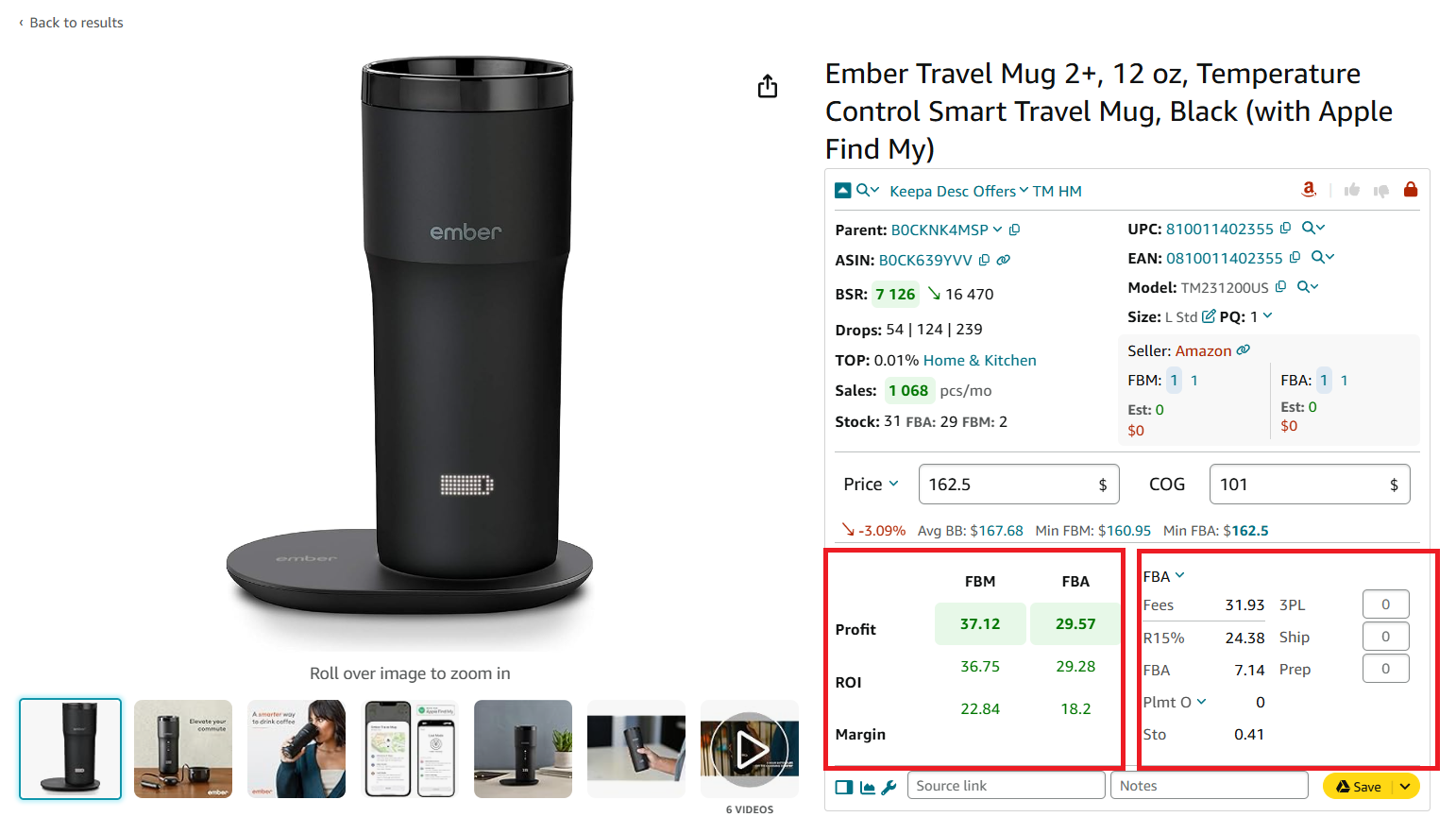
Hesap makinesinin karlılık ve maliyetler bölümünde 2 alt bölüm bulunmaktadır
Step 2. Enter your Cost of Goods (COG)
Uzantının COG alanına tedarikçiden aldığınız maliyeti girin.Bu, ürünü edinmek için ödediğiniz temel fiyattır.
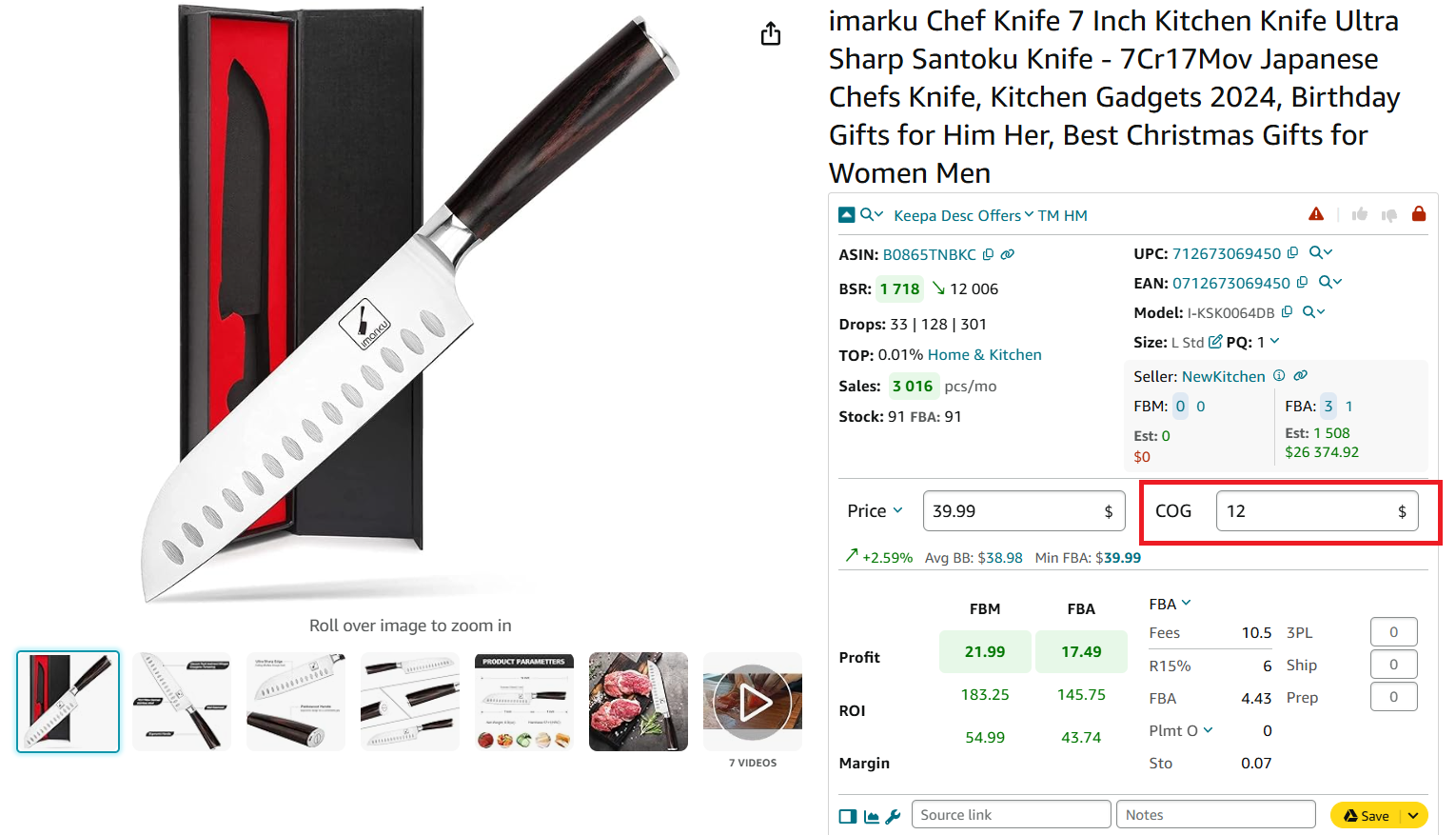
COG Satılan Malın Maliyetidir
Step 3. Choose between FBA and FBM
Ücretleri ve kârları karşılaştırmak için FBA ve FBM arasında seçim yapın.
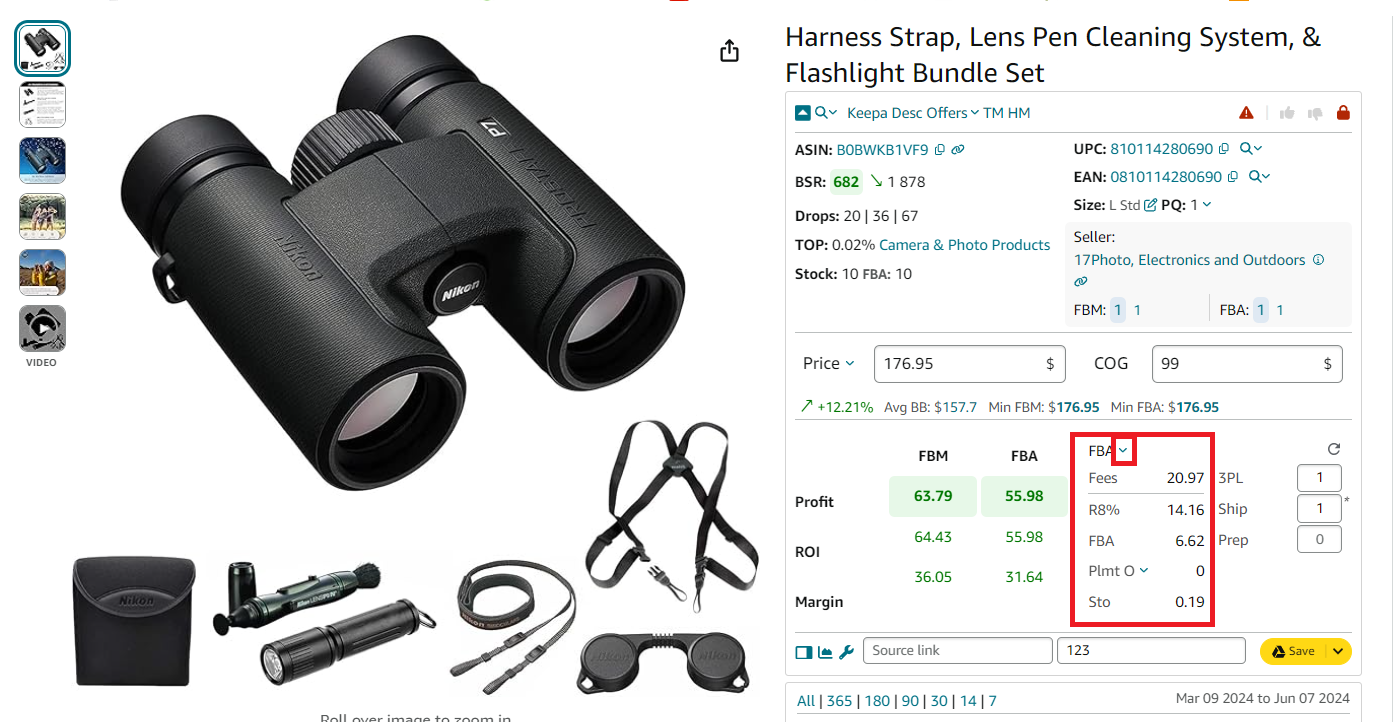
FBA/FBM fees
Satıcı Asistanı şunları gösterecektir:
- FBA/FBM fulfillment costs
- Referral fee (R15%)
- Storage fees (Sto)
- Inbound Placement Service Fees (Plmt)
- Digital Services Fee
Step 4. Factor in logistics costs
Ayarlara tıklayarak lojistik maliyetlerini yapılandırın:
- Shipping to Amazon (per unit)
- Prep center fees for labeling or packaging
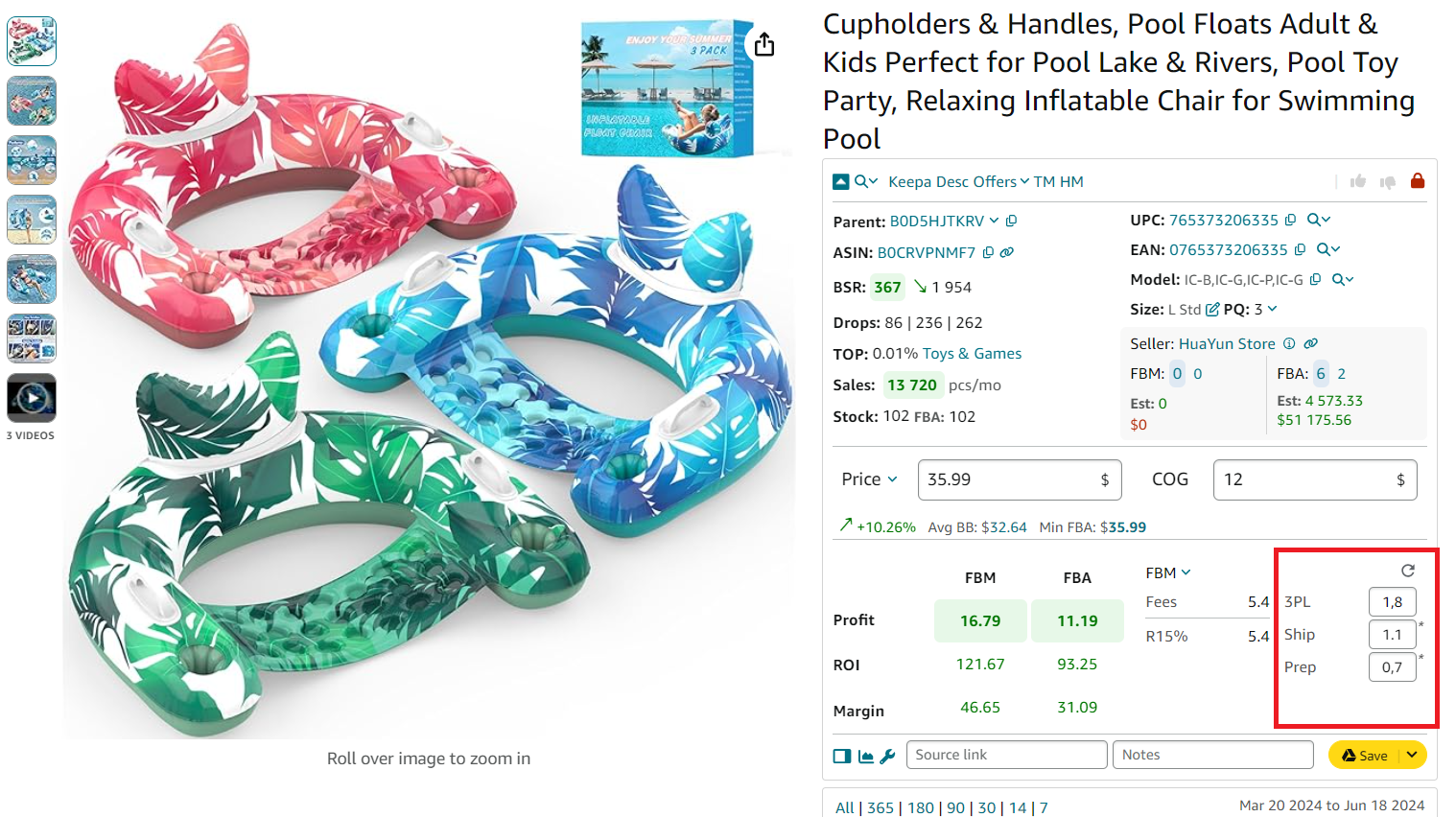
Lojistik maliyetlerini yapılandırma
Step 5. Add sales tax or VAT (if applicable)
COG alanına tıklayın ve ardından şunları etkinleştirin:
- Sales Tax toggle for U.S. sales tax
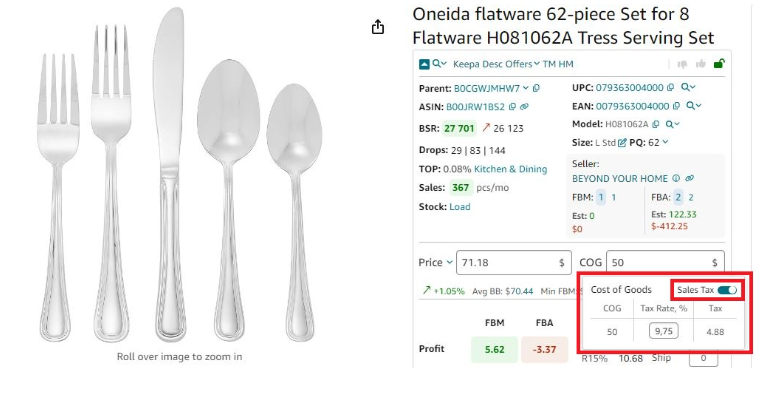
Satış vergisi hesaplayıcısı _
- VAT toggle for European or international sellers
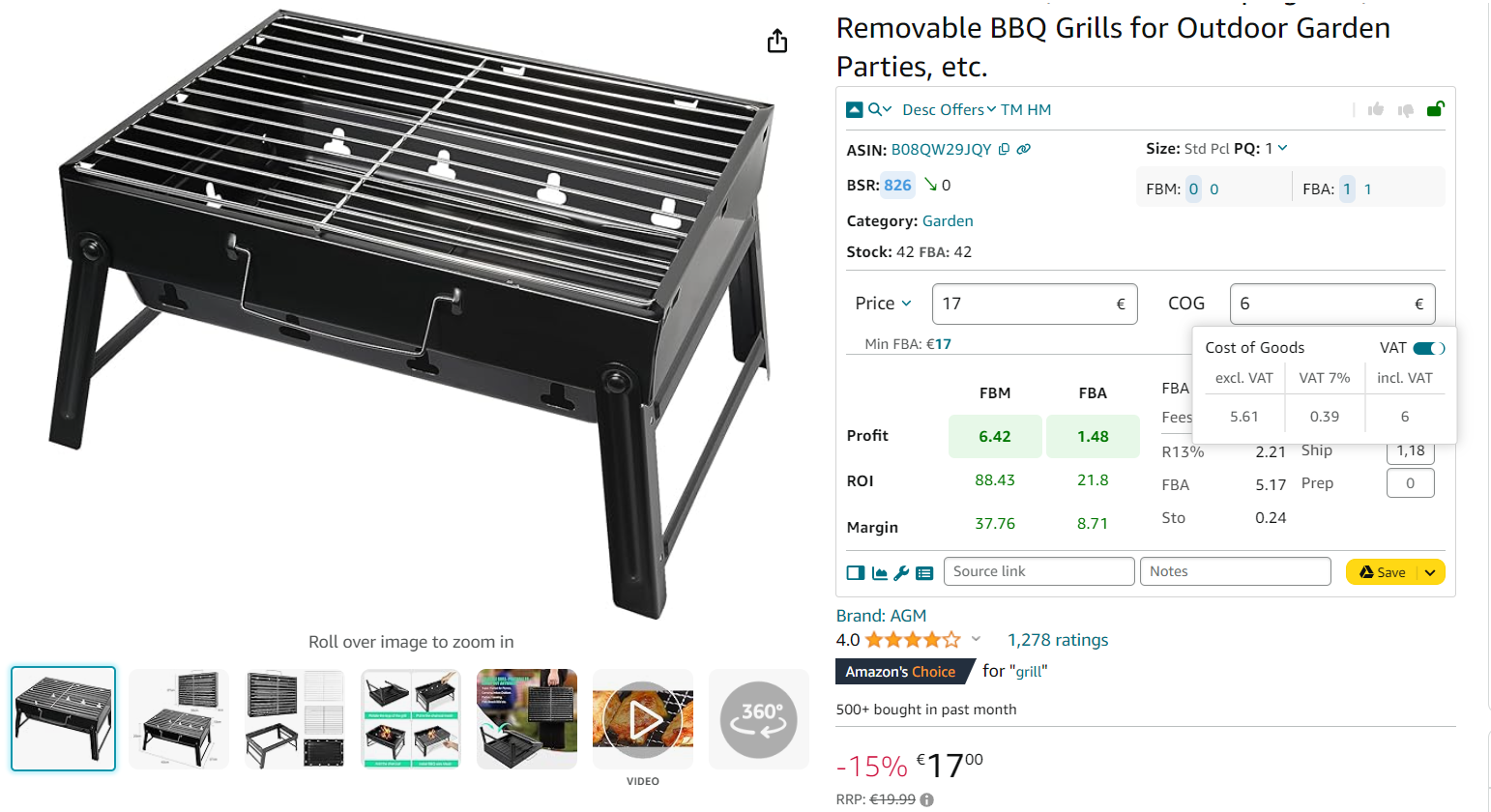
KDV hesaplayıcı
Step 6. Review the full fee breakdown and profitability
FBM ve FBA Hesaplayıcısı şunları görüntüler:
- FBA Fees
Toplam Amazon ücretleri, Amazon sipariş karşılamayla ilgili tüm masraflar
- R15%
Tavsiye ücreti, genellikle satış fiyatının %15’i
- Plmt
Gelen yerleştirme hizmet ücreti
- Sto
Amazon depolarındaki birim başına aylık depolama maliyetleri.
- 3PL
3PL is third-party logistics costs – (Ship + Prep + Frgl).
- Shipping
Kargo, Amazon lojistik merkezine birim başına kargo ücretidir.
- Prep
Hazırlık, hazırlık merkezi maliyetidir.Hazırlık merkezi, envanterinizi Amazon standartlarına göre siparişe hazırlayan bir hizmet sağlayıcıdır.
- Profit per unit
Kâr = Satış fiyatı – COG – tüm ücretler (yönlendirme, Amazon Lojistik, depolama, lojistik, vergi, KDV)
- ROI (%)
YG = Kâr ÷ (COG + satış vergisi + lojistik) × %100
- Margin (%)
Marj = Kâr ÷ Satış fiyatı × %100
- VAT/Sales Tax
Marketiniz için yapılandırılmışsa uygulanır.
FBA fees calculation for single products on supplier websites
If you’re sourcing from retail supplier websites, Seller Assistant’s Side Panel View makes profitability analysis easy – right on the same page. It’s designed for side-by-side product research without the need to switch tabs or copy data back and forth.
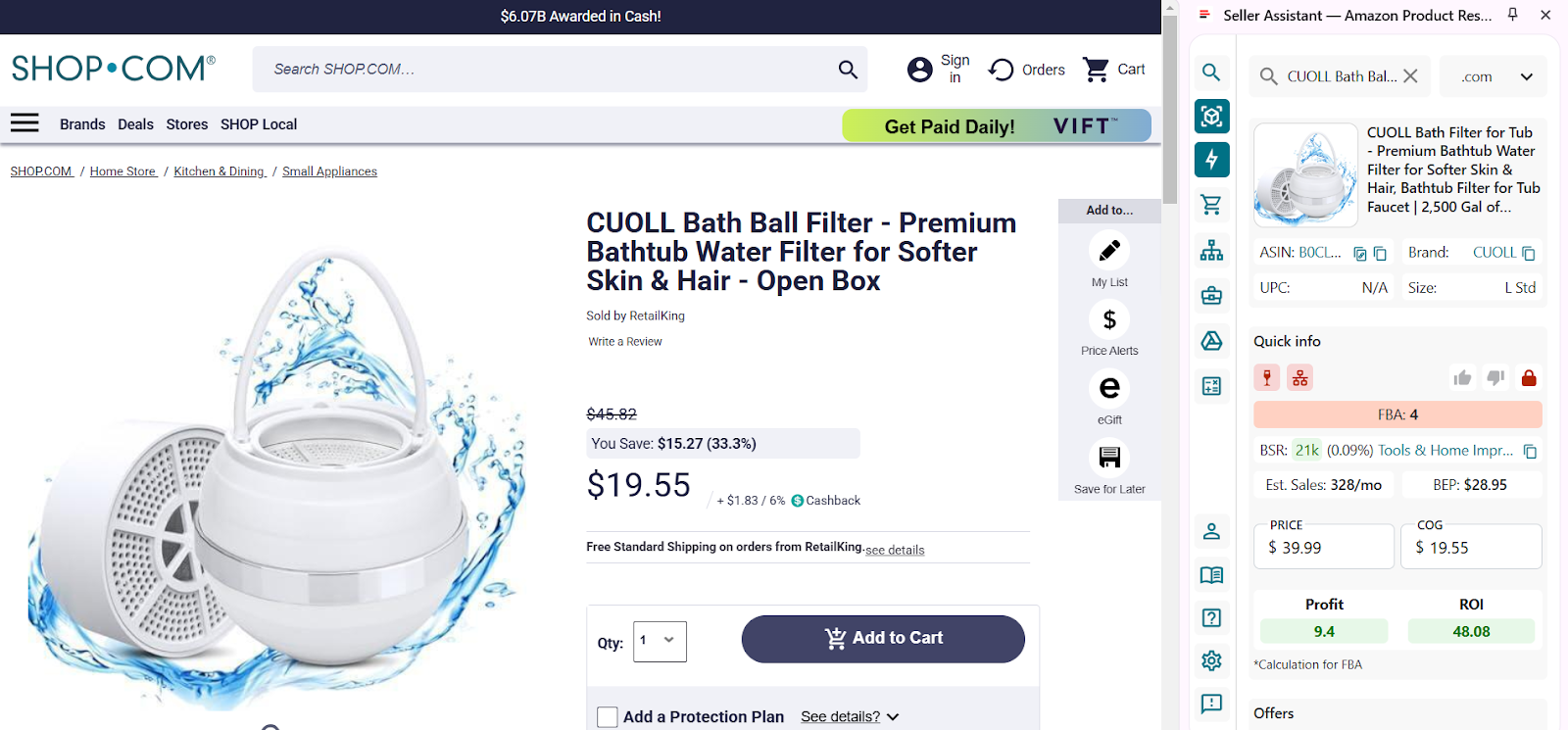
Ürününüzü seçmek için Yan Panel Görünümünde aşağı kaydırın ve ürünü açmak için ürün ayrıntıları simgesini veya ürün görselini tıklayın._
Side Panel View is a sourcing feature inside the Seller Assistant Extension that displays Amazon product data directly on any external website – like supplier pages – via a side panel. This allows you to evaluate a product’s sales potential, profitability, and competition while browsing your supplier catalog.
With Side Panel View, you can make sourcing decisions in real time. It reduces friction, speeds up product research, and ensures you’re evaluating not just price – but true profitability. Whether you’re vetting new suppliers or reviewing existing catalogs, this tool ensures your numbers are accurate before you buy.
What it does
- Calculates FBA and FBM fees, including referral, fulfillment, and storage costs
- Estimates profit, ROI, and margin instantly
- Calculates break-even-point
- Customizes inputs like shipping, prep, and logistics costs
- Computes sales tax and VAT (if applicable).
How to use it step-by-step
Step 1. Open a supplier product page
Navigate to any supplier or wholesale product listing. You can use the Side Panel View on virtually any site – just keep the Seller Assistant Extension installed and active.
Step 2. Launch the Side Panel View
Chrome tarayıcı araç çubuğunuzdaki Uzantılar simgesini tıklayın ve Satıcı Asistanı Uzantısı’nı seçin.Yan Panel Görünümü ekranınızın sağ tarafında otomatik olarak görünecektir.
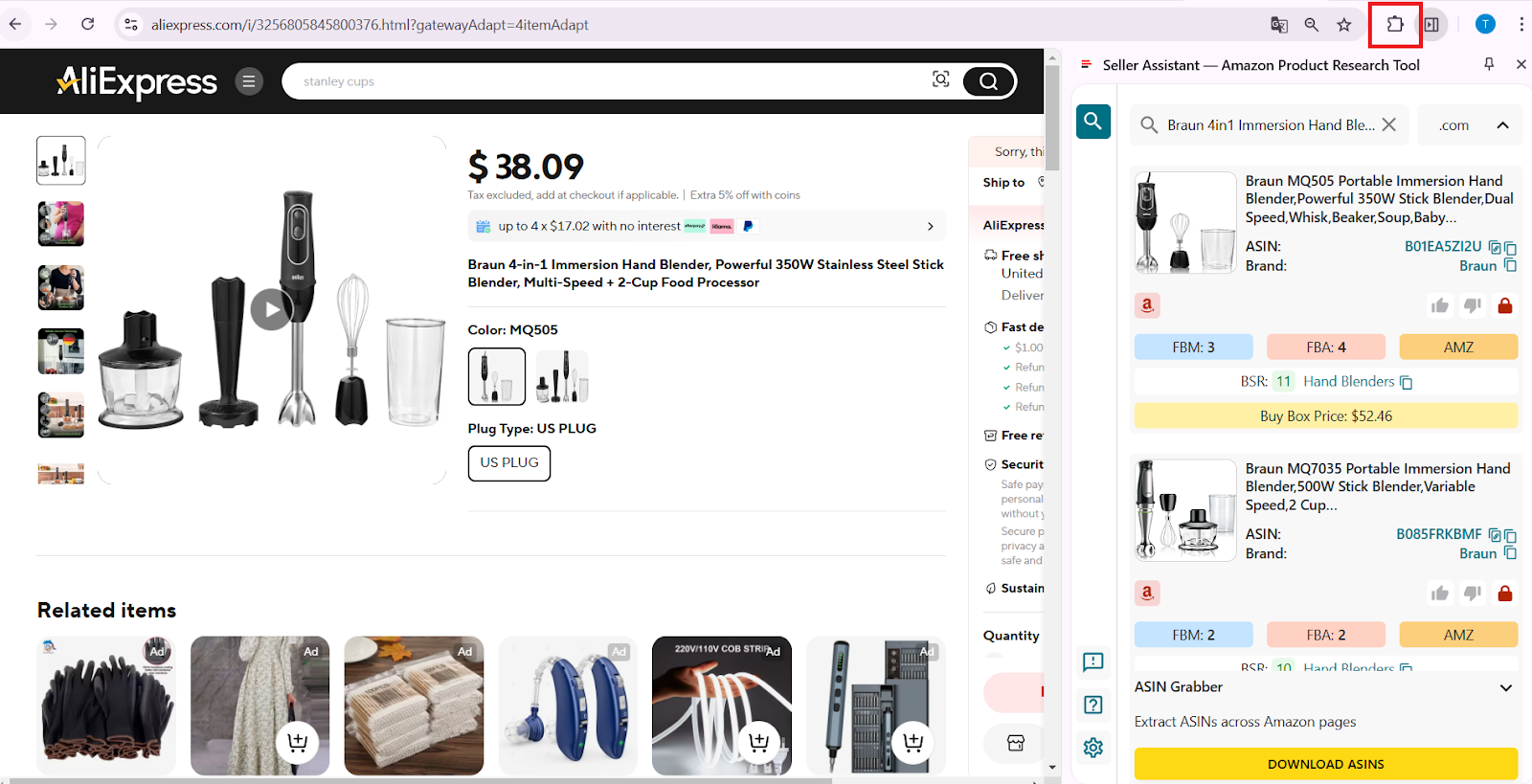
Teklifleri açmak için Chrome tarayıcısında adres çubuğunuzun sağındaki Uzantılar simgesini tıklayın ve Satıcı Asistanı’nı seçin (Satıcı Asistanı’nı zaten sabitlediyseniz).
Step 3. Select the matched Amazon product
Doğru eşleşmeyi bulmak için yan panelde ilerleyin.Eşleşen Amazon listeleme verilerini açmak için ürün ayrıntıları simgesine veya görseline tıklayın.
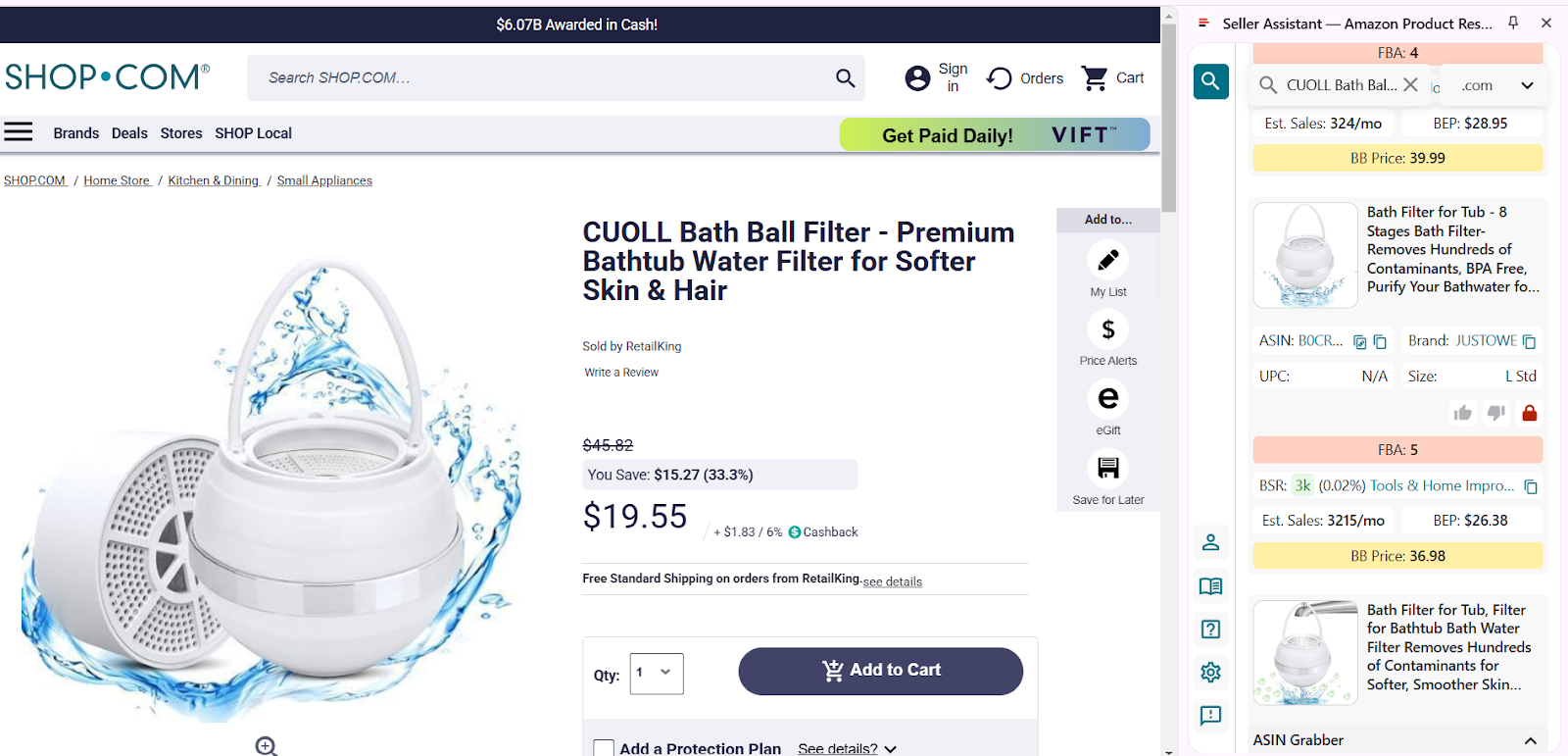
Tedarikçi web sitenizde bir ürün sayfası açın ve Yan Panel Görünümünü etkinleştirin
Step 4. Enter the Cost of Goods (COG)
Ürün maliyetinizi doğrudan COG alanına girin.Seller Assistant, Amazon FBA varsayımlarını kullanarak tahmini karı ve yatırım getirisini anında hesaplayacaktır.Bu size, sekme değiştirmeden, anlaşmanın karlı olup olmadığı konusunda birinci düzey bir kontrol sağlar.
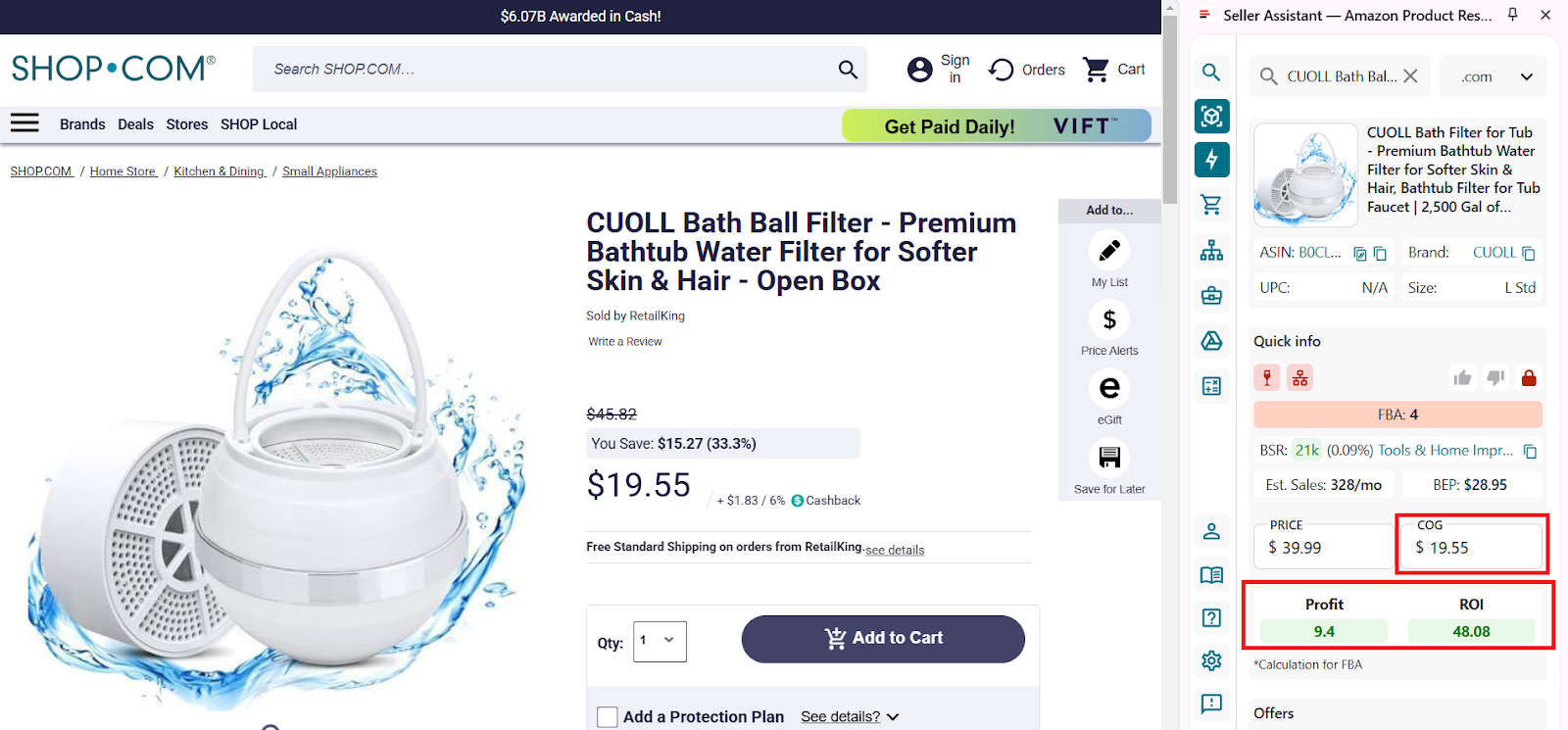
COG’yi (tedarikçideki ürün fiyatı) girin ve Kâr ve ROI’ye bakın (hesaplama FBA için yapılır).
Step 5. Use the extended calculator for deeper analysis
Click the calculator icon to open the full FBM and FBA Calculator.
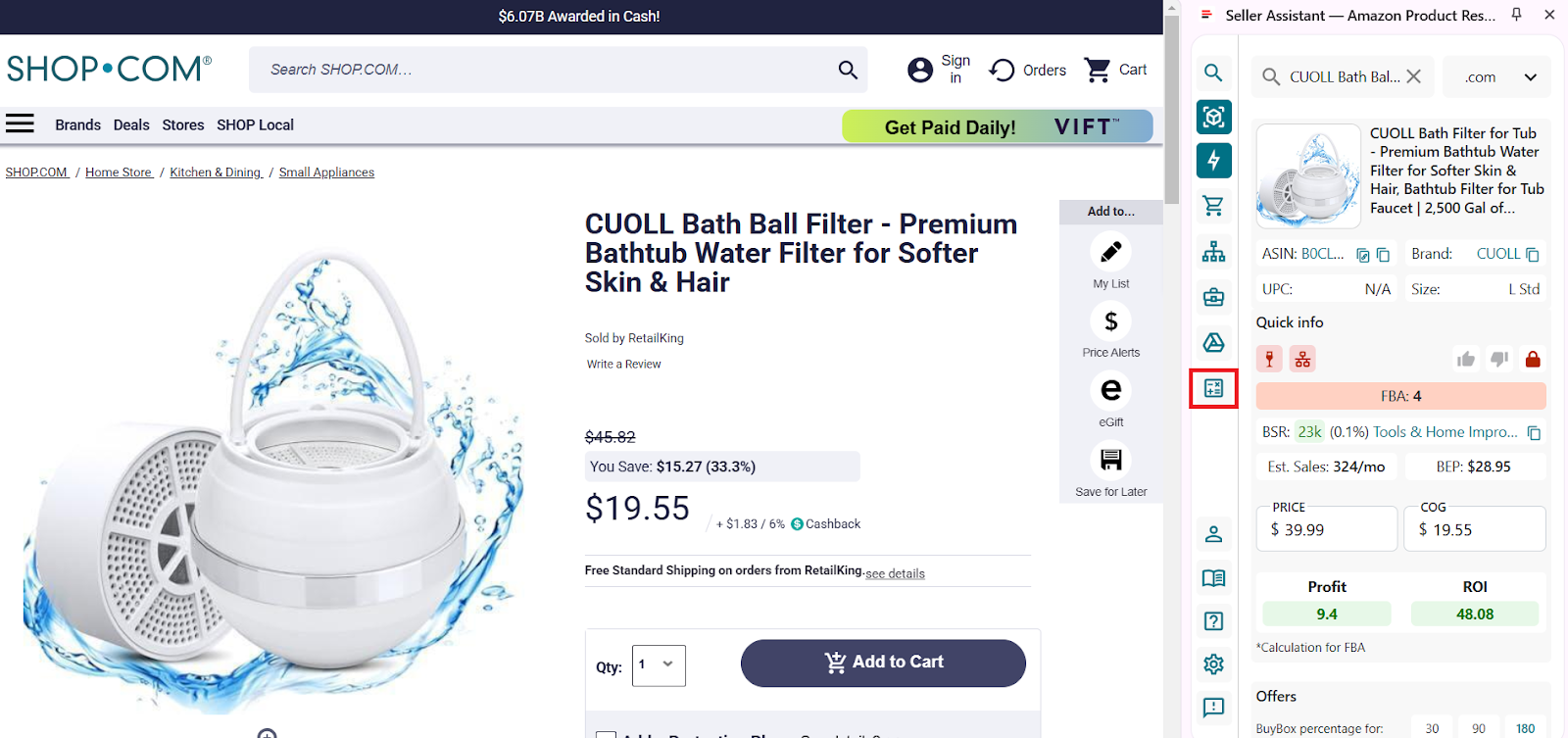
FBM ve FBA Hesaplayıcı
Here, you can:
- Switch between FBA and FBM fulfillment methods
- Enter logistics costs:
- Prep costs (e.g., bubble wrap, labeling)
- Shipping to Amazon
- Adjust package quantity if applicable
- All Amazon fees – referral, FBA, storage, inbound placement – are automatically pulled in.
Tüm hesap makinesi verilerini görün:
- FBA Fees
Toplam Amazon ücretleri, Amazon sipariş karşılamayla ilgili tüm masraflar
- R15%
Tavsiye ücreti, genellikle satış fiyatının %15’i
- Plmt
- Sto
Amazon depolarındaki birim başına aylık depolama maliyetleri.
- 3PL
3PL, üçüncü taraf lojistik maliyetleridir – (Ship + Prep + Frgl).
- Shipping
Kargo, Amazon lojistik merkezine birim başına kargo ücretidir.
- Prep
Prep is the preparation center cost. Prep center is a service provider preparing your inventory for fulfillment according to Amazon standards.
- Profit per unit
Kâr = Satış fiyatı – COG – tüm ücretler (yönlendirme, Amazon Lojistik, depolama, lojistik, vergi, KDV)
- ROI (%)
YG = Kâr ÷ (COG + satış vergisi + lojistik) × %100
- Margin (%)
Marj = Kâr ÷ Satış fiyatı × %100
- BEP
Başabaş noktası
- VAT/Sales Tax
Uygulanıyorsa Katma Değer Vergisi veya Satış Vergisi.
Amazon’s Fee Calculator Tools
Amazon offers sellers 3 fee calculator tools. Two of them are used to estimate FBA fees, while the third one shows you fees charged for existing products you sell on Amazon.
Inline revenue calculator
The Inline revenue calculator shows you the estimate of Amazon FBA fees for each SKU.
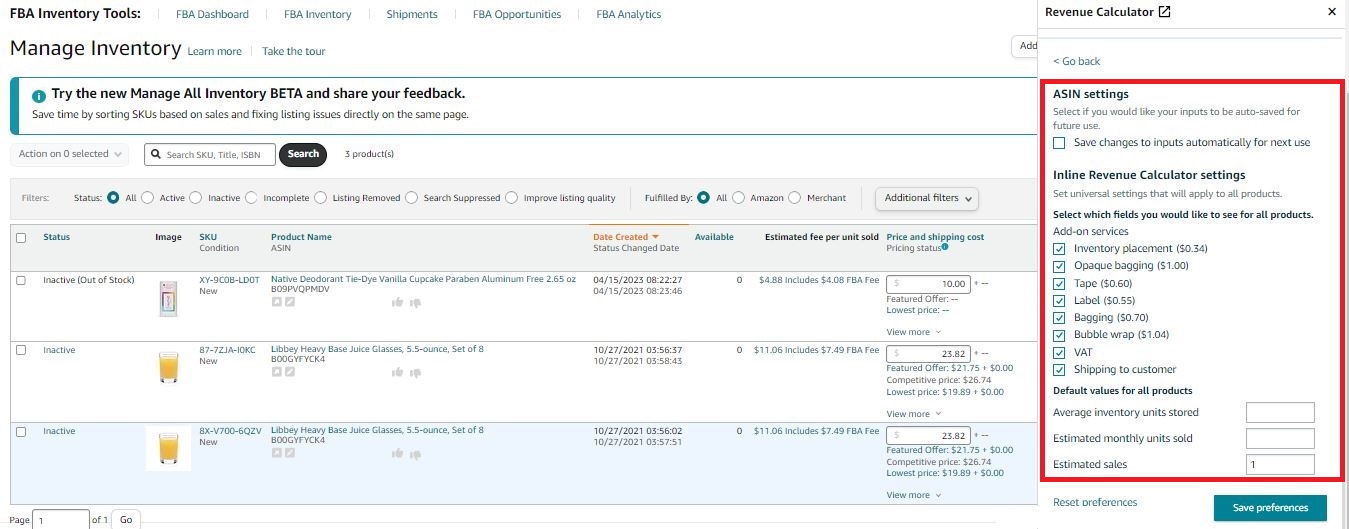
Satır içi gelir hesaplayıcı
Bu araç, bazı FBA ücret dökümlerini görmek için kullanışlıdır ancak tüm ücretleri göstermez.Ayrıca verileri manuel olarak girmeniz gerekir ve sonuçları kaydedemezsiniz.
Fees shown by the Inline revenue calculator
- Referral fees;
- FBA fulfillment fees;
- FBA inbound placement service fees;
- Monthly storage fees;
- Long-term storage fees;
- Variable closing fees;
- Per-item fees;
- Optional Service fees
Fees not shown by the Inline revenue calculator
- Monthly selling plan fees;
- Removal order fees;
- Return processing fees;
- Unplanned service fees;
- FBA inventory storage overage fees;
- Refund administration fees;
- Rental book service fees;
- High volume listing fees;
- FBA Export;
- Prime Wardrobe.
What it does
Satır içi gelir hesaplayıcı, her ürünün FBA ücretlerini ve elde edeceğiniz kârı tahmin etmenize olanak tanır.Ücret hesaplaması liste fiyatına, tahmini nakliye maliyetine ve diğer verilere dayanmaktadır.
Tahmini kârı hesaplamak için Satılan Malın Maliyeti veya nakliye maliyetini girebilirsiniz.Hesap makinesi ayarlarını da özelleştirebilirsiniz.
How to use it
The Inline revenue calculator can be accessed in your Seller Central under Inventory > Manage Inventory by clicking the Estimated fee per unit sold column.
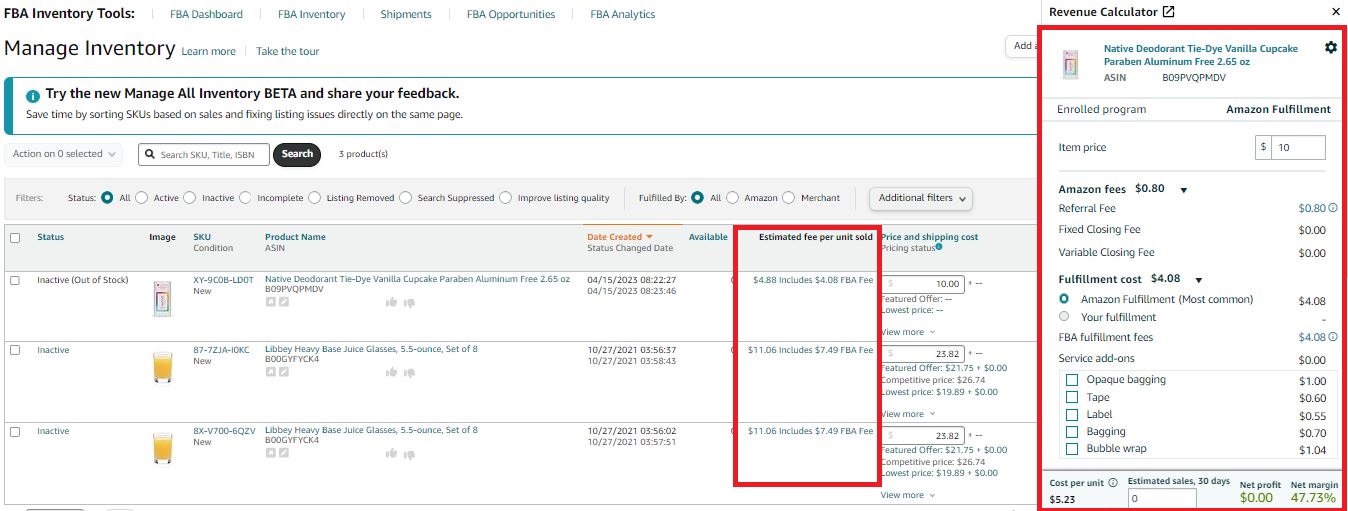
Satır içi gelir hesaplayıcı
Revenue Calculator
The Revenue Calculator is a tool that helps sellers estimate product fulfillment costs and make real-time cost comparisons between FBA and FBM fulfillment methods. Its main purpose is to compare which of the two fulfillment methods – Fulfillment by Amazon or Fulfillment by Merchant – is more profitable for delivering your product to the buyer.
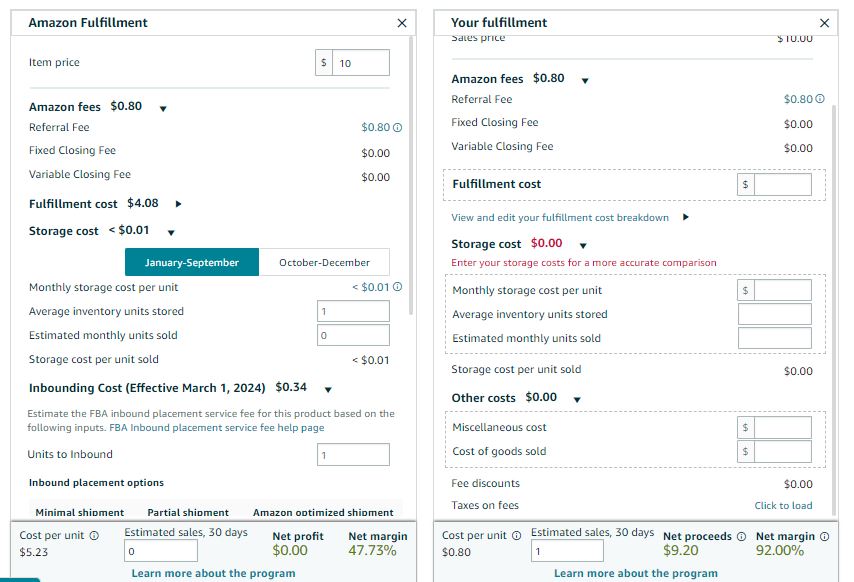
Gelir Hesaplayıcı
Ancak tüm ücretleri göstermez.Ayrıca, ürün kârını hesaplamak için sayfa üzerini kullanamazsınız.Birçok ürünü araştırıyorsanız ve tüm ürün parametrelerini aynı anda tahmin etmeniz gerekiyorsa bu durum sakıncalıdır.Buna erişmek için, her ürün için hesaplama yapmanız gerektiğinde Satıcı Merkezinizi açmanız gerekir.
Ayrıca hesaplama yapmak için verileri manuel olarak girmeniz gerekir ve sonuçları kaydedemezsiniz.
Related: Amazon FBA Calculator: Free vs. Paid
Fees shown by the Revenue Calculator
- Referral fees;
- FBA fulfillment fees;
- FBA inbound placement service fees;
- Monthly storage fees;
- Long-term storage fees;
- Variable closing fees.
Fees not shown by the Revenue Calculator
- Monthly selling plan fees;
- Per-item fees;
- Removal order fees;
- Return processing fees;
- Unplanned service fees;
- FBA inventory storage overage fees;
- Refund administration fees;
- Rental book service fees;
- High volume listing fees.
What it does
Amazon Gelir Hesaplayıcı, FBA ve FBM arasında seçim yapmanıza yardımcı olur ve siparişi müşteriye ulaştırmak için neyin daha uygun maliyetli olduğu konusunda fikir verir (bunu kendiniz mi yoksa Amazon mu yaparsınız).Bu hesap makinesi tüm masrafları hesaba katmayı garanti etmez ve kesin ücret hesaplamasına ihtiyacınız varsa üçüncü taraf araçları kullanmak daha iyidir.
How to use it
Amazon Lojistik ücretlerinizi ve ürünün kendi kendine gönderim maliyetini hesaplamak için fiyat ve kargo ücreti ayrıntılarını girmeniz, Gelen yerleştirme seçeneklerini, konum sayısını ve gelen bölgeleri ve Satılan Malların Maliyeti’ni, tahmini gönderim maliyetlerinizi ve Amazon Lojistik paketleme ve etiketleme hizmeti eklentileri gibi diğer ücretleri seçmeniz gerekir.Ardından üçüncü taraf gönderi ücretleriyle ilgili gerekli tüm verileri ekleyin ve sonuçları karşılaştırın.
Amazon Fee Preview Report
Amazon Fee Preview Report is used to provide a summary of specific Amazon selling and FBA monthly fulfillment fees. You can also see if Amazon will change fees for any of your orders. However, it doesn’t show many other fees, and you can’t do any calculations there. To do that, you must use another tool.
What it does
Bu raporda mevcut Amazon Lojistik envanteriniz için Amazon satış ve sipariş karşılama ücretlerinin özet tahminlerini bulabilirsiniz.Ayrıca herhangi bir ücret değişikliği olup olmayacağını da size bilgi vermeniz ve kar hesaplamalarınızı düzeltmeniz için gösterir.
Rapordaki veriler bilgilendirme amaçlıdır ve 72 saate kadar eski olabilir.
How to use it
Rapora erişmek için Raporlar açılır menüsünde Yerine Getirme’yi seçin.
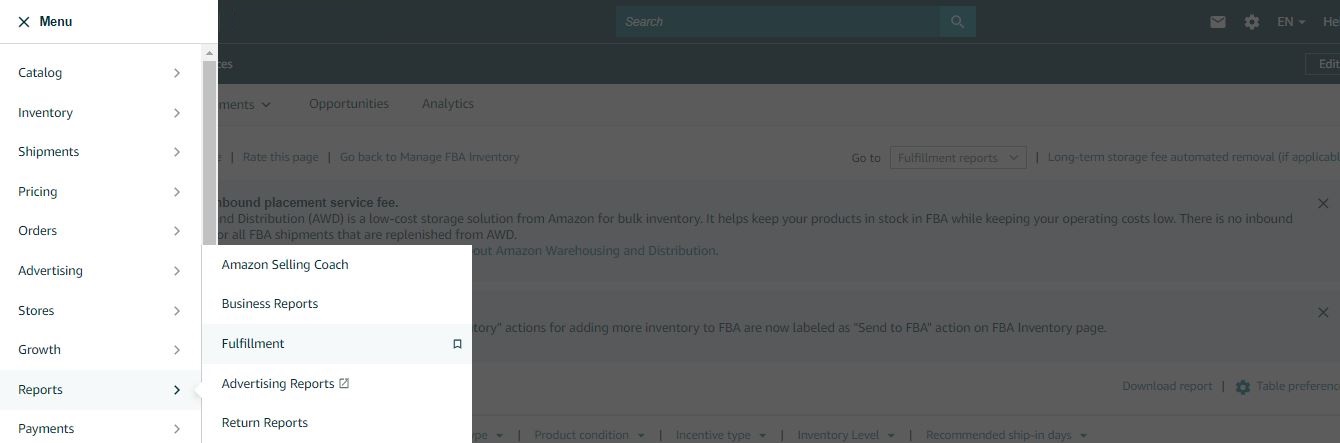
Ücret Önizleme Raporuna erişmek için Raporlar açılır menüsünde Yerine Getirme’yi seçin.
Sayfanın solunda Ödemeler’e gidin ve Ücret Önizlemesi’ni tıklayın.
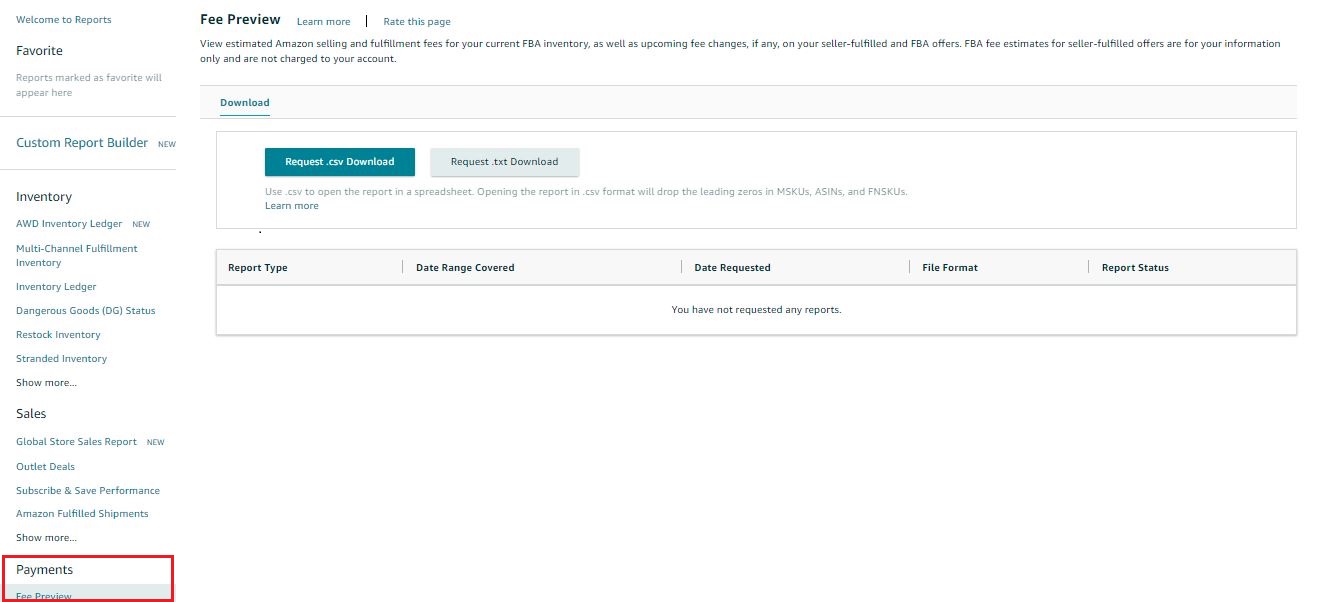
_ Ücretsiz Önizleme Raporuna erişmek için Ödemeler’e gidin ve Ücret Önizlemesi’ni tıklayın._
Sıkça Sorulan Sorular
FBA ücretleri nasıl hesaplanır?
FBA ücretlerini doğru hesaplamak için Amazon satıcılarının çoğu FBA hesaplayıcıları kullanır. Amazon’un ücretsiz araçlarını veya Seller Assistant’ın FBM ve FBA Kâr Hesaplayıcısı gibi gelişmiş üçüncü taraf hesaplayıcıları kullanabilirsiniz.
Amazon FBA ücretlerini nasıl hesaplıyor?
FBA ücretleri için herkese uyan tek bir maliyet yoktur. Amazon, temel sipariş karşılama ücretini belirlemek için ürün boyutunu, ağırlığını ve kategorisini dikkate alır. Ayrıca depolarındaki eşyalar için depolama ücreti de alır.
Amazon FBA depolama ücretleri nasıl hesaplanır?
FBA depolama ücretlerini hesaplamak için Seller Assistant’ın FBM ve FBA Kâr Hesaplayıcısı gibi araçlar kullanabilirsiniz. Bu araç tüm Amazon ücretlerini doğrudan ürün sayfalarında gösterir.
Amazon’da FBA ücretleri nerede bulunur?
Amazon FBA ücretlerini Seller Central’daki Ücret Önizleme Raporunda bulabilirsiniz.
Bir ürünü listelemeden önce FBA ücretlerini doğru şekilde nasıl hesaplayabilirim?
Ücretleri ve kârlılığı gerçek zamanlı olarak hesaplamak için Seller Assistant Uzantısı gibi bir araç kullanın. Yerleşik hesaplayıcılarla ürünleri doğrudan Amazon veya tedarikçi web sitelerinde analiz edebilirsiniz.
Final Thoughts
Amazon FBA ücretlerinin nasıl hesaplanacağını bilmek yalnızca rakamları hesaplamakla ilgili değildir; marjlarınızı korumak ve daha akıllı kaynak bulma kararları vermekle de ilgilidir.Sevk ve teslimattan depolama ve lojistiğe kadar düzinelerce ücret söz konusu olduğunda, tek bir yanlış tahmin, büyük bir kaybın oluşmasına neden olabilir.
Tools like Seller Assistant simplify this process, giving you accurate, real-time profitability insights directly on Amazon and supplier pages. Whether you’re analyzing bulk price lists or checking a single product, Seller Assistant helps you stay on top of your costs and stay competitive.
Seller Assistant is an all-in-one product sourcing software offering all the features vital for product sourcing. It combines three extensions: Seller Assistant Extension, IP Alert, and VPN by Seller Assistant, tools: Price List Analyzer, Brand Analyzer, Seller Spy, Bulk Restrictions Checker, and API integrations, and features: Side Panel View, FBM&FBA Profit Calculator, Quick View, ASIN Grabber, UPC/EAN to ASIN converter, Stock Checker, and other features that help quickly find high-profit deals. Seller Assistant also offers integration with Zapier allowing to create custom product sourcing workflows.

