



Most Amazon sellers don’t struggle to find products – they struggle to choose the right supplier. The same ASIN often appears across multiple supplier lists with different costs, terms, and profit potential.
Without a structured way to compare these offers, it’s easy to make inconsistent decisions or miss better deals.
Seller Assistant’s Product Database changes that. It gives you a clear system to store supplier offers, compare them side by side, and consistently select the most profitable option. In this guide, you’ll learn how to use your product database to find the best supplier offer and build a sourcing workflow that actually scales.
Why Use Product Database for Supplier Selection?
Choosing a supplier isn’t just about finding the lowest price – it’s about making consistent, data-driven decisions for every ASIN. When supplier offers are stored in a product database, you stop relying on scattered spreadsheets and start working with a structured system.
This allows you to compare offers accurately, track past decisions, and move faster from sourcing to purchasing. Instead of guessing or rechecking the same products, you build a repeatable process that improves margins and reduces errors as your sourcing volume grows.
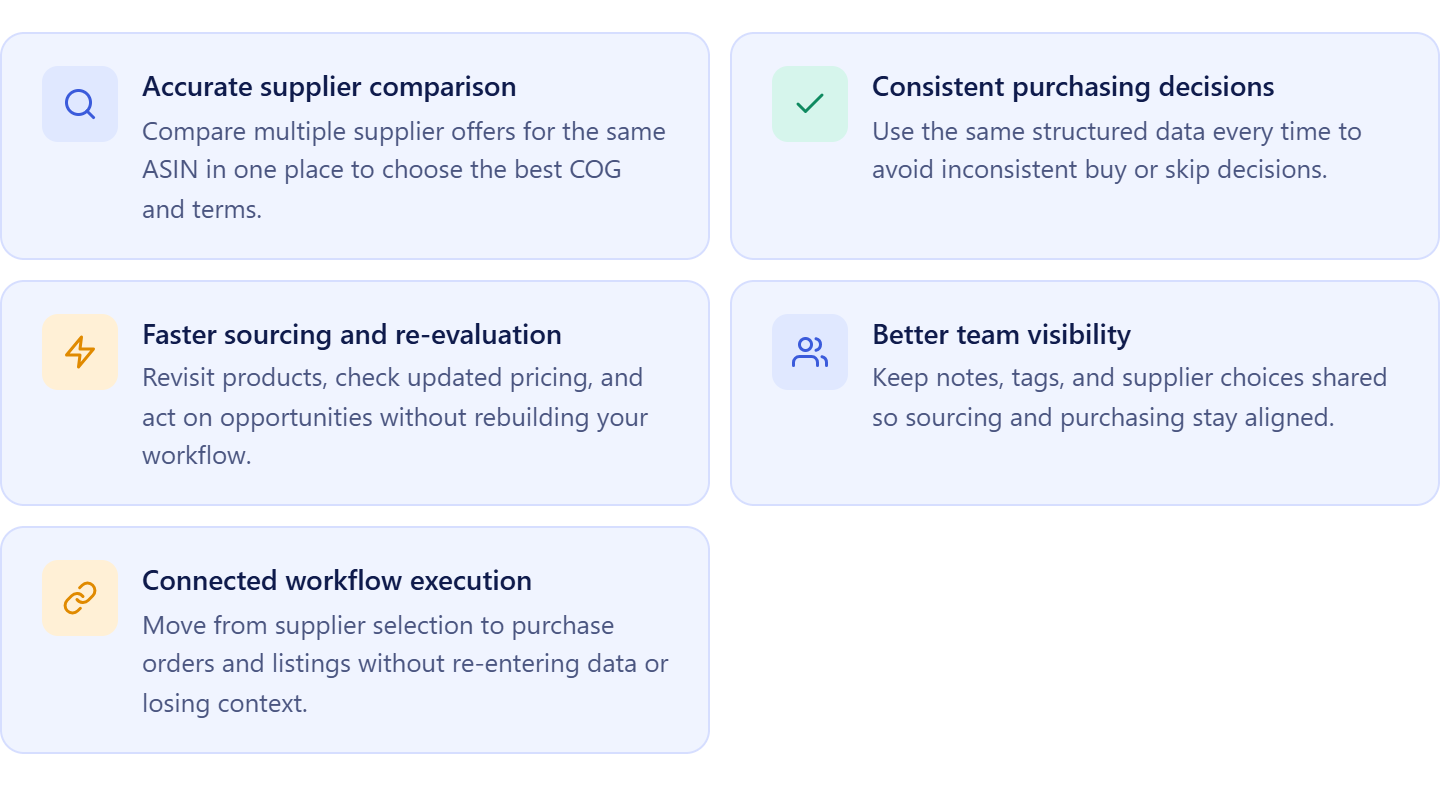
Accurate supplier comparison
A product database keeps all supplier offers for the same ASIN in one place. You can clearly compare COG, identifiers, and supplier details side by side, which eliminates guesswork and helps you consistently select the most profitable option.
Consistent purchasing decisions
When product and supplier data are structured, every decision is based on the same information. This prevents situations where a product is approved or rejected differently across sourcing sessions due to missing context.
Faster sourcing and re-evaluation
With all products stored and organized, you can quickly revisit previous deals, re-check profitability, and act on price changes without rebuilding your sourcing pipeline from scratch.
Better team visibility
A shared product database allows your team to see notes, tags, and supplier choices in one place. This keeps sourcing, purchasing, and listing aligned and reduces miscommunication.
Connected workflow execution
Supplier selection doesn’t happen in isolation. A product database connects supplier offers directly to purchase orders and listings, so you can move from analysis to execution without re-entering data or breaking your workflow.
What Seller Assistant Tools Help Choose Supplier Offers from Product Database
Choosing the best supplier offer requires more than just comparing prices – it depends on having both product-level data and supplier-level context in one connected system. Seller Assistant simplifies this by linking structured product records with detailed supplier profiles.
Instead of switching between spreadsheets, notes, and tools, you evaluate offers, check supplier terms, and make decisions in one workflow, keeping everything consistent and scalable.
This process is powered by two core tools: Seller Assistant’s Product Database and Seller Assistant’s Suppliers Database.
Product Database
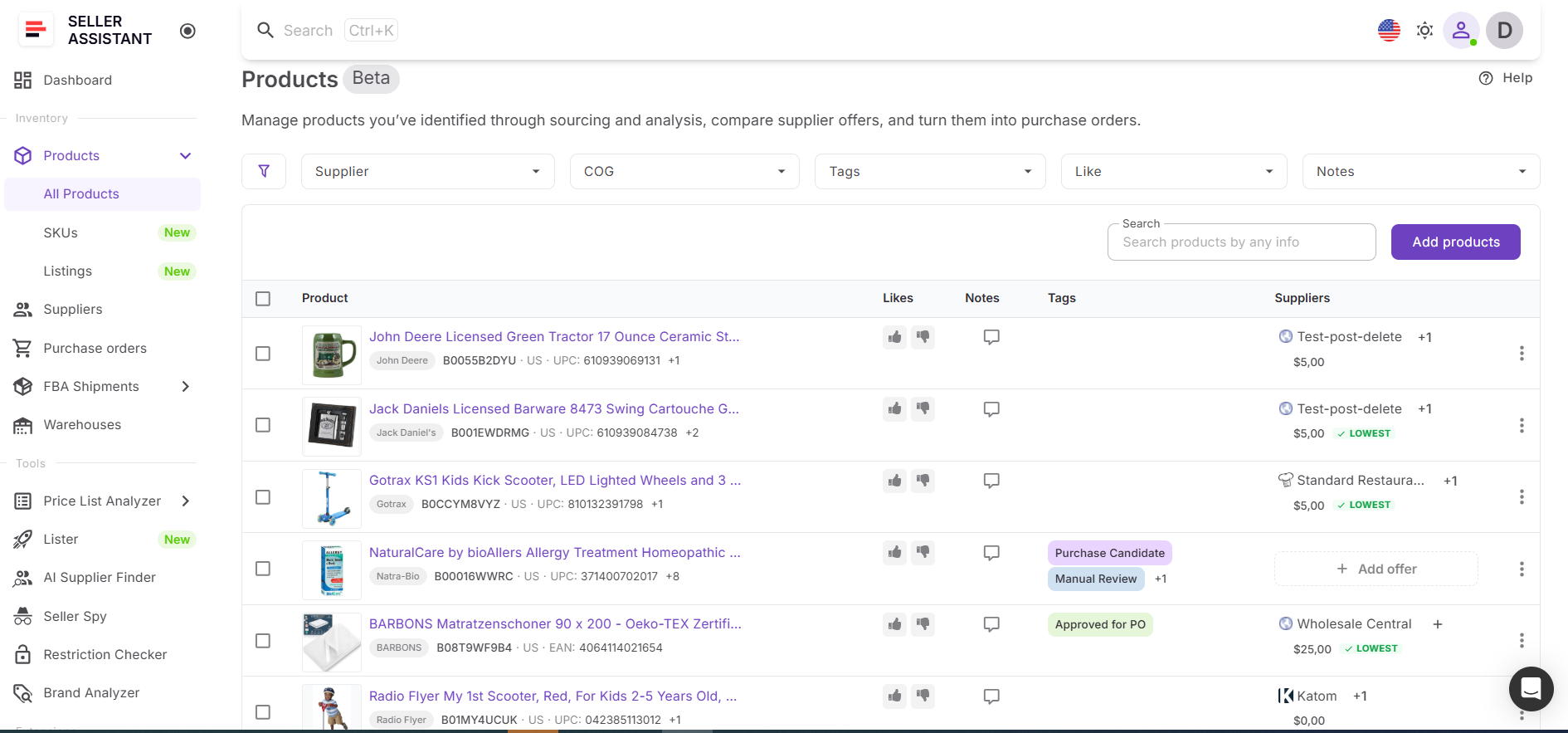
Product Database is where supplier offers are collected and compared at the ASIN level. It stores multiple offers per product, including COG, identifiers, and supplier links, allowing you to evaluate all available options in one place. You can select a default supplier, track sourcing decisions, and ensure every product has a clear, consistent buying choice.
Suppliers Database
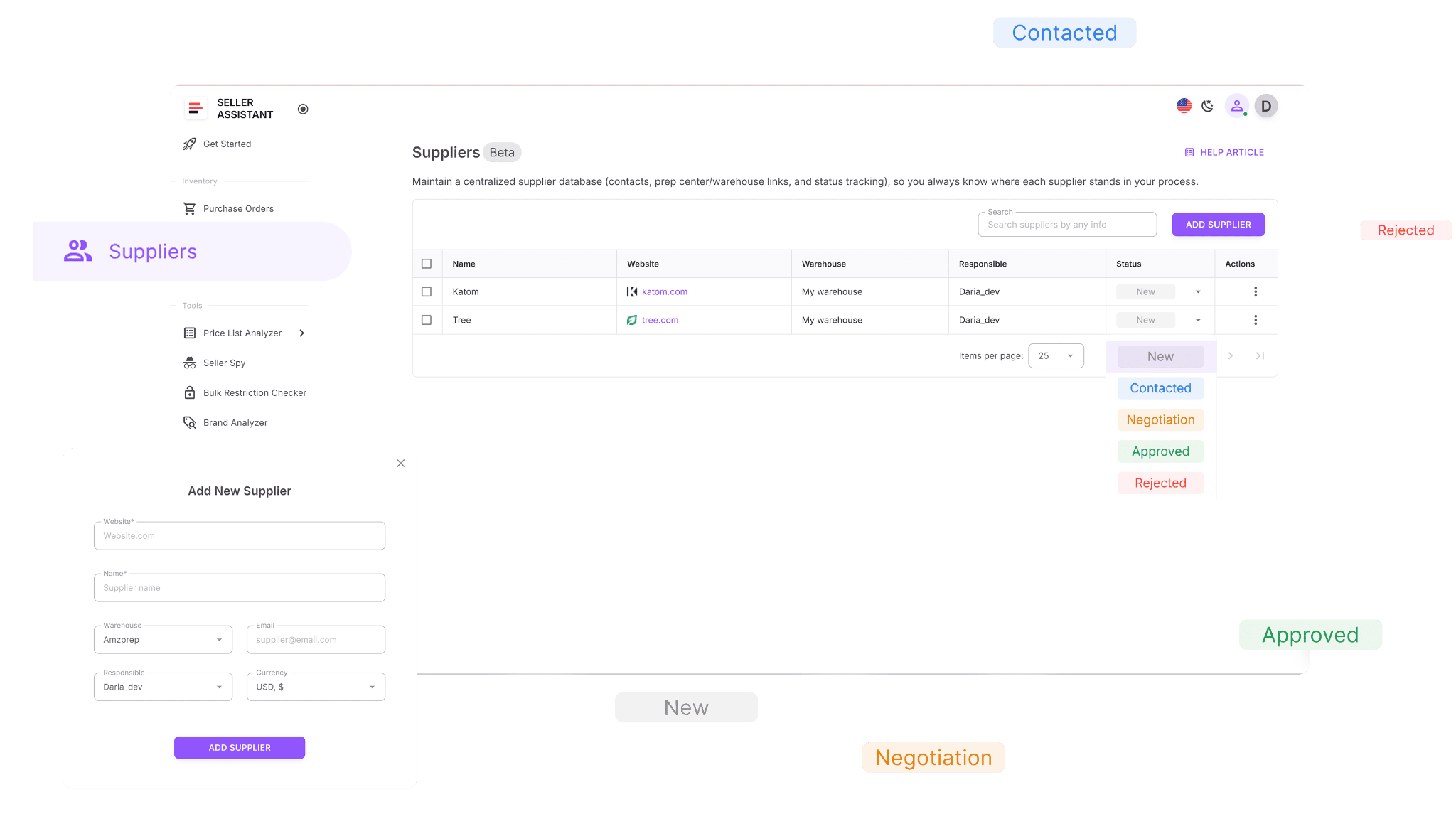
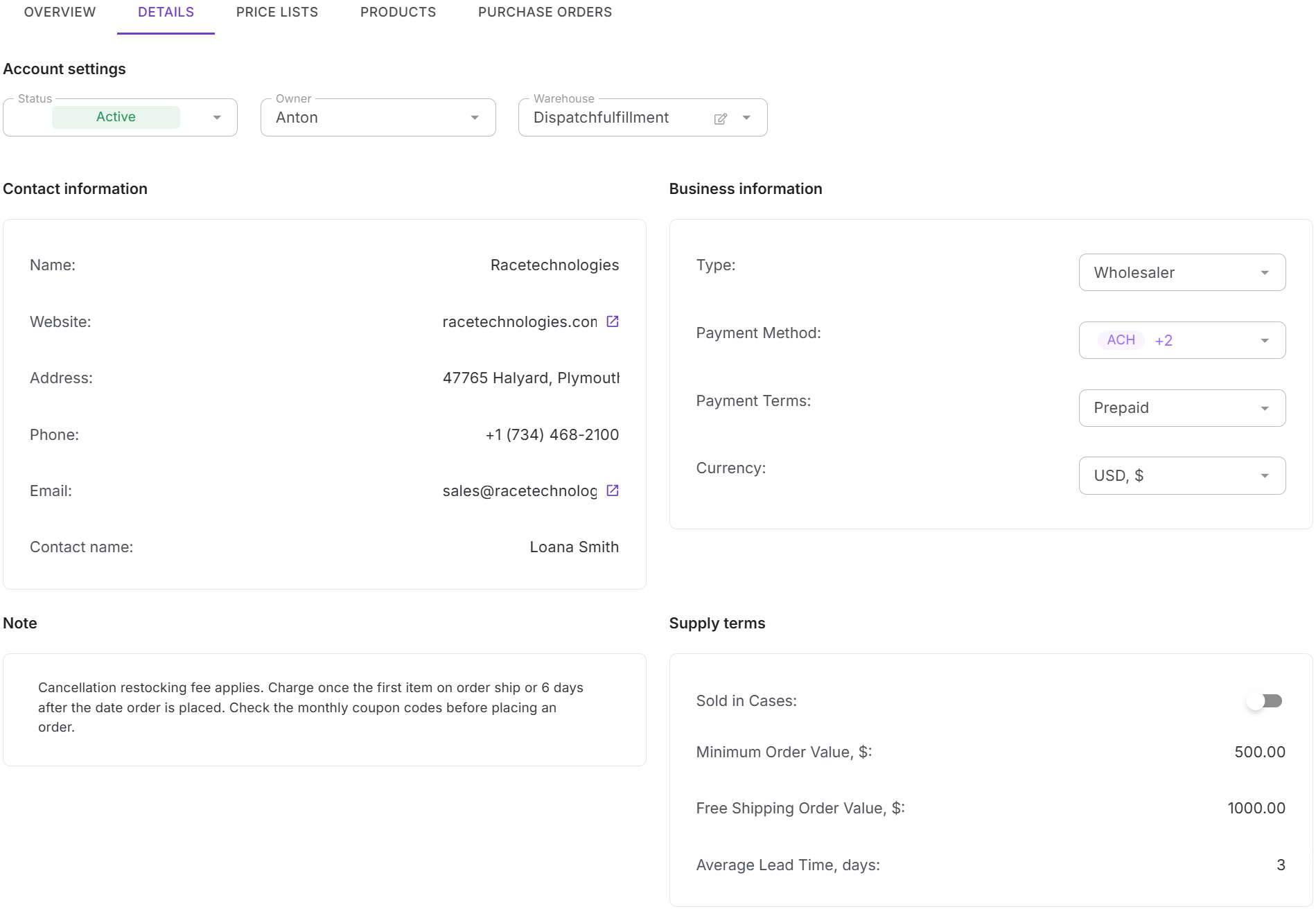
Suppliers Database is where supplier relationships and terms are managed. It stores key details such as minimum order value, payment terms, lead time, and routing rules. This ensures that when you evaluate supplier offers in Product Database, you also understand the real constraints behind each supplier, not just the price.
How they work together
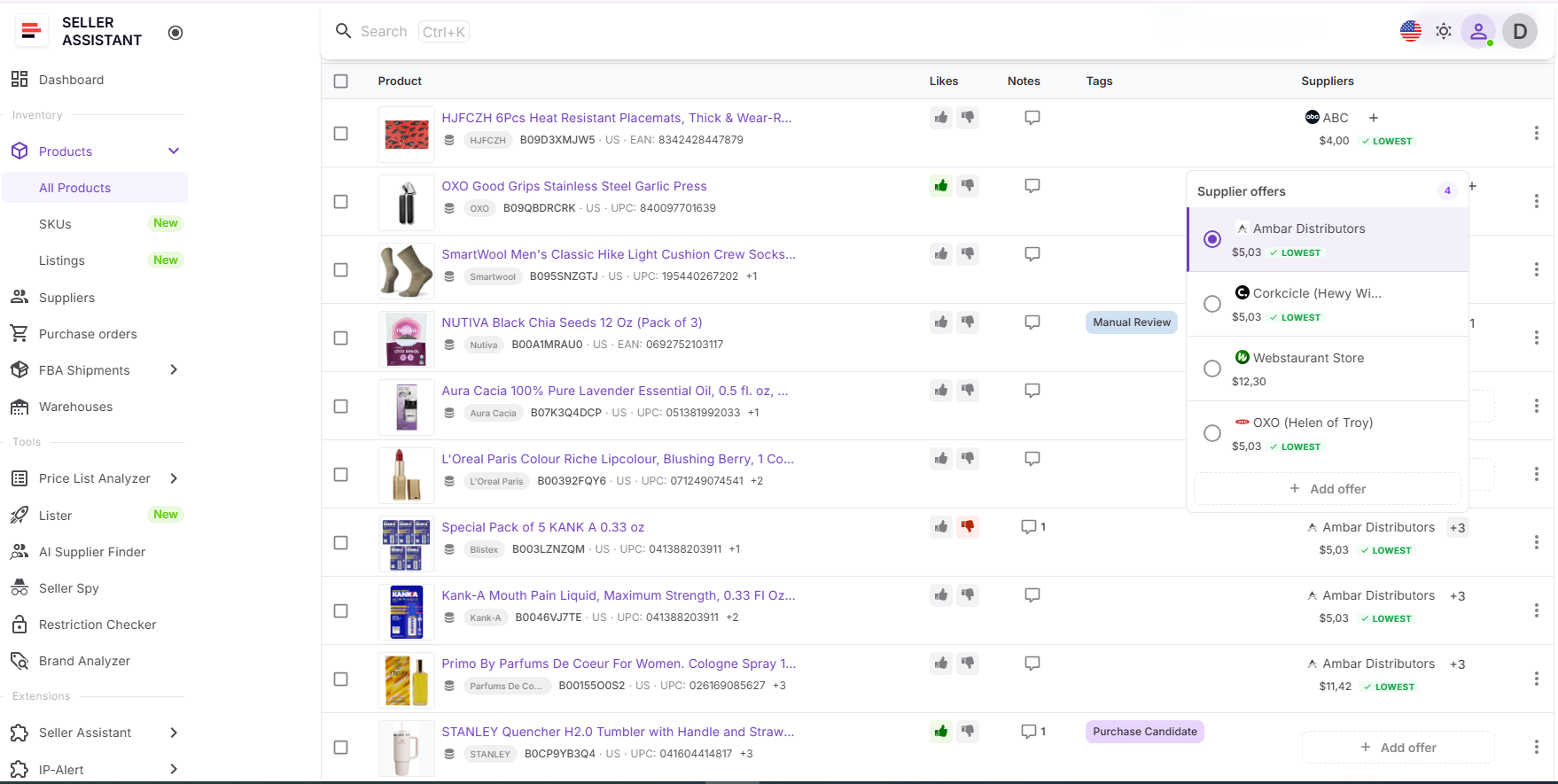
You review supplier offers in Product Database and compare them side by side for each ASIN. At the same time, Suppliers Database provides the context behind each offer, including terms and operational requirements. This allows you to choose not just the cheapest supplier, but the most practical and profitable one.
How choosing supplier offers fits into your workflow
Selecting supplier offers inside Product Database is part of Seller Assistant’s connected sourcing workflow. Supplier data flows from Suppliers Database into product records, and your final selection becomes the default supplier used in purchasing. This keeps decisions consistent from sourcing to buying and helps you scale without losing control over margins.
Note. Seller Assistant is an end-to-end Amazon workflow management platform that integrates 15+ wholesale-focused solutions into one connected system. It combines sourcing workflow automation, bulk research and intelligence tools, and integrated Chrome extensions – giving you everything you need to streamline finding deals, managing suppliers, and creating purchase orders.

The platform aggregates: workflow management tools – Purchase Orders Module, Suppliers Database, Product DB, Warehouses Database, FBA Shipments to organize, automate, and scale every step of your wholesale and arbitrage operations; bulk research & sourcing tools – Price List Analyzer, Bulk Restriction Checker, AI Supplier Finder, Brand Analyzer, Seller Spy to evaluate supplier price lists, verify selling eligibility and restrictions, open new brands, and discover winning product ideas from competitors to expand your product catalog; Chrome extensions – Seller Assistant Browser Extension, IP-Alert Extension, and built-in VPN by Seller Assistant to deep-research products, check IP claims and compliance, and access geoblocked supplier sites directly within your browser; and integrations & team access features – seamless API connectivity and integrations with Zapier, Airtable, and Make, plus Virtual Assistant Accounts for secure, scalable team collaboration.
With Seller Assistant, every step of your Amazon wholesale and arbitrage workflow is automated and connected.
What Is Product Database?
Product Database is Seller Assistant’s central workspace for managing all sourced products in one system. It stores ASINs, supplier offers, COG, and sourcing decisions in a structured format that keeps everything connected.
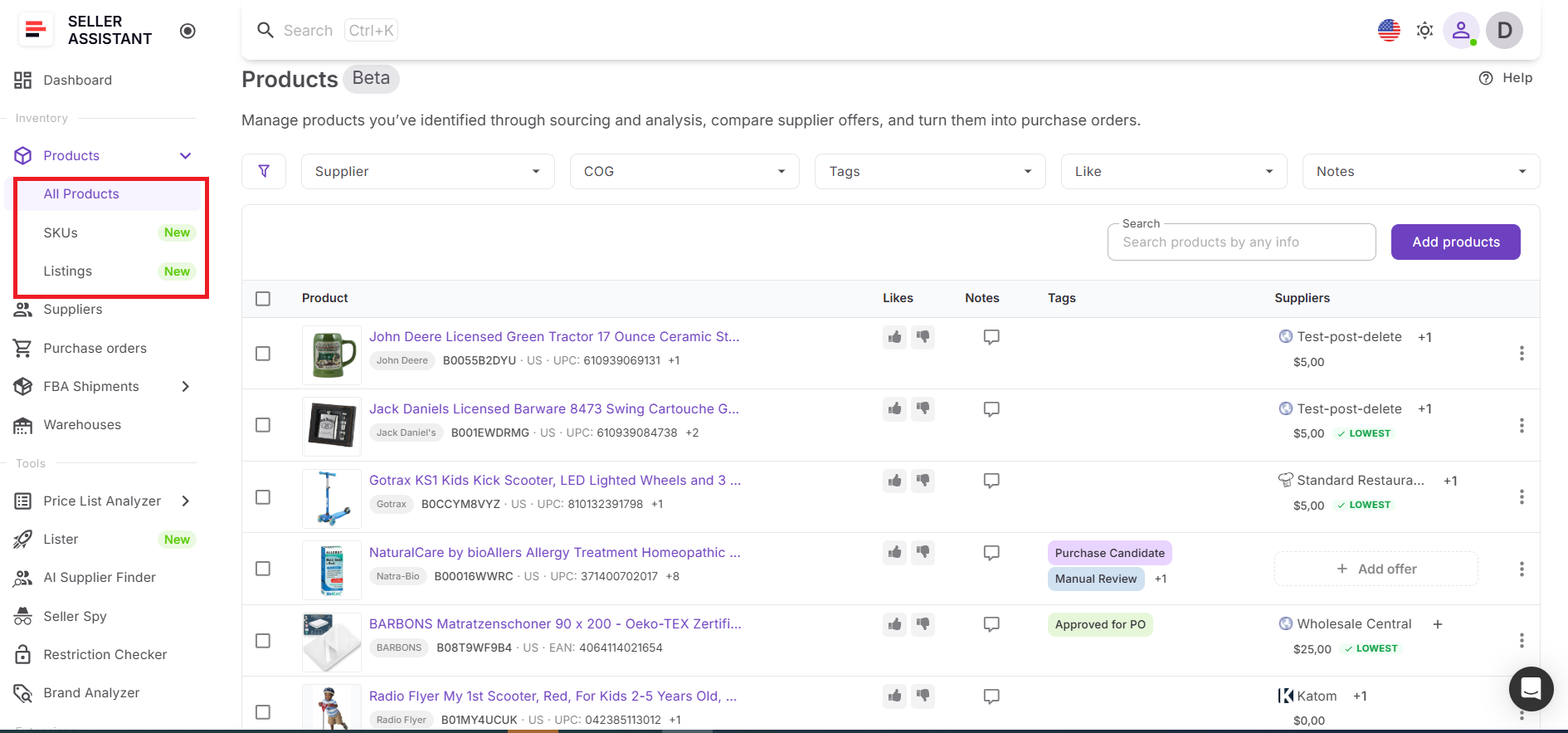
Instead of juggling spreadsheets and separate tools, you work with product data in one place that links directly to purchasing and listing. This setup helps you turn sourcing decisions into actions – moving products into purchase orders and listings without re-entering data or losing important context.
What you can do with Product Database
Product Database helps you organize sourcing data and turn it into a clear, actionable workflow. It keeps products, suppliers, and decisions connected so you can manage and act on them without manual work or missing information.
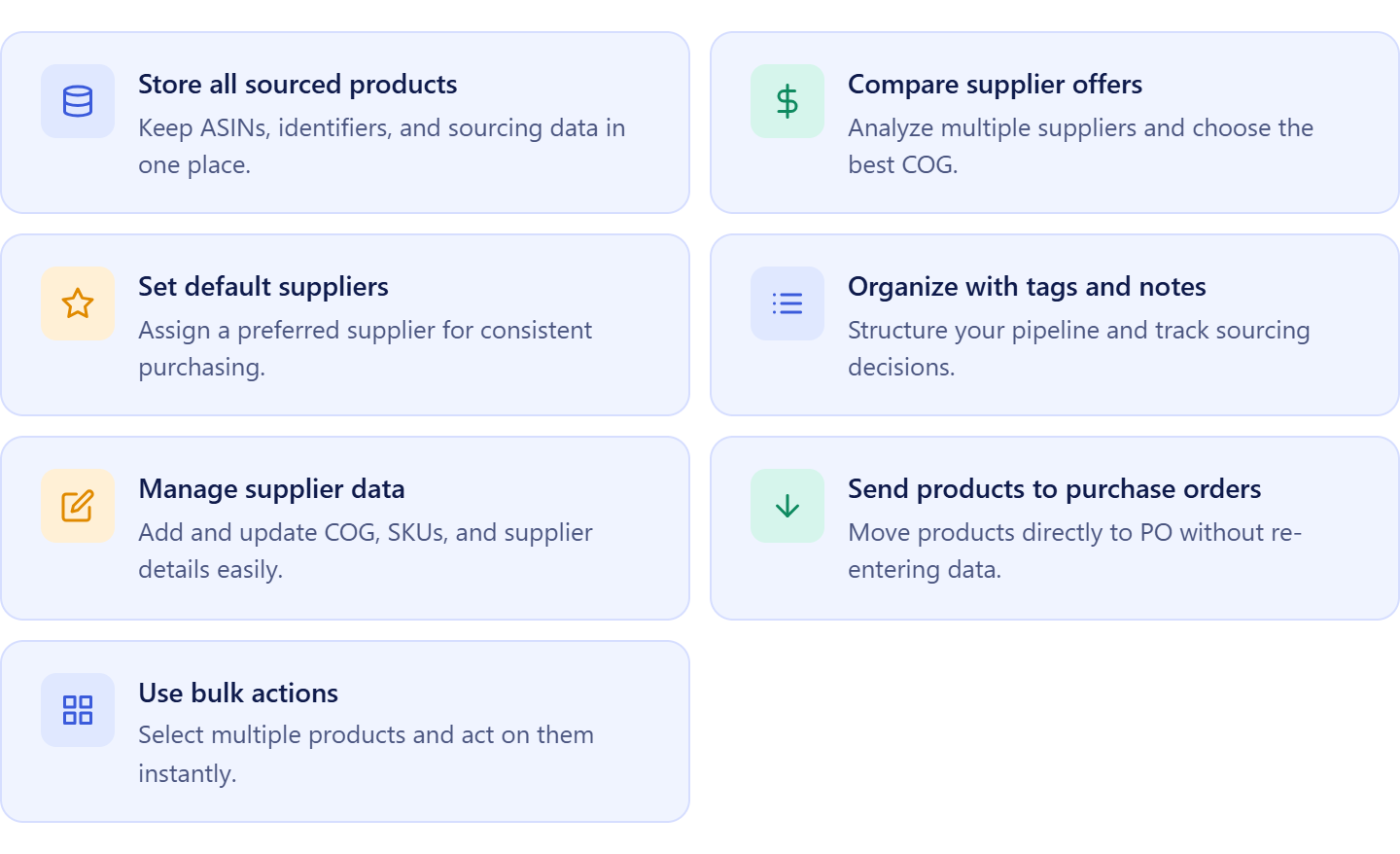
- Store sourced products in one place
Keep ASINs, identifiers, marketplace details, and sourcing inputs centralized for easy access and consistency.
- Compare supplier offers per product
View multiple supplier offers side by side, evaluate COG differences, and identify the most profitable option.
- Set and manage default suppliers
Assign a preferred supplier for each product to ensure consistent purchasing and faster order creation.
- Organize products with tags, notes, and likes
Structure your sourcing pipeline, document decisions, and keep your team aligned.
- Add and update supplier offers
Create or edit supplier data, including COG, SKU, and links, to maintain accurate and current records.
- Send products to purchase orders
Move selected products directly into the Purchase Orders Module without re-entering supplier or cost data.
- Use bulk actions to scale
Apply tags, select multiple products, or send them to purchase orders in one step to speed up operations.
How Product Database improves your sourcing workflow
Product Database turns sourcing into a structured and repeatable process. Instead of working with static lists, you manage dynamic product records that stay linked to suppliers, purchase orders, and listings.
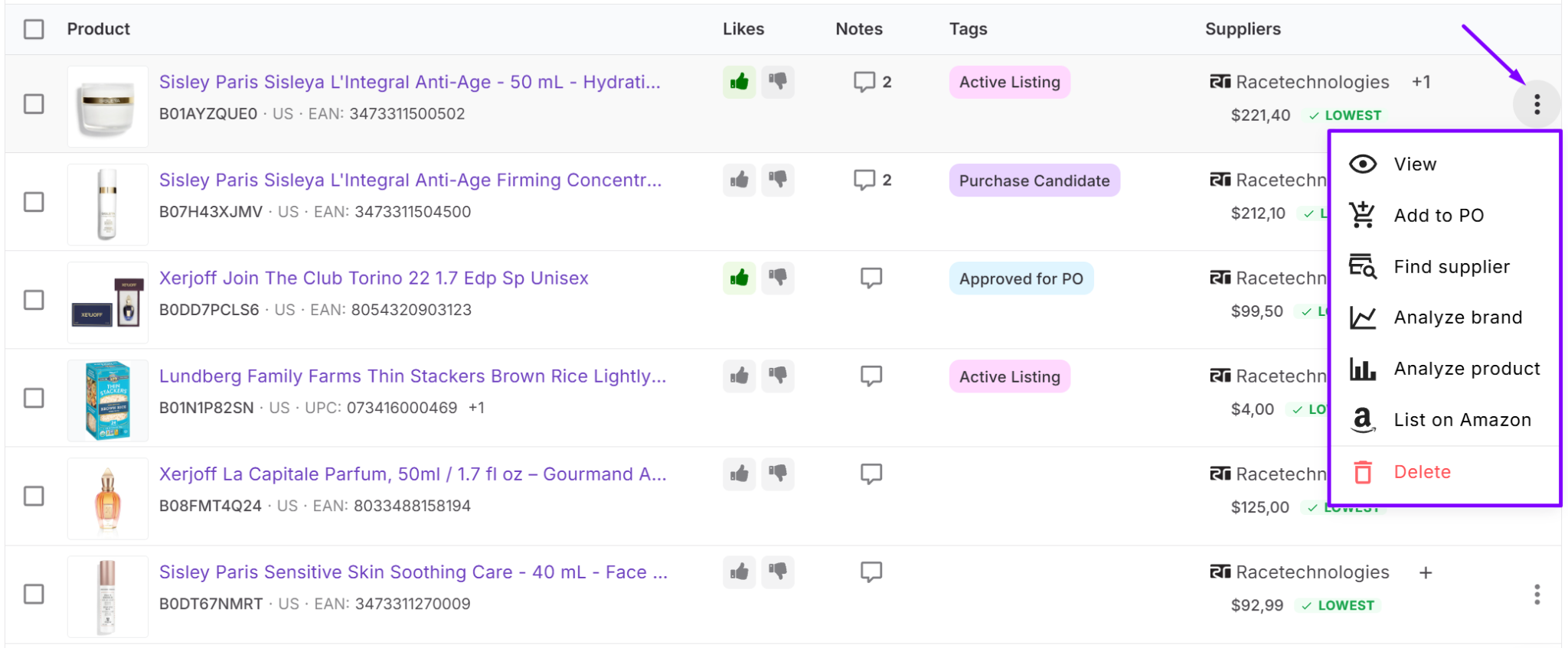
You can add products from tools like Price List Analyzer, Seller Assistant Extension, or manually, attach supplier offers, and choose a default supplier. Once products are validated, they are ready for execution – you can move them directly into purchase orders or listing tools without rebuilding data.
Product Database connects sourcing, purchasing, and listing into one continuous workflow. You select products, create purchase orders with prefilled supplier and cost data, and track everything in one place.
When used together. tools like Product Database, Price List Analyzer, Brand Analyzer, AI Supplier Finder, Suppliers Database, Bulk Restriction Checker, Lister, Warehouses Database, Purchase Orders Module, and FBA Shipments, your workflow stays consistent, errors are reduced, and scaling becomes much easier.
What Is Suppliers Database?
Suppliers Database is Seller Assistant’s central workspace for managing all supplier information in one system. It stores supplier profiles, contact details, terms, and sourcing status in a structured format that keeps everything organized.
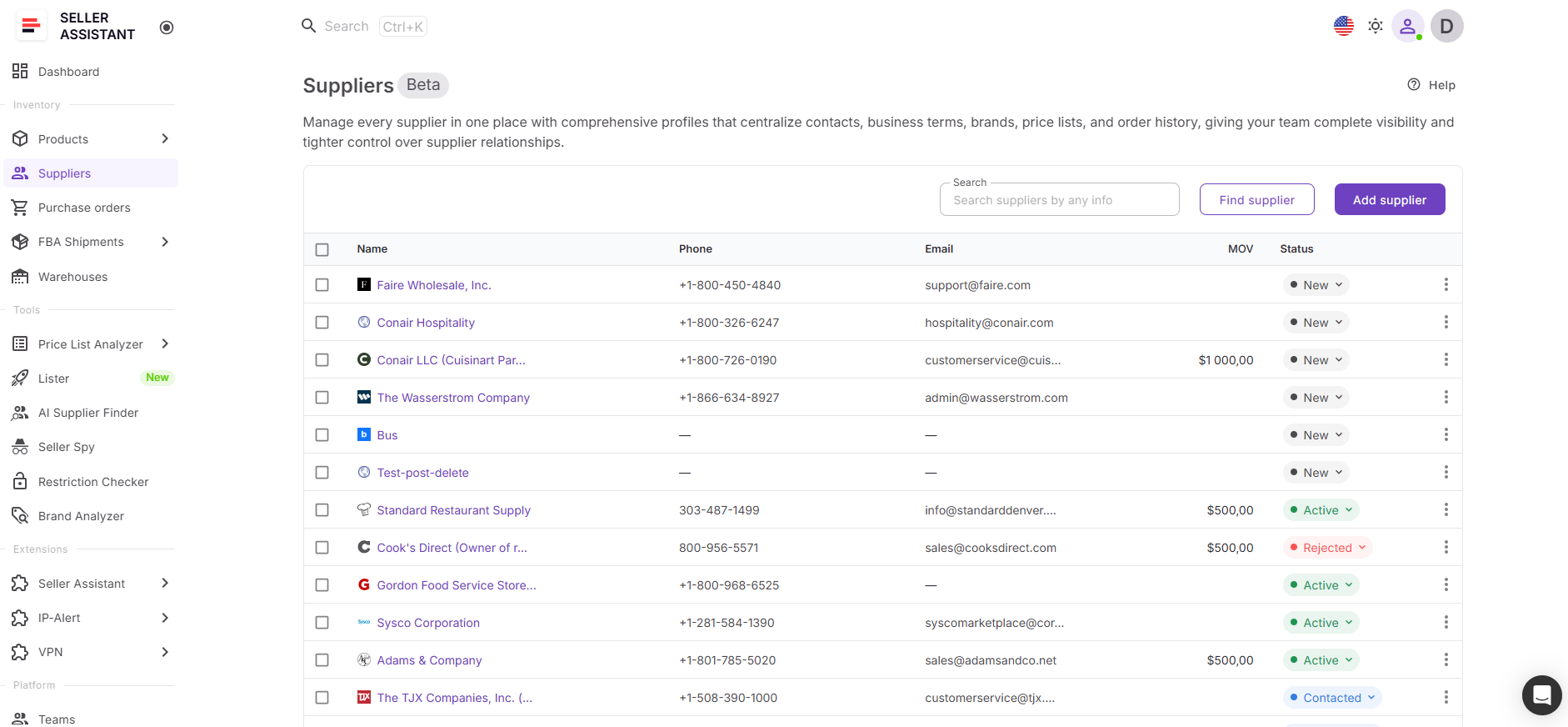
Instead of tracking suppliers across spreadsheets, emails, and notes, you manage all supplier data in one place that connects directly to sourcing and purchasing. This setup helps you maintain accurate supplier records and reuse them across your workflow without re-entering data or losing important details.
What you can do with Suppliers Database
Suppliers Database helps you organize supplier relationships and turn them into a structured, repeatable sourcing process. It keeps supplier data consistent and accessible, so you can act on it without manual work or confusion.
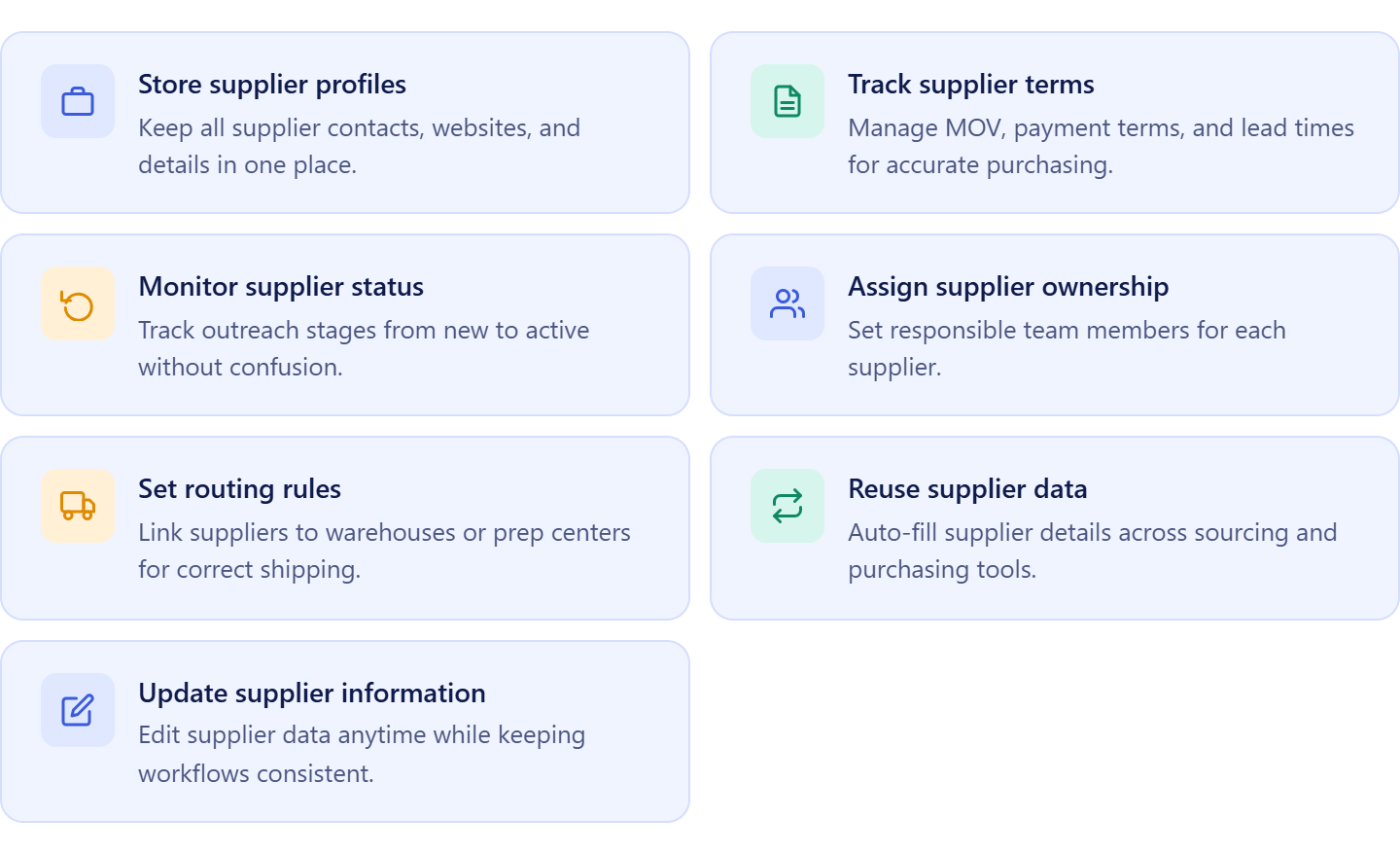
- Store supplier profiles in one place
Keep contact details, websites, and basic supplier information centralized for easy access.
- Manage supplier terms and conditions
Track key details such as minimum order value, payment terms, lead time, and shipping rules to ensure accurate purchasing.
- Track supplier relationship status
Monitor each supplier’s stage – from new to active – to manage outreach and avoid duplicate communication.
- Assign suppliers to team members
Define ownership for each supplier to keep responsibilities clear across your team.
- Link suppliers to warehouses
Set default prep centers or warehouses to ensure correct routing during purchase orders.
- Reuse supplier data across tools
Use supplier profiles automatically in tools like Price List Analyzer and Purchase Orders Module without re-entering data.
- Update supplier information anytime
Edit supplier details as relationships evolve while keeping all connected workflows consistent.
How Suppliers Database improves your sourcing workflow
Suppliers Database turns supplier management into a structured and scalable process. Instead of keeping supplier details in static files, you work with dynamic supplier profiles that stay connected to sourcing and purchasing.
You can add suppliers manually or from tools like AI Supplier Finder, define their terms, and track their status. Once stored, supplier data is reused across your workflow, reducing manual entry and preventing errors.
Suppliers Database connects supplier management with sourcing and purchasing. It ensures that every product decision is backed by accurate supplier information, and every purchase order uses the correct terms and routing.
When used together with tools like Product Database, Price List Analyzer, Brand Analyzer, AI Supplier Finder, Bulk Restriction Checker, Warehouses Database, Purchase Orders Module, and FBA Shipments, your workflow stays consistent, supplier data remains reliable, and scaling becomes more controlled.
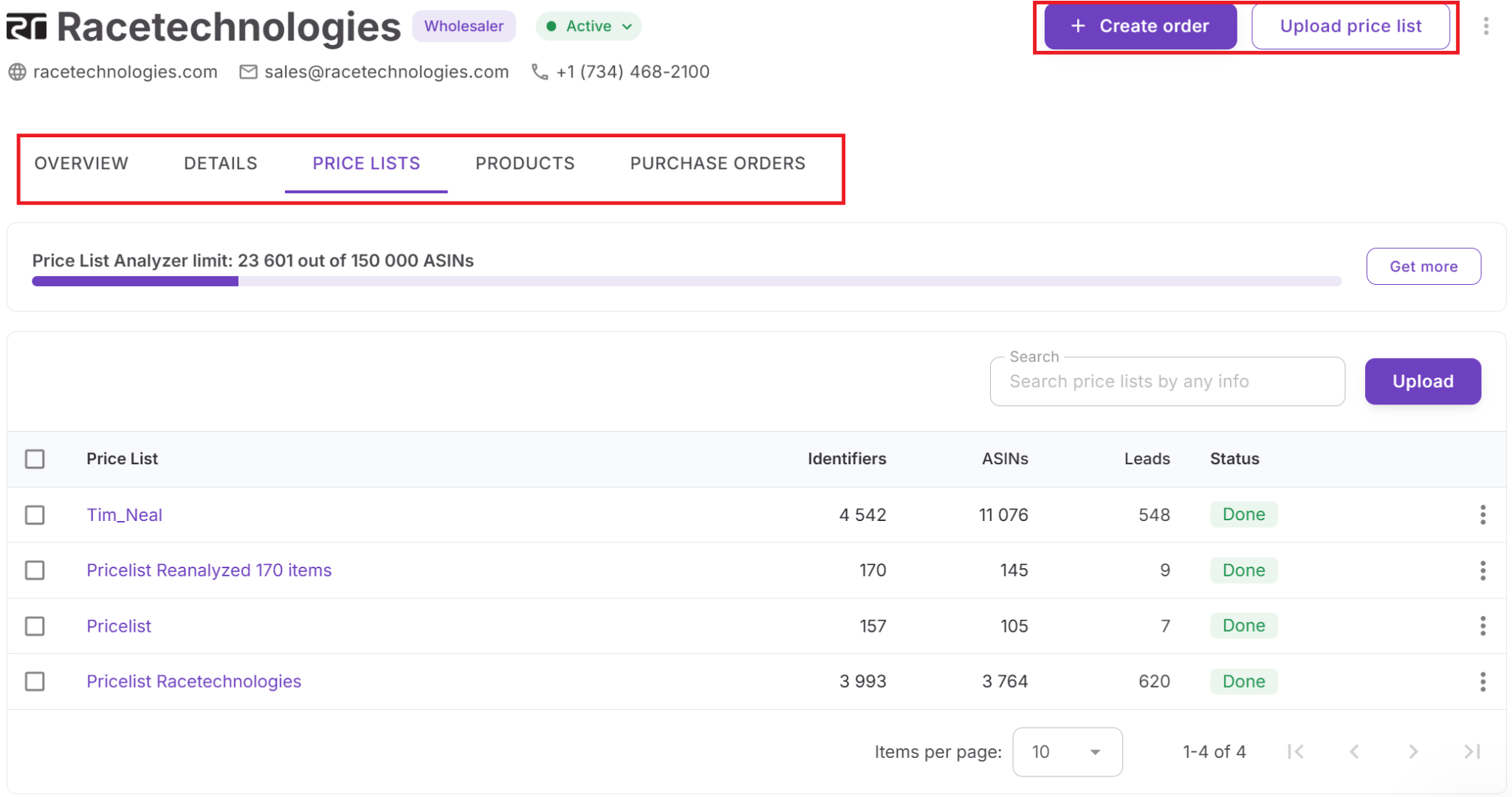
How to Choose the Best Supplier Offer from Product Database
The process starts with your sourced products stored in Product Database. After analyzing deals and collecting supplier offers, each ASIN already contains key data – multiple suppliers, COG, identifiers, and sourcing notes. At this stage, you have everything needed to make a decision, but in a typical workflow, you would still compare offers across spreadsheets or recheck supplier details manually.
Instead of switching between tools, you evaluate all supplier offers directly inside Product Database. Each offer is grouped under the same ASIN, so you can review costs, compare options, and understand which supplier gives you the best outcome.
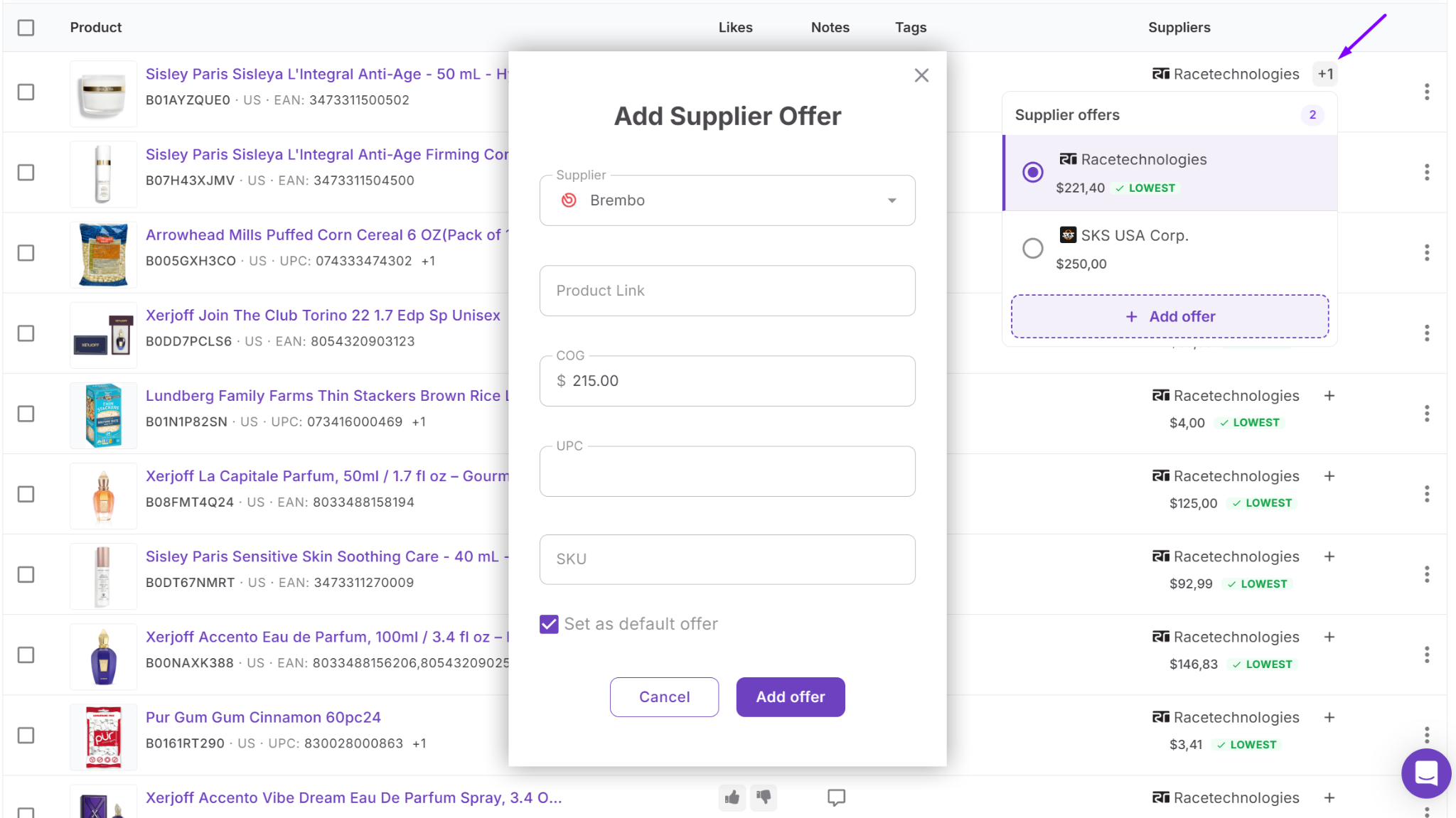
At the same time, supplier data from Suppliers Database provides additional context like terms and constraints. Once you select a default supplier, your decision is locked in and ready for execution. This keeps your sourcing consistent, eliminates repeated analysis, and allows you to move from product research to purchasing faster and with fewer errors.
Step-by-step: How to Choose the Best Offer from Product Database
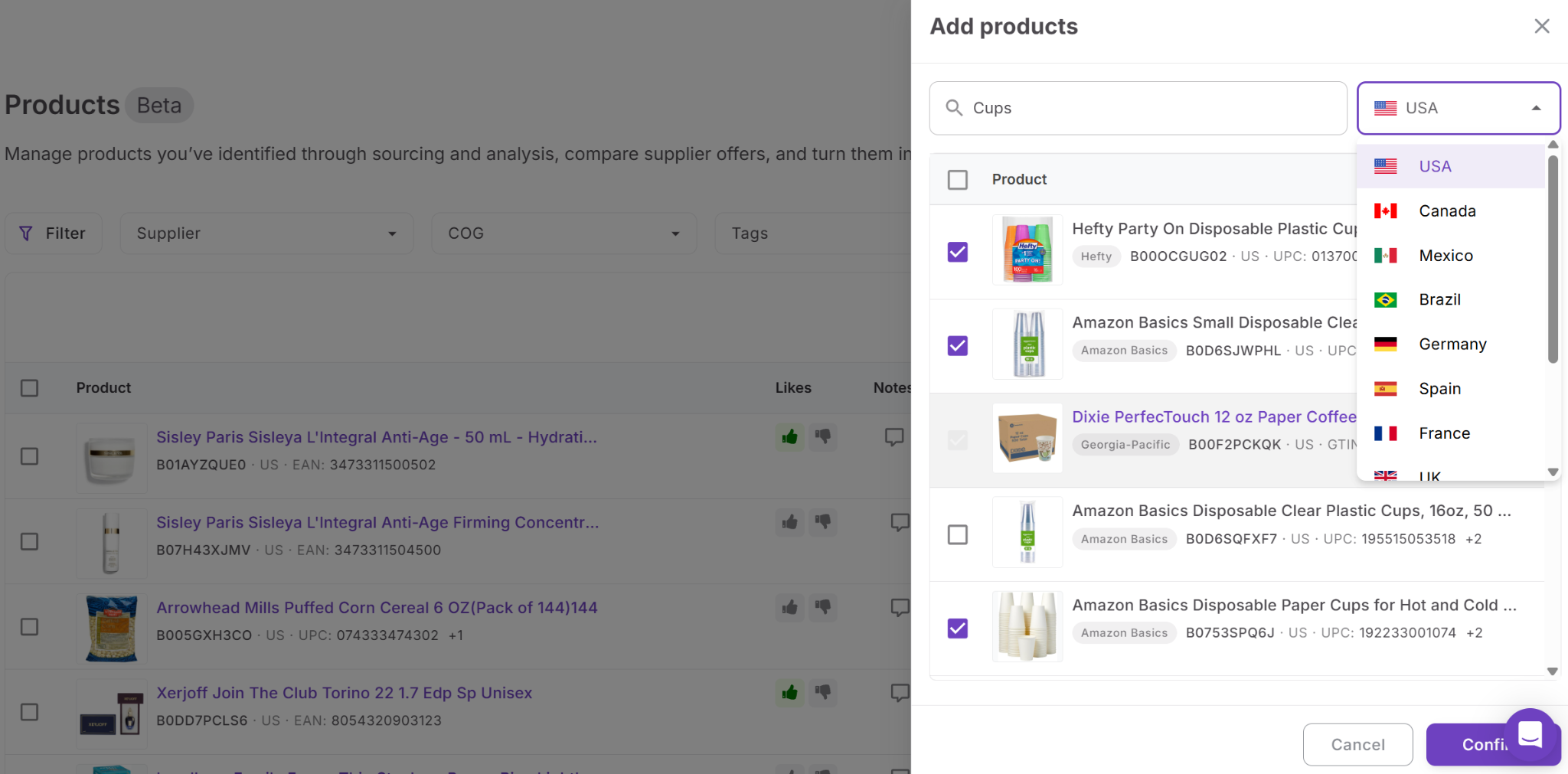
Step 1. Add products to Product Database
Start by adding sourced products to Product Database. You can add them manually or import them from Price List Analyzer. This creates a structured product record for each ASIN and keeps all sourcing data in one place from the start.
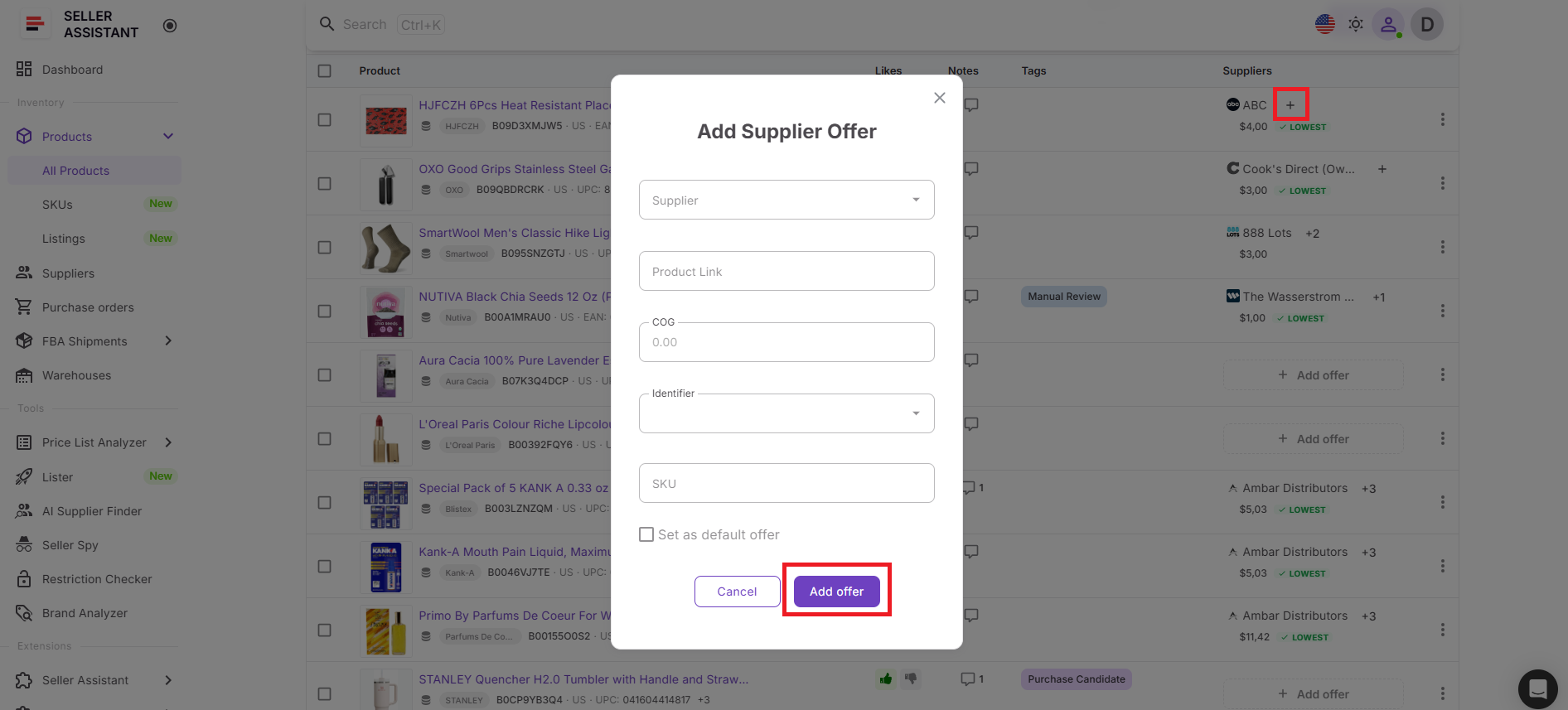
 Step 2. Add or review supplier offers
Open the product and check all supplier offers linked to that ASIN. Each offer can include supplier details, COG, SKU, UPC, and product link, which makes comparison easier and keeps pricing data organized.
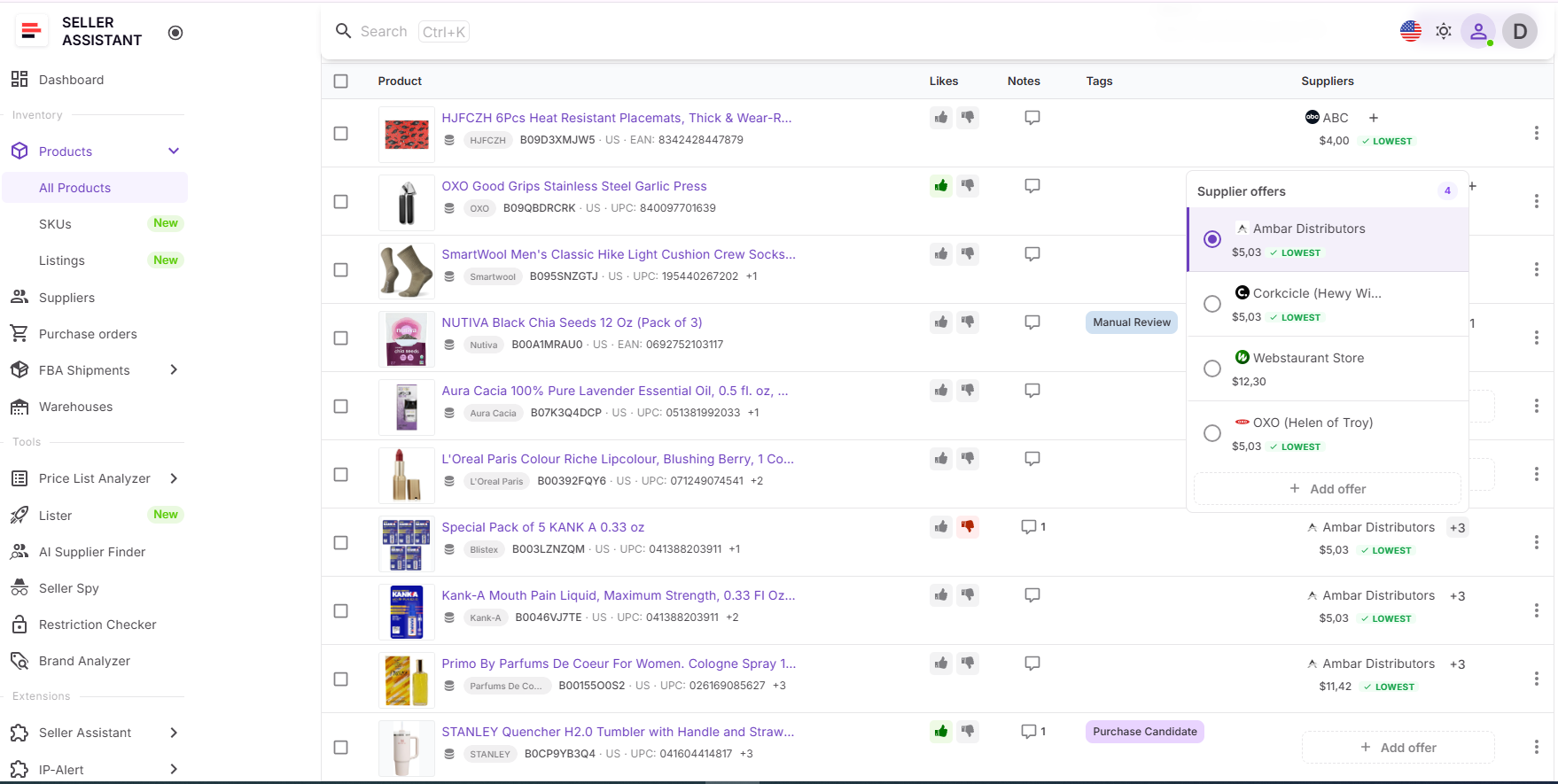
Step 3. Compare supplier costs
Review all available offers for the same product and compare their COG. This helps you quickly see which supplier gives you the strongest buying option before moving forward.
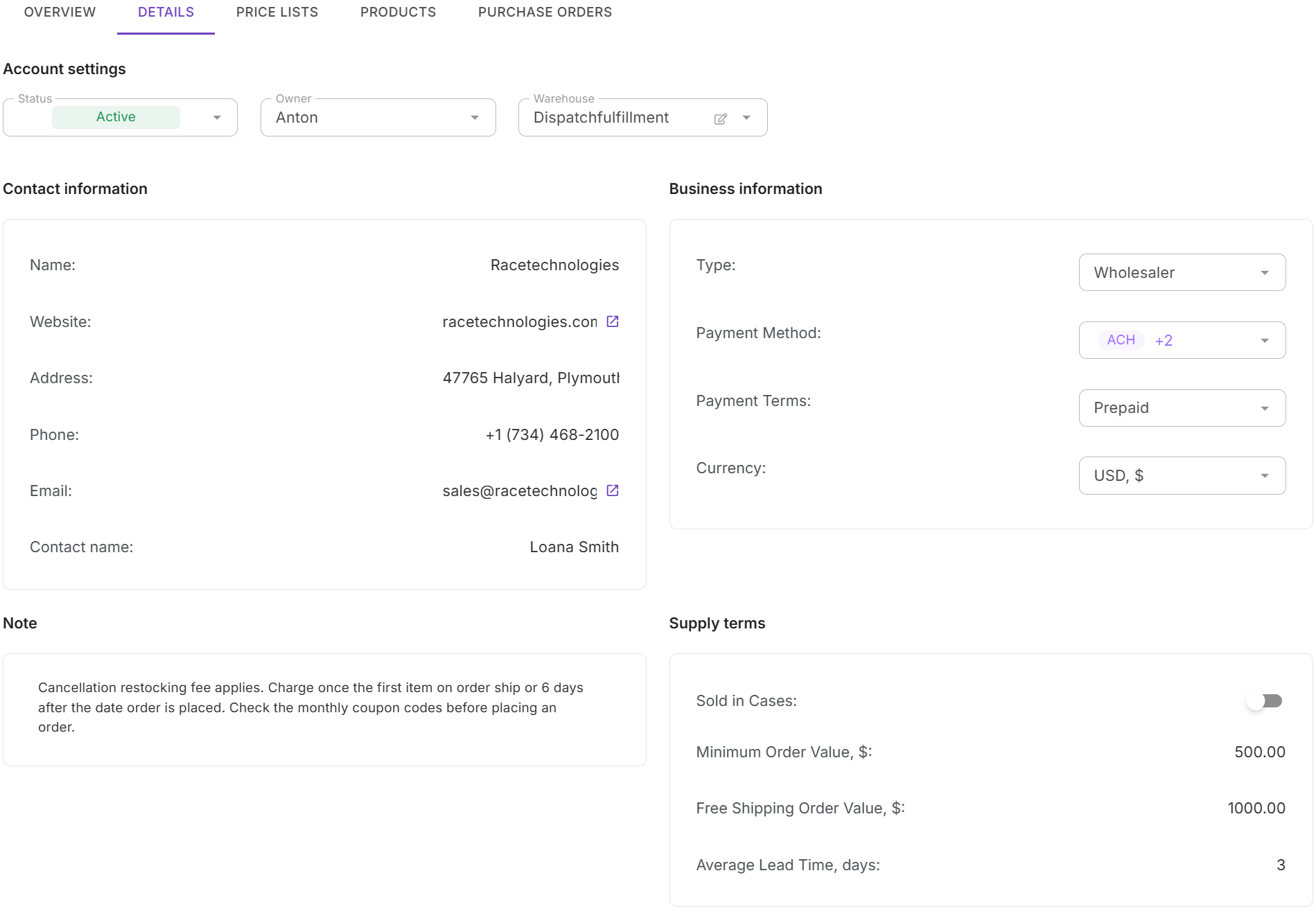
Step 4. Check supplier details
Use Suppliers Database to review the supplier behind each offer. Look at terms such as MOV, lead time, payment details, and routing rules so you understand whether the offer works in practice, not just on price.
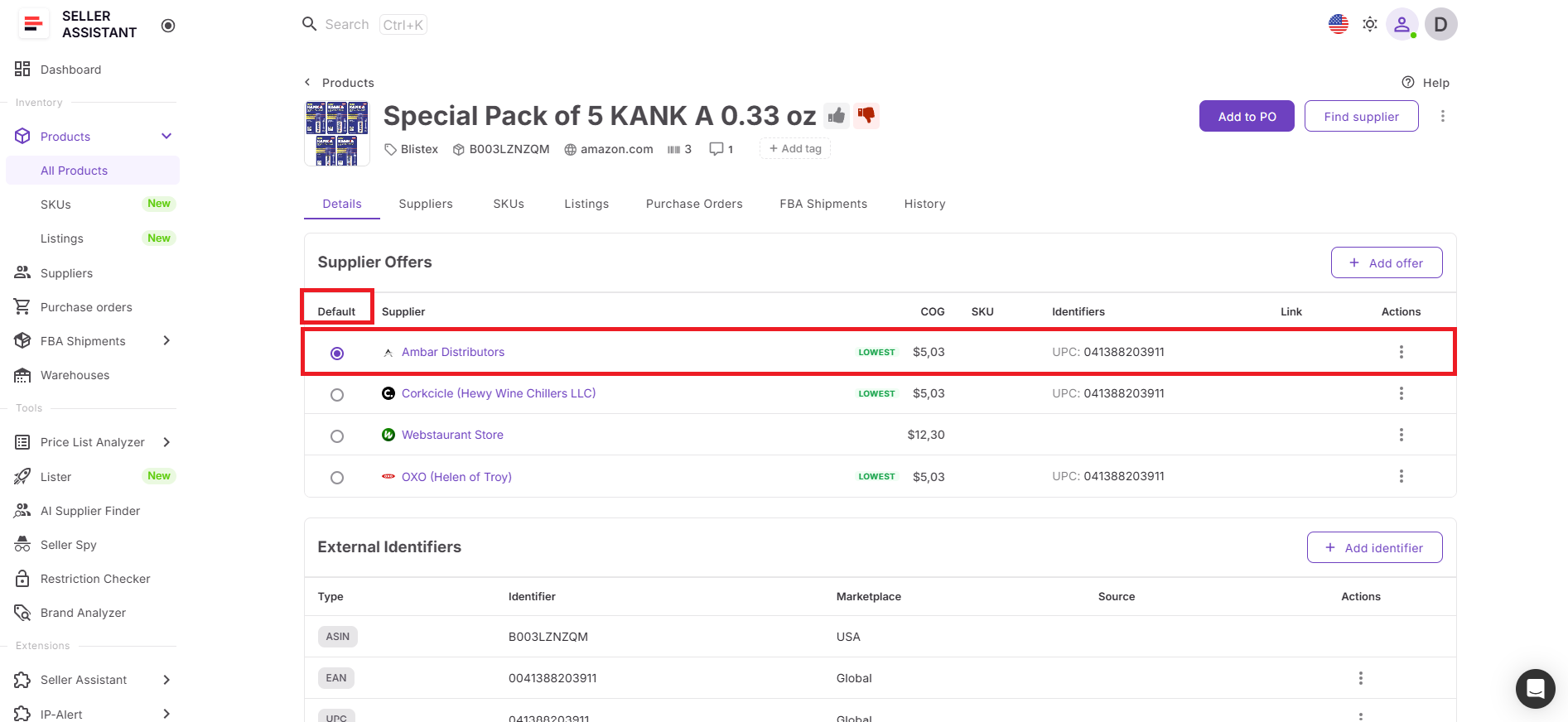
Step 5. Select the default supplier
Choose the supplier you want to use for that product as the default supplier. This makes your decision clear and ensures the selected supplier is used in the next steps of your workflow.
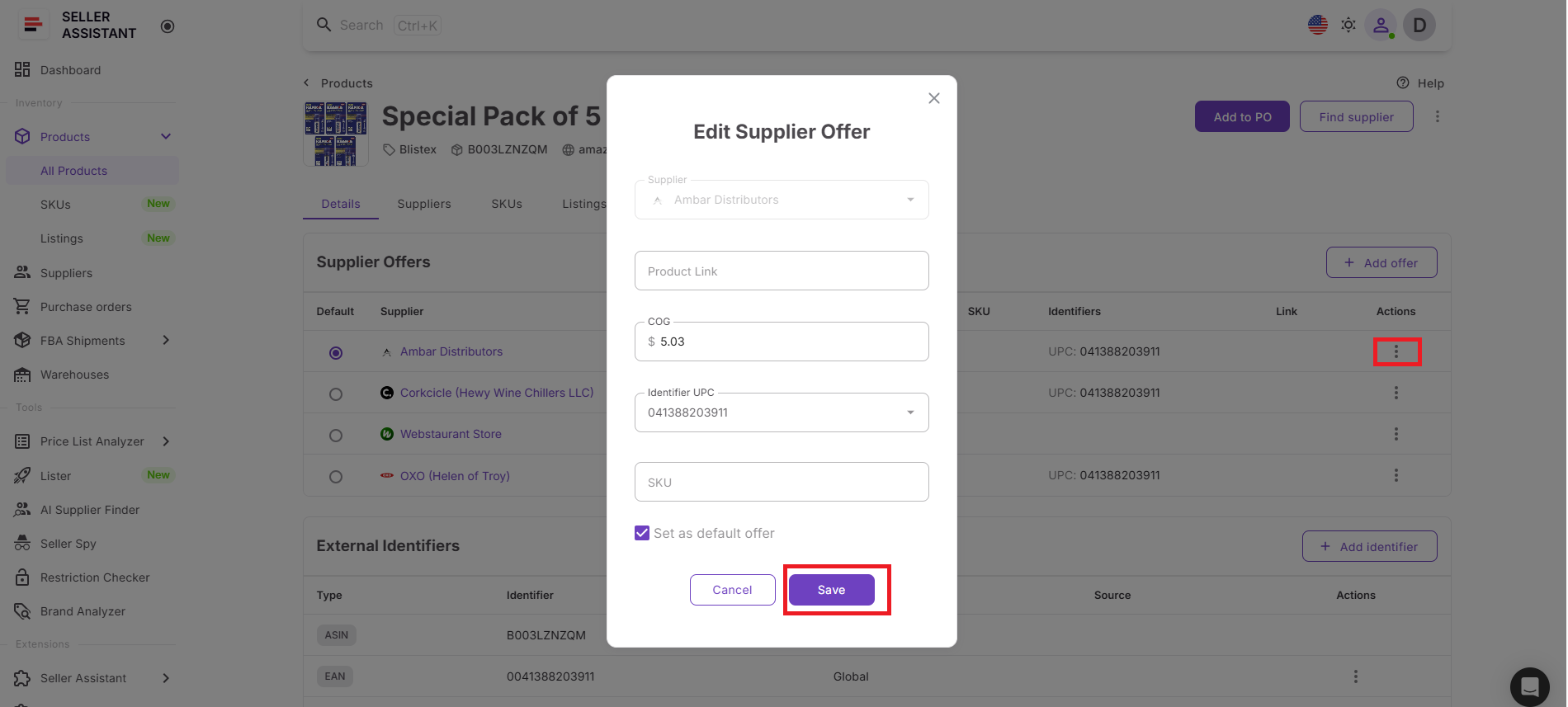
Step 6. Keep supplier data updated
If a supplier changes pricing or product details, update the offer inside Product Database. Keeping records current helps you make accurate decisions and avoids working with outdated costs.
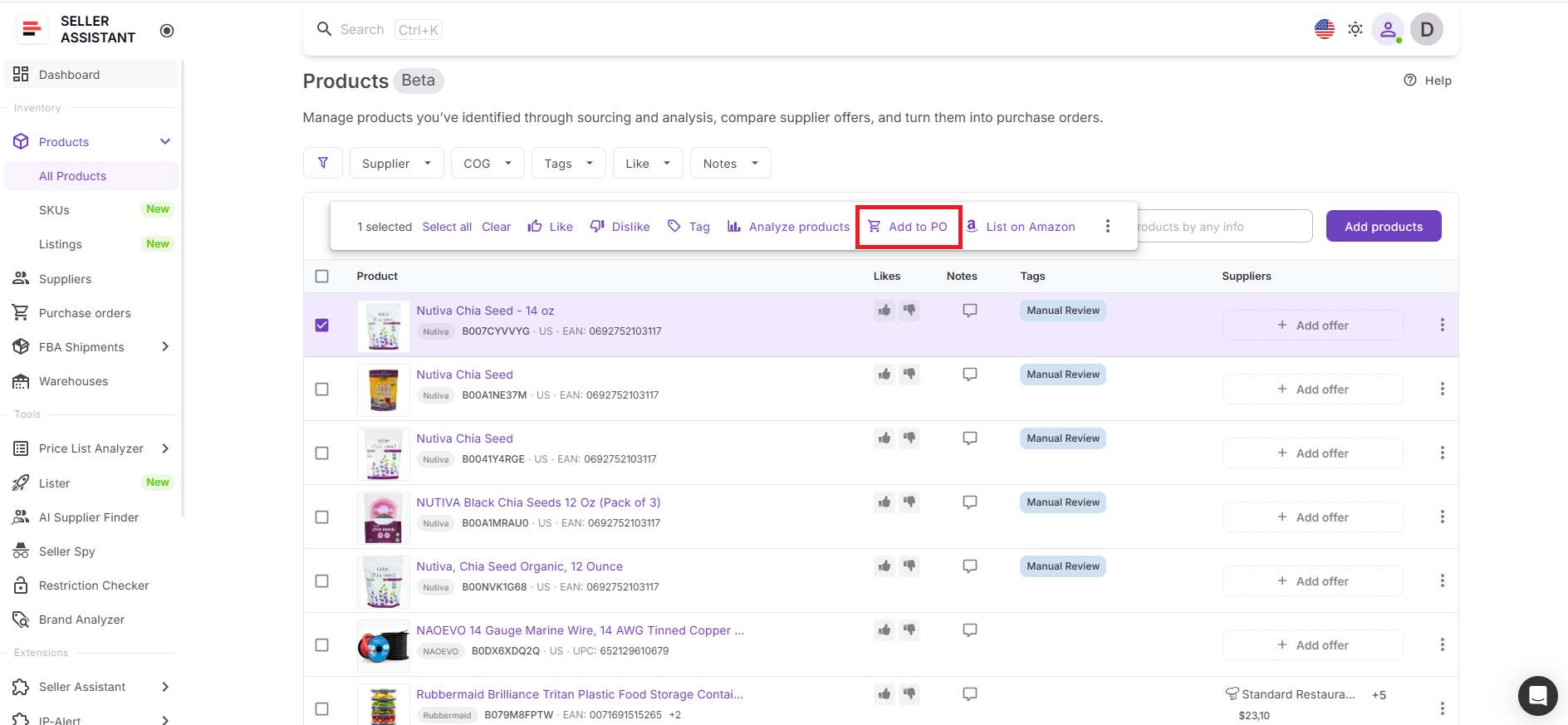
Step 7. Move the product to purchasing
Once the supplier is selected, send the product directly to the Purchase Orders Module. Your chosen supplier and stored cost data stay connected, so you can continue to purchase without re-entering information.
FAQ
How do I know which supplier offer is the best?
The best offer is not always the lowest COG – you need to consider fees, margins, and supplier terms. Use Product Database to compare offers and Suppliers Database to validate if the supplier is practical to work with.
Can I track multiple supplier offers for the same ASIN?
Yes, Product Database allows you to store and manage multiple supplier offers under one product. This makes it easy to compare options and revisit them later without losing data.
What is a default supplier and why does it matter?
A default supplier is the selected supplier you plan to buy from for a specific product. It ensures consistency and is automatically used when moving products to purchase orders.
Can I update supplier offers after adding them?
Yes, you can edit supplier offers at any time, including COG, SKU, and product details. Keeping this data updated helps you make accurate decisions and respond to market changes.
Do I need both Product Database and Suppliers Database to choose offers?
You can compare prices in Product Database alone, but without supplier context, decisions may be incomplete. Using both tools together ensures you evaluate both profitability and supplier constraints.
Final Thoughts
Finding the best supplier offer on Amazon is not about checking prices once – it’s about building a system that helps you make the right decision every time. When supplier offers are organized inside Seller Assistant’s Product Database and supported by Suppliers Database, you get full visibility into both pricing and supplier conditions. This allows you to compare offers accurately, select the right supplier, and keep decisions consistent across your workflow.
Instead of relying on scattered data and repeated checks, you work with a structured process where every product, supplier, and decision is connected. This reduces errors, saves time, and makes it easier to scale your sourcing without losing control over margins.
Seller Assistant automates and connects every stage of your Amazon wholesale and arbitrage workflow. It brings together in one platform: workflow management tools – Purchase Orders Module, Suppliers Database, Warehouses Database, FBA Shipments, bulk research & sourcing tools – Price List Analyzer, Bulk Restriction Checker, Sourcing AI, Brand Analyzer, Seller Spy, Chrome extensions – Seller Assistant Browser Extension, IP-Alert Extension, and built-in VPN by Seller Assistant, and integrations & team access features – seamless API connectivity, integrations with Zapier, Airtable, and Make, and Virtual Assistant Accounts.


