A supplier price list with a few thousand SKUs doesn’t tell you which ones are worth buying – that still means uploading it, waiting for the analysis, then filtering by profit, ROI, and sales estimate to separate the handful of real leads from everything else.
Seller Assistant’s Price List Analyzer already does that filtering – and its MCP Server means you can ask for the results directly: “analyze this price list,” then “show me the profitable leads,” in a conversation with Claude or ChatGPT.
This post walks through finding, filtering, and acting on profitable leads through an AI chat, with no analyzed-list table to scroll through by hand.
Why Supplier Lists Don’t Reveal The Best Amazon Leads
A supplier price list may contain hundreds or thousands of SKUs, but that does not mean it contains hundreds or thousands of viable Amazon sourcing opportunities. Each product still needs to be matched to Amazon and evaluated against profitability, demand, competition, pricing, and potential sourcing risks before it becomes a lead worth considering.
The challenge becomes even bigger with large catalogs. A seller can calculate profit and ROI and still miss promising products buried in the results – or focus on attractive numbers without noticing missing data, weak demand, unusual pricing, or warnings that change the sourcing decision.
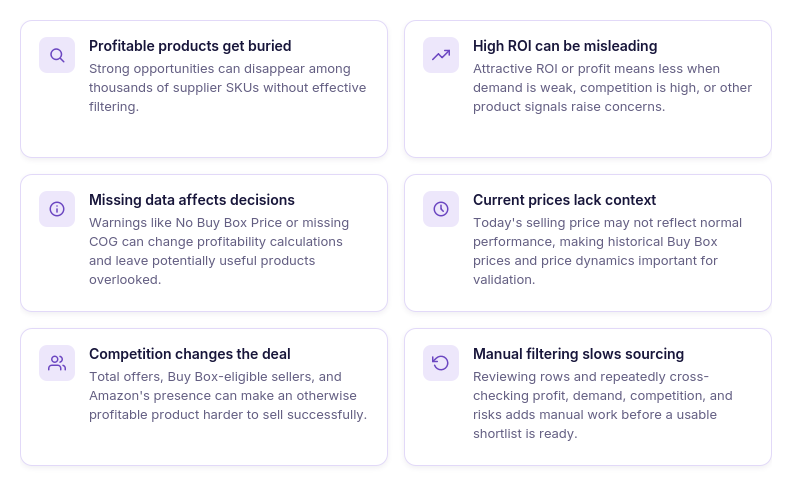
Profitable products get buried in large catalogs
A supplier file can contain thousands of products while only a fraction meet the seller’s sourcing criteria. Without effective filtering, strong opportunities can disappear among hundreds of irrelevant results.
High ROI does not always mean a strong lead
A product can show attractive ROI or profit while having limited demand, strong competition, or other characteristics that make the opportunity less appealing. Profitability needs to be evaluated together with the rest of the product data.
Missing data can quietly affect the shortlist
Products may have warnings such as No Buy Box Price or missing COG data that affect profitability calculations or how the opportunity is evaluated. If sellers only scan the final numbers, they may overlook why a potentially interesting product was excluded or requires additional research.
Current prices can give an incomplete picture
A profitable calculation based on today’s selling price does not necessarily show how the product normally performs. Historical Buy Box prices and price dynamics provide additional context for deciding whether current profitability is representative.
Competition can change an otherwise attractive deal
Total offers, Buy Box-eligible sellers, and Amazon’s presence can materially change the opportunity behind a profitable calculation. These factors are easy to overlook when the first screening is based primarily on ROI or profit.
Manual filtering becomes another sourcing bottleneck
Even after a supplier list has been analyzed, sellers still need to narrow the results according to their own criteria. Repeating filters, reviewing rows, and cross-checking profitability against sales, competition, and risks adds another layer of manual work before a shortlist is ready.
Why AI Assistant with Tool Access – Not Just Profit Math – Is the Fix
AI can explain Amazon sourcing metrics and help sellers define what they consider a profitable product. You can ask what ROI means, how margin differs from profit, or which demand and competition signals are worth checking before placing an order.
But knowing the criteria is different from applying them to a real supplier catalog. Without access to the analyzed price list, a general AI assistant cannot see which products are actually there, what they cost, which Amazon listings they match, or how their profitability, demand, competition, pricing, and risk metrics compare. To help find actual leads, AI needs a way to work with the seller’s real sourcing data.
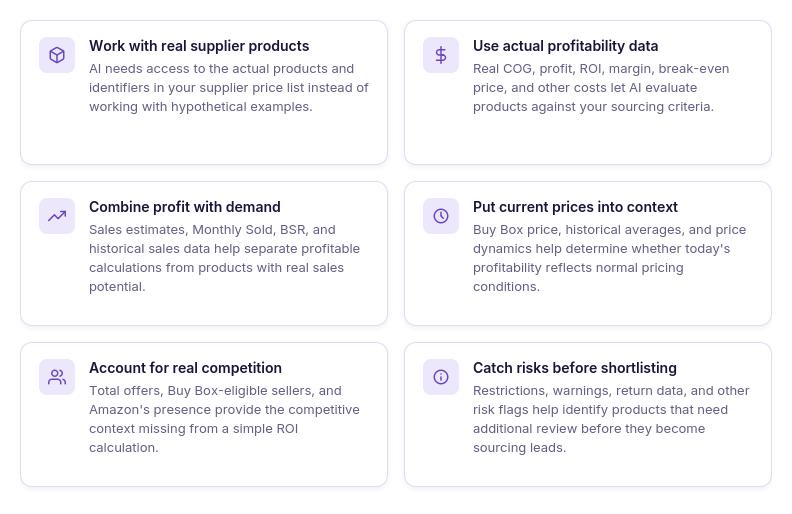 Work with real supplier products
Instead of discussing hypothetical products, AI needs access to the products and identifiers contained in the seller’s actual price list.
Use actual profitability calculations
Real COG, FBA and FBM profit, ROI, margin, break-even price, Max COG, and applicable costs provide the financial context needed to identify products that meet the seller’s criteria.
Combine profit with demand
Sales estimates, Monthly Sold, BSR, and Sales Rank Drops help determine whether an attractive profitability calculation is supported by sufficient product demand.
Put current pricing into context
Buy Box price, historical Buy Box averages, and price dynamics help AI work with more than a single current selling price when examining an opportunity.
Account for competition and Amazon presence
Offer counts, Buy Box-eligible competition, seller data, and Amazon’s Buy Box presence add competitive context that a generic profitability calculation cannot provide.
Surface risks before products reach the shortlist
Restrictions, warnings, return data, and Alerts & Flags can be reviewed alongside profitability instead of being discovered only after a product already looks promising.
What Seller Assistant Tools Make AI-assisted Price List Analysis Possible
Finding profitable Amazon leads with AI requires more than a chatbot that understands ROI or sourcing terminology. The AI needs access to structured supplier and Amazon data it can actually work with – including product matches, costs, profitability, demand, competition, pricing, and risk information.
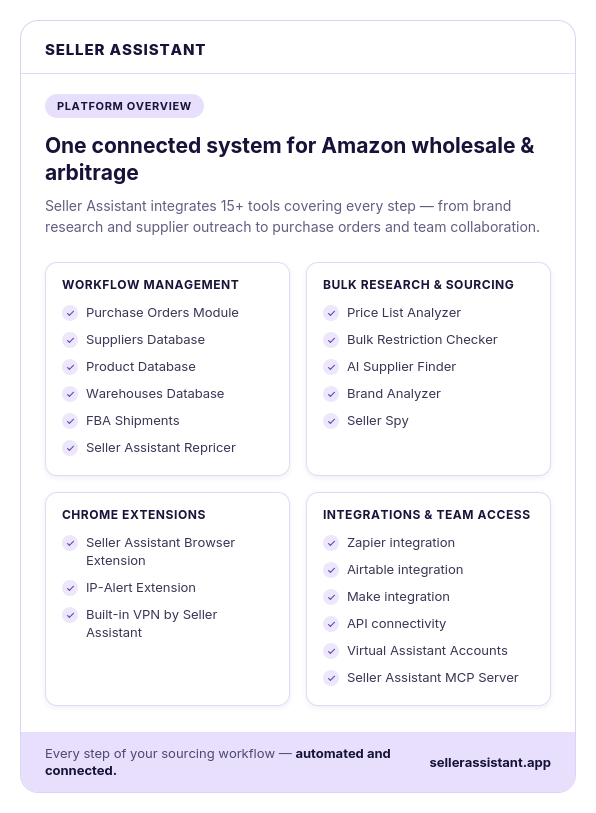
Seller Assistant combines two parts of this workflow. Price List Analyzer turns a raw supplier catalog into structured sourcing data, while Seller Assistant MCP Server connects supported Seller Assistant tools and data to AI assistants such as ChatGPT and Claude. This lets sellers move from analyzing data in a dashboard to working with supported sourcing information through natural-language requests.
What is Seller Assistant Price List Analyzer?
Seller Assistant’s Price List Analyzer is a bulk product research tool for Amazon wholesale, online arbitrage, and dropshipping sellers. Instead of researching supplier products individually, sellers can upload an .xlsx or .xls price list containing product identifiers and COG and analyze the catalog in bulk.
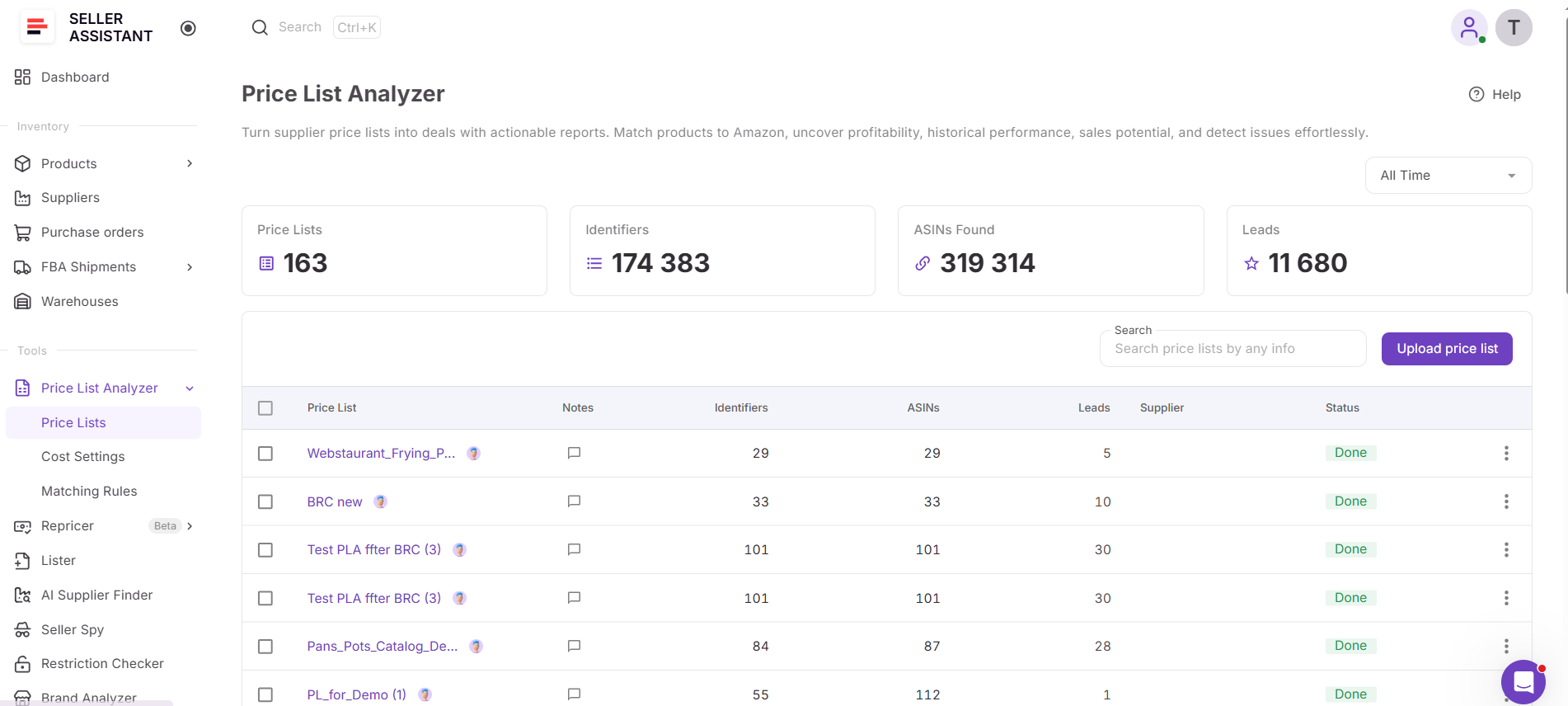
Price List Analyzer matches supplier products to Amazon listings and enriches the results with the information needed to evaluate potential deals. This includes profitability calculations, demand and sales data, pricing and Buy Box metrics, competition, restrictions, warnings, and other product information. Sellers can then filter the analyzed catalog to narrow thousands of supplier products into a manageable group of sourcing leads.
What Price List Analyzer helps you analyze
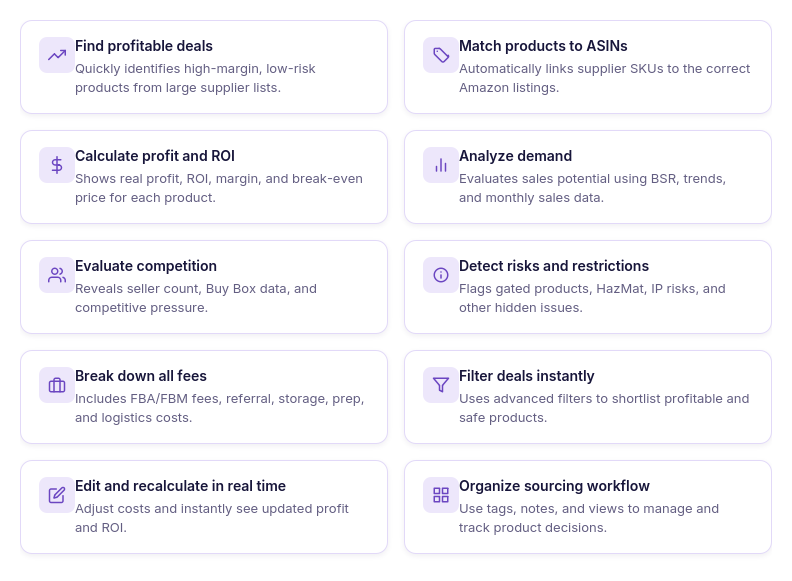
- Analyze supplier catalogs at scale
Upload large supplier price lists and research hundreds or thousands of products in one workflow instead of checking Amazon listings individually.
- Match supplier products to Amazon
Automatically match supplier product identifiers to Amazon ASINs, reducing the manual work required to connect catalog items with the correct listings.
- Calculate FBA and FBM profitability
See profit, ROI, margin, break-even price, Max COG, seller proceeds, and detailed costs using Amazon fees and your configured sourcing expenses.
- Validate product demand
Use sales estimates, Monthly Sold, current and historical BSR, and Sales Rank Drops to evaluate sales potential and demand consistency over time.
- Analyze pricing and Buy Box history
Compare current Buy Box pricing with historical averages and price dynamics to avoid evaluating a deal only against a temporary selling price.
- Evaluate real competition
Review total offers, Buy Box-eligible FBA and FBM offers, top sellers, Buy Box share, and Amazon presence to understand the competitive environment around each ASIN.
- Detect restrictions and sourcing risks
Surface restrictions, warnings, and product flags such as HazMat, meltable, fragile, oversize, IP-related risks, missing Buy Box data, and other issues that may require additional research.
- Filter products by your sourcing criteria
Narrow large catalogs using profitability, demand, competition, pricing, restrictions, risk, brand, category, tags, and other available metrics, then save views to reuse your preferred criteria.
- Test different cost scenarios
Adjust COG, shipping and prep costs, package quantity, fees, taxes, and other cost assumptions and recalculate profitability without uploading the supplier file again.
- Organize and review sourcing leads
Use likes and dislikes, tags, notes, and saved views to shortlist products, record sourcing decisions, and keep research organized across a team.
- Export the leads you need
Export the complete analyzed list, filtered results, or selected products depending on what you want to review or use next.
- Turn analyzed products into purchase orders
Select sourcing candidates from the analyzed price list and use Add to PO to continue with them in Seller Assistant Purchase Orders workflow instead of manually transferring product data.
How Price List Analyzer helps turn supplier catalogs into sourcing leads
For bulk product research, the key advantage of Price List Analyzer is that it evaluates an entire supplier catalog against the same sourcing data instead of requiring sellers to research each product separately. Supplier products are matched to Amazon listings and enriched with profitability, demand, pricing, competition, and risk metrics, creating a structured dataset for lead selection. You can filter leads by any metric to identify the best ones.
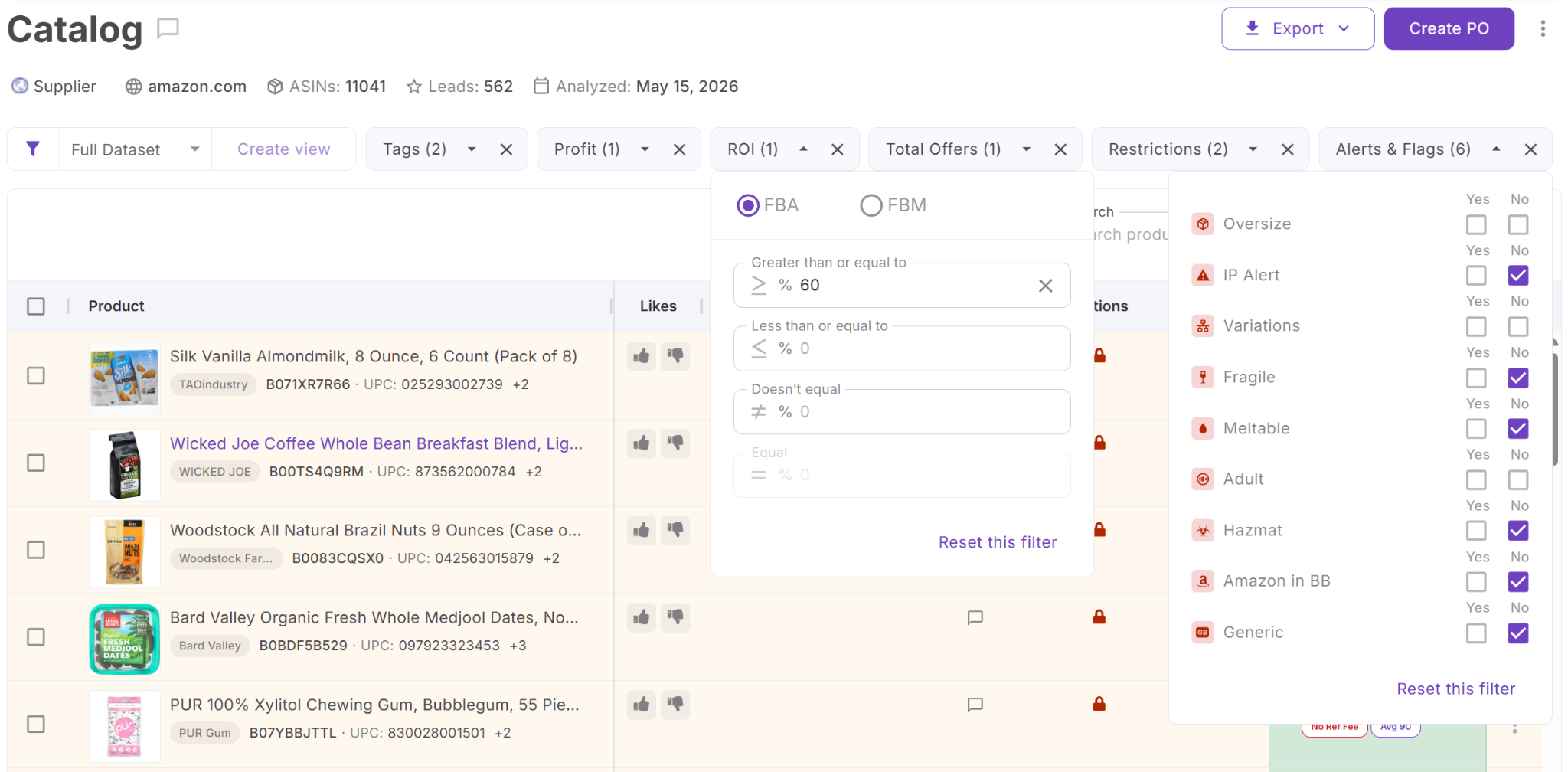
This makes Price List Analyzer especially useful for larger wholesale, online arbitrage, or dropshipping catalogs. Sellers can filter thousands of analyzed products using their own sourcing criteria, then progressively narrow the results by profit, ROI, sales potential, competition, and risks – creating the foundation for finding and investigating profitable leads through AI.
What is Seller Assistant MCP Server?
Seller Assistant MCP Server connects AI assistants with Seller Assistant tools and account data, allowing sellers to manage supported workflows through natural-language requests. MCP-compatible AI clients such as ChatGPT and Claude can retrieve actual Seller Assistant data and use supported operations instead of working only with general Amazon knowledge or information manually copied into the conversation.
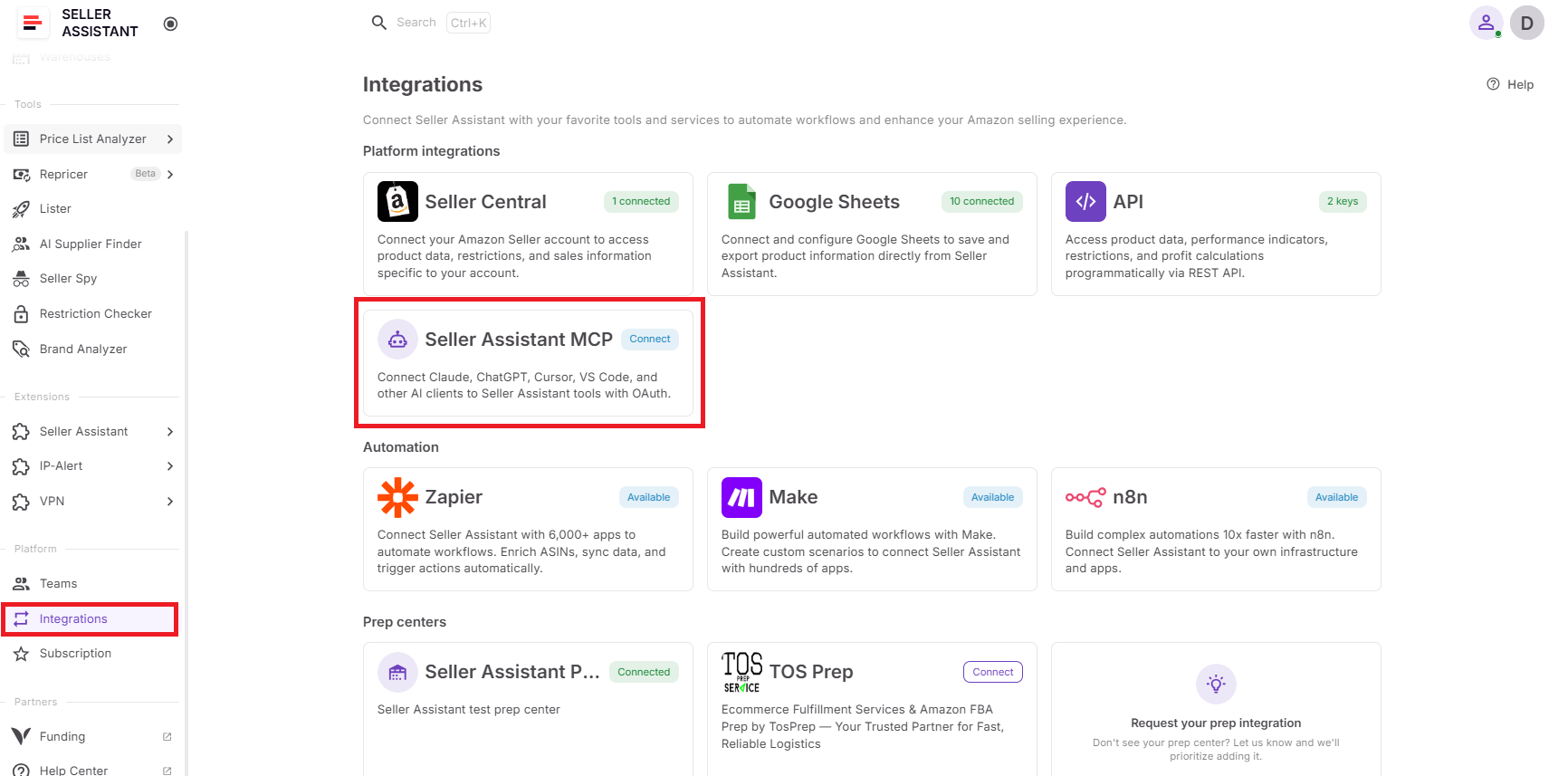
For Price List Analyzer, this means AI can work with the supplier price lists and analysis results available through the seller’s account. The assistant can list price lists, start an analysis, check its status, and retrieve the resulting leads – bringing supplier catalog analysis into the same AI conversation.
What you can do with Seller Assistant MCP for Price List Analyzer
Seller Assistant MCP gives an AI assistant access to supported Price List Analyzer operations. Sellers can use it to start and monitor price list analysis and retrieve actual leads through conversational requests rather than manually moving information between Price List Analyzer and an AI chat.
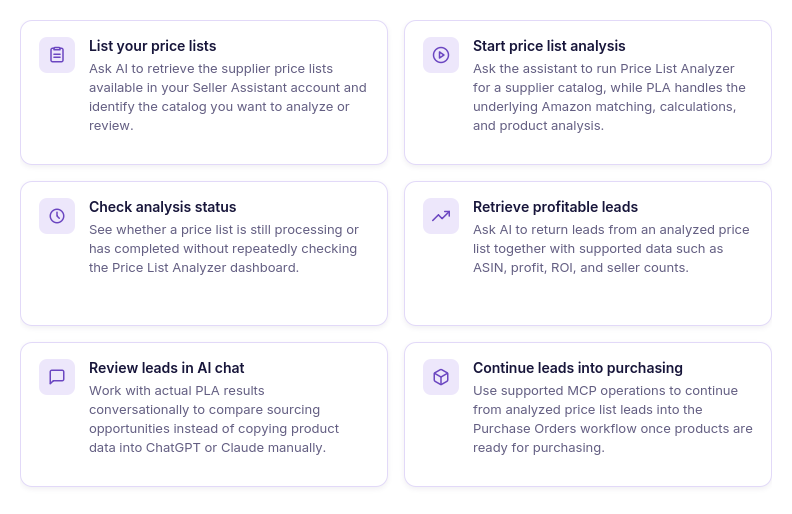
- List your price lists
Ask AI to retrieve the price lists available in your Seller Assistant account so you can identify the catalog you want to analyze or review.
- Start price list analysis
Ask the assistant to start analysis for a supplier price list on the selected Amazon marketplace. Price List Analyzer then performs the underlying product matching and analysis rather than the AI calculating the results independently.
- Check analysis status
Ask AI whether a specific price list analysis is still processing or has been completed instead of repeatedly checking its status in the Price List Analyzer interface.
- Retrieve profitable leads
Ask the assistant to return the leads generated by a completed price list analysis. Seller Assistant MCP prompt examples specifically support retrieving lead data including ASIN, profit, ROI, and seller counts.
- Review profitability in AI chat
Use the actual profit and ROI returned from Price List Analyzer to review sourcing opportunities in conversation instead of asking AI to estimate profitability from manually entered numbers.
- Compare leads by competition
Review seller counts alongside profitability to distinguish products that look attractive financially from opportunities that may face heavier marketplace competition. The MCP documentation confirms seller counts as part of the supported lead-result request.
- Continue from analysis to purchasing
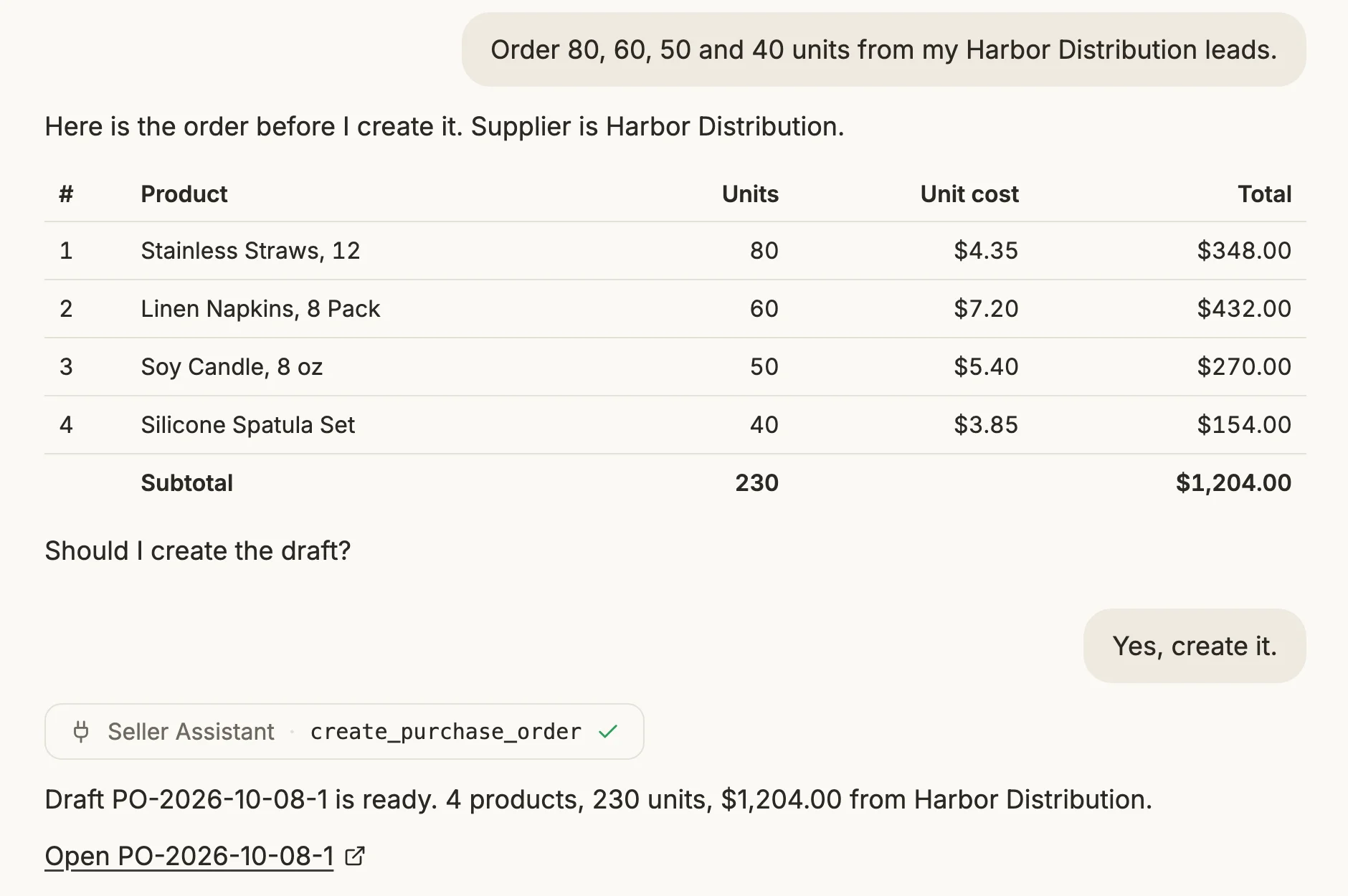
Seller Assistant MCP also supports finding wholesale suppliers, creating a PO from price list leads, and other workflow activities. This allows the workflow to continue from analyzed sourcing opportunities toward purchasing without treating price list analysis as an isolated task.
How MCP helps find profitable leads from supplier price lists
For lead finding, MCP connects supplier list analysis with conversational review. A seller can ask AI to identify the relevant price list, start its analysis, monitor processing, and retrieve the resulting leads with actual profitability and competition data instead of manually transferring results into the chat.
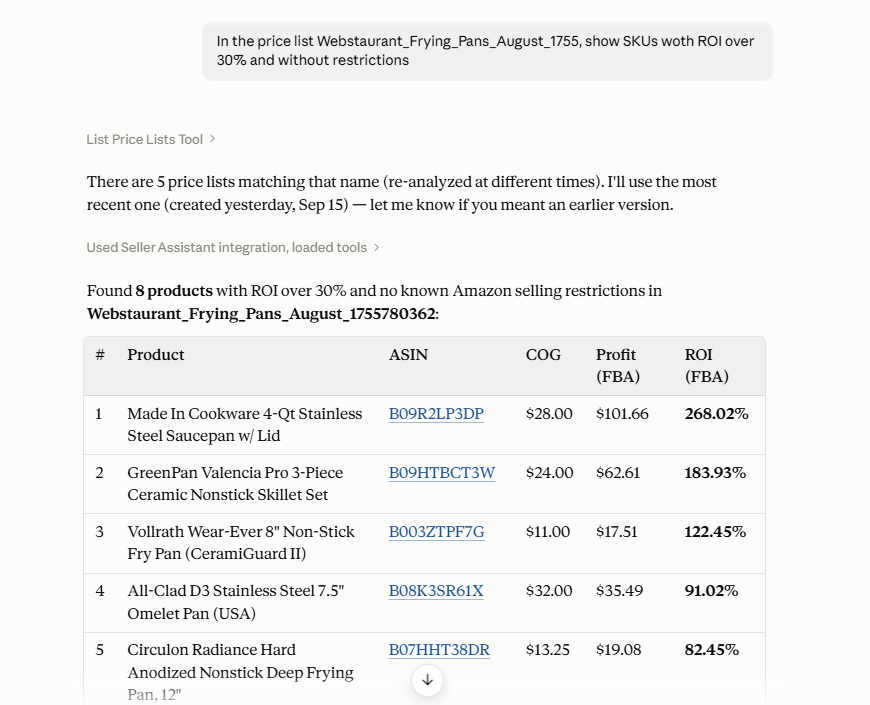
The conversation can then continue around those results. This turns supplier catalog research into an analyze → check → retrieve → review → act workflow: Price List Analyzer performs the underlying product matching and profitability analysis, MCP gives AI access to the supported results and operations, and the seller remains responsible for deciding which leads are worth pursuing.
How to Find Profitable Amazon Leads from Supplier Price Lists with AI
Finding profitable leads starts with turning a raw supplier catalog into data that can actually support a sourcing decision. Instead of judging products only by supplier cost or checking ASINs one by one, sellers need to match products to Amazon and evaluate profitability together with demand, pricing, competition, and potential risks.
With Seller Assistant MCP, this workflow can continue through AI chat. Sellers can work with supplier price lists from their Seller Assistant account, start and monitor analysis, retrieve the resulting leads, and review actual Price List Analyzer data in conversation – turning bulk supplier research into an analyze → retrieve → review → refine → act workflow.
What makes a profitable Amazon lead in Price List Analyzer?
A profitable lead is not simply a product with positive profit or high ROI. Price List Analyzer combines profitability with other sourcing signals so sellers can evaluate whether the numbers are supported by sufficient demand, realistic pricing, manageable competition, and acceptable risk.
The analysis can include FBA and FBM profit, ROI, margin, break-even price, Max COG, and detailed costs alongside sales estimates, BSR history, Buy Box data, seller competition, restrictions, warnings, and other product information. This allows sellers to build a shortlist around their own sourcing requirements rather than relying on a universal definition of a “good” deal.
Price List Analyzer metrics for evaluating profitable leads
| Metric Group | What It Helps Evaluate |
|---|---|
| Profit and ROI | Whether the expected return meets your sourcing requirements |
| Margin and break-even price | How much room the product has before profitability disappears |
| COG and Max COG | Whether the supplier cost fits the economics of the deal |
| Sales estimates and Monthly Sold | Whether there is enough potential demand |
| BSR and historical BSR | How product demand has behaved over time |
| Buy Box price and history | Whether profitability is based on realistic selling-price conditions |
| Total and Buy Box-eligible offers | How much seller competition the listing has |
| Amazon presence | Whether Amazon itself is an important competitor |
| Restrictions and warnings | Whether additional sourcing or eligibility risks need review |
Price List Analyzer supports filtering analyzed products by profitability, demand, competition, restrictions, risk, and other available metrics, so sellers can progressively narrow a large supplier catalog into a smaller group of candidates.
How Price List Analyzer works through AI chat
To work with Price List Analyzer through AI, first connect Seller Assistant MCP Server to an MCP-compatible AI client such as ChatGPT or Claude. In ChatGPT, open the Seller Assistant app and select Connect. In Claude, open Seller Assistant in the Claude directory and select Connect. Then sign in to your Seller Assistant account and approve access.
Once connected, enable Seller Assistant in the AI chat and start with a natural-language request related to your supplier price lists. For example, you can ask AI to show the price lists available in your account, start analysis for the relevant supplier catalog, or check whether an analysis has finished. Price List Analyzer performs the underlying Amazon matching and sourcing analysis – MCP gives the AI assistant access to the supported operation.
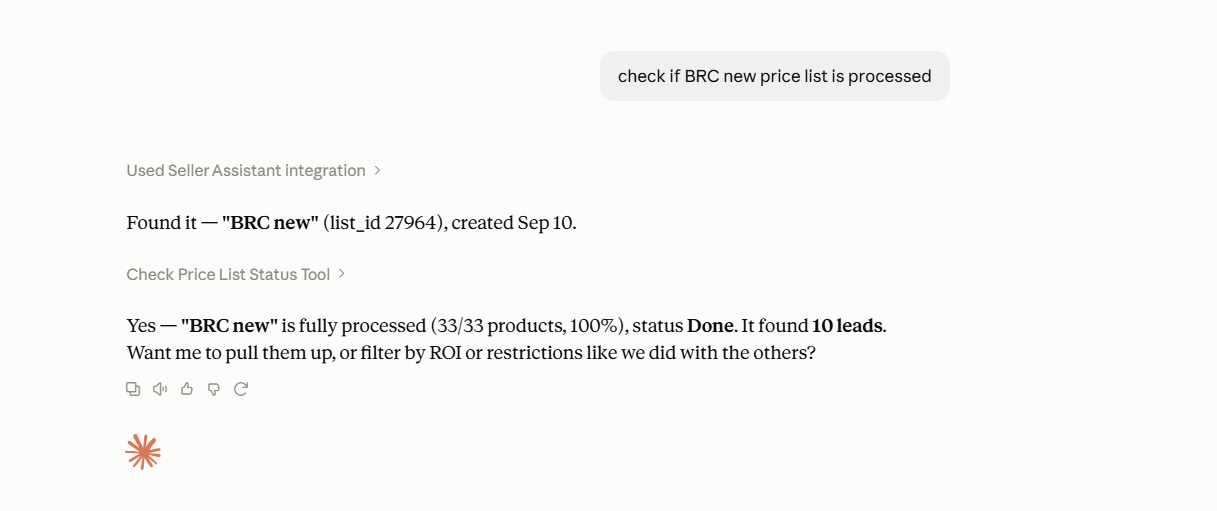
When the analysis is ready, continue the conversation by asking for the resulting leads. Instead of copying Price List Analyzer rows into the chat manually, the assistant can retrieve supported lead data from Seller Assistant, including information such as ASIN, profit, ROI, and seller counts. You can then use follow-up questions to review the returned products and narrow your investigation without starting a new research process.
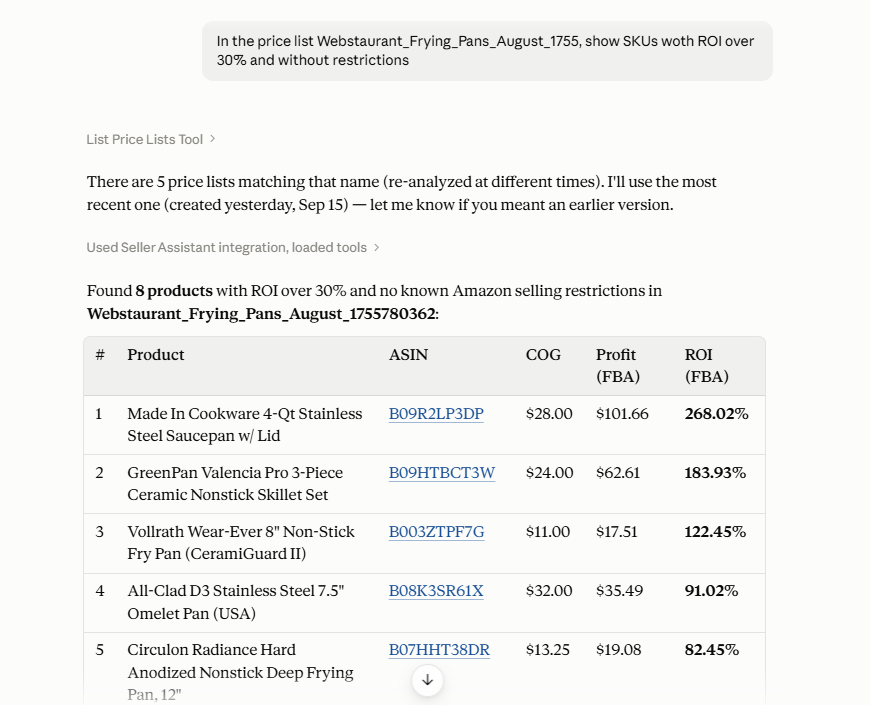
This creates a workflow in which Price List Analyzer performs the product research, MCP connects the results to AI, and ChatGPT or Claude provides the conversational interface. The seller can move from a supplier catalog to actual sourcing candidates through an analyze → retrieve → review → refine → act process while keeping the final purchasing decision in their hands.
You can also configure an AI agent to handle the workflow automatically – from uploading a new supplier price list and starting the analysis to checking when it is complete and retrieving the resulting leads. This turns recurring price list analysis into an automated sourcing workflow rather than a sequence of manual requests.
How to find profitable Amazon leads from a supplier price list with AI
Step 1. Connect Seller Assistant MCP to your AI assistant
Connect Seller Assistant MCP Server to an MCP-compatible AI client such as ChatGPT or Claude and authorize access to your Seller Assistant account.
In ChatGPT, open the Seller Assistant app and select Connect. In Claude, open Seller Assistant in the Claude directory and select Connect. Then sign in to your Seller Assistant account to approve access. Other MCP clients connect with the server URL from the MCP page.
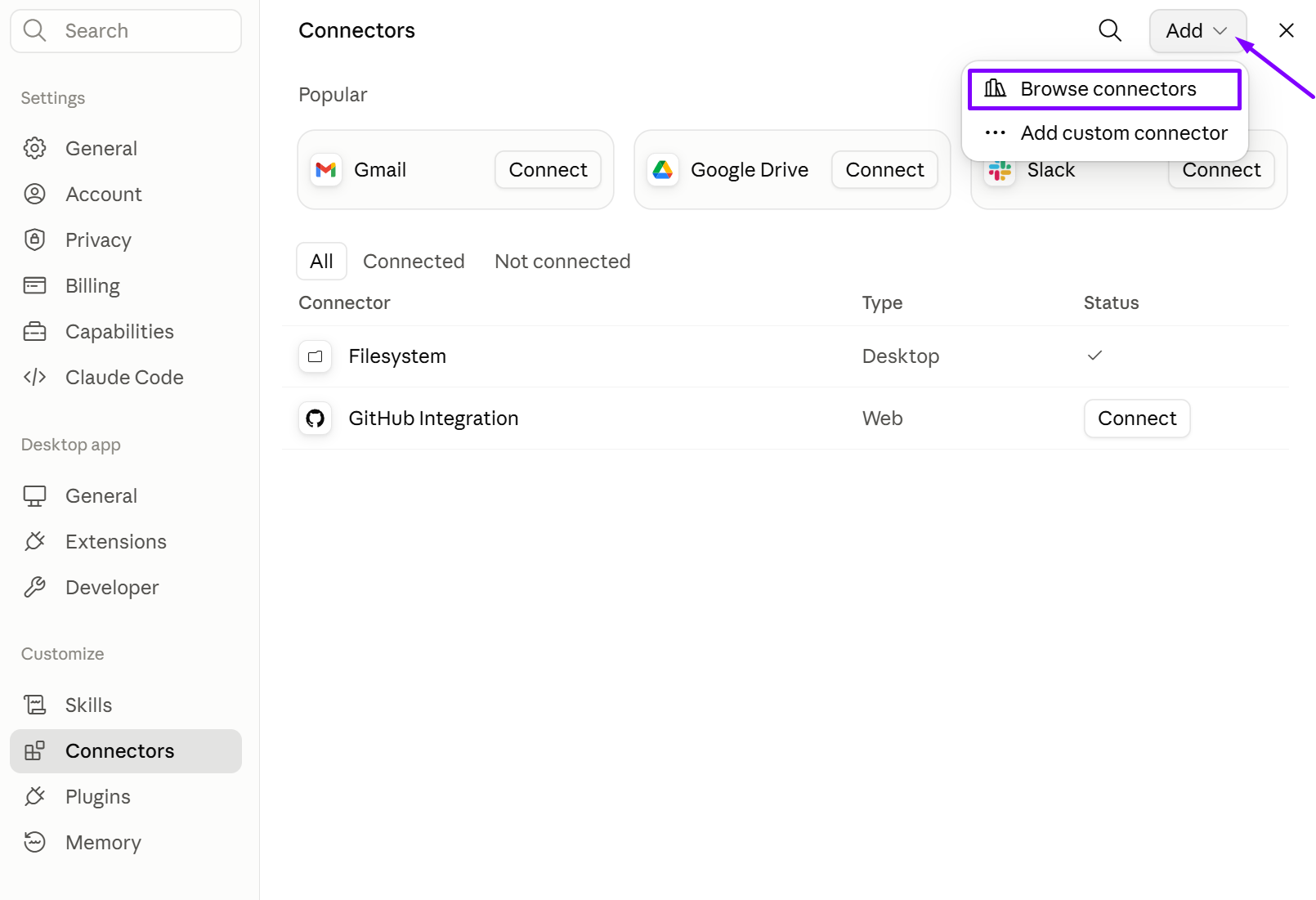
MCP gives the AI access to supported Seller Assistant tools and account data, so it can work with actual price list analysis instead of generic Amazon information.
Step 2. Select and analyze the supplier price list
Ask AI to identify the supplier price list you want to research and start Price List Analyzer for the selected Amazon marketplace. Price List Analyzer then handles the underlying product matching, profitability calculations, and Amazon product analysis.
This connects the correct supplier catalog with Amazon data and turns the raw product list into structured sourcing results that AI can work with in the next steps.
Step 3. Check the analysis status
Ask AI whether the price list is still processing or whether the analysis has been completed. If it is not ready yet, check again once processing has progressed.
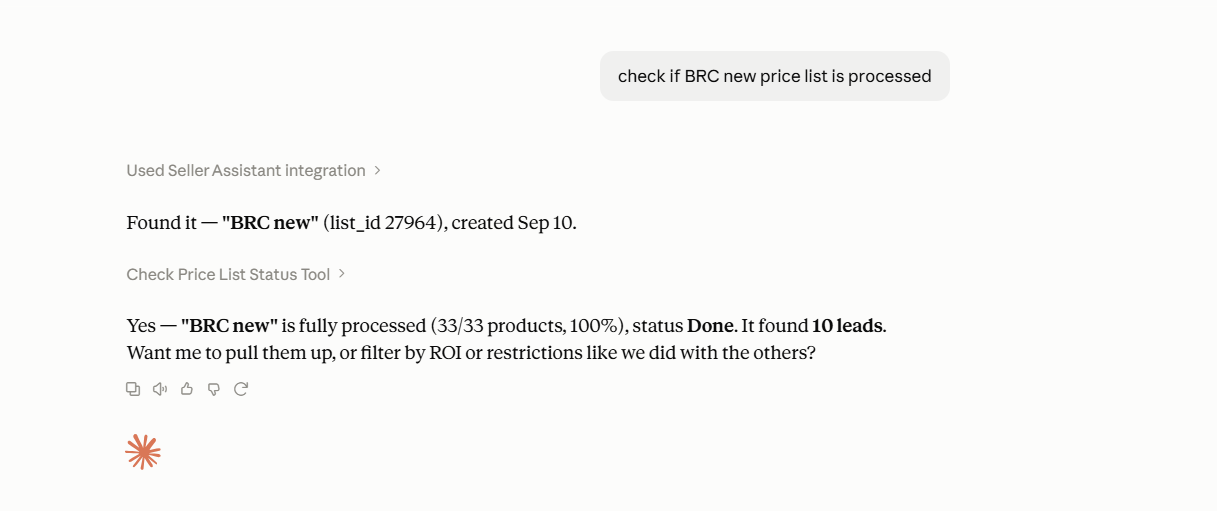
Lead analysis needs to be completed before you rely on the resulting data for sourcing decisions.
Step 4. Retrieve the resulting leads
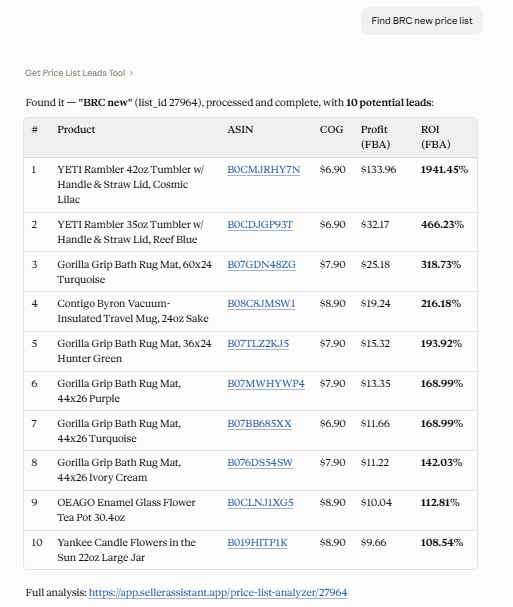
Once the analysis is complete, ask AI to retrieve the leads from the analyzed price list, including supported metrics such as ASIN, profit, ROI, and seller counts.
This brings actual Price List Analyzer results directly into the conversation, eliminating the need to manually copy products and metrics from the dashboard.
Step 5. Review and narrow the leads
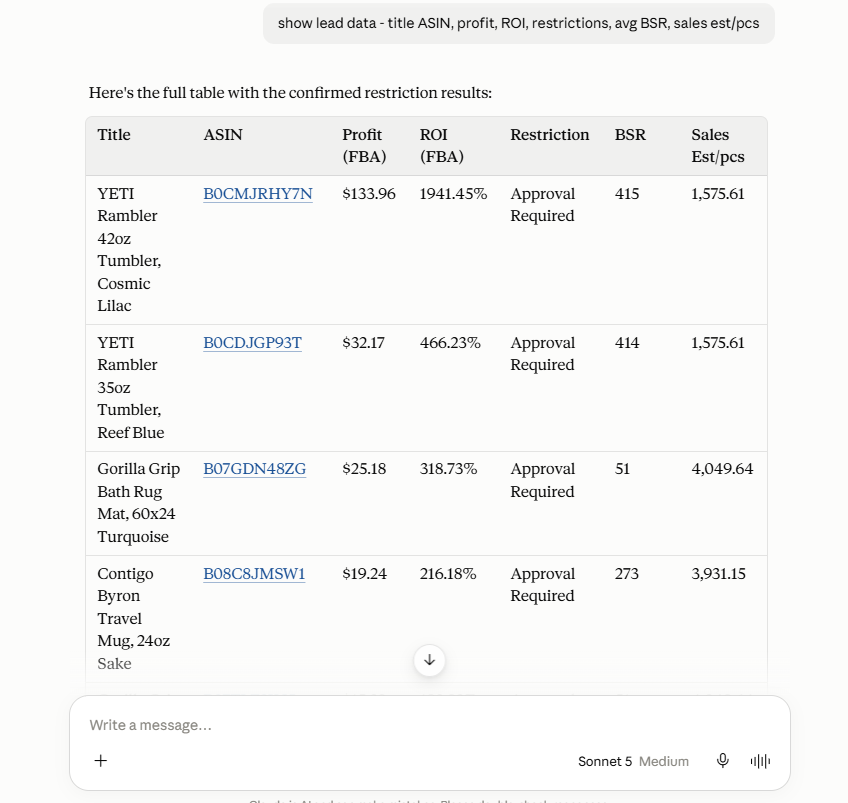
Use follow-up prompts to compare the returned products against your sourcing criteria – for example, profitability and competition – and investigate the strongest candidates further.
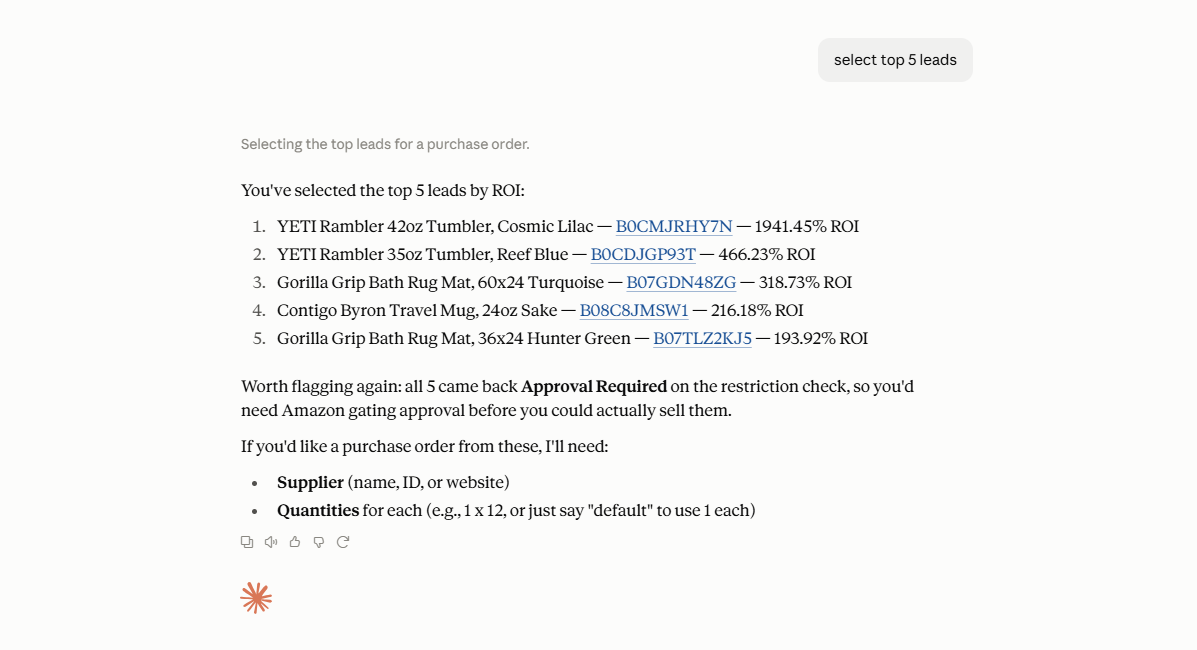
A profitable calculation alone does not make a product a strong sourcing opportunity, so leads still need to be evaluated in context.
Step 6. Continue with the selected products
Once you have identified products worth pursuing, continue with the next sourcing action supported by Seller Assistant, such as moving selected leads toward the Purchase Orders workflow.
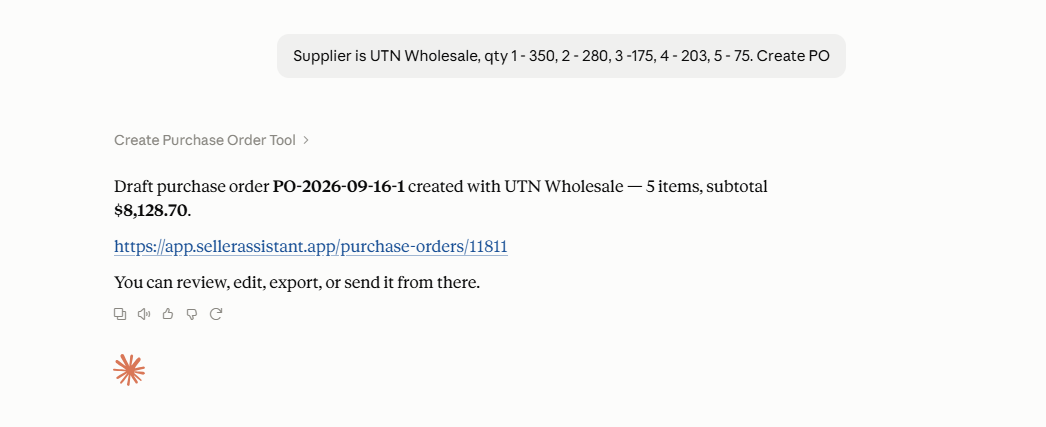
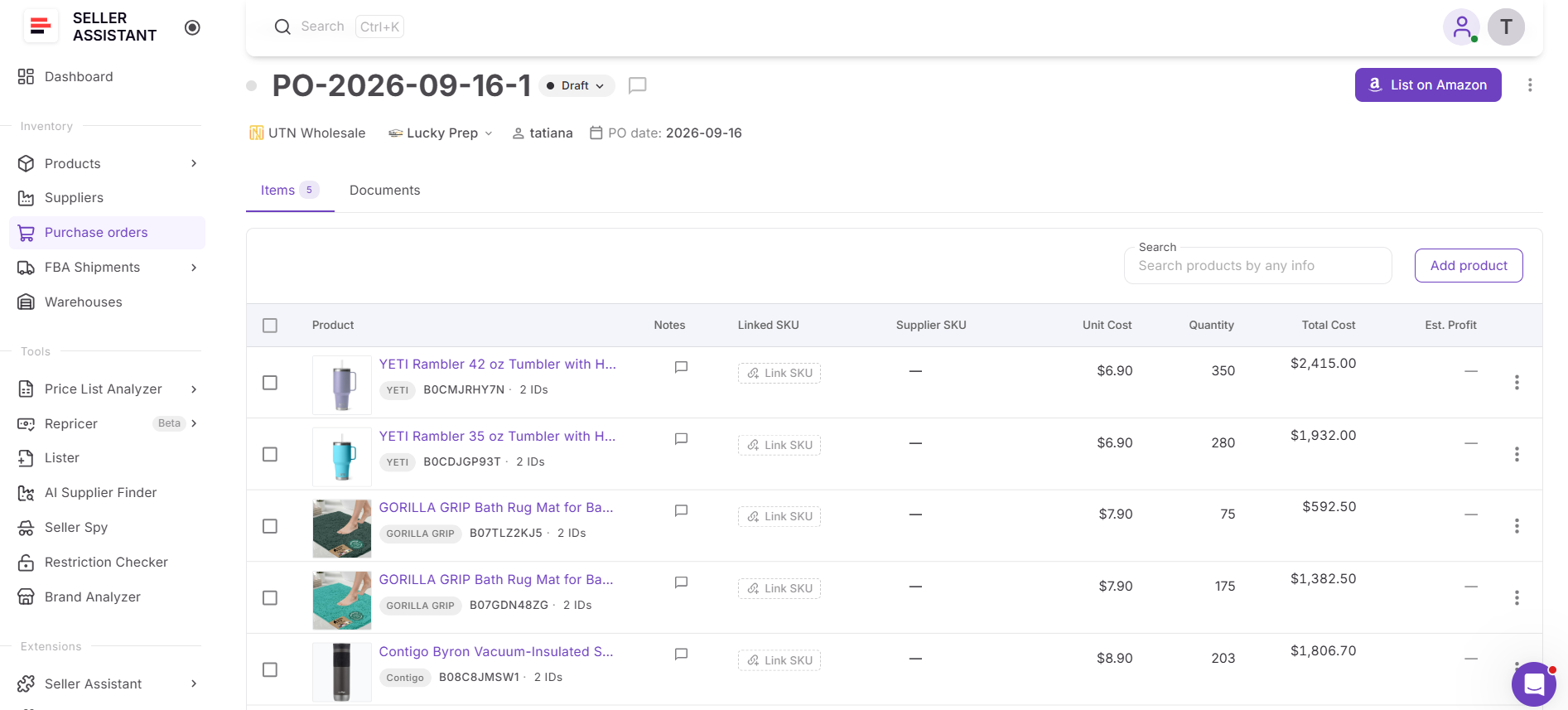
This connects supplier list analysis with the next stage of sourcing instead of leaving the shortlist as an isolated research result.
FAQ
Can AI analyze a supplier price list if some products are missing Amazon matches?
Yes. Unmatched or uncertain products can remain part of the analysis results, but they may need manual review before you can evaluate them as sourcing leads. Missing or incorrect identifiers can prevent reliable Amazon data from being attached to a supplier product.
Should I use the same profitability criteria for every supplier price list?
Not necessarily. Minimum ROI, profit, and other sourcing thresholds can vary depending on factors such as your business model, supplier terms, product category, and the amount of capital you want to invest.
Can I reanalyze a price list when supplier costs change?
Yes. Reanalyzing a supplier list can help you evaluate products against updated sourcing and Amazon data instead of relying on an older analysis. This is useful when suppliers send updated catalogs or pricing changes significantly.
Does a high-ROI product automatically make a good Amazon lead?
No. A high ROI can still come with low demand, unstable pricing, strong competition, restrictions, or other risks, so profitability should be considered alongside the broader product data.
Can I use AI to process supplier price lists on a recurring basis?
Yes. You can configure an AI agent around supported Seller Assistant MCP operations to handle repeatable stages of the workflow and reduce repeated manual requests. This can be useful for sellers who regularly receive new or updated supplier catalogs.
Final Thoughts
Finding profitable Amazon products from a supplier list becomes much easier when product matching, profitability calculations, demand, competition, pricing, and risk data are analyzed together. Seller Assistant’s Price List Analyzer turns large supplier catalogs into structured sourcing results, helping sellers move from thousands of raw SKUs to a focused list of products worth investigating.
Seller Assistant MCP takes this workflow into AI chat. Instead of manually moving between supplier files, analysis results, and separate research steps, sellers can use natural-language requests – or configure an AI agent for recurring workflows – to run supported Price List Analyzer operations, retrieve leads, review opportunities, and move promising products toward the next sourcing stage.