.svg)
How to Check Wholesale Brand for Restrictions on Amazon
Download Amazon Seller Guide
This guide will help you get started, understand the basics of Amazon selling, and explain in simple words how it all works.

Checking whether a brand or product is restricted on Amazon is one of the most important steps in any wholesale, online arbitrage, or dropshipping workflow. A single gated brand can turn a profitable deal into dead inventory, especially when restrictions change without warning.
That’s why successful sellers verify eligibility before running profit calculations or placing purchase orders.
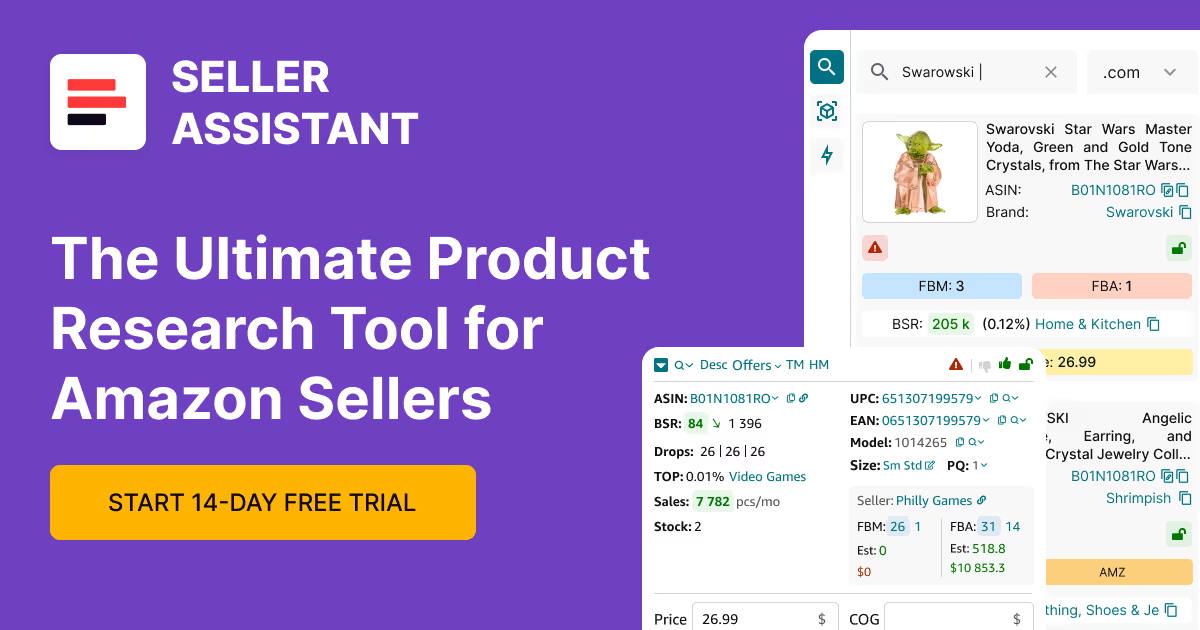
Seller Assistant makes this process simple with built-in restriction checkers that show your exact selling status on every ASIN – instantly, in bulk, or directly on Amazon product pages. With the right tools, you can source confidently, avoid costly mistakes, and focus only on products your account can actually sell.
Note. Seller Assistant is an end-to-end Amazon workflow management platform that integrates 10+ wholesale-focused solutions into one connected system. It combines sourcing workflow automation, bulk research and intelligence tools, and integrated Chrome extensions – giving you everything you need to streamline finding deals, managing suppliers, and creating purchase orders.

The platform aggregates: workflow management tools – Purchase Orders Module, Suppliers Database, Warehouses Database to organize, automate, and scale every step of your wholesale and arbitrage operations; bulk research & sourcing tools – Price List Analyzer, Bulk Restriction Checker, Sourcing AI, Brand Analyzer, Seller Spy to evaluate supplier price lists, verify selling eligibility and restrictions, open new brands, and discover winning product ideas from competitors to expand your product catalog; Chrome extensions – Seller Assistant Browser Extension, IP-Alert Extension, and built-in VPN by Seller Assistant to deep-research products, check IP claims and compliance, and access geoblocked supplier sites directly within your browser; and integrations & team access features – seamless API connectivity and integrations with Zapier, Airtable, and Make, plus Virtual Assistant Accounts for secure, scalable team collaboration.
With Seller Assistant, every step of your Amazon wholesale and arbitrage workflow is automated and connected.
What Are Brand Restrictions on Amazon?
Brand restrictions on Amazon are Amazon’s rules that limit which sellers can list specific brands or products. These rules exist to protect customers from counterfeit items, prevent safety issues, and keep the marketplace compliant with regulations. Because Amazon constantly updates brand and category rules, a product that was open last month may be gated today.
That’s why sellers must check eligibility before sourcing – especially when dealing with brands restricted only in certain categories, category-wide restrictions, or product-specific restrictions applied at the ASIN level.
Why brand restrictions exist
Amazon uses restrictions to maintain a safe and trusted shopping environment. They help ensure:
- only qualified sellers list brands with strict intellectual property or quality requirements,
- customers receive authentic, compliant products,
- harmful or unsafe items never reach the marketplace,
- sellers meet documentation, safety, and performance standards before offering sensitive products.
For resellers, this means you must confirm your account’s eligibility before adding inventory. Even profitable products become losses if your account is blocked or requires approval.
Types of Amazon brand restrictions
Amazon gives every ASIN one of three eligibility statuses. These statuses determine whether you can list a branded product immediately, need additional documentation, or cannot sell it at all.
Eligible
You can list the product right away. No paperwork, no approvals. These are the safest deals because your account already meets all requirements for the brand or category.
Approval required
The product is gated. You must submit invoices, safety documents, or compliance paperwork to request approval. This status is common for high-risk brands, regulated categories, and products with strict authenticity standards.
Ineligible
Your account cannot sell the product. Amazon will show messages such as “Your account does not qualify.” This often happens when the category is fully restricted, your account lacks permission, you are in the wrong marketplace, or the brand prohibits third-party sellers altogether.
Why Checking Brand Restrictions Before Sourcing Is Essential
Sellers often evaluate profit, sales rank, or competition before confirming whether they can actually list a product. Running a restriction check first gives you a clear yes/no early in the workflow so you don’t waste money or time on blocked brands.
Avoid dead stock
Buying restricted brand’s products instantly turns your investment into unsellable inventory. Checking restrictions upfront keeps you from ordering items your account has no permission to list.
Save sourcing time
Checking eligibility first removes blocked or approval-required products from your workflow, letting you analyze only deals your account can actually sell.
Increase profit confidence
When you confirm eligibility before running the numbers, every deal you analyze is truly sellable – giving you confidence as you scale orders or negotiate supplier pricing.
Avoid policy and compliance issues
Restricted brands often require strict documentation, authenticity proof, or regulatory compliance. Checking restrictions early helps you avoid IP complaints, listing violations, and account health risks.
Adapt to changing rules
Amazon’s restrictions update frequently, sometimes overnight. Routine checks keep your sourcing aligned with current rules and protect you from sudden gating changes.
How to Review Amazon Restrictions
Manually verifying eligibility for every brand and product is slow and unreliable, especially when sourcing large volumes. Your first step in evaluating any deal should be checking whether your account can sell the item – long before comparing profit, sales rank, or competition. Without bulk checks, you risk analyzing products you aren’t approved to list. And because Amazon updates brand, category, and ASIN restrictions frequently, a product that was sellable last week may now be gated.
To streamline this process, sellers rely on automated tools that check restrictions at scale or on individual listings. Seller Assistant provides Price List Analyzer, Bulk Restriction Checker) and Seller Assistant Extension, giving you instant visibility into eligibility and helping you focus only on products your account can sell.
Check Eligibility During Catalog Sourcing
One of the fastest ways to verify eligibility is to check brand restrictions during your sourcing workflow – not after. Price List Analyzer integrates restriction checks directly into your catalog research, allowing you to find profitable and sellable products in one pass.
When you upload your supplier file, the tool automatically connects each item to the correct Amazon ASIN, runs profit calculations, and displays restriction status in a single dashboard. This automation saves hours of manual work, prevents buying unsellable stock, and keeps your research focused on approved products.
What Price List Analyzer helps you do
Price List Analyzer is designed for wholesale, online arbitrage, and dropshipping sellers who handle large supplier catalogs. It processes spreadsheets, finds the correct ASIN matches, and calculates all core profitability metrics so you can uncover strong deals in minutes.
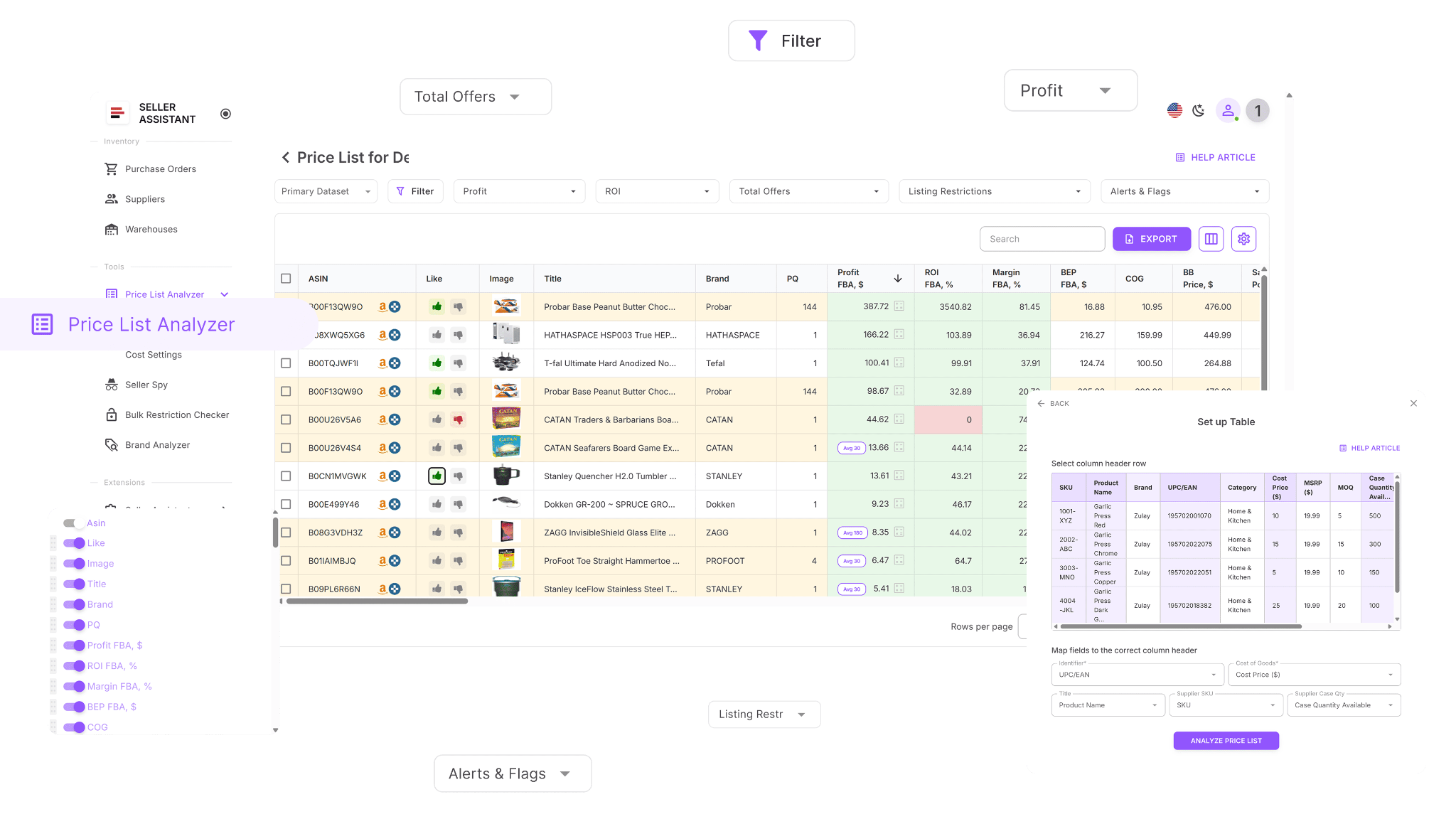
The tool adds more than 100 essential data points to your spreadsheet, including sales trends, Buy Box history, Amazon fees, competition indicators, ROI, and restriction alerts. You can filter results, highlight top opportunities, and adjust costs to instantly recalculate profit. Price List Analyzer gives you accurate, complete data for confident buying decisions.
Price List Analyzer turns big, complex supplier lists into organized insights. It analyzes your file, identifies correct ASIN matches, and highlights high-profit, low-risk items – all within a few minutes.
What you can accomplish with Price List Analyzer
How to Analyze Suppliers’ Price Lists in Bulk | Price List Analyzer Review
- Analyze large supplier files and find high-profit, low-risk products.
- Automatically match supplier SKUs with Amazon ASINs.
- Check restriction statuses and flag items your account cannot sell.
- Add over 100 detailed metrics, including: sales performance – BSR, trends, estimated sales, velocity; profitability – net profit, ROI, margins, break-even points; pricing – average Buy Box prices for 30/90/180 days; fees – FBA/FBM fees, referral fees, storage, shipping, prep, HazMat; competition – seller count, rotation behavior, Amazon in Buy Box.
- Identify product risks using built-in alerts (ASIN Not Found, No Buy Box, Approval Required, etc.).
- Filter deals by profit, sales, or risk and reuse saved table layouts.
- Mark items with Likes/Dislikes, build purchase lists, and export selected ASINs.
- Adjust COGs, prep, or shipping and get instant profit updates.
- Add shared notes that reappear automatically whenever that ASIN is uploaded again.
How restriction checks work in Price List Analyzer
When Price List Analyzer evaluates your supplier file, it assigns one of three statuses to every product:
- Eligible – your account can sell the product (green open lock).
- Approval required – the product is gated and needs documentation (red closed lock).
- Ineligible – your account cannot sell the item (red closed lock with exclamation mark).
These instant indicators help you see which products you can sell, which require ungating, and which you should skip.
How to use Price List Analyzer
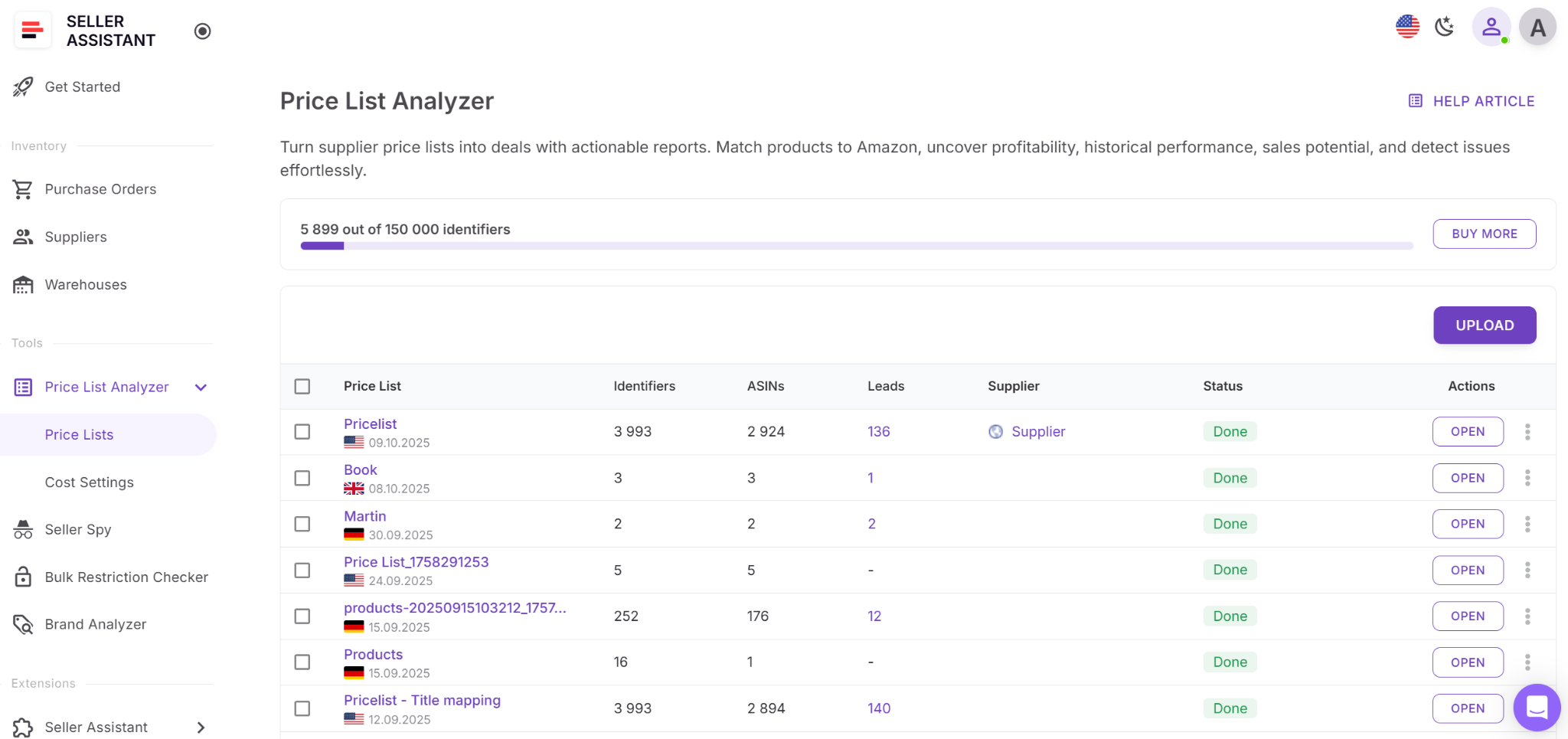
Step 1. Upload your supplier file
Open Price List Analyzer from your Seller Assistant dashboard. Upload your CSV or Excel file with UPC/EAN identifiers and cost of goods. The tool matches each item to an ASIN, analyzes it, and fills your table with profit, eligibility, and warnings.
Step 2. Find the restriction indicators
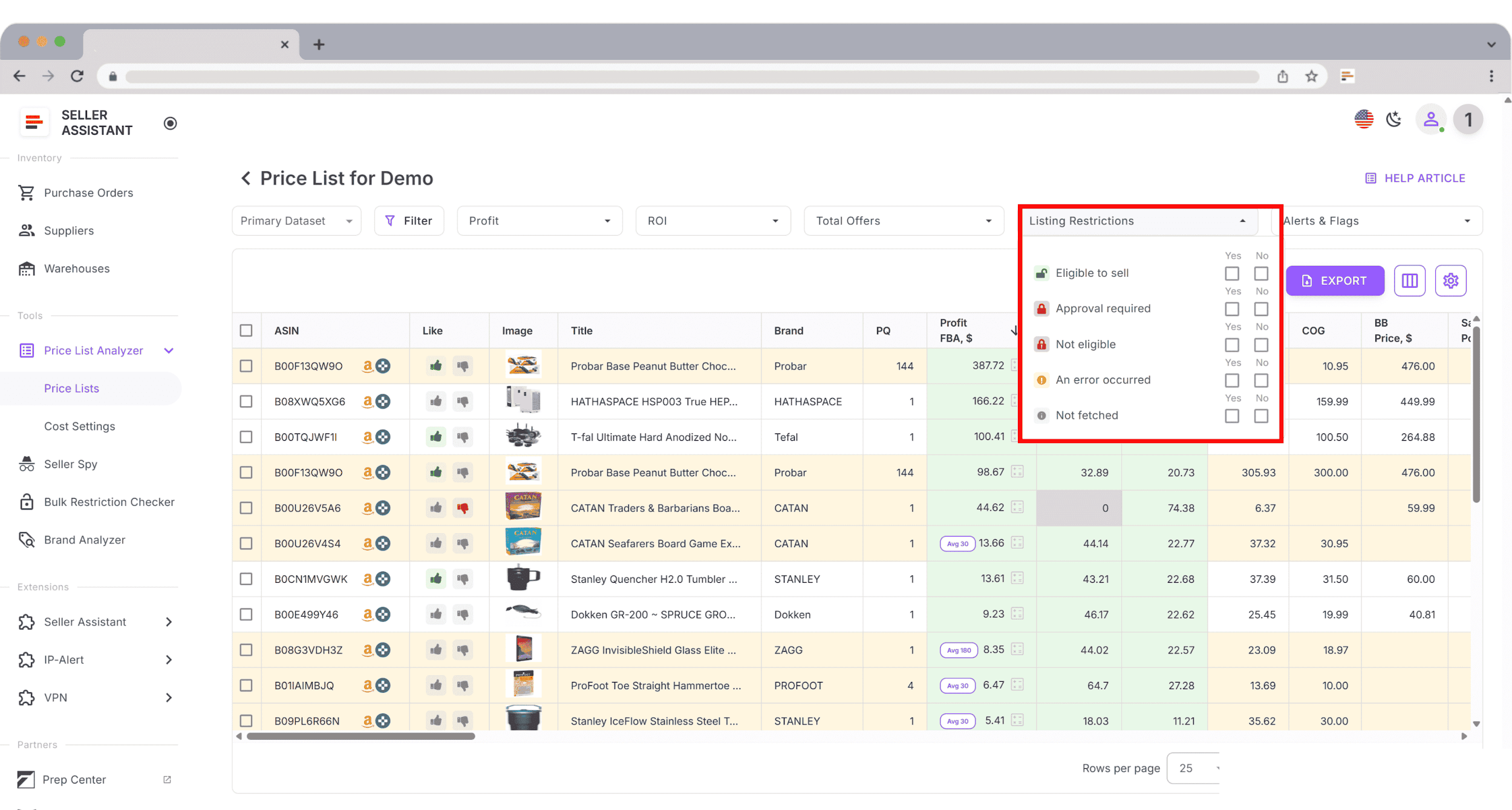
Locate the Listing restrictions column. Each product will display:
- green open lock – eligible
- red closed lock – approval required
- red closed lock with exclamation mark – ineligible

Step 3. Review all unsellable or gated items
Scroll through rows with red locks. Hover over the icon or check the Warnings column to see whether the limitation is a brand gate, category restriction, or another approval requirement.
Step 4. Filter your list by restriction type
Open Filters → Restrictions, or filter by specific lock icons. You can combine restriction filters with ROI, profit, or sales filters to identify gated products worth ungating.
Step 5. Decide how to move forward
- Approval required: decide if ungating is worth pursuing.
- Ineligible: skip the product until your account qualifies.
- Eligible: move forward, but verify any IP, HazMat, or prep warnings.
Step 6. Save your table view
Save your layout (e.g., “Sellable Only,” “Ungating Targets,” “Restricted Items”). These presets keep future uploads organized and consistent.

Verify Restrictions in Bulk with Bulk Restriction Checker
Seller Assistant's Bulk Restriction Checker lets you evaluate large ASIN lists in a single step, helping you confirm selling eligibility before you commit to inventory. The tool processes up to 20,000 ASINs at once and instantly shows which items are sellable, gated, or blocked for your account.
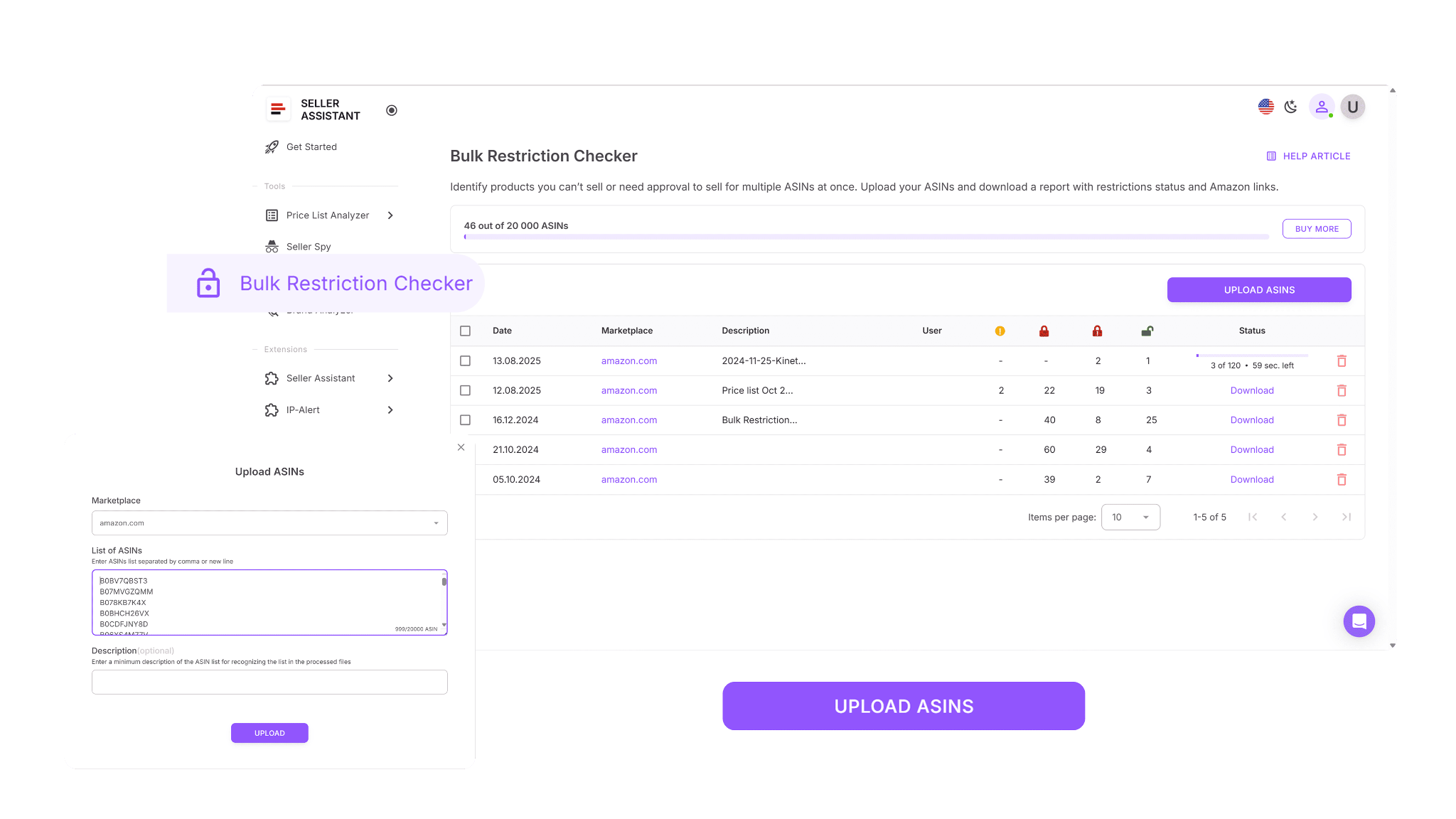
Because it reads your live marketplace permissions, the tool identifies restriction issues early. This makes it ideal for reviewing supplier catalogs, validating sourcing spreadsheets, and cleaning large product lists before buying.
What Bulk Restriction Checker helps you do
Bulk Restriction Checker is built for resellers who need to verify eligibility across thousands of products quickly. It evaluates each ASIN you upload, compares it to your Seller Central permissions, and provides a clear overview of what your account can and cannot list.

The tool scans every ASIN in your file, assigns its restriction status, and organizes products into three groups – eligible, approval required, and not eligible. Within minutes, you receive a structured report showing exactly which items are safe to source.
What you can accomplish with Bulk Restriction Checker
With Bulk Restriction Checker, you can:
- Clean large sourcing lists by verifying eligibility for thousands of ASINs.
- Identify gated items early and evaluate whether they’re worth pursuing for ungating.
- Avoid purchasing products your account cannot list.
- Download organized reports for sorting, filtering, and team collaboration.
- Streamline wholesale, online arbitrage, and dropshipping sourcing workflows.
How restriction checks work in Bulk Restriction Checker
To check restrictions with Bulk Restriction Checker, log into your Seller Assistant account, choose your Amazon marketplace, and upload your ASIN file. The tool processes your list and returns a downloadable report.
Each ASIN is marked with a clear status:
- ELIGIBLE – you can sell the item
- APPROVAL_REQUIRED – gated and needs documentation
- NOT_ELIGIBLE – your account cannot list it
This gives you immediate clarity on what to source, what to skip, and what to consider for ungating.
How to use Bulk Restriction Checker
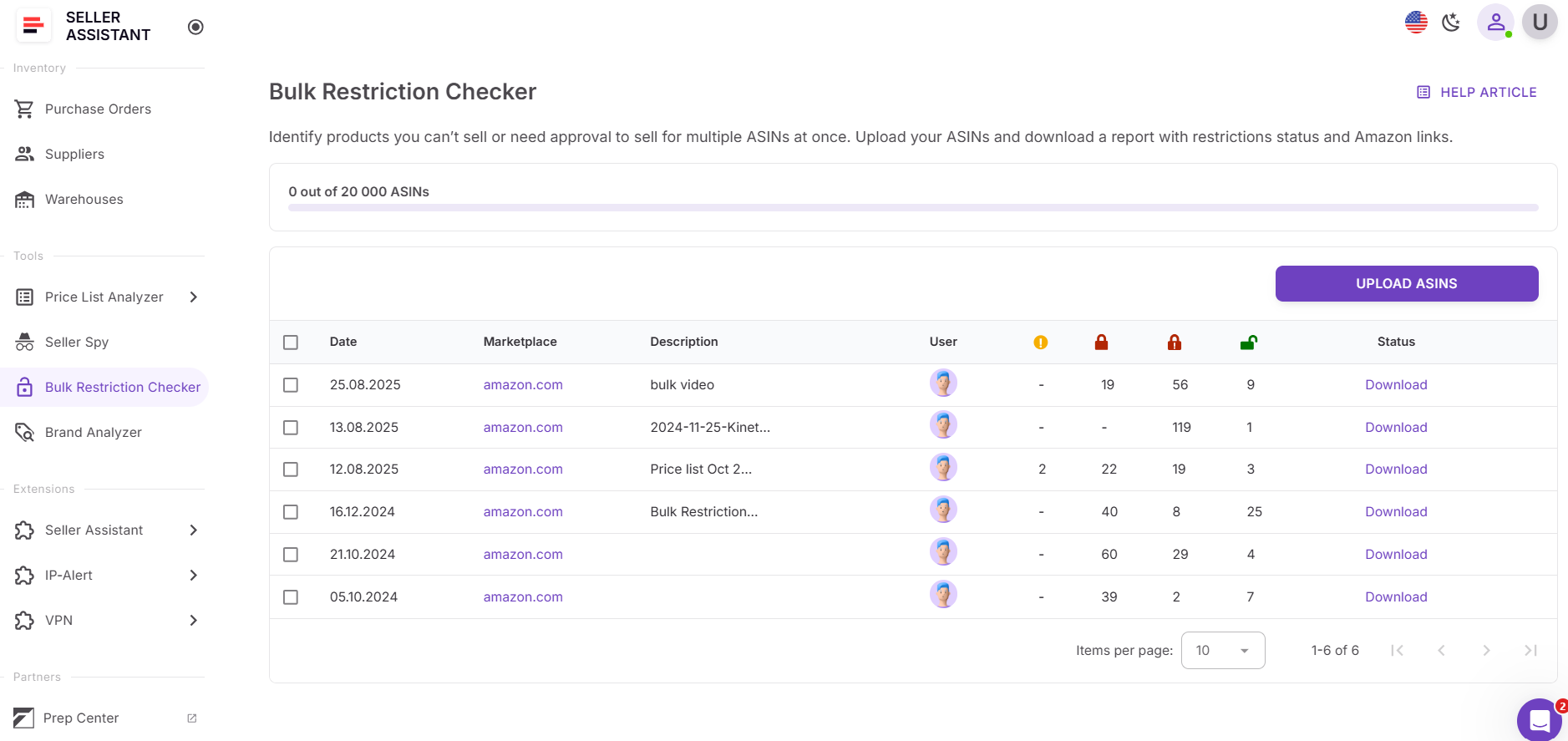
Step 1. Open Bulk Restriction Checker in your Seller Assistant dashboard
Go to the Tools section and select Bulk Restriction Checker.
Step 2. Upload your ASIN list
Submit a file with up to 20,000 ASINs. The tool automatically begins checking each item against your Seller Central permissions.

Step 3. Wait for your notification email
When processing is complete, you’ll receive an email confirming your report is ready.
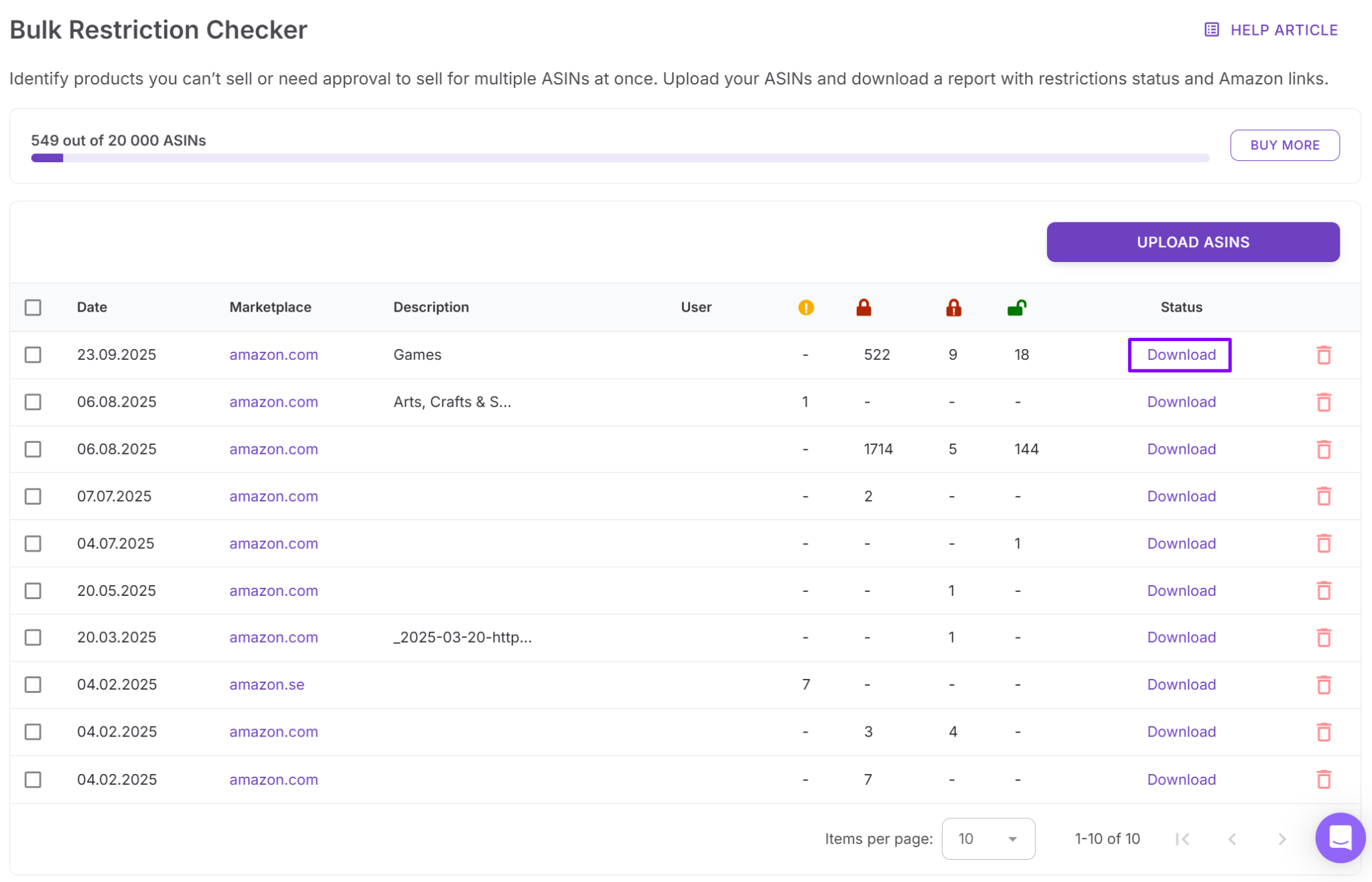
Step 4. Download your completed report
Download the file to view all restriction statuses. You can sort, filter, and share the results with your team to guide purchasing decisions.
Check Single Brand Restrictions with Seller Assistant Extension
When analyzing products one by one, the quickest way to confirm restrictions is directly on Amazon. Seller Assistant Extension adds a live data panel to Amazon listings, search results, supplier sites, and competitor storefronts. You instantly see restriction status, profitability, IP risk, fees, and sales indicators without switching tabs or doing manual checks.
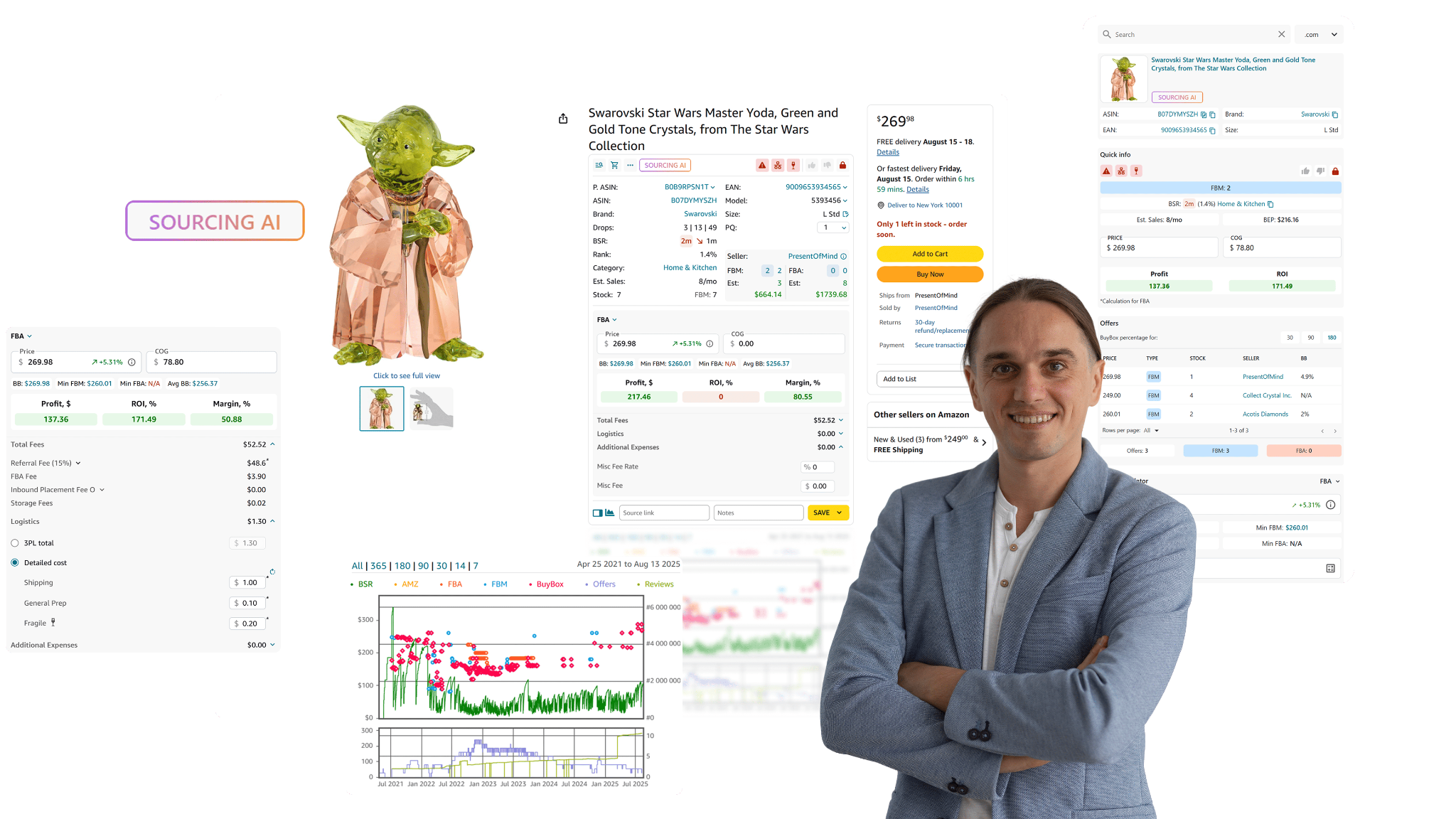
This lets you evaluate a product’s sellability, margins, and overall risk profile within seconds, making single-product research significantly faster and more accurate.
What Seller Assistant Extension helps you do
Seller Assistant Extension is designed for resellers who need real-time data while browsing Amazon or supplier websites. It displays key product metrics directly on the page so you can quickly determine if an item is worth sourcing based on restrictions, profitability, and competition.
The extension adds a rich dashboard to Amazon listings showing sales velocity, competition levels, Buy Box trends, restriction status, IP complaint history, profit estimates, and top-performing variations.
- On supplier websites, Side Panel View gives you full Amazon data next to the supplier listing.
- On Amazon search results, Quick View highlights strong opportunities at a glance.
- Inside competitor storefronts, Storefront Widget reveals their best-selling products, top brands, and main categories.
What you can accomplish with Seller Assistant Extension
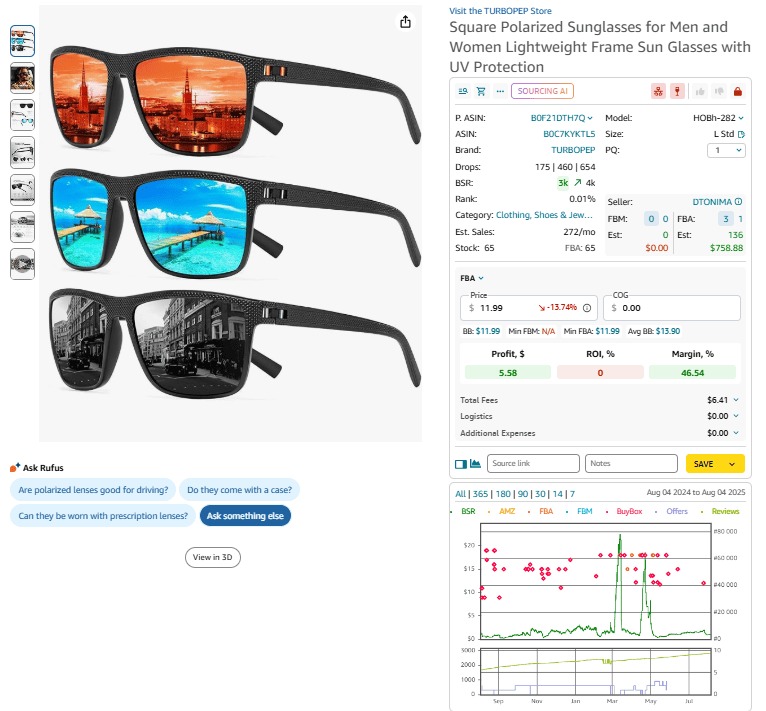
- View full product data directly on Amazon listings.
- Review sales potential using BSR trends, demand signals, and velocity.
- Check restriction status (eligible, gated, ineligible) via Restriction Checker.
- Detect products and brands with IP complaints through IP Alert.
- Estimate profitability with built-in FBA and FBM calculators.
- See Amazon fees, logistics costs, and taxes automatically.
- Calculate VAT for EU, US, and Canada sellers.
- Analyze Buy Box competition and see if Amazon is a seller.
- Review variation performance with Variation Viewer.
- Check real stock levels of FBA and FBM sellers using Stock Checker.
- Explore branded offers and bestselling ASINs in competitor storefronts.
- Export product research records directly to Google Sheets.
- Use Sourcing AI to find up to 10 potential US suppliers instantly.
- Open supplier links on Walmart, eBay, Target, Google, and more.
- Add notes, likes/dislikes, and source links to stay organized across products.
- View full price and sales history with Keepa-powered charts.
How restriction checks work in Seller Assistant Extension
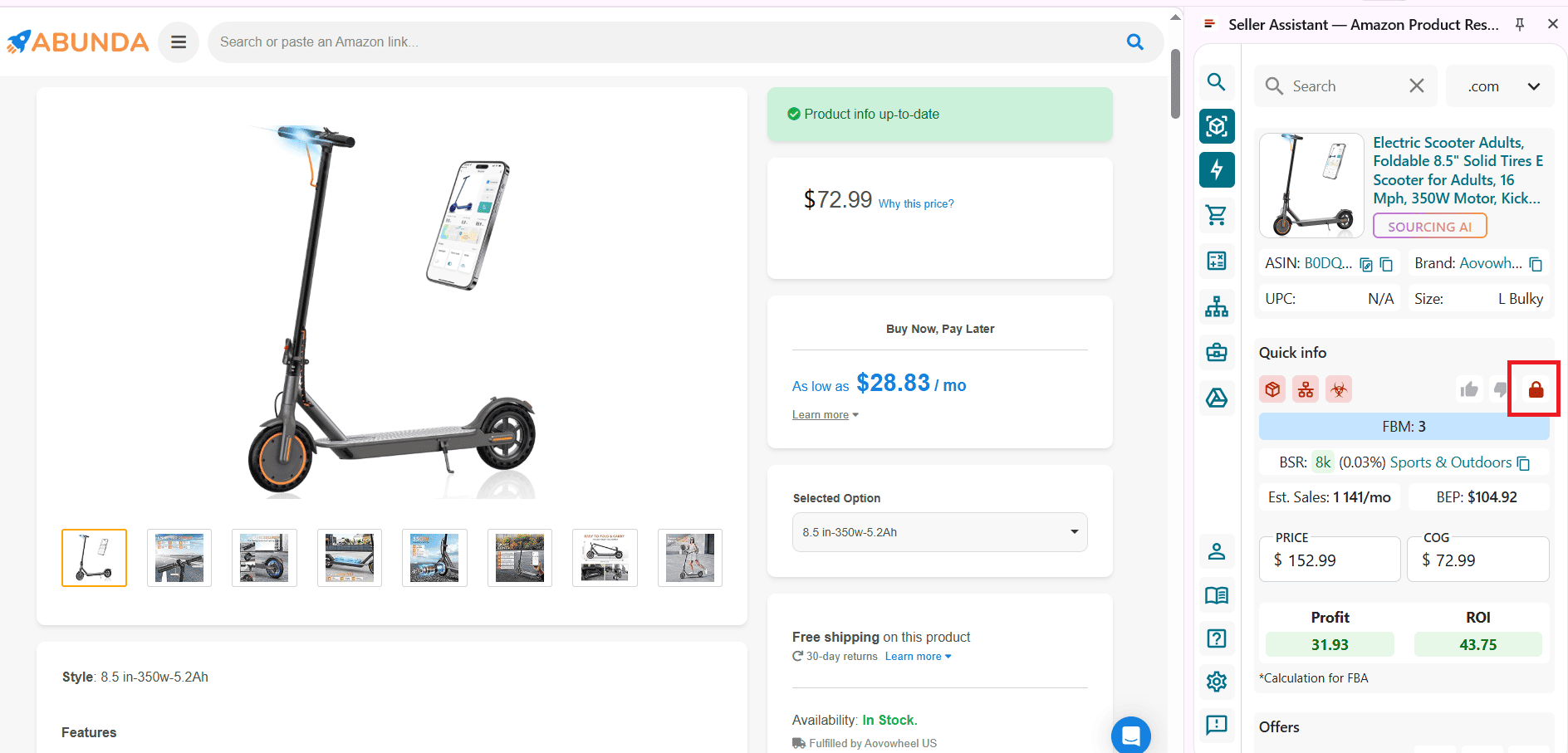
The extension appears on Amazon product pages, search results, supplier sites, and competitor storefronts. It displays a green open lock when you can sell a product and a red closed lock when it is restricted.
Step 1. Install and activate the Extension
Download Seller Assistant Extension for Chrome, Edge, or Firefox. Log in to your Seller Assistant account and connect Seller Central for accurate eligibility checks.
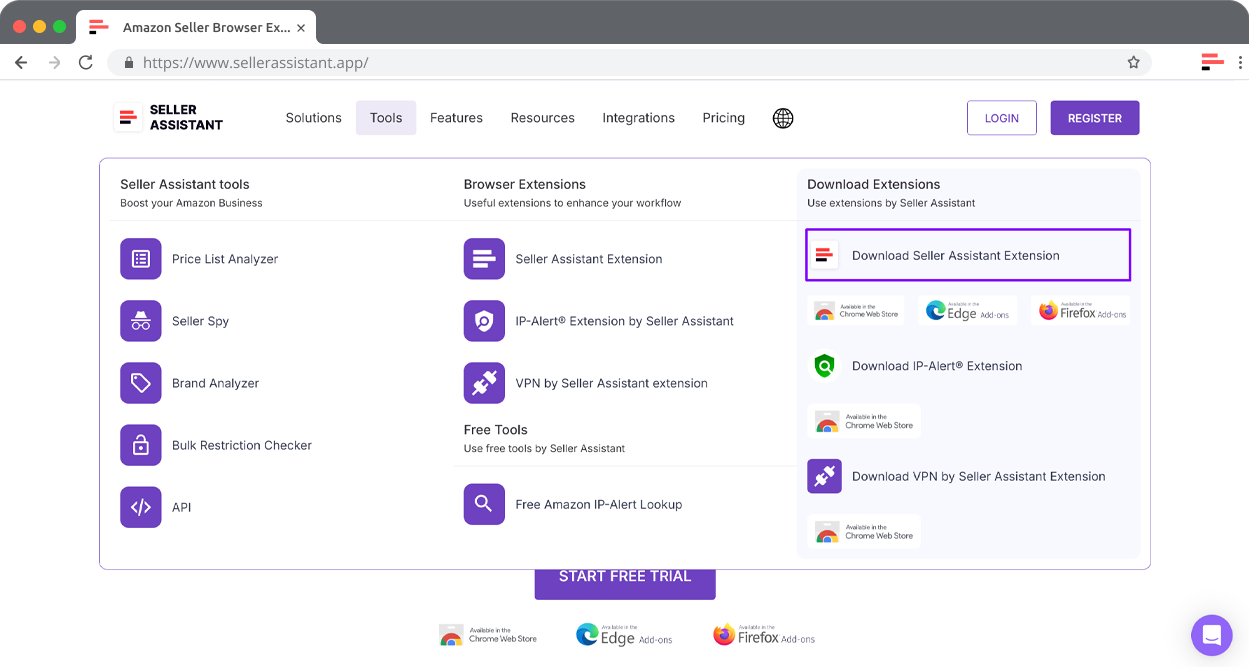
Step 2. Open an Amazon product page
Visit any Amazon listing. The extension panel appears automatically and shows restriction status, profitability, IP alerts, and other essential data.
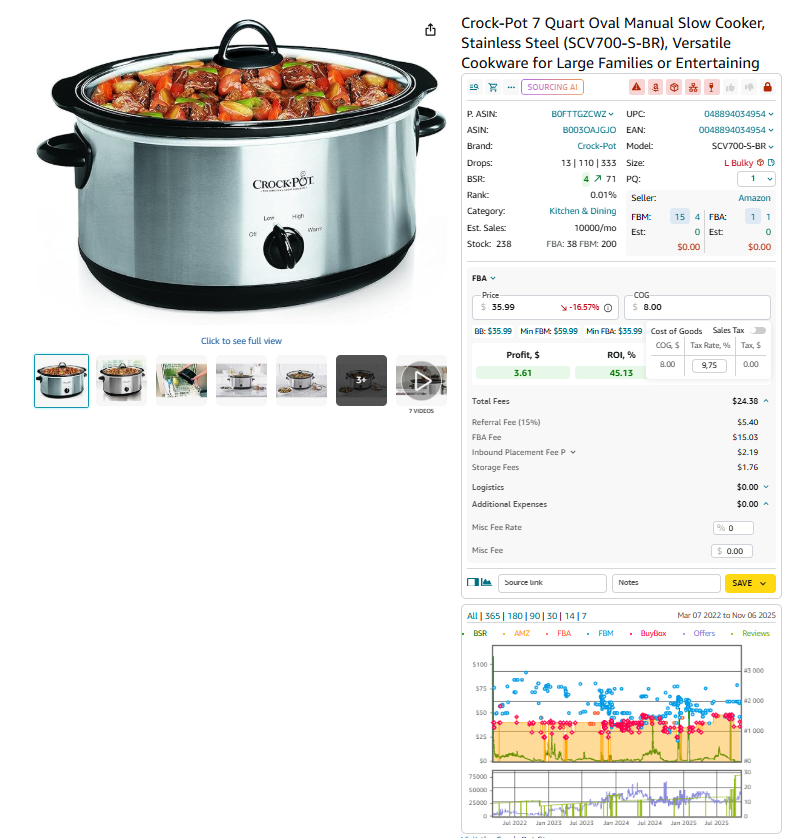
Step 3. Review the restriction indicator
Open the Restriction Checker section inside the panel. It shows whether the product is eligible, requires approval, or is ineligible for your account.

Step 4. Evaluate products from Amazon search results
Search for any keyword on Amazon. Quick View displays core product data – including restriction status – directly below each search result.
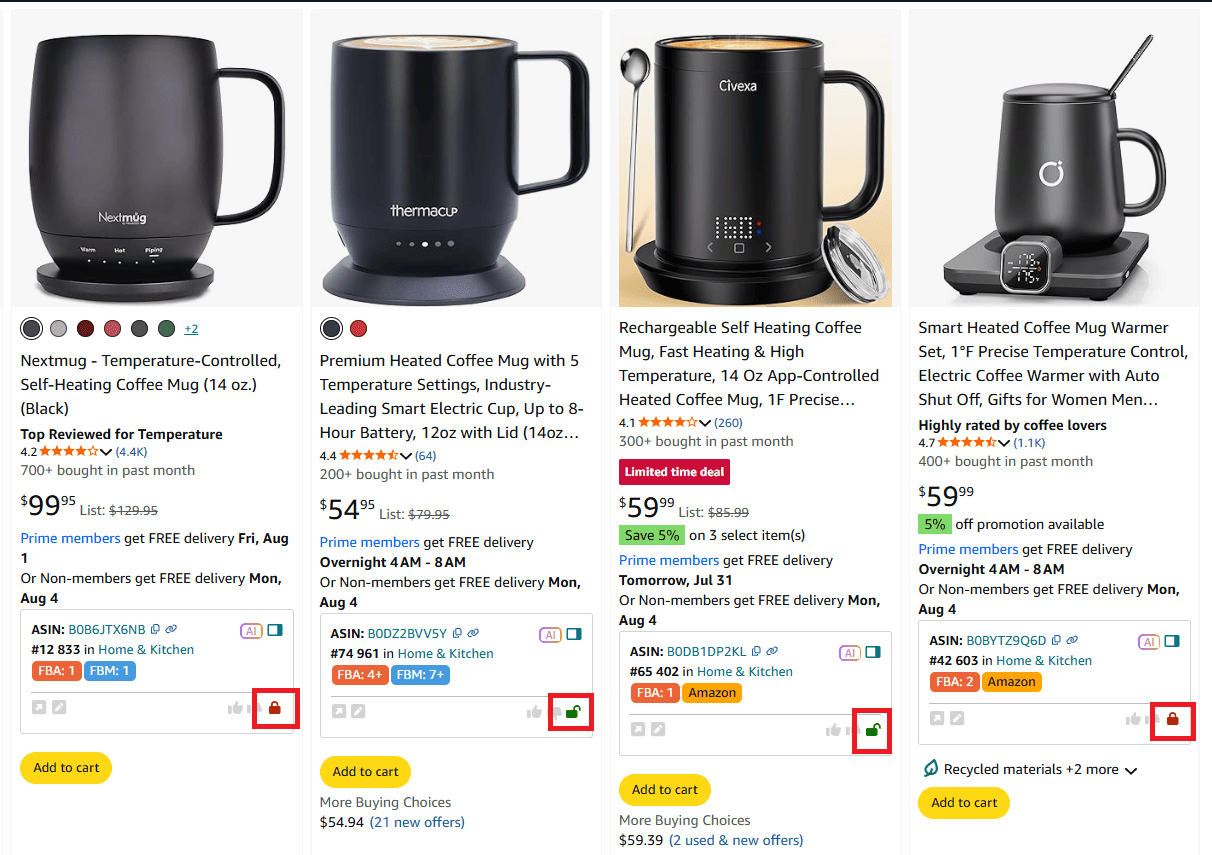
Step 5. Analyze products on supplier websites
Open any product on a supplier’s website. Click the extension icon to load the Side Panel View and review full Amazon metrics, including eligibility.
Step 6. Check restrictions through competitor storefronts
Open a competitor’s Amazon storefront. The Storefront Widget automatically appears and shows their best categories, top brands, and bestselling ASINs – each with restriction info included.

FAQ
How do I check if a brand is restricted on Amazon?
You can check restriction status directly in Seller Central by searching the ASIN and viewing your listing permissions. Tools like Seller Assistant Extension, Price List Analyzer, and Bulk Restriction Checker show your eligibility instantly and far faster than manual checks.
Why do some products require approval even if I’ve sold similar items before?
Amazon evaluates each brand and ASIN separately, and approval requirements can vary by category, subcategory, or marketplace. Even if you sold related items previously, Amazon may require updated invoices or safety documents for specific products.
How often do Amazon brand restrictions change?
Restrictions can change at any time based on brand policies, safety guidelines, and Amazon’s compliance updates. That’s why resellers check restrictions every time they source, even for products they’ve sold before.
Can I check restrictions for thousands of ASINs at once?
Yes – Seller Assistant’s Bulk Restriction Checker lets you upload up to 20,000 ASINs and returns eligibility results within minutes. This is the fastest way to clean large sourcing lists and avoid unsellable inventory.
What happens if I buy a restricted product by mistake?
If your account is not eligible to sell the item, you won’t be able to add your offer, which often results in stuck inventory and lost money. Using restriction-check tools before purchasing is the best way to avoid this problem entirely.
Final Thoughts
Checking brand and ASIN restrictions is one of the simplest steps in the sourcing workflow, yet it prevents some of the costliest mistakes sellers make. When you confirm eligibility before running profit numbers or placing orders, you protect your capital, avoid compliance issues, and focus only on products your account can actually sell.
Seller Assistant's Price List Analyzer, Bulk Restriction Checker, and Seller Assistant Extension make restriction checks fast, accurate, and fully integrated into your daily research. make this process fast, accurate, and scalable for wholesale, online arbitrage, and dropshipping sellers. Seller Assistant automates and connects every stage of your Amazon wholesale and arbitrage workflow. It brings together in one platform: workflow management tools – Purchase Orders Module, Supplier Database, Warehouse Database, bulk research & sourcing tools – Price List Analyzer, Bulk Restriction Checker, Sourcing AI, Brand Analyzer, Seller Spy, Chrome extensions – Seller Assistant Browser Extension, IP-Alert Extension, and built-in VPN by Seller Assistant, and integrations & team access features – seamless API connectivity, integrations with Zapier, Airtable, and Make, and Virtual Assistant Accounts.