
100+ Client Accounts, Checked in 20 Minutes Instead of 5 Days
Top Selected Brand, an Amazon-authorized agency, wired every client account into one internal spreadsheet running on the Seller Assistant API. It checks eligibility and lists the approved products from the same place, and it closed the dormant window between signing a client and handing them something to sell.

“Speed, accuracy and wiser use of employees’ time.”
Ivan Rincon Top Selected Brand, LLC Top Selected Brand, an Amazon-authorized agency managing 100+ client Amazon accounts, cut selling-restriction checks from 3–5 days to 15–20 minutes, and lists the approved products to client stores in 5–7 minutes, by driving Seller Assistant through the API from one internal spreadsheet.
A Hundred Accounts, Five ASINs, Eight People
Top Selected Brand runs 100+ client Amazon accounts on an agency model. Before anyone can act on a product, it has to be matched against every one of them, because eligibility is per account, not per product. That is a matrix, and the team was filling it in by hand.
“It would take us four to five days with a total of six to eight individuals to check whether this product can be sold in this store.”
The checking was split across the team on top of their actual job, which was product research. Every new client made the matrix wider, not longer: 30 opportunities found this week had to be re-checked against the new account as well as all the old ones.
And the window kept closing while they worked. As Ivan puts it: “whatever is on sale now may not be on sale two days from now.”
The Dormant Three Weeks
The agency’s job is to connect a seller to a vetted brand: letters of authorization, brand registry invitations, compliant supply chain documentation. As an Amazon-authorized service provider, listed on the Amazon Service Provider Network for account management and FBA prep, Top Selected Brand can get all of it. What it cannot do is get it quickly.
Negotiating the relationship, securing the authorization and the registry invitation, putting the purchase order together and submitting payment takes three to four weeks, and no brand hands over any of it before they see a serious order. A client who signs on Monday has nothing to sell for most of a month.
Nothing holds them there either. Top Selected Brand sells a month-to-month subscription with no large startup fee, which is exactly why clients pick it, and exactly why a month of waiting is dangerous. An idle new client is a churning client, and the manual eligibility check was making the gap longer rather than shorter.
This is the part that cost them money. Asked straight out whether the bottleneck lost them business, Ivan does not hedge:
“Tons. Tons of individuals. It’s very slow, I’m not getting product, I’m not getting to see the product faster. They would go elsewhere for the service.”
Not lost deals at the end of a pipeline: prospects who had already chosen them and left during the wait. An agency whose pitch is speed cannot ask a new client to sit still for a month.
Closing it meant answering one question fast: out of everything we already have access to, what can this specific account sell today?
Nothing They Tried Got Them Out of Seller Central
The old process was entirely manual, and it looked the same every time: open a client’s Seller Central, type in the ASIN, read the answer, close it, open the next account. Five ASINs across a hundred accounts is five hundred of those, done by people whose actual job was product research.
They trialled two other tools to get out of that loop. Both failed on the same point, and it was not a feature gap. It was an architecture one.
“It was the same as if I were going to the Seller Central account. I still had to go to each individual account in order for me to check.”
A tool that checks one account faster does nothing for a business whose problem is a hundred accounts. The unlock was not a better checker. It was checking every account at once, which required an access model, not just an interface.
Restriction Checks Across Every Client Account, From One Sheet
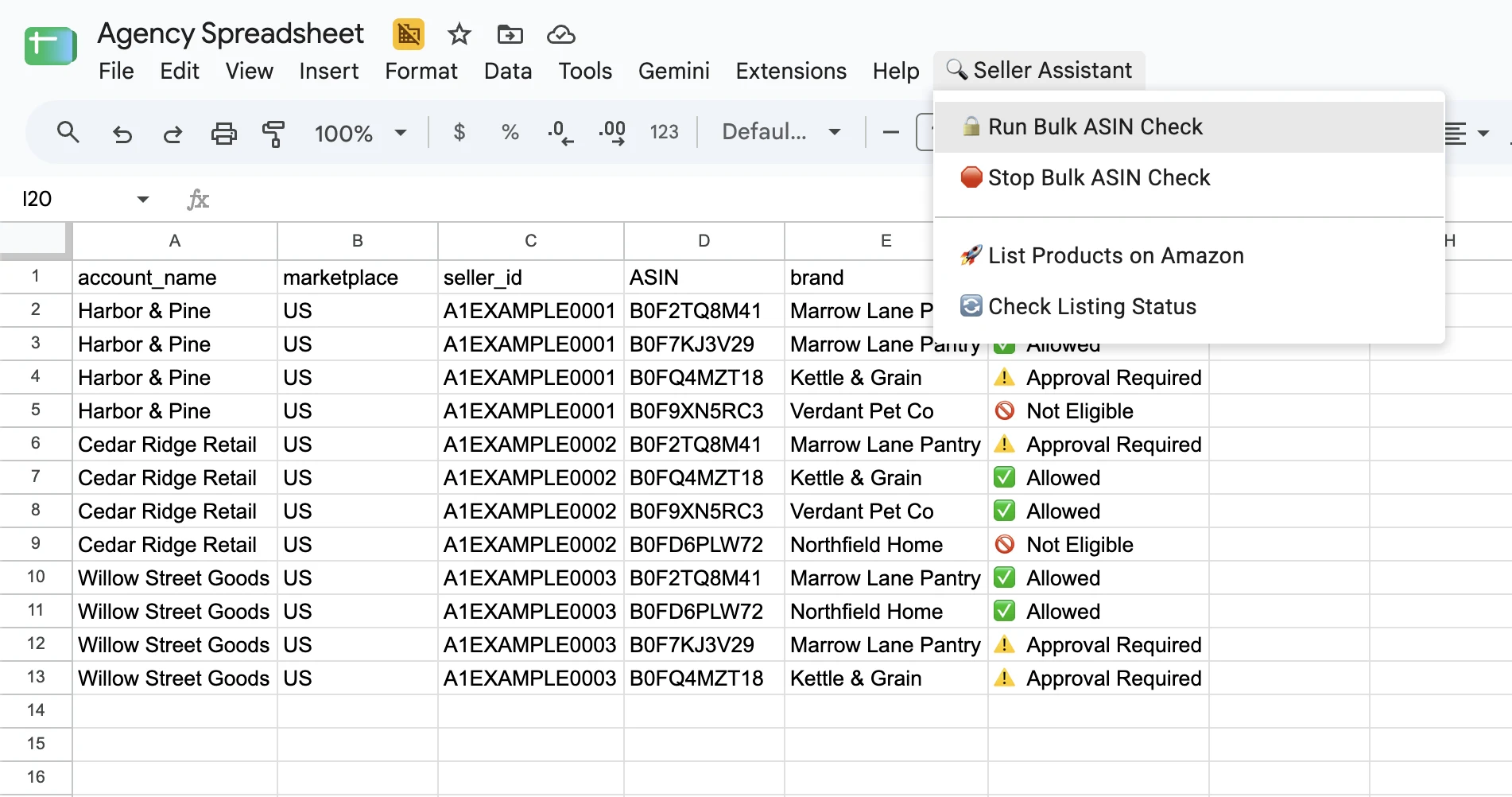
They built it on the Seller Assistant API. The interface their team uses is an ordinary spreadsheet; behind it, every restriction check and every listing is an API call. Because Top Selected Brand is an Amazon Solutions Provider Network partner, each client grants tool access once at onboarding, the same permission they already give their agency, and that account is registered on the back end and reachable from the same call as every other client.
Paste a column of ASINs, and the sheet comes back with eligibility for every connected account. Nobody opens Seller Central. Nothing here is custom software: the Seller Assistant menu is an add-on installed into a normal Google Sheet, and the work was configuration, not development.
“Once we set up the rules, it checks it, gives the results, we’ll know where to go from there.”
Phase one, checking accounts, took two weeks: one week of testing, one week of execution. “By that Friday we were ready to rock and roll.”
Re-Scanning 25,000 Products Against Every Client
The interesting part is not that the old task got faster. It is that a task nobody could attempt before became routine.
“I can now go back to my catalog of over 25,000 products and I can check for immediate available opportunities for everyone’s store. I no longer just have to be dependent on the individual to check.”
Onboard a client today, scan the catalog against their account overnight, and hand them a list of products they are already approved to sell tomorrow. The three-to-four-week dormant window collapses to roughly 24 hours, and the brand-direct negotiation carries on in the background while the client is already selling.
Five Minutes to Live
Finding the approved products was half the loop. Listing them was the other half, and it had the same shape: one Seller Central login per client, every time.
Lister removed it: the same button, in the same sheet. Ivan sets the account merchant token, a SKU template so listings follow a consistent naming scheme, and a price rule, then sends the products straight to the store.
“By the time we go in there, we have to add 10 products. We wait five, seven minutes. It’s already added on the store, and we can proceed with our next steps.”
Clients see it land. “They love it, because they get to see: okay, you’re approved, and they were able to see it added to their store.”
What Changed
15–20 minutes
3–5 days elapsed, fitted around other work
One person, one button in the sheet they already work in
6–8 people, each opening client accounts in Seller Central
About 24 hours
3–4 weeks
5–7 minutes from a rules template
Manually, inside each Seller Central account
Any of 25,000 products, against any account
Whatever the team had time to check
Clients are selling the day after they sign
“Tons of individuals… they would go elsewhere for the service”
Where the Hours Went
The obvious way to score this story is headcount. Ivan rejects that framing outright.
“It’s not about saving on salary. It’s about paying attention to where an employee’s time is most valuable.”
Checking whether an ASIN is gated in an account is work a machine should do. Answering a client the same day, and putting a fresh set of opportunities in front of them every week, is not. The team moved from the first to the second.
He has already introduced two other agency owners to it. The sharper answer came when he was asked the opposite question: what would happen if Seller Assistant went away tomorrow. He did not talk about hiring checkers back.
“I would not be able to provide them the list of over 20,000 products that we have. It would have to be very, very limited, particularly to those individuals who are new to the marketplace.”
That is the measure of it. Not hours saved, but how much of the catalog an agency can put in front of a client at all.
Questions Agencies Ask About This
Can you check Amazon selling restrictions for multiple seller accounts at once?
Does Seller Assistant have an API for agencies?
How does an agency get access to check restrictions on client accounts?
Do we need to build something to use this?
Is it safe to connect a client’s Amazon account?
How long does it take to set up bulk restriction checking across client accounts?
Does it also list the approved products to the client’s store?
The Tools in This Story
Top Selected Brand drives all three from its own spreadsheet, over the API.
Drive restriction checks and listings from your own tooling. Included from the Business plan up.
AnalyzeCheck selling eligibility for up to 20,000 ASINs across every Amazon account you manage.
AnalyzePush approved products to a store from a merchant token, SKU template and price rule.
ListMore on how agencies use Seller Assistant across client accounts: Seller Assistant for Agencies. Or read what other sellers say in reviews.
Check Every Client Account at Once
Run restriction checks across all the Amazon accounts you manage in one pass, then list the approved products without opening Seller Central. Drive it from the app, or from your own tooling over the API.

14-day risk-free trial. Cancel anytime.
Not sure which plan fits your sourcing workflow? Chat with our team — we're happy to help.