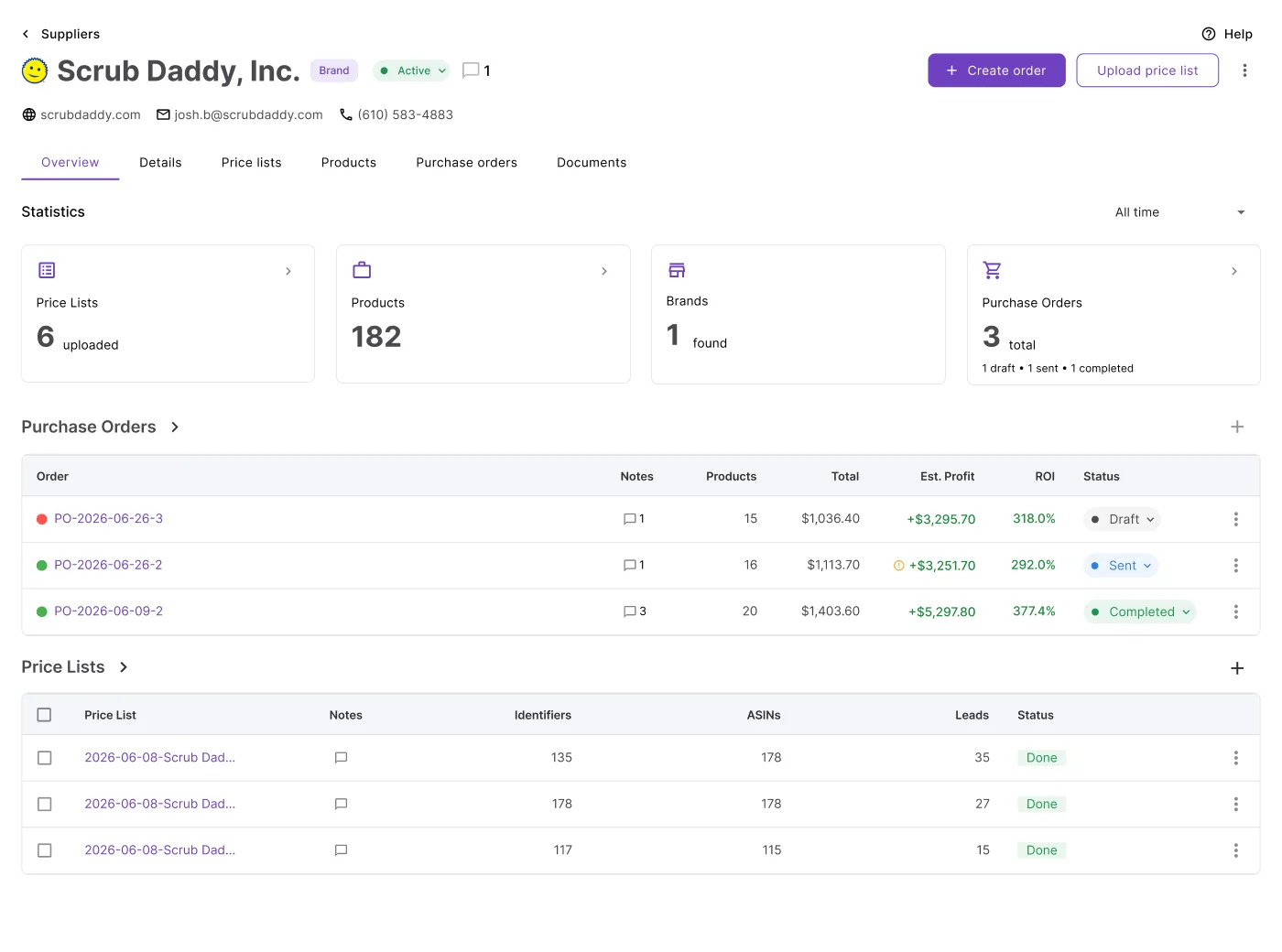
Amazon wholesale sourcing doesn’t get difficult when you find suppliers – it gets difficult when supplier catalogs become too large to analyze manually.
Checking ASINs one by one, calculating fees, verifying restrictions, and estimating demand across thousands of products slows sourcing down and makes profitable deals easy to miss. As competition increases and Buy Box prices change daily, slow analysis turns into lost margin. Seller Assistant solves this by connecting Suppliers Database with Price List Analyzer in one structured workflow. Sellers can upload supplier catalogs directly from the supplier profile, automatically link them to the correct supplier, and convert raw price lists into structured, decision-ready sourcing data.
Why Supplier-Centered Sourcing Scales Better
Managing supplier catalogs becomes difficult as your Amazon wholesale business grows. Sellers must analyze thousands of products while keeping supplier terms, sourcing decisions, prep routing, and purchasing workflows organized.
When catalogs are disconnected from supplier records, teams waste time re-entering data, lose track of sourcing history, and make costly ordering mistakes. Connecting suppliers databases with price list scanning in one structured workflow allows you to analyze products faster, and keep sourcing, supplier management, and purchasing connected inside one system.
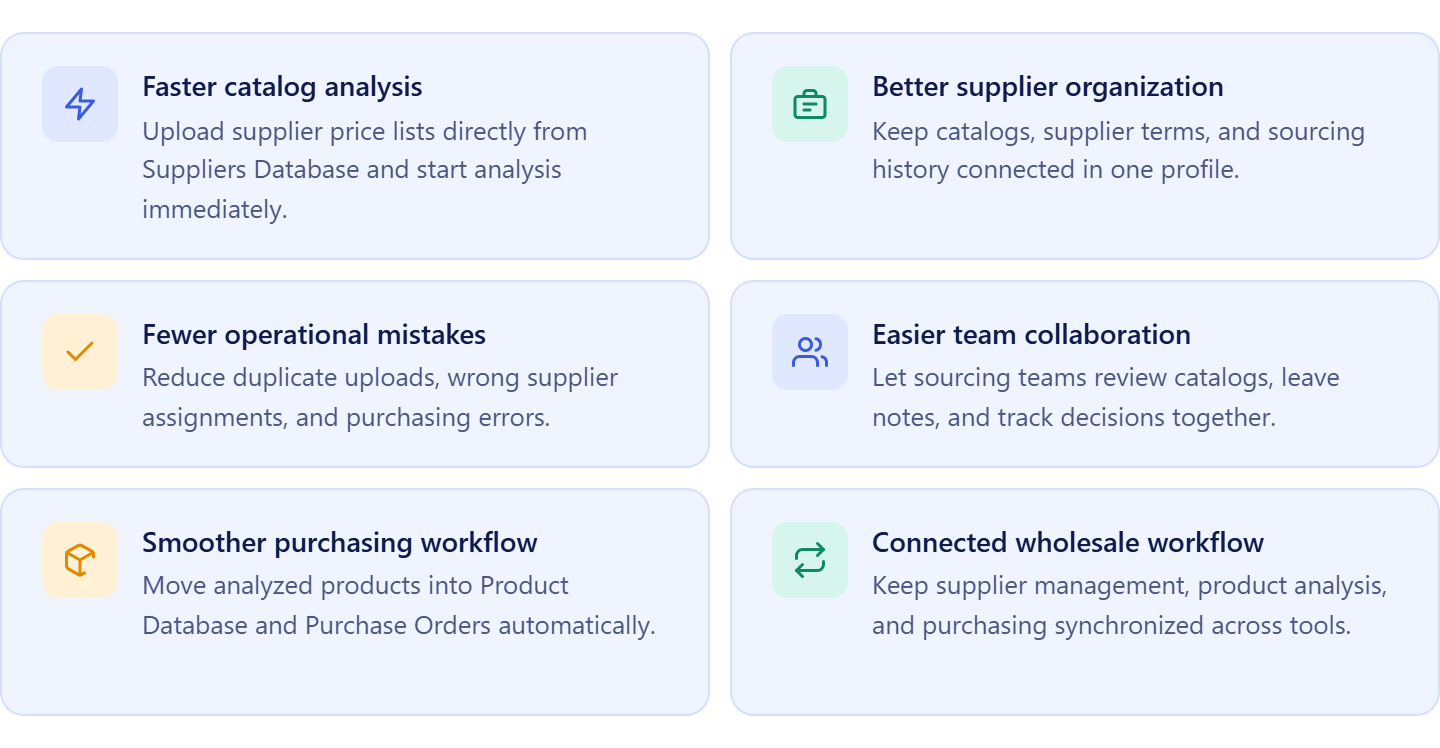
Faster catalog analysis
Uploading price lists directly from Suppliers Database removes extra setup steps and keeps supplier information attached automatically. Sellers can start analyzing products immediately instead of organizing spreadsheets manually.
Better supplier organization
Each uploaded catalog stays linked to the correct supplier profile. This keeps sourcing history, pricing, supplier terms, and product analysis organized in one place.
Fewer operational mistakes
Connected workflows reduce duplicate uploads, incorrect supplier assignments, and purchasing errors. Teams work with consistent supplier data across sourcing and purchasing.
Easier team collaboration
Virtual assistants and sourcing teams can review supplier catalogs, leave notes, apply tags, and track sourcing decisions inside one shared workflow without relying on scattered spreadsheets.
Smoother purchasing workflow
Analyzed products can move directly into product databases and purchase orders while keeping supplier information, warehouse routing, and sourcing data connected automatically.
What Seller Assistant Tools Help Analyze Supplier Price Lists
Analyzing supplier price lists requires more than checking profit and ROI – Amazon sellers also need supplier context, sourcing history, restrictions, competition data, and purchasing workflows connected in one system. Seller Assistant simplifies this by linking supplier management with bulk product analysis inside a structured wholesale workflow.
Instead of uploading disconnected spreadsheets and manually tracking sourcing decisions, sellers can upload catalogs directly from the supplier profile, analyze products at scale, and keep supplier data connected across sourcing and purchasing.
This workflow is powered by two core tools: Seller Assistant’s Suppliers Database and Seller Assistant’s Price List Analyzer.
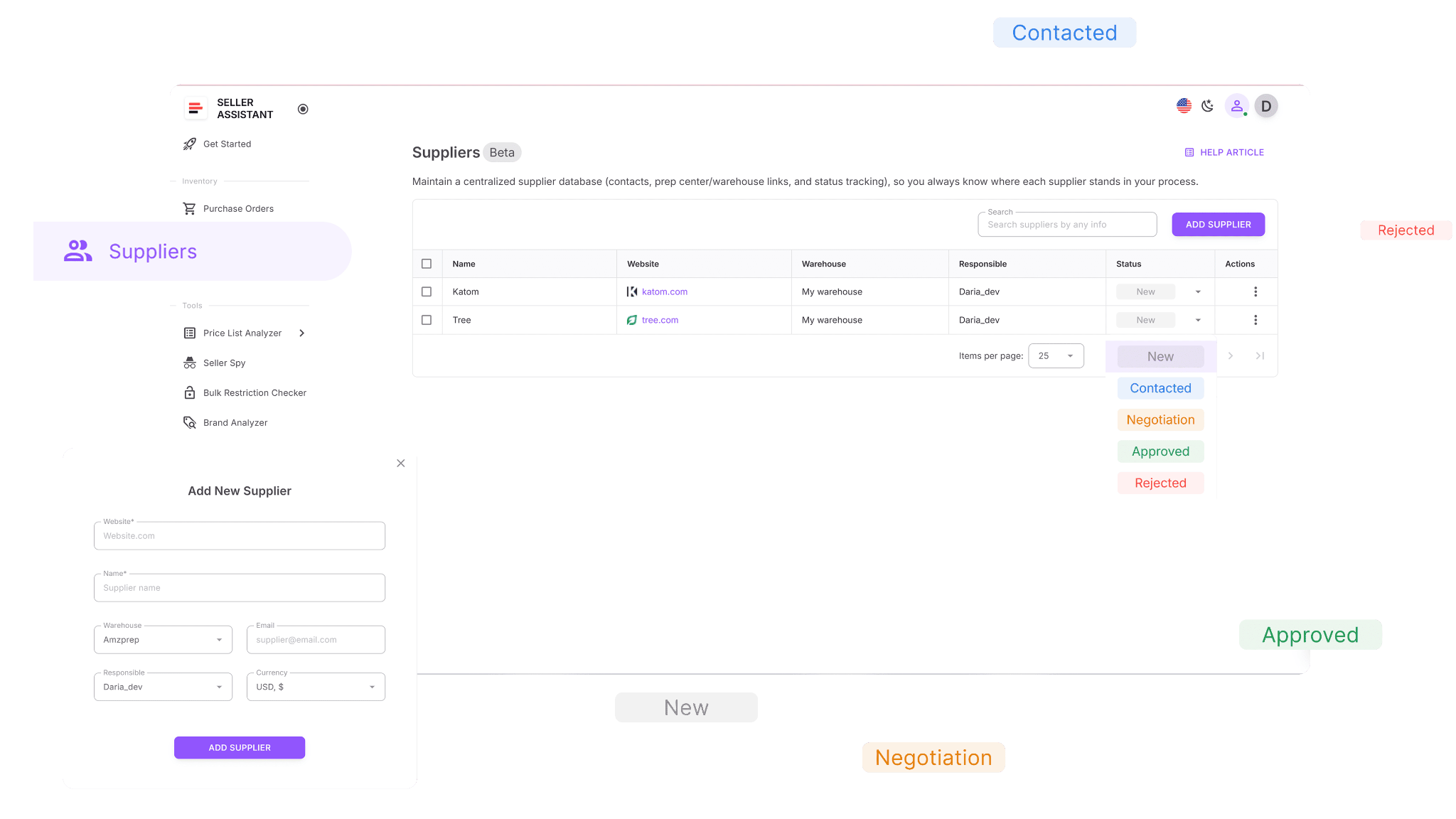
Suppliers Database
Suppliers Database is where supplier relationships, sourcing terms, and operational details are managed. Sellers can store supplier contacts, payment terms, minimum order value, lead times, warehouse routing, and outreach status inside one structured profile. Supplier catalogs are uploaded directly from the supplier profile, which keeps every price list connected to the correct supplier automatically.
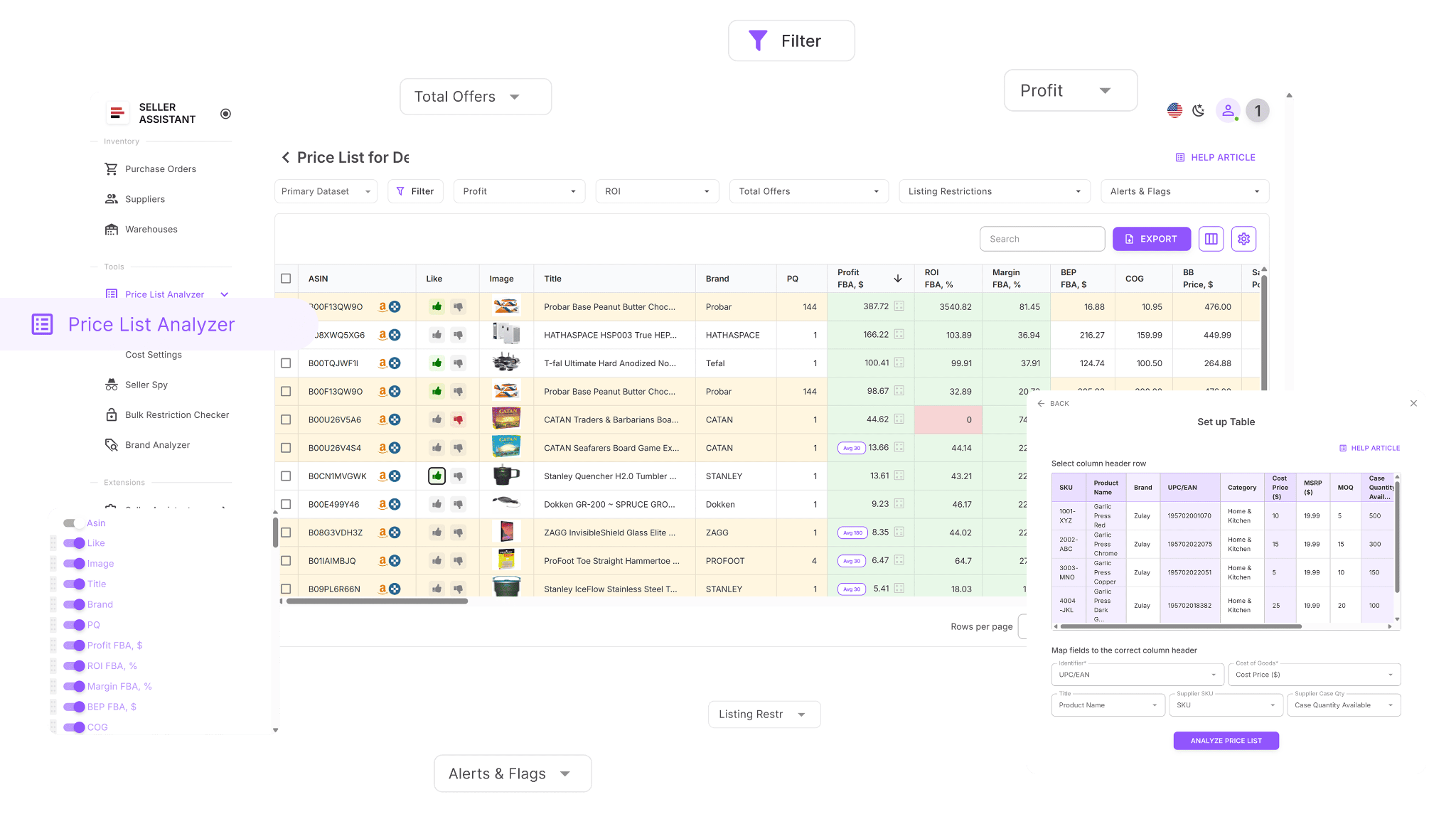
Price List Analyzer
Price List Analyzer is where supplier catalogs are analyzed at scale. The tool automatically matches products to Amazon ASINs, calculates profitability, evaluates competition, estimates demand, and flags risks such as restrictions, Amazon presence, or unstable Buy Box conditions. This allows sellers to identify profitable, low-risk products across thousands of SKUs in minutes instead of checking products manually.
How the tools work together
Suppliers Database acts as the operational starting point for sourcing workflows, while Price List Analyzer acts as the decision engine. Sellers upload supplier catalogs directly from the supplier profile, and the system automatically keeps supplier information attached during analysis. This creates a connected workflow where sourcing decisions, supplier records, and product analysis stay organized together.
How supplier catalog analysis fits into your workflow
Analyzing supplier catalogs inside Suppliers Database is part of Seller Assistant’s connected wholesale workflow. Supplier data flows directly into Price List Analyzer, and shortlisted products can continue into Product Database, Purchase Orders Module, and warehouse routing without re-entering information manually. This keeps sourcing workflows structured, scalable, and consistent from supplier outreach to purchasing.
Note. Seller Assistant is an end-to-end Amazon workflow management platform that integrates 15+ wholesale-focused solutions into one connected system. It combines sourcing workflow automation, bulk research and intelligence tools, and integrated Chrome extensions – giving you everything you need to streamline finding deals, managing suppliers, and creating purchase orders.

With Seller Assistant, every step of your Amazon wholesale and arbitrage workflow is automated and connected.
What Is Suppliers Database?
Suppliers Database is Seller Assistant’s centralized supplier management system built for Amazon wholesale sellers, online arbitrage sellers, and dropshippers. It keeps supplier profiles, sourcing terms, contact details, and operational settings organized in one connected workspace, making supplier management easier as your sourcing workflow grows.
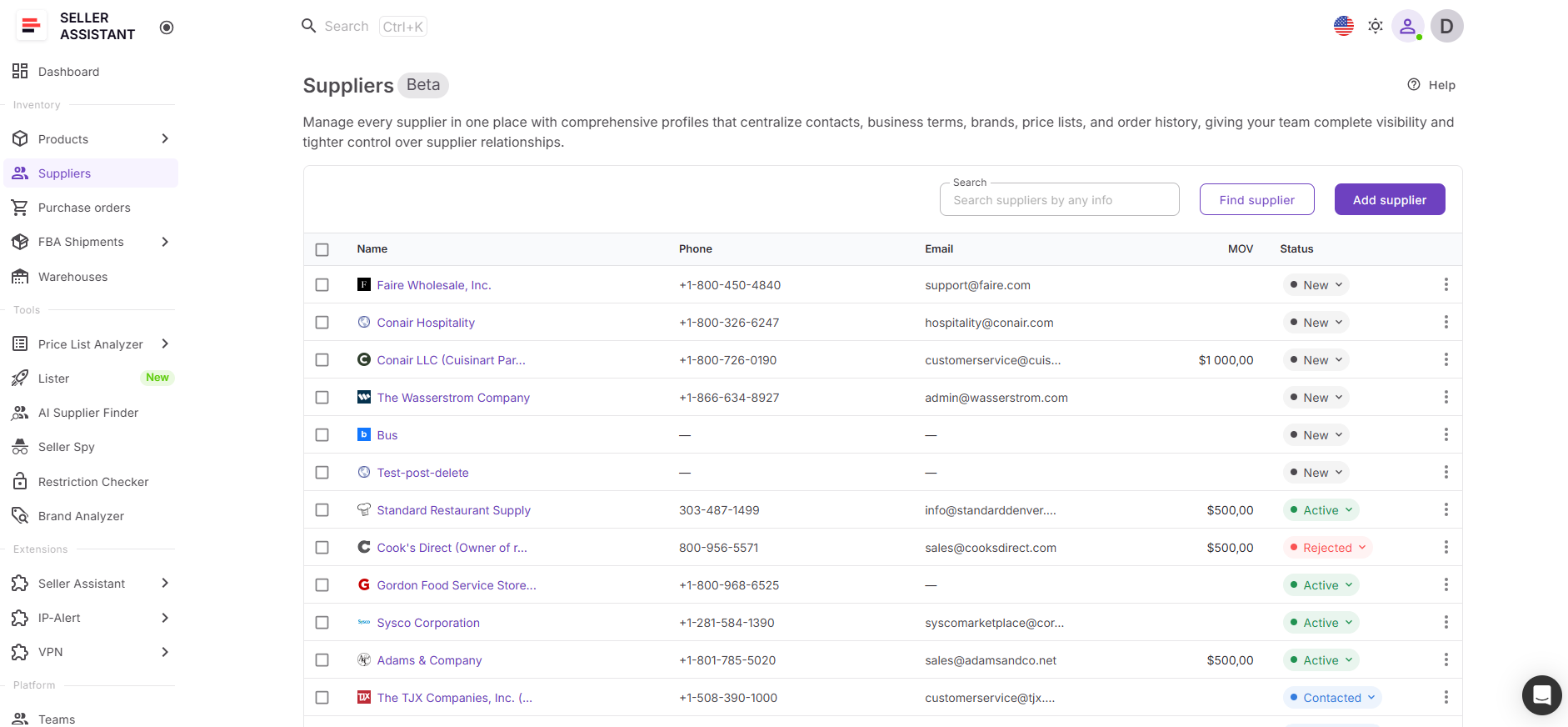
Instead of managing supplier information through spreadsheets, inboxes, and scattered notes, sellers work with structured supplier profiles that connect directly to catalog analysis and purchasing workflows. This helps teams keep supplier records accurate, organized, and reusable across the entire sourcing process.
What you can do with Suppliers Database
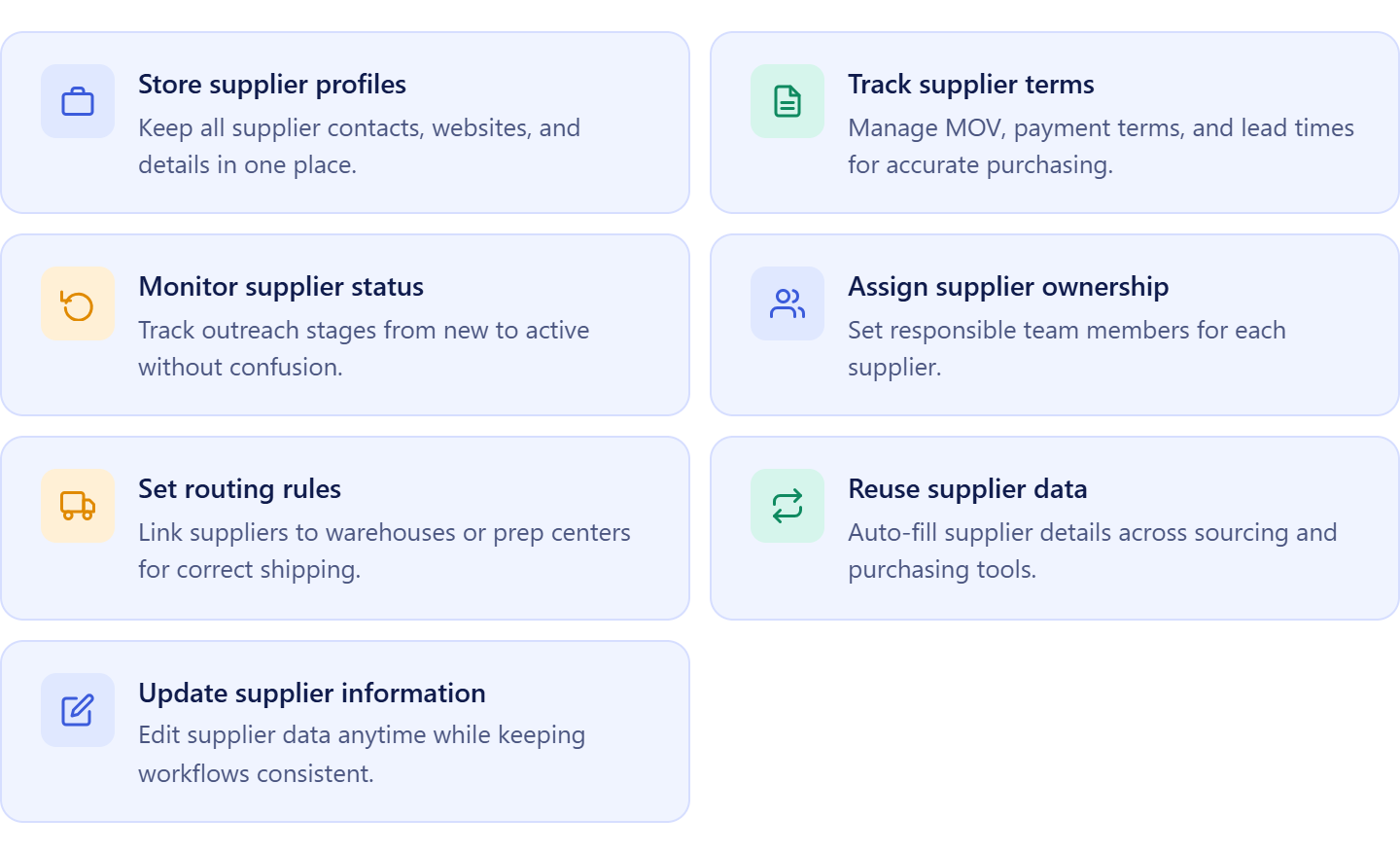
Suppliers Database helps sellers organize supplier relationships and connect them directly to product analysis workflows, making wholesale sourcing more structured and scalable.
- Store supplier profiles in one system
Keep supplier contacts, websites, sourcing notes, and operational details centralized for quick access during sourcing and purchasing.
- Manage supplier terms and operational settings
Track important supplier conditions such as minimum order value, payment terms, lead times, shipping requirements, and warehouse routing rules.
- Monitor supplier relationship stages
Track suppliers through sourcing stages such as New, Contacted, Negotiation, Approved, Active, or Rejected to maintain a structured outreach workflow.
- Assign suppliers to sourcing team members
Set ownership for each supplier relationship to keep sourcing responsibilities clear across VAs and team members.
- Upload supplier catalogs directly from the supplier profile
Create and upload price lists inside the supplier profile so the supplier is linked automatically during analysis.
- Connect supplier profiles with Price List Analyzer
Analyze supplier catalogs directly inside Price List Analyzer while keeping supplier information, sourcing history, and operational terms attached throughout the workflow.
- Keep supplier data synchronized across workflows
Update supplier details anytime while maintaining consistency across sourcing analysis, purchasing, and warehouse routing.
How Suppliers Database improves your sourcing workflow
Suppliers Database turns supplier management into a connected sourcing workflow instead of a collection of disconnected spreadsheets and uploads. Sellers can create supplier profiles, define sourcing terms, upload supplier catalogs, and analyze products directly from the supplier workspace without re-entering information manually.
When supplier catalogs are uploaded from Suppliers Database, they open inside Price List Analyzer with the supplier attached automatically. This keeps supplier management and bulk product analysis connected in one workflow, helping sellers organize sourcing decisions, maintain accurate records, and reduce operational mistakes.
As products move through the workflow, supplier information stays connected across Price List Analyzer, Product Database, Purchase Orders Module, Warehouses Database, and FBA Shipments. This creates a structured sourcing system where supplier data, product analysis, and purchasing remain synchronized as the business scales.
What Is Price List Analyzer?
Price List Analyzer is Seller Assistant’s bulk product analysis tool designed for Amazon wholesale sellers, online arbitrage sellers, and dropshippers who work with large supplier catalogs. It converts supplier price lists into structured Amazon product data, helping sellers analyze profitability, demand, competition, and risks across hundreds or thousands of products at once.
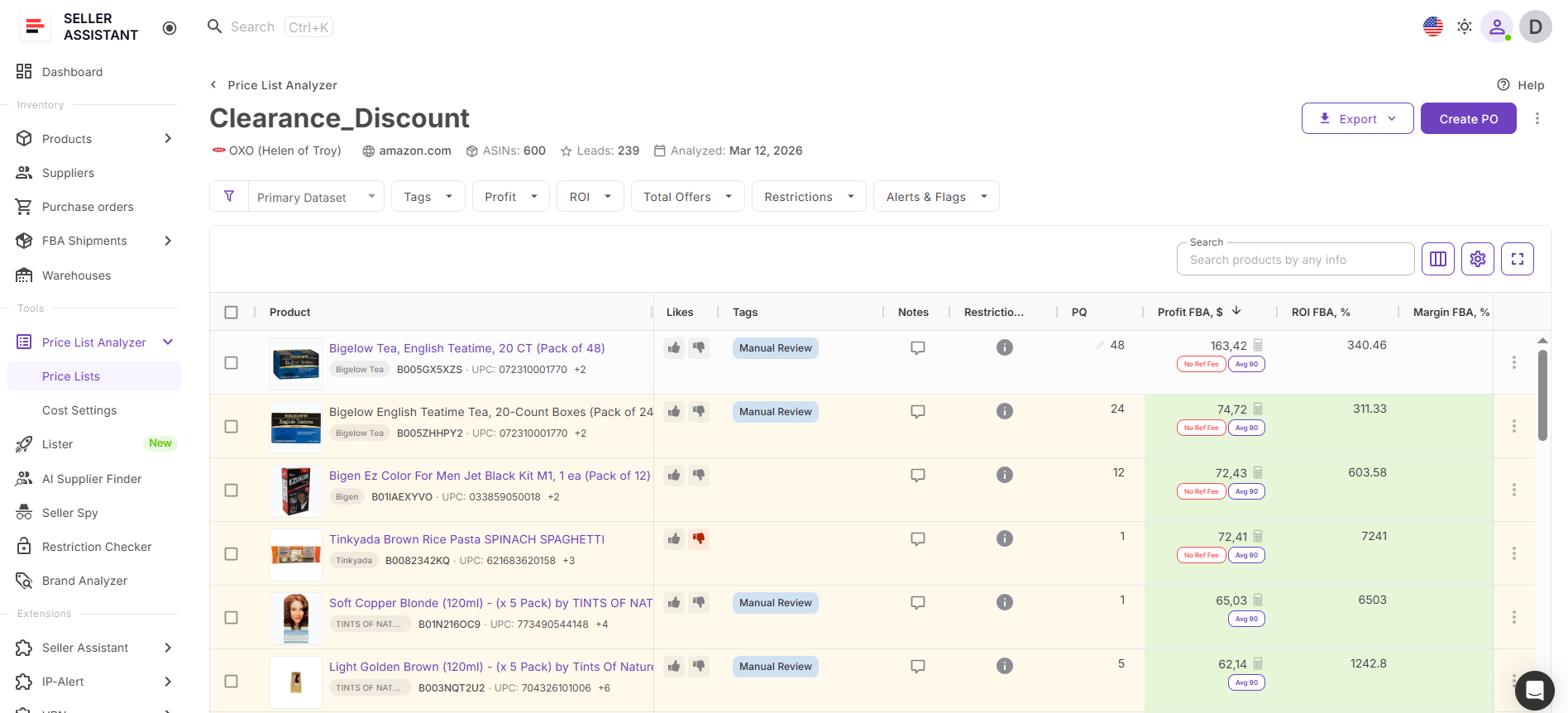
Instead of checking products manually, sellers can upload supplier catalogs directly from Suppliers Database, automatically connect them to the correct supplier, and evaluate sourcing opportunities inside one connected workflow.
What you can do with Price List Analyzer
Price List Analyzer helps sellers turn raw supplier catalogs into structured sourcing decisions while keeping supplier information connected throughout the workflow.
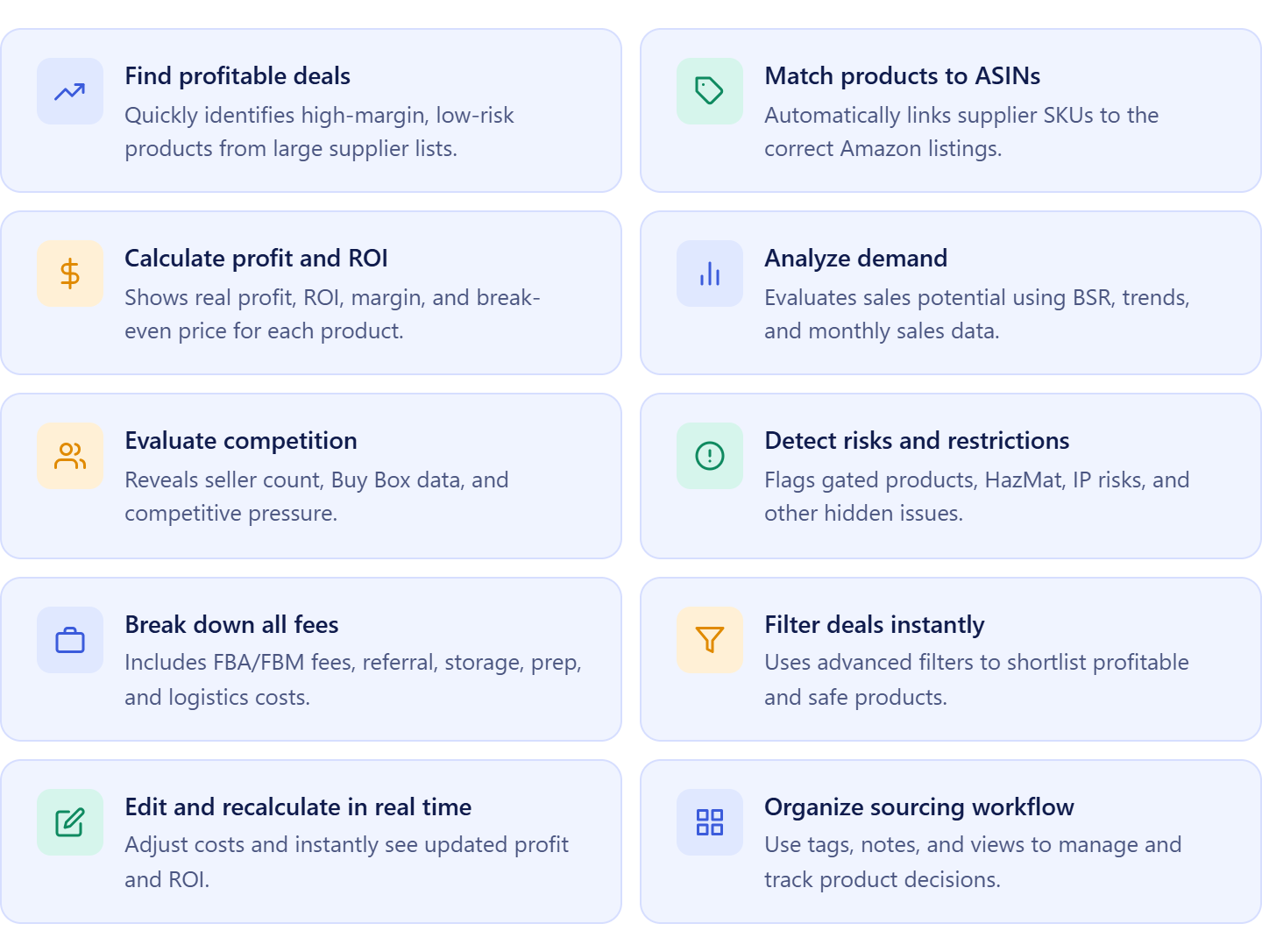
- Analyze large supplier catalogs quickly
Upload bulk supplier price lists and evaluate hundreds or thousands of products in minutes instead of checking ASINs manually.
- Match supplier products to Amazon ASINs automatically
Connect supplier SKUs, UPCs, and EANs to the correct Amazon listings without manual product research.
- Calculate profitability automatically
View ROI, margin, net profit, break-even price, and maximum COG using built-in Amazon fee calculations.
- Validate demand and sales stability
Use BSR history, sales estimates, and sales trends to identify products with stable demand and reliable sales velocity.
- Review competition and Buy Box conditions
Analyze seller count, Amazon presence, Buy Box pricing, and competitive pressure before committing capital.
- Detect restrictions and product risks early
Identify gated products, HazMat items, meltable products, IP risks, and other sourcing risks before purchasing inventory.
- Filter profitable sourcing opportunities
Apply filters for profit, ROI, competition, demand, restrictions, and risk to quickly shortlist the best products.
- Adjust sourcing costs dynamically
Edit COG, shipping, prep fees, taxes, and package quantities with instant recalculation of profitability metrics.
- Organize sourcing decisions inside the workflow
Use tags, notes, likes, and saved views to manage sourcing decisions and collaborate with team members more efficiently.
- Export and continue sourcing workflows
Export analyzed results or move shortlisted products into Product Database, Purchase Orders, and warehouse routing workflows.
How Price List Analyzer fits into supplier catalog analysis
Price List Analyzer works as the product analysis layer inside Seller Assistant’s connected wholesale workflow.
Sellers begin inside Suppliers Database by opening a supplier profile and uploading a supplier catalog directly from the supplier workspace. The supplier is attached automatically to the uploaded file, which keeps supplier information, sourcing terms, and operational details connected during analysis.
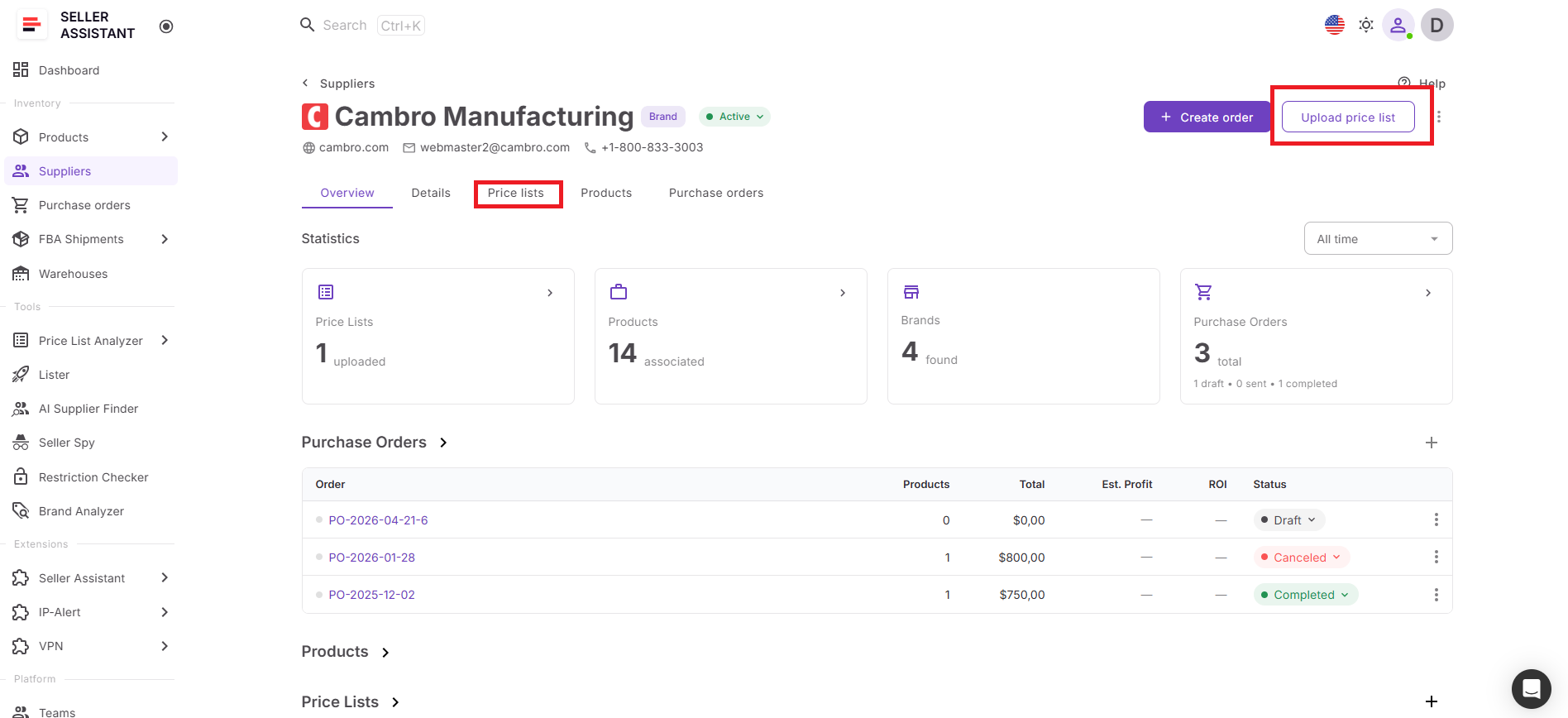
Once the catalog opens inside Price List Analyzer, sellers can map fields, run bulk analysis, filter profitable products, and evaluate risks without switching between disconnected tools or spreadsheets.
Because Price List Analyzer connects directly with Suppliers Database, Product Database, Purchase Orders Module, Warehouses Database, Brand Analyzer, Bulk Restriction Checker, Lister, and FBA Shipments, sourcing data moves through the entire workflow automatically.
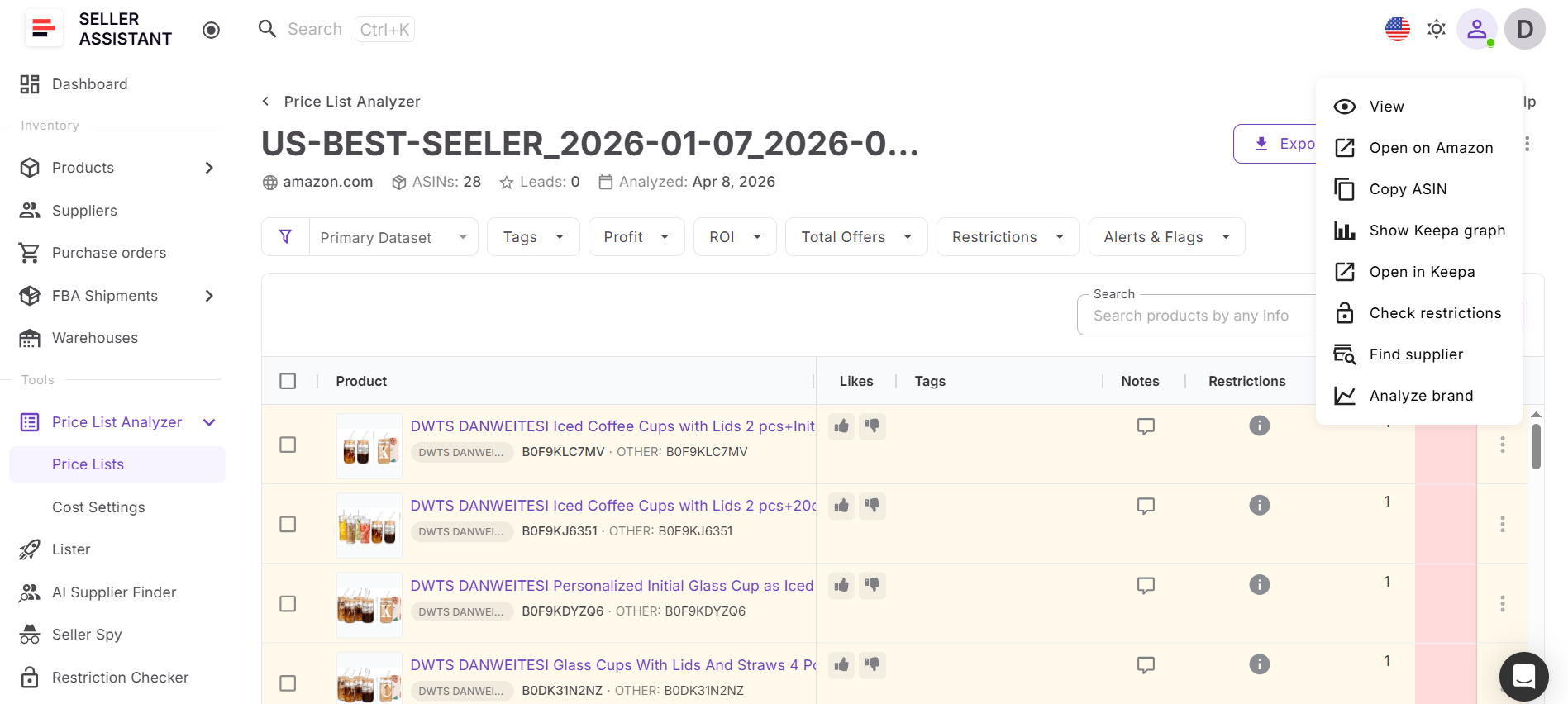
This allows sellers to move from supplier profile to supplier catalog, to profitable products, and purchasing without re-entering supplier data or breaking workflow continuity. The result is a faster, more organized sourcing process where supplier management, product analysis, and purchasing remain connected inside one structured Amazon wholesale workflow.
How to Analyze Supplier Price Lists from Suppliers Database
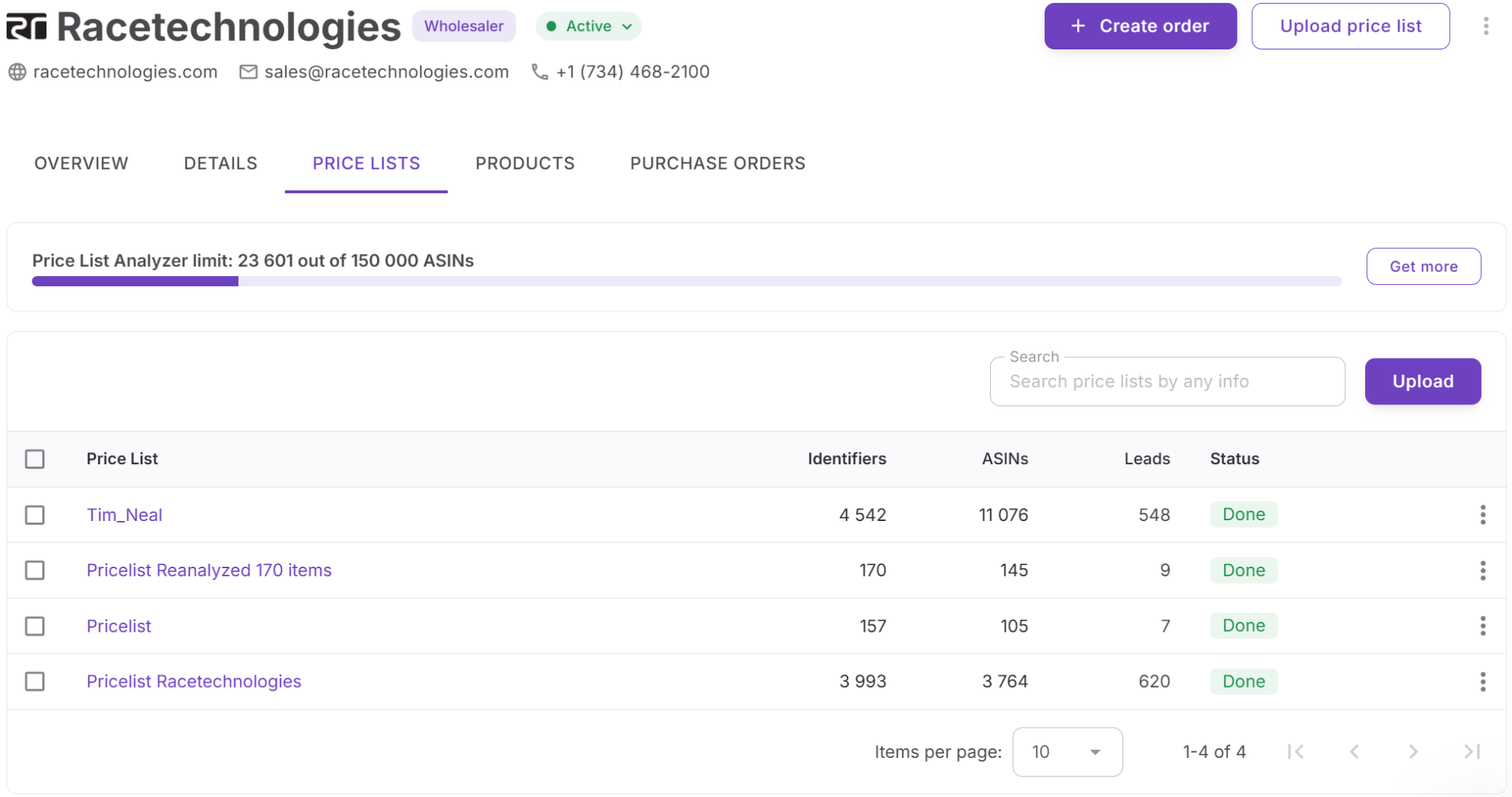
The process starts inside Suppliers Database, where your supplier profiles, sourcing terms, and operational details are already organized. Instead of working with disconnected spreadsheets, you open a supplier profile and upload the supplier catalog directly from the same workspace. The supplier is attached automatically, so the price list stays connected to the correct supplier throughout the workflow.
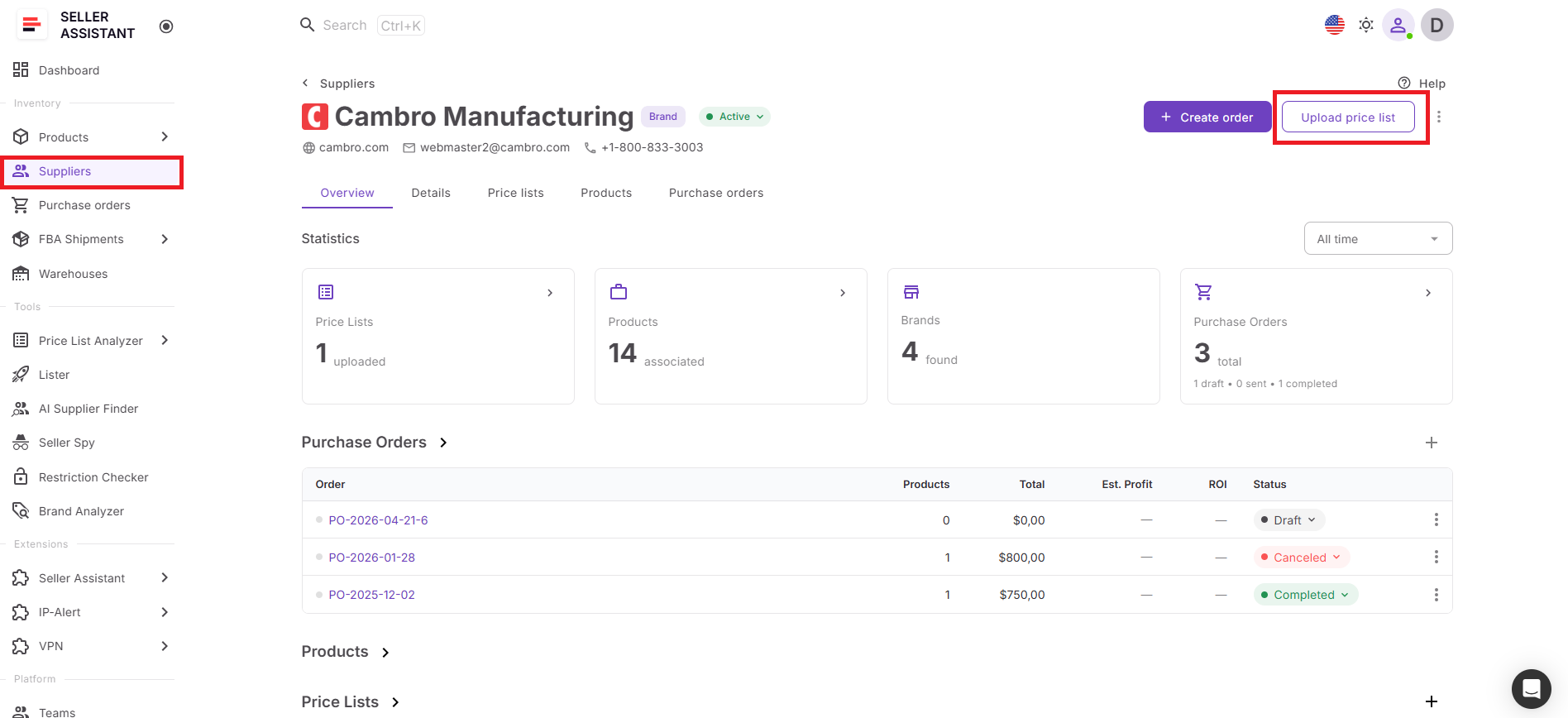
Once the catalog opens inside Price List Analyzer, the system matches products to Amazon ASINs, calculates profitability, evaluates competition, and flags risks across the entire supplier list. Instead of checking products one by one, you review all sourcing opportunities in one structured table, apply filters, and quickly identify profitable, low-risk products.
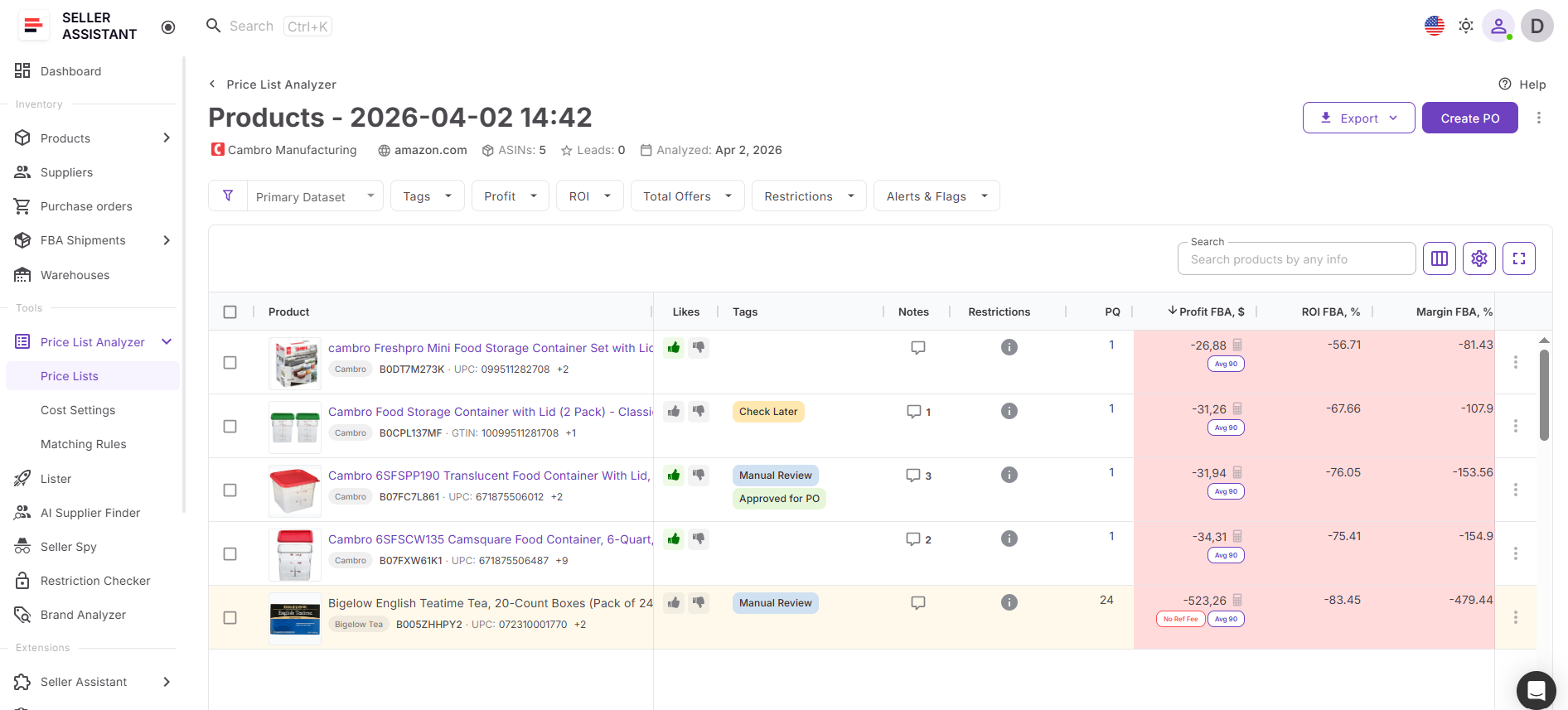
At the same time, supplier information from Suppliers Database remains connected during analysis, giving you operational context alongside product data. This keeps sourcing decisions organized, reduces manual work, and allows you to move from supplier catalogs to purchasing faster and with fewer errors.
How to Analyze Supplier Price Lists from Suppliers Database Step by Step
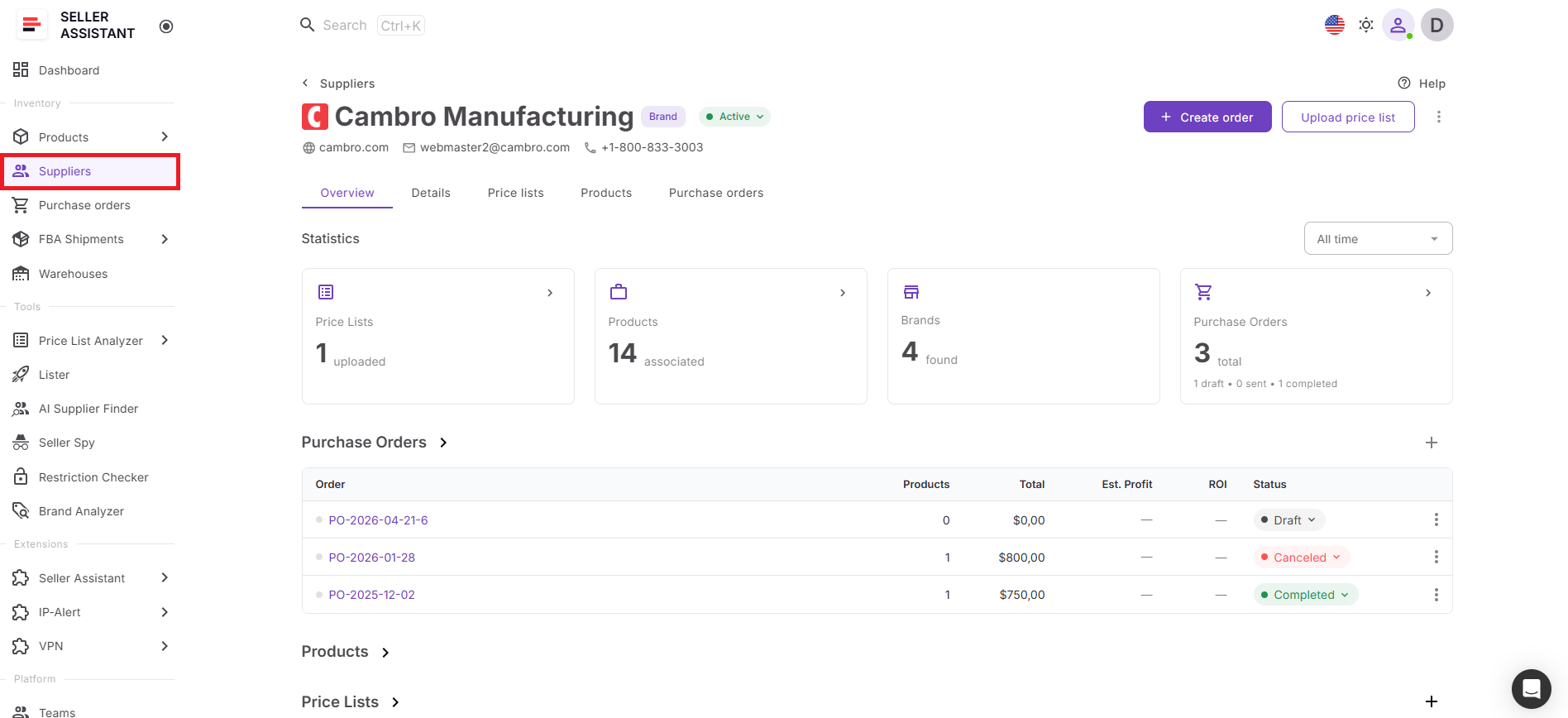
Step 1. Open Suppliers Database
Go to Inventory > Suppliers in your Seller Assistant account. Find the supplier whose catalog you want to analyze and open the supplier profile.
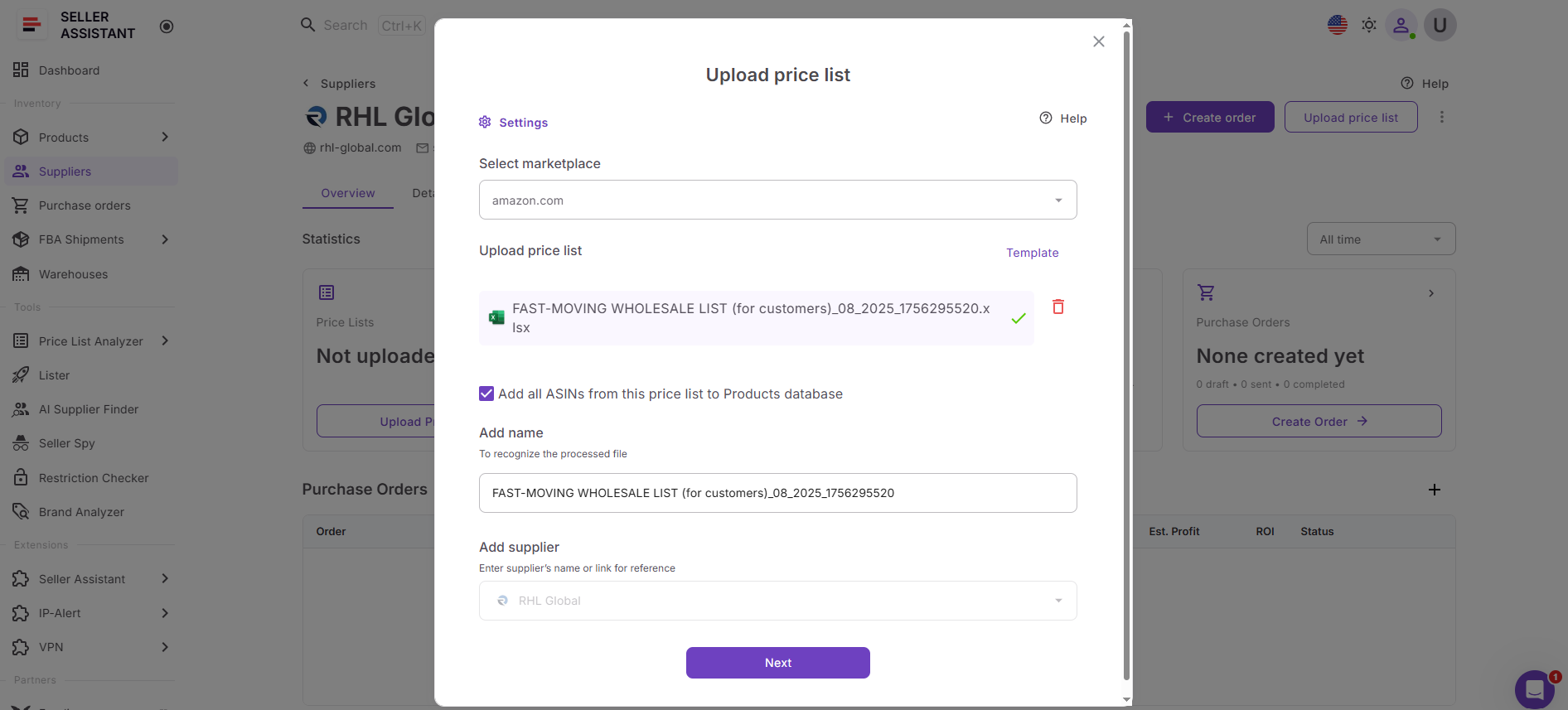
Step 2. Upload the supplier price list
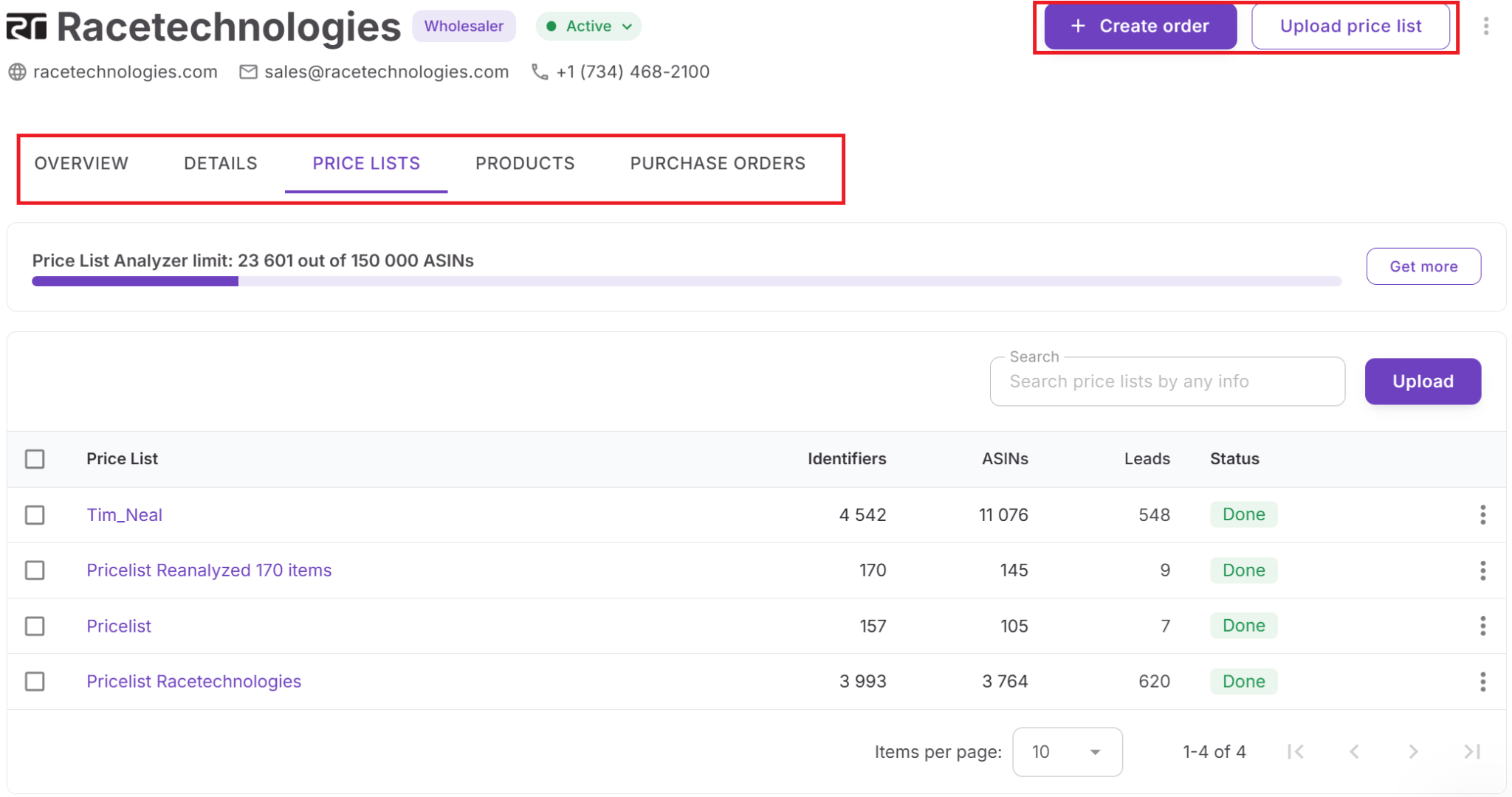
Inside the supplier profile, click Upload price list. Create a new price list from the profile, and the supplier will be applied automatically.
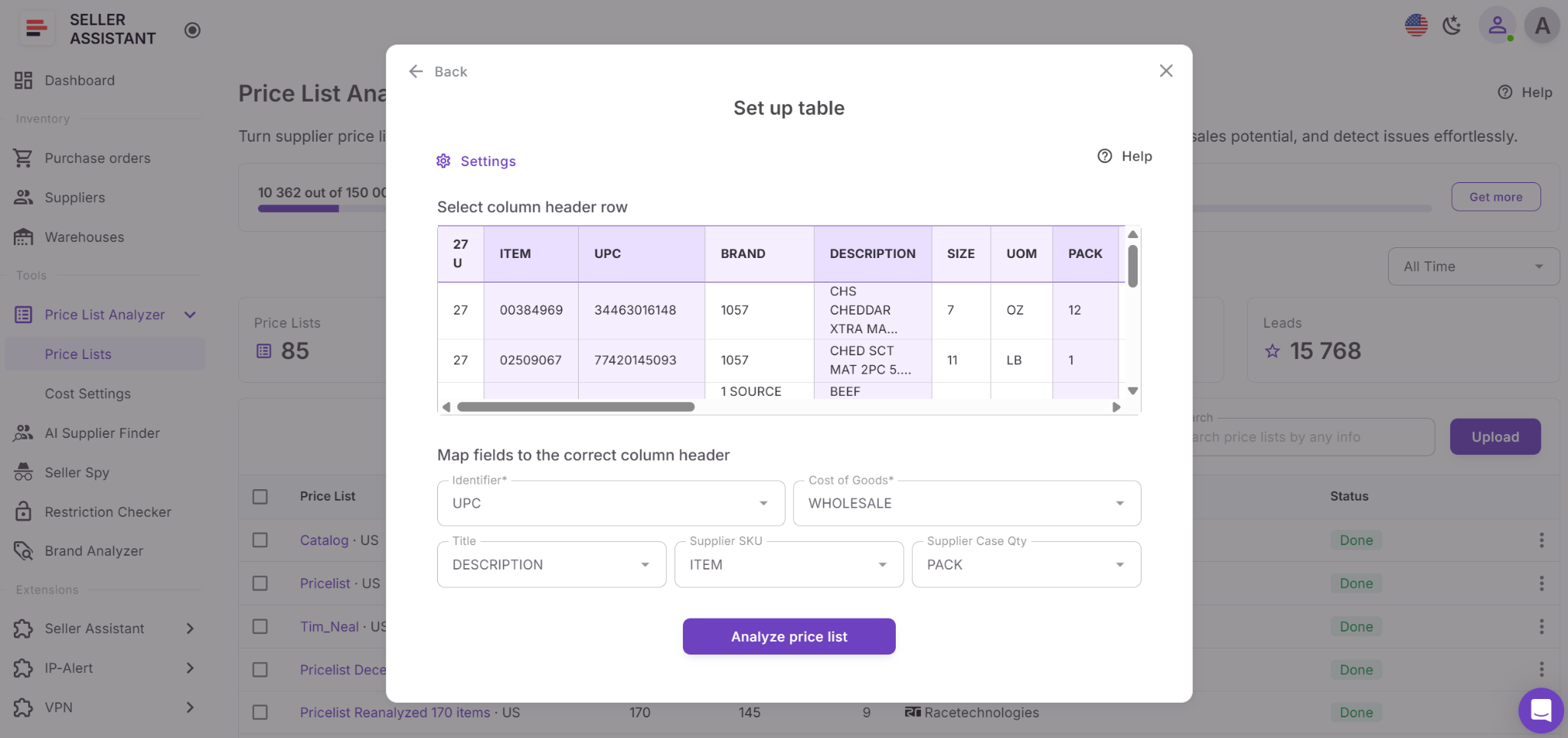
Step 3. Map the price list fields
Select the correct sheet and map the required fields, such as UPC, EAN, ASIN, COG, and product title if available.
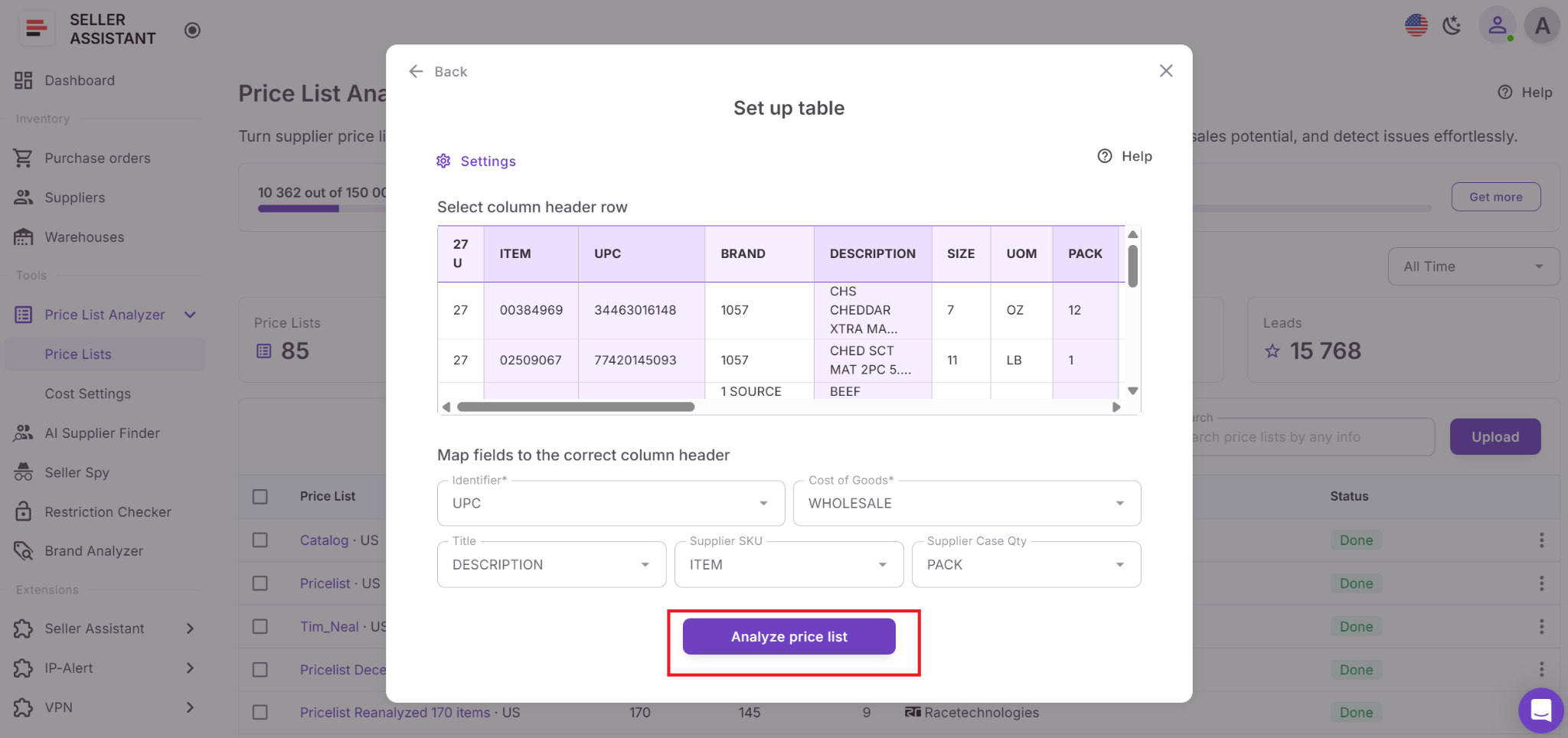
Step 4. Run Price List Analyzer
Click Analyze price list. Seller Assistant will match products to Amazon ASINs, calculate profit and ROI, add demand and competition data, and flag restrictions or risks.
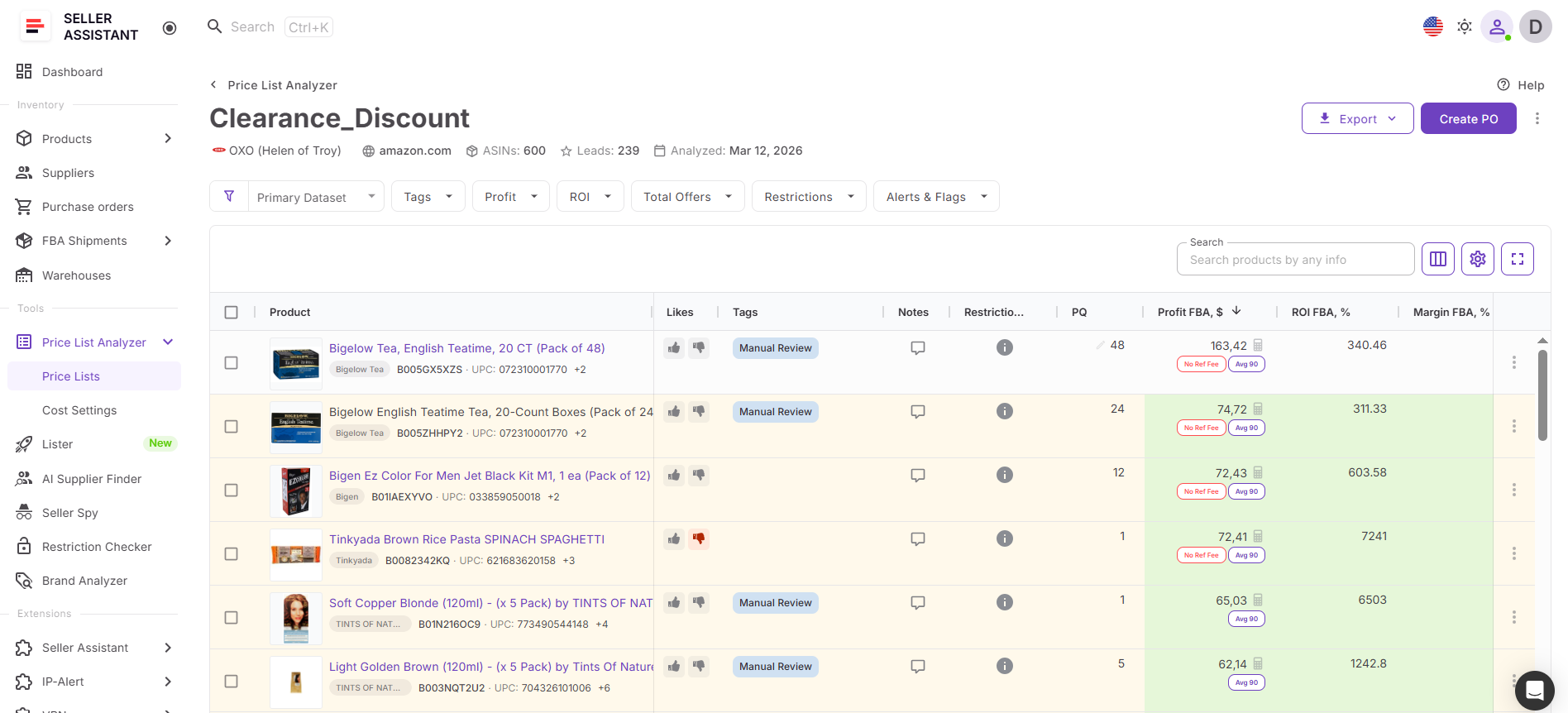
Step 5. Review the results
Open the analyzed file in Price List Analyzer and review the product table. Check profitability, Buy Box data, BSR, seller count, Amazon presence, fees, and warnings.
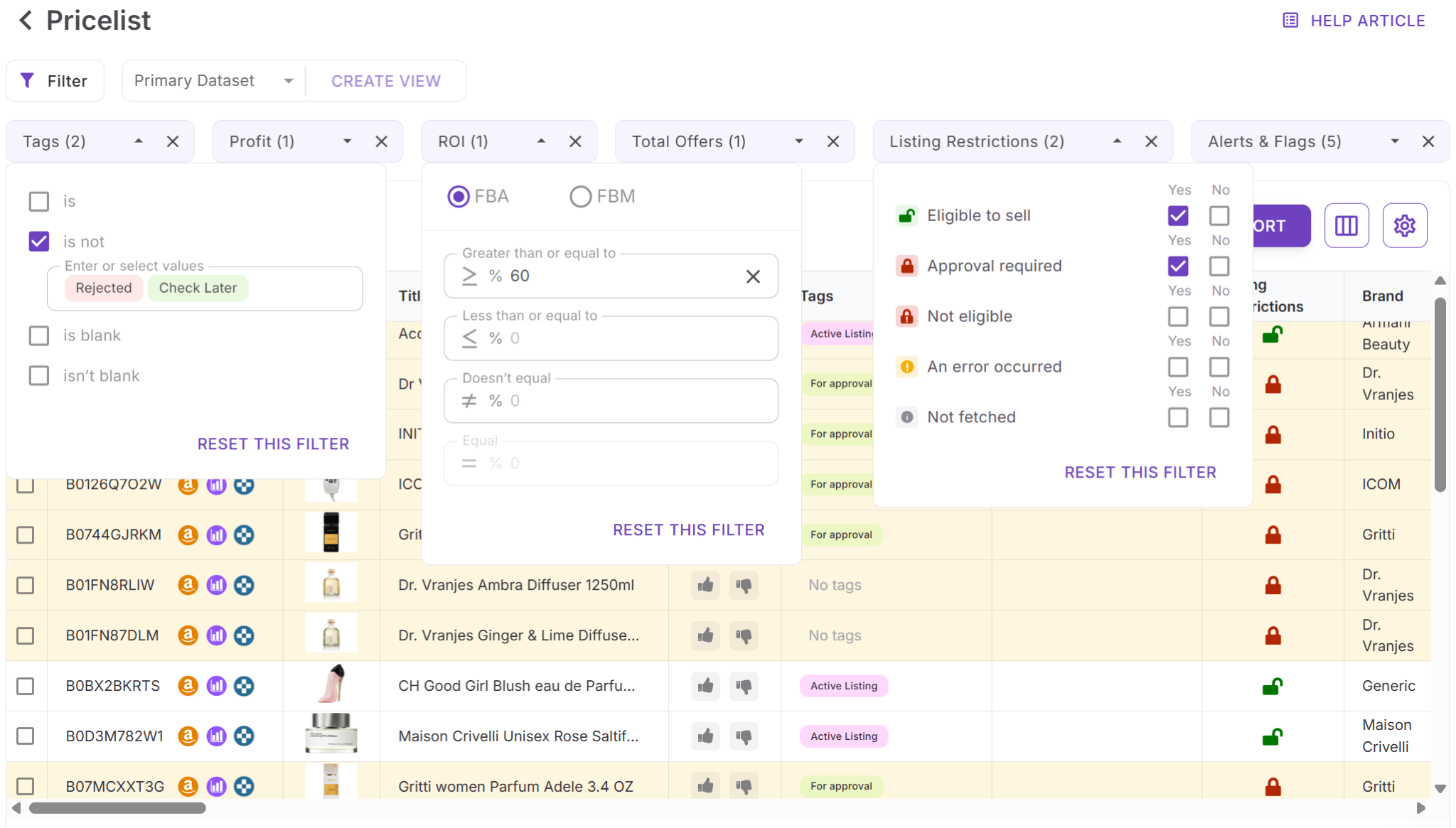
Step 6. Filter profitable products
Apply filters for ROI, profit, demand, competition, restrictions, and risk flags. This helps remove weak products and focus on the best sourcing opportunities.
Step 7. Adjust costs if needed
Edit COG, shipping, prep costs, taxes, or package quantity directly in the table. All metrics recalculate instantly.
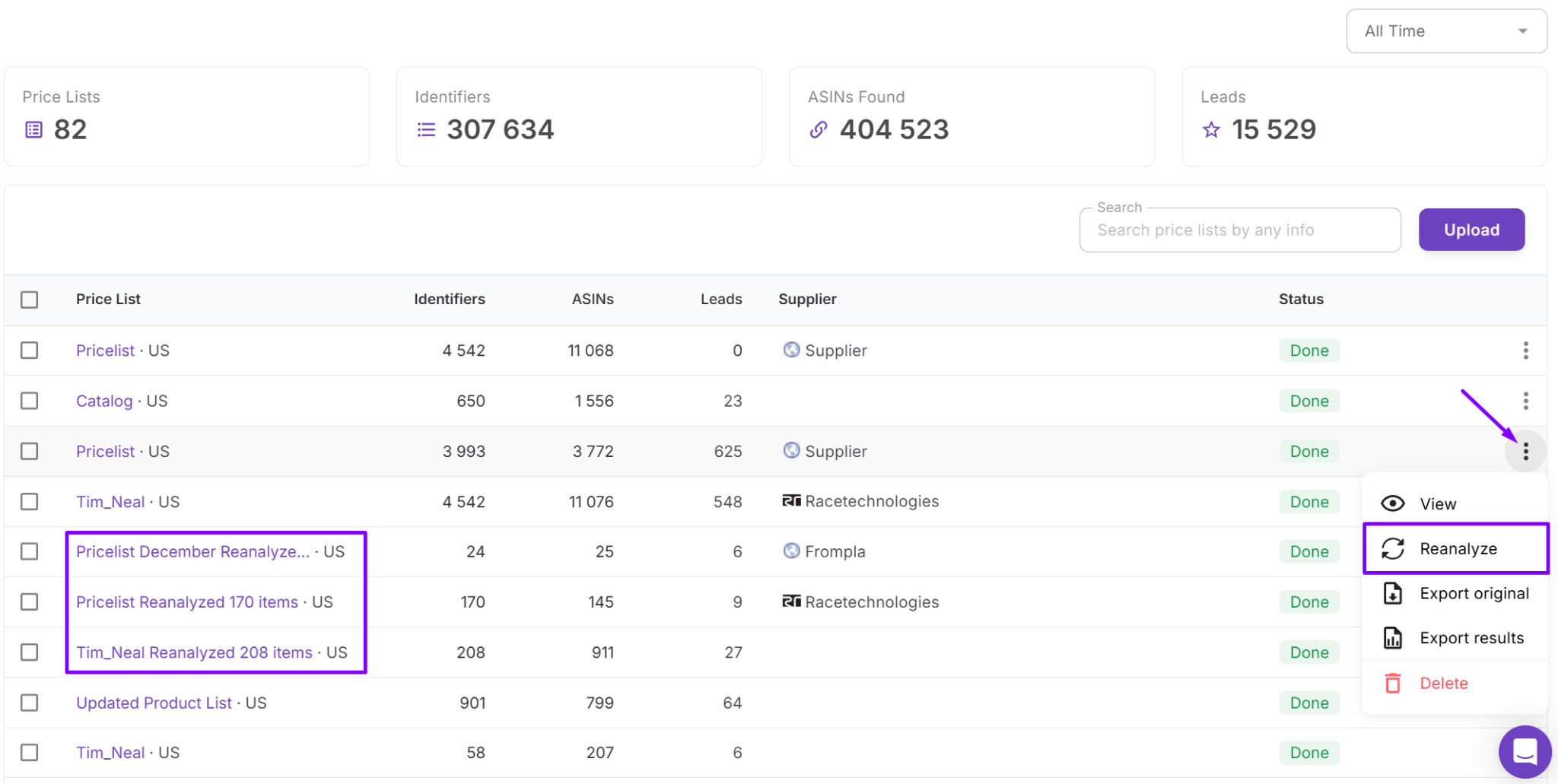
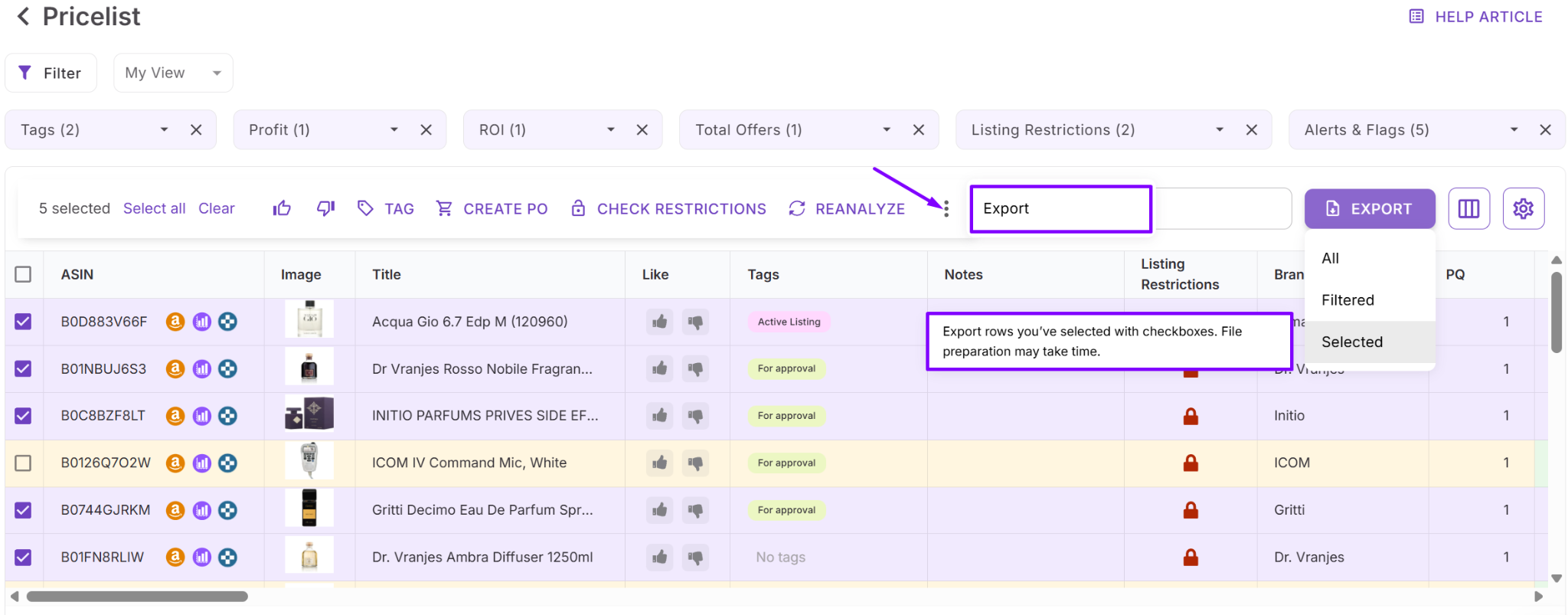
Step 8. Save or export your shortlist
Use tags, notes, likes, saved views, or exports to organize selected products. You can then move strong deals into Product Database, Purchase Orders, and the rest of your Seller Assistant workflow.
FAQ
Can I analyze supplier price lists directly from Suppliers Database?
Yes. You can open a supplier profile in Suppliers Database and upload the supplier catalog directly from there. The supplier is attached automatically, so the price list stays connected to the correct supplier during analysis.
What file formats does Price List Analyzer support?
Price List Analyzer supports supplier files in .xlsx and .xls formats. Your file should include product identifiers such as UPC, EAN, or ASIN, along with cost of goods.
Can I filter products by profitability and risk?
Yes. Price List Analyzer allows you to filter products by ROI, profit, demand, seller count, restrictions, HazMat flags, Amazon presence, and other risk indicators.
Why is analyzing supplier catalogs inside Suppliers Database useful?
Keeping supplier catalogs connected to supplier profiles helps organize sourcing workflows and reduces manual work. It also keeps supplier terms, sourcing history, and purchasing data synchronized across the workflow.
Can I move analyzed products into other Seller Assistant tools?
Yes. Shortlisted products can continue into Product Database, Purchase Orders, warehouse routing, and other connected Seller Assistant workflows. This allows you to move from supplier catalogs to purchasing without re-entering data manually.
Final Thoughts
Analyzing supplier price lists manually becomes difficult once your Amazon wholesale business starts scaling. Large catalogs, changing Buy Box prices, restrictions, and supplier terms create too much operational complexity to manage through spreadsheets and disconnected tools. Seller Assistant solves this by connecting Suppliers Database with Price List Analyzer in one structured workflow.
Instead of uploading random files and checking products one by one, sellers can analyze supplier catalogs directly from the supplier profile, keep sourcing data organized, and evaluate profitable products at scale. With supplier management, bulk analysis, purchasing, and warehouse routing connected in one system, you can move from supplier catalogs to buying decisions faster, with fewer errors and more control over your sourcing workflow.