Getting inventory from a supplier to a prep center usually involves two separate systems that don’t talk to each other – your purchasing workflow on one side, and the prep center’s own portal on the other. Every purchase order means manually recreating that same information as an inbound shipment, address and all.
Seller Assistant’s Prep Center Integration connects the two directly. Once a supported prep center is linked to your account, warehouses sync automatically, and purchase orders can be sent as inbound shipments without leaving the platform.
This guide covers the full process – from connecting a prep center, to keeping it synced, and what happens when you disconnect one.
What Is Seller Assistant’s Prep Center Integration?
Seller Assistant’s Prep Center Integration is a built-in integration that connects supported prep center accounts directly to Seller Assistant, allowing Amazon wholesale sellers, online arbitrage sellers, and dropshippers to manage prep operations without switching between multiple platforms. Instead of manually maintaining warehouse records and recreating inbound shipments, sellers can synchronize prep center data and use it throughout their purchasing workflow.
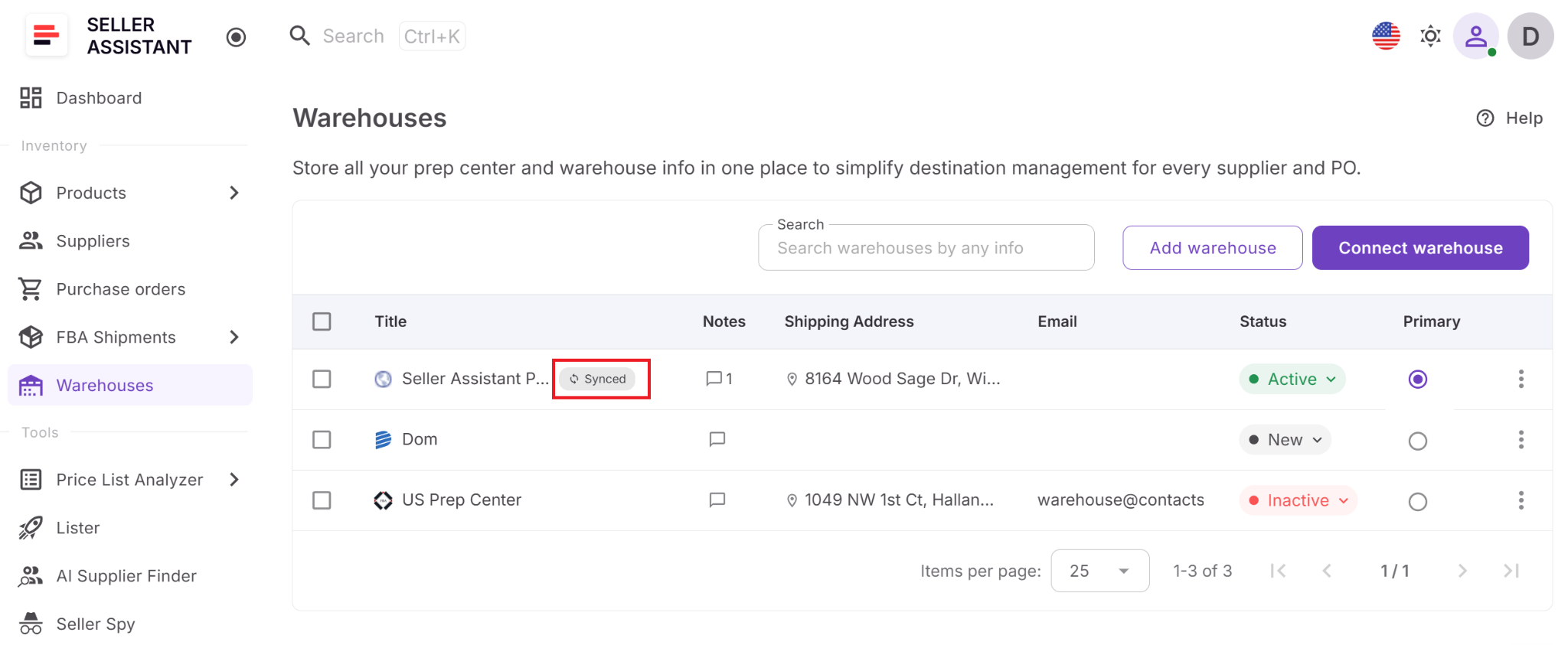
After connecting a prep center, Seller Assistant automatically imports warehouse locations into Warehouses Database, where they’re available alongside manually created fulfillment locations. Synced warehouses can be used in the Purchase Orders Module, enabling sellers to create inbound shipments directly from purchase orders while keeping purchasing, prep, and Amazon FBA fulfillment connected in one streamlined workflow.
Seller Assistant’s Prep Center Integration summary
| Feature | What It Does | Benefit |
|---|---|---|
| Direct prep center connection | Connects supported prep center accounts to Seller Assistant | Eliminates disconnected workflows and keeps prep operations within one platform |
| Automatic warehouse synchronization | Imports warehouse locations from connected prep centers | Keeps fulfillment locations current without manual updates |
| Synced warehouse records | Displays imported locations in the Warehouses Database with a Synced badge | Reduces duplicate records and clearly identifies provider-managed warehouses |
| Purchase Order integration | Makes synced warehouses available in the Purchase Orders Module | Simplifies warehouse routing and reduces manual data entry |
| Direct inbound shipment creation | Creates prep center inbound shipments directly from purchase orders | Eliminates the need to recreate shipment information in the prep center portal |
| Shipment tracking | Displays shipment status and a link to the prep center from the purchase order | Keeps purchasing and prep activities connected in one place |
| Flexible integration management | Lets you disconnect providers or request additional prep center integrations | Makes it easy to adapt as your fulfillment network grows |
| Connected fulfillment workflow | Integrates with Warehouses Database, Purchase Orders Module, and FBA Shipments | Connects warehouse management, purchasing, prep, and Amazon fulfillment |
| Scalable prep operations | Supports growing fulfillment networks and increasing purchasing volume | Reduces manual work while improving routing accuracy and operational efficiency |
Benefits of Seller Assistant’s Prep Center Integration
Prep Center Integration helps Amazon sellers connect purchasing with fulfillment, eliminating repetitive manual tasks while keeping warehouse information synchronized across their workflow.
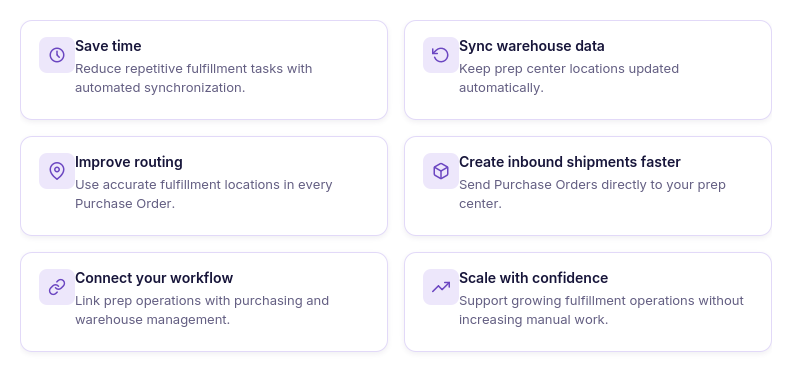
Save time on fulfillment operations
Connect your prep center once and reuse synchronized warehouse locations instead of manually creating and maintaining fulfillment records.
Eliminate duplicate data entry
Automatically sync warehouse locations from your prep center, avoiding the need to update the same information in multiple systems.
Improve routing accuracy
Use synchronized warehouse locations in purchase orders to ensure suppliers ship inventory to the correct prep center every time.
Streamline inbound shipment creation
Create inbound shipments directly from purchase orders without switching to your prep center’s portal or re-entering order details.
Keep fulfillment data up to date
Synced warehouse records automatically reflect the latest information from your connected prep center, helping maintain consistent routing.
Manage prep operations from one platform
Connect Prep Center Integration with Warehouses Database, Purchase Orders Module, and FBA Shipments to manage purchasing and fulfillment in one connected workflow.
Scale your business more efficiently
Whether you work with one prep center or expand your fulfillment network, synchronized data and integrated workflows reduce administrative work and support business growth.
What Prep Center Integration Shows
Prep Center Integration provides a centralized workspace for connecting and managing supported prep center accounts. Rather than simply storing connection details, it gives sellers visibility into connected providers, synchronized warehouse locations, linked shipments, and integration status, making it easier to manage prep operations without leaving Seller Assistant.
Available prep center providers
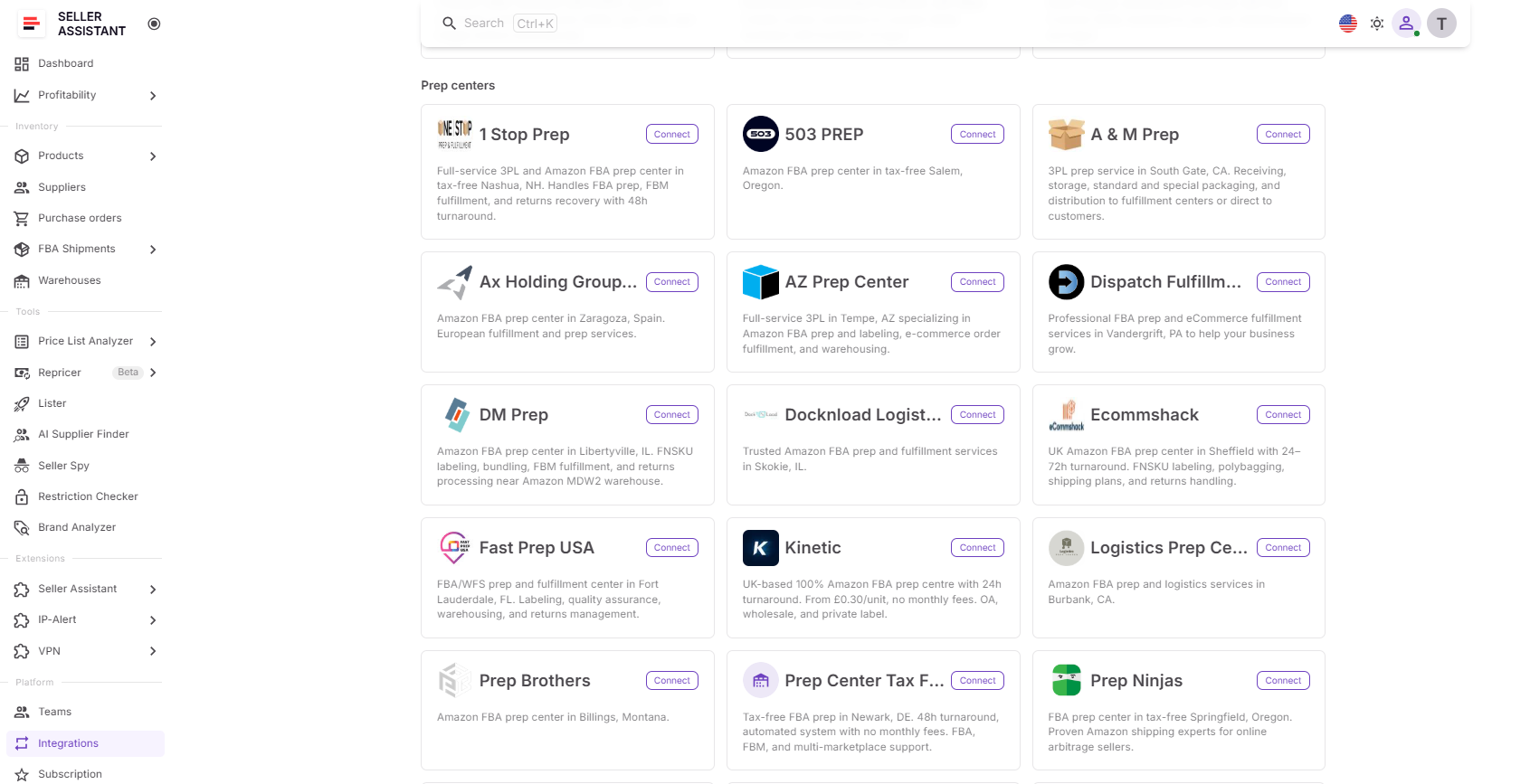
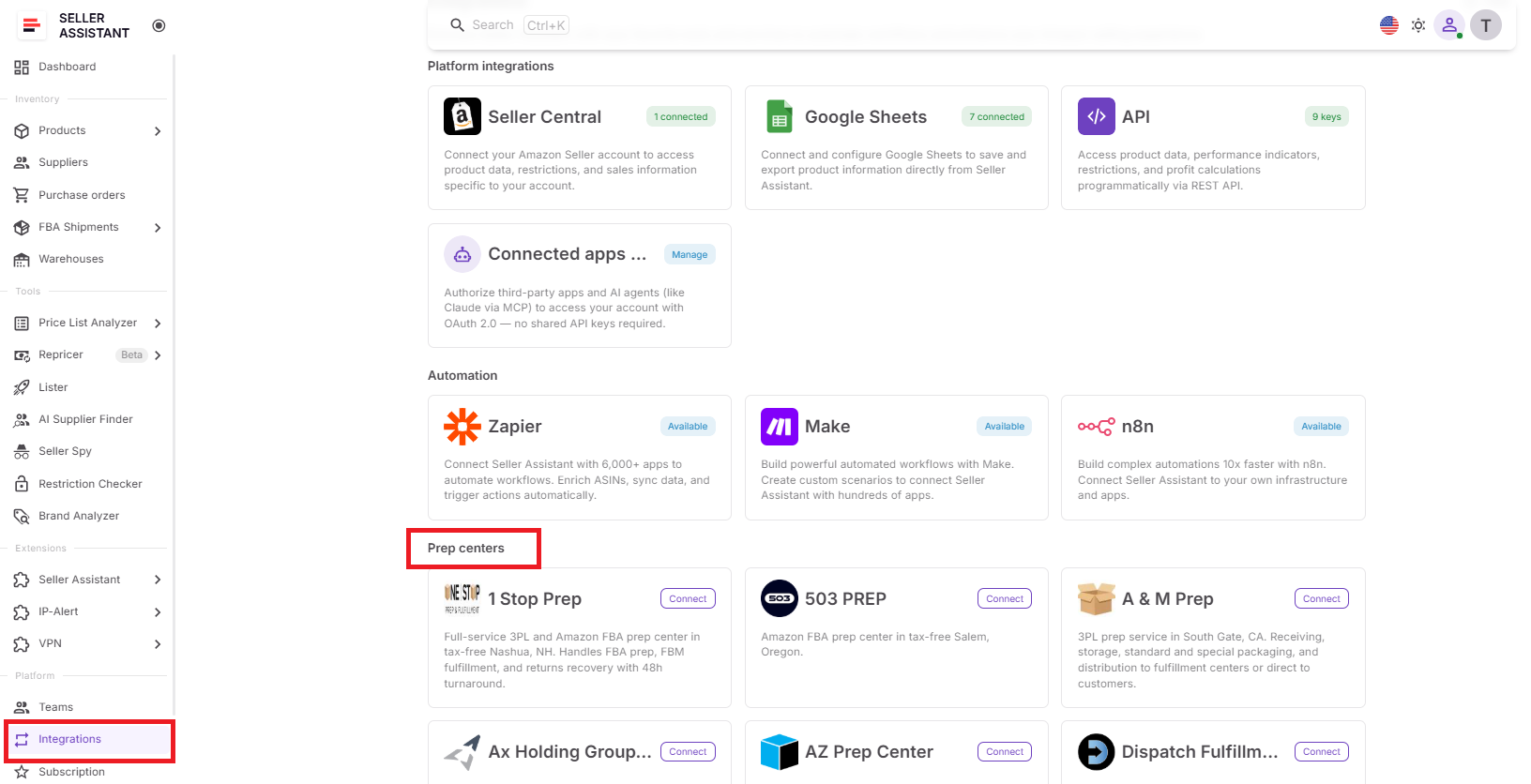
The Prep Centers page displays all supported integration providers. Sellers can browse available prep centers, connect new providers, manage existing connections, or request support for additional integrations.
Connected prep center
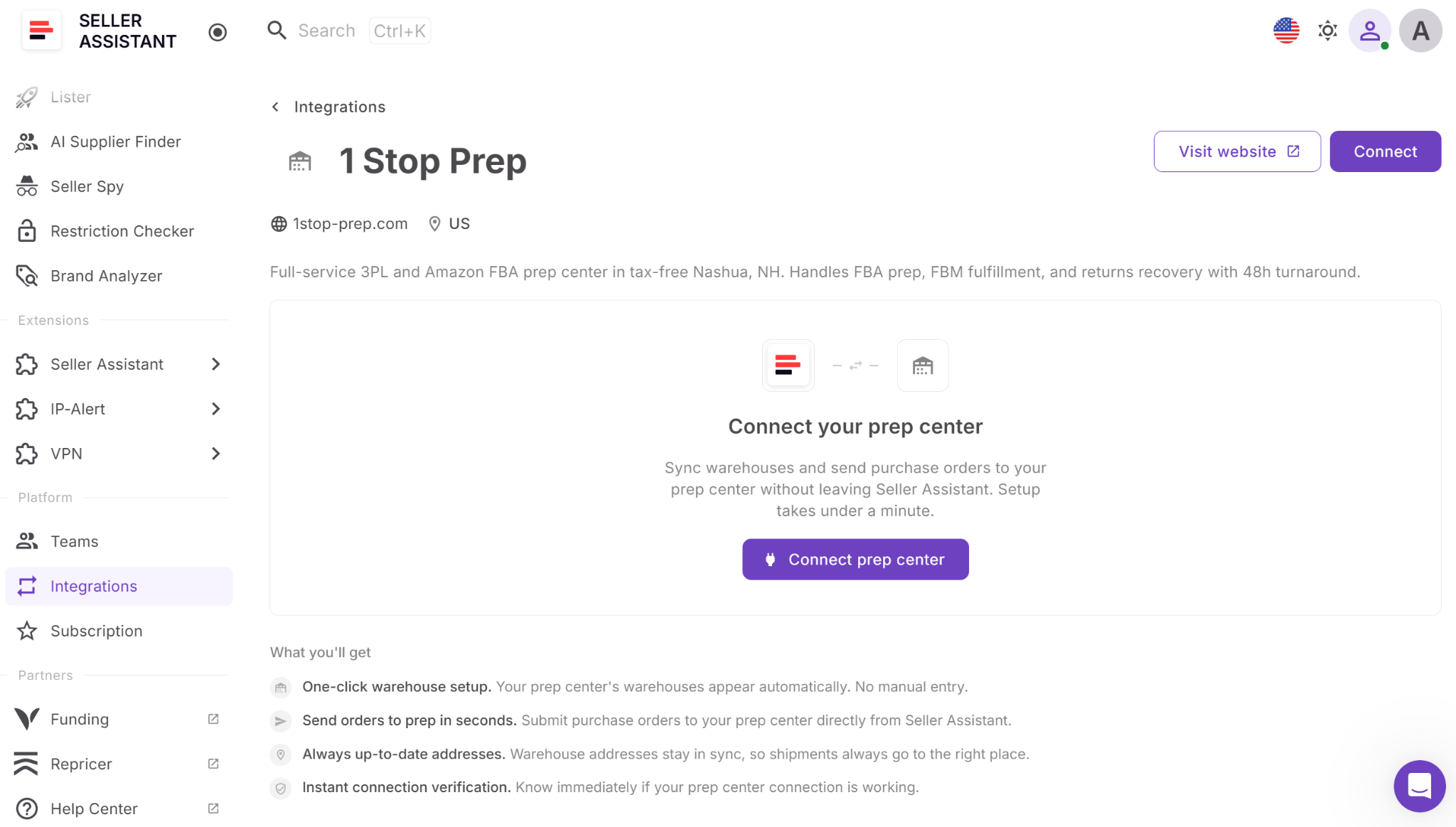
Each connected provider has its own integration page showing the current connection status and allowing sellers to connect or disconnect their prep center account using secure credentials.
Synchronized warehouse locations
After a prep center is connected, its warehouse locations are automatically imported into the Warehouses Database. Synced locations are clearly identified with a Synced badge and provider label, making them easy to distinguish from manually created warehouse records.
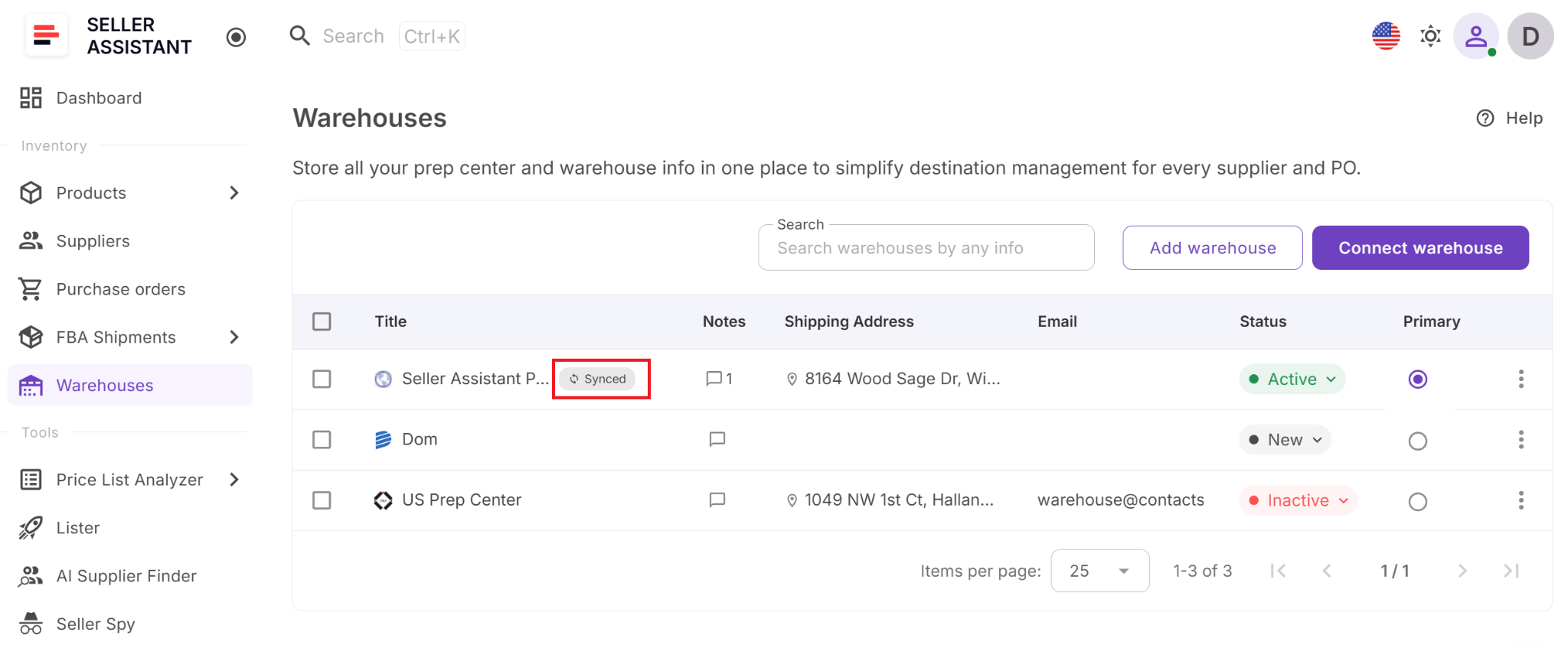
For each synchronized warehouse, Seller Assistant displays key fulfillment information, including:
- Warehouse name
- Website
- Shipping address
- Email address
- Notes
- Operational status
- Synced badge
- Connected prep center (provider)
This gives sellers a complete view of every connected fulfillment location while ensuring routing information stays consistent across the purchasing workflow.
Purchase Order integration
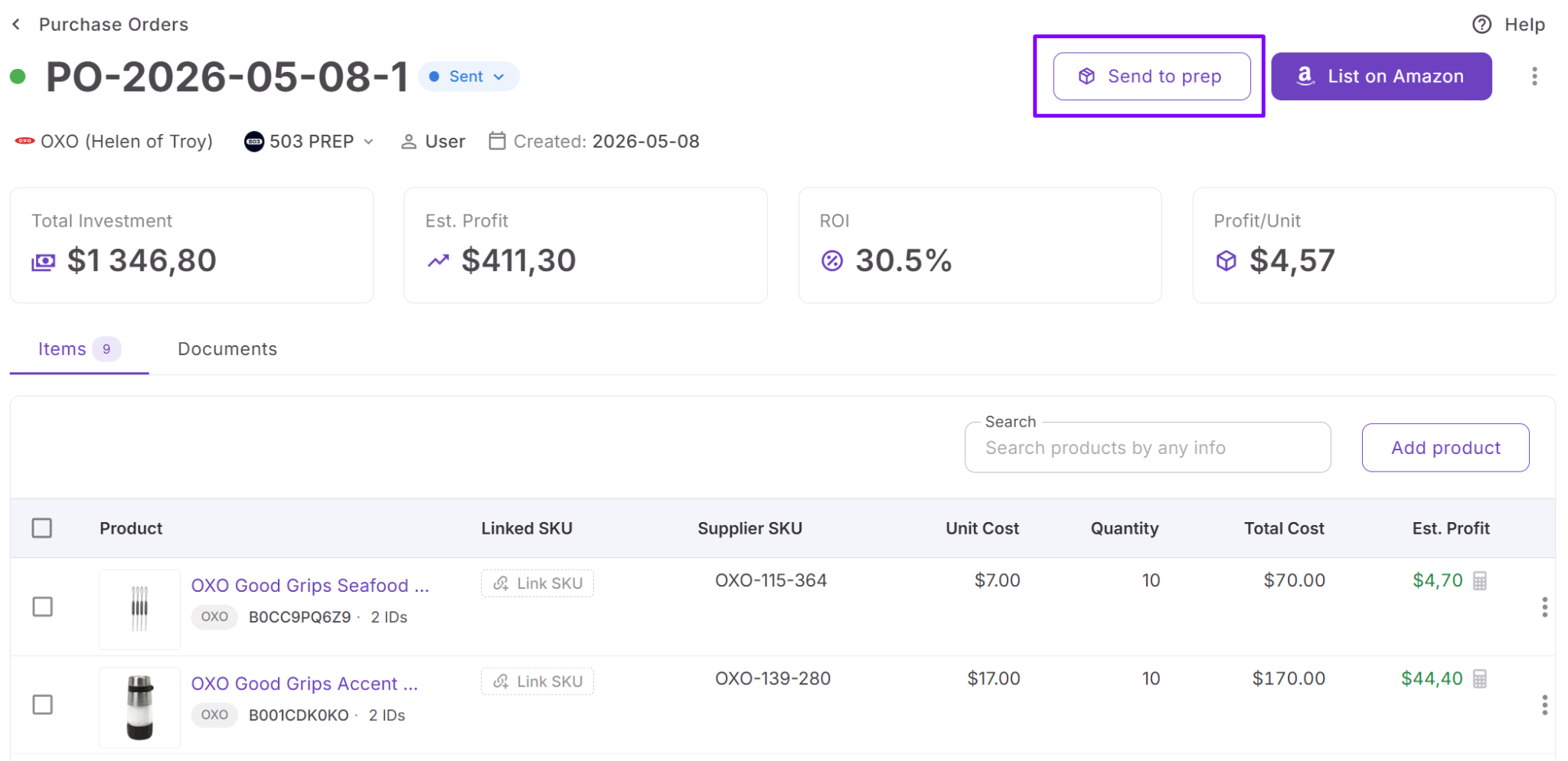
Purchase orders assigned to synced warehouses display additional prep center information, including the Send to prep action, shipment status, and a direct link to the corresponding shipment in the prep center portal.
Integration management
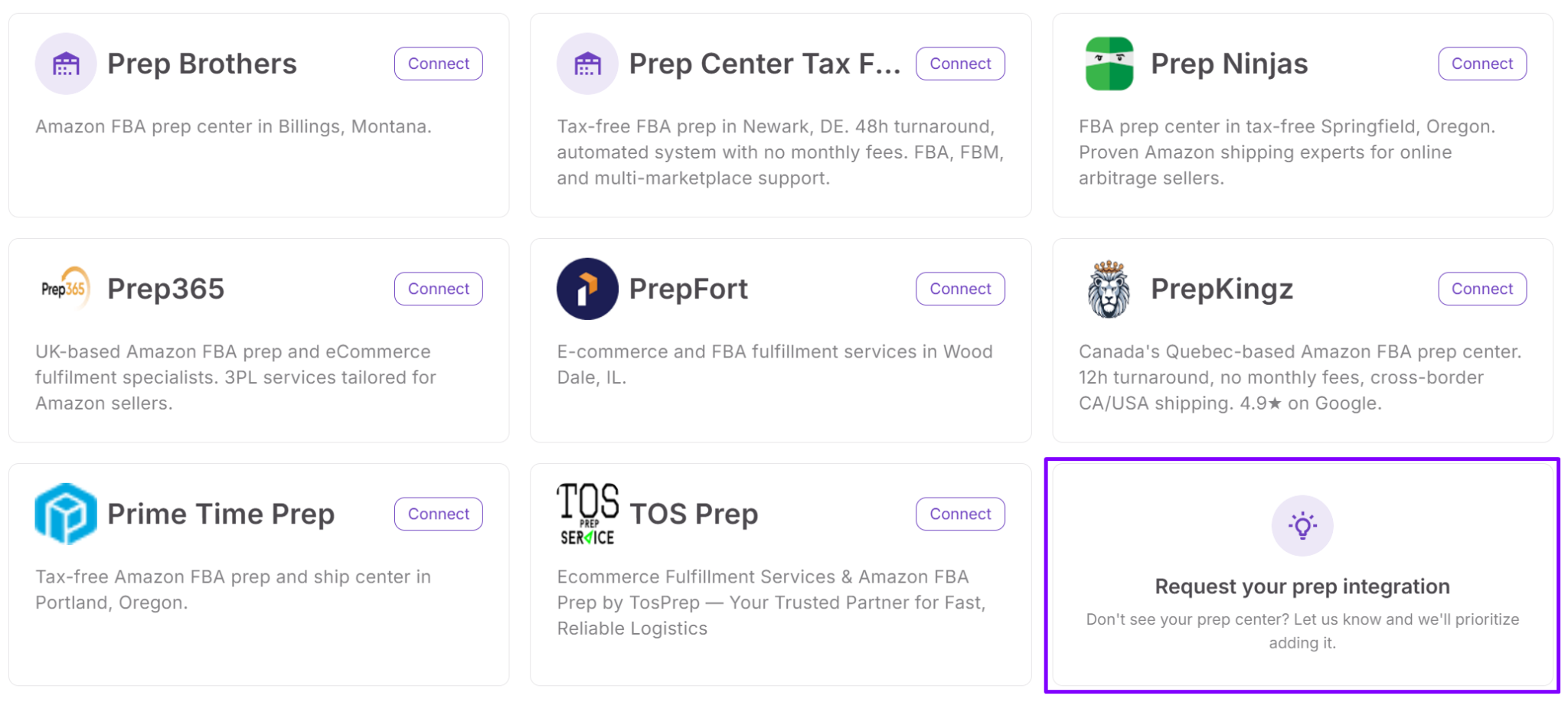
The integration page allows sellers to request support for additional prep center services if their preferred provider isn’t yet available or disconnect a provider at any time.
Connected fulfillment workflow
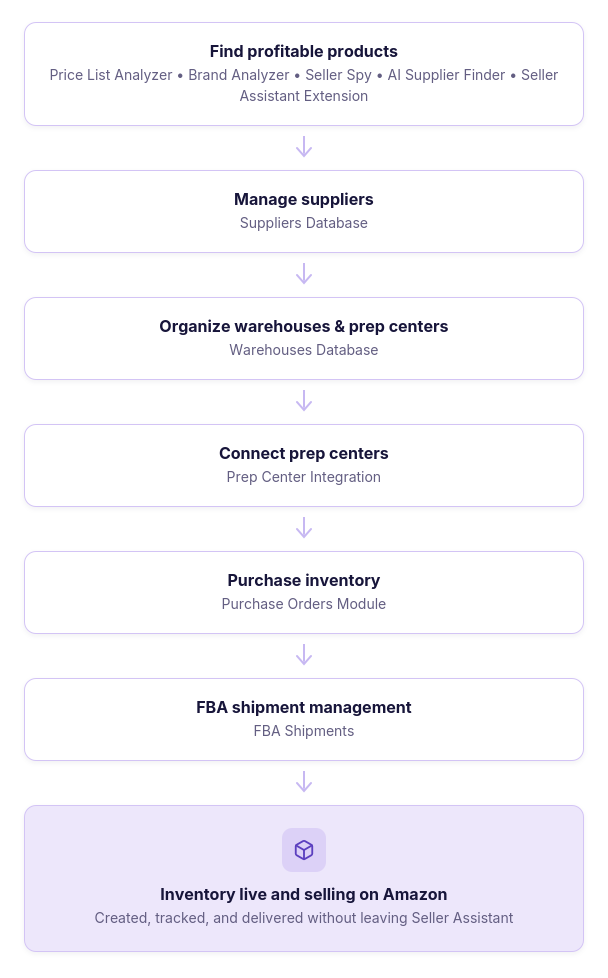
Prep Center Integration works seamlessly with Warehouses Database, Purchase Orders Module, and FBA Shipments. By keeping warehouse locations synchronized and making them available throughout Seller Assistant, it connects prep operations with purchasing and fulfillment while reducing manual work and duplicate data entry.
Prep Center Integration Use Cases
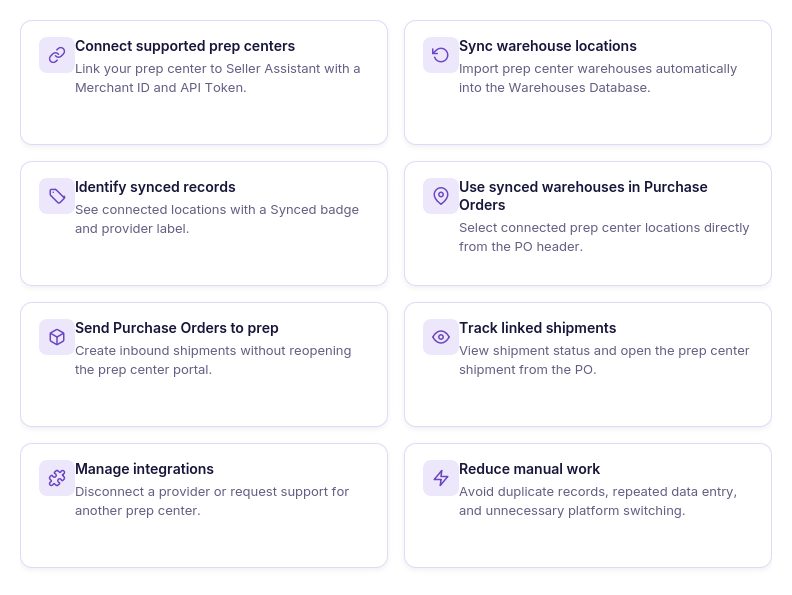
Prep Center Integration is designed to simplify fulfillment operations by connecting Seller Assistant directly with supported prep center providers. Whether you’re managing one prep center or scaling to multiple fulfillment locations, the integration reduces manual work, improves routing accuracy, and keeps purchasing connected with prep operations.
Keeping warehouse locations synchronized
Use case
A seller wants warehouse information in Seller Assistant to always match the locations configured in their prep center.
Solution
Prep Center Integration automatically synchronizes warehouse locations from the connected prep center, eliminating the need to manually maintain duplicate warehouse records.
Eliminating duplicate data entry
Use case
A seller is tired of entering the same warehouse information in both Seller Assistant and the prep center’s portal.
Solution
Once connected, warehouse locations are imported automatically into Warehouses Database, so fulfillment data only needs to be maintained in one place.
Sending purchase orders directly to prep
Use case
A seller creates multiple purchase orders every day and wants to avoid manually creating inbound shipments.
Solution
Purchase orders assigned to synced warehouses can be sent directly to the connected prep center as inbound shipments without leaving Seller Assistant.
Managing multiple prep centers
Use case
A growing business uses different prep centers for various suppliers, product categories, or fulfillment regions.
Solution
Prep Center Integration keeps connected fulfillment locations organized in Warehouses Database, making it easier to route inventory to the correct prep center.
Reducing routing mistakes
Use case
A seller wants to ensure suppliers always ship inventory to the correct prep center.
Solution
Using synchronized warehouse locations in purchase orders helps standardize routing and reduces the risk of selecting outdated or incorrect fulfillment destinations.
Monitoring prep shipments
Use case
A seller wants to quickly check whether inventory has been sent to the prep center without logging into another platform.
Solution
Seller Assistant displays shipment status and a direct link to the connected prep center from the purchase order, making shipment tracking more convenient.
Scaling fulfillment operations
Use case
As purchasing volume grows, a seller needs a more efficient way to manage prep operations without increasing administrative work.
Solution
By connecting Warehouses Database, Prep Center Integration, Purchase Orders Module, and FBA Shipments, Seller Assistant creates a scalable fulfillment workflow that reduces manual processes and supports business growth.
Working with a connected fulfillment workflow
Use case
A seller wants purchasing, warehouse management, prep, and Amazon fulfillment to work together instead of relying on disconnected tools.
Solution
Prep Center Integration connects fulfillment data across Seller Assistant, allowing warehouse locations, purchase orders, prep operations, and FBA Shipments to share the same synchronized information throughout the workflow.
How Prep Center Integration Works
Prep Center Integration is designed to fit naturally into your purchasing and fulfillment workflow. After connecting a supported prep center, Seller Assistant automatically synchronizes warehouse locations, makes them available throughout the platform, and lets you create inbound shipments directly from purchase orders.
The entire process takes place within Seller Assistant, reducing manual data entry and eliminating unnecessary switching between systems.
Step 1. Open the Prep Centers page
Go to Integrations → Prep Centers in your Seller Assistant account. The page displays all supported prep center providers and your current connection status.
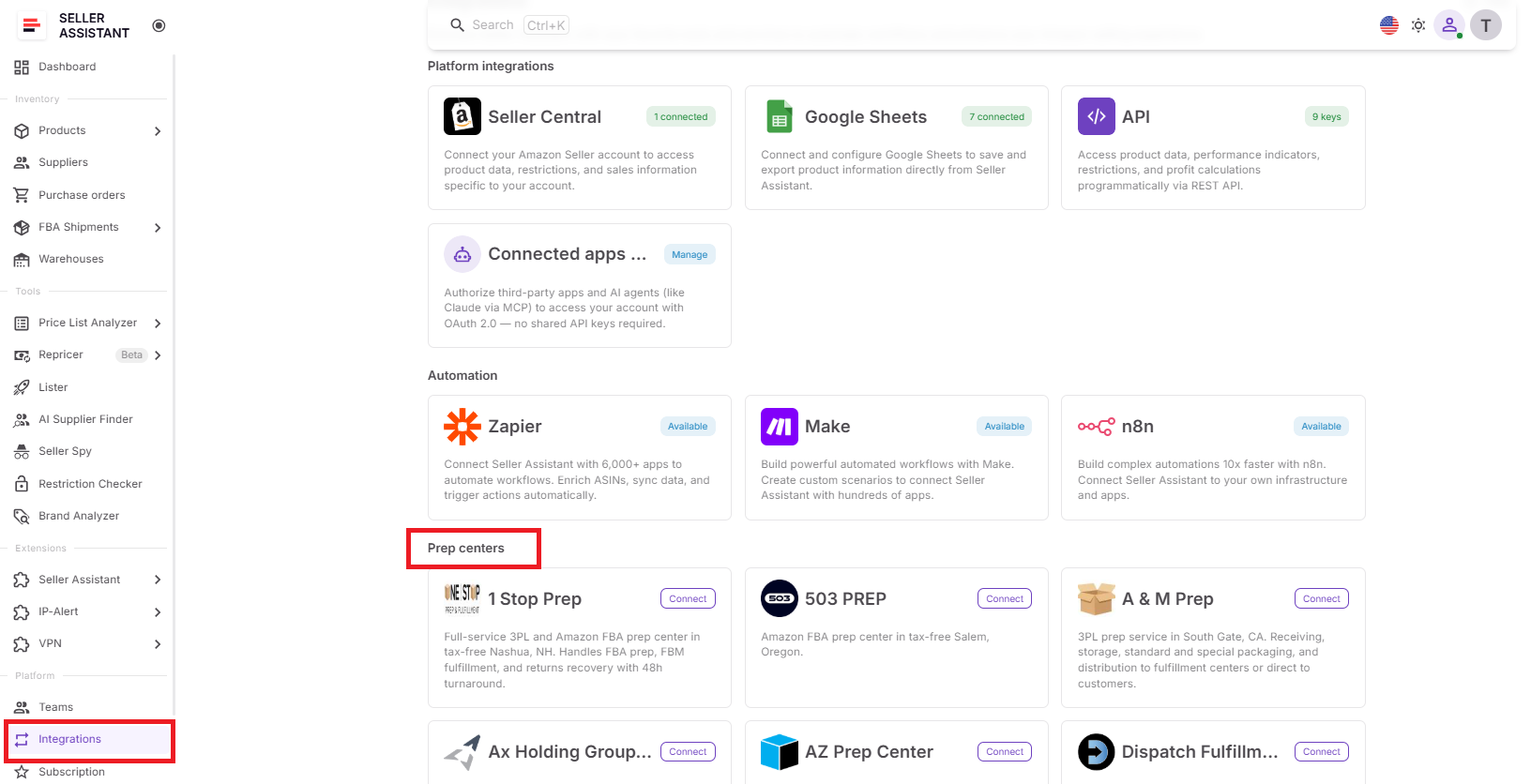
This is your central workspace for connecting and managing prep center integrations.
Step 2. Select a prep center
Choose the prep center you want to connect and open its integration page.
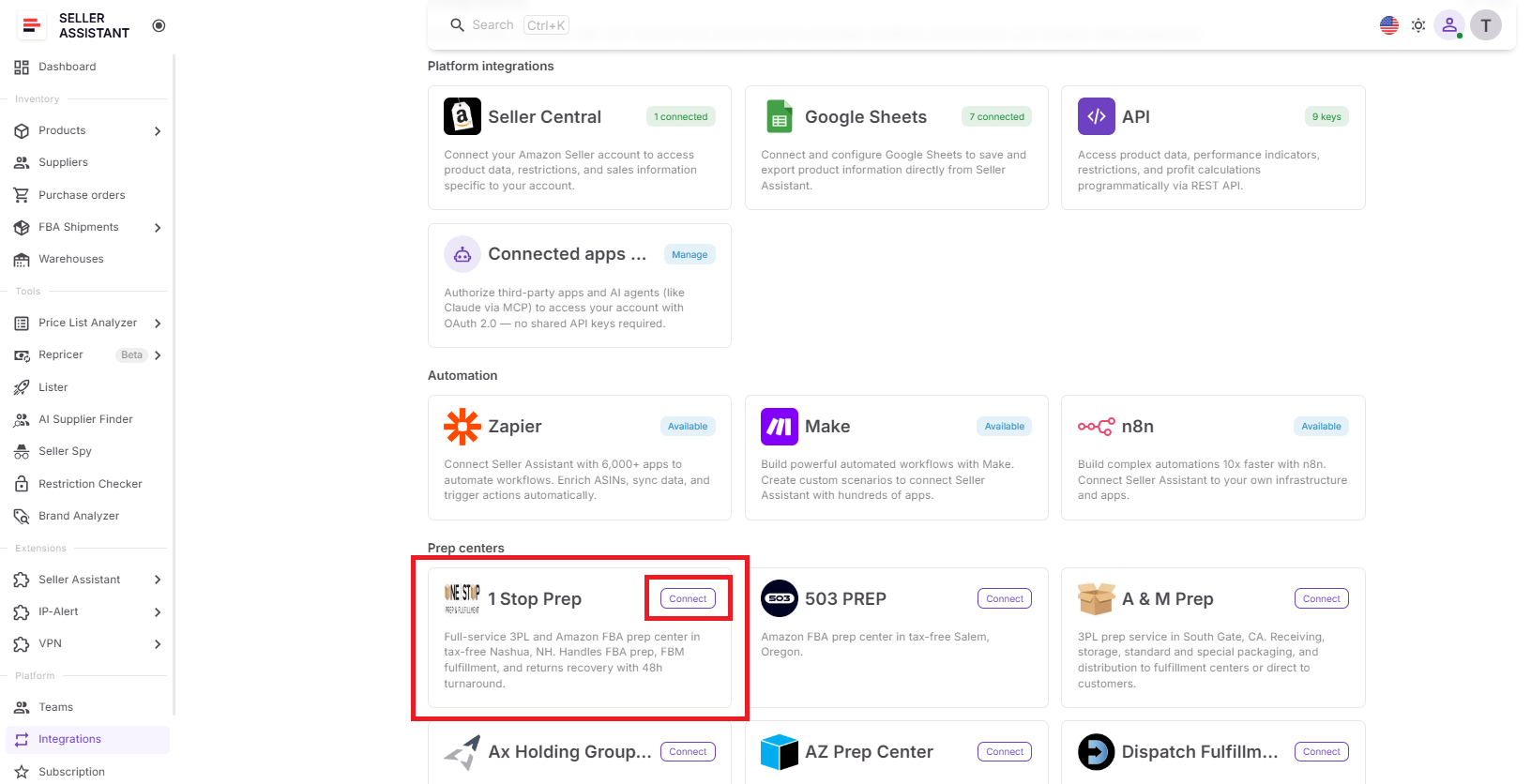
Each provider has its own connection settings, making it easy to manage integrations individually.
Step 3. Connect your account
Click Connect prep center and enter your Merchant ID and API Token obtained from your prep center account.
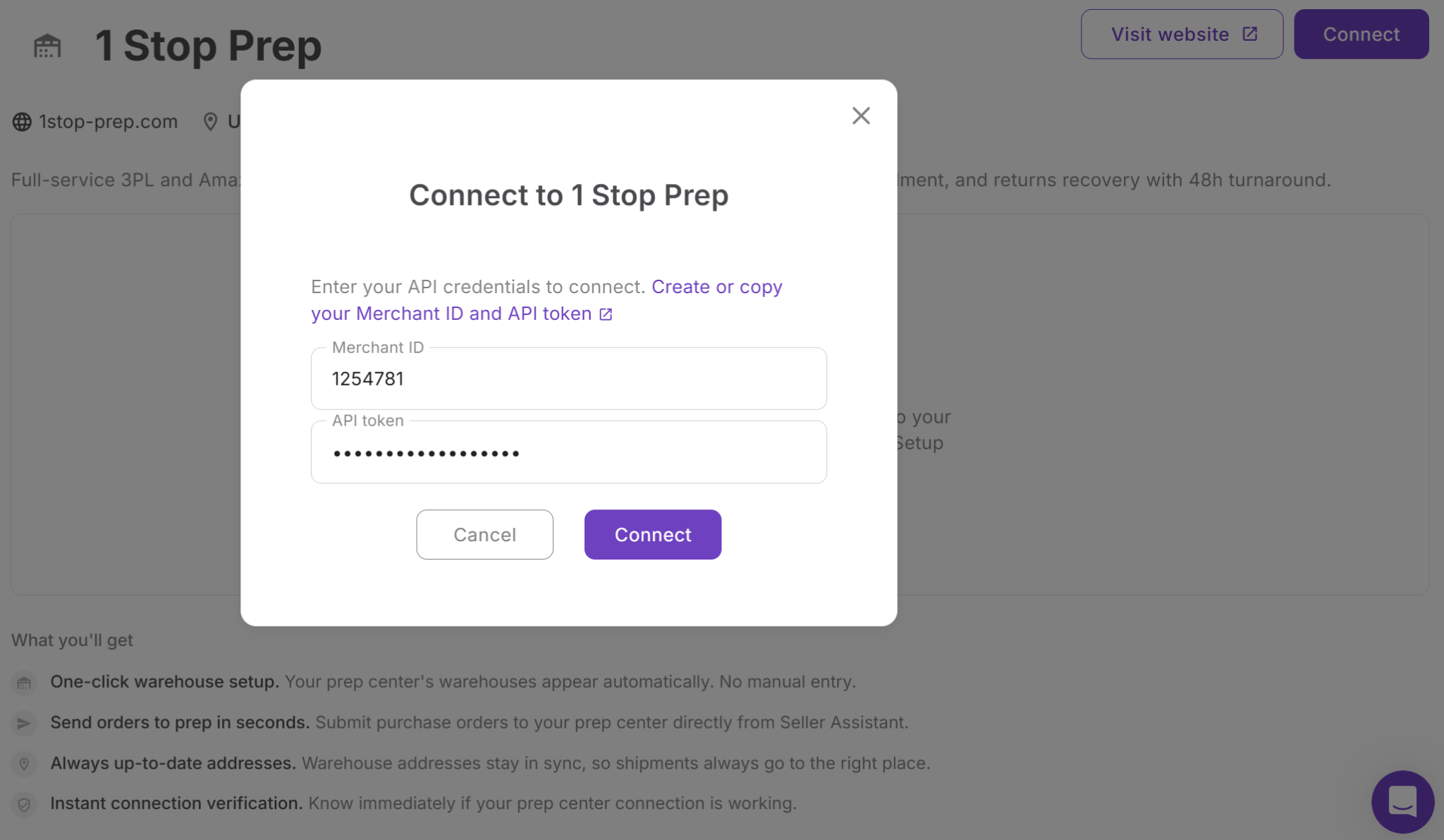
Secure authentication allows Seller Assistant to communicate directly with your prep center.
Step 4. Sync warehouse locations
Once the connection is verified, Seller Assistant automatically imports warehouse locations into Warehouses Database, where they’re marked with a Synced badge.
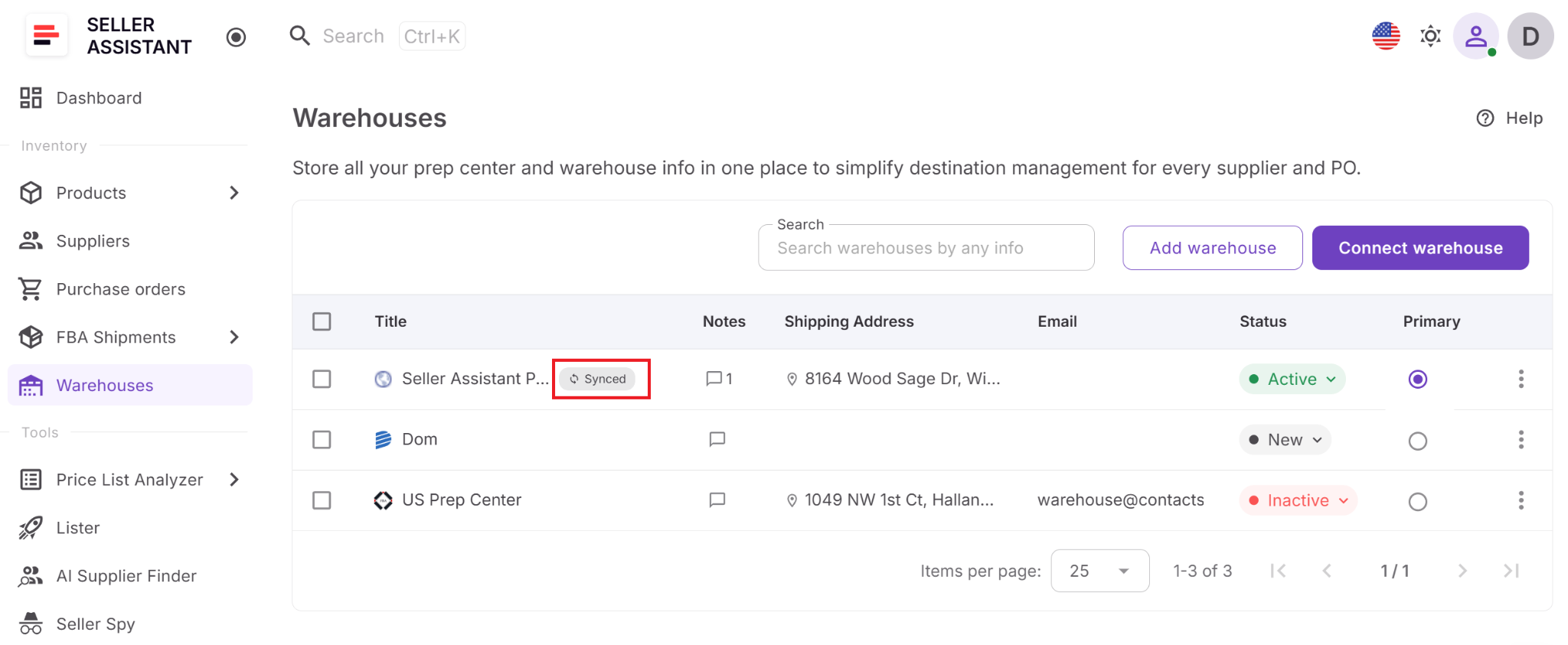
Synchronized warehouse records eliminate duplicate maintenance and ensure fulfillment locations stay current.
Step 5. Send purchase orders to prep
When a purchase order is assigned to a synced warehouse, click Send to prep to create an inbound shipment directly in your connected prep center. The purchase order then displays the shipment status and a link to the shipment.
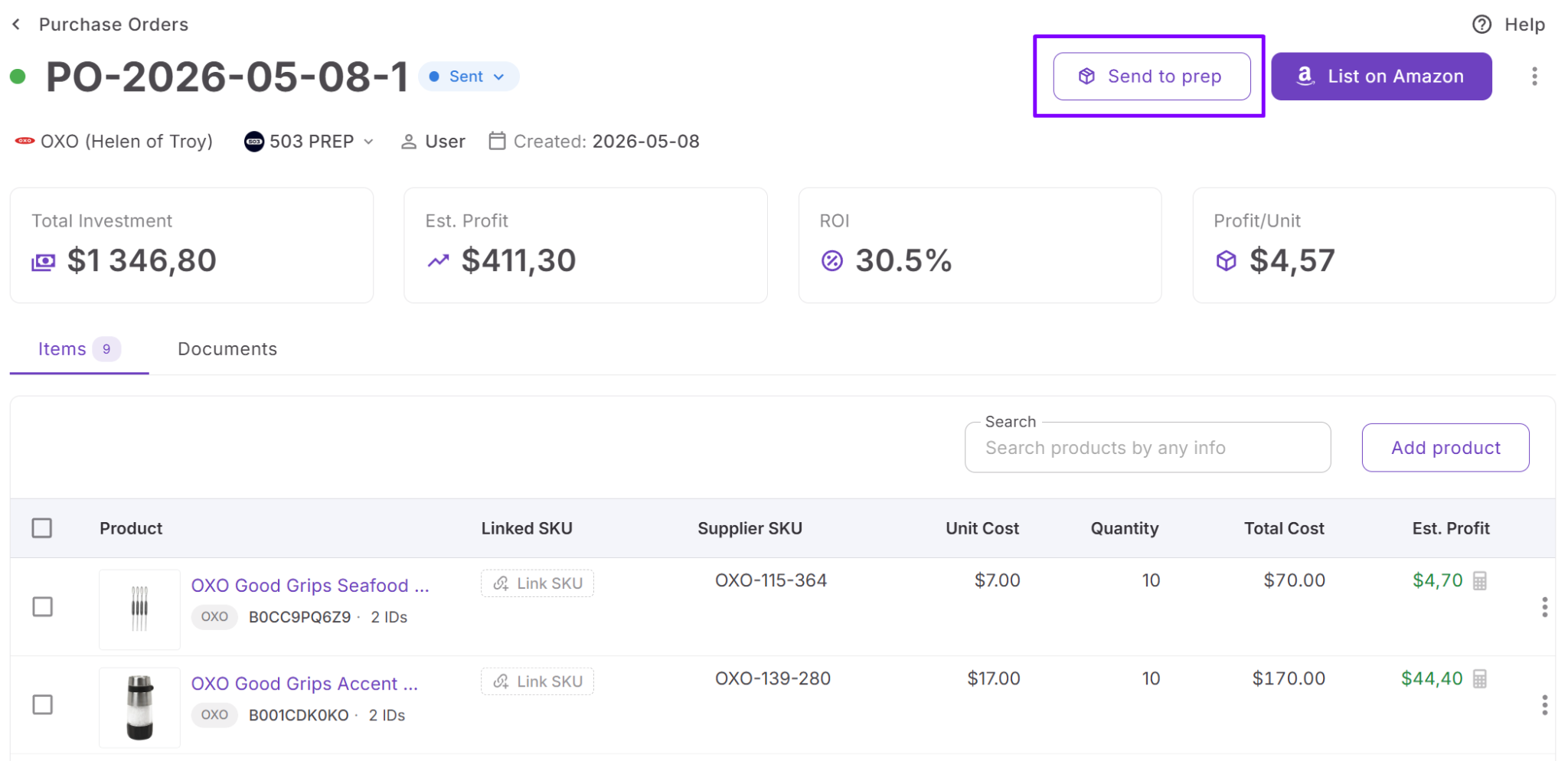
This removes the need to recreate inbound shipments manually and keeps purchasing connected with prep operations.
Step 6. Manage your integration
Request support for additional providers from the Prep Centers page or disconnect a prep center whenever necessary. If a purchase order is already linked to a prep shipment, unlink it before assigning a different synced warehouse.
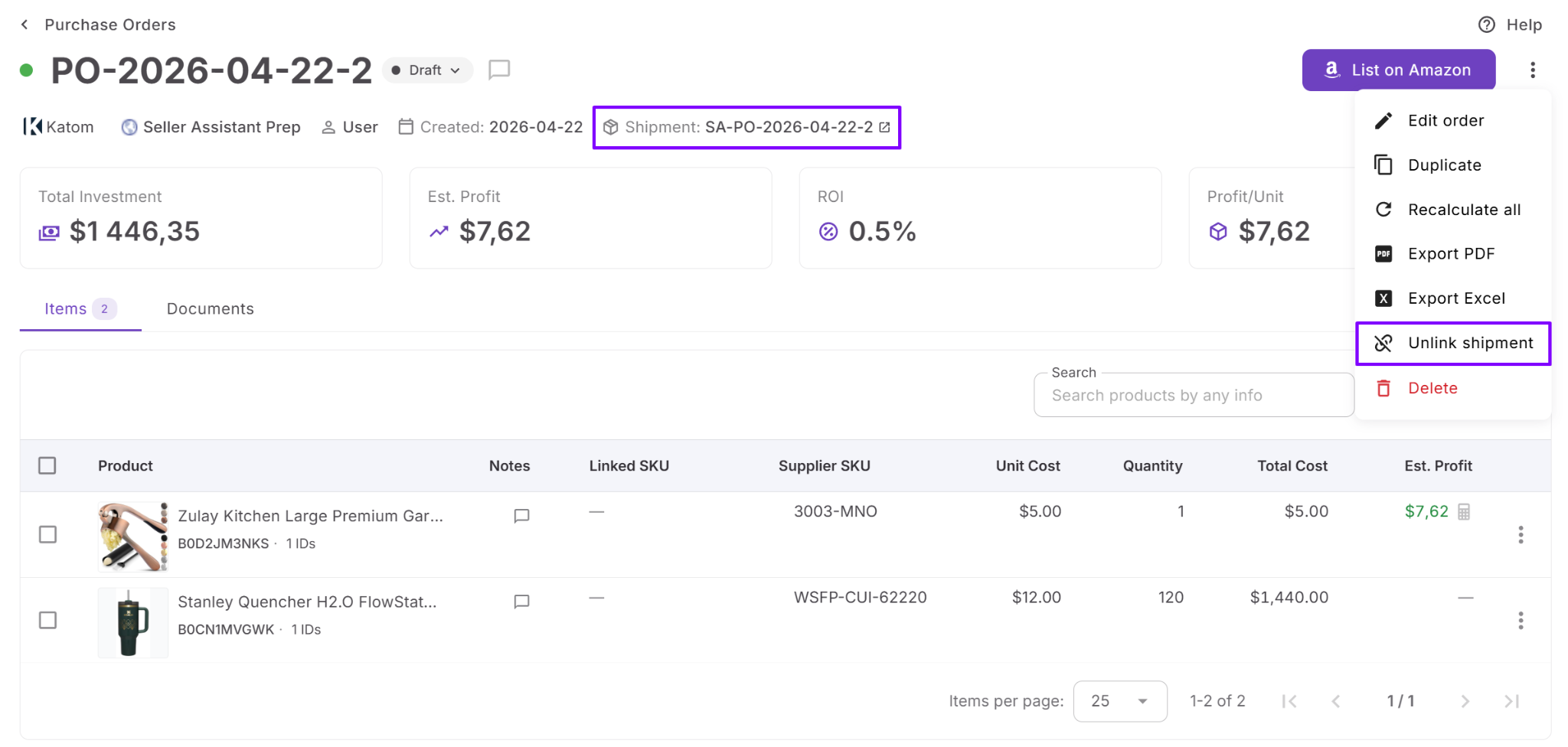
Flexible integration management allows your fulfillment network to evolve while preserving accurate purchasing and shipment history.
FAQ
Can I still use manually created warehouses after connecting a prep center?
Yes. Manually created warehouses and synced prep center locations can coexist in the Warehouses Database. This gives you the flexibility to manage your own facilities alongside connected prep centers from a single workspace.
Will Prep Center Integration change my existing Purchase Orders?
No. Connecting a prep center doesn’t modify purchase orders you’ve already created. Existing orders retain their warehouse information, while new prep center features become available only for purchase orders assigned to synced warehouses.
Can I disconnect my prep center without losing my purchase order history?
Yes. If you disconnect a prep center, the synchronized warehouse records are removed, but existing purchase orders keep the warehouse name for historical reference. This preserves your purchasing records even after the integration is removed.
Why doesn’t the Send to prep button appear on my purchase order?
The button is available only when the purchase order is assigned to a synchronized warehouse from a connected prep center. If the order uses a manually created warehouse, it won’t be available until you select a synced fulfillment location.
What should I do if my prep center isn’t supported?
You can request a new integration directly from the Prep Centers page in Seller Assistant. This helps prioritize future provider support as the integration ecosystem continues to expand.
Final Thoughts
Seller Assistant’s Prep Center Integration helps Amazon sellers eliminate repetitive fulfillment tasks by connecting prep operations directly to their purchasing workflow. Instead of maintaining warehouse records in multiple systems or manually recreating inbound shipments, you can synchronize warehouse locations, route purchase orders more efficiently, and manage prep activities from a single platform.
Working together with Warehouses Database, Purchase Orders Module, and FBA Shipments, Prep Center Integration creates a connected workflow that keeps fulfillment data accurate from supplier order to Amazon. Whether you’re scaling your wholesale business, expanding your prep network, or simply looking to streamline daily operations, integrating your prep center helps save time, reduce routing errors, and move inventory to Amazon FBA more efficiently.
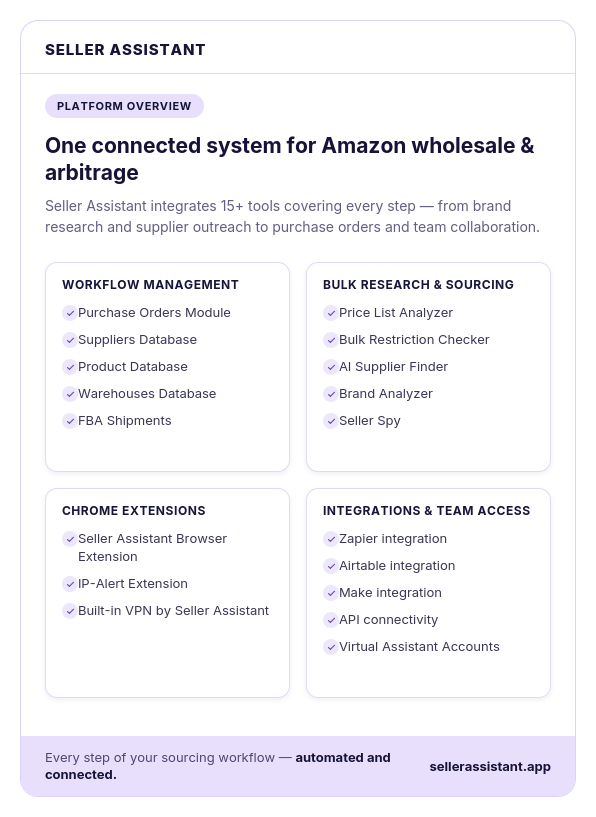
Seller Assistant automates and connects every stage of your Amazon wholesale and arbitrage workflow. It brings together in one platform: workflow management tools – Purchase Orders Module, Suppliers Database, Product Database, Warehouses Database, FBA Shipments, bulk research & sourcing tools – Price List Analyzer, Bulk Restriction Checker, AI Supplier Finder, Brand Analyzer, Seller Spy, Chrome extensions – Seller Assistant Browser Extension, IP-Alert Extension, and built-in VPN by Seller Assistant, and integrations & team access features – seamless API connectivity, integrations with Zapier, Airtable, and Make, and Virtual Assistant Accounts.