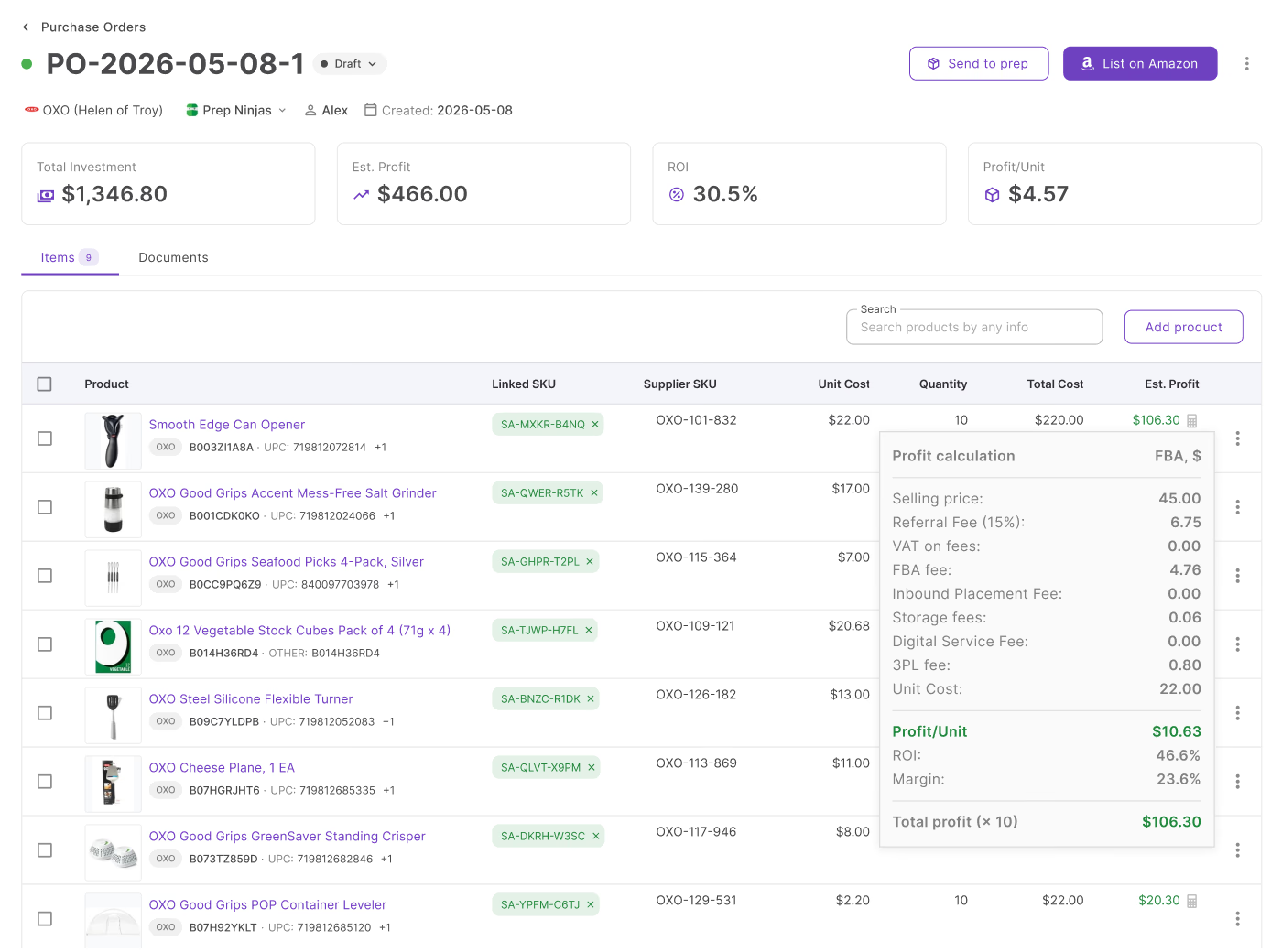
Buying inventory in bulk can grow your Amazon business faster, but it also increases the cost of mistakes. A purchase order may contain dozens of SKUs that look profitable individually, yet a few weak products, inaccurate costs, or overlooked expenses can quietly reduce the performance of the entire order.
Looking at products one by one also makes it difficult to understand your total investment and expected return.
Seller Assistant helps Amazon wholesale sellers, online arbitrage sellers, and dropshippers evaluate profitability directly inside their purchasing workflow. This helps sellers see the complete picture before committing capital and placing inventory orders.
Note. Seller Assistant is an end-to-end Amazon workflow management platform that integrates 15+ wholesale-focused solutions into one connected system. It combines sourcing workflow automation, bulk research and intelligence tools, and integrated Chrome extensions – giving you everything you need to streamline finding deals, managing suppliers, and creating purchase orders.

With Seller Assistant, every step of your Amazon wholesale and arbitrage workflow is automated and connected.
What Is Purchase Order Profitability?
Purchase order profitability is the process of evaluating the expected financial performance of an entire supplier order before inventory is purchased. Instead of looking at products individually, it measures how all SKUs inside a purchase order perform together by combining costs, investment, and expected returns into one view.
This matters because profitable products do not always create profitable purchase orders. A few weak products, inaccurate costs, or higher-than-expected expenses can reduce the performance of the full order. Reviewing purchase order profitability helps Amazon wholesale sellers, online arbitrage sellers, and dropshippers understand total investment, identify products that weaken returns, and make stronger buying decisions before committing capital.
What affects wholesale PO profitability?
Several factors influence whether a purchase order becomes a profitable investment or ties up cash in inventory that delivers weaker returns than expected. Looking at these metrics together helps sellers understand not only how much money an order can generate, but also why its performance changes.
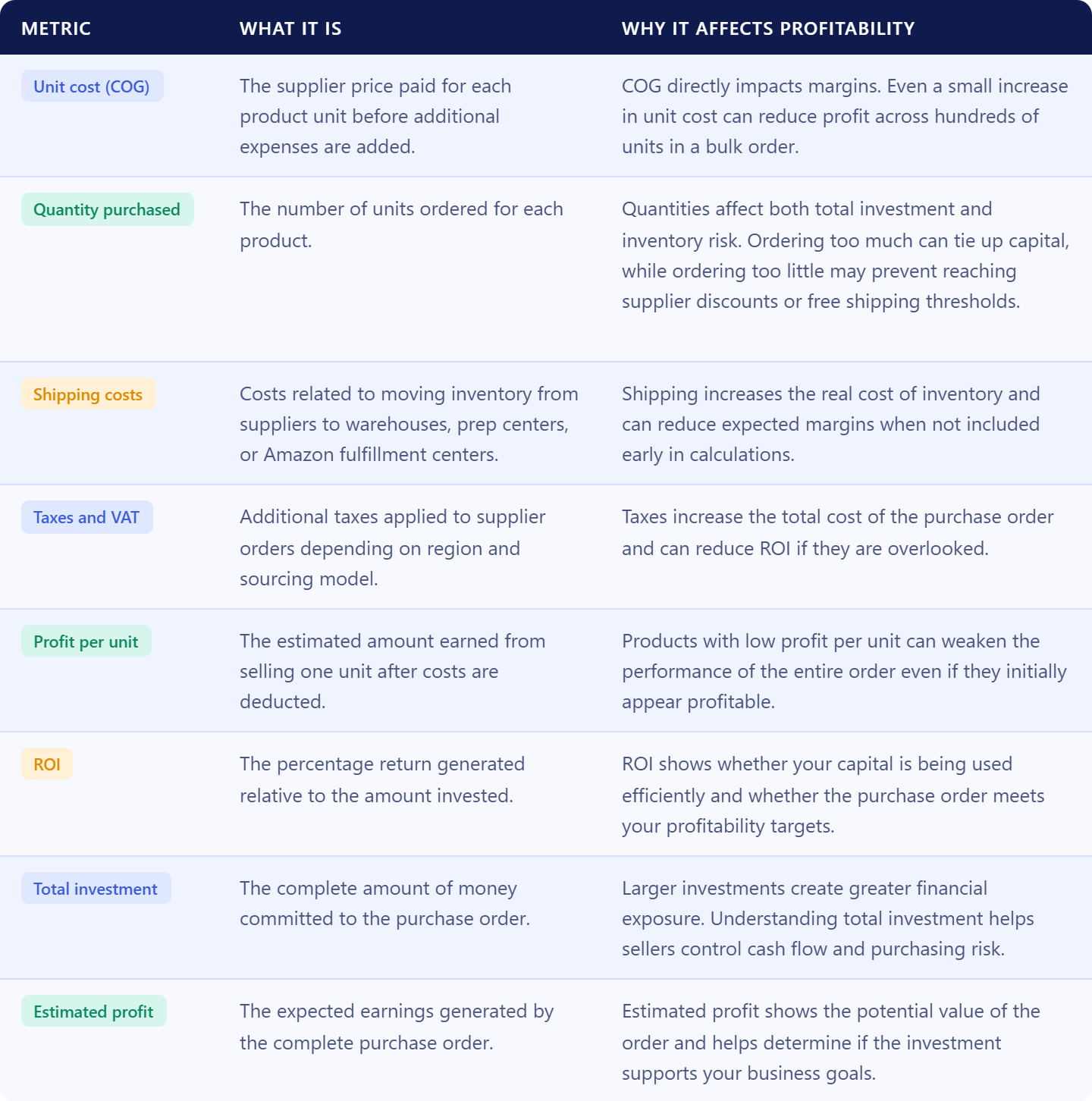
Unit cost (COG)
- What it is
The supplier price paid for each product unit before additional expenses are added.
- Why it affects profitability
COG directly impacts margins. Even a small increase in unit cost can reduce profit across hundreds of units inside a bulk order.
Quantity purchased
- What it is
The number of units ordered for each product.
- Why it affects profitability
Quantities affect both total investment and inventory risk. Ordering too much inventory can tie up capital, while ordering too little may reduce the value of supplier discounts or free shipping thresholds.
Shipping costs
- What it is
Costs related to transporting inventory from suppliers to warehouses, prep centers, or Amazon fulfillment centers.
- Why it affects profitability
Shipping expenses increase the real cost of inventory and can significantly reduce expected margins if they are overlooked during purchasing.
Taxes and VAT
- What it is
Additional taxes applied to supplier orders depending on region and sourcing model.
- Why it affects profitability
Taxes increase the total cost of a purchase order and can quietly reduce ROI if they are not included in calculations.
Profit per unit
- What it is
The estimated amount earned from selling one unit after costs are deducted.
- Why it affects profitability
Products with low profit per unit may weaken the performance of the entire purchase order even if they initially appear profitable.
Return on investment (ROI)
- What it is
The percentage return generated relative to the amount invested.
- Why it affects profitability
ROI helps sellers understand whether capital is being used efficiently and whether a purchase order meets target return goals.
Total investment
- What it is
The complete amount of money committed to the purchase order.
- Why it affects profitability
Large investments can create cash-flow pressure. Understanding total investment helps sellers balance growth with available capital.
Estimated profit
- What it is
The expected earnings generated by the full purchase order.
- Why it affects profitability
Estimated profit shows the potential return of the complete order and helps determine whether the investment supports business goals.
Why Purchase Order Profitability Matters
Amazon sellers often focus on product-level profitability during sourcing, but purchase decisions happen at the order level. A product with solid margins does not automatically create a profitable purchase order.
Large wholesale orders can include dozens of SKUs, shipping costs, taxes, prep expenses, and different inventory quantities that affect overall returns. Looking only at individual products can hide weak performers and create a misleading view of expected profit. Reviewing profitability at the purchase-order level helps sellers understand total investment, identify products that reduce margins, and make stronger purchasing decisions before inventory is ordered.
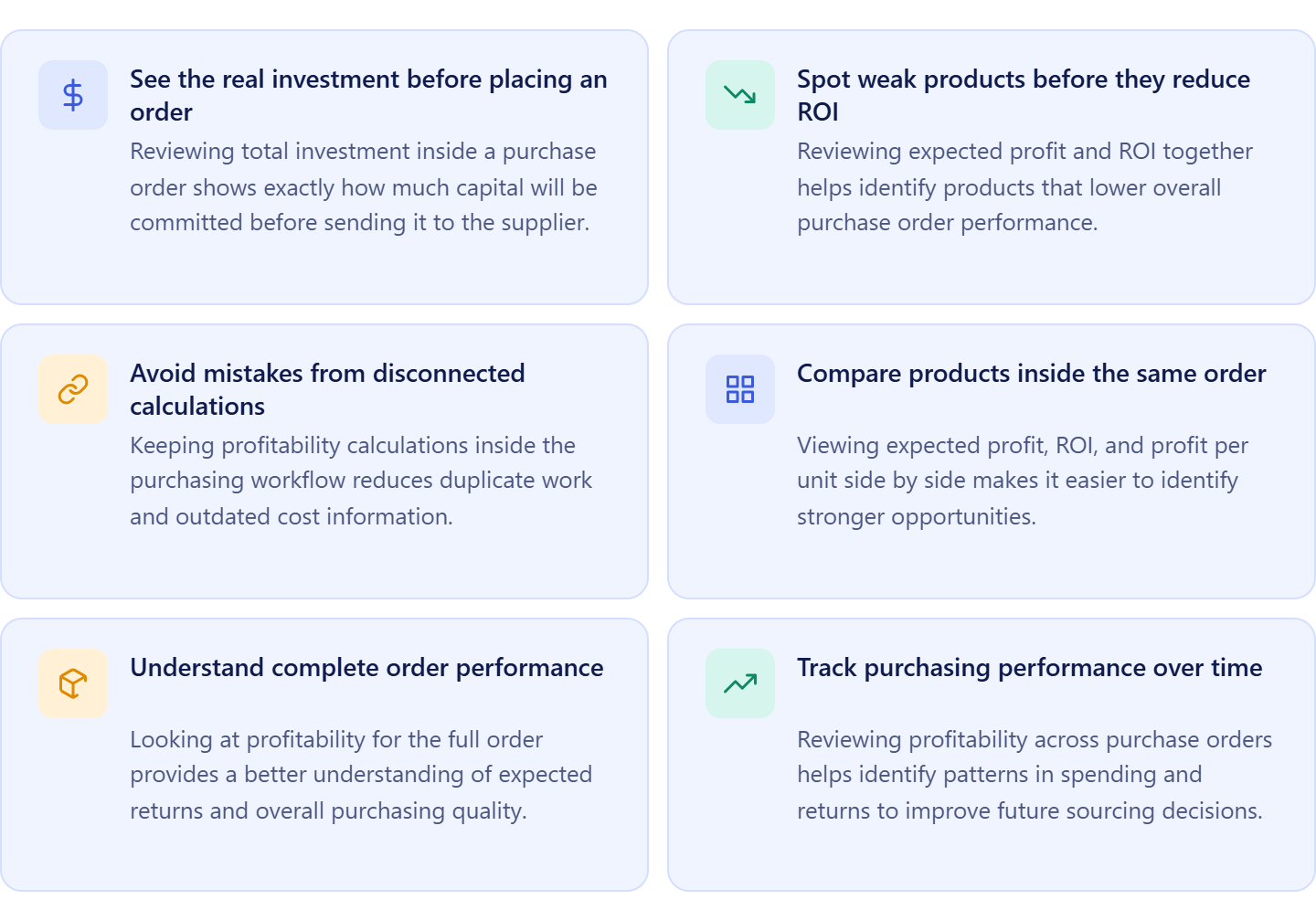
See the real investment before placing an order
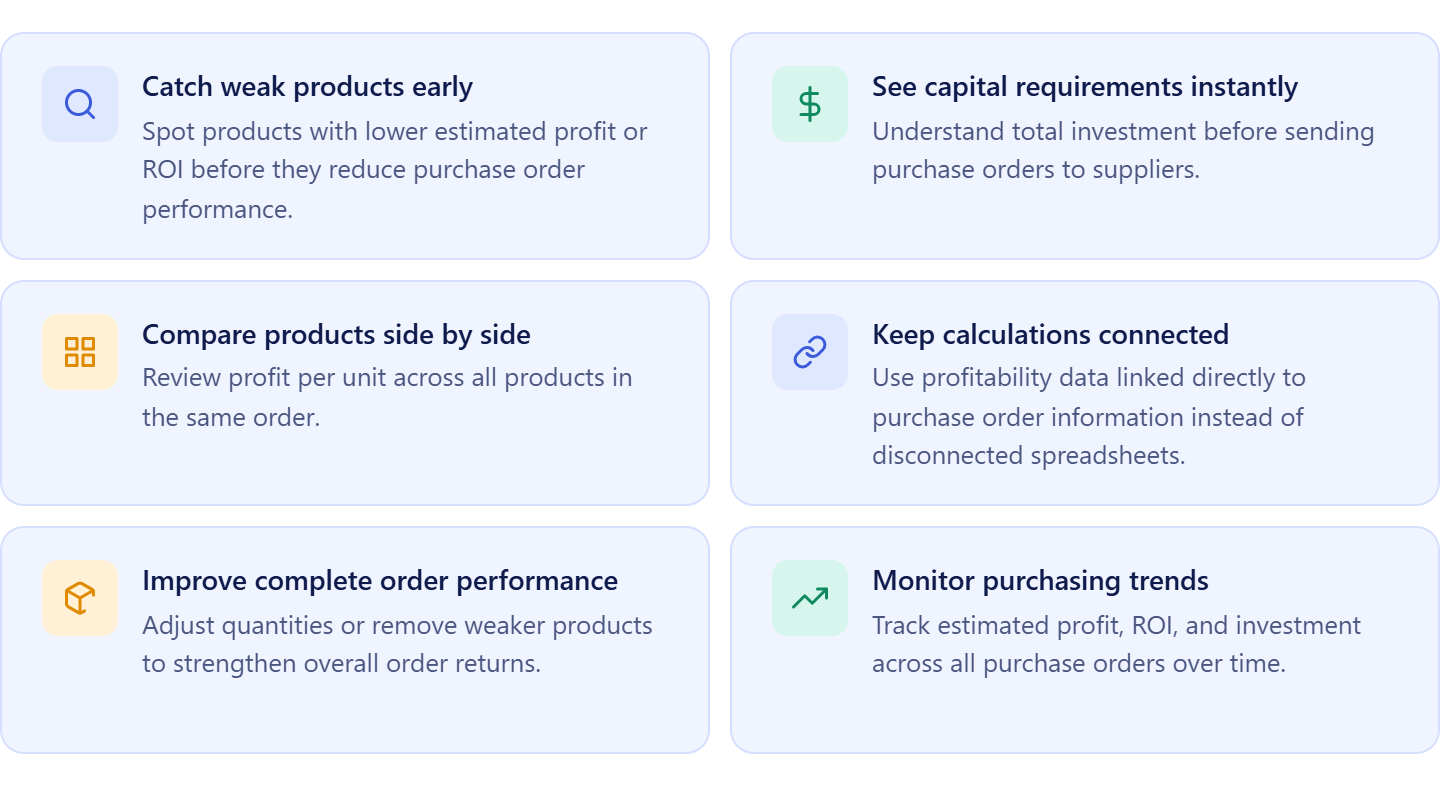
Large supplier orders can tie up significant capital. Reviewing total investment inside a purchase order shows exactly how much money will be committed before you send the order to the supplier.
Spot weak products before they reduce ROI
Some products appear profitable on their own but lower the performance of the entire purchase order. Reviewing expected profit and ROI together helps identify products that weaken returns.
Avoid mistakes from disconnected calculations
Using spreadsheets and separate calculators often creates duplicate work and outdated cost information. Keeping profitability calculations inside the purchasing workflow reduces manual errors.
Compare products inside the same order
Wholesale sellers often purchase dozens of products from one supplier. Viewing expected profit, ROI, and profit per unit side by side makes it easier to identify stronger opportunities.
Understand complete order performance
Strong products do not always create strong purchase orders. Looking at profitability for the full order provides a better understanding of expected returns and overall purchasing quality.
Track purchasing performance over time
Reviewing profitability across purchase orders helps sellers identify patterns in spending, investment, and returns. This makes it easier to improve future sourcing and purchasing decisions.
What Seller Assistant Tools Help Calculate Purchase Order Profitability?
Seller Assistant helps Amazon wholesale sellers, online arbitrage sellers, and dropshippers evaluate purchase order performance before inventory is purchased. The PO Profit Calculator, built into the Purchase Orders Module, automatically calculates expected profitability using connected purchasing data. Instead of reviewing products individually or switching between spreadsheets and calculators, sellers can see profitability for complete supplier orders in one place.
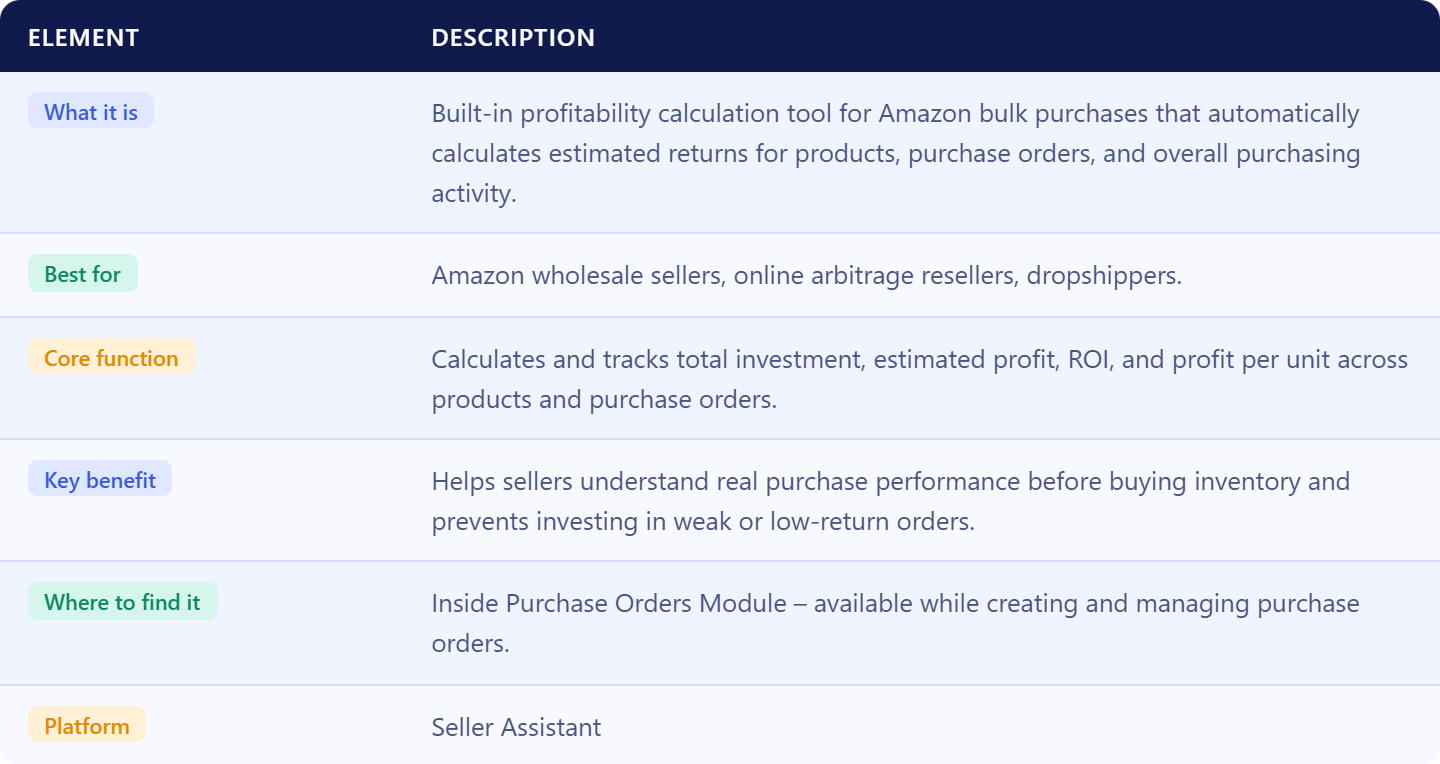
The tool calculates metrics at multiple levels, from individual products to full purchase orders and overall purchasing activity. This gives sellers a clearer view of expected returns, total investment, and order performance before capital is committed.
What the PO Profit Calculator helps you analyze
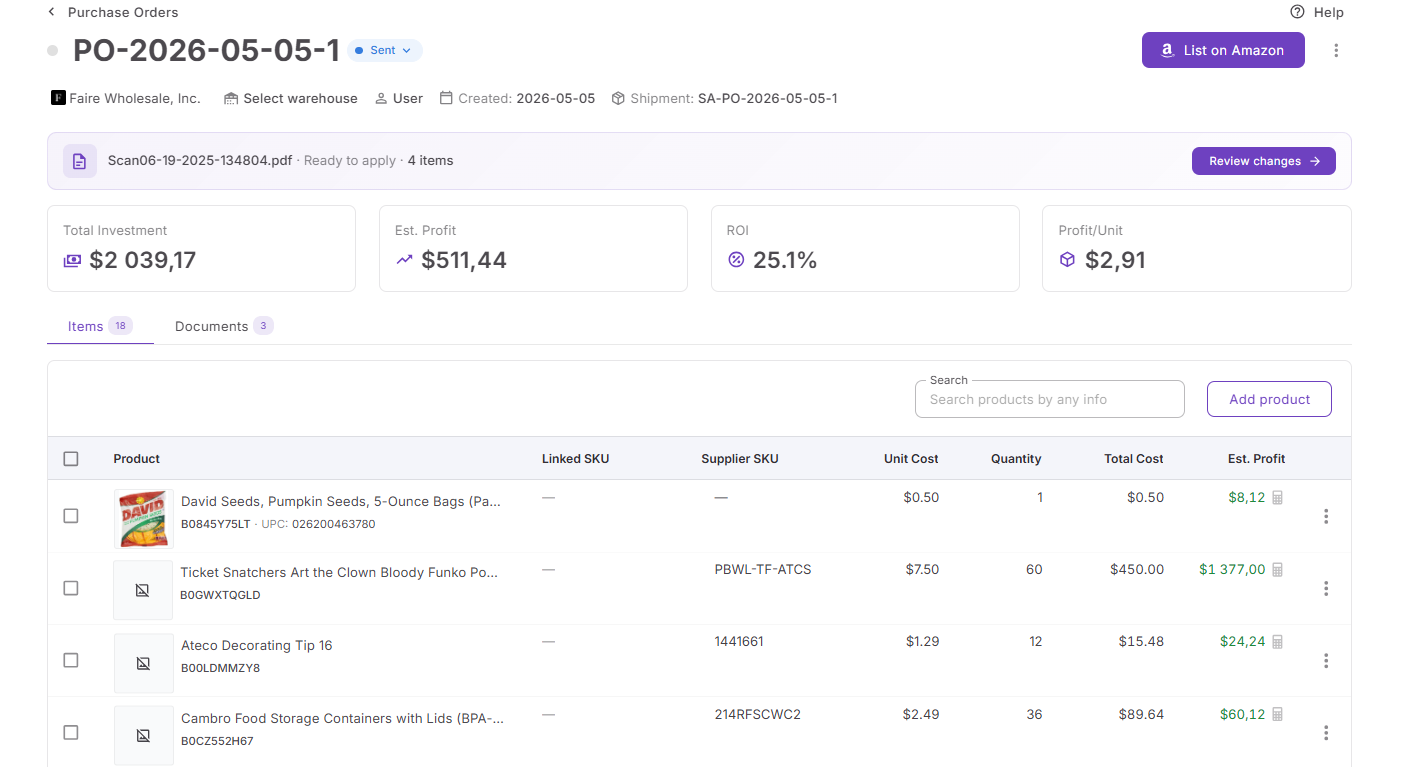
The PO Profit Calculator gives sellers visibility into profitability from different perspectives instead of focusing only on individual products. It helps evaluate how products perform inside a purchase order, how the entire order performs as a single investment, and how purchasing results change across multiple orders over time.
This broader view makes it easier to understand not only whether specific products look profitable, but also whether the complete supplier order supports your business goals and expected returns.
Where to find and use it
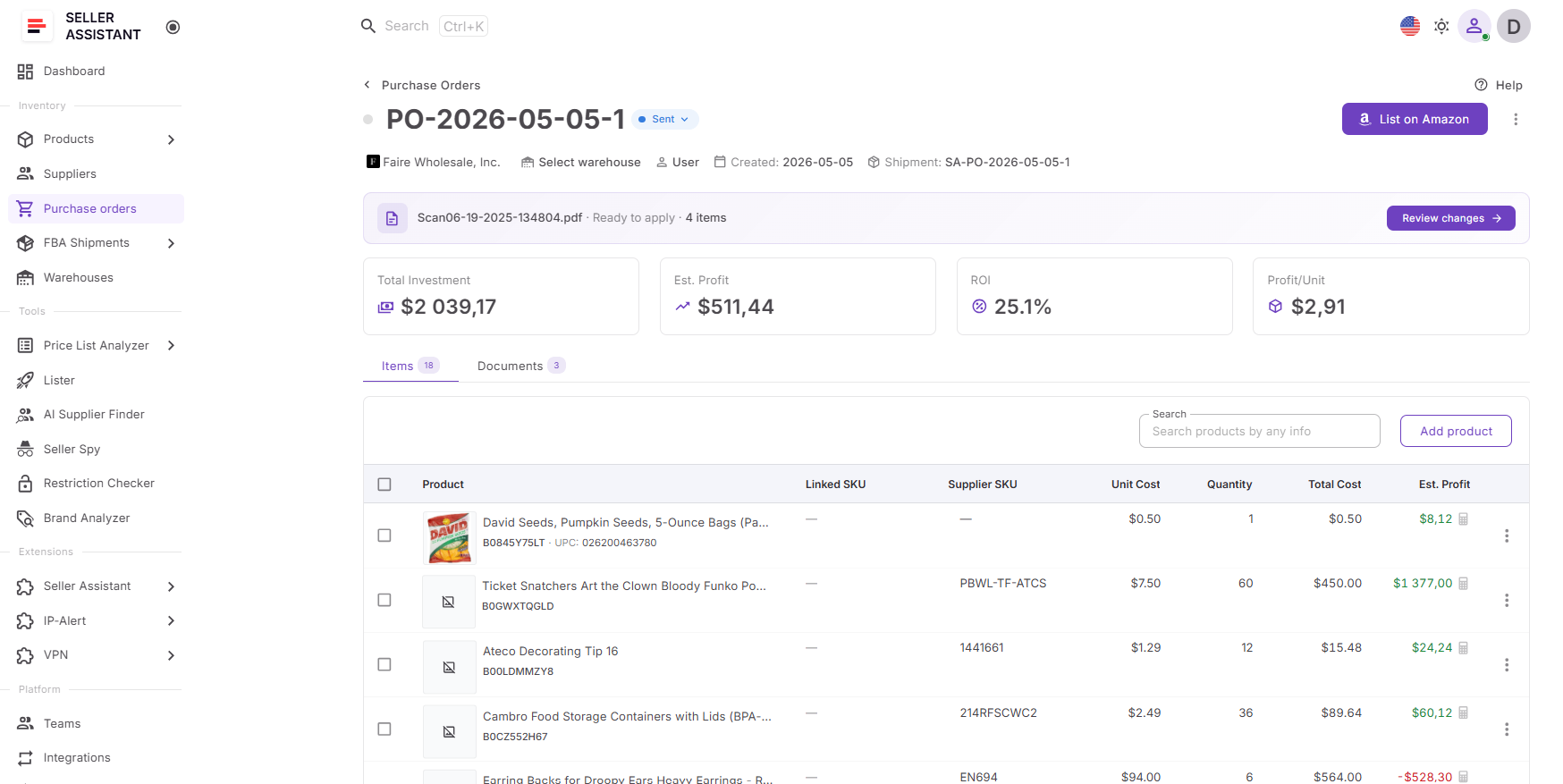
The PO Profit Calculator is available directly inside the Purchase Orders Module while creating or reviewing supplier orders. The tool stays connected to live purchasing data and refreshes automatically whenever order values change.
As sellers adjust product quantities, costs, shipping expenses, taxes, or other purchasing details, calculations update instantly. This makes it easier to test different purchasing scenarios and refine decisions before placing an order.
Why it helps improve purchasing decisions
Wholesale inventory purchases often require substantial investment, and small mistakes become more expensive as order size grows. Looking at products separately can make an order appear stronger than it really is because lower-performing products and additional expenses may stay hidden.
Reviewing profitability at the purchase-order level helps sellers understand whether an order supports their target margins, identify products that weaken performance, and avoid committing capital to inventory with weaker expected returns.
How it fits into your wholesale workflow
The PO Profit Calculator works as part of Seller Assistant’s connected purchasing workflow. Products flow from sourcing and research tools into the Purchase Orders Module, while supplier and warehouse information is filled automatically from connected data sources.
Because profitability stays tied to purchasing activity, sellers can move from sourcing to purchasing decisions without transferring information between multiple tools or rebuilding calculations manually.
What You Can Do with PO Profit Calculator
How PO Profit Calculator calculates purchase order profitability
The PO Profit Calculator works directly inside the Purchase Orders Module, allowing sellers to review profitability without switching between spreadsheets or separate tools. Instead of calculating returns manually, profitability stays connected to live purchase order data and updates automatically as the order changes.
As products are added, quantities are adjusted, or purchasing costs are modified, calculations refresh instantly. This helps sellers make decisions using current information rather than outdated estimates.
Where you can access the PO Profit Calculator
The PO Profit Calculator is available inside the Purchase Orders Module during purchase order creation and review. Profitability insights appear directly within the order view and adjust automatically whenever purchasing values change.
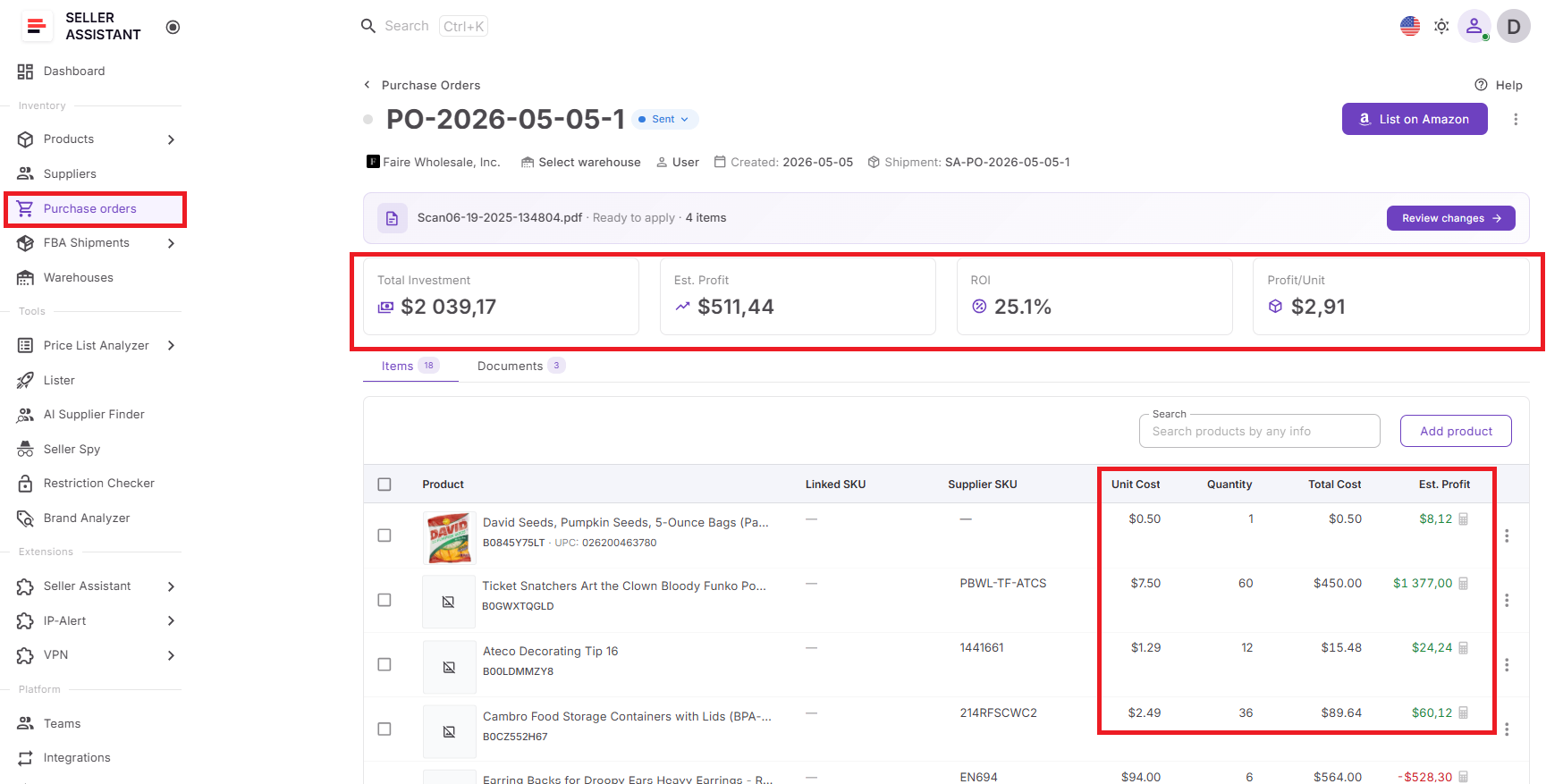
This allows sellers to evaluate order performance while building the purchase order instead of reviewing it later in separate calculations.
What insights the PO Profit Calculator provides
The PO Profit Calculator helps sellers understand profitability at different purchasing levels rather than looking at products in isolation.
It can provide visibility into at different levels/
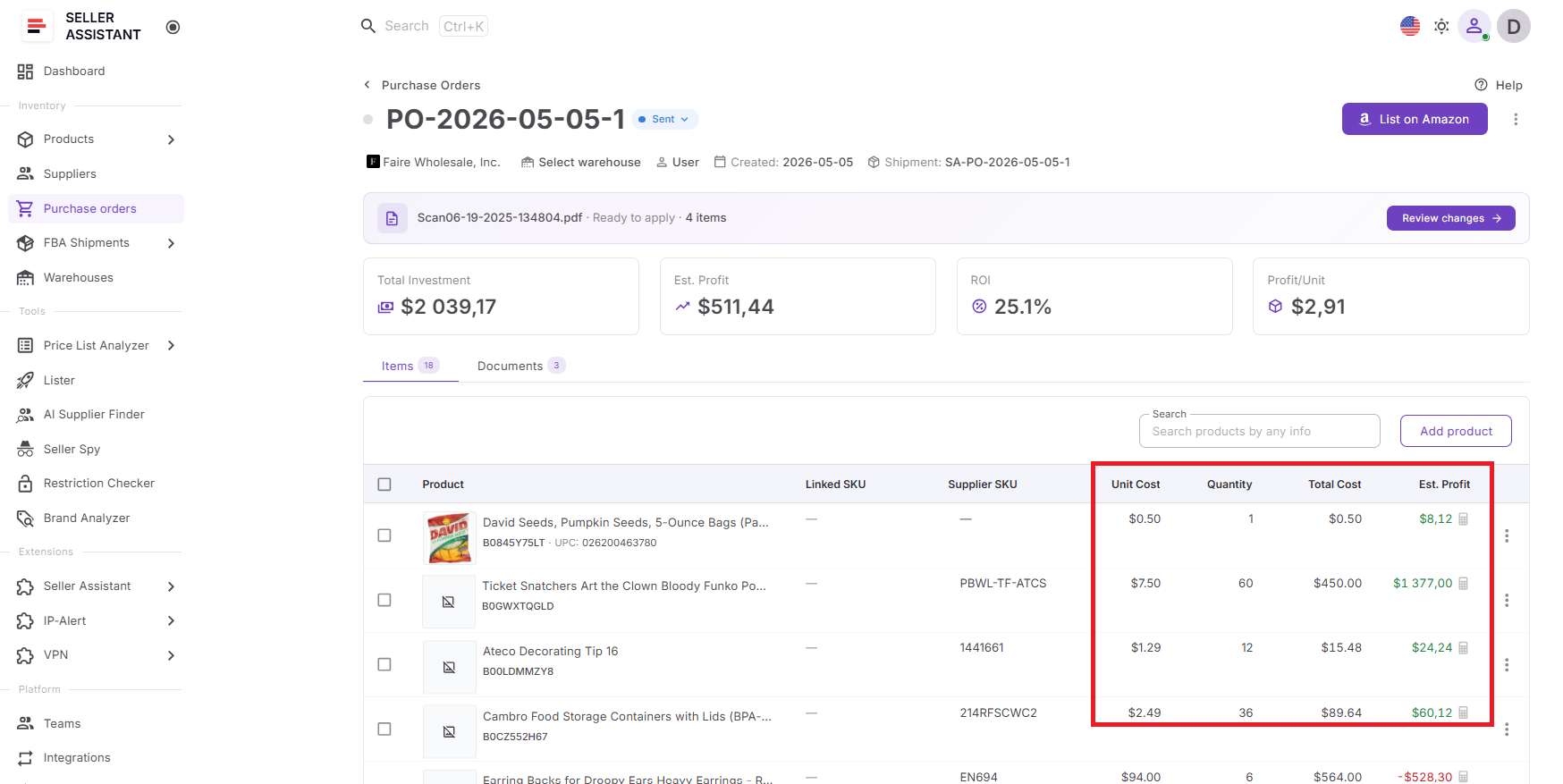
Product-level performance
- Unit cost
- Quantity
- Total cost
- Estimated profit
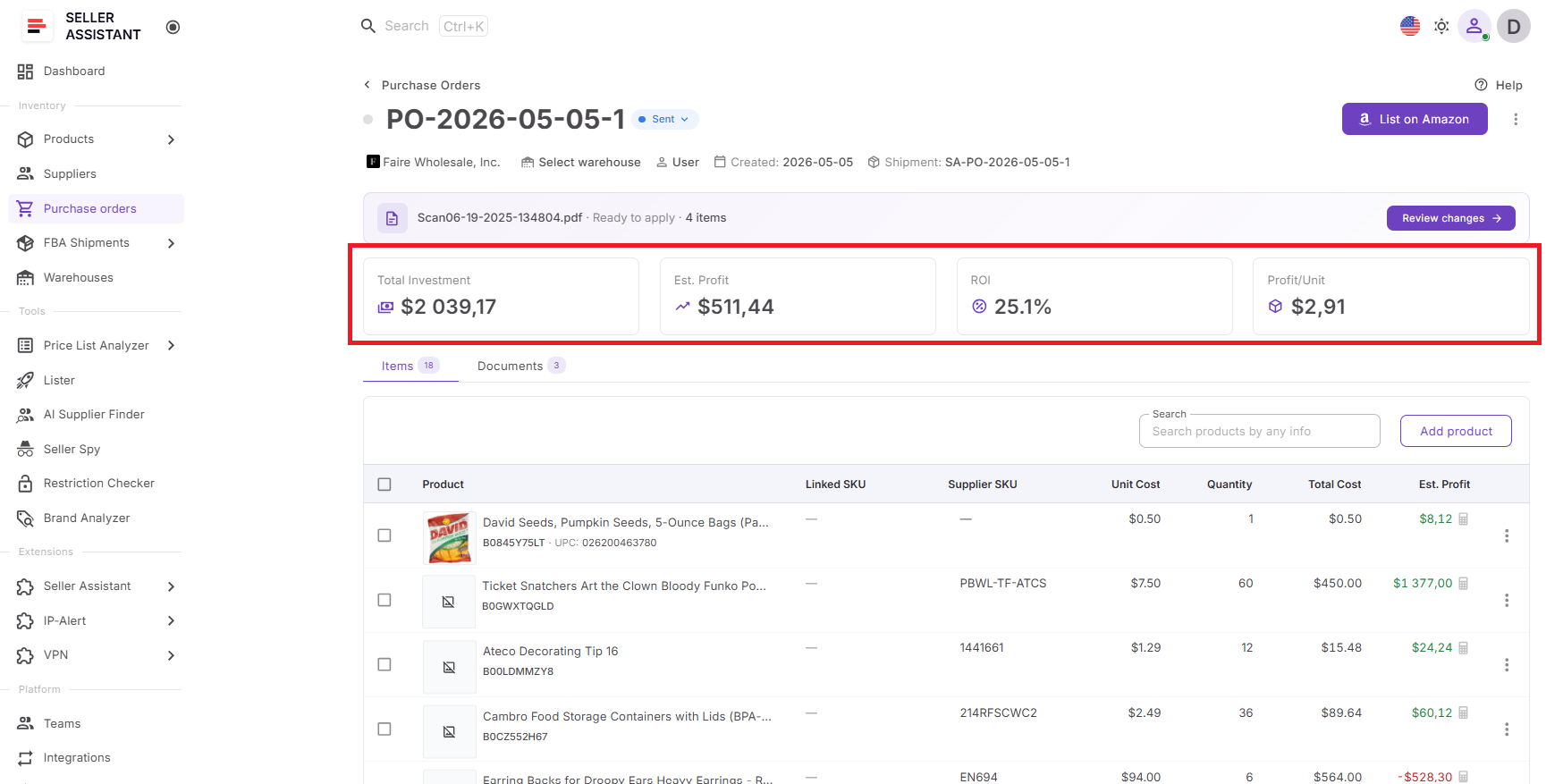
Purchase-order performance
- Total investment
- Estimated profit
- ROI
- Profit per unit
Profitability for all purchase orders:
- Total investment
- Estimated profit
- ROI
- Profit per unit
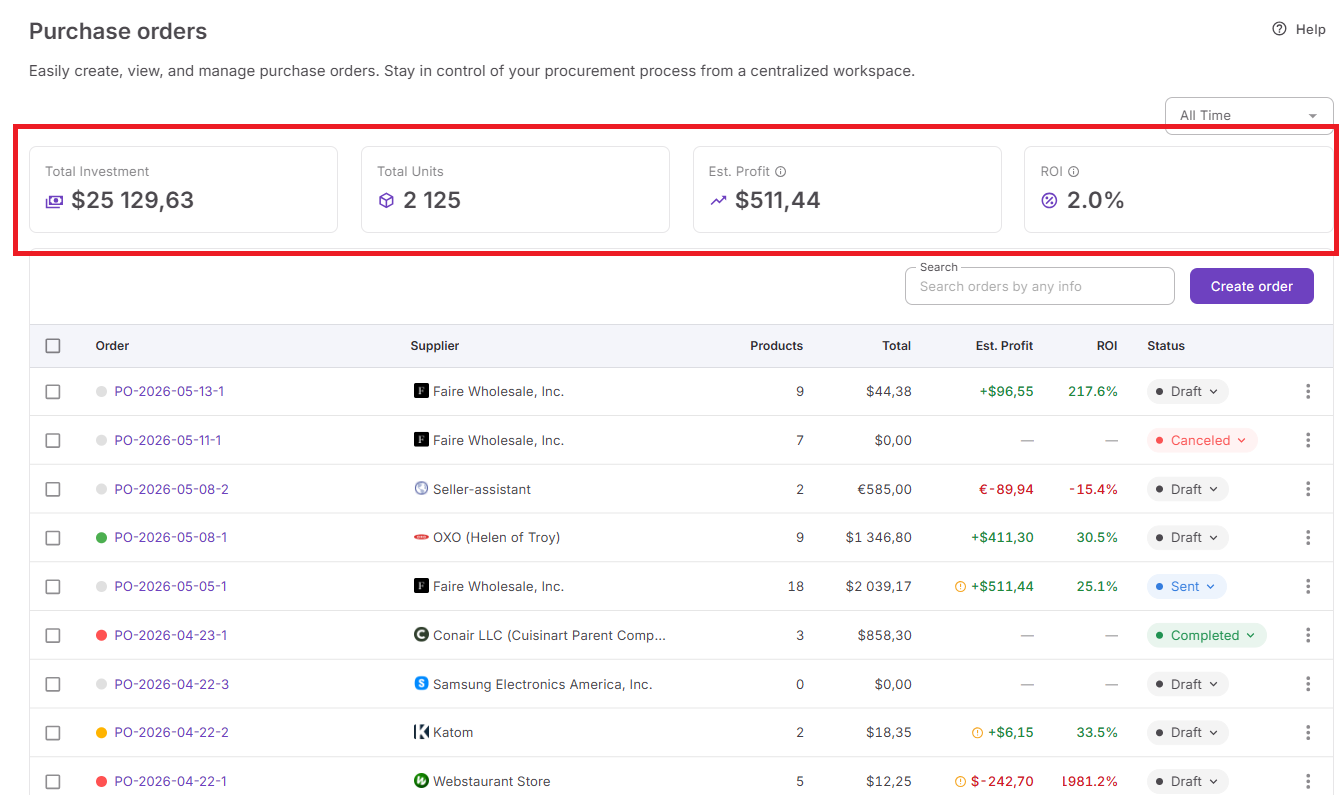
This allows sellers to review both individual products and complete purchasing performance from a single view.
How it helps optimize purchase orders
Not every product contributes equally to purchase order performance. Some SKUs improve returns, while others reduce profitability and tie up capital.
The PO Profit Calculator helps sellers:
- Compare product performance
- Identify lower-performing SKUs
- Review profitability across products
- Adjust order quantities
- Remove weaker products before ordering
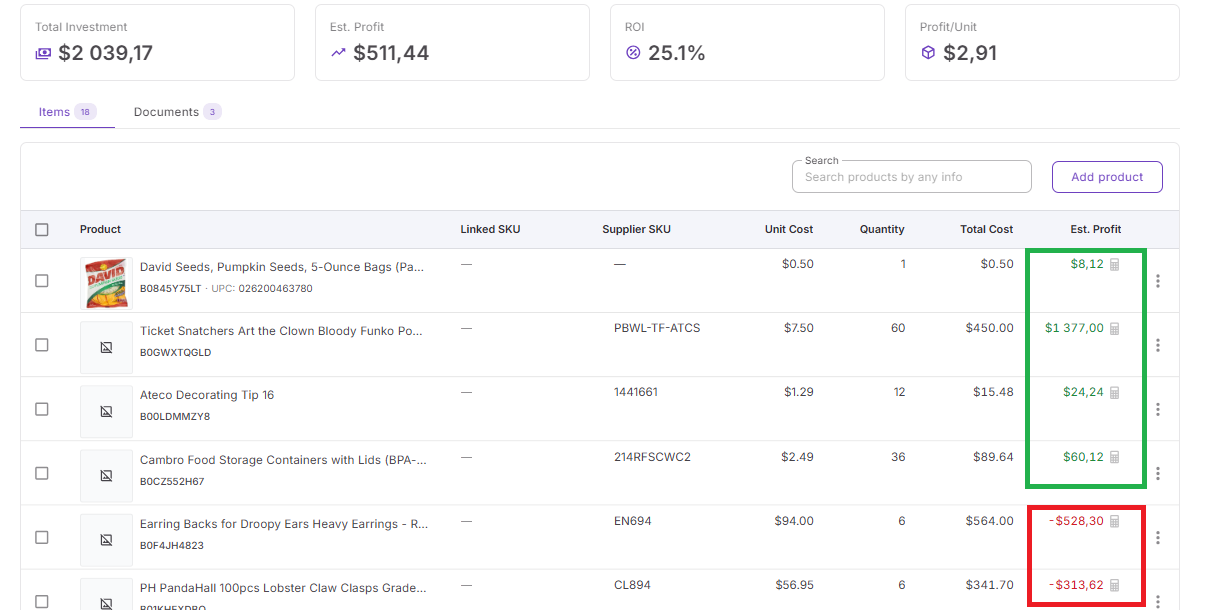
This helps improve the quality of the complete purchase order rather than optimizing products one at a time.
How it works with Seller Assistant tools
The PO Profit Calculator operates inside Seller Assistant’s connected purchasing workflow and uses data already stored across the platform.
Information flows automatically from:
Provides sourcing and product analysis data.
Stores sourced products, supplier offers, COG values, and purchasing information.
Provides supplier details and purchasing terms.
Applies routing and destination information.
Uses purchasing data to calculate order profitability.
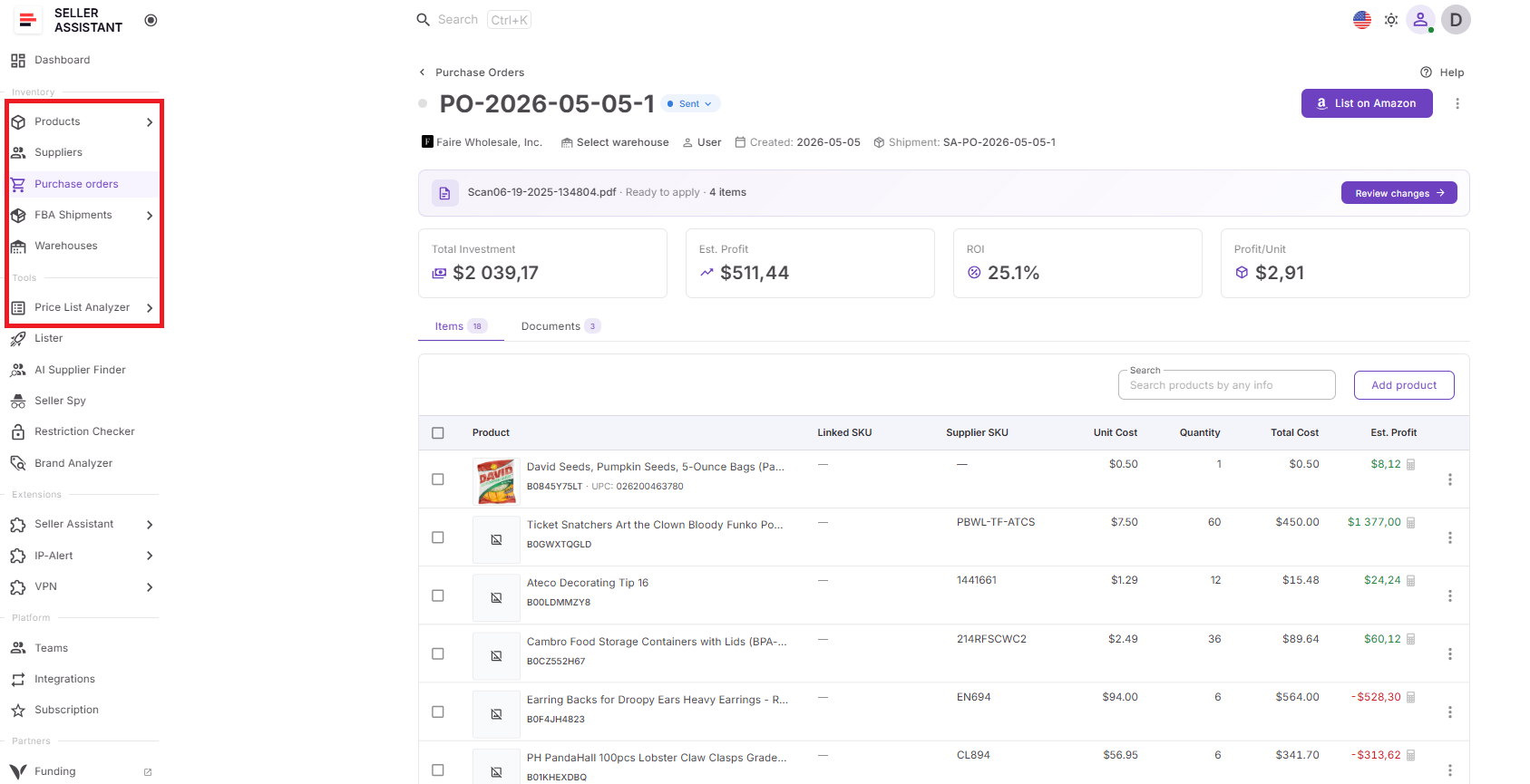
Because these tools share information automatically, sellers do not need to transfer data manually or rebuild calculations in spreadsheets.
Why connected profitability matters
Bulk purchasing requires larger investments, which means mistakes become more expensive. Looking only at individual products can hide how the full order actually performs.
Keeping profitability connected to live purchasing data helps sellers evaluate expected returns before placing inventory orders, improve purchasing quality, and make decisions based on complete order performance rather than assumptions.
How to Use the PO Profit Calculator Step by Step
The PO Profit Calculator works inside the Purchase Orders Module. You create or open a supplier order, add products, check costs, and review profitability before deciding whether the order is worth placing.
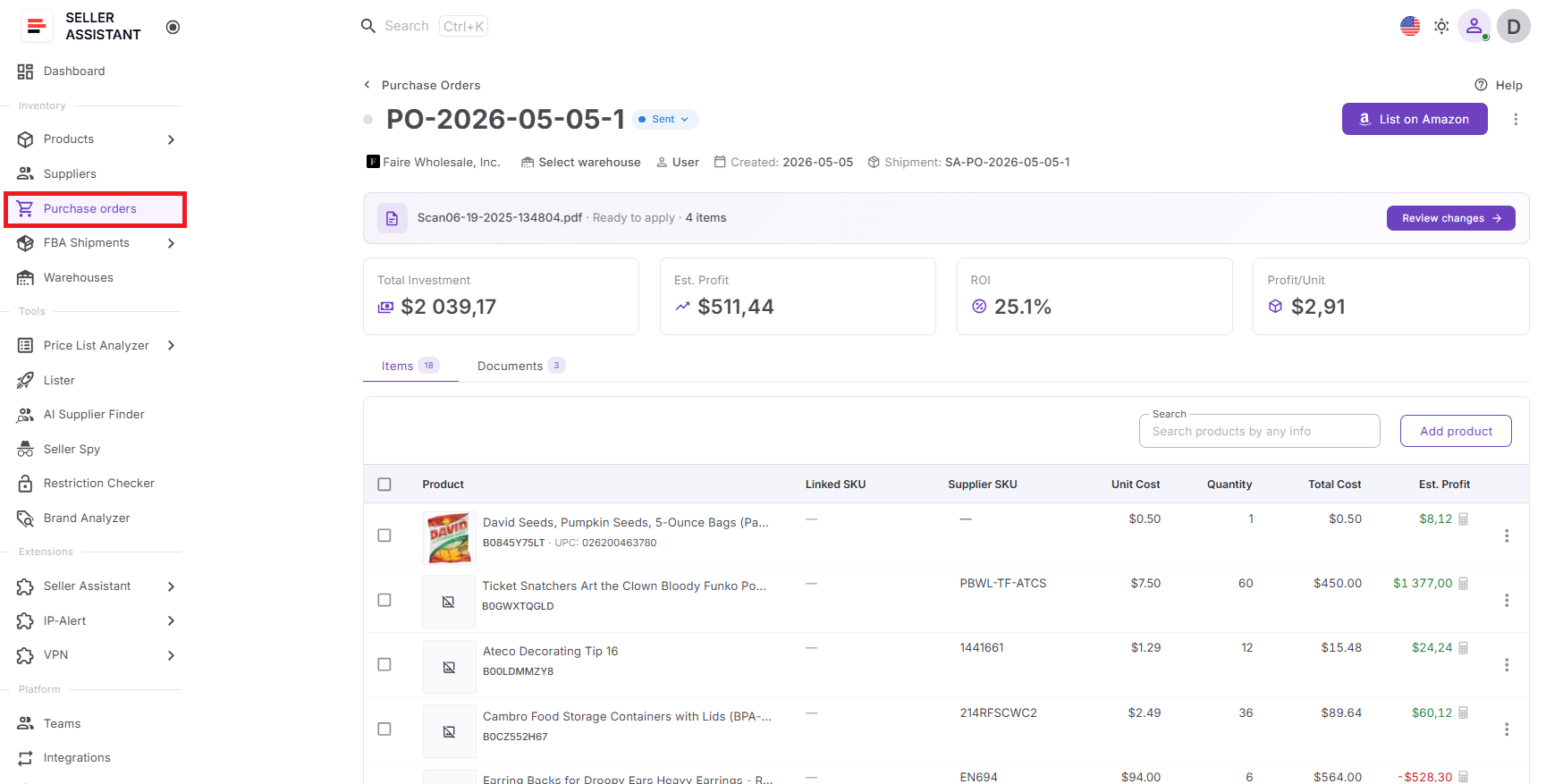
Step 1. Open Purchase Orders Module
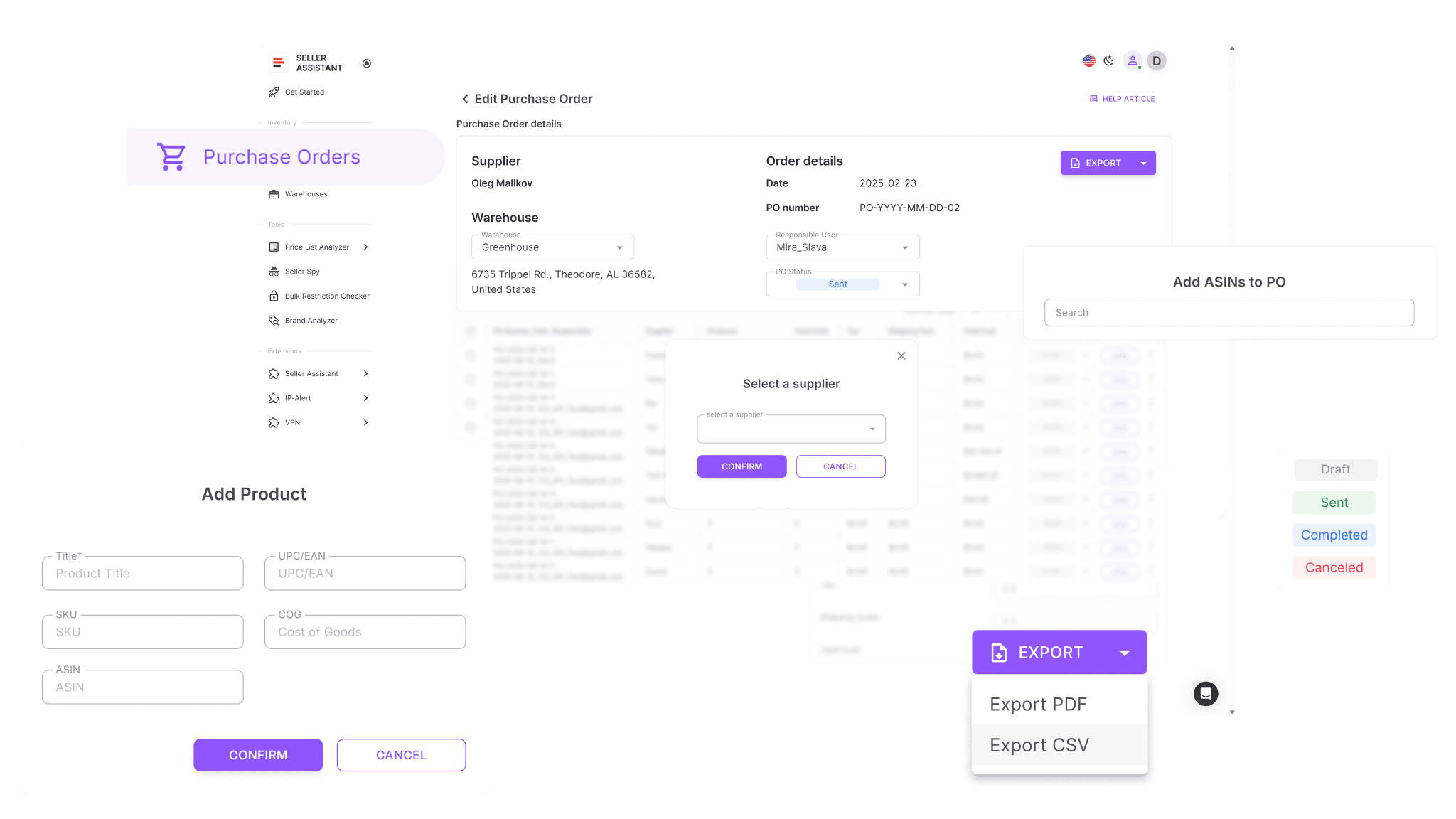
Log in to Seller Assistant and go to Inventory → Purchase Orders. Open an existing PO or create a new purchase order for the supplier you plan to buy from.
Step 2. Add products to the order
Add products from Product Database, Price List Analyzer, supplier price lists, product search, or manual entry. Selected products appear in the PO with their identifiers and cost data.
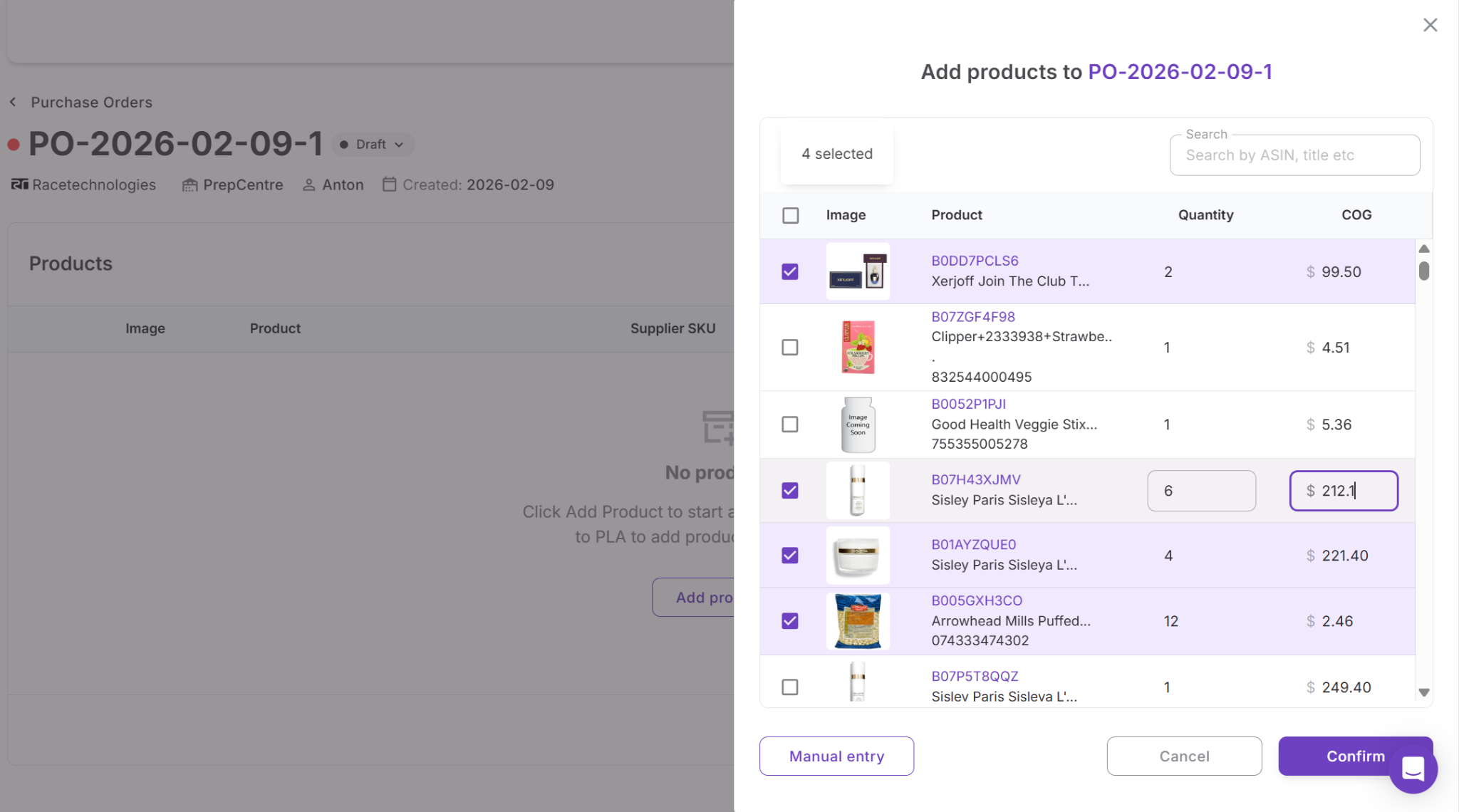
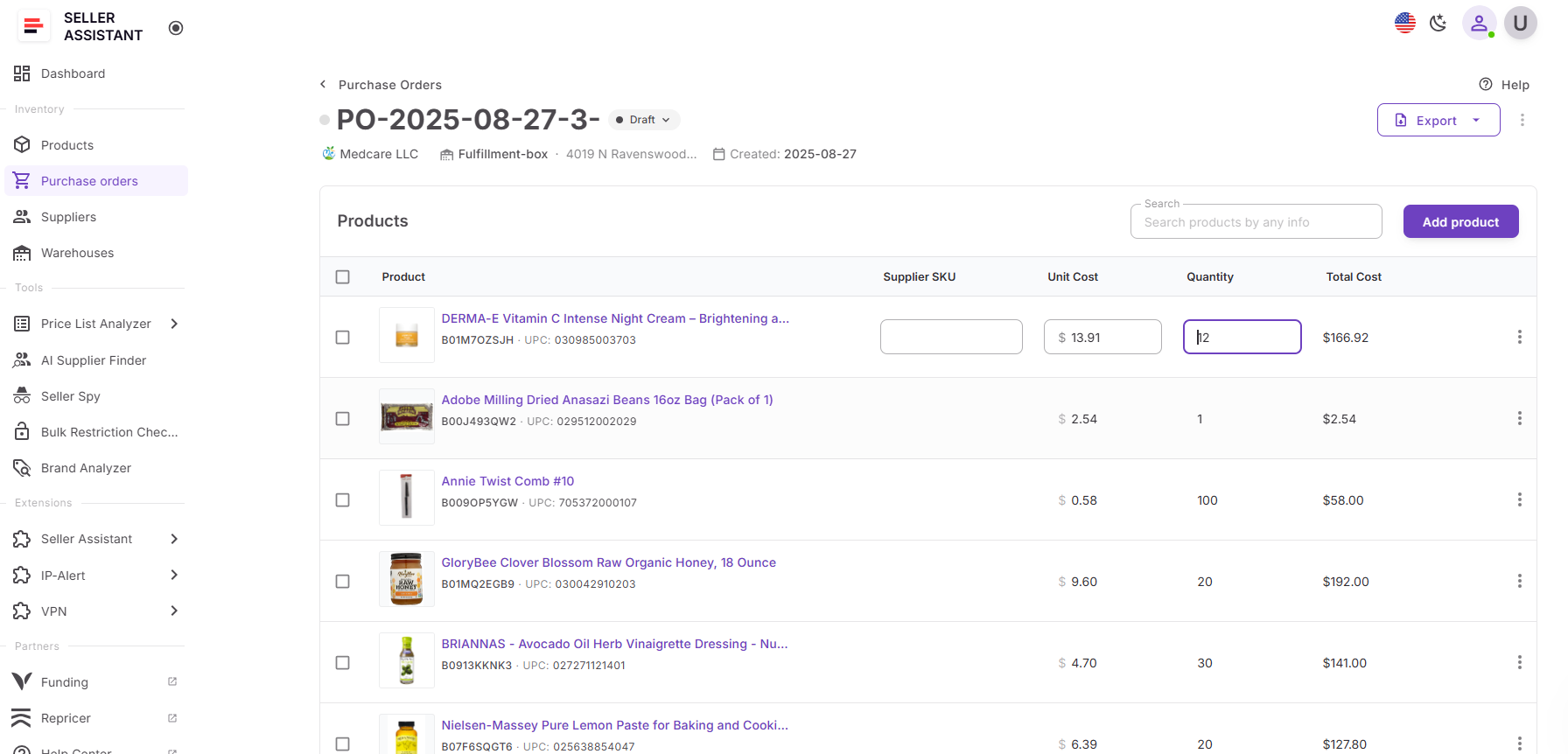
Step 3. Review quantities and costs
Check each product line and update quantity, unit cost, shipping, tax, or other purchase values if needed. Profitability updates as the order changes.
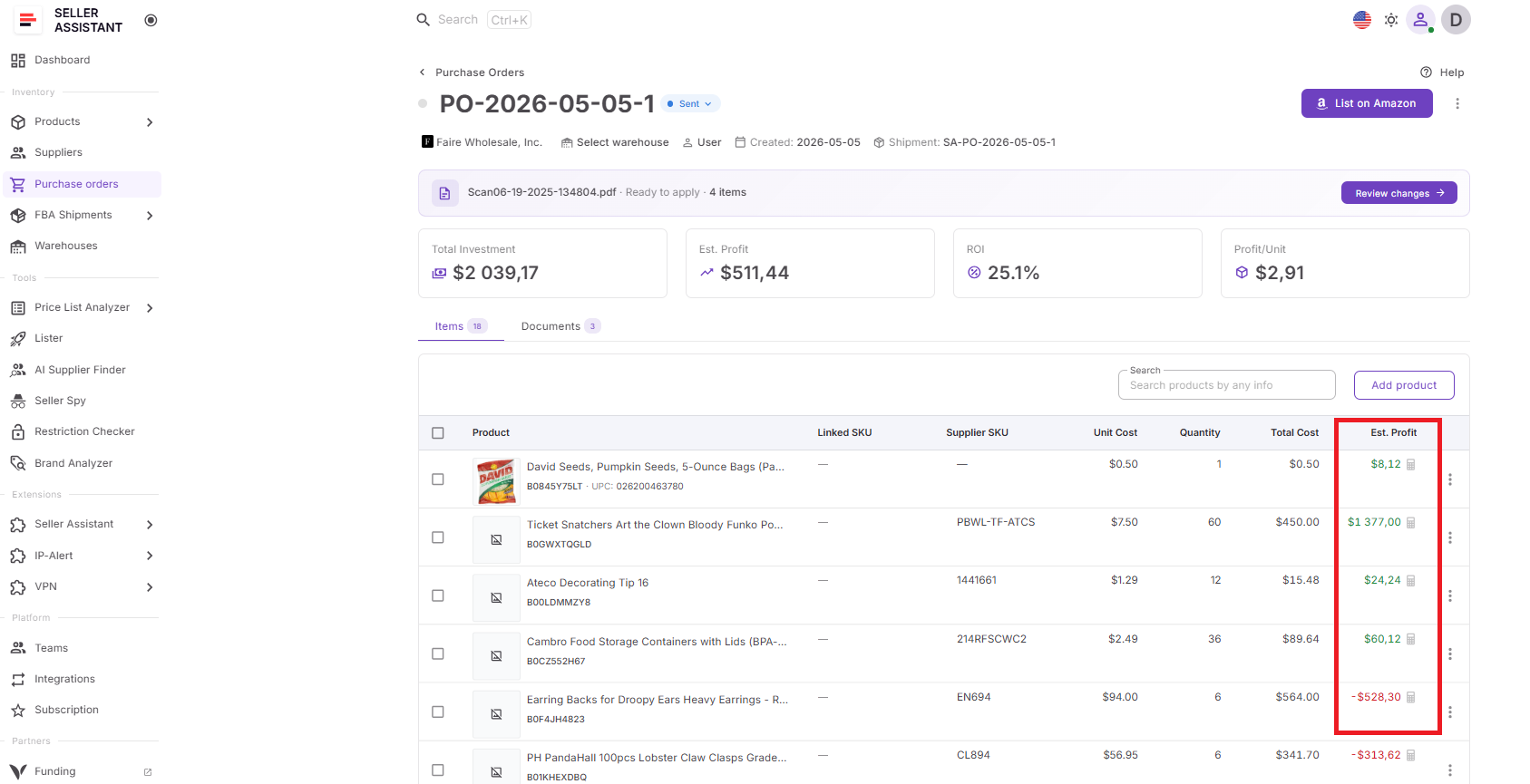
Step 4. Check product-level profitability
Review profitability for each product in the order. Use these metrics to identify SKUs that may reduce overall purchase order performance.
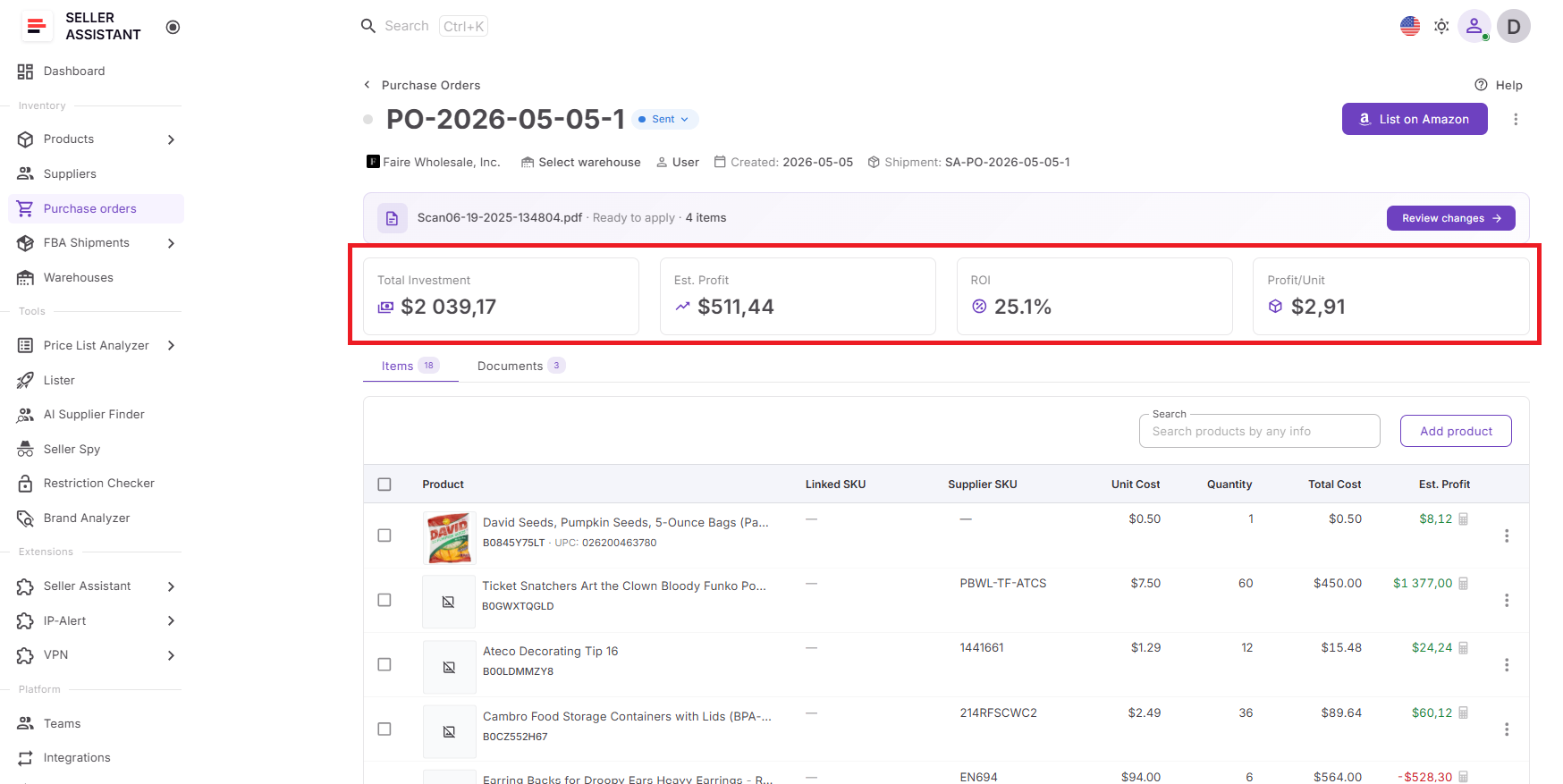
Step 5. Review full order profitability
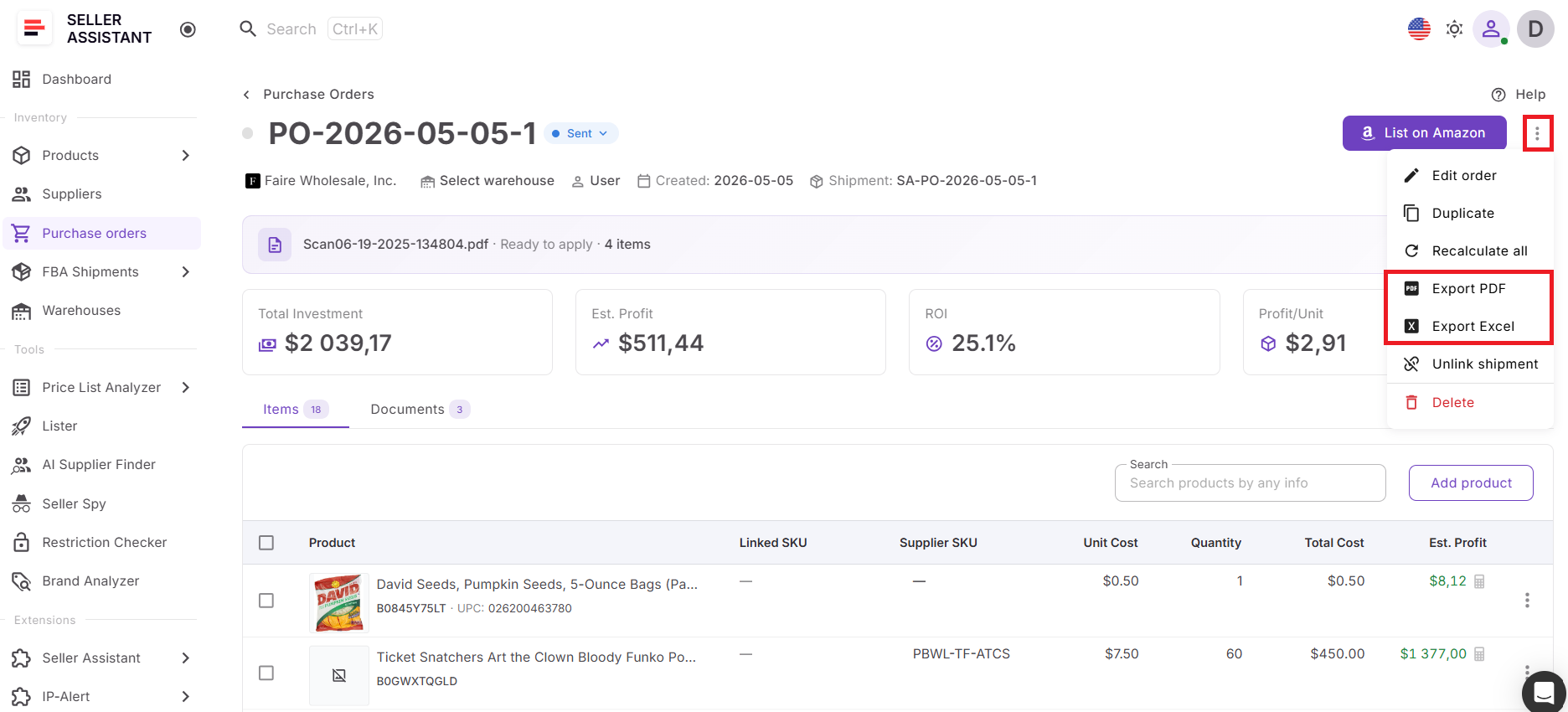
Check the PO summary to understand the expected performance of the complete order, including total investment, estimated profit, ROI, and profit per unit.
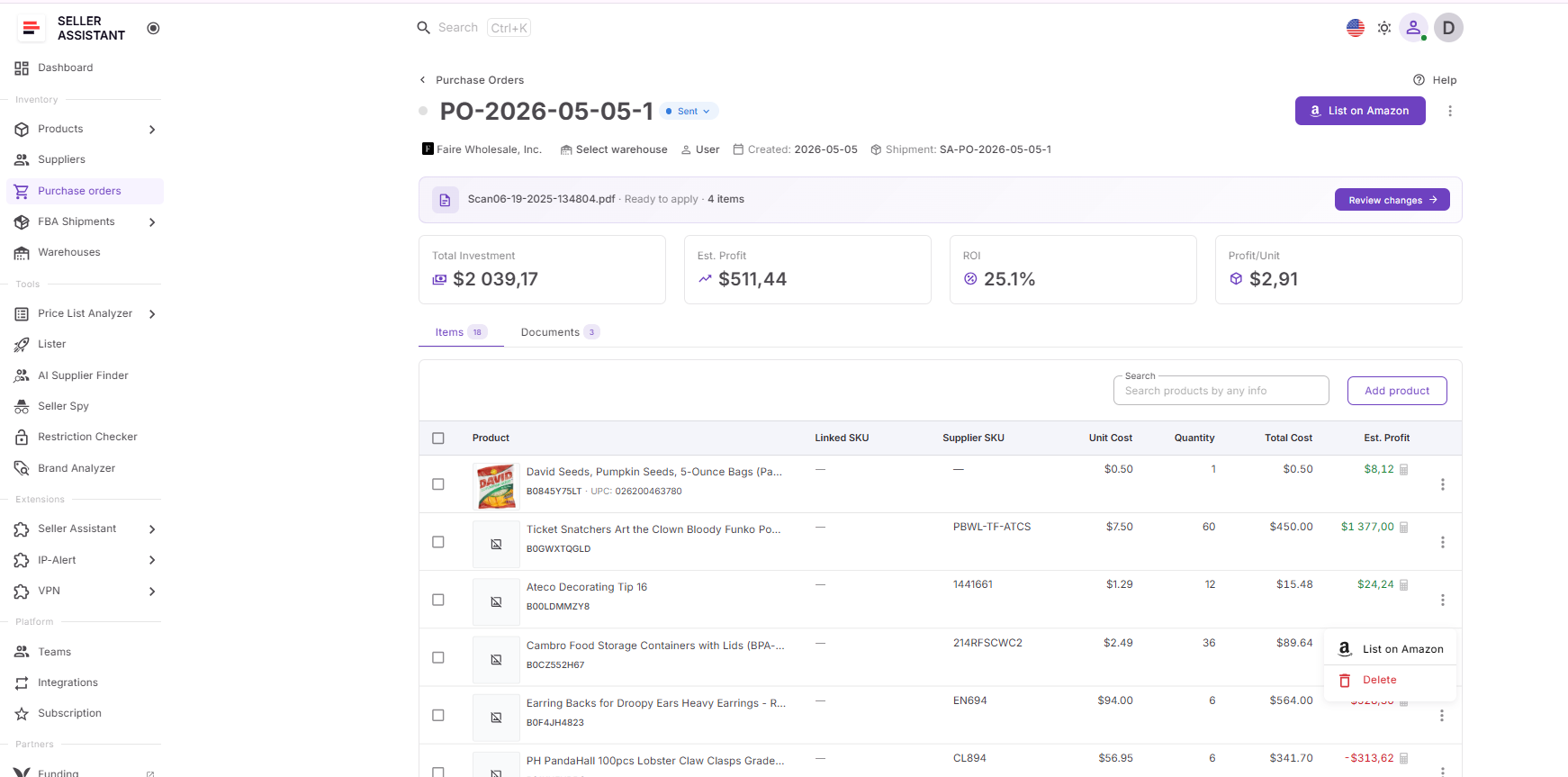
Step 6. Optimize the order before buying
Remove weak products, adjust quantities, or update costs until the purchase order matches your target profit and ROI.
Step 7. Export and send the PO
When the order meets your profitability targets, export it as PDF or XLSX and send it to your supplier.
FAQ
How is purchase order profitability different from product profitability?
Product profitability measures the expected return of a single SKU. Purchase order profitability evaluates the performance of the entire supplier order, including all products, costs, and investment requirements.
Why can profitable products create an unprofitable purchase order?
Some products may have weaker margins, lower ROI, or require higher costs that reduce overall order performance. Additional expenses such as shipping, taxes, and purchasing costs can also lower returns across the full order.
What costs should be included when calculating wholesale purchase order profitability?
Calculations should include unit cost, shipping expenses, taxes, prep costs, and any other purchasing-related costs that affect inventory value. Missing expenses can create misleading profit estimates and reduce actual returns.
Can I improve profitability before placing a purchase order?
Yes. You can remove lower-performing products, adjust quantities, or update purchasing costs to improve the expected return of the order. Small changes often increase overall ROI and reduce capital tied up in weaker inventory.
Why is calculating profitability inside a purchase order better than using spreadsheets?
Purchase-order-based calculations stay connected to live purchasing data and update automatically when order details change. Spreadsheets often require manual updates and can create outdated costs, duplicate work, and calculation errors.
Final Thoughts
Wholesale purchasing creates bigger opportunities, but it also increases the impact of small mistakes. A few weaker products, inaccurate costs, or missing expenses can reduce the performance of an entire purchase order and tie up capital in inventory that delivers lower-than-expected returns. Looking only at product-level profit often does not provide the full picture.
Seller Assistant helps Amazon wholesale sellers, online arbitrage sellers, and dropshippers evaluate purchase order profitability where buying decisions happen — directly inside the Purchase Orders Module. With the PO Profit Calculator, sellers can review profitability across products and complete orders, compare opportunities, optimize purchasing decisions, and understand expected returns before placing inventory orders.