Finding wholesale suppliers for Amazon often feels harder than sourcing itself. You can identify strong opportunities, but turning them into real supply is where the process breaks.
Many sellers waste time contacting the wrong brands, chasing unreliable distributors, or working with suppliers that can’t support profitable resale. The issue isn’t just how you search – it’s when you search.
This post shows a more efficient approach: validate brands first, then find suppliers that match those opportunities, all with Seller Assistant. By structuring your workflow this way, you reduce risk, save time, and build a sourcing process that actually scales.
Why Speed Matters When Sourcing Suppliers for Validated Brands
Once you’ve identified a brand that meets your criteria – strong demand, manageable competition, and real scalability – the next step is acting on it quickly. Delays between analysis and supplier outreach often lead to missed opportunities, shifting prices, or increased competition.
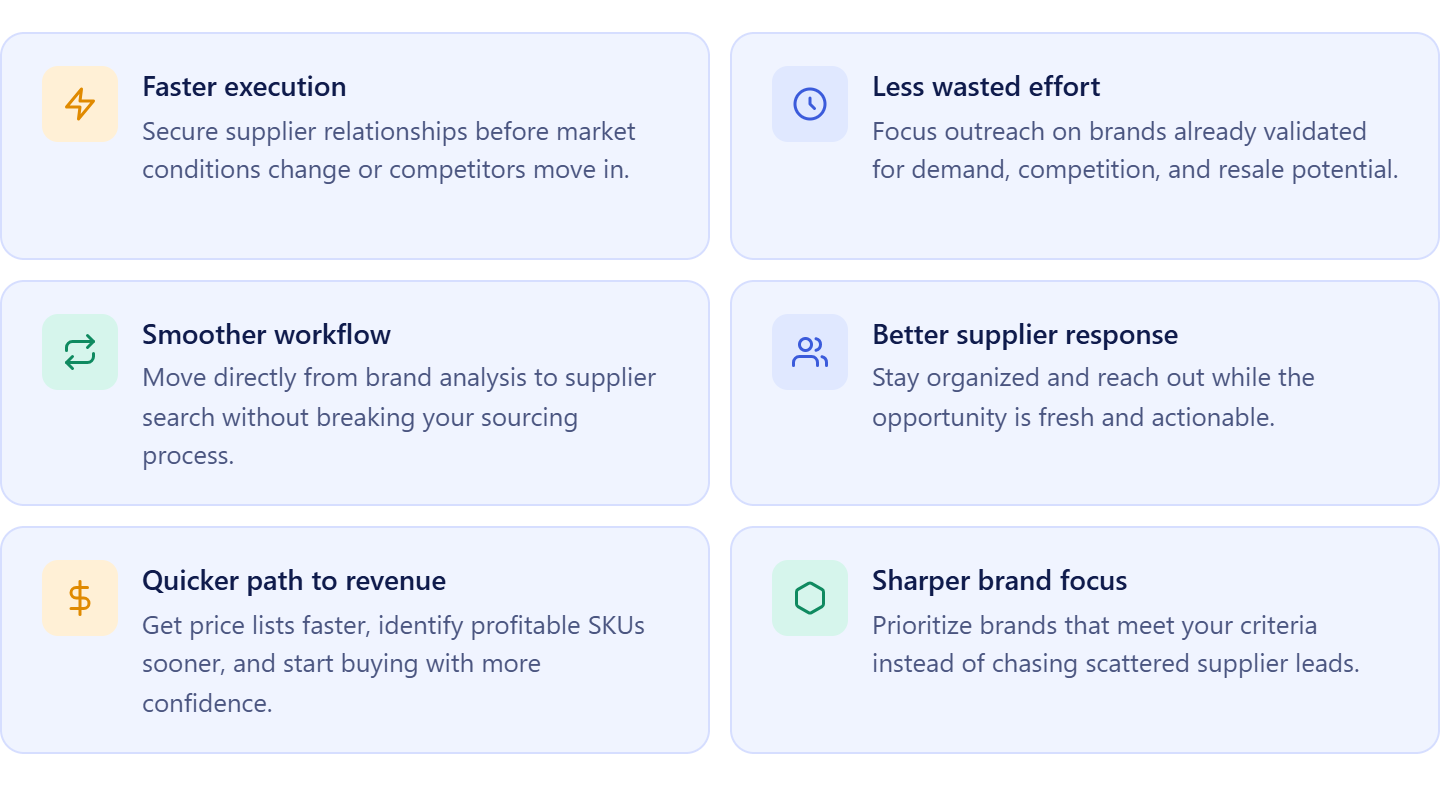 Faster execution protects profitable opportunities
Validated brands don’t stay “easy” for long. Moving quickly helps you secure supplier relationships before market conditions change or competitors enter.
Reduced risk of wasted sourcing efforts
When you act immediately after validation, you avoid spending time on brands that may decline or become harder to source later.
Stronger and more consistent workflow
Connecting brand analysis directly to supplier search keeps your sourcing process structured, efficient, and scalable instead of fragmented.
Better supplier response and approval chances
Reaching out while the opportunity is fresh helps you stay organized and consistent with outreach, increasing the chances of building supplier relationships before your pipeline gets crowded.
Faster transition from research to revenue
The quicker you move from validated brand to supplier account, the sooner you can access price lists, identify profitable SKUs, and start generating sales.
Improved focus on high-quality brands
Acting quickly forces prioritization. Instead of spreading attention across multiple uncertain opportunities, you focus only on brands that already meet your criteria and deserve immediate action.
How Seller Assistant Tools Help Find Suppliers for Validated Brands
Finding suppliers for Amazon isn’t just about running searches – it’s about acting on the right brands at the right time. Many sellers validate a brand, then switch to manual research, losing momentum and working with scattered, unreliable results. Seller Assistant removes this gap by connecting brand analysis directly to supplier discovery.
Instead of jumping between tools or searching blindly, you move from a validated brand to real supplier options in one continuous workflow. This keeps sourcing structured, reduces noise, and helps you focus only on brands that are worth pursuing.
This process is powered by two core tools: Seller Assistant’s Brand Analyzer and AI Supplier Finder.
Brand Analyzer
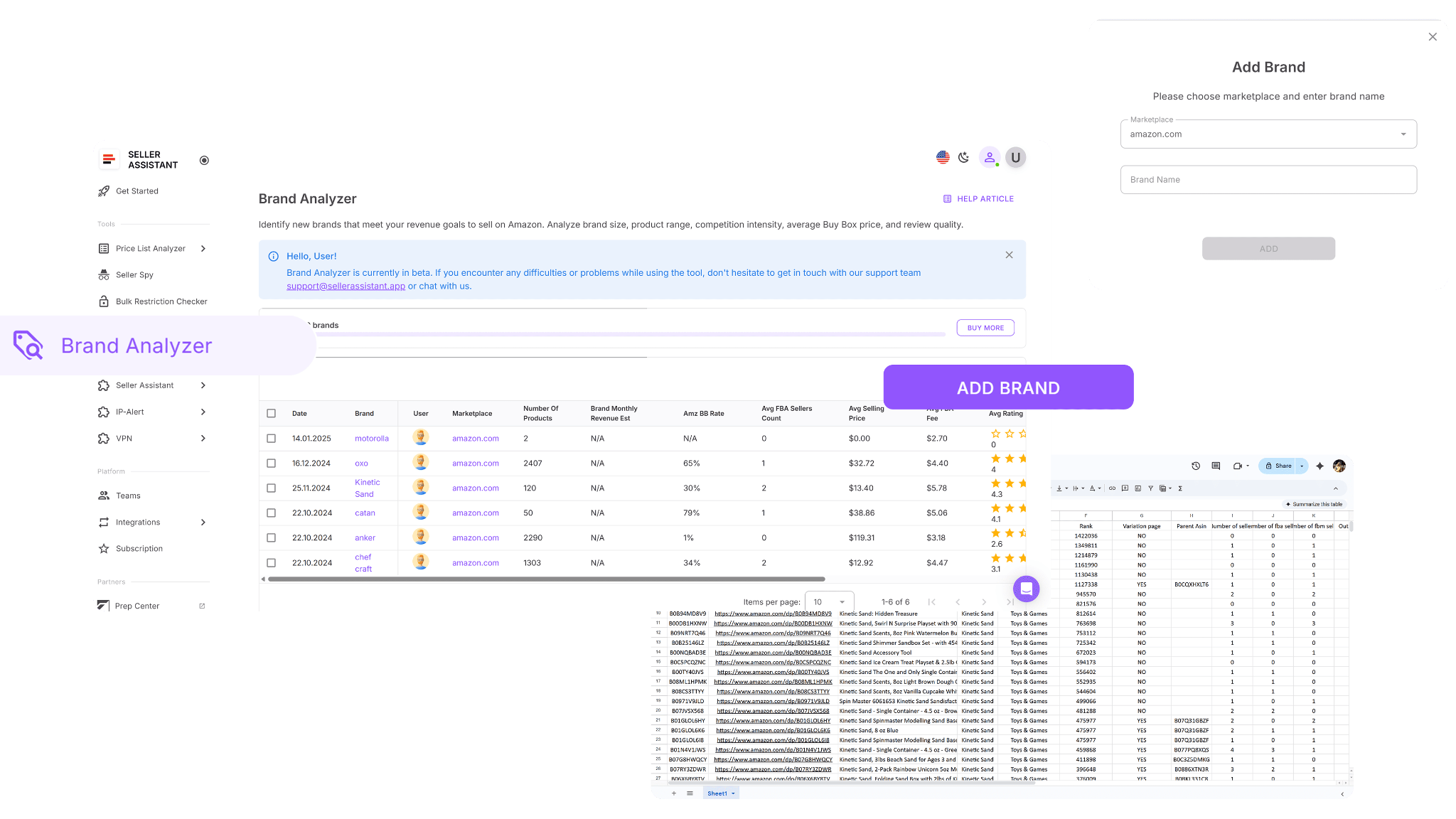
Brand Analyzer is where you decide if a brand is worth sourcing. It evaluates demand, competition, Amazon presence, and catalog size, giving you a clear picture of whether the brand supports profitable resale before you invest time in supplier outreach.
AI Supplier Finder
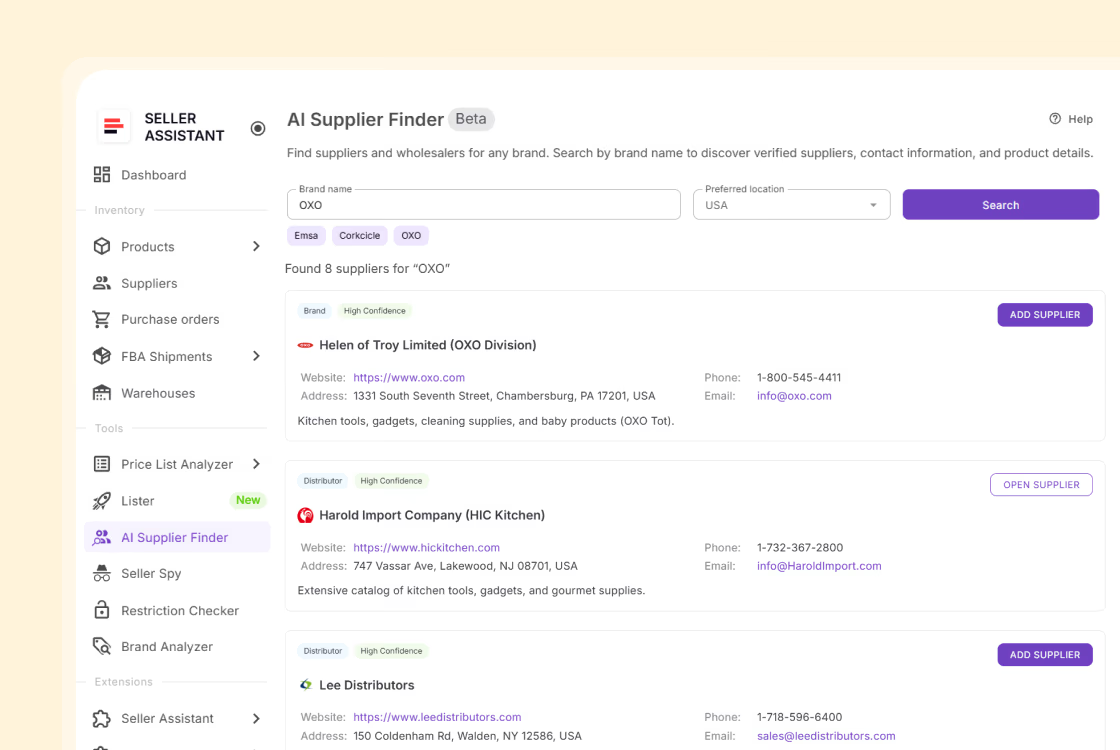
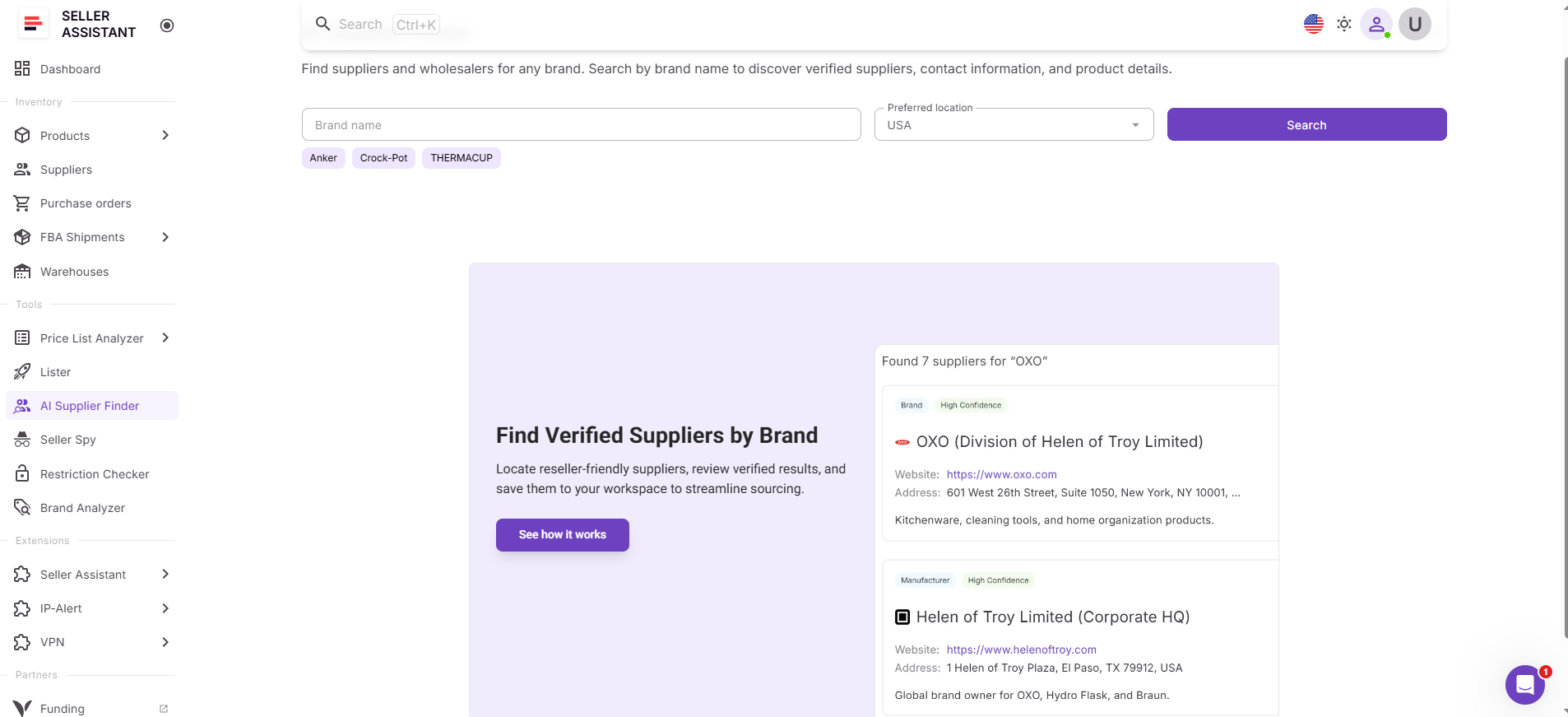
AI Supplier Finder is where validated brands turn into real supply opportunities. It finds manufacturers, distributors, and wholesalers connected to the brand, filters out retail stores, and prioritizes suppliers based on relevance and trust.
How the tools work together
Once a brand passes your criteria in Brand Analyzer, you can launch AI Supplier Finder directly from the same workflow. The brand is transferred автоматически, and supplier search begins instantly. This allows you to move from validation to sourcing without re-entering data or breaking your process.
How supplier sourcing from analyzed brand fits into your workflow
Supplier discovery is not a separate step – it’s part of a connected wholesale system. After validating a brand, you immediately move to supplier search, then into supplier management, price list analysis, and purchasing.
All of this can be done inside Seller Assistant’s workflow tools, where each stage is linked and data flows automatically between them. Instead of switching between spreadsheets and disconnected software, you keep everything in one place, reduce manual work, and maintain a consistent sourcing process. This allows you to avoid wasted outreach and focus only on brands that can support scalable, profitable wholesale operations.
Note. Seller Assistant is an end-to-end Amazon workflow management platform that integrates 15+ wholesale-focused solutions into one connected system. It combines sourcing workflow automation, bulk research and intelligence tools, and integrated Chrome extensions – giving you everything you need to streamline finding deals, managing suppliers, and creating purchase orders.

With Seller Assistant, every step of your Amazon wholesale and arbitrage workflow is automated and connected.
What Is Brand Analyzer in Seller Assistant?
Brand Analyzer is a brand evaluation tool in Seller Assistant that helps you assess entire brands before moving into sourcing. Instead of reviewing products one by one, it compiles data across a brand’s full catalog and shows key metrics like revenue, competition, pricing, and overall resale potential in a single view. This allows you to decide whether a brand is worth pursuing before reaching out to suppliers or analyzing individual ASINs.
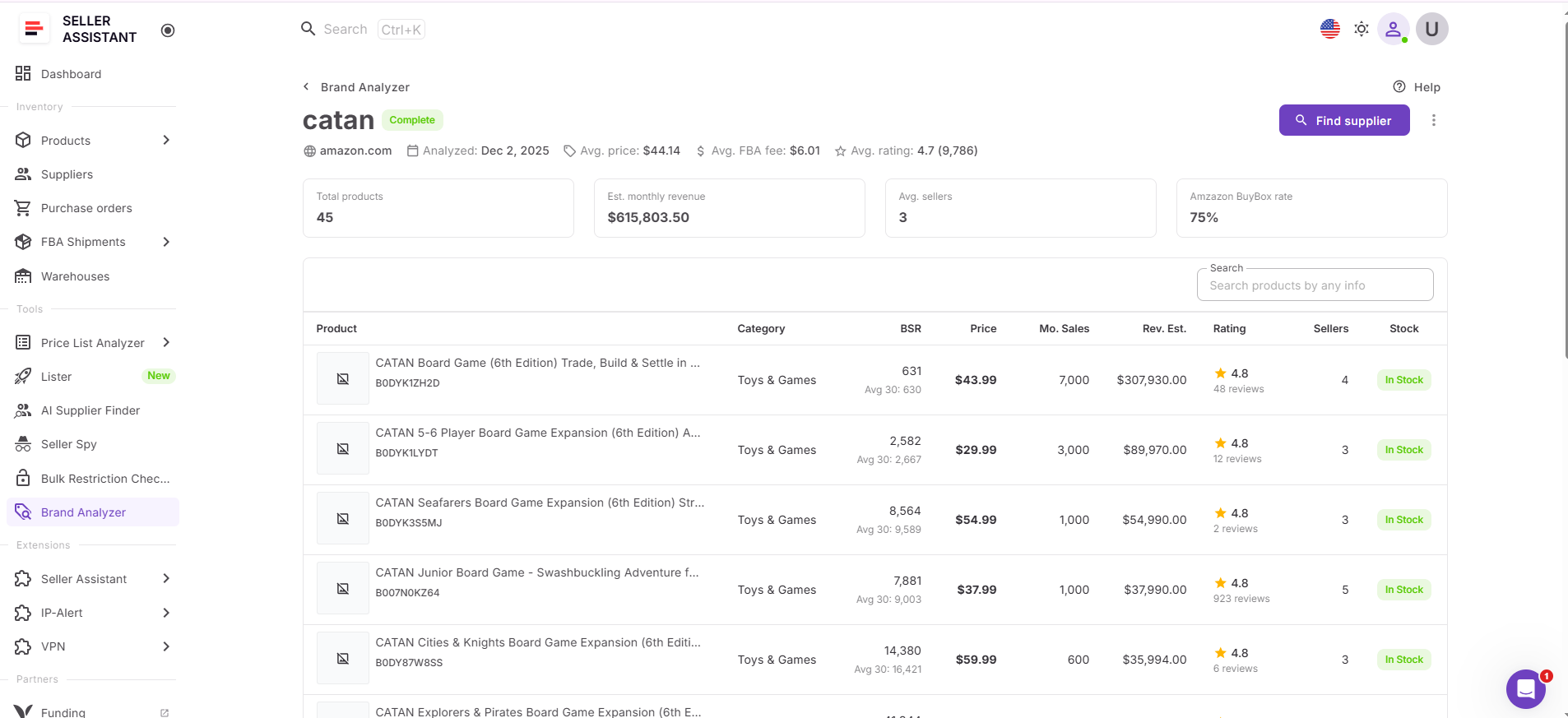
What you can do with Brand Analyzer
Brand Analyzer helps you make clear, data-driven decisions about which brands deserve your attention. It brings all essential brand-level insights into one place so you can quickly qualify or eliminate opportunities.
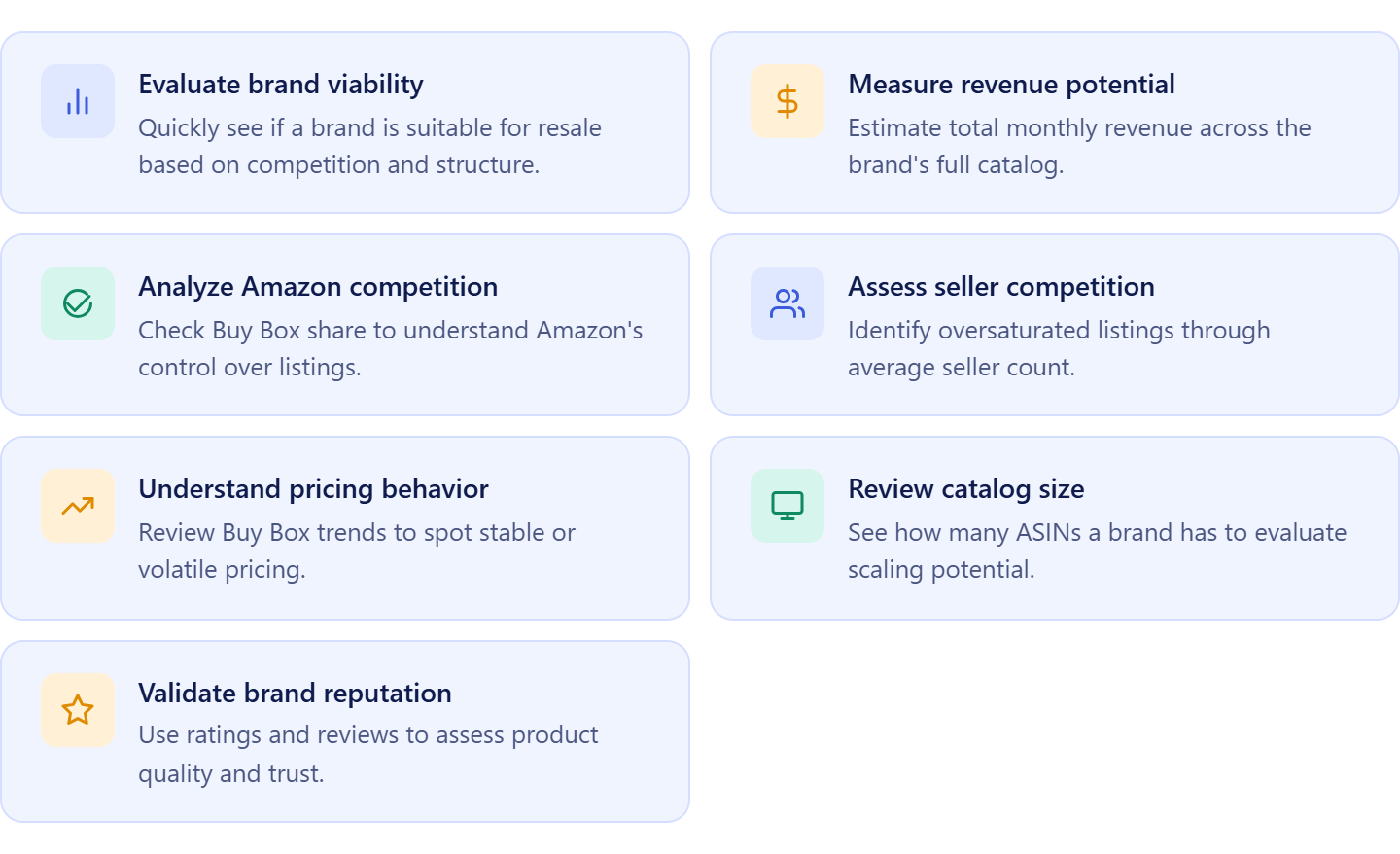
Check brand suitability
Understand if a brand fits wholesale resale by reviewing competition, Amazon presence, and catalog structure.
Estimate revenue potential
See total monthly revenue across the catalog to evaluate whether the brand can support consistent sales.
Evaluate Amazon competition
Measure Amazon’s Buy Box share to understand how often Amazon controls listings.
Review seller competition
Analyze average seller counts to identify if listings are competitive or overcrowded.
Analyze pricing patterns
Review Buy Box pricing and historical trends to assess price stability and margin potential.
Assess catalog depth
Check the number of ASINs to determine scalability and expansion opportunities.
Verify brand reputation
Use ratings and review volume to evaluate product quality and customer trust.
How Brand Analyzer streamlines your sourcing decisions
Once a brand meets your criteria, you can immediately move to supplier search using AI Supplier Finder directly from Brand Analyzer. The brand is transferred automatically, allowing you to find manufacturers, distributors, and wholesalers without restarting your search or switching tools.
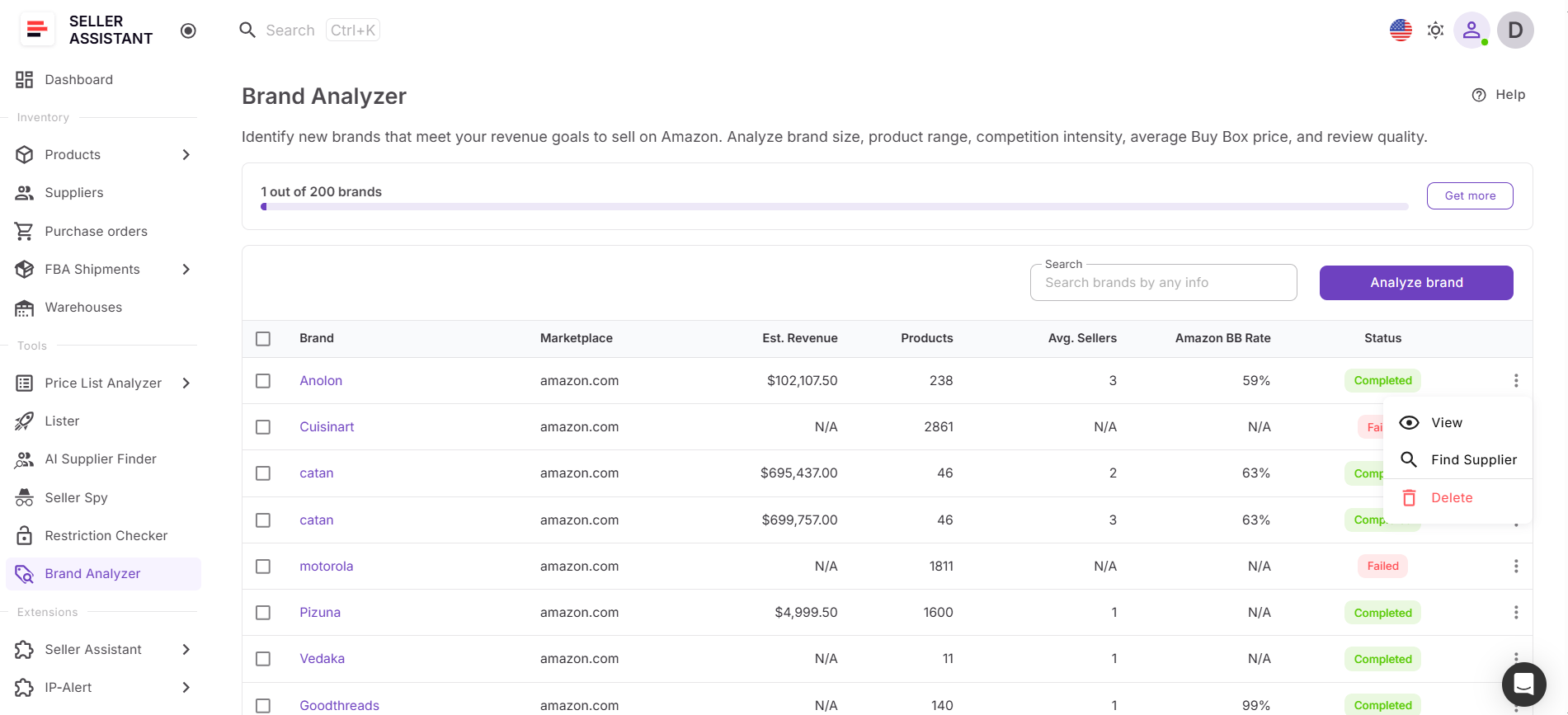
Brand Analyzer turns brand research into a structured step within your sourcing process. You can enter a brand manually or launch analysis directly from tools like Price List Analyzer or Seller Assistant Extension, and the system generates a full performance overview.
Instead of switching between multiple product pages, you get a complete catalog-level view with all key metrics in one place. This helps you quickly identify patterns such as steady demand, high competition, or strong Amazon presence without analyzing each listing individually.
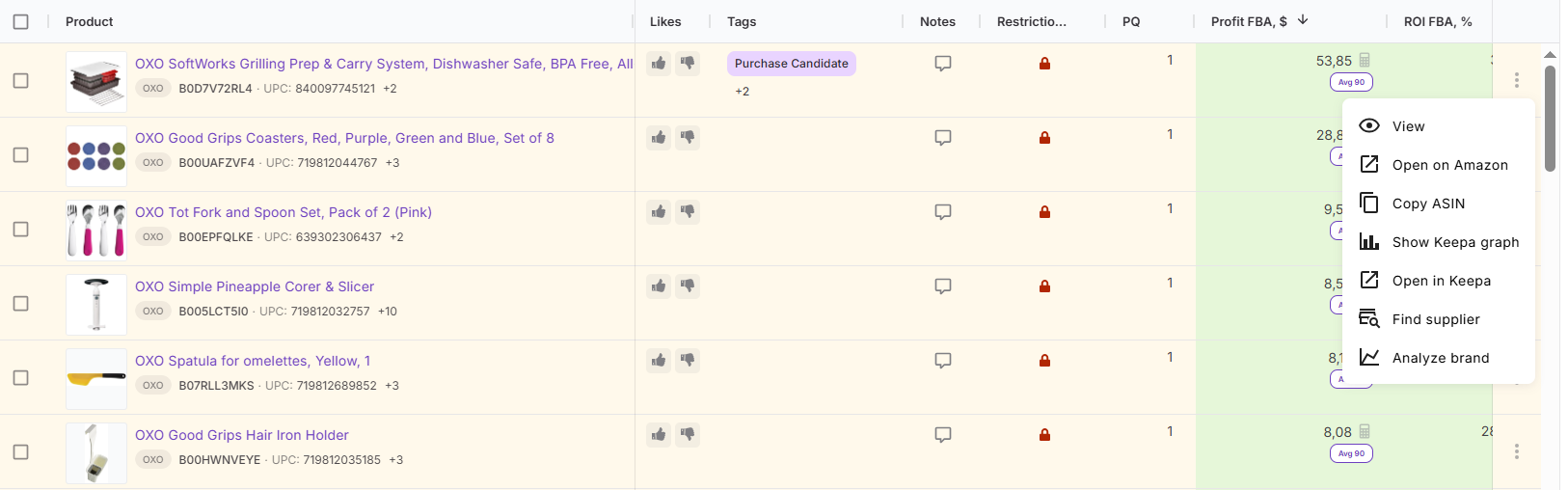
Brand Analyzer connects with other Seller Assistant workflow tools like Product Database, Bulk Restriction Checker, Price List Analyzer, and Purchase Orders Module. Once a brand is validated, you can immediately move into supplier discovery, bulk product analysis, and purchasing – all within one connected workflow.
What Is AI Supplier Finder?
AI Supplier Finder is Seller Assistant’s supplier sourcing tool that helps you find wholesale suppliers by brand. Instead of manually searching Google, filtering out retail stores, and guessing which companies are legitimate, the tool analyzes brand data and returns a structured list of manufacturers, distributors, and wholesalers. It’s designed to help you turn validated brands into real supply sources – quickly and without trial-and-error research.
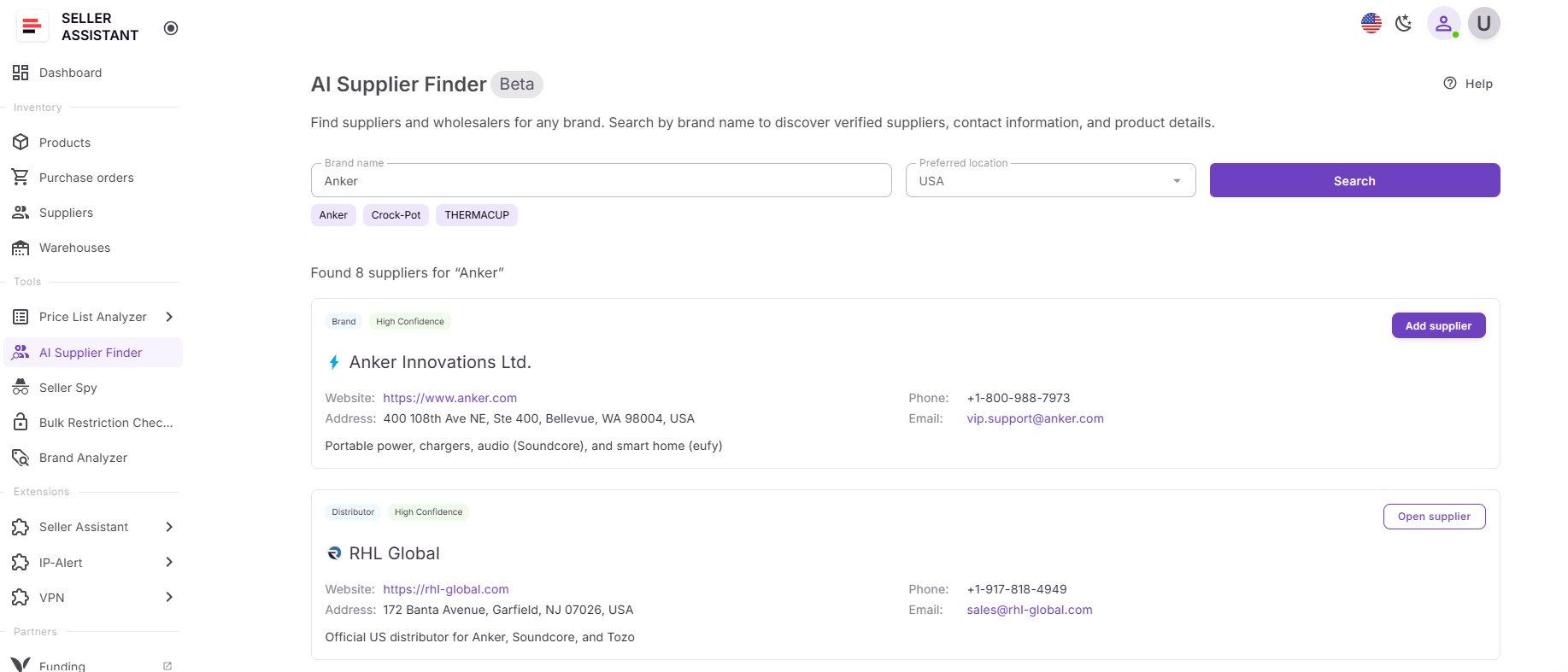
What you can do with AI Supplier Finder
AI Supplier Finder helps you find and prioritize suppliers in a structured way. It removes noise from manual search and gives you clear, resale-focused results so you can move straight into outreach.
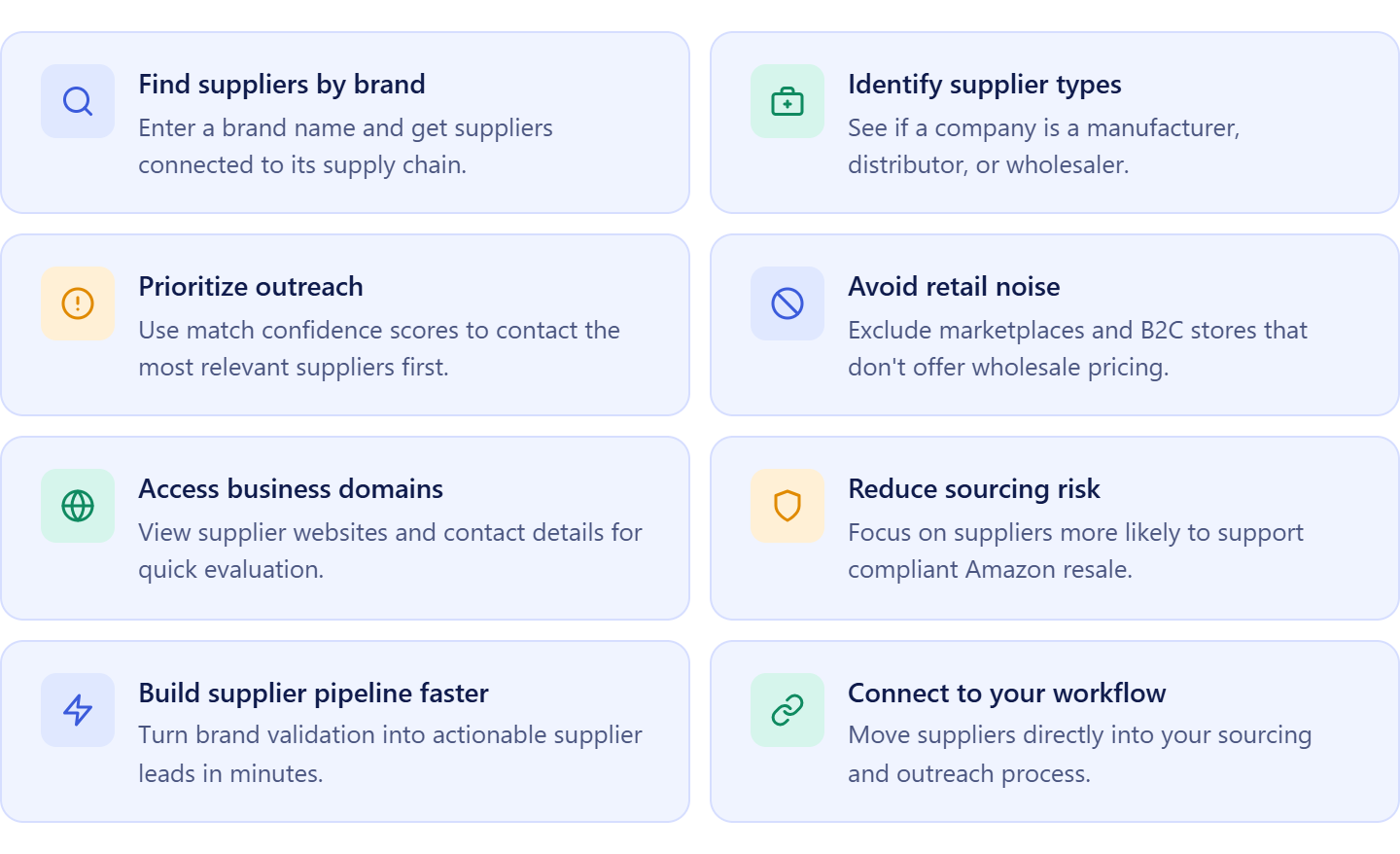
Find suppliers by brand
Search using a brand name and get a list of companies connected to its supply chain.
Identify supplier types
See whether a company is a manufacturer, authorized distributor, or wholesaler to choose the best sourcing path.
Prioritize outreach with match confidence
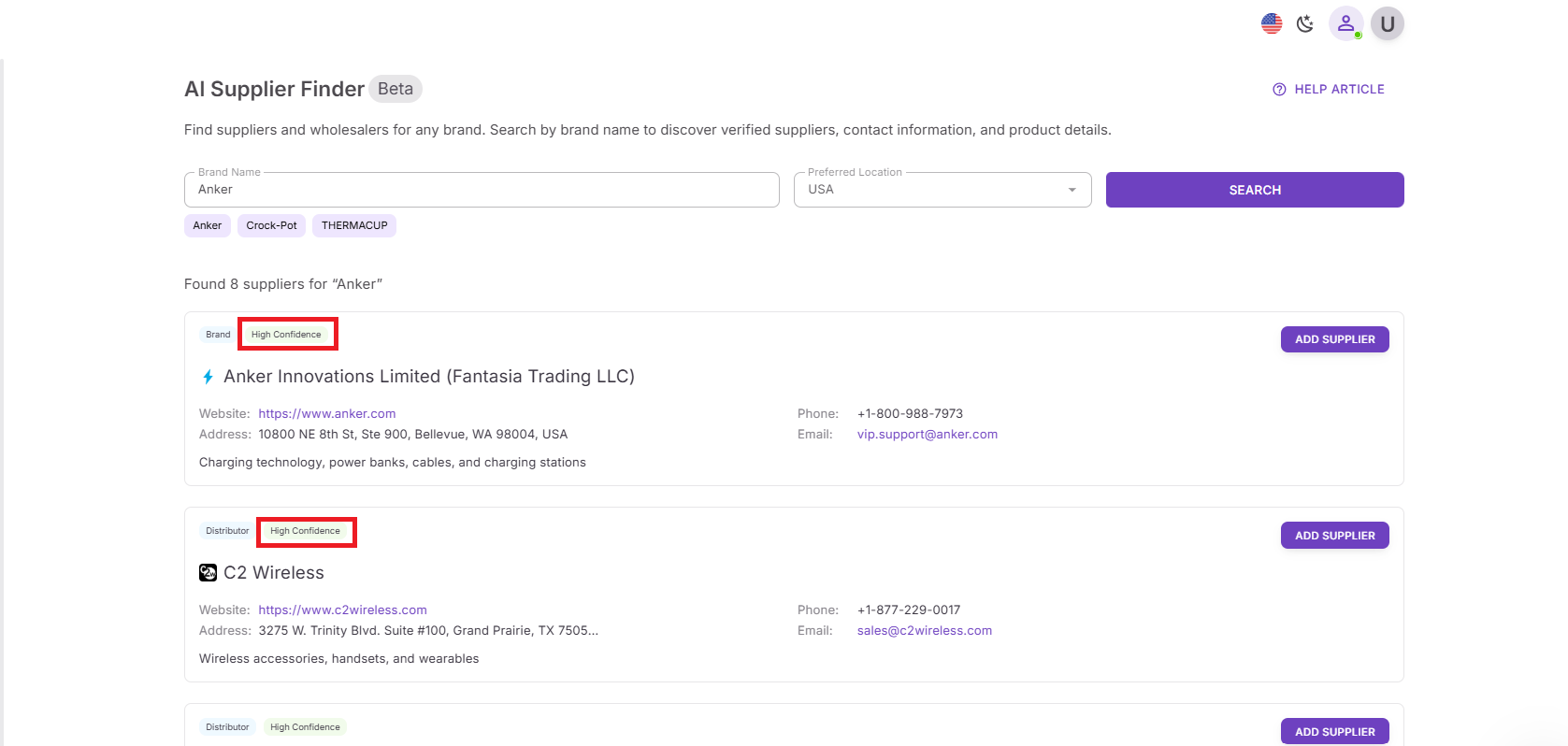
Use High, Medium, and Low confidence scores to decide which suppliers to contact first.
Avoid retail and marketplace noise
Automatically exclude Amazon, eBay, and B2C stores that don’t support wholesale pricing.
Access verified business domains
View supplier websites and available contact details to evaluate legitimacy quickly.
Reduce sourcing risk
Focus on suppliers more likely to provide proper invoices and support Amazon resale.
Build a supplier pipeline faster
Turn brand validation into a list of actionable supplier leads in minutes instead of hours.
How AI Supplier Finder supports your sourcing workflow
AI Supplier Finder turns supplier discovery into a structured step inside your workflow. You enter a brand or launch the tool directly from Brand Analyzer, Price List Analyzer or Seller Assistant Extension, and the system generates a list of relevant suppliers.
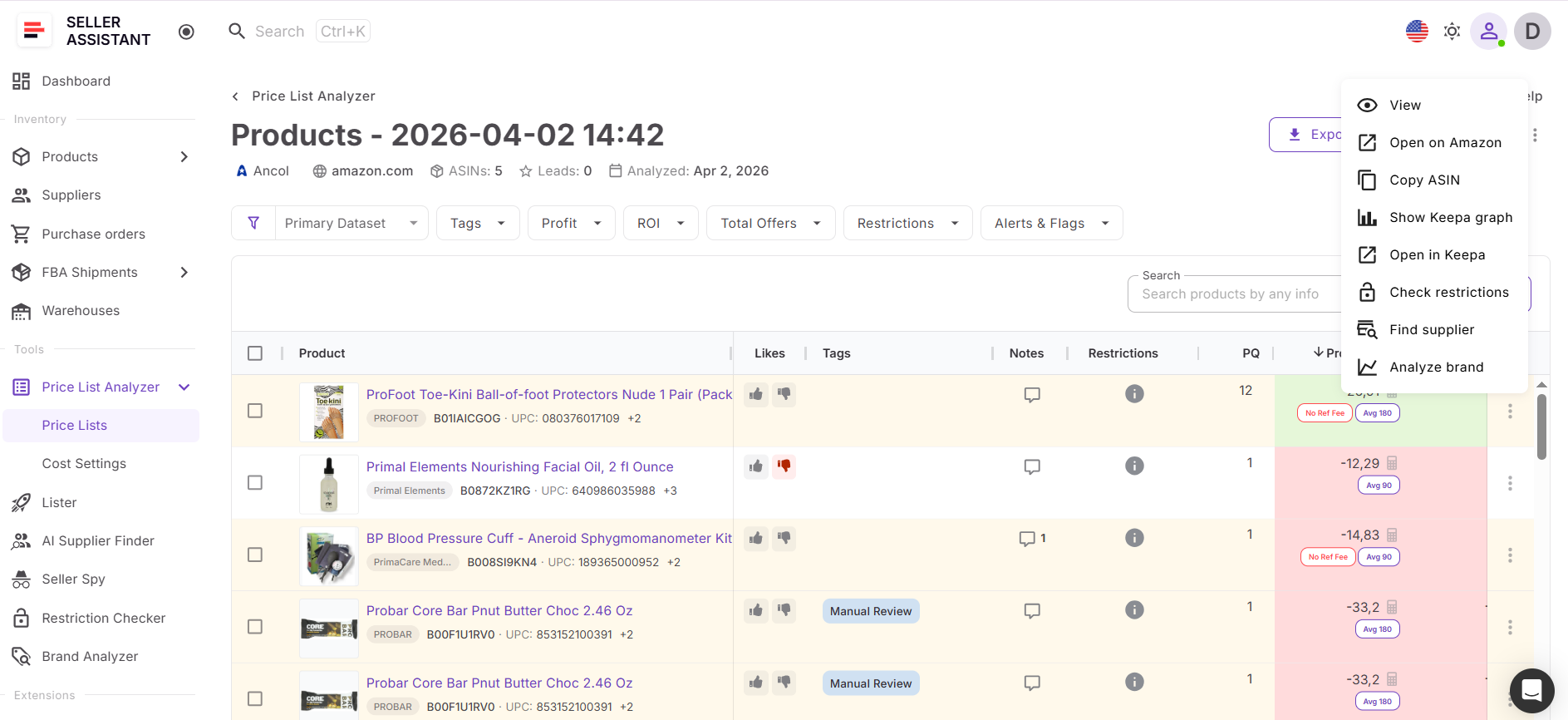
Instead of manually searching and verifying each lead, you get organized results grouped by supplier type and prioritized by relevance. This allows you to move directly from brand validation to supplier outreach without breaking your workflow.
AI Supplier Finder connects with other Seller Assistant tools like Suppliers Database, Product Database, Price List Analyzer, and Purchase Orders Module. Once suppliers are identified, you can save them, manage outreach, analyze price lists, and create purchase orders – all inside one connected system.
How to Turn Brand Analysis into Real Supplier Opportunities
The process starts with brand analysis. You open Brand Analyzer, enter a brand, and review its performance across demand, competition, pricing, and catalog size. At this stage, you understand whether the brand is worth reselling, but in a traditional workflow, you would still need to search for suppliers manually.
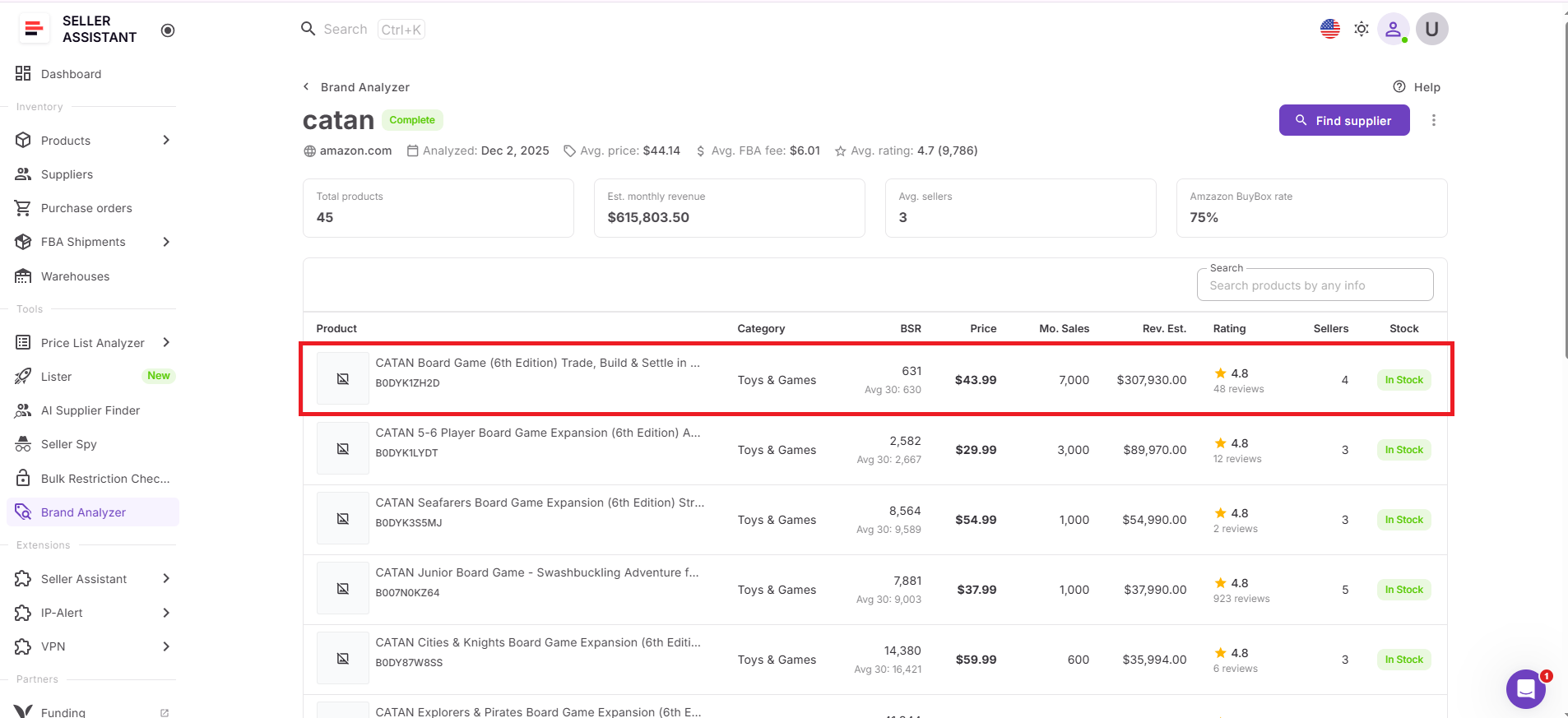
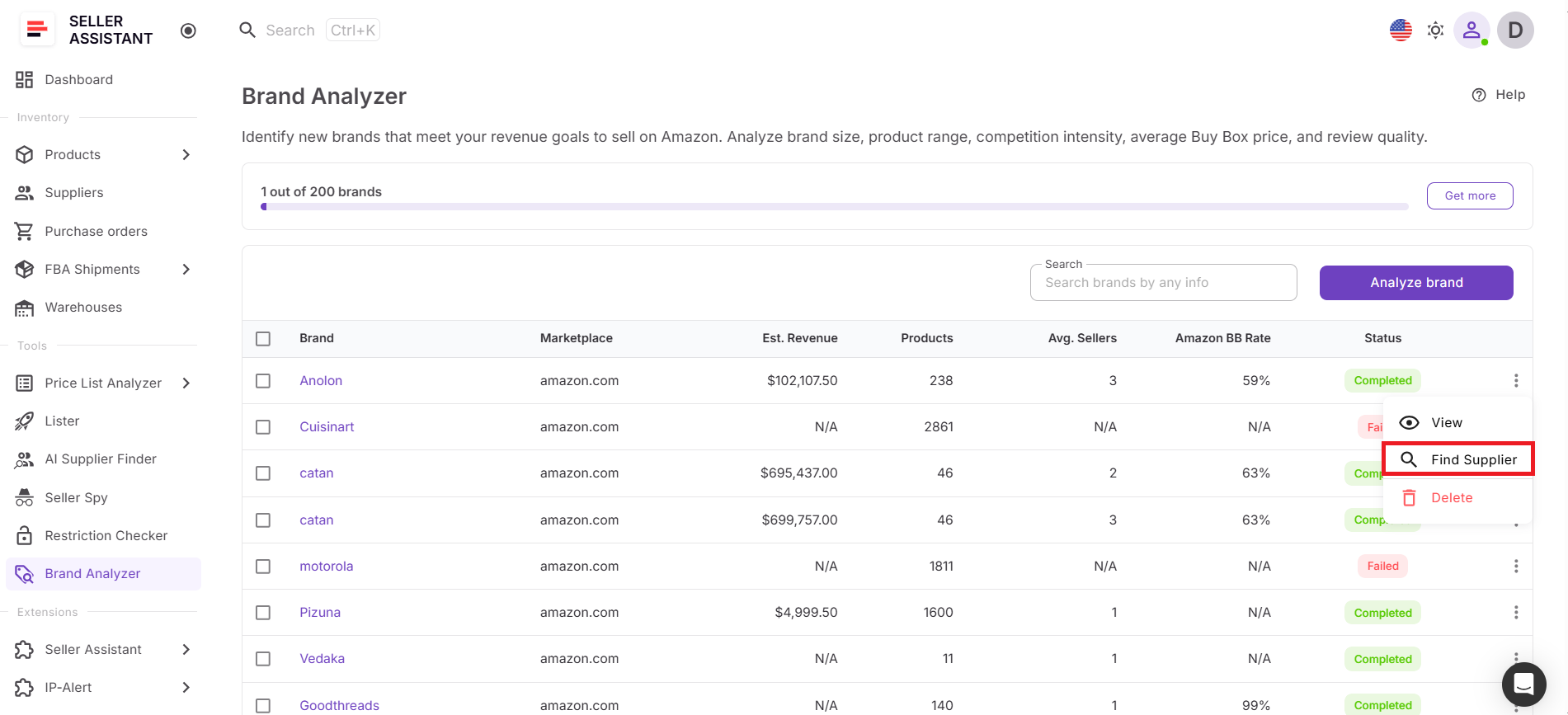
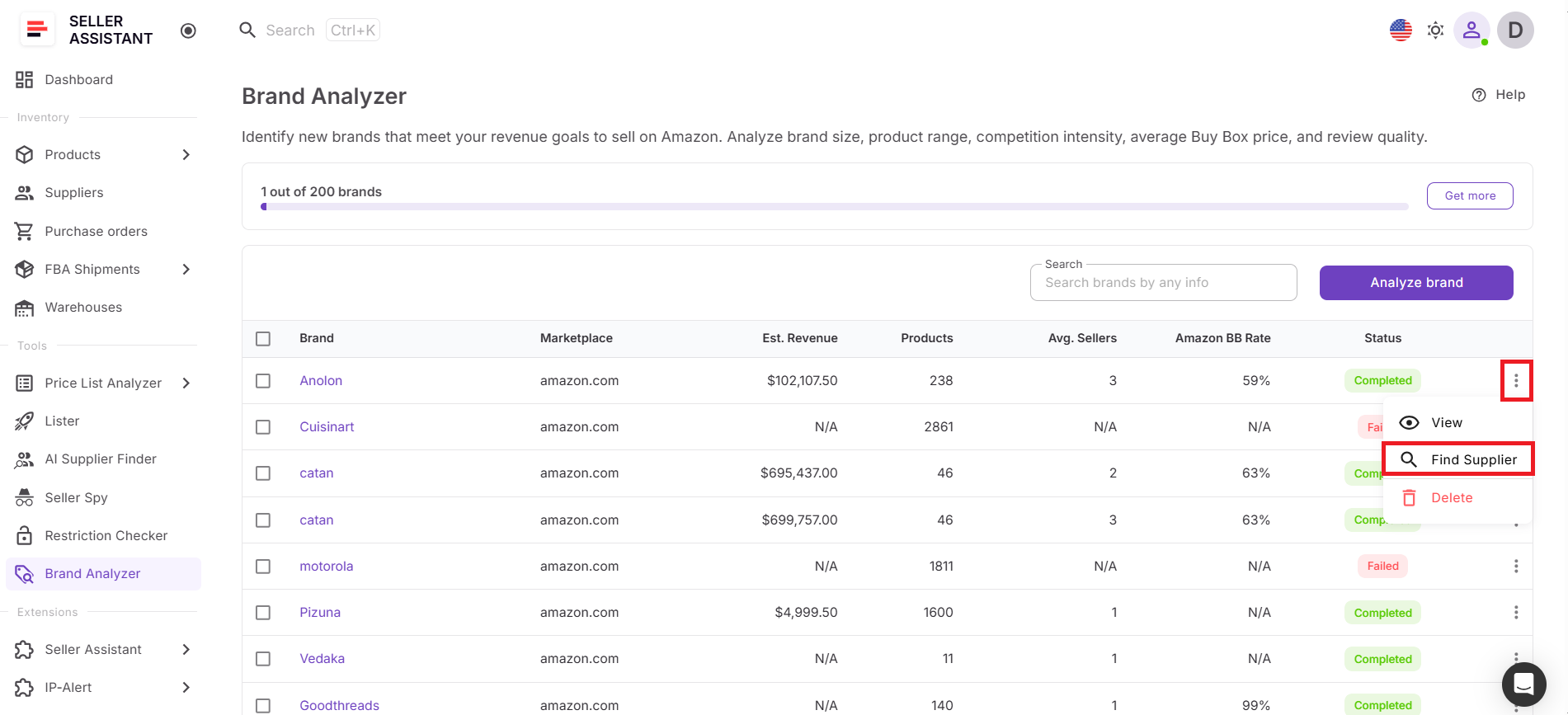
Instead of starting a new search, you launch AI Supplier Finder directly from Brand Analyzer. Open the three-dot menu next to the brand, click Find supplier, and instantly move into supplier discovery with the brand already prefilled. There’s no need to re-enter data or switch between tools – the system carries your validated brand into the next step.
Once suppliers are identified, you move from analysis to execution in one flow. This keeps your sourcing fast and consistent, eliminates time spent on irrelevant suppliers, and ensures you only build relationships for brands that support profitable, scalable wholesale sourcing.
How to Find a Supplier for Your Analyzed Brand Step by Step
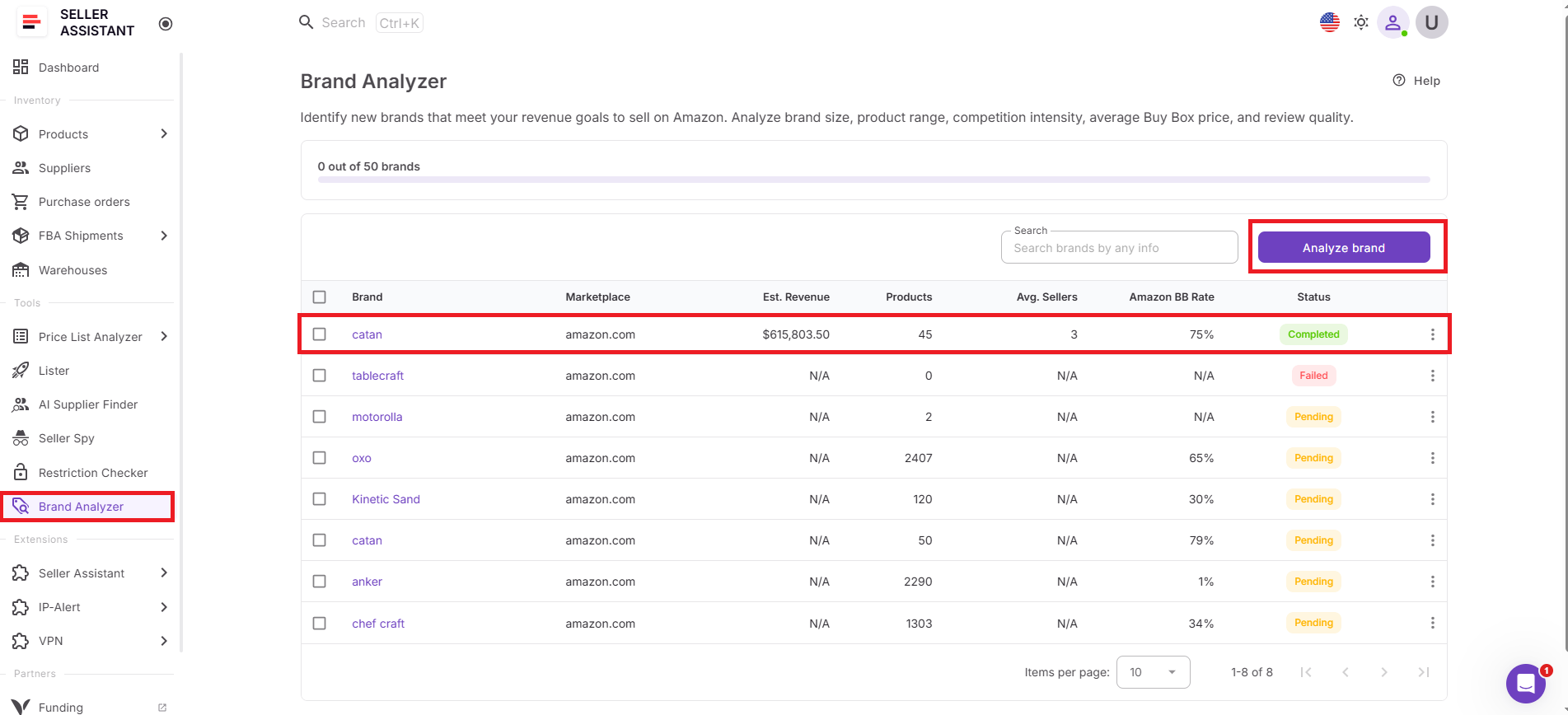
Step 1. Open Brand Analyzer
Go to Brand Analyzer in Seller Assistant and select the brand you want to evaluate.
Step 2. Review brand performance
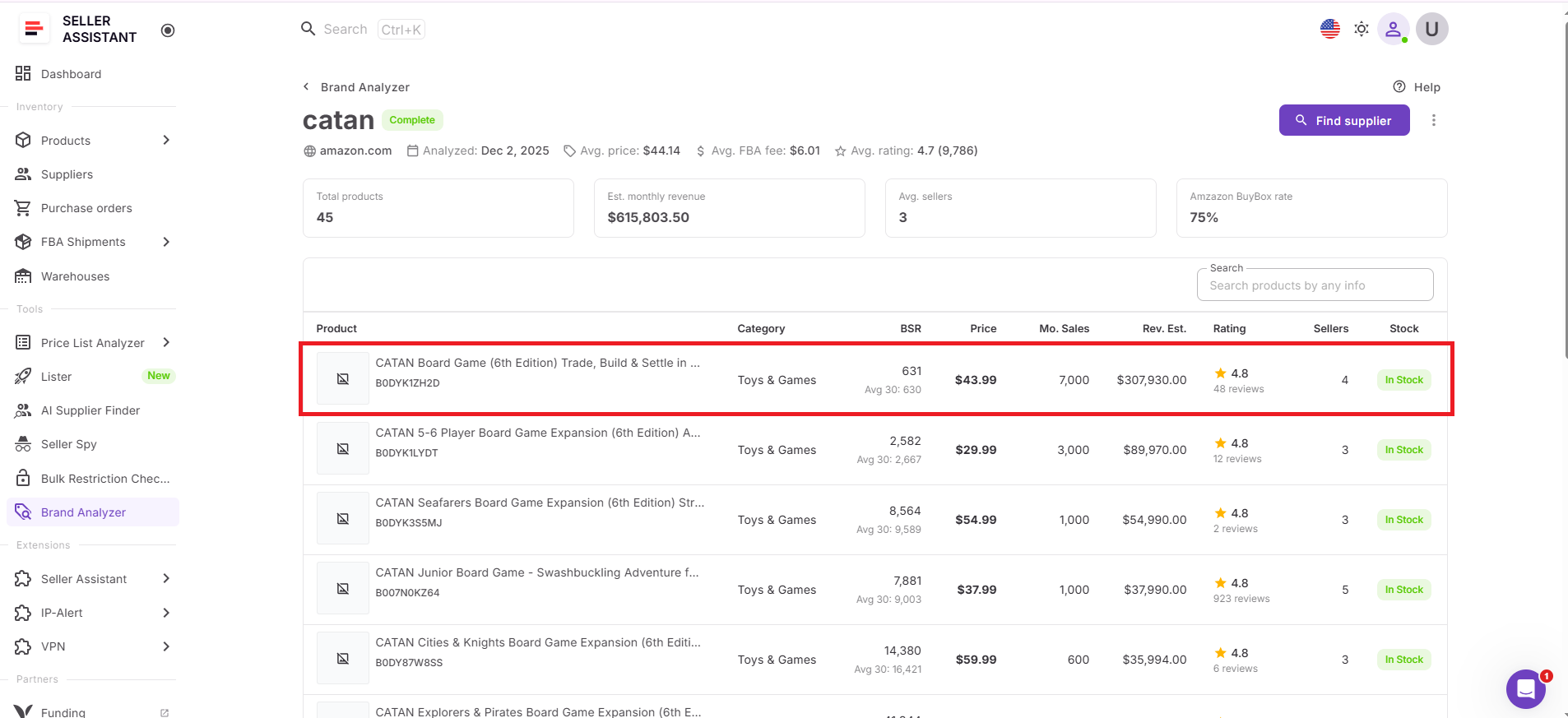
Check key metrics such as revenue, catalog size, Amazon Buy Box share, seller count, pricing, ratings, and reviews to decide if the brand is worth reselling.
Step 3. Open supplier search
If the brand meets your sourcing criteria, click the three-dot menu next to the brand and select Find supplier.
Step 4. Launch AI Supplier Finder
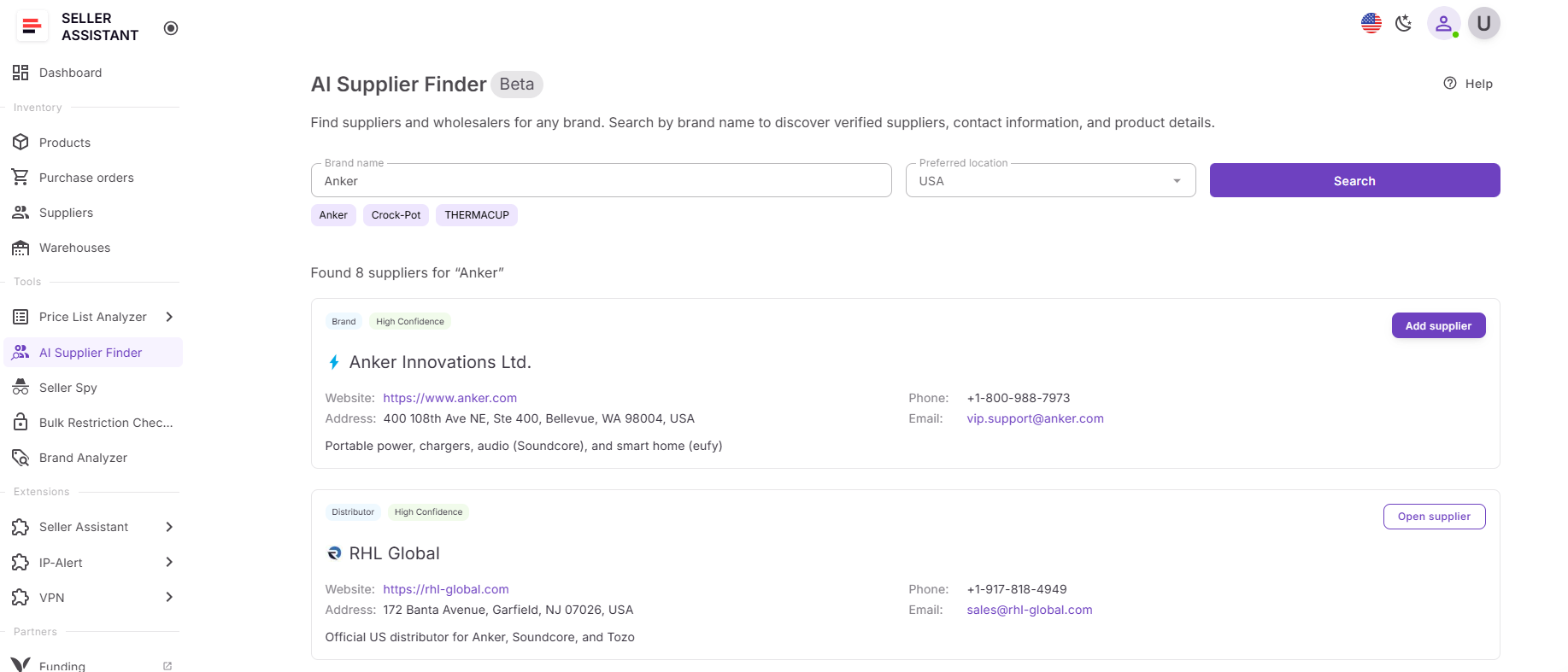
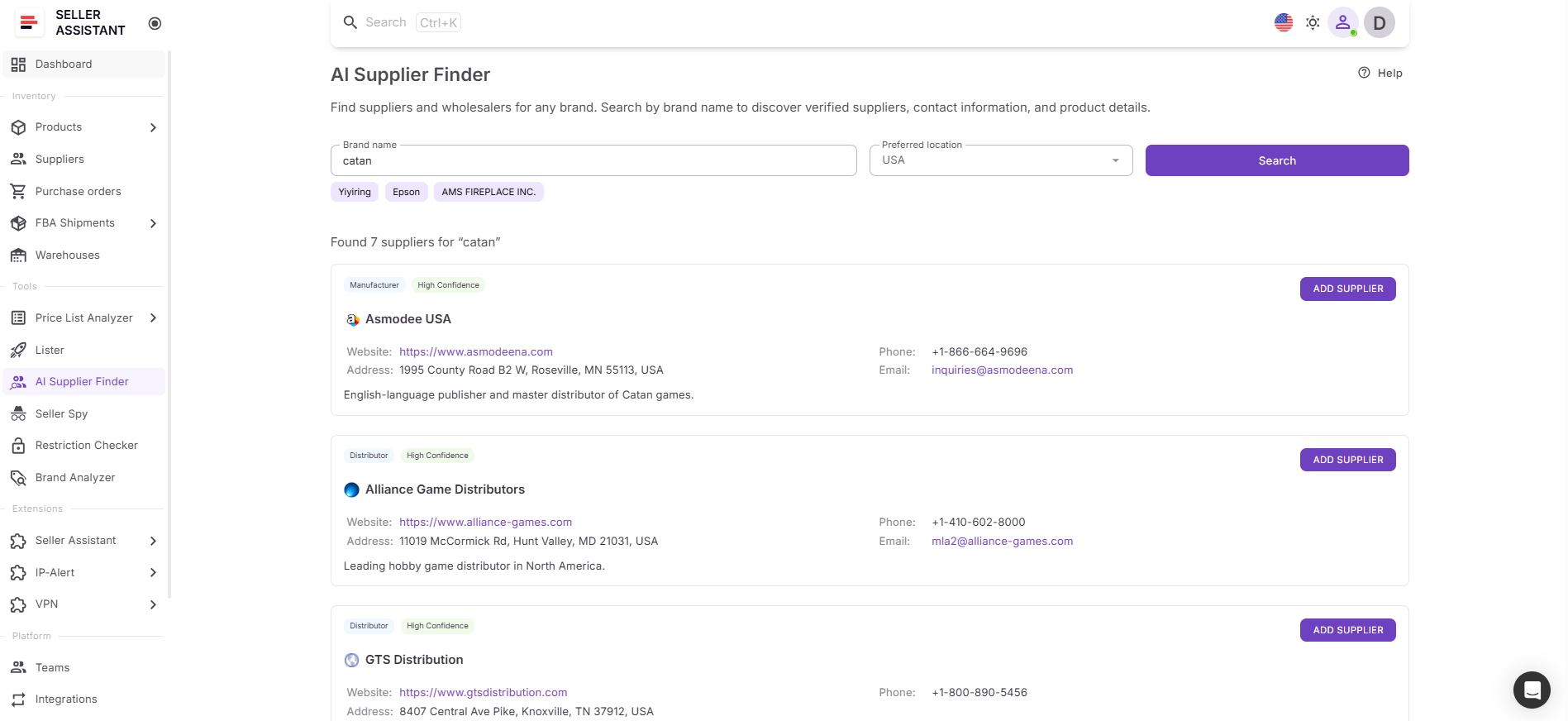
Seller Assistant opens AI Supplier Finder with the brand already prefilled, so you don’t need to enter it manually.
Step 5. Review supplier results
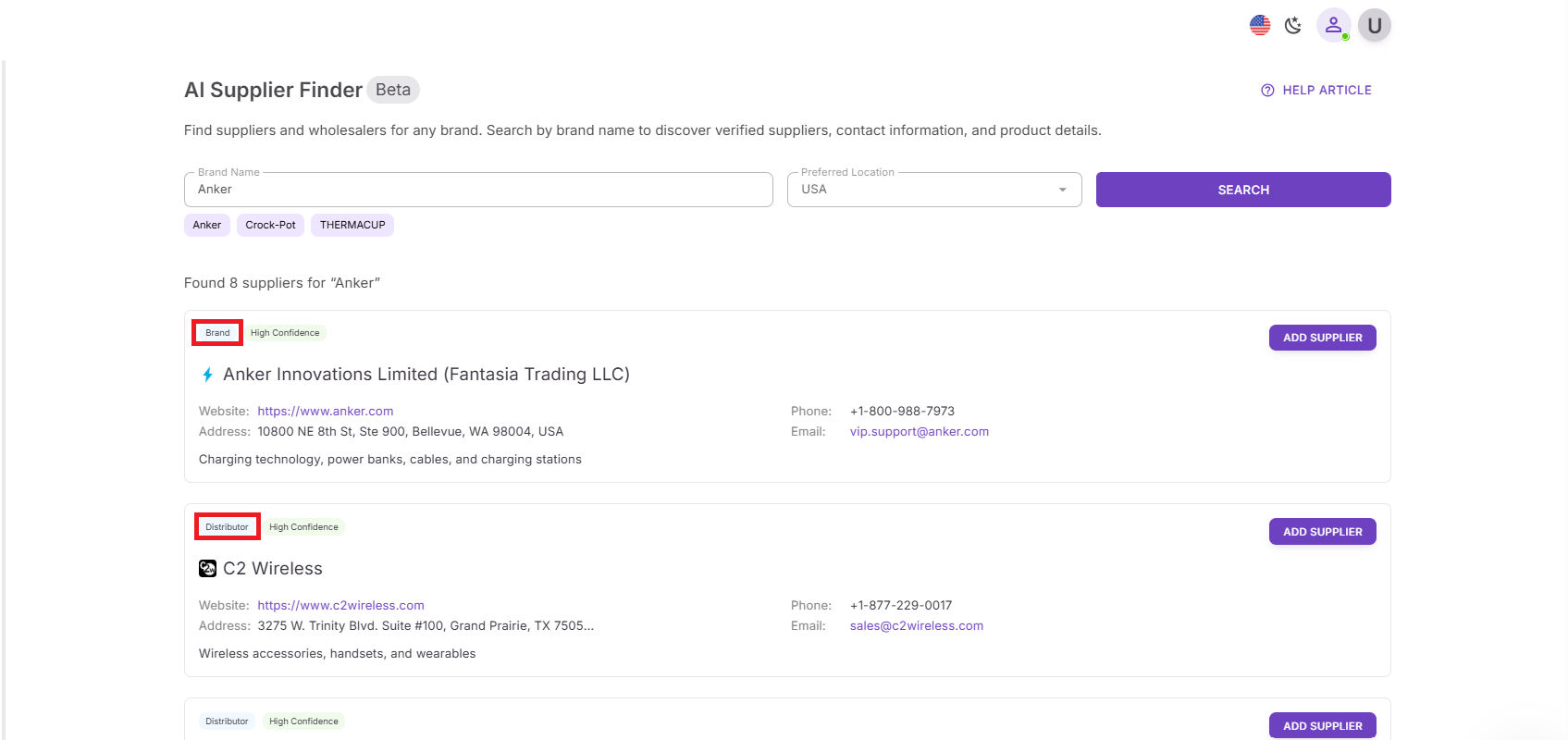
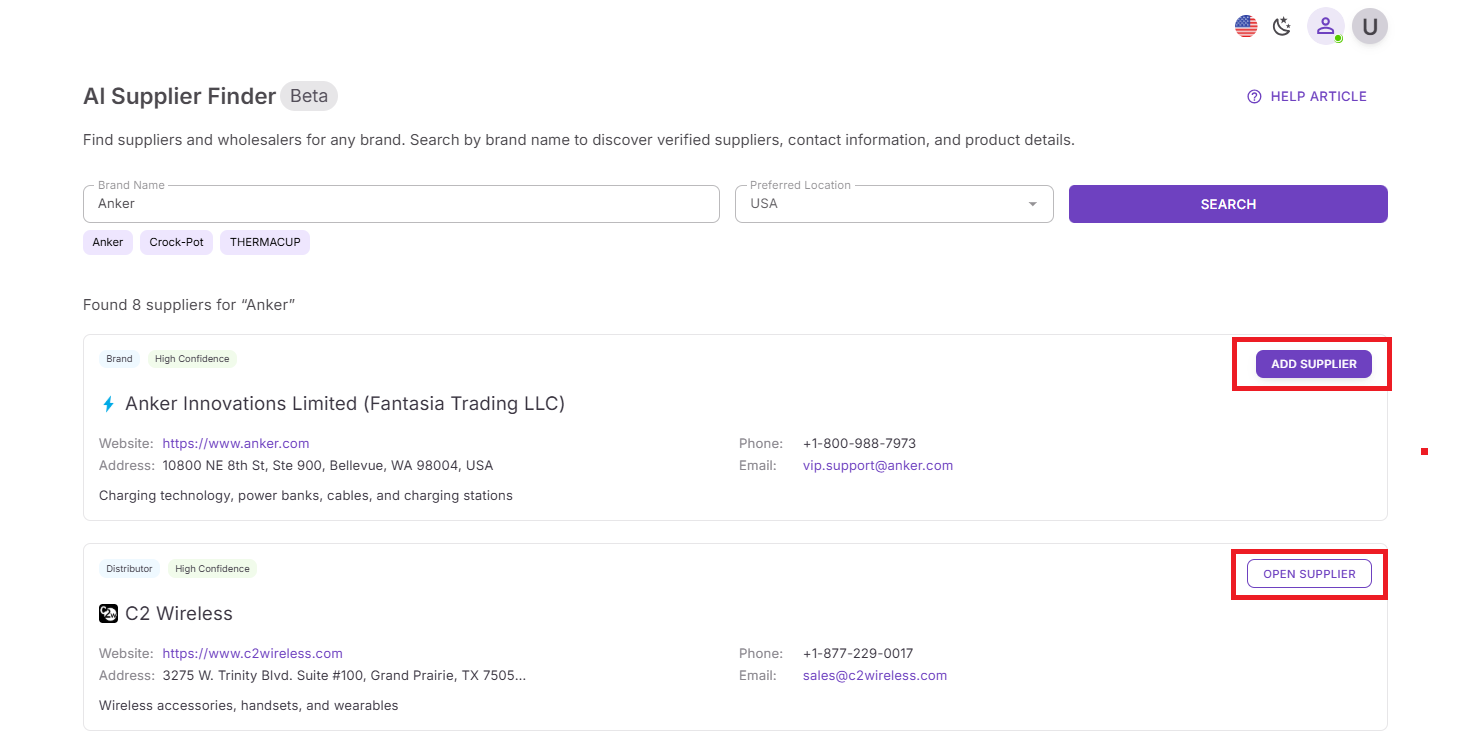
AI Supplier Finder shows potential suppliers grouped by type, such as brand or manufacturer, authorized distributor, wholesaler, or alternative supplier.
Step 6. Prioritize suppliers
Start with High-confidence matches, then review Medium-confidence options if you need more leads.
Step 7. Save suppliers for outreach
Click Add supplier to create a supplier profile or Open supplier if the supplier already exists in your account. This moves the lead into your Seller Assistant workflow for outreach and management.
FAQ
How do I know if a brand is worth finding a supplier for?
Use Brand Analyzer to evaluate demand, competition, Amazon presence, and catalog size. If the brand shows stable revenue, manageable competition, and low Amazon dominance, it’s worth sourcing.
Can I find suppliers without analyzing a brand first?
You can, but it often leads to wasted time and poor supplier choices. Analyzing the brand first ensures you only pursue suppliers for profitable and scalable opportunities.
What type of suppliers should I contact first?
Start with manufacturers or authorized distributors, as they provide better pricing and more reliable invoices. Wholesalers can be used as backup options if primary sources are limited.
What does match confidence mean in AI Supplier Finder?
Match confidence shows how relevant a supplier is to the brand and resale use case. High-confidence suppliers should be prioritized, while medium and low should be validated further.
Can I manage suppliers after finding them in Seller Assistant?
Yes, suppliers can be saved directly into the Suppliers Database for tracking and outreach. This keeps your sourcing process organized and connected with the rest of your workflow.
Final Thoughts
Finding wholesale suppliers becomes much easier when you start with the right brands. Instead of searching blindly or contacting suppliers that won’t support profitable resale, you first validate demand, competition, and scalability – then move directly into supplier sourcing.
With Seller Assistant, this process becomes a connected workflow. You analyze brands with Brand Analyzer, launch supplier search instantly with AI Supplier Finder, and move into supplier management, product analysis, and purchasing without breaking your process.