Finding profitable products on Amazon is only part of the sourcing process. The real challenge starts when you try to find reliable suppliers behind those products. Many Amazon sellers waste hours searching Google, filtering out retail stores, and trying to verify whether a distributor is legitimate.
At the same time, supplier data, pricing, and sourcing decisions often end up scattered across spreadsheets and disconnected tools.
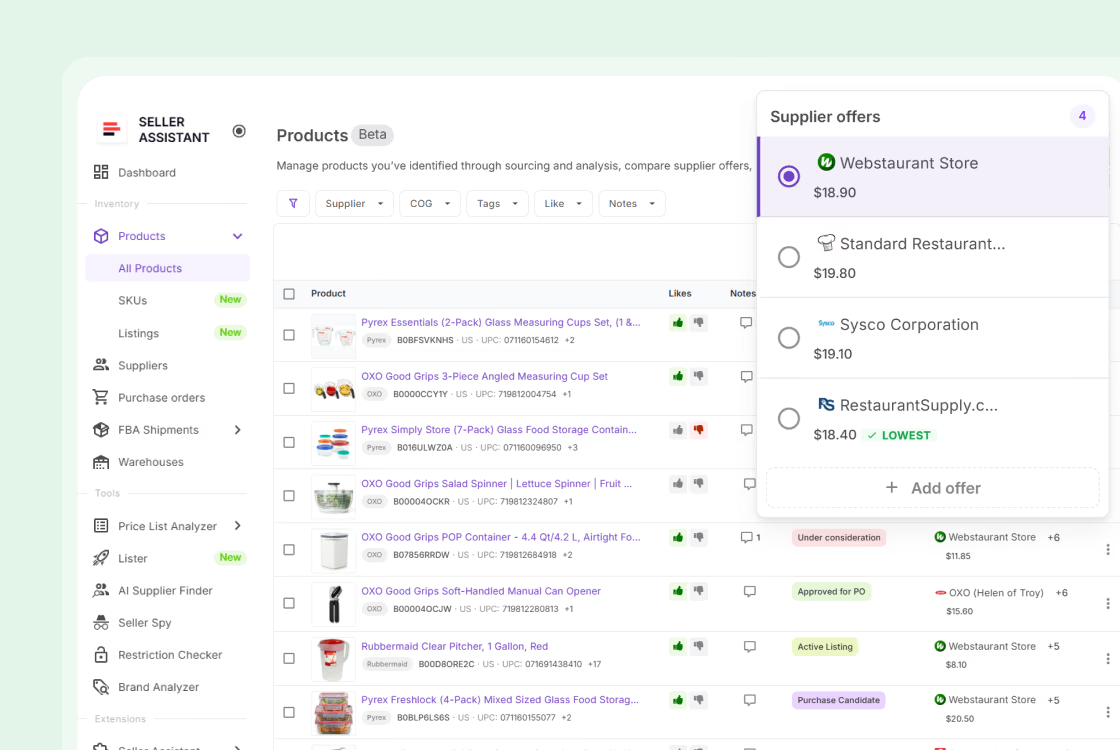
Seller Assistant simplifies this workflow. With Product Database and AI Supplier Finder, you can organize sourced products, launch supplier search directly from a product, compare supplier options, and move approved products into purchasing – all inside one connected system built for Amazon wholesale, online arbitrage, and dropshipping sellers.
Why Supplier Sourcing Works Better from a Centralized Product Database
Finding profitable products is only the beginning of Amazon sourcing. The real challenge is managing supplier research, pricing, and sourcing decisions in a way that stays organized as your business grows. Many sellers still rely on spreadsheets, browser tabs, and scattered notes to track products and suppliers. This makes it difficult to compare supplier offers, revisit previous sourcing decisions, and build a consistent purchasing process.
A centralized product database solves this problem by keeping product data, supplier information, costs, and sourcing history connected in one place. Instead of restarting supplier research every time, sellers can move faster, compare opportunities more accurately, and build a sourcing workflow that scales without becoming chaotic.
Product and supplier data stay connected
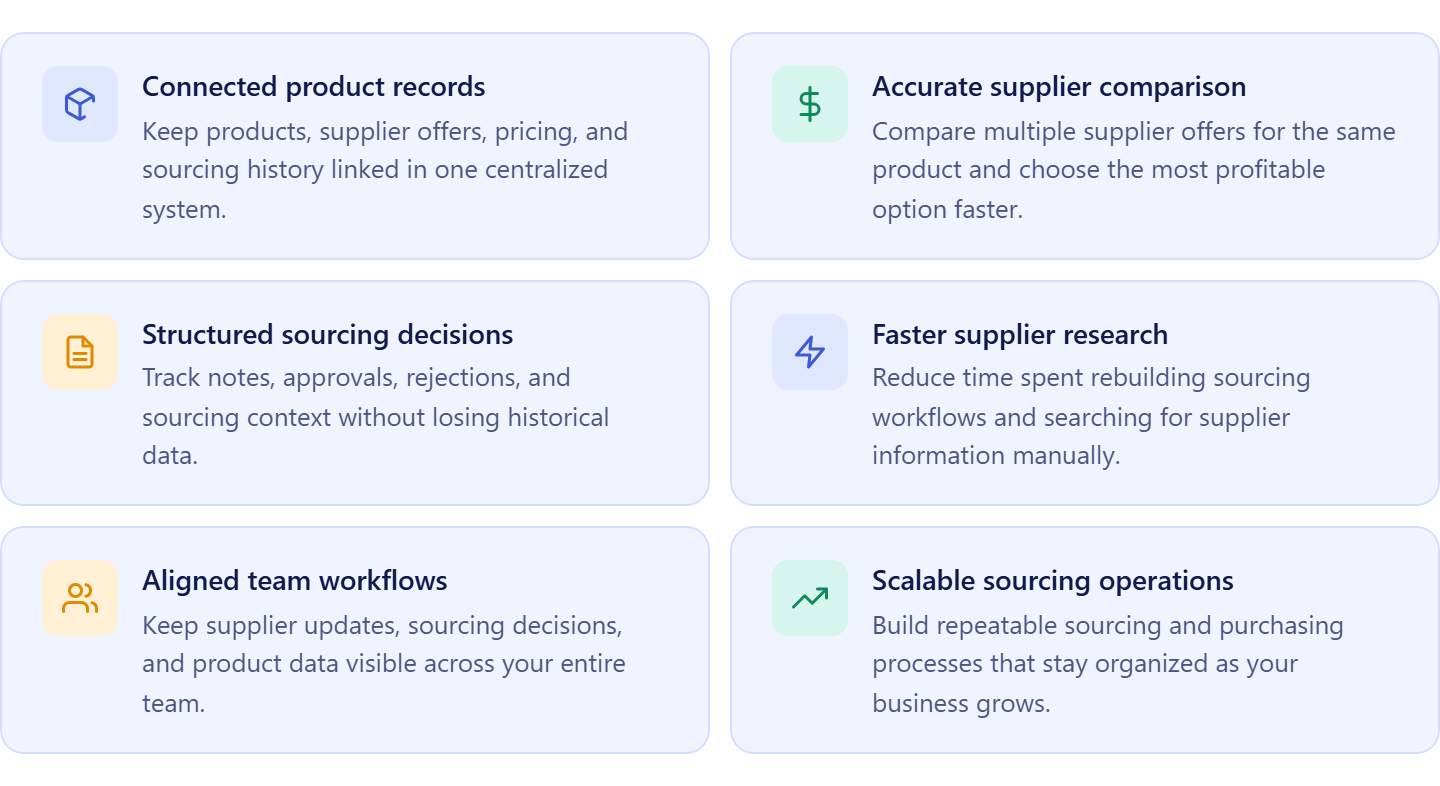
A centralized database keeps sourced products linked with supplier offers, pricing, notes, and sourcing history. This makes it easier to compare opportunities and avoid losing important supplier information between sourcing sessions.
Supplier comparison becomes more accurate
The same product can have multiple supplier offers with different costs, minimum order quantities, and margins. Keeping all offers attached to the same product helps sellers compare options consistently and choose the most profitable supplier.
Sourcing decisions become easier to track
Without a structured system, sellers often forget why a product was approved, rejected, or postponed. A centralized database creates a clear sourcing history that helps teams make more consistent buying decisions.
Faster supplier research reduces wasted time
When product information and sourcing data are already organized, supplier discovery becomes much faster. Sellers spend less time rebuilding research and more time moving profitable products toward purchasing.
Team workflows stay aligned
As sourcing operations grow, multiple people often work on the same products and suppliers. A centralized system keeps notes, updates, and supplier information visible to the entire team, reducing confusion and duplicated work.
Structured sourcing supports long-term scaling
Scaling Amazon wholesale, online arbitrage, or dropshipping operations requires repeatable systems. A centralized product database creates structure around sourcing, supplier management, and purchasing, making growth easier to manage over time.
What Seller Assistant Tools Help Find Suppliers for Your Amazon Products
Finding suppliers for Amazon products is rarely a smooth process. Many sellers identify profitable products, then switch to manual Google searches, spreadsheets, and disconnected notes to look for suppliers. This slows sourcing down and makes it difficult to track supplier offers, pricing, and previous decisions. Product Database and AI Supplier Finder solve this by connecting product organization directly with supplier discovery.
Instead of treating supplier research as a separate task, you move from a sourced product to potential suppliers in one connected workflow. This keeps sourcing structured, reduces manual work, and helps sellers focus on products that already match their sourcing criteria.
This workflow is powered by two core Seller Assistant tools – Product Database and AI Supplier Finder.
Product Database
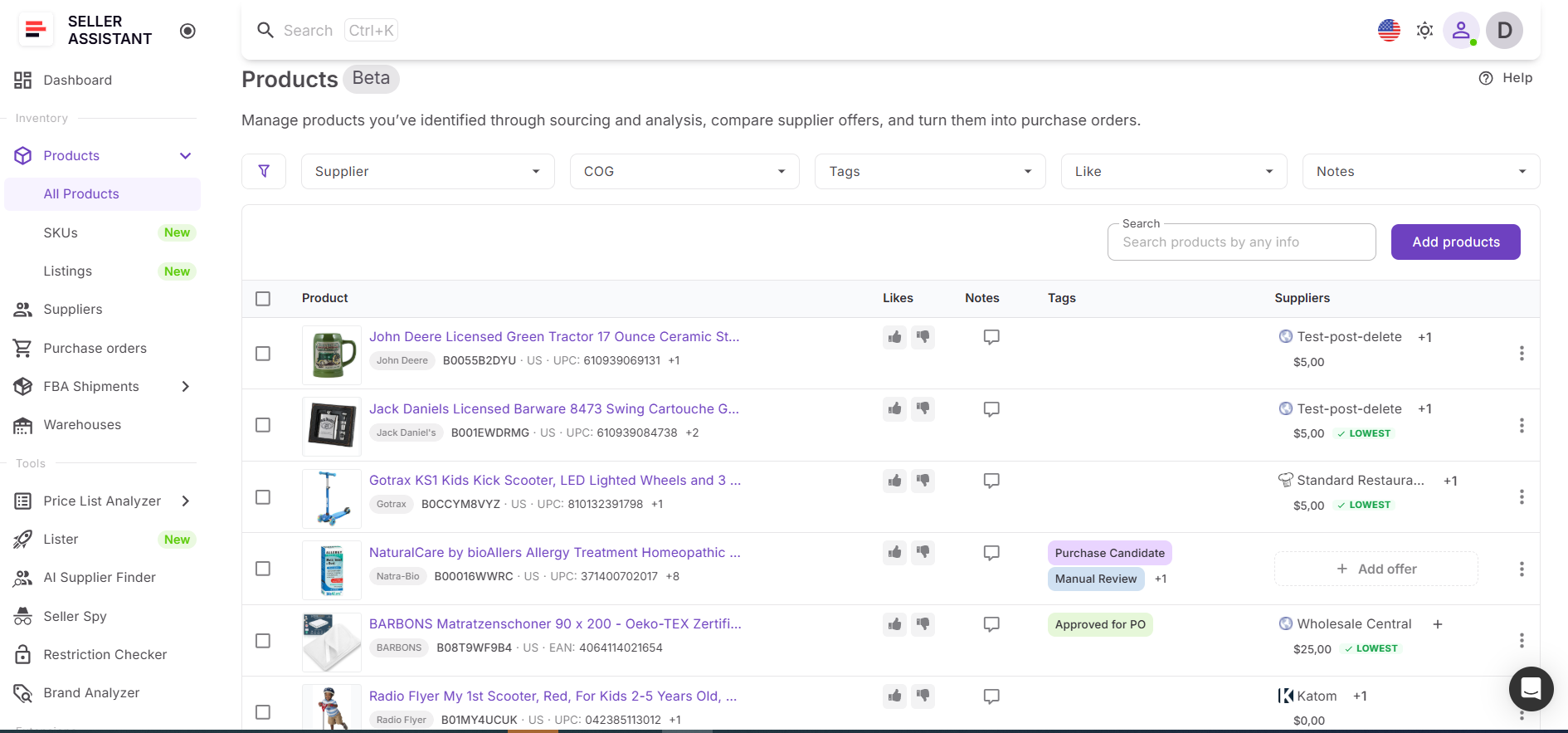
Product Database is where sourced Amazon products are stored, organized, and managed. It keeps product identifiers, supplier offers, COG, notes, tags, and sourcing history connected in one place, making it easier to compare supplier options and track sourcing decisions over time.
AI Supplier Finder
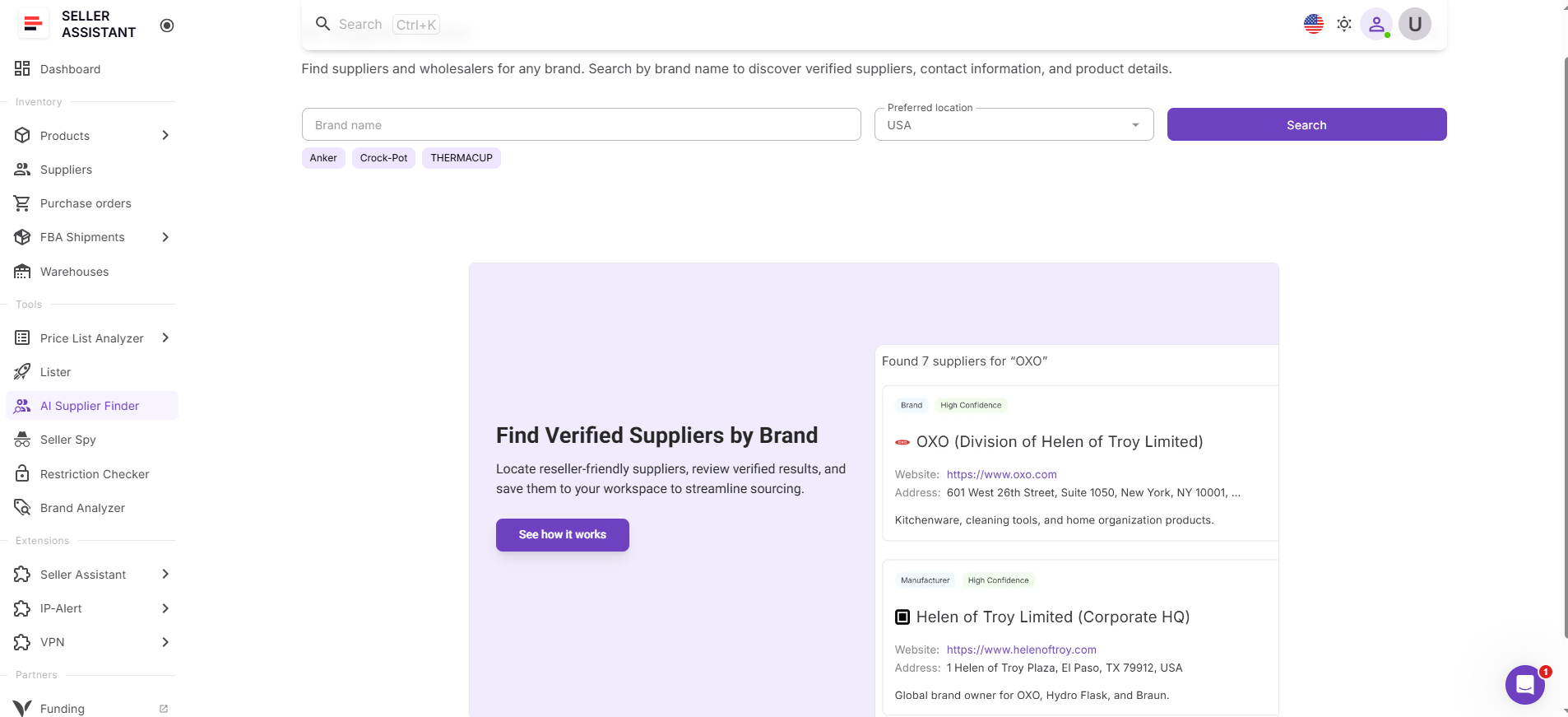
AI Supplier Finder helps sellers find manufacturers, distributors, and wholesalers connected to a product’s brand. It filters out marketplaces and retail stores, prioritizes resale-focused suppliers, and organizes supplier results by relevance and trust level.
How the tools work together
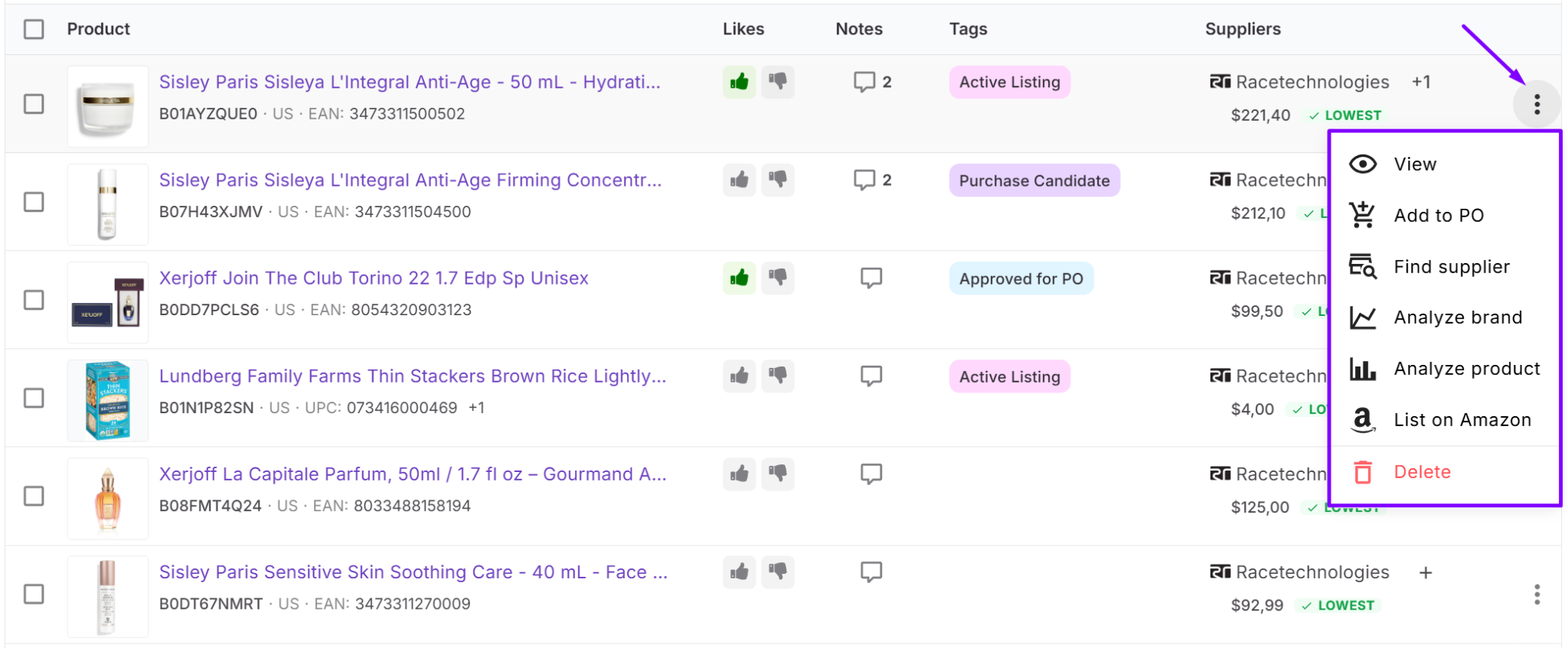
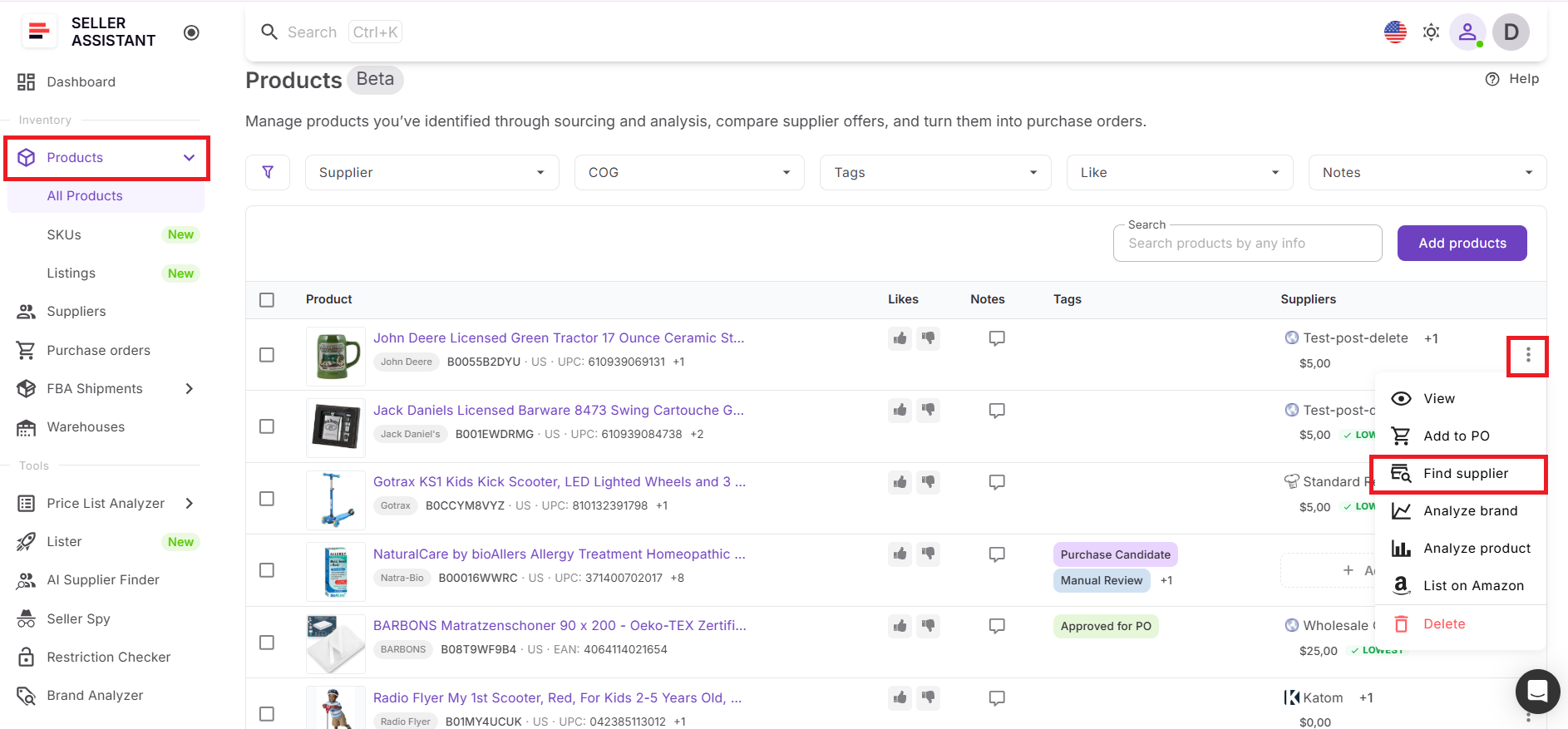
Once a product is stored in the Product Database, you can open the three-dot menu next to the product and click Find Supplier. AI Supplier Finder launches automatically using the product’s brand, allowing supplier discovery to begin instantly without manual searches or re-entering data.
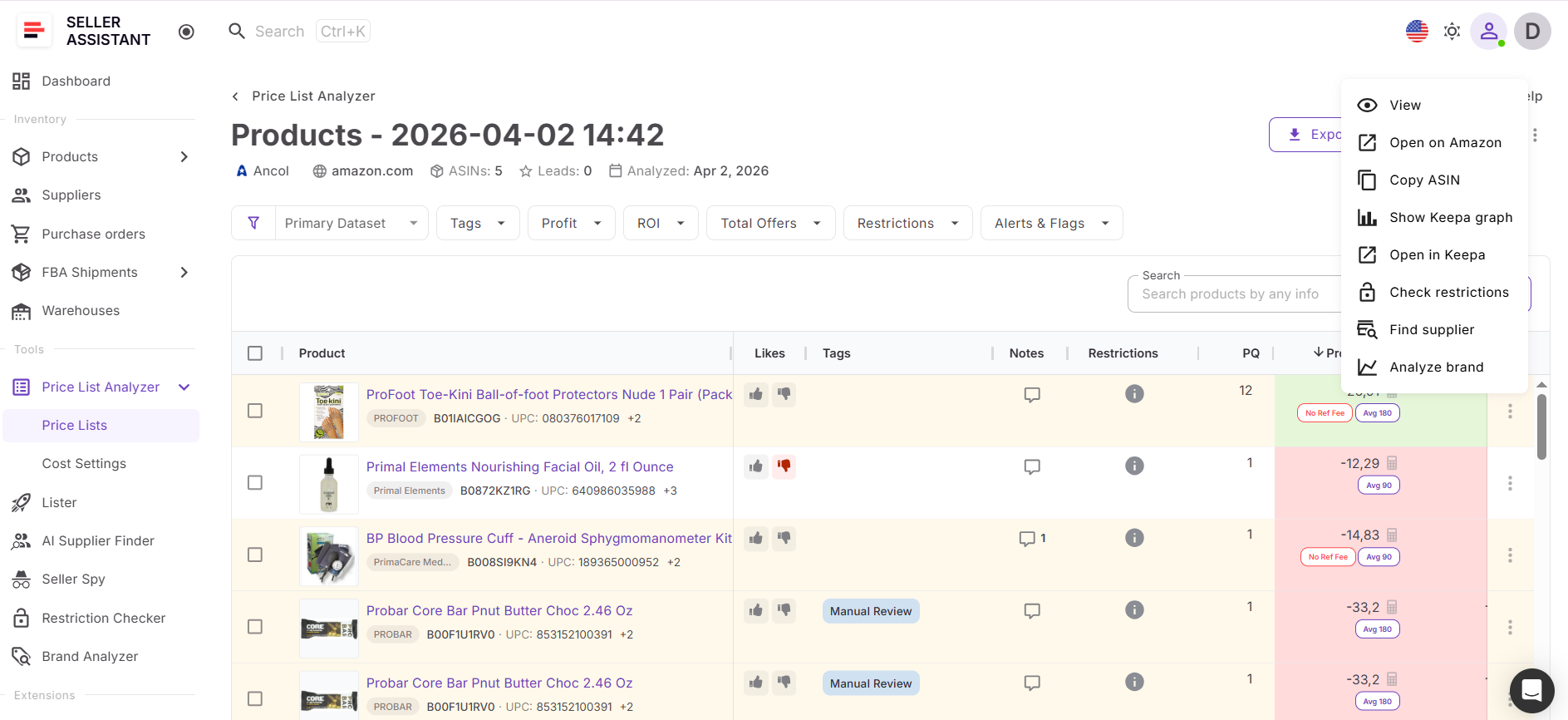
How supplier sourcing from Product Database fits into your workflow
Supplier discovery works best when it’s connected to the rest of your sourcing process. After identifying and storing profitable products, you can immediately search for suppliers, compare supplier offers, save sourcing decisions, and move approved products into purchasing.
Keeping these stages connected reduces duplicate work, keeps supplier data organized, and creates a sourcing workflow that scales more efficiently as your Amazon business grows.
Note. Seller Assistant is an end-to-end Amazon workflow management platform that integrates 15+ wholesale-focused solutions into one connected system. It combines sourcing workflow automation, bulk research and intelligence tools, and integrated Chrome extensions – giving you everything you need to streamline finding deals, managing suppliers, and creating purchase orders.

With Seller Assistant, every step of your Amazon wholesale and arbitrage workflow is automated and connected.
What Is Product Database?
Product Database is Seller Assistant’s centralized workspace for managing sourced Amazon products and connected supplier data in one system. It stores ASINs, supplier offers, COG, notes, tags, and sourcing decisions, making it easier to organize product research and move directly into supplier discovery.
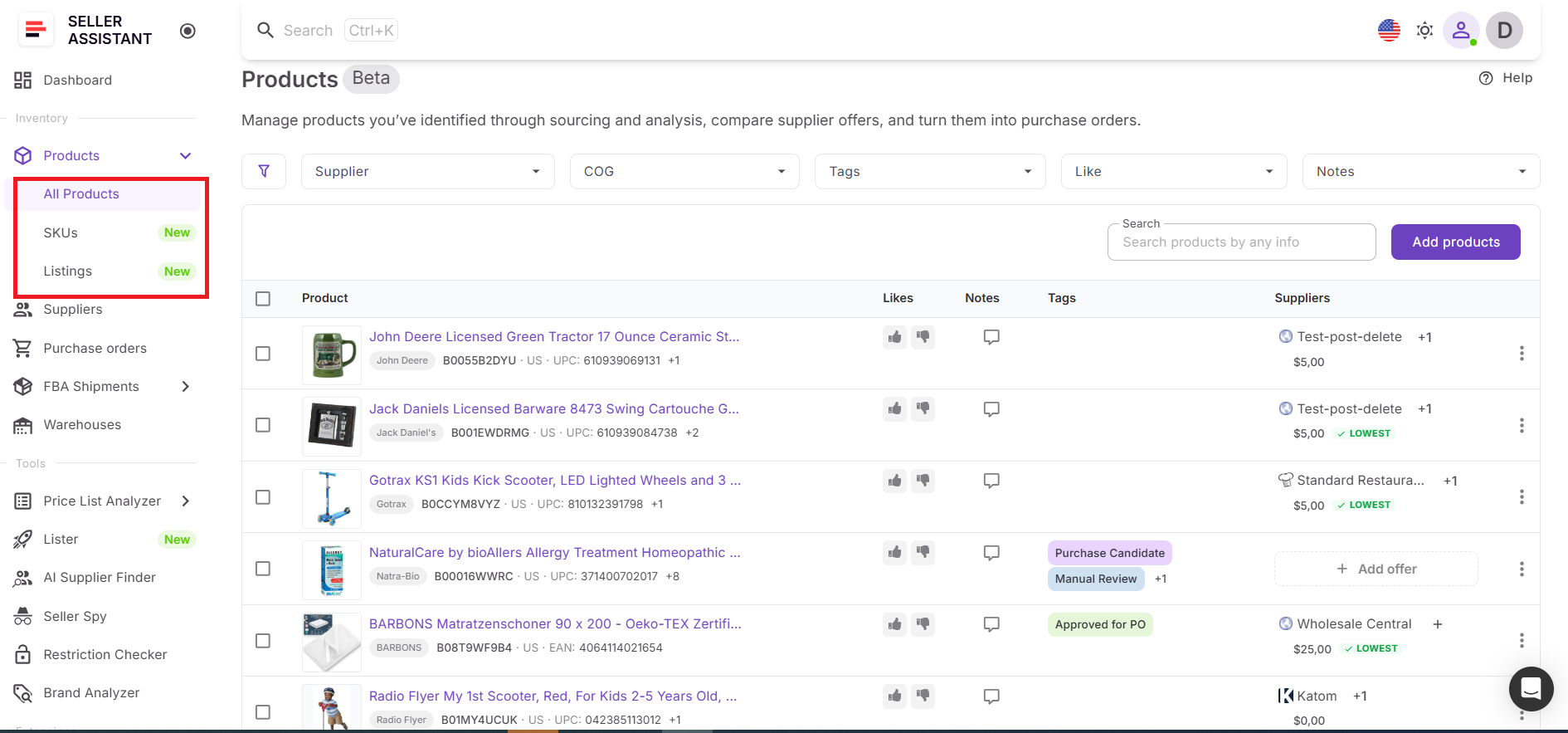
Instead of managing products across spreadsheets, browser tabs, and disconnected sourcing tools, sellers work with structured product records that stay linked to supplier information and sourcing history. Product Database is designed to help sellers move from product research to supplier sourcing faster, without rebuilding workflows or losing context.
What you can do with Product Database
Product Database helps sellers organize sourced products and connect them directly with supplier discovery workflows. It keeps product data, supplier information, and sourcing decisions structured in one place, making supplier research faster and more consistent.
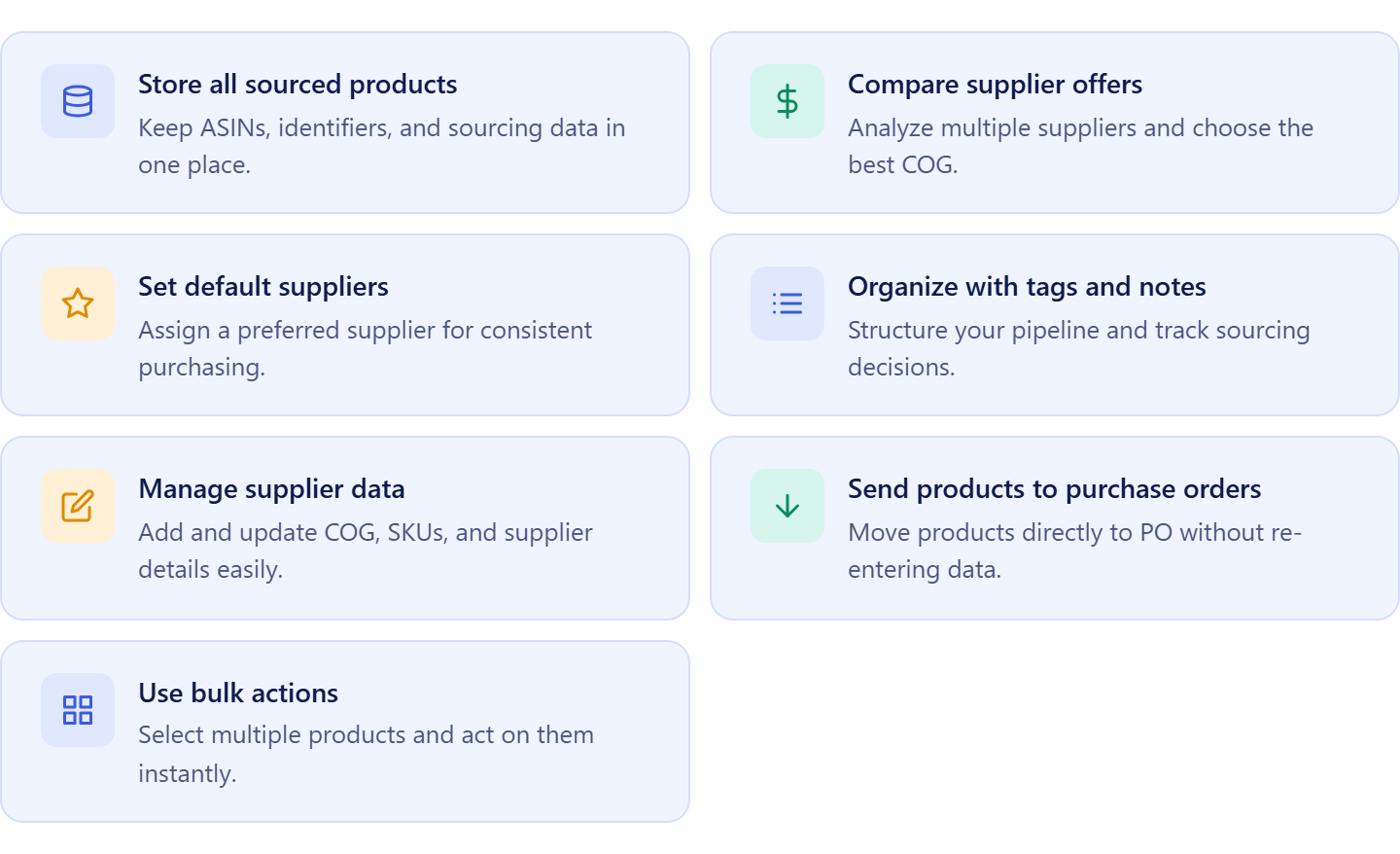
- Store sourced products in one workspace
Keep ASINs, identifiers, marketplace information, supplier offers, and sourcing inputs centralized for easier product management.
- Compare supplier offers for the same product
Review multiple supplier offers side by side, analyze COG differences, and identify the best sourcing opportunity faster.
- Keep supplier research connected to products
Store supplier data directly inside product records so sourcing history and supplier relationships remain organized over time.
- Organize sourcing workflows with notes and tags
Use notes, likes, and tags to track sourcing decisions, supplier status, and product opportunities across your team.
- Update supplier data without losing context
Edit supplier offers, pricing, SKUs, and links while keeping all sourcing information connected to the product.
- Launch supplier search directly from products
Open the three-dot menu next to a product and click Find supplier to launch AI Supplier Finder automatically using the product’s brand.
- Work with products in bulk
Apply tags, organize sourcing lists, and manage multiple products at once to streamline large-scale sourcing operations.
How Product Database supports connected supplier sourcing
Product Database turns supplier sourcing into a connected workflow instead of a separate research task. Sellers can store products from sourcing tools or manual research, organize supplier offers, and launch supplier discovery directly from validated products.
Instead of searching for suppliers manually every time, supplier discovery starts from products already saved in the database. This keeps sourcing structured, reduces duplicate work, and helps sellers move faster from product research to real supplier opportunities.
Product Database also connects with other Seller Assistant tools like Price List Analyzer, Brand Analyzer, AI Supplier Finder, Suppliers Database, Bulk Restriction Checker, Purchase Orders Module, and Lister. Keeping products, suppliers, and sourcing decisions connected inside one workflow reduces operational mistakes and creates a more scalable sourcing system for Amazon wholesale, online arbitrage, and dropshipping sellers.
What Is AI Supplier Finder?
AI Supplier Finder is Seller Assistant’s supplier discovery tool designed to help Amazon sellers find wholesale suppliers connected to sourced products and brands. Instead of manually searching Google, sorting through retail stores, and trying to verify supplier legitimacy yourself, the tool generates structured supplier results focused on wholesale and resale opportunities.
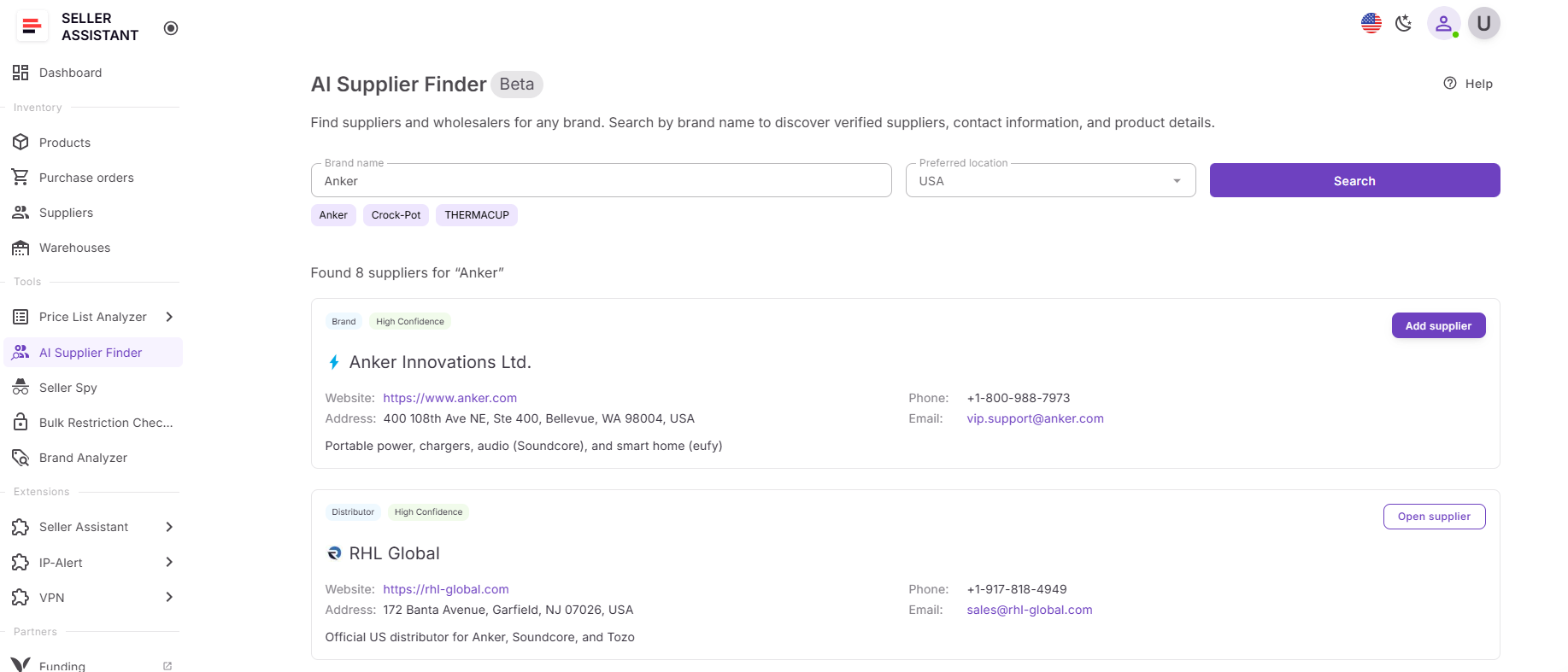
It helps sellers move from sourced products in Product Database to real supplier leads faster by identifying manufacturers, distributors, and wholesalers connected to the product’s brand. The goal is to simplify supplier discovery, reduce manual research, and make supplier sourcing part of a connected workflow instead of a separate process.
What you can do with AI Supplier Finder
AI Supplier Finder helps sellers organize supplier discovery and prioritize the best sourcing opportunities faster. It removes retail search noise and provides supplier results designed specifically for Amazon resale workflows.
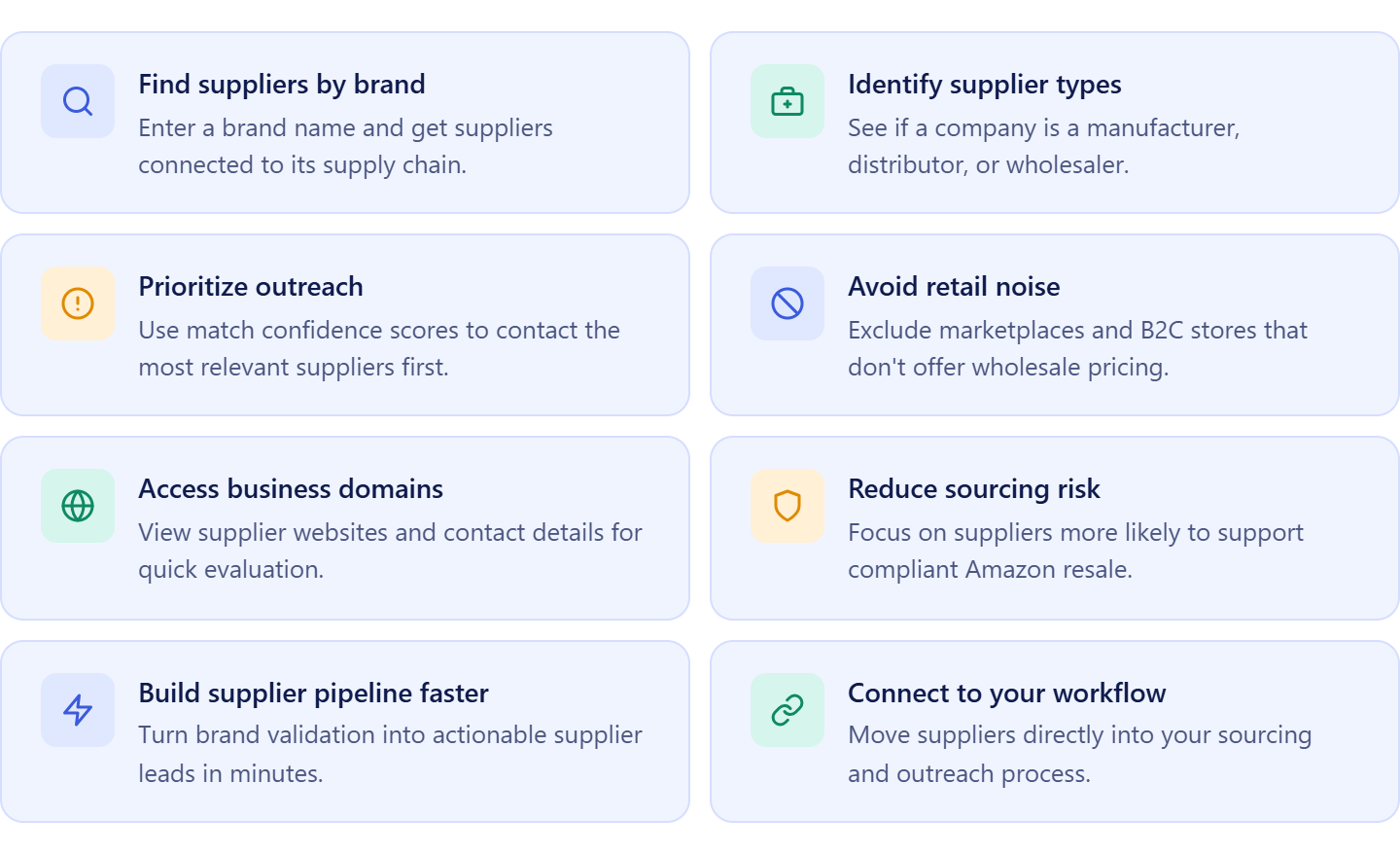
- Find suppliers connected to sourced products
Launch supplier discovery from products stored in Product Database and identify companies connected to the product’s brand.
- Identify different supplier types
See whether a supplier is a manufacturer, authorized distributor, wholesaler, or alternative supplier to choose the right sourcing path.
- Prioritize supplier outreach faster
Use match confidence levels like High, Medium, and Low to decide which suppliers should be contacted first.
- Exclude marketplaces and retail stores
Automatically filter out Amazon, eBay, Shopify storefronts, and other B2C sellers that do not support wholesale purchasing.
- Review business domains and supplier details
Access supplier websites and available contact information to evaluate supplier relevance and legitimacy more efficiently.
- Reduce sourcing and compliance risks
Focus on suppliers more likely to provide valid invoices and support long-term Amazon resale operations.
- Build supplier pipelines directly from sourced products
Turn products already stored in Product Database into organized supplier opportunities without restarting research manually.
How AI Supplier Finder supports connected supplier sourcing
AI Supplier Finder makes supplier discovery part of a connected sourcing workflow. Instead of switching between spreadsheets, browser searches, and supplier lists, sellers can launch supplier search directly from products already stored in Product Database.
When you open the three-dot menu next to a product and click Find Supplier, the system automatically transfers the product’s brand into AI Supplier Finder and starts supplier discovery instantly. This removes repetitive manual work and keeps supplier sourcing connected to validated products and sourcing data.
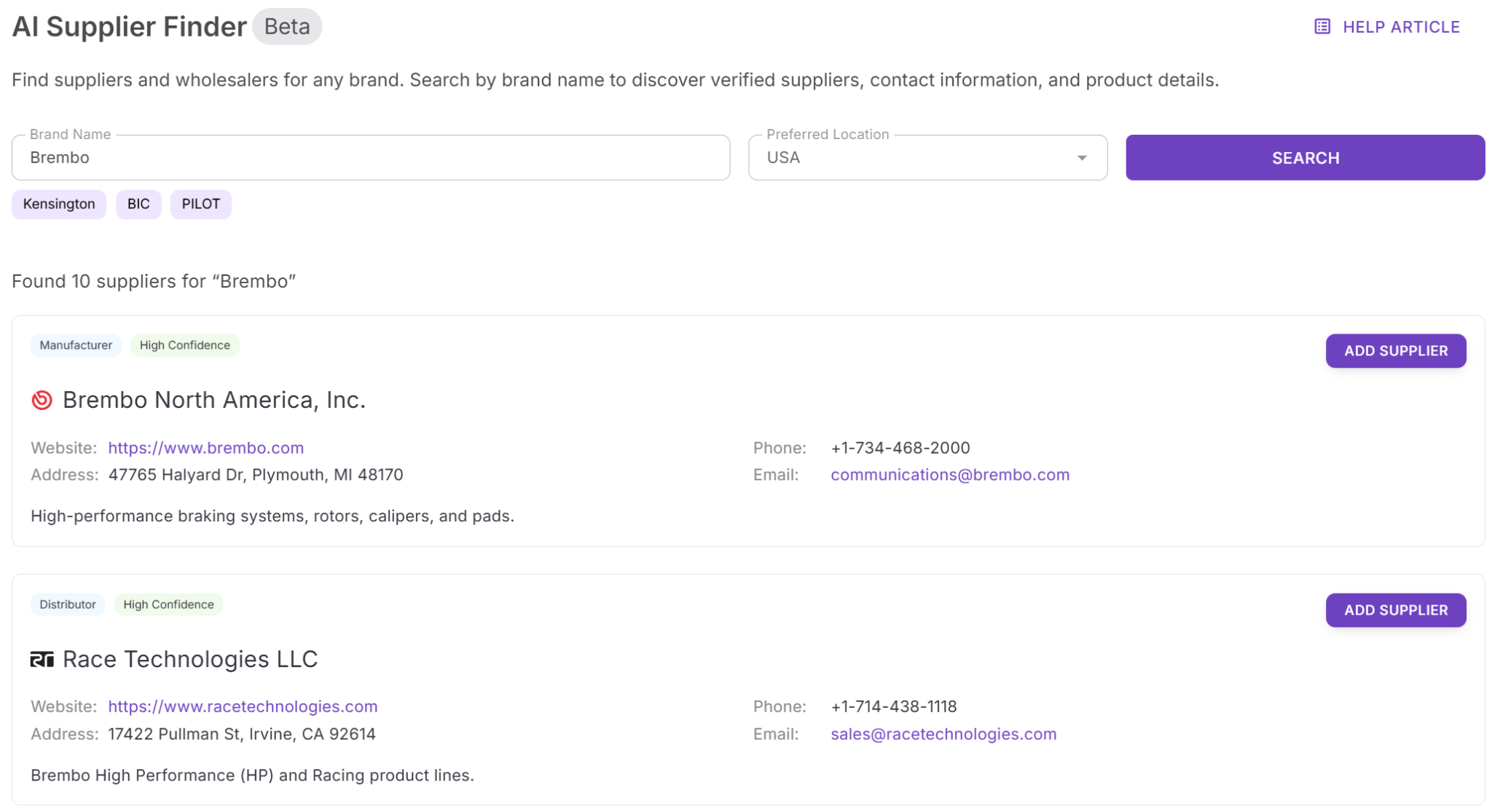
Supplier results are grouped by supplier type and prioritized by relevance, helping sellers move faster from product research to supplier outreach. AI Supplier Finder also connects with tools like Product Database, Suppliers Database, Price List Analyzer, Brand Analyzer, and Purchase Orders Module, creating a structured workflow where products, suppliers, and sourcing decisions stay organized in one system.
How to Find Suppliers From Products Stored in Product Database
The workflow starts inside Product Database, where sellers store sourced Amazon products together with supplier offers, COG, notes, tags, and sourcing history. Instead of keeping product research scattered across spreadsheets and browser tabs, sellers manage validated products inside one centralized sourcing workspace.
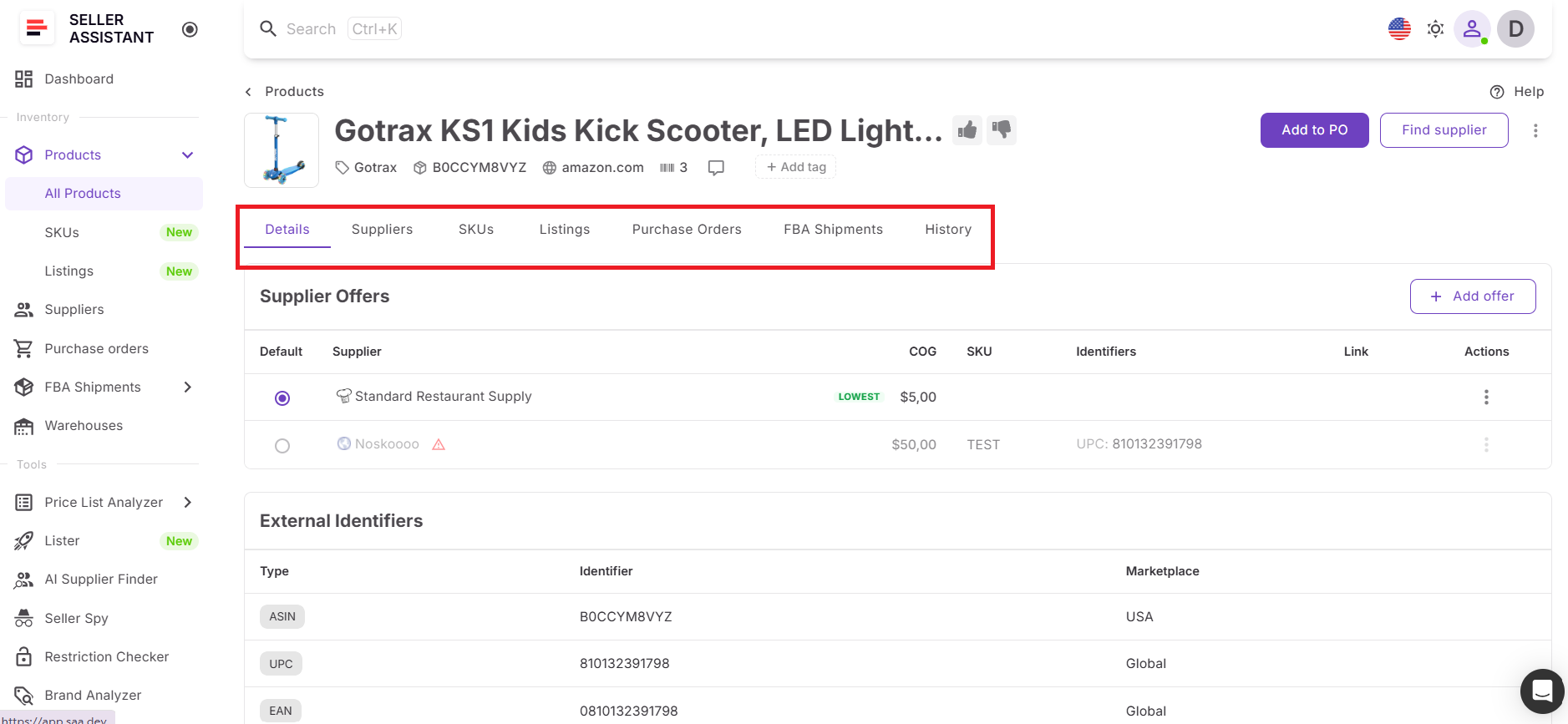
Once products are saved in the database, sellers review sourcing data, compare supplier offers, and identify products worth scaling with Price List Analyzer. To start supplier discovery, they open the three-dot menu next to the selected product and click Find Supplier. This automatically launches AI Supplier Finder using the product’s brand, without requiring manual searches or re-entering supplier information.
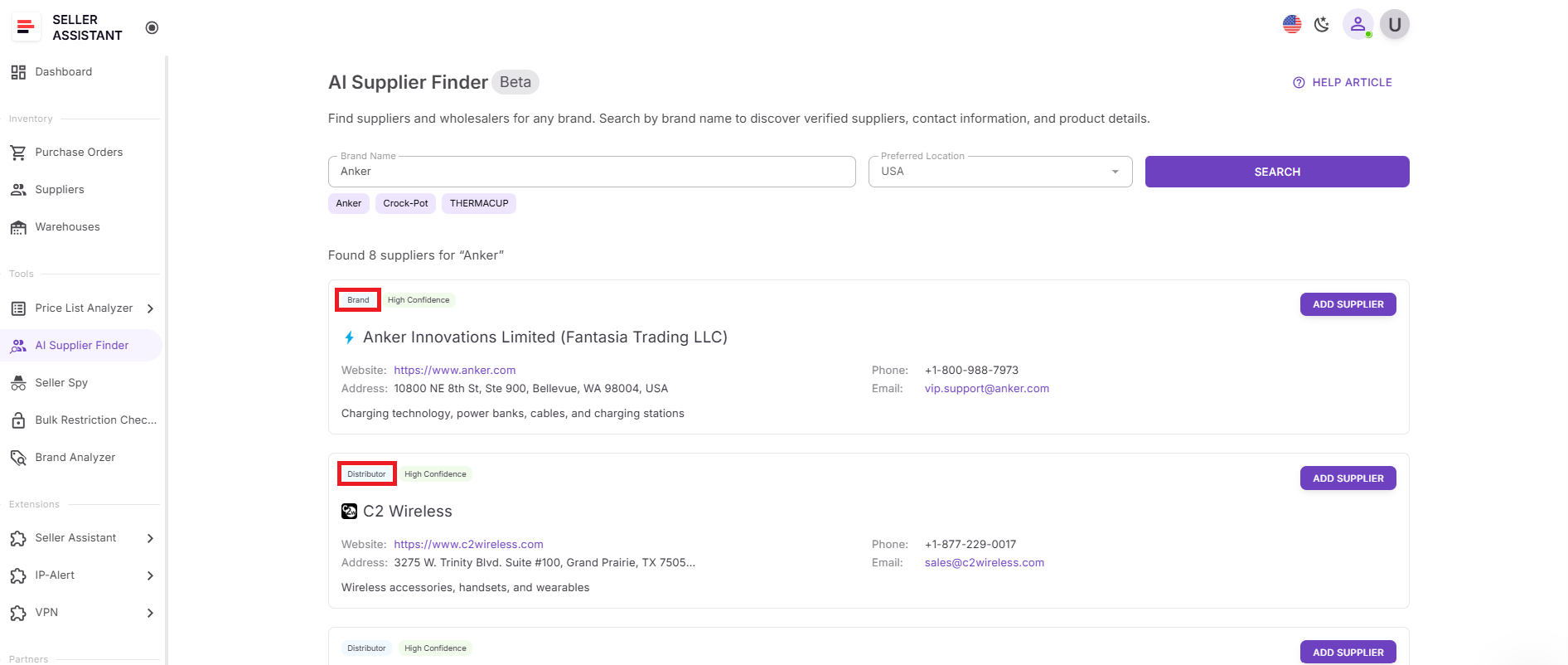
AI Supplier Finder then generates a structured list of manufacturers, distributors, wholesalers, and alternative suppliers connected to the product’s brand. Sellers can review supplier types, evaluate match confidence levels, and check available business details and contact information directly inside the workflow.
This connected process removes the need to switch between spreadsheets, Google searches, and disconnected sourcing tools. It helps Amazon wholesale, online arbitrage, and dropshipping sellers move from sourced products to real supplier opportunities faster while keeping supplier research structured and organized.
How to Find Suppliers from Product Database Step-by-Step
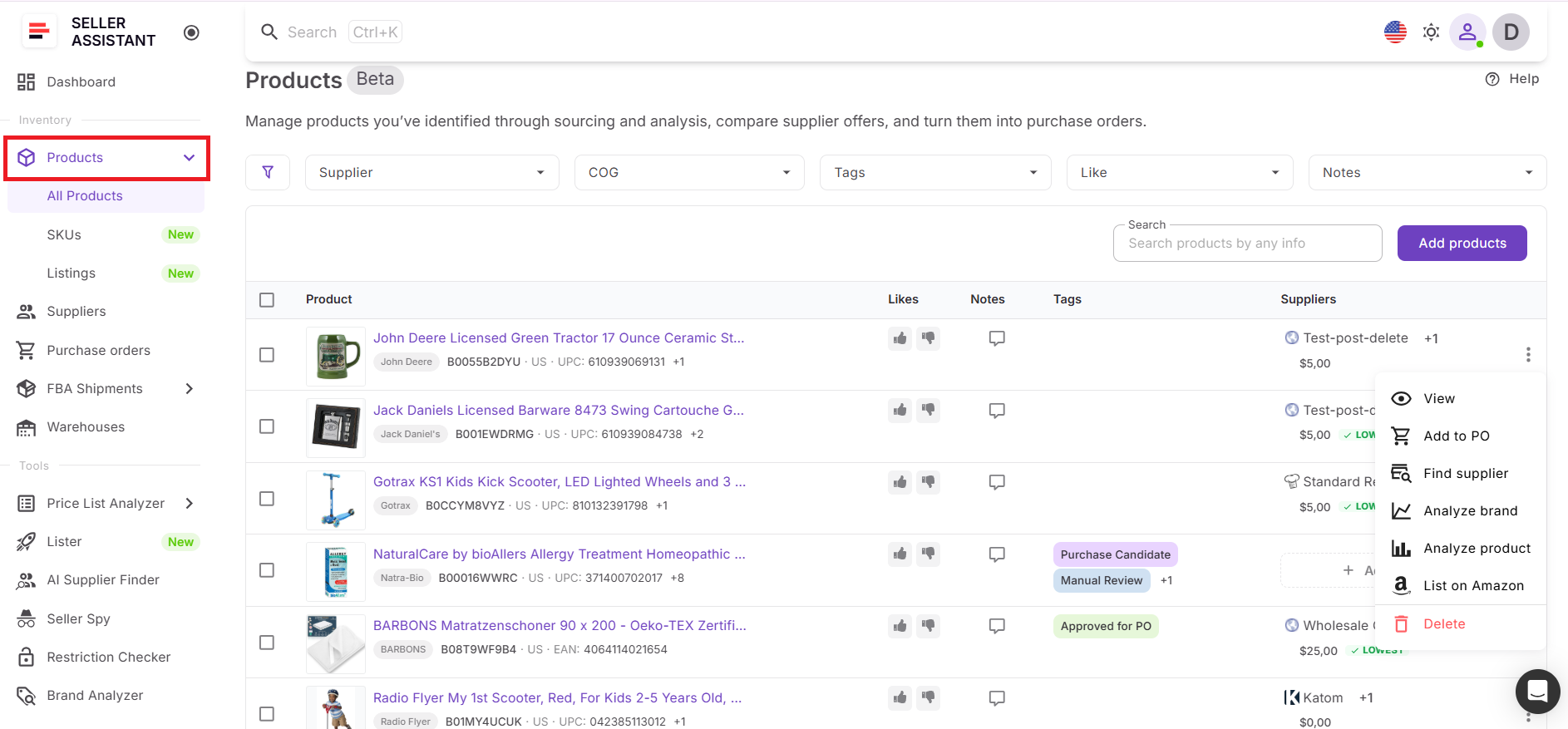
Step 1. Open Product Database
Go to Products in Seller Assistant. This is where your sourced products are stored together with ASINs, supplier offers, COG, notes, tags, and sourcing history.
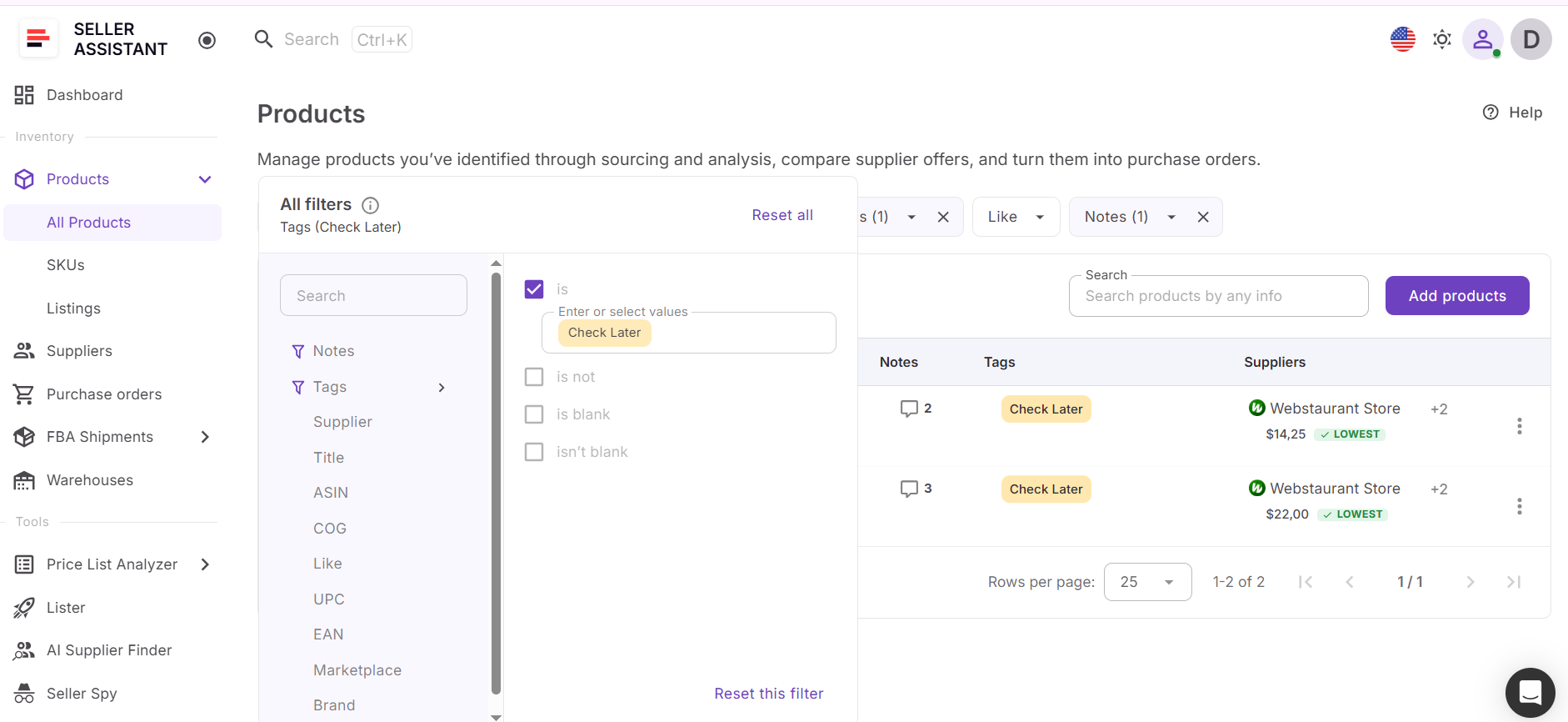
Step 2. Find the product
Use search or filters to locate the product you want to source. You can search by product name, ASIN, supplier, COG, tags, likes, or notes.
Step 3. Open the product action menu
Find the three-dot menu next to the product. This menu gives you access to additional actions connected with that product.
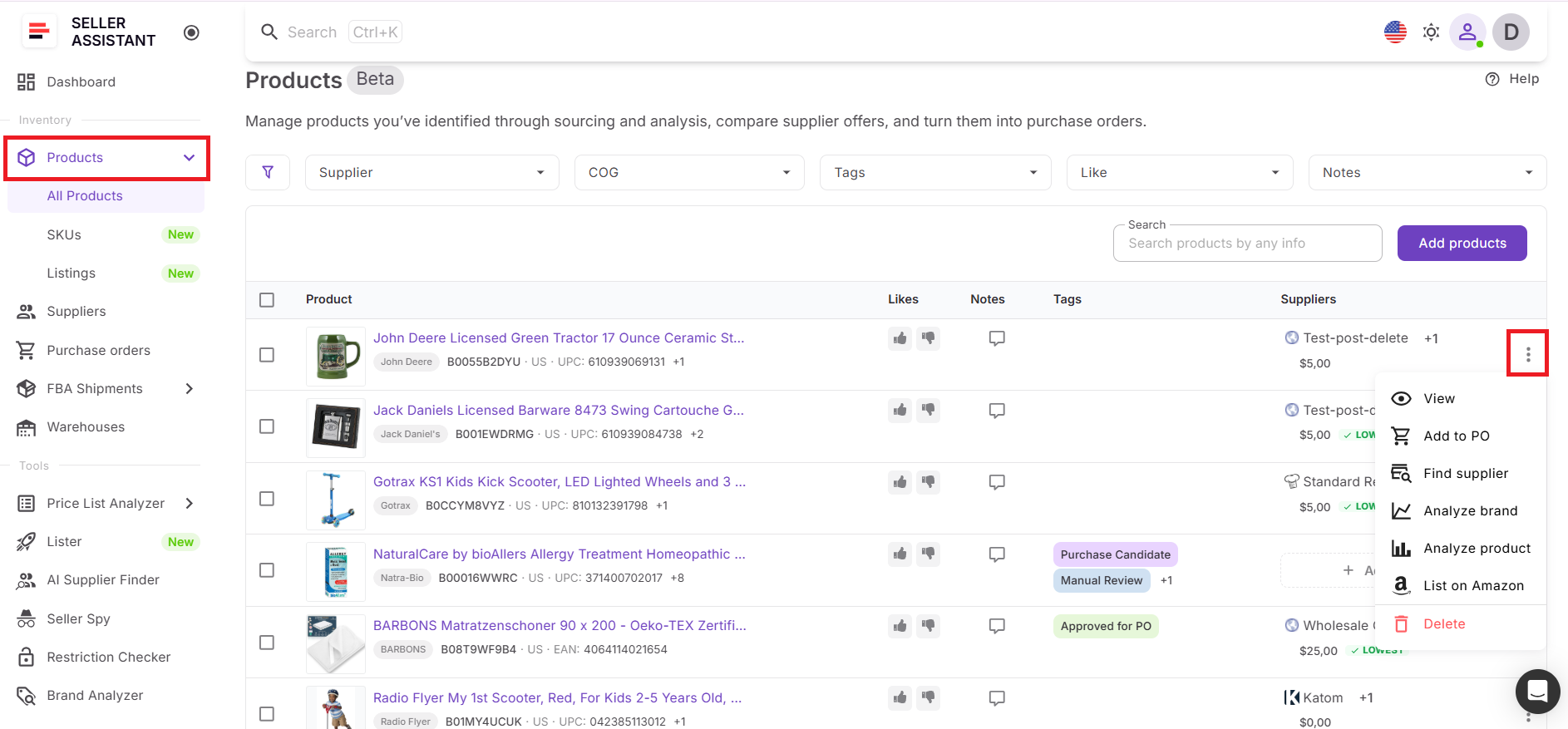
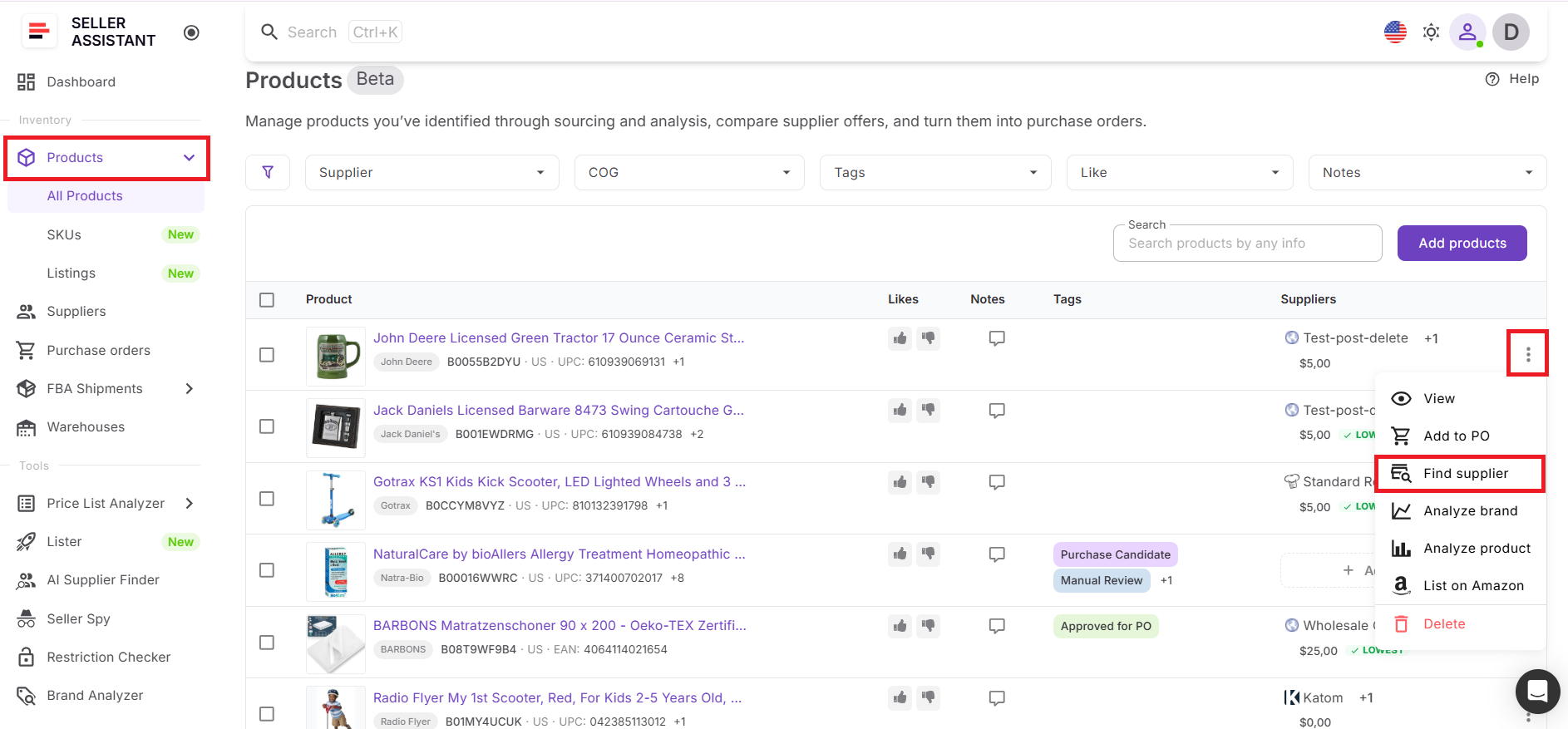
Step 4. Click Find Supplier
Select Find Supplier from the menu. Seller Assistant automatically launches AI Supplier Finder and uses the product’s brand to start supplier discovery.
Step 5. Review supplier results
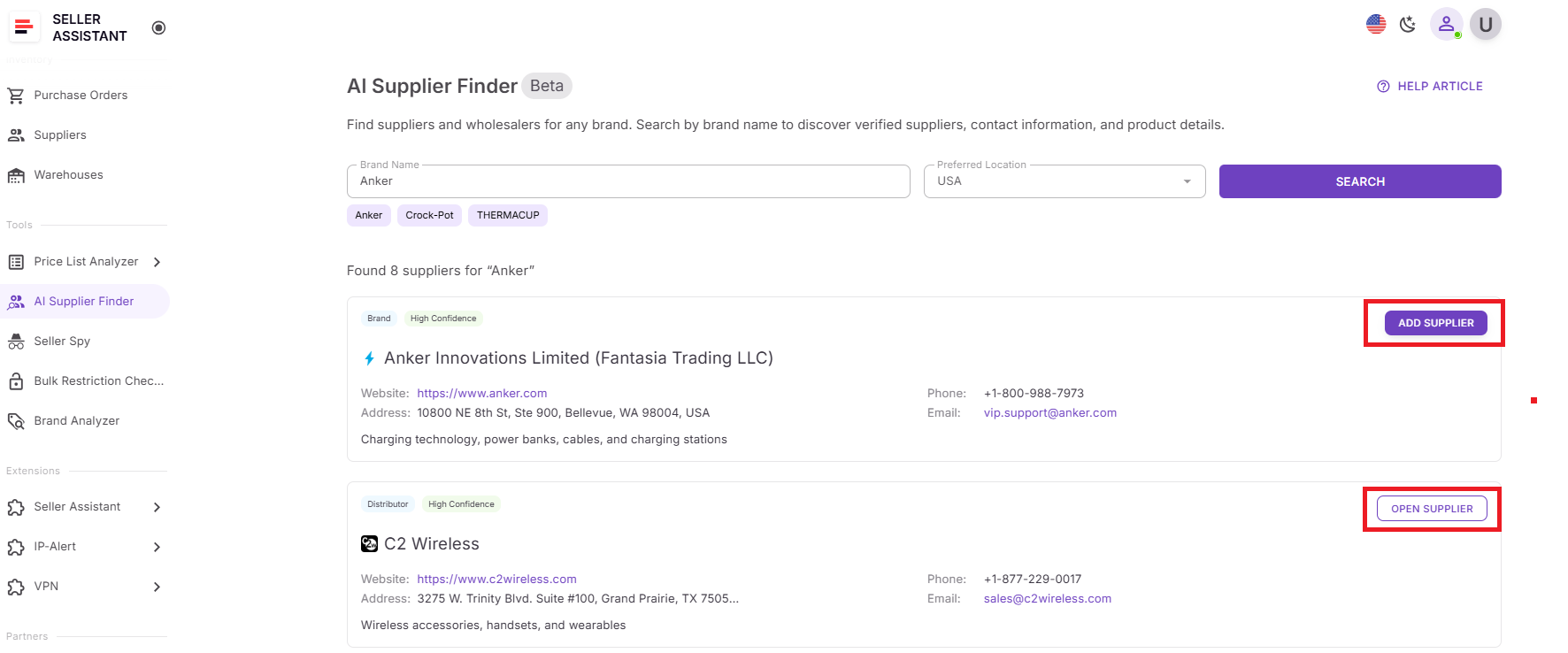
AI Supplier Finder shows potential suppliers connected to the product’s brand. Results can include manufacturers, authorized distributors, wholesalers, and alternative suppliers.
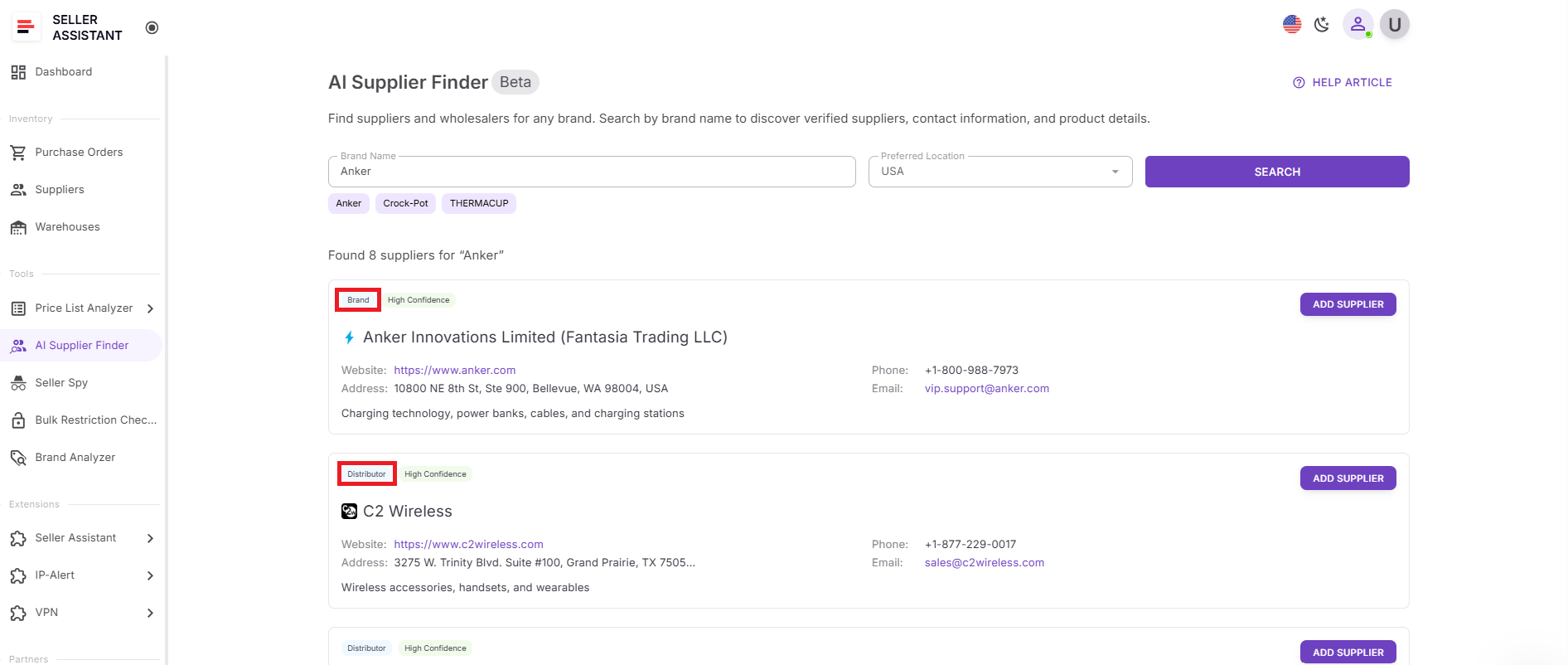
Step 6. Prioritize supplier options
Review supplier type, match confidence, business website, and available contact details. Start with High-confidence suppliers, then move to Medium-confidence options if you need more leads.
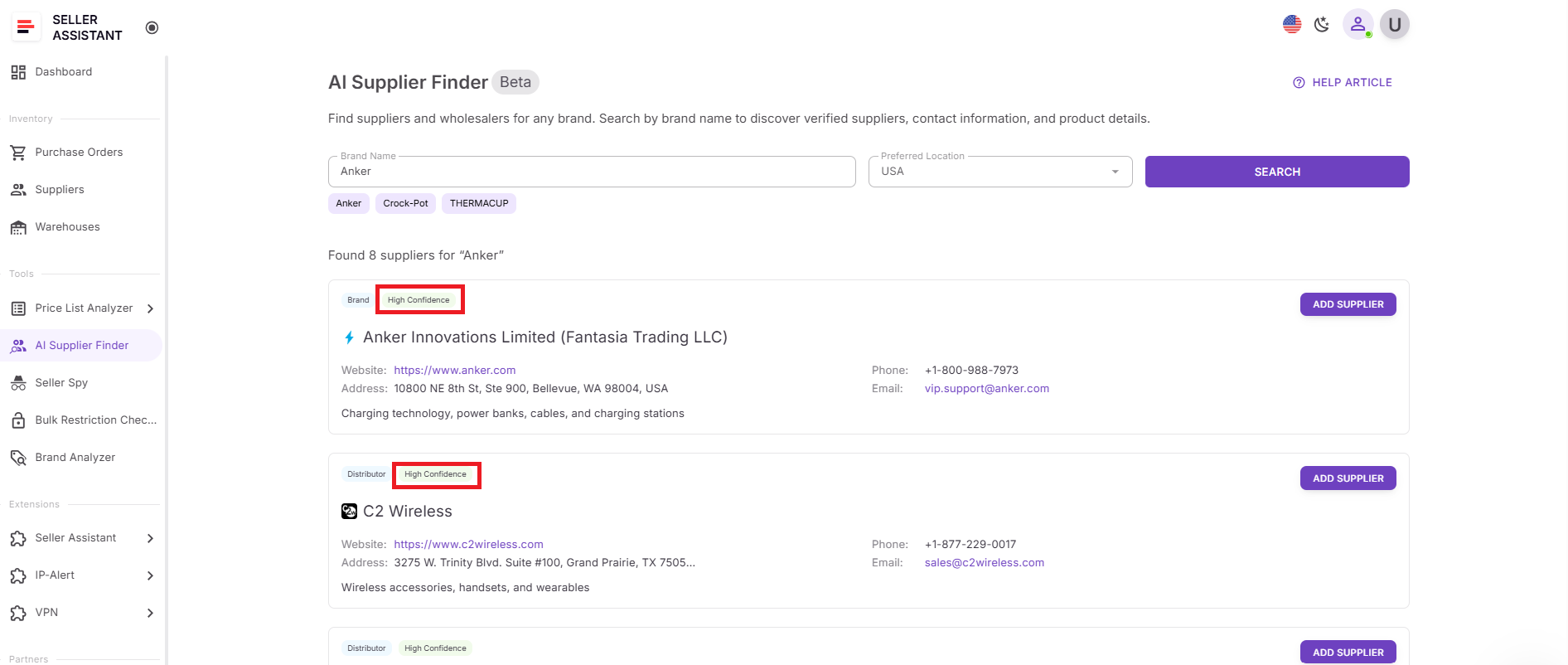
Step 7. Save suppliers for outreach
Click Add supplier to create a supplier profile, or Open supplier if the supplier already exists in your account. This keeps supplier discovery connected to your sourcing workflow.
FAQ
Can I find suppliers directly from products stored in Product Database?
Yes. You can open the three-dot menu next to a product and click Find supplier to launch AI Supplier Finder automatically. The tool uses the product’s brand to generate relevant supplier results without manual searching.
What types of suppliers does AI Supplier Finder show?
AI Supplier Finder can display manufacturers, authorized distributors, wholesalers, and alternative suppliers connected to the product’s brand. Supplier results are grouped by type to help sellers prioritize the best sourcing path.
Does AI Supplier Finder show retail stores or marketplaces?
No. The tool automatically filters out Amazon, eBay, Shopify storefronts, and other B2C marketplaces that do not support wholesale sourcing. This keeps supplier search focused on resale-friendly business suppliers.
Why is finding suppliers from Product Database better than manual research?
Products stored in Product Database already contain sourcing context, supplier offers, and product information. Launching supplier discovery directly from validated products keeps sourcing organized and reduces repetitive manual work.
Can I save suppliers after finding them?
Yes. You can save suppliers directly into your workflow by clicking Add supplier or open existing supplier profiles if they are already stored in your account. This keeps supplier management connected with product sourcing and purchasing workflows.
Final Thoughts
Finding profitable products is only one part of building a scalable Amazon sourcing operation. The real challenge is turning those products into reliable supplier relationships while keeping sourcing data organized and actionable. When supplier research happens across spreadsheets, browser tabs, and disconnected tools, it becomes harder to compare suppliers, track sourcing decisions, and scale consistently.
Seller Assistant’s Product Database and AI Supplier Finder simplify that process by connecting sourced products directly with supplier discovery. Instead of restarting supplier research manually, sellers can launch supplier search from products already stored in their workflow, review structured supplier results, and move faster toward outreach and purchasing decisions.