A supplier list with a few thousand rows, fully analyzed, still isn’t a buying decision – it’s a table of numbers that someone has to read, weigh, and turn into “buy this, skip that, order this quantity.” That step, not the analysis itself, is usually where sourcing slows down.
Seller Assistant’s Price List Analyzer already calculates the numbers behind that decision; its MCP Server lets an AI assistant carry it the rest of the way – “which of these are worth buying,” “add these to a purchase order” – in one conversation.
Why a Fully Analyzed Supplier List Still Requires Another Decision Layer
Analyzing a supplier price list solves the data problem, but it does not automatically solve the buying decision. A catalog can already contain profitability, demand, pricing, competition, and risk data for hundreds or thousands of products, yet sellers still need to determine which combination of those signals makes a product worth sourcing.
The challenge is that Amazon sourcing decisions rarely depend on a single metric. A product with excellent ROI may have limited sales potential, while a lower-ROI product may offer stronger demand or more manageable competition. Turning analyzed data into a purchase decision means weighing these trade-offs against the seller’s own sourcing criteria, budget, and purchasing priorities.
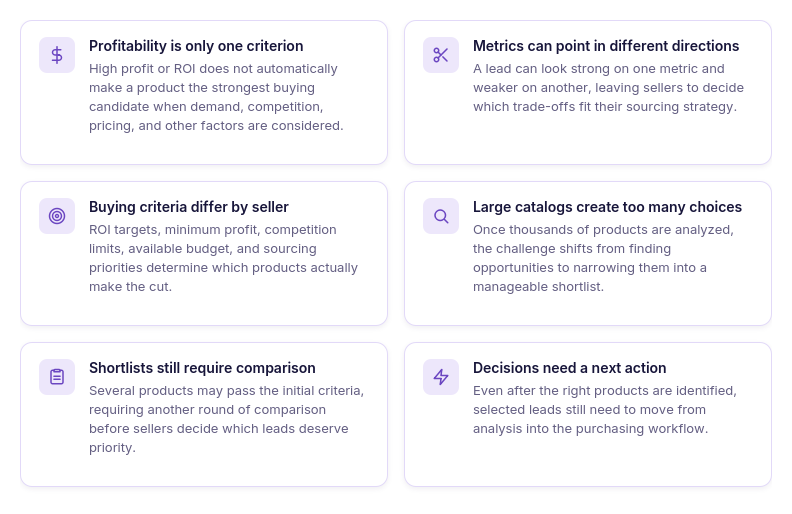
Profitability is only one criterion
High profit or ROI can make a product attractive, but those numbers need to be considered alongside demand, competition, pricing, and other sourcing factors.
Strong metrics can point in different directions
A lead can perform well on one metric and look less attractive on another. Sellers still need to decide which trade-offs fit their sourcing strategy before committing capital.
Every seller has different buying criteria
There is no single combination of metrics that makes a product the right buy for every Amazon reseller. Minimum ROI, target profit, competition limits, budget, and other requirements can change which products make the shortlist.
Large catalogs create too many possible choices
Once hundreds or thousands of supplier products have been analyzed, even a relatively small percentage of promising leads can leave sellers with a long list to review. The bottleneck shifts from finding data to narrowing the available options.
Shortlisted products still need comparison
Filtering reduces the number of candidates, but several products may still meet the initial requirements. Sellers then need to compare the remaining leads and determine which ones deserve priority.
Decisions still have to become actions
Choosing promising products is not the end of the sourcing workflow. Selected leads still need to move from research into purchasing before the analysis becomes an actual supplier order.
Why Asking AI “What Should I Buy?” Isn’t Enough
A general AI assistant can explain how to evaluate Amazon sourcing opportunities, suggest useful profitability thresholds, or describe which factors to compare before placing an order. But knowing how sourcing decisions work is different from applying those criteria to the actual products in a supplier catalog.
Without access to the analyzed price list, AI cannot see which leads meet your requirements, compare the products you are considering, or continue working with them as your criteria change. To help move from thousands of analyzed rows toward an actionable purchase decision, the assistant needs access to the real sourcing data behind those products.
General sourcing knowledge is not catalog analysis
AI can explain which metrics matter when choosing Amazon products, but it cannot identify the relevant leads without access to the actual analyzed supplier catalog.
Buying decisions depend on real product data
Profit, ROI, costs, demand, competition, and other sourcing metrics vary from product to product, so useful comparisons require actual lead data rather than hypothetical examples.
Manually copied leads limit what AI can see
If you paste only a few products into the chat, AI can work only with the shortlist you have already created and cannot consider other candidates still buried in the catalog.
Decisions require multiple metrics
The strongest buying candidate may not be the product with the highest ROI or profit, making it necessary to evaluate several sourcing factors together.
Follow-up questions can change the shortlist
Changing a threshold, adding another criterion, or investigating a specific product can produce a different group of candidates, so AI needs continued access to the underlying data.
Advice still needs to become action
Even after products have been narrowed and investigated, selected leads still need to move into the purchasing workflow. Tool access connects the conversation with supported sourcing actions instead of stopping at recommendations.
How Seller Assistant Makes AI-Assisted Buying Decisions Possible
Turning a large supplier catalog into actual buying decisions requires two things: detailed sourcing data for the products being considered and a way for AI to work with that data throughout the decision process. The assistant needs more than general Amazon knowledge – it needs access to the actual leads, their profitability and marketplace data, and supported operations that can move selected products further in the sourcing workflow.
Seller Assistant combines these two parts. Price List Analyzer turns supplier catalogs into structured Amazon sourcing data, while Seller Assistant MCP Server connects supported Seller Assistant data and operations to AI assistants such as ChatGPT and Claude. Together, they create a workflow where sellers can move from thousands of analyzed products to a focused shortlist, investigate individual opportunities, and continue selected leads toward purchasing through the same conversation.
How Price List Analyzer turns supplier catalogs into decision-ready data
Seller Assistant’s Price List Analyzer is built for bulk product research across Amazon wholesale, online arbitrage, and dropshipping catalogs. Sellers upload an .xlsx or .xls supplier file containing product identifiers and COG, allowing hundreds or thousands of supplier products to be researched together instead of evaluating potential buys one listing at a time.
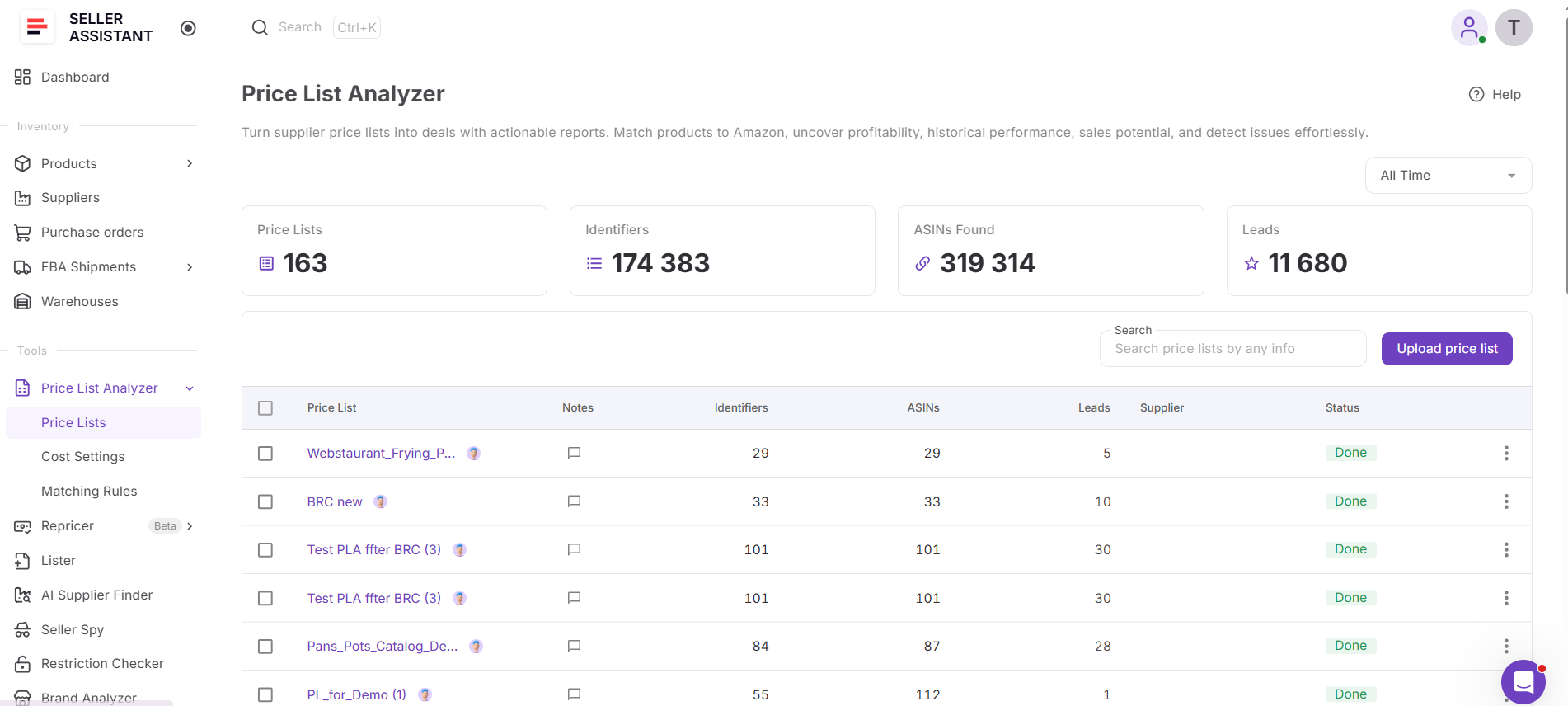
Price List Analyzer matches supplier products with Amazon listings and builds a sourcing dataset for each match. Profitability, demand, sales history, pricing and Buy Box data, competition, restrictions, warnings, and other product information are brought together in one analysis. For buying decisions, this provides the data sellers need to move from a large supplier catalog toward a smaller group of products that meet their sourcing requirements.
What Price List Analyzer helps you evaluate before buying
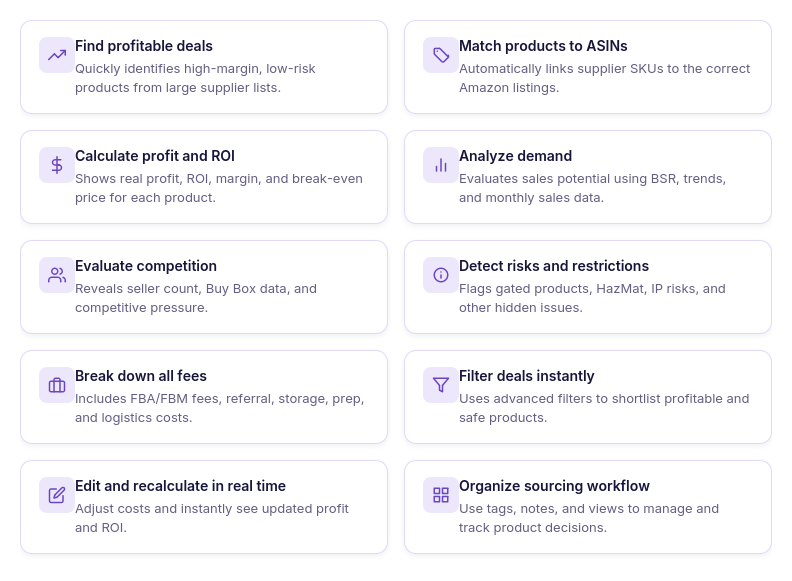
- Analyze supplier catalogs at scale
Upload large supplier price lists and research hundreds or thousands of products in one workflow instead of checking Amazon listings individually.
- Match supplier products to Amazon
Automatically match supplier product identifiers to Amazon ASINs, reducing the manual work required to connect catalog items with the correct listings.
- Calculate FBA and FBM profitability
See profit, ROI, margin, break-even price, Max COG, seller proceeds, and detailed costs using Amazon fees and your configured sourcing expenses.
- Validate product demand
Use sales estimates, Monthly Sold, current and historical BSR, and Sales Rank Drops to evaluate sales potential and demand consistency over time.
- Analyze pricing and Buy Box history
Compare current Buy Box pricing with historical averages and price dynamics to avoid making a buying decision based only on a temporary selling price.
- Evaluate real competition
Review total offers, Buy Box-eligible FBA and FBM offers, top sellers, Buy Box share, and Amazon presence to understand the competitive environment around each ASIN.
- Detect restrictions and sourcing risks
Surface restrictions, warnings, and product flags such as HazMat, meltable, fragile, oversize, IP-related risks, missing Buy Box data, and other issues that may affect whether a lead moves forward.
- Filter products by your sourcing criteria
Narrow large catalogs using profitability, demand, competition, pricing, restrictions, risk, brand, category, tags, and other available metrics, then save views to reuse your preferred criteria.
- Test different cost scenarios
Adjust COG, shipping and prep costs, package quantity, fees, taxes, and other cost assumptions and recalculate profitability without uploading the supplier file again.
- Organize and review sourcing leads
Use likes and dislikes, tags, notes, and saved views to build shortlists, record sourcing decisions, and keep product research organized across a team.
- Export the leads you need
Export the complete analyzed list, filtered results, or selected products depending on which products and data you want to use next.
- Turn analyzed products into purchase orders
Select sourcing candidates from the analyzed price list and use Add to PO to continue with them in Seller Assistant Purchase Orders workflow instead of manually transferring product data.
How Price List Analyzer helps narrow a supplier catalog into buying candidates
The value of analyzing an entire supplier catalog is not simply getting profitability calculations for every row. Price List Analyzer puts the metrics that influence a sourcing decision into the same dataset, allowing sellers to progressively narrow thousands of products using the criteria that matter to their business.
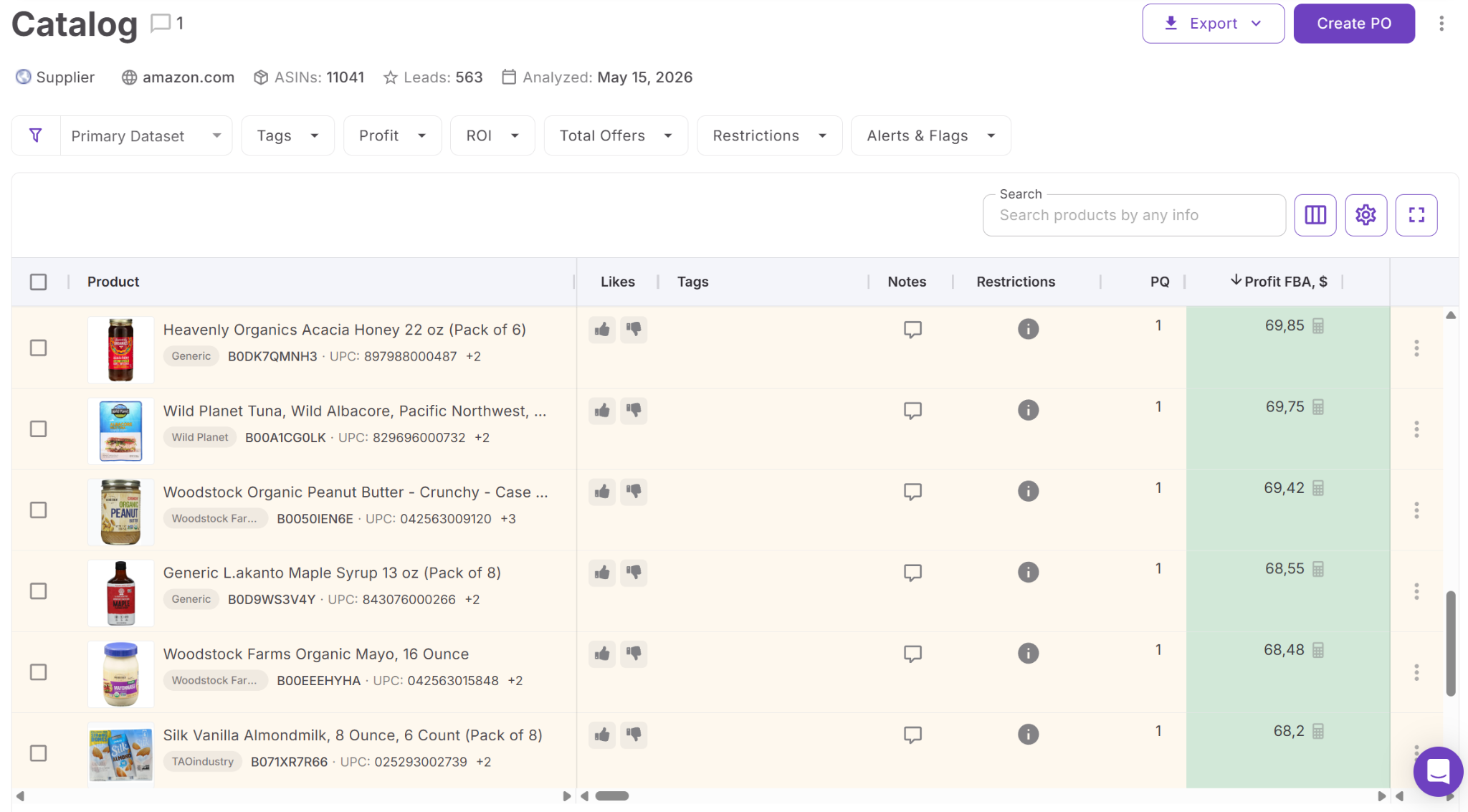
A seller can begin with profitability, then consider demand, competition, pricing history, restrictions, warnings, and other factors before deciding which products deserve further investigation. Products that fail the initial requirements can be removed from consideration, while stronger candidates can be organized into a more manageable shortlist.
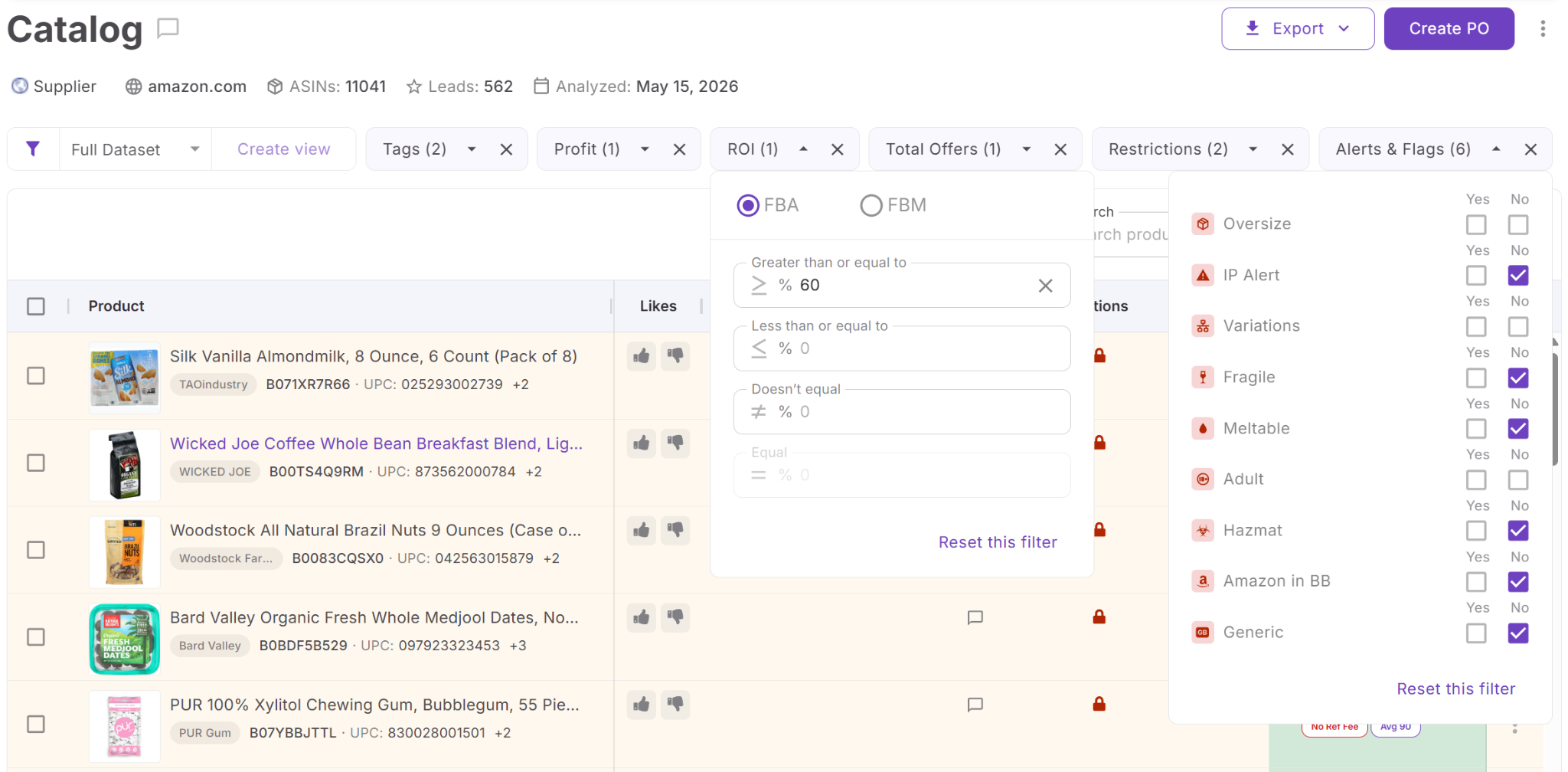
That shortlist becomes the bridge between analysis and purchasing. Instead of starting with thousands of supplier products when deciding what to order, sellers can work with a smaller set of analyzed candidates and move the products they ultimately select into the Purchase Orders workflow.
How Seller Assistant MCP turns analyzed leads into actionable buying decisions
Seller Assistant MCP Server connects AI assistants with Seller Assistant tools and account data, allowing sellers to work with supported sourcing operations through natural-language requests. Instead of discussing buying criteria with ChatGPT or Claude and then returning to the sourcing workflow to find the relevant products manually, MCP gives the assistant access to actual Seller Assistant data and supported actions.
For buying decisions, this connection helps bridge the gap between an analyzed supplier catalog and the products a seller ultimately chooses to source. The assistant can work with supported Price List Analyzer workflows, retrieve actual leads, help narrow and investigate potential buys, and continue selected products into supported supplier and Purchase Order operations.
What you can do with Seller Assistant MCP when making buying decisions
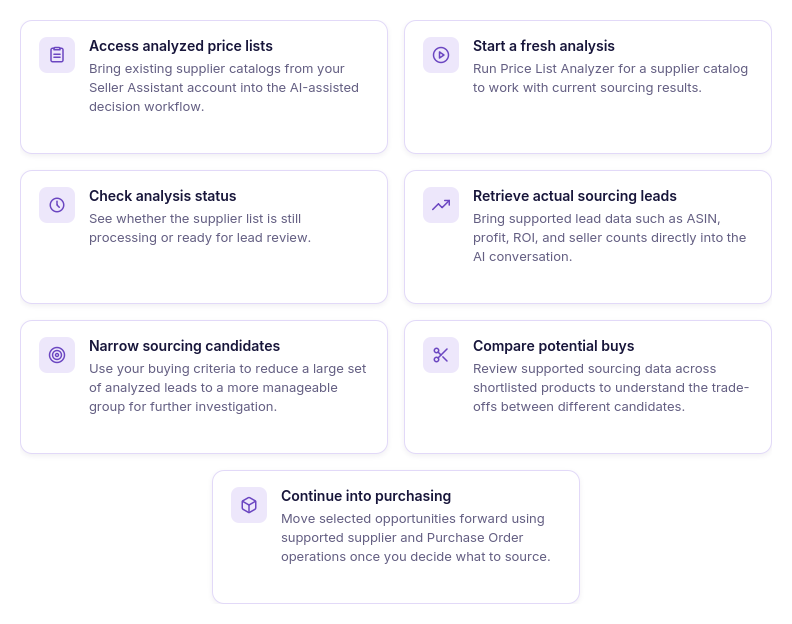
- Access your analyzed price lists
Ask AI to retrieve price lists from your Seller Assistant account so you can work with an existing analyzed supplier catalog instead of manually transferring product data into the conversation.
- Start a fresh analysis
Run Price List Analyzer for the supplier catalog you want to evaluate. This gives the buying workflow a current set of analyzed sourcing leads rather than relying on an older shortlist.
- Check when results are ready
Ask AI whether the price list analysis is still processing or has finished. Once the results are ready, you can continue working with the resulting leads in the same conversation.
- Bring actual leads into the conversation
Retrieve Price List Analyzer leads with supported data such as ASIN, profit, ROI, and seller counts. This gives the assistant real sourcing candidates to work with instead of hypothetical products or manually copied rows.
- Narrow a large set of sourcing candidates
Use the retrieved lead data to focus on products that fit the criteria relevant to your buying decision. This helps reduce a large analyzed catalog to a more manageable group of products for further investigation.
- Compare products before making a decision
Review supported profitability and marketplace data across potential buys to understand how shortlisted products differ. Follow-up questions can then focus on the leads that require closer investigation before purchasing.
- Continue selected leads into purchasing
Once you decide which products you want to source, supported MCP workflows can continue into supplier and Purchase Order operations. This helps connect the research stage with purchasing instead of leaving the final shortlist disconnected from the next sourcing step.
How MCP connects supplier analysis with purchasing
MCP changes AI from a separate source of sourcing advice into an interface for working with supported Seller Assistant data and operations. Instead of analyzing a supplier catalog, manually creating a shortlist, copying products into AI, and then returning to Seller Assistant for the next action, sellers can continue working with actual sourcing results through the conversation.
Price List Analyzer performs the underlying product matching and analysis, MCP connects supported results and operations to the AI assistant, and the seller defines the criteria and makes the final buying decision. Together, they create an analyze → retrieve → narrow → investigate → decide → act workflow that helps turn a large supplier catalog into products ready to move toward purchasing.
Practical Tips to Turn Supplier Leads Into Purchase Decisions with AI
AI is most useful at the decision stage when each request answers a specific sourcing question. Instead of asking broadly, “What should I buy?”, sellers can use AI to narrow analyzed leads according to their criteria, compare potential buys, investigate individual products, and continue the products they select toward purchasing.
The seller still defines what makes a product worth sourcing and makes the final buying decision. AI helps apply those criteria to supported Seller Assistant data and reduces the manual work between a large analyzed supplier catalog and an actionable shortlist.
| Buying Task | How AI Helps | Prompt Example |
|---|---|---|
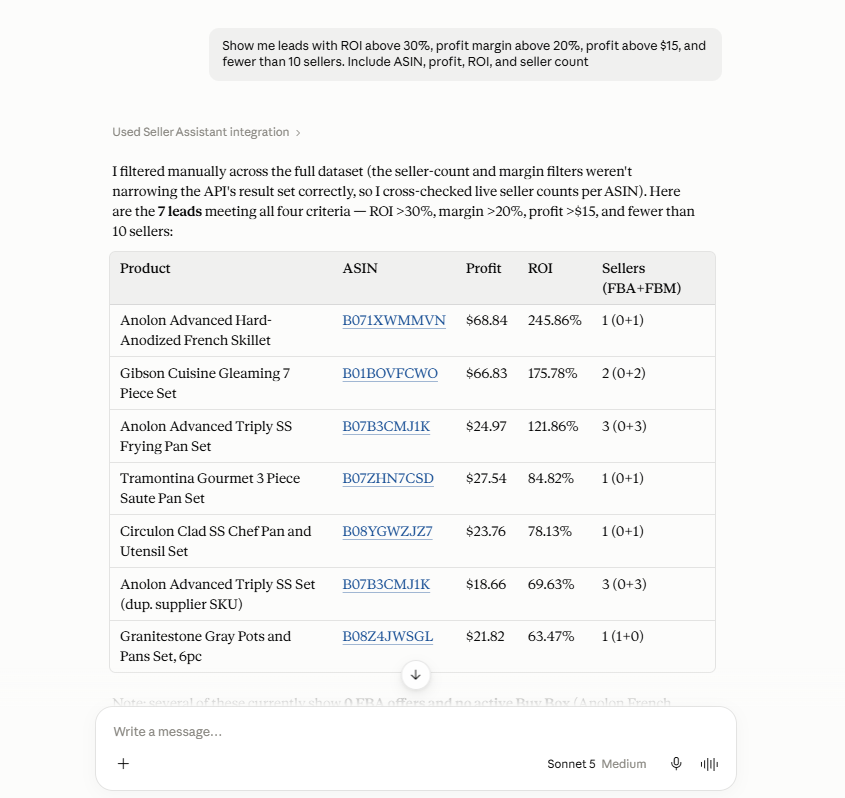
| Build a shortlist from a large catalog | Work with retrieved Price List Analyzer leads and focus on products that meet the criteria relevant to your sourcing strategy. | ”Show me leads with ROI above 25%. Include ASIN, profit, ROI, and seller count.” |
| Compare promising leads | Review supported metrics for several products together and identify differences between potential buys. | ”Compare these leads by profit, ROI, and seller count. Show me the key differences I should investigate before deciding.” |
| Investigate a specific candidate | Retrieve supported data for an individual lead and continue asking follow-up questions about the product. | ”Find ASIN B0XXXXXXXX in my price list leads and show me its profit, ROI, and seller count.” |
| Refine the shortlist | Change the criteria in follow-up requests and review which products remain relevant under the new requirements. | ”Now focus on the leads with ROI above 25% and fewer than 10 sellers. Show me their ASIN, profit, ROI, and seller count.” |
| Continue selected leads toward purchasing | Use supported supplier and Purchase Order operations after you decide which products you want to source. | ”Create a purchase order for these selected products.” |
Build a shortlist from a large supplier catalog
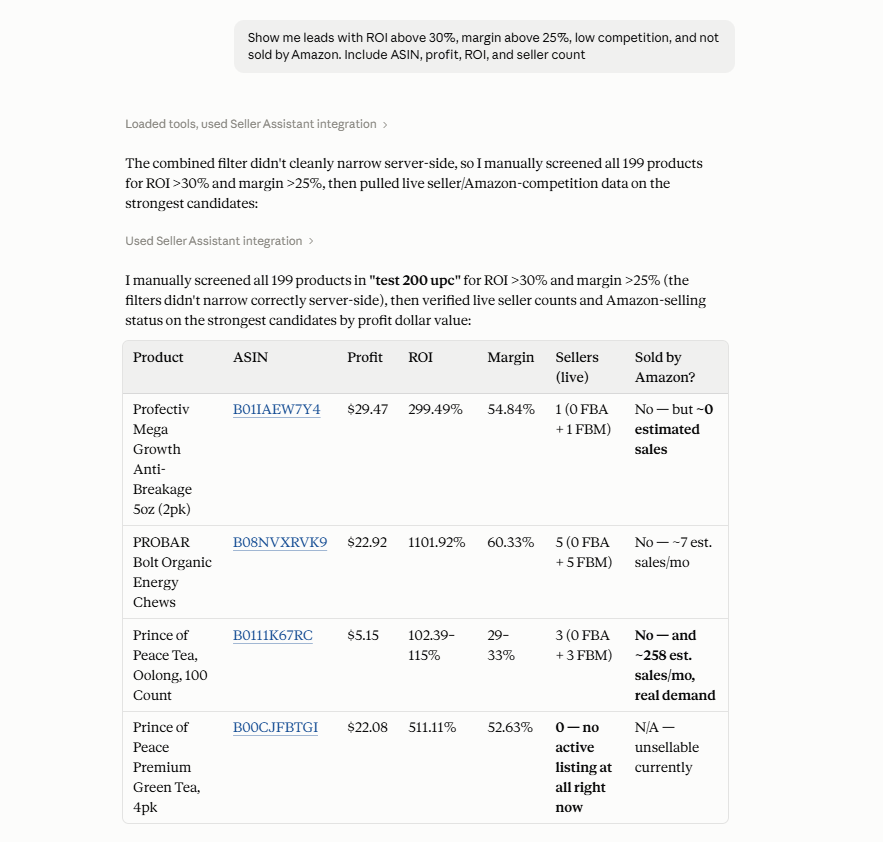
A fully analyzed price list can still contain hundreds or thousands of potential leads. Ask AI to narrow the retrieved results using your buying criteria so you can focus on a smaller group of products that deserves further evaluation.
Prompt example
“Show me leads with ROI above 30%, margin above 25%, low competition, and not sold by Amazon. Include ASIN, profit, ROI, and seller count.”
Why it matters
The first shortlist removes much of the catalog from immediate consideration. Instead of comparing every analyzed product, you can concentrate your attention on candidates that already meet your basic sourcing requirements.
Compare promising sourcing candidates
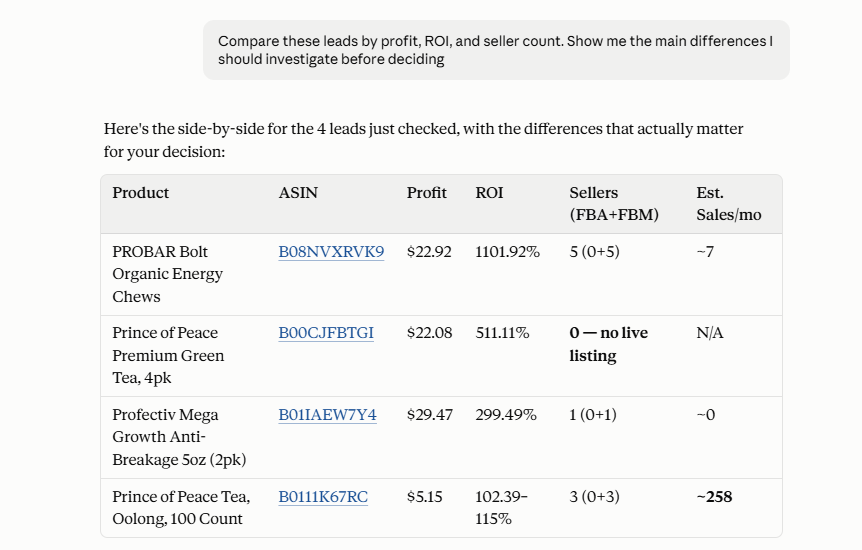
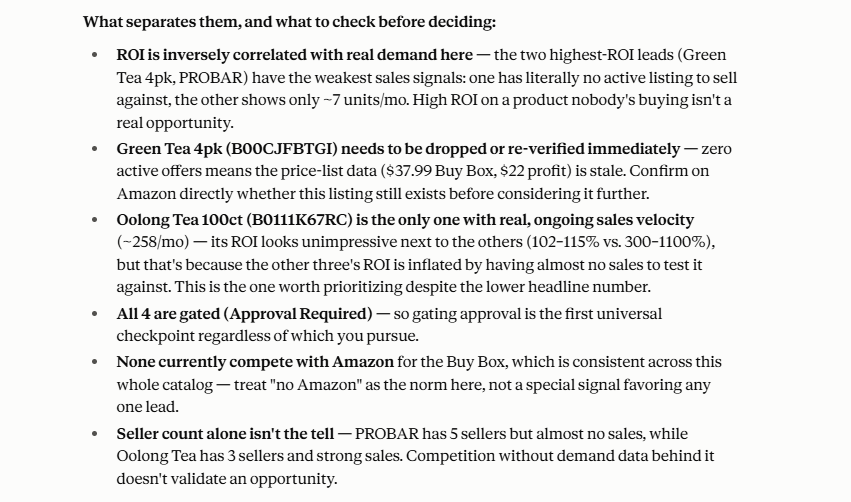
Several products may pass your initial criteria but still differ significantly in profitability and competition. Ask AI to compare supported data across shortlisted leads so you can see those differences together before deciding which products require deeper research.
Prompt example
“Compare these leads by profit, ROI, and seller count. Show me the main differences I should investigate before deciding.”
Why it matters
Passing the same filter does not make products equally attractive for your sourcing strategy. Side-by-side comparison helps reveal the trade-offs that may be difficult to notice when reviewing leads individually.
Investigate a product before making a buying decision
Once a product reaches your shortlist, use follow-up requests to examine its supported sourcing data more closely. Instead of treating the initial filter as a final buying signal, you can investigate individual candidates before committing capital.
Prompt example
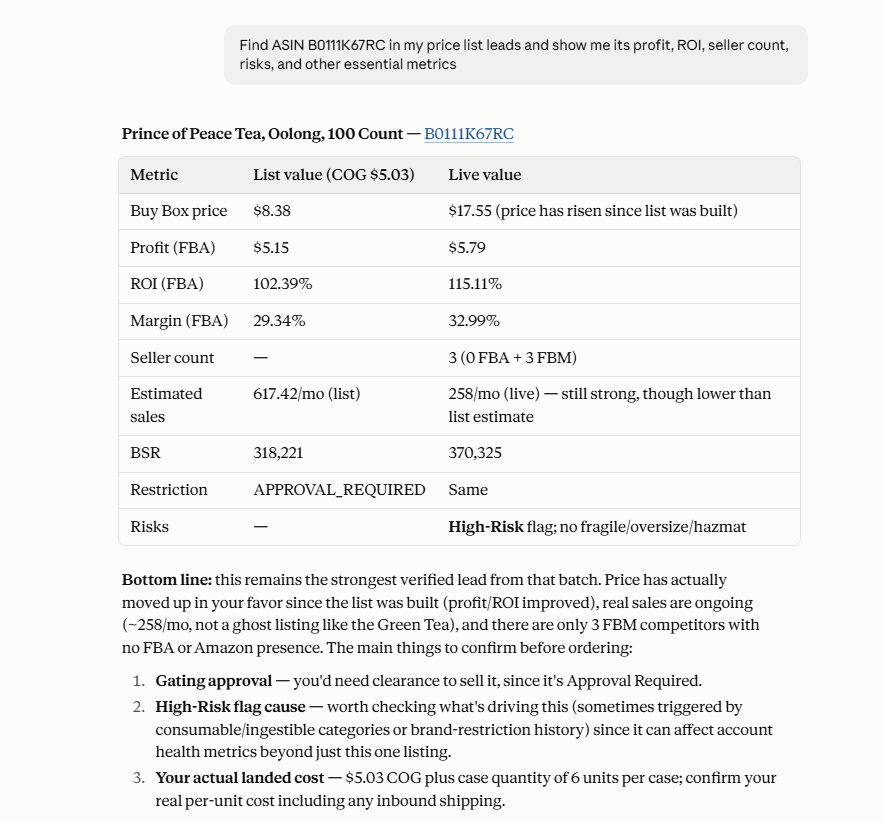
“Find ASIN B0111K67RC in my price list leads and show me its profit, ROI, seller count, risks, and other essential metrics.”
Why it matters
A shortlist tells you which products deserve attention, not necessarily which ones you should buy. Investigating individual leads adds another decision layer between meeting your initial criteria and placing an order.
Refine the shortlist as your criteria change
Your first set of requirements may still leave too many potential products. Ask AI to apply additional criteria to the retrieved leads and progressively narrow the selection as you learn more about the available opportunities.
Prompt example
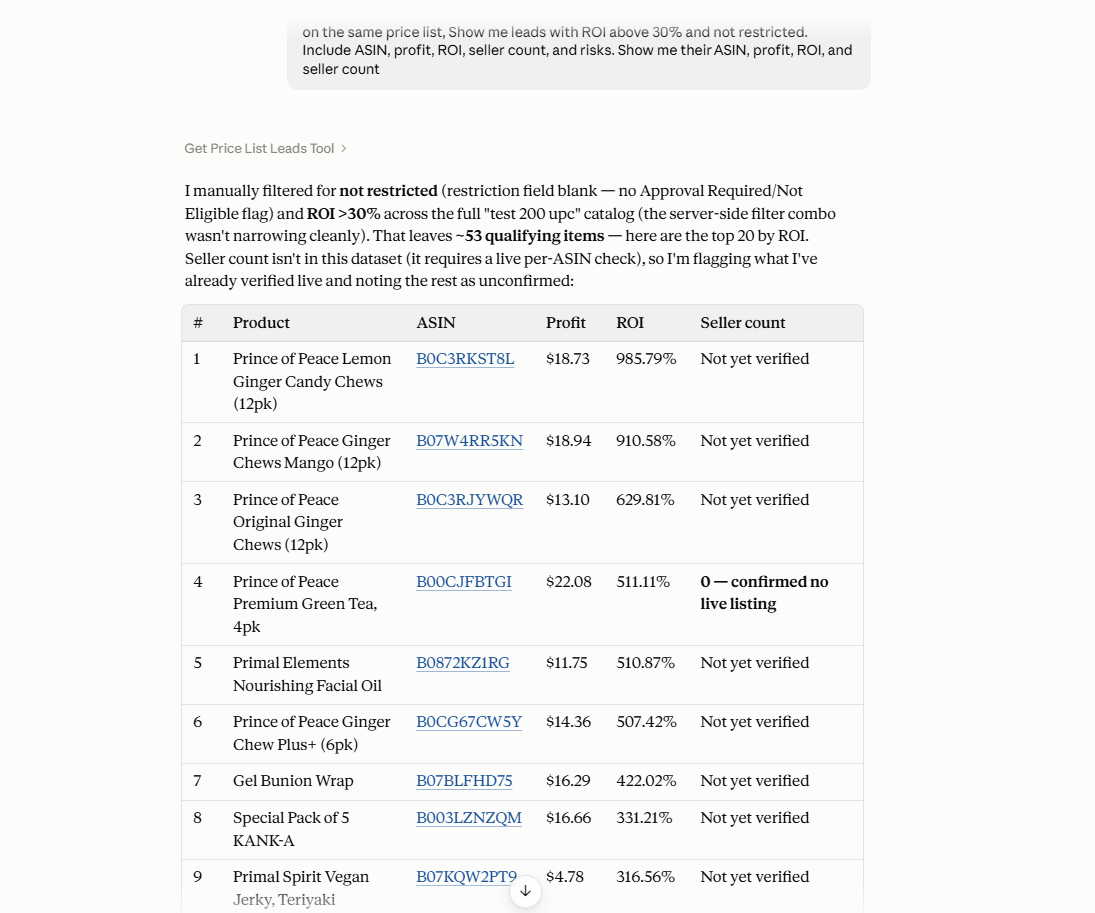
“Show me leads with ROI above 30% and not restricted. Include ASIN, profit, ROI, seller count, and risks. Show me their ASIN, profit, ROI, and seller count.”
Why it matters
Sourcing decisions are rarely made with a single filter. Refining the shortlist lets you adjust your requirements without restarting the entire review process each time your priorities change.
Move selected products toward purchasing
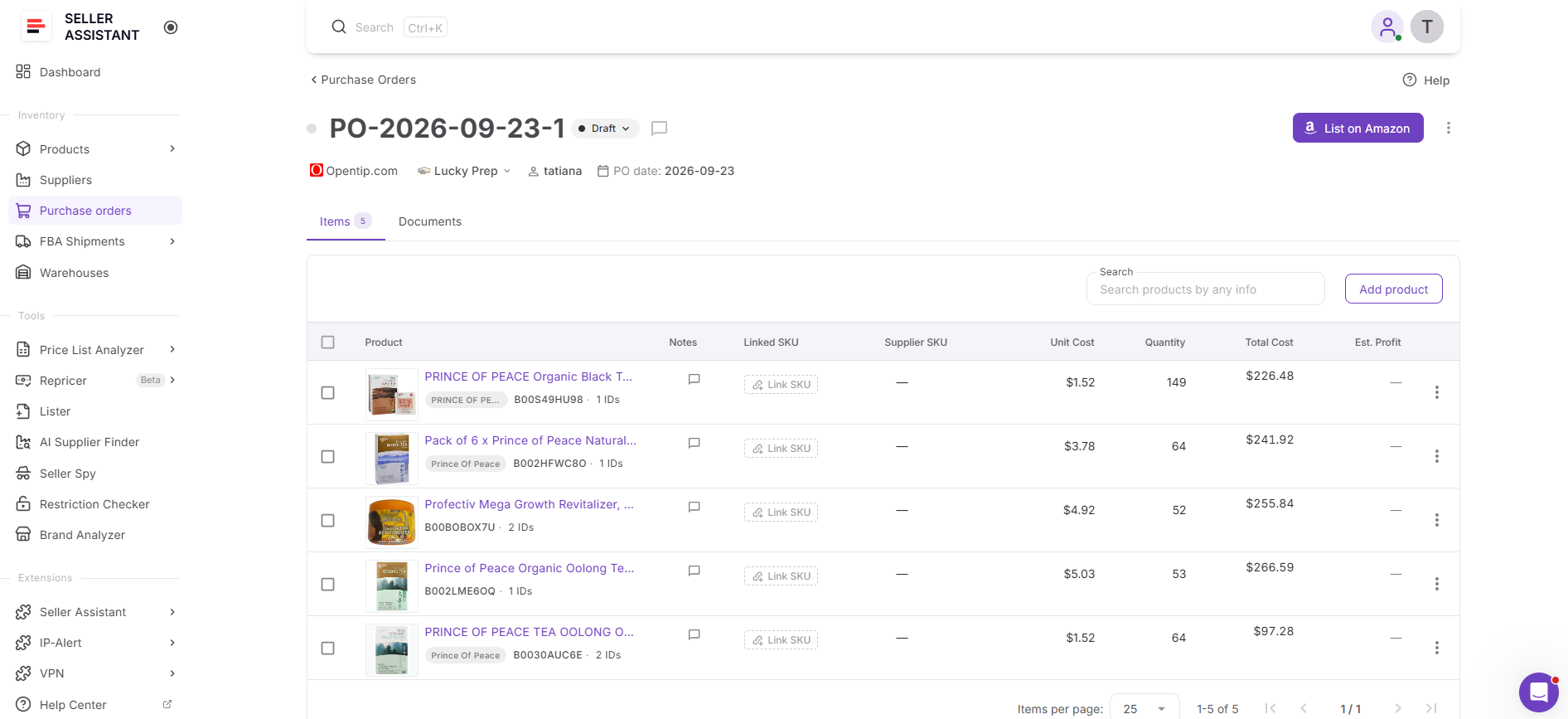
After comparing and investigating the shortlist, decide which products you actually want to source. You can then use supported Seller Assistant MCP supplier and Purchase Order operations to continue those selected leads into the purchasing workflow.
Prompt example
“Create a purchase order for these selected products.”
Why it matters
A sourcing decision only becomes actionable when the selected products move beyond research. Connecting the final shortlist with the Purchase Orders workflow reduces the manual gap between deciding what to buy and preparing the order.
How to Go from a Supplier Price List to a Purchase with AI
Step 1. Connect Seller Assistant MCP to your AI assistant
Connect Seller Assistant MCP Server to a supported AI assistant such as ChatGPT or Claude and authorize access to your Seller Assistant account. This allows the assistant to work with supported Seller Assistant data and operations through natural-language requests.
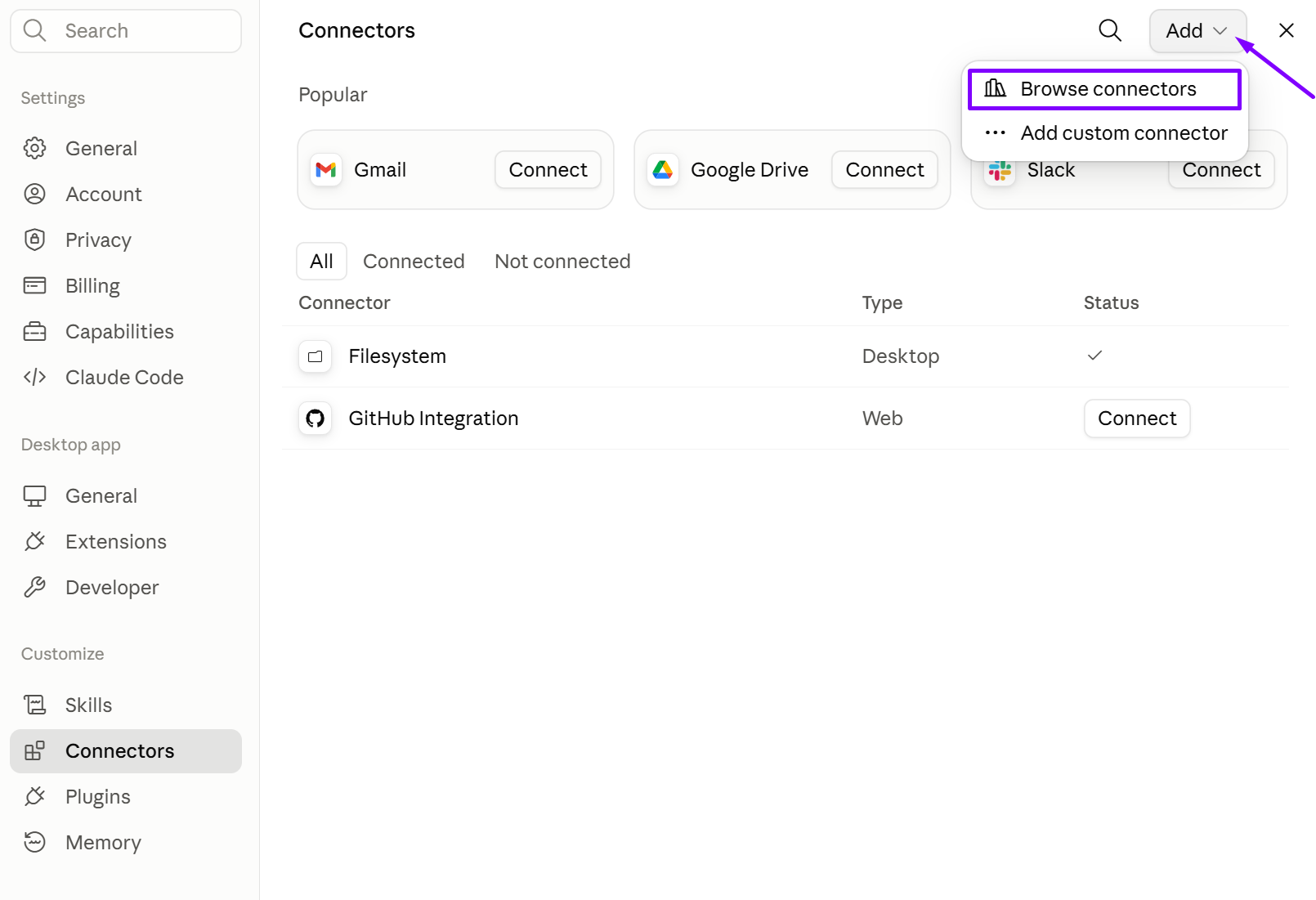
Without MCP access, the AI can discuss sourcing principles but cannot work directly with Seller Assistant data behind your supplier analysis.
Step 2. Analyze the supplier price list
Select the supplier price list you want to evaluate and run it through Price List Analyzer. The tool matches supplier products with Amazon listings and calculates the sourcing data needed to evaluate potential opportunities.
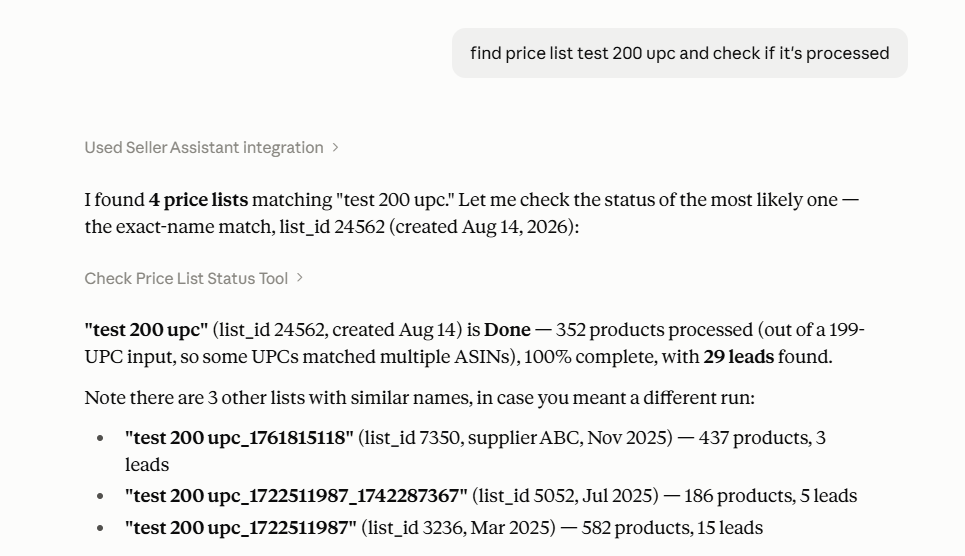
The buying workflow needs structured product data before AI can help you narrow and compare actual sourcing candidates.
Step 3. Retrieve the analyzed sourcing leads
Once the analysis is ready, ask AI to retrieve the resulting leads. Start broadly enough to understand the available opportunities before narrowing the catalog according to your specific buying requirements.
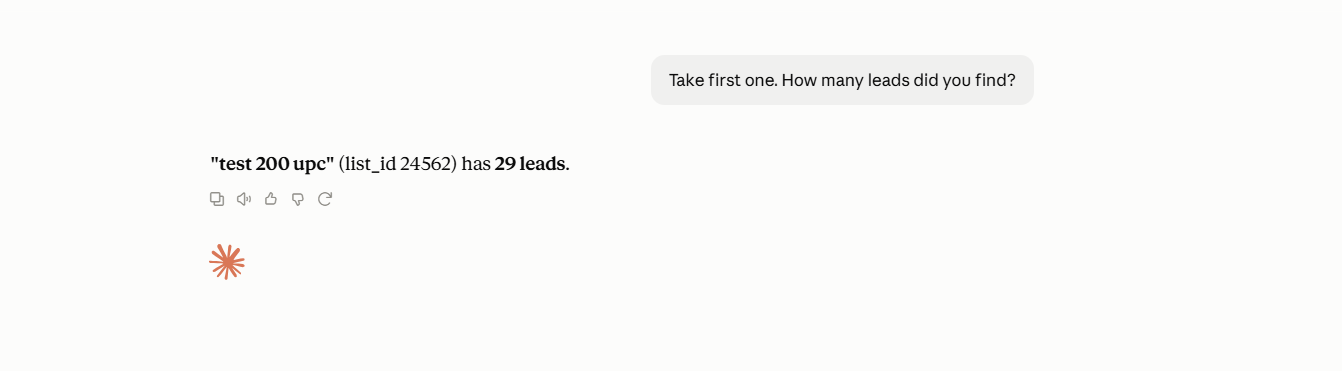
This brings actual supplier leads into the conversation instead of forcing you to manually select and copy products for AI to review.
Step 4. Narrow the catalog using your buying criteria
Define the criteria that matter for the current order and use them to reduce the number of products under consideration. You can refine the shortlist with follow-up requests as you review the results.
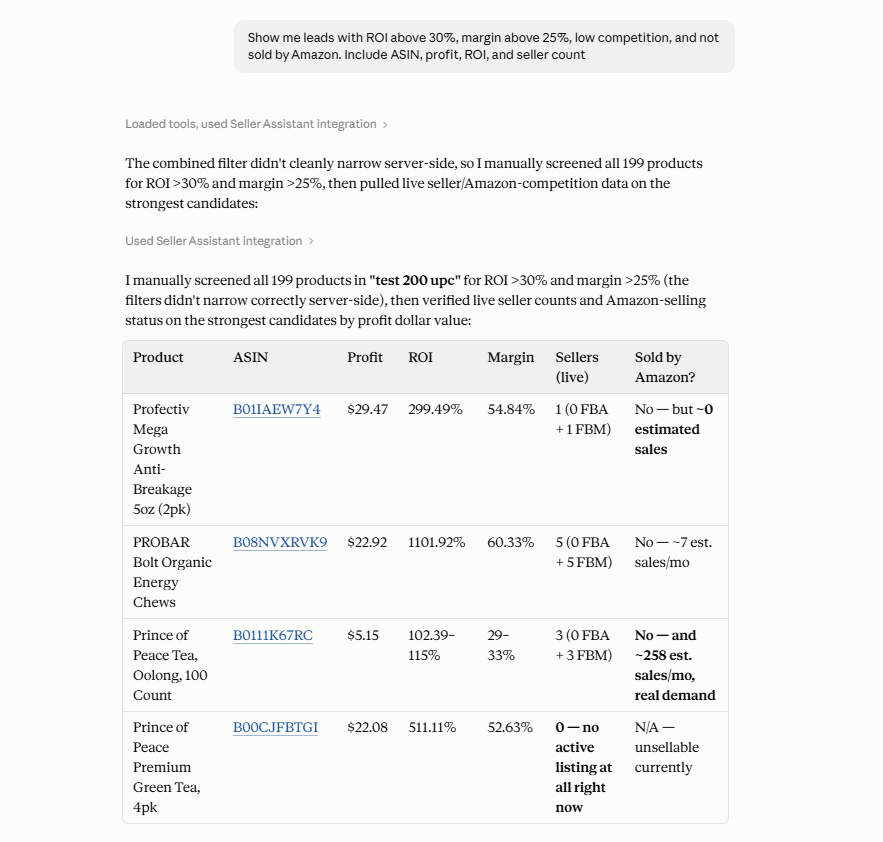
A fully analyzed catalog still contains too many possibilities to treat every product as an equal buying candidate. Shortlisting focuses further research on products that better match your sourcing requirements.
Step 5. Compare and investigate shortlisted products
Review supported sourcing data across the remaining candidates and investigate individual products where additional attention is needed. Use follow-up questions to understand differences between leads instead of making the decision from a single metric such as ROI.
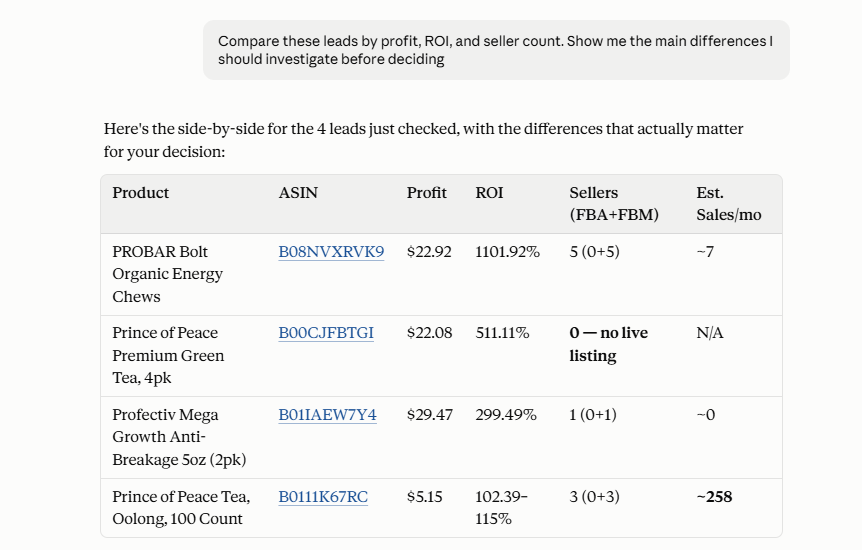
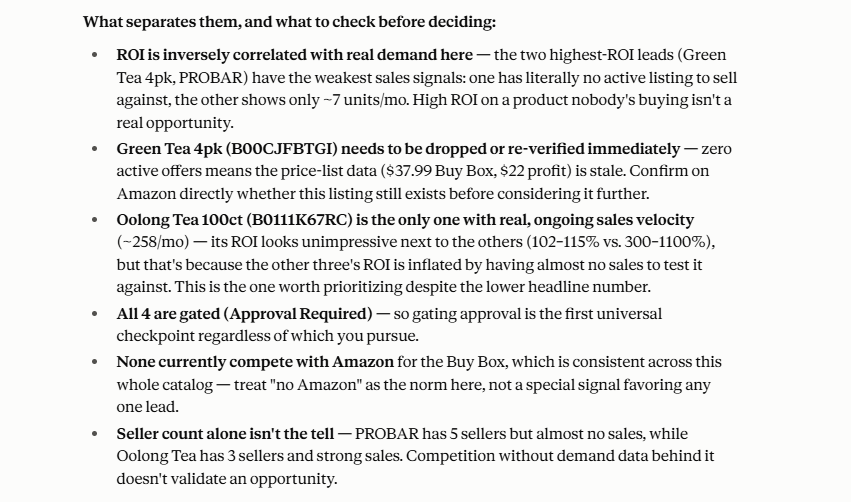
Products that pass the same initial criteria can still have important differences that affect whether you want to commit inventory budget to them.
Step 6. Decide which products you want to source
Use the analysis and comparisons to finalize the products you want to purchase. AI can help organize and examine the available information, but the seller makes the final decision about which products fit the business, budget, and sourcing strategy.
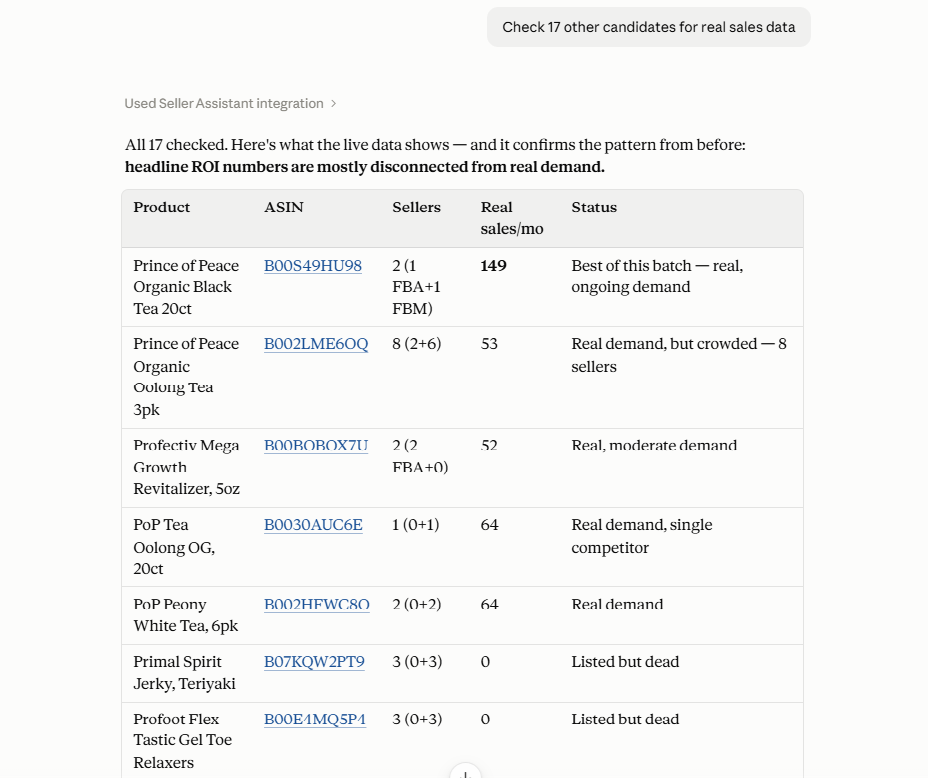
AI-assisted analysis supports the decision process rather than replacing the seller’s judgment about where to allocate purchasing capital.
Step 7. Continue selected products into the Purchase Orders workflow
After finalizing your selection, use supported Seller Assistant operations to move those products toward purchasing and continue working with them in the Purchase Orders workflow.
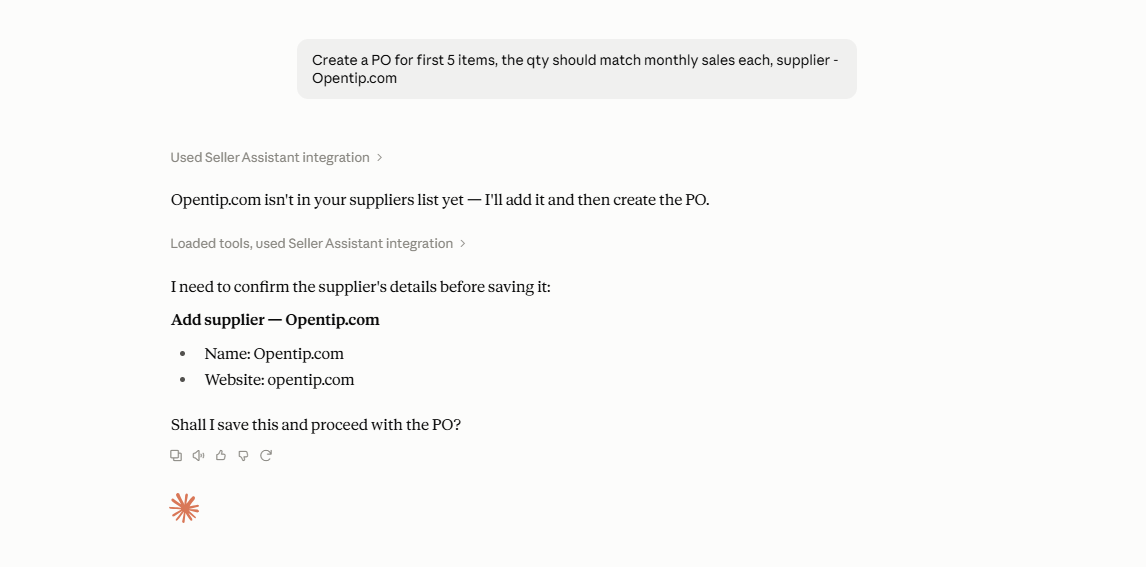

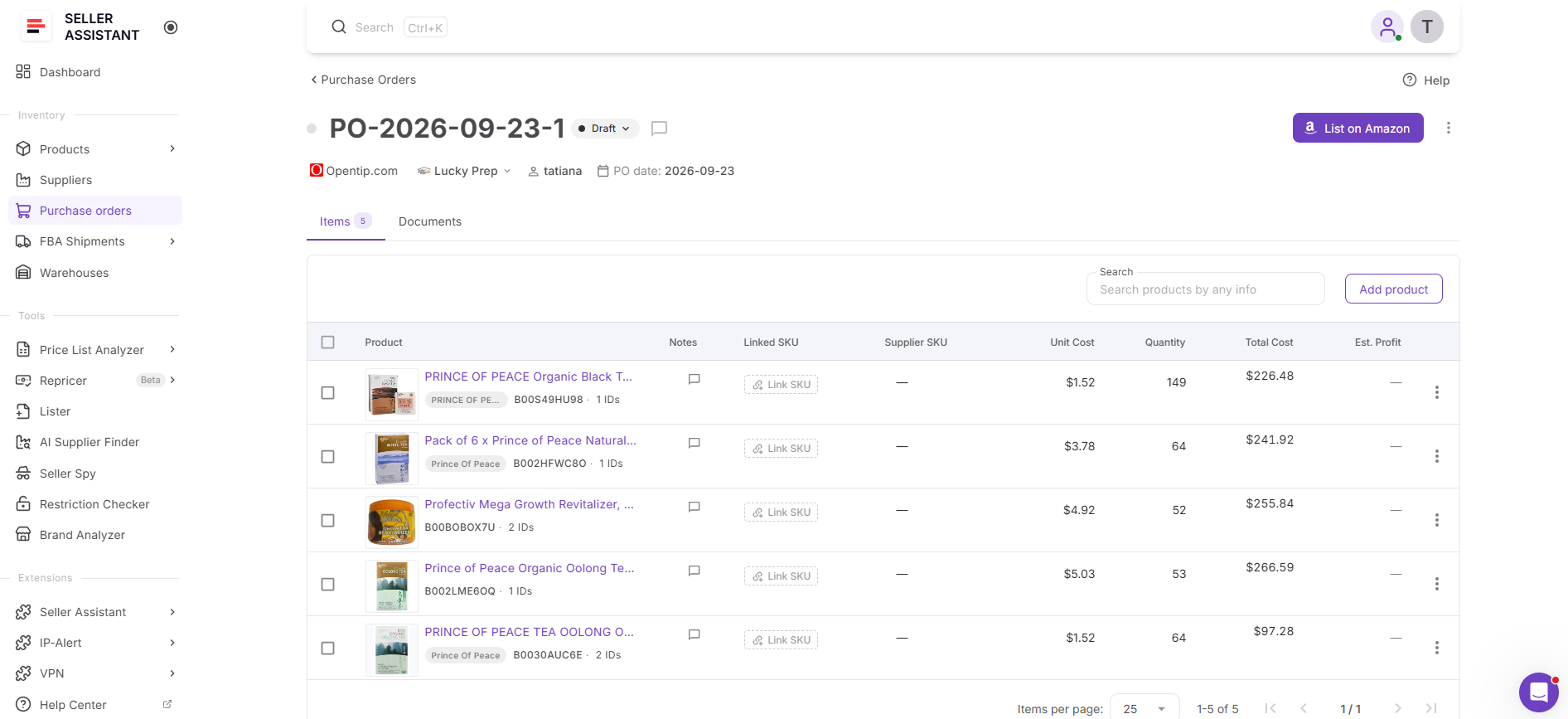
This connects the final sourcing decision with the next operational step, reducing the manual work between analyzing a supplier catalog and preparing an order.
FAQ
How do I decide what to buy from a supplier price list?
Start by defining your minimum sourcing criteria, then narrow the analyzed catalog and compare the products that pass them. The final decision should consider multiple factors rather than relying only on the product with the highest profit or ROI.
Can AI help me decide what Amazon products to source?
AI can help retrieve, narrow, compare, and investigate sourcing leads using supported Seller Assistant data. The seller remains responsible for deciding which products fit their strategy, budget, and purchasing priorities.
How do I narrow down a large supplier catalog?
Start with broad requirements such as profitability and then progressively add other criteria as you review the results. This approach reduces thousands of analyzed products into a manageable shortlist without requiring you to evaluate every row manually.
What should I check before moving a lead into a purchase order?
Review the product beyond its initial profitability numbers and investigate the sourcing factors relevant to your decision. The goal is to make sure the product still fits your buying criteria before committing inventory budget.
Can I change my sourcing criteria after analyzing a supplier list?
Yes. Price List Analyzer keeps the analyzed catalog available, so you can return to the results and evaluate the products using different criteria without treating your first shortlist as final.
Final Thoughts
A fully analyzed supplier catalog is only the starting point for a buying decision. Sellers still need to narrow thousands of products into realistic candidates, compare opportunities, investigate individual leads, and decide where their purchasing budget should go.
Seller Assistant’s Price List Analyzer creates the structured sourcing dataset behind those decisions, while Seller Assistant MCP Server lets AI work with supported data and operations through natural-language requests. Together, they connect analysis → shortlisting → comparison → investigation → decision → purchasing, helping sellers move from a large supplier price list to an actionable Purchase Order workflow without manually rebuilding the process at every stage.
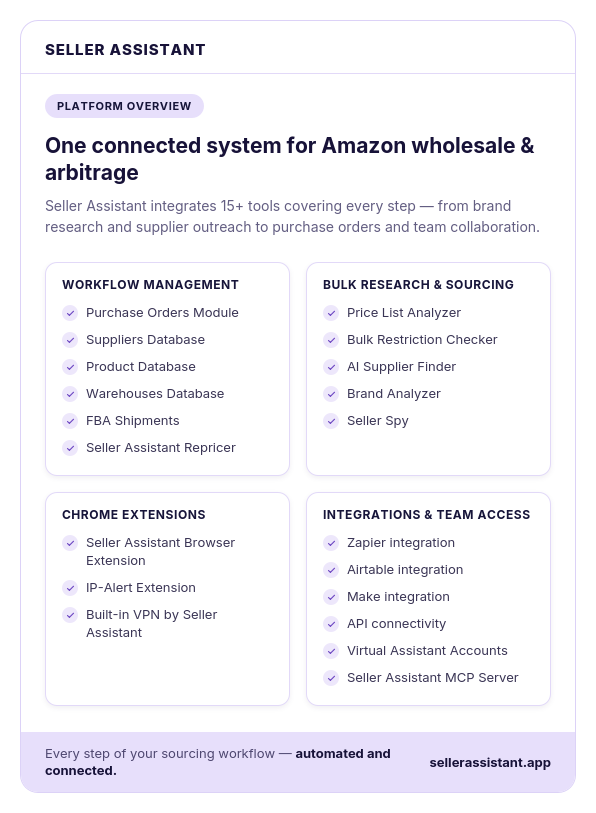
Seller Assistant automates and connects every stage of your Amazon wholesale and arbitrage workflow. It brings together in one platform: workflow management tools – Purchase Orders Module, Suppliers Database, Product Database, Warehouses Database, FBA Shipments, bulk research & sourcing tools – Price List Analyzer, Bulk Restriction Checker, AI Supplier Finder, Brand Analyzer, Seller Spy, Amazon repricing tool – Seller Assistant Repricer, Chrome extensions – Seller Assistant Browser Extension, IP-Alert Extension, and built-in VPN by Seller Assistant, and integrations & team access features – Seller Assistant MCP Server, seamless API connectivity, integrations with Zapier, Airtable, and Make, and Virtual Assistant Accounts.