



Finding profitable products from a supplier price list is a standard part of Amazon sourcing. But one supplier rarely gives you the best deal every time.
Prices vary, stock changes, and relying on a single source limits your margins and scale. Strong sellers don’t stop at one supplier – they look for better options for the same products.
This post shows how to use your existing price list analysis to discover additional suppliers, compare opportunities, and strengthen your sourcing strategy without starting from scratch with Seller Assistant.
Why Finding Suppliers from Your Price List Gives You a Real Edge
Working with a supplier price list is where most Amazon sourcing starts. But stopping at one supplier limits your potential. The same product can often be sourced from multiple suppliers, each offering different pricing, stock levels, and terms.
By finding additional suppliers directly from your analyzed price list, you turn a single opportunity into multiple options. This approach helps you improve margins, reduce risk, and build a more flexible sourcing strategy that can scale with your business.
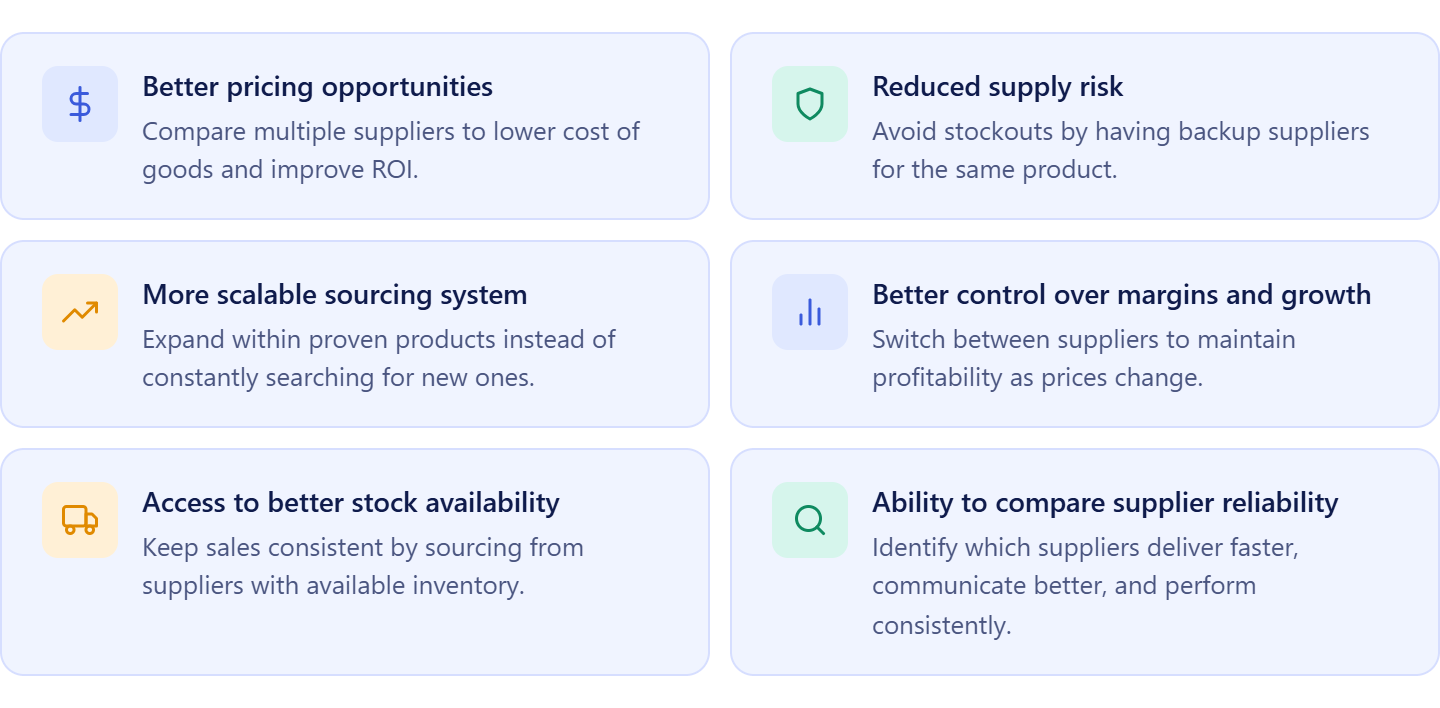
Better pricing opportunities
The first supplier you find is rarely the most competitive. By identifying additional suppliers for the same product, you can compare cost of goods, negotiate better terms, and increase your ROI without changing your product selection.
Reduced supply risk
Relying on one supplier creates a bottleneck. If they go out of stock or change terms, your sales stop. Having backup suppliers ensures consistent inventory and protects your revenue.
More scalable sourcing system
Instead of constantly searching for new products, you expand opportunities within products you’ve already validated. This makes your sourcing process faster, more predictable, and easier to scale.
Better control over margins and growth
With multiple sourcing options per product, you can choose the best deal at any given time. This flexibility allows you to maintain healthy margins even as market conditions change.
Access to better stock availability
Different suppliers have different inventory cycles. When one supplier is out of stock, another may still have available units. This helps you avoid gaps in inventory and maintain consistent sales velocity.
Ability to compare supplier reliability
Not all suppliers operate at the same level. By working with multiple options, you can evaluate shipping speed, communication, order accuracy, and overall reliability – and prioritize suppliers who perform best over time.
How Seller Assistant Tools Help You Find Suppliers from Analyzed Products
Finding suppliers from a price list isn’t just about running a separate search – it’s about acting on products you’ve already validated while the data is still fresh. Many sellers analyze a price list, identify profitable ASINs, and then switch to manual supplier research. That break slows them down and often leads to inconsistent or low-quality supplier options.
Seller Assistant removes that gap by connecting product analysis with Price List Analyzer directly to supplier discovery with AI Supplier Finder.
Instead of leaving your workflow, you can move from a profitable product to real supplier options in one continuous process. This keeps sourcing fast, structured, and focused only on products that already meet your criteria.
Price List Analyzer
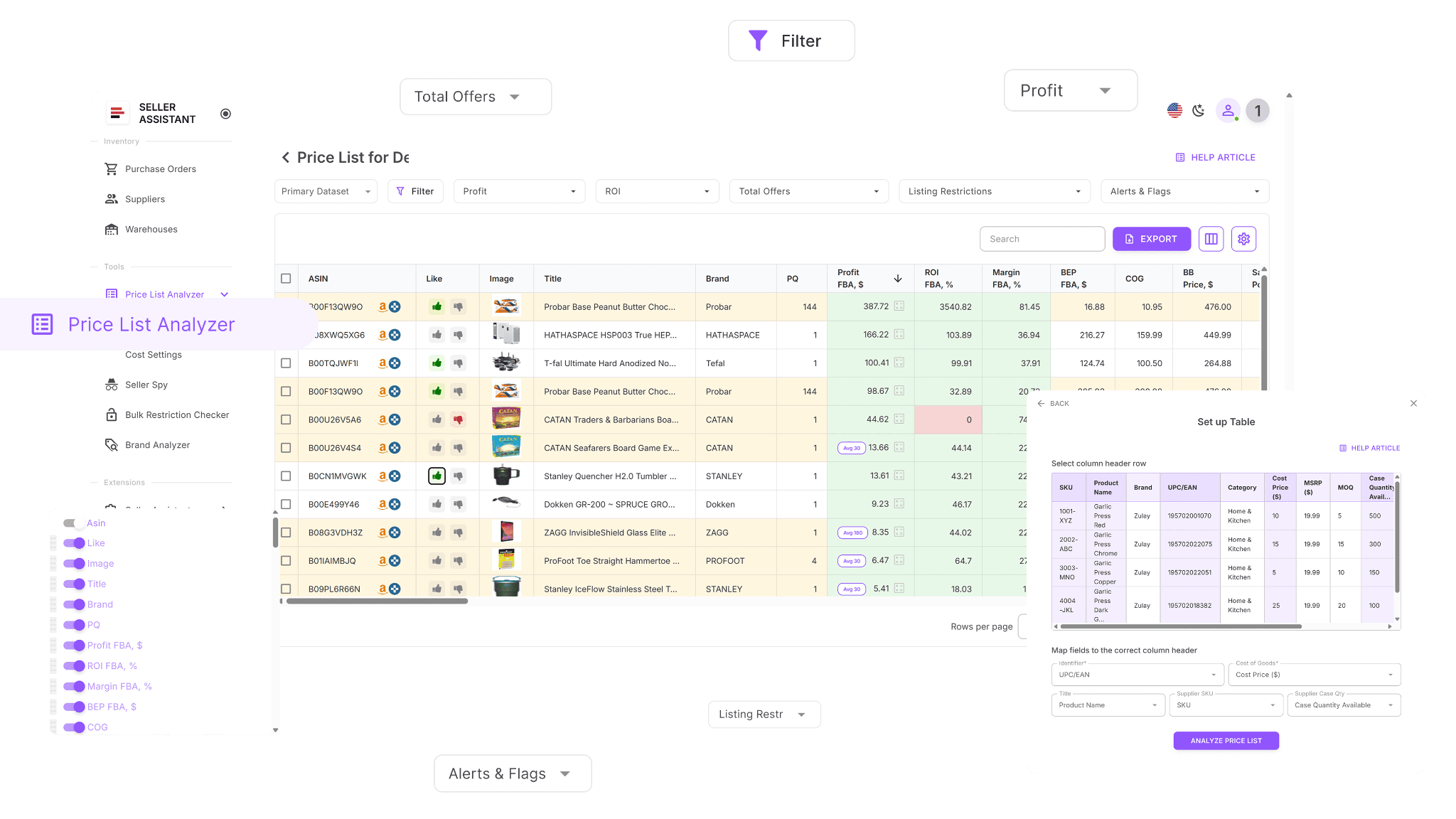
Price List Analyzer is where you identify products worth sourcing. It scans supplier catalogs, matches products to ASINs, and evaluates profitability, demand, competition, and risks. By the time you finish filtering, you already have a shortlist of validated products.
AI Supplier Finder
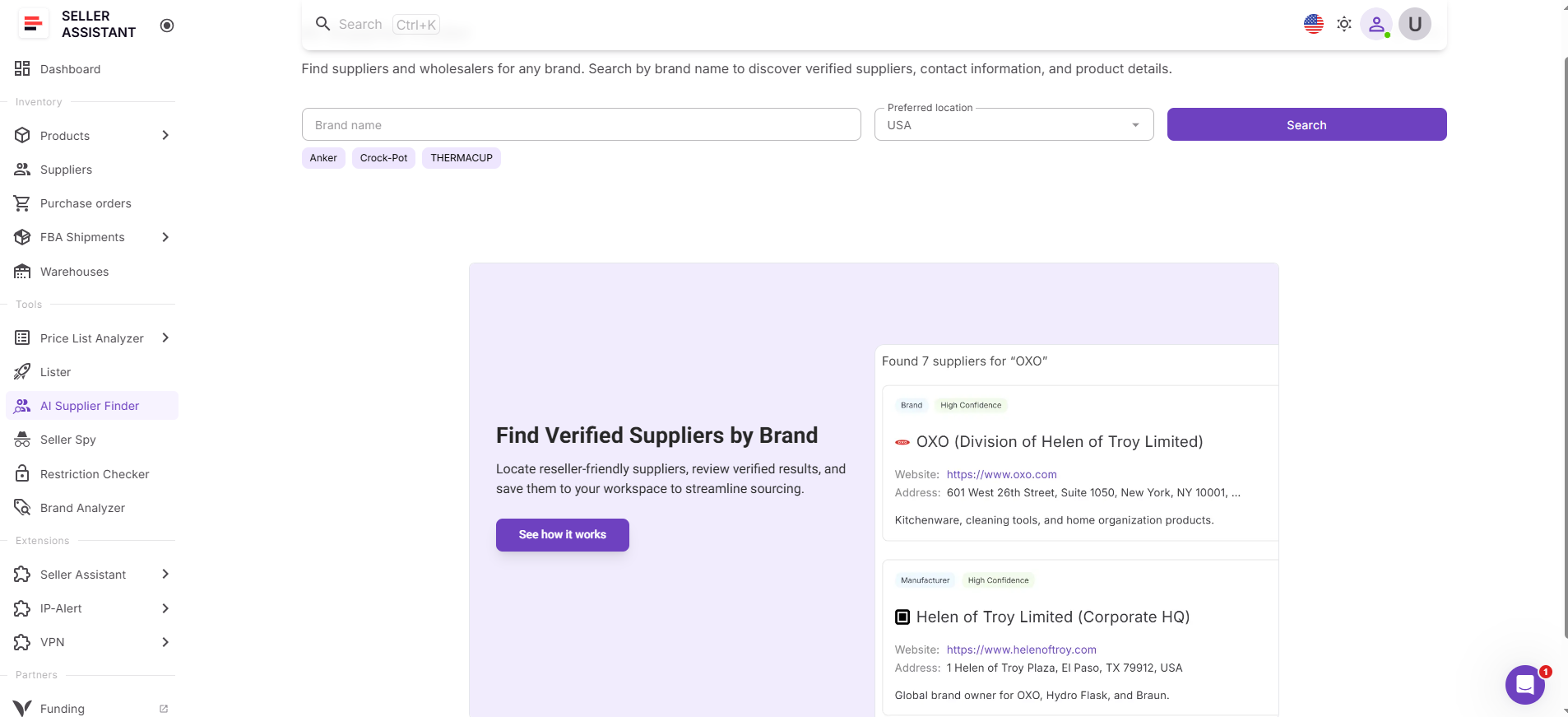
AI Supplier Finder is where those validated products turn into supplier opportunities. It uses the product and its brand to find manufacturers, distributors, and wholesalers, filters out retail stores, and prioritizes suppliers based on resale relevance and trust.
How the tools work together
Once you identify a strong product in Price List Analyzer, you can launch AI Supplier Finder directly from the same interface. The system uses the product and its brand automatically, so supplier search starts instantly without manual input.
This allows you to move from product validation to supplier discovery in seconds.
How this fits into your sourcing workflow
Supplier discovery becomes part of your analysis process – not a separate step. You analyze a price list, filter profitable products, launch supplier search, and move directly into supplier management and purchasing.
All of this happens inside one connected workflow. Data flows between tools, decisions stay consistent, and you avoid switching between spreadsheets or manual searches. This helps you act faster, reduce sourcing friction, and focus only on products that can scale.
Note. Seller Assistant is an end-to-end Amazon workflow management platform that integrates 15+ wholesale-focused solutions into one connected system. It combines sourcing workflow automation, bulk research and intelligence tools, and integrated Chrome extensions – giving you everything you need to streamline finding deals, managing suppliers, and creating purchase orders.

The platform aggregates: workflow management tools – Product Database, Purchase Orders Module, Suppliers Database, Warehouses Database, FBA Shipments to organize, automate, and scale every step of your wholesale and arbitrage operations; bulk research & sourcing tools – Price List Analyzer, Bulk Restriction Checker, AI Supplier Finder, Brand Analyzer, Seller Spy to evaluate supplier price lists, verify selling eligibility and restrictions, open new brands, and discover winning product ideas from competitors to expand your product catalog; Chrome extensions – Seller Assistant Browser Extension, IP-Alert Extension, and built-in VPN by Seller Assistant to deep-research products, check IP claims and compliance, and access geoblocked supplier sites directly within your browser; and integrations & team access features – seamless API connectivity and integrations with Zapier, Airtable, and Make, plus Virtual Assistant Accounts for secure, scalable team collaboration.
With Seller Assistant, every step of your Amazon wholesale and arbitrage workflow is automated and connected.
What Is Price List Analyzer and How It Supports Supplier Discovery
Price List Analyzer is Seller Assistant’s bulk sourcing tool that transforms supplier price lists into structured, Amazon-ready data. Instead of reviewing products one by one, it automatically matches supplier items to ASINs, calculates profitability, and adds demand, competition, and risk insights.
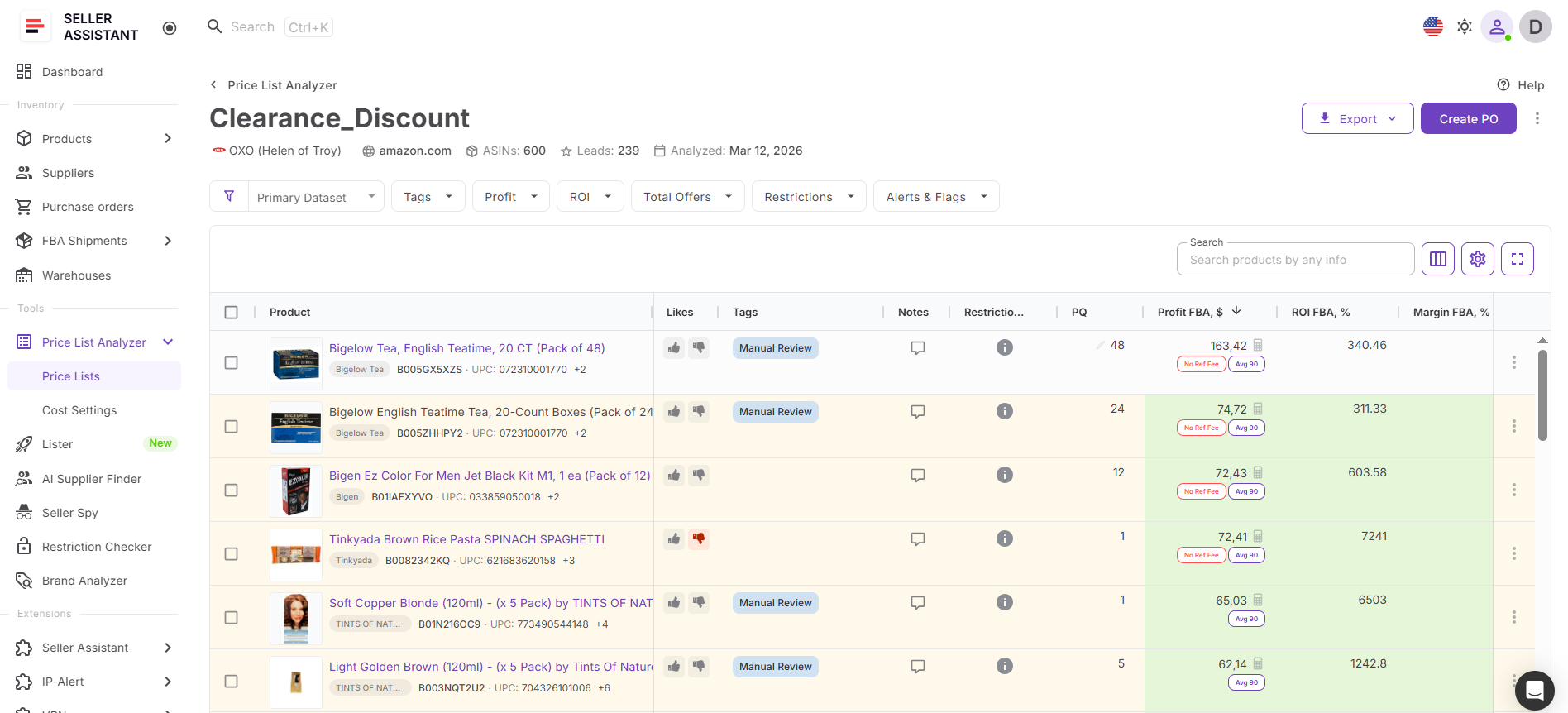
This allows you not only to identify profitable products quickly, but also to pinpoint which items are worth finding additional suppliers for – turning your price list into a starting point for deeper supplier sourcing.
What you can achieve with Price List Analyzer
Price List Analyzer helps you move from raw supplier data to clear sourcing decisions without manual checks or scattered tools. It creates a structured workflow where every product is evaluated using consistent criteria.
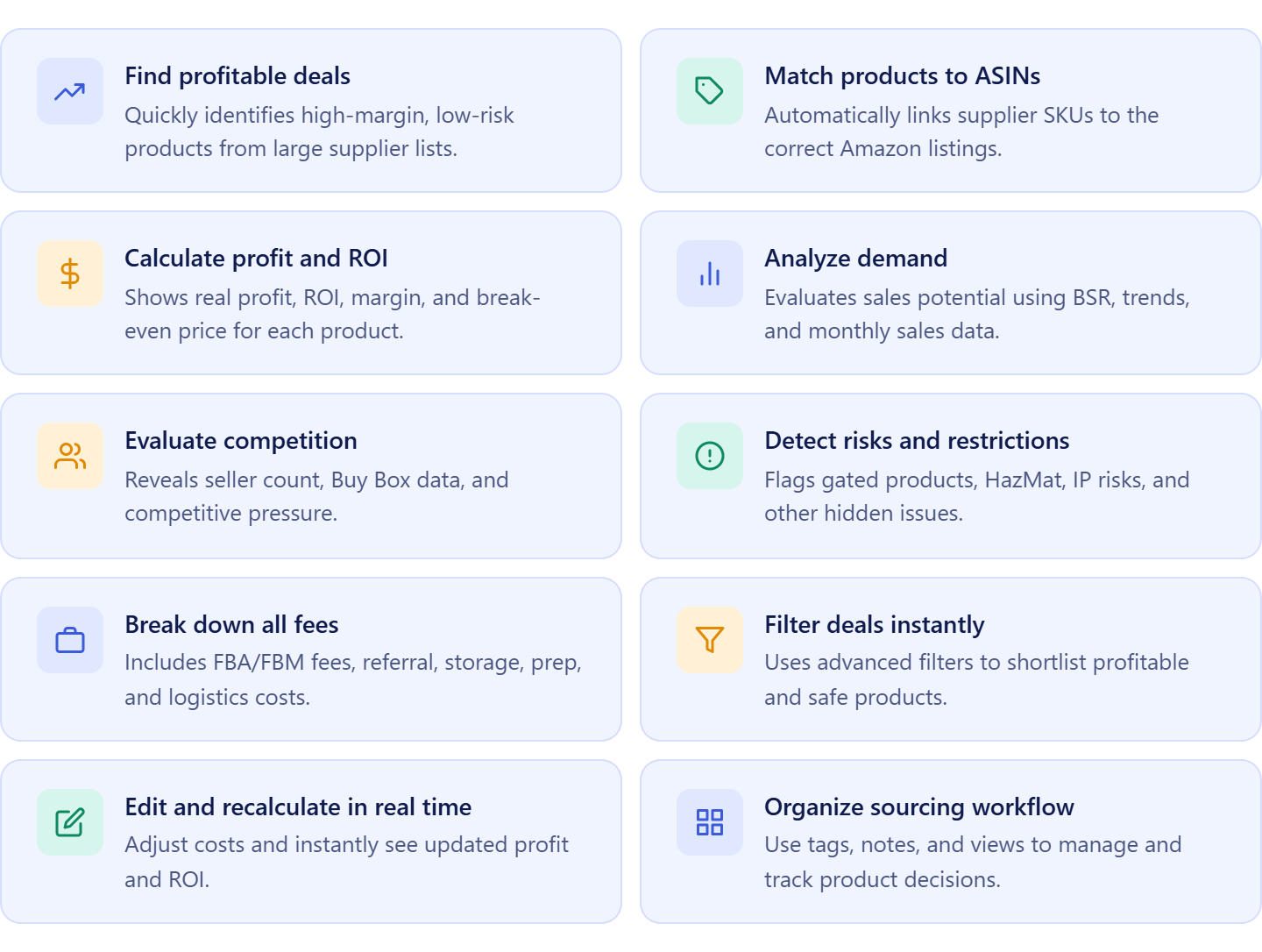
- Process large supplier lists in minutes
Upload bulk price lists and analyze hundreds or thousands of products at once.
- Automatically match products to ASINs
Connect supplier SKUs to the correct Amazon listings without manual searching.
- Instantly calculate profit and ROI
View margin, ROI, break-even price, and max COG with built-in fee calculations.
- Validate demand and sales consistency
Use BSR, sales estimates, and trends to identify products that actually sell.
- Understand competition and Buy Box dynamics
Analyze seller count, Buy Box price, and competitive pressure before sourcing.
- Detect restrictions and risks early
Identify gated products, HazMat, IP risks, and other issues before investing.
- Filter down to the best opportunities
Apply filters for profitability, demand, competition, and risk to shortlist products.
- Adjust costs and test scenarios
Edit COG, shipping, and prep costs to instantly recalculate profitability.
- Spot brand and product patterns
Group products to identify trends in pricing, demand, and competition.
- Build a shortlist for supplier expansion
Use tags, notes, and likes to mark products where you want to find better or additional suppliers.
- Export and share sourcing data
Download full or filtered results for team collaboration or external analysis.
How Price List Analyzer fits into supplier sourcing from your price list
Price List Analyzer is the starting point for finding additional suppliers within your existing sourcing process.
You upload a supplier list, map key fields, and run analysis. As results appear, you can review products directly in the table, filter profitable items, and identify which ones are worth expanding.
From there, you don’t leave the workflow. You can launch supplier search directly from the analyzed product and move into finding alternative or better suppliers for the same item.
Because Price List Analyzer connects with tools like AI Supplier Finder, Product Database, Suppliers Database, Brand Analyzer, Bulk Restriction Checker, Lister, Warehouses Database, Purchase Orders Module, and FBA Shipments, your data flows through the entire workflow.
This means you can go from:
- supplier price list
- to profitable product
- to additional supplier discovery
- to purchasing
- without re-entering data or switching tools.
The result is a faster, more consistent sourcing process where finding better suppliers becomes a natural extension of product analysis – not a separate task.
What Is AI Supplier Finder and How It Expands Your Supplier Options
AI Supplier Finder is Seller Assistant’s sourcing tool that helps Amazon sellers discover wholesale suppliers using product and brand data. It analyzes relevant signals and returns a structured list of manufacturers, distributors, and wholesalers, making it easier to identify legitimate supply sources and move from research to supplier outreach within a consistent workflow.
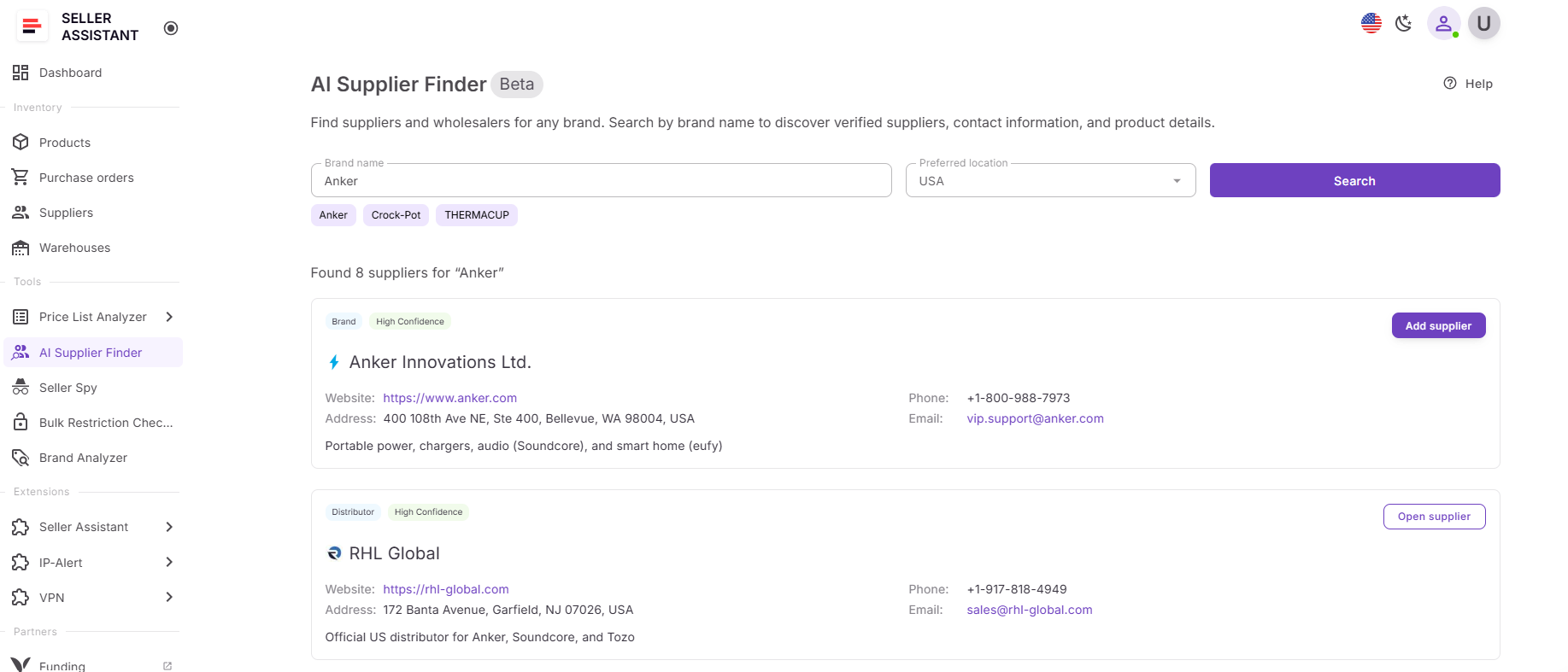
The tool helps you turn a validated product into multiple sourcing options – quickly and without trial-and-error research.
What you can achieve with AI Supplier Finder
AI Supplier Finder gives you a clear, structured way to discover and prioritize suppliers, so you can move from product analysis to outreach without delays.
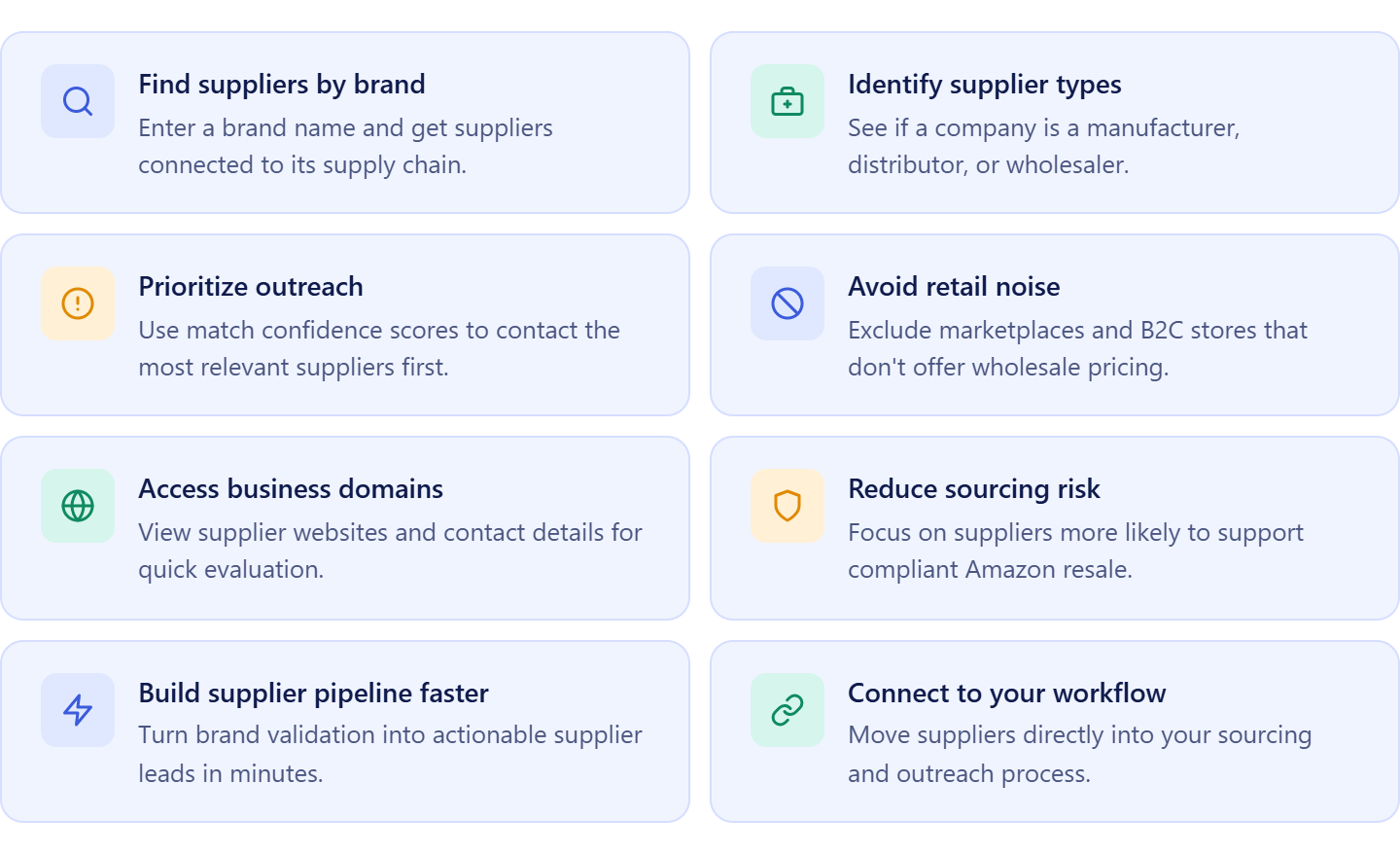
- Find suppliers for analyzed products
Launch supplier search directly from a product and get relevant supply sources.
- Understand supplier roles
See whether a company is a manufacturer, authorized distributor, or wholesaler to choose the right sourcing path.
- Prioritize outreach with confidence scoring
Use High, Medium, and Low match levels to decide which suppliers to contact first.
- Avoid retail and marketplace noise
Exclude Amazon, eBay, and B2C stores that don’t support wholesale sourcing.
- Access real business websites and contacts
Review supplier domains and available contact details to evaluate legitimacy quickly.
- Reduce sourcing and compliance risks
Focus on suppliers more likely to provide valid invoices and support Amazon resale.
- Build supplier options faster
Turn one product into multiple supplier leads in minutes instead of hours.
How AI Supplier Finder fits into sourcing from your price list
AI Supplier Finder works as a natural extension of your price list analysis.
After identifying profitable products in Price List Analyzer, you can launch supplier search directly from the product. The system automatically uses product and brand data to generate relevant supplier results.
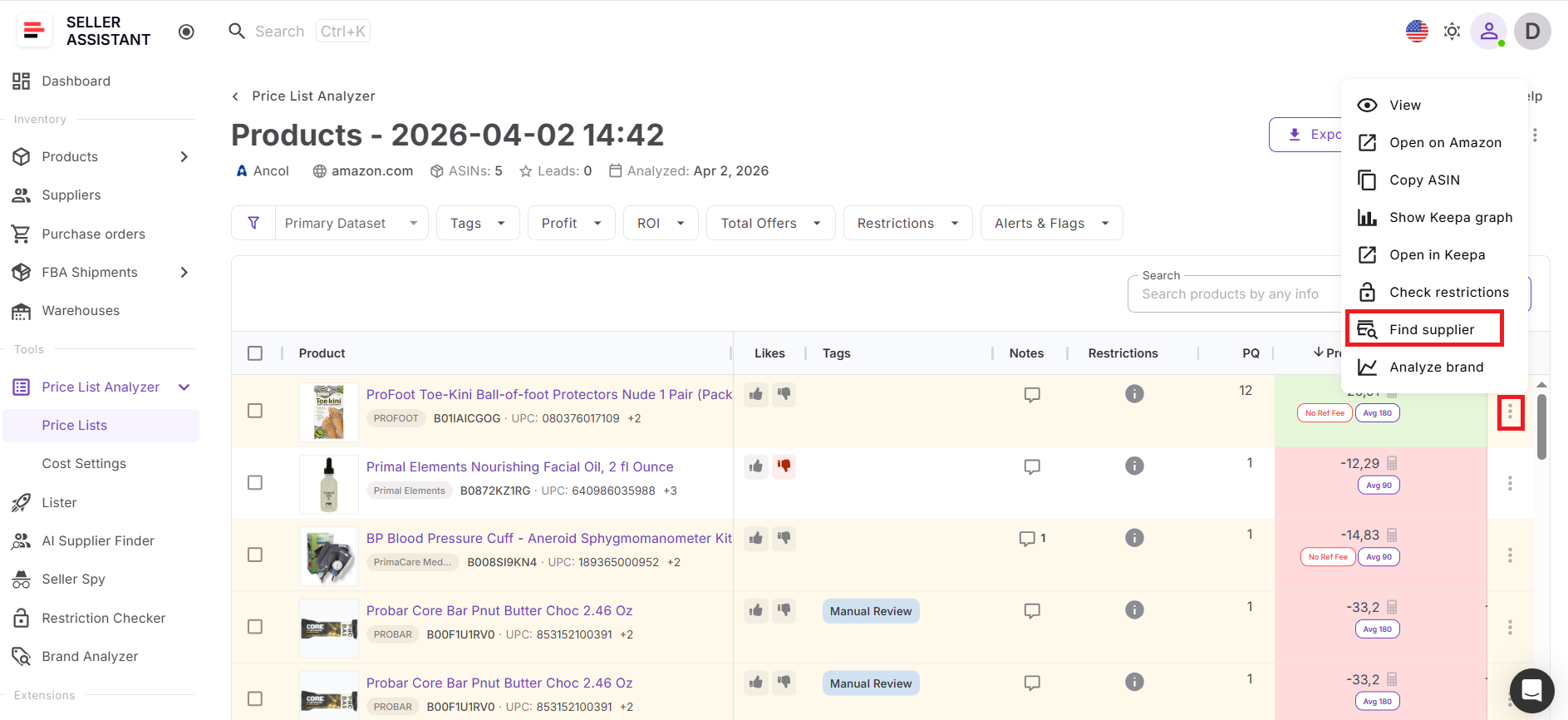
Instead of switching to manual research, you stay inside the same workflow:
- analyze product
- launch supplier search
- review and save suppliers
- move to outreach and purchasing
Because AI Supplier Finder connects with tools like Suppliers Database, Product Database, Price List Analyzer, and Purchase Orders Module, supplier data flows through your entire process and allows you to choose the best product supplier.
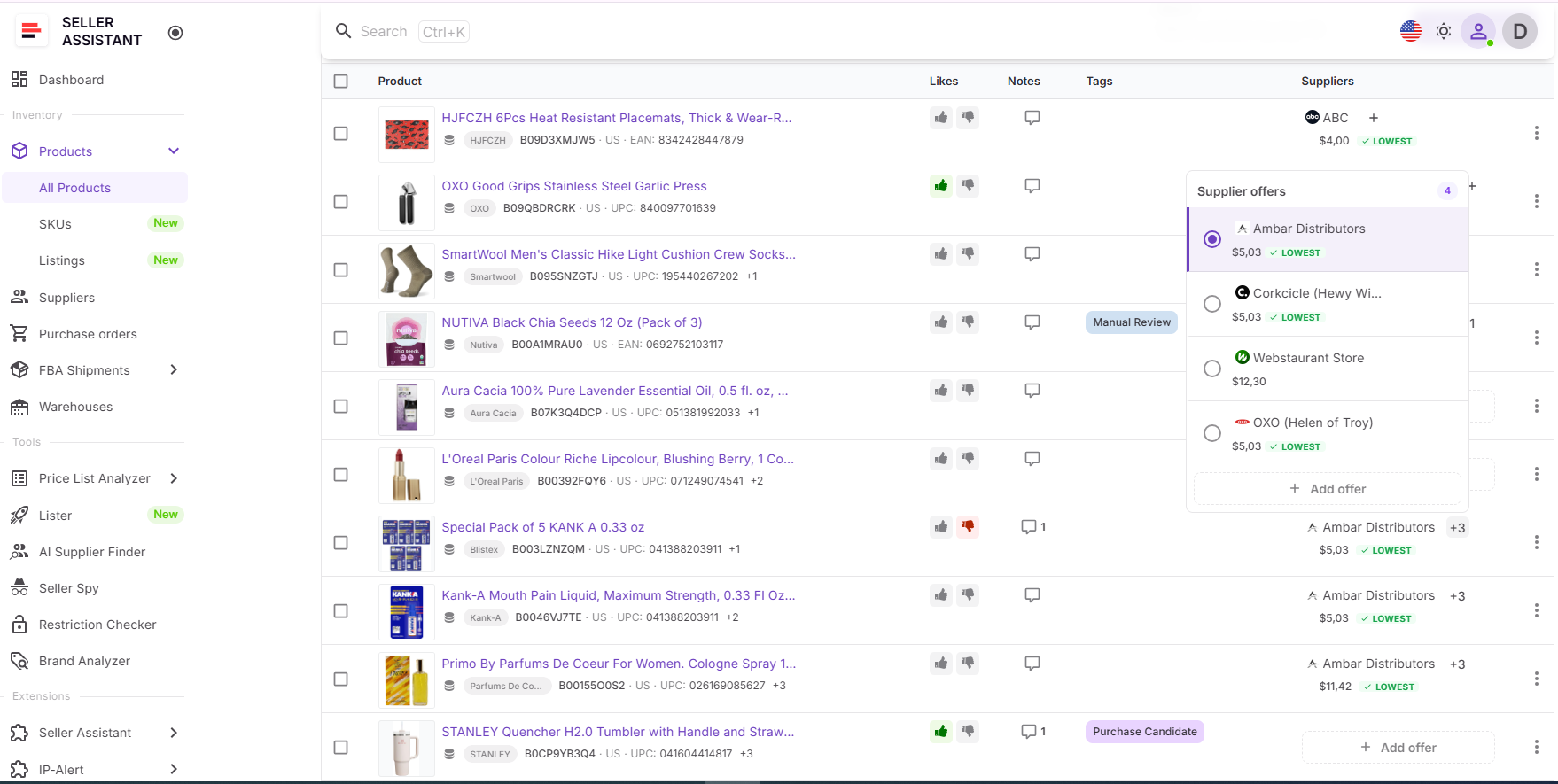
This allows you to move from:
- analyzed product
- to additional supplier discovery
- to supplier management
- to selecting the best supplier
- to purchase orders
in one continuous system, making supplier expansion fast, consistent, and scalable.
How to Turn a Price List into New Supplier Opportunities
The process starts with your supplier price list. After receiving a catalog, you upload it into Price List Analyzer, where products are matched to Amazon ASINs and enriched with profitability, demand, competition, and risk data. At this stage, your raw supplier data becomes a structured dataset with clear, validated opportunities.
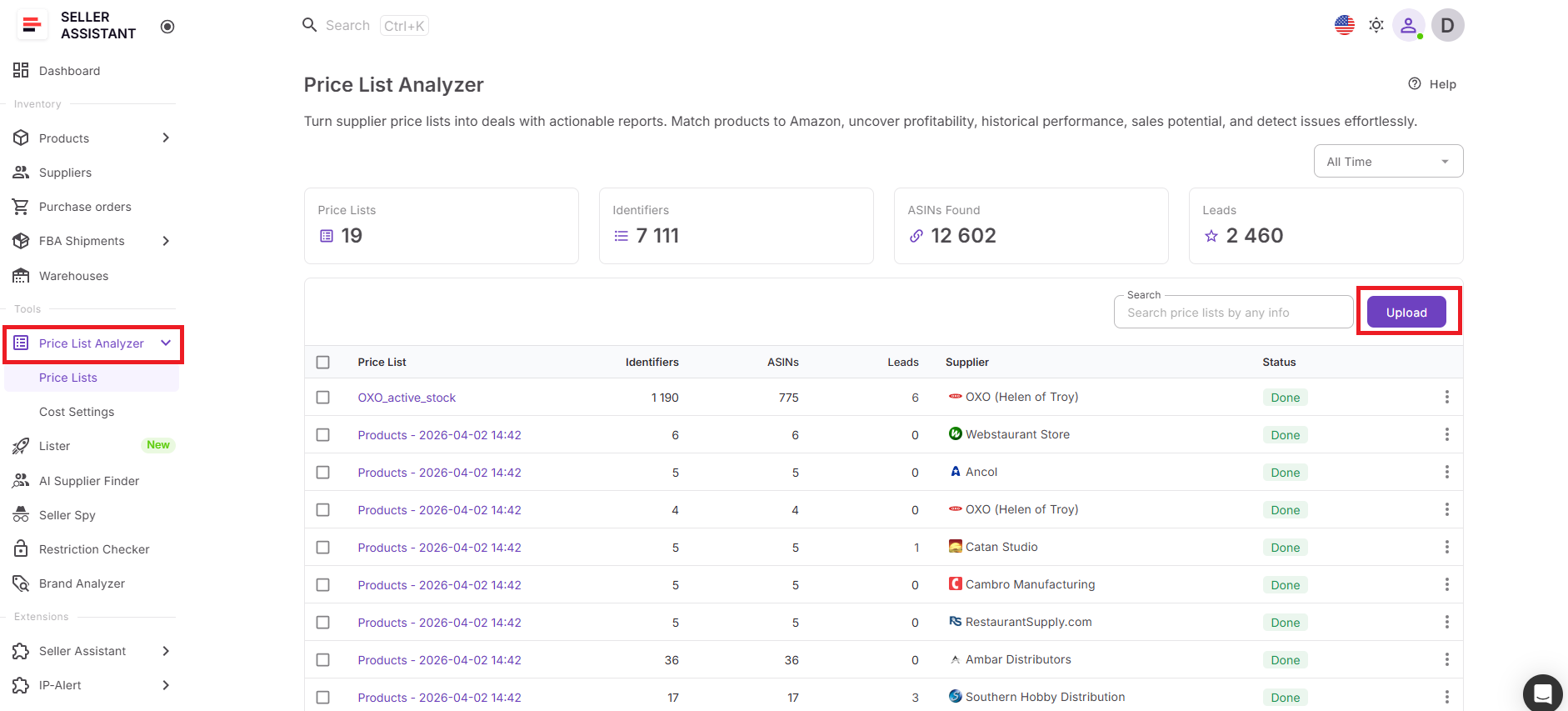
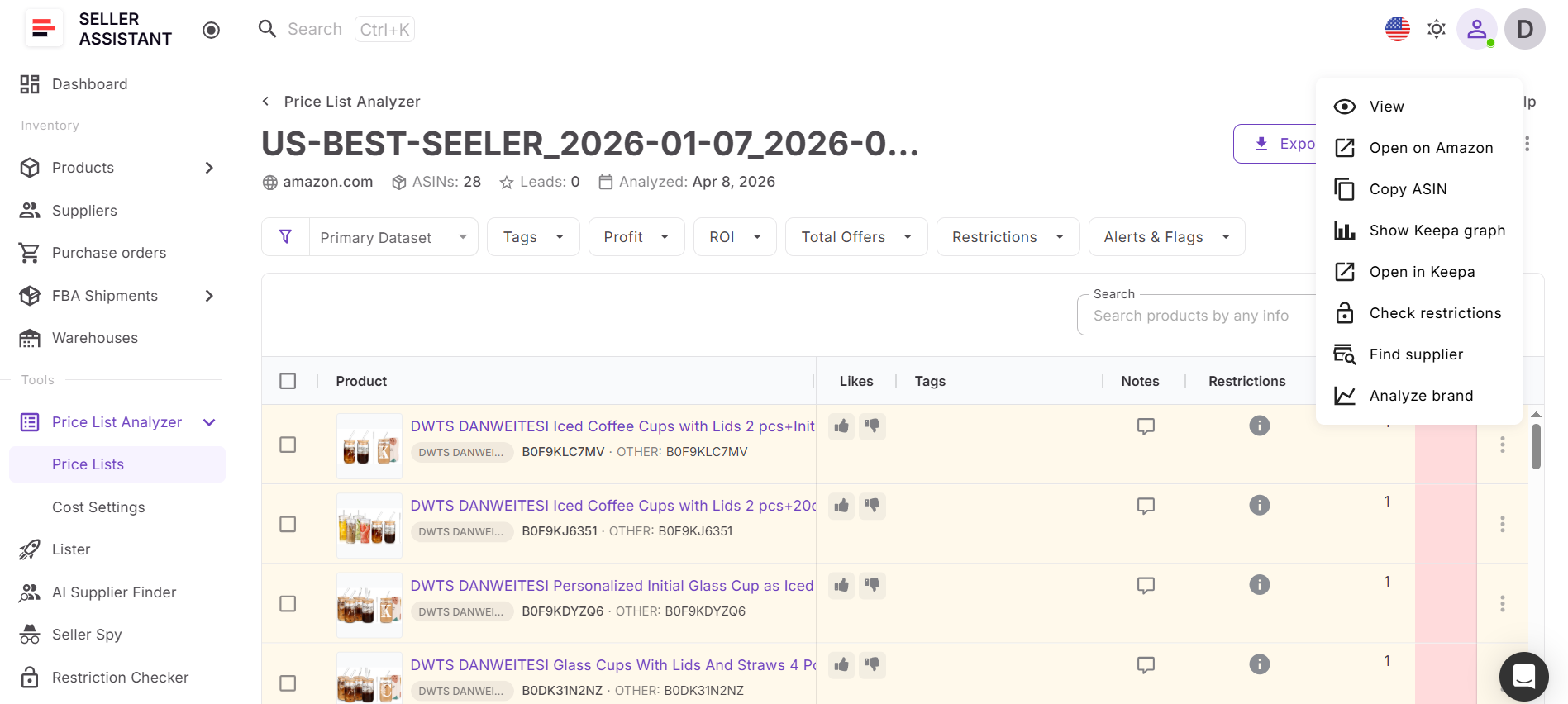
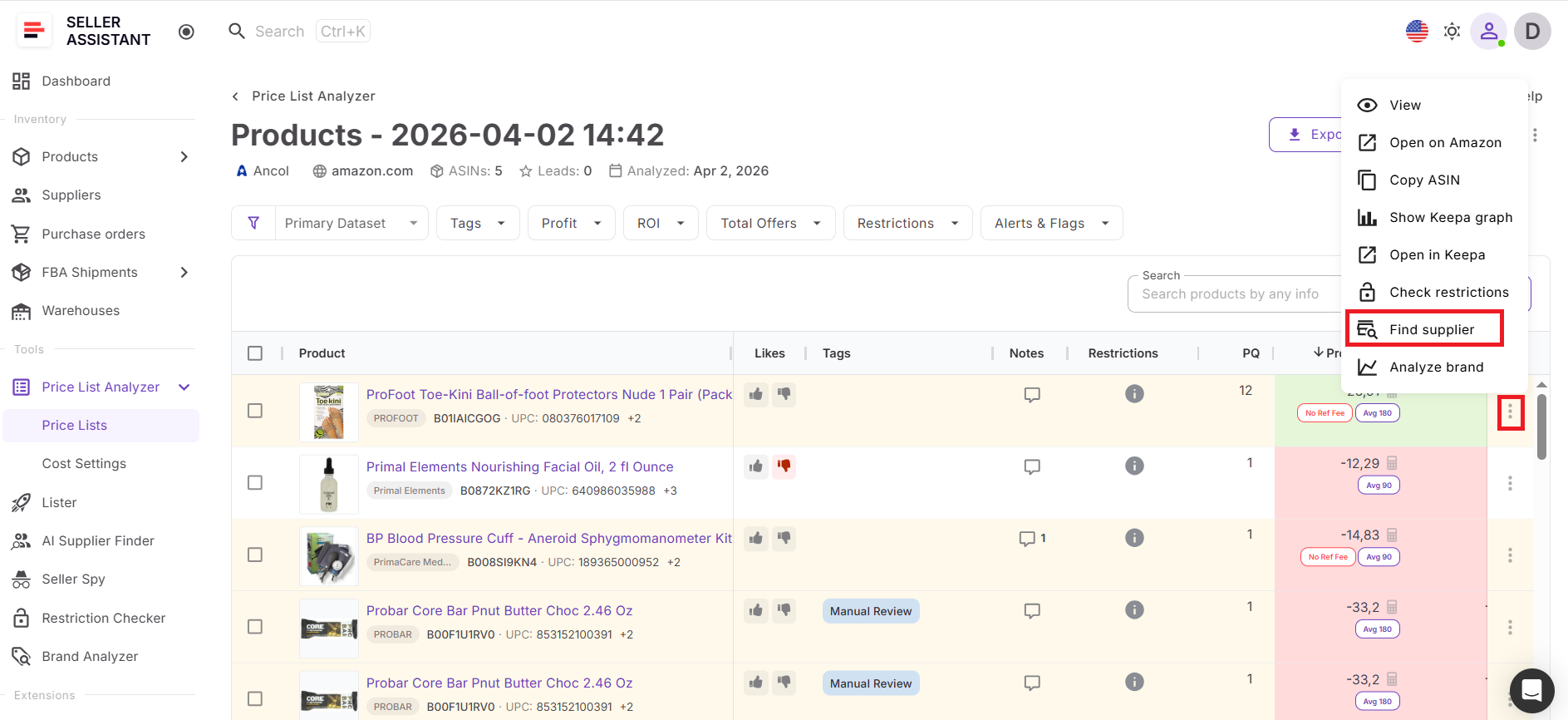
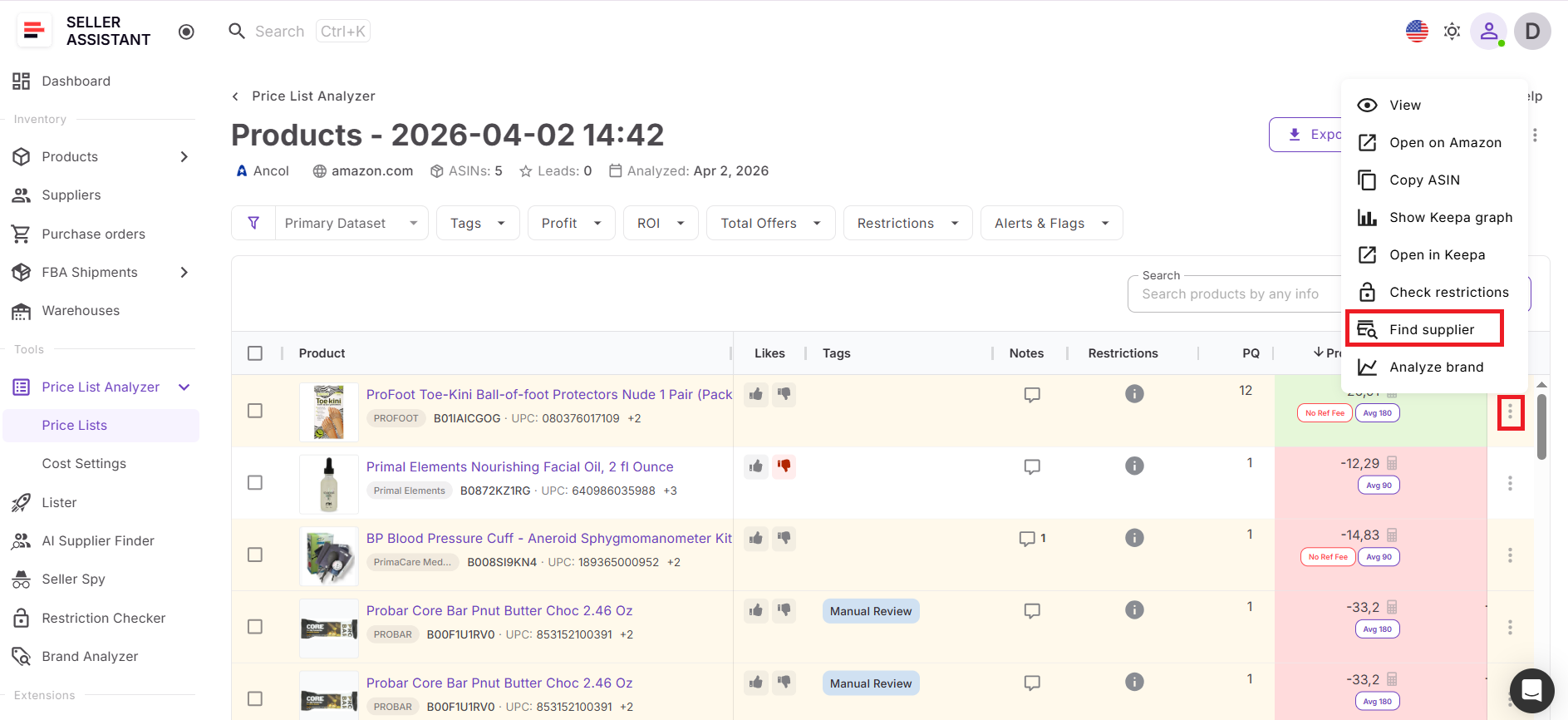
If specific best-selling products you’d like to add to your portfolio show low profitability, in a traditional workflow, you would stop here and manually search for additional suppliers. Instead of switching tools, you can launch AI Supplier Finder directly from the analyzed product. Open the three-dot menu next to any item, select “Find supplier,” and start supplier discovery instantly.
You don’t need to copy brand names or run separate searches – the system uses product context to generate relevant supplier results automatically. Once suppliers are identified, you move from analysis to sourcing in one continuous flow. This keeps your process fast, reduces manual work, and helps you focus only on products that are already proven to be profitable.
How to Find a Supplier for Your Analyzed Product Step by Step
Step 1. Open your analyzed price list
Go to Price List Analyzer and open the supplier price list you’ve already analyzed.
- Review the table.
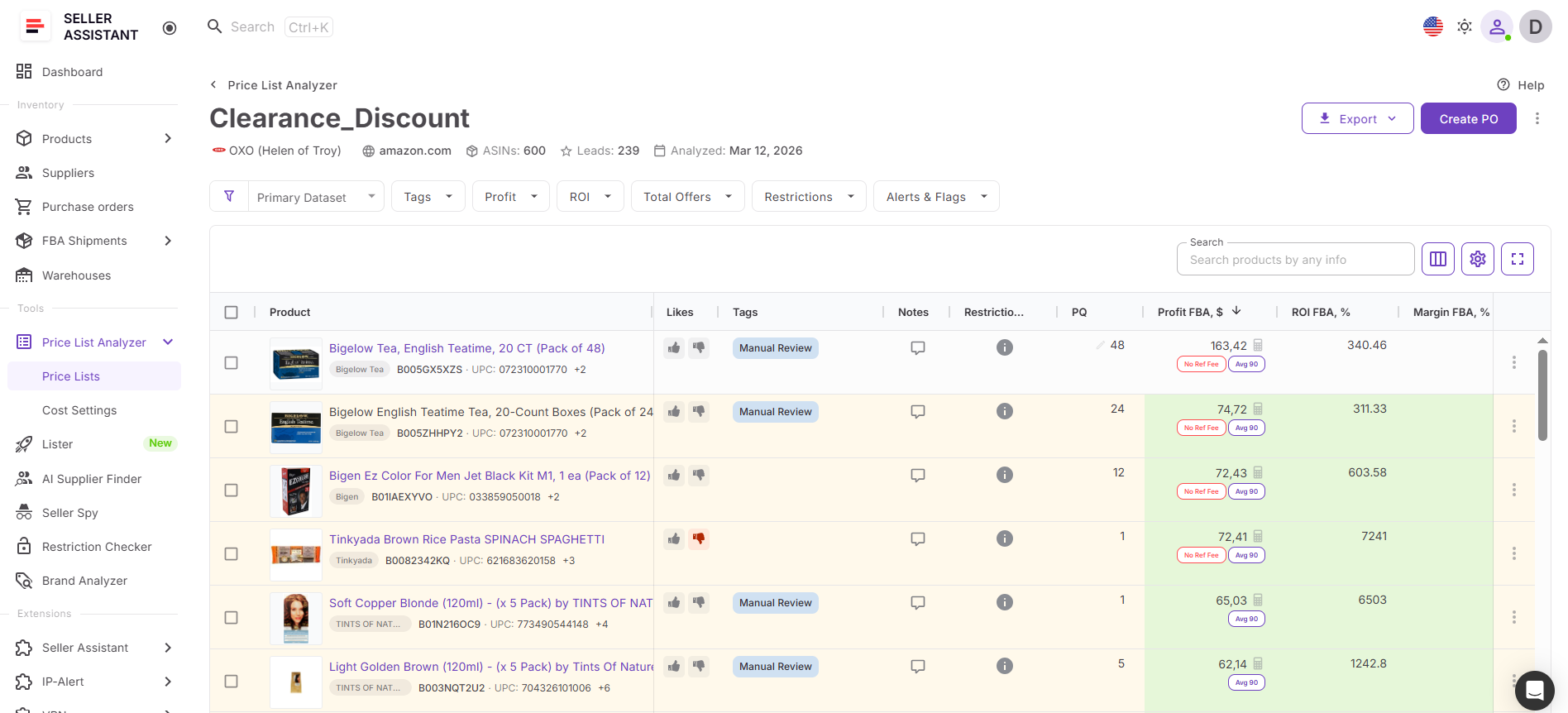
- Filter products by profit, ROI, demand, competition, and risk.
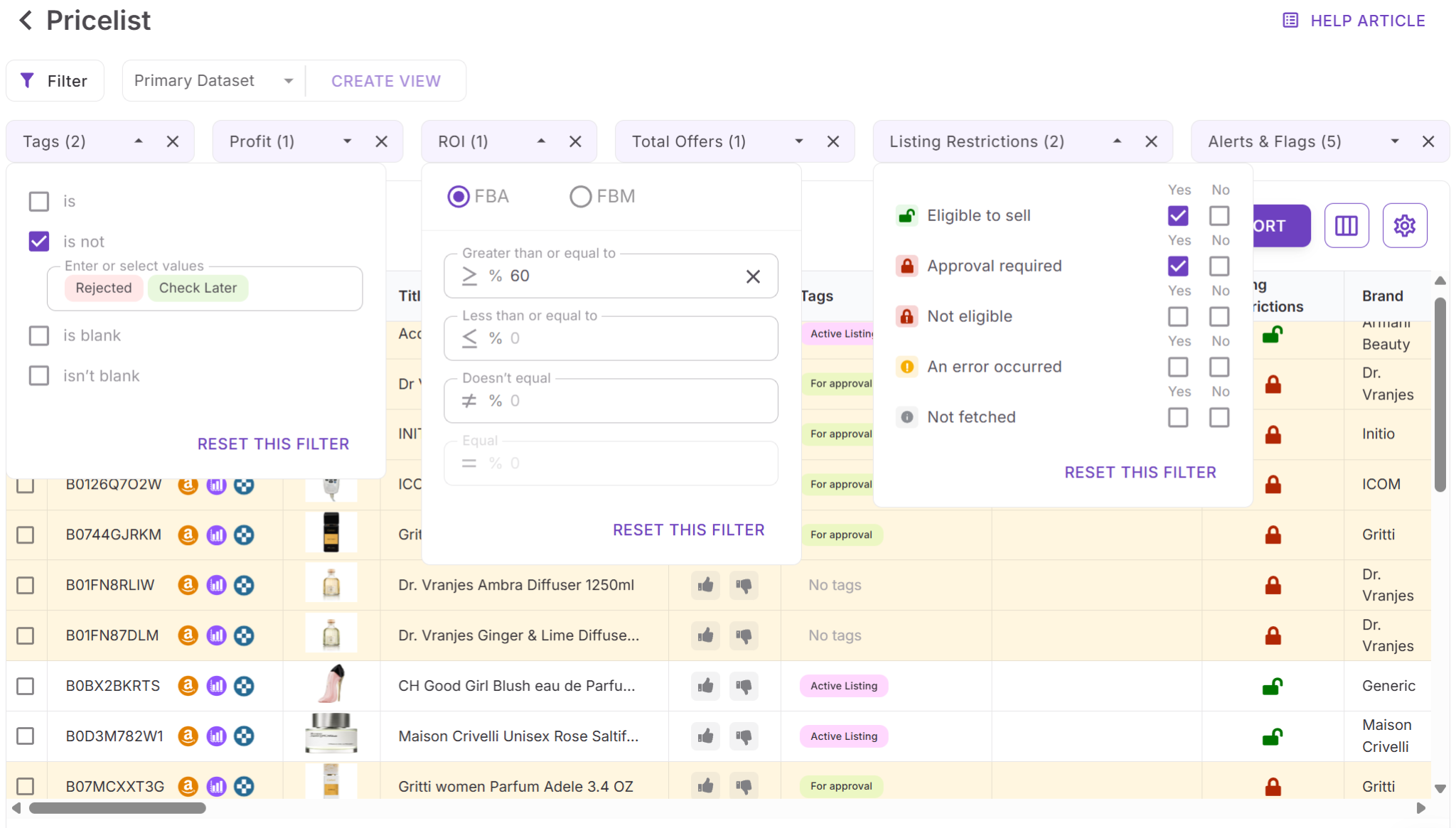
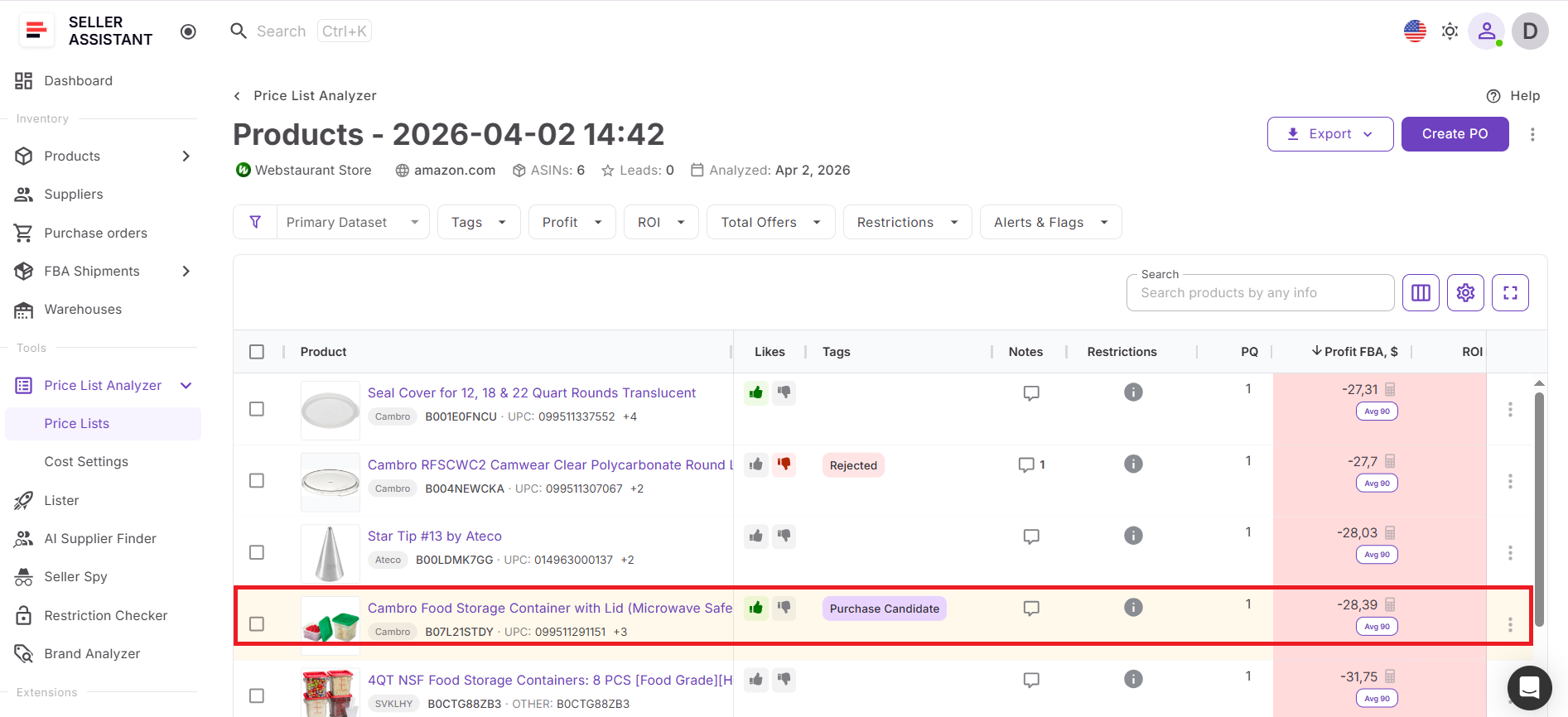
Step 2. Choose a product worth sourcing
Select a product that meets your buying criteria. Focus on items with stable demand, acceptable competition, healthy profit, and no critical restriction or risk flags.
Step 3. Open product actions
Find the product in the table and click the three-dot menu on the right side of the row. This opens the available actions for that product.
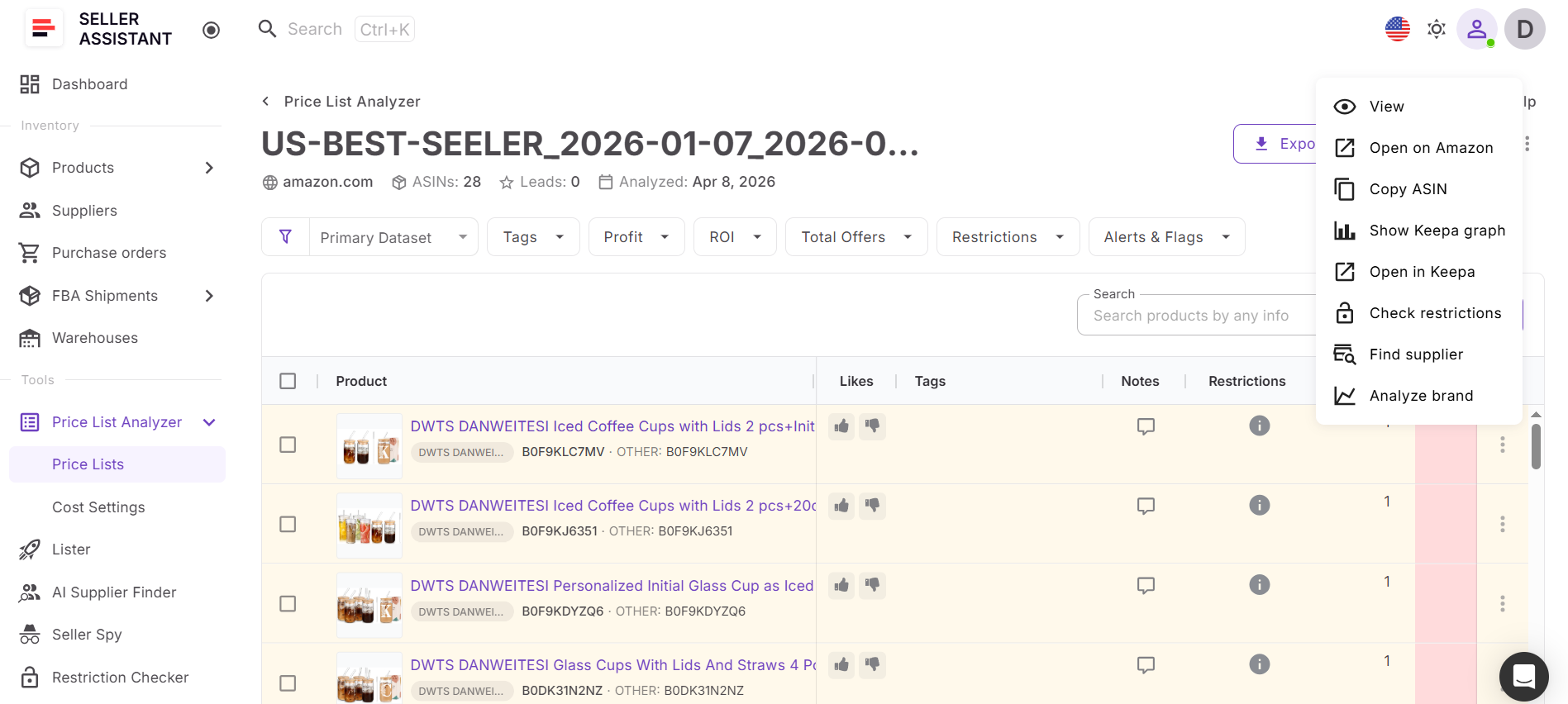
Step 4. Click “Find supplier”
Select Find supplier from the dropdown. Seller Assistant will launch AI Supplier Finder and use the product and brand data to start supplier discovery.
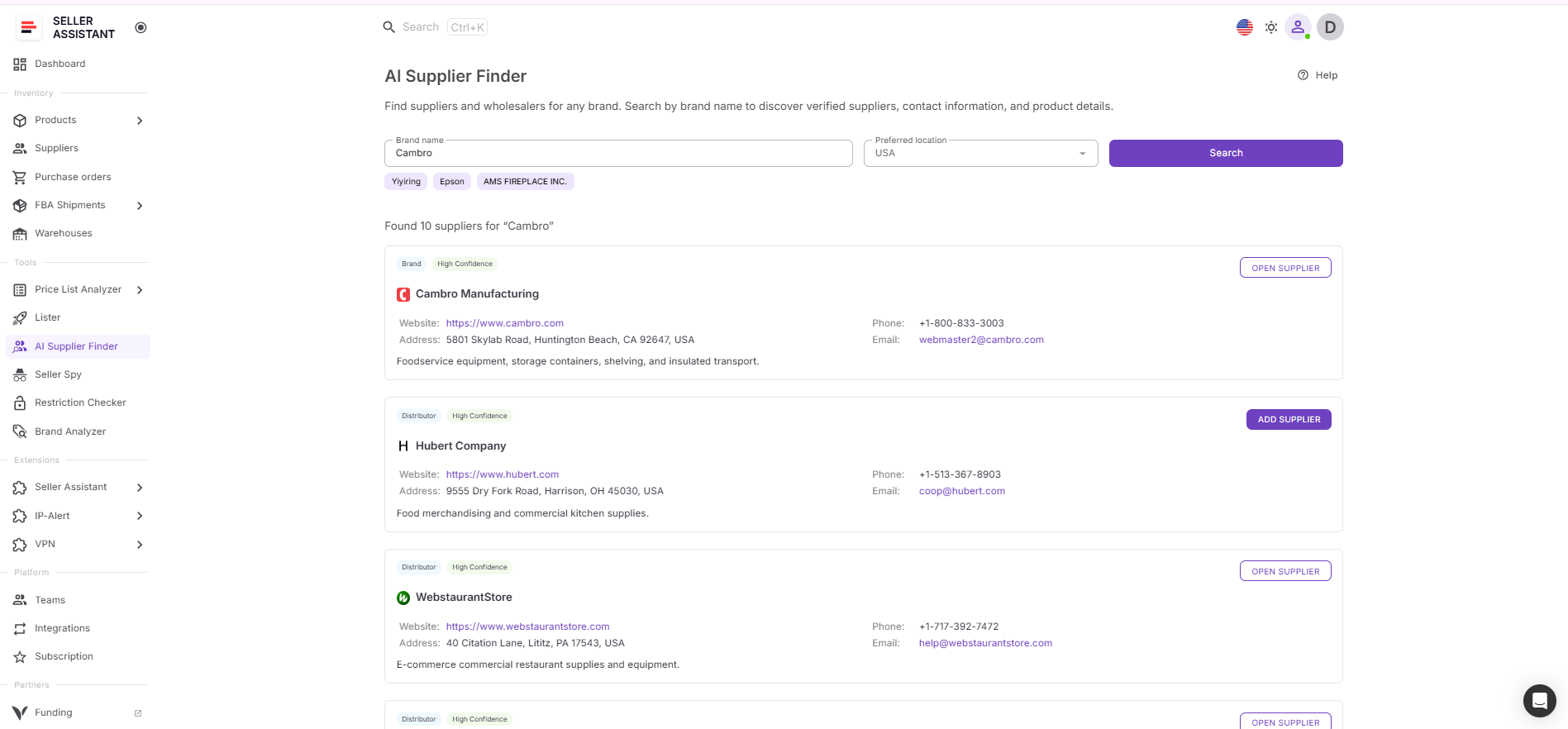
Step 5. Review supplier results
AI Supplier Finder returns relevant supplier options, including manufacturers, distributors, wholesalers, and alternative suppliers. Retail stores and marketplaces are filtered out.
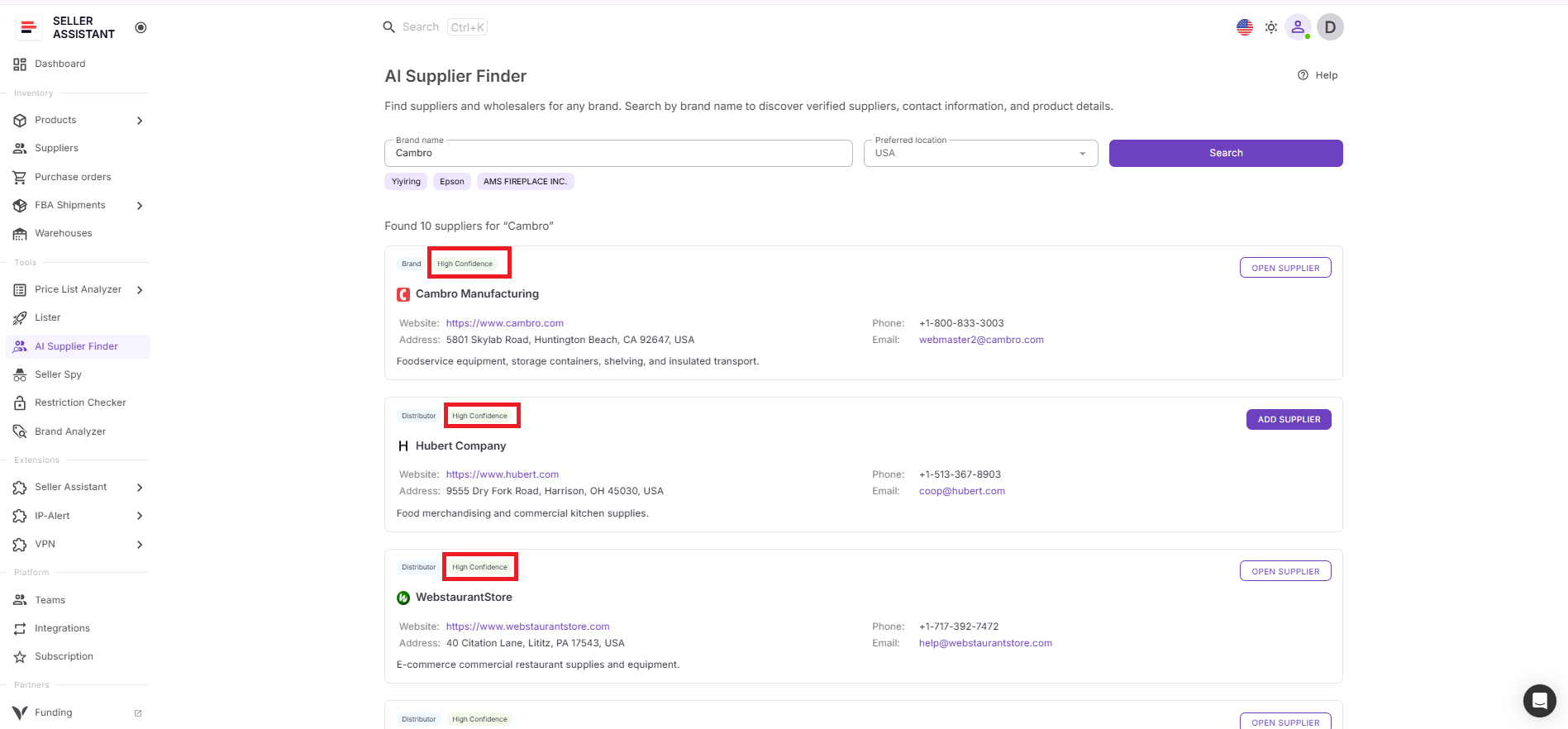
Step 6. Prioritize the best matches
Start with suppliers marked with higher match confidence. Review supplier type, website, contact details, and relevance before adding them to your outreach list.
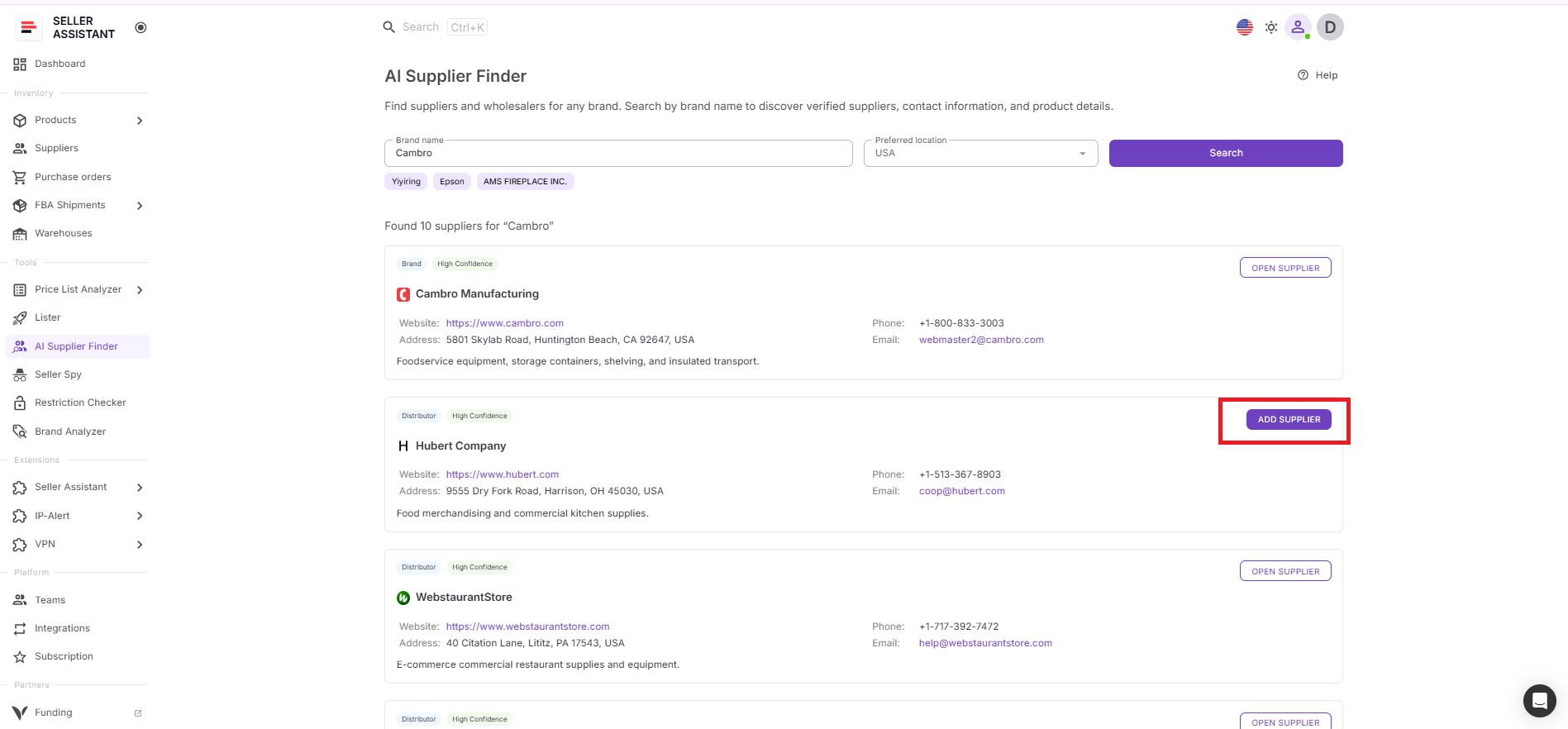
Step 7. Save and continue sourcing
Save suitable suppliers to your workflow, then move to outreach, price comparison, or purchase planning. This lets you turn one analyzed product into multiple sourcing options without leaving Seller Assistant.
FAQ
Can I find additional suppliers for the same product using this workflow?
Yes, you can use analyzed products to discover multiple suppliers for the same item. This helps you compare pricing, improve margins, and reduce dependency on a single source.
Do I need to search for suppliers manually after analyzing a price list?
No, you can launch supplier search directly from the analyzed product inside Price List Analyzer. This removes the need for manual research and keeps your workflow uninterrupted.
How do I know which supplier to contact first?
Use match confidence and supplier type to prioritize your outreach. Start with high-confidence manufacturers and authorized distributors, then expand if needed.
Can this process help reduce sourcing risks?
Yes, because you only search for suppliers after validating product profitability, demand, and restrictions. This ensures you focus on viable products and avoid unnecessary supplier outreach.
Is this workflow suitable for scaling an Amazon business?
Yes, it allows you to process large catalogs, identify profitable products, and find suppliers without manual bottlenecks. This makes your sourcing faster, more consistent, and easier to scale.
Final Thoughts
Working with a supplier price list doesn’t end at product analysis. The real advantage comes when you use those validated products to find better and additional suppliers, improving your pricing, stability, and overall sourcing strategy.
By combining Seller Assistant’s Price List Analyzer and AI Supplier Finder, you turn a static price list into a dynamic sourcing system. You analyze products, identify opportunities, and launch supplier search instantly – all within one workflow. This removes manual steps, keeps your process consistent, and helps you scale faster by focusing only on products that are already proven to perform.
Seller Assistant automates and connects every stage of your Amazon wholesale and arbitrage workflow. It brings together in one platform: workflow management tools – Purchase Orders Module, Suppliers Database, Warehouses Database, FBA Shipments, bulk research & sourcing tools – Price List Analyzer, Bulk Restriction Checker, Sourcing AI, Brand Analyzer, Seller Spy, Chrome extensions – Seller Assistant Browser Extension, IP-Alert Extension, and built-in VPN by Seller Assistant, and integrations & team access features – seamless API connectivity, integrations with Zapier, Airtable, and Make, and Virtual Assistant Accounts.


