



As a seller looking to expand your Amazon business, selling globally is a great way to target new customers and grow your profits.
However, if you want to sell in international markets, you must be familiar with the local laws, taxation, shipping rules, and product regulations. Amazon Global Selling program gives you a selection of essential tools for successful international selling.
This post will discuss the benefits of selling internationally and explain how Amazon Global Selling works.
Related: Seller Assistant Extension Review
Seller Assistant — the Ultimate Tool for Amazon Online Arbitrage
What Is Amazon Global Selling?
Amazon Global Selling (AGS) is a program that allows sellers to list and sell their products on Amazon marketplaces in Europe, Asia-Pacific, the Middle East, and the Americas. Sellers can use Amazon’s global infrastructure to reach millions of new customers in 200+ countries.
Amazon Global Selling is an excellent option if you’re interested in selling internationally. Currently, Amazon has over 21 marketplaces worldwide, and this number is growing each year. AGS makes it easier for merchants to sell internationally.
The services and support AGS offers can help sellers save time and money and avoid the challenges of selling internationally on their own. AGS offers customer and language support, distribution and fulfillment channels, and many other valuable options.
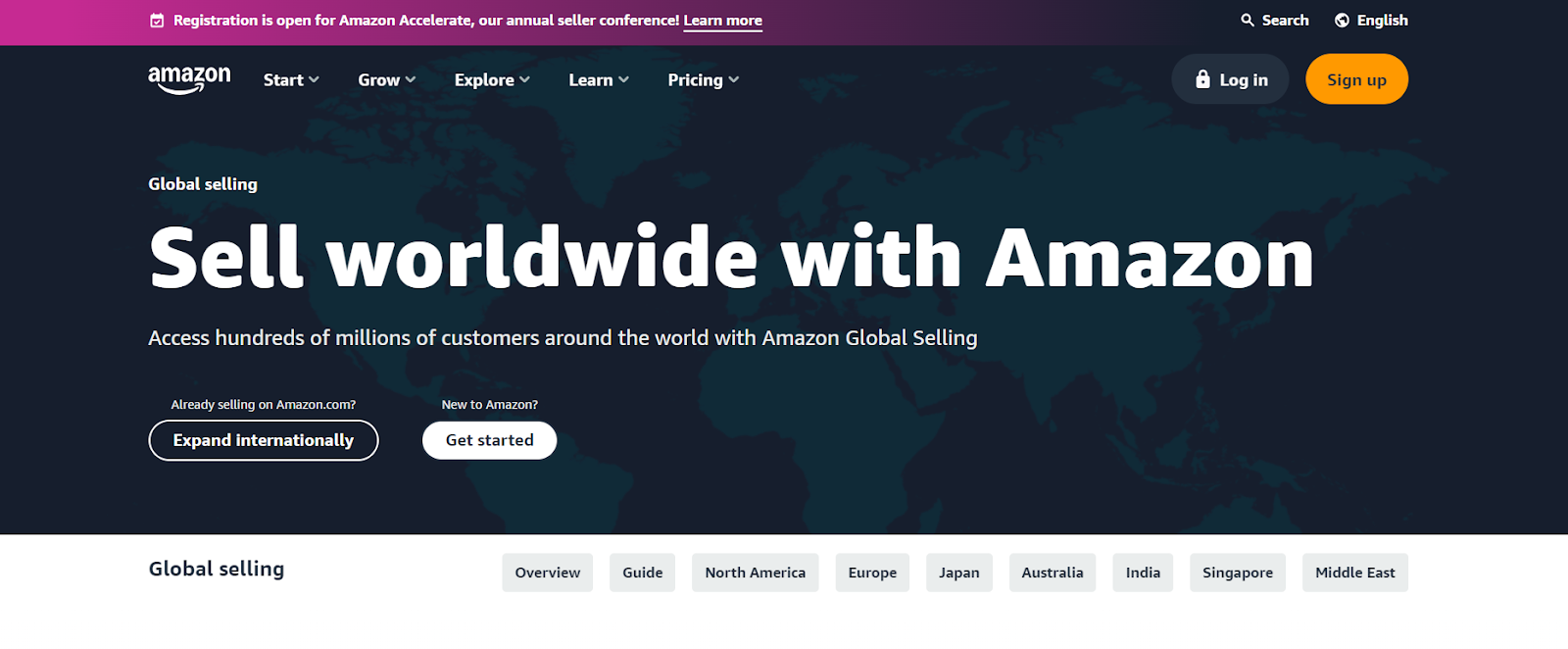
Amazon Global Selling webpage
Benefits of Amazon Global Selling
Amazon Global Selling provides a number of helpful advantages.
Access to a global marketplace
Amazon has over 300 million active customers worldwide. Selling on Amazon Global Selling allows you to reach a way larger audience than you could if you only sold in your home country.
Simplified logistics
Amazon can handle the shipping and logistics of your international orders, so you don’t have to worry about it. That can save you time and money and help ensure that your orders arrive to your customers on time and in good condition.
Local currency payments
Amazon can collect payments from your international customers in their local currency. That can make it easier for your buyers to pay for your products. Amazon Seller Wallet and Amazon Currency Converter for Sellers help deal with local currencies.
Multilingual support
Amazon provides multilingual support to sellers who sell on Amazon Global Selling. That means you can communicate with Amazon’s customer service team in your own language and translate your product listings into the languages of the countries where you want to sell.
How Does Amazon Global Selling Work?
To sell Amazon products internationally, sellers must set up Seller Central accounts for each country or group of countries. Once you have set up your AGS account, you can start selling your products to customers around the world. Below, you can find the steps to start selling internationally.
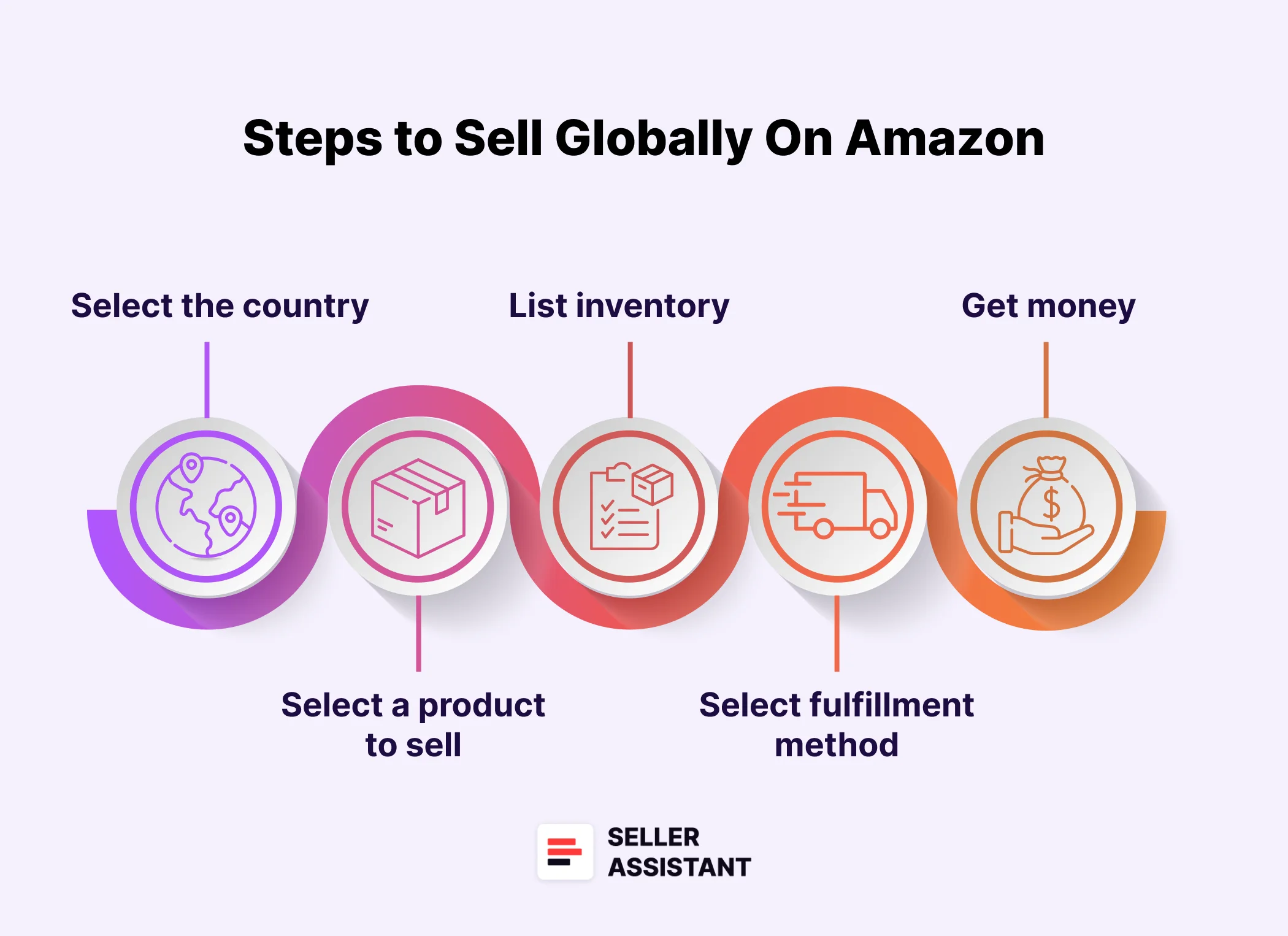
Steps to sell globally on Amazon
Steps to sell globally on Amazon
Step 1. Select the country group where you want to sell
Set up your Amazon selling account. Create a new Amazon seller account for each international marketplace you want to enter.
- If you’re already selling in one Amazon North American marketplace, you can use your current account to sell in others like Amazon.com.mx;
- If you’re selling in one Amazon European marketplace, you can use the same account for other European marketplaces like Amazon.es.
Step 2. Merge your Amazon seller accounts in different marketplaces
Get reduced subscription fees and unify your sales across Amazon’s international stores. Gain access to international tools.
- Check for existing merged accounts in the store switcher in the Sell Globally dashboard.
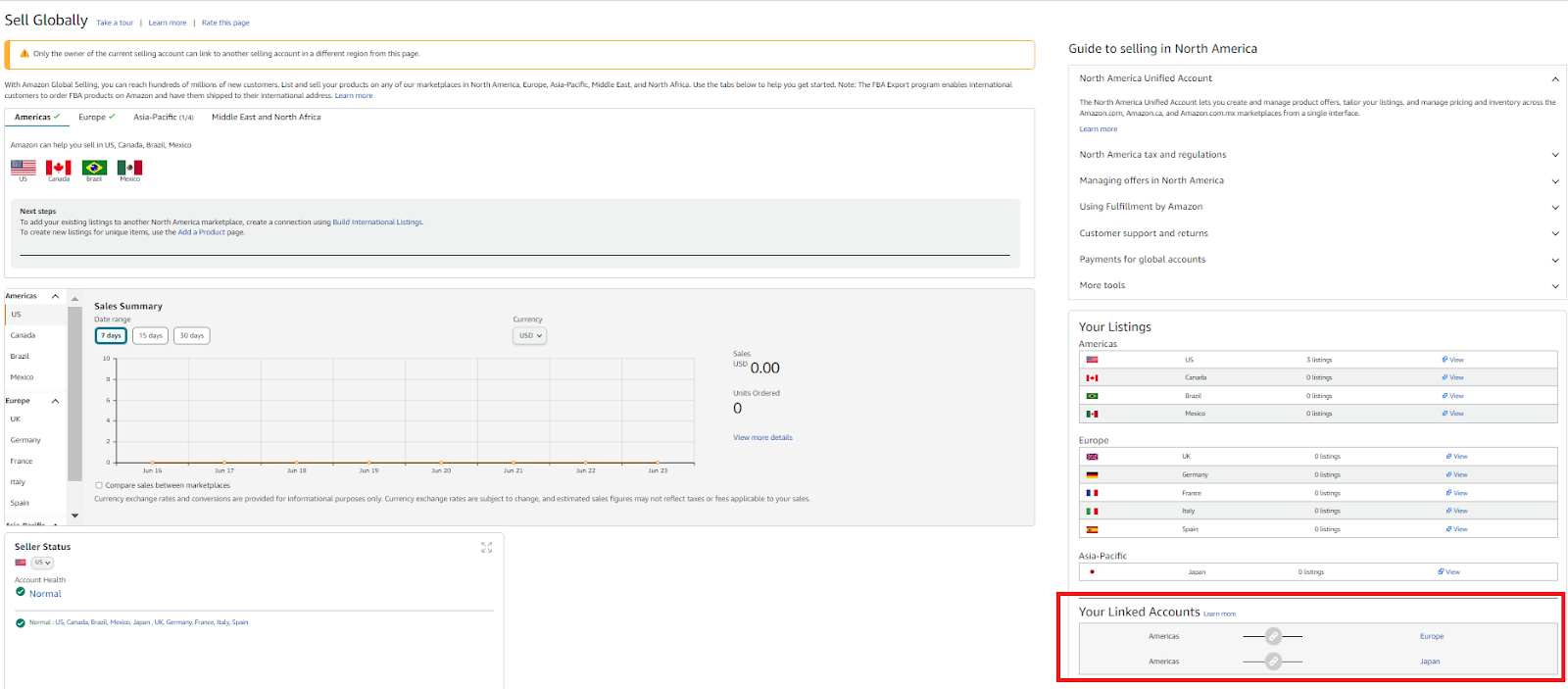
Check for existing merged accounts in the store switcher in the Sell Globally dashboard
- If not listed, merge the accounts in the Inventory menu > Sell Globally > Merge accounts tab.
- Follow the on-screen instructions to select and merge your accounts;
- To register and merge new accounts, in the Inventory menu > Sell Globally > Choose the region and click Register. Sign in again, if prompted. Complete the registration process, and your new account will merge automatically.
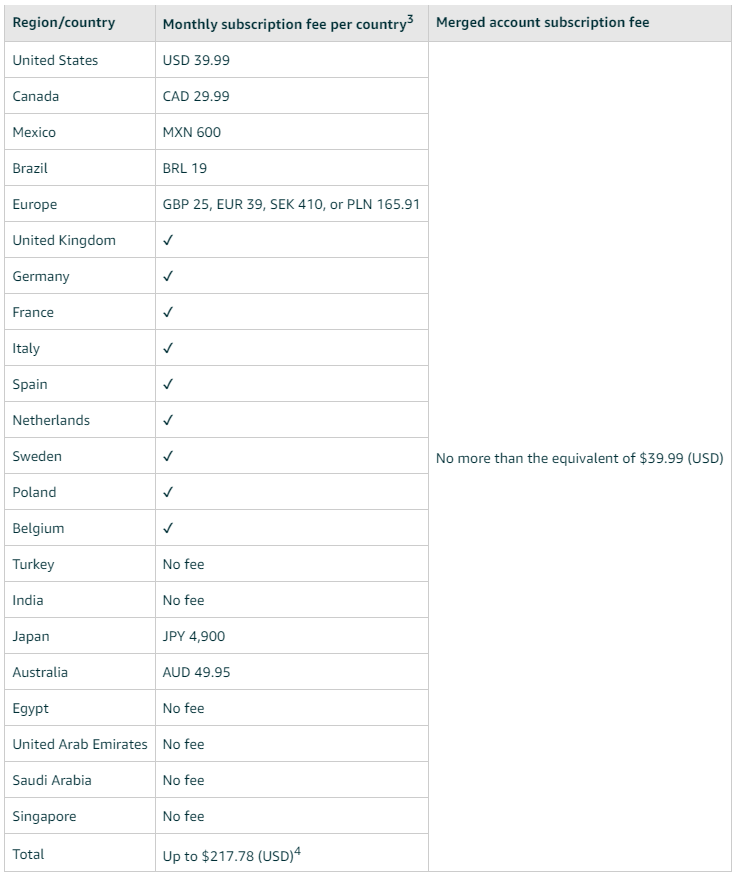
Merge your Amazon seller accounts in different marketplaces and get reduced subscription fees
Step 3. Select a product to sell
Choose the products you want to sell and set prices considering the competition, your profit margin, Amazon fees, and other expenses. Ensure the products are allowed for sale in the destination country.
Step 4. List inventory
List the inventory on the selected marketplace in the local language.
Step 5. Select fulfillment method
When customers buy a product, Amazon sends you a notification with the order details and shipping instructions. To ship the orders, you can use Fulfillment by Amazon, and the platform will take care of the fulfillment process for a fee, or you can fulfill orders yourself.
Step 6. Sell and get money
After Amazon deducts all applicable fees, they will credit the resulting amount to your bank account in a currency you select.
Note. Different countries have different laws and regulations governing the sale of products to consumers. It is essential to research and understand each marketplace’s legal and regulatory requirements before selling internationally. Some key areas to consider include taxes and customs, intellectual property rights, export controls, parallel importation, marking and labels, environment, health and safety, and product compliance. For instance, you may need to obtain a seller’s permit in the target country.
Where Can You Sell with Amazon?
As of now, Amazon offers sellers access to more than 21 global marketplaces and over 200 countries.
Amazon marketplaces
Europe
Asia-Pacific
Middle East and North Africa
Americas
Registration Requirements by Region
If you want to start selling in a new international Amazon marketplace, you must create a new Amazon seller account for each marketplace. You need to register as usual, however you may be required to provide a different set of documents depending on the marketplace and country, as described below.
United States
Provide a valid credit card, bank account, phone number, and tax information. Complete an online interview to determine if you need a W-9 (U.S. taxpayer) or W-8BEN (non-U.S. taxpayer). Additional documents like passport copies may be required.
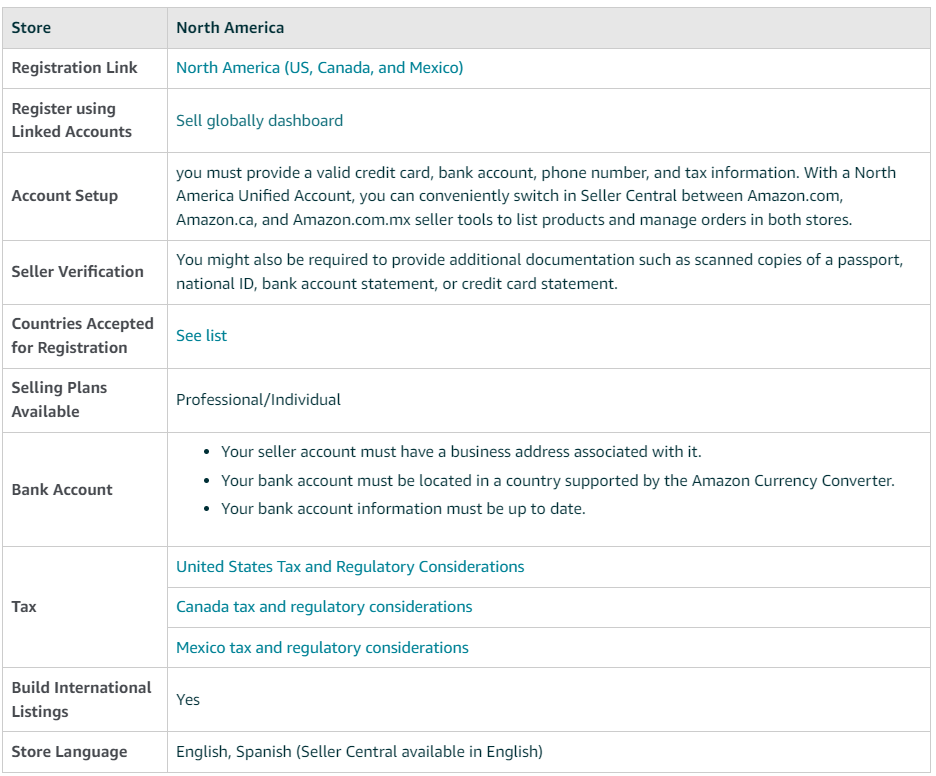
Global Selling registration requirements for US
European marketplaces
Provide a valid credit card, phone number, and VAT number. Manage your business from a single account to sell across multiple Amazon European sites. You must comply with local tax and regulatory requirements. Use a single seller account for Amazon’s European marketplaces. Additional documents may be required for verification.
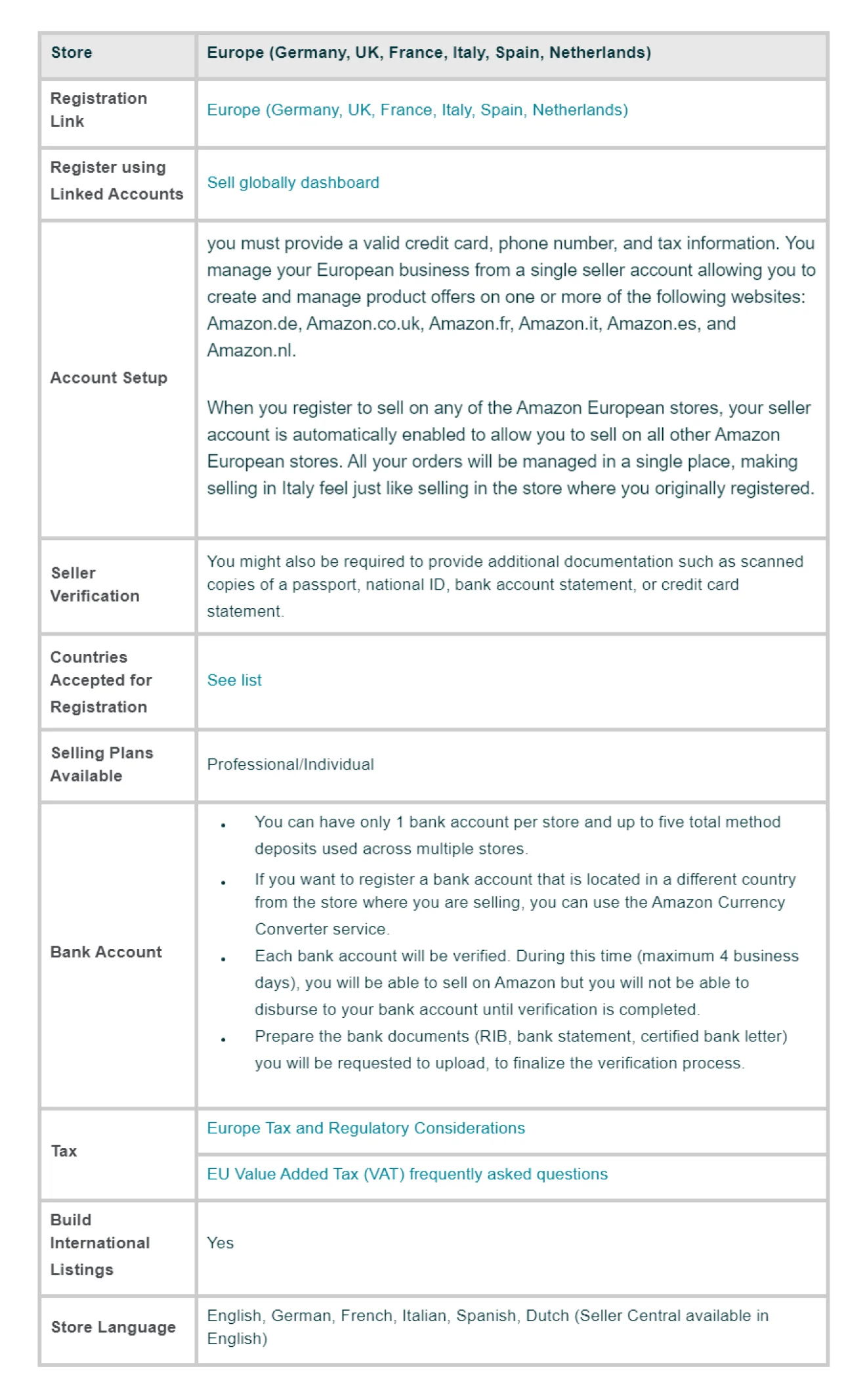
European marketplaces
Pacific-Asia
Provide a valid credit card, phone number, and tax information. Register in Japan, Australia, or Singapore. Additional identity verification documents may be required.
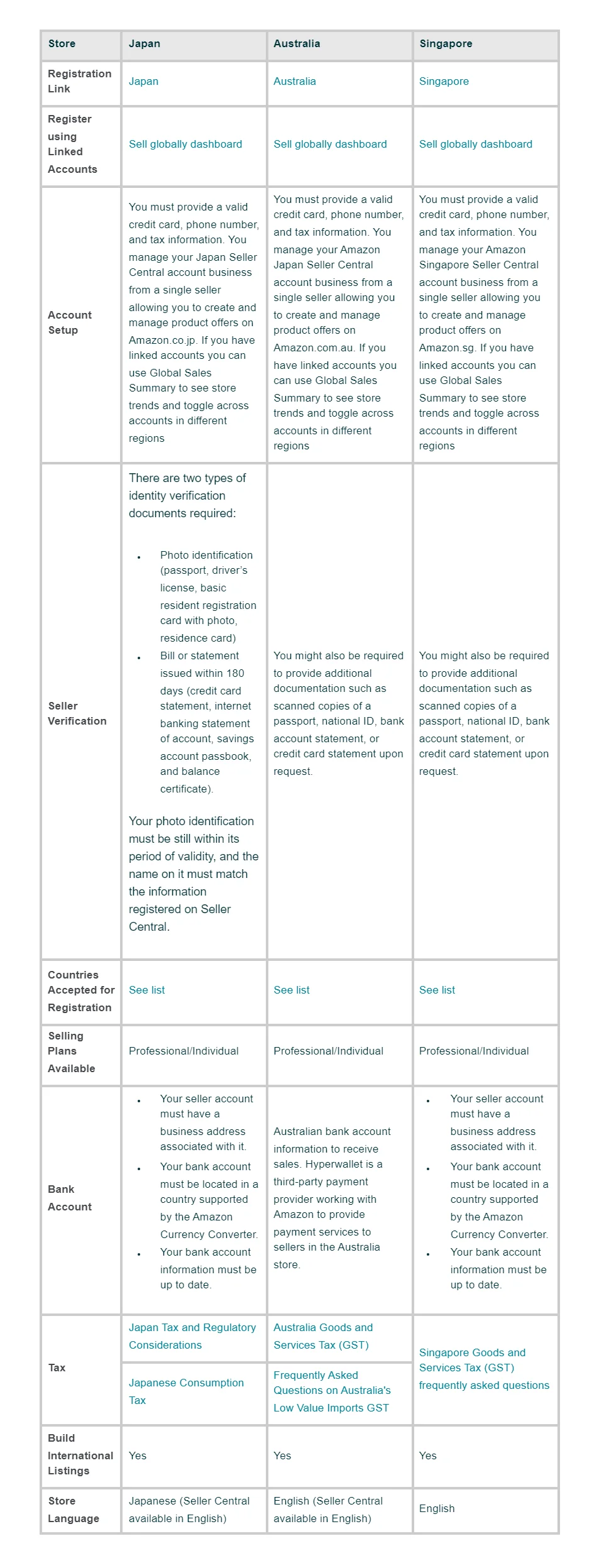
Pacific-Asia
Middle East
Provide a valid credit card, phone number, and tax information. Available for the United Arab Emirates and Turkey. Additional documents may be required for verification.
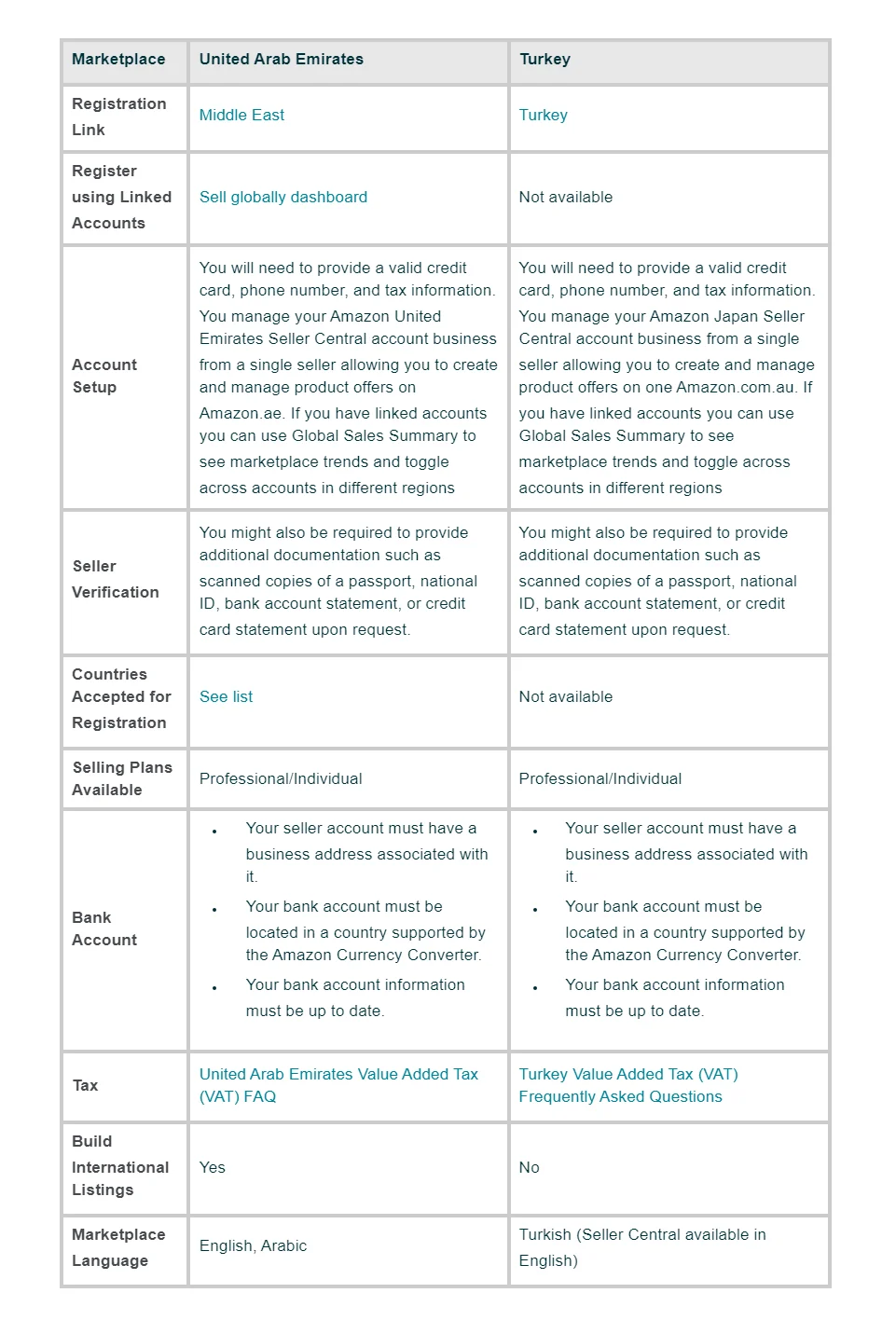
Middle East
India
To register as a seller on Amazon in India, you need to provide an official business name and registered address, email address and phone number for business communications, business license, valid ID such as a passport, voter’s ID, or driver’s license, and a proof of a contract with an Amazon-approved carrier.
Brazil
Provide full name and address. Sellers from the U.S. and China need a legal address in their respective countries and a valid U.S. bank account.
What to Sell Internationally?
Regardless of the type of products you choose, it is crucial to research and ensure there is a demand for them, and they will bring you profit. Once you have product ideas for your Amazon international sales, assess their viability by considering factors such as competition, demand, and profitability.
Tips for choosing products to sell globally
The best product sourcing tool that helps you select high-profit products for your international store is Seller Assistant. Below is how it helps you identify profitable deals directly in the Amazon product and search pages, and do your research on the supplier website.
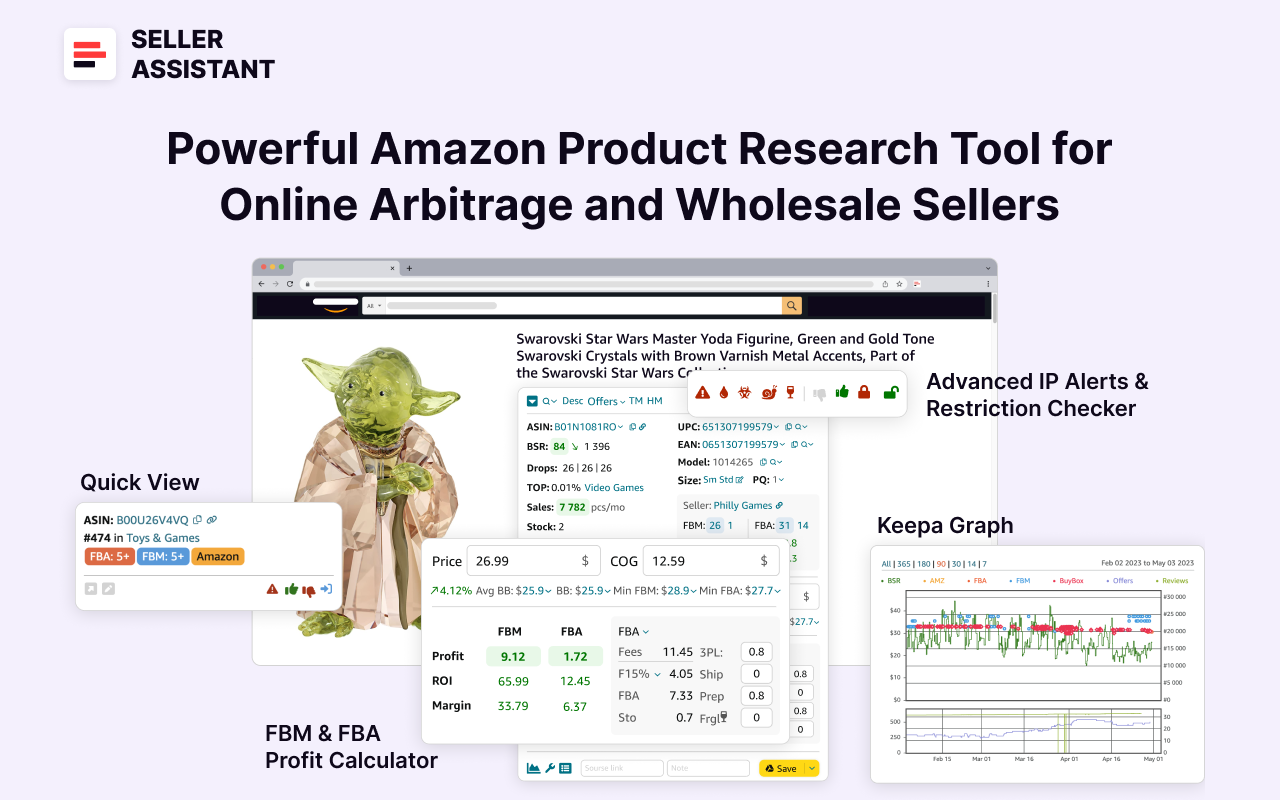
Seller Assistant
Choose products with high demand
Use Amazon’s Best Sellers Rank (BSR) to determine product sales potential. A lower BSR indicates higher sales volume.
Seller Assistant calculates how many products you can potentially sell per month in the Sales field. Drops (BSR drops) show how many products were sold during 30, 90, and 180 days. If the BSR number is green and the arrow beside it points down, the product sales go up; if it is red and the arrow points up, the product sales go down.
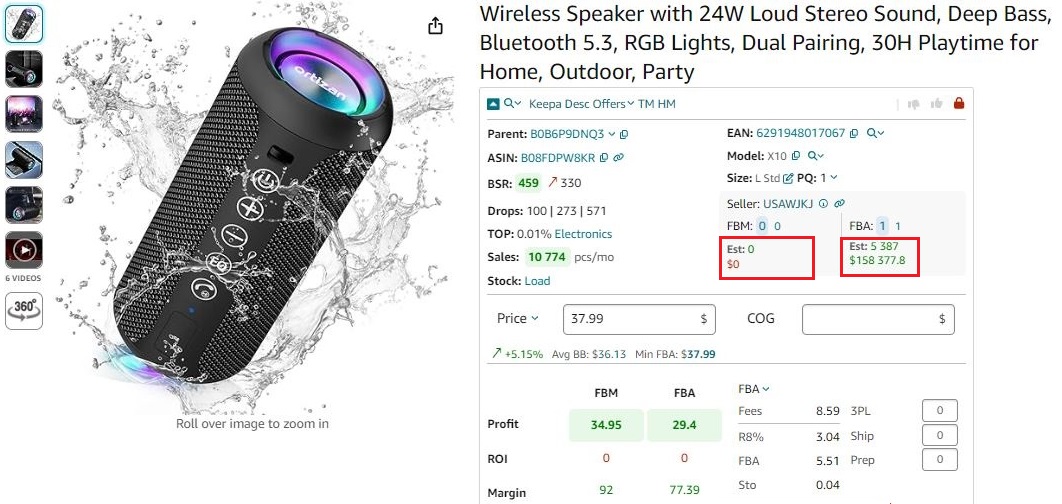
Seller Assistant calculates estimated sales for each product
Aim to dominate the Buy Box
Most sales on Amazon occur through the Buy Box, so securing it is essential for increasing sales. Seller Assistant displays the average Buy Box price and highlights opportunities to win it by showing the minimum FBA and FBM prices.
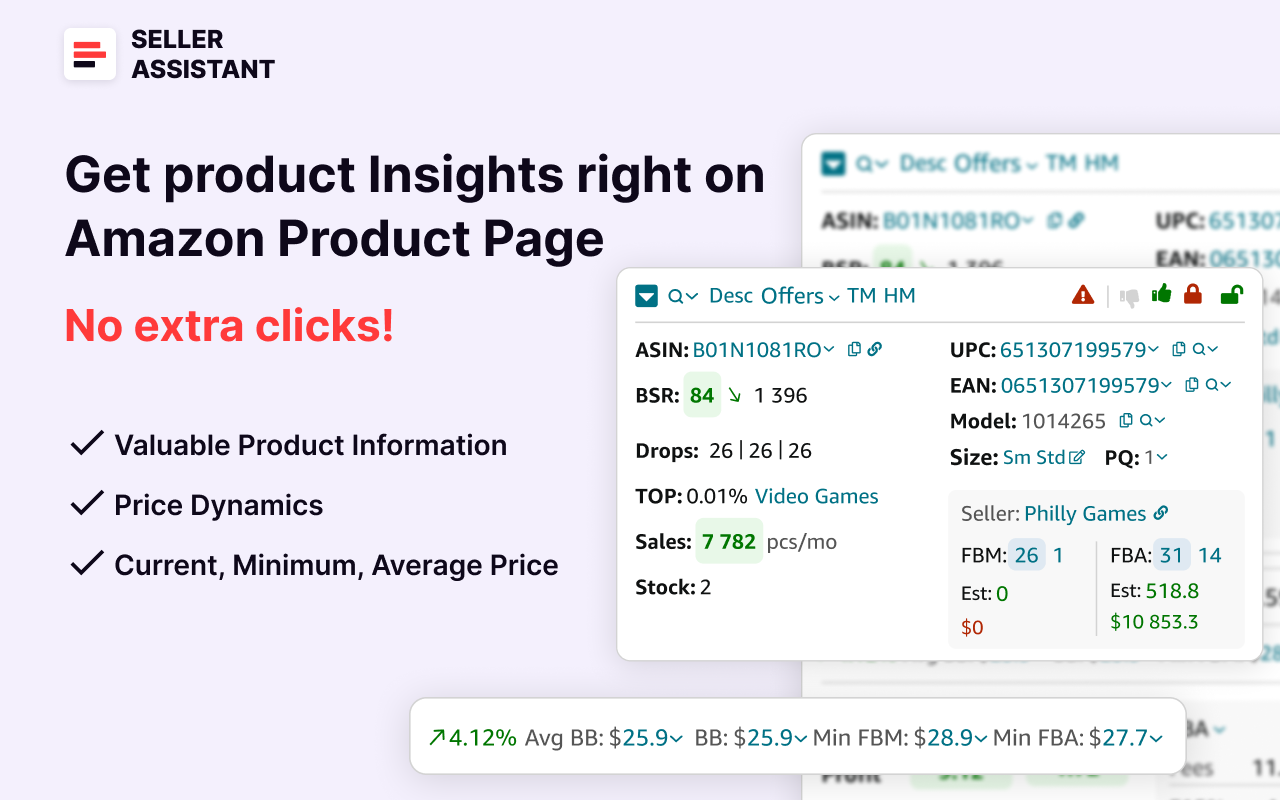
It also shows Buy Box shares by each seller offering the product and indicates when Amazon is in the Buy Box.
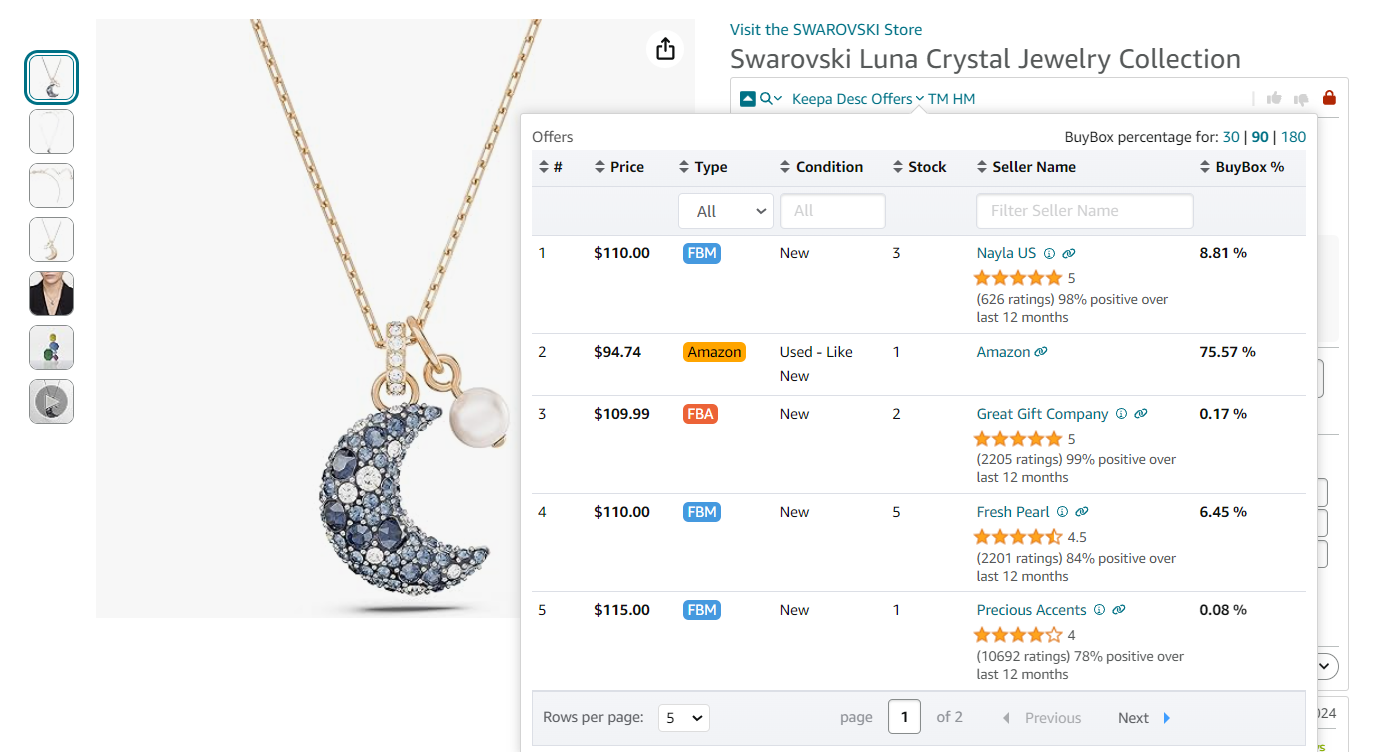
Buy Box
Avoid high competition
Steer clear of products with high competition, especially those with many FBA sellers or a low Buy Box price.
Use Seller Assistant to check the number of FBA and FBM offers. If there are more than 10 sellers, competition is typically high. Avoid products sold by Amazon because it’s difficult to compete.
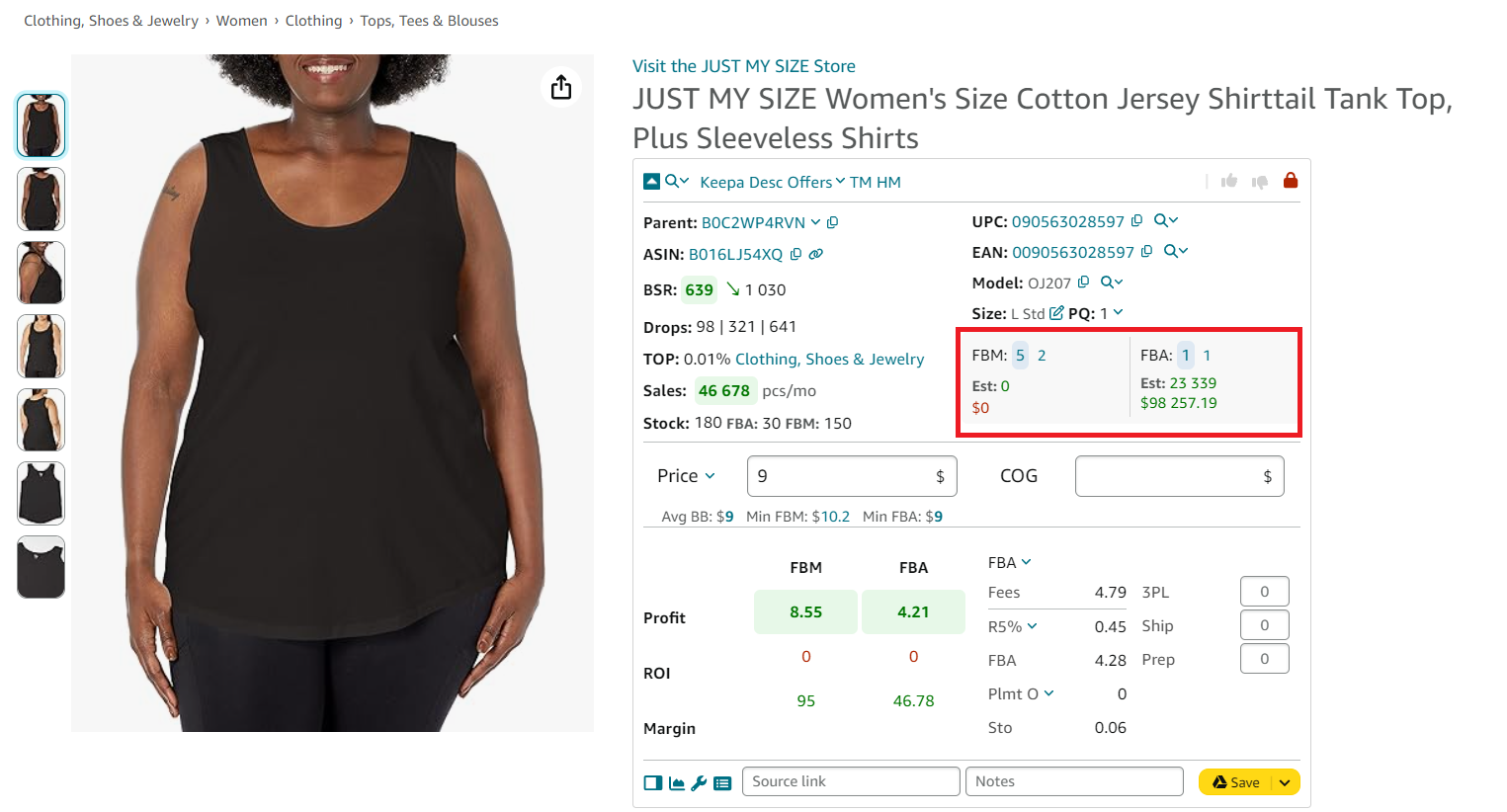
Use Seller Assistant to check the number of FBA and FBM offers.
Estimate sales potential
Use Seller Assistant to estimate how many units of a product you can sell. It provides potential sales figures to help you make informed decisions.
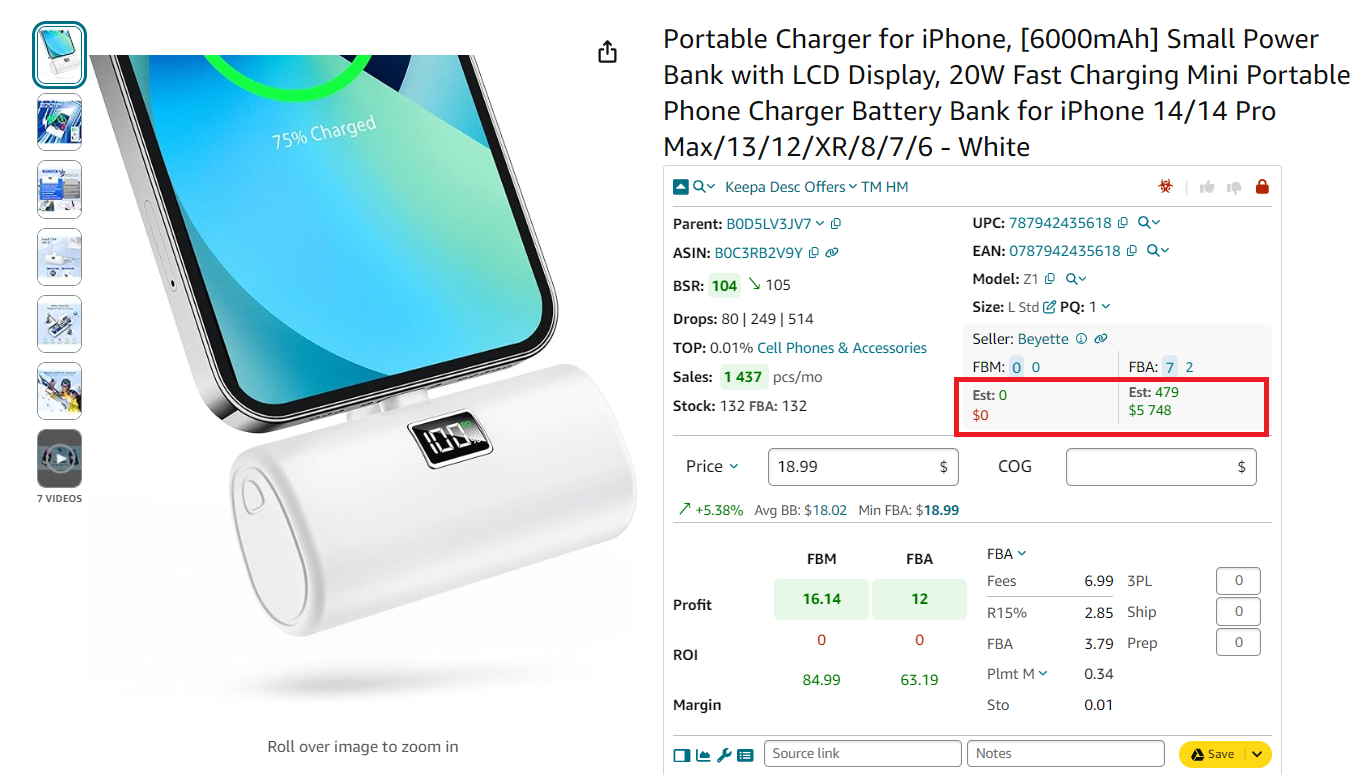
Estimate sales potential
Avoid restricted products and IP issues
Ensure the products you choose are not restricted on Amazon and do not have intellectual property (IP) complaints. Seller Assistant’s Restrictions Checker and IP Alert features can identify products with sales history issues and specific problems, helping you avoid potential pitfalls.
Seller Assistant indicates ungated products with a green open lock and shows red closed lock for restricted products. If you see a red closed lock with an exclamation mark, you can’t sell a product on your account.
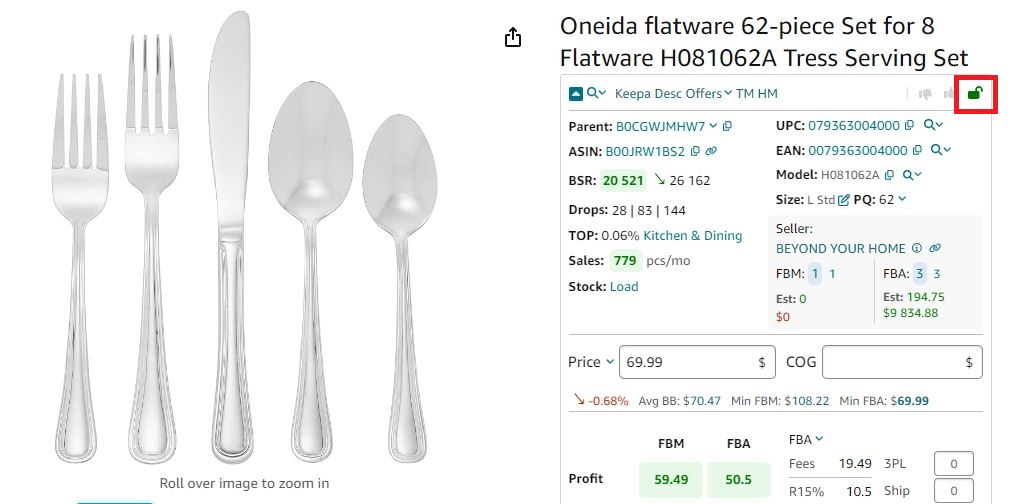
If you see a green open lock icon in Seller Assistant, you can sell a product
Products with IP alerts are marked with a red triangle.
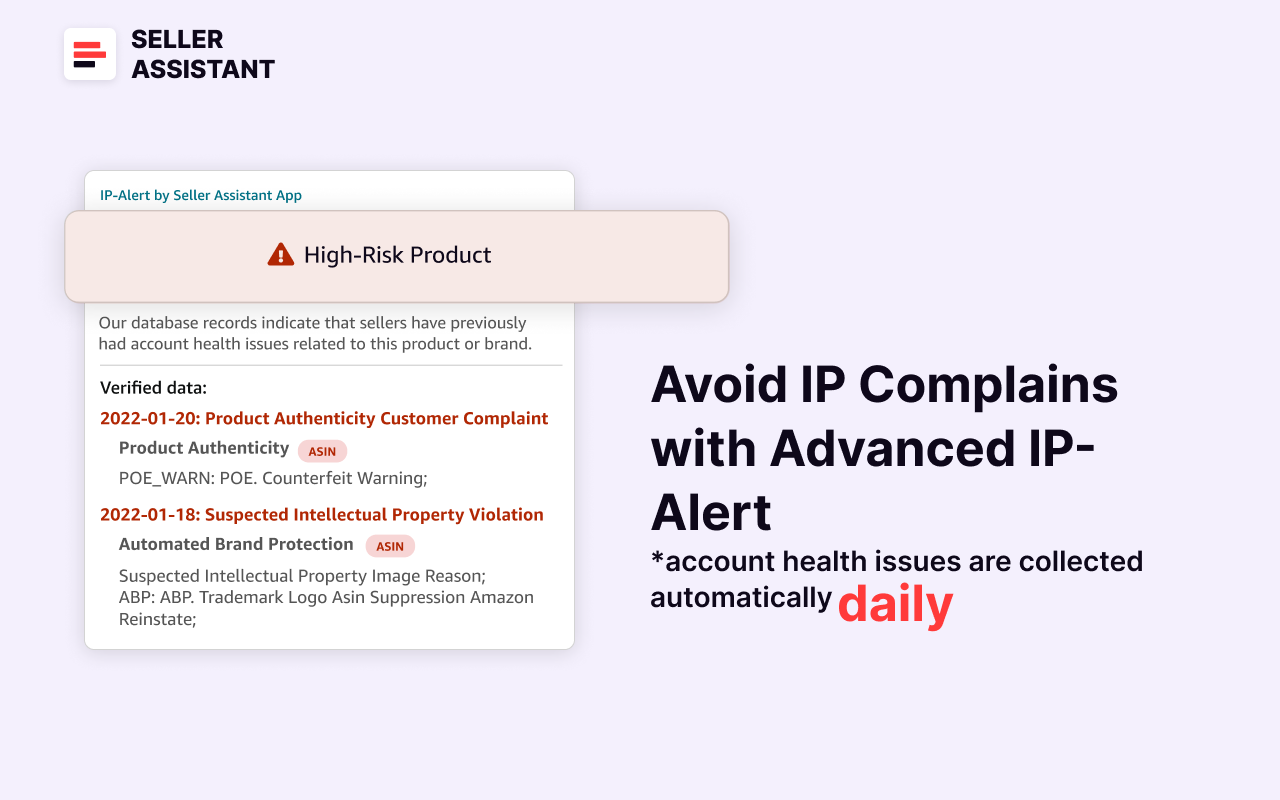
Seller Assistant’s IP Alert extension
Calculate profitability
Use Seller Assistant’s FBA&FBM profit calculator to estimate profit and profit margin for each product. This will help you determine which products are worth selling and how to price them competitively.
Add the Cost of Goods Sold (COG, the purchase price from the supplier) to the calculator, and logistics costs. Seller Assistant will calculate your profit, ROI, margin, and FBA or FBM fees.
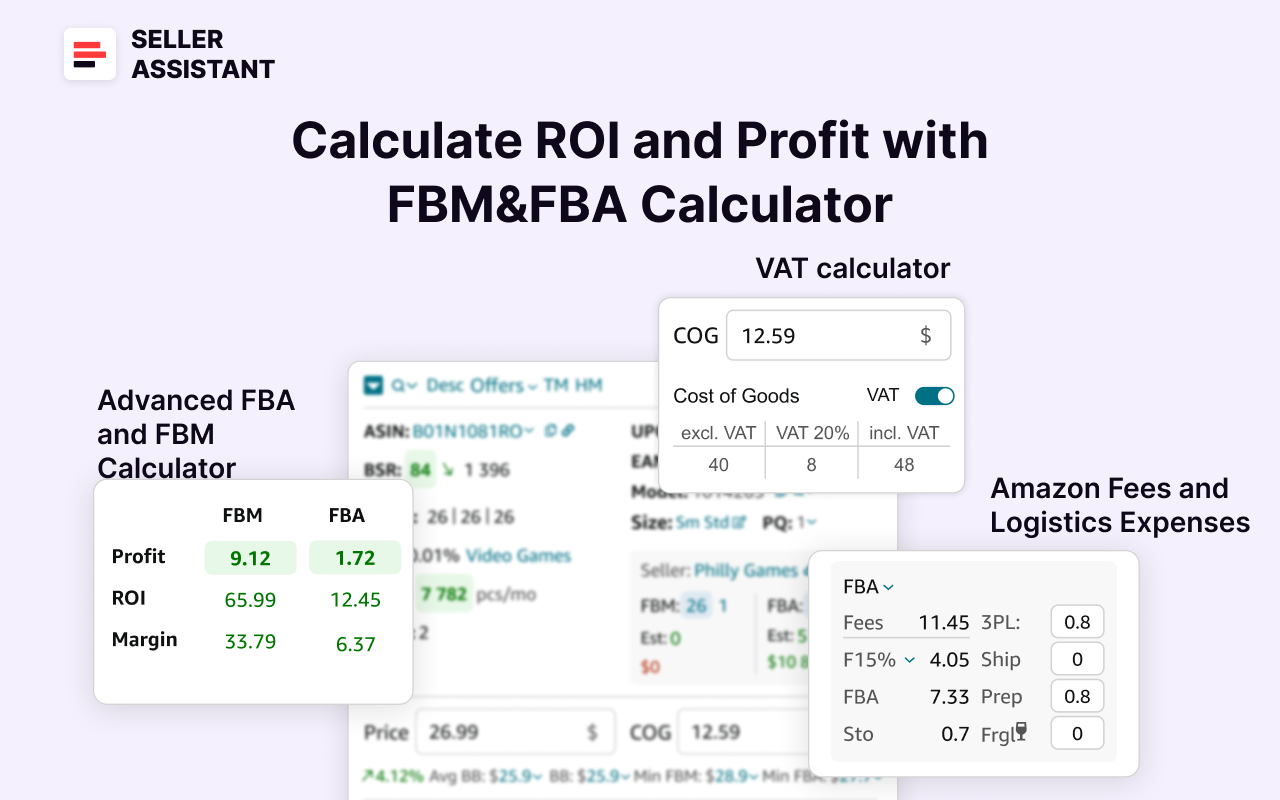
Seller Assistant’s FBA&FBM profit calculator
Factor in VAT
Seller Assistant VAT calculator lets you calculate the VAT you must pay across international Amazon marketplaces. You can applying the appropriate VAT rate based on the shipping destination. You can configure the VAT by selecting your target marketplace in Seller Assistant’s personal account. VAT for the Cost of Goods (COG) is supported.
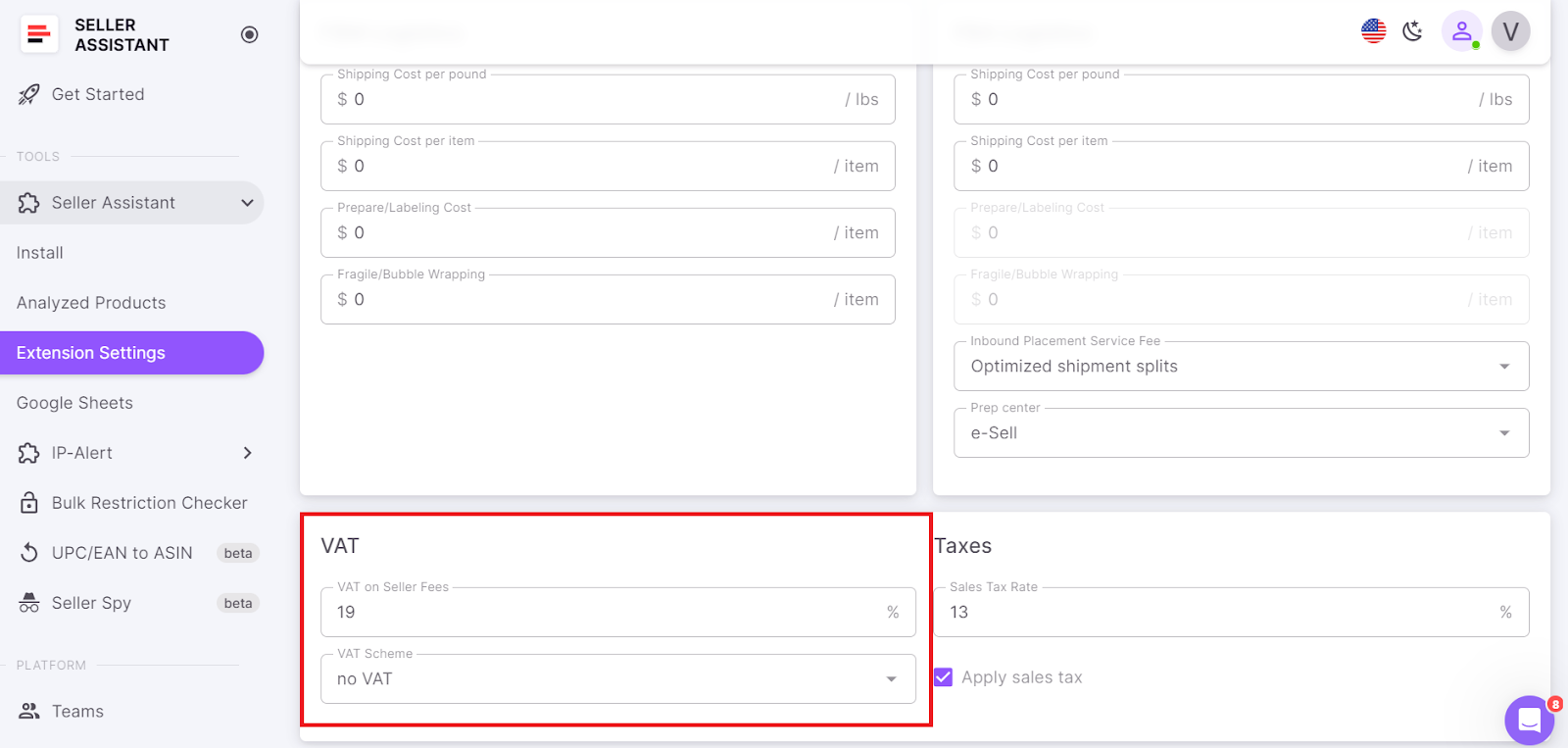
You can configure the VAT by selecting your target marketplace in Seller Assistant’s personal account
To calculate VAT on the product page, or on a supplier website, enter the COG, click on it, and toggle the “VAT” switch in the pop-up. Seller Assistant will automatically compute your VAT.
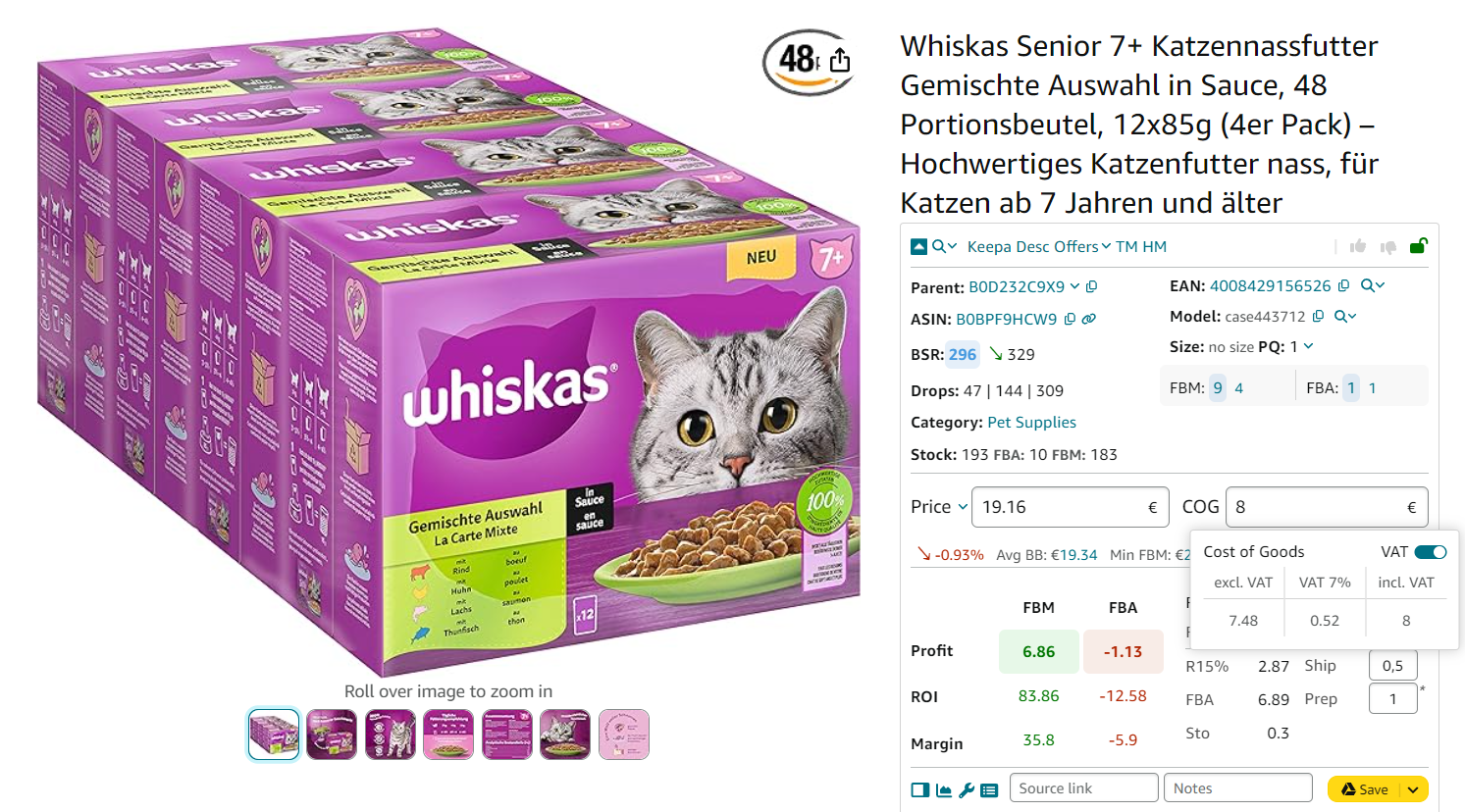
To calculate VAT on the product page, or on a supplier website, enter the COG, click on it, and toggle the “VAT” switch in the pop-up
Verify product standards and regulations
Research the laws and regulations for selling your product in each country. Ensure your products are suitable for your target country.
Consider the product standards because they vary by country. For instance, digital devices designed for 110-220 V with two-prong chargers may not be suitable for the UK but could be appropriate for Japan.
To check your product compliance, go to Add a Product page in your Seller Central.
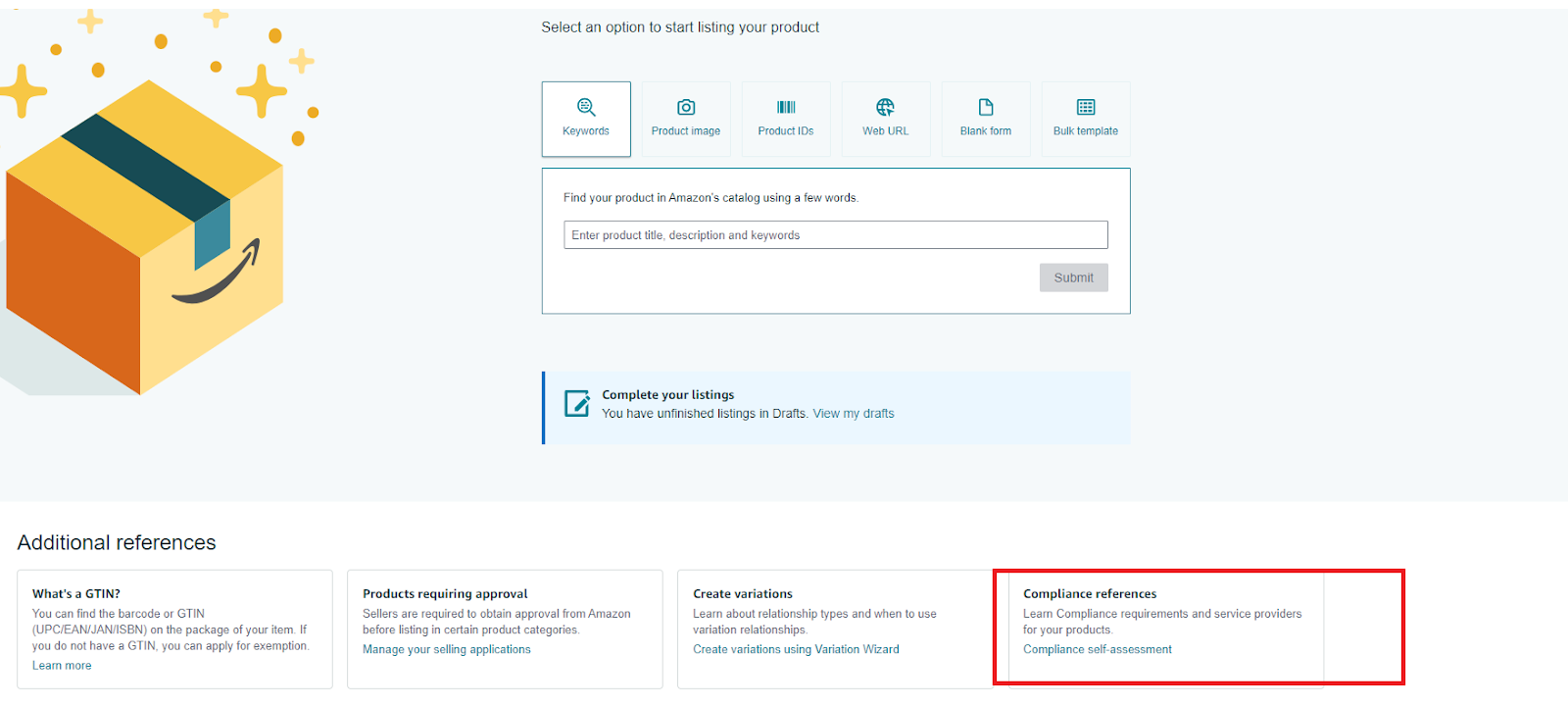
To check your product compliance, go to Add a Product page in your Seller Central.
Then, use the Compliance Reference tool, specify your target country and product type, and check the requirements.
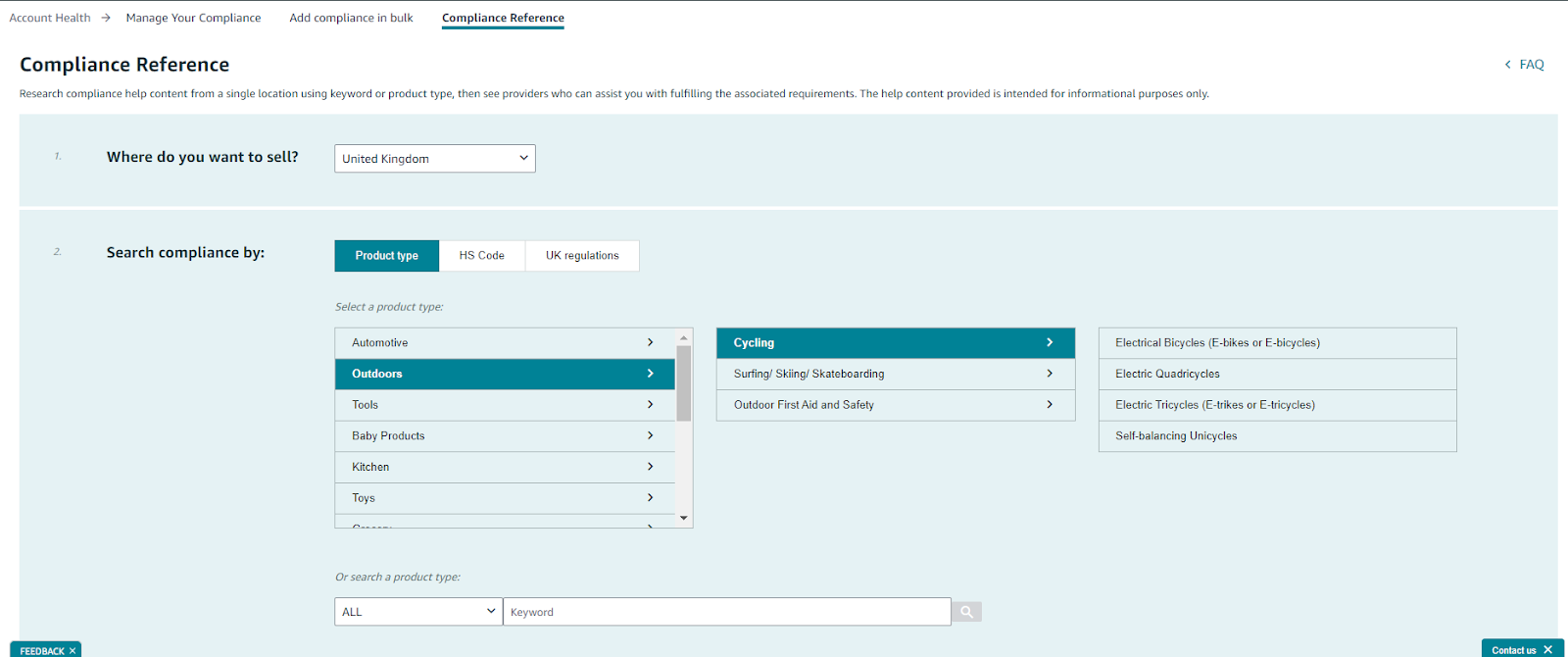
Compliance Reference tool
How to List Amazon Global Inventory?
When you choose the products for selling globally, you must list your products on each Amazon marketplace separately. Amazon can help you by providing a tool that matches your needs based on your inventory size.
Amazon listing tools for Global Selling
Listing 100 items and less
For smaller inventories of fewer than 100 products, add your products on the Add a Product page. It allows you to list each product individually, providing a straightforward way to add your items to Amazon.
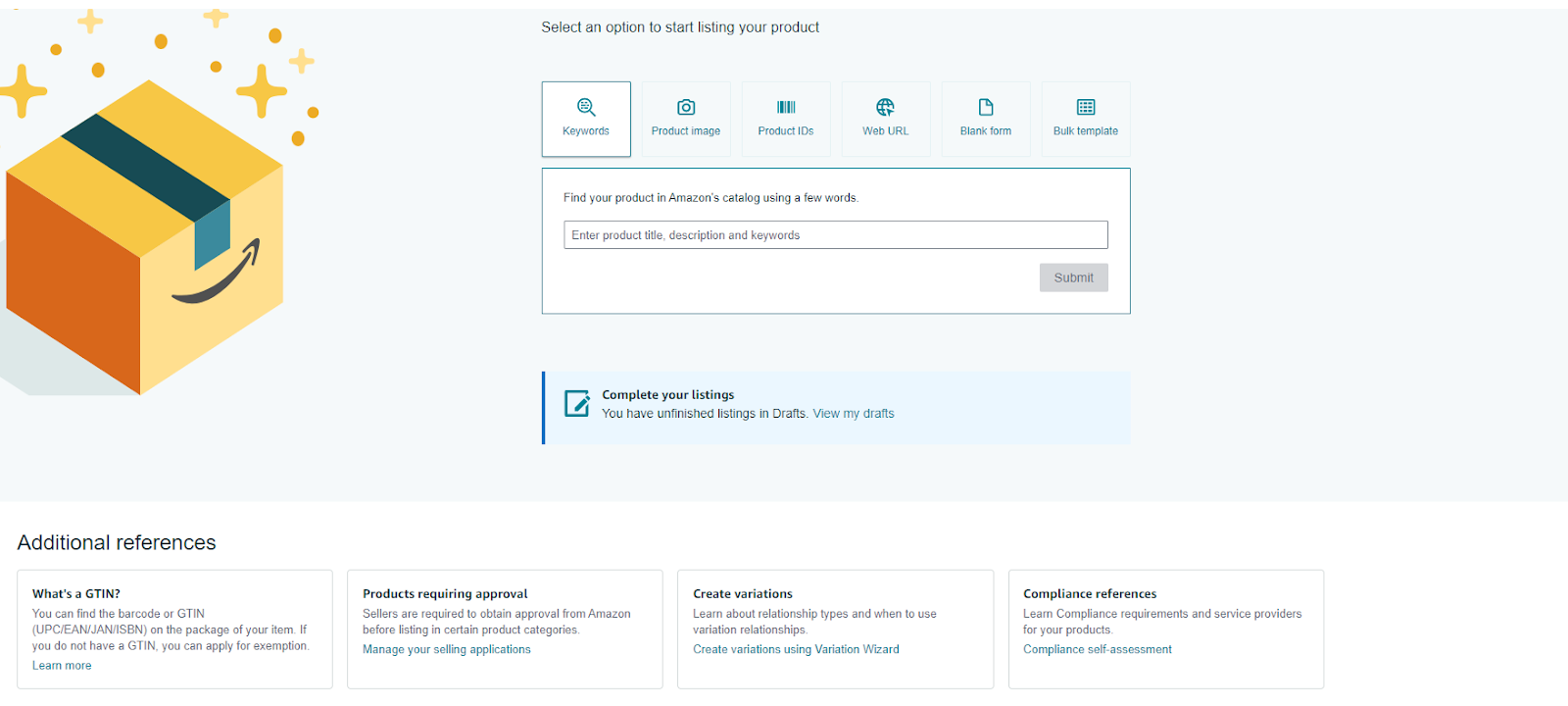
List your products on the Add a Product page.
You can consult Product detail pages and offers page to understand how to add your offers to Amazon.
Listing more than 100 items
For larger inventories, sellers with Professional accounts can create an inventory file using templates from Inventory File Templates, enabling bulk uploads and efficient management.
To save time and streamline the process of managing listings across multiple marketplaces, use the Build International Listings tool. This tool allows you to create and update listings simultaneously in various Amazon marketplaces from a unified account. It automatically generates listings in target marketplaces based on those in your source marketplace, updates listings as you add or remove products, and adjusts prices according to your set rules and currency fluctuations.
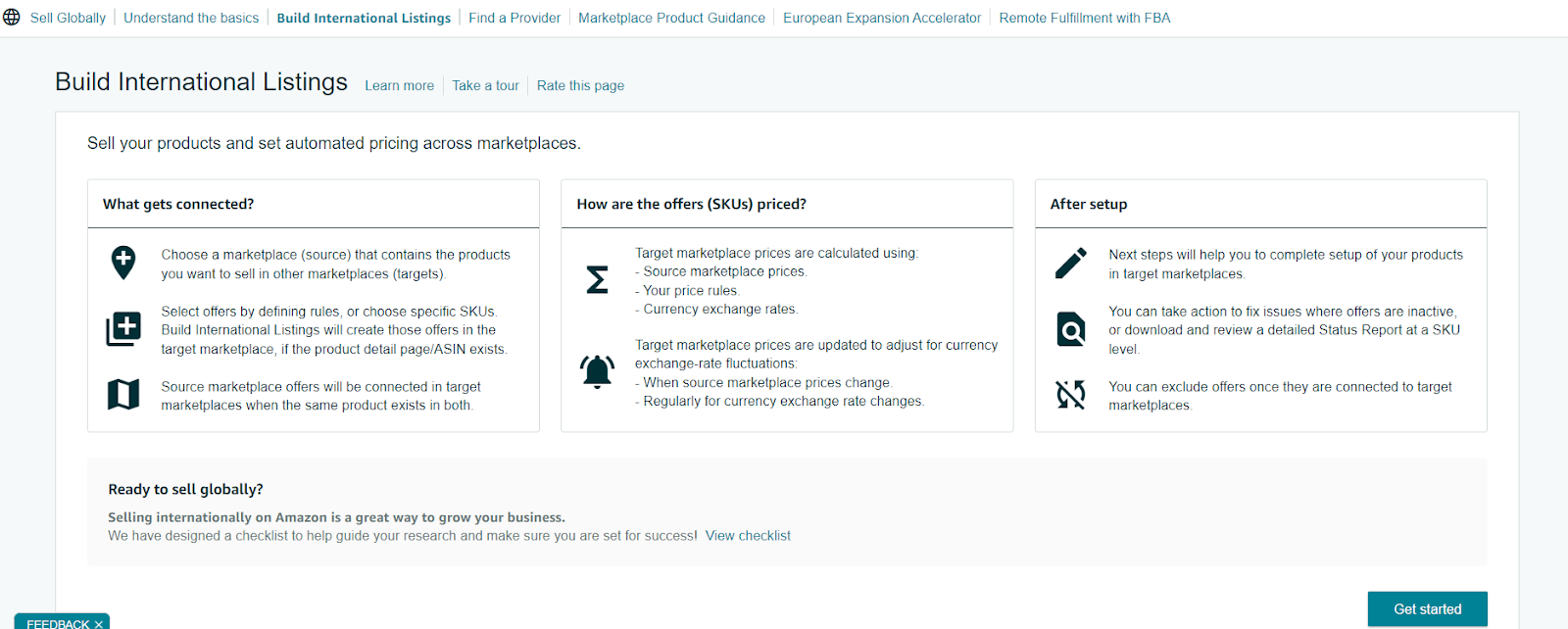
Build International Listings
How to Ship Amazon Products Globally?
When shipping Amazon products internationally, you must carefully pack your products, clearly label packages, and get insurance. There are several ways to ship Amazon products globally. Below are the options to ship your inventory across the world.
Fulfillment by Amazon
FBA is a fulfillment service Amazon provides to sellers. With FBA, you ship your inventory to Amazon’s warehouse in your target country, and they will take care of the fulfillment process for a fee. That is an excellent option if you don’t want to deal with the logistics of shipping products internationally yourself.
.webp)
Fulfillment by Amazon
If you want to sell internationally from the U.S, you can use the Amazon FBA Exports program. If you plan to sell in Europe, you can use specific Amazon FBA programs to deliver orders to your customers.
FBA Exports
The FBA Export program offered by Fulfillment by Amazon (FBA) helps you expand your international business. By opting into FBA Export, your eligible products become available for international shipping. When an international customer places an order, Amazon handles the picking, packing, and shipping directly to the customer. Amazon manages the complexities of international shipping at no additional cost to you.
Customers visiting Amazon.com can search for your products, and at checkout, they pay for the order, which includes international shipping, an import fee deposit (duty), and the product cost. Amazon provides customer service for any order inquiries and handles the return process if needed, without charging extra fees to sellers.
Amazon Pan-European program
The Amazon Pan-European FBA (PAN-EU FBA) is a program designed for sellers who aim to expand their business and reach customers across the European Union. This program enables sellers to store their products in multiple Amazon fulfillment centers across Europe, facilitating more efficient and cost-effective order fulfillment for customers in various countries.
Amazon manages the distribution of the seller’s inventory across these fulfillment centers based on customer demand, which helps minimize shipping times and costs associated with cross-border deliveries.
Key benefits of the program include access to Amazon’s customer service in local languages, eligibility for Amazon Prime, and enhanced product visibility across Europe. To participate, sellers must meet certain eligibility requirements, such as maintaining a professional selling account on Amazon, registering for VAT in all countries where they hold inventory, and adhering to Amazon’s performance standards.
Amazon EFN program
The Amazon EFN (European Fulfillment Network) program allows Fulfillment by Amazon (FBA) sellers to store their products in Amazon fulfillment centers, facilitating local and cross-border order handling. This means you can reach customers across all European marketplaces, even if your inventory is stored in just one country.
With EFN, you can list your FBA inventory for sale on all of Amazon’s European marketplaces using a single selling account. Orders placed by customers on any of these marketplaces will be fulfilled from your FBA inventory through Amazon’s reliable and efficient European Fulfillment Network.
For new sellers in Europe, Amazon EFN provides a straightforward solution for managing and shipping inventory across all European Amazon marketplaces.
Direct shipping
You can also ship Amazon products internationally yourself. This option gives you more control over the shipping process, but it can also be more time-consuming and expensive. In this option, you must handle all necessary international documentation, taxes, and fees yourself.
Shipping partners
There are a number of Amazon-approved shipping partners that can help you ship Amazon products internationally. These partners can handle all the logistics for you, saving you time and effort.
How to Provide Global Customer Support?
When selling in an Amazon marketplace, you must provide customer support in the local language of that marketplace. For example, if you are selling on Amazon.jp or Amazon.es, you need to offer support in Japanese or Spanish, respectively. You can handle this yourself or let Amazon manage it by joining FBA.
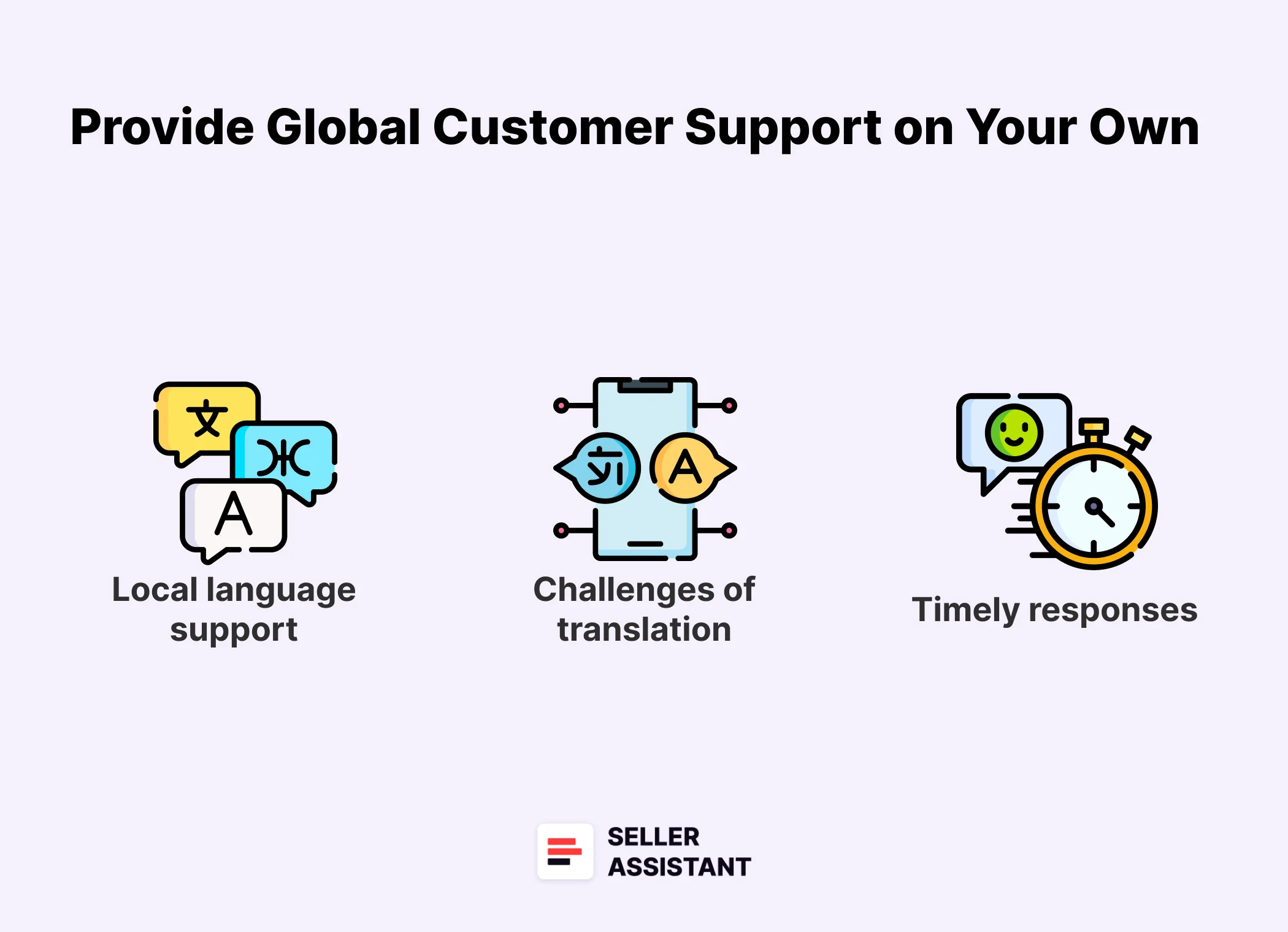
How to Provide Global Customer Support?
Handling customer care on your own
Local language support
If you fulfill orders yourself, you are responsible for handling customer support, which includes managing inquiries in the local language. This can be challenging if you don’t speak the language of the marketplace.
Challenges of automated translation
While you may consider using automated translation tools for customer emails, this can lead to poor translations and a negative customer experience, potentially harming your seller performance. A better option is to use third-party service providers for customer support in the local language.
Timely responses
Customers expect quick and helpful responses, ideally within 24 hours. It’s crucial to have customer service specialists who understand your products, track shipments, and provide timely responses in the local language, even if your business is in a different time zone.
Fulfilling orders through FBA
When using FBA, Amazon handles customer support on your behalf in the local language of the marketplace, providing 24-hour service. This is a significant advantage for selling internationally, allowing you to offer Amazon’s top-tier customer service while you focus on growing your business.
What Are Amazon Global Selling Fees?
Amazon Global Selling fees are charged to sellers who sell their products on Amazon’s international marketplaces. The fees vary depending on the marketplace where the products are sold, the product category, and the fulfillment method. Below is a breakdown of the Amazon Global Selling fees.
Monthly Professional Selling Plan fee
This fee is charged for each active seller account that sells on Amazon’s international marketplaces. The fee varies depending on the marketplace where the account is registered.
Referral fee
This fee is charged for each product sold. The exact fee percentage may vary depending on your item category. Most referral fees are between 8% and 15%.
FBA fees
These fees are charged for FBA services, such as storage, pick and pack, and shipping. The fees vary depending on the weight and size of the product, the distance it needs to travel, and the shipping method.
International shipping fees
These fees are charged by shipping carriers for shipping products to customers in international markets. The fees vary depending on the weight and size of the product, the distance it needs to travel, and the shipping carrier.
Customs duties and taxes
These fees are charged by governments for importing products into their countries. The fees vary depending on the product, the country of import, and the product’s value.
When Is It Time for You to Start Selling Globally?
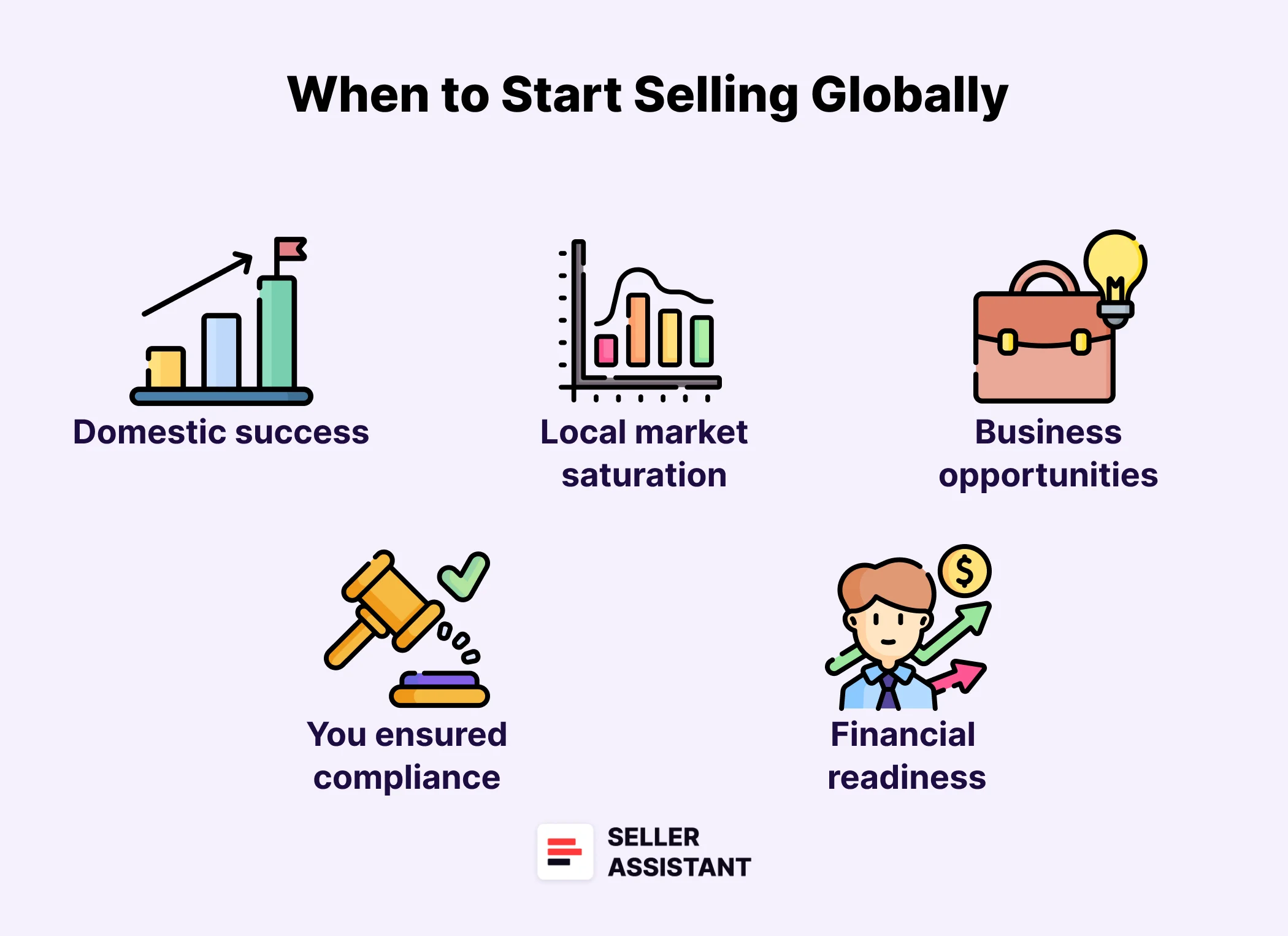
Expanding your Amazon business globally is a significant step that can open up new markets and increase sales. Here are key indicators that it might be the right time for you to start selling globally.
When Is It Time for You to Start Selling Globally?
Domestic success
Your Amazon business is performing well in your home country, with consistent sales, positive customer feedback, and efficient operational processes.
Local market saturation
The domestic market for your products is saturated or growth is slowing, and global selling opens new customer bases.
Market research indicates business opportunities
You have conducted thorough market research and identified demand for your products in international markets. Understanding the target market, including local competition and consumer preferences, is crucial.
You ensured regulatory compliance
You are prepared to navigate and comply with international regulations, including tax laws, import/export restrictions, and product standards.
Financial readiness
Your business has the financial stability to invest in international expansion, including costs associated with shipping, customs duties, and potential marketing in new regions.
FAQ
Can you sell on Amazon from a different country?
Yes, you can sell on Amazon from a different country. You can create an Amazon Seller Central account in any country where Amazon operates and list your products for sale on Amazon’s international marketplaces.
What country is best to sell on Amazon?
The best country to sell on Amazon depends on your products and target market. The top 5 Amazon international marketplaces for third-party sellers are the U.S. (80%), Canada (23%), the U.K. (15%), Germany (10%), Mexico (10%).
How do I list globally on Amazon?
To list globally on Amazon, you must use Amazon Global Selling. Create an Amazon Seller Central account, choose the countries where you want to sell, and create product listings for each country.
Can you do Amazon FBA overseas?
Yes, you can do Amazon FBA overseas. Amazon FBA allows you to store your products in Amazon’s fulfillment centers and ship them to customers worldwide.
What are the top 3 countries on Amazon sellers?
The top 3 countries on Amazon sellers are the U.S. (80%), Canada (23%), and the U.K. (15%).
Which European country is best for Amazon?
The most popular European countries for Amazon are Germany and the United Kingdom. However, your choice must depend on your products, target market, and competition.
Final Thoughts
In conclusion, selling internationally on Amazon can be an excellent opportunity to expand your business and grow. However, it’s essential to research and understand each marketplace’s specific requirements before you start. By following the tips in this post, you can increase your chances of success when selling internationally on Amazon.
Seller Assistant is an all-in-one product sourcing software offering all the features vital for product sourcing. It combines three extensions: Seller Assistant Extension, IP Alert, and VPN by Seller Assistant, tools: Price List Analyzer, Seller Spy, Bulk Restrictions Checker, and API integrations, and features: Side Panel View, FBM&FBA Profit Calculator, Quick View, ASIN Grabber, UPC/EAN to ASIN converter, Stock Checker, and other features that help quickly find high-profit deals. Seller Assistant also offers integration with Zapier allowing to create custom product sourcing workflows.
FAQ - Selling on Amazon Internationally


