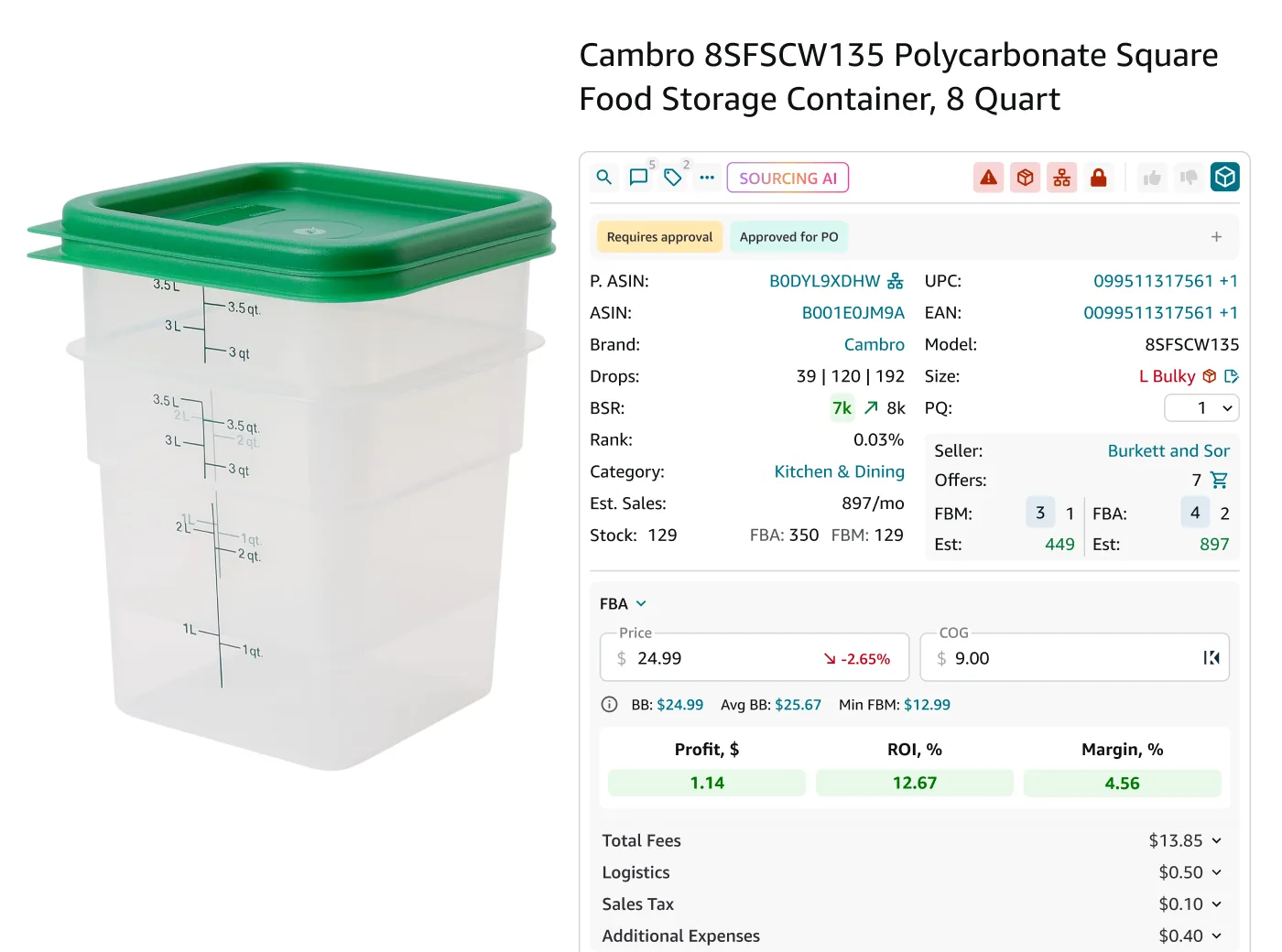
Thinking about launching an online business but unsure where to start? Amazon offers a massive marketplace where resellers can turn everyday products into profitable ventures.
Whether you’re making money by selling items from online retailers or bulk inventory, reselling on Amazon can be a game-changer for sellers seeking flexibility and growth.
In this post, you’ll discover what Amazon reselling is, explore various reselling models, learn step-by-step how to become a successful Amazon reseller and provide strategies on how to find products to resell on Amazon effortlessly.
What Is Amazon Reselling?
What Is Amazon Reselling?
Amazon reselling is a business model where individuals or companies purchase products from various sources – such as brands or their distributors, retail stores, or online marketplaces – and then sell them on Amazon at a higher price to earn a profit.
Unlike private labeling or manufacturing, resellers don’t create their own products; they leverage existing brands and products to meet market demand and make money.
How does Amazon reselling work?
Profit in Amazon reselling is generated through the difference between the purchase price of a product and its selling price on Amazon, after deducting associated fees and expenses. The key to profitability is sourcing products at a low price and selling them at a competitive but profitable price point on Amazon.
Key costs you deduct from Amazon selling price
.webp)
Key costs you deduct from Amazon selling price
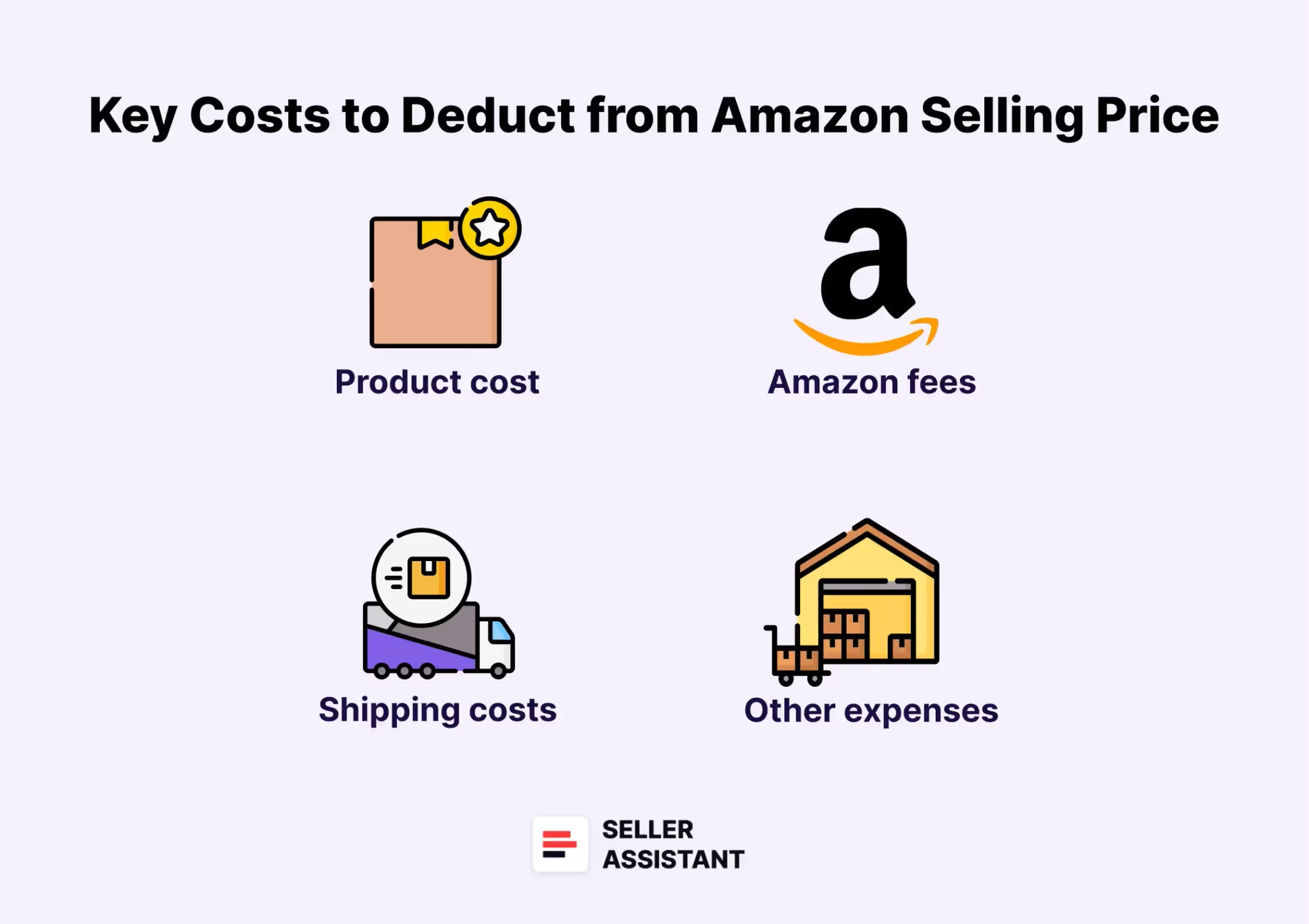
- Product cost
The price paid to acquire the product
- Amazon fees
Account or per-item selling fees, referral fees, and Fulfillment by Amazon (FBA) fees (if you use this service)
- Logistics and shipping costs
Costs to ship products to Amazon warehouses (for FBA) or directly to customers (for FBM)
- Other expenses
Packaging, and any return-related costs.
Example
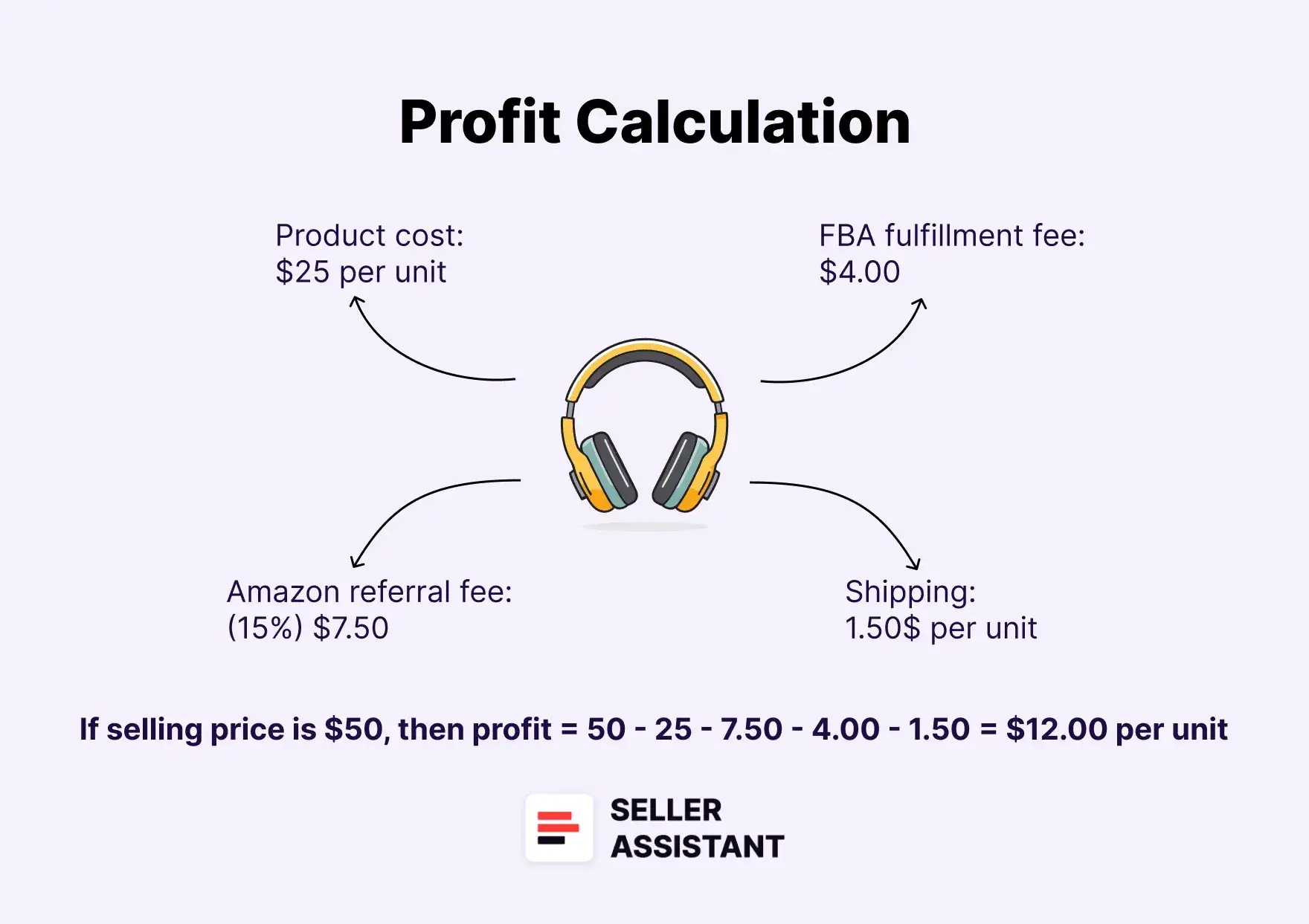
Let’s break down a real-world example.
Product
Wireless Bluetooth Headphones
- Purchase price
$25 per unit (sourced from a wholesale supplier)
- Amazon selling price
$50 per unit
- Amazon referral fee (15%)
$7.50
- FBA fulfillment fee
- 4.00
- Shipping to Amazon warehouse
- 1.50 per unit
Profit calculation
Profit calculation
Selling price ($50) - product cost ($25) - referral fee ($7.50) - FBA fee ($4.00) - shipping ($1.50) = $12.00 profit per unit
If the seller sells 100 units in a month, the total profit would be: 100 units x $12 = $1,200.
What Are the Reselling Models on Amazon?
Amazon offers four primary reselling business models that cater to different entrepreneurial goals and investment capacities: wholesale, online arbitrage, dropshipping, and retail arbitrage.. Each model has its own strategies for sourcing products and generating profits.
Also, the shares of Amazon sellers using different reselling models in their business are more or less equal, with dropshipping being the lowest (most likely due to Amazon’s dropshipping policy limitations). According to Jungle Scout report, the distribution of Amazon sellers across these models is as follows: 25% wholesale sellers, 25% retail arbitrage sellers, 21% online arbitrage sellers. 19% dropshipping sellers.
Let’s break down each model to understand how they work and what makes them profitable.
Wholesale
.webp)
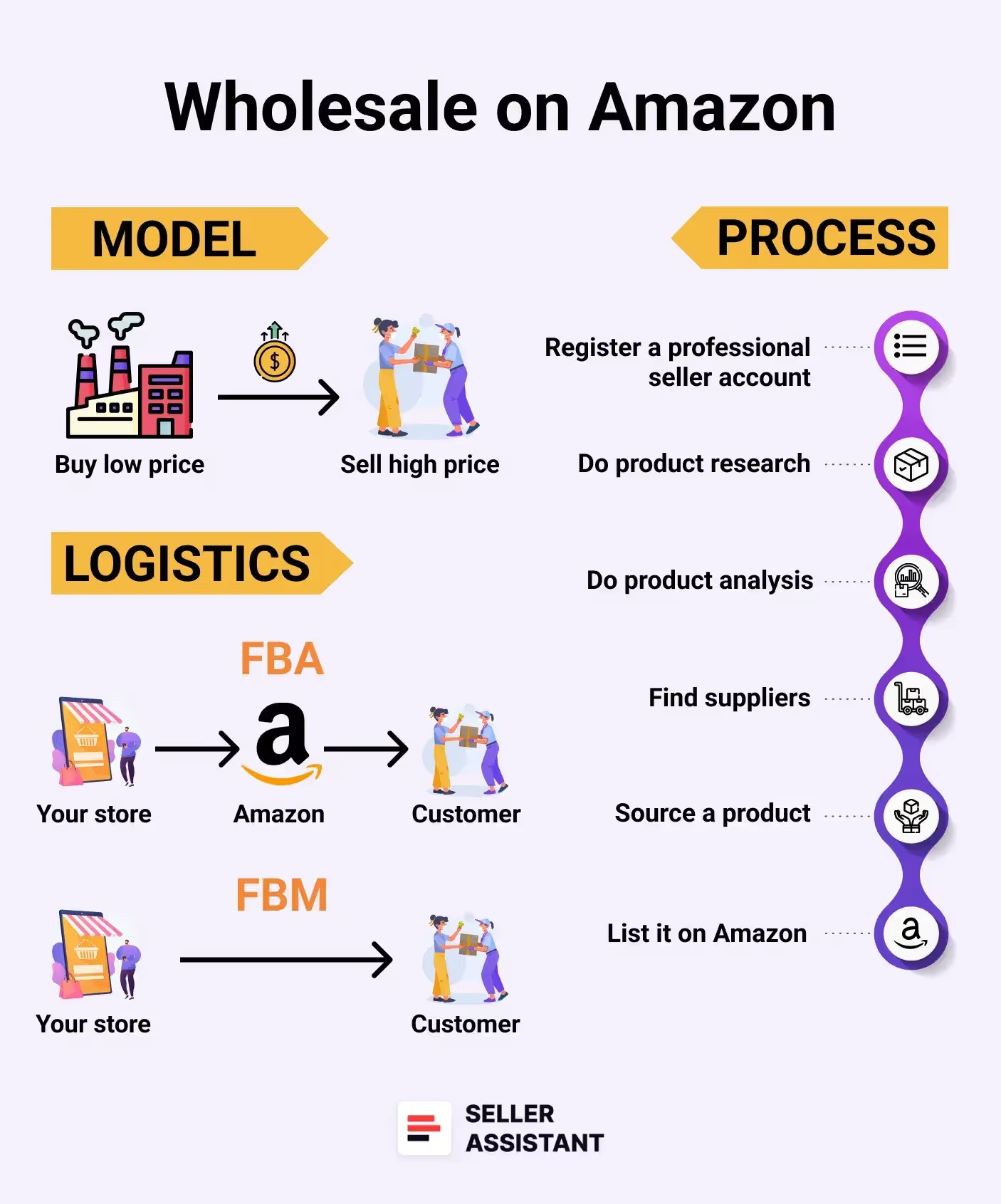
Amazon Wholesale
- Definition
Wholesale involves buying products in bulk at discounted prices directly from suppliers (brands or their distributors) and reselling them on Amazon for a profit.
- How it works
Wholesale sellers negotiate bulk deals with brands or distributors to get products at the lowest price possible, then sell them individually on Amazon at retail prices.
3 key insights
- High profits require big investments
This model demands significant upfront capital but offers higher profits due to bulk purchasing.
- Supplier relationships matter
Building trust with brands and suppliers is critical, as many prefer established distribution networks.
- Product research minimizes risk
Sellers must carefully vet products to avoid issues like low demand and profitability, slow turnover, or selling eligibility and Amazon restrictions. Automate wholesale price list scanning for profitable deals with Amazon product sourcing software like Seller Assistant.
Pros and cons of wholesale
Pros
- Higher profit potential
Buying in bulk from brands or distributors allows for larger profit margins on popular products.
- Scalable business model
Once supplier relationships are established, it’s easier to scale the business by increasing order quantities.
Cons
- High upfront investment
Starting wholesale typically requires at least $2,000 due to large minimum order quantities.
- Difficult supplier access
Gaining trust and forming partnerships with established brands can be challenging.
- Startup cost
Wholesale requires a larger initial investment, often starting at $2,000 or more.
Online arbitrage
.webp)
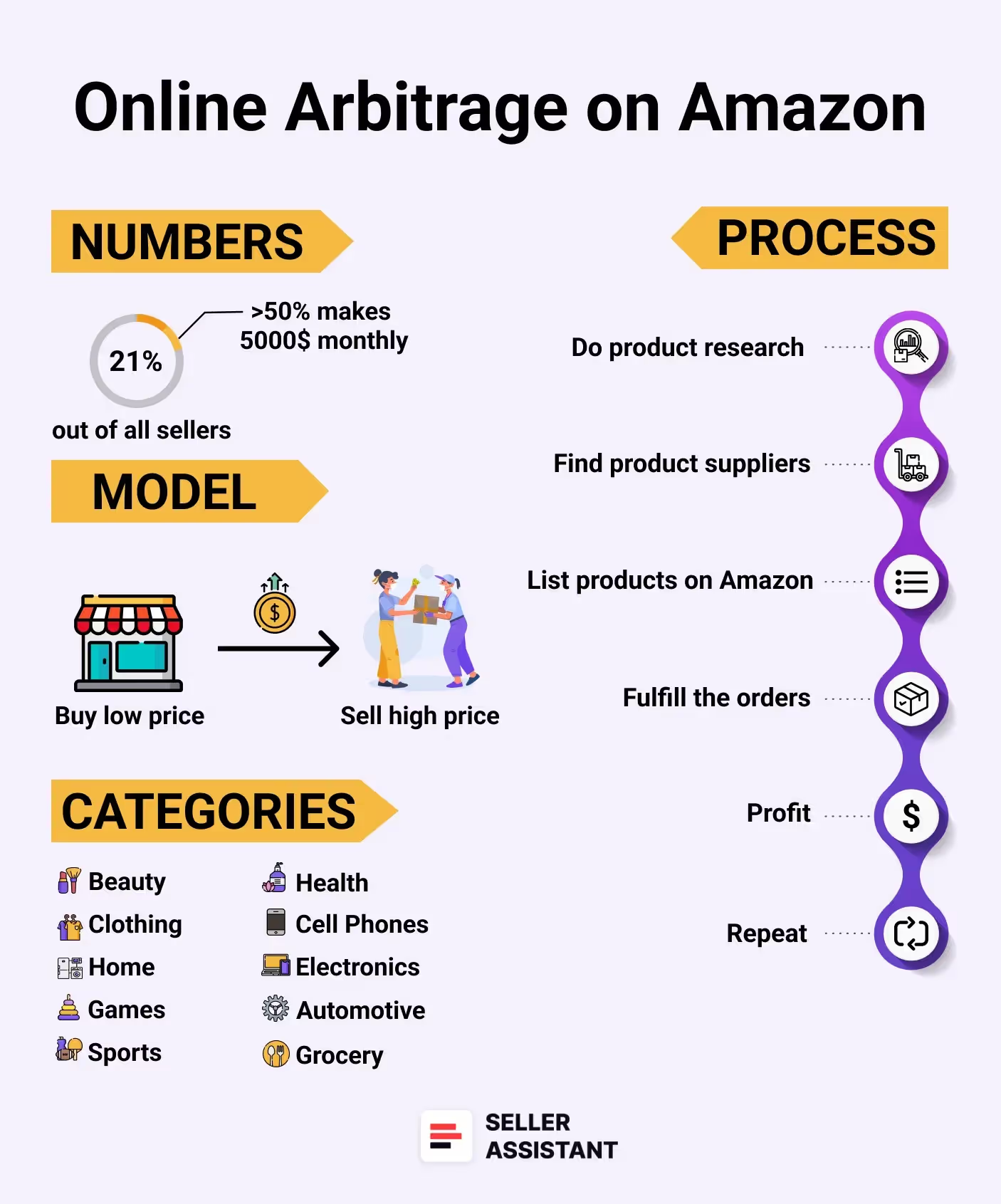
Amazon Online arbitrage
- Definition
Online arbitrage involves purchasing discounted products from online retailers and reselling them on Amazon for a profit.
- How it works
Sellers search online for products sold at lower prices and list them on Amazon at a higher price. The profit comes after accounting for Amazon fees and shipping costs.
3 key insights
- Winning product is key
Choosing high-demand, low-competition products is essential. Avoid restricted or flagged items to ensure smooth selling.
- Product research takes time
Finding profitable products requires extensive research, but Amazon seller tools like Seller Assistant can simplify this process.
- Check for restrictions and risks
Always verify product restrictions and eligibility to sell them on your Amazon account. Also, check product risks (e.g., IP complaints, Amazon policy violations, fragile, meltable items) to avoid extra costs or selling issues.
Pros and cons of online arbitrage
Pros
- Low startup costs
You can start with as little as $500 since you don’t need to invest heavily in inventory upfront.
- Easy to launch
Setting up an Amazon seller account and sourcing products online can be done quickly, often within 2-3 months.
Cons
- Highly competitive market
Many sellers target the same products, which can reduce profit margins.
- Time-consuming product research
Finding profitable and non-restricted products requires significant research and effort. However, you can compensate for that by using Amazon product sourcing tools like Seller Assistant.
- Startup cost
Online arbitrage is beginner-friendly, with a starting investment of around $500, primarily for purchasing inventory.
Dropshipping
.webp)
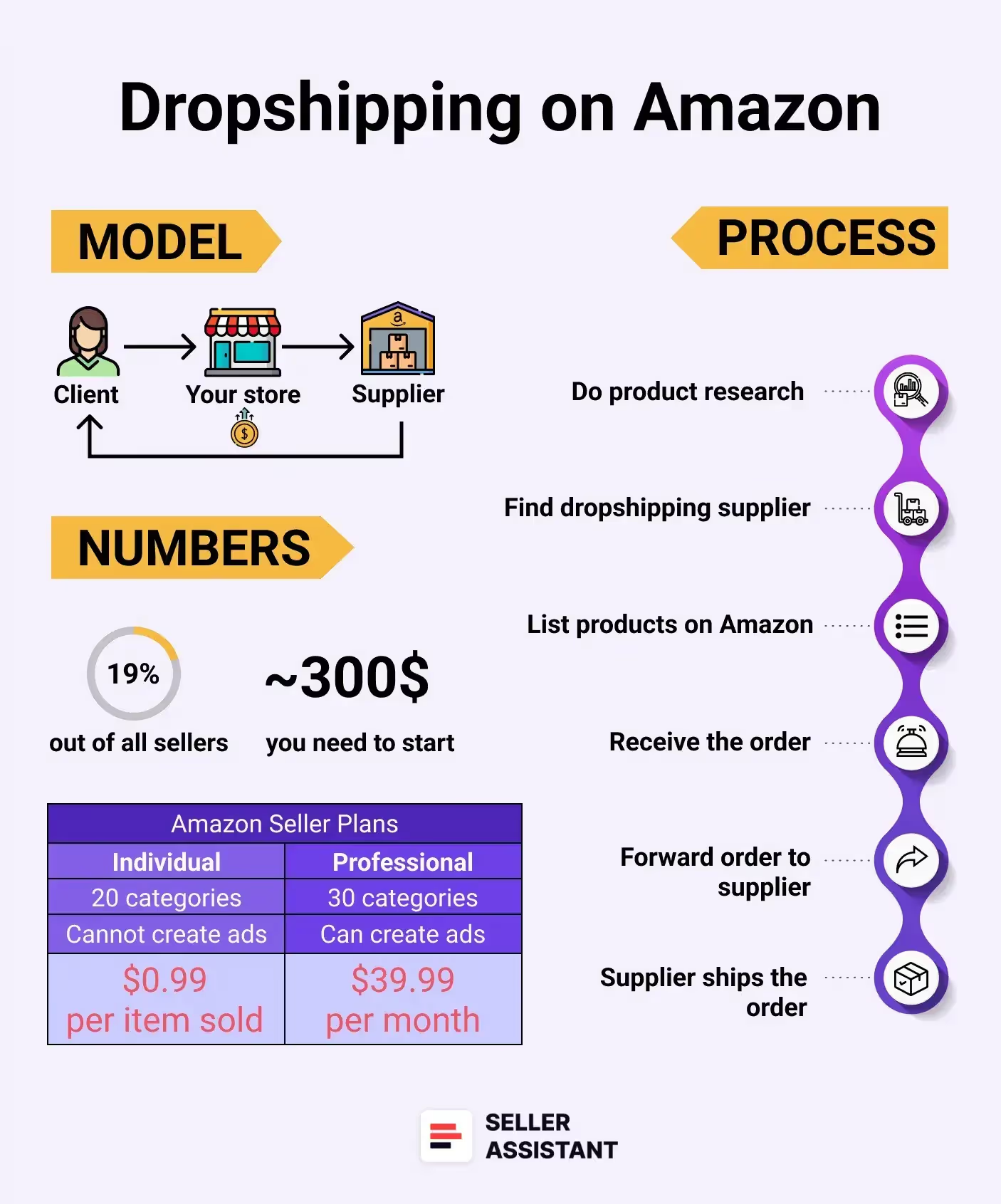
Amazon Dropshipping
- Definition
Dropshipping allows sellers to offer products on Amazon without holding inventory. When a customer places an order, the supplier ships the product directly to the buyer.
As of now due to Amazon’s dropshipping policies, dropshippers ask their suppliers to ship orders to fulfillment centers to repackage them in the dropshipper’s name for a fee. The fulfillment center then ships the order to the customer.
- How it works
Sellers list products from suppliers on Amazon. Once an order is placed, the supplier fulfills the order, and the seller earns profit from the price difference.
3 key insights
- Compliance with Amazon policy
Dropshippers must be listed as the seller of record and remove all third-party branding from packaging.
- IP complaints can be risky
Selling branded products without approval can trigger intellectual property complaints, risking account suspension.
- Supplier reliability is critical
Because sellers don’t handle the products, they must choose reliable suppliers to ensure quality and timely delivery.
Related: How to start Amazon Dropshipping business?
Pros and cons of dropshipping
Pros
Sellers don’t need to store or handle products, reducing operational complexities.
- Low entry barrier
Dropshipping requires minimal initial investment since you only purchase products after making sales.
Cons
- Limited control over logistics and quality
Relying on suppliers for fulfillment can lead to issues with shipping delays or product defects.
- Amazon policy restrictions
Sellers must follow strict Amazon policies, and IP complaints can lead to account suspension.
- Startup cost
Dropshipping has the lowest barrier to entry, requiring little to no upfront inventory investment. Costs are mainly Amazon fees and product-sourcing tools.
Retail arbitrage
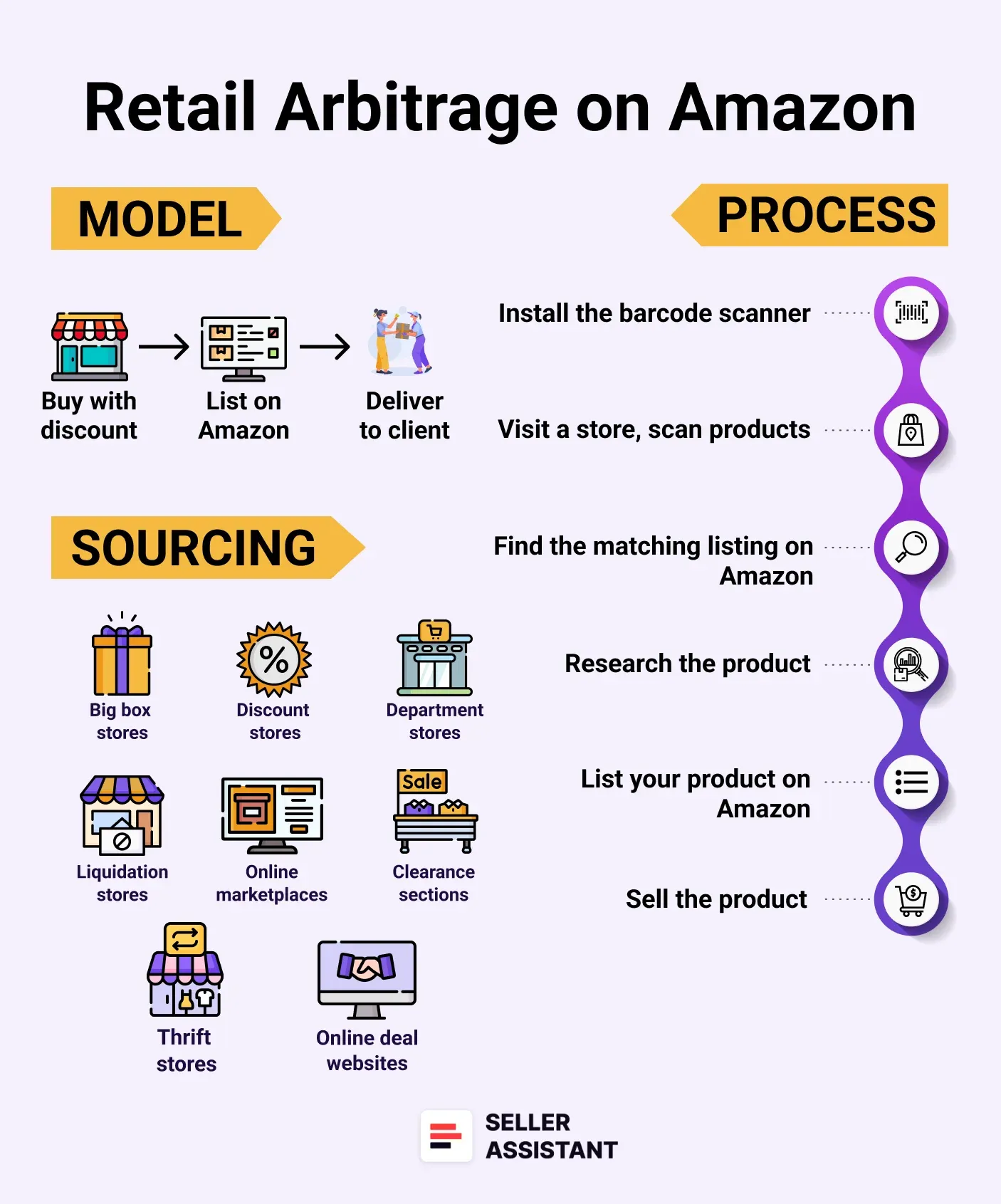
Amazon Retail arbitrage
- Definition
Retail arbitrage involves purchasing discounted products from physical retail stores and reselling them on Amazon for profit.
- How it works
Sellers visit retail stores – especially those with sales, clearances, or liquidation events – to find underpriced items. They then list and sell these items on Amazon at higher prices.
3 key insights
- In-store product research is vital
Sellers use barcode scanning apps in-store to check product profitability on Amazon.
- Highly time-consuming
This model requires significant time to travel to stores, scan items, and replenish inventory.
- Manual restocking
Inventory must be physically restocked, adding more time and effort compared to other models. Also, there’s no guarantee you can restock products at the same discounted price, and stock is limited.
Pros and cons of retail arbitrage
Pros
- Low startup costs
You can begin with a small investment (~$500) by purchasing discounted products from retail stores.
- Quick profit turnaround
Profitable products can often be found quickly during sales or clearance events.
Cons
- Time-intensive sourcing
Visiting multiple stores and scanning products takes significant time and effort.
- Difficult to scale
Inventory depends on local store availability, making it hard to expand the business consistently.
- Startup cost
Retail arbitrage is accessible with a startup cost of around $500, mainly for purchasing inventory and covering Amazon fees.
How to Become a Reseller on Amazon?
To become a successful reseller on Amazon, you must follow a series of essential steps.
While the core process is similar across all business models, the sequence and focus can differ. For example, in wholesale, sellers typically start by finding reliable suppliers and then look for profitable deals on the supplier price list. In contrast, online arbitrage sellers often begin by researching high-demand and profitable products on Amazon and then search for suppliers offering those products at competitive prices.
However, regardless of the business model, the main steps to becoming a reseller on Amazon are as follows
Steps to reselling on Amazon
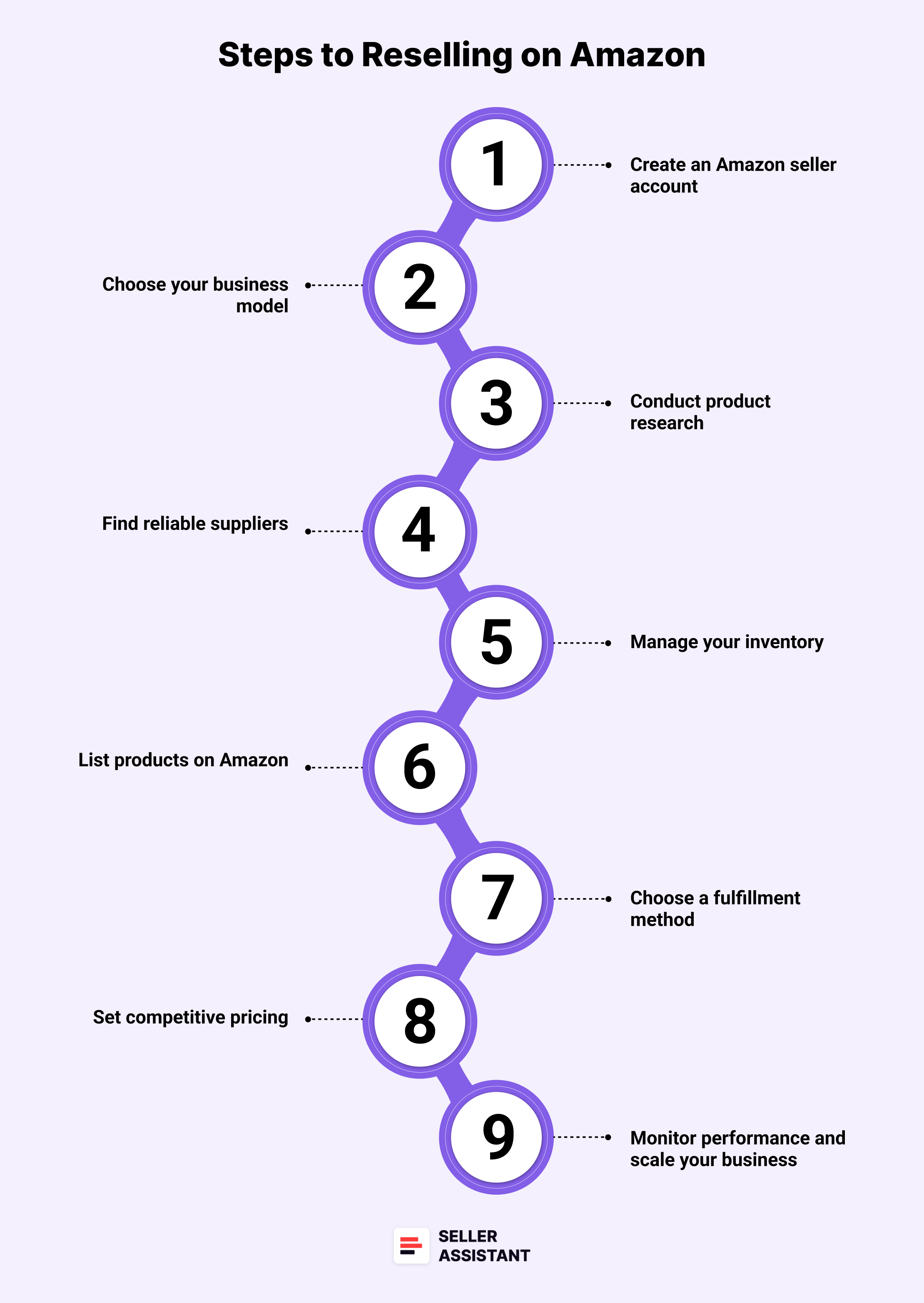
Steps to reselling on Amazon
Step 1. Create an Amazon seller account
Start by registering as a seller on Amazon by choosing a selling plan – Individual (for casual sellers) or Professional (for those selling many products, typically over 40 units/month). You will need to provide your business details, tax information, and payment method. Once registered, you can access Amazon Seller Central, the platform where you manage your sales.
Step 2. Choose your business model
Decide which Amazon reselling model best suits your goals and resources: online arbitrage, wholesale, retail arbitrage, or dropshipping. Each model has different startup costs, risk levels, and operational methods, so choose one that aligns with your skills and investment capacity.
Step 3. Conduct product research
Identify products with high demand and low competition to maximize your profit margins. Use Amazon product sourcing software like Seller Assistant to analyze product profitability, sales trends, and competition. This step is critical to avoid investing in products that won’t sell or could cause account issues due to restrictions.
Step 4. Find reliable suppliers
Source products from trustworthy suppliers who offer competitive pricing and quality products. For wholesale, build relationships with brands or distributors to access bulk discounts. For online and retail arbitrage, search for discounted products on online or physical stores. In dropshipping, partner with suppliers who can fulfill orders efficiently.
Step 5. Manage your inventory
Decide how much inventory to purchase based on demand forecasts and your budget. For wholesale and arbitrage, avoid overstocking by starting small and scaling gradually. In dropshipping, inventory management is minimal since products are shipped directly from suppliers and shipped only when purchased.
Step 6. List products on Amazon
Add your products to Amazon by either joining an existing listing or creating a new one if the product doesn’t already exist. Don’t create a new listing if your product already exists on Amazon. Unlike other e-commerce platforms, Amazon doesn’t allow multiple listings of the same product. Add all offers of the same product to one listing.
Step 7. Choose a fulfillment method
Select how you will deliver products to customers. You can fulfill orders yourself through Fulfilled by Merchant (FBM) or use Fulfillment by Amazon (FBA), where Amazon handles storage, packaging, shipping, and customer service. Each option has different fees and logistics requirements. FBA fulfillment is paid and entails many different fees, therefore you must account for them carefully to ensure profitability.
Step 8. Set competitive pricing
Price your products strategically to win the Featured Offer (Buy Box) and stay competitive. Remember that offering the best price often helps winning the Buy Box. Factor in Amazon’s referral fees, fulfillment fees, and shipping costs to ensure profitability.
Step 9. Monitor performance and scale your business
Regularly review your sales data, customer feedback, and inventory levels to optimize your operations. Identify best-selling products and scale up by increasing inventory, and expanding your product range.
Related: Seller Assistant Extension Review
The Best Amazon Online Arbitrage Tool — Seller Assistant
How to Dropship on Amazon with Seller Assistant
Amazon Wholesale: How to Sell Wholesale on Amazon
How to Find Products for Amazon Reselling?
Finding profitable products and reliable suppliers for Amazon reselling can be a complex and time-consuming process. To streamline product sourcing and identify high-margin opportunities, many sellers rely on advanced tools like Seller Assistant. Below are five powerful strategies designed to help you efficiently discover profitable products and brands for your Amazon business.
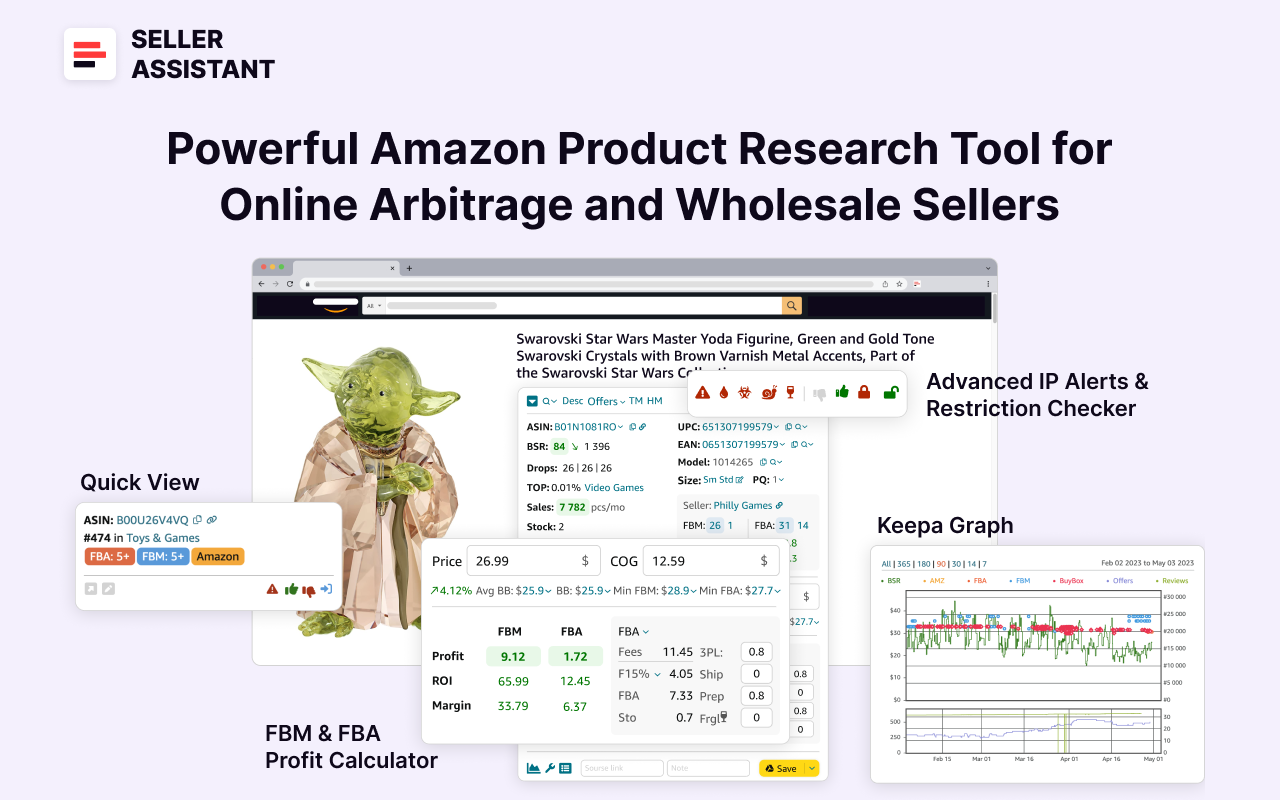
Seller Assistant
Seller Assistant shows all essential product data on Amazon search, product, and inventory pages, and on any website to help you find high-margin deals. By using this FBA and FBM product sourcing software, you can easily identify products that have the potential to be sold well on Amazon.
Related: Amazon FBA Fees 2025
Seller Assistant Extension Review
Strategy 1. Automated brand research
- What it is
Automated brand research is the process of systematically identifying profitable and reseller-friendly brands using data-driven tools. This strategy is ideal for sellers looking to build long-term partnerships with brands or suppliers and need to evaluate a brand’s potential for success on Amazon.
- What is achieved
The goal is to find brands with high revenue potential, low competition, and products that meet Amazon’s selling requirements. Sellers should prioritize brands with strong customer feedback, scalable product ranges, and limited direct competition from Amazon.
- How it works
Using Seller Assistant’s Brand Analyzer, you can enter a brand’s name to receive insights into its sales performance, competition levels, average pricing, and customer reviews. The tool also highlights brands where Amazon is a major seller, helping you avoid excess competition that is difficult to fight.
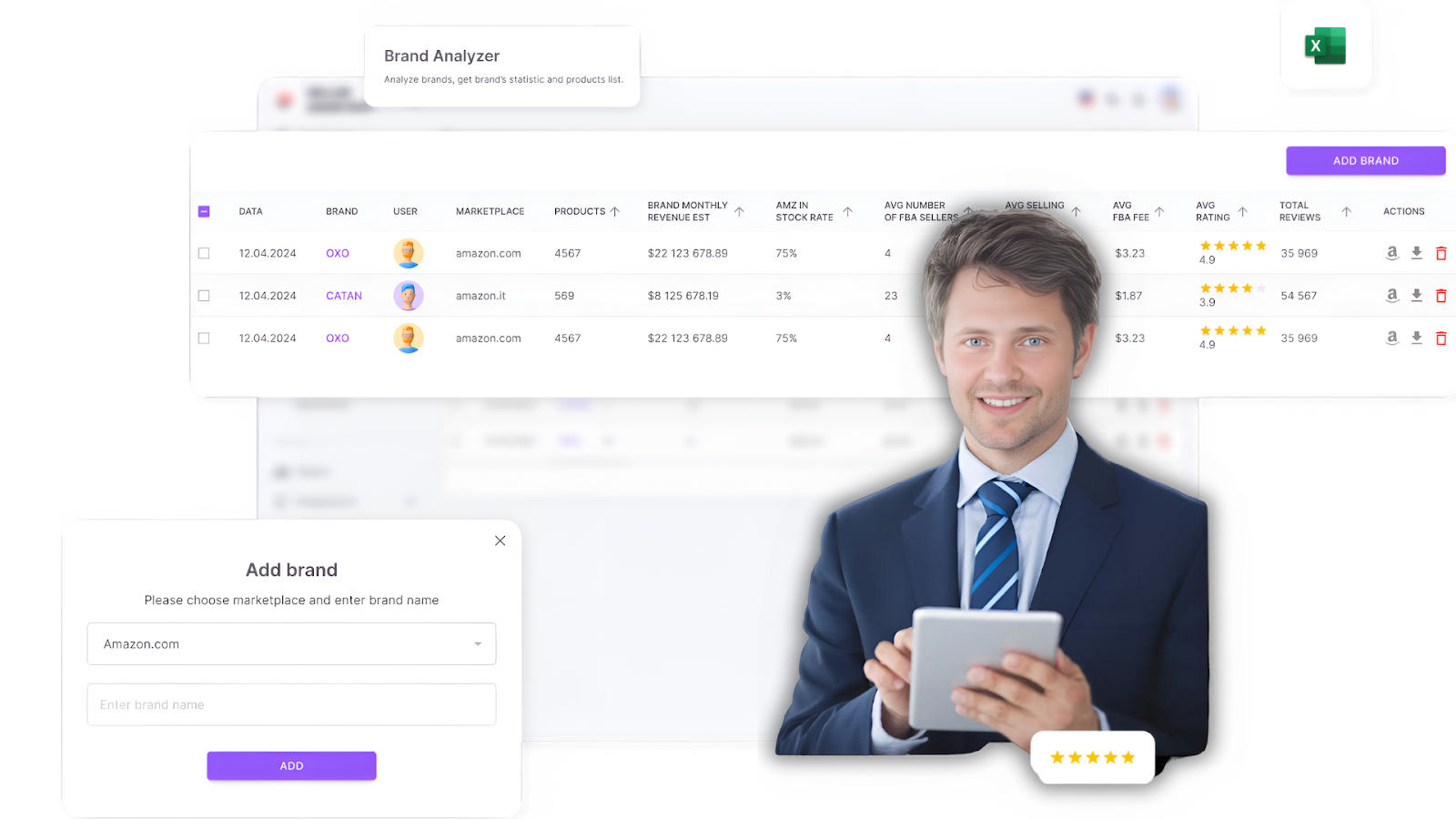
Seller Assistant’s Brand Analyzer
How to research effectively
- Sales performance
Check the average revenue and sales trends of the brand’s products to gauge market demand.
- Competition level
Avoid brands where Amazon controls more than 30% of sales or those with excessive third-party sellers.
- Product range
Prioritize brands with 500+ products to increase the chances of finding profitable items.
- Customer feedback
Focus on brands with 4+ star ratings and positive reviews for credibility.
- Restrictions
Use Seller Assistant’s Bulk Restriction Checker to ensure the brand’s products are eligible for resale. Upload the product list from Brand Analyzer into the Bulk Restrictions Checker. A green open lock means the product is eligible for resale, a red closed lock indicates restrictions, and a red lock with an exclamation mark means the product cannot be sold on your account.
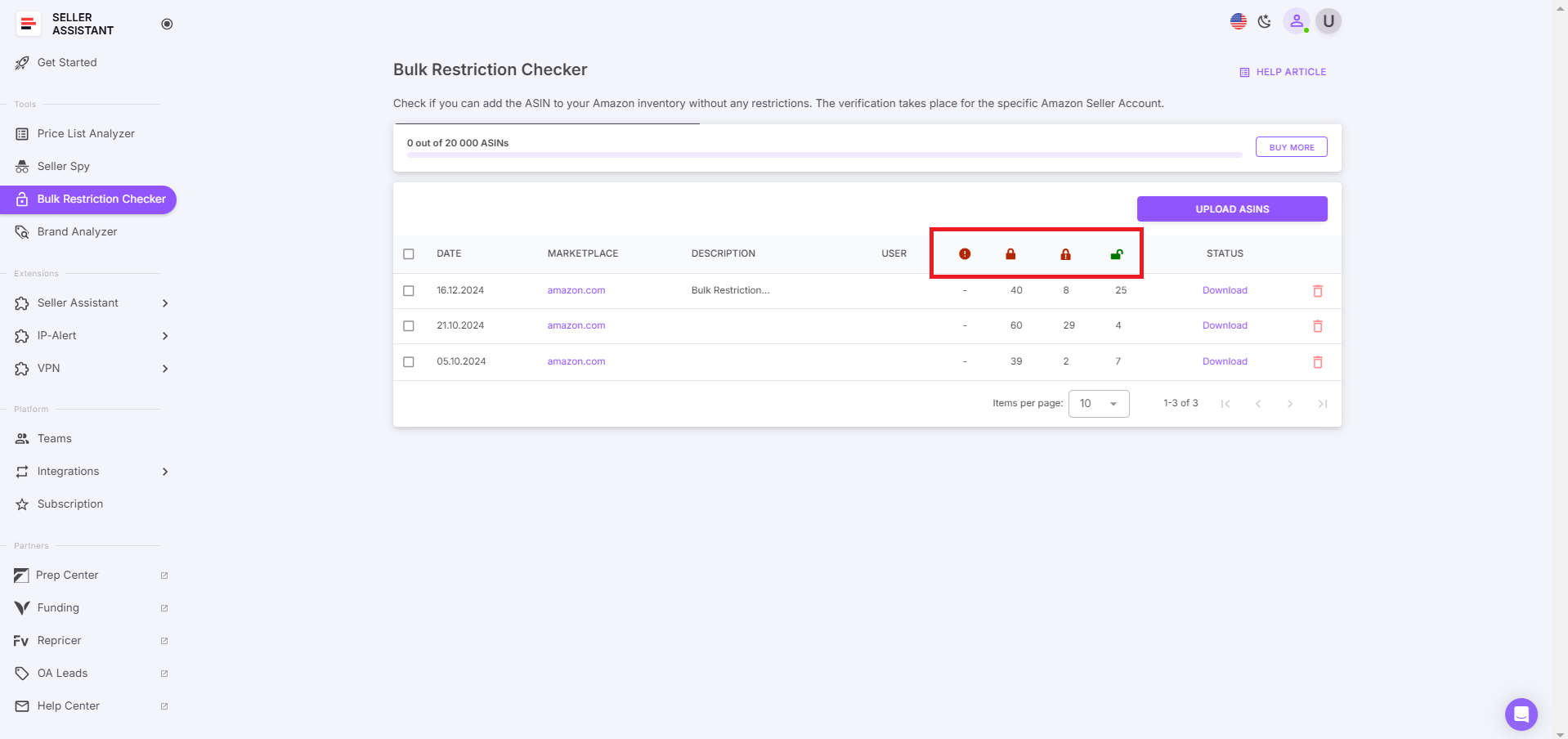
Seller Assistant’s Bulk Restriction Checker
- Who is it good for
- Wholesale sellers seeking long-term relationships with brands.
- Online arbitrage sellers and dropshippers looking to sell specific brands.
Strategy 2. Automated wholesale list scanning
- What it is
Automated wholesale list scanning involves analyzing bulk product lists from suppliers to identify profitable items. This strategy is perfect for wholesale and online arbitrage sellers managing large product portfolios.
- What is achieved
The goal is to quickly filter and prioritize high-margin, low-risk products from supplier catalogs, saving time and reducing the chance of costly mistakes.
- How it works
Use Seller Assistant’s Price List Analyzer. By uploading a supplier’s wholesale price list into the Seller Assistant Price List Analyzer, the tool automatically matches the products to Amazon listings, calculates profitability, flags potential issues like high competition or product restrictions, and provides a lot of other data. You can filter the results by essential metrics, product warnings, and flags, and see which deals are profitable, and which have hidden risks or alerts.
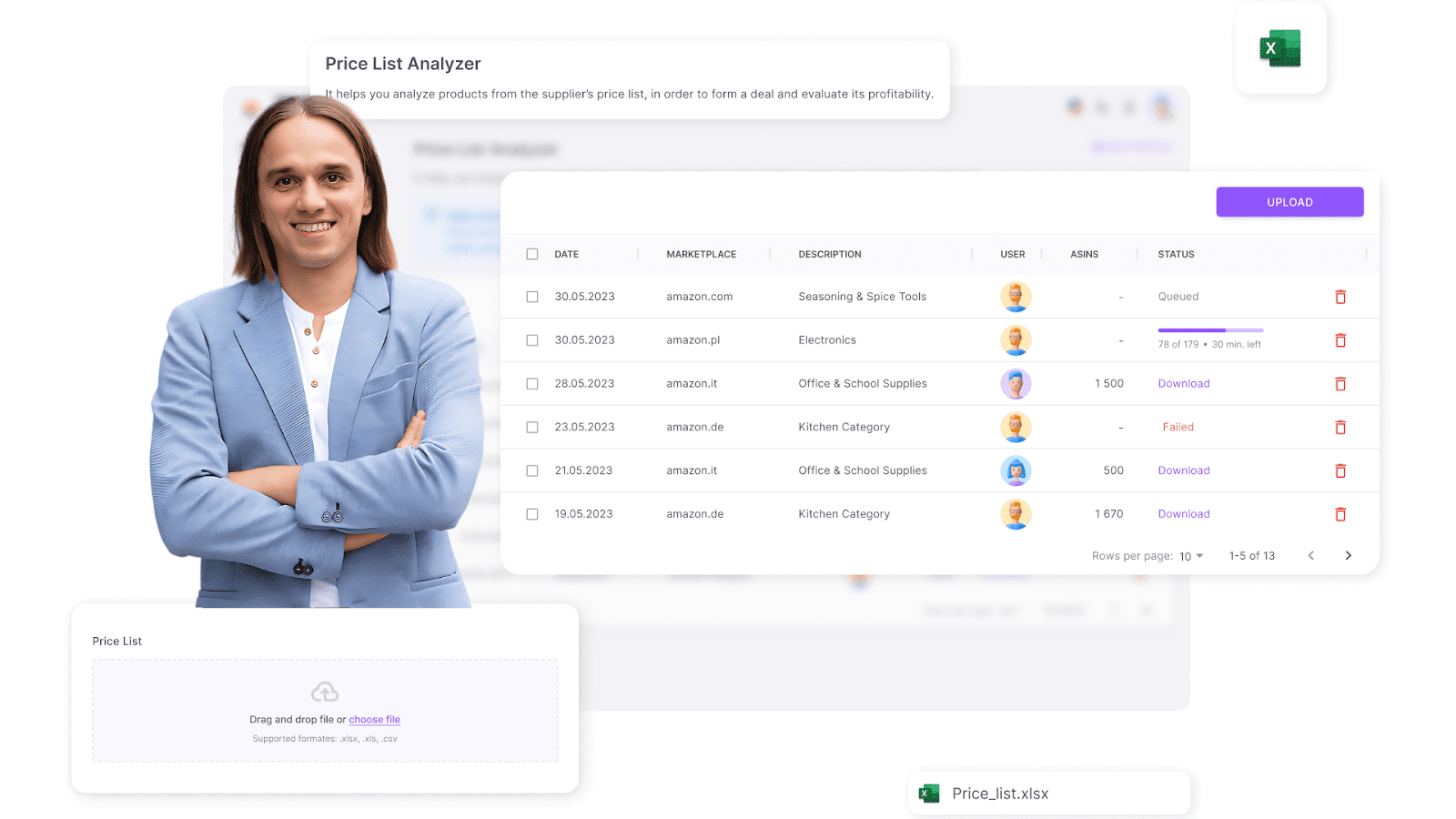
Seller Assistant’s Price List Analyzer
How to research effectively
- Sales performance
Analyze Best Sellers Rank (BSR) to verify if the product sells well.
- Competition level
Avoid listings with more than 15 sellers or those dominated by Amazon.
- Buy Box chances
Identify sellers controlling the Buy Box and assess if you can compete effectively.
- Pricing and profitability
Look at ROI, profit margins, and breakeven points to ensure the product is financially viable.
- Restrictions
Check for IP complaints or gated categories using the Bulk Restriction Checker and IP-Alert® Extension.
- Who is it good for
- Wholesale sellers needing to process large supplier catalogs.
- Online arbitrage sellers managing bulk product sourcing and scraping supplier data from their websites.
Strategy 3. Research your competitors to sell what they sell
- What it is
Competitor research involves analyzing other Amazon sellers’ product portfolios to discover in-demand products. This strategy allows sellers to capitalize on proven product trends and market demand.
- What is achieved
The objective is to identify top-performing products and brands sold by competitors and incorporate similar or identical items into your own inventory.
- How it works
Seller Assistant’s Seller Spy tracks competitor stores, providing insights into the products they’re selling, recently added or removed items, and their pricing strategies. This allows you to replicate successful products and adjust your pricing to stay competitive.
.png)
Seller Spy by Seller Assistant
How to research effectively
- New product monitoring
Track what products competitors are adding to spot market trends.
- Product removals
Identify which products competitors stop selling to avoid declining markets.
- Seller feedback
Analyze competitor product ratings and reviews to gauge customer satisfaction.
- Pricing strategies
Monitor competitor pricing to stay competitive and optimize profit margins.
- Who is it good for
- Online arbitrage sellers looking for proven, high-demand products.
- Wholesale sellers who want to replicate competitor success.
- Dropshippers aiming to quickly adapt to trending products.
Strategy 4. Find deals with in-depth product research
- What it is
This strategy focuses on manually researching individual products to assess their profitability, competition, and potential risks. It’s ideal for sellers who prefer a hands-on approach to selecting products.
- What is achieved
The aim is to ensure every product added to your inventory is thoroughly vetted for sales potential, compliance, and profitability.
- How it works
Seller Assistant Extension provides real-time data on Amazon product pages, search results, supplier sites, and competitor storefronts. It displays sales performance, competition analysis, profitability, and risk warnings.
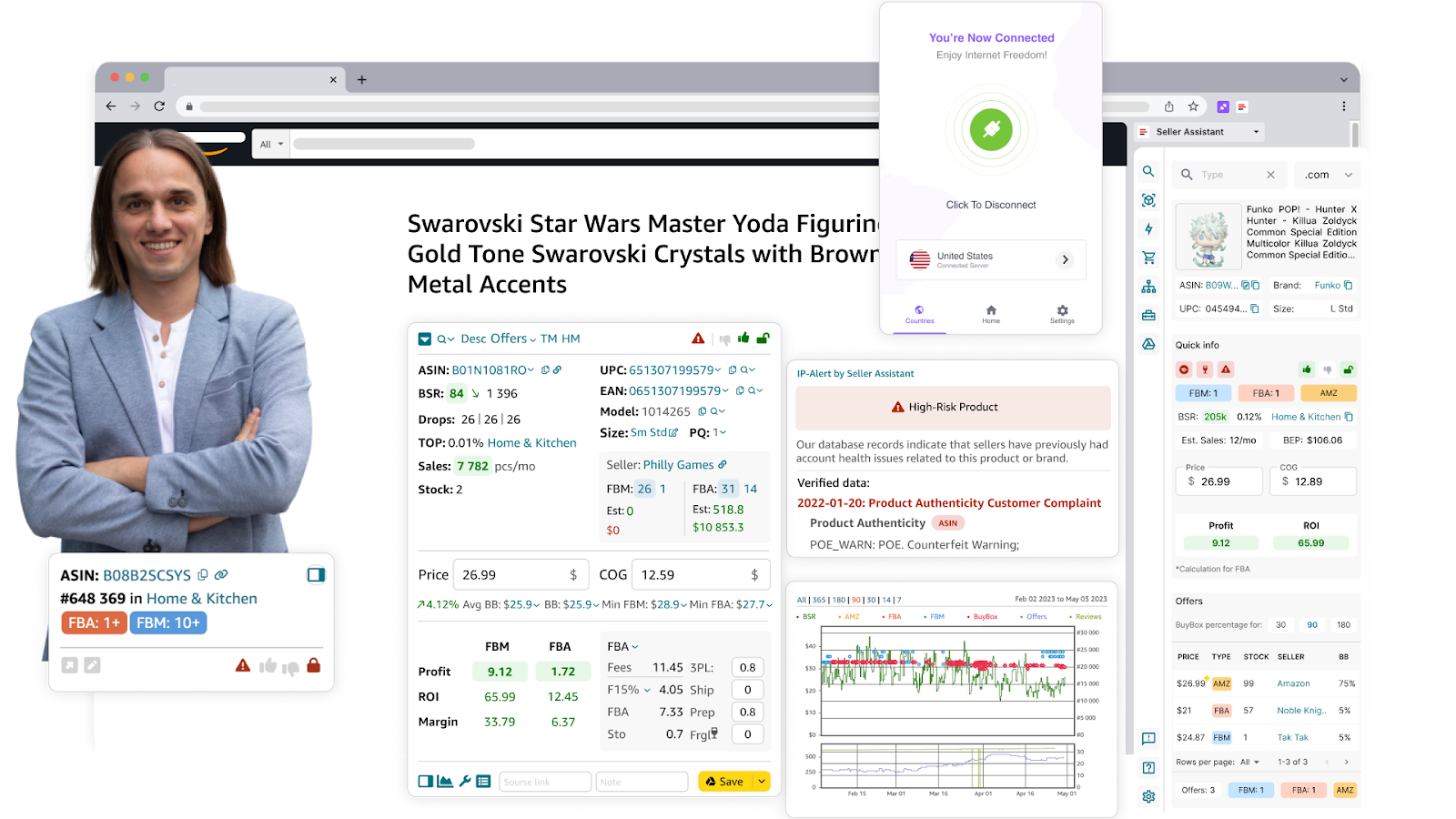
Seller Assistant Extension
How to research effectively
- Sales performance
Review BSR (must be between 1 and 100,000 for the product to sell well), trends and sales history to verify consistent demand.
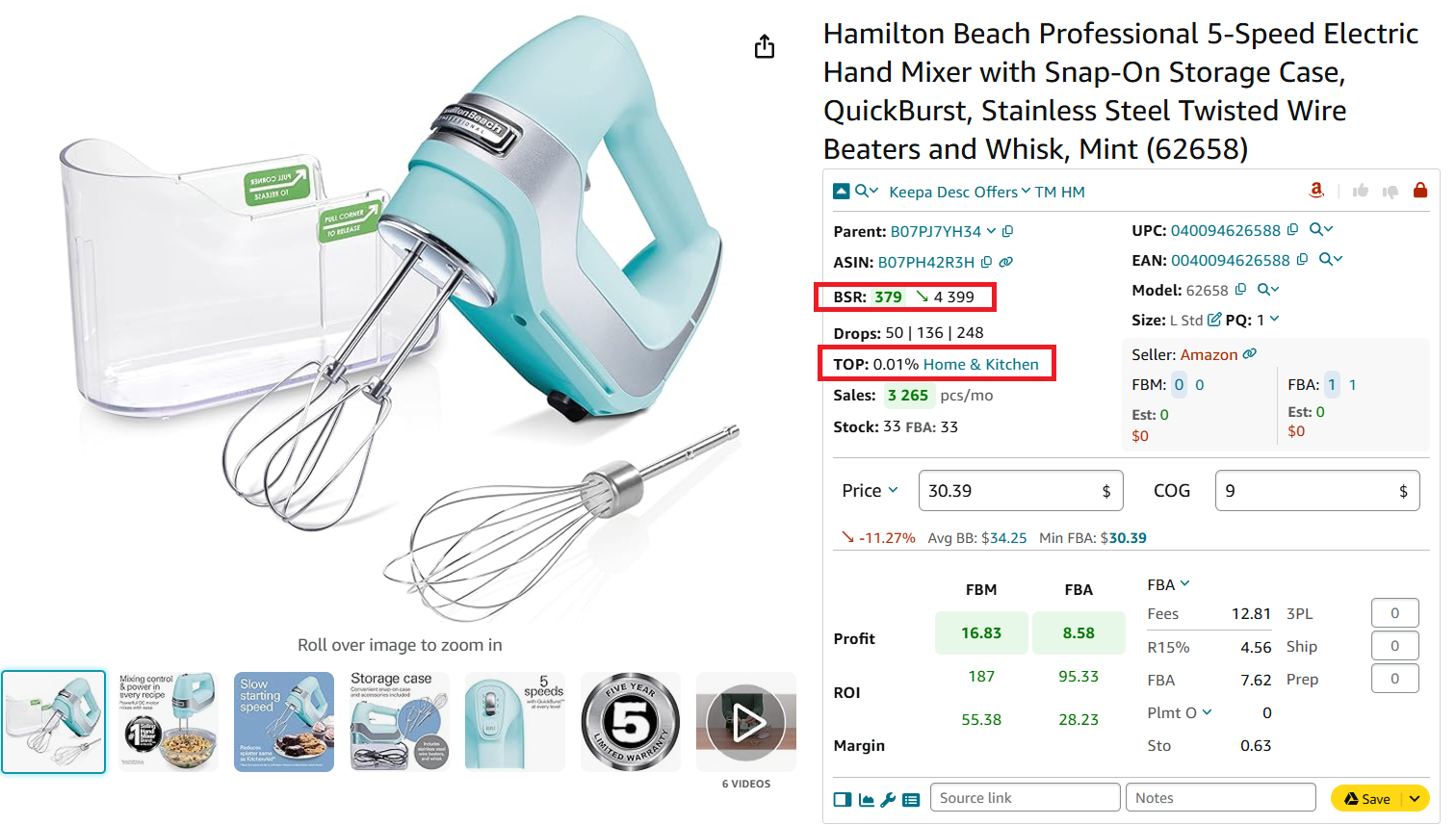
Check how well the product sells
- Competition analysis
Examine the number of FBA and FBM sellers offering the product. Ideally, this number should range between 2 and 15. Use the Offers feature in Seller Assistant to see detailed competitor data like stock levels and pricing.
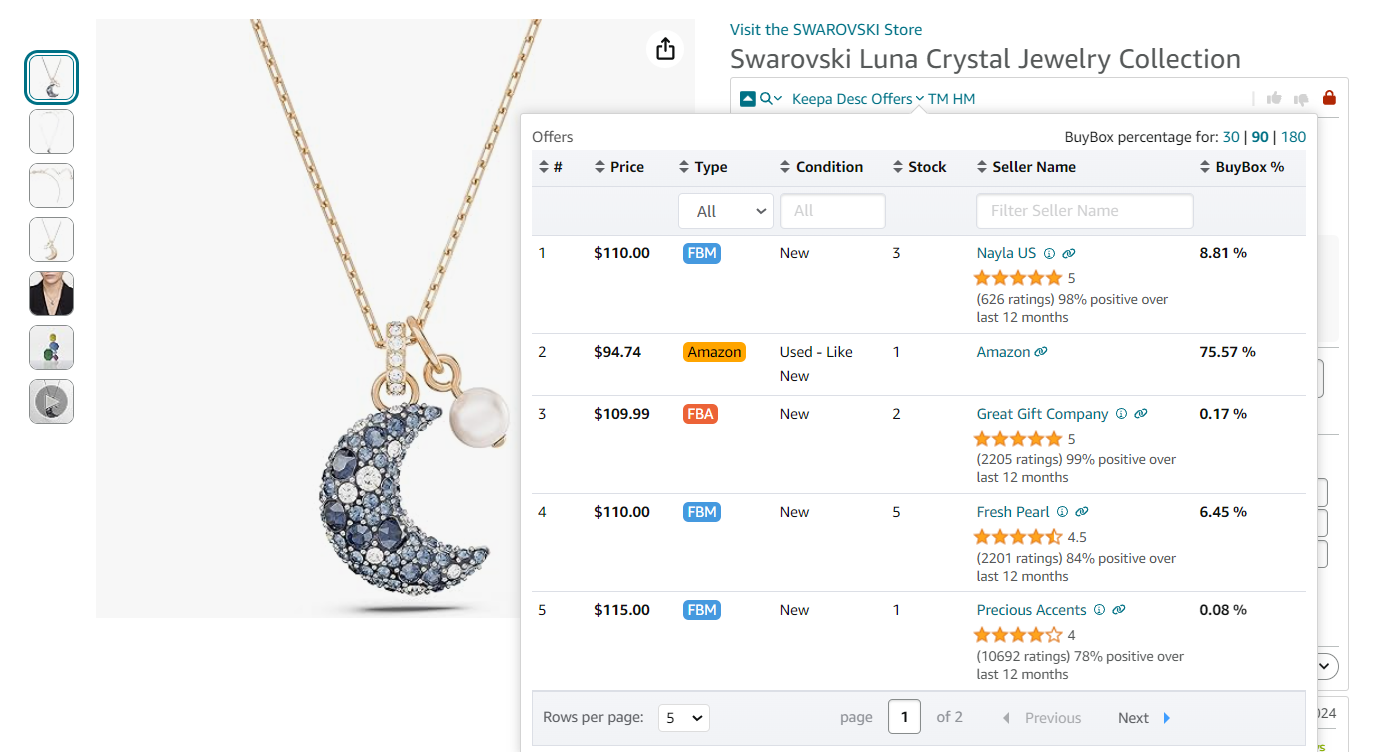
Offers is the extension’s feature that allows to research all seller offers of a product
- Amazon’s presence
Look for the Red Amazon icon in Seller Assistant, which flags listings where Amazon is a competitor. Competing with Amazon for the Buy Box is challenging and it’s better to avoid such products.
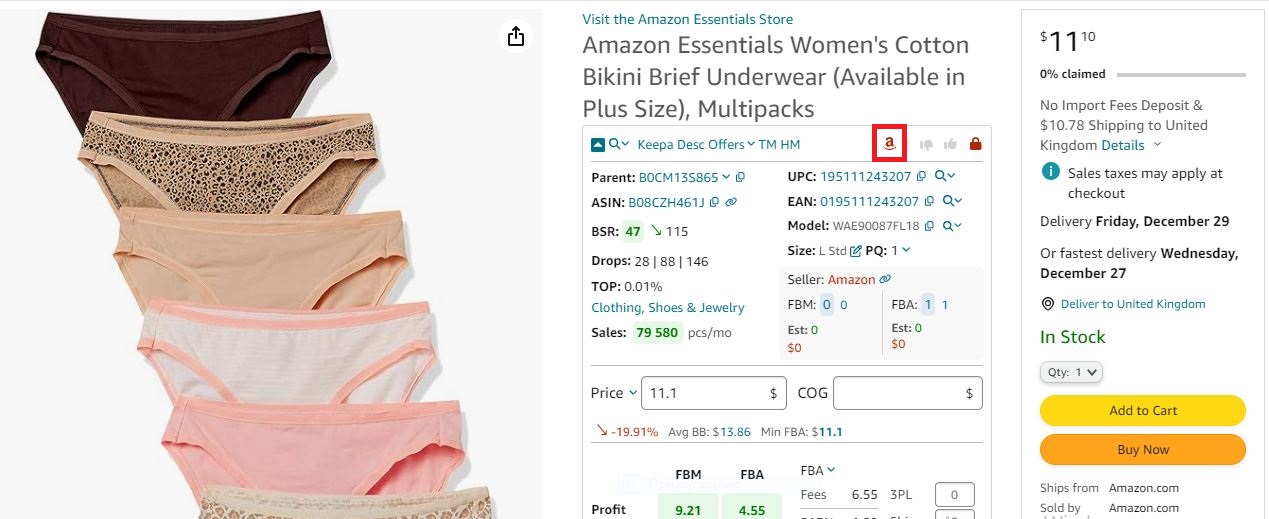
If Amazon is a seller, Seller Assistant shows the red Amazon icon on the product pages
- Profitability metrics
Use the FBA&FBM profit calculator to check ROI, profit margins, and breakeven points.
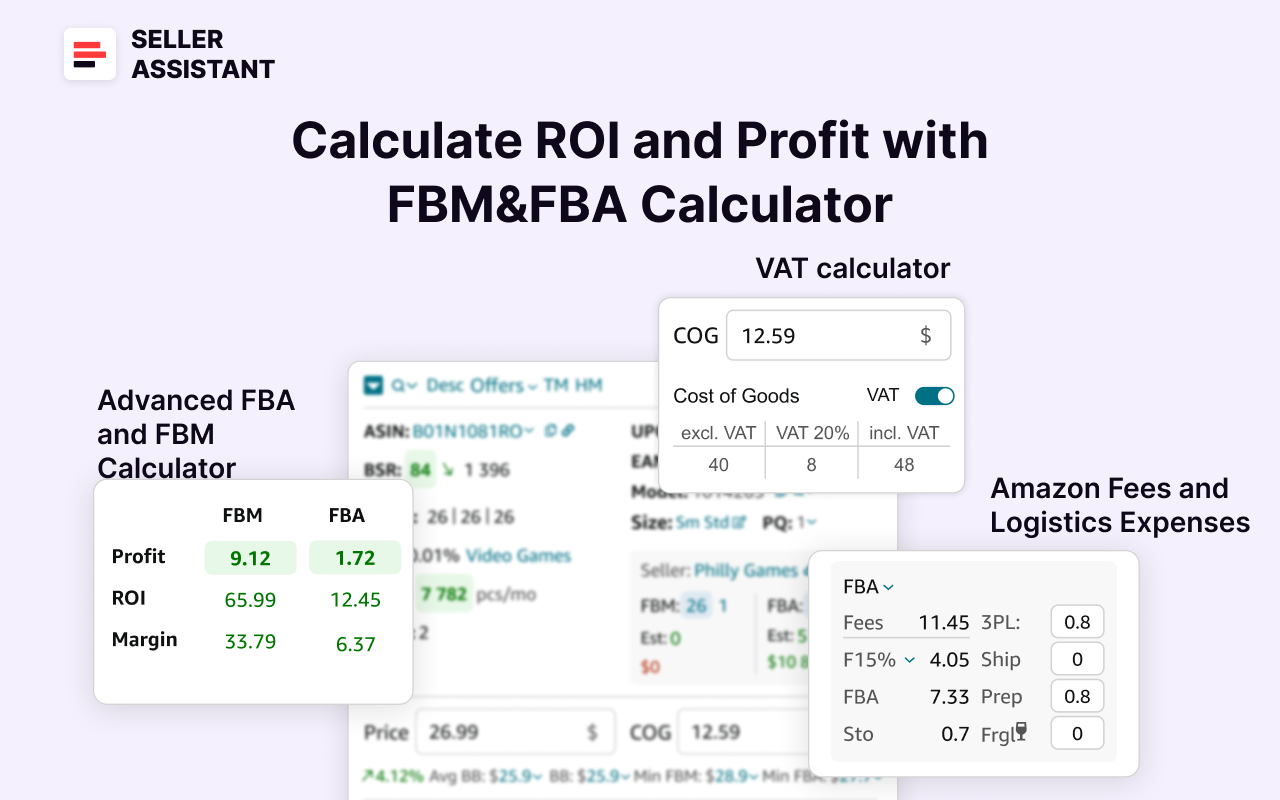
Seller Assistant’s FBA&FBM profit calculator
- Risk assessment
Identify product restrictions, IP complaints, and other risk factors like fragile, heavy and bulky items, hazardous materials, etc.
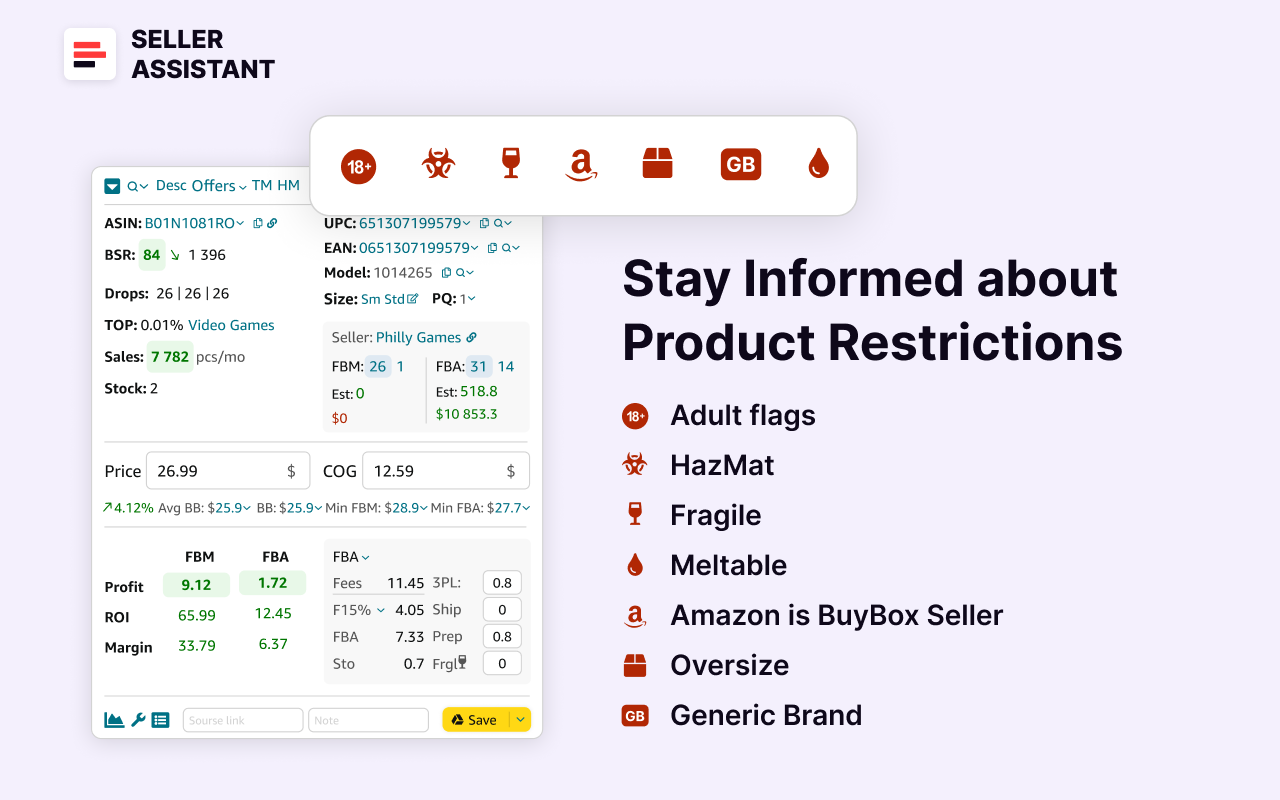
Seller Assistant’s product flags
- Historical data
Use integrated Keepa charts to check long-term pricing and sales trends. If it’s a new product, it’s difficult to estimate its sales history and see if it will sell well.
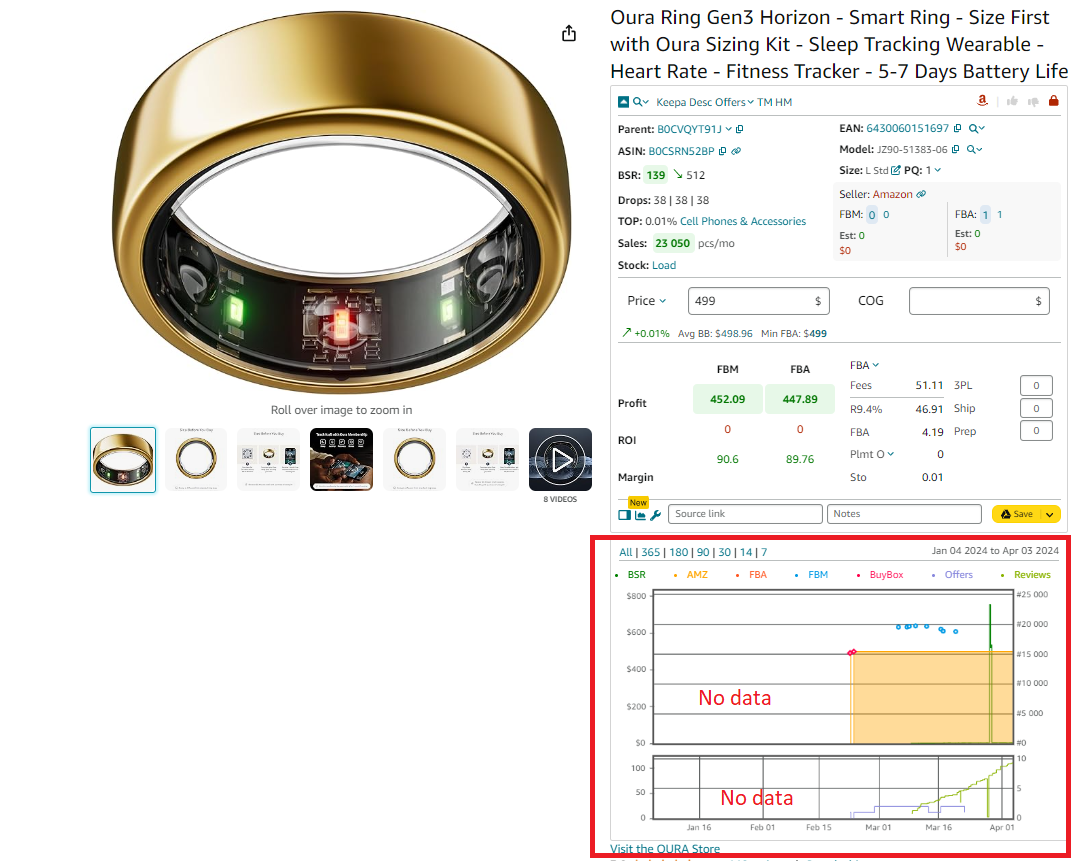
Keepa charts
- Who is it good for
- Online arbitrage sellers needing deep analysis of product profitability.
- Dropshippers manually sourcing products in stores.
Strategy 5. Buy ready-to-sell deals from Seller Assistant Deals Marketplace
- What it is
This strategy involves purchasing pre-vetted, high-margin product leads from a specialized marketplace. It is ideal for sellers who want to save time and reduce the complexity of product research.
- What is achieved
The goal is to quickly access profitable, ready-to-sell products without extensive product research, ensuring a faster path to profitability.
- How it works
On the Seller Assistant Deals, sellers can browse and purchase deals that have been thoroughly vetted for profitability, demand, and compliance. Each deal includes essential data like ROI, profit, BSR, and competition, and is sold to only a few buyers to minimize competition.
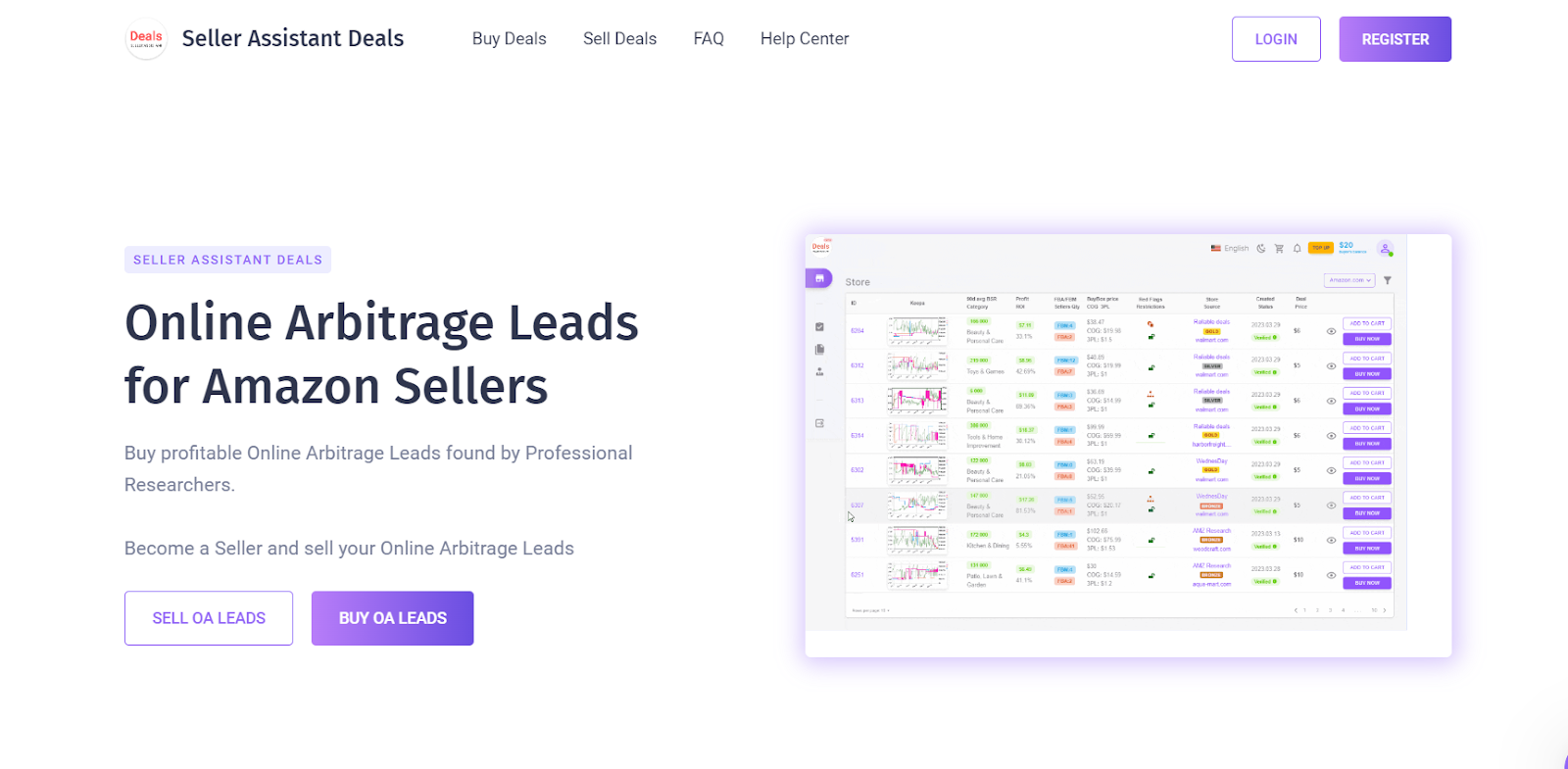
Seller Assistant Deals
How to research effectively
- Deal selection
Browse deals by profitability, ROI, and sales performance to choose the best options.
- Product data analysis
Review Buy Box pricing, BSR, profit margins, and seller competition before purchase.
- Risk assessment
Verify product eligibility for resale using integrated compliance checks.
- Post-purchase access
After buying a deal, access the ASIN, supplier link, and purchase instructions.
- Who is it good for
- New sellers seeking quick and easy product sourcing.
- Time-constrained sellers looking to scale their business efficiently.
- Online arbitrage sellers who prefer buying verified, high-ROI deals.
FAQ
What is an Amazon reseller?
An Amazon reseller is an individual or business that purchases products from manufacturers, wholesalers, or retailers and sells them on Amazon for a profit. They do not create their own products but instead resell existing products to meet customer demand.
What are the benefits of being an Amazon reseller?
Being an Amazon reseller offers access to a massive customer base, allowing sellers to scale their business without building their own e-commerce website. It also provides flexibility in choosing different business models, such as wholesale, retail arbitrage, online arbitrage, and dropshipping.
Is reselling with Amazon profitable?
Yes, reselling on Amazon can be highly profitable when sellers focus on high-demand, low-competition products and manage costs effectively. Success depends on strategic product sourcing, competitive pricing, and understanding Amazon’s fees and policies.
How to become an Amazon reseller?
To become an Amazon reseller, create a Seller Central account, choose a selling plan (Individual or Professional), and select a reselling business model. Then, source products, list them on Amazon, and manage fulfillment either through Fulfillment by Amazon (FBA) or Fulfillment by Merchant (FBM).
Does Amazon allow reselling?
Yes, Amazon allows reselling as long as the products are authentic, comply with Amazon’s selling policies, and are not restricted or counterfeit. Sellers must ensure they meet brand requirements and avoid violating intellectual property rights.
Does Amazon have a reseller program?
Amazon does not have a specific “reseller program,” but it provides selling plans through Seller Central that support various reselling models. Sellers can choose between the Individual and Professional plans to operate their reselling business.
Final Thoughts
Reselling on Amazon is a rewarding business opportunity that offers flexibility, scalability, and access to a global marketplace. Whether you choose wholesale, online arbitrage, retail arbitrage, or dropshipping, success depends on strategic product sourcing, competitive pricing, and efficient operations. By following the right steps and using proven strategies, you can build a profitable reselling business on Amazon.
To simplify and accelerate your product sourcing process, Seller Assistant is an invaluable tool that helps Amazon resellers find profitable products, analyze competition, and manage risks effectively.
By leveraging tools like and following proven strategies, you can streamline your sourcing process, reduce risks, and focus on scaling your business.