



“How much does it cost to sell on Amazon?” If you’ve ever typed that into Google, you’re not alone. Whether you’re just getting started or already knee-deep in FBA, understanding Amazon’s fees is key to running a profitable business.
Between subscriptions, referral fees, FBA charges, and surprise expenses, the costs can sneak up fast. But here’s the good news: we’ve broken it all down – clearly and simply.
This post helps sellers break down Amazon fees to figure out what selling on Amazon really costs, and explains how to quickly calculate your Amazon fees for single and bulk products.
How Much Does It Cost to Start an Amazon Business?
How Much Does It Cost to Start an Amazon Business?
Wondering how much does it cost to sell on Amazon right from the start? The answer depends on your business model – and how deep you’re ready to go. Some sellers launch with just a few hundred bucks. Others invest thousands. Your startup costs change depending on how you plan to sell: online or retail arbitrage, wholesale, dropshipping, private label – it all plays a role.
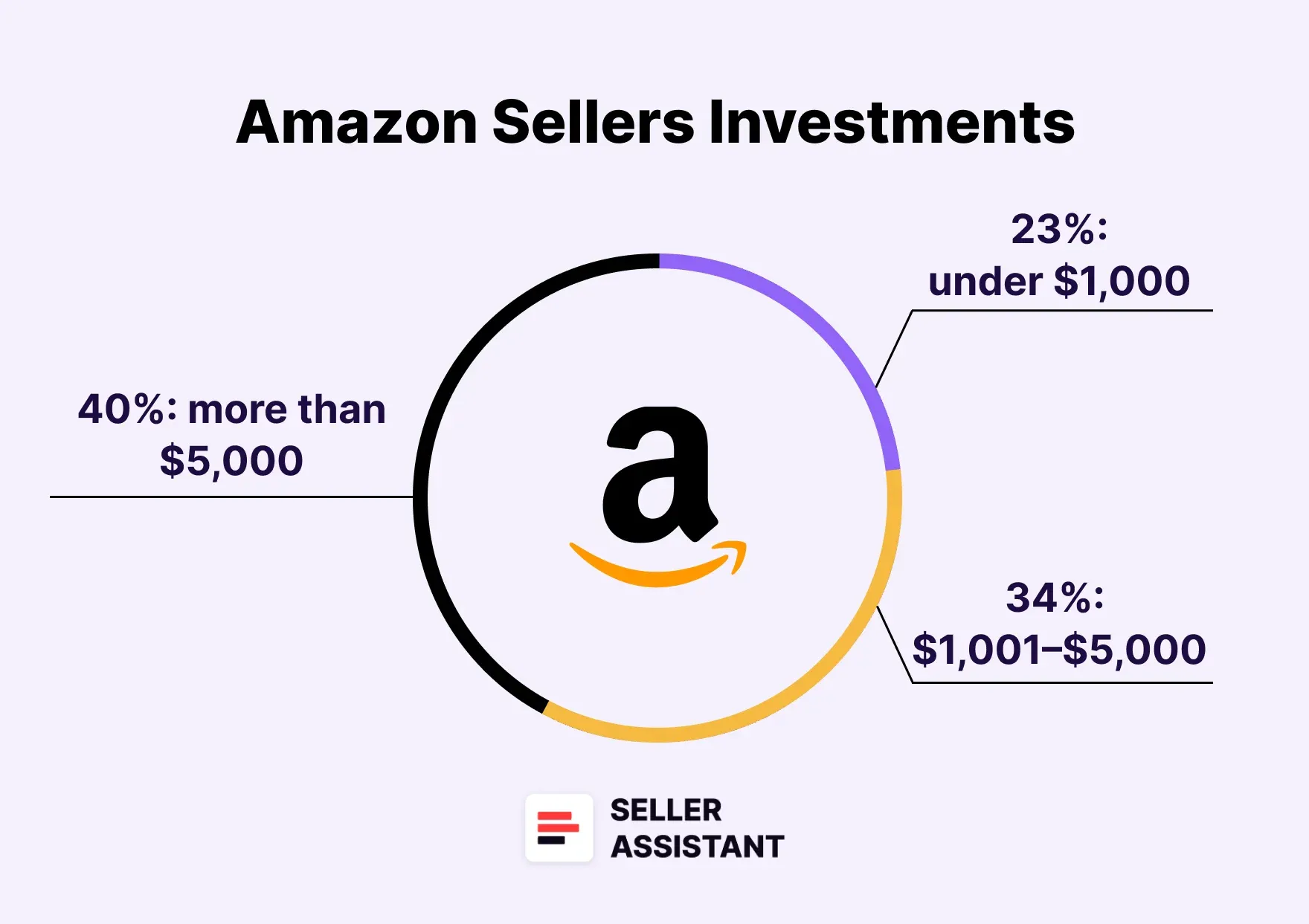
Jungle Scout’s data shows just how wide that range can be:
- 23% of sellers spent under $1,000
- 34% spent between $1,001–$5,000
- 40% invested more than $5,000
So why the difference? Because how much it costs to sell on Amazon changes with the model.
Here’s what startup costs typically look like across the major models.
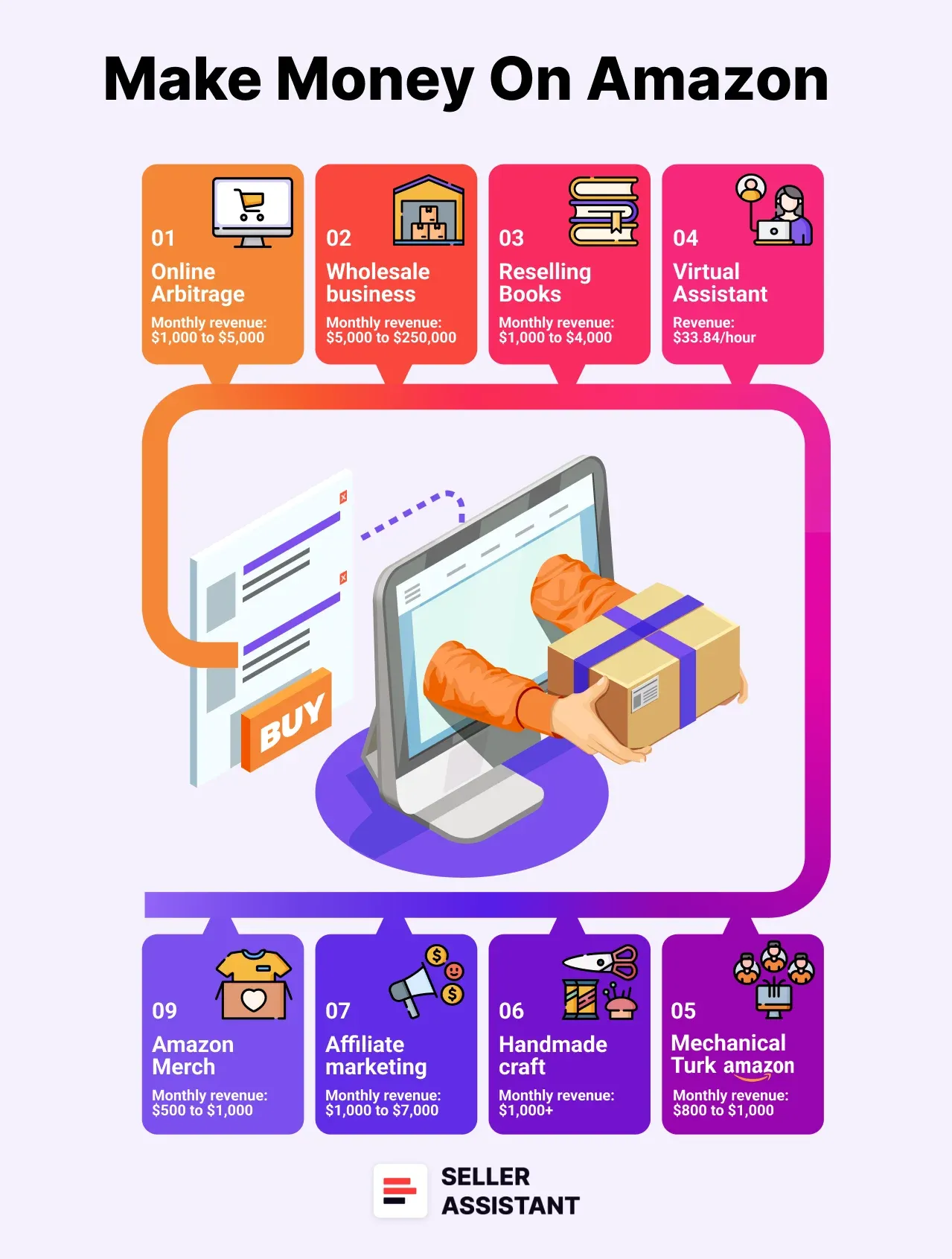
Here’s what startup costs typically look like across the major models
Online arbitrage / retail arbitrage
Around $100–$1,000. You’re buying discounted products and reselling them, so startup costs mainly cover inventory and basic tools. You buy low from online retailers (online arbitrage ) or brick-and-mortar stores (retail arbitrage ), and sell high on Amazon – simple and affordable.
Wholesale
Expect $2,000–$5,000 to buy in bulk and meet minimum order requirements, secure bulk inventory and access suppliers.
Private label
Usually $3,000–$10,000+. You’re creating your own brand, which means sourcing, branding, packaging, and promoting. You’ll pay for manufacturing, branding, packaging, and marketing. It’s high-investment, high-reward.
Dropshipping
Can start with $500–$1,500, since you’re not buying inventory upfront – but be ready for thinner margins and more competition.
What Are Amazon Fees?
When you sell on Amazon, your costs depend on how you fulfill orders – either through Fulfillment by Amazon (FBA) or Fulfillment by Merchant (FBM). FBA sellers outsource storage, shipping, and customer service to Amazon, while FBM sellers handle those logistics themselves or through third-party providers.
Regardless of the model, every seller pays Amazon selling fees – but the breakdown differs for FBA vs. FBM.
Fees paid by all Amazon sellers
.webp)
Fees paid by all Amazon sellers
All sellers on Amazon pay two core types of fees:
- Selling plan fees
Either per-unit or monthly subscription fees for access to the Amazon platform.
- Referral fees
A percentage-based fee charged for each item sold.
Let’s break each of these down.
Selling plan fees
.webp)
Selling plan fees
$0.99 per unit sold; best for sellers moving fewer than 40 items/month.
- Professional Plan
$39.99/month, no per-unit charge; includes access to bulk listing tools, advanced reports, and Buy Box eligibility.
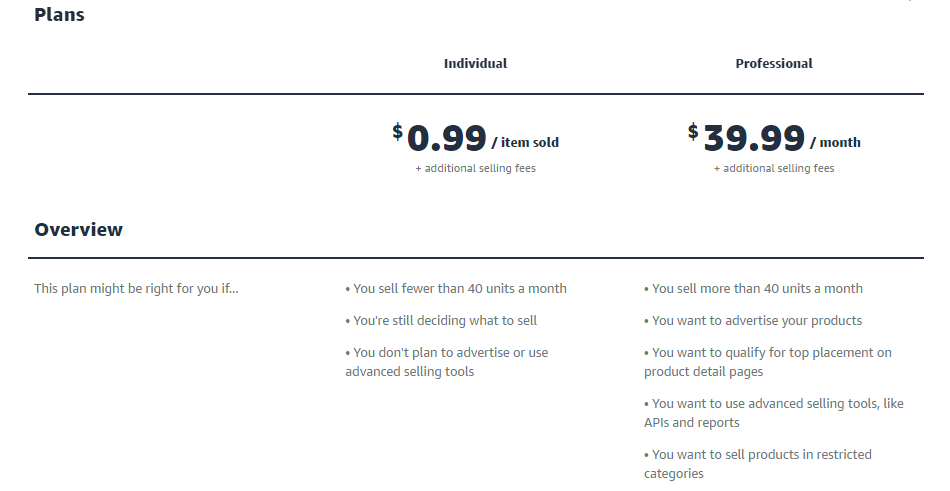
Amazon selling plans
Referral fees
Amazon takes a cut from each sale – this is your referral fee. It’s usually between 8% and 15%, depending on the product category. Some categories go higher – up to 45% for Amazon Device Accessories. Sellers pay either the Referral Fee Percentage (RFP) or Referral Fee Minimum (RFM), whichever is greater.
Referral fee rates
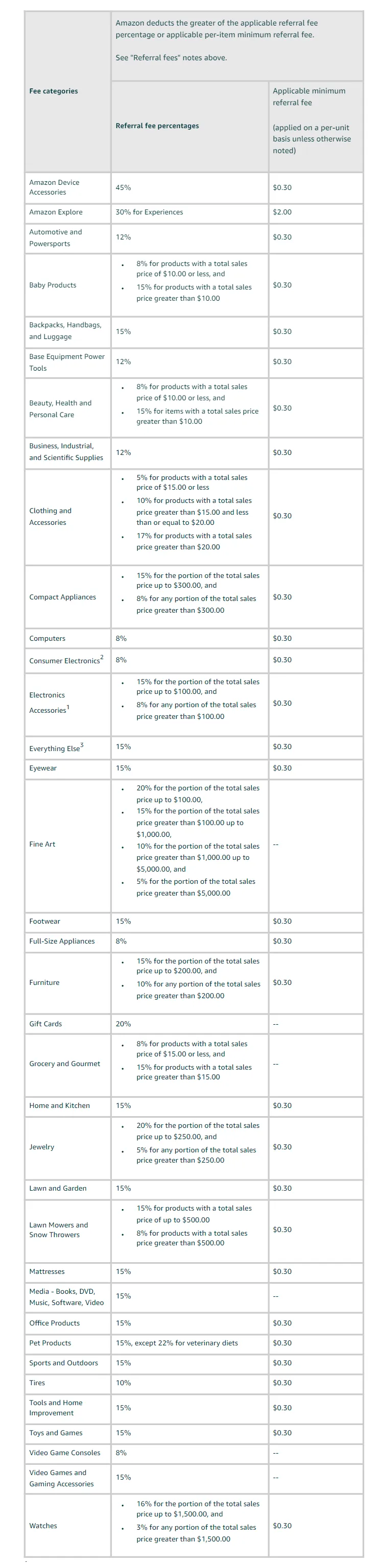
Referral fee rates
Other common fees
- Closing Fee
$1.80 per item in media categories (Books, DVDs, Games, etc.)
- High-Volume Listing Fee
$0.001 per SKU monthly if you list over 1.5 million SKUs
- Refund Administration Fee
Lesser of $5.00 or 20% of the referral fee
- Rental Book Service Fee
$5.00 per textbook rental
- Digital Services Fee
2–3% added to other fees if selling in DST countries (UK, France, Canada, etc.)
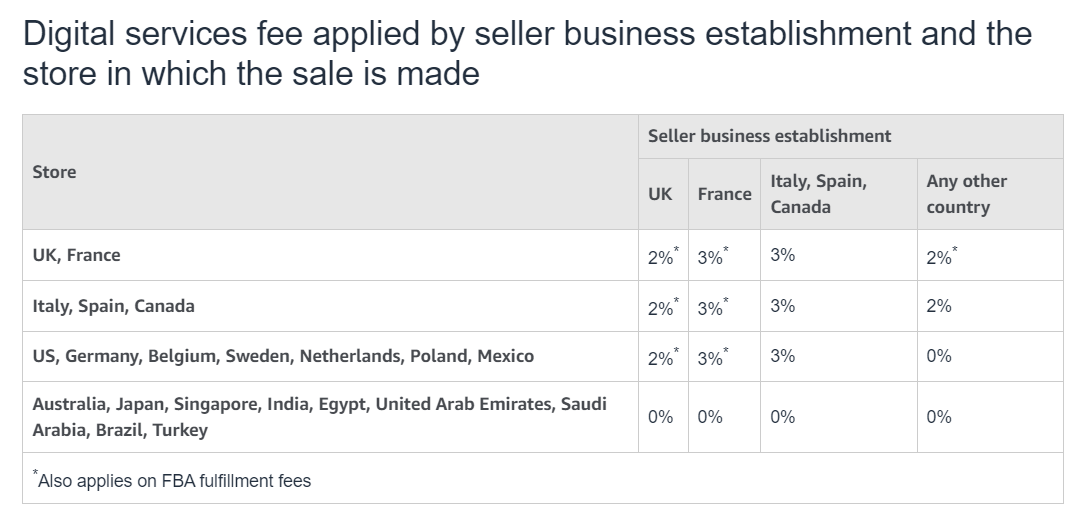
Digital Services Fee
Amazon FBA seller fees
FBA fees cover the cost of storing inventory, picking and packing orders, shipping to customers, handling returns, and providing customer service – charged per unit when an order is fulfilled.
FBA sellers pay the following fee types:
- Fulfillment (picking, packing, shipping, customer service)
- Storage (inventory held in Amazon warehouses)
- Prepping and shipping goods into Amazon’s fulfillment centers
Let’s go deeper.
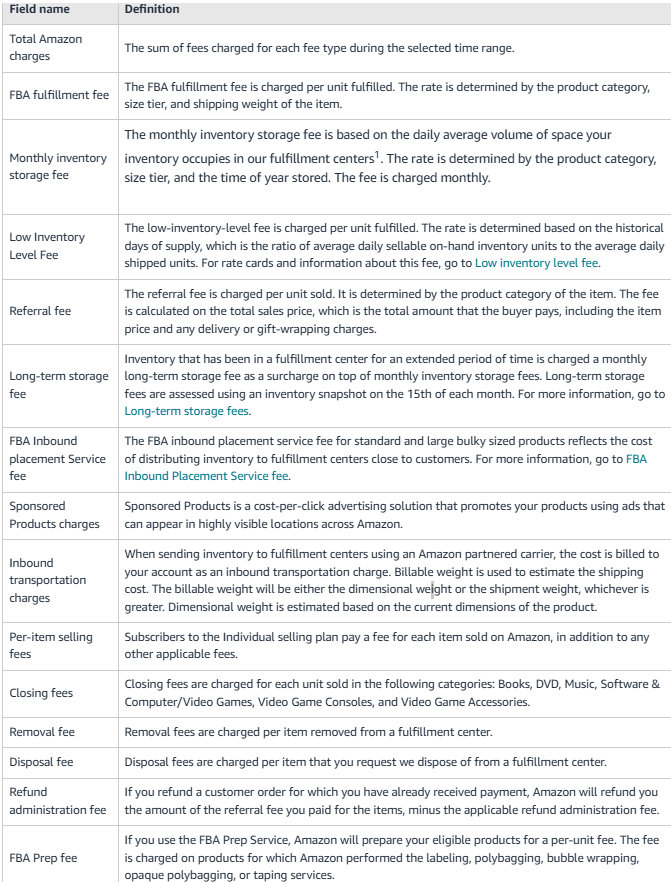
FBA fees list
FBA order fulfillment Fees
These cover order handling: picking, packing, customer service, and returns.
FBA fees vary based on:
- Size tier (standard, heavy and bulky, etc.)
- Product category (apparel, non-apparel, hazmat )
- Product weight and dimensions
- Whether the item is priced below $10 (Low-Price FBA rates apply)
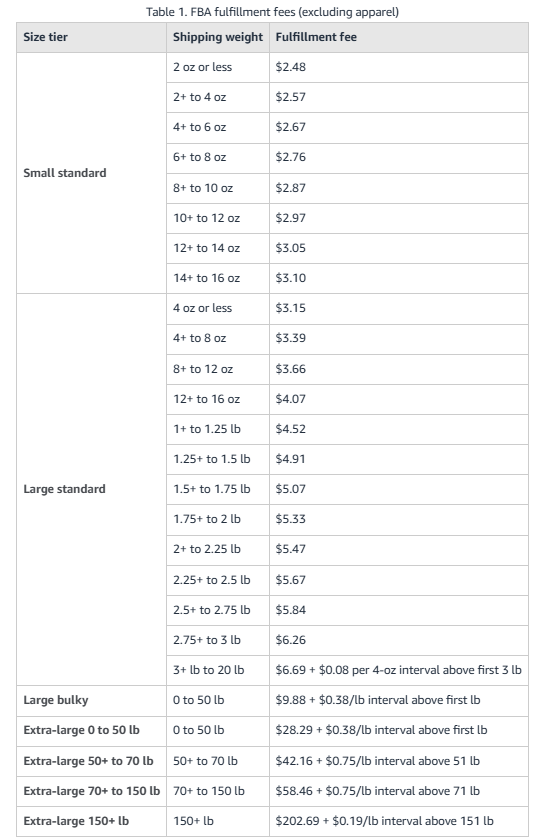
Non-apparel rates
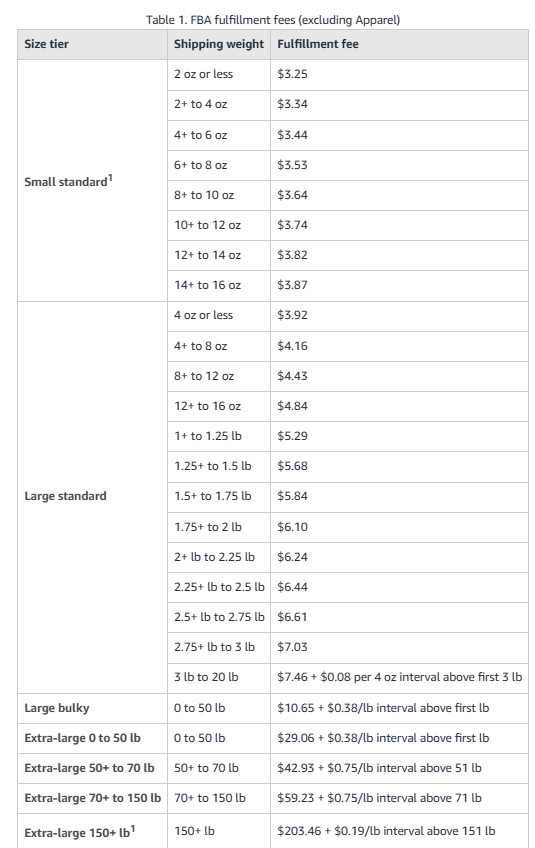
FBA fulfillment fees (excluding Apparel)
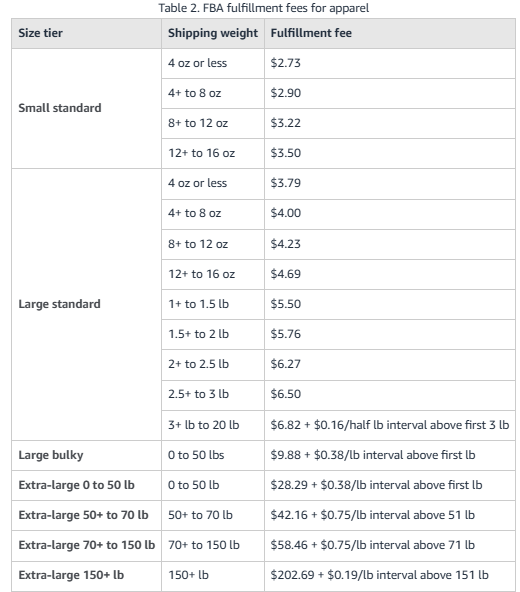
Apparel rates
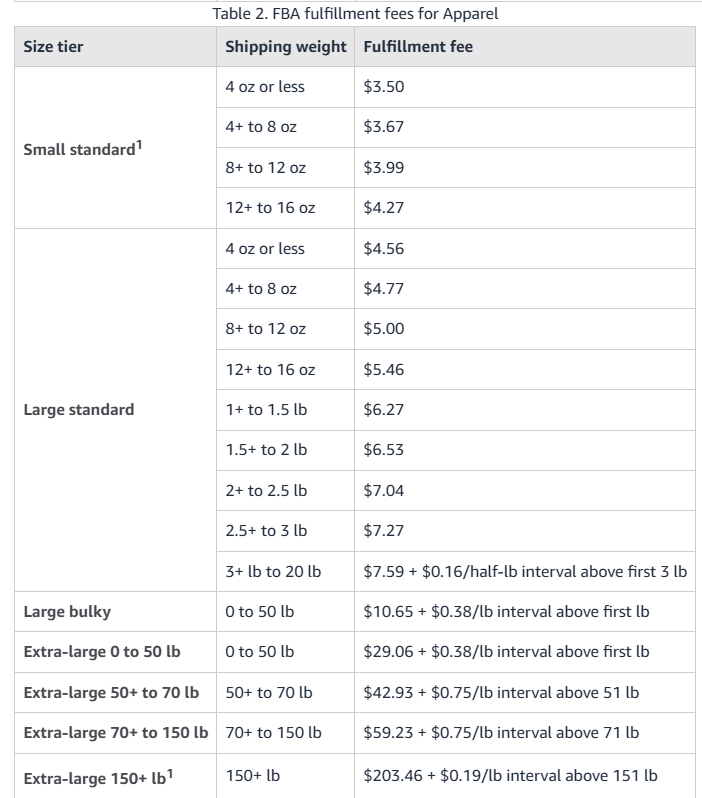
Apparel rates
Dangerous goods rates
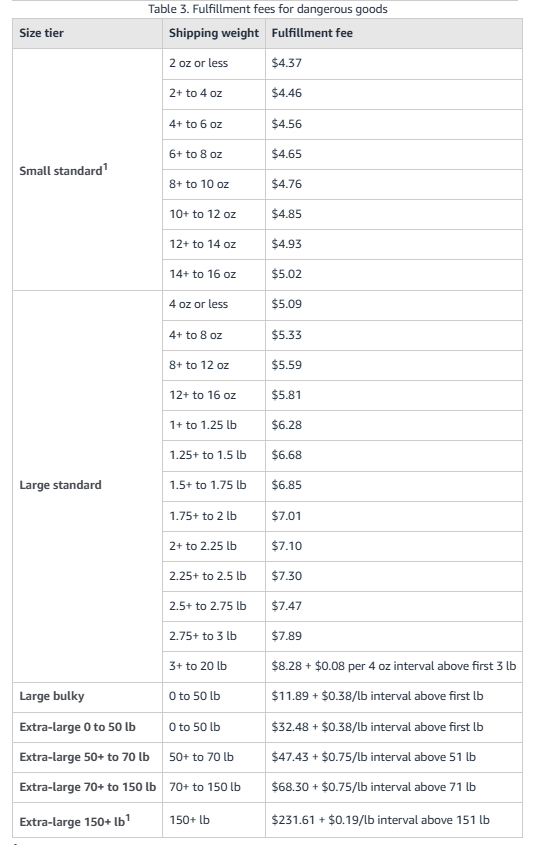
Dangerous goods rates
Low-Price FBA rates for non-apparel
Low-Price FBA rates for apparel
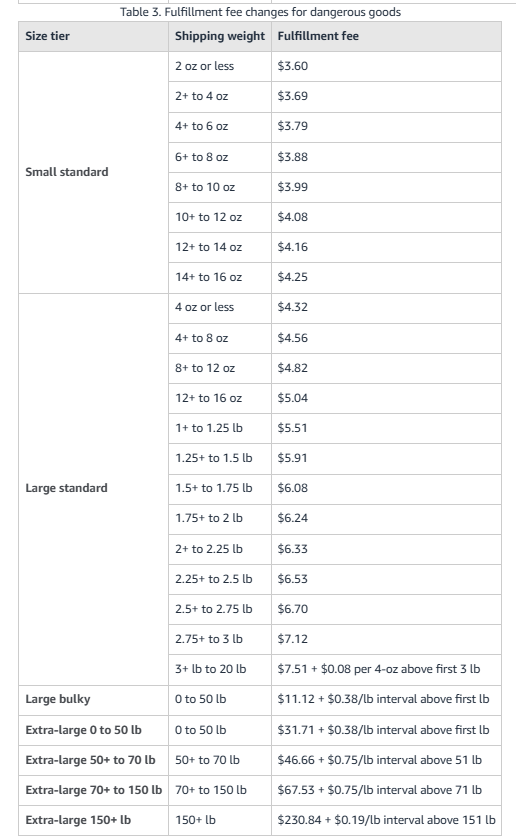
Low-Price FBA rates for hazmat
FBA Inbound Placement Service Fees
Amazon charges this fee to redistribute inventory across its network.
Options:
- Minimal Shipment Splits
Amazon sends your stock to multiple locations. You pay a fee.
- Amazon-Optimized Splits
You handle multiple shipments. No Amazon fee.
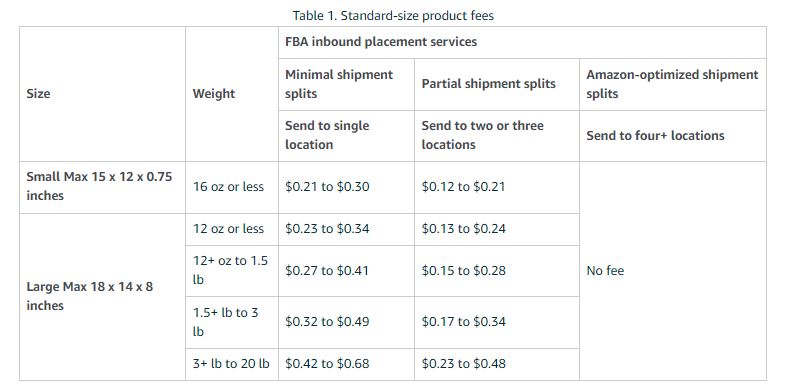
FBA inbound placement fees standard-size products
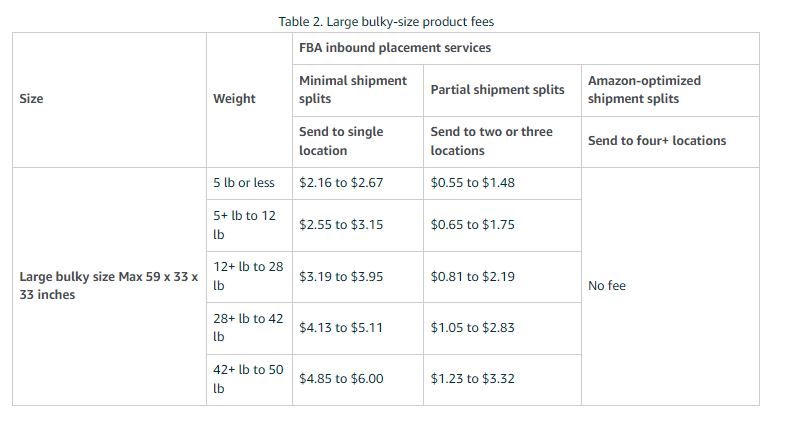
FBA inbound placement fees non-standard-size products
Low-inventory-level fees
Charged when your inventory falls below 28 days’ worth of stock based on demand. Applies to consistently understocked SKUs.
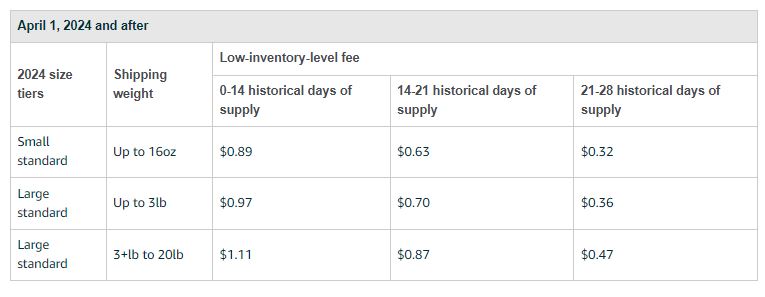
Low-inventory-level fee rates
Returns Processing Fees
If your return rate exceeds a category threshold, Amazon will charge you per returned unit (except Apparel/Shoes – where it’s always charged).
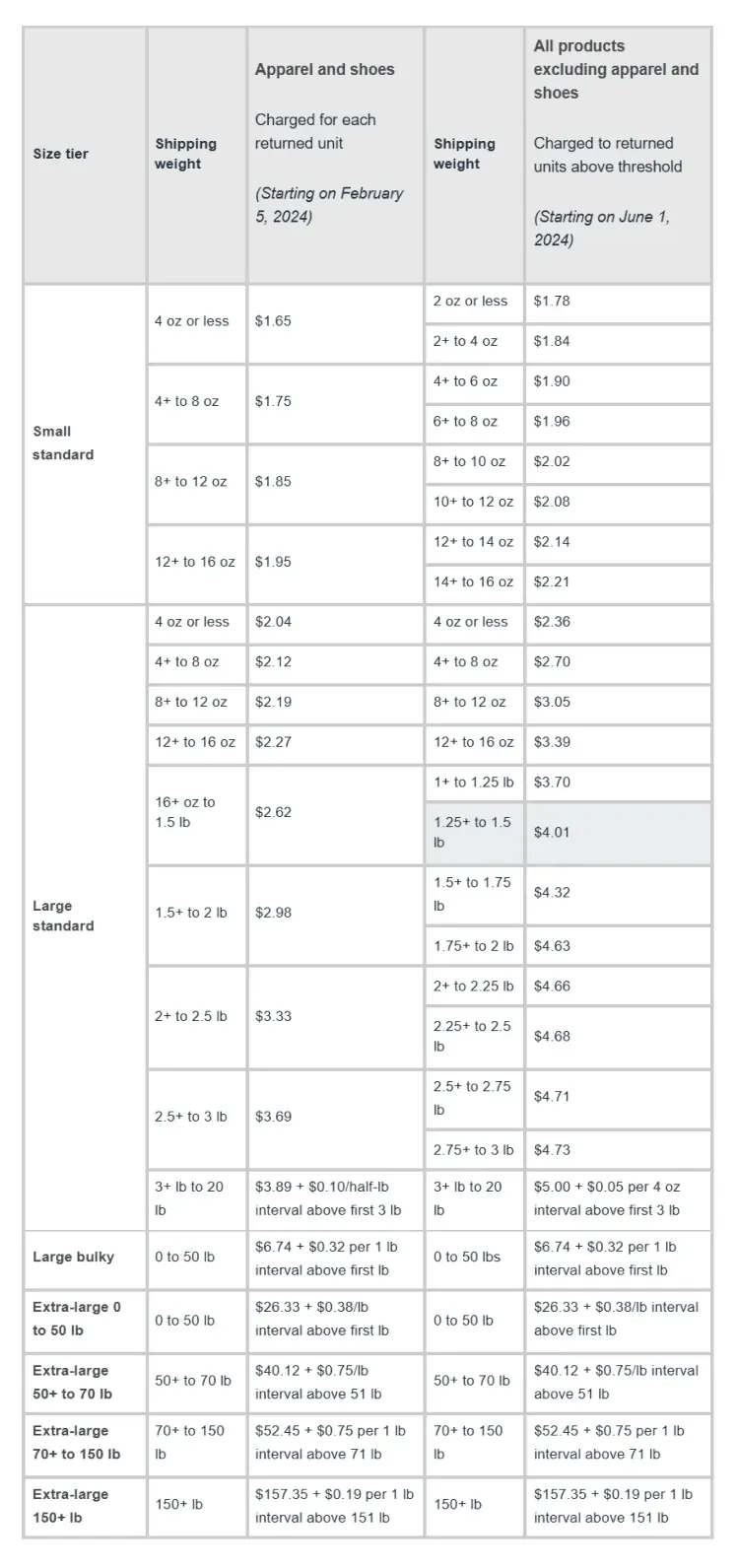
Returns Processing Fees
Inbound Defect Fees
If your shipments don’t meet Amazon’s standards or differ from your shipping plan, you’ll be charged for rework.
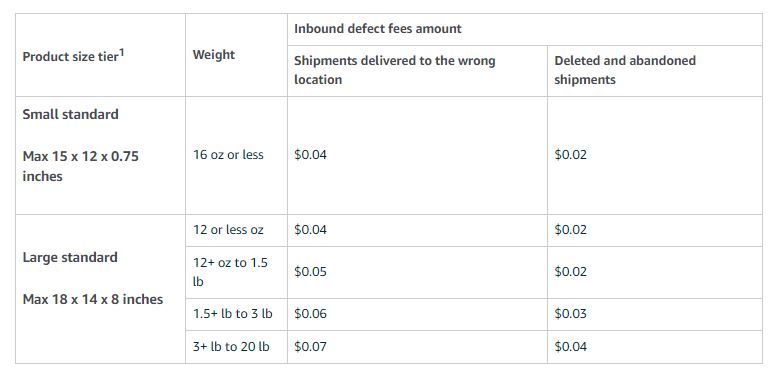
Inbound defect fee rates
Amazon FBA Storage Fees
Amazon charges FBA storage fees to store your inventory in their warehouses.
Amazon storage fees are calculated based on:
- Size and volume of products (cubic feet)
- Time of year (off-peak vs. peak)
- Dangerous goods category
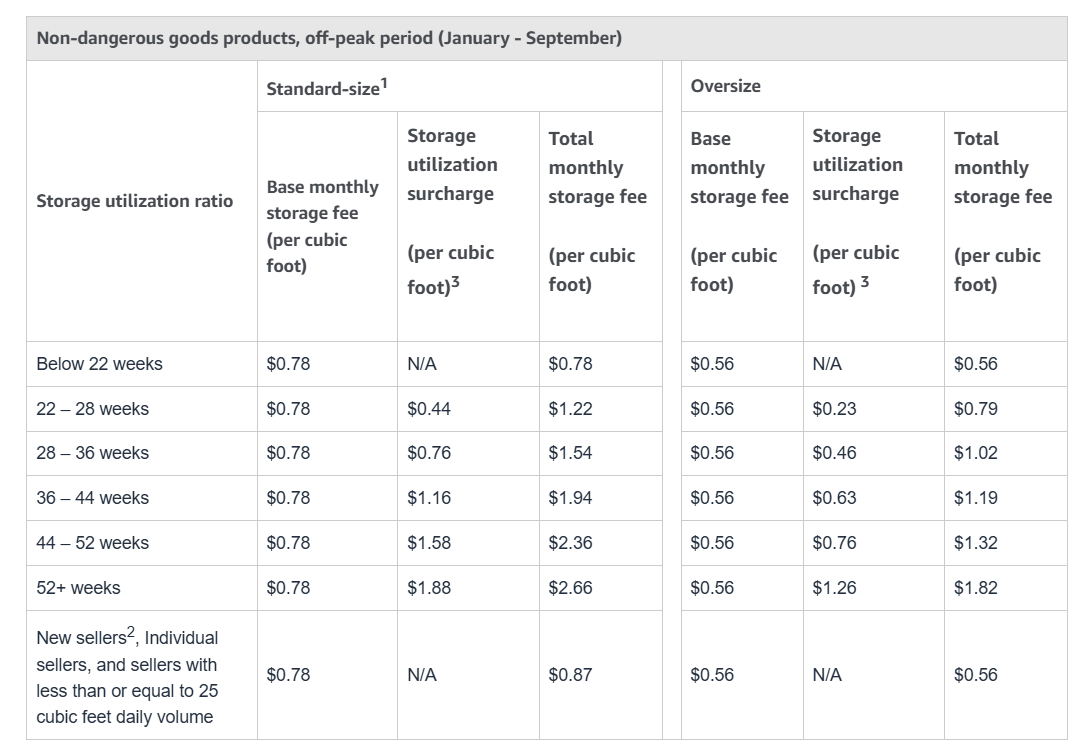
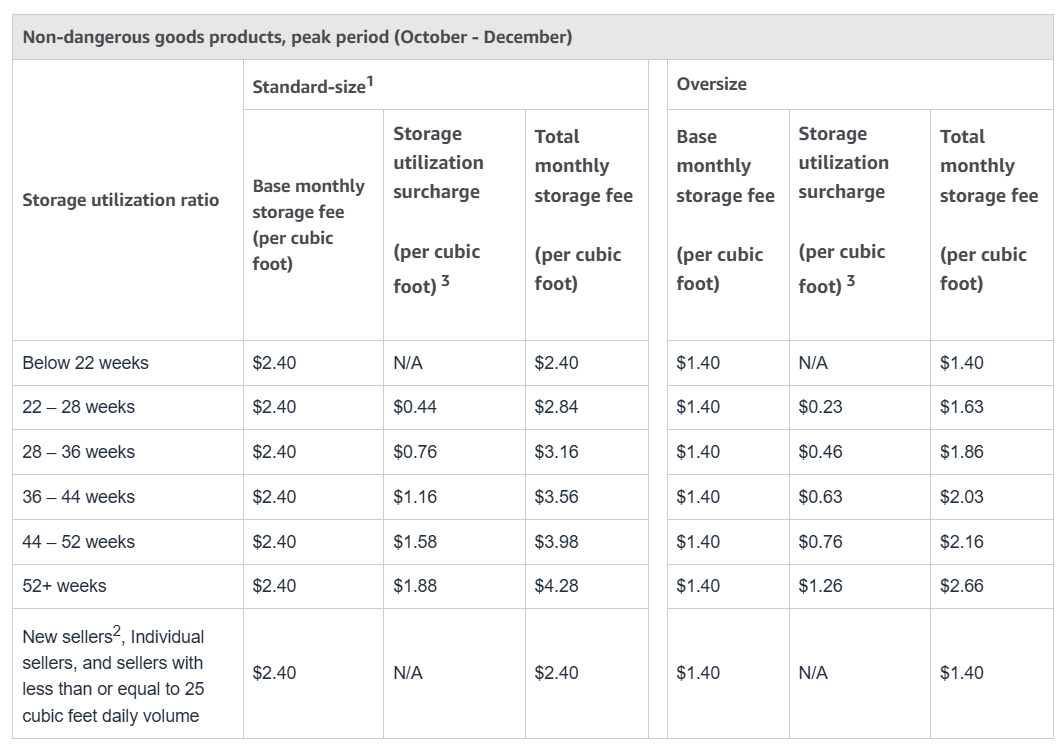
Monthly Inventory Storage Fees
Charged monthly based on the average daily volume your products occupy in Amazon’s warehouses, with higher rates during peak seasons.
- Storage Utilization Surcharge
Applied when your standard-sized inventory exceeds Amazon’s efficient storage usage thresholds, typically during high-demand periods.
Storage rates
Non-dangerous goods peak storage fees
Non-dangerous goods non-peak storage fees
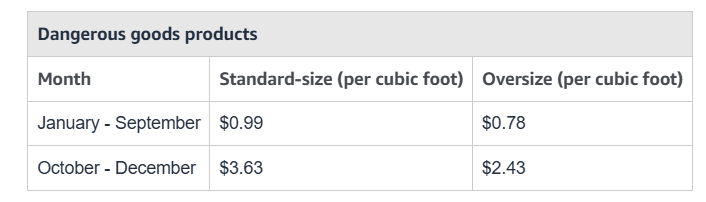
Dangerous goods storage fees
Aged Inventory Surcharge
Imposed on items stored for over 180 days, encouraging sellers to move stagnant stock faster.
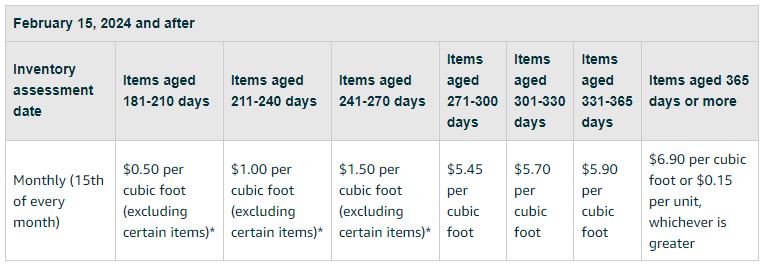
Aged inventory surcharge after February 15, 2024
Inventory Storage Overage Fees
Incurred when your inventory exceeds Amazon’s assigned storage limits in a given month, calculated per cubic foot of excess.
The overage fee is charged monthly at a rate of $10 per cubic foot. This fee is calculated based on the average daily volume of the space your inventory occupies in the Amazon fulfillment centers, which exceeds your storage limits.
Removal and Disposal Fees
Charged per item when you request Amazon to return or dispose of slow-moving or excess inventory to avoid long-term storage costs.
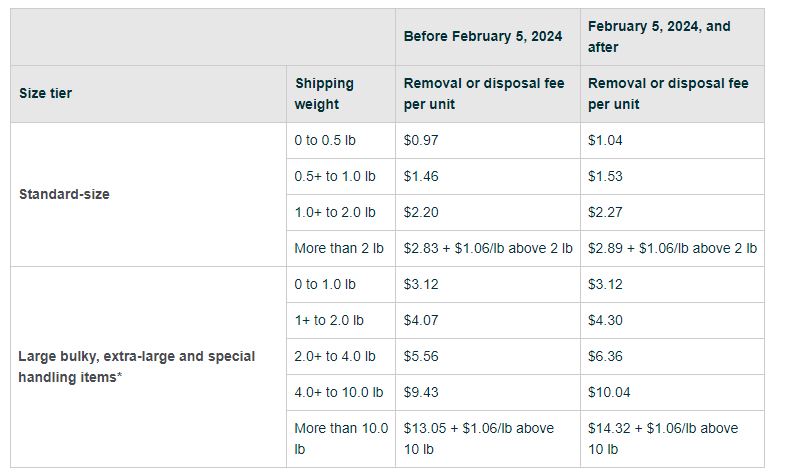
FBA removal and disposal fees after February 5, 2024
Prep and shipping costs (getting inventory to Amazon)
FBA sellers must prep and send their inventory to Amazon before it can be sold.
Paid if you use a third-party prep service to label, bubble wrap, or repackage your inventory. These costs vary by provider and product type.
- Shipping to Amazon (Inbound Shipping Fees)
Cost to ship goods to Amazon fulfillment centers.
- Prices depend on:
- Carrier (UPS, FedEx, etc.)
- Weight and size
- Shipping distance
FBM seller fees
Beyond Amazon’s selling plan and referral fees, FBM sellers are responsible for their own fulfillment and shipping – meaning they must pick, pack, ship orders, and manage customer service on their own.
FBM sellers pay:
- Selling and referral fees (same as FBA)
- Fulfillment and shipping costs (to third-party providers or directly)
FBM fulfillment options
- DIY Fulfillment
You handle everything: packing, shipping, customer support, and returns.
- 3PL (Third-Party Logistics) services
Outsource fulfillment to a provider.
3 PL services
3PL services typically include:
- Warehousing
- Inventory management
- Order packing
- Carrier selection and shipping
- Returns processing
3PL Rates – $0.75–$1.50 per square foot (avg. $1.15)
FBM shipping rates
When you fulfill FBM orders yourself, Amazon applies shipping rates based on the product category and the customer’s chosen delivery method – and you receive that amount as a shipping credit.
Amazon gives sellers two choices:
- Custom Rates (Professional plan)
Set your own fees by item, weight, or price band.
- Standard Rates (Individual plan)
Fixed Amazon rates ranging from $3.99–$46.50, based on category, weight, and service level.
How to Calculate Amazon Fees
Calculating all the different Amazon FBA and FBM fees can seem overwhelming, but getting a clear picture of your costs is essential for pricing products profitably and scaling successfully.
The most effective way to estimate your Amazon selling costs is by using specialized tools like Seller Assistant, which calculates every Amazon fee across both individual products and bulk wholesale price lists – right where you source or sell. Below are 3 methods to calculate Amazon fees.
Note. Seller Assistant is a comprehensive product-sourcing software that helps Amazon sellers quickly find high-profit deals. It combines three extensions: Seller Assistant Browser Extension, and IP-Alert Chrome Extension by Seller Assistant, and VPN by Seller Assistant, Amazon seller tools: Price List Analyzer, Brand Analyzer, Seller Spy, Bulk Restrictions Checker, and API integrations, and features: Storefront Widget, Side Panel View, FBM&FBA Profit Calculator, Quick View, ASIN Grabber, UPC/EAN to ASIN converter, Stock Checker, IP Alert, and Restrictions Checker.
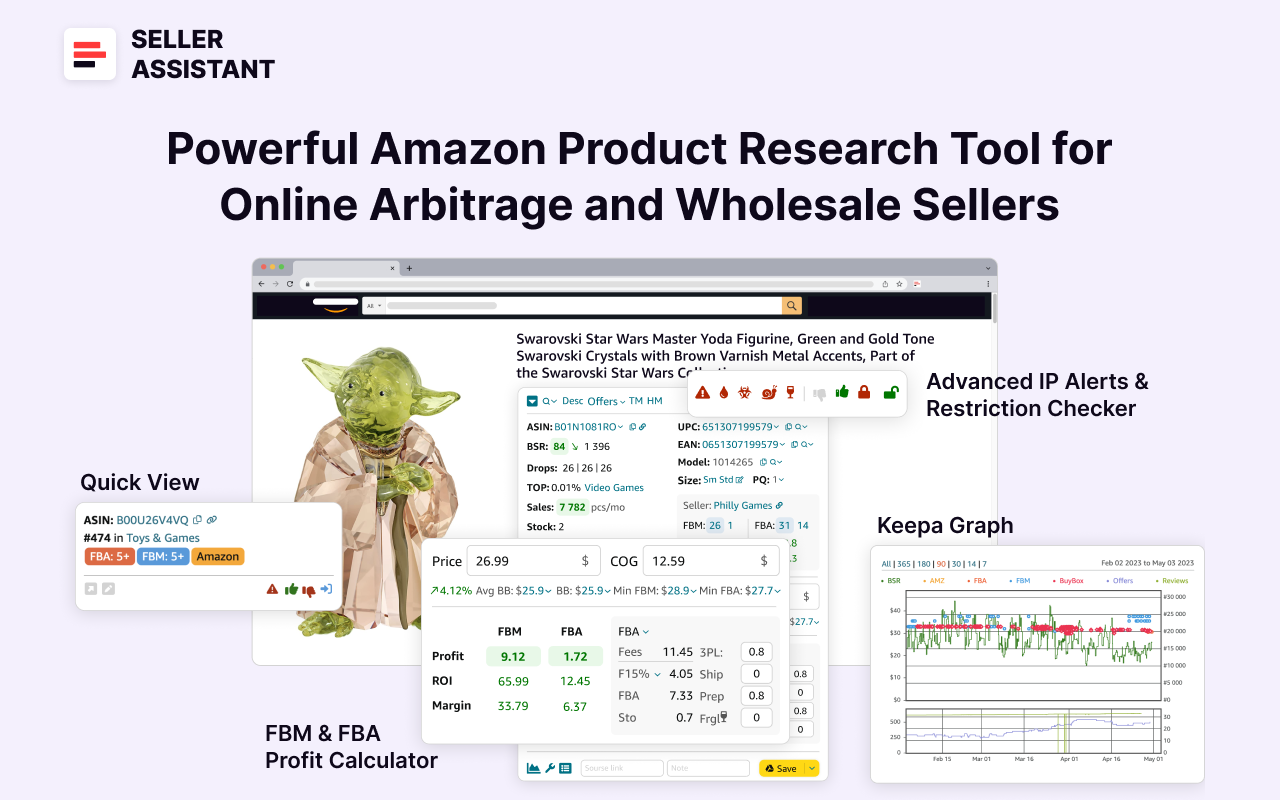
Seller Assistant
Seller Assistant shows all necessary product data on Amazon search, product, and inventory pages, and on any website to help you find high-margin deals. By using this FBA and FBM product sourcing software, you can easily identify products that have the potential to be sold well on Amazon.
Bulk Amazon Fee Calculation with Price List Analyzer
For wholesale sellers working with supplier sheets, or OA and dropshipping sellers who scrape data from supplier websites to locate profitable deals, Seller Assistant’s Price List Analyzer is built for fast, reliable bulk analysis.
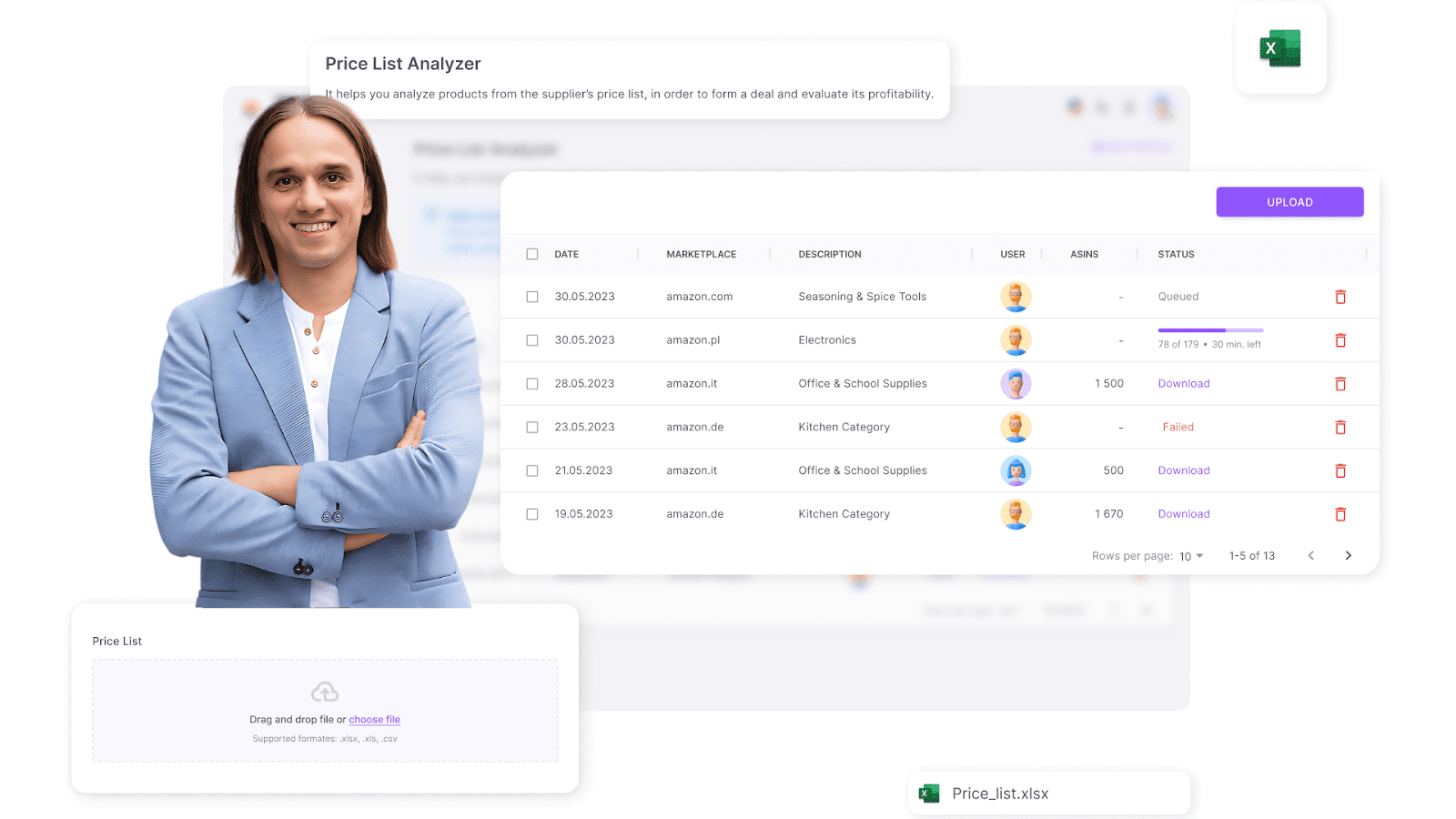
Seller Assistant’s Price List Analyzer
What it does
- Matches supplier product data with Amazon listings
- Calculates all FBA/FBM fees per product
- Estimates profit, ROI, and margins
- Flags risk factors (restrictions, IP alerts, over-competition)
- Allows data filtering and clean Excel report exports
Steps to use it
Step 1. Access Price List Analyzer
Access Price List Analyzer via Seller Assistant dashboard
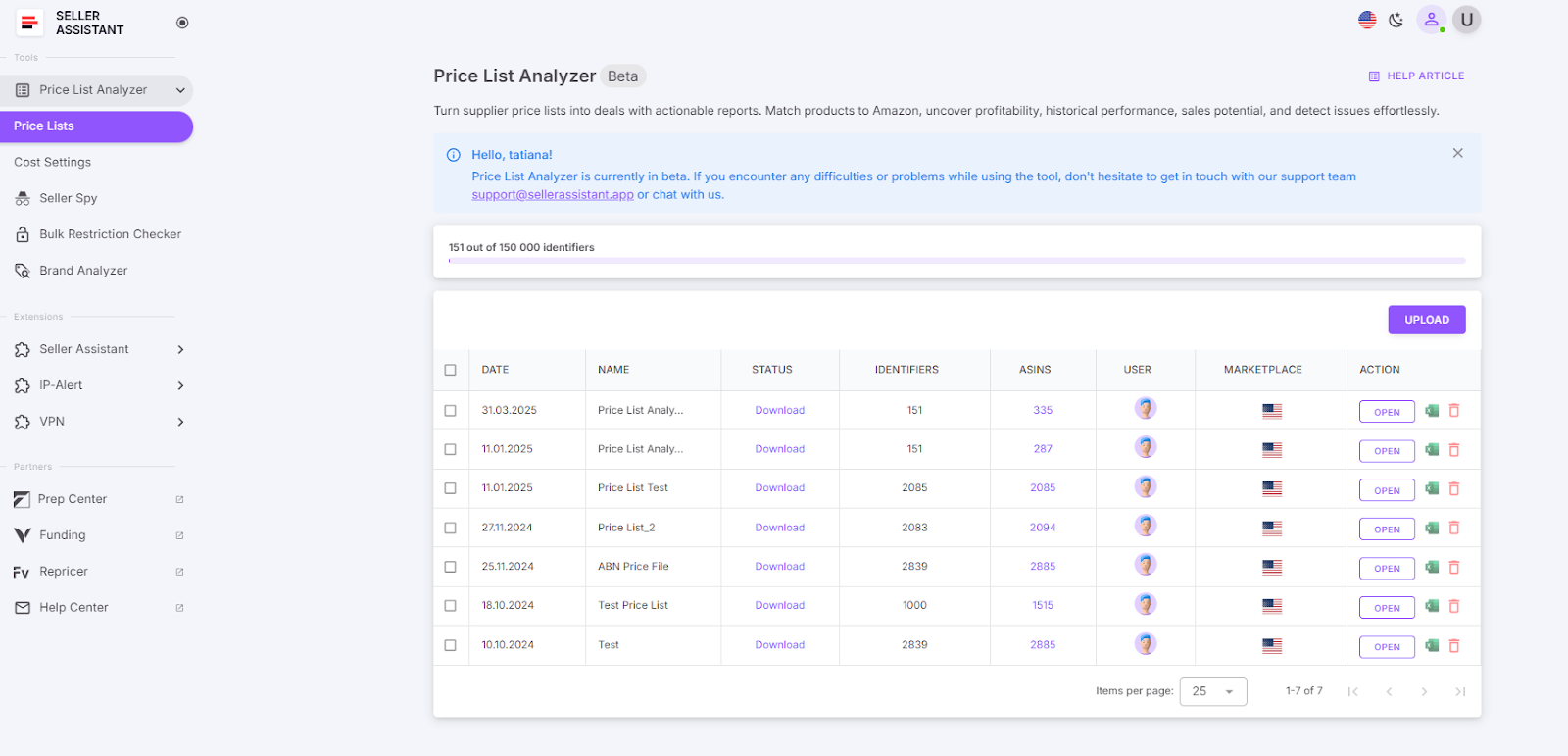
Access Price List Analyzer
Step 2. Upload your wholesale price list
Upload your wholesale list in Excel format and select your marketplace.
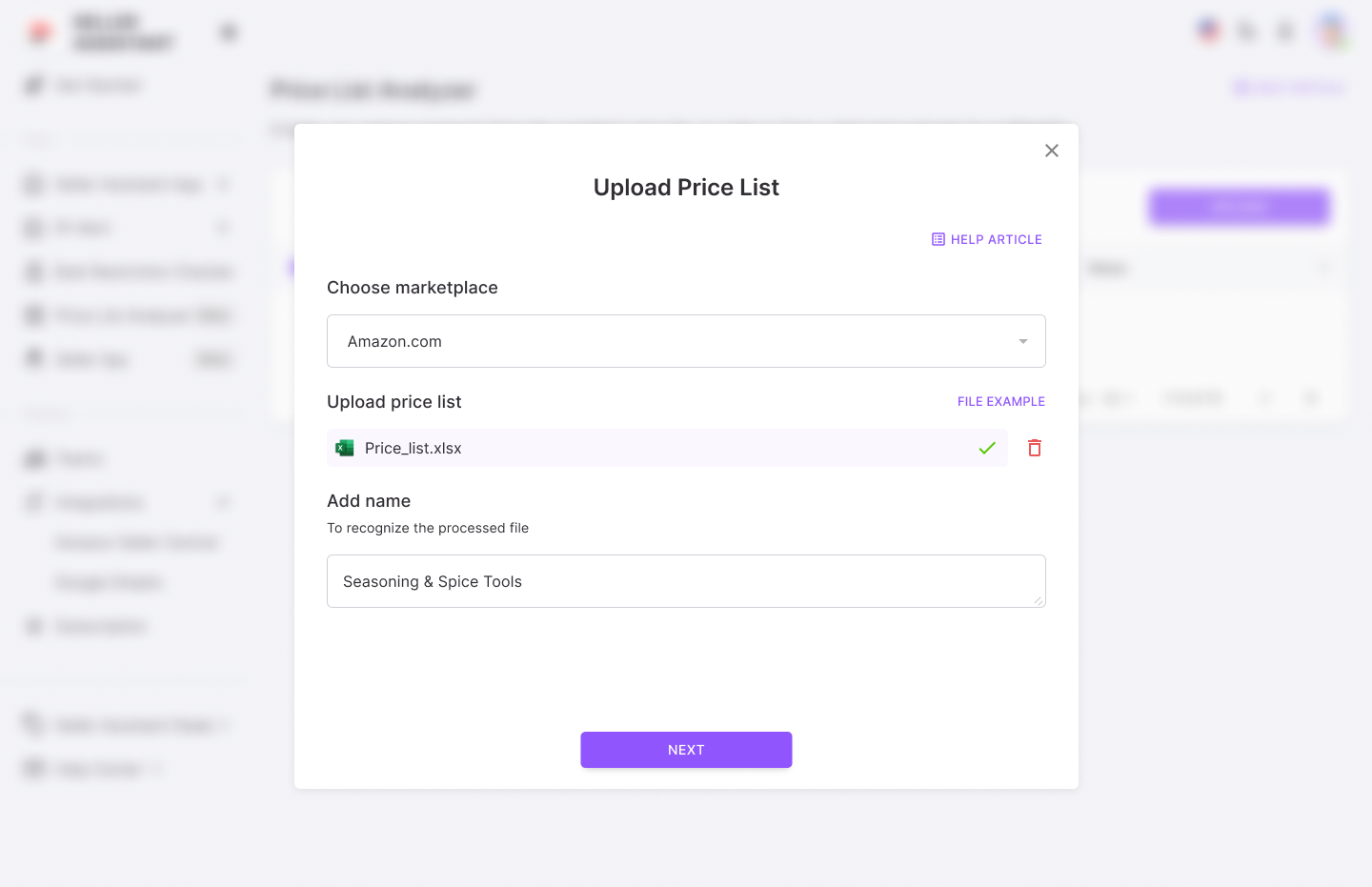
Upload your wholesale price list
Step 3. Set up your wholesale list for processing
Map the key data columns – UPC/EAN codes, cost, and product title.
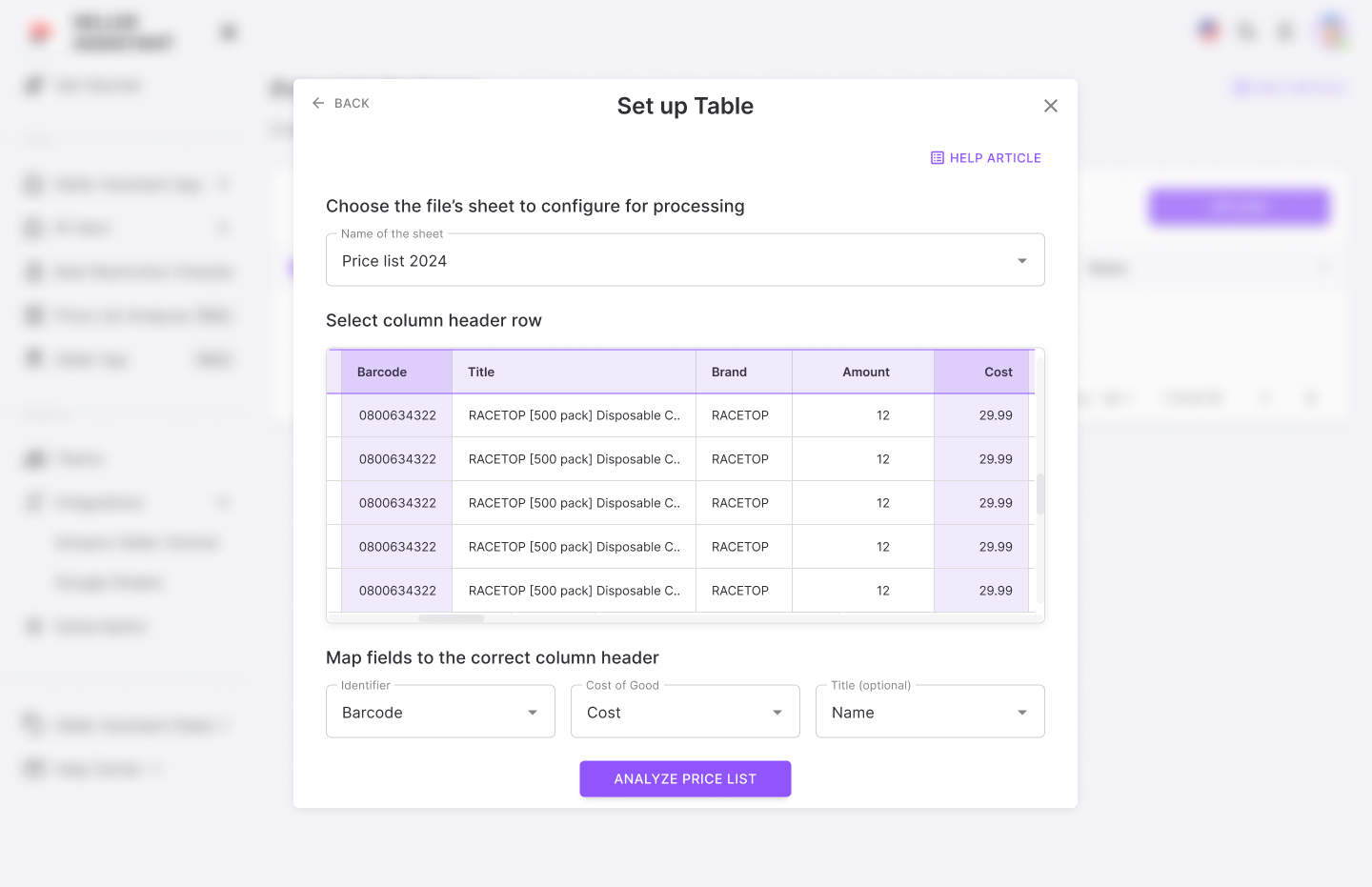
Set up your wholesale list
Step 4. Get the Price List Analyzer results
Start the analysis, get the UI table with key product metrics, and download the detailed .xls report if needed.
Price List Analyzer profitability and Amazon fees data:
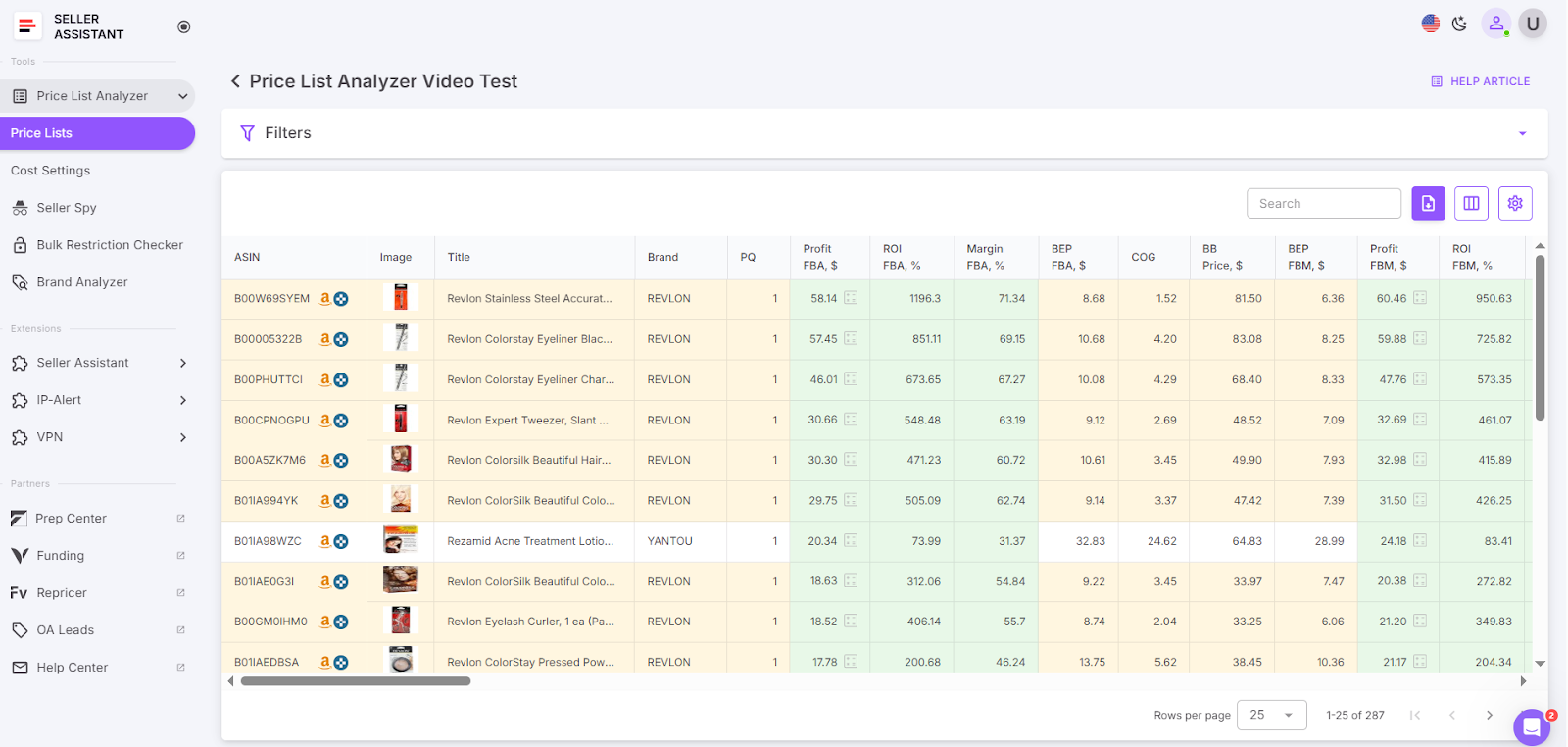
Get the UI table with key product metrics
Pricing and profitability
- COG (Cost of Goods)
Cost of goods before tax. Product price at the supplier
- Cost of Goods incl. VAT
Total cost including VAT
- Buy Box price
Current price of the product winning the Buy Box on Amazon
- Break-Even price (FBA/FBM)
The minimum product price with 0% profit for Fulfillment by Amazon (FBA) or Fulfillment by Merchant (FBM). If you go below break-even threshold, you lose money on the product
- Profit (FBA/FBM)
Estimated profit per unit using FBA or FBM fulfillment methods. Shows how much money you earn on the product
- ROI (FBA/FBM, %)
Return on investment for FBA or FBM orders, as a percentage
- Margin (FBA/FBM, %)
Profit margin after costs, expressed as a percentage
- Fulfillment costs
- Total FBA/FBM fees
Overall fees associated with FBA or FBM services
Fulfillment by Amazon fees
- Referral fee
Amazon’s percentage-based fee on the sale
Cost to store the product in Amazon’s warehouse
- Variable Closing Fee
A fee applied for books, music, video, blu-ray, and DVDs (BMVD) on top of other fees
- Digital Service Fee (DST)
DST applies to selling on Amazon fees (referral fee, fixed closing fee, variable closing fee, and get-paid-faster fee) if you sell in the countries where the fee is paid (e, g. Canada, France, Spain), and FBA fees (UK and France)
- Inbound shipping costs (FBA)
Cost of shipping the product to an Amazon warehouse (for FBA)
- Prepare/labeling cost (FBA/FBM)
Cost for preparing or labeling the product for shipment
- Fragile/bubble wrapping (FBA/FBM)
Additional cost if, the product requires special packaging for fragility
Step 5. Filter the results
Configure and apply filters to refine the displayed results. To download the filtered list, click the Download button and save the updated file.
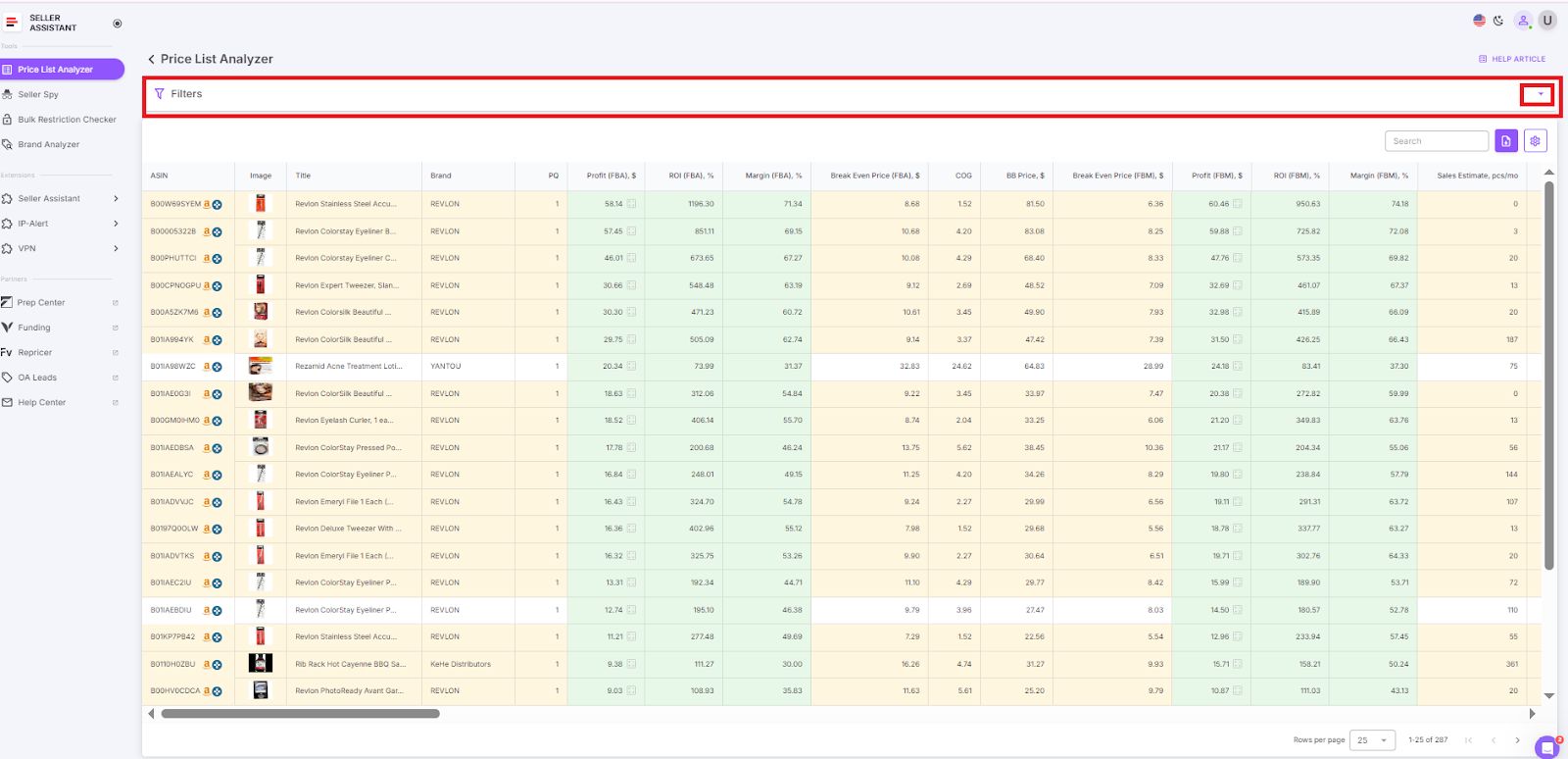
Filter the results
Amazon Fees Calculation for Single Products
For quick and accurate profitability analysis, Amazon sellers rely on the Seller Assistant Chrome Extension, which calculates all relevant fees and profits directly on Amazon product pages – no need to switch tabs or manually copy data.
Seller Assistant Extension is an all-in-one product research tool that delivers real-time, actionable insights right where you’re sourcing – on Amazon listings, supplier websites, and even competitor storefronts.
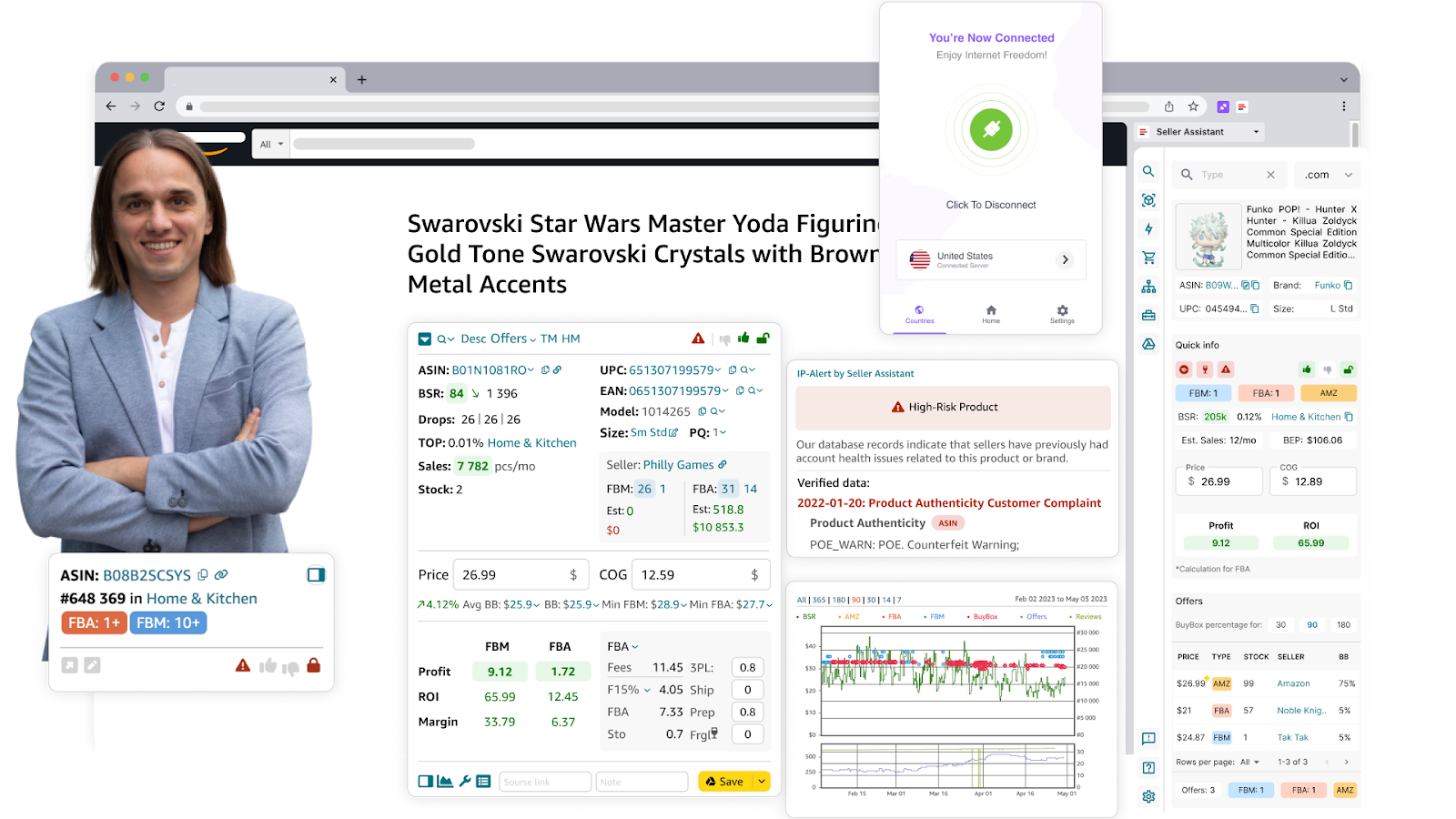
Seller Assistant Extension
It instantly shows profitability, competition levels, Buy Box eligibility, and potential sales. Plus, it flags risks like product restrictions and IP alerts. With built-in Keepa charts and FBM&FBA Profit Calculator, you can confidently decide whether a product is worth selling – without leaving the page.
What it does
- Calculates FBA and FBM fees: referral, fulfillment, and storage
- Instantly estimates profit, ROI, and margin
- Computes your break-even price
- Allows custom inputs for logistics, prep, and shipping
- Applies sales tax and VAT when needed
Steps to use it
Step 1. Open an Amazon product page
Go to the listing you’re evaluating. The Seller Assistant Extension will automatically display its FBM&FBA Profit Calculator.
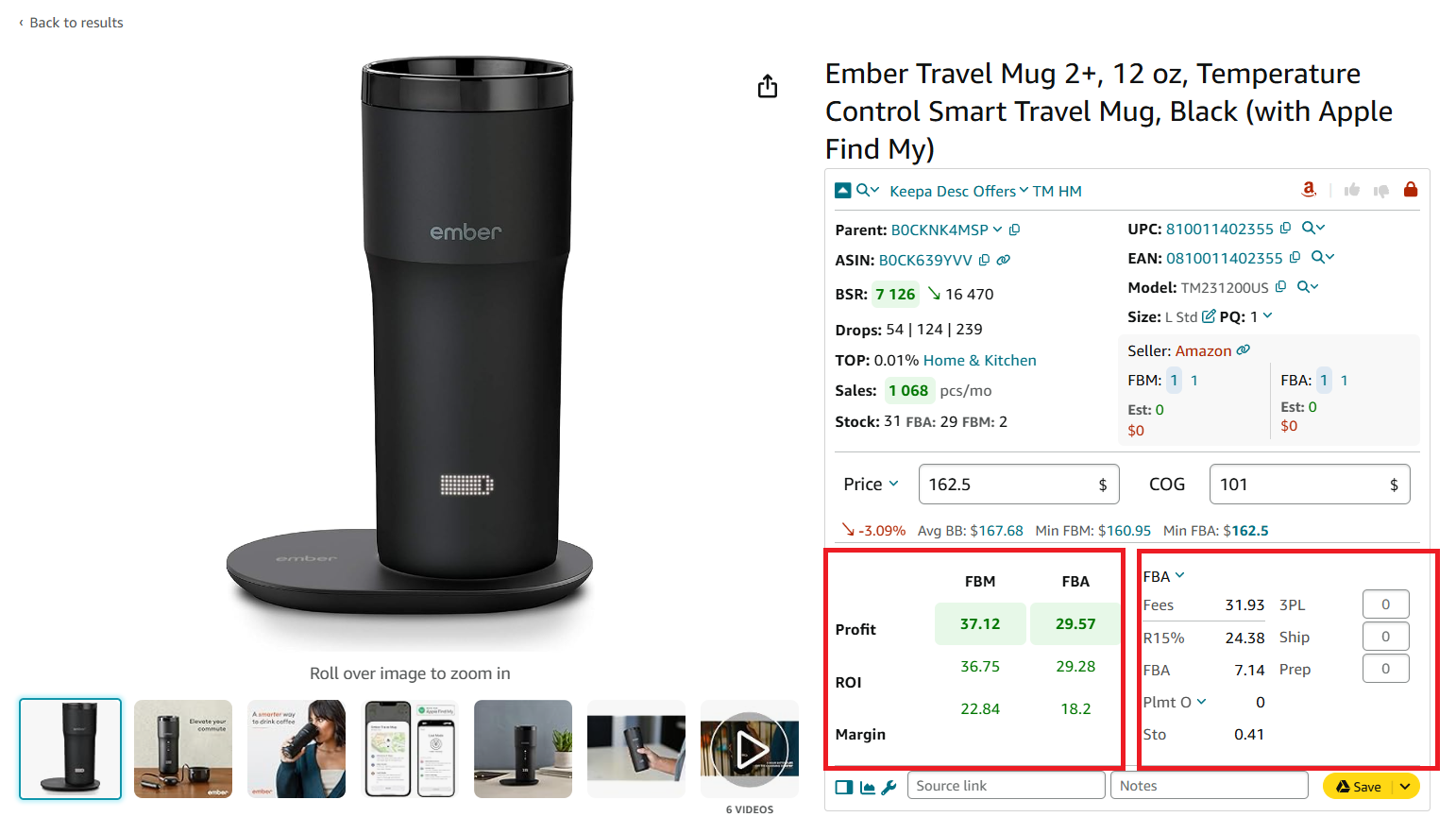
Calculator’s profitability and costs section has 2 subsections
Step 2. Enter tour Cost of Goods (COG)
Input your supplier cost into the COG field – this forms the basis for your profit calculation.
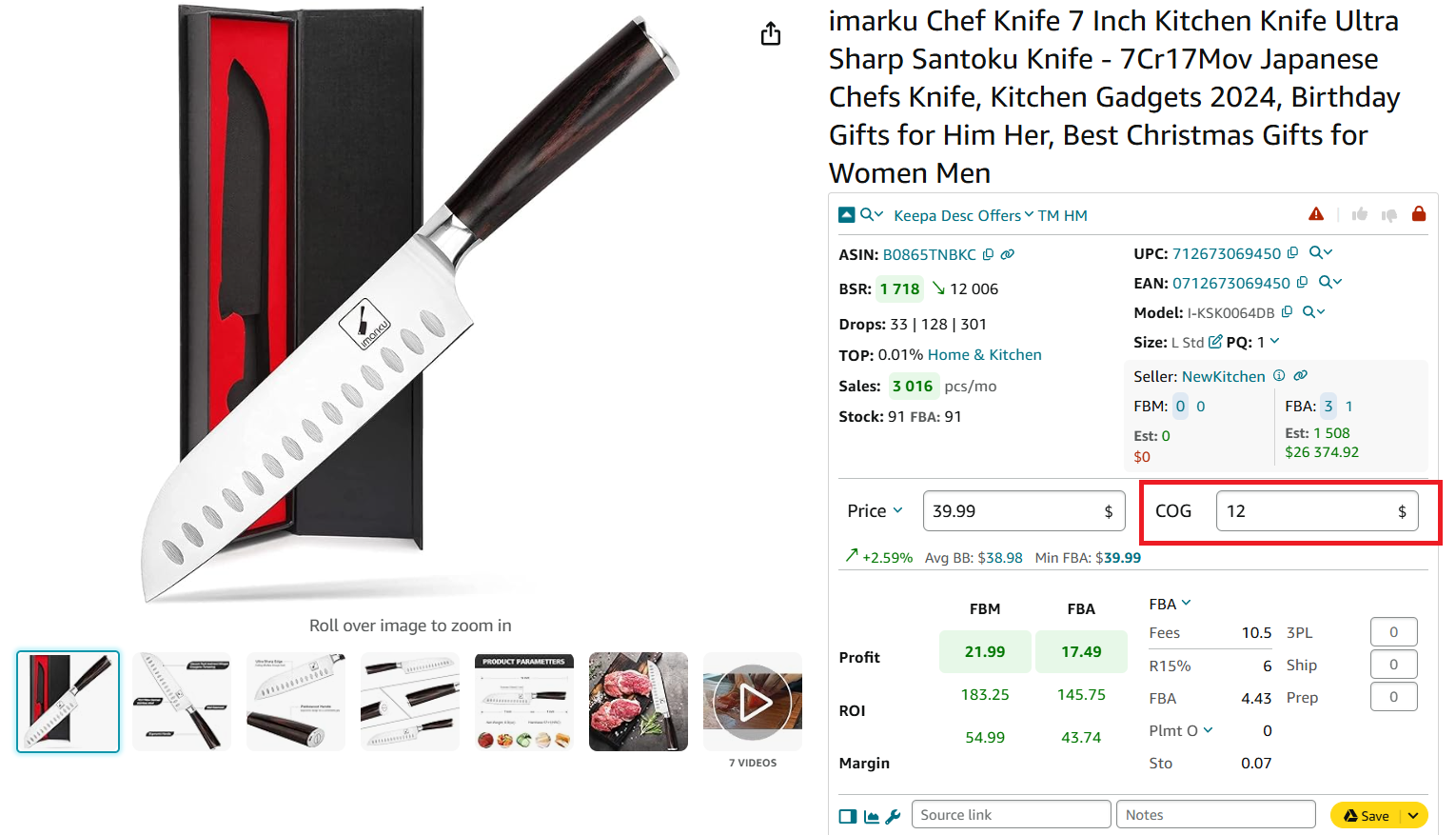
COG is Cost of Goods Sold
Step 3. Choose Between FBA and FBM
Switch between fulfillment methods to instantly compare fees and profitability.
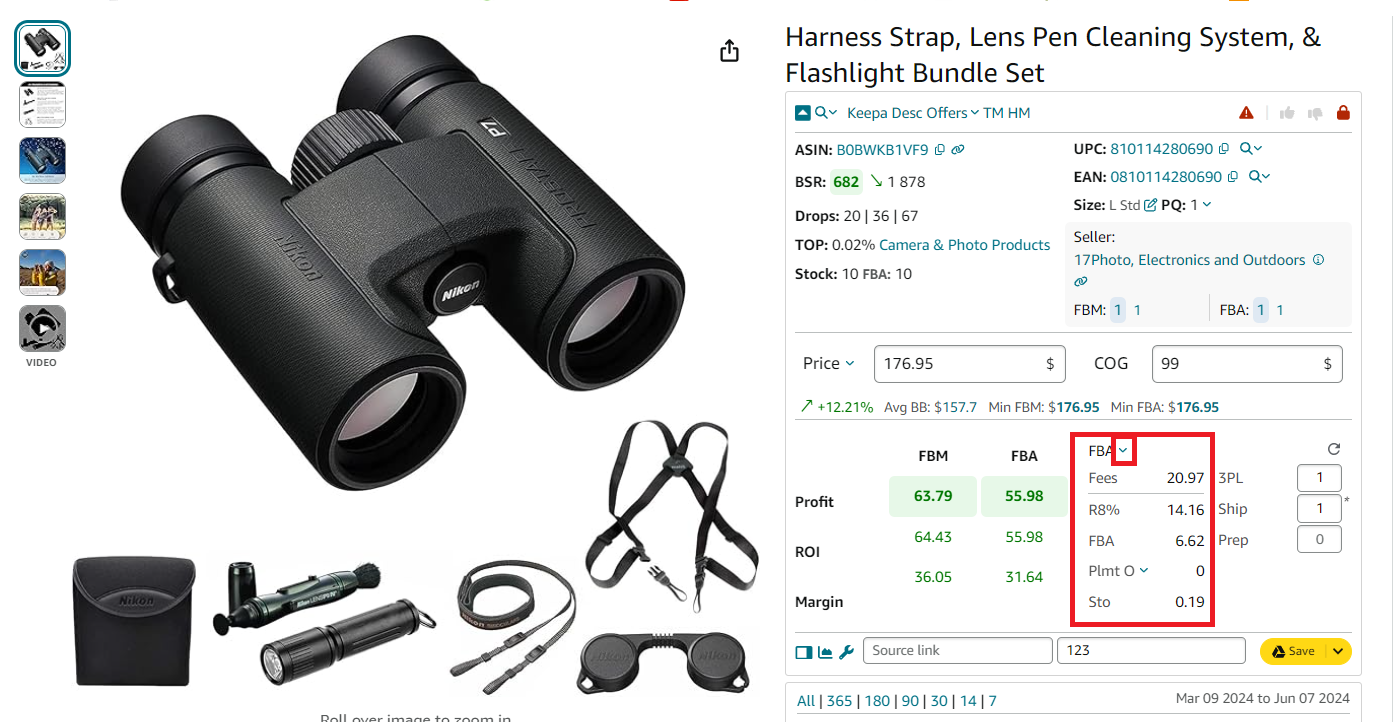
FBA/FBM fees
Displayed data includes:
- FBA/FBM fulfillment costs
- Referral Fee (R15%)
- Storage Fee (Sto)
- Inbound Placement Fee (Plmt)
- Digital Services Fee
Step 4. Add logistics costs
- For FBA, add:
- Shipping to Amazon (per unit)
- Prep center costs for packaging or labeling
- For FBM, input
Logistics costs (Prep + Ship + Frgl)
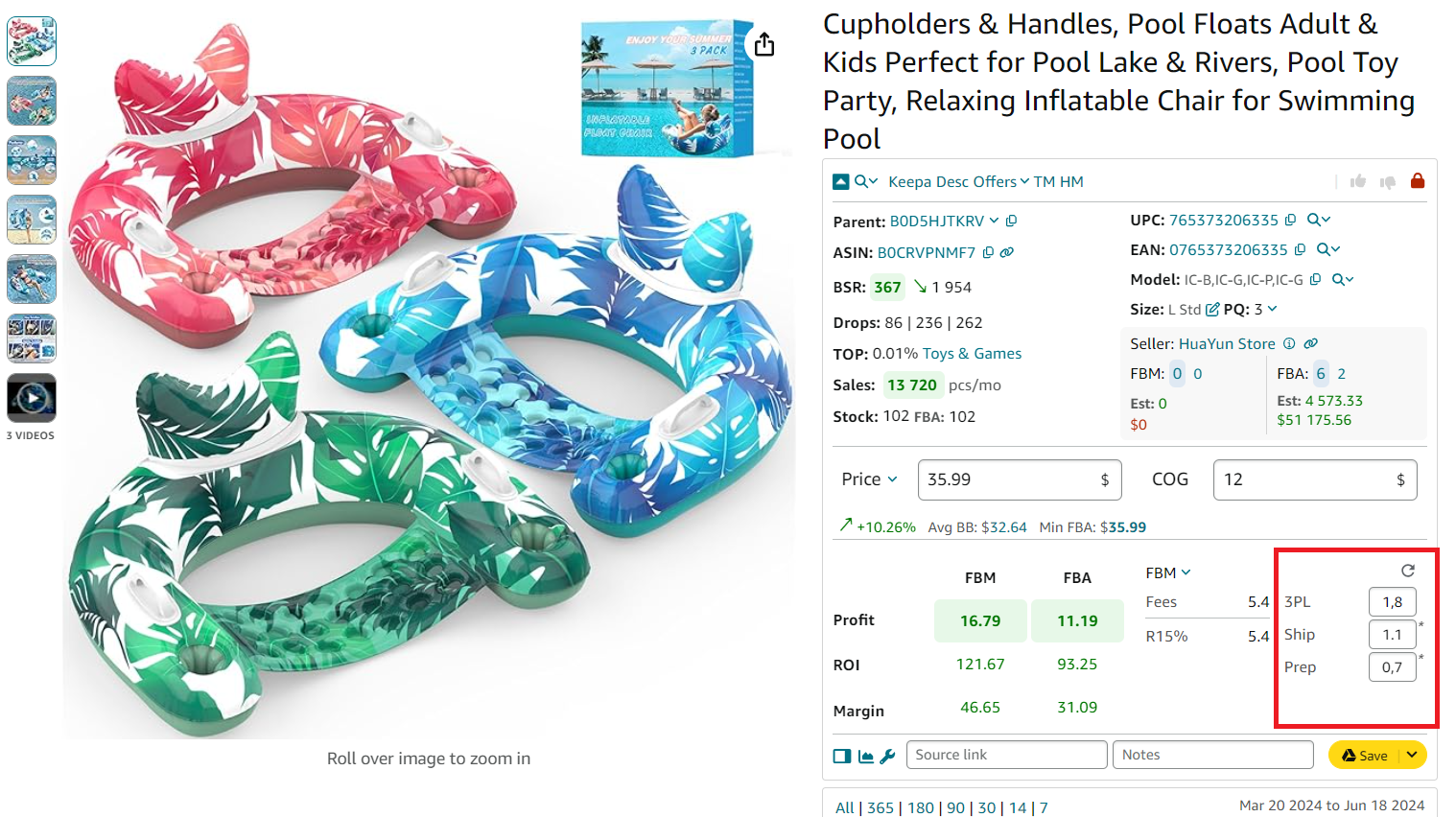
Configure logistics costs
Step 5. Enable Sales Tax or VAT (if applicable)
Click the COG field and toggle on:
- U.S. Sales Tax
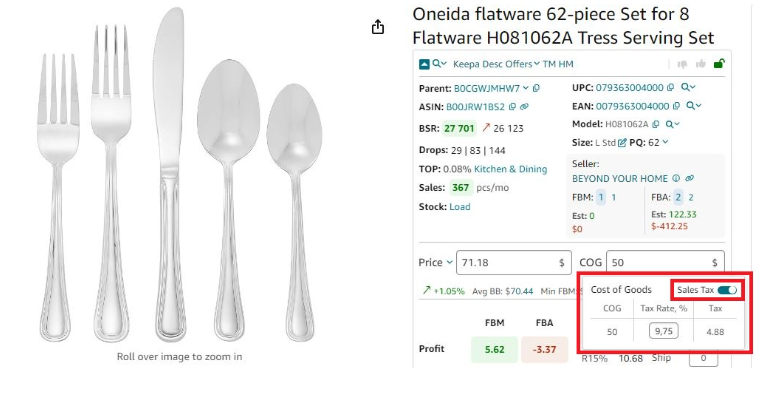
Sales tax calculator
- European or international VAT
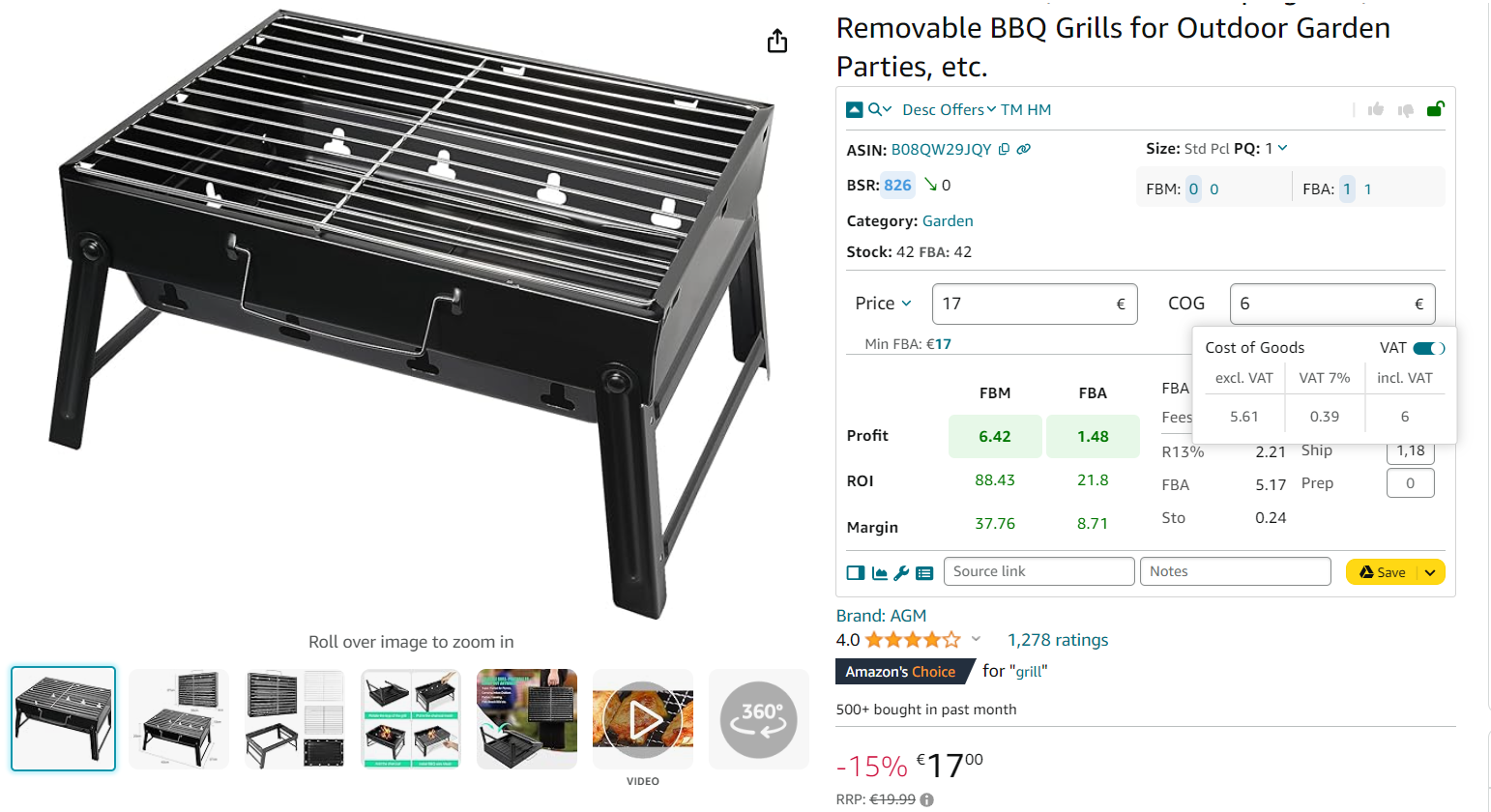
VAT calculator
Step 6. Review full profitability breakdown
The calculator will display your complete cost structure, so you can make informed sourcing decisions on the spot.
The FBM & FBA Calculator displays:
Total Amazon fees, all Amazon fulfillment-related charges
- R15%
Referral fee, usually 15% of sale price
- Plmt
Inbound placement service fee
- Sto
Monthly costs of storage per unit in Amazon’s warehouses.
3PL is third-party logistics costs – (Ship + Prep + Frgl).
- Shipping
Shipping is the cost of shipping per unit to the Amazon fulfillment center.
- Prep
Prep is the preparation center cost. Prep center is a service provider preparing your inventory for fulfillment according to Amazon standards.
- Profit per unit
Profit = Selling price – COG – all fees (referral, FBA, storage, logistics, tax, VAT)
- ROI (%)
ROI = Profit ÷ (COG + sales tax + logistics) × 100%
- Margin (%)
Margin = Profit ÷ Selling price × 100%
- VAT/Sales Tax
Applied if configured for your marketplace.
Amazon fees calculation for single products on supplier websites
When sourcing from retail or wholesale supplier websites, Seller Assistant’s Side Panel View simplifies profitability checks – right on the same page. It’s built for seamless side-by-side product analysis, eliminating the need to switch tabs or copy-paste between tools.
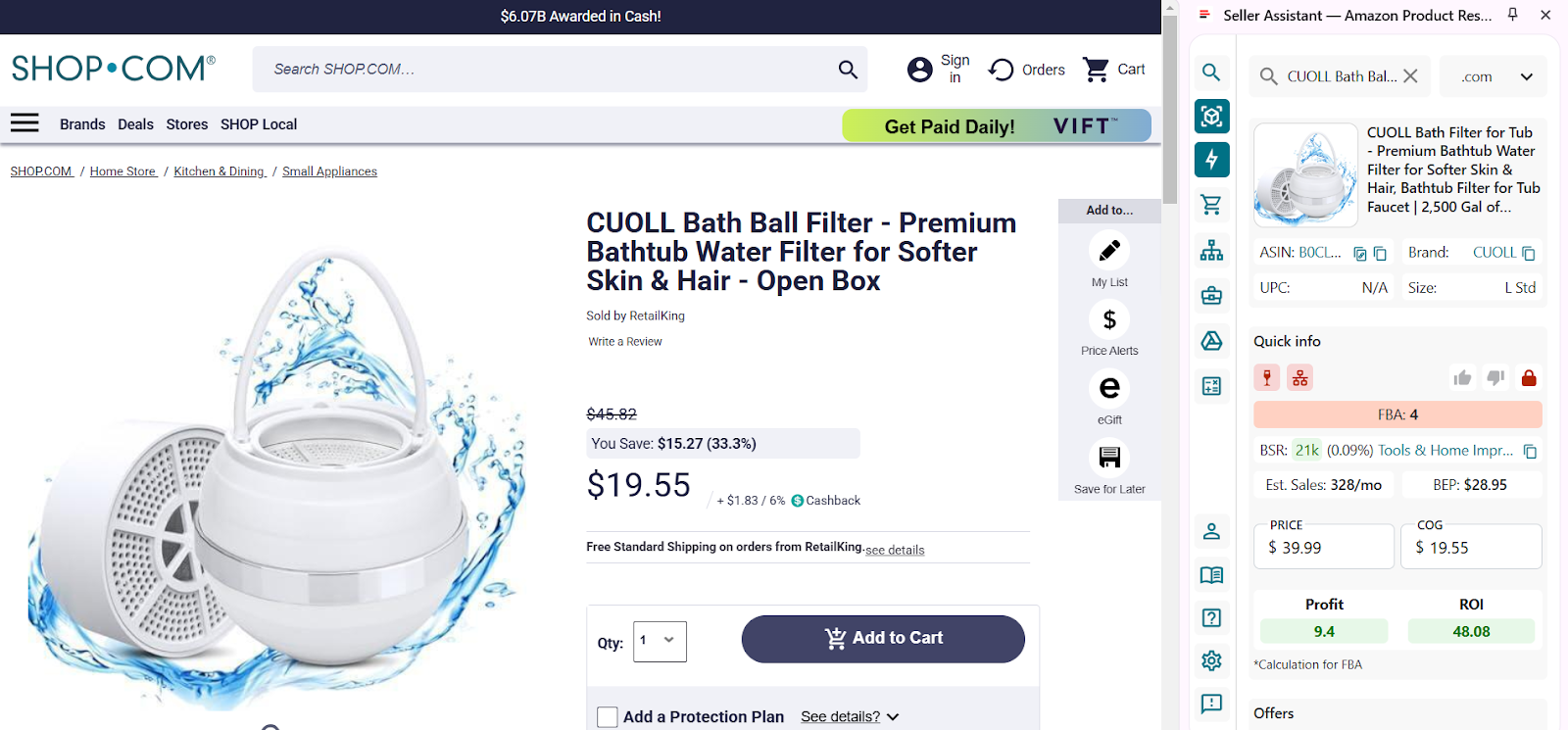
Scroll down in Side Panel View to choose your product and click the product details icon or product image to open the product.
Side Panel View is a feature within the Seller Assistant Extension that displays Amazon product data directly alongside listings on external websites, including supplier pages. This lets you assess a product’s profit potential, competition, and sales viability in real time as you browse.
It cuts friction, accelerates research, and ensures you’re not just looking at prices – but at the full profit picture. Whether you’re scouting new suppliers or vetting large catalogs, this tool ensures data-backed decisions.
What it does
- Calculates full FBA and FBM fees, including referral, fulfillment, and storage
- Estimates profit, ROI, and margin instantly
- Shows break-even pricing
- Allows logistics input: prep, shipping, packaging
- Applies sales tax and VAT if relevant
Steps to use it
Step 1. Open a supplier product page
Navigate to any listing on your supplier or wholesale site. The Side Panel View works across most platforms as long as Seller Assistant is active in your browser.
Step 2. Launch Side Panel View
Click the Extensions icon in Chrome and select Seller Assistant Extension. The panel will appear on the right side of your screen.
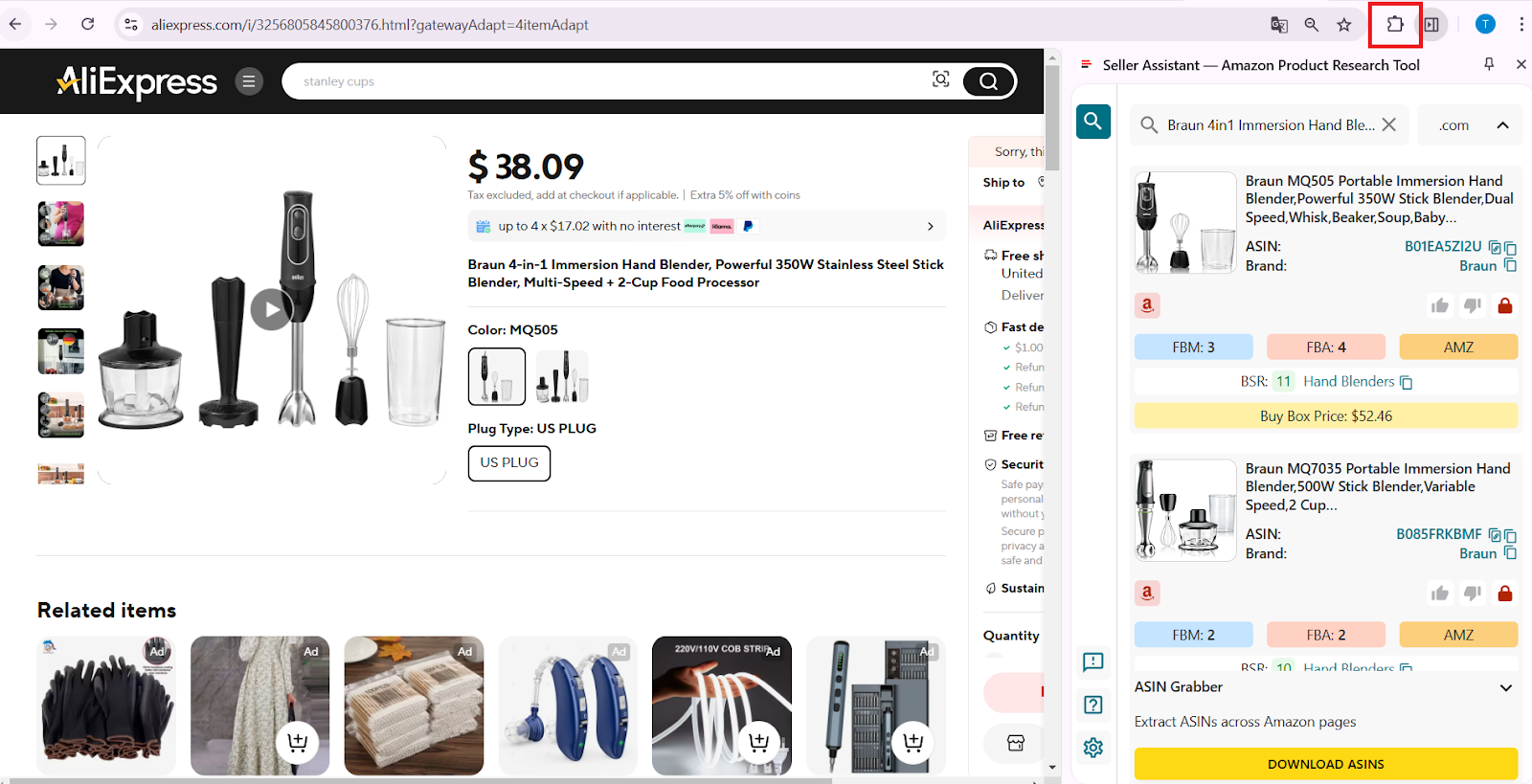
To open Offers, click the Extensions icon to the right of your address bar in Chrome browser and choose Seller Assistant (if you’ve already pinned Seller Assistant).
Step 3. Select the matched Amazon product
Scroll through the panel to find the Amazon match. Click the image or icon to load the associated product data.
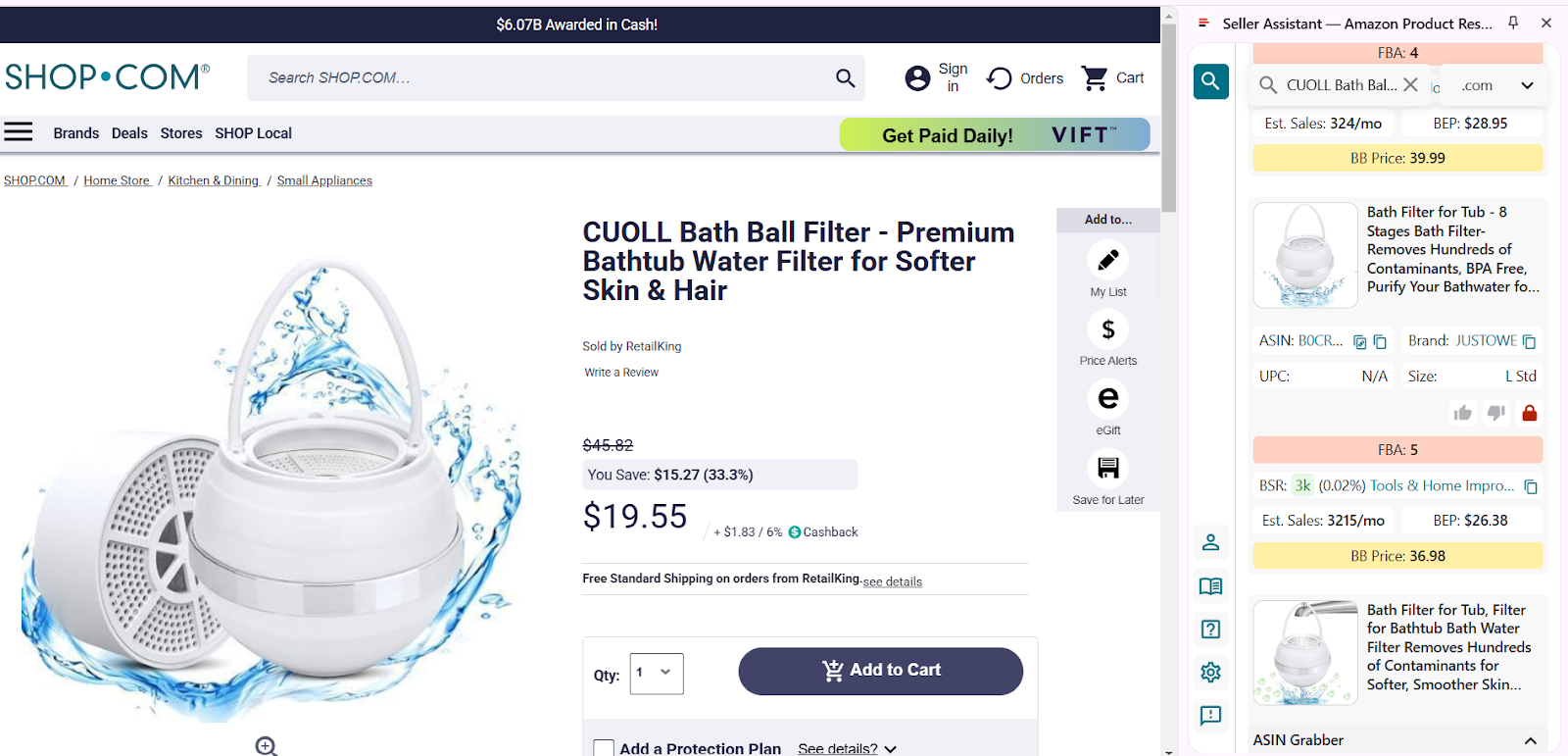
Open a product page on your supplier website and activate Side Panel View
Step 4. Input the Cost of Goods (COG)
Type in your supplier’s cost. Seller Assistant instantly calculates profitability using built-in Amazon fee structures.
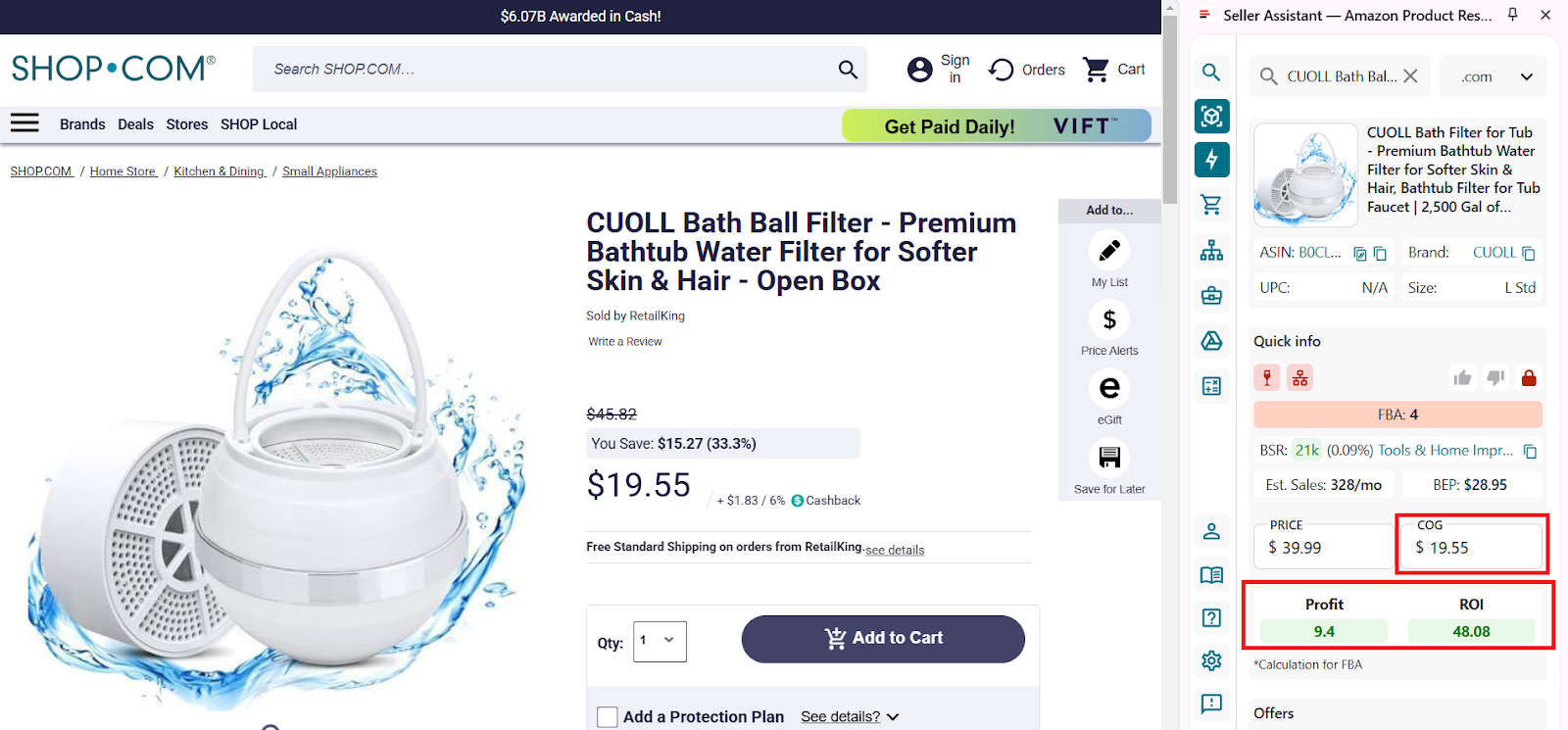
Enter COG (product price at the supplier), and look at the Profit and ROI (the calculation is done for FBA).
Step 5. Open the extended calculator for full analysis
Click the calculator icon to access the detailed FBM and FBA Calculator.
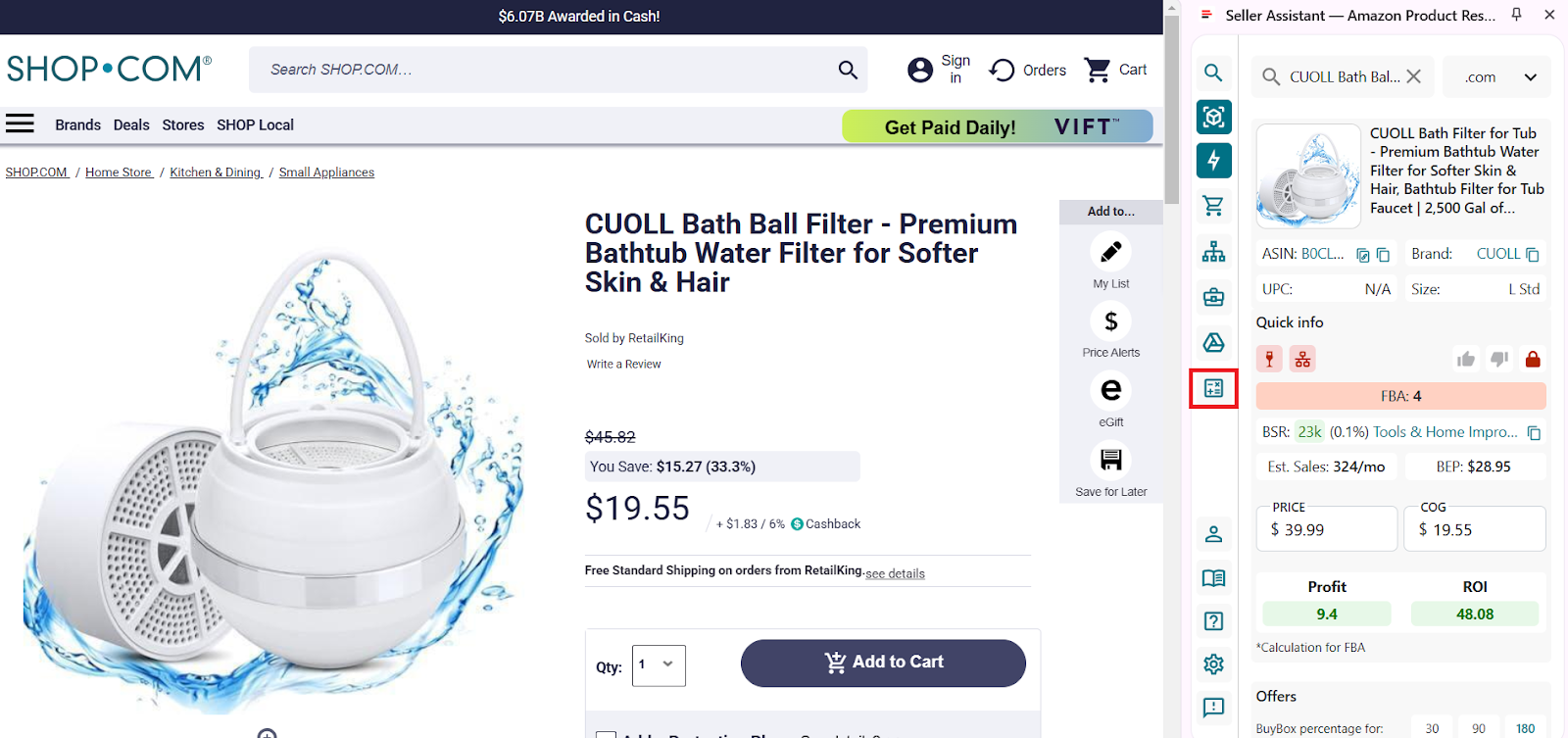
Click the calculator icon to access the detailed FBM and FBA Calculator
Inside, you can:
- Switch between FBA and FBM models
- Enter logistics costs:
- Prep (e.g., labeling, bubble wrap)
- Shipping to Amazon
- Adjust package quantity
- View all Amazon-related fees auto-filled: referral, FBA, storage, inbound placement service fee, etc.
See all calculator data:
- FBA Fees
Total Amazon fees, all Amazon fulfillment-related charges
- R15%
Referral fee, usually 15% of sale price
- Plmt
Inbound placement service fee
- Sto
Monthly costs of storage per unit in Amazon’s warehouses.
- 3PL
3PL is third-party logistics costs – (Ship + Prep + Frgl).
- Shipping
Shipping is the cost of shipping per unit to the Amazon fulfillment center.
- Prep
Prep is the preparation center cost. Prep center is a service provider preparing your inventory for fulfillment according to Amazon standards.
- Profit per unit
Profit = Selling price – COG – all fees (referral, FBA, storage, logistics, tax, VAT)
- ROI (%)
ROI = Profit ÷ (COG + sales tax + logistics) × 100%
- Margin (%)
Margin = Profit ÷ Selling price × 100%
- BEP
Break-even point
- VAT/Sales Tax
Value Added Tax or Sales Tax if applied.
Other Costs of Selling on Amazon: Indirect Expenses
Everything we’ve covered so far – Amazon’s selling plan, referral fees, fulfillment and storage fees, logistics, and prep – falls under direct expenses. These are the costs tied directly to sourcing, listing, and fulfilling a product.
But to run a profitable Amazon business, you also need to consider indirect expenses – the behind-the-scenes costs that keep your operation running. They don’t show up per product but can add up fast and eat into your margins if left untracked.
Here are 6 key types of indirect costs every Amazon seller should factor into their profit calculations.
Operational staff and virtual assistants
Whether it’s a VA researching products or a part-time assistant helping with customer service, salaries and wages are one of the most common indirect costs. These expenses cover support roles that keep your business running but aren’t tied to a specific item sold.
Software tools and subscriptions
Seller tools like product software, inventory trackers, and repricing apps come with monthly or annual fees. While essential for competitive selling, these subscriptions count as overhead and should be factored into your monthly operating budget.
Equipment and office expenses
Running an Amazon business from home or a small office means covering internet bills, electricity, rent (if applicable), and basic supplies. Add to that the costs of your phone, laptop, or desktop – and any repairs or upgrades – and these become ongoing indirect expenses.
Financial services and payment fees
These include Payoneer card charges, bank transfer fees, and payment processor costs that come with managing your Amazon revenue streams. While they’re easy to overlook, they can steadily reduce your net profits over time.
Training and education expenses
Investing in courses, coaching programs, or workshops helps you sharpen your skills and stay competitive in the Amazon marketplace. Though not tied to individual products, these costs fuel long-term business growth and smarter decision-making.
Packaging penalties and miscellaneous charges
Sellers can face unexpected penalties from Amazon for non-compliant packaging, especially if you’re shipping inventory to FBA. Plus, there are always “other” costs – like legal fees, insurance, or occasional professional services – that pop up as your business scales.
FAQ
How much percent does Amazon take from a seller?
Amazon typically takes around 15% of each sale as a referral fee, but the exact percentage varies by product category. Additional fees may include fulfillment, storage, and other service charges depending on your selling model.
Can I start selling on Amazon with $100?
Yes, it’s possible if you choose a low-cost model like dropshipping and use the Individual seller plan. However, expect tight margins and limited scalability at that budget.
Is it worth it to sell on Amazon?
Selling on Amazon can be highly profitable if you research well, manage costs, and choose the right products. It offers access to a massive customer base, but competition and fees require careful planning.
Does Amazon take 40%?
No, Amazon doesn’t take a flat 40% cut. While total costs can add up – especially with FBA and ads – most sellers pay between 15% to 30% in total fees depending on their setup.
Can I sell on Amazon without a fee?
No, every Amazon seller pays at least a referral fee per sale. Even with the Individual plan, you’ll be charged $0.99 per item sold plus category-specific fees.
Can I start selling on Amazon with $500?
Yes, starting with $500 is realistic for models like online arbitrage or dropshipping. Focus on sourcing low-cost, high-demand items and reinvest profits to grow.
Final Thoughts
Selling on Amazon can be incredibly rewarding – but only if you understand where your money’s going. From direct expenses like Amazon fees and logistics to hidden overhead like tools, training, and team costs, every dollar counts.
By accurately calculating both your upfront and ongoing costs, you’ll avoid surprise expenses, price your products smartly, and protect your bottom line. Use Seller Assistant’s tools to streamline fee tracking and profitability analysis – so you can focus on growing, not guessing.
Seller Assistant is an all-in-one product sourcing software offering all the features vital for product sourcing. It combines three extensions: Seller Assistant Extension, IP Alert, and VPN by Seller Assistant, tools: Price List Analyzer, Brand Analyzer, Seller Spy, Bulk Restrictions Checker, and API integrations, and features: Storefront Widget, Side Panel View, FBM&FBA Profit Calculator, Quick View, ASIN Grabber, UPC/EAN to ASIN converter, Stock Checker, and other features that help quickly find high-profit deals. Seller Assistant also offers integration with Zapier allowing to create custom product sourcing workflows.



